
30 Best Hotel Management Software Reviewed in 2026

20 Best Hotel Management Software Shortlist
Here's my pick of the 20 best software from the 30 tools reviewed.


A hotel management system (HMS) is software designed to streamline and automate the day-to-day operations of a hotel, including reservations, billing, housekeeping, and guest management.
With my industry expertise to guide me, I surveyed 50+ hotel management software and made my top 10 recommendations for hoteliers from there. In this article, you'll find product reviews and rankings, key feature lists, and pricing comparisons.
Why Trust Our Software Reviews
We’ve been testing and reviewing hotel management software since 2023. As hotel managers ourselves, we know how critical and difficult it is to make the right decision when selecting software.
We invest in deep research to help our audience make better software purchasing decisions. We’ve tested more than 2,000 tools for different hotel management use cases and written over 1,000 comprehensive software reviews. Learn how we stay transparent & our software review methodology.
Best Hotel Management Software Summary
| Tool | Best For | Trial Info | Price | ||
|---|---|---|---|---|---|
| 1 | Best for hotel maintenance management | 30-day free trial available | From $35/user/month (billed annually) | Website | |
| 2 | Best for automated hotel operations | Free demo available | Pricing upon request | Website | |
| 3 | Best for hotel revenue optimization | Free demo available | Pricing upon request | Website | |
| 4 | Best for internal hotel communication | Free plan + free demo available | From $29/month | Website | |
| 5 | Best for complete booking management | Free demo available | Pricing upon request | Website | |
| 6 | Best for automated guest communication | Free demo available | Pricing upon request | Website | |
| 7 | Best for independent hotels | Free demo available | From $150/user/month | Website | |
| 8 | Best for easy mobile check-in | Free demo available | Pricing upon request | Website | |
| 9 | Best for integrating with third-party applications | Free demo available | From $5/user/month, (billed annually) | Website | |
| 10 | Best for small AirBNB & B&B establishments | 30-day free trial available | Pricing upon request | Website | |
| 11 | Best for personalized guest profiles | Free demo available | Pricing upon request | Website | |
| 12 | Best for predictive maintenance | Free demo available | Pricing upon request | Website | |
| 13 | Best for cloud-based property management | Free demo available | From $85/user/month (billed annually) | Website | |
| 14 | Best for all-in-one booking engine | Free demo available | From $30/user/month | Website | |
| 15 | Best for automated upselling | Free demo available | From $95/user/month (billed annually) | Website | |
| 16 | Best for mobile-first operations | Free demo available | Pricing upon request | Website | |
| 17 | Best for automated channel management | Free demo available | Pricing upon request | Website | |
| 18 | Best for integrated booking engine | Free trial available | From $59/month | Website | |
| 19 | Best for customizable modules | Free demo available | From $200/user/month | Website | |
| 20 | Best for guest engagement tools | Free demo available | From $80/user/month | Website |

-

roommaster
Visit WebsiteThis is an aggregated rating for this tool including ratings from Crozdesk users and ratings from other sites.4.3 -
Little Hotelier
Visit WebsiteThis is an aggregated rating for this tool including ratings from Crozdesk users and ratings from other sites.4.5 -
Roomstay Hotel Booking Engine
Visit Website


Best Hotel Management Software Reviews
Here are my comparative reviews of leading solutions for hotel management software, including what each does best, why I picked these vendors for my list, and pros and cons of each too.

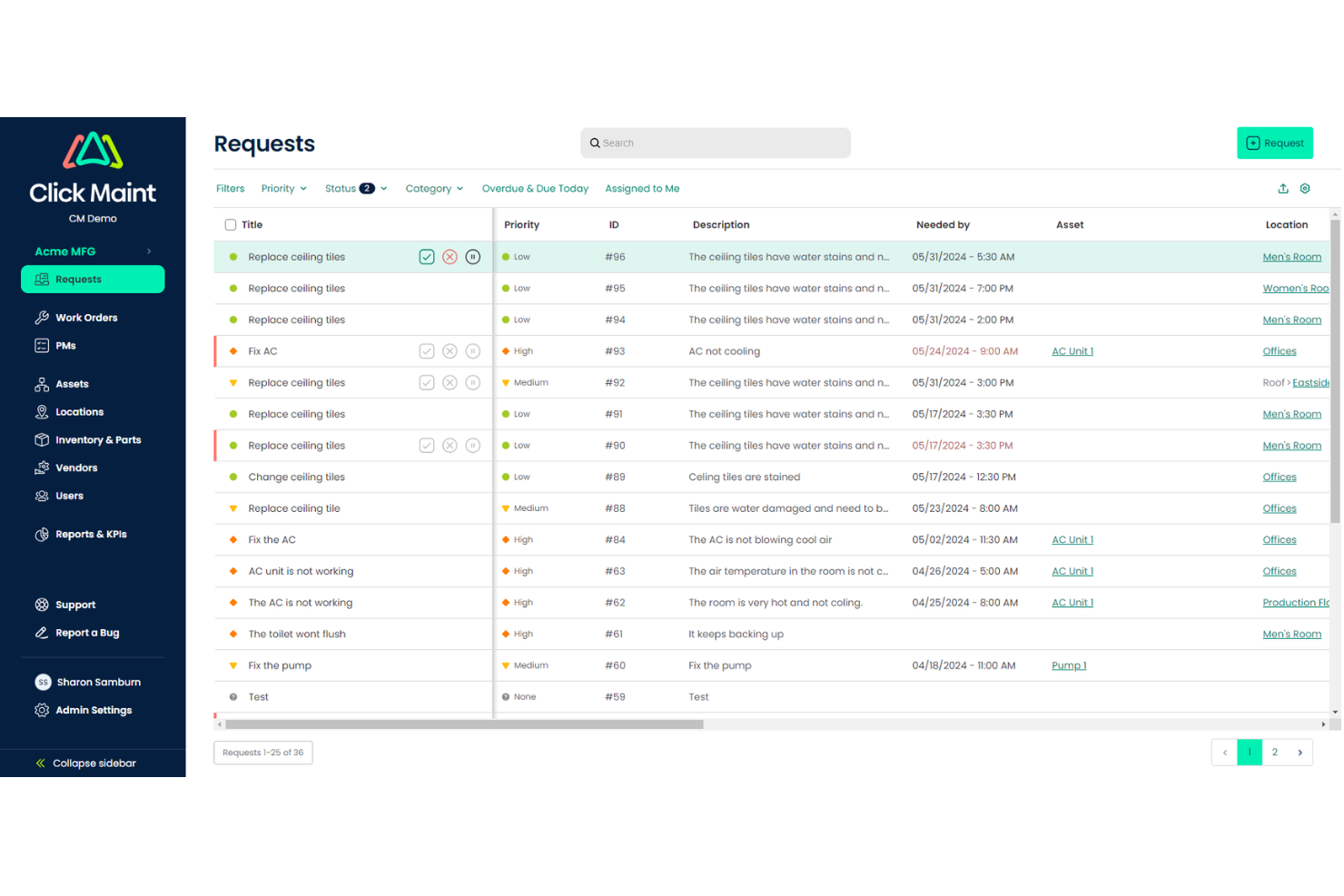
Click Maint CMMS is a cloud-based maintenance management platform designed for hotels and hospitality teams who need to organize work orders, track assets, and keep facilities running smoothly for guests and staff.
Who Is Click Maint CMMS Best For?
Click Maint CMMS is a strong fit for hotel maintenance managers and facility teams who need a straightforward system to manage work orders, preventive maintenance, and asset tracking.
Why I Picked Click Maint CMMS
Click Maint CMMS earns its spot on my shortlist because it's purpose-built for hotel and hospitality maintenance teams, not just adapted from a generic facility management tool. I like how the preventive maintenance scheduling lets you set automated recurring tasks for things like HVAC servicing, plumbing inspections, and pool equipment checks—so recurring tasks aren't missed during busy seasons. The asset registry also separates locations from assets, which means my team can track a specific piece of kitchen equipment in a specific room without any confusion. The mobile work order management lets technicians receive, update, and close out tasks from their phones—useful when your team is spread across multiple floors or buildings.
Click Maint CMMS Key Features
- Parts and inventory management: Track spare parts, maintenance supplies, and materials to ensure your team has what they need before starting a repair job.
- Job costing: Log and estimate labor and material costs against individual work orders to support maintenance budgeting.
- Dispatch management: Assign and coordinate maintenance technicians based on availability and workload to manage response times across the property.
- Maintenance analytics and reporting: Generate reports on work order history, asset performance, and maintenance costs to support operational decision-making.
Click Maint CMMS Integrations
No native integrations are listed.
Pros and Cons
Pros:
- Mobile access enables technicians to manage tasks on the go
- Accommodates hospitality businesses of all sizes
- Automated preventative maintenance scheduling
Cons:
- Only for the maintenance aspect of hotel management
- Reporting capabilities may be limited

Mews is a cloud-based hotel management platform designed for hotels and hospitality businesses that want to modernize operations, simplify front desk tasks, and integrate with other hospitality tools.
Who Is Mews Best For?
Mews is a strong fit for independent hotels, hotel groups, and hostels looking to replace legacy property management systems with a modern, cloud-based alternative.
Why I Picked Mews
Mews earns its spot on my shortlist because it's built around the idea that hotel staff shouldn't be stuck at a screen doing repetitive tasks. I love how the platform automates the routine work that typically bogs down front desk teams—things like guest communications, billing routing, and housekeeping updates—so staff can spend more time with guests. The real-time mobile housekeeping app is a good example: room status updates immediately when a late checkout is flagged, so there's no back-and-forth between departments. The automated billing logic is useful—smart charge routing sends every item, from room charges to bar tabs, to the correct bill without manual intervention.
Mews Key Features
- Online check-in and checkout: Guests can complete the arrival and departure process from their own device, reducing front desk queues.
- Mews Payments: Built-in payment processing handles card tokenization, pre-authorizations, and automated charge capture within the PMS.
- Rate management: Set and adjust room rates, restrictions, and availability across channels directly from the Mews dashboard.
- Reporting and analytics: Access live occupancy, revenue, and operational reports to track property performance at a glance.
Mews Integrations
Integrations include Booking.com, SiteMinder, Expedia, Tripadvisor, Amadeus, BEONX, 1CHECK, 24SevenOffice, and Chekin.
Pros and Cons
Pros:
- Supports multi-property centralized management
- Over 1,000 third-party software integrations
- Extensive PMS automates hotel operations
Cons:
- Limited multi-property pricing transparency
- Occasional issues with third-party integrations


roommaster is a hotel management platform built for independent hotels and groups that need a unified system for reservations, front desk, housekeeping, and guest engagement, helping teams coordinate daily operations and improve the guest experience.
Who Is roommaster Best For?
roommaster is a good fit for independent hotels, boutique properties, and small hotel groups that want an all-in-one PMS without enterprise-level complexity.
Why I Picked roommaster
I picked roommaster as one of the best for hotel revenue optimization because of how its AI-powered pricing engine, called ampliphi, works directly inside the PMS. Rather than toggling between separate tools, I can set pricing rules and let the system automatically adjust rates based on real-time competitor data, local event demand, and booking velocity. I like that it tracks competitor rates continuously and triggers automatic adjustments, so I'm not leaving money on the table during a sold-out concert weekend or a regional conference. The demand forecasting also goes up to 365 days out, which means I can plan inventory and rate strategies well ahead of peak periods instead of reacting to them.
roommaster Key Features
- Centralized guest profiles: Stores each guest's stay history and preferences so your team can personalize service at every touchpoint.
- Automated housekeeping task assignment: Assigns cleaning and maintenance tasks automatically and tracks room status in real time.
- Commission-free booking engine: Lets guests book directly through your website, bypassing OTA fees and increasing direct revenue.
- Multi-currency payment processing: Handles international transactions with PCI-compliant processing and automated deposit and cancellation fee collection.
roommaster Integrations
Integrations include Booking.com, Expedia, SiteMinder, Cendyn, Duetto, QuickBooks, Oracle MICROS, OpenKey, Assa Abloy, and Mailchimp.
Pros and Cons
Pros:
- Includes tools for revenue optimization and dynamic pricing
- Easy integration with OTAs and direct website booking
- Prevents overbooking through channel management
Cons:
- The interface may feel outdated to some users
- Limited customization for reporting templates


Connecteam is a mobile-first platform designed for hotel teams who need to coordinate schedules, manage daily tasks, and keep staff connected across departments and shifts.
Who Is Connecteam Best For?
Connecteam is a strong fit for independent hotels and mid-size hospitality groups managing large, shift-based teams spread across multiple departments.
Why I Picked Connecteam
Connecteam earns its spot on my shortlist because of how well it handles internal communication for hotel teams that are constantly on the move. I like that the in-app team chat lets staff message by department or shift group—so housekeeping, front desk, and F&B teams aren't all tangled up in the same thread. I also use the updates feed to push announcements to specific teams, which helps during high-occupancy periods when everyone needs to coordinate closely.
Connecteam Key Features
- Employee scheduling: Build and publish shift schedules for multiple hotel departments, with staff able to view and accept shifts from their mobile devices.
- Time clock: Let staff clock in and out directly from the app, with GPS verification to confirm they're on-site.
- Task management: Assign recurring or one-off tasks to individuals or teams, with checklists and due dates to track completion.
- Digital forms and checklists: Create custom forms for room inspections, maintenance reports, or onboarding workflows that staff can complete on mobile.
Connecteam Integrations
Integrations include QuickBooks, Gusto, Xero, ADP, Zapier, Wix, Lightspeed POS, PrismHR, Square, and BambooHR.
Pros and Cons
Pros:
- Efficient time tracking & task assignment
- Perfect for on-the-go mobile access
- Excellent features for staff communication
Cons:
- Limited advanced hotel management features
- Limited customization options


Independent hoteliers who want fewer tabs and vendors can manage reservations, rates, and guest communications in one place with ResNexus—combining a PMS, booking engine, and direct OTA connections to Expedia, Booking.com, and Airbnb. You’ll also get built-in email and text marketing, reputation tools, payments, and yield-based pricing, plus channel management that helps prevent double bookings and options like travel protection. If your team wants to grow direct reservations while keeping daily work manageable from a single login, it brings the essentials together.
Who is ResNexus Best For?
ResNexus supports hotel operations and property management teams at small to mid-sized hospitality businesses that need comprehensive booking and reservation management tools. It fits hotels, inns, campgrounds, and vacation rental operators that require an all-in-one platform to manage reservations, guest communication, rates, and availability across direct and OTA channels.
Why I Picked ResNexus
I picked ResNexus as best for comprehensive booking management because it pairs a direct OTA channel manager with a strong first-party booking engine so you can control every reservation source in one workflow. With direct connections to Expedia, Booking.com, and Airbnb, plus real-time sync of rates and availability, your team can reduce double bookings and keep parity across channels. The booking engine supports mobile-friendly direct reservations, upsells and packages, abandoned cart reminders, and automated confirmations via email and text to help you capture and keep more bookings. I also appreciate that it includes yield/dynamic pricing tools so you can adjust rates across channels from the same system when demand shifts.
ResNexus Key Features
In addition to the booking and channel tools above, you get operational and guest-facing features your team can use daily.
- Housekeeping Management: You can track room status for cleans and turnovers, set customizable checklists, and use arrival/departure timelines to prioritize work.
- Integrated Credit Card Processing: You can accept all major cards with EMV-certified readers and PCI-compliant processing tied directly to your PMS.
- Reporting and QuickBooks Export: You can access built-in operational and marketing reports and export your financials to QuickBooks for accounting.
- Travel Protection Add-ons: You can offer travel protection during checkout as an optional add-on to each reservation.
ResNexus Integrations
Integrations include Airbnb, Booking.com, Expedia, Google Hotel Ads, Tripadvisor, Vrbo, STR, PriceLabs, Lightspeed Restaurant POS, and QuickBooks.
Pros and Cons
Pros:
- Multi-source automated booking sync
- Automated booking sync for major OTAs
- Automated email & SMS marketing
Cons:
- Slight learning curve for advanced features
- Costly for small boutique businesses


Cloudbeds is an all-in-one hotel management platform designed for independent hotels, hostels, and boutique properties that need to manage reservations, automate operations, and connect with guests across multiple channels.
Who Is Cloudbeds Best For?
Cloudbeds is a strong fit for independent hoteliers, boutique properties, and small-to-mid-size hospitality groups that need a single platform to manage their entire operation.
Why I Picked Cloudbeds
I picked Cloudbeds as one of the best because its guest communication tools are built into the core platform. The automated messaging feature triggers messages based on specific reservation events—booking confirmation, pre-arrival, check-in, and departure—so your front desk team doesn't have to send the same emails and texts manually. Cloudbeds also pulls all guest conversations into a unified inbox, whether they're coming in via SMS, WhatsApp, Facebook, or OTA channels like Airbnb and Expedia. Multi-channel visibility in one place is useful when you're managing a busy property with a lean team.
Cloudbeds Key Features
- Channel manager: Sync room availability and rates across OTAs, GDS, and direct booking channels in real time to avoid double bookings.
- Booking engine: Accept direct reservations through your property's website without relying on third-party platforms.
- Housekeeping management: Assign and track room cleaning tasks, update room statuses, and coordinate between front desk and housekeeping staff.
- Revenue management tools: Set dynamic pricing rules based on occupancy, demand, and competitor rates to adjust room prices automatically.
Cloudbeds Integrations
Integrations include Airbnb, Booking.com, Expedia, Hostelworld, Google Hotel Search, TripAdvisor, Siteminder, Duetto, QuickBooks, and Mailchimp.
Pros and Cons
Pros:
- Scalable for a range of property sizes (inns to large hotels)
- Strong integration with OTAs and distribution channels
- Cloud‑based all‑in‑one system (PMS + channel manager + booking)
Cons:
- Mobile app/features are somewhat limited in some markets
- Reporting and analytics tools lack depth/customisation

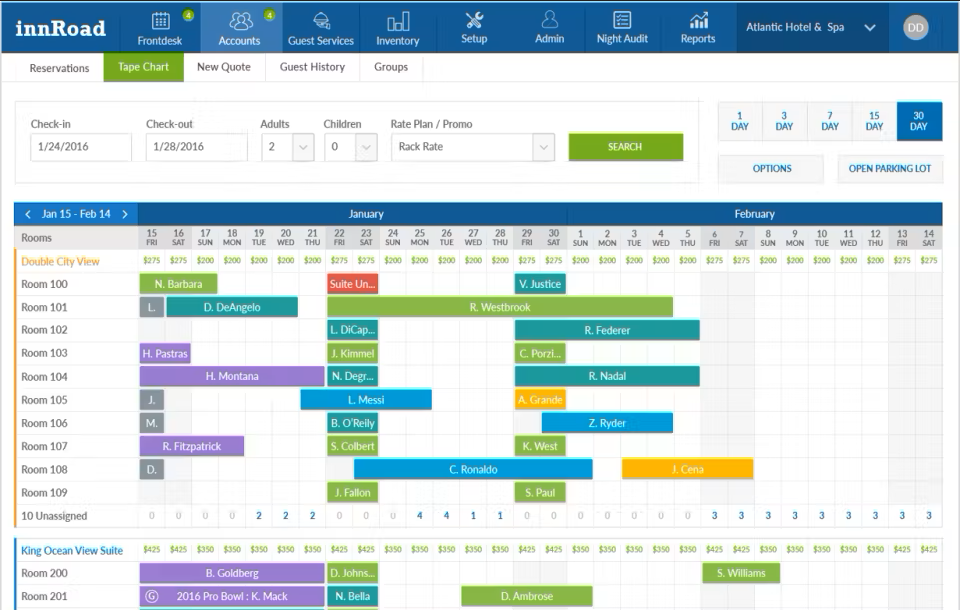
innRoad is a cloud-based hotel management platform built for hospitality professionals who want to simplify reservations, automate daily operations, and manage distribution channels from a single dashboard.
Who Is innRoad Best For?
innRoad is a strong fit for independent hotel operators who need an all-in-one system without the complexity or cost of enterprise-level platforms.
Why I Picked innRoad
innRoad earns its spot on my shortlist because it's purpose-built for independent hotels that need a full PMS without the overhead of enterprise software. I particularly like the built-in channel manager, which syncs rates and availability across OTAs in real time—something independent operators often struggle to manage manually. I also find the integrated booking engine genuinely useful, letting properties capture direct reservations without relying on a third-party tool. For a single-property or small portfolio operator, having reservations, housekeeping, and distribution all in one place removes a lot of day-to-day friction.
innRoad Key Features
- Revenue forecasting: Set ADR, occupancy, and revenue goals, then track progress in real time with automated alerts when bookings surge.
- Automated rate changes: Configure rules that automatically adjust room rates based on demand, removing the need for manual updates.
- Customizable reporting: Build and run reports tailored to your property's specific operational and financial metrics.
- Online check-in/check-out: Let guests complete the check-in and check-out process digitally, reducing front desk workload.
innRoad Integrations
Integrations include Expedia, Booking.com, Airbnb, Vrbo, TripAdvisor, Google Hotel Ads, Stripe, Shift4, Elavon, and Worldpay.
Pros and Cons
Pros:
- Robust reporting & analytics for revenue and occupancy
- Built‑in booking engine to drive direct reservations
- Channel management syncing rates/inventory with OTAs
Cons:
- Not suited for large chains
- User interface feels outdated and less intuitive


Canary Technologies gives hotels and hospitality teams digital tools to modernize guest check-in, simplify payments, and manage guest communications, helping properties deliver a smoother, more secure experience from arrival to departure.
Who Is Canary Technologies Best For?
Canary Technologies is a strong fit for independent hotels and mid-size hotel groups looking to replace paper-based check-in and manual front desk processes with digital alternatives.
Why I Picked Canary Technologies
I picked Canary Technologies as one of the best because the mobile check-in experience is genuinely frictionless—guests receive an automatic check-in link via email or text before they arrive, then submit their credit card, upload an ID, and sign the registration card entirely from their phone. No app download required. I also like that fraud detection is built directly into the check-in flow, so Canary flags potentially fraudulent guests and verifies information before they ever reach the front desk. On top of that, the mobile key feature lets guests use their smartphone or smartwatch to access their room via BLE or NFC, so the entire arrival experience is simplified.
Canary Technologies Key Features
- Guest messaging: Send automated or manual messages to guests via SMS or email throughout their stay.
- Digital upsells: Offer room upgrades, early check-in, and add-ons to guests at key points before and during their stay.
- Digital contracts and e-signatures: Create and send contracts for group bookings or events that guests can sign digitally.
- AI-powered guest sentiment: Collect and analyze in-stay feedback to flag issues before guests check out.
Canary Technologies Integrations
Integrations include Oracle Hospitality, WebRezPro, Shift4 Payments, Mews, Amadeus, Zingle, Elavon, Maestro, and Salto Systems.
Pros and Cons
Pros:
- Digital tipping options
- Dynamic upsells to increase additional revenue
- Contactless check-in enhances guest convenience
Cons:
- Limited integration options with certain property management systems
- Occasional technical glitches

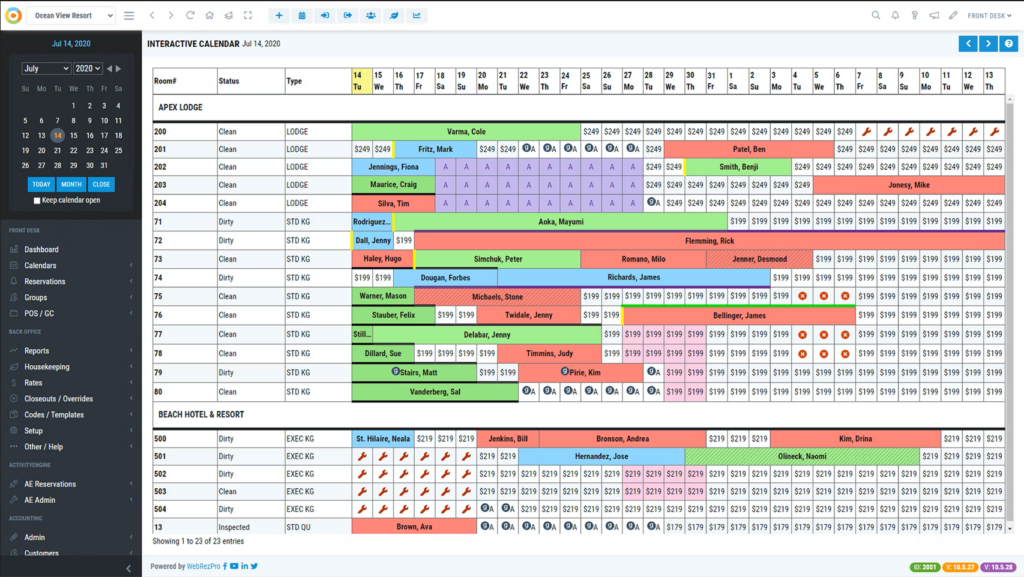
WebRezPro is a cloud-based hotel management system built for independent hotels, inns, and boutique properties that need to manage reservations, housekeeping, and guest communications from a single platform.
Who Is WebRezPro Best For?
WebRezPro is a strong fit for independent hotels, lodges, vacation rentals, and campgrounds that need a purpose-built property management system without the complexity of enterprise platforms.
Why I Picked WebRezPro
I picked WebRezPro as one of the best because of how seriously it takes third-party connectivity. It connects to 150+ integration partners across categories that matter day to day—POS systems, payment gateways, OTAs, channel managers, revenue management tools, and electronic lock systems. The POS integration is particularly useful: when a guest charges a meal to their room, the POS queries WebRezPro in real time to verify their room number and posts the charge directly to their folio. The OTA and channel manager integration is also thought out—inventory, rates, and availability sync directly from the PMS, and incoming reservations update availability automatically.
WebRezPro Key Features
- Guest self check-in: Guests complete a digital agreement before arrival, with completed forms automatically attached to their reservation folio and self-check-in instructions sent.
- Housekeeping zones: Organize rooms into customizable zones, assign them to specific housekeepers, and let staff view and update room status in real time from a mobile device.
- Property stats report: Tracks occupancy rates, ADR, RevPAR, and total room revenue for the current date, month to date, and year to date, with side-by-side comparisons to the previous year.
- Reward/loyalty points module: Automatically awards guests points for each booking, which can be redeemed against future stays directly through the reservation folio.
WebRezPro Integrations
Integrations include Expedia Group, SynXis, SiteMinder, Duetto, OpenKey, Shift4, Oracle MICROS, QuickBooks, Guestfolio, and Assa Abloy.
Pros and Cons
Pros:
- Wide range of hospitality management features
- Mobile app for easy access
- Extensive third-party integration capabilities
Cons:
- Customer support can be improved
- Smaller establishments might not utilize all features

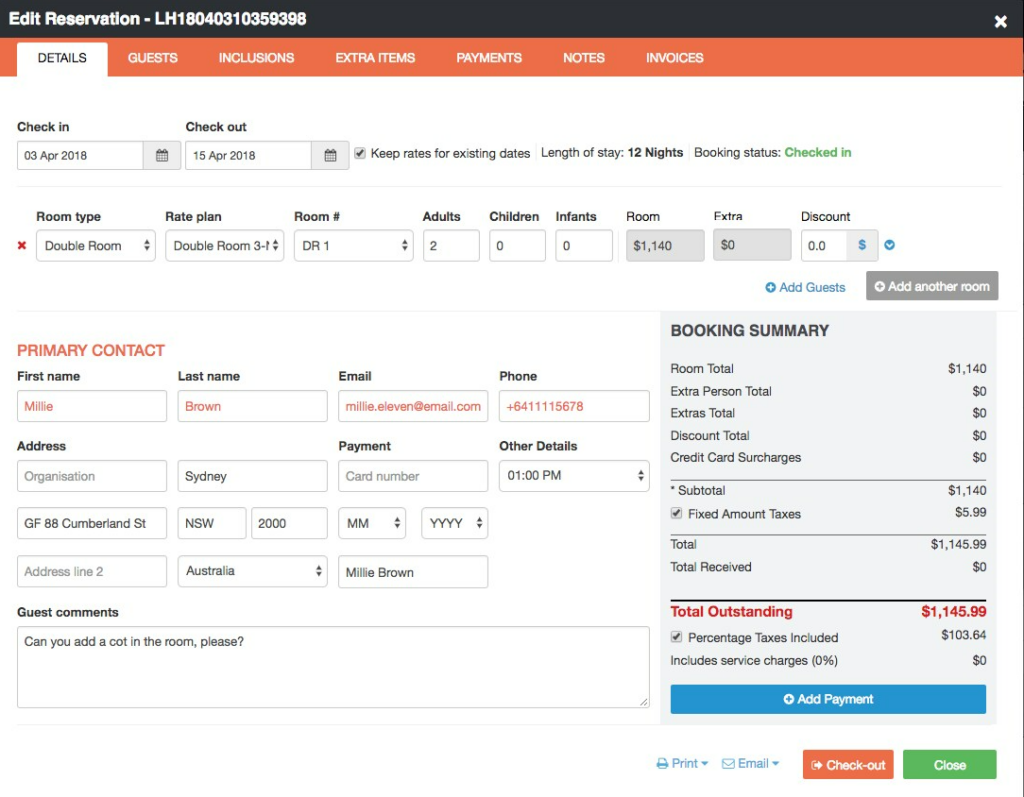
Little Hotelier is a hotel management platform built for small property owners who need an all-in-one system to handle reservations, guest communications, and online bookings without the complexity of larger hotel software.
Who Is Little Hotelier Best For?
Little Hotelier is a great fit for independent property owners running small hotels, B&Bs, guesthouses, or vacation rentals who need simple, purpose-built management tools.
Why I Picked Little Hotelier
Little Hotelier earns its spot on my shortlist because it's purpose-built for small accommodation providers like B&Bs and Airbnb-style properties—not a scaled-down version of enterprise hotel software. I particularly like the channel manager, which connects to OTAs and updates availability across all of them in real time, preventing double bookings. The direct booking engine is another feature I find genuinely useful—it lets you take commission-free reservations straight from your own website or social media pages, which adds up for small operators watching their margins. The mobile app also lets you manage reservations, check-ins, pricing, and payments from your phone when you're not at the front desk.
Little Hotelier Key Features
- Front desk management: Manage bookings, rooms, and guests from a single synchronized calendar view.
- Guest communication automation: Set up automated, personalized emails and messages to guests at key points in their stay.
- Pricing recommendations: Access data-driven rate suggestions to help you adjust pricing and distribution strategy based on performance data.
- Google Hotel Ads integration: List your property on metasearch sites like Google Hotel Ads to attract guests beyond OTA channels.
Little Hotelier Integrations
Integrations include Booking.com, Airbnb, Expedia, Agoda, Google Hotel Ads, TripAdvisor, Trivago, Hostelworld, Vrbo, and Hotelbeds.
Pros and Cons
Pros:
- Real-time sync prevents overbookings and errors
- Direct booking engine boosts revenue
- Good onboarding assisstance
Cons:
- Lacks advanced features for larger properties
- Mobile app has minor usability issues


Opera PMS is a hotel property management system built for hotels and resorts that need to manage reservations, guest services, and daily operations from a single platform.
Who Is Opera PMS Best For?
Opera PMS is a strong fit for large hotels, resorts, and multi-property groups that need an enterprise-grade system to manage complex operations at scale.
Why I Picked Opera PMS
Opera PMS earns its spot on my shortlist because of how deeply it handles guest profile data. The enhanced guest profile view pulls together a guest's communication preferences, past stays, membership details, and spending habits into a single screen—so your front desk team isn't piecing together context from multiple places before a guest even walks in. I also like that for multi-property groups, profiles are centralized across all locations, meaning a returning guest's preferences follow them from one property to the next. That kind of continuity is what turns a one-time visitor into a loyal repeat guest.
Opera PMS Key Features
- Housekeeping task management: Automatically generates task sheets with credit-based workload distribution and real-time mobile access for staff on the go.
- Look to Book reservation tool: Displays rate and room-type combinations side by side so front desk staff can identify the best options and capture upsell revenue.
- Group block management: Handles master and sub-group blocks, rooming list imports, and wash schedules to reallocate unused inventory and protect occupancy.
- Reporting and analytics: Gives access to 300+ built-in reports with custom dashboard creation for tracking revenue, guest behavior, and operational KPIs.
Opera PMS Integrations
Integrations are not publicly listed.
Pros and Cons
Pros:
- Offers detailed guest profile and history tracking
- Supports complex rate and inventory structures
- Handles multi-property management from a single dashboard
Cons:
- Interface can feel outdated compared to newer tools
- Some users report slow customer support response


IBM Maximo Hospitality is an enterprise asset management platform for hotels and resorts that monitor, maintain, and optimize their facilities and equipment to ensure smooth operations and minimize downtime.
Who Is IBM Maximo Hospitality Best For?
IBM Maximo Hospitality is a strong fit for large hotels, resorts, and hospitality groups with complex facilities that require enterprise-grade asset and maintenance management.
Why I Picked IBM Maximo Hospitality
IBM Maximo Hospitality earns its spot on my shortlist because of how it handles predictive maintenance at scale. I particularly like the Condition-Based Maintenance (CBM) feature, which uses real-time sensor data to trigger maintenance based on actual equipment condition rather than fixed schedules—so your HVAC, elevators, and kitchen equipment get serviced when they actually need it, not just on a calendar. I also use the AI-powered forecasting through Maximo APM to surface emerging issues before they become failures, which means my team can schedule repairs during low-occupancy windows instead of scrambling during a full house. The Reliability-Centered Maintenance (RCM) workflows add another layer by helping prioritize which assets are most critical and what failure modes to watch for.
IBM Maximo Hospitality Key Features
- Work order management: Create, assign, and track maintenance work orders with full asset history and priority-based scheduling in one place.
- Inventory optimization: Use AI-driven insights to manage MRO parts inventory, reducing stock shortages and excess supply for maintenance teams.
- Mobile field service management: Give technicians mobile access to work orders and asset data so they can complete jobs and update records on-site.
- Asset inspection tools: Analyze images and video from cameras and mobile devices to detect defects and flag asset issues earlier.
IBM Maximo Hospitality Integrations
Integrations include IBM Cloud, AWS, Microsoft Azure, SAP, Oracle, Esri ArcGIS, Siemens MindSphere, OSIsoft PI System, Tririga, and IBM Watson IoT.
Pros and Cons
Pros:
- Offers mobile access for field technicians
- Supports preventive and predictive maintenance scheduling
- Tracks asset condition with real-time monitoring
Cons:
- Limited hospitality-specific templates or workflows
- High implementation and licensing costs

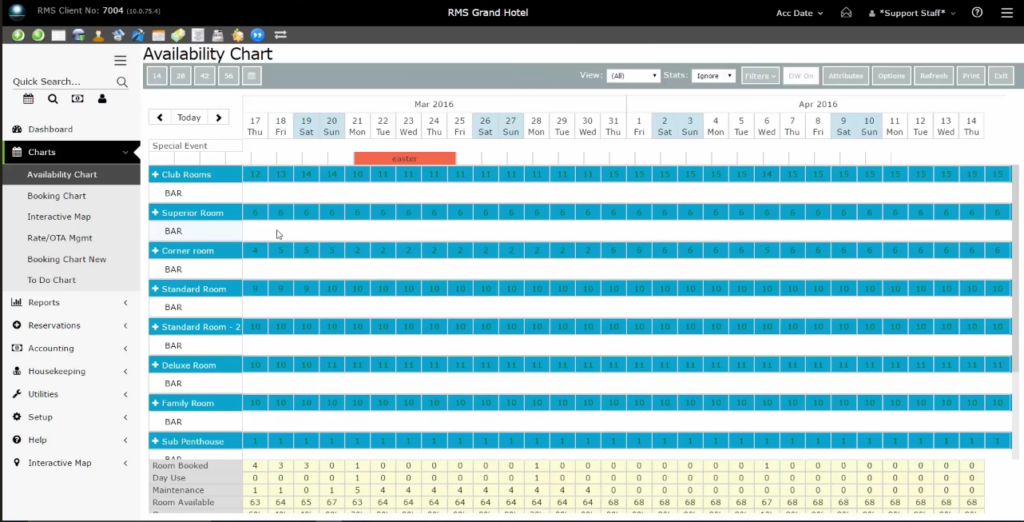
RMS Cloud is a property management platform built for hotels and hospitality businesses that need to manage reservations, guest communications, housekeeping, and reporting from a single, accessible system.
Who Is RMS Cloud Best For?
RMS Cloud is a good fit for independent hotels, resorts, and multi-property groups that need a centralized, cloud-based system to manage operations at scale.
Why I Picked RMS Cloud
I picked RMS Cloud as one of the best because it's one of the few hotel management platforms built cloud-native from the ground up, not retrofitted from a legacy system. That distinction matters in practice: your team can access reservations, guest profiles, and performance data from any device, at any property, without being tied to a front desk terminal. I also like the built-in channel manager, which connects directly to OTAs like Booking.com, Expedia, and Airbnb without requiring a third-party integration. You can apply rate restrictions, set stop sells, and release unsold inventory automatically, all from within the same platform you use to manage operations.
RMS Cloud Key Features
- Housekeeping task management: Assign cleaning tasks to staff based on skills, track room status in real time, and maintain a full audit trail of every update.
- Dynamic pricing engine: Automatically adjust room rates based on occupancy levels, seasonality, and timing to capture revenue during high-demand periods.
- Package rate builder: Bundle extras like breakfast, early check-in, or event services into package rates that can be toggled alongside standard BAR rates.
- Occupancy and revenue forecasting: Generate daily rate trend reports and six-month outlooks to plan pricing adjustments ahead of seasonal demand shifts.
RMS Cloud Integrations
Integrations include RoomPriceGenie, Siteminder, RMS Pay, Trybe, Oracle, Protel, Airbnb, Booking.com, Expedia, and Twin Creeks. An open API is also available for custom integrations.
Pros and Cons
Pros:
- Guest portal supports online check-in and updates
- Multi-property dashboard manages several locations
- Dynamic pricing engine adjusts rates automatically
Cons:
- Training resources are mostly video-based only
- Occasional delays in customer support response

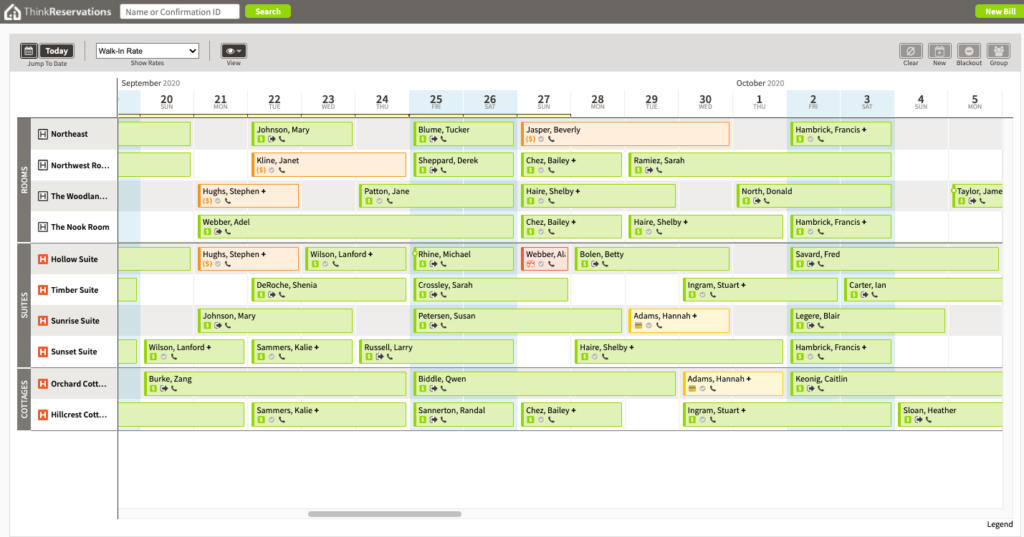
ThinkReservations is a hotel management platform built for independent hotels and boutique properties that need a unified system for reservations, operations, and guest communications.
Who Is ThinkReservations Best For?
ThinkReservations is a strong fit for independent hotels, inns, and bed-and-breakfasts that want a single platform to manage reservations, rates, and front desk operations.
Why I Picked ThinkReservations
ThinkReservations earns its spot on my shortlist because the booking engine isn't a bolt-on—it's built into the core of the platform alongside the PMS and channel manager. I like that yield management rules automatically adjust rates based on occupancy and booking window, so your pricing responds to demand without manual intervention. The member rates feature is a nice touch too, letting guests log in through ThinkTravel to access direct-booking-only rates that genuinely incentivize bypassing OTAs. Automatic deposit collection and instant channel updates fire the moment a reservation is made, which cuts out a lot of the manual follow-up work your front desk would otherwise handle.
ThinkReservations Key Features
- Housekeeping management: Assign and track room cleaning tasks and status updates directly within the platform.
- Guest messaging: Send automated pre-arrival and post-stay emails to guests using customizable templates.
- Reporting and analytics: Access built-in reports covering occupancy, revenue, and booking source performance.
- Payment processing: Collect and manage guest payments, deposits, and refunds from within the reservation system.
ThinkReservations Integrations
Integrations include Stripe, QuickBooks, RemoteLock, Expedia, Booking.com, Airbnb, Google Hotel Ads, TripAdvisor, Mailchimp, and Revinate.
Pros and Cons
Pros:
- Automated rate management for seasonal pricing
- Integrated gift certificate sales and tracking
- Channel manager syncs rates with OTAs instantly
Cons:
- Payment processing limited to selected providers
- No mobile app for on-the-go management

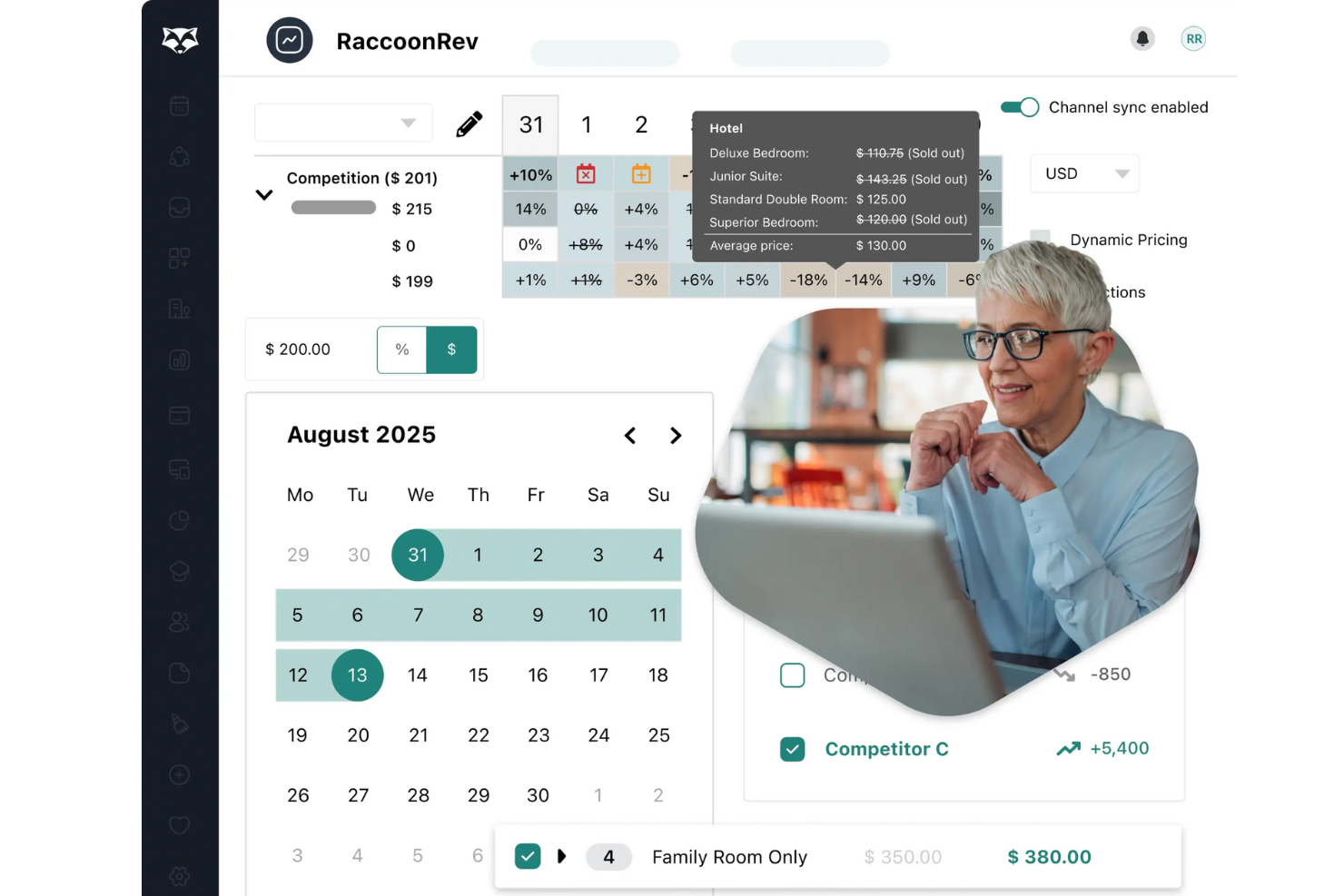
RoomRaccoon is an all-in-one hotel management platform built for independent hotels and boutique properties that want to simplify reservations, automate daily operations, and boost direct bookings with integrated tools for property management, channel management, and guest engagement.
Who Is RoomRaccoon Best For?
RoomRaccoon is a strong fit for independent hoteliers and small to mid-sized properties looking for a single platform to manage reservations, operations, and guest communications without juggling multiple tools.
Why I Picked RoomRaccoon
RoomRaccoon is on my shortlist because it handles automated upselling as a native platform feature rather than a bolted-on extra. I love that RaccoonUpsell triggers personalized upgrade and add-on offers—think early check-in, room upgrades, spa treatments, or airport transfers—automatically during online check-in, before guests arrive. Accepted upsells sync directly back into the PMS, updating inventory, billing, and housekeeping without manual intervention. Built-in upsell performance tracking shows which add-ons are converting, so you can refine offers over time instead of guessing what guests want.
RoomRaccoon Key Features
- Drag-and-drop reservations calendar: View, modify, and upgrade reservations directly from a color-coded calendar with drag-and-drop room reassignment.
- Channel manager with 200+ OTA connections: Sync rates and availability across OTAs, GDSs, and metasearch engines with 5-second updates to prevent overbookings.
- Automated guest communication templates: Choose from 15+ email templates with dynamic replace tags to automate booking confirmations, pre-arrival messages, and check-in requests.
- RaccoonRev dynamic pricing rules: Set automated pricing rules that adjust rates based on demand, occupancy, and competitor activity to optimize RevPAR.
RoomRaccoon Integrations
Integrations include Booking.com, GuestRevu, Google Hotel Ads, PriceLabs, RemoteLock, Vrbo, Siteminder, Stripe, Lightspeed, and Mailchimp.
Pros and Cons
Pros:
- Channel manager syncs rates with major OTAs
- Housekeeping module updates room status instantly
- Automated upsell engine increases ancillary revenue
Cons:
- No built-in loyalty program management
- Mobile app offers fewer features than desktop

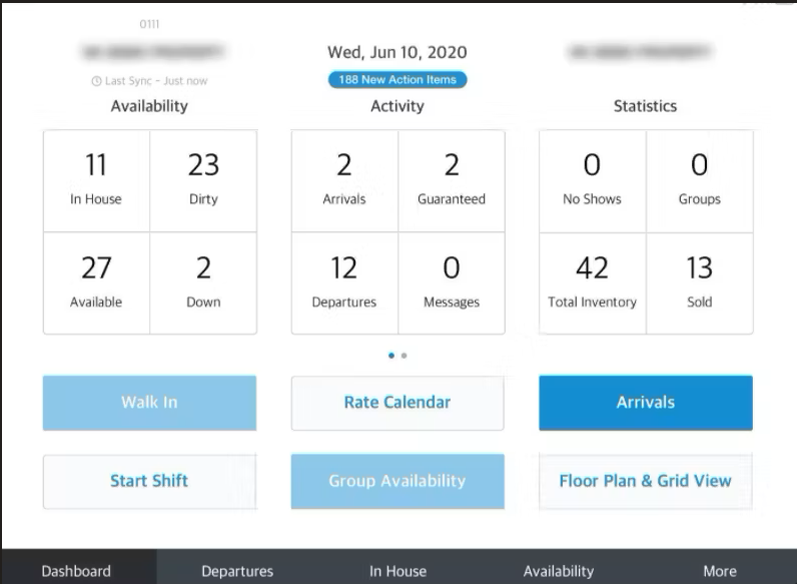
HotelKey offers a cloud-based property management system built for hotels that want mobile-first operations and real-time control. The platform is designed for owners and managers of independent hotels, motels, and multi-property groups who need to coordinate front desk, housekeeping, and reservations from anywhere. Its mobile tools help teams handle check-ins, room assignments, and guest requests without being tied to a desktop.
Who is HotelKey Best For?
HotelKey supports hotel operations and front-desk teams at small to mid-sized hospitality businesses that need mobile-first tools for daily property management and service delivery. It fits hotels, resorts, and multi-location lodging providers that require staff mobility and cloud-based access to reservations, housekeeping, and guest services.
Why I Picked HotelKey
What sets HotelKey apart is its focus on cloud-based property management with mobile-first operations. I picked it because the platform’s mobile apps let staff manage check-ins, housekeeping, and room status updates directly from their phones or tablets. The system also supports real-time updates across devices, so teams can coordinate guest services and room assignments without delays. This approach is especially useful for hotels that want to keep operations flexible and responsive, even when staff are away from the front desk.
HotelKey Key Features
Some other features that make HotelKey appealing include:
- Multi-Property Management: Manage multiple properties and locations from a single dashboard.
- Direct Booking Engine: Accept direct reservations through a branded booking portal.
- Rate and Inventory Management: Adjust rates and room availability across channels in real time.
- Integrated Point of Sale (POS): Process restaurant, bar, or retail transactions within the same system.
HotelKey Integrations
Integrations include QuickBooks, Sage, GuestTek, Revinate, TrustYou, Dormakaba, Adyen, Stripe, Elavon, and FreedomPay.
Pros and Cons
Pros:
- Real-time rate and inventory updates across channels
- POS module handles restaurant and retail sales
- Direct booking engine integrates with hotel websites
Cons:
- Some integrations require additional setup fees
- Group booking management features are basic

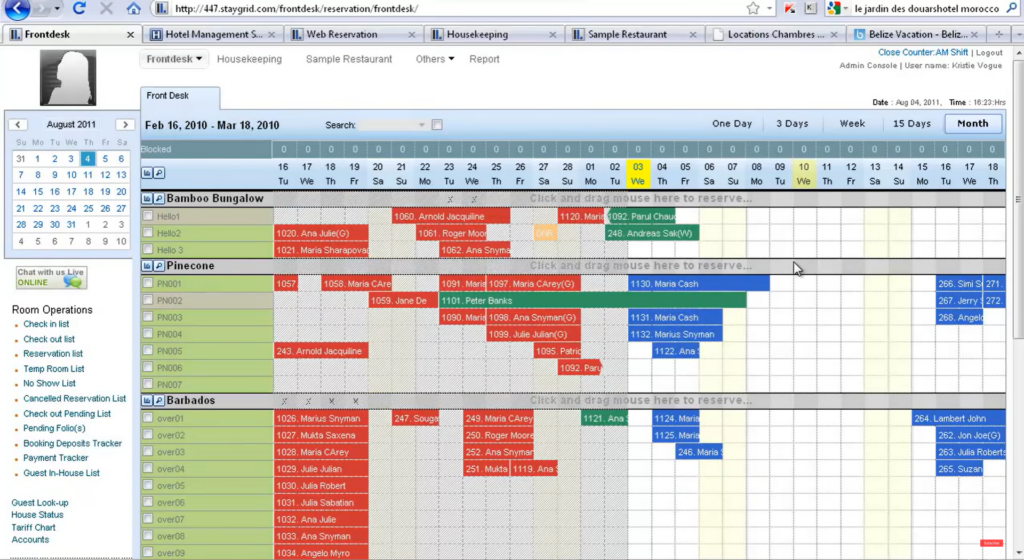
Hotelogix is designed for hoteliers who want an all-in-one property management system with automated channel management. The platform suits independent hotels and small groups looking to reduce manual work and avoid overbookings by syncing rates and inventory across OTAs in real time. Its unified dashboard helps teams handle reservations, housekeeping, and distribution from a single place.
Who is Hotelogix Best For?
Hotelogix supports hotel revenue and operations teams at small to mid-sized hospitality businesses that need automated channel management to synchronize rates and availability across distribution partners. It fits hotels, B&Bs, and multi-location properties that require consolidated control over online travel agency connectivity and bookings alongside core property management workflows.
Why I Picked Hotelogix
Hotelogix stands out for its all-in-one PMS that includes automated channel management, which is essential for hotels juggling multiple online distribution channels. I picked it because the system automatically syncs rates and inventory across OTAs, reducing the risk of double bookings and manual errors. The platform’s unified dashboard lets teams manage reservations, housekeeping, and distribution from one place, making daily operations more coordinated. This setup is especially useful for independent hotels and small groups that want to simplify their tech stack and keep everything connected.
Hotelogix Key Features
Some other features that make Hotelogix useful include:
- Front Desk Module: Manage check-ins, check-outs, and guest folios from a visual calendar.
- Housekeeping Management: Track room status, assign cleaning tasks, and update availability in real time.
- Integrated Point of Sale (POS): Process restaurant, bar, and spa charges directly to guest accounts.
- Customizable Reporting: Generate operational, financial, and occupancy reports with flexible filters.
Hotelogix Integrations
Integrations include AxisRooms, Staah, SiteMinder, Xero, Tally, Assa Abloy, Oracle Hospitality, PayPal, Stripe, and Mailchimp.
Pros and Cons
Pros:
- Multi-currency support for international properties
- POS module supports restaurant and spa billing
- Housekeeping dashboard updates room status instantly
Cons:
- No built-in guest feedback or survey tools
- Reporting filters are less flexible than competitors


Minihotel offers a cloud-based PMS with a built-in booking engine, making it a strong fit for small hotels and boutique properties that want to manage reservations and direct bookings in one place. The platform appeals to hoteliers looking for a simple way to connect with OTAs and automate daily operations without a complex setup. Its focus on direct booking tools and real-time channel management helps properties reduce overbookings and increase revenue from their own website.
Who is Minihotel Best For?
Minihotel supports hotel operations and property management teams at small to mid-sized hospitality businesses that need a cloud-based PMS with an integrated booking engine. It fits hotels, inns, and similar lodging providers that require unified reservation and management tools without separate systems for bookings and property operations.
Why I Picked Minihotel
What drew me to Minihotel is its focus on providing a cloud-based PMS with an integrated booking engine, which is especially valuable for small hotels and boutique properties. The booking engine lets you accept direct reservations from your website, helping you capture more commission-free bookings. I also appreciate that the PMS and booking engine work together in real time, so your availability and rates stay accurate across all channels. This setup is ideal for properties that want to simplify their tech stack and boost direct revenue without relying solely on OTAs.
Minihotel Key Features
Some other features that make Minihotel appealing include:
- Channel Manager: Connects your property to multiple OTAs and updates inventory automatically.
- Housekeeping Module: Assigns cleaning tasks and tracks room status in real time.
- Automated Guest Messaging: Sends booking confirmations and pre-arrival messages to guests.
- Multi-property Management: Lets you oversee several properties from a single dashboard.
Minihotel Integrations
Integrations are not publicly listed.
Pros and Cons
Pros:
- Multi-property dashboard for managing several hotels
- Automated guest messaging for confirmations and reminders
- Direct booking engine integrates with property website
Cons:
- No built-in guest review or survey tools
- API access details are not clearly documented


IQware is designed for hotels and resorts that need a highly customizable PMS to handle complex operations and unique property requirements. The platform stands out for its modular approach, letting you tailor features like reservations, sales, and guest services to fit your business. This makes it a strong choice for multi-property groups, resorts, and independent hotels with specialized workflows or integration needs.
Who is IQware Best For?
IQware supports IT and operations leaders at mid-sized to enterprise hospitality organizations that need a PMS with customizable modules for complex property workflows. It fits large hotels, resorts, and multi-property groups that require flexible, scalable systems to manage reservations, operations, and guest services across distributed operations.
Why I Picked IQware
What sets IQware apart is its enterprise PMS with customizable modules, which is especially valuable for properties with complex operational needs. I picked IQware because it lets you configure modules for reservations, sales, and guest services to match your property’s unique workflows. The system supports multi-property management and can adapt to specialized requirements, such as group bookings or extended stay operations. This flexibility makes it a strong fit for resorts, large hotels, and independent properties that need more than a one-size-fits-all solution.
IQware Key Features
In addition to its customizable modules, I also found these features worth noting:
- Integrated Booking Engine: Lets guests book directly from your website and updates availability in real time.
- Housekeeping Management: Tracks room status, cleaning schedules, and staff assignments.
- Guest Profile Management: Stores guest preferences, history, and contact details for personalized service.
- Event and Group Management: Handles group reservations, event planning, and block bookings within the PMS.
IQware Integrations
Integrations include IQpms, IQho, IQpos, IQlink, IQtrac, IQrez, IQcontact, IQintel, IQspa, and IQbanquet.
Pros and Cons
Pros:
- Modular system adapts to unique property needs
- Built-in event and group booking management
- Integrated POS for on-property sales tracking
Cons:
- Training and onboarding can require significant time
- Outdated user interface compared to newer PMS

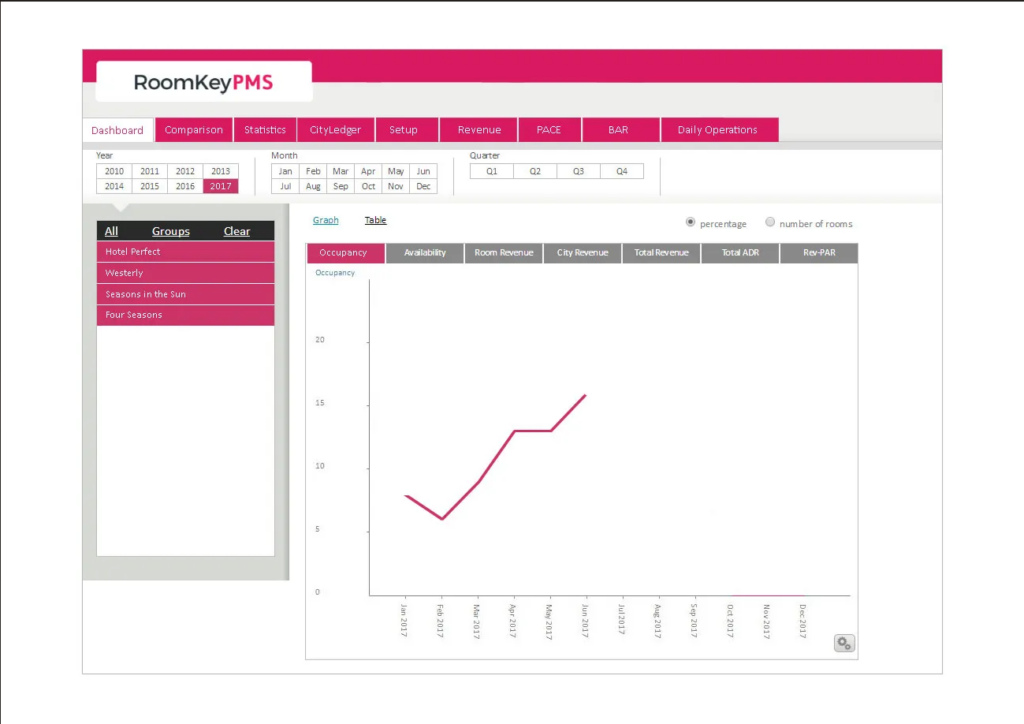
RoomKeyPMS is built for independent hotels and small groups that want a cloud-based PMS with direct booking and guest engagement features. The platform emphasizes tools for driving direct reservations and managing guest communications from a single dashboard. This makes it a strong fit for properties looking to reduce reliance on OTAs and improve guest relationships through integrated messaging and upsell options.
Who is RoomKeyPMS Best For?
RoomKeyPMS supports hotel operations and guest experience teams at small to mid-sized hospitality businesses that need a cloud-based PMS with direct booking and guest engagement tools. It fits hotels, inns, and similar lodging providers focused on centralizing reservations and automated guest communication within a single platform.
Why I Picked RoomKeyPMS
RoomKeyPMS stands out for its focus on direct booking and guest engagement tools, which are essential for hotels aiming to boost direct revenue and guest loyalty. I picked RoomKeyPMS because it offers a built-in booking engine that connects directly to your website, helping you capture more reservations without third-party commissions. The platform also includes automated guest messaging and upsell features, so you can communicate with guests before, during, and after their stay. These capabilities make it a strong choice for independent hotels that want to own the guest relationship and drive more value from every booking.
RoomKeyPMS Key Features
Some other features that caught my attention include:
- Front Desk Dashboard: Provides a real-time overview of arrivals, departures, and in-house guests.
- Housekeeping Management: Tracks room status and cleaning schedules for housekeeping teams.
- Reporting Suite: Offers customizable reports for occupancy, revenue, and operational metrics.
- Multi-Property Management: Lets you oversee multiple properties from a single login.
RoomKeyPMS Integrations
Integrations include SiteMinder, QuickBooks, FLEXIPASS, Duetto, Cendyn Guestfolio CRM, Revinate, Expedia, Booking.com, Assa Abloy Visionline by VingCard, and Micros POS.
Pros and Cons
Pros:
- Multi-property management from a single dashboard
- Direct booking engine integrates with hotel websites
- Automated guest messaging supports pre-arrival upsells
Cons:
- Occasional delays in customer support response
- No self-service guest portal for reservations
Other Hotel Management Software
Below is a list of additional hotel management software that I shortlisted, but did not make it to the top 10. Definitely worth checking them out.
- Skyware Hospitality Solutions
For customizable PMS
- eZee Absolute
For integrated channel management
- eZee FrontDesk
For businesses requiring a front desk system
- Sirvoy
For multilingual PMS
- Maestro PMS
For contactless guest and staff tools
- Smoobu
For vacation rentals
- Operto
For guest access and energy control
- StayNTouch
For guest-centric hotel operations
- HotelConnect
For easy and efficient guest communication
- Jurny
For short-term rentals


Hotel Management Software Selection Criteria
When selecting the best hotel management software to include in this list, I considered common buyer needs and pain points like managing bookings efficiently and improving guest communication. I also used the following framework to keep my evaluation structured and fair:
Core Functionality (25% of total score)
To be considered for inclusion in this list, each solution had to fulfill these common use cases:
- Manage reservations
- Handle billing and invoicing
- Track guest information
- Integrate with online travel agencies
- Generate reports
Additional Standout Features (25% of total score)
To help further narrow down the competition, I also looked for unique features, such as:
- Customizable dashboards
- Automated guest communication
- Loyalty program management
- Real-time analytics
- Multi-property management
Usability (10% of total score)
To get a sense of the usability of each system, I considered the following:
- Intuitive navigation
- Clear interface design
- Minimal learning curve
- Responsive design for mobile
- Customizable user settings
Onboarding (10% of total score)
To evaluate the onboarding experience for each platform, I considered the following:
- Availability of training videos
- Interactive product tours
- Access to webinars
- Use of chatbots for guidance
- Comprehensive onboarding templates
Customer Support (10% of total score)
To assess each software provider’s customer support services, I considered the following:
- 24/7 support availability
- Multi-channel support options
- Access to a knowledge base
- Availability of live chat
- Response time for inquiries
Value For Money (10% of total score)
To evaluate the value for money of each platform, I considered the following:
- Competitive pricing
- Transparent pricing structure
- Availability of free trials
- Flexible subscription plans
- Cost relative to features offered
Customer Reviews (10% of total score)
To get a sense of overall customer satisfaction, I considered the following when reading customer reviews:
- Overall satisfaction ratings
- Frequency of positive feedback
- Commonly mentioned pain points
- Feedback on customer support
- Recommendations from users
How to Choose Hotel Management Software
It’s easy to get bogged down in long feature lists and complex pricing structures. To help you stay focused as you work through your unique software selection process, here’s a checklist of factors to keep in mind:
| Factor | What to Consider |
|---|---|
| Scalability | Will the software grow with your business? Consider if it can handle increased bookings or additional properties as you expand. |
| Integrations | Does it connect with your existing tools, like accounting software or online booking platforms? Check for API availability and supported third-party apps. |
| Customizability | Can you tailor the system to fit your specific workflows? Look for options to adjust settings, templates, and user permissions. |
| Ease of use | Is the interface intuitive for your team? Evaluate the learning curve and whether non-tech staff can use it comfortably. |
| Implementation and onboarding | How long will it take to get started? Consider the time and resources needed for training and data migration, and whether the vendor offers support. |
| Cost | Does the pricing fit your budget? Assess the total cost, including setup fees, subscription plans, and any hidden charges. |
| Security safeguards | Are your guest data and financial information protected? Look for encryption, data backups, and compliance with data protection laws. |
What Is Hotel Management Software?
Hotel management software is a tool that helps manage various aspects of hotel operations, from reservations to billing. Hotel managers, front desk staff, and operations teams generally use these tools to improve efficiency and guest satisfaction. Reservation management, billing automation, and guest communication features help with daily operations and enhance the guest experience. Overall, these tools make managing hotel operations more efficient and organized.
Features of Hotel Management Software
When selecting hotel management software, keep an eye out for the following key features:
- Reservation management: Helps you efficiently handle bookings and avoid overbooking by keeping track of room availability.
- Billing automation: Simplifies invoicing and payment processing, saving time and reducing errors.
- Guest communication: Facilitates direct communication with guests via email or SMS for confirmations and updates.
- Multi-property management: Allows you to manage multiple locations from a single platform, ideal for hotel chains.
- Customizable dashboards: Lets you tailor the interface to display the most relevant information for your team.
- Real-time analytics: Provides insights into occupancy rates and revenue to inform decision-making.
- Loyalty program management: Supports the creation and management of guest loyalty programs to encourage repeat business.
- Mobile access: Enables you to manage hotel operations on the go using smartphones or tablets.
- Integrations: Connects with other software like accounting or travel agency platforms to streamline operations.
- Security safeguards: Protects sensitive guest and financial data with encryption and compliance with data protection laws.
Benefits of Hotel Management Software
Implementing hotel management software provides several benefits for your team and your business. Here are a few you can look forward to:
- Improved efficiency: Automates tasks like billing and reservations, freeing up time for your staff to focus on guests.
- Enhanced guest experience: Offers features like guest communication and loyalty program management to boost satisfaction and retention.
- Better decision-making: Provides real-time analytics for insights into operations, helping you make informed choices.
- Centralized management: Multi-property management lets you oversee various locations from one platform, ideal for chains.
- Cost savings: Reduces manual errors and operational costs through features like billing automation and integrations.
- Flexibility: Mobile access allows you to manage operations from anywhere, keeping you connected on the go.
Costs and Pricing of Hotel Management Software
Selecting hotel management software requires an understanding of the various pricing models and plans available. Costs vary based on features, team size, add-ons, and more. The table below summarizes common plans, their average prices, and typical features included in hotel management software solutions:
Plan Comparison Table for Hotel Management Software
| Plan Type | Average Price | Common Features |
|---|---|---|
| Free Plan | $0 | Basic reservation management, limited guest communication, and basic reporting. |
| Personal Plan | $10-$30/user/month | Reservation management, billing automation, guest communication, and basic analytics. |
| Business Plan | $50-$100/user/month | Advanced reporting, loyalty program management, multi-property management, and integrations. |
| Enterprise Plan | $150+/user/month | Customizable dashboards, real-time analytics, advanced security safeguards, and dedicated customer support. |
Hotel Management Software FAQ
Here are some questions people also ask me about hotel management tools, software for hotels, and hotel management more generally.
Can I outsource my hotel management?
Absolutely, there are businesses that handle hotel management. These companies are experts in the hospitality industry and can manage everything from bookings and customer service to maintenance and accounting, making the process seamless for hotel owners.
What is cloud-based hotel management software?
Cloud-based hotel management software is an online system that provides hoteliers with the flexibility to manage their operations from any internet-connected device.
These systems provide real-time updates across departments, meaning that as soon as a reservation is made or a room is cleaned, all relevant staff members are notified instantly. This accessibility from anywhere allows managers to keep tabs on hotel operations even when offsite, and ensures that guests can benefit from efficient service regardless of time or location.
What computer system is used by hotels?
Many different types of software are used by hotels to manage things like marketing, revenue, bookings, and more. Here is a list of what digital systems hotels use:
1. Property Management System (PMS)
This is the central hub for hotel operations.
Functions:
-
Front desk operations (check-in/check-out)
-
Room assignments and availability
-
Guest profile management
-
Billing and invoicing
-
Housekeeping coordination
Popular PMS options: Opera PMS by Oracle (used by large chains), Cloudbeds, or RoomRaccoon.
2. Central Reservation System (CRS)
Used to manage room reservations across multiple channels (website, OTAs, GDS, etc.).
Functions:
-
Manages booking inventory
-
Distributes availability and rates
-
Handles online travel agency (OTA) connections
Common CRS software: Sabre SynXis, Pegasus, or TravelClick.
3. Revenue Management System (RMS)
Optimizes pricing based on demand forecasts, competitor rates, and historical data.
Functions:
-
Dynamic pricing
-
Demand forecasting
-
Occupancy trend analysis
Examples: Duetto, IDeaS, or Atomize.
4. Point of Sale (POS) System
Used in restaurants, bars, and retail outlets within the hotel.
Functions:
-
Billing for food, beverages, and retail items
-
Inventory tracking
-
Integration with PMS for room charges
Examples: Toast POS, Lightspeed, or Oracle MICROS.
5. Housekeeping Management Software
Tracks room status, housekeeping assignments, and maintenance issues.
Functions:
-
Assign cleaning schedules
-
Track room status (clean, dirty, in progress)
-
Report maintenance problems
Examples: ALICE, Optii, or RoomChecking.
6. Channel Manager
Synchronizes room availability and rates across all online channels.
Functions:
-
Real-time updates to OTA listings
-
Prevents overbooking
-
Centralized management of rates
Examples: SiteMinder, Cloudbeds Channel Manager, or eZee Centrix.
7. Customer Relationship Management (CRM)
Manages guest interactions, loyalty programs, and marketing.
Functions:
-
Personalized communication
-
Guest history tracking
-
Automated marketing campaigns
Examples: Revinate, Cendyn, or Salesforce for Hospitality.
8. Maintenance Management System (CMMS)
Helps manage hotel maintenance requests and preventive maintenance tasks.
Functions:
-
Track repairs
-
Schedule preventive maintenance
-
Log work orders
Examples: Hotelogix CMMS or eMaint.
What software do Hilton hotels use?
Hilton Hotels is transitioning to a new, cloud-based Property Management System (PMS) called the Property Engagement Platform (PEP), developed in collaboration with HotelKey. This platform is designed to streamline operations across Hilton’s portfolio of over 7,000 properties worldwide. The rollout began in 2023, with the goal of full implementation by 2026.
Do hotels use CRM software?
Yes, hotels use CRM (Customer Relationship Management) software—and it’s increasingly becoming a must-have in modern hospitality operations.
Here’s why hotels might use CRM software:
1. Guest Relationship Management
CRM software helps hotels track detailed guest profiles, including:
-
Preferences (room type, amenities, food, etc.)
-
Booking history
-
Special occasions (birthdays, anniversaries)
-
Feedback and complaints
2. Marketing Automation
Hotels use CRM tools to:
-
Send targeted email campaigns (e.g. holiday packages, birthday offers)
-
Run loyalty programs
-
Segment guests based on travel behavior
3. Operational Efficiency
A CRM system integrates with:
-
Property Management Systems (PMS)
-
Booking engines
-
Channel managers
4. Reputation and Feedback Management
Many hotel CRMs include tools for:
-
Collecting and managing guest feedback
-
Sending post-stay surveys
-
Monitoring online reviews (TripAdvisor, Google, etc.)
Examples of hotel CRM software:
-
Revinate: Popular for email marketing and guest data analytics.
-
Guestline CRM: Integrated with PMS and booking systems.
-
Cendyn: Focused on marketing automation and loyalty programs.
-
Zoho CRM: Often used by smaller boutique hotels or chains looking for customizable and budget-friendly CRM options.
Is there any free hotel management software?
Yes, there are free hotel management software options, though they often come with limitations (like restricted features, user limits, or caps on room inventory). Below is a list of popular free hotel management tools, including open-source and freemium platforms:
1. KWHotel Free Version
-
Best for: Small properties (up to 10 rooms)
-
Key Features: Reservation calendar, guest check-in/check-out, customer database
-
Limitations: Only available for Windows; advanced modules cost extra
2. eZee Absolute Free Trial
-
Best for: Properties testing cloud-based PMS
-
Key Features: Front desk operations, housekeeping, reporting
-
Limitations: 30-day trial only; paid plans after
3. NOBEDS
-
Best for: Hostels and small hotels
-
Key Features: Booking calendar, guest registration, reporting
-
Limitations: Free desktop version; online features require paid subscription
4. HotelDruid (Open Source)
-
Best for: Tech-savvy users who want full control
-
Key Features: Reservation management, multi-language support, reports
-
Limitations: Requires setup on a web server; not user-friendly for beginners
5. MiniHotel (Free Plan)
-
Best for: Small hotels and B&Bs
-
Key Features: Booking engine, OTA integration, billing
-
Limitations: Feature access and support limited on free plan
6. Frontdesk Master (Free for Hostels)
-
Best for: Hostels managing 10+ beds
-
Key Features: Bed-level reservations, channel management, POS
-
Limitations: May require upgrade for full channel manager access
What hotel management software is best for small hotels?
The best hotel management software for small hotels depends on your specific needs—such as ease of use, budget, integrations (like with OTAs), and whether you’re managing just a few rooms or multiple properties. Below are top-rated options that cater especially well to small hotels, motels, inns, and B&Bs:
Little Hotelier
-
Best for: Small hotels and B&Bs needing an all-in-one solution
-
Why it stands out: Very easy to use with built-in booking engine, channel manager, and front desk system.
-
Key Features: Reservation management, website builder, OTA sync, reporting
-
Price: Paid, but offers a free trial
innRoad
-
Best for: Independent properties looking for a reliable cloud-based PMS
-
Why it stands out: Combines PMS, booking engine, and channel manager in one platform.
-
Key Features: Reservation tracking, direct booking tools, revenue management
-
Price: Paid, free demo available
What Next?
Choosing the right hotel management software is like finding the perfect concierge, it should make everything run smoothly, from check-ins to guest satisfaction. Whether you're managing a boutique inn or a sprawling resort, understanding the various systems and features will set you up for success.
Don't forget to browse around the site for more great hotel management tips, templates, and tools. Plus, join The Hotel GM newsletter for expert tidbits sent right to your inbox!