

Choosing the best resort management software for your business can be daunting. With so many options available, knowing where to start is hard.
That's why I’ve created this guide. In it, I’ll discuss what resort management software is and give you some examples of how it can benefit your business. I’ll also talk about how much it costs and what features to look for when deciding.
And, of course, I’ll dive deep into the best resort management programs available in the market in 2026, so you can make a great selection that fits your resort.
Why Trust Our Software Recommendations
6,700+
Reviews
20
Industry experts
16+
Evaluation factors
14
Years
Our team has been testing and reviewing software since 2012. As hospitality leaders ourselves, we know how difficult—and important—it is to choose the right software.
For this guide, we evaluated tools using hands-on testing and independent research, scoring tools using our selection criteria.
Our reviews reflect our human editorial judgment, not a sales pitch.
Best Resort Management Software Summary
This comparison chart summarizes pricing details for my top resort management software selections to help you find the best one for your budget and business needs.
| Tool | Best For | Trial Info | Price | ||
|---|---|---|---|---|---|
| 1 | Best for end-to-end guest experience management | Free demo available | Pricing upon request | Website | |
| 2 | Best for resort maintenance | 30-day free trial + free demo available | Single plan at $35 per user/month (billed annually) | Website | |
| 3 | Best for intuitive hotel operations | Free demo available | Pricing upon request | Website | |
| 4 | Best for extensive customization options | 14-day free trial | Pricing upon request | Website | |
| 5 | Best for its direct booking engine | Free demo available | Pricing upon request | Website | |
| 6 | Best for independent properties | Free demo available | Pricing upon request | Website | |
| 7 | Best for scalable operations in chains | 15-day free tiral + free demo available | Pricing upon request | Website | |
| 8 | Best for robust reporting capabilities | Free demo available | Pricing upon request | Website | |
| 9 | Best for comprehensive guest profiling | From $200/user/month (billed annually) | Website | ||
| 10 | Best for dynamic pricing functionality | From $125/user/month | Website |


Best Resort Management Software Reviews
Below are my detailed summaries of the best resort management software that made it onto my shortlist. My reviews offer a detailed look at the key features, pros & cons, integrations, and ideal use cases of each tool to help you find the best one for you.
 Best for end-to-end guest experience management
- Free demo available
- Pricing upon request
Visit WebsiteCustomer Rating:4.8/5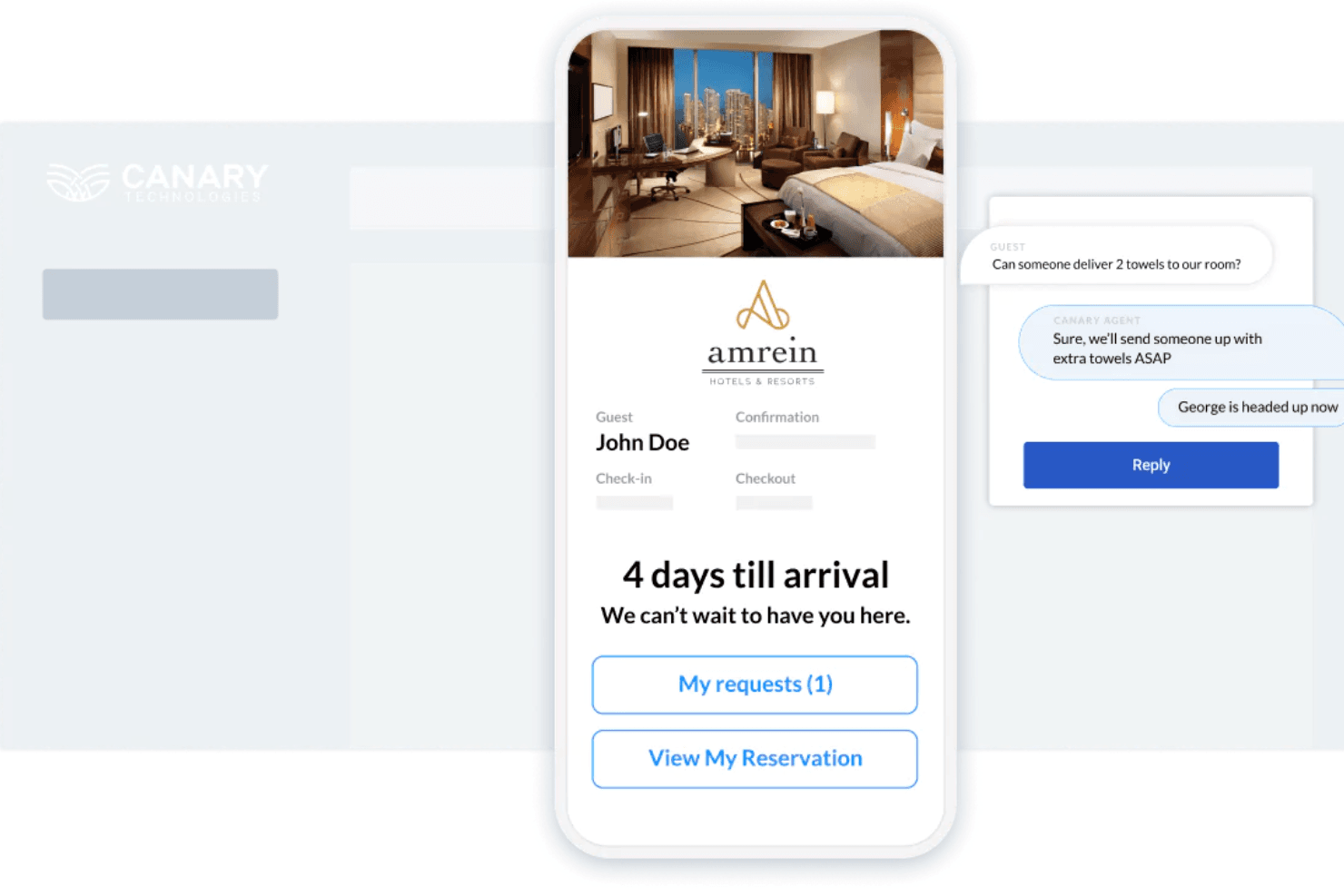
Canary Technologies provides personalized pre-arrival engagement and real-time service requests via its guest messaging feature. Canary Technologies is a guest experience platform that layers AI-powered messaging, mobile check-in, contactless checkout, dynamic upsells, digital payments, and F&B mobile ordering on top of your existing PMS.
Who Is Canary Technologies Best For?
Canary Technologies is a strong fit for hotels and resorts that already run a PMS and want to upgrade the guest-facing experience layer on top of it.
Why I Picked Canary Technologies
I've included Canary Technologies in my top picks because it covers the entire guest journey in one platform, from pre-arrival messaging and mobile check-in to in-stay upsells and contactless checkout. I particularly like its AI Messaging, which handles most guest inquiries automatically, and Dynamic Upsells, which surfaces room upgrades, F&B, and late checkout at every touchpoint without charging the hotel any commission.
Canary Technologies Key Features
- Upsell on Arrivals: Offers the ability to upsell resort amenities, including cabanas, spa packages, and dining on guest arrival.
- F&B Mobile Ordering: Guests order food and drinks directly from their phones, with orders sent straight to the kitchen or bar and integrated with your POS system.
- Digital Tipping: Increases earnings for service teams, leading to improved retention.
- AI Guest Messaging and AI Voice: Reduces front desk calls, automates routine inquiries, and frees up front desk staff.
Canary Technologies Integrations
Canary Technologies connects with resort-relevant PMS platforms including Oracle OPERA, Resort Suite, Maestro, Inntopia, Cloudbeds, and Mews. It also integrates with SiteMinder, SynXis/Sabre, TravelClick, Shift4, and Oracle Simphony Cloud, and provides an API for custom integrations.
Pros and Cons
Pros:
- Promotes upgrades and in-stay services
- Reduces front-desk queues during busy arrivals
- Automates most guest inquiries
Cons:
- Requires manual approval for uncertain inventory
- Cannot replace core resort operations software
Learn more about Canary Technologies: Best for resort maintenance
- 30-day free trial + free demo available
- Single plan at $35 per user/month (billed annually)
Visit WebsiteCustomer Rating:4.7/5
The request management dashboard allows resorts to keep track of maintenance requests across various properties. Click Maint is a maintenance management software designed to help hotels, resorts, and casinos streamline their maintenance operations. It offers tools for managing work orders, scheduling preventive maintenance, and tracking assets and inventory.
Why I Picked Click Maint CMMS:
Its automated work order management lets your team create, assign, and monitor maintenance tasks in real time, ensuring issues are addressed promptly to maintain guest satisfaction. Additionally, Click Maint's preventive maintenance scheduling helps you plan regular upkeep, reducing unexpected equipment failures and prolonging the life of your assets.
Standout features and integrations:
Features include inventory management that helps you keep track of spare parts and supplies, ensuring you have the necessary items on hand for maintenance tasks. The software also offers labor and cost tracking, allowing you to monitor maintenance expenses and workforce efficiency. Integrations include Enterprise Resource Planning (ERP) systems, Customer Relationship Management (CRM) systems, and Human Resources Information Systems (HRIS).
Pros and Cons
Pros:
- Mobile access for managing tasks on the go
- Accommodates hotels of all sizes
- Automated preventative maintenance scheduling
Cons:
- Limited language support
- Only for the maintenance aspect of resort management
Learn more about Click Maint CMMS: Best for intuitive hotel operations
- Free demo available
- Pricing upon request
Visit WebsiteCustomer Rating:4.3/5
roommaster's channel manager connects with over 155 OTAs, enabling real-time inventory updates and efficient rate management. roommaster is a cloud-based property management system (PMS) designed to support the operations of hotels and vacation rentals. It provides a comprehensive suite of features, including booking management, payment processing, and performance reporting, all accessible through an intuitive interface.
Why I Picked roommaster:
Tailored for independent hotels, hotel groups, and resorts, roomMaster helps users manage operations, improve guest satisfaction, and enhance overall efficiency. It facilitates various operations, including reservations, front desk activities, housekeeping, and financial reporting, all through an intuitive interface. This ease of use allows staff to manage their tasks effectively without the need for extensive training, which is essential in maintaining smooth daily operations at a resort.
Standout features and integrations:
roomMaster offers a wide range of resort management features, including WebBook, an integrated booking engine, StayFull, a channel manager, payment processing, performance reporting, and front desk management. The platform integrates with Amadeus, Hoteltix, Sage, Windcave, AirBnB, Expedia, QuickBooks, SiteMinder, TripAdvisor, and Flexkeeping.
Pros and Cons
Pros:
- Recognized for stable performance
- Channel management
- Intuitive user interface
Cons:
- Some connectivity issues
- Lacks customization features
- Limited customer support
Learn more about roommaster: Best for extensive customization options
- 14-day free trial
- Pricing upon request
Visit WebsiteCustomer Rating:4.6/5
Here's the summary view of eZee Absolute's back office tab. eZee Absolute is a comprehensive hotel management system designed to cater to various hotel industries. Its standout feature is its extensive customization, making it a versatile choice for businesses with unique or specific requirements.
Why I Picked eZee Absolute:
eZee Absolute drew my attention for its extensive customization options. It sets the bar high for allowing businesses to tweak the software according to their specific needs, thus standing out in a market filled with more rigid options. Given this flexibility, it easily became my top choice for businesses seeking extensive customization options.
Standout features and integrations:
eZee Absolute comes with a robust set of features, including but not limited to front office management, check-ins, reservation and booking system, and integrated e-distribution. Additionally, it offers an impressive set of integrations with multiple online travel agencies (OTAs), global distribution systems (GDSs), and even restaurant POS systems.
Pros and Cons
Pros:
- Wide range of integrations
- Robust set of features
- Extensive customization options
Cons:
- Support response times can be improved
- Pricing could be more competitive
- Steeper learning curve due to extensive features
Learn more about eZee Absolute: Best for its direct booking engine
- Free demo available
- Pricing upon request
Visit WebsiteCustomer Rating:4.6/5
Here's a screenshot of WebrezPro's dashboard, which provides an overview of key metrics in real-time. WebRezPro is a web-based property management software that serves an array of features including its direct booking engine. This powerful tool is designed to provide hotel businesses an efficient way to manage their bookings, ultimately driving more direct, commission-free reservations.
Why I Picked WebRezPro:
Its advanced direct booking engine strongly influenced the decision to select WebRezPro. I find that it significantly stands out from other platforms because of this feature, enabling businesses to increase their profit margins by reducing reliance on third-party booking platforms. Hence, WebRezPro excels as a tool that provides the best direct booking engine.
Standout features and integrations:
In addition to its excellent direct booking engine, WebRezPro offers other useful features like automated emails, mobile accessibility, and a customer database. The platform is also integrated with various third-party systems, including payment gateways, POS systems, and channel managers.
Pros and Cons
Pros:
- Wide range of third-party integrations
- Useful automated email feature
- Powerful direct booking engine
Cons:
- The mobile accessibility feature might be challenging for some users to navigate
- The user interface could be more intuitive
- Additional setup fee
Learn more about WebRezPro: Best for independent properties
- Free demo available
- Pricing upon request
Visit WebsiteCustomer Rating:4.5/5
Here's the tape chart overview of innRoad, which provide a coded chart for visualizing room allocations and booking blocks. innRoad is a user-friendly, cloud-based hotel management software that caters specifically to the needs of independent properties. It offers an extensive suite of features that streamline operations and help maximize occupancy and increase revenue. With its focus on independent properties, innRoad is ideally suited to help these businesses improve their overall performance and customer experience.
Why I Picked innRoad:
I chose innRoad because of its dedication to serving independent properties. The platform has been built with an understanding of the unique needs of independent businesses, setting it apart from others on the market. Given this, innRoad is the best tool for managing independent hotel properties.
Standout features and integrations:
innRoad boasts features such as an online booking engine, revenue management, a property management system (PMS), and a global distribution system. The software also integrates well with numerous payment gateways and online travel agencies, which can be beneficial for broadening market reach.
Pros and Cons
Pros:
- Robust integration capabilities
- Includes a global distribution system
- Dedicated focus on independent properties
Cons:
- The system may be too complex for smaller independent properties
- Setup charges can add to the initial cost
- High starting price
 Best for scalable operations in chains
- 15-day free tiral + free demo available
- Pricing upon request
Visit WebsiteCustomer Rating:4.4/5
Here's the frontdesk management feature in Hotelogix. Hotelogix is a cloud-based resort management software specifically designed to cater to the needs of multi-property chains. It excels in providing tools that facilitate scalable processes, making it the go-to option for growing hotel chains or large-scale resorts.
Why I Picked Hotelogix:
I selected Hotelogix for this list due to its impressive capabilities in managing complex, chain-wide operations. It uniquely stood out for its multi-property management feature, allowing for centralized control of various locations. Hotelogix is best for scalable chain operations because it provides the tools for managing large-scale, multi-location resort and hotel operations effectively.
Standout features and integrations:
Hotelogix's key features include multi-property management, a unified distribution system, and a robust front desk management module. Additionally, it integrates well with global distribution systems (GDS), online travel agencies (OTAs) like booking.com, Expedia, and Airbnb, and popular payment gateways, supporting a comprehensive booking and payment process.
Pros and Cons
Pros:
- Comprehensive booking and payment integrations
- Robust front desk management module
- Excellent for multi-property management
Cons:
- Higher learning curve for new users
- Customer support could be more responsive
- Might be too complex for smaller properties
Learn more about Hotelogix: Best for robust reporting capabilities
- Free demo available
- Pricing upon request
Visit WebsiteCustomer Rating:4/5
Here's Resort Data's tape chart, which displays reservations by room number in a grid format, providing a visual of the property’s occupancy. Resort Data is a property management system focusing on detailed reporting. It is designed to provide comprehensive data insights for managing various accommodations such as resorts, condominiums, vacation rentals, and timeshares. The emphasis on robust reporting makes Resort Data a fitting tool for hospitality businesses needing extensive and diverse analytical insights.
Why I Picked Resort Data:
I chose Resort Data for this list because of its focus on comprehensive reporting, providing managers with a wide array of data points to improve their operations. In comparing the range of systems available, it was clear that Resort Data offered more in-depth reporting options than most. This is why I determined Resort Data the best tool for robust reporting capabilities.
Standout features and integrations:
Resort Data features over 400 reports covering reservations, finances, maintenance, payment processing, and housekeeping. It provides real-time insights, which can be invaluable for quick decision-making. It integrates with multiple third-party systems, including keyless entry providers, credit card processors, and online booking channels.
Pros and Cons
Pros:
- Real-time data for quick decision making
- Integrations with various third-party systems
- Extensive reporting capabilities with over 400 reports
Cons:
- The abundance of reports might be overwhelming for some users
- Could be complex for users seeking simplicity
- Higher starting price compared to some competitors
Learn more about Resort Data: Best for comprehensive guest profiling
- From $200/user/month (billed annually)

Here's the Seven Rooms restaurant floor plan feature, which helps you manage reservations and customer data, all in one place. Seven Rooms is a powerful, intuitive reservation, seating, and guest management platform. It provides valuable insights into guest preferences, enabling personalized services that lead to superior guest experiences. Given its robust profiling features, Seven Rooms is an excellent choice for establishments wanting to build a rich, detailed understanding of their guests.
Why I Picked Seven Rooms:
In selecting tools, I was struck by Seven Rooms' in-depth focus on guest profiling, a feature that can greatly improve the quality of service in a hospitality setting. This tool is best for comprehensive guest profiling based on its ability to capture, analyze, and utilize detailed guest information, which makes it distinct from its peers.
Standout features and integrations:
Seven Rooms offers tools for reservation management, table management, guest experience, and marketing automation. Its standout feature, however, is its guest profiling, which offers a 360-degree view of guests, capturing everything from dining preferences to past interactions. This tool integrates smoothly with POS systems, email marketing tools, and payment gateways.
Pros and Cons
Pros:
- Comprehensive reservation and table management
- Integration with POS systems and marketing tools
- In-depth guest profiling
Cons:
- Might be overkill for smaller establishments that don't require as in-depth guest profiling
- Setup can be time-consuming
- High starting price
Learn more about Seven Rooms:

Here's the RMS Cloud Resort Software availability chart, which provides a complete view of the rooms' availability. RMS Cloud Resort Software is a robust resort management system equipped with a suite of tools designed to streamline the day-to-day operations of resorts. It particularly excels in offering a powerful dynamic pricing functionality, which can adjust room rates in real-time based on demand and other factors.
Why I Picked RMS Cloud Resort Software:
In selecting tools for this list, RMS Cloud Resort Software stood out for its robust dynamic pricing functionality. Its ability to adjust pricing in real-time, responding to factors like demand, booking channels, and competitors' rates, makes it an excellent asset for revenue management. RMS Cloud Resort Software is best for dynamic pricing functionality because it gives resorts the flexibility to optimize revenue while maintaining occupancy levels.
Standout features and integrations:
Key features of RMS Cloud Resort Software include its dynamic pricing tool, integrated channel management, and built-in CRM for improving guest experience. Furthermore, its API integrations with leading OTAs, GDS systems, and payment gateways facilitate online bookings and financial transactions.
Pros and Cons
Pros:
- In-built CRM for guest experience
- Integrated channel management
- Powerful dynamic pricing functionality
Cons:
- Customer service response times could be improved
- Initial setup might be time-consuming
- The user interface could be more intuitive
Learn more about RMS Cloud Resort Software:
Other Resort Management Software
Below is a list of additional legal practice management software that we shortlisted, but did not make it to the top 10. Definitely worth checking them out.
- 11Agilysys ResortSuiteBest for comprehensive resort operations
- 12Life HouseBest for its unique, local-focused approach
- 13RoomKeyPMSBest for managing multiple properties
- 14SolonisBest for combining CRM and PMS features
- 15Sage IntacctGood for advanced financial management in hospitality
- 16GuestyGood for property managers handling multiple platforms
- 17Little HotelierGood for small hotels seeking a complete reservation system
- 18CloudbedsBest for integrated booking and management
How I Evaluate Resort Management Software
I split my evaluation into baseline criteria—like PMS, channel management, and activity booking—and the differentiators that separate good tools from great ones for resort operators.
Core Functionality (Table Stakes For This List)
When I'm selecting tools for my list, I rank each one on a scale from 0 (does not offer the functionality) to 5 (excels in this area) for each core functionality listed below. Then, I calculate the tool's total score into a percentage. Each tool needs to achieve a minimum total score of 65% to be considered for inclusion.
- Property Management System: I look for a PMS that handles reservations, guest profiles, folios, and check-in/check-out—including group blocks and multi-room bookings common at resorts.
- Channel & Booking Management: Real-time two-way sync with OTAs and GDS matters here, along with a direct booking engine that keeps availability accurate across every channel.
- Rate & Revenue Management: I evaluate whether the tool supports seasonal rate plans, packages, and dynamic pricing rules that match how resorts adjust to demand shifts.
- Housekeeping & Maintenance Ops: Room status tracking, task assignment, and maintenance work orders all factor in—especially mobile access for teams working across large properties.
- Amenity & Activity Booking: Resorts need scheduling for spa, golf, F&B, and recreation, so I check whether the tool handles multi-amenity booking and posts charges to guest folios.
- Payments & Financial Reporting: PCI-compliant payment processing, deposit handling, and reporting on KPIs like ADR, RevPAR, and occupancy are what I expect to see here.
Once I have a list of tools that meet this criteria, I consider what sets each platform apart.
Differentiating Factors (What Sets Vendors Apart)
Here's how I compare and contrast different vendors:
Standout Features
A guest-facing mobile app for digital keys, concierge requests, and in-stay messaging is a real differentiator—I check whether it's native or requires a third-party add-on. Group and event management matters for resorts hosting weddings, conferences, or retreats, so I look for room block tools with integrated catering and meeting space scheduling. Owner and condo accounting is another factor I consider, since many resorts split rental revenue with unit owners and need automated owner statements.
Beyond Features
Integration ecosystems matter a lot here. I check whether the platform connects to the spa, golf, POS, and F&B systems resorts already rely on—not just generic accounting tools. Scalability is another factor I evaluate, particularly whether the tool supports complex unit types like villas and condos alongside standard rooms. Support availability counts too. Resorts operate around the clock, so I look at whether 24/7 live support is included or limited to higher-tier plans, and how the vendor handles onboarding during peak seasons.
How to Choose Resort Management Software
It’s easy to get bogged down in long feature lists and complex pricing structures. To help you stay focused as you work through your unique software selection process, here’s a checklist of factors to keep in mind:
| Factor | What to Consider |
|---|---|
| FactorScalability | What to ConsiderCan the software grow with your business? Consider if it supports additional rooms or properties without needing major upgrades. |
| FactorIntegrations | What to ConsiderDoes it connect with your existing systems like accounting or CRM? Check for compatibility with tools you already use. |
| FactorCustomizability | What to ConsiderCan you tailor the software to fit your specific workflows? Look for flexibility in settings and interface adjustments. |
| FactorEase of Use | What to ConsiderIs it intuitive for your team to use without extensive training? Consider user interface design and how quickly new staff can learn it. |
| FactorImplementation and Onboarding | What to ConsiderHow long will it take to get up and running? Assess the availability of training resources and support during the initial setup phase. |
| FactorCost | What to ConsiderAre there hidden fees beyond the subscription price? Compare pricing models and watch for costs related to additional users or features. |
| FactorSecurity Safeguards | What to ConsiderDoes it protect guest data effectively? Verify encryption standards and data protection measures. |
| FactorSupport Availability | What to ConsiderIs help available when you need it? Consider the hours and channels of support offered, such as phone, chat, or email. |
What Is Resort Management Software?
Resort management software is a tool designed to help manage various operations in a resort setting. Hotel managers, front desk staff, and operations teams generally use these tools to improve efficiency and guest satisfaction.
Reservation management, billing systems, and staff scheduling help with organizing tasks and improving workflow. Overall, these tools save time and enhance the guest experience by simplifying complex processes.
Features
When selecting resort management software, keep an eye out for the following key features:
- Reservation management: Allows you to efficiently handle bookings and cancellations, ensuring optimal room occupancy.
- Billing systems: Streamlines invoicing and payment processes, making transactions easier for both staff and guests.
- Staff scheduling: Helps you organize shifts and manage employee workload, reducing scheduling conflicts.
- Reporting and analytics: Offers insights into performance metrics, aiding in data-driven decision-making.
- Mobile app access: Enables staff to access key functions on the go, improving flexibility and responsiveness.
- Integrated marketing tools: Assists in promoting your resort's services and attracting more guests.
- Automated guest feedback collection: Gathers reviews and suggestions from guests, helping to improve service quality.
- Customizable dashboards: Allows you to tailor the interface to match your specific operational needs.
- Real-time chat support for guests: Provides instant assistance to guests, enhancing their overall experience.
- Security safeguards: Protects sensitive guest and business data, ensuring compliance with data protection standards.
Benefits
Implementing resort management software provides several benefits for your team and your business. Here are a few you can look forward to:
- Improved efficiency: Automates routine tasks like reservations and billing, freeing up time for your staff.
- Enhanced guest experience: Features like real-time chat support and automated feedback collection ensure guests feel heard and valued.
- Better decision-making: Reporting and analytics provide insights into business performance, helping you make informed choices.
- Increased flexibility: Mobile app access and customizable dashboards allow your team to work efficiently from anywhere.
- Cost savings: Efficient scheduling and resource management reduce unnecessary expenses and optimize use of resources.
- Data security: Security safeguards protect sensitive information, ensuring compliance with data protection regulations.
- Scalability: Supports growth by handling increased bookings and additional properties without major changes.
Costs & Pricing
Selecting resort management software requires an understanding of the various pricing models and plans available. Costs vary based on features, team size, add-ons, and more. The table below summarizes common plans, their average prices, and typical features included in resort management software solutions:
Plan Comparison Table for Resort Management Software
| Plan Type | Average Price | Common Features |
|---|---|---|
| Plan TypeFree Plan | Average Price$0 | Common FeaturesBasic reservation management, limited reporting, and email support. |
| Plan TypePersonal Plan | Average Price$10-$30/user/month | Common FeaturesReservation management, billing systems, basic analytics, and email support. |
| Plan TypeBusiness Plan | Average Price$50-$100/user/month | Common FeaturesAdvanced reporting, staff scheduling, mobile app access, and chat support. |
| Plan TypeEnterprise Plan | Average Price$150-$300/user/month | Common FeaturesCustomizable dashboards, real-time analytics, dedicated support, and integrations. |
Resort Management FAQs
Here are some resort management FAQs I wanted to cover before signing off.
Can resort management software integrate with my existing systems?
Yes, most resort management software can integrate with existing systems such as accounting software, CRM, and POS systems. Check for compatibility with tools you currently use to ensure a smooth transition. Integration can save time and reduce errors by automating data transfer between platforms.
Is resort management software secure?
Yes, resort management software can be secure if it follows industry-standard security practices like data encryption and regular security updates. Always verify that the provider has strong security measures in place. Using cloud-based solutions can also offer the benefit of accessing your data from anywhere with an internet connection.
How can I evaluate the customer support of a software provider?
To evaluate customer support, consider the availability of support channels like phone, chat, and email. Test response times by contacting support with questions. Look for reviews that mention support experiences, and consider if the provider offers resources like a help center or community forums for additional assistance.
How can I determine which system fits my resort’s size and operations?
Assess the number of rooms, facilities, staff, and guests you handle daily. Choose a platform that matches your scale and allows room for growth.
What should I verify before switching from my current system?
Ensure the new software supports data migration, integrates with your existing tools, and provides comprehensive onboarding to minimize disruption.
Does resort management software include accounting or financial tools?
Some systems include financial reporting, invoice generation, and revenue tracking, while others integrate with external accounting solutions like QuickBooks or Xero.
What Next?
If you're in the process of researching resort management software, connect with a SoftwareSelect advisor for free recommendations.
You fill out a form and have a quick chat where they get into the specifics of your needs. Then you'll get a shortlist of software to review. They'll even support you through the entire buying process, including price negotiations.