

10 Best Hotel Task Management Software Reviewed in 2026

Best Hotel Task Management Software Shortlist


Hotel task management software is purpose-built to help you coordinate housekeeping, maintenance, and guest service tasks across your property. If you’re searching for the right platform, you probably need to keep a close eye on daily operations, make life easier for your frontline teams, and keep guest satisfaction high, even as staff and budgets get tighter.
This guide brings together the best tools for hotel task management, so you can compare features and pick the right solution to simplify workloads, boost team accountability, and deliver the kind of guest experience that keeps occupancy up.
Why Trust Our Software Recommendations
Our team has been testing and reviewing software since 2012. As hospitality leaders ourselves, we know how difficult—and important—it is to choose the right software.
For this guide, we evaluated tools using hands-on testing and independent research, scoring tools using our selection criteria.
Our reviews reflect our human editorial judgment, not a sales pitch.
Best Hotel Task Management Software Summary
This comparison chart summarizes pricing details for my top Hotel Task Management Software selections to help you find the best one for your budget and business needs.
| Tool | Best For | Trial Info | Price | ||
|---|---|---|---|---|---|
| 1 | Best for hotel maintenance teams | 30-day free trial + free demo available | Single plan at $35 per user/month (billed annually) | Website | |
| 2 | Best for independent hotels | Free demo available | Pricing upon request | Website | |
| 3 | Best for AI-driven insights | Free demo available | Pricing upon request | Website | |
| 4 | Best for financial integration | Free demo available | Pricing upon request | Website | |
| 5 | Best for guest service requests | Free demo available | Pricing upon request | Website | |
| 6 | Best for small hotel teams | Free demo available | Pricing upon request | Website | |
| 7 | Best for guest communication | Free demo available | Pricing upon request | Website | |
| 8 | Best for housekeeping management | Free demo available | From $171/month | Website | |
| 9 | Best for task automation | Free demo available | Pricing upon request | Website | |
| 10 | Best for global scalability | Not available | Pricing upon request | Website |

Best Hotel Task Management Software Reviews
Below are my detailed summaries of the best hotel task management software that made it onto my shortlist. My reviews offer a detailed look at the features, best use cases, and integrations of each platform to help you find the best one for you.

Best for hotel maintenance teams
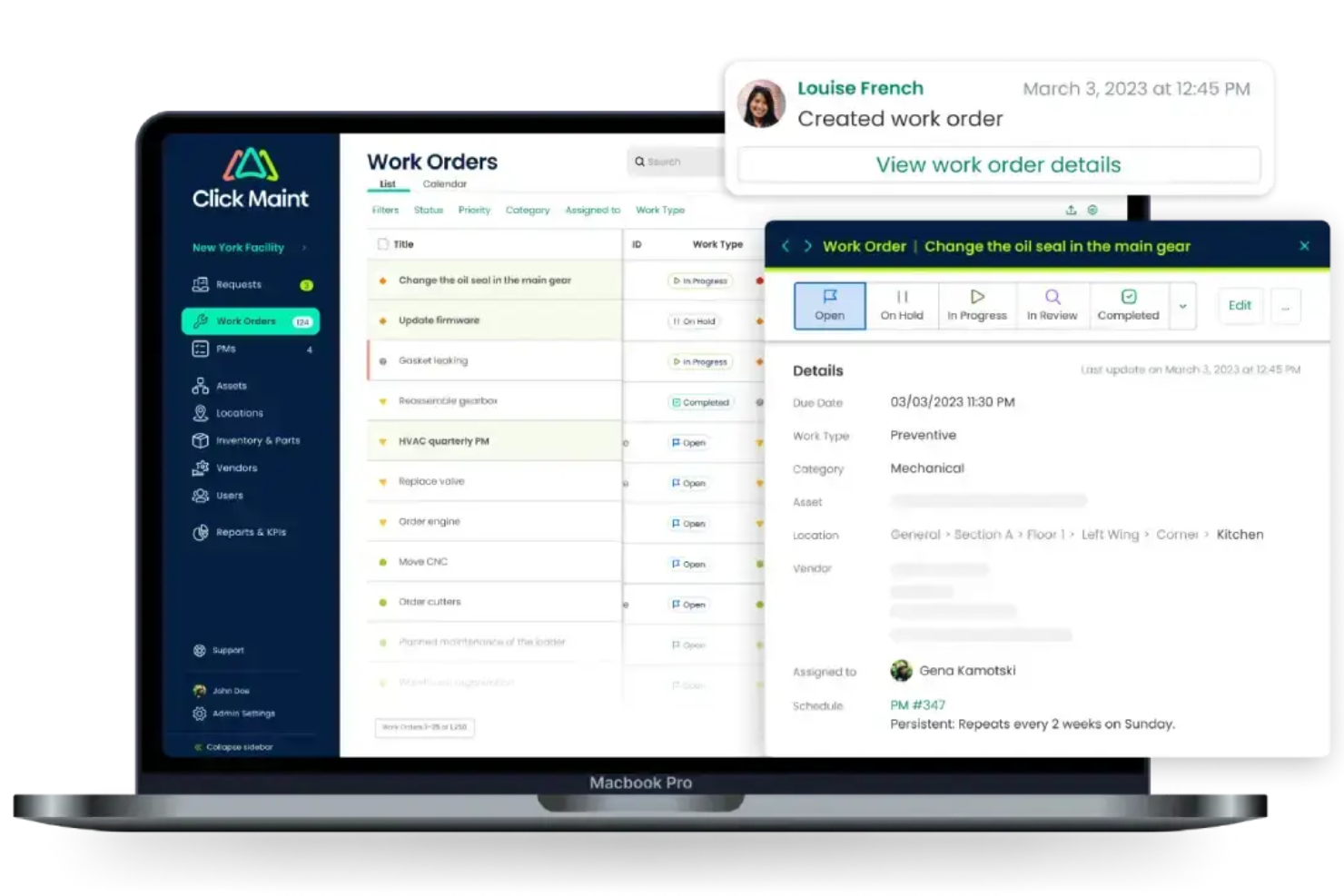
Click Maint CMMS is a computerized maintenance management system (CMMS) built for facilities and maintenance teams—covering work order management, preventive maintenance scheduling, asset tracking, parts inventory, and technician dispatch.
Who Is Click Maint CMMS Best For?
Click Maint CMMS is a strong fit for hotel maintenance teams and facilities managers who need a dedicated system to track work orders, assets, and scheduled maintenance tasks.
Why I Picked Click Maint CMMS
I've included Click Maint CMMS in my top picks because its maintenance scheduling workflows are genuinely well-built for hotel operations. You can set up recurring preventive maintenance tasks on flexible intervals (hourly, daily, monthly) and attach SOP checklists directly to each scheduled job. I also like that the dispatch management feature lets you assign scheduled work to specific technicians or teams, so nothing sits unassigned during a busy weekend.
Click Maint CMMS Key Features
- Work order management: Create, prioritize, and track work orders from submission to completion, with status updates visible across your maintenance team.
- Asset tracking: Log every piece of hotel equipment with full maintenance histories, QR code scanning, and location tagging for fast identification.
- Parts and inventory management: Track spare parts stock levels, set reorder thresholds, and link parts directly to work orders.
- Maintenance reporting dashboard: Access KPI reports covering work order completion rates, asset downtime, and technician performance in one view.
Click Maint CMMS Integrations
Native integrations are not clearly documented for Click Maint CMMS. Click Maint's open API makes it easy to integrate with ERP, accounting, and other business systems, and the engineering team can collaborate directly with your IT staff to ensure smooth, secure, and efficient integration.
Pros and Cons
Pros:
- Built-in scheduling for daily maintenance tasks
- Setup takes as little as two weeks
- QR code scanning speeds up asset lookups
Cons:
- Reporting and asset lifecycle tools need maturing
- Mobile app lacks some desktop features

innRoad
Best for independent hotels
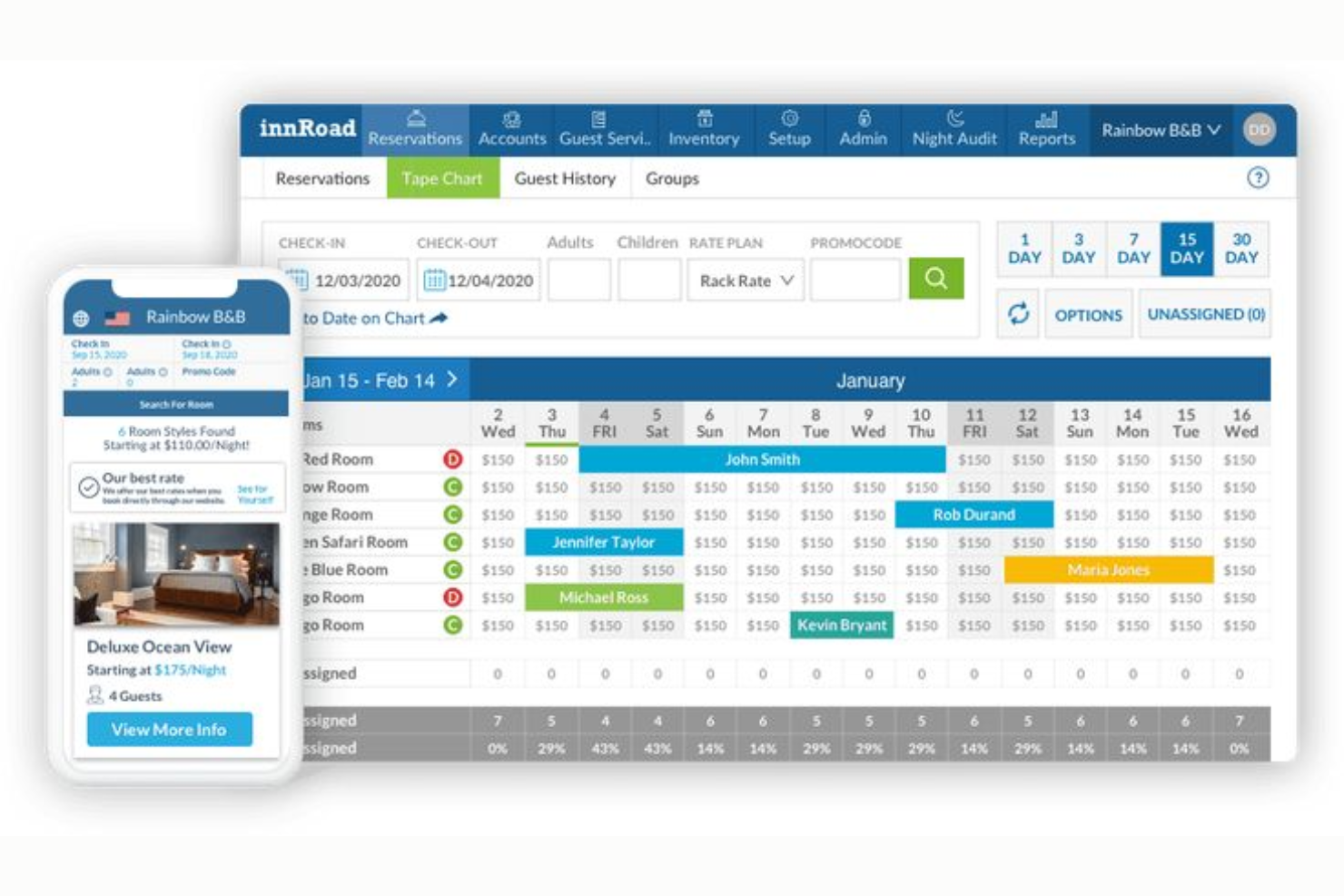
innRoad is an all-in-one property management system for small and independent hotels that includes task creation and assignment, housekeeping management, priority scheduling, revenue management, and a direct booking engine.
Who Is innRoad Best For?
innRoad is a good fit for independent hotel owners who need a single system to handle both daily operations and front desk workflows without managing multiple platforms.
Why I Picked innRoad
I've included innRoad in my top picks because it's purpose-built for independent hotels, not scaled down from an enterprise system. I like that task priority assignments are tied directly to guest arrival times, so your team is always working in the right order during a busy check-in window. The task module also sits inside the same PMS your front desk uses for bookings, payments, and reporting, which means no separate logins or duplicate data entry for a small team.
innRoad Key Features
- Task type categorization: Tag tasks as housekeeping, maintenance, or front desk to-dos when creating them, keeping different teams focused on their own work queues
- Department-level task delegation: Assign tasks to entire departments rather than individual staff, useful when you're short-staffed or roles overlap
- Task performance reporting: Pull reports on task completion rates, resource allocation, and team productivity directly within the PMS
- Real-time task status tracking: Monitor the live status of open and completed tasks across your property without leaving the front desk system
innRoad Integrations
innRoad integrates with Akia for guest messaging, and has direct connections with hundreds of OTAs including Expedia, Booking.com, TripAdvisor, Airbnb, and BedandBreakfast.com. It also offers native GDS integration, and pairs with Revinate for guest communication and data management.
Pros and Cons
Pros:
- Quick onboarding with hands-on support
- Accessible from any device, anywhere
- Task management built into the PMS
Cons:
- Rate change matrix is overly complicated
- Platform experiences occasional data sync freezes

Best for AI-driven insights
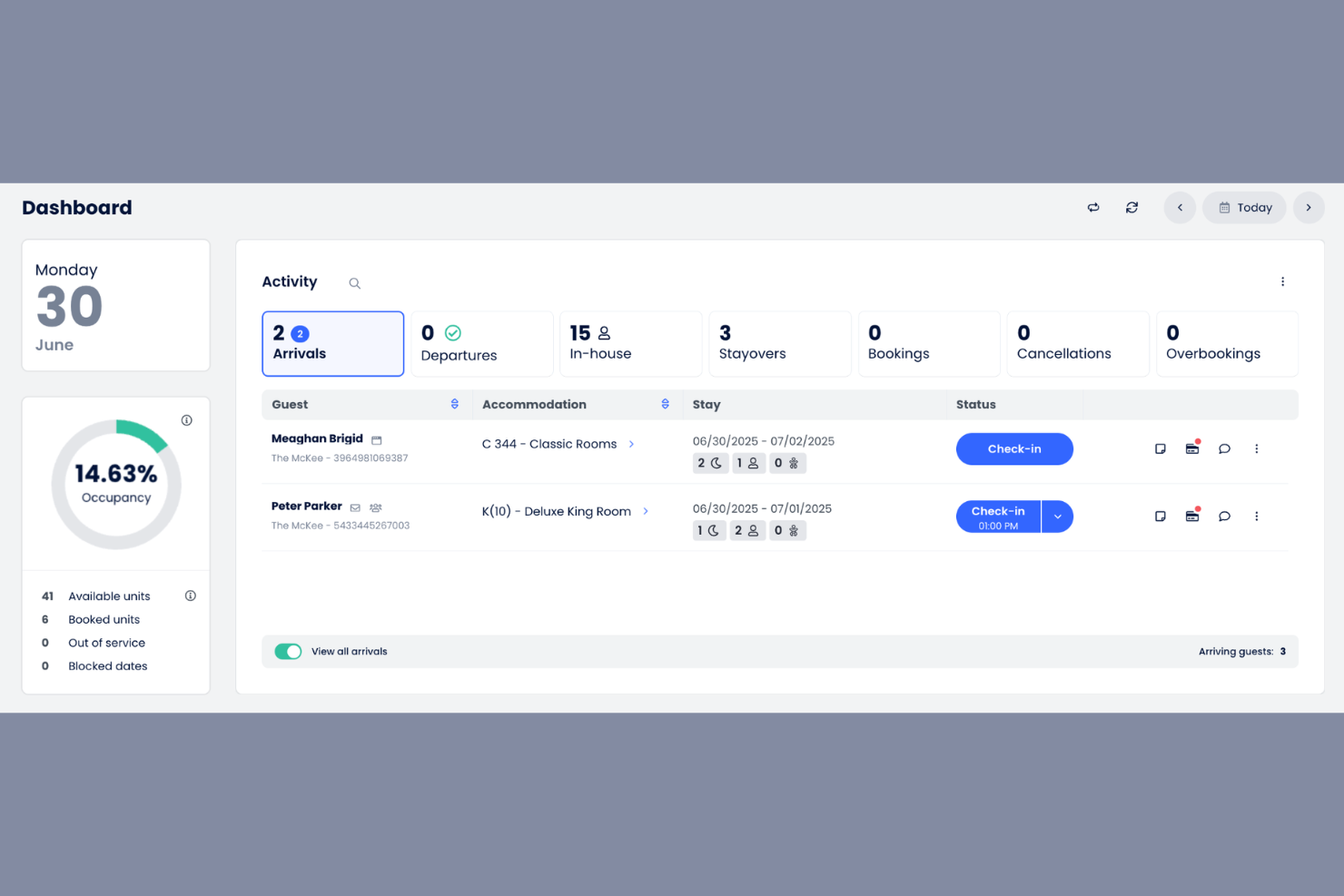
Cloudbeds is a cloud-based property management software that caters to hotels and hostels looking for integrated management solutions. It helps automate tasks like reservations, billing, and analytics, providing comprehensive insights for better decision-making.
Who Is Cloudbeds Best For?
Cloudbeds is a strong fit for independent hotels, boutique properties, and small to mid-size lodging operators who need an all-in-one platform without enterprise-level complexity.
I picked Cloudbeds as one of the best because of Signals, its built-in AI model that processes over 4 billion data points per hour. I particularly like its Revenue Intelligence tool, which uses causal AI to deliver forecasting accuracy up to 95% out to 90 days, so my team can set rates with real confidence. The Guest Marketing CRM is also impressive, using Signals to auto-generate targeted campaigns aimed at guests most likely to book direct.
Cloudbeds Key Features
- Tickets and tasks: Create tasks directly from guest requests, assign them to team members, and track progress in real time from a mobile device.
- Drag-and-drop reservation calendar: Manage reservations, housekeeping, and group bookings from a single calendar that supports 4,000+ rooms and up to 30 concurrent users.
- Unified guest inbox: Centralize messages from email, SMS, WhatsApp, OTAs, and social media into one thread, with auto-translation and team chat built in.
Cloudbeds Integrations
Cloudbeds connects with 450+ integration partners through its marketplace, covering categories like access management, accounting, POS, revenue management, guest experience, and housekeeping. These include PriceLabs, Duetto, FlexMyRoom, Akia, Conduit, Duve, Toast, SiteMinder, Operto, and more. An open API is available for building custom integrations, and Cloudbeds also connects with Zapier.
Pros and Cons
Pros:
- Unified PMS, booking engine, and payments
- Syncs availability across 300+ OTA channels
- Built-in AI demand forecasting via Signals
Cons:
- No built-in accounting module
- System performance suffers frequent data lagging
Best for financial integration
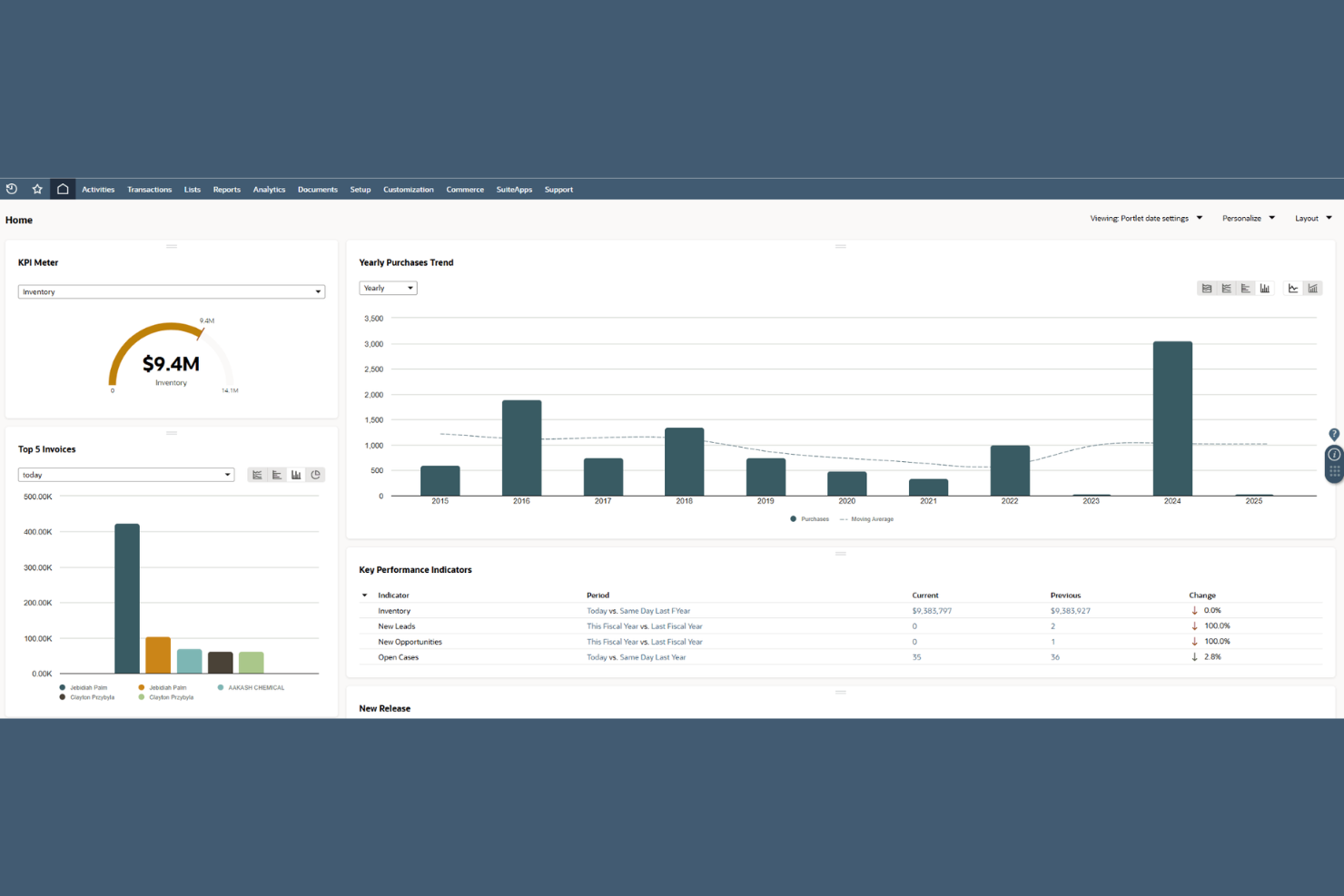
Oracle NetSuite is a cloud-based ERP platform covering financial management, accounting, procurement, inventory, and operational reporting for hotel groups managing multi-entity structures.
Who Is Oracle NetSuite Best For?
Oracle NetSuite is a strong fit for multi-property hotel groups and hospitality management companies that need consolidated financial reporting across entities.
Why I Picked Oracle NetSuite
Oracle NetSuite earns its spot on my shortlist because of how it handles financial consolidation across hotel entities. I like that multi-subsidiary management lets hotel groups close books across all properties simultaneously, with intercompany eliminations handled automatically. The real-time financial dashboard gives finance teams a consolidated P&L, balance sheet, and cash flow view across every property without manual spreadsheet aggregation.
Oracle NetSuite Key Features
- Revenue recognition: Automates revenue allocation across room types, F&B, and ancillary services using configurable recognition rules.
- Fixed asset management: Tracks FF&E and equipment through their full lifecycle, including depreciation schedules and disposal records.
- Procurement management: Manages purchase orders, vendor approvals, and goods receipt workflows for hotel supplies and services.
- Budget vs. actuals reporting: Compares property-level budget targets against real-time actuals within the same reporting interface.
Oracle NetSuite Integrations
Oracle NetSuite's SuiteApp.com marketplace contains over 700 applications spanning finance, e-commerce, logistics, and POS categories. NetSuite Connector provides prebuilt integrations with Shopify, BigCommerce, Adobe Commerce, WooCommerce, Amazon, eBay, Walmart, Salesforce, Oracle Simphony POS, and ShipStation. It's available on Zapier, and the SuiteCloud platform provides REST and SOAP APIs for custom integrations.
Pros and Cons
Pros:
- Scales from single entity to multi-entity operations
- Real-time financial dashboards update without waiting
- Multi-subsidiary consolidation with automatic currency revaluation
Cons:
- Implementation can take several months to complete
- Interface feels dated compared to modern apps

Best for guest service requests
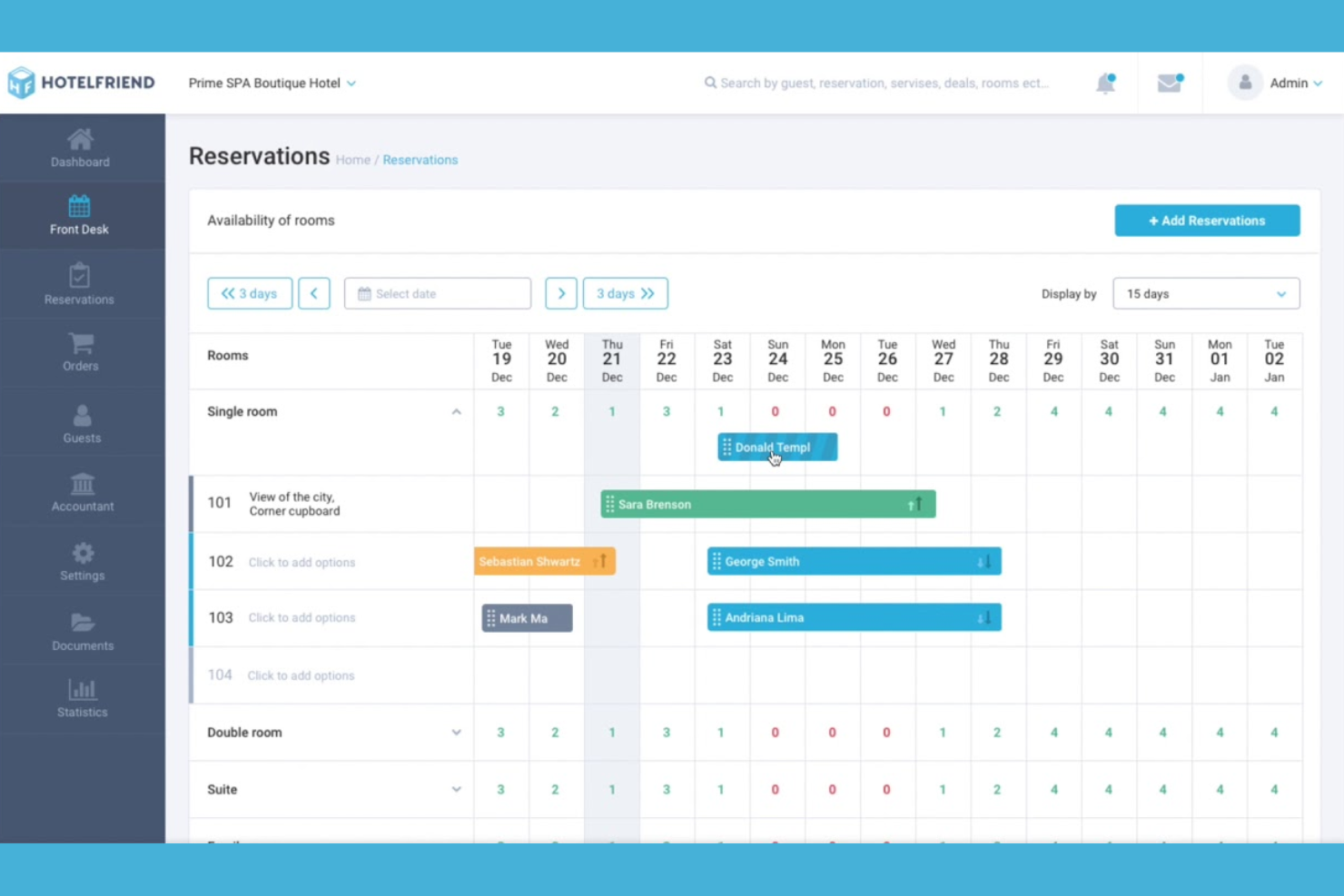
HotelFriend is a hotel management platform with a built-in guest app, employee task management, OTA message hub, housekeeping, and front desk tools all running from one system.
Who Is HotelFriend Best For?
HotelFriend is a strong fit for independent hotels and boutique properties that want to manage guest requests and internal operations from a single platform.
Why I Picked HotelFriend
HotelFriend earns its spot on my shortlist because of how it handles guest service requests end-to-end. Guests submit requests directly through the Guest App, whether that's room service, housekeeping, or a stay extension, and those requests flow straight to the relevant staff with real-time status notifications. I also like the AI-powered in-app chat, which auto-generates responses to common guest messages so your team isn't stuck fielding every routine inquiry manually.
- Employee tasks module: Assign tasks to specific staff members or departments, mark them by urgency, set deadlines, and attach images or comments for context
- Housekeeping scheduling: Track real-time room cleaning status, assign rooms to staff, and log maintenance requests directly within the same system
- OTA MessageHub: Pull Booking.com and Airbnb messages into a centralized PMS inbox so your team manages all guest communication without switching platforms
- Digital check-in and check-out: Guests complete the full check-in flow from their smartphone, including invoice review and PDF delivery, reducing front desk queues
HotelFriend Integrations
HotelFriend offers more than 120 native integrations, including Stripe, PayPal, Adyen, Lightspeed, Vectron, Trello, Tripadvisor, Salesforce, Shopify, Aventri, Lockly, Honeywell, and more. An API is available for custom integrations, and the SALTO KS.
Pros and Cons
Pros:
- Offers centralized housekeeping task automation
- Built-in OTA message hub in PMS
- Guest app for mobile service requests
Cons:
- Employee training requires extra fees
- Primarily focused on the DACH region

Best for small hotel teams
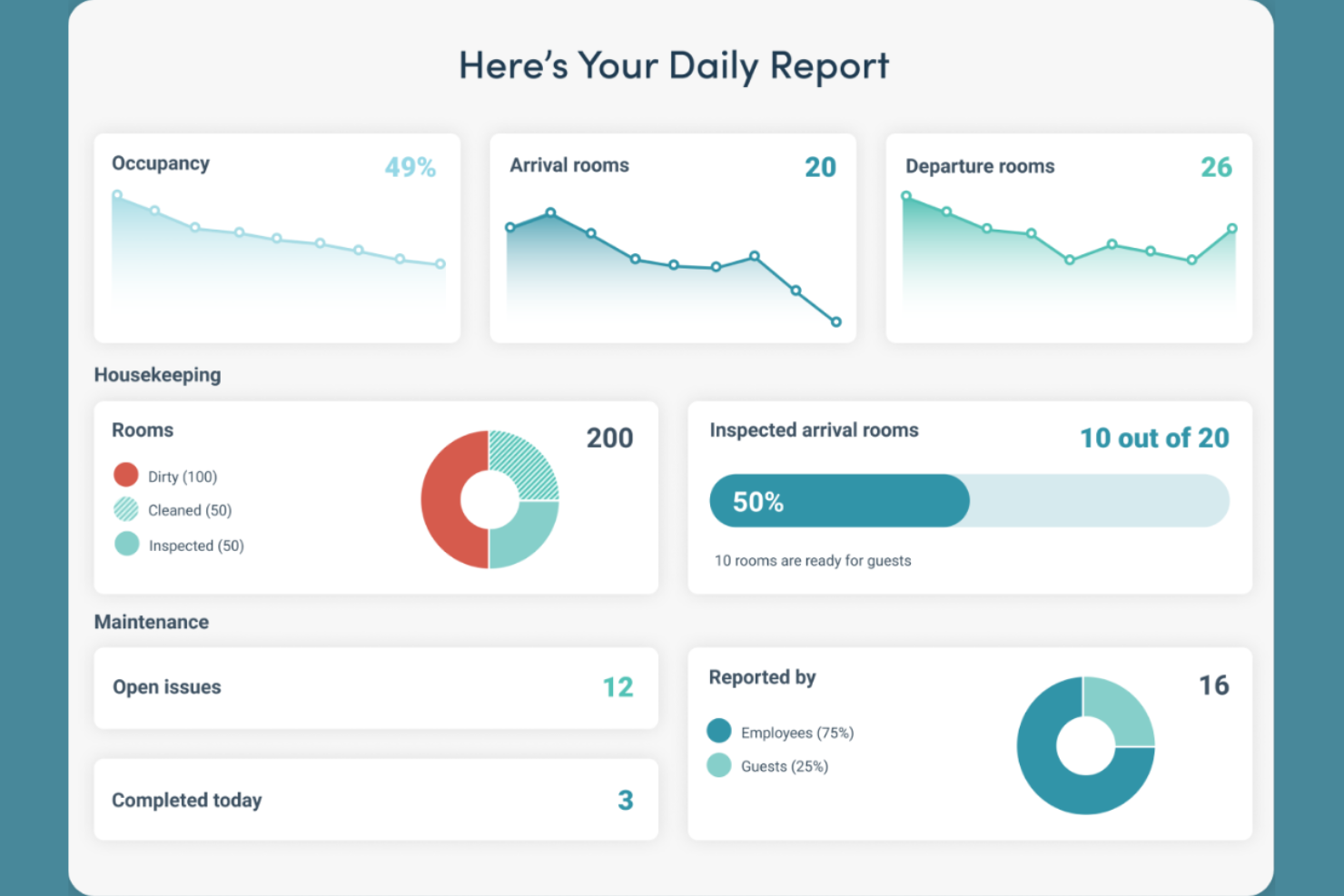
Flexkeeping is a hotel operations platform that centralizes task creation, assignment, prioritization, and real-time monitoring across housekeeping, maintenance, and guest service workflows.
Who Is Flexkeeping Best For?
Flexkeeping is a strong fit for small and independent hotel teams that need a simple way to manage day-to-day operations without a complex setup.
Why I Picked Flexkeeping
Flexkeeping earns its spot on my shortlist because it's built specifically for lean hotel teams that don't have time to manage complicated operations software. I really like how Flexie AI lets staff create tasks using just their voice in over 200 languages, which is a genuine game-changer for multilingual teams without strong tech confidence. I also use the recurring task feature to handle proactive maintenance and housekeeping schedules, so nothing falls through the cracks between shifts.
Flexkeeping Key Features
- Real-time task notifications: Get instant alerts when tasks are assigned, updated, or completed, replacing the need for calls, texts, and emails between staff.
- Pre-arrival guest request scheduling: Schedule guest requests before check-in so your team can prepare and act on them before the guest even arrives.
- Centralized dashboard announcements: Post property-wide updates to a shared dashboard and track which team members have seen them.
- Task priority and time tracking: Assign priority levels and set time credits or minutes to individual tasks so your team knows exactly what to tackle first.
Flexkeeping Integrations
Flexkeeping integrates with leading PMS and guest-facing apps, including Mews, Apaleo, Oracle, Cloudbeds, RMS, Guesty, Shiji, Canary, Protel, and Duve. Additional integrations include Resly, Runnr, D3X, Akia, Planet, Bovo, Hoteza, Beds24, Hirum, SIHOT, and Newbook.
Pros and Cons
Pros:
- Strong cross-department real-time notifications
- Built by a former hotel housekeeper
- Voice-based task creation in 200+ languages
Cons:
- Limited reporting customization options
- Platform requires ongoing manual PMS re-syncs

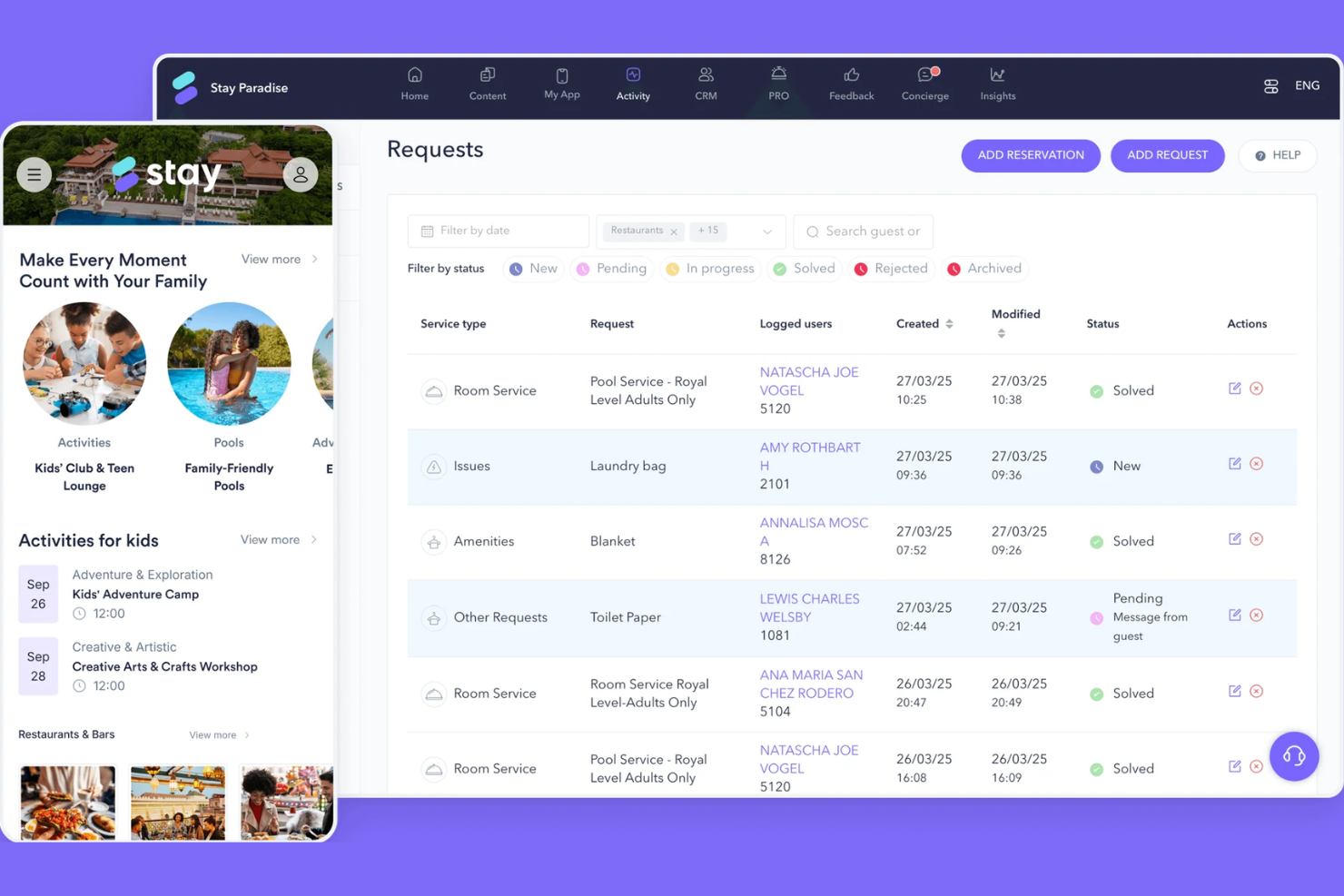
STAY is a hotel task management platform built around guest-facing requests, letting hotel teams manage, track, and respond to guest requests for amenities, housekeeping, room service, and technical support from a centralized dashboard.
Who Is STAY Best For?
STAY is a good fit for full-service and resort hotels where guest requests across housekeeping, room service, amenities, and technical support need to be tracked and managed in one place.
Why I Picked STAY
I've included STAY in my top picks because it closes the loop between guest requests and staff action in a way most task management tools don't. What I find compelling is that guests can track the real-time status of their own requests through the app, which works alongside your booking software to cut down on follow-up calls to the front desk. I also like that the staff app lets team members manage and update tasks from their phones, keeping the whole team connected across housekeeping, room service, amenities, and technical support without being tied to a fixed desk.
STAY Key Features
- Concierge chat: Guests and staff exchange messages directly through the app, keeping all communication tied to specific requests.
- Instant feedback collection: Guests submit feedback during their stay, before checkout, so your team can act on issues in real time.
- Analytics and insights dashboard: View request volume, response times, and department performance data, including credit card transaction speeds, from a centralized reporting view.
- AI concierge: An AI-powered assistant handles common guest questions automatically, routing unresolved queries to the appropriate staff member.
STAY Integrations
STAY offers integrations with over 160 PMS platforms including Opera Cloud, Mews, Avalon, TCA Innsist, QuoHotel, Simphony POS, Hub OS, HotSOS, Hotelkit, Knowcross by Unifocus, and EISI Hotel. Adyen, Stripe, Sabre, and more.
Pros and Cons
Pros:
- Connects to 160+ PMS platforms
- Built-in in-stay feedback before checkout
- Guests track their own request status
Cons:
- No publicly listed pricing plans
- Analytics dashboards experience delayed data updates

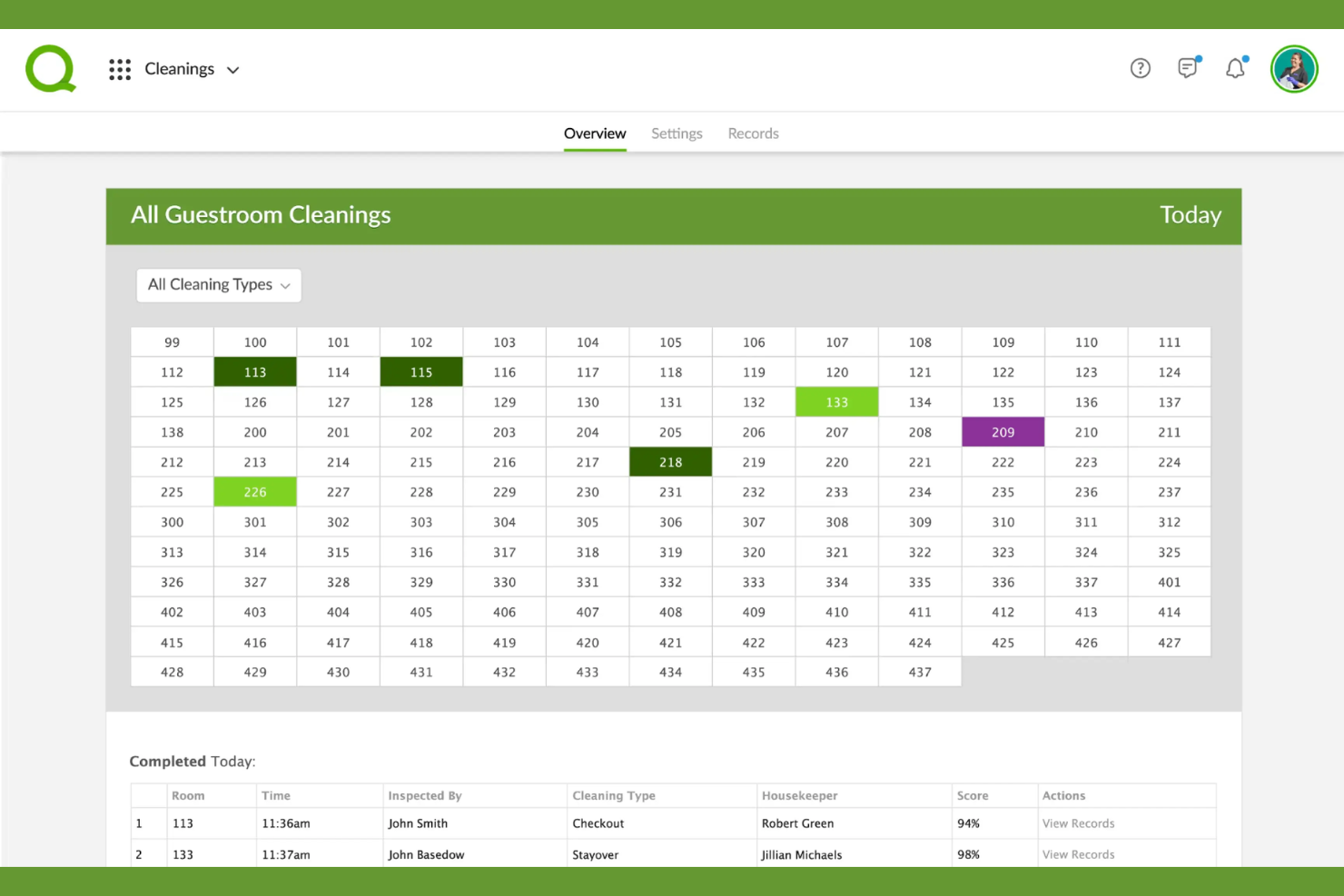
Quore is a hotel operations management platform covering task management, work orders, housekeeping, preventative maintenance, inspections, and complaint tracking across front desk, engineering, and management teams.
Who Is Quore Best For?
Quore is a strong fit for hotel groups and multi-property operators, from select-service hotels to global chains like IHG, Hyatt, and Choice Hotels, that need a single platform to coordinate housekeeping, engineering, and front desk teams.
Why I Picked Quore
Quore earns its spot on my shortlist because of how thoroughly it helps busy hoteliers handle housekeeping management at the operational level. I particularly like the Cleanings Plus add-on, which gives executive housekeepers digital breakout boards, real-time room status updates, and associate performance records all in one place. Inspection scoring with trend tracking is also a standout, letting supervisors document failed items and measure improvement over time rather than relying on paper checklists. Combine that with built-in lost and found logging and shift-specific checklists, and Quore covers nearly every layer of the housekeeping workflow.
Quore Key Features
- Preventative maintenance calendar: Schedule, assign, and track recurring PMs across property assets using custom templates, with auto-triggered work orders when issues are flagged.
- Complaints tracking: Log guest complaints, assign them to staff, set SMS alerts, and track resolution time and compensation in one place.
- Readings tracking: Record boiler, meter, and pool chemical readings from mobile and pull reporting across time periods.
Quore Integrations
Quore integrates with guest messaging platforms, including Kipsu, Whistle for Cloudbeds, Medallia Concierge, Revinate, and Akia, as well as ChoiceADVANTAGE, IHG Concerto and Canary Technologies.
Pros and Cons
Pros:
- Supports multilingual cross-department communication
- Digital desk log with room notes tracking
- Auto-routes maintenance requests to correct staff
Cons:
- Initial system training takes long
- Mobile app has limited feature access
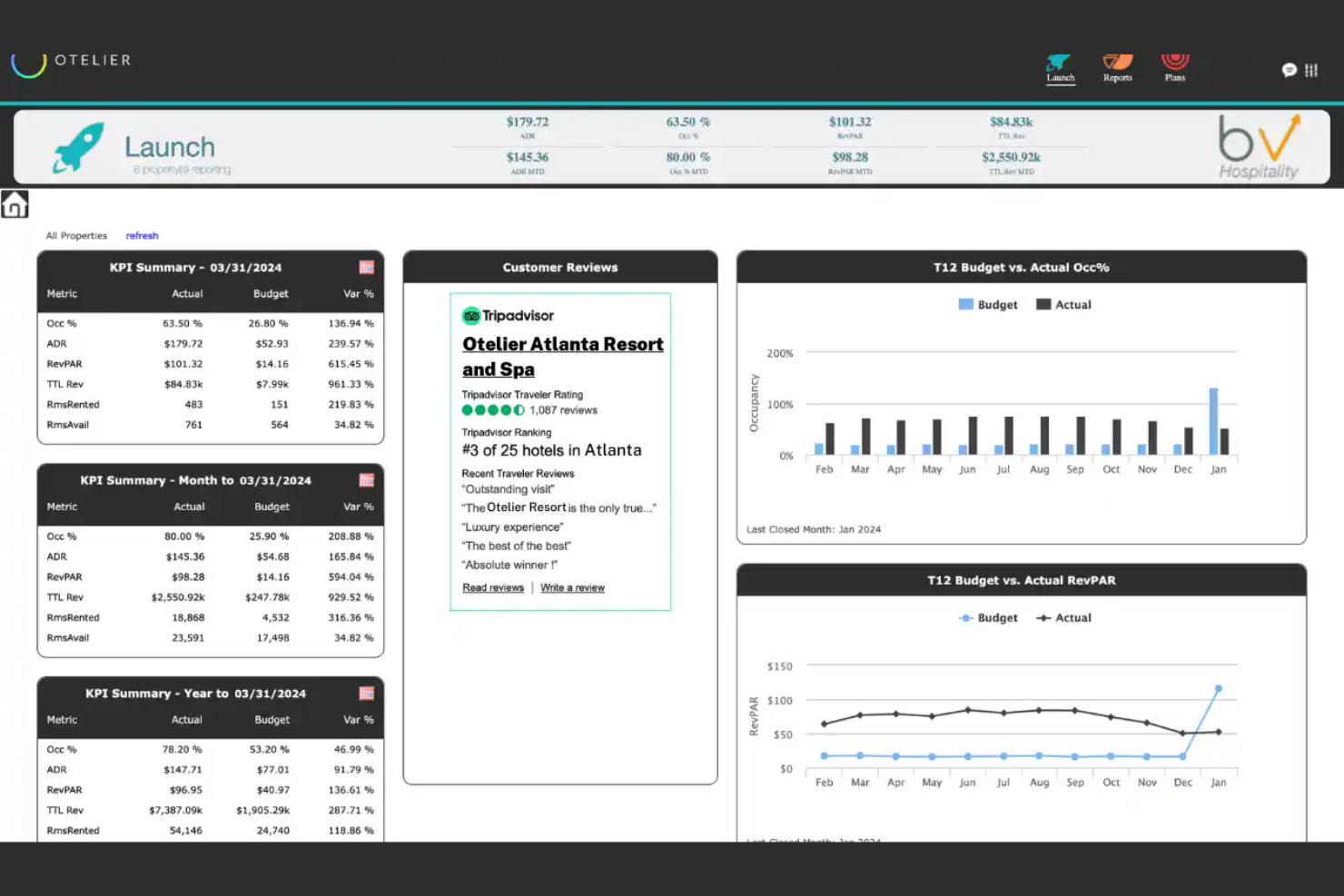
Otelier is a cloud-based hotel management platform built around back-office automation, business intelligence, and budgeting and forecasting across hotel portfolios.
Who Is Otelier Best For?
Otelier is a strong fit for hotel management companies, ownership groups, and multi-property operators who need centralized visibility and back-office control across an entire portfolio.
Why I Picked Otelier
I picked Otelier as one of the best because its task automation goes well beyond a simple checklist. Its OpsPack and DigiAudit products handle nightly report storage, signature workflows, and audit compliance automatically, so your team isn't chasing down approvals or printing reports. I also like that OTA reconciliation and income journaling run without manual input, which cuts the kind of repetitive back-office work that pulls operations staff away from the floor.
Otelier Key Features
- IntelliSight dashboards: Aggregate data from multiple PMS and POS systems into customizable performance dashboards
- TruePlan budgeting: Build, manage, and update property-level budgets and rolling forecasts in one place
- Nightly report repository: Centralize and index nightly reports in secure cloud storage for easy retrieval
- Invoice management: Track and manage invoice workflows across properties from a single back-office interface
Otelier Integrations
Otelier offers 440+ pre-built integrations across categories like PMS, accounting, POS, labor, CRM, spa, golf, and revenue management, including Oracle Opera, Cloudbeds, Stayntouch, ADP, Paycor, Sage 300, QuickBooks, M3, Aptech, Infor Payroll, and Tripleseat.
Pros and Cons
Pros:
- Cloud-based access from any location
- Paperless night audit and document storage
- Automated multi-property reporting and dashboards
Cons:
- Initial setup requires extensive manual configuration
- Platform speed can lag during navigation

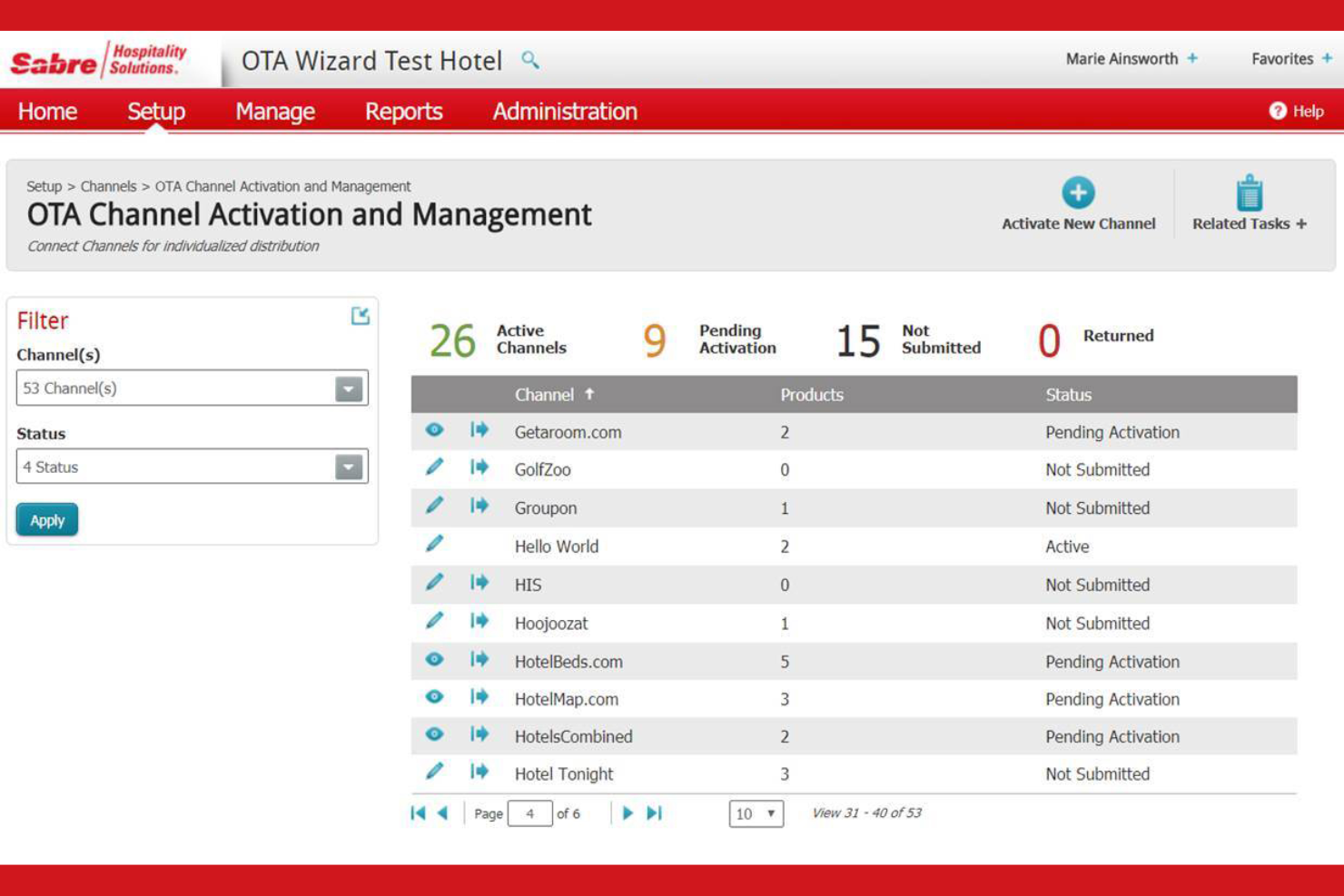
SynXis by Sabre Hospitality is a cloud-based hotel commerce and distribution platform covering central reservations, property management, channel distribution, booking engine, retailing, and analytics across single properties and global hotel chains.
Who Is SynXis Best For?
SynXis is built for multi-property hotel groups, global chains, and large independent hotels that need centralized distribution and reservations management across markets and currencies.
Why I Picked SynXis
I picked SynXis as one of the best because of the scale at which it operates and what that means for multi-property management in practice. The SynXis CRS connects to over 600 distribution partners, including OTAs, GDS channels, and direct booking engines, keeping rates and inventory synchronized across every channel globally. I also like SynXis Insights, which pulls reservation data from the booking engine, voice agent, GDS, and OTAs into six pre-built dashboards, giving chain-level and property-level administrators performance visibility without relying on a central team to share reports.
SynXis Key Features
- SynXis Retailing: Sell ancillary services, packages, and experiences at any point in the guest journey, with dynamic pricing and inventory controls configurable per property.
- SynXis Voice Agent: A call center solution that gives reservation agents real-time access to inventory, rates, and retailing offers across all properties in multiple languages.
- Gift Cards and vouchers: Issue and redeem digital gift cards and experience vouchers directly through the booking flow, creating an additional pre-stay revenue channel.
- SynXis Property Hub: A cloud-native PMS for limited-service hotels that covers reservations, folio management, housekeeping schedules, and bulk rate and inventory updates from a single interface.
SynXis Integrations
SynXis coordinates hotel information across 600+ integrations, connecting to OTAs, GDS channels, and PMS platforms, including Mews, Cloudbeds, RoomKeyPMS, Stayntouch, and Sabre. An API is available through the SynXis Developer Portal for custom integrations.
Pros and Cons
Pros:
- Supports multiple languages and currencies
- Syncs rates across 600+ distribution channels
- Manages multi-property portfolios from one dashboard
Cons:
- Bulk updates experience frequent system lagging
- New feature development can be slow
Other Hotel Task Management Software
Here are some additional hotel task management software options that didn’t make it onto my shortlist, but are still worth checking out:
- Voiset
For voice command tasks
- Eptera
For compliance tracking
- Mews
For cloud-based management
- WebRezPro
For scalable hotel PMS
- Stayflexi
For flexible booking options
- Hostaway
For multi-channel distribution
- RoomRaccoon
For all-in-one management
- HotelKey
For mobile-first operations
- Preno
For user-friendly interface
- Actabl
For data-driven insights


How I Evaluate Hotel Task Management Software
I split my evaluation into two layers: the baseline every tool must hit—like real-time room status and PMS sync—and the differentiators that set the best options apart for your property's needs.
Core Functionality (Table Stakes For This List)
When I'm selecting tools for my list, I rank each one on a scale from 0 (does not offer the functionality) to 5 (excels in this area) for each core functionality listed below. Then, I calculate the tool's total score into a percentage. Each tool needs to achieve a minimum total score of 55% to be considered for inclusion.
- Task Assignment & Dispatch: I check whether you can route a room clean to a specific housekeeper or send a plumbing fix to the right engineer with clear priorities and deadlines attached.
- Guest Request Management: Every tool I evaluate should log, assign, and track guest requests from intake to resolution—think extra pillows, late checkouts, or noise complaints.
- Room & Work Order Tracking: Real-time visibility into which rooms are dirty, inspected, or out of order matters, so I look for live status boards that sync with open work orders.
- Mobile Staff Accessibility: Housekeepers and engineers aren't sitting at desks, so I evaluate whether the mobile app lets them receive tasks, update statuses, and upload photos on the go.
- Preventive Maintenance Scheduling: I look for the ability to set recurring tasks tied to specific rooms or assets, like quarterly HVAC filter changes or annual fire extinguisher inspections.
- PMS Integration: Connecting with your property management system is essential, so I check for certified integrations with platforms like Opera, Mews, or Cloudbeds for two-way data sync.
Once I have a list of tools that meet the criteria, I consider what sets each platform apart.
Differentiating Factors (What Sets Vendors Apart)
Here's how I compare and contrast different vendors:
Standout Features
Multi-property management is a big differentiator for hotel groups—I look for centralized dashboards that let you benchmark performance across locations. Automated escalation rules also matter: if a guest's maintenance request sits untouched for 30 minutes, the right supervisor should get notified without anyone lifting a finger. I also evaluate analytics capabilities, specifically whether the tool tracks room turnover times and staff task completion rates to help you spot bottlenecks during peak seasons.
Beyond Features
Pricing structure matters because hospitality operates differently—I evaluate whether vendors offer per-room licensing that scales with seasonal occupancy versus rigid per-user models that penalize properties with high turnover. Implementation speed is another key factor. Hotels run 24/7, so I consider whether a platform can go live within days and offers multilingual onboarding resources for diverse housekeeping teams. I also look at how deeply a tool connects with the broader hotel tech stack beyond the PMS, including guest messaging platforms and IoT devices like smart locks.
How to Choose Hotel Task Management Software
It’s easy to get bogged down in long feature lists and complex pricing structures. To help you stay focused as you work through your unique software selection process, here’s a checklist of factors to keep in mind:
| Factor | What to Consider |
|---|---|
| Scalability | Will the software grow with your business? Consider future expansion plans and whether the tool can handle increased volume or more properties without performance issues. Look for solutions that offer flexible scaling options. |
| Integrations | Does it work with your existing systems? Check for compatibility with current tools like booking engines, payment gateways, and CRM systems. Avoid solutions that require extensive third-party integration work. |
| Customizability | Can you tailor the software to fit your needs? Evaluate how easily you can modify workflows, reports, and settings. Beware of overly rigid solutions that limit customization options. |
| Ease of use | Is the software intuitive for your team? Test the interface to ensure it’s user-friendly and doesn’t require extensive training. Avoid complex systems that slow down daily operations. |
| Implementation and onboarding | How long will it take to get started? Assess the time and resources needed for setup and training. Look for vendors offering comprehensive onboarding support to avoid prolonged downtime. |
| Cost | Is it within your budget? Compare the total cost of ownership, including setup fees, monthly subscriptions, and any hidden charges. Ensure pricing aligns with the value provided. |
| Security safeguards | How secure is the software? Verify encryption standards, data backup procedures, and compliance with data protection regulations. Avoid solutions with weak security measures that could compromise sensitive information. |
What Is Hotel Task Management Software?
Hotel task management software is a tool designed to help hotels manage daily operations more efficiently. These tools are typically used by hotel managers, front desk staff, and housekeeping teams to improve coordination and ensure tasks are completed on time. Task assignment, real-time notifications, and guest request management features help with organization, communication, and service delivery. Overall, these tools enhance operational efficiency and guest satisfaction in the hospitality industry.
Features of Hotel Task Management Software
When selecting hotel task management software, keep an eye out for the following key features:
- Task assignment and tracking: Allows you to assign tasks to staff and monitor their progress to ensure everything is completed on time.
- Real-time notifications: Keeps your team updated on changes and new tasks, improving communication and response times.
- Guest request management: Helps manage and prioritize guest requests efficiently, enhancing the overall guest experience.
- Automated billing: Optimizes the billing process by automating invoicing and payment tracking, reducing manual errors.
- Customizable dashboards: Lets you tailor the interface to display the most relevant information for your operations.
- AI-driven insights: Provides data-driven recommendations and analytics to help you make informed decisions.
- Mobile app access: Enables staff to manage tasks and communicate on the go, increasing flexibility and efficiency.
- Compliance tracking: Ensures adherence to industry regulations and standards, reducing the risk of non-compliance.
- Multi-property management: Supports operations across multiple locations, ideal for hotel chains and groups.
- Voice command capabilities: Allows hands-free task management, useful in busy environments where physical interaction is limited.
Benefits of Hotel Task Management Software
Implementing hotel task management software provides several benefits for your team and your business. Here are a few you can look forward to:
- Improved efficiency: Automates routine tasks and reduces manual errors, allowing your team to focus on more important duties.
- Enhanced communication: Real-time notifications and mobile access ensure your staff stays informed and connected, improving collaboration.
- Better guest satisfaction: Efficient guest request management and personalized service options lead to a more enjoyable guest experience.
- Increased compliance: Compliance tracking features help you adhere to industry regulations, reducing the risk of penalties.
- Data-driven decisions: AI-driven insights and analytics provide valuable information to help you make informed business choices.
- Scalability: Multi-property management supports growth by allowing you to efficiently manage operations across multiple locations.
- Flexibility: Mobile app access and voice command capabilities offer convenient task management options in various environments.
Costs and Pricing of Hotel Task Management Software
Selecting hotel task management software requires an understanding of the various pricing models and plans available. Costs vary based on features, team size, add-ons, and more. The table below summarizes common plans, their average prices, and typical features included in hotel task management software solutions:
Plan Comparison Table for Hotel Task Management Software
| Plan Type | Average Price | Common Features |
|---|---|---|
| Free Plan | $0 | Basic task tracking, limited users, and essential notifications. |
| Personal Plan | $5-$25/user/month | Task assignment, mobile access, and basic reporting. |
| Business Plan | $30-$50/user/month | Advanced analytics, integrations, and guest request management. |
| Enterprise Plan | $60-$100/user/month | Customizable dashboards, multi-property management, and compliance tracking. |
Hotel Task Management Software FAQs
Here are some answers to common questions about hotel task management software:
How do I choose the right hotel task management software?
Start by identifying your hotel’s specific needs, like task assignment, guest management, or compliance tracking. Compare software options based on features, ease of use, and cost. Consider scalability if you plan to grow. Test a few tools with free trials to see which fits best with your operations.
Can hotel task management software integrate with my existing systems?
Yes, many hotel task management software solutions offer integrations with popular systems like booking engines, CRM, and payment gateways. Check the software’s integration capabilities to ensure it works with your current tools. This can save time and reduce errors by keeping all your systems connected.
Is training required to use hotel task management software?
Yes, some level of training is usually needed, especially for complex systems. Most vendors offer resources like tutorials, webinars, and interactive guides to help your team get started. Take advantage of these resources to ensure a smooth transition and help your staff get up to speed quickly.
What kind of support can I expect from software vendors?
Support varies by vendor, but most offer resources like documentation, FAQs, and live chat. Some provide 24/7 support or dedicated account managers for higher-tier plans. Check the support options available to ensure they meet your needs, especially if you anticipate needing help during peak times.