
RMS Bewertung: Vorteile, Nachteile, Funktionen und Preisübersicht
RMS vereint die Immobilienverwaltung auf einer Plattform – von Reservierungen und Gästemanagement über Housekeeping, Berichte und Zahlungen bis hin zu Hospitality-Operationen.

Wir prüfen Tools unabhängig, und Provisionen helfen, unsere Tests zu finanzieren. Siehe unsere transparente Richtlinie, unsere Methodik oder schlagen Sie ein Tool vor.
RMS is a hotel property management software built for accommodation operators who need to manage reservations, rates, housekeeping, and guest communications from one platform. I'd consider it if you run a resort, holiday park, or multi-property portfolio. RMS handles complex accommodation types and multi-site operations better than something like Cloudbeds, which tends to be a stronger fit for traditional independent hotels with simpler operational structures.
RMS Evaluation Summary
4.4/5
- Pricing upon request
- Free demo available
Warum Sie unseren Software-Empfehlungen vertrauen können
6,700+
Reviews
20
Industry experts
16+
Evaluation factors
14
Years
Unser Team testet und bewertet Software seit 2012. Als Führungskräfte in der Hotellerie wissen wir selbst, wie schwierig – und wichtig – es ist, die richtige Software auszuwählen.
Für diesen Leitfaden haben wir Tools mithilfe von praktischen Tests und unabhängiger Recherche bewertet und dabei unsere Bewertungskriterien angewendet.
Unsere Bewertungen spiegeln unser menschliches redaktionelles Urteilsvermögen wider, keine Verkaufsstrategie.
RMS Overview
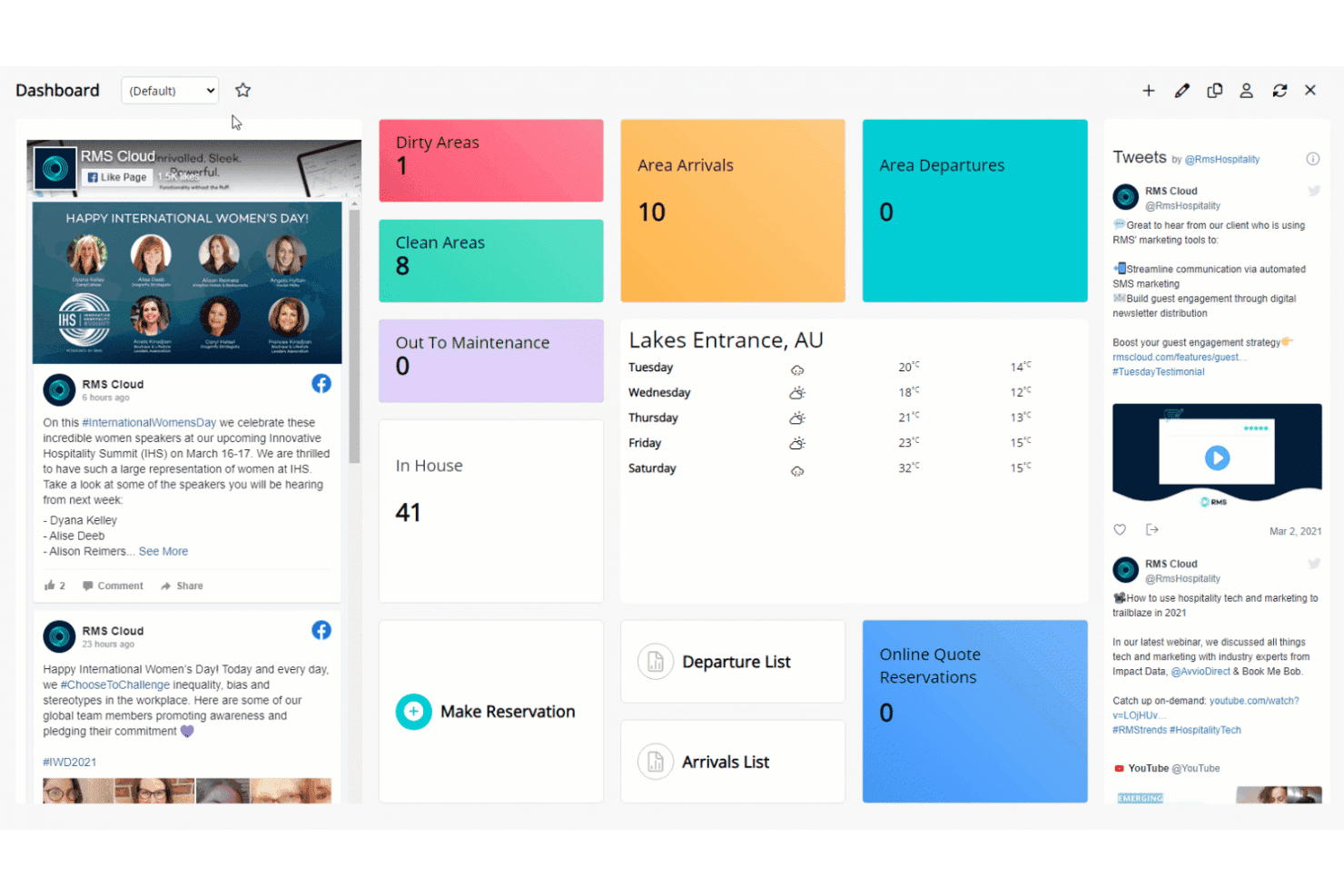
In my opinion, RMS stands out for its powerful customization, automation, and flexible pricing compared to most options on the market. I think the interface feels modern and easy for new users, and you get extensive integrations—especially helpful if you want to connect channel managers or payment gateways. Onboarding takes effort but is well-supported. When I compare RMS to others, I notice its reporting is more advanced, though small boutiques may find the setup more than they need.
I’d suggest RMS is best for mid-sized or multi-property hotels wanting centralized control and scalable operations.
Pros
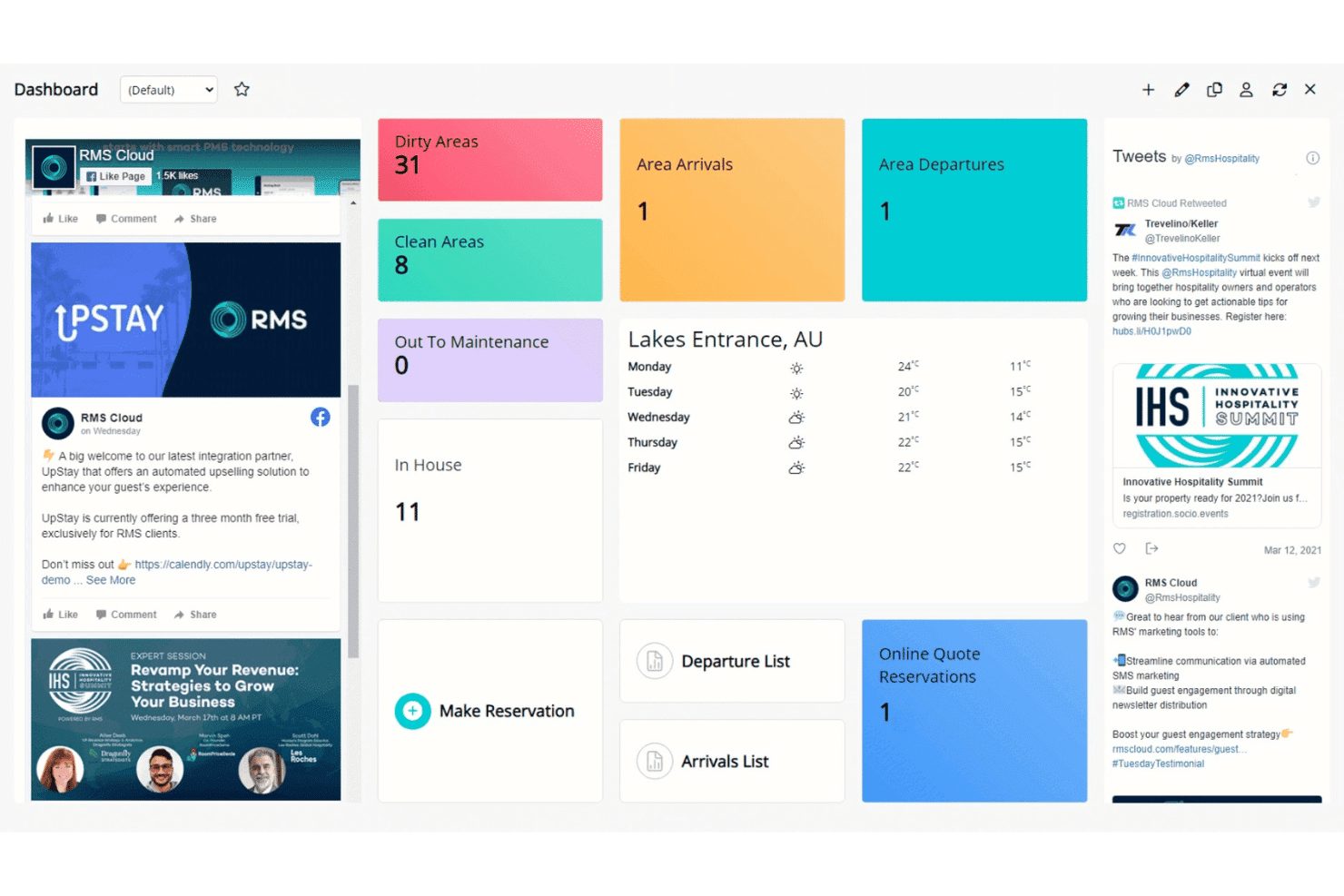
- Customizable dashboards to tailor workflows for different properties
- Advanced rate and revenue management tools included
- Automated guest messaging and communication features
Cons
- Initial system setup can be time-consuming for new users
- Some users report slow customer response times
- Reports interface can feel overwhelming for smaller teams
Is RMS Right For Your Needs?
Who Would be a Good Fit for RMS?
RMS is well-suited for operators who need automation, multi-property oversight, and advanced rate management. Large hotels, resorts, and portfolios benefit from its customizable workflows and robust reporting. Teams managing complex operations or high guest volumes will appreciate features like the interactive tape chart, guest portal, and deep analytics.
RMS also supports properties that want branded guest self-service and flexible booking rules.
- Large Hotel ChainsRMS supports centralized oversight, advanced analytics, and multi-property management with custom dashboards for regional and head office teams.
- Resorts and CampgroundsFeatures like dynamic pricing, diverse accommodation support, and guest portals help manage various inventory types and guest flows.
- Serviced ApartmentsAutomated invoicing, long-stay rate structures, and guest self-service tools are ideal for apartment-style operations with repeat and extended-stay clients.
- Multi-Location OperatorsRMS handles multiple properties, regions, or brands in one unified platform, allowing shared workflows and consolidated reporting.
- Revenue Management TeamsThe advanced pricing, rules engine, and real-time updates suit teams focused on maximizing profit and controlling rate strategy.
- IT/Admin DepartmentsCustom workflows, an API, and flexible configuration levels provide IT teams with tools to tailor RMS to unique property processes.
Who Would be a Bad Fit for RMS?
RMS is less suitable for small, single-property operators and businesses where simplicity or low cost is the main priority. Seasonal operators or teams with frequent staff turnover may find the robust feature set more than they need. Boutique inns and those with highly basic operational needs could find the onboarding and ongoing management cumbersome compared to leaner solutions.
- Small B&BsRMS’s feature set and cost usually outweigh the operational needs of small bed and breakfasts handling only a handful of rooms.
- Solo Property ManagersIts depth and training requirements add unnecessary complexity for a single-person operation.
- Vacation Rental OwnersSimple platforms tailored specifically to short-term rentals may provide a quicker setup and easier owner management than RMS.
- Event VenuesEvent-focused businesses may not require accommodation-centric features, making much of RMS’s functionality unnecessary.
- Seasonal LodgesShort operation periods often don’t justify the effort of learning, configuring, and maintaining an advanced platform like RMS.
- Non-technical TeamsDepartments lacking dedicated tech or admin resources may struggle with initial setup and ongoing customization due to RMS’s range of configuration options.
Wie wir Tools testen und bewerten
Wir haben jahrelang unser System zur Softwareprüfung und -bewertung aufgebaut, verfeinert und verbessert. Der Bewertungsmaßstab ist darauf ausgelegt, die Feinheiten der Softwareauswahl zu erfassen und herauszustellen, was ein Tool effektiv macht, wobei der Fokus auf den kritischen Aspekten des Entscheidungsprozesses liegt. Unten sehen Sie genau, wie unser Test- und Bewertungssystem anhand von sieben Kriterien funktioniert. Es ermöglicht uns eine unparteiische Beurteilung der Software basierend auf Kernfunktionen, besonderen Merkmalen, Benutzerfreundlichkeit, Einarbeitung, Kundensupport, Integrationen, Kundenrezensionen und Preis-Leistungs-Verhältnis.
Kernfunktionalität (25% der Gesamtbewertung)
Ausgangspunkt unserer Bewertung ist immer die Kernfunktionalität des Tools. Verfügt es über die grundlegenden Funktionen und Merkmale, die Nutzer:innen erwarten? Sind einige dieser Kernfunktionen in teureren Preistarifen gesperrt? Im Kern erwarten wir, dass sich ein Tool mit den Basisfähigkeiten seiner Konkurrenten messen kann.
Besondere Merkmale (25% der Gesamtbewertung)
Danach bewerten wir ungewöhnliche, herausragende Merkmale, die über die typischen Kernfunktionen vergleichbarer Tools hinausgehen. Eine hohe Punktzahl spiegelt spezialisierte oder einzigartige Funktionen wider, die das Produkt schneller, effizienter oder für Nutzer:innen besonders wertvoll machen. Wir bewerten auch, wie leicht sich das Tool mit anderen Programmen im technischen Ökosystem verbinden lässt, um dessen Funktionalität und Nutzen zu erweitern. Tools mit umfangreichen, nativen Integrationen, Drittanbieteranbindungen und API-Zugriff für individuelle Integrationen erzielen die höchsten Ergebnisse.
Benutzerfreundlichkeit (10% der Gesamtbewertung)
Wir berücksichtigen, wie schnell und einfach sich mit dem Tool Aufgaben erledigen lassen, die zur Kernfunktionalität gehören. Hoch bewertete Software ist gut gestaltet, intuitiv zu bedienen, bietet Apps für Mobilgeräte, stellt Vorlagen bereit und lässt relativ komplexe Aufgaben einfach erscheinen.
Einarbeitung (10% der Gesamtbewertung)
Uns ist bewusst, wie wichtig eine schnelle Einführung eines neuen Systems im Team ist. Daher bewerten wir, wie einfach ein Tool mit minimalem Training zu erlernen und zu nutzen ist. Wir prüfen, wie schnell sich ein Teammitglied ohne Vorerfahrung anmelden und beginnen kann, das Tool zu verwenden. Lösungen, die mit wenig oder keiner Unterstützung auskommen, schneiden am besten ab.
Kundensupport (10% der Gesamtbewertung)
Wir prüfen, wie schnell und einfach man telefonisch, per Live-Chat oder in der Wissensdatenbank Hilfe findet, um Probleme zu beheben. Tools und Anbieter, die Echtzeit-Unterstützung bieten, erzielen die besten Werte, während Chatbots am schlechtesten abschneiden.
Kundenrezensionen (10% der Gesamtbewertung)
Über unsere eigenen Tests und Bewertungen hinaus berücksichtigen wir den Net Promoter Score aktueller und ehemaliger Kund:innen. Wir prüfen, wie wahrscheinlich sie sich erneut für das Tool entscheiden würden, rein basierend auf den Kernfunktionen. Hoch bewertete Software reflektiert einen hohen Net Promoter Score von bestehenden oder früheren Kund:innen.
Preis-Leistungs-Verhältnis (10% der Gesamtbewertung)
Abschließend bewerten wir unter Berücksichtigung aller anderen Kriterien den durchschnittlichen Einstiegspreis im Vergleich zu den Kernfunktionen sowie zum Wert der anderen Bewertungsmerkmale. Software, die mehr für weniger bietet, wird höher bewertet.
Core Features
Reservation and Booking Management
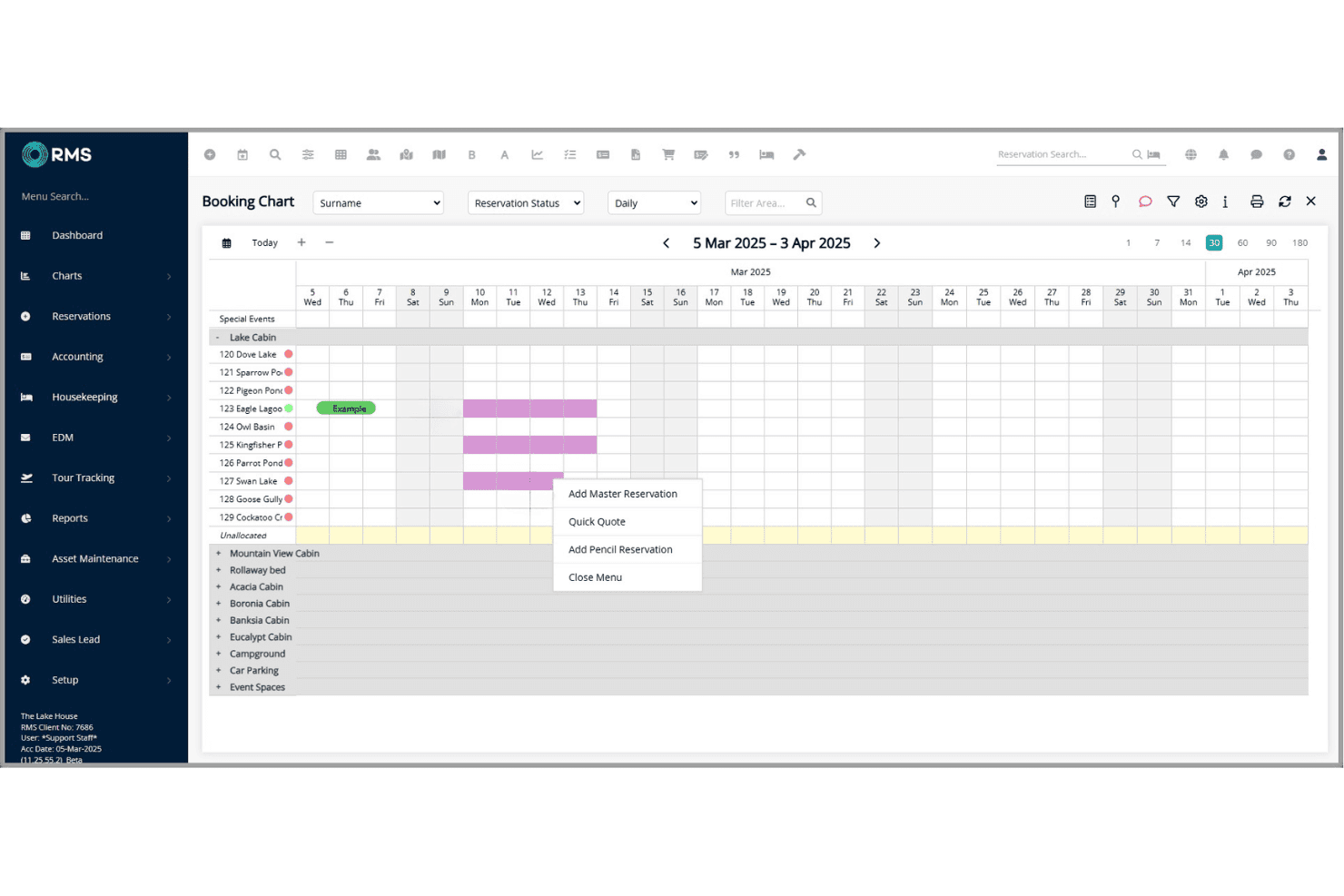
RMS lets you manage direct and OTA bookings in a unified calendar. You can quickly update availability, assign rooms, and handle group reservations with ease.
Rate and Revenue Management
Adjust rates, create dynamic pricing, and manage packages or discounts with RMS’s tools. Automated updates help maximize occupancy and revenue in real time.
Housekeeping Management
Track room status, assign cleaning tasks, and update maintenance issues from one dashboard. Staff can mark rooms clean or ready for inspection on any device.
Guest Messaging and Communication
Send automated emails or SMS for confirmations, pre-arrival, and upsells. This keeps guests informed and reduces repetitive front desk calls.
Reporting and Analytics
Access detailed operational and financial reports with customizable dashboards. Export data to monitor trends like occupancy, revenue, and guest profiles.
Online Guest Portal
Guests can check-in online, update details, and request services through a branded portal. This streamlines arrivals and enhances self-service for guests.
Ease of Use
In my experience, RMS is user-friendly for daily tasks like check-ins, but the depth of options can feel complex at first. Features like the drag-and-drop tape chart and guest messaging are intuitive, yet some users mention the setup and reporting tools take extra time to master.
Overall, I think staff will find routine functions quick, but power users benefit most from its advanced controls.
Integrations
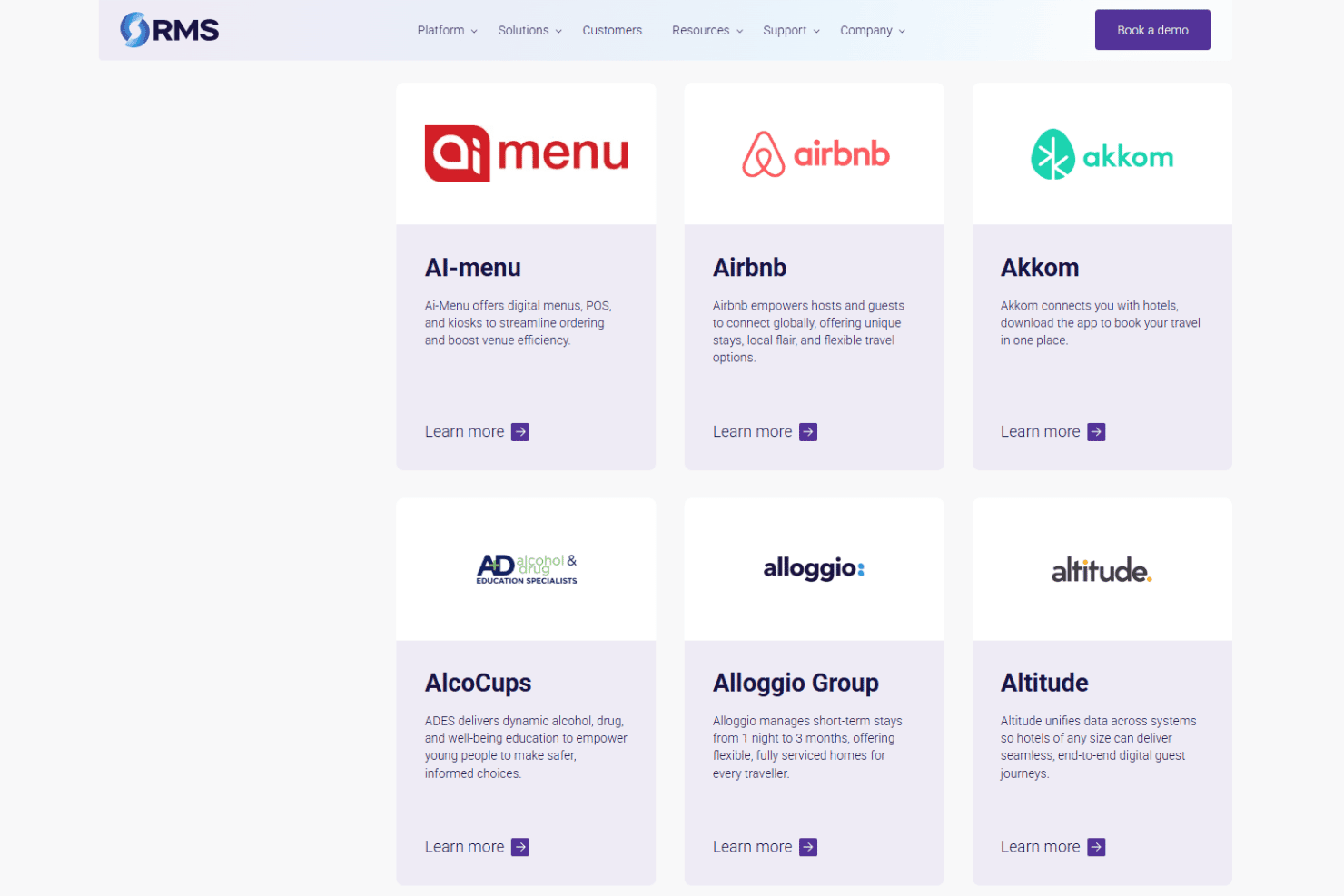
RMS integrates with RoomPriceGenie, 4WiFi, 934 Systems, AdriaScan, Agoda, Ai-Menu, Airbnb, Advance, Altitude, and Alloggio Group, among others.
RMS also offers a REST API so you can build custom connections to other products.
RMS Specs
- API: Yes
- Budgeting: Yes
- Calendar Management: Yes
- Compliance Tracking: Yes
- Contact Management: Yes
- Customer Management: Yes
- Dashboard: Yes
- Data Export: Yes
- Data Import: Yes
- Data Visualization: Yes
- Document Management: Yes
- Expense Tracking: Yes
- External Integrations: Yes
- Forecasting: Yes
- Inventory Tracking: Yes
- Multi-Currency: Yes
- Multi-User: Yes
- Notifications: Yes
- Organization Management: Yes
- Payment Processor: Yes
- Payroll: No
- Scheduling: Yes
- Supplier Management: Yes
- Tax Management: Yes
- Workflow Management: Yes


