
17 Best Venue Management Software Reviewed in 2026

10 Best Venue Management Software Shortlist
Here's my pick of the 10 best software from the 17 tools reviewed.


Managing a venue can be a juggling act. Between coordinating events, handling bookings, and keeping track of staff schedules, the tasks can pile up quickly. You need solutions that simplify your workload and make operations smoother.
I've tested and reviewed a range of venue management software, focusing on what truly matters to you. In my experience, the right software can alleviate many of your daily challenges, offering features tailored to your needs.
In this article, I'll share my top picks for venue management software. You'll find insights into their unique features, helping you choose the best fit for your team. Whether you're managing a hotel, event space, or any venue, there's something here for you.
Why Trust Our Software Reviews
Best Venue Management Software Summary
This comparison chart summarizes pricing details for my top venue management software selections to help you find the best one for your budget and business needs.
| Tool | Best For | Trial Info | Price | ||
|---|---|---|---|---|---|
| 1 | Best for theme parks and attractions | Free demo available | Pricing upon request | Website | |
| 2 | Best for sales and CRM features | Free demo available | From $249/month | Website | |
| 3 | Best for large enterprise venues | Free demo available | Pricing upon request | Website | |
| 4 | Best for event calendar integration | 30-day free trial available | From $9/month (billed annually) | Website | |
| 5 | Best for catering management | Free demo available | From $59/user/month | Website | |
| 6 | Best for sports and entertainment venues | Free demo available | Pricing upon request | Website | |
| 7 | Best for user-friendly interface | Free trial available | From $58/month | Website | |
| 8 | Best for comprehensive booking tools | Free demo upon request. | Customized pricing upon request | Website | |
| 9 | Best for client communication tools | Free demo available | From $120/month (billed annually) | Website | |
| 10 | Best for co-working space management | Free demo available | Pricing upon request | Website |
-

Little Hotelier
Visit WebsiteThis is an aggregated rating for this tool including ratings from Crozdesk users and ratings from other sites.4.5 -
roommaster
Visit WebsiteThis is an aggregated rating for this tool including ratings from Crozdesk users and ratings from other sites.4.2 -
Roomstay Hotel Booking Engine
Visit Website


Best Venue Management Software Reviews
Below are my detailed summaries of the best venue management software that made it onto my shortlist. My reviews look at each tool’s key features, pros & cons, integrations, and ideal use cases to help you find the best one.


ROLLER combines ticketing, POS, CRM, and self-service kiosk into one system for amusement parks and attractions. It optimizes guest flow, upsells add-ons, and centralizes multi-venue operations, making complex attraction operations intuitive.
Why I picked ROLLER: ROLLER offers customizable ticketing options, allowing you to manage various ticket types and pricing tiers. The software's guest management tools help you enhance the visitor experience by providing personalized services. Additionally, its point of sale system integrates seamlessly with ticketing, ensuring smooth operations across your venue.
Standout features & integrations:
Features include a dynamic ticketing system that adapts to different pricing strategies, a robust point of sale system that supports various payment methods, and detailed analytics that provide insights into visitor behavior. These features help you optimize operations and improve guest satisfaction.
Integrations include Salesforce, Mailchimp, Google Analytics, Xero, Stripe, PayPal, Shopify, QuickBooks, Zapier, and Eventbrite.
Pros and Cons
Pros:
- Customizable pricing tiers
- Detailed visitor analytics
- Comprehensive ticketing options
Cons:
- No dedicated mobile app
- Limited customization for reporting
- Requires internet for functionality


Event Temple offers drag-and-drop pipelines, proposal automation, and contact tracking, ideal for sales and CRM focus. It’s a solid choice for venues that rely heavily on lead nurturing and contract conversion, where users need to monitor every inquiry, booking, and communication.
Why I picked Event Temple: Event Temple excels in sales and CRM features, making it a valuable tool for venues focused on maximizing bookings and improving client interactions. It offers a centralized booking calendar, helping you manage reservations efficiently. The CRM system allows for detailed client profiles, enabling personalized service. Additionally, its sales tracking tools provide insights into revenue and performance, supporting strategic decision-making.
Standout features & integrations:
Features include a centralized booking calendar that simplifies scheduling, a detailed CRM system that enhances client interactions, and sales tracking tools that offer revenue insights. These features help you manage bookings and client relationships effectively.
Integrations include Salesforce, QuickBooks, Mailchimp, Google Calendar, Stripe, PayPal, Zapier, Eventbrite, Xero, and Slack.
Pros and Cons
Pros:
- Enhances client interactions
- Detailed client profiles
- Centralized booking calendar
Cons:
- Learning curve for advanced tools
- Basic mobile app features
- Requires internet for functionality


Infor’s Sales & Event Management covers the full event lifecycle from inquiry to invoice. It supports multi-property rollups, data standardization, advanced analytics, unlimited users, and workflow automation, helping large venues stay consistent, visible, and efficient at scale.
Why I picked Infor Sales & Event Management: Infor Sales & Event Management caters to large enterprise venues with its comprehensive suite of features designed for complex operations. It offers advanced booking management systems that handle high volumes efficiently. Financial reporting tools provide insights into revenue and expenses, crucial for large venues. Additionally, its event planning capabilities support large-scale event coordination, making it ideal for big operations.
Standout features & integrations:
Features include advanced booking systems that accommodate high demand, financial tools that offer detailed revenue insights, and event planning features that support large-scale operations. These features ensure efficient management of large venues.
Integrations include Salesforce, Microsoft Dynamics, SAP, Oracle, Google Calendar, Outlook, Mailchimp, QuickBooks, Stripe, and PayPal.
Pros and Cons
Pros:
- Supports large-scale events
- Detailed financial reporting
- Advanced booking management
Cons:
- High resource requirements
- Limited mobile support
- Complex setup process


Timely offers a built-in event calendar that enables linking between venue availability, booking slots, recurring events, and public event listings. It helps avoid double-bookings and embeds real-time availability calendars directly into websites or apps.
Why I picked Timely Event Management: The standout feature of Time.ly is its event calendar integration, which allows you to seamlessly display multiple calendar views directly on your website. This feature is particularly useful for managing various events and bookings efficiently. Time.ly also offers customizable booking forms and email templates to match your brand, enhancing the client experience. Additionally, it supports real-time availability and automated booking requests, making it a flexible choice for diverse industries.
Standout features & integrations:
Features include online booking capabilities that allow you to manage reservations directly through your website, customizable booking forms that align with your branding, and real-time availability tracking to prevent scheduling conflicts.
Integrations include Google Calendar, Outlook, iCal, Salesforce, Mailchimp, Eventbrite, PayPal, Stripe, Zoom, and QuickBooks.
Pros and Cons
Pros:
- Customizable email templates
- Real-time availability updates
- Flexible booking forms
Cons:
- Basic payment processing options
- Limited reporting features
- No mobile app for management

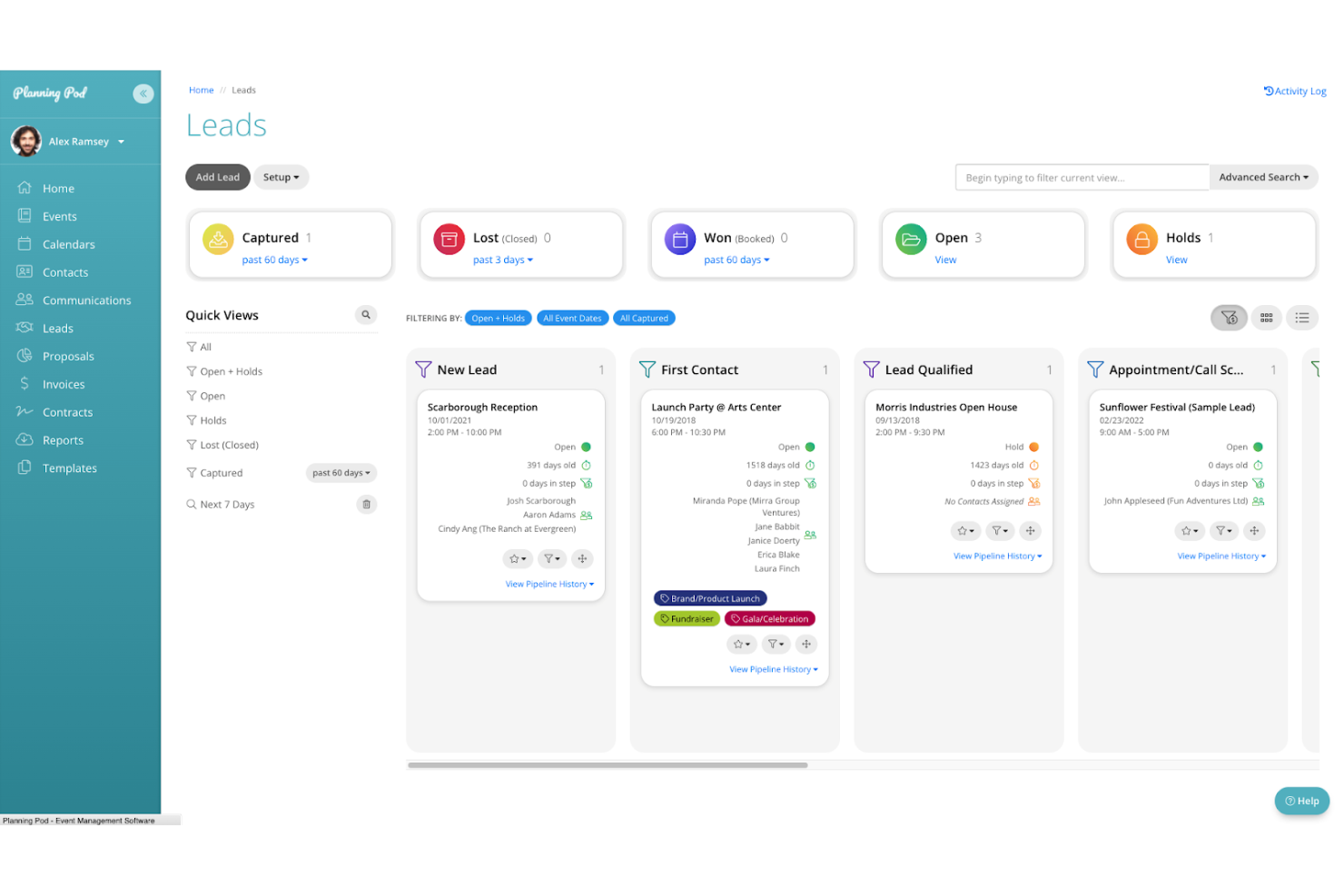
Planning Pod is an all-in-one platform offering over 40 integrated tools to manage venue booking and floor plans, and handle food and beverage menu creation and tracking. It allows venues to generate BEOs, manage food item libraries, and keep venue bookings and contracts synchronized.
Why I picked Planning Pod: Planning Pod is particularly suited for catering management due to its extensive features tailored for food and beverage operations. It includes menu planning tools that let you customize offerings for each event. The software also provides detailed event timelines and task management features, ensuring smooth operations. Additionally, its client communication tools help you maintain clear and effective communication with your clients.
Standout features & integrations:
Features include customizable event layouts that help you plan the event space efficiently, budget tracking tools that keep your finances in check, and automated reminders that ensure you never miss a deadline. These features contribute to a well-organized event planning process.
Integrations include QuickBooks, Salesforce, Mailchimp, Google Calendar, Stripe, PayPal, Xero, Zapier, Eventbrite, and Slack.
Pros and Cons
Pros:
- Comprehensive task management
- Detailed event timelines
- Effective client communication tools
Cons:
- Basic reporting capabilities
- Limited mobile app features
- Requires internet for full functionality


Momentus Technologies is an end-to-end cloud platform that integrates CRM, sales/booking, operations, accounting, and risk/sustainability tools into one system. It can handle high-volume ticketing, complex scheduling, and scale operational workflows, making it ideal for large sports and entertainment venues.
Why I picked Momentus Technologies: Momentus Technologies caters specifically to the complex requirements of sports and entertainment venues. It offers advanced event scheduling tools that manage large crowds and multiple events efficiently. The ticketing system is adaptable, allowing you to handle various seating arrangements and pricing tiers. Additionally, its guest management features enhance the visitor experience by providing personalized services and insights.
Standout features & integrations:
Features include dynamic seating management that optimizes venue capacity, detailed analytics that offer insights into event performance, and a comprehensive ticketing system that supports various pricing strategies. These features help you manage large-scale events effectively.
Integrations include Salesforce, Ticketmaster, Google Analytics, Mailchimp, Stripe, PayPal, QuickBooks, Oracle, SAP, and Eventbrite.
Pros and Cons
Pros:
- Dynamic seating management
- Flexible ticketing system
- Advanced scheduling tools
Cons:
- High resource requirements
- Limited mobile functionality
- Complex initial setup

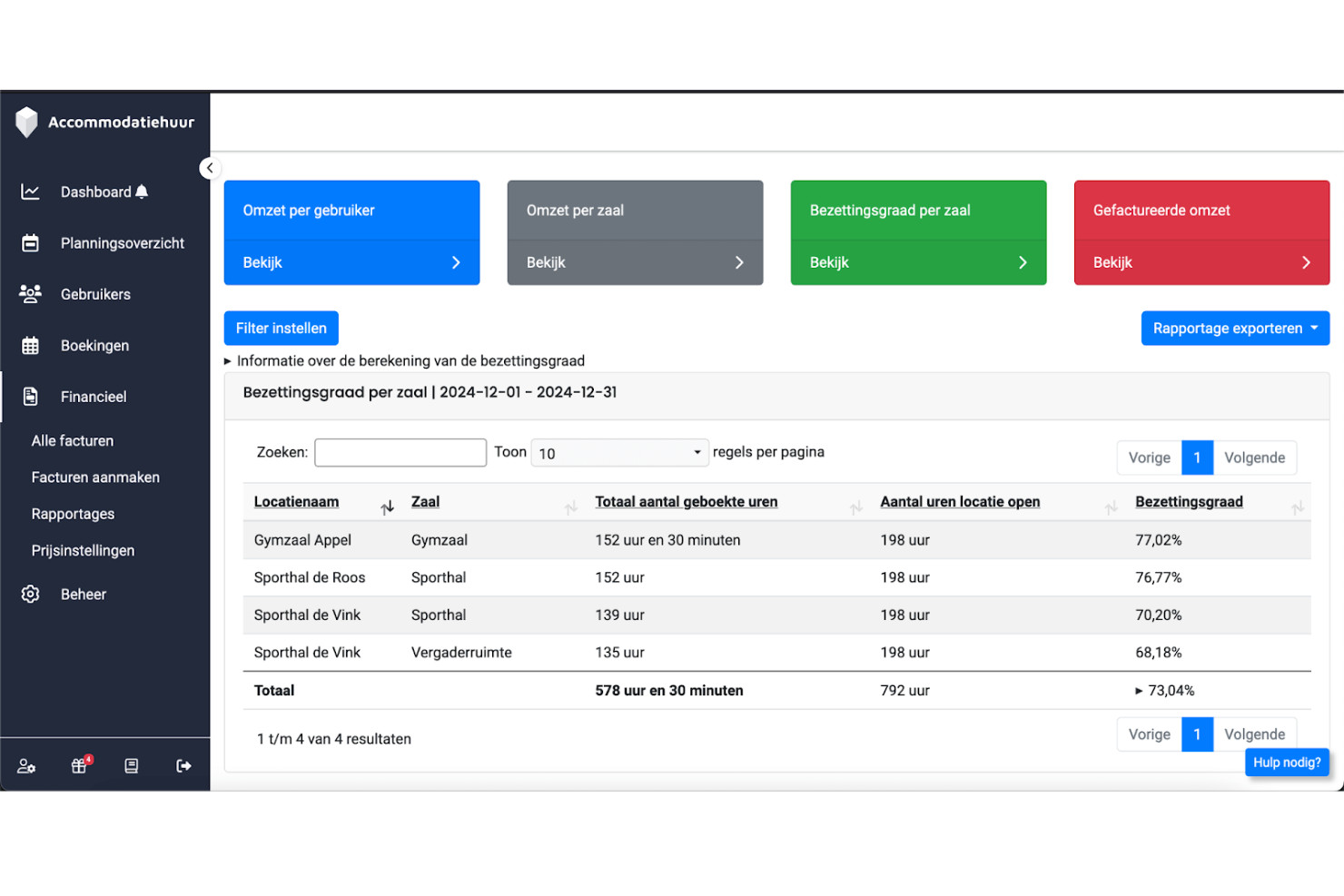
Aqqo is a cloud-based venue management platform that centralizes bookings, invoicing, customer relationships, and financial operations across event venues. It offers an intuitive design and onboarding, making complex workflows easier to manage alongside accounting systems.
Why I picked Aqqo: Aqqo excels with its user-friendly interface, allowing easy navigation for venue managers. The software offers booking management and event scheduling, which helps prevent conflicts and optimize space usage. Invoicing and payment tracking features streamline financial administration, enhancing operational efficiency. Real-time reporting and analytics provide insights into venue performance, supporting data-driven decisions.
Standout features & integrations:
Features include secure online booking and payment options that enhance the user experience, streamlined financial workflows with integration to accounting tools, and high uptime reliability with a 99.9% uptime rate. These features ensure efficient operations and client satisfaction.
Integrations include QuickBooks, Xero, Stripe, PayPal, Google Calendar, Outlook, iCal, Salesforce, Mailchimp, and Zoom.
Pros and Cons
Pros:
- Efficient financial administration
- Supports various venue types
- Comprehensive reporting tools
Cons:
- Basic marketing tools
- Requires internet for full functionality
- Limited customization options

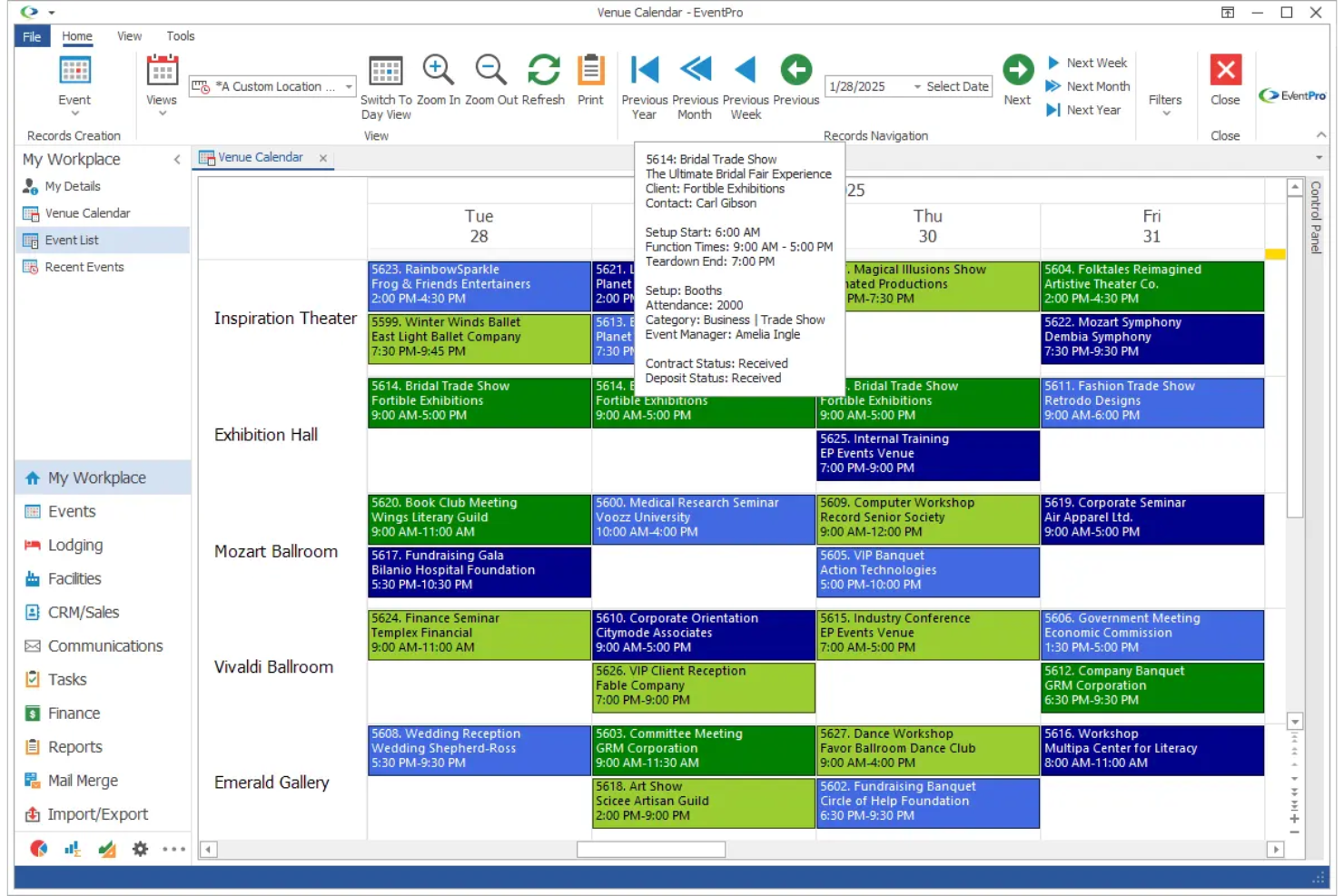
EventPro is a venue & resource-scheduling system that centralizes room booking, client data, and communication. It offers comprehensive booking tools and customizable permissions and reporting, making it easy to manage every aspect of an event.
Why I picked EventPro: EventPro excels in offering comprehensive booking tools that cater to diverse venue needs. Its booking management system allows you to handle multiple events and resources without conflicts. The event planning features offer detailed timelines and checklists, ensuring nothing is overlooked. Additionally, its resource allocation capabilities help you optimize venue usage, making it an ideal choice for complex event coordination.
Standout features & integrations:
Features include detailed event timelines that keep your team organized, resource allocation tools that maximize venue efficiency, and customizable checklists that ensure thorough planning. These features help you deliver successful events consistently.
Integrations include Microsoft Outlook, Google Calendar, QuickBooks, Salesforce, Mailchimp, Stripe, PayPal, Xero, Eventbrite, and Slack.
Pros and Cons
Pros:
- Customizable event timelines
- Detailed planning checklists
- Comprehensive booking management
Cons:
- Basic analytics features
- Limited mobile app functionality
- Requires extensive setup time

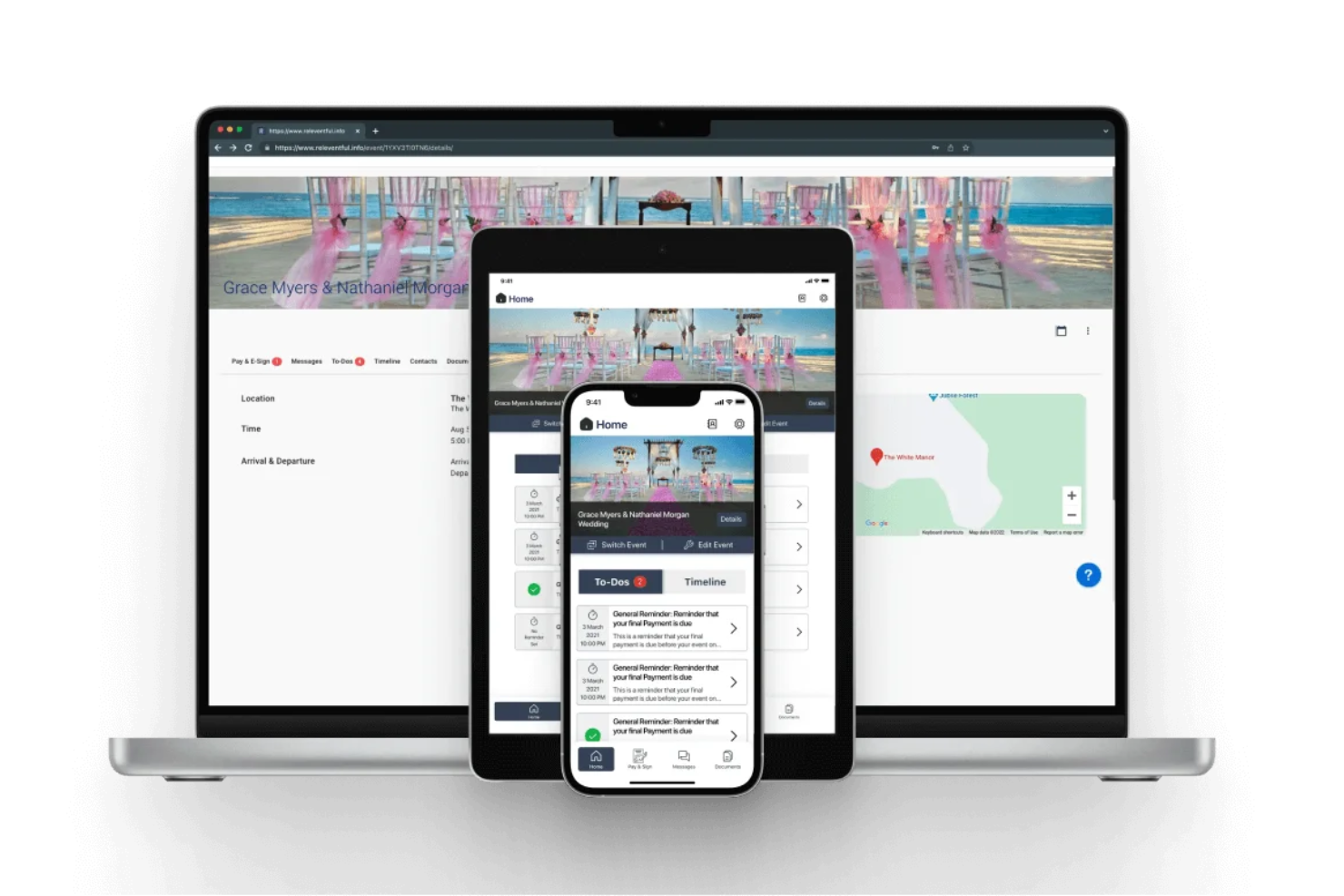
Releventful has built-in email and SMS messaging and automated reminders and messaging workflows for more timely and transparent client interactions. It unifies bookings, contracts, and payments, letting teams and clients collaborate.
Why I picked Releventful: Releventful excels in providing comprehensive client communication tools, making it easier for you to manage customer interactions. It includes features like automated emails and text messaging, ensuring timely communication with clients. The software also offers task and project management tools to keep your team organized. Additionally, its client portal allows your customers to view event details and make payments online, enhancing the overall client experience.
Standout features & integrations:
Features include automated follow-up emails that help maintain client engagement, detailed project management tools that keep your team on track, and a built-in CRM for managing client relationships. These features ensure that you can efficiently manage client interactions and event details.
Integrations include QuickBooks, Google Calendar, Mailchimp, Zoom, Microsoft Outlook, Stripe, PayPal, Salesforce, Eventbrite, and Slack.
Pros and Cons
Pros:
- Client portal for online payments
- Built-in CRM system
- Comprehensive project management
Cons:
- Limited mobile functionality
- Basic analytics features
- Limited customization options


Switch Event Management by Dispace handles internal/external room bookings, self-service portals, and calendar centralization, making it easier for co-working operators to manage shared spaces. It offers resource planning and communication tools to avoid conflicts and streamline member communication.
Why I picked Switch Event Management: Switch excels in managing co-working spaces with features that cater to flexible work environments. It offers tools for booking desks and meeting rooms, supporting efficient space usage. The software includes membership management, allowing you to handle different membership tiers easily. Additionally, its billing system integrates with space utilization, ensuring accurate and timely invoicing.
Standout features & integrations:
Features include a resource booking system that lets you manage space reservations efficiently, a membership management tool that simplifies tier handling, and a billing system that integrates with resource usage for accurate invoicing. These features help you maintain organized and efficient operations.
Integrations include Google Calendar, Microsoft Outlook, QuickBooks, Stripe, PayPal, Zapier, Slack, Salesforce, Xero, and Mailchimp.
Pros and Cons
Pros:
- Customizable booking options
- Accurate billing integration
- Efficient membership management
Cons:
- No dedicated mobile app
- Requires internet for full functionality
- Limited customization for large setups
Other Venue Management Software
Here are some additional venue management software options that didn’t make it onto my shortlist, but are still worth checking out:
- VenueSumo
For small to mid-sized venues
- VenuePro
For customizable solutions
- iVvy Venues
For real-time booking
- UrVenue
For nightlife venues
- Curate
For floral event planning
- Perfect Venue
For small event spaces
- ConventionSuite
For large conventions


Venue Management Software Selection Criteria
When selecting the best venue management software to include in this list, I considered common buyer needs and pain points like managing event bookings efficiently and optimizing space utilization. I also used the following framework to keep my evaluation structured and fair:
Core Functionality (25% of total score)
To be considered for inclusion in this list, each solution had to fulfill these common use cases:
- Manage event bookings
- Track venue availability
- Process payments
- Organize client information
- Generate reports
Additional Standout Features (25% of total score)
To help further narrow down the competition, I also looked for unique features, such as:
- Automated marketing tools
- Real-time analytics
- Customizable dashboards
- Multi-venue support
- Integrations with third-party tools
Usability (10% of total score)
To get a sense of the usability of each system, I considered the following:
- Intuitive interface design
- Easy navigation
- Minimal learning curve
- Responsive design
- Accessibility features
Onboarding (10% of total score)
To evaluate the onboarding experience for each platform, I considered the following:
- Availability of training videos
- Interactive product tours
- Access to webinars
- Availability of templates
- Supportive chatbots
Customer Support (10% of total score)
To assess each software provider’s customer support services, I considered the following:
- 24/7 customer service availability
- Multiple support channels
- Quick response times
- Availability of a knowledge base
- Access to dedicated account managers
Value For Money (10% of total score)
To evaluate the value for money of each platform, I considered the following:
- Competitive pricing
- Scalability of pricing plans
- Features included at each price point
- Discounts for annual billing
- Free trial or demo availability
Customer Reviews (10% of total score)
To get a sense of overall customer satisfaction, I considered the following when reading customer reviews:
- Overall satisfaction ratings
- Commonly mentioned pros and cons
- Feedback on ease of use
- Comments on customer support
- User recommendations
How to Choose Venue Management Software
It’s easy to get bogged down in long feature lists and complex pricing structures. To help you stay focused as you work through your unique software selection process, here’s a checklist of factors to keep in mind:
| Factor | What to Consider |
|---|---|
| Scalability | Can the software grow with your business? Consider if it can handle increased bookings and larger venues as you expand. |
| Integrations | Does it integrate with your current tools? Look for compatibility with your CRM, accounting software, and calendars to streamline processes. |
| Customizability | Can you tailor the software to fit your needs? Check if you can adjust settings, workflows, and user permissions to match your operations. |
| Ease of use | Is the interface intuitive? Ensure your team can quickly learn and navigate the system without extensive training. |
| Implementation and onboarding | How long will it take to implement? Consider the time and resources needed for setup, and whether training materials are available. |
| Cost | Does it fit your budget? Compare pricing plans, look for hidden fees, and consider the value provided at each price tier. |
| Security safeguards | Are your data and customer information protected? Check for encryption, data backup, and compliance with relevant regulations. |
| Support availability | Is help available when you need it? Look for 24/7 support options and whether you have access to dedicated account managers or support teams. |
What Is Venue Management Software?
Venue management software is a tool that helps manage the operations of event spaces, from scheduling to client interactions. Event planners, venue managers, and hospitality professionals use these tools to enhance efficiency and organization.
Its features, such as booking management, client communication, and reporting, help coordinate events, optimize space usage, and maintain customer relationships. These tools provide significant value by simplifying complex tasks and improving operational efficiency.
Features of Venue Management Software
When selecting venue management software, keep an eye out for the following key features:
- Booking management: Streamlines scheduling and reservations, preventing conflicts and optimizing space usage.
- Client communication: Facilitates interaction with clients through automated emails and messaging, improving relationship management.
- Reporting tools: Provides insights into performance and operations, helping with data-driven decision-making.
- Customizability: Allows you to tailor the software to fit specific needs and workflows, enhancing usability.
- Resource allocation: Manages and optimizes the use of venue resources, ensuring efficient operations.
- Security safeguards: Protects data and customer information through encryption and compliance with regulations.
- Integrations: Connects with existing tools like CRM and accounting software, creating a unified system.
- User-friendly interface: Ensures ease of use with intuitive navigation and minimal learning curve.
- Onboarding support: Offers training materials and support to assist with a smooth transition and quick adoption.
- Scalability: Accommodates growth and increased demand, allowing the software to expand with your business.
Benefits of Venue Management Software
Implementing venue management software provides several benefits for your team and your business. Here are a few you can look forward to:
- Improved efficiency: Automates booking and scheduling, reducing manual tasks and freeing up time for other responsibilities.
- Enhanced client relationships: Facilitates better communication with clients through automated messaging and CRM features, leading to stronger relationships.
- Data-driven insights: Offers detailed reporting tools that help you make informed decisions based on real-time data.
- Resource optimization: Manages resources effectively, ensuring you make the most of available space and materials.
- Scalable growth: Supports your business as it grows, accommodating increased demand and new venues without disruption.
- Security assurance: Protects sensitive data with strong security measures, keeping client information safe and secure.
- Ease of use: Features user-friendly interfaces that make it easy for your team to adopt and navigate the software quickly.
Costs and Pricing of Venue Management Software
Selecting venue management software requires an understanding of the various pricing models and plans available. Costs vary based on features, team size, add-ons, and more. The table below summarizes common plans, their average prices, and typical features included in venue management software solutions:
Plan Comparison Table for Venue Management Software
| Plan Type | Average Price | Common Features |
|---|---|---|
| Free Plan | $0 | Basic booking management, limited customer support, and basic reporting. |
| Personal Plan | $10-$30/user/month | Enhanced booking tools, email support, customizable templates, and basic integrations. |
| Business Plan | $40-$70/user/month | Advanced scheduling features, CRM integration, detailed analytics, and priority support. |
| Enterprise Plan | $80-$150/user/month | Customizable dashboards, multi-venue support, dedicated account manager, and full integration capabilities. |
Venue Management Software FAQs
Here are some answers to common questions about venue management software:
How does venue management software improve the booking process?
Venue management software streamlines the booking process with calendars, contracts, and event registration tools. A venue management system prevents double-bookings and simplifies wedding venue scheduling, ensuring smooth client experiences.
How does venue management software support sales and payments?
Venue management software combines sales management with payment tools. It tracks leads, handles credit card payments, and links revenue to event bookings.
What functionality does it offer?
Assess the software’s functionality based on your venue’s specific needs. Look for features that cater to your operations, like booking management and customer communication. Consider the software’s ability to scale and adapt to the event industry’s unique processes. Evaluate if it offers customizable options.
Why replace spreadsheets with venue management software?
Spreadsheets, notifications, and on-site paperwork create errors and slow venues down. Venue management software centralizes booking, event registration, and on-site coordination in one system. It streamlines client data, automates notifications, and keeps event organizers and team members aligned for greater efficiency.
How customizable is the software?
Customization is important to tailor the software to your event business’s needs. Evaluate if you can adjust settings, workflows, and reports. Customizability ensures the software aligns with your operations and can adapt to changing requirements. Check if the provider offers support for customization efforts.
What is the difference between event management software and a venue management system?
Venue management software focuses on venue operations, while event management software covers broader event planning and specializes in bookings, proposals, and customer interactions.
What’s Next:
If you're in the process of researching venue management software, connect with a SoftwareSelect advisor for free recommendations.
You fill out a form and have a quick chat where they get into the specifics of your needs. Then you'll get a shortlist of software to review. They'll even support you through the entire buying process, including price negotiations.