

Il software gestionale per conferenze può semplificare la pianificazione e la gestione degli eventi riunendo registrazione, biglietteria, coinvolgimento dei partecipanti, programmazione e reportistica in un unico sistema.
La piattaforma giusta può ridurre il lavoro manuale, migliorare il coordinamento e offrire agli organizzatori una visione più chiara delle attività dei partecipanti e delle prestazioni dell'evento. È particolarmente utile per gestire conferenze complesse con più sessioni, relatori, espositori e gruppi numerosi di partecipanti.
Ho valutato diversi software gestionali per conferenze in base alle loro funzionalità, facilità d'uso e capacità di gestione degli eventi. L'elenco seguente mette in evidenza le opzioni più adatte alle diverse esigenze delle conferenze.
Perché fidarsi dei nostri consigli sui software
6,700+
Reviews
20
Industry experts
16+
Evaluation factors
14
Years
Il nostro team testa e recensisce software dal 2012. In quanto leader del settore alberghiero noi stessi, sappiamo quanto sia difficile — e importante — scegliere il software giusto.
Per questa guida, abbiamo valutato gli strumenti attraverso test pratici e ricerche indipendenti, assegnando un punteggio agli strumenti in base ai nostri criteri di selezione.
Le nostre recensioni riflettono il nostro giudizio editoriale umano, non un discorso di vendita.
Tabella comparativa dei software gestionali per conferenze
Questa tabella comparativa riassume i dettagli sui prezzi delle mie migliori selezioni di software gestionali per conferenze:
| Tool | Best For | Trial Info | Price | ||
|---|---|---|---|---|---|
| 1 | Ideale per applicazioni mobili per eventi | Non disponibile | A partire da $2,495 | Website | |
| 2 | Ideale per la progettazione e la registrazione flessibili degli eventi | No | Da $11,800/anno (fatturato annualmente) | Website | |
| 3 | Ideale per creare reti intuitive tramite dispositivi mobili | No | Prezzi su richiesta | Website | |
| 4 | Ideale per una gestione efficiente della biglietteria e della raccolta fondi | Prova gratuita disponibile | A partire da $7,500 (una tantum) | Website | |
| 5 | Ideale per una gestione solida dei progetti degli eventi | Sì | $5/utente/mese (con fatturazione annuale) | Website | |
| 6 | Ideale per conferenze ibride immersive | Demo gratuita disponibile | Prezzi disponibili su richiesta | Website | |
| 7 | Ideale per eventi virtuali e ibridi interattivi | Sì | $500/mese, fatturato annualmente | Website | |
| 8 | Ideale per app per eventi personalizzabili | No | Prezzo su richiesta | Website | |
| 9 | Ideale per soluzioni complete di ricerca delle sedi | Demo gratuita disponibile | Prezzi su richiesta | Website | |
| 10 | Ideale per esperienze di eventi virtuali immersive | No | Da $99/organizzatore/mese (fatturati annualmente) | Website |


Recensione dei migliori software gestionali per conferenze
Di seguito sono riportati i miei riepiloghi dettagliati dei migliori software gestionali per conferenze inclusi nella mia selezione. Le mie recensioni offrono un’analisi approfondita delle funzionalità principali, dei vantaggi & svantaggi, delle integrazioni e dei casi d’uso ideali di ogni strumento, per aiutarti a trovare quello più adatto a te.
 Ideale per applicazioni mobili per eventi
- Non disponibile
- A partire da $2,495
Visit WebsiteCustomer Rating:4.8/5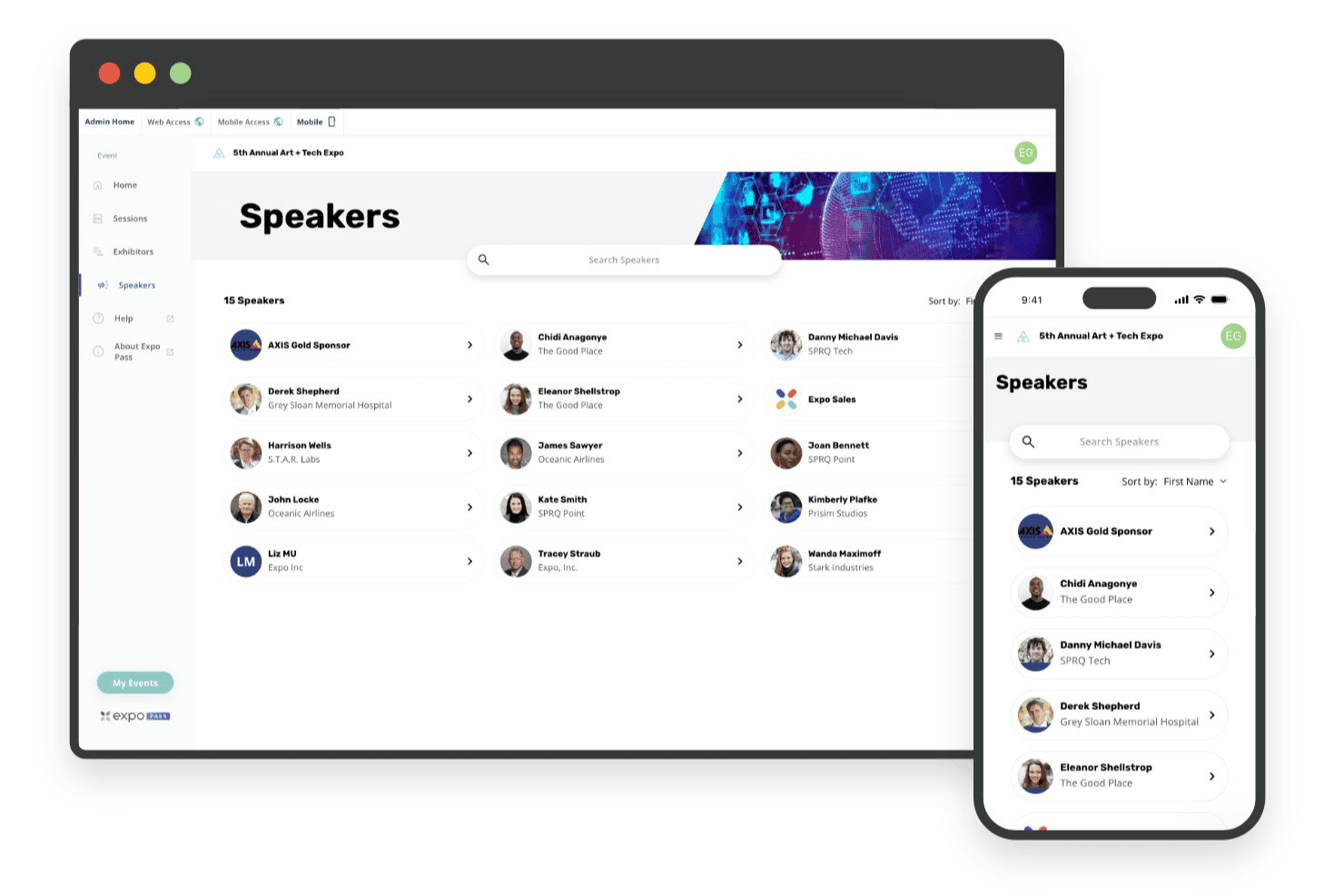
Expo Pass supporta applicazioni mobili per eventi dedicate alla registrazione, ai programmi e agli aggiornamenti per i partecipanti Expo Pass è una piattaforma per la gestione degli eventi che include registrazione online, check-in in loco, stampa dei badge, acquisizione dei lead, monitoraggio delle presenze e un'app mobile per eventi in presenza, virtuali e ibridi.
Per chi è più adatto Expo Pass?
Expo Pass è adatto agli organizzatori di eventi che gestiscono conferenze, fiere commerciali ed esposizioni e desiderano un'esperienza mobile efficace per i partecipanti al centro del loro evento.
Perché ho scelto Expo Pass
Expo Pass si è guadagnato un posto nella mia selezione perché l'app mobile per eventi è davvero una delle migliori che abbia visto per mantenere coinvolti i partecipanti in eventi in presenza, virtuali e ibridi. Mi piace il fatto che i partecipanti ricevano agende personalizzate, messaggistica in tempo reale e funzionalità di networking per le sessioni su iOS, Android o browser, senza bisogno di scaricare nulla. Le notifiche push mi permettono di aggiornare i programmi in tempo reale, mentre gli spazi dedicati agli sponsor sono integrati direttamente nell'esperienza dell'app.
Funzionalità principali di Expo Pass
- Stampa dei badge in loco: I badge personalizzati con il marchio vengono stampati su richiesta tramite stampanti Zebra abbinate a chioschi iPad pronti all'uso, spediti direttamente al tuo evento.
- Monitoraggio dei crediti CE/CEU: Le scansioni delle sessioni calcolano automaticamente l'idoneità ai crediti e generano certificati personalizzati sulla base di regole di presenza personalizzabili.
- Gestione dei blocchi di camere per gruppi: Gli organizzatori configurano blocchi di camere, sotto-blocchi e pagine di prenotazione per i partecipanti personalizzate con il marchio, con monitoraggio in tempo reale delle prenotazioni effettuate e accesso al portale dell'hotel.
- Acquisizione dei contatti: Gli espositori scansionano i badge dei partecipanti tramite l'app Expo Pass per acquisire, qualificare ed esportare i contatti direttamente dall'area dell'evento.
Integrazioni di Expo Pass
Expo Pass offre integrazioni documentate con Stripe, Zoom, Vimeo, IBM Stream e Linkroom. Non documenta integrazioni native con PMS, CRS, POS, CRM, Zapier o API.
Pros and Cons
Pros:
- L'applicazione mobile per eventi non richiede download
- Stampa completa dei badge in loco inclusa
- Monitoraggio automatico dei crediti CE/CEU disponibile
Cons:
- Nessun ordine per eventi di banchetto né strumenti per i servizi di ristorazione
- Mancano funzionalità per la gestione degli spazi per eventi degli hotel
Learn more about Expo Pass: Ideale per la progettazione e la registrazione flessibili degli eventi
- No
- Da $11,800/anno (fatturato annualmente)
Visit WebsiteCustomer Rating:4.8/5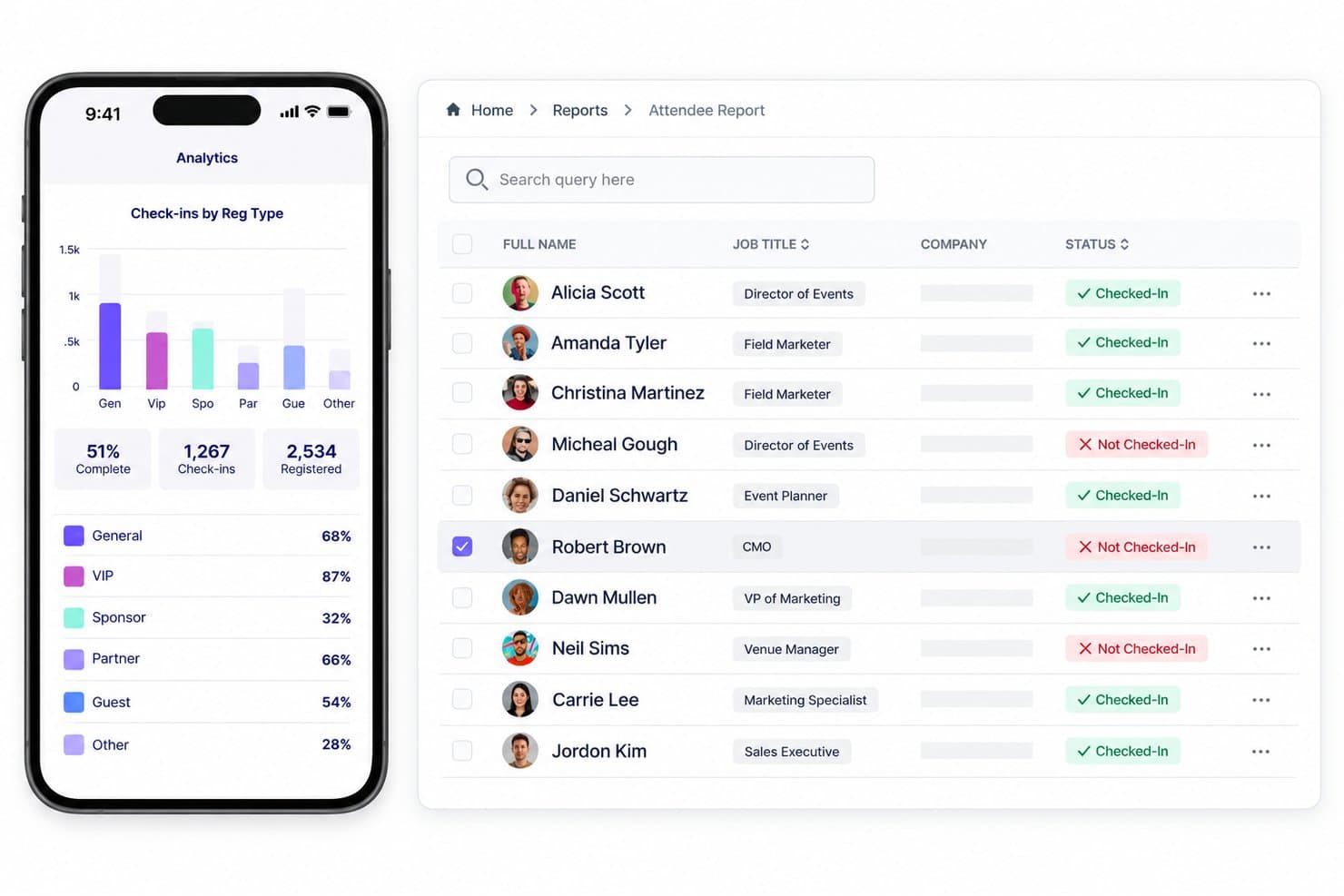
Swoogo unifica registrazione, sessioni, relatori, check-in, camere e report. Swoogo è una piattaforma di registrazione e gestione degli eventi che comprende la registrazione dei partecipanti, la creazione del sito web dell'evento, la gestione di sessioni e relatori, il coordinamento dei blocchi di camere e il check-in in loco per eventi in presenza, virtuali e ibridi.
Per chi è più indicato Swoogo?
Swoogo è una soluzione particolarmente adatta ai responsabili del marketing di eventi aziendali e agli organizzatori di conferenze che necessitano di registrazioni dei partecipanti e siti web per eventi altamente configurabili, in presenza, virtuali o ibridi.
Perché ho scelto Swoogo
Swoogo è entrato nella mia rosa di finalisti perché il motore di registrazione è davvero uno dei più flessibili che abbia utilizzato: consente di creare percorsi di registrazione completamente diversi per relatori, sponsor e partecipanti generici all'interno di un singolo evento. Apprezzo molto la possibilità di vincolare le date di check-in e check-out alle date dell'evento all'interno del modulo Hotel, così i partecipanti prenotano il blocco di camere corretto senza ulteriori scambi. Il Report combinato dei blocchi di camere riunisce tutte le prenotazioni dei blocchi in un'unica visualizzazione, eliminando il monitoraggio tramite fogli di calcolo su cui si affidano ancora la maggior parte dei team organizzatori di conferenze.
Funzionalità principali di Swoogo
- Logica di registrazione condizionale: Crea percorsi di registrazione distinti per diversi tipi di partecipanti—relatori, sponsor e partecipanti generici—all'interno di un singolo evento, utilizzando regole condizionali illimitate.
- Flussi di lavoro automatizzati per i partecipanti: Attiva automaticamente e-mail di conferma, assegnazioni alle sessioni e aggiornamenti dei campi in base ai cambiamenti dello stato di registrazione, come abbandono, modifica o cancellazione.
- Pianificazione di sessioni su più percorsi: Organizza sessioni simultanee su più percorsi con un portale per la candidatura dei relatori che include flussi di lavoro interni di valutazione e revisione.
- Analisi dei partecipanti tra più eventi: Accedi a oltre 15 report personalizzabili e aggrega i dati dei partecipanti tra più eventi per identificare le tendenze e misurare il coinvolgimento nel tempo.
Integrazioni di Swoogo
Swoogo offre oltre 30 integrazioni native, tra cui Salesforce, HubSpot, Zoom, ON24, Passkey, Stripe e Google Analytics. Supporta inoltre un'API REST, webhook in uscita e Zapier; non sono documentate integrazioni con PMS, CRS e POS alberghieri.
Pros and Cons
Pros:
- Flussi di lavoro di registrazione altamente flessibili con percorsi multipli
- Report combinato dei blocchi di camere per gli organizzatori
- Solidi controlli di sicurezza e conformità degli eventi
Cons:
- Nessuna gestione di catering o spazi lato hotel
- Non dispone di pipeline per RFP e vendite di gruppo
Learn more about Swoogo: Ideale per creare reti intuitive tramite dispositivi mobili
- No
- Prezzi su richiesta
Visit WebsiteCustomer Rating:4.8/5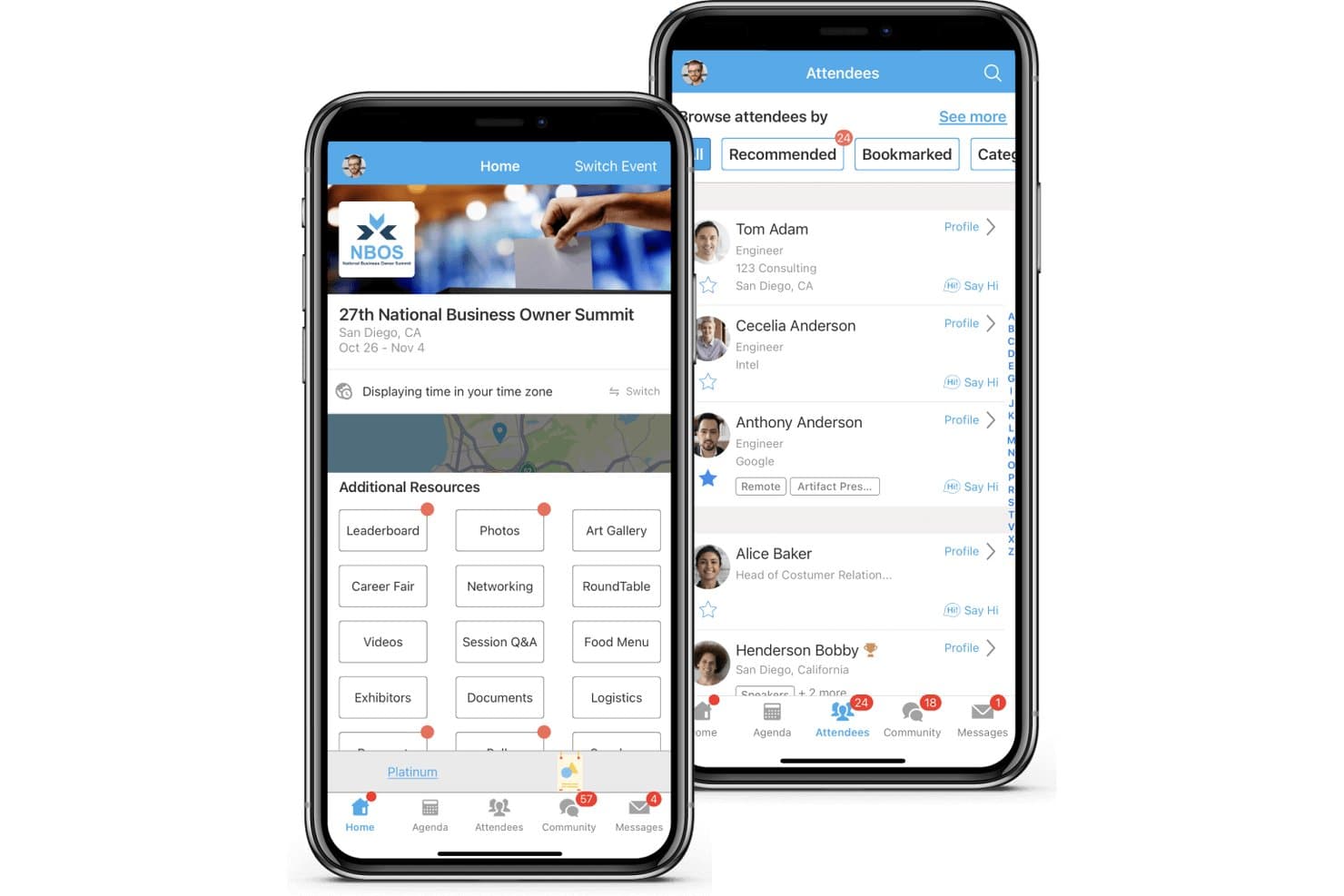
Whova combina registrazione, sessioni, registrazione all'arrivo, proposte, espositori e creazione di reti. Whova è una piattaforma per la gestione di conferenze in presenza, virtuali e ibride che comprende la registrazione dei partecipanti, app mobili per eventi, gestione dell'agenda, creazione di reti, stand degli espositori e analisi post-evento.
Per chi è più adatto Whova?
Whova è una soluzione ideale per gli organizzatori di conferenze e i team che gestiscono eventi di associazioni e che hanno bisogno di una piattaforma incentrata sui dispositivi mobili per gestire il coinvolgimento e la creazione di reti tra i partecipanti.
Perché ho scelto Whova
Ho scelto Whova come una delle migliori soluzioni perché i suoi strumenti mobili per creare reti vanno ben oltre una semplice directory dei partecipanti. Funzionalità come l'abbinamento basato sull'intelligenza artificiale, le sale video per le connessioni rapide e la bacheca della community consentono ai partecipanti di connettersi prima, durante e dopo un evento dai loro telefoni. Apprezzo in particolare la funzione di pianificazione degli incontri, che permette ai partecipanti di prenotare appuntamenti 1:1 e riservare uno spazio in loco, trasformando la partecipazione passiva a una conferenza in una costruzione attiva di relazioni.
Funzionalità principali di Whova
- Gestione delle proposte: Un portale di invio personalizzato consente agli oratori di presentare proposte di sessione, con moduli personalizzabili, revisione tra pari singola o doppia cieca e sincronizzazione diretta delle proposte accettate con l'agenda dell'evento.
- Creazione del sito web dell'evento: Scegli tra oltre 20 modelli per creare un sito dell'evento ospitato che sincronizza automaticamente agenda, oratori e sponsor senza bisogno di scrivere codice.
- Strumenti di coinvolgimento ludico: Gare a quiz, concorsi fotografici, sfide con passaporto e classifiche stimolano la partecipazione dei partecipanti per tutta la durata dell'evento.
- Rapporto analitico post-evento: Whova genera un rapporto post-evento dettagliato che include la partecipazione alle sessioni, le metriche di coinvolgimento, l'attività di creazione di reti e le visualizzazioni degli sponsor.
Integrazioni di Whova
Whova si integra con Cvent, Eventbrite, Zoom, Stripe, HubSpot, Mailchimp, WildApricot, YourMembership e Glue Up. Supporta inoltre connessioni tramite chiavi API e Zapier.
Pros and Cons
Pros:
- Offre strumenti di abbinamento dei partecipanti basati sull'intelligenza artificiale
- Le funzionalità di coinvolgimento ludico stimolano il coinvolgimento dei partecipanti
- Supporta sessioni su più percorsi con sincronizzazione automatica
Cons:
- Non dispone di strumenti per la gestione dei blocchi di camere d'albergo
- Non offre funzionalità per gli ordini degli eventi con servizio di banchetto
Learn more about Whova: Ideale per una gestione efficiente della biglietteria e della raccolta fondi
- Prova gratuita disponibile
- A partire da $7,500 (una tantum)
Visit WebsiteCustomer Rating:4.7/5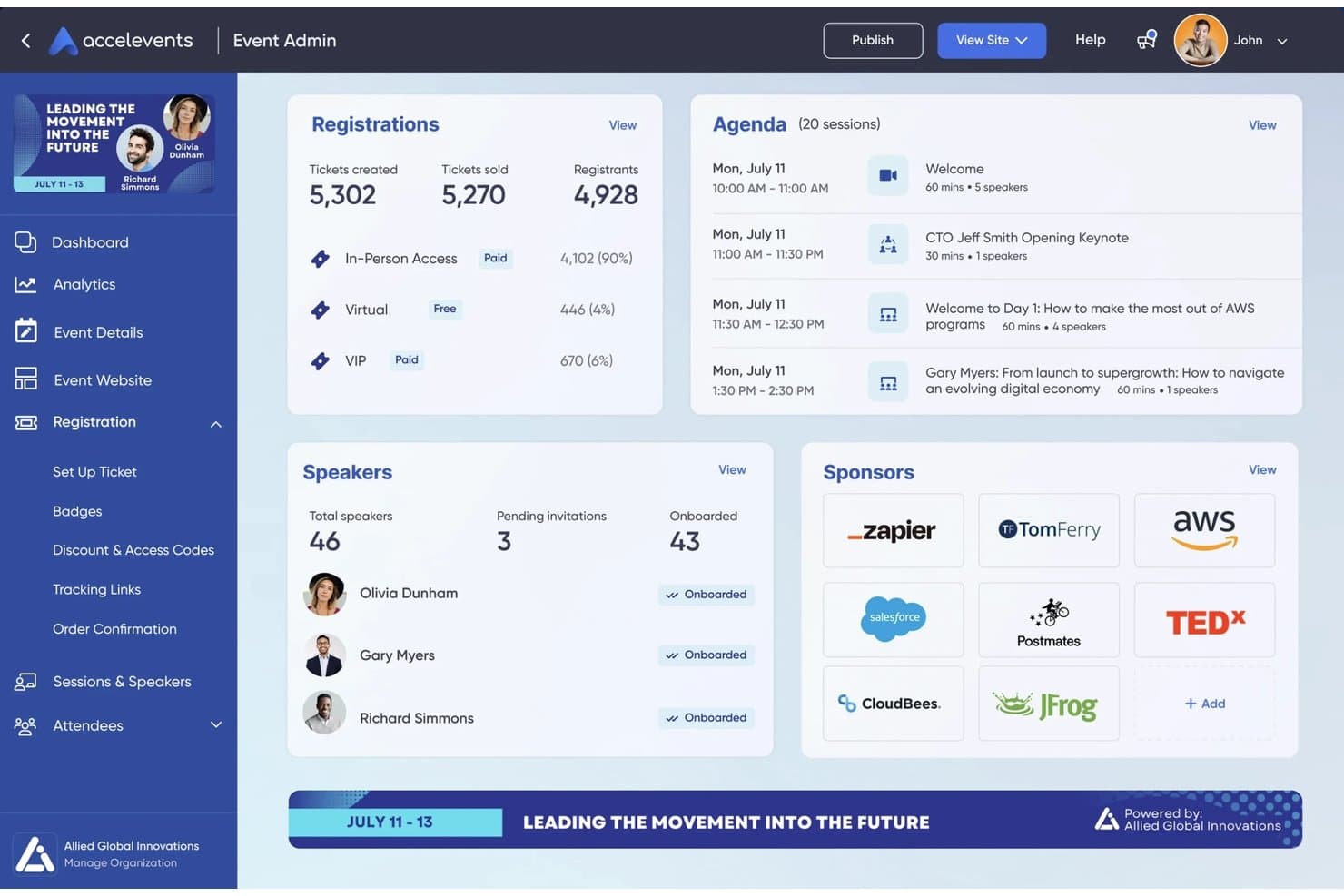
Accelevents copre registrazione, check-in, badge, coinvolgimento ed eventi virtuali. Accelevents è una piattaforma tutto-in-uno per la gestione degli eventi che gestisce registrazione, biglietteria, check-in dei partecipanti, stampa dei badge, gestione dei relatori, portali per gli espositori e organizzazione di eventi virtuali per conferenze in presenza, virtuali e ibride.
Per chi è più adatto Accelevents?
Accelevents è particolarmente adatto a organizzatori di eventi, associazioni e team di marketing aziendale che gestiscono conferenze con un elevato numero di registrazioni e necessità complesse di biglietteria, raccolta fondi o partecipazione ibrida.
Perché ho scelto Accelevents
Ho scelto Accelevents come una delle migliori opzioni perché i suoi strumenti per la biglietteria e la raccolta fondi gestiscono complessità che la maggior parte delle piattaforme non è in grado di affrontare. Apprezzo in particolare il supporto per la logica condizionale, i flussi di approvazione e i posti riservati per un numero illimitato di tipologie di registrazione, il tutto senza costi di transazione. Per le conferenze che combinano livelli a pagamento, prenotazioni di gruppo e sessioni con accesso tramite codice, questa flessibilità è difficile da replicare.
Caratteristiche principali di Accelevents
- Strumento per la creazione di programmi multi-traccia: Crea e gestisci programmi complessi per conferenze su più tracce, con aggiornamenti in blocco per capienza, ubicazione e tipologia di sessione.
- Centro per eventi virtuali: Ospita nativamente sessioni trasmesse in diretta e disponibili su richiesta, con trascrizione automatica e strumenti interattivi come sondaggi e domande e risposte integrati in ogni sessione.
- Centro risorse per espositori: Un portale autonomo in cui gli espositori gestiscono le attività, caricano materiali e acquisiscono i contatti dei partecipanti tramite scansione dei codici QR durante l'evento.
- Pannello analitico unificato: Combina i dati di registrazione, check-in in loco, app mobile e coinvolgimento virtuale in un'unica vista per i report, con report personalizzati e condivisibili.
Integrazioni di Accelevents
Accelevents offre integrazioni documentate con Salesforce, HubSpot, Marketo, Zoom, Vimeo, Cvent Passkey, ExpoFP e Google Analytics GA4. Offre inoltre un'API REST pubblica, webhook e supporto per Zapier.
Pros and Cons
Pros:
- Tipologie di registrazione illimitate e biglietteria condizionale
- Prenotazione dell'hotel da parte dei partecipanti direttamente dopo la registrazione
- Stampa dei badge con colori dinamici per il testo del badge
Cons:
- Nessuna funzionalità per la gestione degli ordini relativi ai servizi per banchetti
- Nessuno strumento per la gestione delle operazioni alberghiere o dei blocchi di camere
Learn more about Accelevents: Ideale per una gestione solida dei progetti degli eventi
- Sì
- $5/utente/mese (con fatturazione annuale)
Visit WebsiteCustomer Rating:4.6/5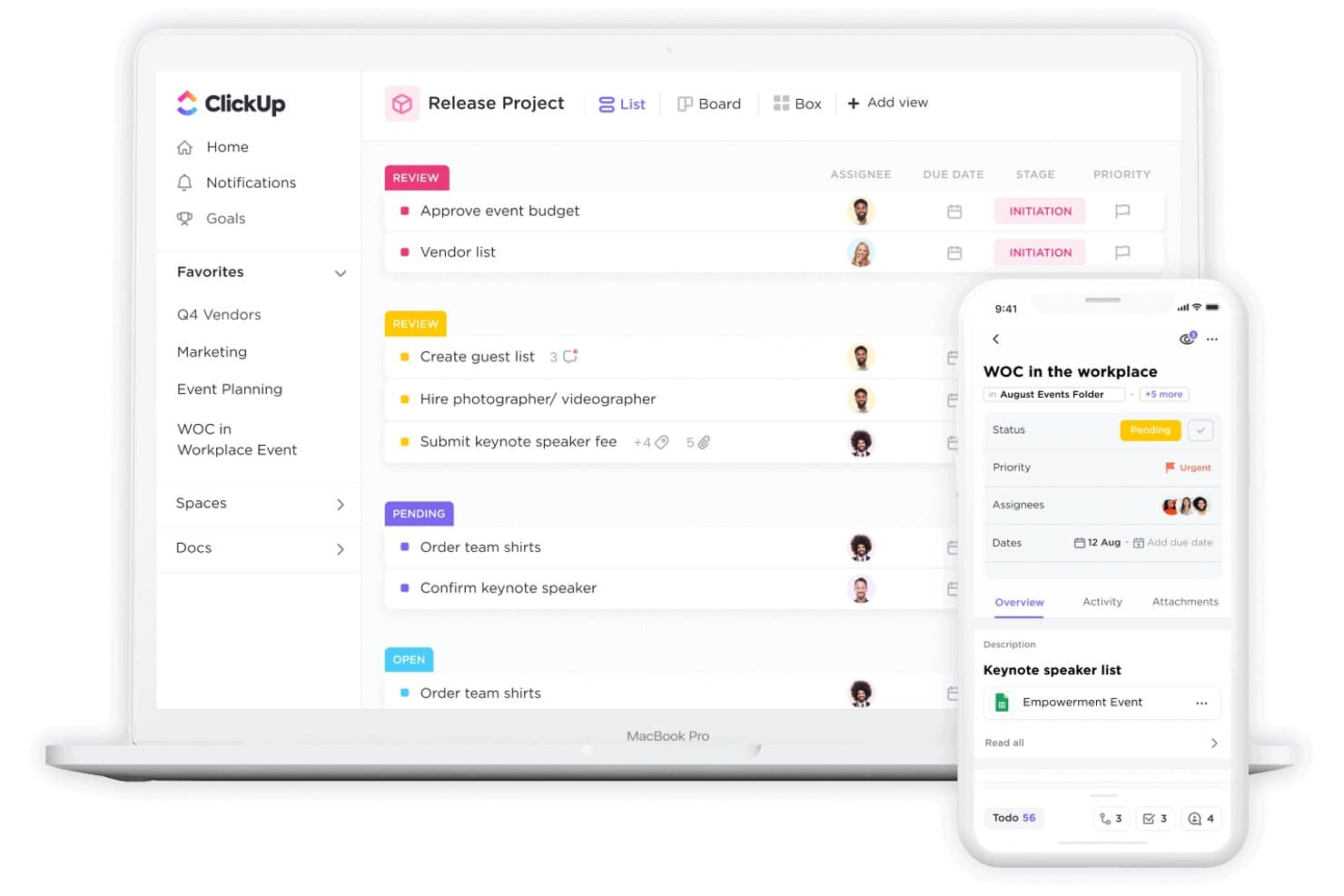
ClickUp monitora attività, stati e assegnatari degli eventi su diversi dispositivi. ClickUp è una piattaforma di gestione dei progetti per uso generale che riunisce il monitoraggio delle attività, l'automazione dei flussi di lavoro, la gestione del budget, la collaborazione tra team e pannelli di controllo personalizzabili per coordinare tutti gli elementi della pianificazione degli eventi.
Per chi è più adatto ClickUp?
ClickUp è adatto ai team che organizzano eventi e hanno bisogno di un centro operativo flessibile per la gestione dei progetti, in modo da coordinare fornitori, tempistiche e budget nell'ambito di conferenze su larga scala.
Perché ho scelto ClickUp
Ho incluso ClickUp tra le mie scelte principali perché offre solide funzionalità di gestione dei progetti per la pianificazione di conferenze, soprattutto quando è necessario coordinare contemporaneamente fornitori, tempistiche e team interni. Apprezzo il suo modello per la gestione delle conferenze, che suddivide la pianificazione in fasi definite come Preparazione, Sul posto e Dopo l'evento, con 19 stati personalizzati delle attività che mantengono visibili tutti gli elementi del progetto. I pannelli di controllo personalizzati consentono di monitorare in tempo reale la spesa rispetto al budget, una funzione essenziale per il coordinamento di conferenze su larga scala.
Funzionalità principali di ClickUp
- Vista del diagramma di Gantt: Visualizza le tempistiche dell'evento con dipendenze tra attività, tappe fondamentali e programmazione lungo l'intero ciclo di vita della conferenza.
- Accesso degli ospiti con autorizzazioni: Invita fornitori esterni, relatori o clienti nel tuo spazio di lavoro con controlli di accesso basati sui ruoli.
- Automazioni senza codice: Imposta regole basate su eventi attivatori per assegnare automaticamente le attività, aggiornare gli stati e inviare notifiche durante l'avanzamento della pianificazione.
- Documenti ClickUp: Crea e collega documenti collaborativi, come guide operative o briefing per i fornitori, direttamente alle attività pertinenti.
Integrazioni di ClickUp
ClickUp pubblicizza oltre 1.000 integrazioni, comprese connessioni native con Zoom, Slack, Microsoft Teams, Google Calendar e Outlook Calendar. Supporta anche webhook, Zapier e un'API pubblica, ma non dispone di integrazioni native con PMS, CRS o POS.
Pros and Cons
Pros:
- I pannelli di controllo personalizzati visualizzano i budget e le tempistiche degli eventi
- Le automazioni senza codice riducono i passaggi manuali delle attività
- L'accesso degli ospiti consente la collaborazione con i fornitori
Cons:
- Nessuna gestione delle sale riunioni o dei blocchi di camere
- Nessun flusso di lavoro per gli ordini degli eventi per banchetti (BEO)
Learn more about ClickUp: Ideale per conferenze ibride immersive
- Demo gratuita disponibile
- Prezzi disponibili su richiesta
Visit WebsiteCustomer Rating:4.7/5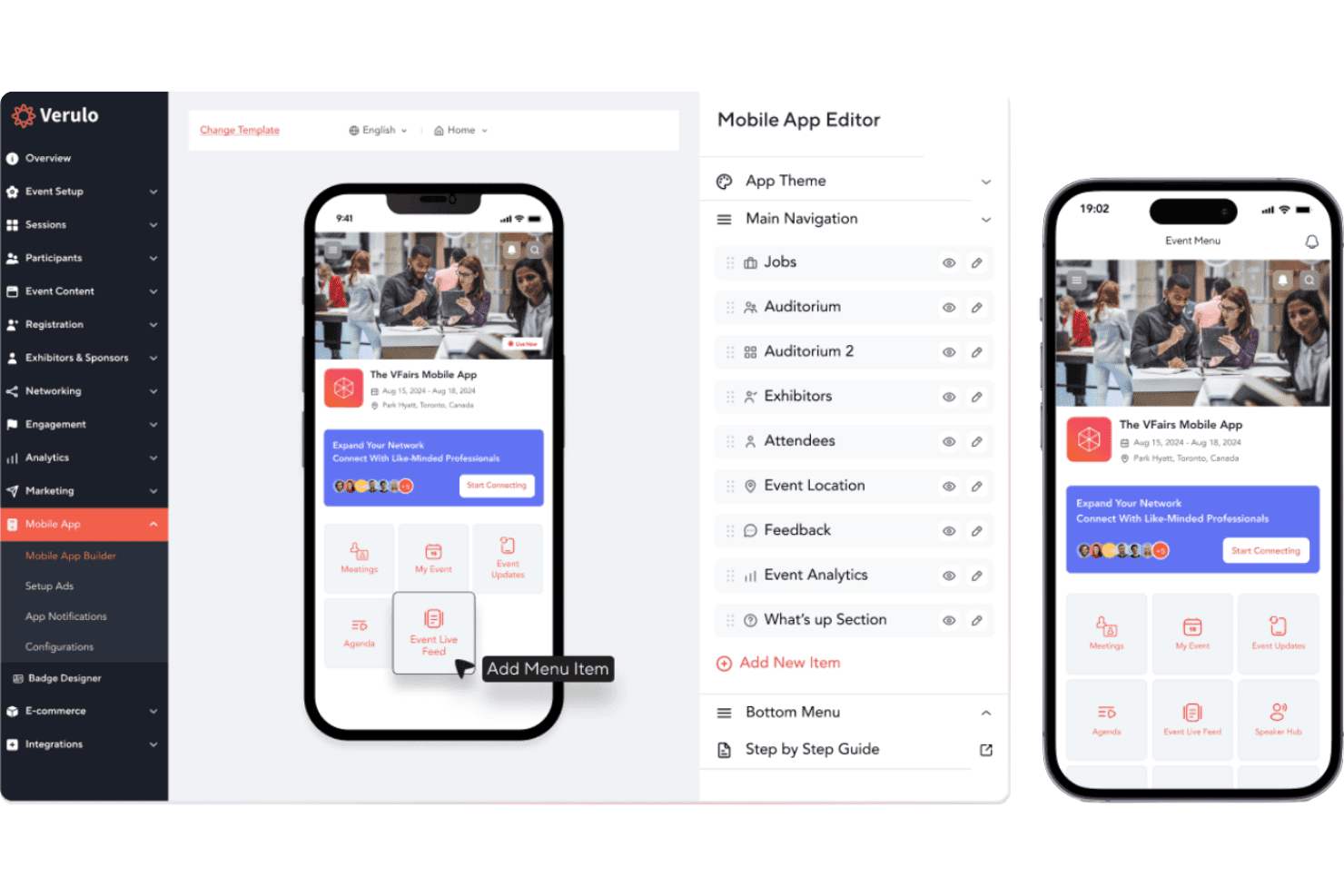
vFairs offre registrazione, sedi virtuali, programmi, relazioni e registrazione all'arrivo. vFairs è una piattaforma di gestione di conferenze virtuali e ibride che comprende la registrazione agli eventi, ambienti virtuali immersivi in 3D/2D, programmi a più sessioni, relazioni tra partecipanti, invio di abstract, registrazione all'arrivo in loco e coordinamento degli alloggi per gli organizzatori di eventi.
Per chi è più adatto vFairs?
vFairs è particolarmente adatto agli organizzatori di eventi e alle associazioni che gestiscono conferenze virtuali o ibride su larga scala e necessitano di ambienti immersivi per i partecipanti e strumenti di coinvolgimento integrati.
Perché ho scelto vFairs
vFairs si è guadagnato un posto nella mia selezione perché nessun'altra piattaforma che ho testato è all'altezza dei suoi ambienti immersivi per conferenze ibride, in cui i partecipanti possono esplorare foyer, auditorium e sale per le relazioni in 3D completamente personalizzati con il marchio, sia che partecipino da remoto sia che siano presenti in loco. Apprezzo particolarmente il sistema intelligente di abbinamento basato sull'intelligenza artificiale, che mette in contatto partecipanti, espositori e relatori in base ai loro interessi e profili prima ancora che accedano a una sessione. Il creatore di programmi a più sessioni, con prenotazione delle sessioni con un solo clic e promemoria automatici, mantiene allineati i partecipanti virtuali e in presenza anche nei programmi complessi di più giorni.
Funzionalità principali di vFairs
- Portale per l'invio degli abstract: Un portale personalizzabile e con il marchio dell'organizzazione per raccogliere e gestire gli invii di relatori e ricercatori, con assegnazione dei revisori e notifiche automatiche sullo stato.
- Sistema di ludicizzazione: Assegna punti ai partecipanti per la presenza alle sessioni, i download e i sondaggi, con classifiche, distintivi per traguardi e opzioni per riscattare i premi.
- Registrazione all'arrivo con riconoscimento facciale basato sull'intelligenza artificiale: Consente una registrazione all'arrivo in loco senza contatto e senza QR tramite il riconoscimento facciale, con modalità offline e monitoraggio delle presenze in tempo reale.
- Applicazione mobile per eventi personalizzata con il marchio: Un'applicazione per partecipanti completamente personalizzata con il marchio dell'organizzazione, con programmi personalizzati, notifiche push, strumenti per le relazioni e mappe interattive.
Integrazioni di vFairs
vFairs offre integrazioni con Zoom, Webex, Microsoft Teams, Restream, Salesforce, HubSpot, Slido e oltre 30 gateway di pagamento. Offre inoltre un'API REST, webhook, sviluppo di integrazioni personalizzate e connettività con Zapier.
Pros and Cons
Pros:
- Ambienti virtuali immersivi in 3D e 2D
- Abbinamento basato sull'intelligenza artificiale per partecipanti ed espositori
- Modulo per la gestione degli alloggi rivolto ai partecipanti
Cons:
- Nessuno strumento per gli spazi meeting dell'hotel o per i BEO
- I blocchi di camere non sono collegati al PMS dell'hotel
Learn more about vFairs: Ideale per eventi virtuali e ibridi interattivi
- Sì
- $500/mese, fatturato annualmente
Visit WebsiteCustomer Rating:4.7/5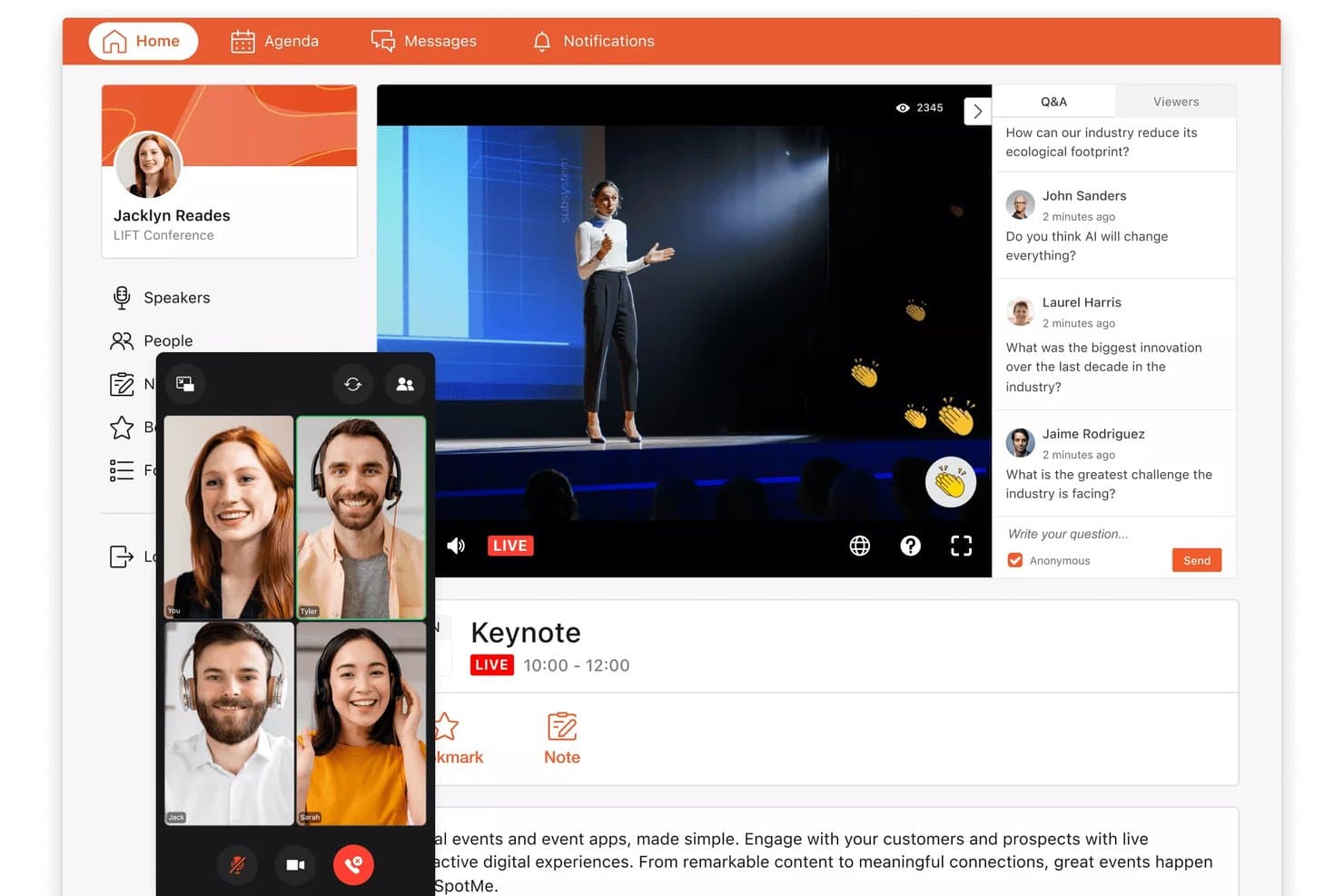
SpotMe consente ai partecipanti di guardare i discorsi principali dal vivo e inviare domande e risposte in tempo reale. SpotMe è una piattaforma per il coinvolgimento dei partecipanti agli eventi che supporta conferenze virtuali, ibride e in presenza con strumenti per la registrazione dei partecipanti, lo streaming dal vivo, le app mobili per eventi, l'interazione durante le sessioni, il networking e l'analisi post-evento.
Per chi è più adatto SpotMe?
SpotMe è una soluzione particolarmente adatta ai team aziendali che organizzano eventi nel settore delle scienze della vita e dei servizi professionali, gestendo programmi virtuali e ibridi ad alto volume.
Perché ho scelto SpotMe
SpotMe è entrato nella mia rosa dei candidati grazie alla sua efficacia nella gestione del livello interattivo degli eventi virtuali e ibridi. Mi piace il fatto che combini sondaggi dal vivo, domande e risposte, abbinamento dei partecipanti e sale di discussione in un'unica esperienza personalizzata con il proprio marchio, così i partecipanti rimangono coinvolti sia che si trovino in sala sia che partecipino da remoto. SpotMe Studio consente di gestire streaming dal vivo con più relatori, sovrimpressioni inferiori personalizzate con il proprio marchio e sottotitoli in tempo reale in oltre 30 lingue, una caratteristica che, secondo la mia esperienza, fa davvero la differenza per le conferenze ibride internazionali.
Funzionalità principali di SpotMe
- Check-in con codice QR: Scansiona i codici QR dei partecipanti ai punti di ingresso e monitora in tempo reale le presenze a livello di sessione, con applicazione integrata dei limiti di capienza delle sale.
- Strumenti di gamification: Consente di assegnare ai partecipanti punti e distintivi per il completamento delle attività, con classifiche e un negozio dei premi per stimolare la partecipazione durante tutto l'evento.
- Monitoraggio dei crediti CEU e certificazione: Monitora la partecipazione individuale alle sessioni per calcolare i crediti di formazione continua e rilascia automaticamente le certificazioni al completamento.
- Libreria di contenuti su richiesta: Archivia registrazioni delle sessioni, presentazioni e documenti in un unico luogo, così i partecipanti possono rivedere i contenuti dopo la conclusione dell'evento.
Integrazioni di SpotMe
SpotMe offre integrazioni native con Salesforce, HubSpot, Veeva, IQVIA, Marketo, Eloqua e Pardot, oltre a integrazioni con Cvent, RainFocus e Swoogo. Fornisce inoltre un'API REST, l'accesso singolo OpenID Connect e la connettività RTMPS.
Pros and Cons
Pros:
- Offre oltre 80 funzionalità per il coinvolgimento dei partecipanti
- Fornisce sottotitoli dal vivo in oltre 30 lingue
- App per eventi personalizzabili con il proprio marchio incluse
Cons:
- Nessuna integrazione con spazi per eventi o hotel
- Non include la gestione degli ordini per banchetti
Learn more about SpotMe:
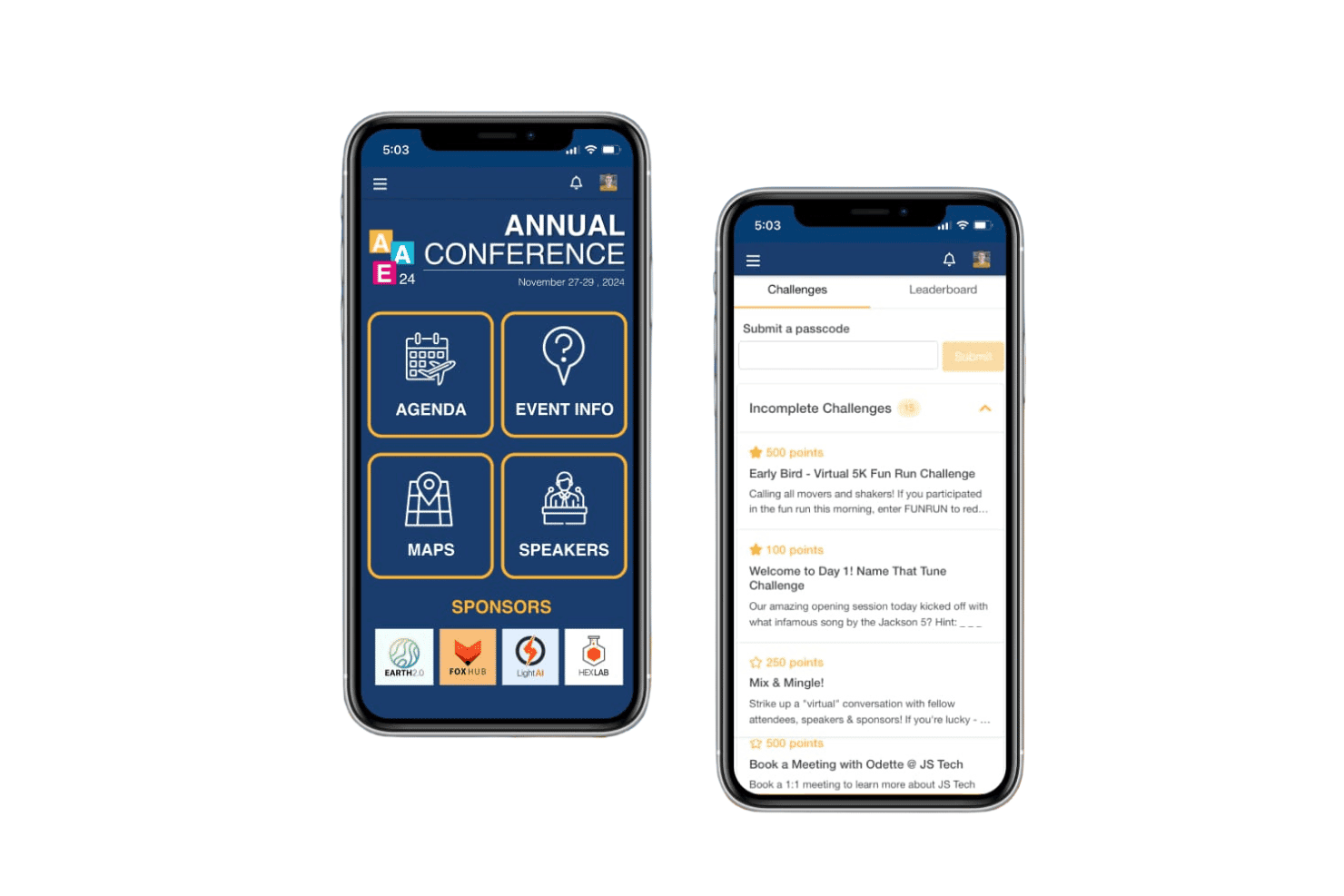
EventMobi gestisce la registrazione, le app per eventi, il check-in e il coinvolgimento dei partecipanti. EventMobi è una piattaforma per la gestione degli eventi che si occupa della registrazione dei partecipanti, di app mobili per eventi personalizzate con il brand, della produzione di eventi virtuali e ibridi, del check-in, della stampa dei badge e di strumenti per il coinvolgimento come sondaggi dal vivo, domande e risposte e networking per conferenze in presenza, virtuali e ibride.
Per chi è più indicato EventMobi?
EventMobi è adatto agli organizzatori di eventi e ai team delle associazioni che hanno bisogno di un'app per conferenze personalizzata e rivolta ai partecipanti, con strumenti di coinvolgimento integrati per eventi in presenza, virtuali o ibridi.
Perché ho scelto EventMobi
EventMobi si è guadagnato un posto nella mia rosa ristretta perché le opzioni di personalizzazione dell'app sono davvero notevoli. Mi piace il fatto che lo strumento avanzato di progettazione con funzionalità di trascinamento consenta di creare un'esperienza per i partecipanti completamente personalizzata con il brand senza dover scrivere una riga di codice. Per le conferenze ibride, la combinazione di programmi delle sessioni personalizzati e della produzione di streaming dal vivo di EventMobi Studio fa sì che i partecipanti in presenza e da remoto vivano un'esperienza coerente e curata utilizzando la stessa piattaforma.
Funzionalità principali di EventMobi
- Modulo di registrazione dei partecipanti: Supporta la registrazione in più passaggi con prezzi a livelli, accesso solo su invito e flussi di email automatizzati.
- Sondaggi dal vivo e domande e risposte: Consente agli organizzatori di realizzare sondaggi, domande e questionari in tempo reale direttamente nell'app dell'evento durante le sessioni.
- Strumenti per il coinvolgimento tramite il gioco: Include sfide, attività con ricompense e giochi sponsorizzati per stimolare la partecipazione dei partecipanti durante tutto l'evento.
- Acquisizione dei contatti degli espositori: Consente agli espositori di scansionare i badge dei partecipanti per raccogliere ed esportare i contatti dall'app dell'evento.
Integrazioni di EventMobi
L'Hub delle integrazioni di EventMobi supporta oltre 1.000 connessioni ad app, tra cui Salesforce, HubSpot, Marketo, Eventbrite, Cvent, Mailchimp, iMIS, MemberSuite, Wild Apricot e Airtable. Offre inoltre un'API gratuita e la connettività con Zapier.
Pros and Cons
Pros:
- Creazione di app per eventi personalizzate con il brand tramite trascinamento
- Sondaggi dal vivo e strumenti di coinvolgimento tramite il gioco aumentano il coinvolgimento
- Check-in e stampa dei badge integrati
Cons:
- Nessuno strumento per sale riunioni o spazi per eventi
- Nessuna funzionalità per la gestione dei blocchi di camere per gruppi
Learn more about EventMobi: Ideale per soluzioni complete di ricerca delle sedi
- Demo gratuita disponibile
- Prezzi su richiesta
Visit WebsiteCustomer Rating:4.4/5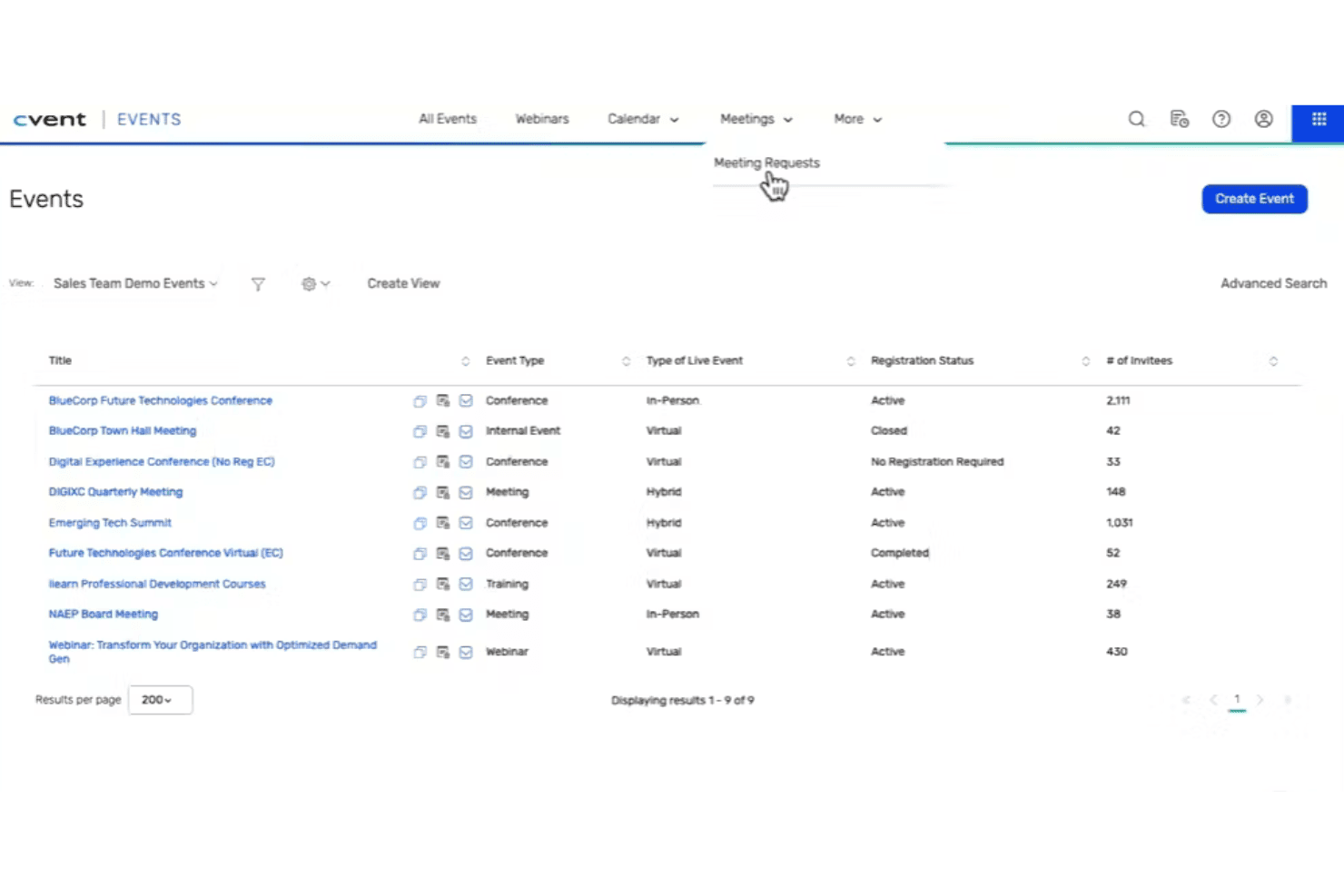
Cvent coordina sedi, registrazione, blocchi di camere, coinvolgimento e check-in in loco. Cvent è una piattaforma di gestione delle conferenze basata sull'intelligenza artificiale che copre la ricerca delle sedi, la gestione degli RFP, la gestione dei blocchi di camere per gruppi, la registrazione agli eventi, il coinvolgimento dei partecipanti e il check-in in loco per eventi in presenza, virtuali e ibridi.
Per chi è più adatto Cvent?
Cvent è particolarmente adatto ai team commerciali degli hotel e ai responsabili delle operazioni MICE presso strutture a servizio completo e di grandi dimensioni che devono gestire elevati volumi di RFP di gruppo, blocchi di camere e attività di ricerca per più eventi da un'unica piattaforma.
Perché ho scelto Cvent
Cvent si guadagna un posto tra le migliori soluzioni della mia selezione perché nessun'altra piattaforma si avvicina alla sua portata nella ricerca delle sedi, con circa 340.000 hotel e sedi presenti nella rete Cvent Supplier Network e oltre 155.000 organizzatori attivi che inviano RFP. Apprezzo in particolare il modo in cui CventIQ™ assegna un punteggio e stabilisce la priorità degli RFP di gruppo in entrata in base ai ricavi stimati e all'idoneità del gruppo, così i team commerciali degli hotel dedicano meno tempo alla selezione iniziale e più tempo a rispondere ai contatti giusti. Cvent Passkey completa l'offerta con pannelli di controllo in tempo reale per il monitoraggio delle prenotazioni dei blocchi di camere e avvisi automatici sulle scadenze, eliminando i continui aggiornamenti dei fogli di calcolo su cui la maggior parte dei team fa ancora affidamento.
Funzionalità principali di Cvent
- Percorsi di registrazione personalizzati: Crea flussi di registrazione con più percorsi, logica condizionale, selezione delle sessioni, liste d'attesa ed elaborazione dei pagamenti per eventi in presenza, virtuali o ibridi.
- Check-in in loco con OnArrival: Supporta il check-in tramite chiosco e servizio autonomo, la stampa dei badge su richiesta e pannelli di controllo delle presenze in tempo reale presso la sede dell'evento.
- App mobile Attendee Hub: Un'app con marchio personalizzato che offre streaming dal vivo, contenuti su richiesta, strumenti di networking, domande e risposte, sondaggi e gamification per coinvolgere i partecipanti.
- Intelligence aziendale di CSN: Fornisce analisi in tempo reale della pipeline degli RFP, benchmarking del set competitivo e monitoraggio dell'andamento, direttamente collegati alla rete di ricerca di gruppi di Cvent.
Integrazioni Cvent
Cvent documenta oltre 80 integrazioni native, tra cui Salesforce, Marketo, HubSpot, Microsoft Dynamics, Zoom, Webex, Microsoft Teams e SAP Concur. Cvent Passkey dispone di un'integrazione certificata bidirezionale Maestro PMS, mentre un'API aperta supporta le integrazioni personalizzate.
Pros and Cons
Pros:
- Mercato per la ricerca delle sedi con 340.000 strutture
- L'intelligenza artificiale automatizza l'assegnazione dei punteggi e la definizione delle priorità degli RFP
- Passkey automatizza la gestione dei blocchi di camere per gruppi
Cons:
- Nessuna creazione o distribuzione nativa dei BEO
- Il costo della suite completa è fuori dalla portata delle strutture indipendenti
 Ideale per esperienze di eventi virtuali immersive
- No
- Da $99/organizzatore/mese (fatturati annualmente)
Visit WebsiteCustomer Rating:4.5/5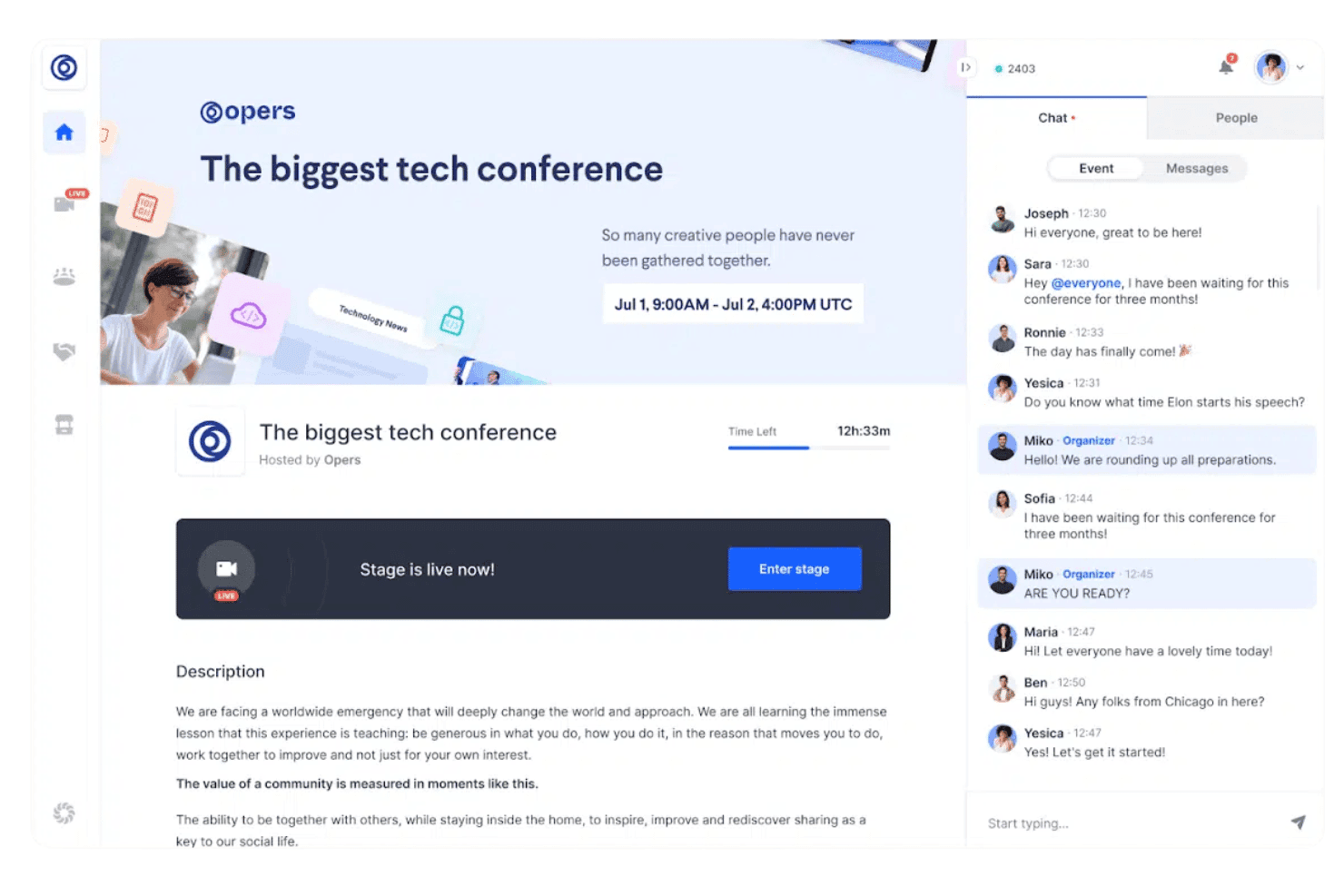
RingCentral Events supporta la registrazione, lo streaming dal vivo, le sessioni su più tracce, il networking, gli stand degli sponsor e i contenuti post-evento. RingCentral Events è una piattaforma per eventi virtuali e ibridi che comprende la registrazione dei partecipanti, lo streaming dal vivo, le sessioni su più tracce, il networking, gli stand degli sponsor e l'hosting dei contenuti post-evento.
Per chi è più adatto RingCentral Events?
RingCentral Events è una soluzione ideale per i responsabili del marketing degli eventi aziendali e per i team di comunicazione che organizzano conferenze virtuali o ibride su larga scala.
Perché ho scelto RingCentral Events
RingCentral Events si è guadagnato un posto nella mia lista ristretta perché è stato progettato fin dall'inizio per offrire esperienze immersive di eventi virtuali, con una sede virtuale strutturata che offre ai partecipanti spazi distinti da attraversare, dai palchi per i keynote agli stand espositivi fino alle sale per il networking rapido. Apprezzo in particolare il sistema automatizzato di abbinamento dei partecipanti, che mette in contatto i partecipanti sulla base dei dati del profilo invece di lasciare il networking al caso. Anche la funzione AI Clips in Creator Lab si distingue, poiché genera automaticamente raccolte dei momenti salienti e brevi contenuti per i social dalle registrazioni delle sessioni, prolungando la durata dei contenuti dell'evento ben oltre la giornata dell'evento dal vivo.
Funzionalità principali di RingCentral Events
- Gestione delle sessioni su più tracce: Organizza sessioni parallele di approfondimento insieme a un palco principale, consentendo ai partecipanti di spostarsi tra le tracce durante gli eventi dal vivo.
- Pagine di registrazione personalizzate: Crea pagine di registrazione personalizzabili con codici promozionali, monitoraggio UTM e supporto per oltre 135 valute.
- Suite per il check-in in sede: Utilizza la modalità chiosco, la stampa dei badge e gli strumenti di controllo degli accessi per gestire il flusso dei partecipanti nelle sedi fisiche degli eventi.
- Hub dei contenuti: Ospita le registrazioni delle sessioni, i clip e le risorse su una pagina web post-evento personalizzata per estendere l'accesso ai contenuti dopo la conclusione dell'evento.
Integrazioni di RingCentral Events
RingCentral Events offre oltre 40 integrazioni del marketplace, tra cui HubSpot, Salesforce, Marketo, Cvent, Eventbrite, Kahoot, Miro, Slido e Interprefy. Fornisce inoltre un'API REST pubblica e si connette a oltre 9,000 app tramite Zapier.
Pros and Cons
Pros:
- Raccolte dei momenti salienti e brevi contenuti per i social basati sull'intelligenza artificiale
- Registrazione, check-in e stampa dei badge integrati
- Abbinamento automatizzato dei partecipanti per il networking
Cons:
- Nessuna gestione dei blocchi di camere d'albergo o dei BEO
- Le planimetrie sono statiche, non interattive
Learn more about RingCentral Events:
Altri software gestionali per conferenze
Ecco alcune ulteriori opzioni di software gestionali per conferenze che non sono entrate nella mia selezione, ma che vale comunque la pena valutare:
- 11Zoho BackstageIdeale per funzionalità di gestione degli eventi dall'inizio alla fine
- 12Lasso.ioIdeale per analisi avanzate degli eventi
- 13RainFocusIdeale per i dati delle conferenze aziendali e il ROI di marketing
- 14WrikeIdeale per la pianificazione collaborativa di eventi
- 15GrenadineIdeale per la pianificazione di conferenze con più sessioni parallele
- 16ON24Ideale per il coinvolgimento nelle conferenze virtuali
- 17BizzaboIdeale per il coinvolgimento nelle conferenze basato sui dati
- 18EventsAirIdeale per esperienze interattive durante le conferenze
- 19EventTempleIdeale per le vendite di conferenze incentrate sulla sede
- 20EventSquidIdeale per flussi di lavoro configurabili per conferenze
Come Valuto il Software di Gestione Conferenze
Divido ogni valutazione in requisiti di base indispensabili—come i workflow BEO e l'integrazione con il PMS—e i fattori distintivi che separano una buona soluzione da quella giusta.
Funzionalità Principali (Requisiti Minimi per Questa Lista)
Quando seleziono gli strumenti per la mia lista, valuto ciascuno su una scala da 0 (non offre la funzionalità) a 5 (eccelle in quest'area) per ogni funzionalità chiave elencata di seguito. Poi, calcolo il punteggio totale dello strumento in percentuale. Ogni software deve raggiungere un punteggio totale minimo del 65% per essere preso in considerazione.
- Gestione Spazi Funzionali: Verifico se una piattaforma tiene traccia della disponibilità in tempo reale di sale da ballo, sale riunioni e sale consigli, inclusi i tempi di preparazione/smontaggio per evitare doppie prenotazioni.
- Gestione Blocchi di Camere di Gruppo: Gestire la disponibilità rispetto ai blocchi contrattualizzati è dove gli errori costano in termini di ricavi, quindi cerco strumenti per tracciare le scadenze, calcolare i "wash" e gestire le rooming list.
- Workflow per Banquet Event Order (BEO): Valuto come ogni strumento crea, versiona e distribuisce i BEO ai team di cucina, banchetti e AV—soprattutto quando un planner modifica il numero di pranzi 48 ore prima dell’evento.
- Gestione RFP e Proposte: Il percorso dal lead in entrata al contratto firmato è importante, quindi verifico come gli strumenti acquisiscono le RFP, generano proposte brandizzate e fanno avanzare le trattative nelle fasi di approvazione.
- Integrazione PMS/CRS: Controllo la presenza di connessioni certificate bidirezionali con i sistemi di gestione della proprietà e le centrali di prenotazione come Opera, Mews o Infor HMS per mantenere allineati inventario e dati degli ospiti.
- Ricavi Gruppi e Reportistica: Esamino report di andamento, previsioni catering e analisi di displacement—quei report che aiutano il team ricavi a decidere se accettare un’offerta per un gruppo.
Dopo aver raccolto la lista degli strumenti che soddisfano questi criteri, considero cosa distingue ciascuna piattaforma.
Fattori Differenzianti (Cosa Distingue i Fornitori)
Ecco come metto a confronto i diversi fornitori:
Funzionalità Distintive
La gestione multi-proprietà è un fattore fondamentale per i gruppi alberghieri. Cerco piattaforme che permettono a un team commerciale regionale di condividere lead e confrontare andamento tra più strutture da un’unica dashboard. Anche l’accesso mobile ai BEO è importante—capisala e chef hanno bisogno di aggiornamenti in tempo reale sul posto, non di una stampa di tre giorni fa. Gli strumenti interattivi per la planimetria completano l’offerta, consentendo ai commerciali di mostrare visivamente le configurazioni ai clienti durante la prenotazione.
Oltre le Funzionalità
L’integrazione con l’ecosistema hospitality è una delle prime cose che valuto. Una piattaforma che si connette al PMS, POS e alle fonti lead come Cvent o Knowland fa risparmiare ore di inserimenti manuali. Considero anche l’idoneità rispetto alla tipologia di struttura—un hotel congressuale con 40 sale breakout ha esigenze molto diverse rispetto a una struttura boutique che ospita occasionalmente ritiri aziendali. Anche la struttura dei prezzi è importante, perché le licenze per struttura possono diventare costose rapidamente per chi ha un portfolio in crescita, rispetto ai modelli per utente.
Come scegliere un software gestionale per conferenze
La scelta del software gestionale per conferenze dipende dal formato dell'evento, dal numero di partecipanti, dalla complessità delle sessioni e dai requisiti per la gestione in presenza. Valuta se hai bisogno di registrazione, programmazione su più percorsi, strumenti per espositori, gestione degli abstract o funzionalità per eventi ibridi.
| Se la tua priorità è... | Cerca... |
|---|---|
| Se la tua priorità è...Gestire programmi di conferenze complessi | Cerca...Programmazione su più percorsi e gestione delle sessioni |
| Se la tua priorità è...Gestire relatori e contributi | Cerca...Portali per relatori e gestione degli abstract |
| Se la tua priorità è...Migliorare le operazioni in presenza | Cerca...Registrazione all'arrivo, stampa dei tesserini e scansione dei partecipanti |
| Se la tua priorità è...Supportare sponsor ed espositori | Cerca...Portali per espositori, acquisizione dei contatti e gestione degli stand |
| Se la tua priorità è...Aumentare la partecipazione dei partecipanti | Cerca...Creazione di reti professionali, app mobili, sondaggi e domande e risposte |
| Se la tua priorità è...Organizzare conferenze ibride o virtuali | Cerca...Trasmissione in diretta e gestione di sessioni virtuali |
Come valutare la propria selezione
- Testa il flusso di registrazione: Crea diversi tipi di partecipanti, categorie di biglietti, codici sconto e domande personalizzate per la registrazione.
- Costruisci un programma di conferenza di esempio: Aggiungi più percorsi, sessioni, relatori e sale per verificare come vengono gestiti i conflitti di programmazione.
- Valuta gli strumenti rivolti ai partecipanti: Testa l'app mobile, i programmi personali, gli strumenti per creare contatti, gli avvisi sulle sessioni, i sondaggi e le funzionalità di domande e risposte.
- Esamina le funzionalità in loco: Verifica come il software gestisce l'accettazione dei partecipanti, la stampa dei tesserini, la scansione alle sessioni e le modifiche dell'ultimo minuto alle registrazioni.
- Testa i flussi di lavoro per espositori e sponsor: Crea profili di espositori di esempio, assegnazioni degli stand, pacchetti di sponsorizzazione e processi di acquisizione dei contatti.
- Compromesso: piattaforma tutto-in-uno o strumenti specializzati: Decidi se una sola piattaforma debba gestire l'intera conferenza o integrarsi con strumenti separati per la registrazione, la trasmissione in diretta e il coinvolgimento.
Che cos'è il software per la gestione delle conferenze?
Il software per la gestione delle conferenze è una piattaforma per pianificare, organizzare e gestire le conferenze, dalla registrazione fino alla reportistica post-evento.
Queste piattaforme supportano comunemente la registrazione dei partecipanti, la programmazione delle sessioni, la gestione dei relatori, l'accettazione, la stampa dei tesserini, la creazione di contatti e la reportistica. Alcune offrono anche la gestione dei riassunti, strumenti per gli espositori, applicazioni mobili per gli eventi e funzionalità per conferenze virtuali.
Funzionalità del software per la gestione delle conferenze
Quando scegli il software per la gestione delle conferenze, presta attenzione alle seguenti funzionalità chiave:
- Registrazione dei partecipanti: Raccoglie le informazioni sui partecipanti, gestisce i tipi di biglietto, elabora le registrazioni e supporta moduli di registrazione personalizzati.
- Gestione delle sessioni e del programma: Organizza percorsi, sessioni, sale, relatori e orari della conferenza da un unico calendario centrale.
- Gestione dei relatori: Memorizza i profili dei relatori, le assegnazioni alle sessioni, i file delle presentazioni, la disponibilità e lo storico delle comunicazioni.
- Gestione dei riassunti: Raccoglie le proposte di presentazione, gestisce le revisioni tra pari, monitora le approvazioni e assegna i riassunti accettati alle sessioni.
- Accettazione in loco e stampa dei tesserini: Gestisce gli arrivi dei partecipanti e stampa tesserini personalizzati per velocizzare l'ingresso.
- Creazione di contatti tra partecipanti: Offre elenchi dei partecipanti, programmazione di incontri, messaggistica, abbinamento tra partecipanti e altri strumenti per creare contatti.
- Applicazioni mobili per gli eventi: Offrono ai partecipanti l'accesso ai programmi, alle informazioni sui relatori, agli annunci, alle mappe, alla creazione di contatti e agli aggiornamenti sulle sessioni.
- Gestione di sponsor ed espositori: Gestisce i profili degli espositori, le assegnazioni degli stand, i contenuti degli sponsor, l'acquisizione dei contatti e le attività di coinvolgimento.
- Strumenti per eventi virtuali e ibridi: Supporta la trasmissione in diretta, le sessioni virtuali, la creazione di contatti in rete e la partecipazione da remoto.
- Reportistica della conferenza: Monitora le registrazioni, le presenze, la partecipazione alle sessioni, il coinvolgimento, i contatti e altri dati sulle prestazioni dell'evento.
Vantaggi del software per la gestione delle conferenze
L'implementazione di un software per la gestione delle conferenze offre diversi vantaggi agli organizzatori e ai team degli eventi:
- Pianificazione centralizzata della conferenza: Mantiene le informazioni sui partecipanti, sui relatori, sulle sessioni, sugli espositori e sulle operazioni all'interno di un'unica piattaforma.
- Elaborazione più rapida dei partecipanti: La registrazione digitale, i codici QR e la stampa dei tesserini riducono le attività manuali di accettazione.
- Migliore coordinamento delle sessioni: Gli strumenti di programmazione semplificano la gestione di sessioni sovrapposte, relatori, sale e percorsi della conferenza.
- Maggiore partecipazione dei partecipanti: La creazione di contatti, i sondaggi, le domande e risposte, le notifiche e i programmi personalizzati incoraggiano una maggiore interazione.
- Amministrazione semplificata dei relatori: I portali per i relatori offrono un unico spazio per raccogliere biografie, presentazioni, disponibilità e dettagli delle sessioni.
- Operazioni per gli espositori più organizzate: I portali per gli espositori e gli strumenti di acquisizione dei contatti semplificano la gestione delle attività degli sponsor e degli stand.
- Maggiore visibilità dell'evento: Gli strumenti di reportistica mostrano le tendenze delle registrazioni, le presenze alle sessioni, i livelli di coinvolgimento e il comportamento dei partecipanti.
- Supporto per diversi formati di evento: Gli organizzatori possono gestire conferenze in presenza, virtuali e ibride utilizzando la stessa piattaforma.
Costi e prezzi del software per la gestione delle conferenze
Il prezzo del software per la gestione delle conferenze varia in base al numero di partecipanti, alla frequenza degli eventi, alle funzionalità e ai requisiti di servizio.
Alcuni fornitori addebitano un costo per evento o partecipante, mentre altri offrono abbonamenti annuali o contratti aziendali personalizzati. Potrebbero essere applicati costi aggiuntivi per app mobili, hardware in loco, stampa dei badge, strumenti per eventi virtuali o assistenza premium.
Tabella comparativa dei piani per il software di gestione delle conferenze
| Tipo di piano | Prezzo medio | Funzionalità comuni |
|---|---|---|
| Tipo di pianoPiano gratuito | Prezzo medio$0 | Funzionalità comuniRegistrazione di base, programmazione limitata degli eventi e assistenza via email. |
| Tipo di pianoPiano personale | Prezzo medio$10-$30/utente/mese | Funzionalità comuniBranding personalizzato, analisi di base e assistenza via email e chat. |
| Tipo di pianoPiano aziendale | Prezzo medio$50-$100/utente/mese | Funzionalità comuniRegistrazione avanzata, funzionalità di integrazione e assistenza telefonica. |
| Tipo di pianoPiano aziendale avanzato | Prezzo medio$150-$300/utente/mese | Funzionalità comuniPersonalizzazione completa, responsabile dell'account dedicato, analisi avanzate e formazione. |
Domande frequenti sul software di gestione delle conferenze
Ecco alcune risposte alle domande comuni sul software di gestione delle conferenze:
In che modo il software di gestione delle conferenze gestisce la sicurezza dei dati?
Il software di gestione delle conferenze include generalmente misure di sicurezza come la crittografia e protocolli di protezione dei dati per salvaguardare le informazioni dei partecipanti. È importante verificare se il software è conforme a normative come il GDPR o l’HIPAA, se applicabili ai propri eventi. Questo garantisce che i dati rimangano sicuri e protetti.
Quali opzioni di assistenza sono disponibili con il software di gestione delle conferenze?
Le opzioni di assistenza variano in base al fornitore, ma spesso includono risorse come chat dal vivo, assistenza via email e centri di supporto. Alcuni fornitori offrono anche responsabili dell’account dedicati per i piani aziendali. Valuta le esigenze di assistenza del tuo team e scegli un fornitore che offra un supporto adeguato alle tue attività.
È possibile personalizzare il software di gestione delle conferenze?
La maggior parte degli strumenti di gestione delle conferenze consente di personalizzare l’esperienza in base al proprio branding e ai requisiti dell’evento. Spesso è possibile modificare temi, layout e percorsi dei partecipanti. Verifica che il software offra la flessibilità necessaria per rispecchiare l’identità del tuo marchio e soddisfare esigenze specifiche dell’evento.
Come si valuta la capacità di una piattaforma di gestire conferenze ibride?
È necessario verificare se supporta sia gli elementi in presenza sia quelli virtuali: streaming dal vivo, sale parallele, sessioni virtuali di poster e chat per i partecipanti. È inoltre importante verificare con quanta fluidità il sistema gestisce il passaggio tra i percorsi in sede e quelli online. Testa se i partecipanti virtuali e quelli in presenza possono interagire (domande e risposte, sondaggi, networking) senza difficoltà.
Quali report e analisi dovresti aspettarti dopo la conferenza?
Dovresti poter visualizzare le presenze per sessione, i tassi di abbandono, le suddivisioni demografiche, i report sui contatti acquisiti dagli sponsor e i sondaggi sulla soddisfazione. Cerca inoltre dati grezzi esportabili per condurre le tue analisi. Più è possibile approfondire i dati (per percorso, giorno o tipo di partecipante), più utili saranno le informazioni ottenute.
Come si gestiscono le comunicazioni e le notifiche dei partecipanti nei flussi di lavoro avanzati?
Verifica se puoi configurare email attivate da eventi specifici: per promemoria delle sessioni, cancellazioni, notifiche per le liste d’attesa o modifiche al programma. Verifica inoltre se puoi personalizzare i messaggi in base al percorso o allo stato di ciascun partecipante. La possibilità di sopprimere o raggruppare le notifiche aiuta a evitare un sovraccarico di email.