

Gestire gli eventi di un hotel significa coordinare spazi per ricevimenti, blocchi di camere, dettagli del catering, personale e attrezzature senza creare conflitti di programmazione. Il giusto software per la programmazione degli eventi può riunire tutti questi elementi in un unico posto e offrire al tuo team una visibilità migliore su ogni prenotazione.
Ho esaminato le principali opzioni per hotel e strutture ricettive, concentrandomi sugli strumenti che supportano la programmazione degli eventi, la gestione degli spazi per ricevimenti, i BEO, le prenotazioni di gruppo, il coordinamento delle risorse e le integrazioni per il settore dell'ospitalità.
In questa guida ti illustrerò i migliori software per la programmazione degli eventi per i team alberghieri, comprese le funzionalità, i punti di forza e i casi d'uso che distinguono ogni opzione, così potrai scegliere quella più adatta alla tua struttura.
Perché fidarsi dei nostri consigli sui software
6,700+
Reviews
20
Industry experts
16+
Evaluation factors
14
Years
Il nostro team testa e recensisce software dal 2012. In quanto leader del settore alberghiero noi stessi, sappiamo quanto sia difficile — e importante — scegliere il software giusto.
Per questa guida, abbiamo valutato gli strumenti attraverso test pratici e ricerche indipendenti, assegnando un punteggio agli strumenti in base ai nostri criteri di selezione.
Le nostre recensioni riflettono il nostro giudizio editoriale umano, non un discorso di vendita.
Riepilogo dei migliori software per la programmazione degli eventi
Questa tabella comparativa riassume i dettagli dei prezzi delle mie selezioni dei migliori software per la programmazione degli eventi, per aiutarti a trovare quello più adatto al tuo budget e alle esigenze della tua attività.
| Tool | Best For | Trial Info | Price | ||
|---|---|---|---|---|---|
| 1 | Ideale per la generazione automatica di BEO e proposte | Prova gratuita di 14 giorni | A partire da $199/mese (con fatturazione annuale) | Website | |
| 2 | Ideale per la rappresentazione interattiva 3D degli spazi per eventi | Piano gratuito disponibile | A partire da $150/mese | Website | |
| 3 | Ideale per pannelli di controllo di pianificazione condivisi a livello di sede | Demo gratuita disponibile | Prezzi disponibili su richiesta | Website | |
| 4 | Ideale con strumenti di gestione degli eventi basati sull'intelligenza artificiale | Non disponibile | A partire da $99/mese (con fatturazione annuale) | Website | |
| 5 | Ideale con accesso illimitato per gli utenti dei team che gestiscono eventi | Demo gratuita disponibile | Prezzi su richiesta | Website | |
| 6 | Ideale per la gestione di catene con più strutture | Prova gratuita disponibile | A partire da $249/mese (con fatturazione annuale) | Website | |
| 7 | Ideale per le vendite di gruppo basate su Salesforce | Non disponibile | Prezzi su richiesta | Website | |
| 8 | Ideale per l'automazione delle richieste e delle prenotazioni tramite IA | Demo gratuita disponibile | Prezzo su richiesta | Website | |
| 9 | Ideale con disponibilità immediata e in tempo reale degli spazi per eventi | Dimostrazione gratuita disponibile | Prezzi su richiesta | Website | |
| 10 | Ideale per proposte e pagamenti integrati | Demo gratuita disponibile | A partire da $199/mese | Website |


Recensioni dei migliori software per la programmazione degli eventi
Di seguito trovi i miei riepiloghi dettagliati dei migliori software per la programmazione degli eventi inclusi nel mio elenco. Le mie recensioni offrono un’analisi approfondita delle funzionalità, dei migliori casi d’uso e delle capacità di ciascuna piattaforma, per aiutarti a trovare quella più adatta alle tue esigenze.
 Ideale per la generazione automatica di BEO e proposte
- Prova gratuita di 14 giorni
- A partire da $199/mese (con fatturazione annuale)
Visit WebsiteCustomer Rating:4.8/5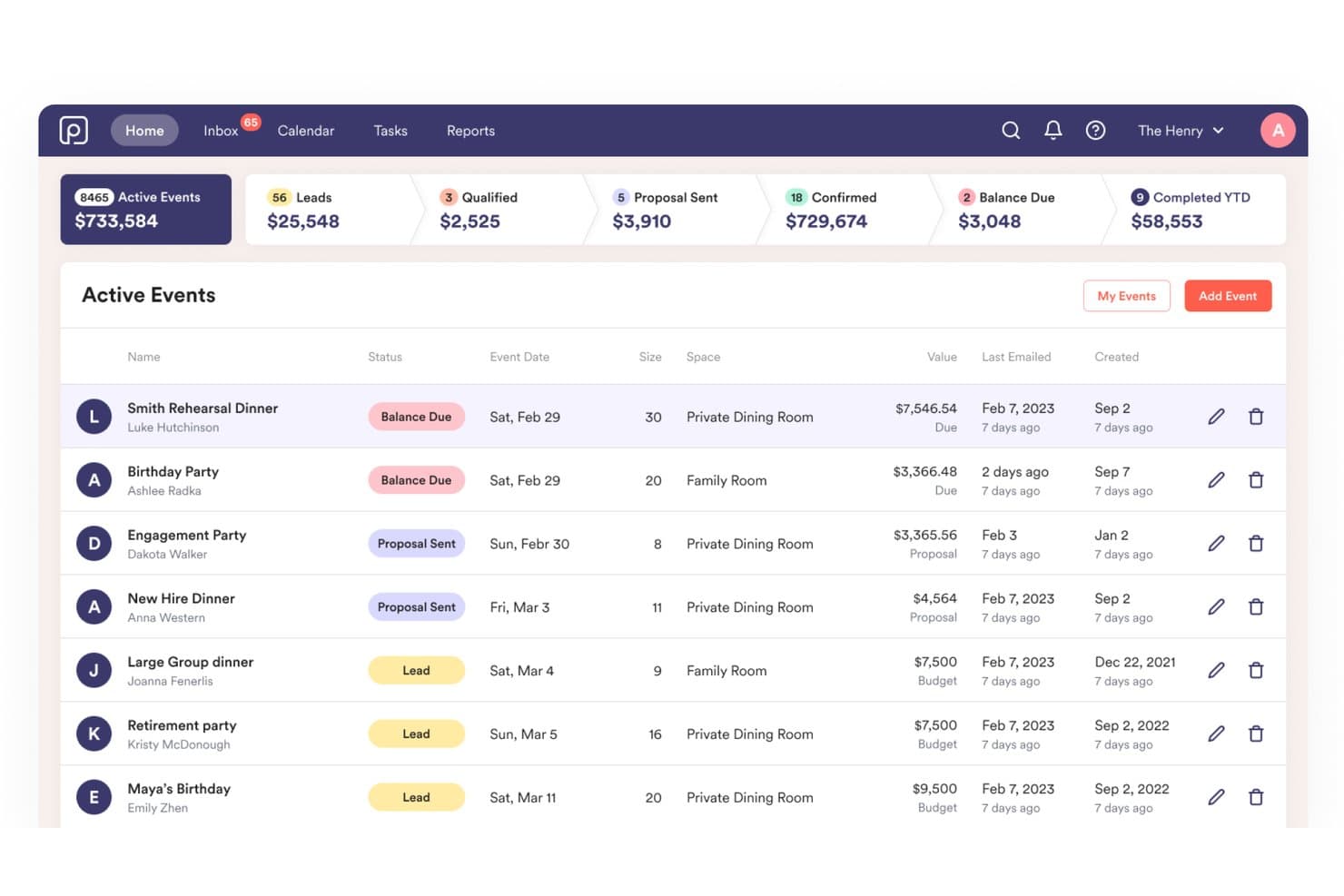
Perfect Venue mostra un pannello di controllo degli eventi attivi con metriche della pipeline, stati degli eventi e dettagli delle prenotazioni per i responsabili delle sedi. Perfect Venue è una piattaforma privata di gestione degli eventi pensata per ristoranti e sedi per eventi, che combina in un unico sistema un calendario centrale delle prenotazioni, la generazione automatica dei BEO, strumenti per le proposte, l'elaborazione dei pagamenti e la comunicazione con gli ospiti.
Per chi è più adatto Perfect Venue?
Perfect Venue è particolarmente adatto a ristoranti indipendenti, birrifici e sedi per eventi indipendenti che gestiscono cene private ed eventi organizzati.
Perché ho scelto Perfect Venue
Perfect Venue si è guadagnato un posto nella mia rosa dei preferiti per il modo in cui gestisce la generazione dei documenti. Quando arriva una prenotazione, crea automaticamente il BEO, inclusi menu, tempistiche e personale, e invia una proposta personalizzata con il marchio all'ospite senza che io debba modificare un modello. La funzione BEO per il personale distribuisce quindi i dettagli dell'evento direttamente ai team della cucina e della sala. Apprezzo anche il fatto che i clienti possano esaminare, firmare e pagare tramite il Portale ospiti senza scambi continui.
Funzionalità principali di Perfect Venue
- Calendario centralizzato degli eventi: Visualizza in un unico calendario tutte le prenotazioni degli eventi, le richieste e la disponibilità di più sedi.
- Flusso di prenotazione rapida degli ospiti: Consenti agli ospiti di visualizzare la disponibilità, selezionare le voci del menu e pagare direttamente online i depositi.
- App mobile per la gestione degli eventi: Gestisci le prenotazioni, aggiorna i dettagli degli eventi e accedi alle informazioni sugli ospiti sui dispositivi iOS.
- Assegnazione delle attività al team: Assegna, monitora e notifica al personale le attività e le scadenze relative agli eventi in tempo reale.
Integrazioni di Perfect Venue
Perfect Venue offre integrazioni native con Stripe, Square, HubSpot, Mailchimp, 7shifts e Tock e si collega a Zapier. È disponibile un'API per le integrazioni personalizzate.
Pros and Cons
Pros:
- La generazione automatica dei BEO riduce significativamente il tempo dedicato alle attività amministrative
- Il Portale ospiti consente di gestire autonomamente depositi e firme
- La distribuzione del BEO al personale mantiene allineati i team della cucina
Cons:
- Funzionalità limitate per le grandi strutture alberghiere
- Nessuna planimetria o funzione integrata per la rappresentazione grafica delle sale
Learn more about Perfect Venue: Ideale per la rappresentazione interattiva 3D degli spazi per eventi
- Piano gratuito disponibile
- A partire da $150/mese
Visit WebsiteCustomer Rating:4.4/5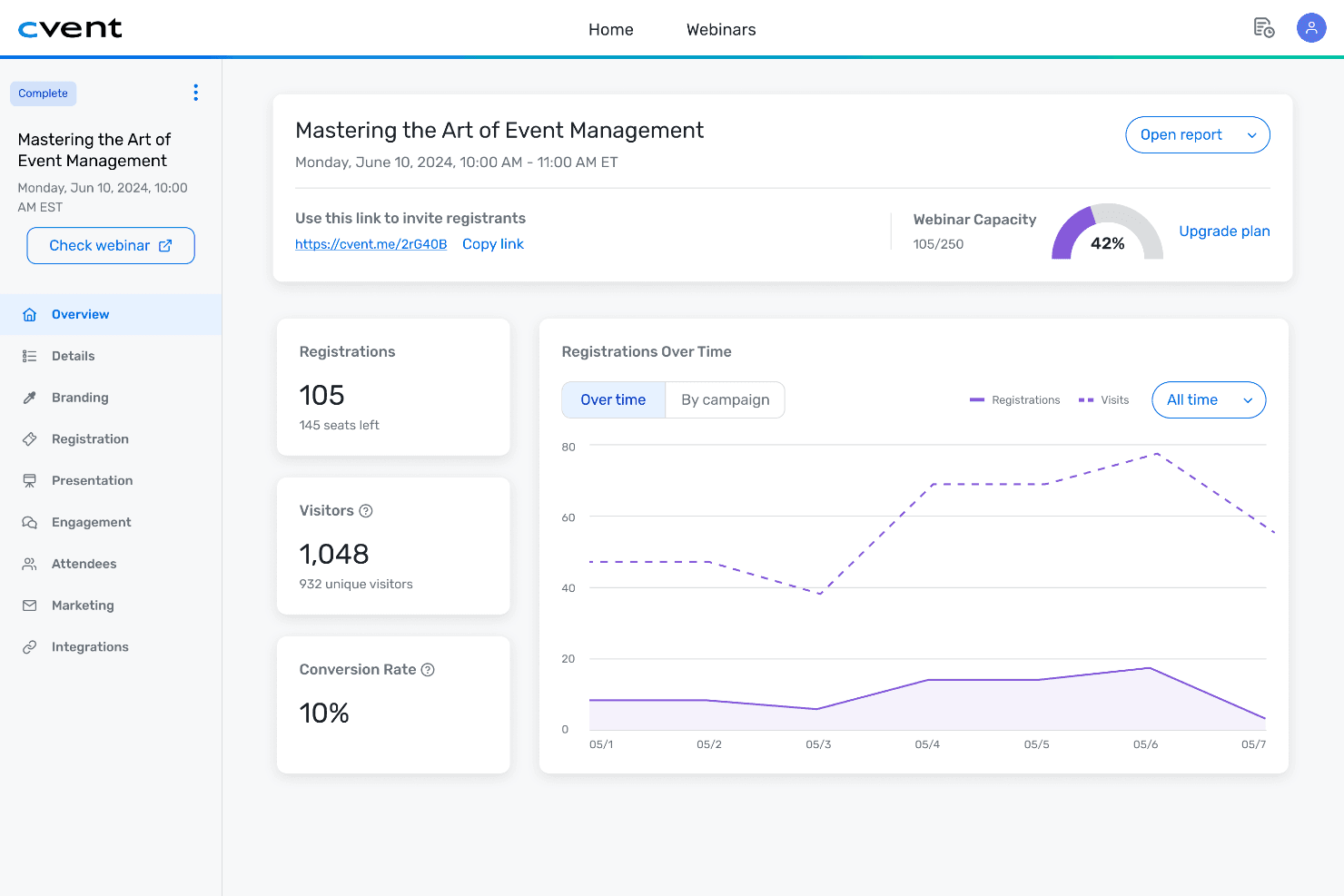
Cvent centralizza dati degli eventi, metriche e informazioni sui partecipanti in un unico pannello di controllo. Cvent è una piattaforma completa per la gestione degli eventi che copre la registrazione, la ricerca di sedi, i blocchi di camere per gruppi, la rappresentazione grafica degli spazi, il coinvolgimento dei partecipanti e la reportistica post-evento per eventi in presenza, virtuali e ibridi.
Per chi è più indicato Cvent?
Cvent è adatto a hotel aziendali, centri congressi e grandi team aziendali che gestiscono elevati volumi di eventi complessi in più spazi.
Perché ho scelto Cvent
Cvent si è guadagnato un posto nella mia lista ristretta perché nessun'altra piattaforma di programmazione degli eventi è all'altezza nella visualizzazione 3D degli spazi. Mi piace molto il fatto che si possa trascinare un BEO direttamente in Cvent Event Diagramming e che CventIQ AI estragga istantaneamente tutti i dettagli dell'allestimento, eliminando completamente l'inserimento manuale dei dati. Da lì, la visita guidata 3D fotorealistica mi permette di condividere un collegamento con i clienti, così possono vedere l'esatta configurazione della sala prima ancora che venga spostata una sola sedia.
Funzionalità principali di Cvent
- Estrazione dei BEO con CventIQ AI: Trascina i BEO direttamente nella piattaforma per estrarre automaticamente i dettagli dell'evento.
- Assegnazione delle risorse e monitoraggio dell'inventario: Assegna personale, apparecchiature audiovisive e attrezzature a ogni evento con la gestione dell'inventario in tempo reale.
- Integrazioni con PMS e CRM: Si collega alle principali piattaforme PMS e di vendita alberghiera per sincronizzare eventi, prenotazioni e registri dei partecipanti.
- Collaborazione e commenti multiutente: Consente modifiche simultanee, notifiche in tempo reale e comunicazioni interne o esterne tra i team in qualsiasi spazio di lavoro dell'evento.
Integrazioni di Cvent
Cvent offre integrazioni native con Salesforce, HubSpot, Marketo, Oracle Hospitality OPERA, Amadeus Delphi e Oracle Sales Cloud. È disponibile un'API per le integrazioni personalizzate.
Pros and Cons
Pros:
- Strumenti di rappresentazione grafica delle planimetrie 3D leader del settore
- L'AI estrae automaticamente i dettagli dei BEO
- I portali per i clienti supportano l'approvazione delle proposte in tempo reale
Cons:
- L'implementazione richiede molto più tempo rispetto ai concorrenti
- La personalizzazione dei report richiede una configurazione aggiuntiva
 Ideale per pannelli di controllo di pianificazione condivisi a livello di sede
- Demo gratuita disponibile
- Prezzi disponibili su richiesta
Visit WebsiteCustomer Rating:4.4/5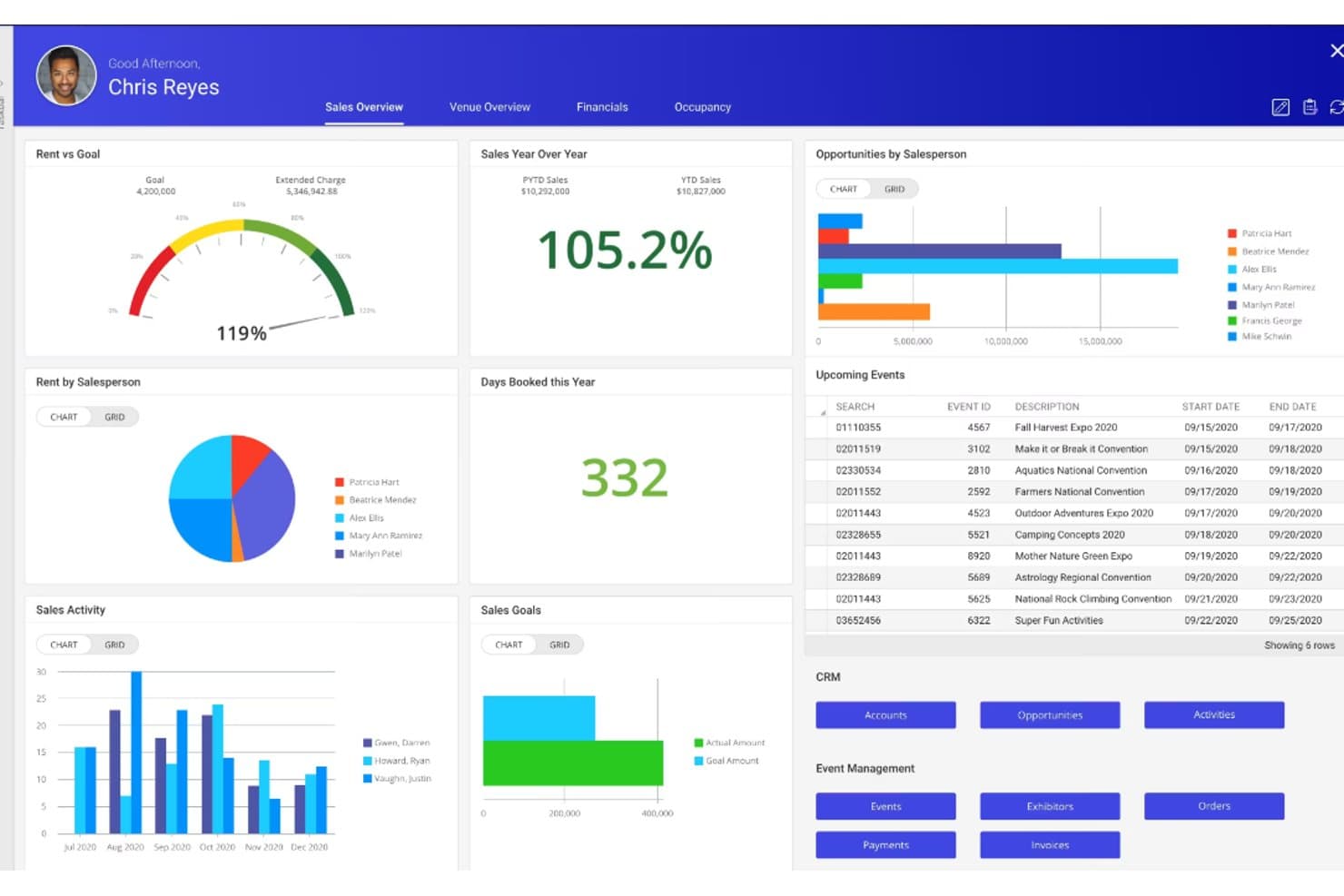
Momentus Technologies offre un pannello di controllo completo per le vendite con monitoraggio dei canoni, prestazioni dei venditori, eventi imminenti e strumenti CRM. Momentus Technologies è una piattaforma di gestione di sedi ed eventi che combina la prenotazione degli spazi, la gestione delle relazioni con i clienti (CRM), la gestione del catering, la generazione degli ordini per eventi, la pianificazione operativa e la gestione del calendario multi-spazio per contesti complessi.
Per chi è più adatto Momentus Technologies?
È una soluzione particolarmente adatta ai responsabili dei servizi congressuali e alle squadre di vendita del catering che gestiscono eventi ad alto volume presso centri congressi, arene, stadi o campus universitari.
Perché ho scelto Momentus Technologies
Momentus Technologies si è guadagnato un posto nella mia lista ristretta perché nessun'altra piattaforma offre alle squadre delle sedi con più reparti una visualizzazione condivisa del calendario altrettanto efficace. Apprezzo in particolare il Calendario delle disponibilità, che mostra in tempo reale la disponibilità degli spazi in tutte le aree prenotabili contemporaneamente, e la Vista operativa personalizzata, che mantiene catering, audiovisivi e squadre responsabili degli allestimenti sulla stessa sequenza temporale dell'evento. Con utenti illimitati su un unico pannello di controllo aggiornato in tempo reale, ho constatato che elimina il caos del controllo delle versioni che solitamente compromette il coordinamento tra le squadre di vendita e operative.
Funzionalità principali di Momentus Technologies
- Planimetrie e diagrammi delle sale in 2D e 3D: Progetta planimetrie dettagliate e configurazioni dei posti a sedere per ogni spazio destinato agli eventi.
- Gestione completa delle prenotazioni di gruppo: Gestisci offerte, contratti, depositi e previsioni dei ricavi all'interno di un'unica piattaforma.
- Creazione e modifica degli ordini per eventi: Genera, personalizza e distribuisci ordini completi per gli eventi, con tutti i dettagli sulle esigenze di catering e allestimento.
- API aperta per le integrazioni di sistema: Collegati ad altri strumenti aziendali o crea integrazioni personalizzate per operazioni alberghiere complesse.
Integrazioni di Momentus Technologies
Momentus Technologies offre integrazioni native con DocuSign, Tessitura, EventDraw, Microsoft Outlook, Mailchimp e WeTrack. È disponibile un'API aperta per le integrazioni personalizzate. Non sono documentate integrazioni native con PMS o POS.
Pros and Cons
Pros:
- Disponibilità in tempo reale di tutti gli spazi della sede
- Ordini dettagliati per gli eventi distribuiti a più reparti
- Planimetrie e diagrammi delle sale in 3D integrati
Cons:
- Nessuna integrazione PMS nativa documentata
- Implementazione più complessa per le strutture più piccole
Learn more about Momentus Technologies : Ideale con strumenti di gestione degli eventi basati sull'intelligenza artificiale
- Non disponibile
- A partire da $99/mese (con fatturazione annuale)
Visit WebsiteCustomer Rating:4.1/5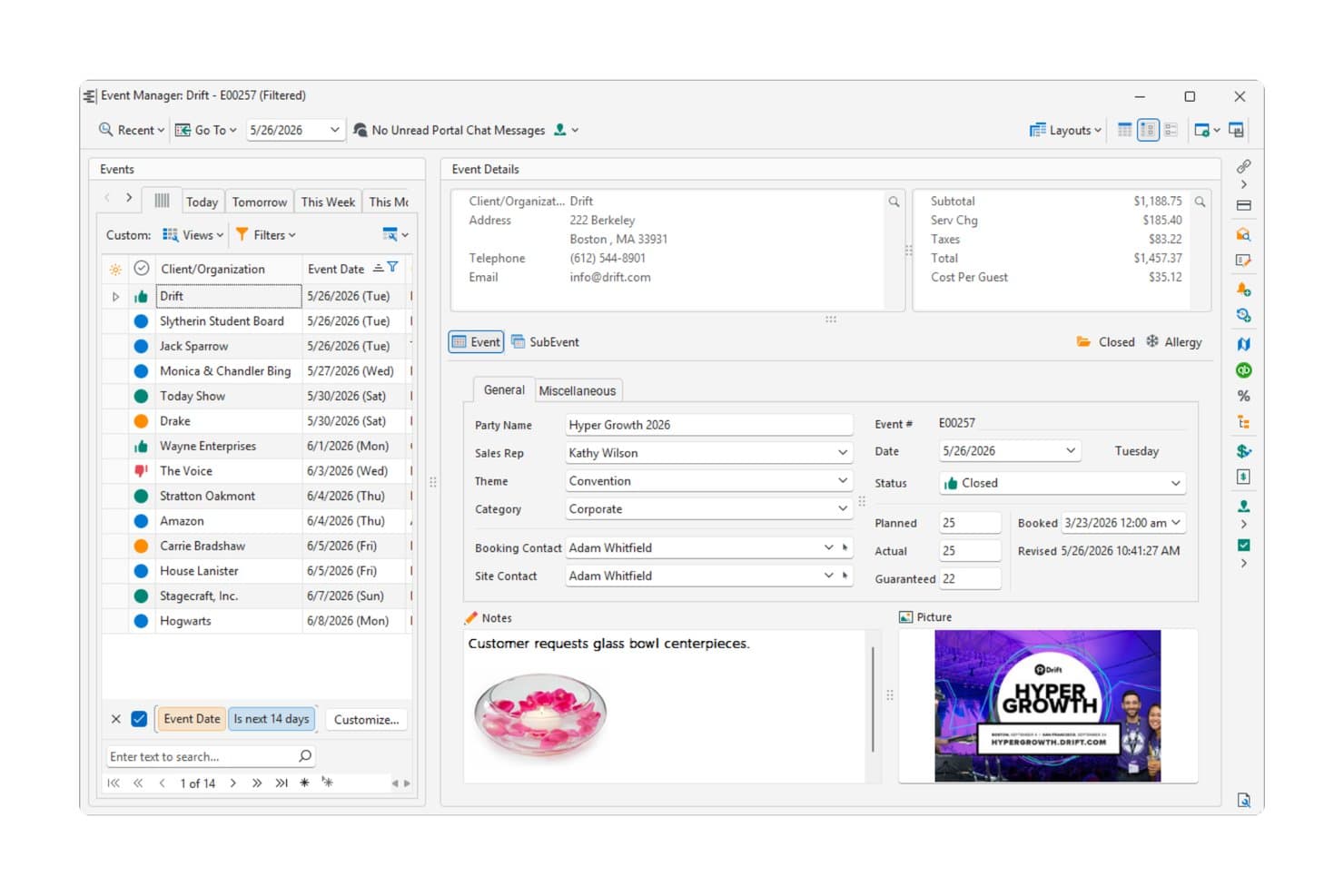
Caterease mostra un pannello di controllo dettagliato per la gestione degli eventi con informazioni sui clienti, dati finanziari e note sull'evento per un convegno aziendale. Caterease è una piattaforma per la gestione di catering ed eventi, basata su prenotazioni guidate da procedure guidate, generazione di BEO, gestione dei menu, gestione del personale e reportistica basata sull'intelligenza artificiale tramite il suo Horizon Hub.
Per chi è più adatto Caterease?
Caterease è particolarmente adatto ai team di catering e alle attività di ristorazione e bevande degli hotel che gestiscono grandi volumi di eventi con requisiti complessi relativi a menu, personale e fatturazione.
Perché ho scelto Caterease
Ho scelto Caterease come una delle migliori soluzioni perché il suo Horizon Hub cambia concretamente il modo in cui si accede quotidianamente ai dati degli eventi. L'assistente Cai mi consente di recuperare dettagli sugli eventi, schede dei clienti e report utilizzando richieste in linguaggio naturale invece di navigare tra menu nidificati. I Report intelligenti generano analisi su richiesta senza configurazione manuale, mentre le Tendenze del settore confrontano le prestazioni della mia attività con dati anonimizzati provenienti dall'intera base clienti di Caterease: un contesto che difficilmente potrei ottenere altrove.
Funzionalità principali di Caterease
- Procedura guidata dinamica per la prenotazione degli eventi: guida gli utenti nell'inserimento di tutti i dettagli richiesti sull'evento, sul cliente e sulla sede, con campi condizionali per ogni tipo di evento.
- Modelli personalizzabili di BEO e proposte: consente di progettare e generare ordini per banchetti, contratti e proposte personalizzati per ogni cliente o evento.
- Sistema integrato di visualizzazione per la cucina: fornisce al team di cucina una visualizzazione aggiornata e codificata a colori degli articoli del menu e delle modifiche alla preparazione per ogni evento.
- Calendario multi-spazio con raggruppamento: mostra le prenotazioni e lo stato di più spazi per eventi, consentendo una rapida revisione visiva e una pianificazione efficace.
Integrazioni di Caterease
Caterease offre integrazioni native con QuickBooks, Outlook, Google Calendar, Mailchimp, Constant Contact, Salesforce e DocuSign. È disponibile un'API per le integrazioni personalizzate.
Pros and Cons
Pros:
- L'assistente basato sull'intelligenza artificiale interroga gli eventi utilizzando il linguaggio naturale
- La prenotazione guidata acquisisce rapidamente tutti i dettagli dell'evento
- Generazione e personalizzazione dei BEO estremamente dettagliate
Cons:
- L'interfaccia appare datata rispetto alle piattaforme più recenti
- L'esperienza sui dispositivi mobili è in ritardo rispetto alle funzionalità desktop
Learn more about Caterease: Ideale con accesso illimitato per gli utenti dei team che gestiscono eventi
- Demo gratuita disponibile
- Prezzi su richiesta
Visit WebsiteCustomer Rating:4.7/5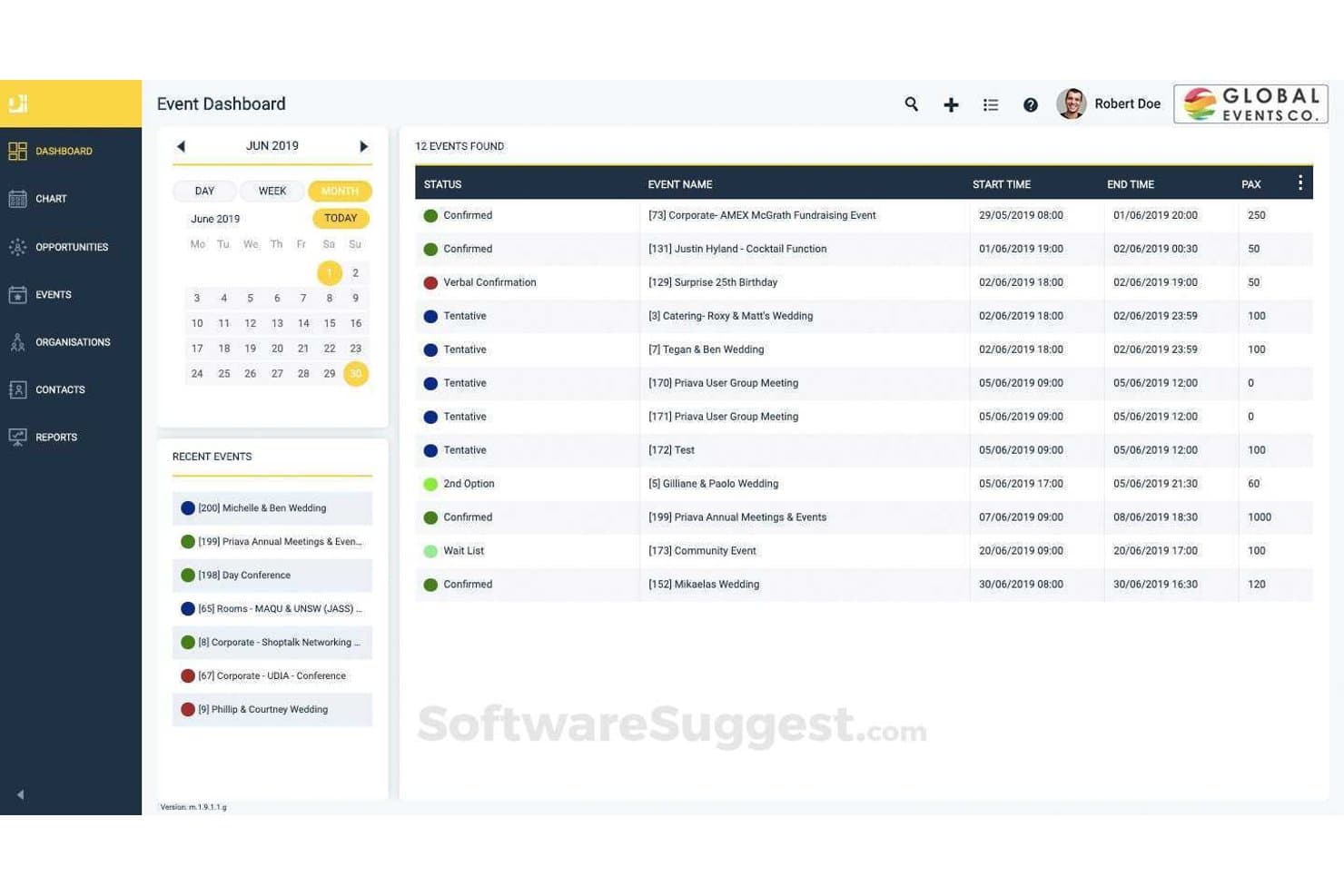
Priava offre una dashboard per gli eventi con una vista calendario, il monitoraggio dello stato e un elenco dettagliato degli eventi programmati, inclusi gli orari di inizio/fine e il numero di partecipanti. Priava è una piattaforma basata sul cloud per la prenotazione di spazi e la gestione degli eventi, che comprende la programmazione degli spazi, il coordinamento del catering, l'assegnazione delle risorse, il CRM e il rilevamento dei conflitti per diversi tipi di sedi.
Per chi è più adatta Priava?
Priava è adatta a sedi di medie e grandi dimensioni—centri congressi, spazi per le arti performative, università e arene—che gestiscono elevati volumi di eventi in più spazi contemporaneamente.
Perché ho scelto Priava
Ho incluso Priava tra le mie scelte principali perché il suo modello con utenti illimitati consente a ogni coordinatore, responsabile del catering e responsabile operativo di lavorare nello stesso sistema senza aumentare i costi delle licenze. Apprezzo in particolare il modo in cui la piattaforma gestisce la programmazione simultanea di più sedi con controlli dei conflitti integrati, impedendo a due membri del team di prenotare accidentalmente lo stesso spazio. La gestione condivisa delle attività e il monitoraggio degli ordini di servizio mantengono tutti i reparti allineati su un'unica scheda evento.
Funzionalità principali di Priava
- Modelli personalizzabili per i documenti degli eventi: Genera proposte, contratti e materiali destinati ai clienti, adattati a ogni evento e sede.
- CRM nativo per la gestione di lead e richieste: Tieni traccia e gestisci le richieste relative agli eventi, le interazioni con i clienti e le opportunità di vendita direttamente dalla piattaforma.
- Monitoraggio della disponibilità delle risorse e dei servizi: Assegna risorse audiovisive, di catering e logistiche alle prenotazioni, monitorando al contempo l'inventario e le esigenze di supporto.
- Report dettagliati su più sedi: Produci report operativi e finanziari relativi a più spazi o proprietà per le previsioni e il monitoraggio delle prestazioni.
Integrazioni di Priava
Priava offre integrazioni native con Salesforce, NetSuite, HubSpot, MailChimp, SAP e Microsoft Outlook. È disponibile un'API per le integrazioni personalizzate.
Pros and Cons
Pros:
- Utenti illimitati per l'intero team che gestisce gli eventi
- Rilevamento dei conflitti in tempo reale tra più sedi
- Gestisce insieme catering, risorse e spazi
Cons:
- L'accesso da dispositivi mobili è limitato per il personale di sala
- La configurazione richiede tempo per le impostazioni complesse
Learn more about Priava: Ideale per la gestione di catene con più strutture
- Prova gratuita disponibile
- A partire da $249/mese (con fatturazione annuale)
Visit WebsiteCustomer Rating:4.9/5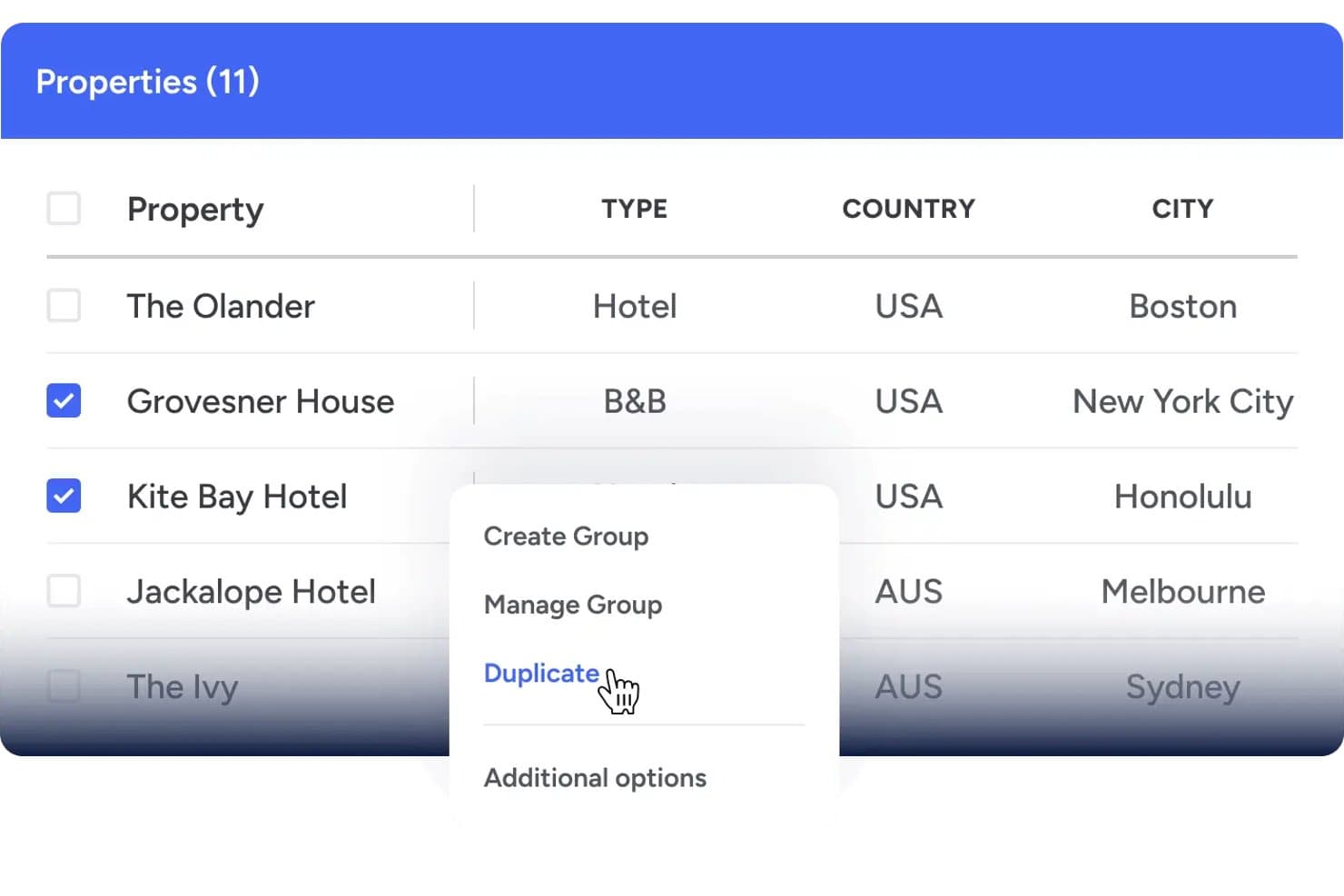
Event Temple offre un'interfaccia per la gestione di più strutture che consente agli utenti di selezionare e duplicare le strutture in sedi diverse. Event Temple è una piattaforma CRM per la gestione di eventi e vendite, progettata per il settore alberghiero, che gestisce prenotazioni di gruppo, contratti di catering, BEO, proposte elettroniche e calendari degli spazi per eventi di hotel e strutture.
Per chi è più adatto Event Temple?
È una soluzione ideale per i team che si occupano di catering ed eventi presso catene alberghiere e gruppi con più strutture, che necessitano di una visibilità centralizzata tra le varie sedi.
Perché ho scelto Event Temple
Event Temple si è guadagnato un posto nella mia rosa di candidati perché il suo modulo di gestione delle catene risolve un problema che la maggior parte degli strumenti di pianificazione degli eventi ignora: coordinare le vendite e le prenotazioni di gruppo tra più strutture da un unico punto. Apprezzo soprattutto il pannello di controllo della catena, che consente ai team di vendita nazionali di passare da una struttura all'altra e accedere a una vista condivisa di account e contatti per individuare opportunità di vendita incrociata. I report aggregati per più strutture rendono davvero pratico il monitoraggio delle prestazioni a livello di portafoglio.
Funzionalità principali di Event Temple
- Modelli BEO personalizzabili: consentono ai team di creare, modificare e distribuire ordini per banchetti (BEO) personalizzati per ogni evento.
- Flussi integrati per proposte e firme elettroniche: generano proposte e contratti digitali che i clienti possono esaminare e firmare online.
- Calendario visivo degli spazi per eventi: offre un calendario con funzionalità di trascinamento per prenotare e gestire contemporaneamente più spazi per eventi.
- Integrazione con il PMS Opera Cloud: consente la sincronizzazione in tempo reale delle prenotazioni degli eventi e dei blocchi di camere con i principali sistemi di gestione delle strutture.
Integrazioni di Event Temple
Event Temple offre integrazioni native con Opera Cloud PMS, Salesforce, Mailchimp, Tripleseat, Duetto, For-Sight CRM, GuestRevu e Zapier. È inoltre disponibile un'API per integrazioni personalizzate.
Pros and Cons
Pros:
- Potente pannello di gestione delle catene con più strutture
- CRM dedicato al settore alberghiero e progettato per gli hotel
- Generazione di BEO con flussi di distribuzione automatizzati
Cons:
- Funzionalità di creazione di planimetrie limitate rispetto ai concorrenti
- Le opzioni di personalizzazione dei report sono alquanto limitate
Learn more about Event Temple: Ideale per le vendite di gruppo basate su Salesforce
- Non disponibile
- Prezzi su richiesta
Visit WebsiteCustomer Rating:4.7/5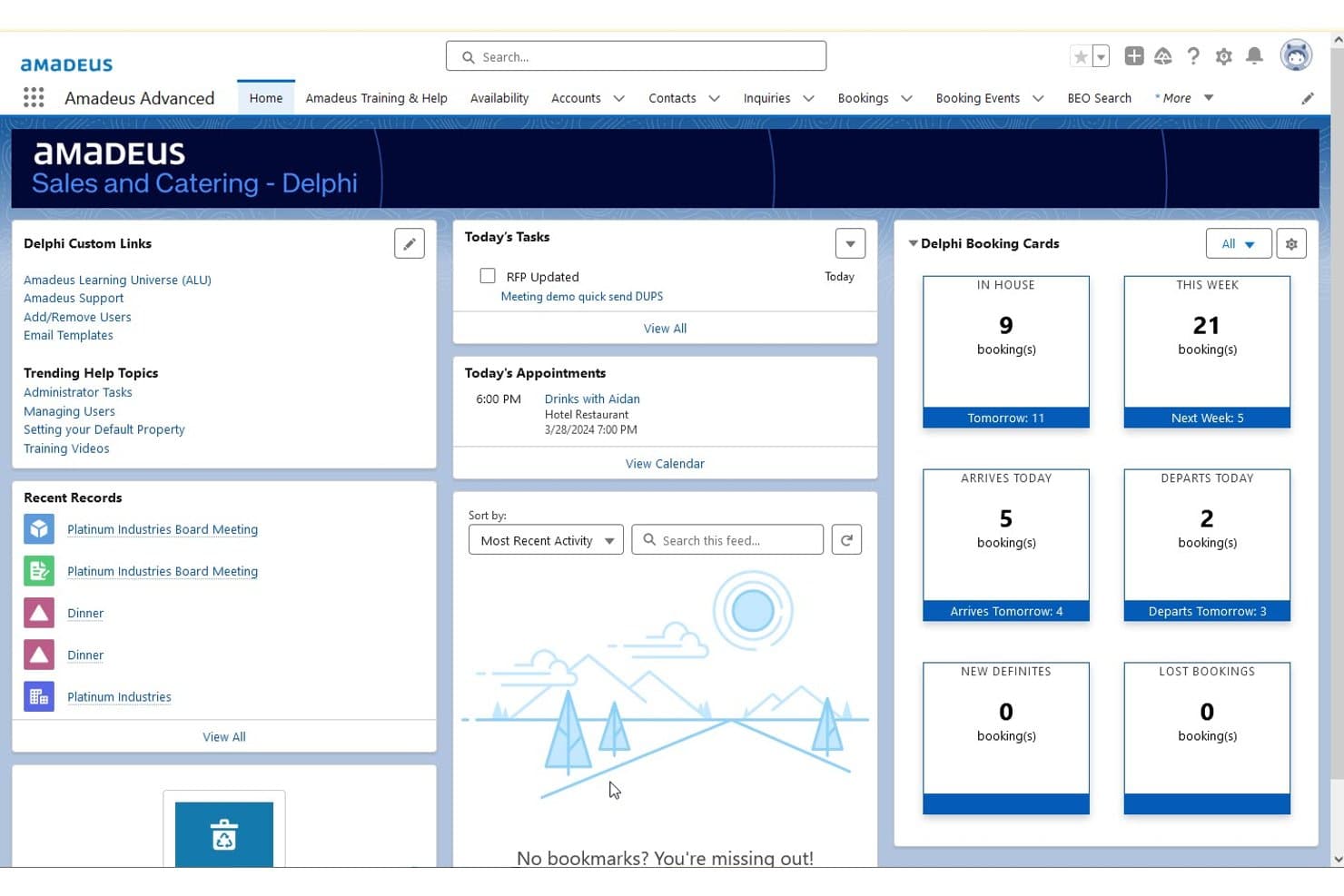
Amadeus Delphi offre un cruscotto principale centralizzato che visualizza schede delle prenotazioni, attività odierne, appuntamenti e record recenti per la gestione di eventi e catering. Amadeus Delphi è una piattaforma di gestione delle vendite alberghiere e del catering basata su Salesforce, che gestisce prenotazioni di gruppo, generazione di BEO, pianificazione degli spazi per eventi e contratti di catering per portafogli di strutture singole e multiple.
Per chi è più adatto Amadeus Delphi?
Delphi è particolarmente adatto agli hotel a servizio completo e alle strutture con più proprietà, dotati di team dedicati alle vendite di catering che gestiscono elevati volumi di attività per gruppi ed eventi.
Perché ho scelto Amadeus Delphi
Amadeus Delphi si è guadagnato un posto nella mia selezione perché è l'unica piattaforma di pianificazione degli eventi alberghieri realizzata nativamente su Salesforce, il che significa che i flussi di vendita dei gruppi, il monitoraggio dei contratti e i ricontatti con i clienti risiedono tutti nello stesso CRM. Apprezzo in particolare la generazione di proposte e contratti in 3 clic, che consente ai team di vendita di gestire rapidamente i contatti in entrata relativi ai gruppi. Il flusso di lavoro BEO automatizzato collega inoltre direttamente a ogni prenotazione i dettagli relativi a catering, allestimento e personale, evitando che qualcosa vada perso tra i reparti.
Funzionalità principali di Amadeus Delphi
- Progettazione di planimetrie in 3D: Progetta e visualizza in scala la disposizione degli spazi per gli eventi con planimetrie interattive.
- Accesso mobile ai BEO: Consenti al personale dei banchetti, della cucina e delle operazioni di accedere in tempo reale ai BEO e alle modifiche tramite dispositivi mobili.
- Instradamento di contatti e richieste: Distribuisci automaticamente ai responsabili assegnati i contatti per riunioni e gruppi provenienti dai principali canali di vendita.
- Gestione del portafoglio di più proprietà: Gestisci inventario condiviso, modelli e reportistica tra più proprietà da un unico sistema.
Integrazioni di Amadeus Delphi
Amadeus Delphi offre integrazioni native con StayNTouch PMS, IDeaS G3 RMS, Cvent, Sertifi, Canary e MeetingPackage, oltre a fornire un'API per integrazioni personalizzate.
Pros and Cons
Pros:
- Il CRM nativo Salesforce alimenta il flusso di vendita dei gruppi
- BEO automatizzati distribuiti direttamente a ogni reparto
- Supporta la gestione del portafoglio di più proprietà in un unico sistema
Cons:
- L'implementazione richiede mesi per le strutture di grandi dimensioni
- L'interfaccia sembra datata rispetto ai concorrenti più recenti
Learn more about Amadeus Delphi: Ideale per l'automazione delle richieste e delle prenotazioni tramite IA
- Demo gratuita disponibile
- Prezzo su richiesta
Visit WebsiteCustomer Rating:4.5/5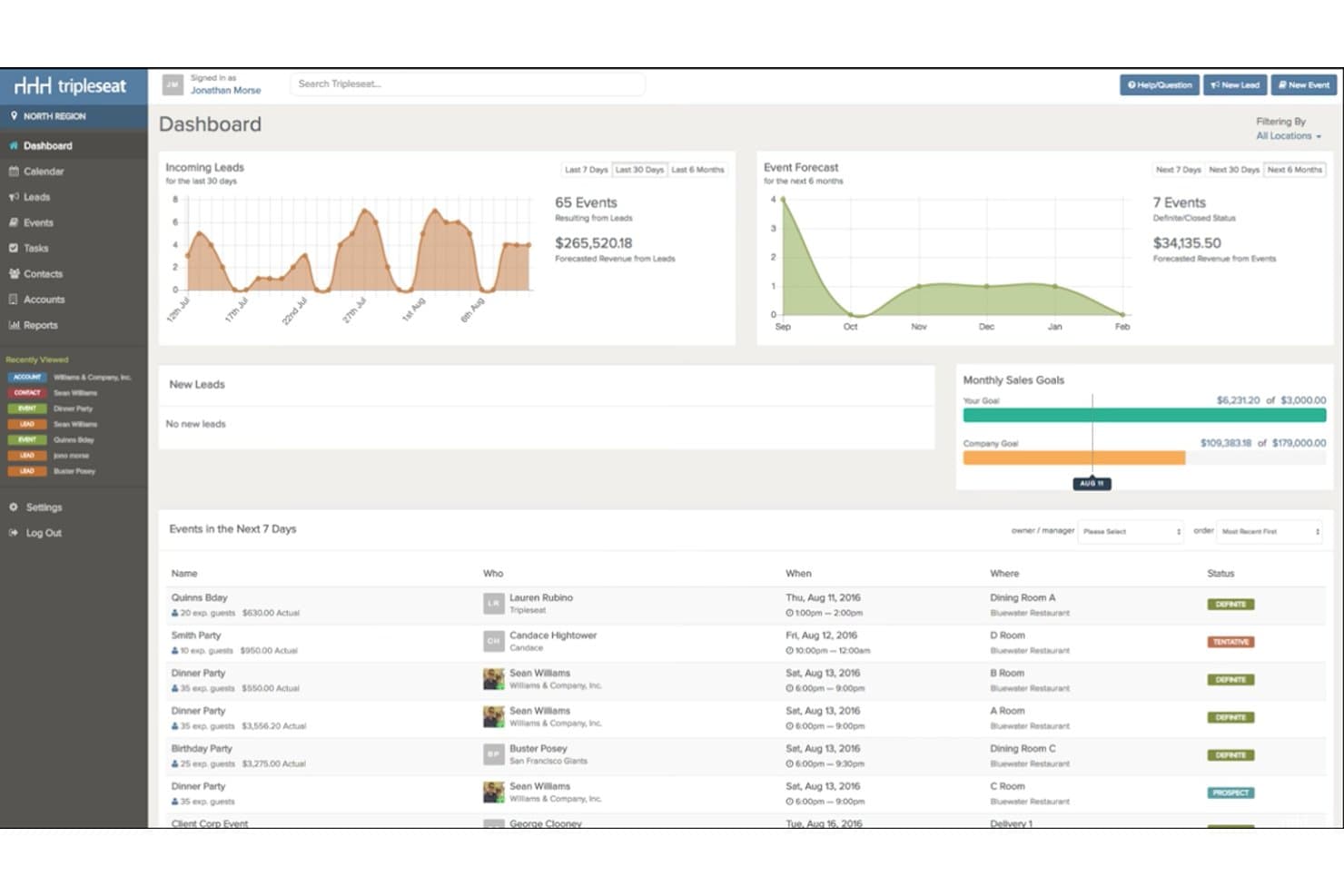
Tripleseat offre un pannello di controllo centralizzato che mostra in un'unica visualizzazione i nuovi contatti, le previsioni degli eventi, gli obiettivi mensili di vendita e gli eventi imminenti. Tripleseat è una piattaforma per la vendita e la gestione di eventi, orientata al settore dell'ospitalità, che gestisce la prenotazione degli spazi per eventi, la generazione degli ordini per eventi di banchetto (BEO), le proposte di catering, i contratti di gruppo e il coordinamento dei calendari di più strutture per hotel, ristoranti e sedi uniche.
Per chi è più adatto Tripleseat?
Tripleseat è particolarmente adatto ai team che gestiscono eventi in hotel, ai responsabili del catering e agli operatori di più strutture che hanno bisogno di una piattaforma dedicata per gestire l'intero ciclo di vendita degli eventi.
Perché ho scelto Tripleseat
Ho incluso Tripleseat tra le mie scelte principali perché Tripleseat Intelligence gestisce il ciclo di vita delle richieste senza intervento manuale: le risposte automatiche istantanee confermano la ricezione dei nuovi contatti, l'IA prepara le bozze dei contratti a partire dai dettagli dell'evento e i promemoria automatici si attivano quando una proposta rimane non firmata troppo a lungo. Apprezzo anche Direct Book, che consente agli ospiti di confermare le prenotazioni degli spazi 24 ore su 24, 7 giorni su 7, senza dover telefonare. Nella pratica, il mio team sta convertendo richieste che altrimenti si bloccherebbero a metà del processo di vendita.
Funzionalità principali di Tripleseat
- Creazione di planimetrie 2D e 3D: Progetta configurazioni dettagliate degli eventi con strumenti di trascinamento per l'allestimento delle sale e la disposizione dei posti.
- Generazione degli ordini per eventi di banchetto (BEO): Crea, personalizza e distribuisci BEO che definiscono menu, tempistiche e personale per ogni evento.
- Integrazioni native con PMS e POS: Collega i dettagli degli eventi ai principali sistemi di gestione delle strutture alberghiere e ai sistemi di punti vendita per operazioni fluide.
- Calendario visivo multi-spazio: Prenota, blocca e gestisci la disponibilità di più strutture e spazi per eventi da un unico pannello di controllo centralizzato.
Integrazioni di Tripleseat
Tripleseat offre integrazioni native con GoTab POS, OpenTable, SevenRooms, CardConnect, DoorDash for Merchants, Outlook, Google Calendar e Prismm. È disponibile un'API per le integrazioni personalizzate.
Pros and Cons
Pros:
- Flusso dedicato alla vendita di eventi integrato
- L'IA automatizza le risposte alle richieste e i promemoria di sollecito
- Strumenti efficaci per la creazione e la distribuzione dei BEO
Cons:
- Le opzioni di personalizzazione dei report sono limitate
- Tempi di configurazione elevati per le impostazioni relative a più strutture
Learn more about Tripleseat: 9Ideale con disponibilità immediata e in tempo reale degli spazi per eventi
iVvy
- Dimostrazione gratuita disponibile
- Prezzi su richiesta
Visit WebsiteCustomer Rating:4.7/5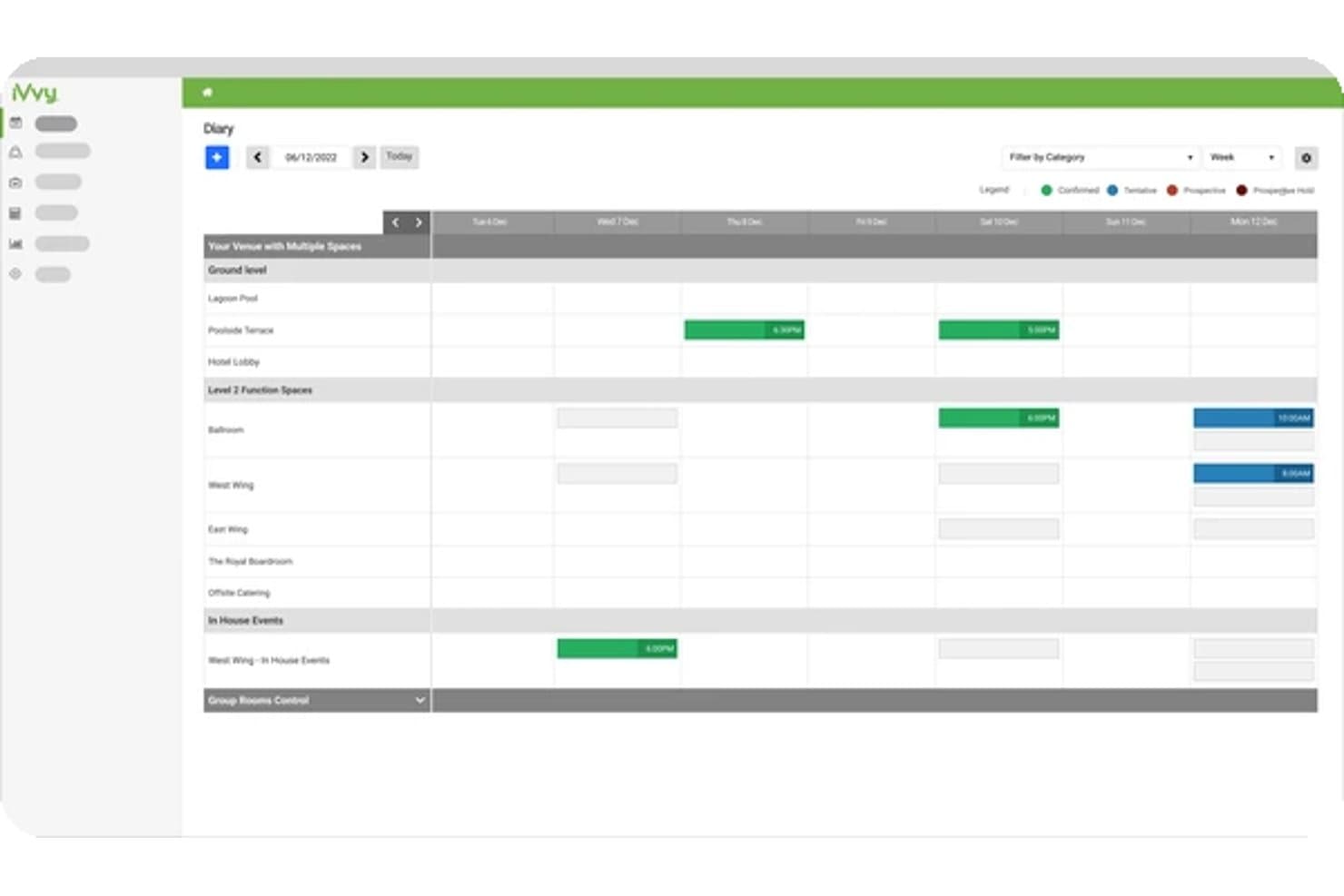
iVvy offre una visualizzazione settimanale del diario per programmare e gestire gli eventi tra più spazi e categorie della sede. iVvy è una piattaforma per le vendite alberghiere e il catering che combina la gestione degli spazi per eventi, la generazione degli ordini per banchetti (BEO), il coordinamento delle prenotazioni di gruppo, il CRM e i contratti di catering in un unico sistema progettato per hotel e sedi per eventi.
Per chi è più adatto iVvy?
iVvy è adatto ai team addetti alle vendite di catering e agli eventi di hotel, centri per eventi e gruppi alberghieri con più strutture che gestiscono grandi volumi di prenotazioni di gruppo e per conferenze.
Perché ho scelto iVvy
iVvy si è guadagnato un posto nella mia lista ristretta grazie al modo in cui gestisce la disponibilità in tempo reale degli spazi per eventi nell'intero calendario delle funzioni di un hotel. Adoro il fatto che il Diario delle funzioni mostri in un'unica visualizzazione le prenotazioni con preventivo, provvisorie e confermate, sia per le sale riunioni sia per i blocchi di camere, rendendo impossibile la doppia prenotazione. Il Motore di prenotazione espone quindi questa disponibilità in tempo reale direttamente sul sito web di un hotel, così le richieste arrivano già qualificate in base a ciò che è effettivamente disponibile.
Funzionalità principali di iVvy
- Generazione degli ordini per banchetti (BEO): Crea, modifica e invia ordini per banchetti dettagliati con menu, tempistiche ed esigenze di personale per ogni evento.
- Reportistica e analisi dei ricavi: Accedi a cruscotti, report sull'andamento e modelli personalizzabili per monitorare i ricavi degli eventi e prevedere le vendite.
- CRM e gestione dei contatti: Acquisisci tutte le richieste, gestisci i dati dei clienti e monitora attività e comunicazioni in un unico sistema.
- Proposte digitali e firme elettroniche: Genera rapidamente proposte e contratti personalizzati con il marchio, quindi inviali per la firma elettronica del cliente con monitoraggio delle versioni.
Integrazioni di iVvy
iVvy offre integrazioni native con Opera Cloud, Mews, StayNTouch, RMS, Agilysys, Protel Air, Jonas Chorum, Xero, MYOB, NetSuite, Infor, Salesforce, Cvent, IdeaS e SevenRooms. È disponibile un'API per le integrazioni personalizzate.
Pros and Cons
Pros:
- Il diario delle funzioni in tempo reale previene le doppie prenotazioni
- Visualizzazione della disponibilità in tempo reale direttamente sui siti web degli hotel
- Progettato specificamente per eventi e catering alberghieri
Cons:
- La configurazione iniziale richiede un tempo considerevole
- Le cruscotti di reportistica offrono opzioni di personalizzazione limitate
Learn more about iVvy: Ideale per proposte e pagamenti integrati
- Demo gratuita disponibile
- A partire da $199/mese
Visit WebsiteCustomer Rating:4.2/5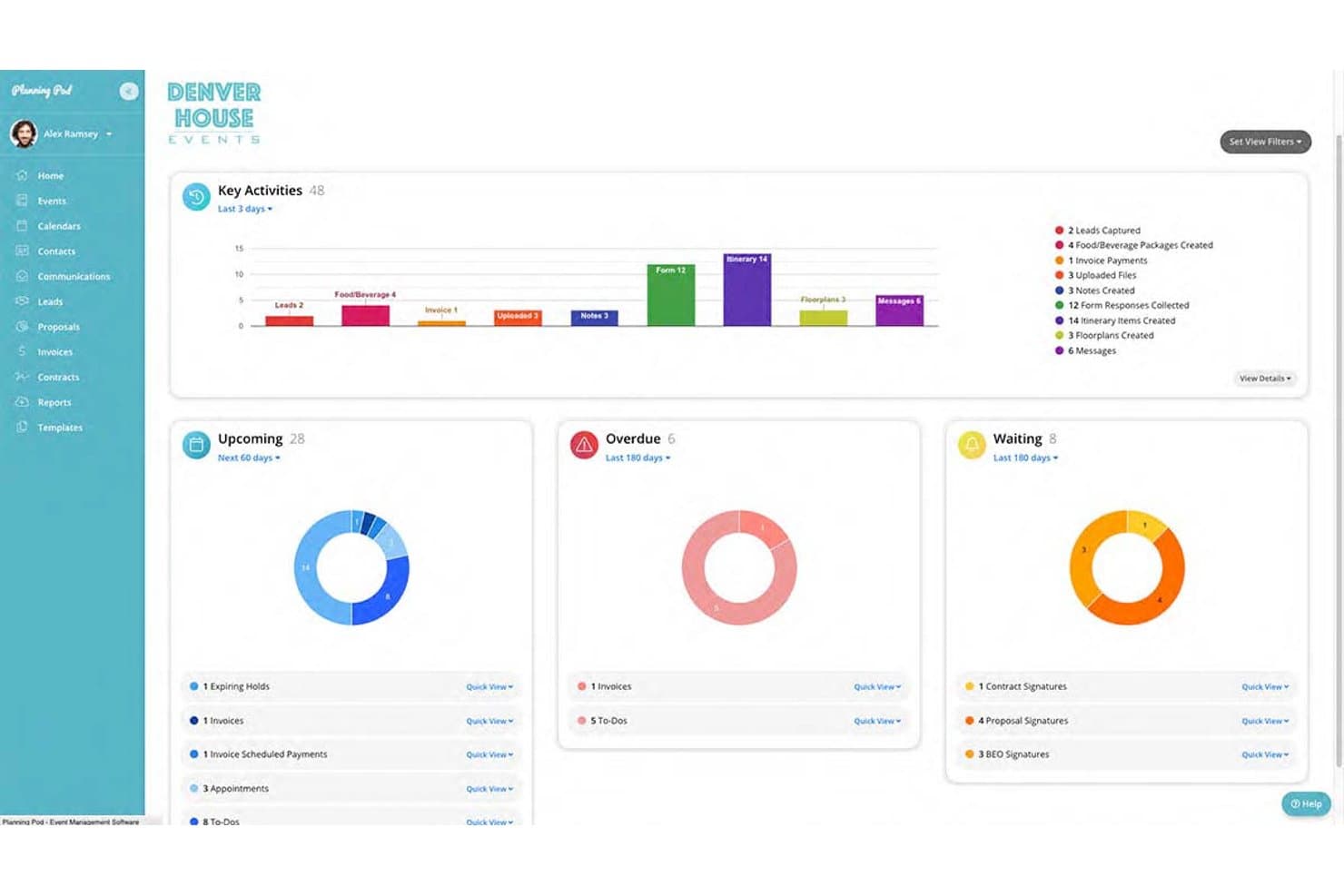
Planning Pod mostra un pannello di controllo centralizzato per la gestione degli eventi con grafici delle attività principali, attività imminenti, elementi in ritardo e firme in attesa. Planning Pod è una piattaforma per la gestione di sedi ed eventi progettata per hotel, sale banchetti e centri eventi, che combina prenotazione degli spazi funzionali, generazione di BEO, gestione di F&B, proposte di ristorazione e strumenti di comunicazione con i clienti in un unico sistema.
Per chi è più adatto Planning Pod?
Planning Pod è adatto a hotel indipendenti, sedi boutique e centri eventi indipendenti che gestiscono autonomamente eventi, servizi di ristorazione e fatturazione dei clienti senza un ecosistema PMS completo.
Perché ho scelto Planning Pod
Planning Pod è entrato nella mia selezione perché collega in modo particolarmente efficace proposte, contratti e pagamenti a un'unica scheda di prenotazione. Mi piace il fatto che, una volta che un cliente firma una proposta tramite firma elettronica, la piattaforma trasferisca automaticamente questi dettagli in una fattura con piani di pagamento rateale già integrati. Il mio team può quindi riscuotere i depositi tramite portali cliente personalizzati, elaborando nativamente pagamenti con carta di credito e ACH attraverso Adyen, senza dover cambiare strumenti.
Funzionalità principali di Planning Pod
- Diagrammazione delle planimetrie: Crea e modifica configurazioni in scala per gli spazi degli eventi, inclusi tavoli, sedie e allestimenti.
- Generazione e distribuzione dei BEO: Crea ordini per banchetti personalizzabili per i team FOH, di cucina e di consegna.
- Gestore delle attività con assegnazione al personale: Assegna e monitora le attività per membro del team durante i flussi di lavoro degli eventi.
- Moduli web per la raccolta dei contatti: Raccogli direttamente dal sito web della sede le richieste di informazioni sugli eventi e inseriscile nel funnel di vendita.
Integrazioni di Planning Pod
Planning Pod offre integrazioni native con QuickBooks Online, WeddingWire, The Knot, Google Calendar, Apple Calendar e Microsoft Outlook Calendar. Si collega inoltre a Zapier e fornisce un'API per integrazioni personalizzate.
Pros and Cons
Pros:
- Proposte, contratti e pagamenti vengono trasferiti automaticamente
- Diagrammazione delle planimetrie integrata per gli eventi
- I clienti possono gestire autonomamente le attività tramite un portale personalizzato
Cons:
- La reportistica non offre analisi approfondite dei ricavi e del rendimento
- Non è progettato per portafogli di grandi dimensioni con più strutture
Learn more about Planning Pod:
Altri software per la programmazione degli eventi
- 11SwoogoIdeale per flussi di lavoro flessibili per la registrazione agli eventi
- 12EventbriteIdeale per massimizzare la visibilità degli eventi pubblici
- 13HoneyBookIdeale per la collaborazione e i pagamenti tramite portale clienti
- 14SkeddaIdeale per regole di prenotazione avanzate e automazione
- 15AcceleventsIdeale per la gestione di programmi e relatori su larga scala
Come valuto il software per la pianificazione degli eventi
Valuto il software per la pianificazione degli eventi su due livelli: gli elementi di base—pianificazione degli eventi, gestione delle sedi e delle risorse, flussi di lavoro per le prenotazioni e prevenzione dei conflitti—e i fattori distintivi che differenziano le migliori opzioni orientate all'ospitalità e alle sedi per eventi.
Funzionalità principali (requisiti essenziali per questo elenco)
Quando seleziono gli strumenti per il mio elenco, assegno a ciascuno un punteggio su una scala da 0 (non offre la funzionalità) a 5 (eccelle in quest'area) per ogni funzionalità principale elencata di seguito. Successivamente, calcolo il punteggio totale dello strumento e lo converto in percentuale. Ogni strumento deve raggiungere un punteggio totale minimo del 65% per essere preso in considerazione.
- Pianificazione di eventi e spazi per funzioni: cerco un calendario centralizzato, un registro delle funzioni o una griglia delle prenotazioni che consenta ai team di pianificare sale riunioni, sale da ballo, spazi per eventi e altre aree prenotabili, verificandone la disponibilità a colpo d'occhio.
- Gestione delle prenotazioni e delle vendite: valuto quanto bene la piattaforma gestisca il processo dalla richiesta iniziale o dall'RFP fino a proposte, contratti, conferme e pagamenti.
- Rilevamento dei conflitti: il software dovrebbe aiutare a prevenire le prenotazioni sovrapposte mostrando la disponibilità degli spazi e delle risorse e segnalando i potenziali conflitti di pianificazione prima che un evento venga confermato.
- Gestione delle risorse per gli eventi: verifico se i team possono assegnare attrezzature, requisiti di ristorazione, configurazioni delle sale, personale e altre risorse ai singoli eventi, mantenendo tali requisiti collegati alla prenotazione.
- Documenti e comunicazioni degli eventi: cerco strumenti che aiutino i team a creare e condividere proposte, contratti, riepiloghi degli eventi, BEO, schede operative o altri documenti operativi, mantenendo aggiornati i clienti e i team interni.
- Integrazioni: la piattaforma dovrebbe connettersi ai sistemi pertinenti per l'ospitalità o l'attività aziendale, come PMS, POS, CRM, strumenti di contabilità, pagamento, calendario o marketing, in modo che i team possano ridurre l'inserimento duplicato dei dati.
Una volta ottenuto un elenco di strumenti che soddisfano questi criteri, considero ciò che distingue ciascuna piattaforma.
Fattori distintivi (ciò che differenzia i fornitori)
Ecco come confronto i diversi fornitori:
Funzionalità di rilievo
Esamino attentamente funzionalità specifiche per il settore dell'ospitalità, come la generazione di BEO, la gestione dei blocchi di camere per gruppi, i flussi di lavoro per la ristorazione e la progettazione degli spazi per funzioni. Gli strumenti che forniscono planimetrie 2D o 3D possono aiutare i team di vendita a creare configurazioni accurate delle sale e a condividerle con i clienti prima che un evento venga finalizzato. I portali rivolti ai clienti sono un altro fattore distintivo, perché consentono agli organizzatori di esaminare le proposte, firmare i contratti, effettuare pagamenti e comunicare modifiche senza dipendere da lunghe conversazioni via e-mail. Anche l'accesso da dispositivi mobili è importante per i team operativi che devono controllare programmi, BEO, configurazioni delle sale o modifiche dell'ultimo minuto agli eventi mentre lavorano all'interno della struttura.
Oltre le funzionalità
La profondità delle integrazioni è particolarmente importante per gli hotel e le strutture ricettive. Verifico se la piattaforma si connette a sistemi di gestione delle strutture come Oracle OPERA, Mews, Cloudbeds o Stayntouch, nonché a piattaforme POS, CRM, di contabilità e di pagamento, ove pertinenti. Per gli strumenti orientati agli hotel, una connettività PMS affidabile può aiutare a mantenere allineati i blocchi di camere per gruppi, i dettagli degli eventi e le operazioni della struttura.
Anche il tipo di struttura e la scala operativa influenzano la mia valutazione. Un resort a servizio completo che gestisce più sale da ballo, team di ristorazione e blocchi di camere per gruppi ha requisiti diversi rispetto a un ristorante che organizza eventi di ristorazione privata o a un hotel boutique con un'unica sala riunioni. Considero inoltre i requisiti di implementazione, la facilità d'uso, le integrazioni disponibili e la struttura dei prezzi, in particolare se il prezzo si basa sugli utenti, sulle strutture, sui moduli o sul volume complessivo degli eventi.
Come scegliere il software per la programmazione degli eventi
È facile perdersi in lunghi elenchi di funzionalità e strutture tariffarie complesse. Per aiutarti a rimanere concentrato mentre affronti il tuo processo di selezione del software, unico nel suo genere, ecco una lista di fattori da tenere presenti:
| Fattore | Cosa considerare |
| Scalabilità | Il software supporterà un numero maggiore di eventi, spazi per funzioni, strutture e utenti con la crescita della vostra attività? Verificate se è in grado di gestire tutto, da una singola sala riunioni fino a operazioni con eventi distribuiti su più strutture. |
| Integrazioni | Si connette ai sistemi che già utilizzate? Cercate integrazioni con il vostro PMS, POS, CRM, software di contabilità, strumenti di pagamento e calendari per ridurre l'inserimento manuale dei dati. |
| Personalizzazione | È possibile adattare proposte, BEO, contratti, modelli di eventi, flussi di prenotazione e report in base al modo in cui opera la vostra struttura? |
| Facilità d'uso | È semplice da usare per i team di vendita, catering, banchetti e operativi? Cercate calendari intuitivi, una navigazione chiara e aggiornamenti semplici degli eventi per ridurre i tempi di formazione. |
| Implementazione e avviamento | Quanto velocemente può iniziare a utilizzarlo il vostro team? Considerate la migrazione dei dati, la configurazione del PMS, la definizione dei flussi di lavoro, le risorse formative e il supporto all'avviamento fornito dal fornitore. |
| Costo | Il modello di prezzo è adatto alla vostra struttura? Confrontate i prezzi per utente, per struttura e basati sui moduli, tenendo conto dei costi di implementazione, delle integrazioni e dei componenti aggiuntivi opzionali. |
| Misure di sicurezza | In che modo la piattaforma protegge i dati degli ospiti, dei pagamenti e degli eventi? Cercate controlli degli accessi, crittografia, gestione sicura dei pagamenti e misure di conformità pertinenti. |
| Disponibilità dell'assistenza | Potete ricevere aiuto quando si verifica un problema durante un evento? Considerate gli orari di assistenza, i tempi di risposta, il supporto all'avviamento e i canali disponibili, come telefono, e-mail e chat. |
Che cos'è il software di pianificazione degli eventi?
Il software di pianificazione degli eventi aiuta hotel, sedi e team del settore dell'ospitalità a gestire prenotazioni di eventi, spazi per funzioni, attività di gruppo, esigenze di catering e risorse per gli eventi da un unico sistema. I responsabili degli hotel, i team di vendita, i responsabili del catering e i coordinatori degli eventi utilizzano queste piattaforme per organizzare la disponibilità, prevenire le doppie prenotazioni, creare documenti per gli eventi e coordinare i reparti.
Molte piattaforme pensate per il settore dell'ospitalità vanno oltre la semplice pianificazione su calendario, offrendo supporto per BEO, proposte, contratti, blocchi di camere, caparre, planimetrie e integrazioni con i sistemi di gestione della struttura e dei punti vendita. In questo modo, i team di vendita e operativi dispongono di un metodo più centralizzato per gestire gli eventi dalla richiesta iniziale fino alla realizzazione.
Funzionalità del software di pianificazione degli eventi
Quando scegliete un software di pianificazione degli eventi, prestate attenzione alle seguenti funzionalità principali:
- Gestione degli spazi per funzioni: consente di visualizzare e programmare sale da ballo, sale riunioni, spazi per cene private e altre aree per eventi da un calendario centralizzato.
- Generazione dei BEO: aiuta i team di catering e banqueting a creare e distribuire ordini per banchetti ed eventi contenenti menu, requisiti di allestimento, tempistiche e istruzioni operative.
- Gestione delle prenotazioni di gruppo: supporta richieste di gruppo, proposte, contratti, blocchi di camere, caparre e altre fasi del processo di vendita degli eventi.
- Rilevamento dei conflitti: individua sovrapposizioni nelle prenotazioni di spazi, attrezzature o risorse prima che causino problemi operativi.
- Proposte e contratti: consente ai team di vendita di creare proposte, accordi e contratti personalizzati con il marchio e di raccogliere firme elettroniche.
- Pianificazione delle risorse: aiuta ad assegnare personale, apparecchiature audiovisive, arredi, requisiti di catering e altre risorse a eventi specifici.
- Strumenti per planimetrie e diagrammi: consente ai team di creare configurazioni delle sale e piani dei posti a sedere per riunioni, matrimoni, conferenze e banchetti.
- Integrazioni con PMS e POS: collega le informazioni sugli eventi ai sistemi di gestione della struttura e dei punti vendita per ridurre la duplicazione nell'inserimento dei dati.
- Portali per i clienti: offre agli organizzatori di eventi uno spazio per esaminare i documenti, effettuare pagamenti, inviare informazioni e comunicare con la sede.
- Analisi e report: monitora i ricavi degli eventi, i tassi di conversione, l'utilizzo degli spazi, le attività di gruppo e altri indicatori delle prestazioni.
Vantaggi del software di pianificazione degli eventi
L'implementazione di un software di pianificazione degli eventi offre diversi vantaggi al vostro team e alla vostra azienda. Ecco alcuni dei vantaggi che potete aspettarvi:
- Riduzione dei conflitti di prenotazione: La disponibilità degli spazi per eventi in tempo reale semplifica l'eliminazione delle doppie prenotazioni e delle assegnazioni sovrapposte delle risorse.
- Migliore coordinamento tra i reparti: I dettagli centralizzati degli eventi consentono ai team vendite, catering, banchetti, cucina e ricevimento di accedere alle stesse informazioni.
- Vendita più rapida degli eventi: Le proposte digitali, i contratti, la riscossione dei pagamenti e i flussi di lavoro automatizzati possono ridurre il tempo che intercorre tra la richiesta e la prenotazione confermata.
- Esecuzione degli eventi più accurata: I BEO, le planimetrie, le tempistiche e i programmi delle risorse aiutano i team a comprendere esattamente ciò che ogni evento richiede.
- Riduzione dell'inserimento manuale dei dati: Le integrazioni con PMS, POS, CRM, sistemi contabili e sistemi di pagamento riducono la necessità di reinserire le informazioni sugli eventi e sugli ospiti nei diversi sistemi.
- Migliore esperienza degli ospiti: Comunicazioni più rapide, portali per i clienti e dettagli organizzati sugli eventi semplificano la risposta agli organizzatori e la gestione delle modifiche.
- Migliore visibilità sui ricavi: Gli strumenti di reportistica aiutano a comprendere i ricavi degli eventi, i tassi di conversione, l'utilizzo degli spazi per eventi e l'andamento dell'attività relativa ai gruppi.
Costi e prezzi del software per la programmazione degli eventi
La scelta di un software per la programmazione degli eventi richiede la comprensione dei vari modelli di prezzo e dei piani disponibili. I costi variano in base alle dimensioni della struttura, al numero di utenti, agli spazi per eventi, alle integrazioni, ai moduli e ai requisiti di implementazione. Molti fornitori specializzati nel settore dell'ospitalità utilizzano prezzi personalizzati invece di pubblicare tariffe mensili fisse.
La tabella seguente riassume gli approcci di prezzo più comuni e le funzionalità generalmente incluse nelle soluzioni software per la programmazione degli eventi:
Tabella comparativa dei piani per il software di programmazione degli eventi
| Tipo di piano | Prezzo tipico | Funzionalità comuni |
| Piano base | Circa $50-$150/mese | Calendario degli eventi, prenotazioni di base, gestione dei contatti, proposte e reportistica semplice |
| Piano professionale | Circa $150-$500/mese | BEO, contratti, pagamenti, programmazione delle risorse, automazione e reportistica avanzata |
| Piano basato sulla struttura | Prezzo personalizzato | Gestione degli spazi per eventi, vendite per gruppi, flussi di lavoro per il catering, integrazioni PMS e accesso multiutente |
| Piano aziendale | Prezzo personalizzato | Gestione di più strutture, integrazioni avanzate, reportistica centralizzata, API, assistenza dedicata e flussi di lavoro personalizzati |
Domande più frequenti relative al software di programmazione degli eventi (FAQ)
Come integro il software di programmazione degli eventi con i sistemi alberghieri esistenti?
La maggior parte delle piattaforme per la programmazione degli eventi si collega a sistemi come software di gestione della struttura, sistemi per i punti vendita, CRM, strumenti di contabilità, piattaforme di pagamento e calendari. Prima di scegliere uno strumento, verifica se offre integrazioni native con il tuo PMS o POS esistente. Se non è disponibile un’integrazione diretta, alcune piattaforme supportano anche API o connettori di terze parti.
Il software di programmazione degli eventi è in grado di gestire eventi ricorrenti?
Sì, molti strumenti per la programmazione degli eventi supportano prenotazioni ricorrenti per riunioni, conferenze, sessioni di formazione e altri eventi ripetuti. A seconda della piattaforma, potresti essere in grado di impostare la frequenza della ricorrenza, prenotare lo stesso spazio funzionale, assegnare risorse e copiare i dettagli dell’evento da una prenotazione a quella successiva.
Quanto è personalizzabile il software di programmazione degli eventi?
La personalizzabilità varia in base alla piattaforma. Alcuni strumenti consentono di personalizzare proposte, contratti, BEO, moduli di prenotazione, modelli di evento, autorizzazioni degli utenti, flussi di lavoro e report. Gli hotel e le strutture per eventi dovrebbero cercare un software in grado di rispecchiare i processi esistenti di vendita, ristorazione e gestione degli eventi, invece di costringerli a seguire un flusso di lavoro rigido.
È disponibile assistenza per l'inserimento di nuovi utenti?
Molti fornitori offrono assistenza per l’inserimento degli utenti tramite sessioni di formazione, tutorial, basi di conoscenza, webinar e assistenza clienti. Le piattaforme per il settore dell’ospitalità più avanzate possono inoltre fornire specialisti dell’implementazione che aiutano a configurare spazi funzionali, integrazioni, modelli, autorizzazioni degli utenti e flussi di lavoro prima del lancio.
Come valuto il rapporto costi-benefici del software di programmazione degli eventi?
Inizia confrontando il costo totale del software con il valore operativo che offre. Considera i costi di abbonamento, i costi di implementazione, le integrazioni, i componenti aggiuntivi e verifica se il prezzo si basa sul numero di utenti, sulle strutture o sui moduli. Valuta poi se la piattaforma è in grado di ridurre le doppie prenotazioni, l’inserimento manuale dei dati, il lavoro amministrativo e il tempo dedicato al coordinamento degli eventi, aiutando al contempo il tuo team a gestire un maggior numero di gruppi ed eventi.