
23 Best Hotel Restaurant Software Solutions for 2026

Best Hotel Restaurant Software Shortlist
Here’s my shortlist of hotel restaurant software:


Hotel restaurant software is a category of digital tools designed to help hotels manage restaurant management and dining operations, from reservations and ordering to inventory and staff scheduling.
If you’re searching for the best restaurant management software for the hospitality industry, you’re likely looking to coordinate dining services with your property’s broader operations, keep up with guest expectations, and reduce manual work for your team.
Many platforms support day-to-day operations with features like CRM, back office management, and business intelligence, often improved with AI-powered capabilities. These tools help hospitality businesses improve efficiency while maintaining a user-friendly experience for staff.
This list will help you compare leading options, understand what each system does best, and choose the right fit for your hotel’s unique needs, with many teams also referencing case studies to evaluate performance and results.
Why Trust Our Software Reviews
We’ve been testing and reviewing hotel management software since 2023. As hotel managers ourselves, we know how critical and difficult it is to make the right decision when selecting software.
We invest in deep research to help our audience make better software purchasing decisions. We’ve tested more than 2,000 tools for different hotel management use cases and written over 1,000 comprehensive software reviews. Learn how we stay transparent & our software review methodology.
Best Hotel Restaurant Software Summary
This comparison chart summarizes pricing details for my top hotel restaurant software selections to help you find the best one for your budget and business needs.
| Tool | Best For | Trial Info | Price | ||
|---|---|---|---|---|---|
| 1 | Best for menu engineering tools | Expert consultation available | Pricing upon request | Website | |
| 2 | Best for tableside ordering features | Fee plan available | From $69/month | Website | |
| 3 | Best for accounting integration | Free demo available | Pricing upon request | Website | |
| 4 | Best for managing group dining events | Free demo available | Pricing upon request | Website | |
| 5 | Best for cloud-based property integration | Free demo available | Pricing upon request | Website | |
| 6 | Best for multi-outlet coordination | Free demo available | Pricing upon request | Website | |
| 7 | Best for mobile-first operations | Free demo available | Pricing upon request | Website | |
| 8 | Best for inventory and procurement tracking | Free demo available | Pricing upon request | Website | |
| 9 | Best for enterprise-level analytics | Free demo available | Pricing upon request | Website | |
| 10 | Best for recipe and allergen management | Free demo available | Pricing upon request | Website |
-

roommaster
Visit WebsiteThis is an aggregated rating for this tool including ratings from Crozdesk users and ratings from other sites.4.3 -
Little Hotelier
Visit WebsiteThis is an aggregated rating for this tool including ratings from Crozdesk users and ratings from other sites.4 -
Roomstay Hotel Booking Engine
Visit Website


Best Hotel Restaurant Software Reviews
Below are my detailed summaries of hotel restaurant software that made it onto my shortlist. My reviews offer a detailed look at the features, integrations, and best use cases of each platform to help you find the best one for you.

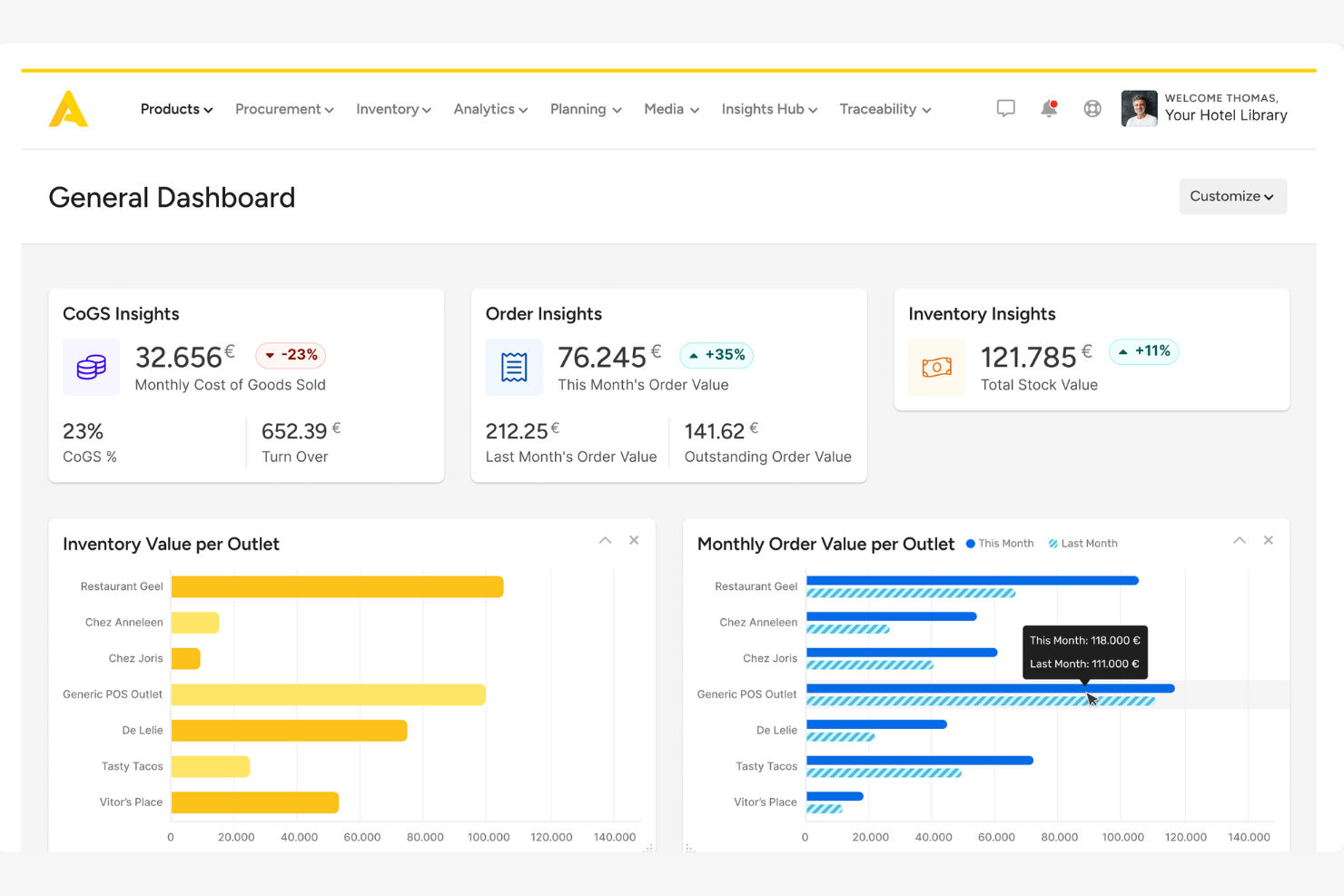
Apicbase is designed for hospitality teams that want to take control of menu engineering and food cost management. This platform gives chefs and F&B managers detailed tools for recipe costing, allergen tracking, and menu performance analysis. If you need to optimize profitability and consistency across your hotel’s food outlets, Apicbase brings data-driven insights to every menu decision.
Why I Picked Apicbase
When it comes to menu engineering, Apicbase stands out for its depth and focus on data-driven decision-making. I picked Apicbase because it gives hotel restaurant teams granular control over recipe costing, ingredient tracking, and menu profitability analysis. The platform’s menu performance dashboards and allergen management tools help you refine offerings and ensure compliance across all outlets. For hotels looking to maximize margins and maintain consistency, Apicbase offers specialized features that go beyond basic inventory or POS systems.
Apicbase Key Features
Some other features that make Apicbase valuable for hotel restaurant teams include:
- Supplier Management: Lets you track supplier details, pricing, and order histories in one place.
- Inventory Forecasting: Uses historical data to predict future stock needs and reduce waste.
- Multi-Outlet Management: Supports centralized control and reporting for multiple restaurant locations.
- Production Planning: Helps kitchen teams schedule and organize prep work based on real-time demand.
Apicbase Integrations
Integrations include Lightspeed, Revel, Deliverect, Foodics, Trivec, Square, Mews, Planday, Tenzo, and more.
Pros and Cons
Pros:
- Inventory forecasting uses historical consumption data
- Supplier price updates sync directly to recipes
- Centralized dashboard for multi-outlet management
Cons:
- Reporting exports limited to certain formats
- Menu photo management can be cumbersome

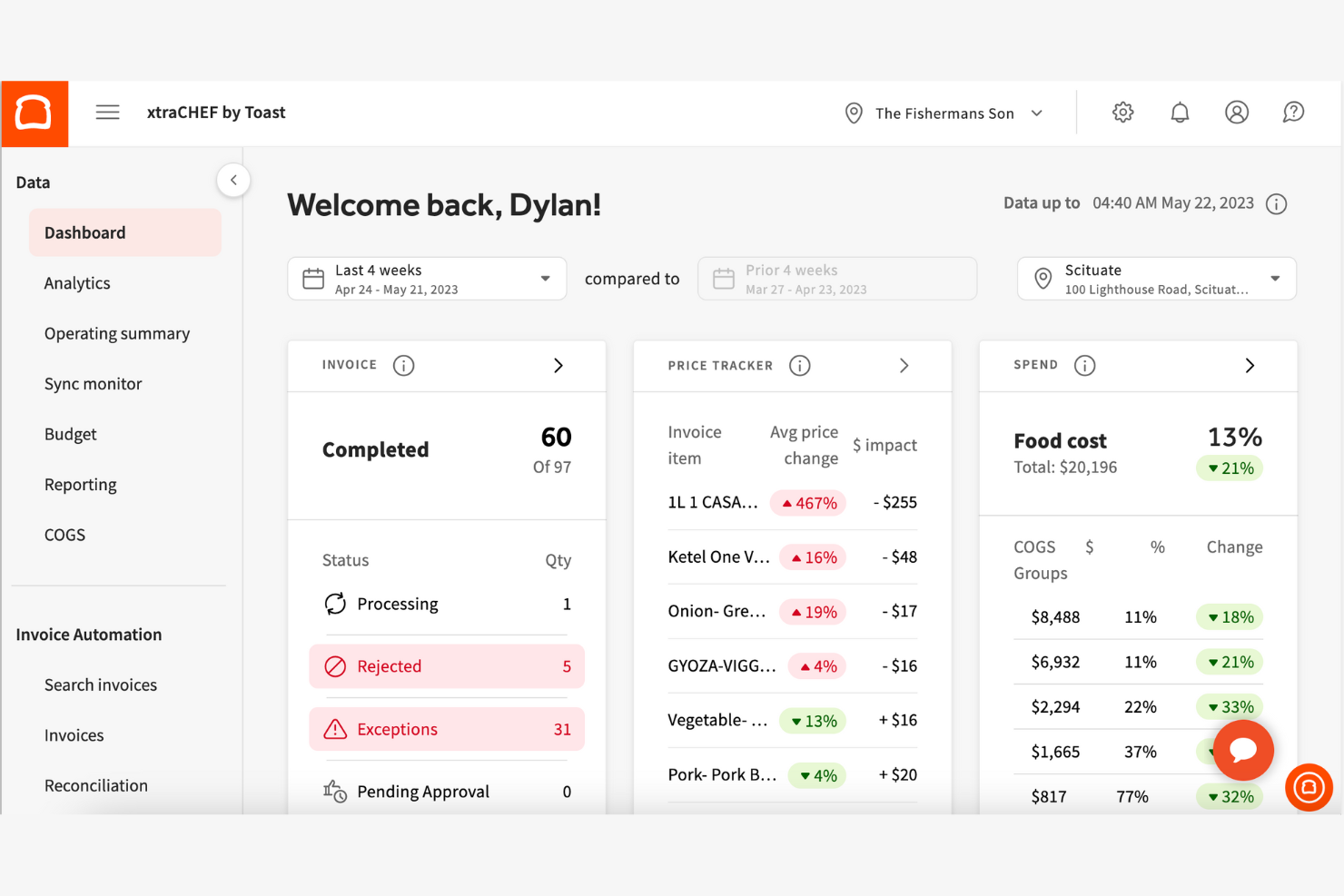
If your hotel restaurant needs fast, flexible tableside ordering, Toast is built for you. This point-of-sale platform is designed for hospitality teams that want to speed up service and reduce order errors. Toast’s handheld devices and digital ordering tools help servers take and send orders directly from the table, keeping operations moving during busy shifts.
Why I Picked Toast
For hotel restaurants that want to speed up service and improve order accuracy, Toast’s tableside ordering features are a strong fit. I picked Toast because its handheld POS devices let servers take orders and process payments right at the table, which helps reduce wait times and mistakes. The platform also supports digital menus and guest self-ordering, so you can offer flexible service options during peak hours. These features make Toast especially useful for busy hotel dining rooms that need to keep guests happy and tables turning quickly.
Toast Key Features
Some other features that make Toast useful for hotel restaurant teams include:
- Inventory Tracking: Monitors ingredient levels and alerts you when it’s time to reorder.
- Kitchen Display System: Sends orders directly to kitchen screens for faster prep and fewer errors.
- Loyalty Program Management: Lets you create and manage guest rewards and promotions.
- Multi-Location Reporting: Consolidates sales and performance data across all your hotel restaurant outlets.
Toast Integrations
Integrations include Grubhub, Uber Eats, DoorDash, xtraCHEF, QuickBooks, 7shifts, Compeat, BevSpot, PeachWorks, and Ctuit.
Pros and Cons
Pros:
- Detailed shift reports for restaurant managers
- Menu updates sync instantly across all terminals
- Handheld POS devices support tableside payments
Cons:
- Limited support for international currencies
- Hardware replacement can be expensive

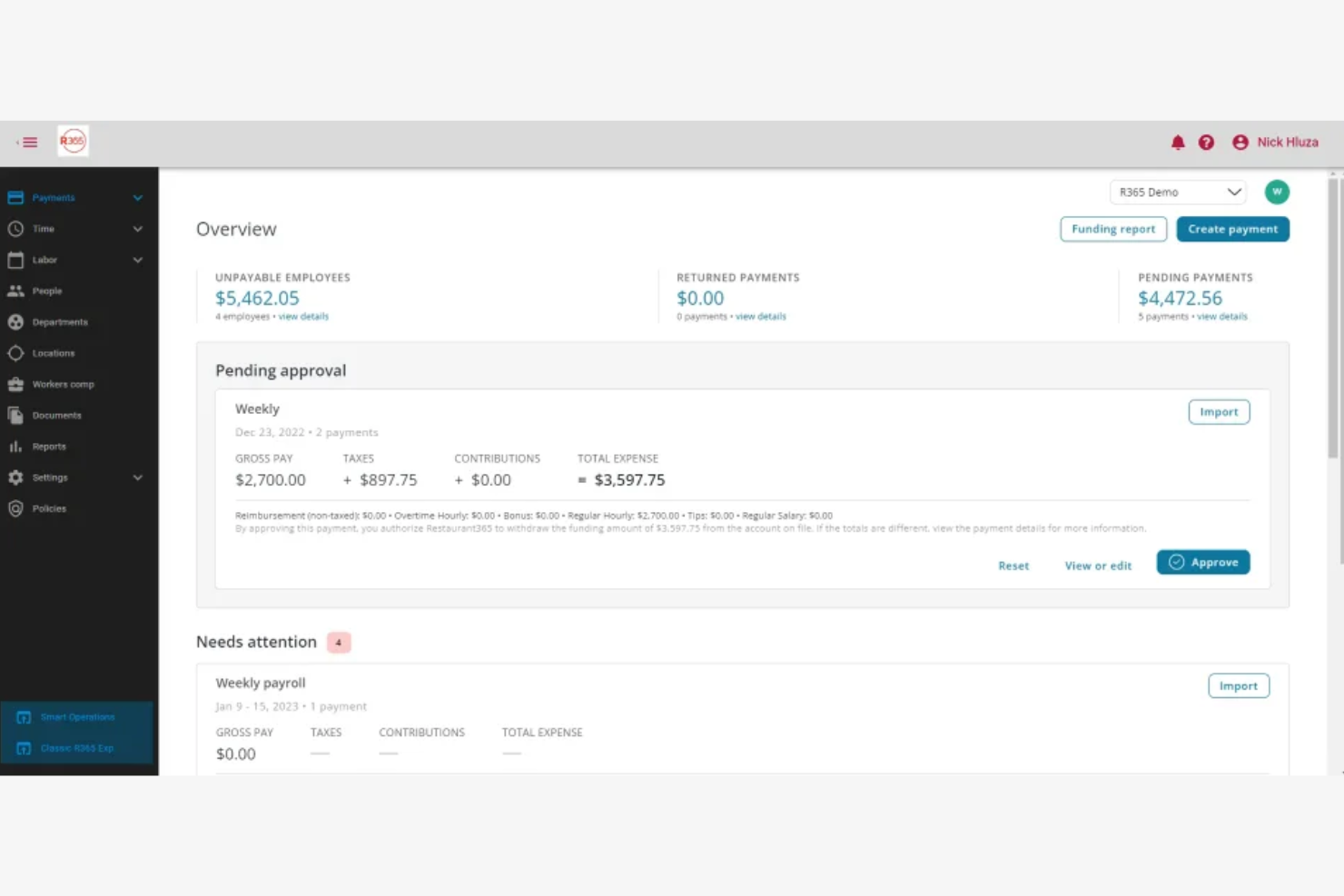
Restaurant365 is designed for hospitality teams that want to connect restaurant operations with accounting in one platform. This tool appeals to hotel F&B managers and finance leads who need real-time visibility into costs, invoices, and financial performance. If you’re looking to automate accounting tasks while managing restaurant operations, Restaurant365 brings both together in a single system.
Why I Picked Restaurant365
When hotel restaurants need to bridge the gap between daily operations and accounting, Restaurant365 stands out for its direct accounting integration. I picked Restaurant365 because it lets you automate invoice processing and sync sales data straight into your general ledger, which is a major advantage for finance teams. The platform’s real-time financial reporting and bank reconciliation tools help hotel F&B leaders keep a close eye on profitability. If you want to reduce manual data entry and connect restaurant performance with financial outcomes, Restaurant365 is purpose-built for that need.
Restaurant365 Key Features
Some other features that make Restaurant365 valuable for hotel restaurant teams include:
- Recipe Costing Module: Tracks ingredient costs and calculates plate costs for menu items.
- Inventory Management Tools: Monitors stock levels and automates reorder points for supplies.
- Labor Scheduling: Builds staff schedules and tracks labor costs against sales.
- Vendor Management: Centralizes supplier information and manages purchase orders in one place.
Restaurant365 Integrations
Integrations include Square, Aloha, Clover, Micros, POSitouch, Upserve, QuickBooks, ADP, and more.
Pros and Cons
Pros:
- Consolidated financial reporting for multiple outlets
- Built-in recipe costing and menu analysis
- Real-time food and labor cost tracking
Cons:
- Occasional delays in syncing POS data
- Limited support for non-U.S. tax compliance

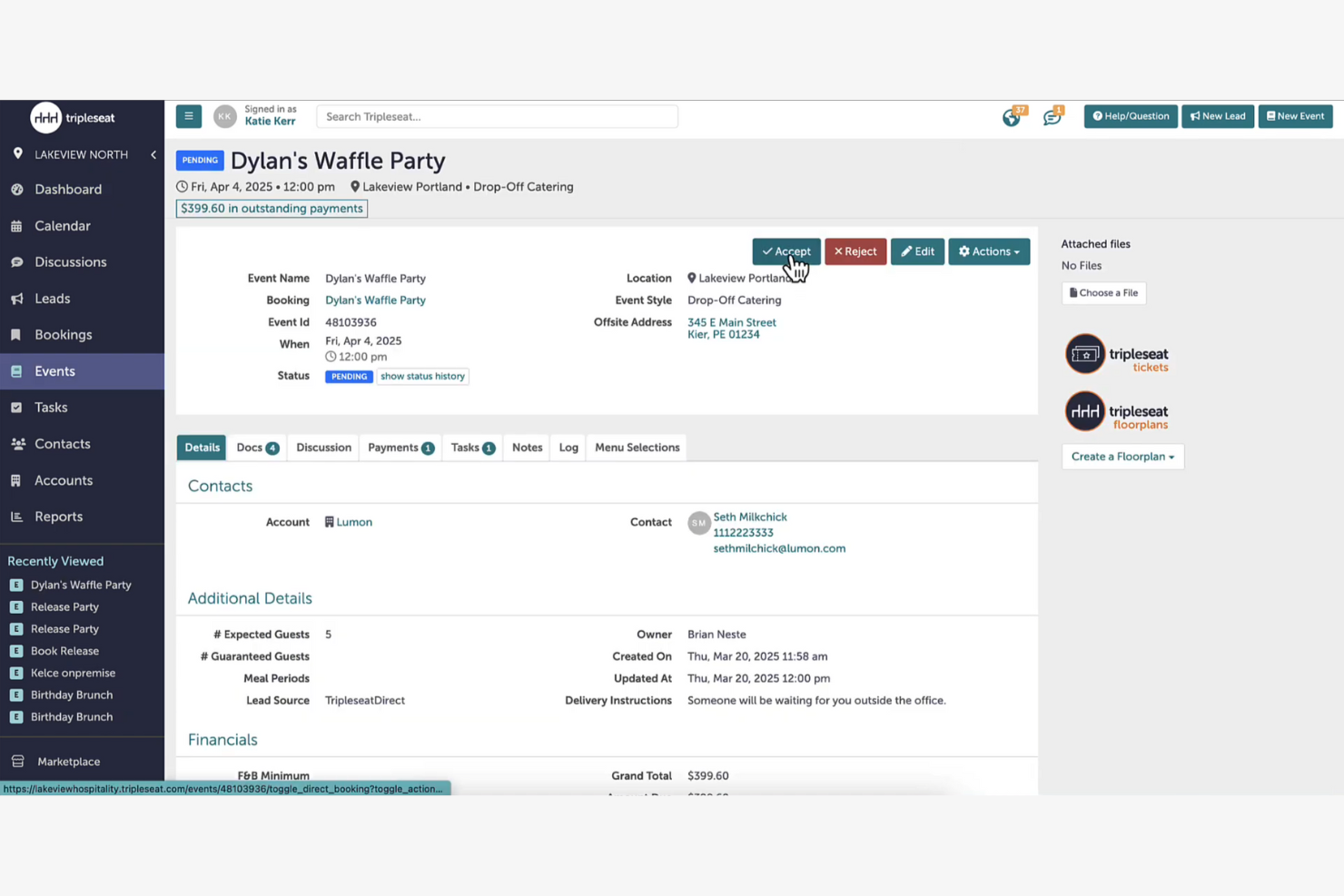
Tripleseat is designed for hotels and venues that need to manage group dining events and private bookings with less manual coordination. This platform helps sales and event teams centralize communication, track leads, and automate event details. If your property hosts frequent banquets, meetings, or special occasions, Tripleseat can help you keep every detail organized from inquiry to execution.
Why I Picked Tripleseat
Managing group dining events in a hotel setting requires tools built for complex coordination, and that’s where Tripleseat stands out. I picked Tripleseat because it offers event-specific features like customizable booking forms and automated proposal generation, which help hotel teams handle everything from initial inquiry to final billing. The platform also includes a centralized calendar and task management system, making it easier to track multiple events and avoid scheduling conflicts. These capabilities make Tripleseat a strong choice for hotels that regularly host banquets, conferences, or private dining experiences.
Tripleseat Key Features
Some other features in Tripleseat that are useful for hotel restaurant teams include:
- Document Templates: Create and reuse branded contracts, BEOs, and invoices for consistent event documentation.
- Guest List Management: Track RSVPs, dietary preferences, and seating arrangements directly within each event file.
- Task Reminders: Set automated reminders for follow-ups, deadlines, and event milestones to keep teams on track.
- Reporting Dashboard: Access real-time analytics on event sales, booking trends, and team performance.
Tripleseat Integrations
Integrations include OpenTable, SevenRooms, Mailchimp, Constant Contact, Stripe, Square, Oracle Hospitality, Infor, Mews, Maestro, and more.
Pros and Cons
Pros:
- Provides real-time reporting on event sales
- Supports multi-venue and multi-space management
- Tracks guest dietary needs and preferences
Cons:
- Limited menu engineering or costing tools
- No built-in table management for daily dining

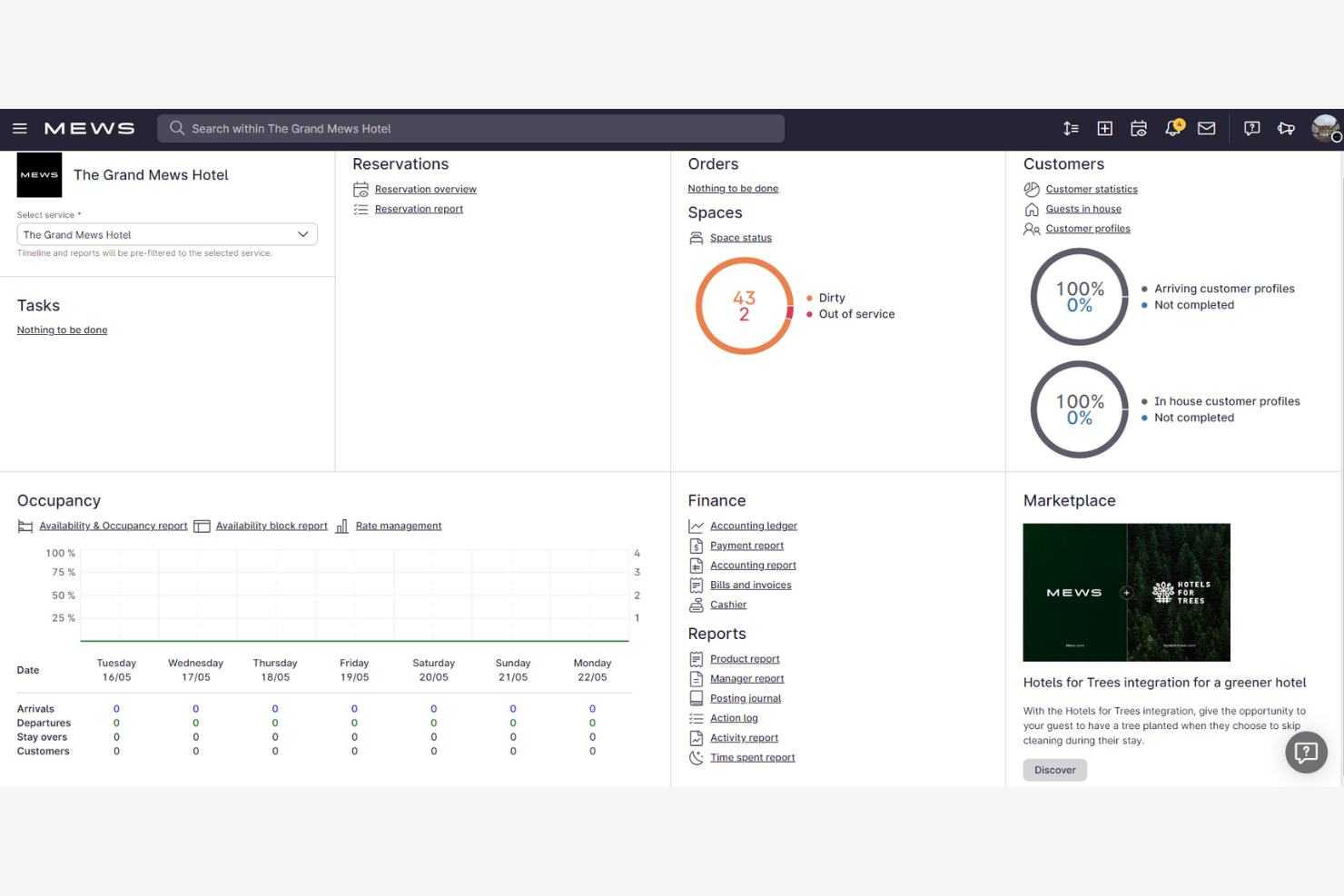
Mews brings cloud-based property management and restaurant operations together for hotels looking to unify guest and dining experiences. This platform is a fit for properties that want to connect reservations, POS, and guest profiles across rooms and restaurants in real time. If you need a system that helps your teams coordinate service and data between the front desk and F&B outlets, Mews offers a single platform to bridge those gaps.
Why I Picked Mews
For hotels that want to connect their property management and restaurant operations in the cloud, Mews offers a unified approach. I picked Mews because it lets you manage guest profiles, room bookings, and restaurant reservations all in one system, which helps teams deliver a more coordinated guest experience. The platform’s real-time data sharing between the front desk and F&B outlets means staff can see guest preferences and charges instantly, reducing manual handoffs. This level of integration is especially valuable for properties aiming to simplify operations and personalize service across every touchpoint.
Mews Key Features
Some other features in Mews that hotel restaurant teams may find useful include:
- Integrated POS System: Connects restaurant sales directly to guest folios and property accounts.
- Mobile Ordering: Lets guests place F&B orders from their own devices, whether in-room or on property.
- Automated Billing: Consolidates charges from rooms, restaurants, and amenities into a single invoice.
- Customizable Reporting: Offers detailed analytics on restaurant revenue, covers, and guest spend patterns.
Mews Integrations
Integrations include Booking.com, SiteMinder, Expedia, Tripadvisor, profitize, BEONX, 1CHECK, 20Tabs, 24SevenOffice, Abacus, and more.
Pros and Cons
Pros:
- Includes customizable reporting for F&B outlets
- Provides automated charge posting to folios
- Offers real-time syncing of guest profiles
Cons:
- Guest-facing ordering interface is not branded
- No built-in table reservation management

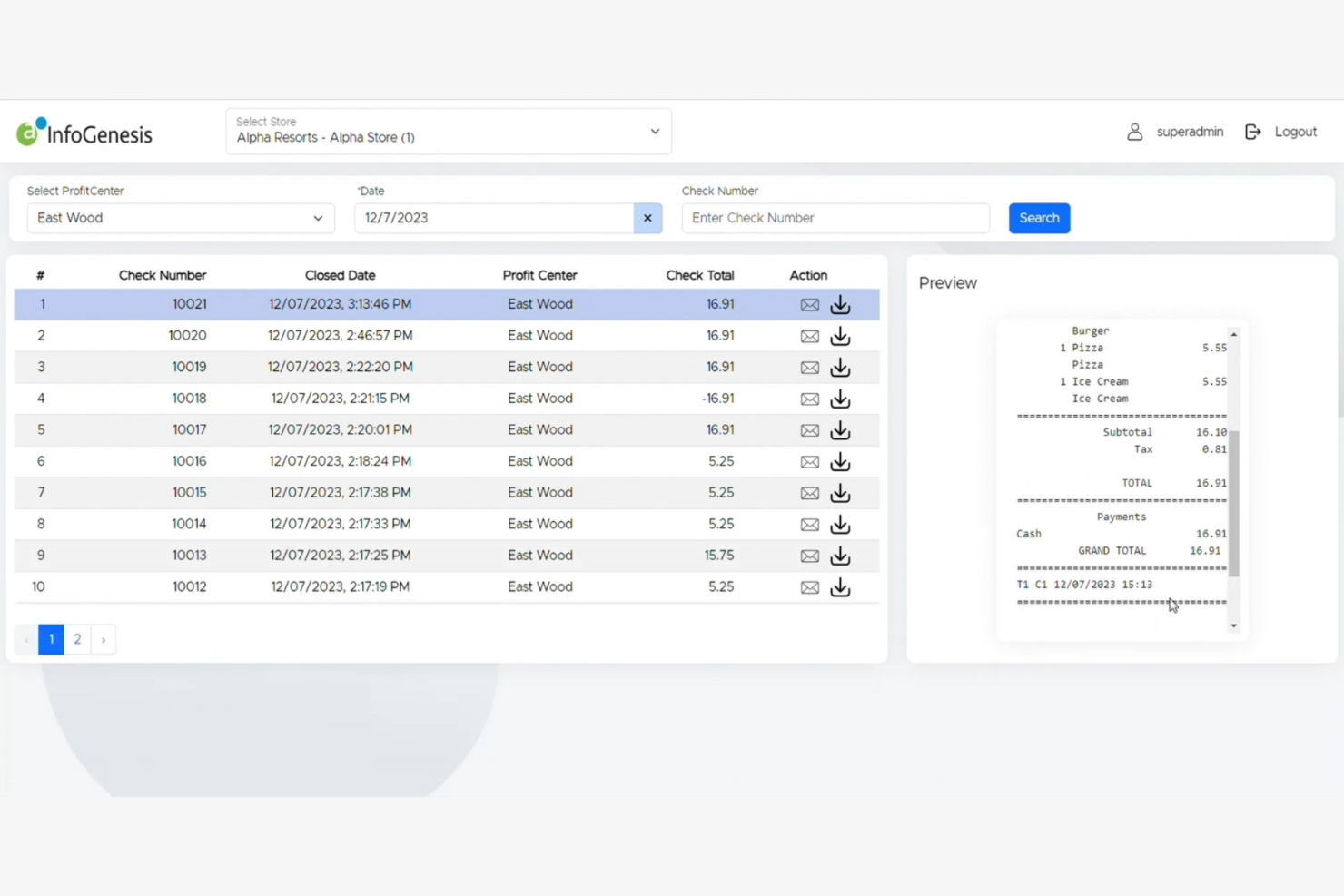
Agilysys is built for hotels and resorts that operate multiple restaurants, bars, and outlets under one roof. This platform helps food and beverage managers coordinate menus, inventory, and service across several venues from a single system. If your property needs to unify operations and reporting for diverse outlets, Agilysys brings centralized control to complex hospitality environments.
Why I Picked Agilysys
Coordinating multiple outlets within a single hotel or resort can be challenging, and Agilysys is purpose-built to address this complexity. I picked Agilysys because it lets you manage menus, inventory, and staffing across several restaurants, bars, and service points from one centralized dashboard. The platform also supports shared guest profiles and unified reporting, so you can track performance and guest preferences across all outlets. This level of coordination is especially valuable for properties that want to deliver consistent service and optimize operations across diverse food and beverage venues.
Agilysys Key Features
Some other features that make Agilysys useful for hotel restaurant teams include:
- Mobile Ordering: Allows guests to place orders from their smartphones or tablets.
- Table Management: Lets staff assign, track, and optimize table usage in real time.
- Loyalty Program Integration: Connects guest purchases to loyalty rewards and promotions.
- Kitchen Display System (KDS): Sends orders directly to kitchen screens for faster preparation and tracking.
Agilysys Integrations
Integrations include Book4Time, Oracle, Infor, Amadeus, Sabre, Springer-Miller, Shift4, FreedomPay, Elavon, and more.
Pros and Cons
Pros:
- Detailed reporting for each outlet and property
- Mobile ordering and payment for guests
- Built-in loyalty and guest profile management
Cons:
- Menu updates require manual sync across outlets
- Hardware compatibility varies by location

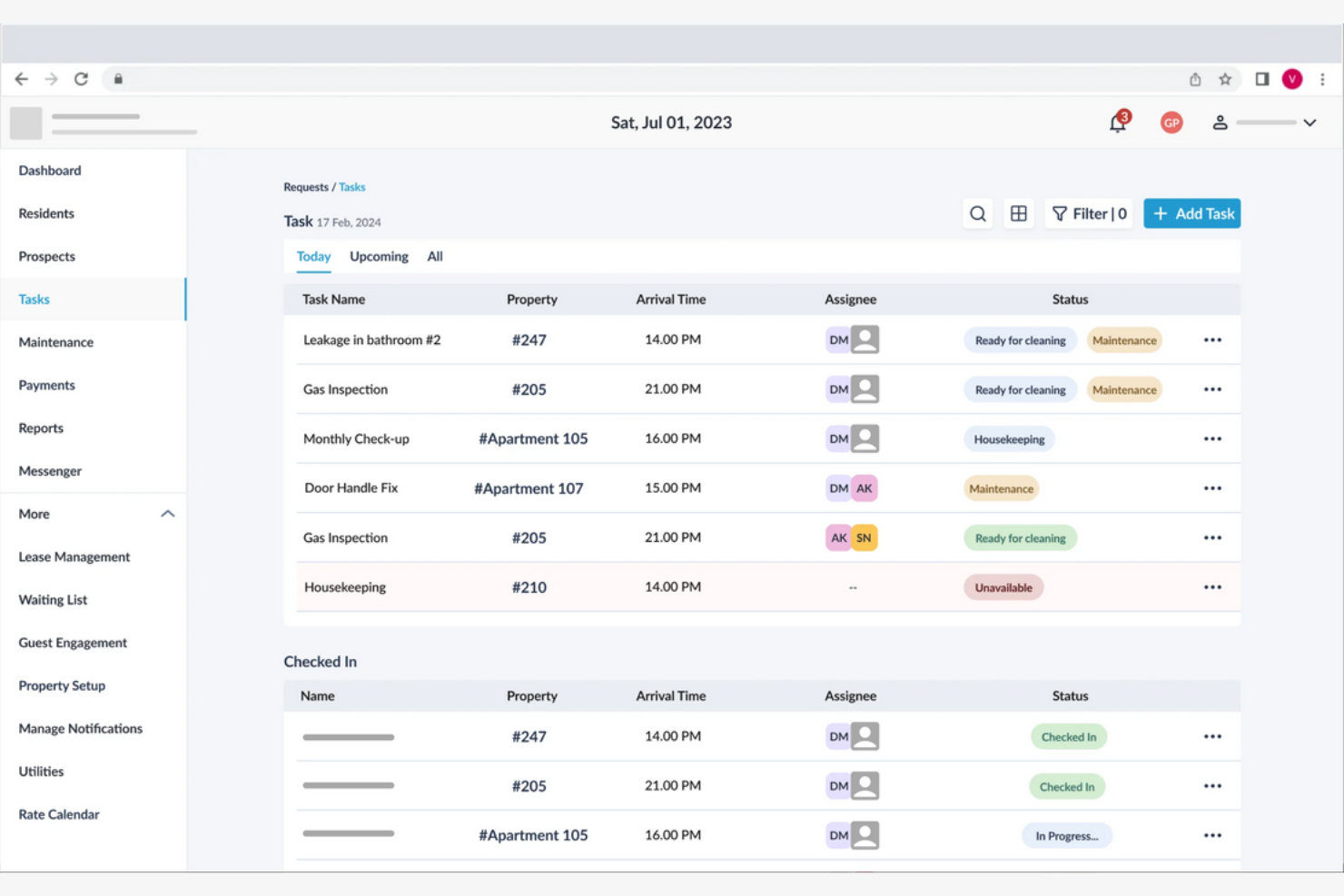
HotelKey brings a mobile-first approach to hotel restaurant operations, making it a strong fit for teams that need flexibility on the go. This platform is designed for properties that want to manage reservations, orders, and guest requests from any device, anywhere on the property. With its cloud-based tools, HotelKey helps hotel restaurants keep service moving smoothly without being tied to a front desk or fixed terminal.
Why I Picked HotelKey
When mobile flexibility is a top priority for hotel restaurant teams, HotelKey stands out for its mobile-first design. I picked HotelKey because it lets staff manage reservations, orders, and guest requests directly from smartphones or tablets, so service isn’t limited to a fixed workstation. The platform’s cloud-based dashboard gives managers real-time visibility into restaurant operations from anywhere on the property. This approach is especially useful for hotels that want to keep staff moving and responsive throughout the guest experience.
HotelKey Key Features
Some other features that make HotelKey useful for hotel restaurant operations include:
- Menu Management: Lets you update menu items, pricing, and availability in real time.
- Table Assignment Tools: Helps staff assign and track tables for efficient seating and service.
- Integrated Payment Processing: Supports multiple payment types directly through the platform.
- Customizable Reporting: Generates detailed sales and performance reports tailored to your restaurant’s needs.
HotelKey Integrations
Integrations include QuickBooks, M3, Revinate, GuestTek, Dormakaba, FreedomPay, Stripe, Virdee, Adyen, Sage, and more.
Pros and Cons
Pros:
- Table assignment tools for busy dining rooms
- Real-time menu updates from any device
- Mobile app supports full restaurant operations
Cons:
- No built-in inventory management for restaurants
- Menu design options are basic

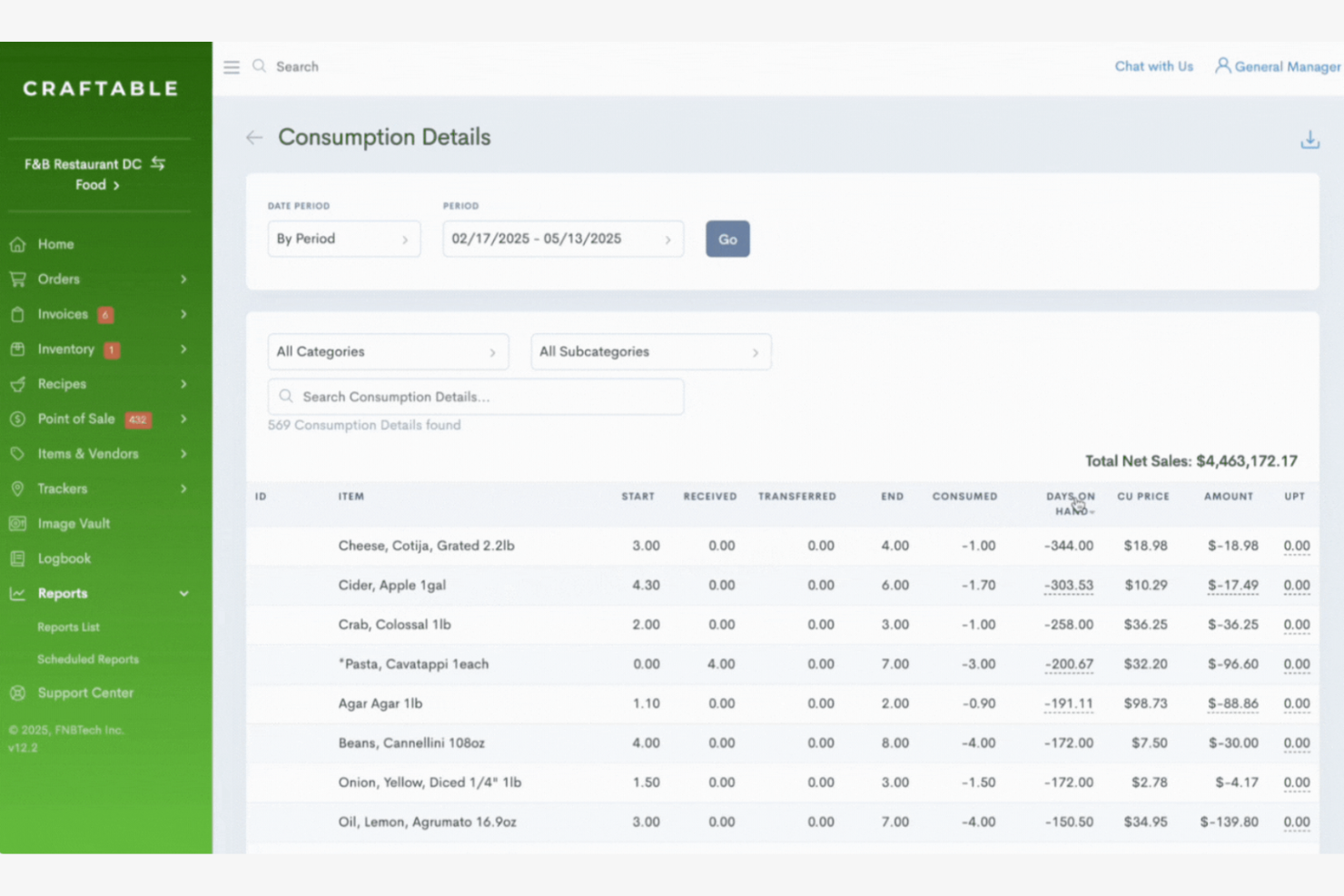
If your hotel restaurant needs tighter control over inventory and purchasing, Craftable is built for you. This platform is designed for hospitality teams that want to track stock, manage procurement, and monitor costs across multiple outlets. With Craftable, you can automate order management and gain real-time visibility into food and beverage usage, helping you reduce waste and improve margins.
Why I Picked Craftable
Inventory and procurement tracking are often the biggest challenges for hotel restaurants with multiple outlets or high-volume operations. I picked Craftable because it gives you detailed control over stock levels, purchasing, and vendor management in one place. The platform’s automated order tracking and real-time inventory updates help prevent over-ordering and stockouts, which are crucial for busy kitchens. If you want to keep a close eye on food and beverage costs while simplifying procurement, Craftable is purpose-built for that need.
Craftable Key Features
Some other features that make Craftable useful for hotel restaurant teams include:
- Recipe Management: Lets you build, cost, and update recipes with live pricing from your inventory.
- Vendor Price Tracking: Monitors price changes from suppliers and flags cost fluctuations.
- Invoice Capture: Digitizes and stores invoices for easy access and reconciliation.
- Multi-Location Support: Manages inventory and procurement across several outlets from a single dashboard.
Craftable Integrations
Native integrations are not currently listed.
Pros and Cons
Pros:
- Offers detailed food and beverage cost analytics
- Monitors supplier price changes over time
- Tracks inventory depletion by recipe usage
Cons:
- Lacks a guest-facing menu or ordering tools
- No built-in POS or PMS integration
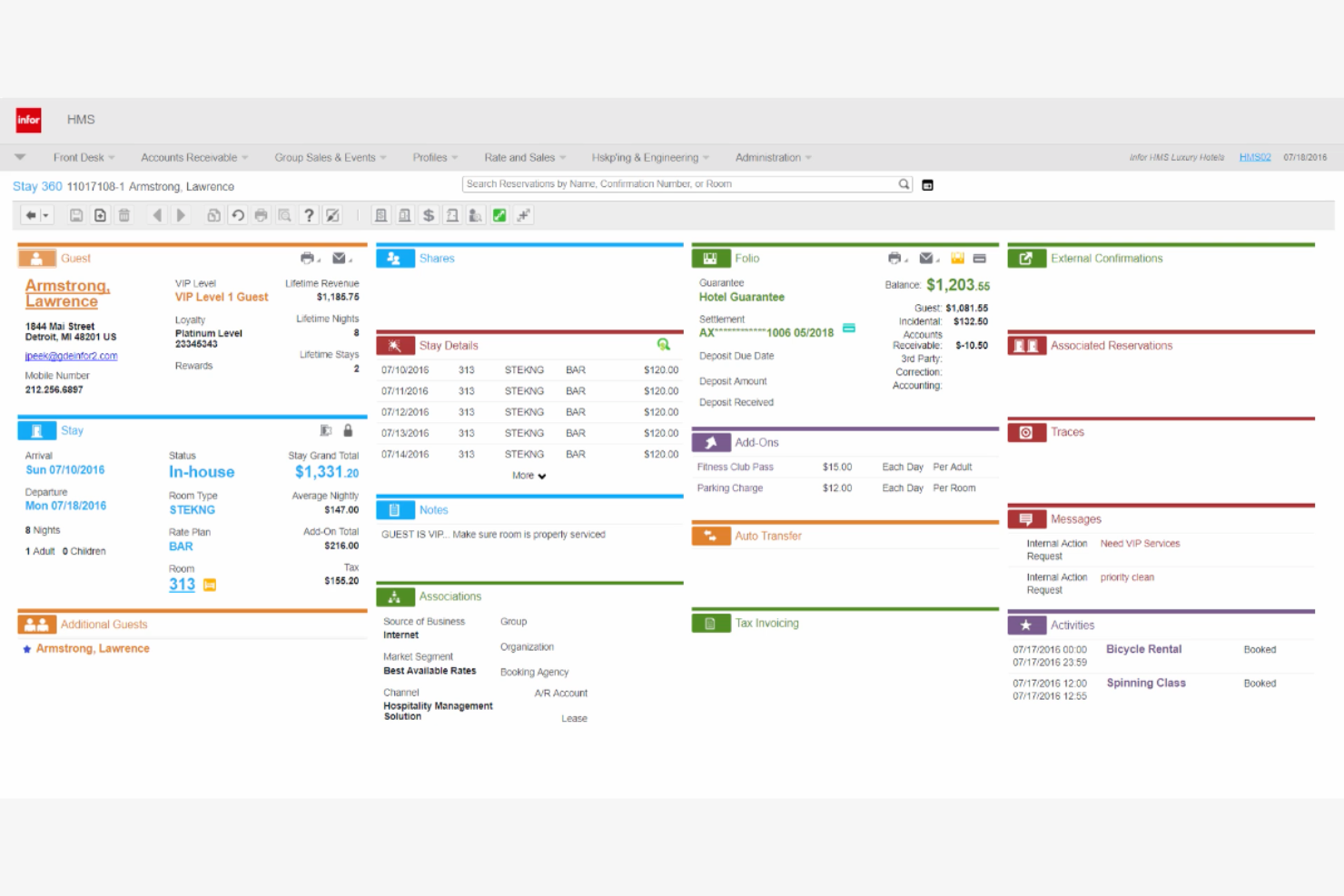
Designed for large hotel groups and resorts, Infor Hospitality brings advanced analytics and data-driven decision-making to hospitality operations. This platform is a fit for executives and managers who need to unify property, restaurant, and guest data across multiple locations. With Infor Hospitality, you can analyze performance trends, optimize revenue, and coordinate operations at scale.
Why I Picked Infor Hospitality
When you need to manage complex operations and analyze performance across multiple properties, Infor Hospitality stands out for its enterprise-level analytics. I picked this platform because it brings together data from your hotel, restaurant, and event spaces, giving you a unified view of your business. Its analytics tools let you track revenue, costs, and guest trends in real time, which is essential for making informed decisions at scale. For hotel groups that want to optimize operations and drive profitability with data, Infor Hospitality offers the depth and flexibility needed.
Infor Hospitality Key Features
Some other features that make Infor Hospitality valuable for hotel restaurant teams include:
- Menu Engineering Tools: Lets you analyze menu performance and adjust offerings based on sales and profitability data.
- Centralized Procurement Management: Supports purchasing and supplier management across multiple properties from one platform.
- Labor Scheduling Module: Helps you plan and track staff schedules for both front and back of house.
- Mobile Management App: Gives managers access to operational data and approvals from any location.
Infor Hospitality Integrations
Native integrations are not currently listed.
Pros and Cons
Pros:
- Provides mobile access for on-the-go managers
- Offers advanced menu engineering capabilities
- Consolidates multi-property data for analytics
Cons:
- Customization often needs vendor involvement
- Implementation can require significant IT resources
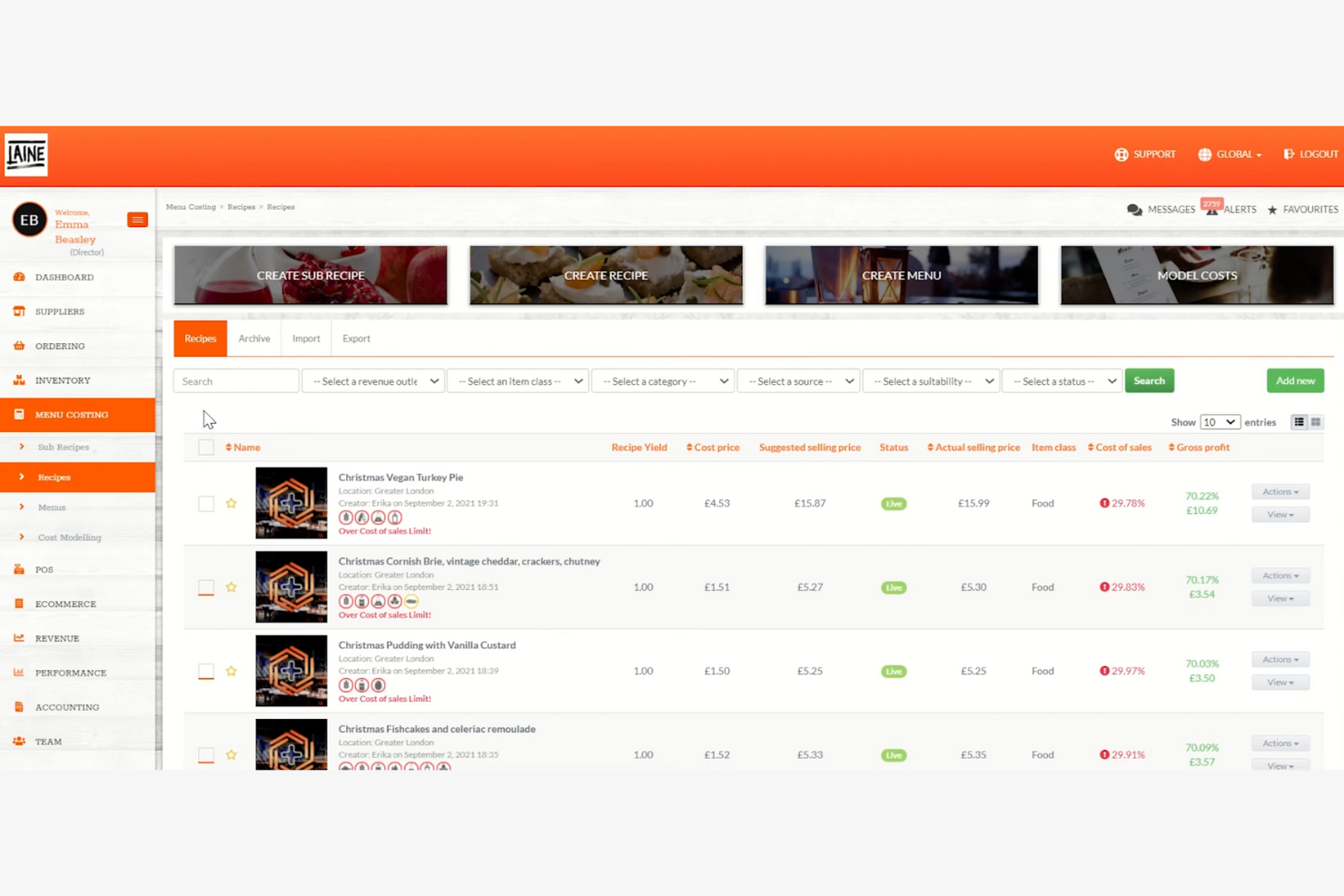
Kitchen CUT is designed for hotel restaurant teams that need precise control over recipes, allergens, and nutrition data. This platform helps chefs and managers track ingredients, flag allergens, and maintain compliance with food safety standards. If your property handles complex menus or caters to guests with dietary restrictions, Kitchen CUT brings structure and transparency to your kitchen operations.
Why I Picked Kitchen CUT
For hotel restaurants that need to manage recipes and allergens with precision, Kitchen CUT offers specialized tools that go beyond basic menu management. I picked Kitchen CUT because it lets you build detailed recipes with full allergen and nutritional breakdowns, helping your team stay compliant and transparent with guests. The platform also tracks ingredient sourcing and updates allergen information automatically when recipes change. This focus on food safety and clear communication makes Kitchen CUT a strong choice for properties serving guests with diverse dietary needs.
Kitchen CUT Key Features
Some other features that make Kitchen CUT valuable for hotel restaurant teams include:
- Supplier Management: Lets you track and manage supplier details and ingredient costs in one place.
- Stock Control: Monitors inventory levels and usage to help prevent shortages or overstocking.
- Cost Analysis Tools: Calculates dish and menu costs based on real-time ingredient prices.
- Digital HACCP Logs: Provides digital logs for food safety checks and compliance documentation.
Kitchen CUT Integrations
Integrations include QuickBooks, Xero, Klimato, Yooz, Moneypennys, Lightspeed, Oracle, Square, Zonal, and more.
Pros and Cons
Pros:
- Supplier management centralizes vendor information
- Ingredient cost analysis updates in real time
- Digital HACCP logs support food safety compliance
Cons:
- Reporting exports require manual formatting
- No built-in POS or table management
Other Hotel Restaurant Software
Here are some additional hotel restaurant software options that didn’t make it onto my shortlist, but are still worth checking out:
- Avero
For sales and labor reporting
- Focus e-RMS
For customizable reporting options
- 7shifts
For staff scheduling tools
- Cloudbeds
For unified reservations and POS
- SevenRooms
For guest profile management
- Petpooja
For multilingual interface support
- Square
For flexible payment processing
- SkyTouch Technology
For automated guest billing
- OpenTable
For real-time table reservations
- Owner
For direct online ordering
- IRIS
For in-room dining automation
- Supy
For supplier order tracking
- Olo
For digital ordering integration


Hotel Restaurant Software Selection Criteria
When selecting the best hotel restaurant software to include in this list, I considered common buyer needs and pain points like managing multi-outlet operations and tracking real-time inventory. I also used the following framework to keep my evaluation structured and fair:
Core Functionality (25% of total score)
To be considered for inclusion in this list, each solution had to fulfill these common use cases:
- Manage table reservations and seating
- Track food and beverage inventory
- Process guest orders and payments
- Generate sales and performance reports
- Integrate with hotel property management systems
Additional Standout Features (25% of total score)
To help further narrow down the competition, I also looked for unique features, such as:
- Customizable reporting and analytics tools
- Multi-language and multi-currency support
- Mobile ordering and contactless payment options
- Built-in guest loyalty and rewards programs
- Automated supplier order management
Usability (10% of total score)
To get a sense of the usability of each system, I considered the following:
- Simple and intuitive user interface
- Minimal training required for staff
- Fast navigation between key functions
- Responsive design for tablets and mobile devices
- Clear visual hierarchy and labeling
Onboarding (10% of total score)
To evaluate the onboarding experience for each platform, I considered the following:
- Availability of step-by-step setup guides
- Access to training videos and webinars
- Interactive product tours or walkthroughs
- Pre-built templates for menus and reports
- Live chat or chatbot support during onboarding
Customer Support (10% of total score)
To assess each software provider’s customer support services, I considered the following:
- 24/7 support availability
- Multiple support channels like phone, email, and chat
- Fast response times to inquiries
- Access to a searchable knowledge base
- Availability of dedicated account managers
Value For Money (10% of total score)
To evaluate the value for money of each platform, I considered the following:
- Transparent and predictable pricing structure
- Flexible plans for different business sizes
- No hidden fees or surprise charges
- Features included at each pricing tier
- Free trial or demo availability
Customer Reviews (10% of total score)
To get a sense of overall customer satisfaction, I considered the following when reading customer reviews:
- Consistent positive feedback on reliability
- Reports of responsive customer support
- Comments on ease of use for staff
- Feedback on integration with hotel systems
- User satisfaction with reporting and analytics
How to Choose Hotel Restaurant Software
It’s easy to get bogged down in long feature lists and complex pricing structures. To help you stay focused as you work through your unique software selection process, here’s a checklist of factors to keep in mind:
| Factor | What to Consider |
|---|---|
| Scalability | Will the software support your property as you add outlets, expand menus, or grow guest volume? |
| Integrations | Does it connect natively with your PMS, accounting, and payment systems, or will you need workarounds? |
| Customizability | Can you tailor reports, menus, and workflows to match your unique F&B operations and branding? |
| Ease of use | Will your staff—front and back of house—pick it up quickly, or will it require extensive training? |
| Implementation and onboarding | How long will it take to get up and running, and what resources or support will you need during rollout? |
| Cost | Are all fees clear, including setup, support, and add-ons? Does the pricing fit your budget and business model? |
| Security safeguards | Does the software offer user permissions, data encryption, and compliance with payment security standards? |
| Support availability | Can you reach support when you need it, especially during peak service hours or system outages? |
What Is Hotel Restaurant Software?
Hotel restaurant software is a digital platform designed to manage food and beverage operations within hotels. It centralizes tasks like table reservations, order processing, inventory tracking, and sales reporting.
These systems help hotel teams coordinate service across outlets, maintain accurate records, and integrate with broader hotel management tools to deliver a consistent guest experience.
Features
When selecting hotel restaurant software, keep an eye out for the following key features:
- Table management: Organizes reservations, seating assignments, and waitlists to optimize dining room flow and guest turnover.
- Order processing: Captures guest orders at the table or counter, routes them to the kitchen, and tracks order status in real time.
- Inventory tracking: Monitors stock levels of food, beverages, and supplies, and alerts staff when items need to be reordered.
- Menu management: Allows you to create, update, and customize digital menus, including pricing, descriptions, and daily specials.
- Sales reporting: Generates detailed reports on sales, revenue, and item performance to support data-driven decision-making.
- Multi-outlet support: Manages operations across multiple restaurants, bars, or outlets within a single hotel property.
- Payment processing: Accepts a variety of payment methods, including credit cards, mobile payments, and room charges, with secure transaction handling.
- Integration with PMS: Connects directly to your property management system to sync guest profiles, room charges, and billing information.
- Recipe and costing tools: Tracks ingredient usage and calculates the cost of each menu item to help control margins and reduce waste.
- User permissions: Sets access levels for different staff roles, ensuring sensitive data and functions are only available to authorized users.
Hotel restaurant software solutions do not typically include AI as part of their feature offering.
Benefits
Implementing hotel restaurant software provides several benefits for your team and your business. Here are a few you can look forward to:
- Centralized operations: Manage reservations, orders, and inventory from a single platform, reducing manual coordination across outlets.
- Improved guest experience: Coordinate service and personalize interactions by integrating guest profiles and preferences with order and seating data.
- Accurate sales and inventory tracking: Generate real-time reports and monitor stock levels to support better purchasing and reduce waste.
- Faster order processing: Route orders directly to the kitchen and process payments quickly, minimizing wait times for guests.
- Improved data security: Control user access and protect sensitive information with built-in permissions and compliance safeguards.
- Simplified multi-outlet management: Oversee multiple restaurants, bars, or service points within your hotel from one system.
- Actionable business insights: Access detailed analytics and customizable reports to inform menu planning, staffing, and pricing decisions.
Costs and Pricing
Selecting hotel restaurant software requires an understanding of the various pricing models and plans available. Costs vary based on features, team size, add-ons, and more. The table below summarizes common plans, their average prices, and typical features included in hotel restaurant software solutions:
Plan Comparison Table for Hotel Restaurant Software
| Plan Type | Average Price | Common Features |
|---|---|---|
| Free Plan | $0 | Basic order entry, limited menu management, simple reporting, and email support. |
| Personal Plan | $20-$50/user/month | Table management, menu customization, basic inventory tracking, payment processing, and chat support. |
| Business Plan | $60-$150/user/month | Multi-outlet support, advanced reporting, PMS integration, user permissions, and phone support. |
| Enterprise Plan | $200+/user/month | Custom integrations, dedicated account management, advanced analytics, onboarding assistance, and priority support. |
Hotel Restaurant Software FAQs
Here are some answers to common questions about hotel restaurant software:
How does hotel restaurant software integrate with a property management system?
Hotel restaurant software typically connects with your property management system (PMS) through direct integrations or APIs. This allows you to post restaurant charges to guest rooms, sync guest profiles, and consolidate billing, making it easier to manage guest accounts and simplify operations.
Can hotel restaurant software handle multiple outlets or locations?
Yes, most hotel restaurant software supports multi-outlet management. You can oversee several restaurants, bars, or service points within one property or across multiple locations, with centralized reporting and inventory tracking for each outlet.
What should I consider when migrating from a legacy POS to hotel restaurant software?
Plan for data migration, staff training, and integration with existing hotel systems. Check if the new software can import historical sales and menu data, and ensure your team has access to onboarding resources like training videos or live support during the transition.
Is it possible to customize menus and pricing for different outlets?
Yes, many hotel restaurant software solutions let you create unique menus and pricing for each outlet. This flexibility helps you tailor offerings to different guest segments or service styles within your hotel.
What types of support are available for hotel restaurant software users?
Support options often include live chat, phone, email, and searchable knowledge bases. Some vendors also offer onboarding assistance, webinars, and dedicated account managers, especially for business and enterprise plans.