
12 Best Free Restaurant Management Software Reviewed in 2026

10 Best Free Restaurant Management Software Shortlist
Here's my pick of the 10 best software from the 12 tools reviewed.


Running a restaurant is tough, especially when you’re trying to keep costs under control. You need to deliver great service in real-time without overspending. Free restaurant management software can help you automate tasks like reservations, inventory, and staff scheduling at no cost.
I’ve reviewed several free tools that support both front-of-house and back-office operations. These solutions can simplify daily tasks, allowing you to focus more on your customers.
This article will guide you through the best free restaurant management software available. You'll discover key features and benefits helping you make an informed decision for your restaurant business. Let's find the right solution for your team.
Why Trust Our Software Reviews
Best Free Restaurant Management Software Summary
While all the restaurant management software on my list offer free plans, they also provide paid upgrades for additional features. Here are the base costs for each of the tools that made it onto my shortlist:
| Tool | Best For | Trial Info | Price | ||
|---|---|---|---|---|---|
| 1 | Best for employee scheduling | Free 14-day trial + free plan available | From $39.99/location/month (billed annually) | Website | |
| 2 | Best for app customization | Free demo + free 15-day trial available | From $8/user/month (billed annually) | Website | |
| 3 | Best for free unlimited online orders | Free to use | Free forever plan | Website | |
| 4 | Best for multi-location management | Free 14-day trial + free plan available | From $50/store/year | Website | |
| 5 | Best for inventory management | Free trial available | Pricing upon request | Website | |
| 6 | Best for online orders | Free plan available + transaction fees | From $49/month and 2.5% + $0.15/transaction | Website | |
| 7 | Best for open-source flexibility | Free to use | Free forever plan | Website | |
| 8 | Best for mobile order tracking | Free demo + free trial available | From $99/month | Website | |
| 9 | Best for reservation management | Free demo available | From $149/month | Website | |
| 10 | Best for fast setup | Free plan available | From $9.99/month | Website |
-

roommaster
Visit WebsiteThis is an aggregated rating for this tool including ratings from Crozdesk users and ratings from other sites.4.2 -
Little Hotelier
Visit WebsiteThis is an aggregated rating for this tool including ratings from Crozdesk users and ratings from other sites.4.5 -
Roomstay Hotel Booking Engine
Visit Website


Best Free Restaurant Management Software Reviews
Below are my detailed summaries of the best free restaurant management software that made it onto my shortlist. My reviews offer a detailed look at the key features, pros and cons, integrations, and ideal use cases of each tool to help you find the best one for you. While some of these tools offer a completely free version, others offer a free trial period. I’ve added a note about what’s free in each of my reviews.

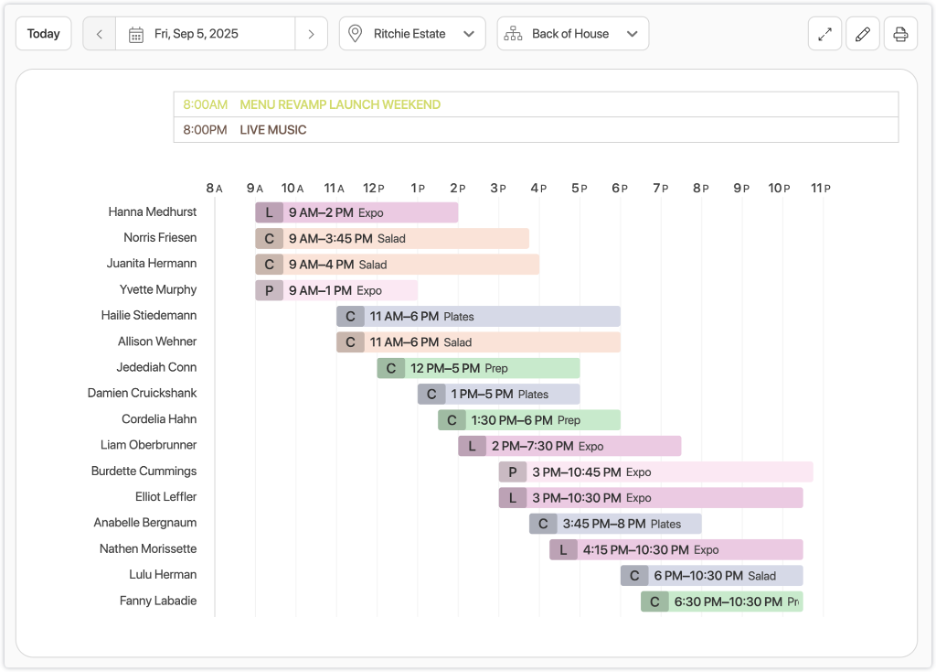
7shifts is a scheduling software tailored for restaurant managers looking to simplify employee management. It helps simplify scheduling, time tracking, and communication for restaurants, cafes, and bars.
Why I picked 7shifts: 7shifts offers a free plan that allows small teams to manage employee schedules. You can create schedules, track time, and communicate with your team, all in one place. The free plan supports scheduling for a single location, which is ideal for restaurant owners with small businesses. This makes it a practical choice for those who need efficient scheduling without added costs.
Standout Features and Integration:
Features include a time clocking software that helps you track employee hours accurately. The centralized communication app keeps your team connected and informed. There's also a reporting feature that gives insights into labor costs and scheduling efficiency.
Integrations include QuickBooks, ADP, and more.
What's free? 7shifts offers a free plan for single locations, giving small teams basic scheduling and communication tools, with a limit on the number of employees supported.
Pros and Cons
Pros:
- Insightful reporting tools
- Clear communication features
- Effective time tracking
Cons:
- Basic reporting capabilities
- Limited to one location

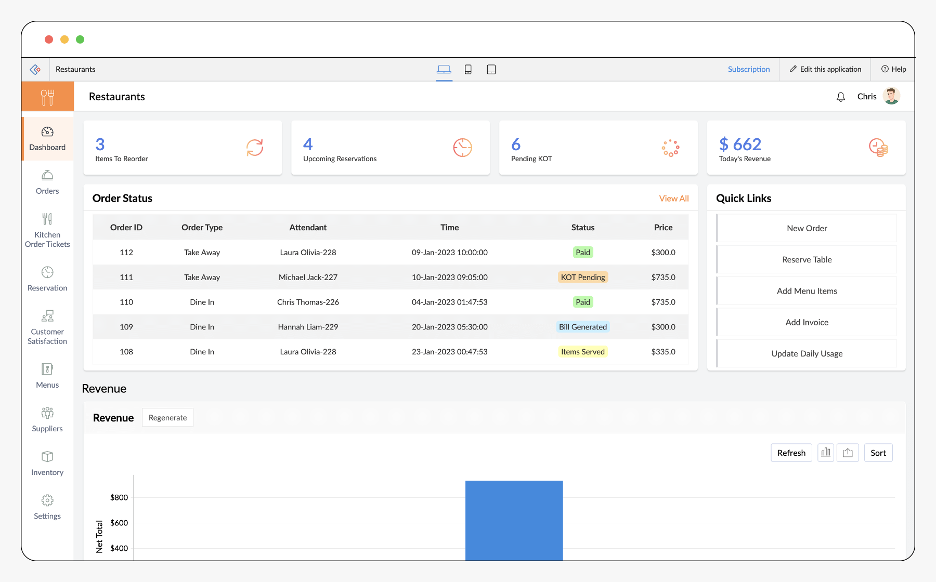
Zoho Creator is a low-code platform designed for businesses looking to create custom applications, including restaurant management solutions. It serves restaurateurs who need tailored apps for inventory, orders, and staff management.
Why I picked Zoho Creator: Zoho Creator's free plan allows you to build custom apps that fit your restaurant's specific needs. You can create applications for inventory tracking and order management with ease. The platform's flexibility in app customization is ideal for those who require unique solutions. This makes it a valuable tool for restaurants seeking to build tailored applications without costly software.
Standout Features and Integrations:
Features include a drag-and-drop interface that simplifies app creation. The data management feature helps you organize and analyze restaurant data efficiently. There's also a reporting tool that provides insights into various restaurant operations.
Integrations include Zoho CRM, Zoho Books, Google Workspace, Salesforce, Zapier, and more.
What's free? Zoho Creator offers a free plan option that lets you build and use a basic custom app with limited features, making it suitable for small teams.
Pros and Cons
Pros:
- Drag-and-drop interface
- Suitable for unique restaurant needs
- Highly customizable app creation
Cons:
- Limited number of apps
- Limited users in the free plan
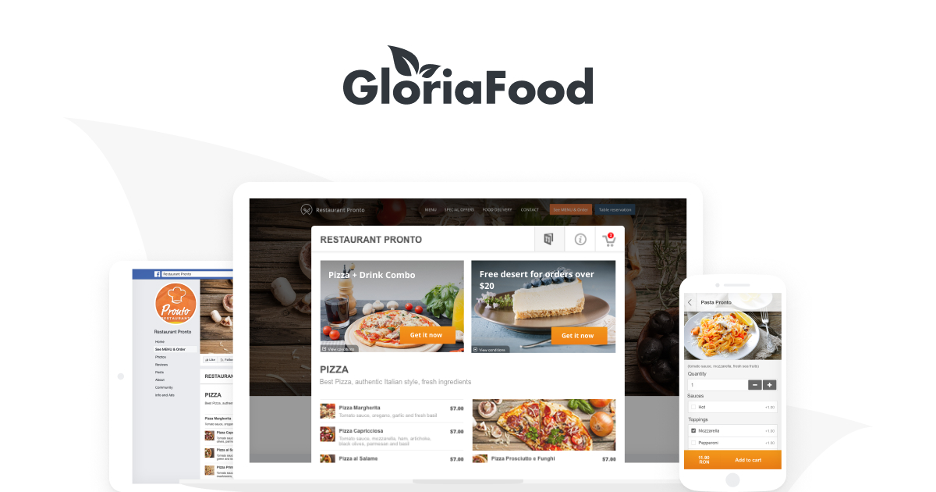
GloriaFood is an online ordering and restaurant management platform designed for small to mid‑sized restaurants, cafés, and food businesses. It offers tools for accepting orders, managing reservations, and organizing menus — helping restaurants improve operations and grow sales.
Why I picked GloriaFood: GloriaFood provides a genuinely free‑forever online ordering system that allows restaurants to take orders online without monthly fees. Its free plan includes key features like order acceptance, menu customization, and basic reporting, making it a strong choice for restaurants wanting to launch online ordering without upfront costs. Optional paid add‑ons are available for businesses that need more advanced capabilities.
Standout Features and Integrations:
Features include a customizable online ordering widget that you can embed on your website or Facebook page, a menu builder with photos and item options, real‑time order notifications, and basic sales reporting. There’s also a reservation system that restaurants can enable to accept table bookings.
Integrations include Square, Lightspeed, and more.
What’s free? GloriaFood offers a free‑forever core online ordering and menu management system with essential order and reservation tools.
Pros and Cons
Pros:
- Integrates with popular POS systems
- Easy menu and order management
- Truly free‑forever online ordering
Cons:
- Limited reporting depth
- Some advanced features require paid add‑ons

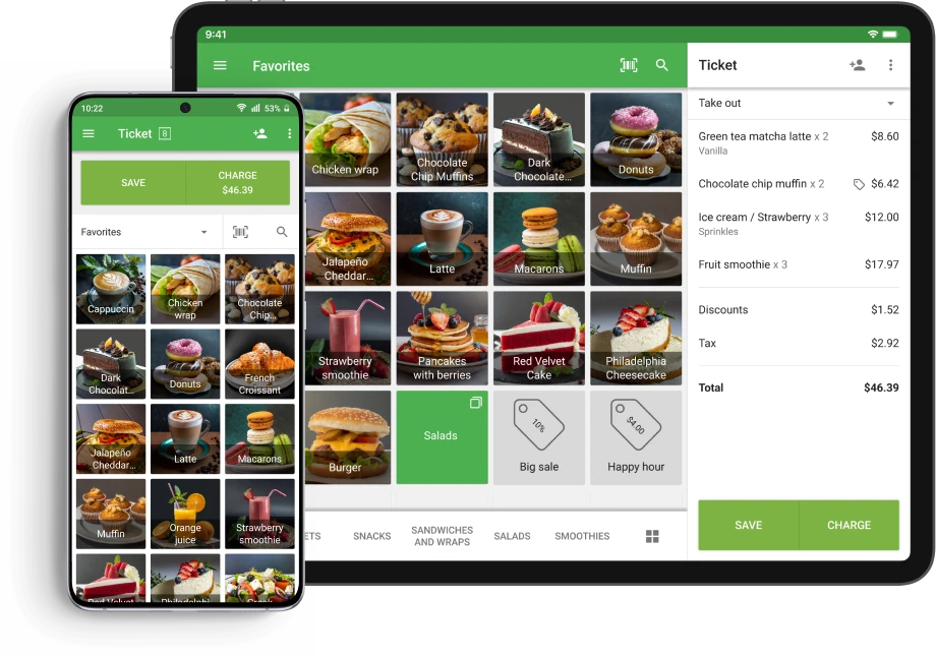
Loyverse POS is a point-of-sale software tailored for small and medium-sized businesses, including cafes and retail stores. It offers features for sales tracking, inventory management, and customer loyalty programs, making it ideal for businesses with multiple locations.
Why I picked Loyverse POS: Loyverse POS provides a free plan that supports multi-location management, which is beneficial for businesses operating in various locations. You can manage sales and inventory across different sites without additional costs. The free plan includes basic POS and customer loyalty features, giving you tools to improve customer engagement. This makes it a practical choice for businesses looking to expand their reach without added expenses.
Standout Features and Integrations:
Features include a detailed sales analytics tool that helps you track performance metrics. The inventory management feature allows you to manage stock levels and reorder items efficiently. There's also a customer loyalty program that encourages repeat business.
Integrations include QuickBooks, Xero, Shopify, and more.
What's free? Loyverse POS offers a free‑forever core POS and inventory system, including multi‑location support, with optional paid add‑ons for advanced features.
Pros and Cons
Pros:
- Increases customer loyalty
- Effective inventory tracking
- Supports multiple locations
Cons:
- Limited integrations on the free tier
- Limited advanced reporting and analytics

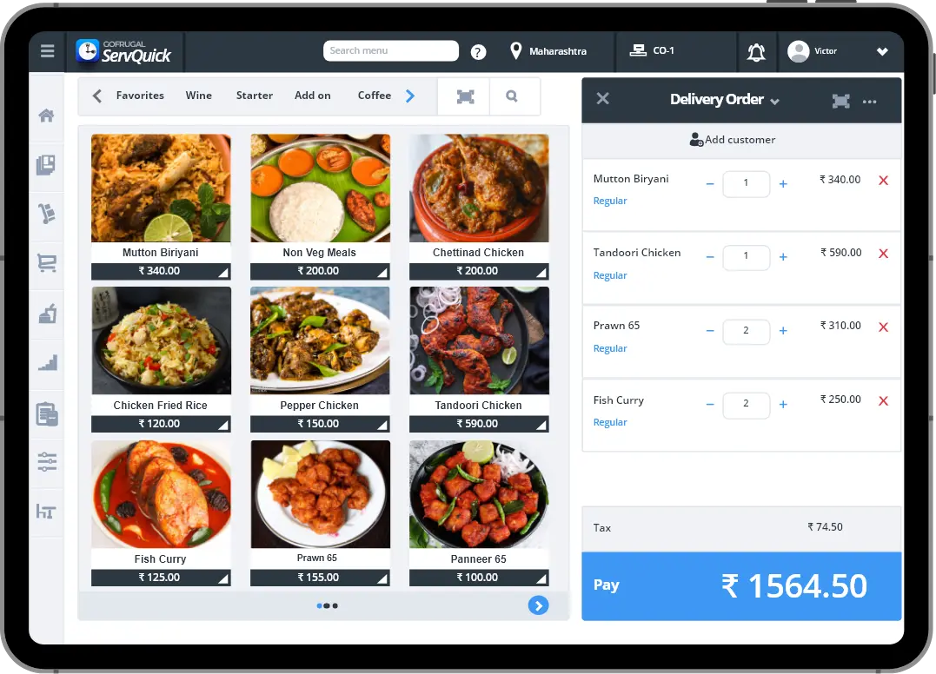
Gofrugal is a restaurant management tool aimed at helping restaurants optimize their operations. It primarily serves small to medium-sized businesses by focusing on inventory management, billing, and customer service.
Why I picked Gofrugal: Gofrugal offers a free trial that gives you access to its inventory management capabilities. You can manage stock levels, track purchases, and reduce waste, which is important for cost-effective operations. The free trial allows you to explore these features without commitment. It's particularly useful for restaurants that need detailed inventory tracking without upfront costs.
Standout Features and Integrations:
Features include automated billing that simplifies the checkout process. The customer management system helps you keep track of customer preferences and loyalty. Additionally, the reporting tools provide insights into sales and inventory performance.
Integrations include QuickBooks, Amazon, Shopify, and more.
What's free? GoFrugal offers a limited‑time free trial that lets you explore its inventory management features before subscribing.
Pros and Cons
Pros:
- Insightful reporting tools
- Automated billing processes
- Detailed inventory tracking
Cons:
- Bookkeeping may not be ideal for advanced accounting
- Limited trial period
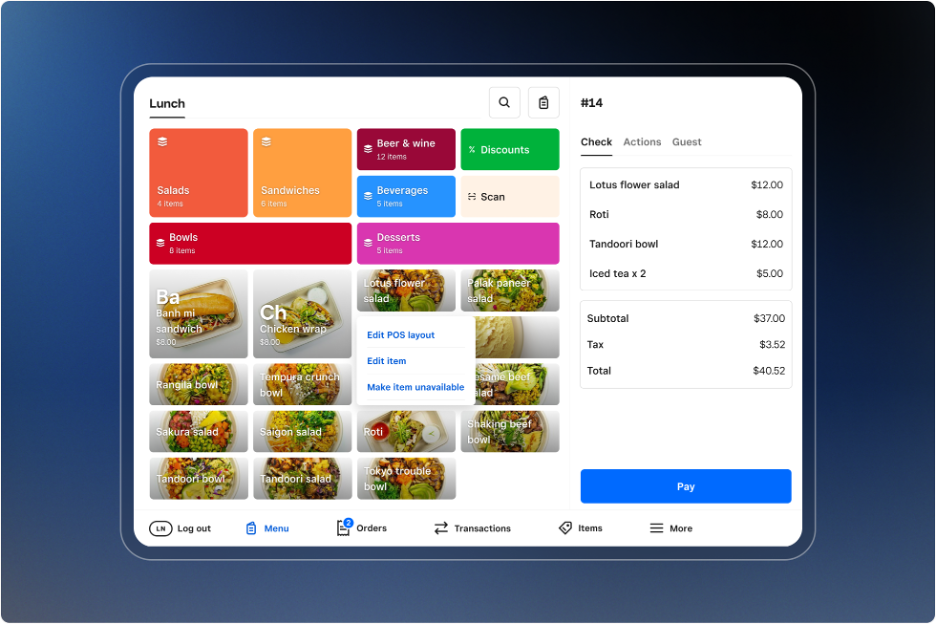
Square Online is an e-commerce platform designed for restaurants to facilitate online ordering and delivery. It serves eateries of all sizes, helping them expand their reach and manage digital sales efficiently.
Why I picked Square Online: Square Online provides a free plan that enables restaurants to set up an online store for takeaway and delivery orders. You can customize your online menu and accept payments directly through the platform. The free version supports basic e-commerce functions, which is great for those focusing on online sales. It's ideal for restaurants looking to boost their online presence without initial costs.
Standout Features and Integrations:
Features include an easy-to-use website builder that helps you create a professional online store. The order management system allows you to track and fulfill orders efficiently. There's also a payment processing feature that accepts various payment methods.
Integrations are not publicly listed.
What's free? Square Online provides a free‑forever plan with basic online store features. There are no monthly fees, but transaction fees still apply when you make sales.
Pros and Cons
Pros:
- Good for expanding online reach
- Supports various payment methods
- Easy online store setup
Cons:
- Basic design customization
- Transaction fees apply

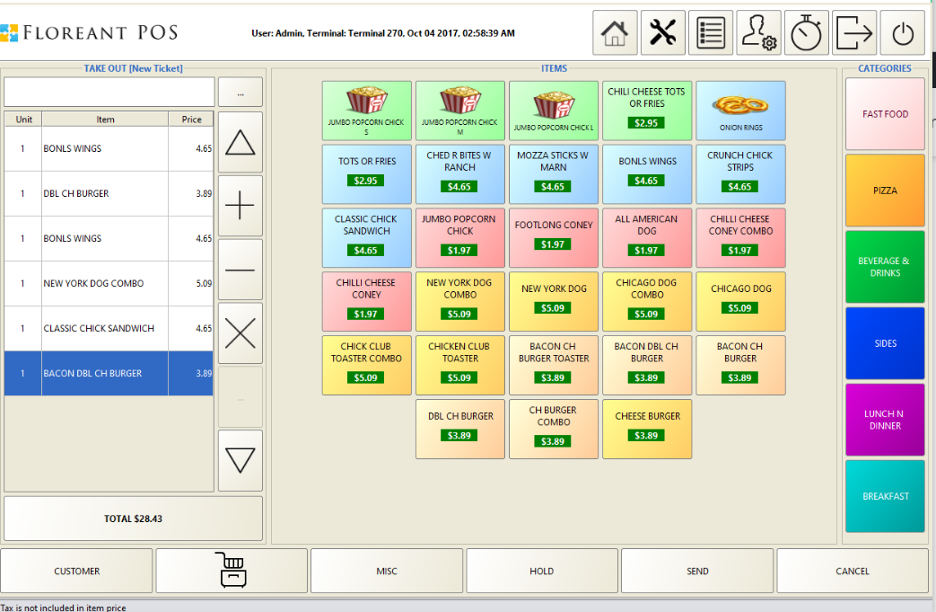
Floreant POS is an open-source point-of-sale system designed for restaurants, food trucks, and cafes. It caters to businesses that need a customizable, flexible solution for managing orders, billing, and kitchen operations.
Why I picked Floreant POS: Floreant POS offers a free, open-source version that lets you tailor the software to your restaurant's specific needs. You can manage orders and customize the interface to suit your workflow. This flexibility makes it ideal for those who want a restaurant POS system without the constraints of a fixed setup. It's especially valuable for tech-savvy users who need more control over their POS environment.
Standout Features and Integrations:
Features include table management that allows you to organize dining areas efficiently. The kitchen display system helps contribute to the smooth running of order processing in the kitchen. There's also a billing system that simplifies payment processing for various payment methods.
Integrations are not publicly listed.
What's free? Floreant POS offers a free, open‑source version that lets you use and customize the core POS system without licensing fees, though optional paid plugins are available for extra features.
Pros and Cons
Pros:
- Wide range of features
- Suitable for tech-savvy users
- Highly customizable system
Cons:
- Basic reporting features
- Requires technical knowledge

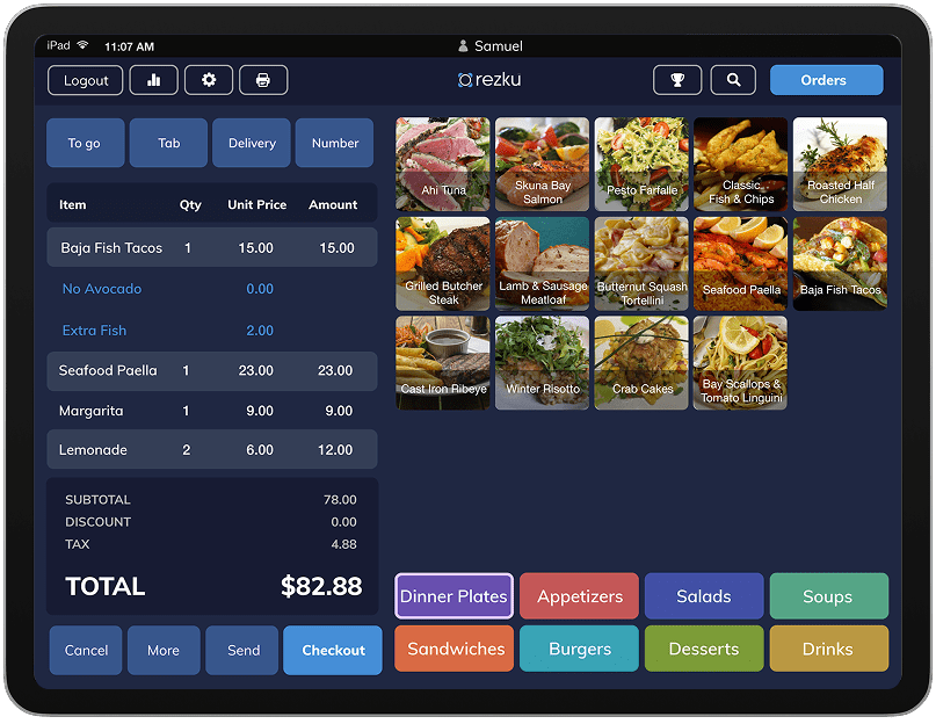
Rezku is a restaurant management software tailored for food service businesses seeking efficient operations. It caters to restaurants, bars, food trucks, and cafes, focusing on order management, inventory control, and customer engagement.
Why I picked Rezku: Rezku offers a free trial where you can explore mobile order tracking, a key feature for busy establishments. It lets you manage orders directly from mobile devices, helping boost flexibility and speed. The free trial also allows you to experience features like inventory management and CRM tools. This makes it a good fit for businesses needing mobile solutions without upfront costs.
Standout Features and Integrations:
Features include intuitive order management to improve customer service. The inventory management system helps you track stock and reduce waste. There's also a CRM feature that improves customer relationship building.
Integrations include QuickBooks, Xero, Mailchimp, Grubhub, DoorDash, and more.
What's free? Rezku offers a free trial, giving you access to explore its features, including mobile order tracking, inventory, and CRM, without commitment.
Pros and Cons
Pros:
- Fast setup process
- User-friendly interface
- Mobile order tracking
Cons:
- Mobile-first focus may limit desktop functionality
- Complex pricing structure

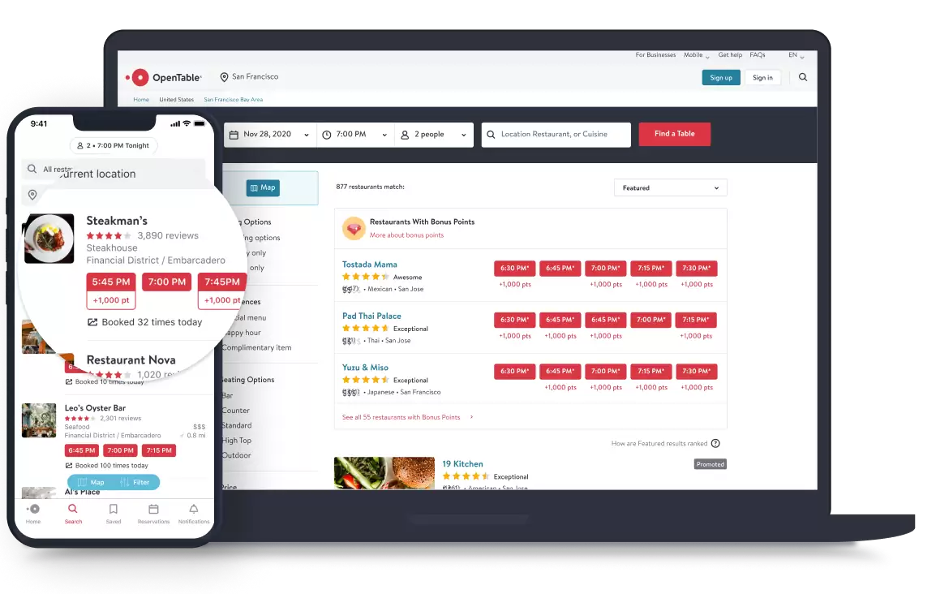
OpenTable is a reservation management tool primarily used by restaurants to manage bookings and customer interactions. It helps restaurants fill seats efficiently and improves customer dining experiences by handling table reservations and providing dining rewards.
Why I picked OpenTable: OpenTable offers a platform where you can manage reservations effectively, which is imperative for busy restaurants. Its free version allows you to access basic reservation management features, making it suitable for restaurants focusing on customer booking efficiency. You can also benefit from dining rewards that encourage customer loyalty. This makes it a preferred choice for managing reservations without extra costs.
Standout Features and Integrations:
Features include reservation management that simplifies booking processes. The dining rewards program helps you attract and retain customers. It also offers user reviews, enabling you to gather customer feedback and improve service.
Integrations include Google Maps, TripAdvisor, Facebook, Instagram, and more.
What's free? OpenTable’s restaurant management platform usually includes a limited‑time free trial that lets you test reservation and basic management features before paying for a subscription with ongoing fees.
Pros and Cons
Pros:
- Customer feedback collection
- Access to dining rewards
- Easy reservation management
Cons:
- Basic marketing tools
- Limited customization options

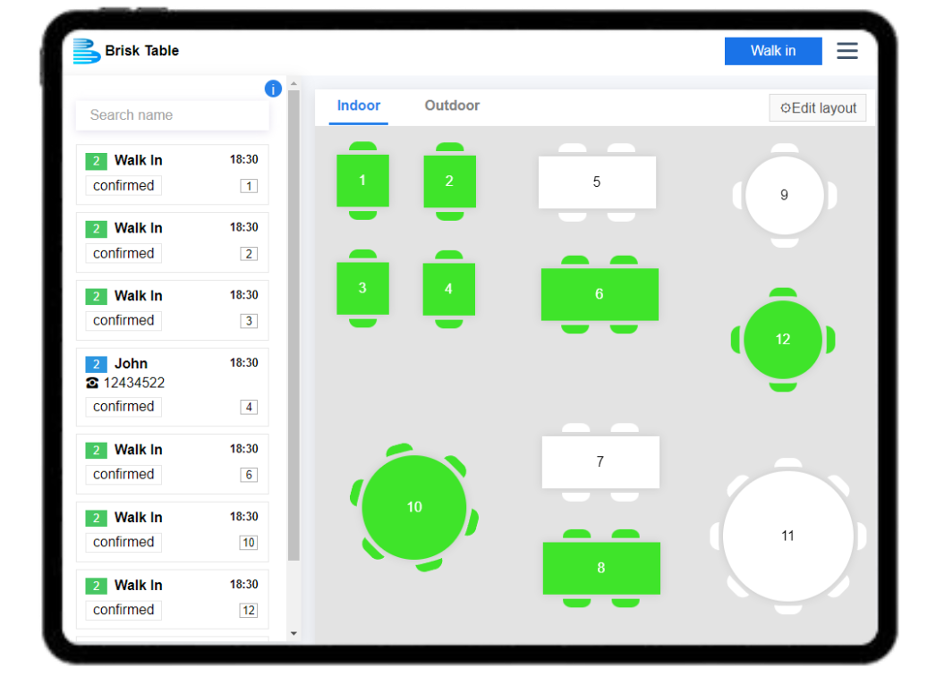
Brisk Table is a restaurant management software designed for restaurants and cafes. It offers tools for scheduling, menu creation, and order management, making it ideal for businesses looking to refine operations quickly.
Why I picked Brisk Table: Brisk Table's free plan allows you to set up essential restaurant management functions with ease. You can manage staff schedules, create menus, and handle bookings without a complicated setup process. The straightforward interface is perfect for businesses needing to get started without technical hurdles. This makes it a great choice for those who want quick and efficient restaurant management solutions.
Standout Features and Integrations:
Features include an intuitive menu generator that lets you create and print menus. The Kitchen Display System helps you route orders to the correct preparation stations efficiently. There's also a time clock system that simplifies tracking staff hours.
Integrations are not publicly listed.
What's free? Brisk Table offers a free‑forever plan that includes basic scheduling, menu creation, booking management, POS, and related tools, making it a budget‑friendly option for small restaurants.
Pros and Cons
Pros:
- Efficient order management
- Easy menu creation
- Quick setup process
Cons:
- Requires constant internet access
- Support is limited to email for free‑plan users
Other Free Restaurant Management Software
Here are some additional restaurant management software options that also offer free plans or trials. While these tools didn’t make it onto my shortlist, they’re still worth checking out:


Free Restaurant Management Software Selection Criteria
When selecting the best free restaurant management software to include in this list, I considered common buyer needs and pain points like budget constraints and ease of use in the restaurant industry. I also used the following framework to keep my evaluation structured and fair:
Core Functionality (25% of total score)
To be considered for inclusion in this list, each solution had to fulfill these common use cases:
- Manage reservations
- Track inventory
- Process payments
- Schedule staff
- Generate sales reports
Additional Standout Features (25% of total score)
To help further narrow down the competition, I also looked for unique features, such as:
- Customizable menu design
- Integrated online ordering
- Loyalty program management
- Advanced analytics
- Multi-location support
Usability (10% of total score)
To get a sense of the usability of each system, I considered the following:
- Intuitive navigation
- Clean interface design
- Easy setup process
- Minimal learning curve
- Responsive design
Onboarding (10% of total score)
To evaluate the onboarding experience for each platform, I considered the following:
- Availability of training videos
- Interactive product tours
- Access to webinars
- Use of templates
- Chatbot assistance
Customer Support (10% of total score)
To assess each software provider's customer support services, I considered the following:
- 24/7 customer support
- Live chat availability
- Extensive help center
- Responsive email support
- Availability of phone support
Value for Money (10% of total score)
To evaluate the value for money of each platform, I considered the following:
- Competitive pricing
- Feature set included in free plan
- Cost of upgrades
- Transparency in pricing
- No hidden fees
Customer Reviews (10% of total score)
To get a sense of overall customer satisfaction, I considered the following when reading customer reviews:
- Overall satisfaction ratings
- Commonly praised features
- Repeated complaints
- Experiences with customer support
- Ease of use feedback
How To Choose Free Restaurant Management Software
Complex feature lists and pricing structures can make it hard to figure out what you're really getting from free restaurant management software. To help you stay focused as you work through your software selection process, here are some factors to keep in mind:
| Factor | What To Consider |
| Free Offer Scope | Check what's included in the free plan, such as basic features and limitations. Make sure it covers your essential needs without forcing an upgrade. |
| Scalability | Consider whether the software can grow with your business. Look for options that allow easy upgrades as your restaurant expands or needs change. |
| Integrations | Confirm the software integrates with tools you already use, like accounting or inventory systems. This saves time and avoids data entry duplication. |
| Ease of Use | Look for a user-friendly interface that's easy for your team to learn. A simple setup process can save time and reduce frustration for new users. |
| Customer Support | Check if support is available when you need it. Look for 24/7 support or an extensive help center to assist with any issues that arise. |
| Customization | Determine if the software allows you to tailor features to fit your restaurant's specific needs. Customizable options can improve efficiency and satisfaction. |
| Reporting Capabilities | Evaluate the quality of the reporting tools. Good analytics can help you make informed decisions and improve your restaurant's performance. |
What Is Free Restaurant Management Software?
Restaurant management software is designed to help restaurants manage operations like reservations, inventory, and staff scheduling. Typically, these tools offer free plans or limited-time trials with basic features. Restaurant managers, owners, and staff use them to strengthen efficiency and organization. Features like inventory tracking, reservation management, menu management, and staff scheduling help with daily operations, improve customer service, and support business growth.
Features
Let's go over the features commonly found in restaurant management software, and which ones are usually included in free vs. paid plans.
Typically Free Restaurant Management Software Features
- Inventory management: Helps track stock levels and reorder items so you never run out of essential ingredients.
- Order management: Simplifies customer order processing, reducing wait times and improving overall customer experience.
- Basic reporting: Provides simple reports to help you understand sales trends and performance.
- Staff scheduling: Helps you create and manage employee schedules for optimal coverage.
- Customer loyalty programs: Offer tools to manage loyalty rewards, encouraging repeat business.
- Table management: Lets you organize seating arrangements for dine-in customers to maximize occupancy and improve customer flow.
- Online ordering: Facilitates the setup of online orders, expanding your restaurant's reach.
Typically Paid Restaurant Management Software Features
- Advanced analytics and detailed reports: Provide in-depth insights into business performance and overall profitability, helping you make data-driven decisions.
- Customizable menus: Allow full control over menu design and pricing, offering flexibility for promotions and changes within the ordering system.
- Multi-location management: Supports operations across multiple sites, centralizing management for larger businesses.
- Extensive CRM tools: Offer detailed customer relationship management features, encouraging customer engagement.
- Integration support: Provides access to a wide range of third-party integrations, helping operations run more efficiently alongside other tools.
- Marketing tools: Include built-in options for email campaigns, social media outreach, and promotions to increase visibility and customer retention.
- Improved security: Provides advanced security measures to protect sensitive business data and transactions, offering protection across the entire restaurant POS system.
Benefits
Implementing free restaurant management system software provides several benefits for your team and your business. Here are a few you can look forward to:
- Cost-effective operations: Free plans help you manage essential tasks like inventory and orders without extra costs, making it budget-friendly.
- Improved efficiency: Features such as order management and staff scheduling help simplify daily operations, saving time and reducing errors.
- Better customer service: Tools like customer loyalty programs, QR code menus, and online ordering improve customer interactions and satisfaction.
- Scalability: Many free tools offer options to upgrade, allowing your business to grow without switching systems.
- Data insights: Basic reporting provides useful insights into sales and performance, helping you make informed decisions.
- Flexibility: Free versions often allow for some customization, enabling you to tailor the software to your specific needs.
- Accessibility: Being cloud-based, these tools are accessible from anywhere, allowing you to manage your restaurant remotely.
Costs and Pricing
I realize you came to this article looking for the best restaurant management software options that are available for free. However, since free plans only offer limited features, there's a good chance you'll need to scale your plan up in the future.
The table below summarizes common plans, their average prices, and typical features included in restaurant management software solutions:
Plan Comparison Table for Restaurant Management Software
| Plan Type | Average Price | Common Features |
| Free Plan | $0 | Basic inventory management, order processing, staff scheduling, basic reporting, and customer loyalty programs. |
| Personal Plan | $30-$80/month | Advanced inventory management, detailed sales reports, customer relationship management, and online ordering capabilities. |
| Business Plan | $70-$300/month | Multi-location support, advanced analytics, customizable menus, marketing tools, and integration with third-party applications. |
| Enterprise Plan | $150-$2000+/month | End-to-end CRM platforms, extensive customization options, advanced security features, priority customer support, and full integration capabilities. |
Free Restaurant Management Software FAQs
Here are some answers to common questions about free restaurant management software:
How can I maintain data security in free restaurant management software?
When using free restaurant management software, verify that the provider implements standard security protocols like encryption and secure user authentication. It’s also wise to check user reviews for any data breach incidents. These steps help protect your business information and customer data.
Can free restaurant management software integrate with my existing tools?
Many free restaurant management tools offer basic integration options. Check if the software supports integration with your existing POS or accounting systems. This keeps your data flowing smoothly between platforms, reducing manual entry.
What limitations should I expect with free plans?
Free plans often come with limitations like restricted features, limited user accounts, or capped data storage. Evaluate these restrictions to confirm the free version aligns with your business needs. You might need to upgrade for more advanced capabilities as your restaurant grows.
How do I choose the best free restaurant management software for my needs?
Identify your restaurant’s specific needs, such as inventory management or order processing, and match them with the features offered in free plans. Reading user reviews and trying out free trials can also help you determine the best fit for your business.
Is there customer support for free restaurant management software?
Customer support for free software can vary. Some providers offer limited support, such as email or community forums, while others may provide more solid options. It’s important to verify the level of support available for free users so you can get help when needed.
How often do free restaurant management software providers update their features?
The frequency of updates can vary, but many providers roll out updates regularly to improve functionality and fix bugs. Keeping your software up to date allows you to take advantage of the latest features and security improvements. Check the provider’s update history for more insight.
What's Next:
If you're in the process of researching free restaurant management software, connect with a SoftwareSelect advisor for free recommendations.
You fill out a form and have a quick chat where they get into the specifics of your needs. Then you'll get a shortlist of software to review. They'll even support you through the entire buying process, including price negotiations.