

Oracle OPERA Review: Pros, Cons, Key Features and Updated Pricing

We review tools independently, and commissions help fund our testing. See our transparency policy, our methodology, or suggest a tool.
Oracle OPERA is a hotel property management software built for full-service hotels and multi-property groups that need centralized control over reservations, front desk operations, housekeeping, and billing. I'd consider it when your operation has complex requirements that mid-market tools like Cloudbeds aren't designed to handle—particularly if you need deep configuration options, enterprise-level reporting, and a wide ecosystem of third-party integrations across a large or branded property.
Oracle OPERA Evaluation Summary
0/5
- Pricing upon request
- Free demo available
Why Trust Our Software Recommendations
6,700+
Reviews
20
Industry experts
16+
Evaluation factors
14
Years
Our team has been testing and reviewing software since 2012. As hospitality leaders ourselves, we know how difficult—and important—it is to choose the right software.
For this guide, we evaluated tools using hands-on testing and independent research, scoring tools using our selection criteria.
Our reviews reflect our human editorial judgment, not a sales pitch.
Oracle OPERA Overview
When evaluating Oracle OPERA as a property management software, its advanced integrations, flexible configuration, and global support network set it apart for large hotels and multi-property groups. The interface can feel overwhelming and rather clunky, onboarding can feel complex compared to simpler options, and pricing is often higher, but the depth of features—like group booking management and custom reporting—justifies the investment for properties with demanding requirements.
If you’re selecting a solution for a high-volume, multi-department operation, Oracle OPERA’s scalability and reliability make it a strong contender, though smaller hotels may find the learning curve and cost less appealing.
Pros
- Handles complex group bookings and event management well.
- Supports reservations, group sales, loyalty programs, reporting, and multi-department operations in a single platform.
- The system’s modular architecture allows properties to tailor functionality to their specific needs.
Cons
- Platform's breadth of features and configurability can make it difficult for new users or smaller teams to learn.
- Modular pricing, customization, and enterprise implementation can lead to significant upfront and ongoing costs.
- Can feel clunky, outdated, and unintuitive, particularly for teams accustomed to modern, minimalist software.
Is Oracle OPERA Right For Your Needs?
Who Would be a Good Fit for Oracle OPERA?
- Large Hotel Chains & Multi-Property GroupsOPERA’s modular and highly configurable architecture supports centralized management across multiple hotels, enabling corporate teams to standardize workflows, reporting, and controls across locations.
- Resorts and Full-Service PropertiesProperties with complex revenue streams, including room, F&B, events, and spa services, benefit from OPERA’s ability to manage group sales, loyalty programs, and multiple revenue centers within one system.
- Hotels With High Volume Group & Event BusinessOPERA’s Sales and Event Management modules help teams manage conferences, meetings, and banquets alongside room inventory, reducing redundant data entry and improving coordination.
- Hotels Requiring Deep Reporting and AnalysisEnterprise properties with strict reporting requirements can use OPERA’s advanced analytics and customizable reporting tools to extract operational insights and track performance across departments.
- Mixed-Use & Vacation Ownership PropertiesOPERA’s flexible rule-based operations and support for fractional ownership or condominium units make it a good fit for mixed-use properties that combine hospitality with real estate or timeshare models.
- International Hotels With Complex Distribution NeedsOPERA Cloud’s global integrations and support for GDS, loyalty, and channel management workflows help international properties coordinate availability, distribution, and pricing across markets.
Who Would be a Bad Fit for Oracle OPERA?
- Small Boutique HotelsOracle OPERA’s complexity and cost are excessive for properties with fewer rooms and simpler needs.
- Independent Bed and BreakfastsThe software’s enterprise-level features and setup requirements do not match the scale or budget of small, owner-operated accommodations.
- HostelsHostels often need flexible bed management and social booking tools, which Oracle OPERA does not prioritize.
- Vacation Rental ManagersOracle OPERA is not designed for managing dispersed, individually owned vacation homes or apartments.
- Seasonal LodgesShort operating seasons and limited staff make the investment and training required for Oracle OPERA impractical.
- Non-Hospitality BusinessesBusinesses like coworking spaces or serviced offices will not benefit from Oracle OPERA’s hospitality-specific workflows and integrations.
How We Test & Score Tools
We’ve spent years building, refining, and improving our software testing and scoring system. The rubric is designed to capture the nuances of software selection and what makes a tool effective, focusing on critical aspects of the decision-making process.
Below, you can see exactly how our testing and scoring works across seven criteria. It allows us to provide an unbiased evaluation of the software based on core functionality, standout features, ease of use, onboarding, customer support, integrations, customer reviews, and value for money.
Core Functionality (25% of final scoring)
The starting point of our evaluation is always the core functionality of the tool. Does it have the basic features and functions that a user would expect to see? Are any of those core features locked to higher-tiered pricing plans? At its core, we expect a tool to stand up against the baseline capabilities of its competitors.
Standout Features (25% of final scoring)
Next, we evaluate uncommon standout features that go above and beyond the core functionality typically found in tools of its kind. A high score reflects specialized or unique features that make the product faster, more efficient, or offer additional value to the user.
We also evaluate how easy it is to integrate with other tools typically found in the tech stack to expand the functionality and utility of the software. Tools offering plentiful native integrations, 3rd party connections, and API access to build custom integrations score best.
Ease of Use (10% of final scoring)
We consider how quick and easy it is to execute the tasks defined in the core functionality using the tool. High scoring software is well designed, intuitive to use, offers mobile apps, provides templates, and makes relatively complex tasks seem simple.
Onboarding (10% of final scoring)
We know how important rapid team adoption is for a new platform, so we evaluate how easy it is to learn and use a tool with minimal training. We evaluate how quickly a team member can get set up and start using the tool with no experience. High scoring solutions indicate little or no support is required.
Customer Support (10% of final scoring)
We review how quick and easy it is to get unstuck and find help by phone, live chat, or knowledge base. Tools and companies that provide real-time support score best, while chatbots score worst.
Customer Reviews (10% of final scoring)
Beyond our own testing and evaluation, we consider the net promoter score from current and past customers. We review their likelihood, given the option, to choose the tool again for the core functionality. A high scoring software reflects a high net promoter score from current or past customers.
Value for Money (10% of final scoring)
Lastly, in consideration of all the other criteria, we review the average price of entry level plans against the core features and consider the value of the other evaluation criteria. Software that delivers more, for less, will score higher.
Core Features
Reservation Management:
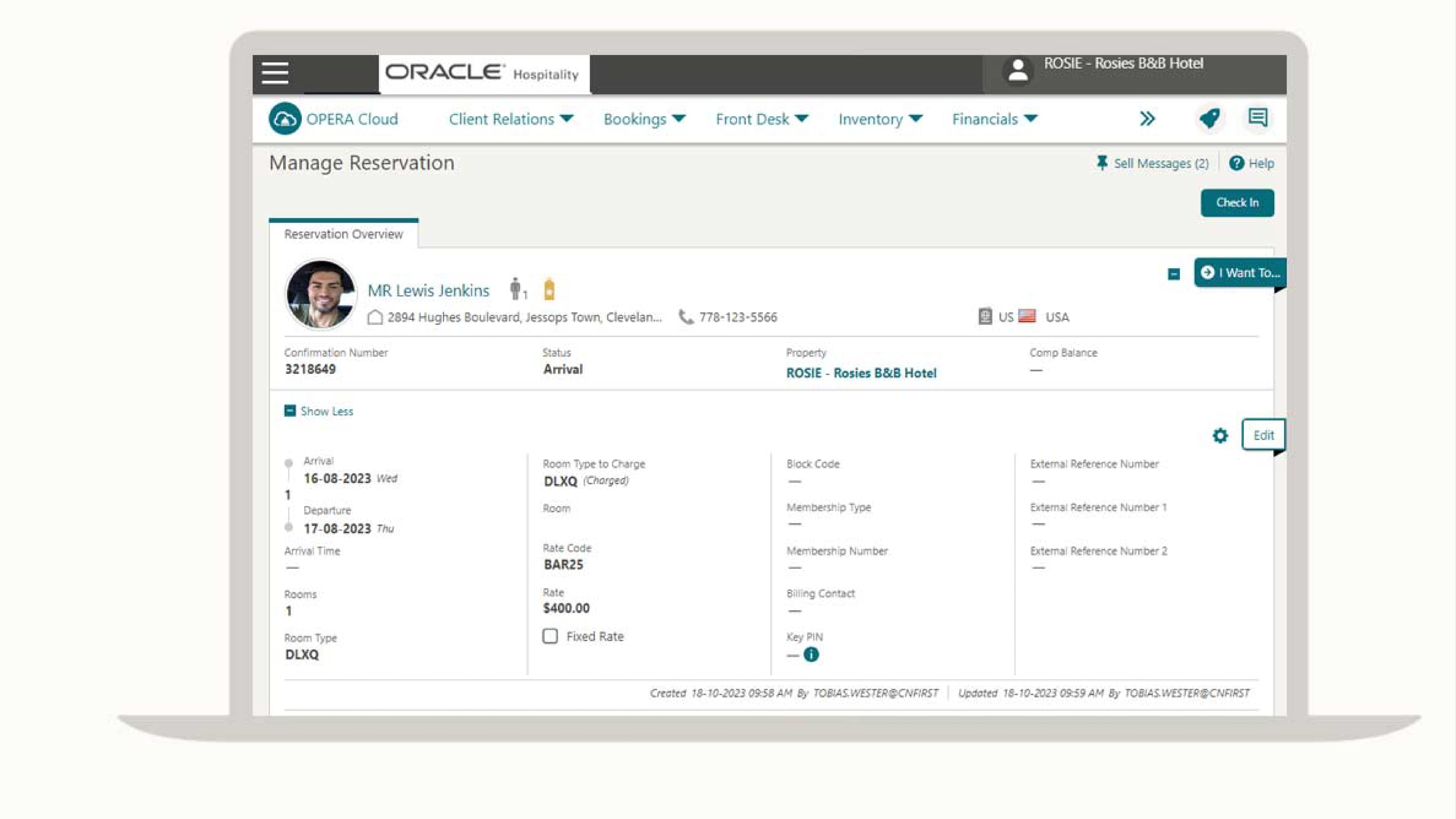
Create, modify, and track individual or group reservations with real-time availability. The system supports complex booking scenarios, including split stays and room upgrades.
Front Desk Operations:
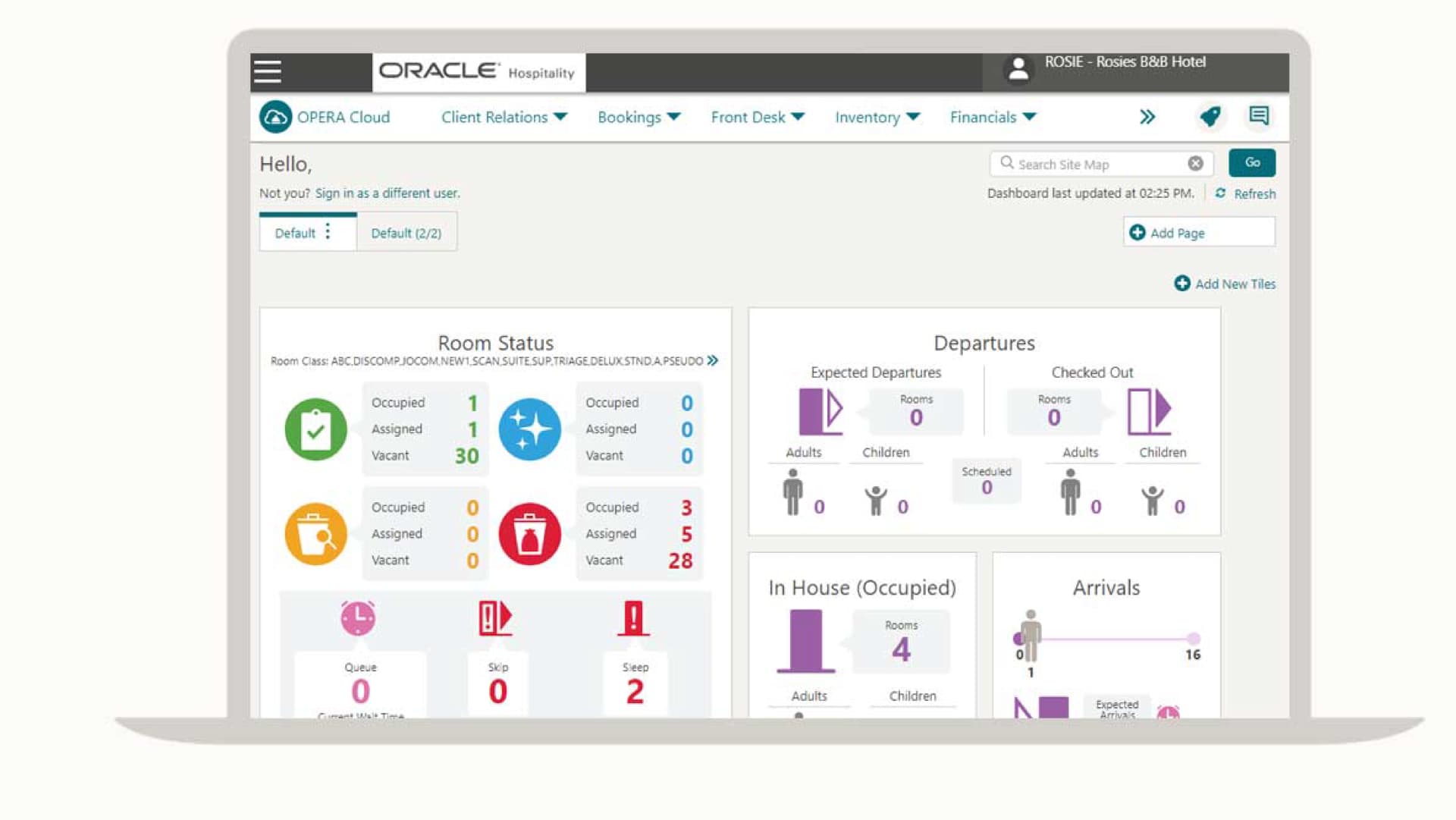
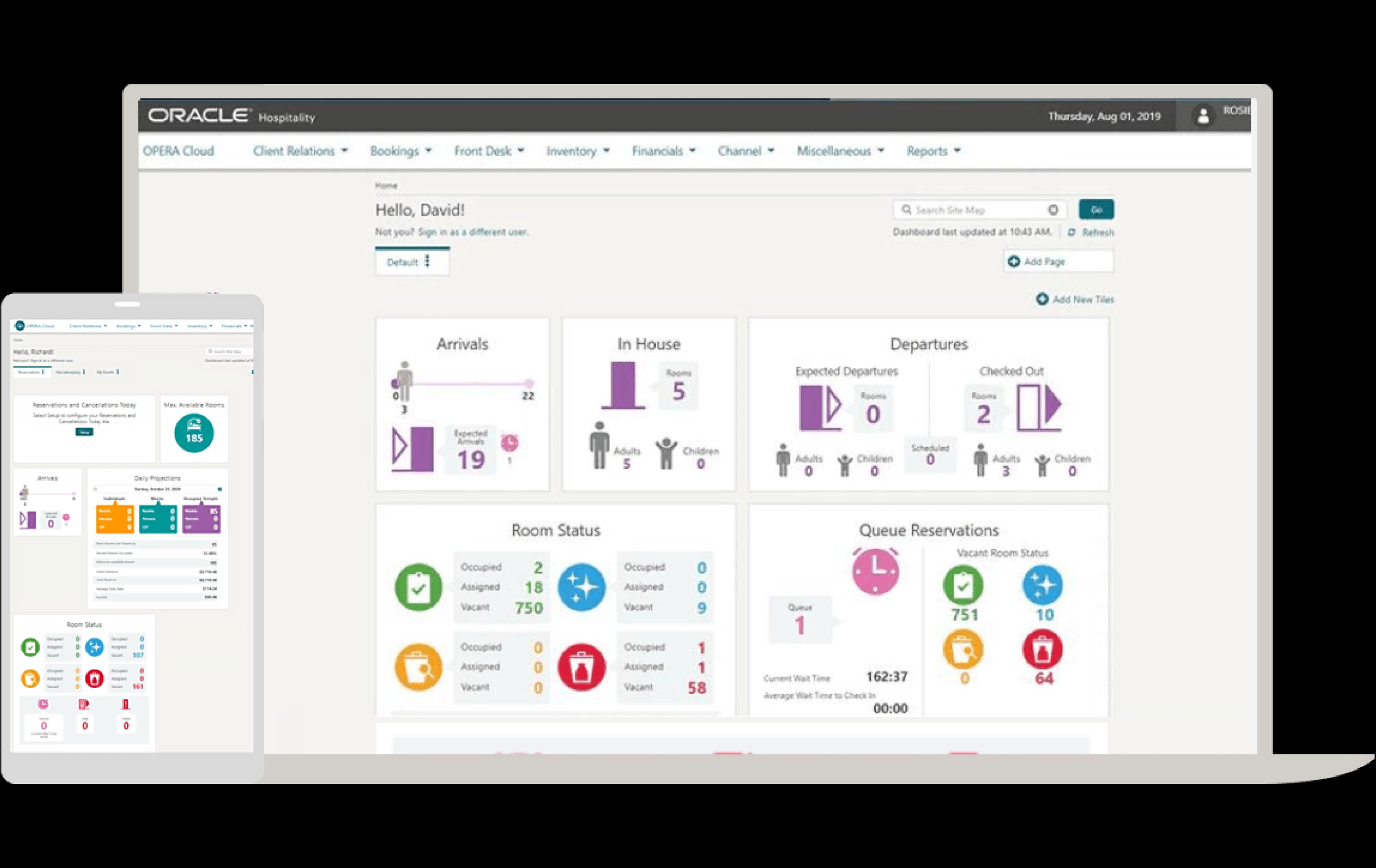
Manage check-in, check-out, room assignments, and guest folios from a centralized dashboard. Staff can access guest preferences and special requests instantly.
Housekeeping Management:
Track room status, assign cleaning tasks, and update availability in real time. Automated notifications help coordinate between front desk and housekeeping teams.
Rate and Inventory Management:
Set dynamic pricing, manage rate plans, and control room inventory across multiple channels. The platform supports yield management and negotiated corporate rates.
Reporting and Analytics:
Generate detailed operational, financial, and guest reports with customizable dashboards. Users can analyze occupancy trends, revenue performance, and guest demographics.
Guest Profile Management:
Store and update guest preferences, history, and loyalty information in a centralized database. This enables personalized service and targeted marketing campaigns.
Standout Features
Centralized Multi-Property Management
Oracle OPERA allows users to oversee multiple properties from a single platform, sharing guest profiles, rates, and reporting across locations. This is especially valuable for hotel groups that need unified control and visibility over diverse portfolios.
Advanced Event and Banquet Management
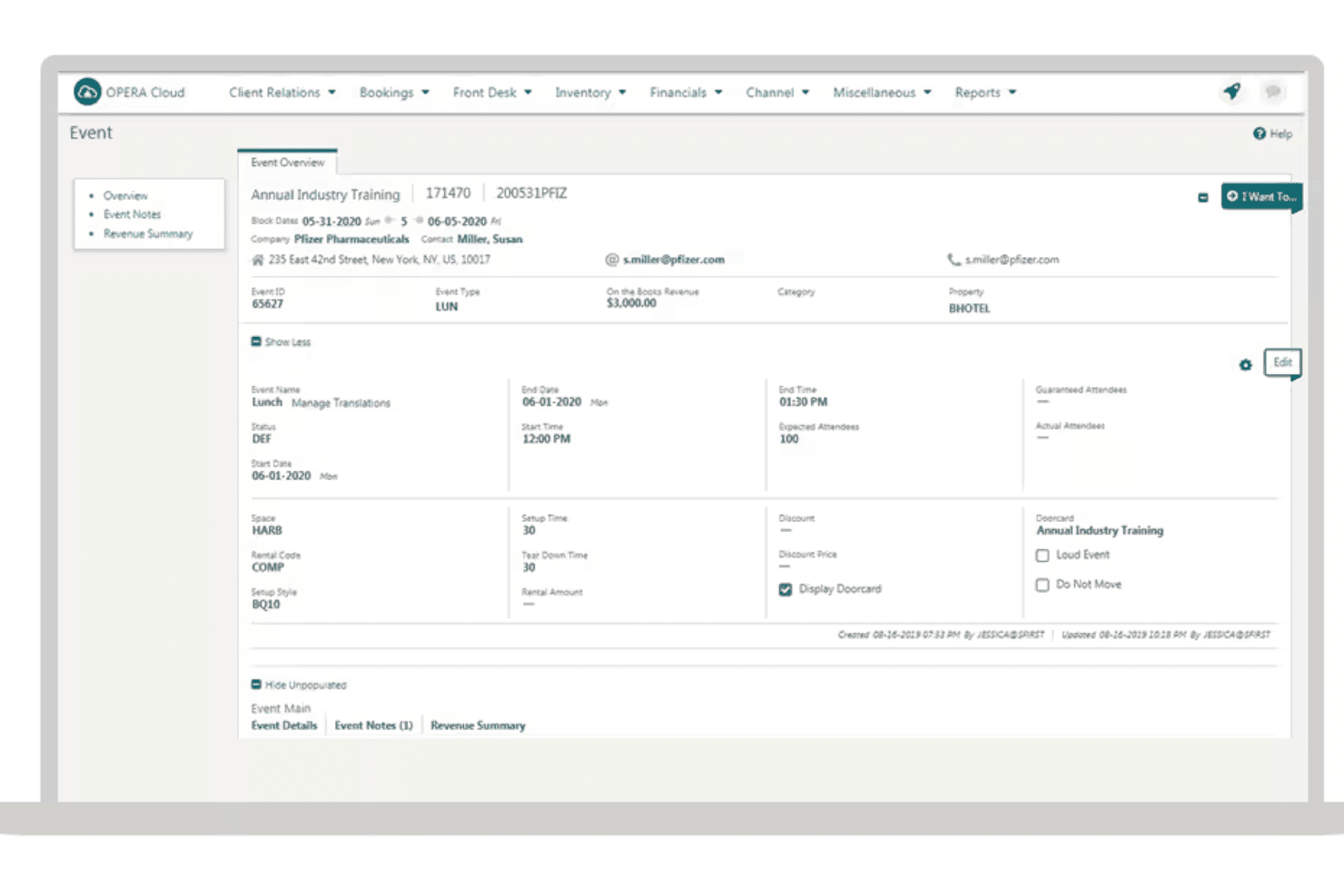
The system includes tools for planning, booking, and managing events, from small meetings to large banquets. Users can coordinate room blocks, catering, and billing in one workflow, reducing errors and improving event execution.
Ease of Use
Oracle OPERA’s interface is feature-rich but can feel overwhelming for new users, especially in smaller properties or with limited IT support. Many users report that navigating menus and configuring workflows requires extensive training. However, once staff are familiar with the system, its depth allows for precise control over operations and guest management. The platform’s complexity is a trade-off for its advanced capabilities, making it better suited to teams with dedicated training resources.
Onboarding
Onboarding with Oracle OPERA is often described as lengthy and resource-intensive, with many users noting the need for formal training sessions and guided implementation. Oracle provides extensive documentation, online resources, and dedicated support teams, but the system’s complexity means new users rarely achieve quick time to value. Properties with experienced IT or operations staff tend to adapt faster, while smaller teams may struggle without ongoing support during the initial rollout.
Customer Support
Oracle OPERA offers 24/7 global support, a dedicated helpdesk, and a comprehensive knowledge base, which many users find essential for resolving complex issues. While response times are generally reliable, some users mention that solutions for highly specific problems can take longer due to the system’s complexity. The availability of regional support teams and detailed documentation helps larger properties manage ongoing challenges, but smaller hotels may find the process less personal and more formal than expected.
Integrations
Oracle OPERA integrates with Oracle MICROS POS, Sabre, Amadeus, SiteMinder, Duetto, IDeaS, TravelClick, GDS systems, payment gateways, and key card systems, among others.
The platform also offers an API for custom integrations and connects with a wide range of third-party tools.
Value for Money
Oracle OPERA is generally considered a premium property management system with pricing that is not publicly disclosed. Instead, Oracle offers a quote-based pricing model tailored to the specific needs and size of each property or hotel group. This approach allows for customization based on the number of users, property size, and required modules. That said, larger hotel groups or enterprises with complex needs may incur higher fees due to customization and integration. Overall, the custom quote-based model ensures you pay for the features and services most relevant to your business.
Oracle OPERA Specs
- API: Yes
- Budgeting: No
- Calendar Management: Yes
- Compliance Tracking: Yes
- Contact Management: Yes
- Customer Management: Yes
- Dashboard: Yes
- Data Export: Yes
- Data Import: Yes
- Data Visualization: No
- Document Management: No
- Expense Tracking: No
- External Integrations: Yes
- Forecasting: No
- Inventory Tracking: Yes
- Multi-Currency: Yes
- Multi-User: Yes
- Notifications: Yes
- Organization Management: No
- Payment Processor: No
- Payroll: No
- Scheduling: No
- Supplier Management: No
- Tax Management: No
- Workflow Management: Yes
Oracle OPERA FAQs
Oracle OPERA Company Overview & History
Oracle OPERA is a property management system developed by Oracle Corporation, a global technology company headquartered in Austin, Texas. Oracle is known for its broad portfolio of enterprise software, cloud solutions, and database products, serving clients across industries worldwide. The OPERA platform is part of Oracle Hospitality, which provides technology solutions to hotels, resorts, and casinos, including many leading global hotel brands. Oracle Corporation is publicly traded (NYSE: ORCL) and employs over 140,000 people globally.
Oracle OPERA Major Milestones
- 1999: Initial release of OPERA property management system.
- 2014: Oracle acquires MICROS Systems, the original developer of OPERA, expanding its hospitality portfolio.
- 2016: Launch of Oracle OPERA Cloud, offering cloud-based property management.
- 2020: OPERA Cloud adoption accelerates among major hotel groups and independent properties.
- 2023: Oracle Hospitality continues to expand integrations and global reach, supporting thousands of properties worldwide.