Choosing the right revenue management software is one of the most consequential decisions you'll make for your property's bottom line. I've evaluated dozens of these tools, and the differences between them aren't always obvious until you're deep in a demo. The wrong choice means leaving revenue on the table—or paying for features your team never uses.
In this guide, I'll walk you through exactly what to look for, what questions to ask, and how to match a platform's capabilities to your property's actual pricing strategy and operational reality.
4 Things to Look for When Choosing Revenue Management Software
Based on what I’ve seen work (and fail) in real hotel operations, here’s what I’d focus on first when picking revenue management software:
1. PMS and Channel Manager Integration
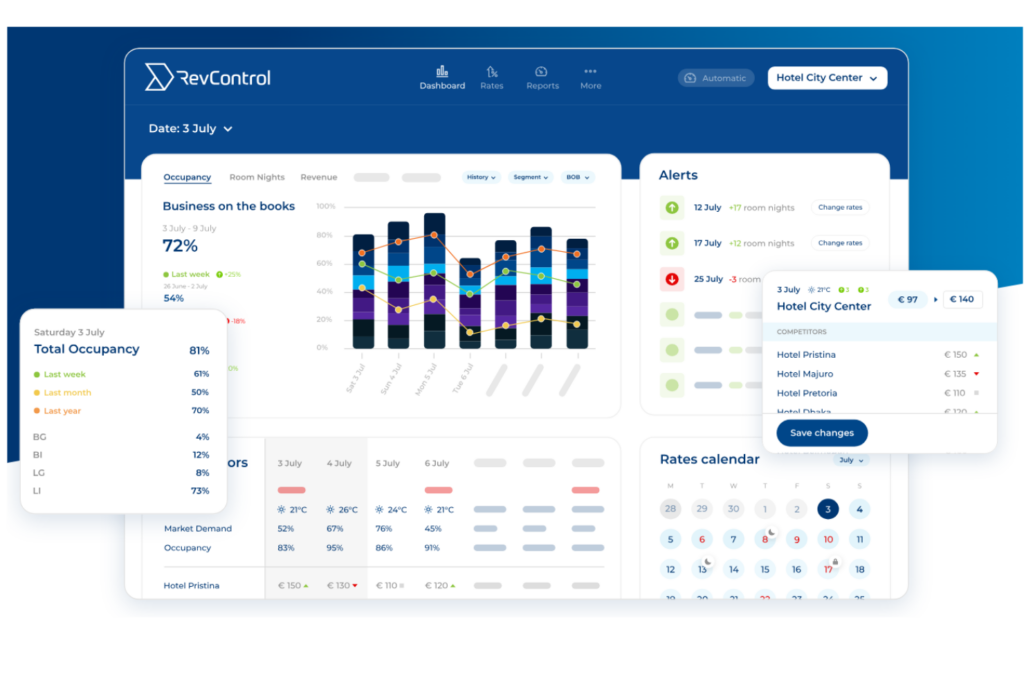
PMS and channel manager integration connects your revenue management software to your property management system and online distribution channels. This matters because without solid integration, you’re stuck with manual updates, patchy inventory sync, and missed pricing opportunities.
Look for tools with direct, real-time integrations and ask vendors how they handle two-way data sync with your current PMS and channel manager—don’t assume every API connection is equal.
2. Demand Forecasting and Reporting Accuracy
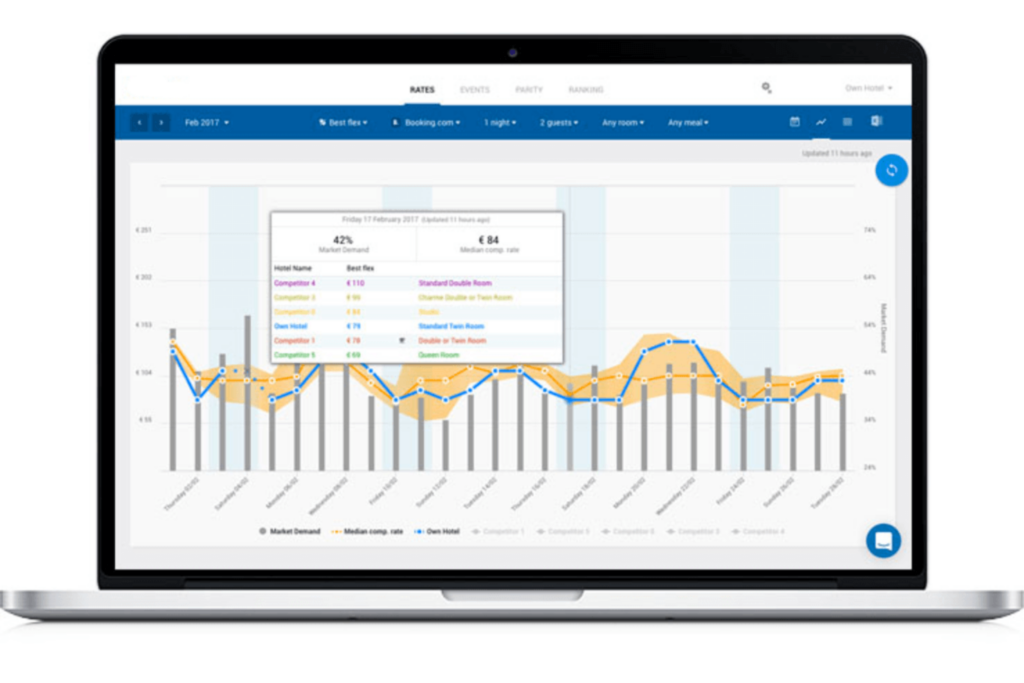
Demand forecasting and reporting accuracy determine how well the software predicts occupancy, revenue, and market shifts by analyzing real-time and historical data. This matters because even small forecasting errors lead to missed pricing opportunities or overbooking headaches.
Check if the software uses automated data pulls from your main systems and ask for sample reports—does the data line up with what you’d expect from your operation?

Have an account? Log In
3. Implementation and Ongoing Support Quality
Implementation and ongoing support quality affect how quickly your team gets up to speed and how you handle issues post-launch. You want responsive, knowledgeable support and an onboarding process that matches your team’s skills and schedule.
Ask each vendor for details about their onboarding support and what happens if you run into problems after go-live—and talk to references about their experience getting questions answered.
4. Multi-Property Scalability and Flexibility
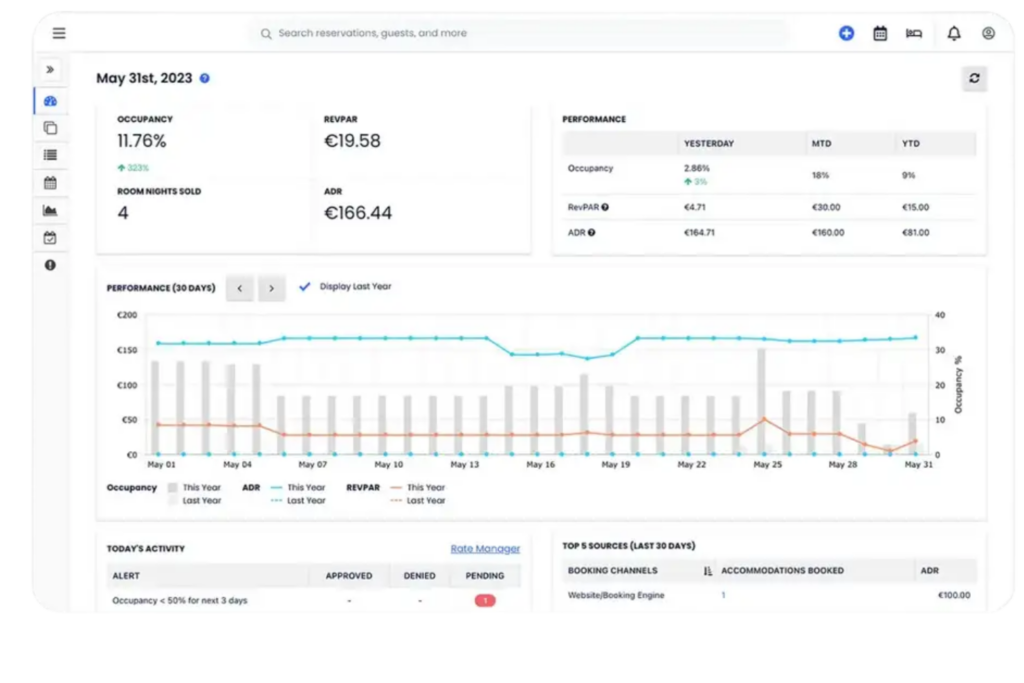
Multi-property scalability and flexibility let you manage pricing, inventory, and reporting across several locations from a single platform. This matters if you run more than one hotel or expect to grow, since fragmented systems create extra work and muddy your data.
Check if the software actually supports group-level controls, property-level overrides, and flexible user roles—and ask yourself whether switching between properties in the interface feels intuitive or clunky.
How to Choose Revenue Management Software: A 5-Step Framework
Follow these five steps to make a confident, well-informed decision when choosing revenue management software for your hotel:
Step 1: Identify Your Needs
Before you compare vendors or sit through a single demo, get clear on what your property actually needs from revenue management software. In my experience, skipping this step is what leads to shiny-feature regret—where you end up paying for capabilities your team never uses while missing the ones you genuinely needed.
Start by auditing your current setup. Think about where your pricing process breaks down, what manual work takes the most time, and which reports you wish you had but don't. That friction tells you a lot about what to prioritize.
Talk to the stakeholders who will live with this decision every day:
- Revenue managers: What forecasting gaps or manual workarounds slow them down most?
- Front desk and operations staff: Where does the current system create confusion or extra steps?
- General manager or ownership: What KPIs matter most—RevPAR, ADR, occupancy?
- IT or systems administrator: What integrations are non-negotiable, and what's your current PMS stack?
Once you've gathered input, use these questions to sharpen your requirements:
- How many properties do I need to manage from one platform?
- Do I need automated pricing, or will my team want to approve rate changes manually?
- Which channel manager and PMS do I already use, and are they on the vendor's integration list?
- How technically capable is my team, and what level of onboarding support do I realistically need?
- What's my budget, and does that include implementation, training, and annual fees?
Use this table to organize what you learn into a clear picture of your priorities before you start evaluating vendors:
| Category | Current State | Desired Outcome |
|---|---|---|
| CategoryPricing process | Current StateManual, time-consuming | Desired OutcomeAutomated rate recommendations |
| CategoryForecasting | Current StateLimited or unreliable data | Desired OutcomeAccurate demand predictions |
| CategoryIntegrations | Current StatePartial or manual syncs | Desired OutcomeReal-time, two-way data connections |
| CategoryReporting | Current StateFragmented across tools | Desired OutcomeCentralized, customizable dashboards |
| CategoryTeam capability | Current StateVaries by property | Desired OutcomeConsistent, low-friction workflows |
By the end of this step, you should have a written list of must-have features, nice-to-have features, and deal-breakers. That document becomes your filter for every vendor conversation that follows—and it keeps you from getting talked into something that doesn't actually fit.
Step 2: Research Revenue Management Software Vendors
Once you know what you need, it's time to find out which vendors are actually worth your time. I'd resist the urge to Google "best hotel revenue management software" and click the first few results—that approach tends to surface the vendors with the biggest marketing budgets, not necessarily the best fit for your property.
Here's how I'd approach the research phase:
- Start with peer recommendations: Talk to other hoteliers in your network—especially those at properties with a similar size, segment, or complexity to yours. What they tell you off the record is worth more than any vendor case study.
- Check independent review platforms: Sites like G2, Capterra, and TrustRadius let you filter reviews by property type and company size. I pay close attention to negative reviews—specifically how vendors respond to them.
- Read industry publications and forums: Hospitality-focused publications and online communities (LinkedIn groups, Reddit threads, HSMAI forums) often have candid discussions about what's working and what isn't in the real world.
- Ask your PMS or channel manager provider: They'll know which revenue management tools integrate cleanly with your existing stack. This one step can eliminate a lot of poor fits early.
- Attend trade events: Conferences like ITB or HITEC give you unscripted access to vendor teams and the chance to speak with their existing customers in person.
As you gather information, track what you find in a structured way. Use this table to organize vendor intelligence before you move into shortlisting:
| Research Source | What to Note |
|---|---|
| Research SourcePeer recommendations | What to NoteSpecific praise or concerns; relevant property type |
| Research SourceReview platforms | What to NoteOverall rating, recurring complaints, support quality |
| Research SourceIndustry publications | What to NoteVendor reputation, recent news, product updates |
| Research SourcePMS/channel manager provider | What to NoteConfirmed integrations, known compatibility issues |
| Research SourceTrade events or webinars | What to NoteVendor responsiveness, product demo quality |
By the end of this step, you should have a list of vendors worth a closer look—not a ranked shortlist yet, just a realistic pool of candidates. The goal is to enter the evaluation phase with enough context to ask sharper questions and spot gaps that vendors won't volunteer on their own.
Top Revenue Management Software to Consider
Here's my shortlist of the best revenue management software solutions:
Step 3: Make a Revenue Management Software Shortlist
By now, you have a list of candidates from your research and a clear picture of your requirements from Step 1. This step is about cutting that list down to three to five vendors worth a real conversation—not just the ones with the best-looking websites.
Here's how I'd approach the narrowing process:
- Apply your must-haves first: Pull out the requirements document you built in Step 1 and run every vendor through it. If a tool doesn't integrate with your PMS or can't support your number of properties, it's off the list—no exceptions.
- Check pricing fit early: Most vendors won't publish pricing, but you can often get a ballpark from peer conversations or review platforms. If a solution is clearly priced for enterprise chains and you're running an independent property, don't waste time on a demo.
- Weight support quality heavily: I've seen good software fail because the vendor disappeared after go-live. If a vendor's reviews consistently flag slow or unhelpful support, factor that in more than you might expect.
- Look for red flags in reviews: Pay attention to complaints about data accuracy, clunky interfaces, or poor onboarding experiences. These issues rarely get better after you've signed a contract.
- Prioritize vendors your PMS provider knows: If your PMS provider has worked directly with a vendor and can vouch for the integration, that's a meaningful signal. It also reduces your implementation risk.
Use this table to score your candidates before reaching out:
| Evaluation Criteria | Why It Matters |
|---|---|
| Evaluation CriteriaMust-have features covered | Why It MattersNon-negotiable; eliminate vendors that miss these |
| Evaluation CriteriaPMS/channel manager integration confirmed | Why It MattersPrevents manual workarounds post-launch |
| Evaluation CriteriaPricing within budget range | Why It MattersAvoids wasted time on mismatched vendors |
| Evaluation CriteriaSupport quality (per reviews) | Why It MattersPredicts your experience after go-live |
| Evaluation CriteriaProperty type fit | Why It MattersEnsures the tool is built for your context |
Once you've scored your candidates, contact the top three to five vendors and request a demo. When you do, be specific—tell them your property type, your current PMS, and the two or three problems you most need to solve. A vendor worth your time will tailor the demo to your situation rather than running a generic slide deck.
By the end of this step, you should have a shortlist you feel genuinely good about—vendors that clear your baseline requirements and are worth a deeper evaluation.
More Articles
Step 4: Build the Business Case
A solid business case is what turns a good idea into an approved budget. In my experience, skipping this step—or rushing through it—is the fastest way to get a "not right now" from ownership or finance. Take the time to build something that speaks to the people who control the budget, not just the people who'll use the software.
The goal here isn't to oversell the decision. It's to present an honest picture of what you expect to gain, what it'll cost, and what could go wrong. Decision-makers appreciate that kind of transparency, and it gives your recommendation more credibility.
Here's how I'd approach it:
- Summarize expected ROI and outcomes: Ground your projections in your own property's numbers. Pull your current RevPAR, ADR, and occupancy data, then estimate how much improvement is realistic. Even a 2–3% RevPAR lift can justify the investment for most properties. Be conservative—optimistic numbers that don't materialize hurt your credibility later.
- Build a clear cost estimate: Account for everything, not just the subscription fee. Implementation, training, any required hardware or IT work, and ongoing support costs all belong in this number. Ask each vendor for a full cost breakdown in writing before you finalize your estimate.
- Set a realistic implementation timeline: Most properties underestimate how long setup, data migration, and staff training actually take. I'd add a buffer of at least two to four weeks beyond whatever the vendor tells you.
- Address risks directly: Don't bury the risks. Name them, and explain what you'd do if they materialize. This shows ownership that you've thought it through.
Use this table to organize the core components of your business case before presenting it:
| Business Case Component | What to Include |
|---|---|
| Business Case ComponentExpected ROI | What to IncludeRevPAR, ADR, and occupancy uplift estimates based on your current data |
| Business Case ComponentCost estimate | What to IncludeSubscription, implementation, training, IT, and annual renewal fees |
| Business Case ComponentImplementation timeline | What to IncludePhases, milestones, and a realistic go-live date with buffer time |
| Business Case ComponentRisk summary | What to IncludeIntegration delays, staff adoption challenges, and mitigation plans |
| Business Case ComponentSuccess metrics | What to IncludeKPIs you'll use to measure performance at 30, 60, and 90 days post-launch |
One thing I'd flag: the risks section is where most business cases fall flat. Don't treat it as a formality. If your PMS integration has historically been problematic, say so—and explain what you've confirmed with the vendor to reduce that risk. If your team has limited technical experience, name that too, and reference the onboarding support you've vetted.
By the end of this step, you should have a one- to two-page document that answers the three questions every decision-maker is going to ask: What do we get? What does it cost? What happens if it doesn't go to plan?
Step 5: Implement Your Revenue Management Software and Onboard Your Users
Signing the contract is the easy part. In my experience, implementation is where most hotels either set themselves up for long-term success or spend the next six months fighting the tool they just paid for. The difference usually comes down to how intentionally you handle the first 90 days.
Before go-live, get clear on who owns what. Ambiguity about roles during implementation creates delays, duplicated effort, and gaps that don't surface until something breaks at the worst possible moment.
Keep these priorities front of mind as you kick off your rollout:
- Assign a dedicated internal lead: Someone on your team needs to own the implementation—not just coordinate it. This person is the single point of contact for the vendor, the decision-maker for configuration questions, and the one accountable for hitting your go-live date.
- Communicate the rollout early: Tell your front desk, revenue team, and operations staff what's changing, when it's happening, and what it means for their daily work. Silence breeds resistance. A brief all-hands update or a written summary goes a long way.
- Map your data migration carefully: Know exactly what historical data you need in the new system before you start. I'd recommend auditing your existing data for gaps or inconsistencies before migration—bad data going in means bad forecasts coming out.
- Build training around real workflows: Don't just walk your team through features. Run training scenarios based on your actual property—your rate categories, your booking windows, your comp set. Generic walkthroughs don't stick.
- Set a feedback cadence: Schedule a 30-day check-in with your team after go-live. Ask specifically what's confusing, what's taking longer than expected, and what they're skipping. That feedback tells you where to focus follow-up training.
Use this table to stay organized across your implementation phases:
| Phase | Key Actions | Who Owns It |
|---|---|---|
| PhasePre-launch | Key ActionsAssign internal lead, audit data, confirm integrations | Who Owns ItInternal lead + IT |
| PhaseGo-live communication | Key ActionsBrief all affected staff on timeline and changes | Who Owns ItInternal lead + GM |
| PhaseTraining | Key ActionsRun role-specific sessions using real property scenarios | Who Owns ItVendor + internal lead |
| Phase30-day review | Key ActionsGather team feedback, flag adoption gaps | Who Owns ItInternal lead |
| Phase60–90 day check-in | Key ActionsMeasure against your KPIs, escalate unresolved issues | Who Owns ItRevenue manager |
One thing I'd push back on: don't treat training as a one-time event. I've seen hotels do a solid go-live and then watch adoption fall off over the following months because new staff never got properly onboarded and the original training materials were never updated. Build a short onboarding module your team can use with anyone who joins after go-live.
By the end of this step, your team should feel genuinely confident using the system day-to-day—not just technically able to log in. That's the benchmark worth holding yourself to.
Ready to Choose the Right Revenue Management Software?
Now that you have a framework for evaluating vendors, your next step is making sure you understand the broader discipline behind the tools—so take a deeper look at hotel revenue management strategies, metrics, and roles to make sure your software choice is grounded in a solid commercial foundation.