

Hotel venue management software manages event inquiries, bookings, room blocks, event details, and banquet event orders for a hotel’s meetings and functions. When room availability, menus, and setup plans change, sales and operations teams need those details in one connected workflow.
This guide compares options for different event volumes, group booking needs, and property-management system setups so you can find the right fit for your hotel.
Why Trust Our Software Recommendations
6,700+
Reviews
20
Industry experts
16+
Evaluation factors
14
Years
Our team has been testing and reviewing software since 2012. As hospitality leaders ourselves, we know how difficult—and important—it is to choose the right software.
For this guide, we evaluated tools using hands-on testing and independent research, scoring tools using our selection criteria.
Our reviews reflect our human editorial judgment, not a sales pitch.
Comparison Table: Hotel Venue Management Software
Compare pricing and specs, side by side, for the hotel venue management software that made it onto my shortlist.
| Tool | Best For | Trial Info | Price | ||
|---|---|---|---|---|---|
| 1 | Best for hotel event sales and BEO workflows | 14-day free trial available | From $199/month (billed annually) | Website | |
| 2 | Best for hotel group sales and PMS sync | Free demo available | From $249/month | Website | |
| 3 | Best for hotel group bookings and BEO automation | Free demo available | Pricing upon request | Website | |
| 4 | Best for proposal-to-BEO booking workflows | Free demo available | Pricing upon request | Website | |
| 5 | Best for catering-led venue and room block ops | Not available | From $99/month (billed annually) | Website | |
| 6 | Best for venue booking with built-in floor plan tools | Free demo available | Pricing upon request | Website | |
| 7 | Best for hotel group sales and PMS-linked blocks | Free demo available | Pricing upon request | Website | |
| 8 | Best for complex multi-venue event sales workflows | Free demo available | Pricing upon request | Website | |
| 9 | Best for Salesforce-native hotel event sales | Free discovery call available | Pricing upon request | Website | |
| 10 | Best for group blocks and catering BEO workflows | Free demo available | Pricing upon request | Website |


Hotel Venue Management Software Reviews
Below are my reviews of the best hotel venue management software on my shortlist. Each overview covers event-booking features, room-block and BEO workflows, and integrations to help you find the right fit.
 Best for hotel event sales and BEO workflows
- 14-day free trial available
- From $199/month (billed annually)
Visit WebsiteCustomer Rating:4.8/5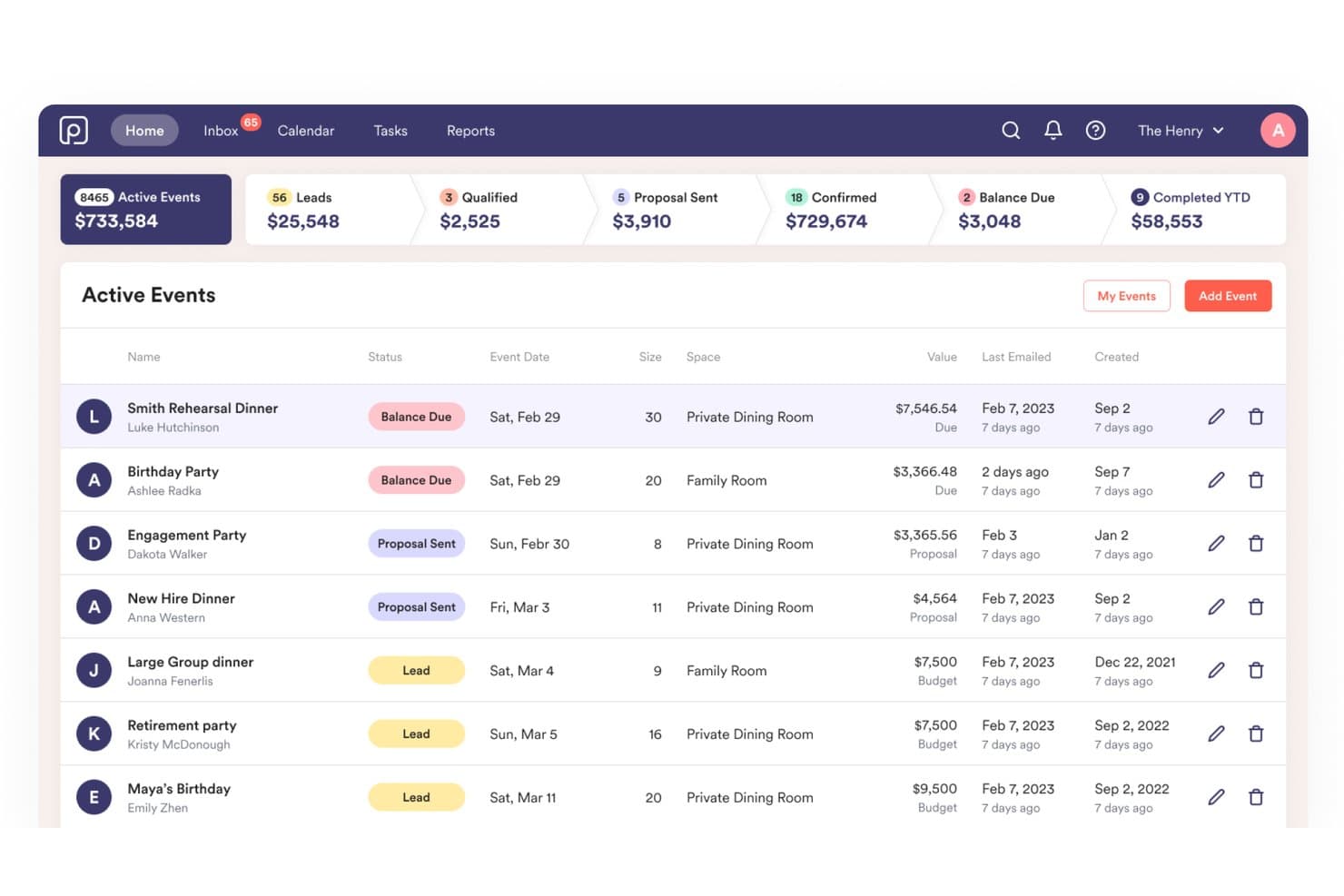
Perfect Venue centralizes event tracking, statuses, and revenue. Perfect Venue is an event management platform for hotels and venues that covers the full booking cycle, from inquiry and CRM tracking to proposals, BEOs, e-signatures, and payment collection.
Who Is Perfect Venue Best For?
Perfect Venue is a strong fit for hotel sales managers and catering directors who need to manage event inquiries, proposals, BEOs, and payments in one place.
Why I Picked Perfect Venue
I've included Perfect Venue in my top picks because it handles the full hotel event sales cycle in one place, from the first inquiry through signed proposal, BEO generation, and payment collection. I particularly like how it auto-generates BEOs and documents directly from event details, so your team isn't manually rebuilding that information for the kitchen or catering staff. The pipeline tracking by location and sales rep, with conversion rates and response times, gives hotel sales managers a clear view of where bookings stand at any moment.
Perfect Venue Key Features
- Express Book: Lets guests check space availability, select menu items, and submit a deposit online, with configurable lead time, buffer time, and acceptance windows of instant up to 72 hours.
- AI Reply: Drafts personalized responses to inquiries using venue-specific details like availability, menus, policies, and tone of voice.
- Google Calendar sync: Connects the centralized booking calendar to Google Calendar, with the option to include leads, event details, and a copy of the Staff BEO.
- Role-based team access: Assigns team members to specific venues with four permission levels—Admin, Editor, Viewer, and Limited View—for multi-location accounts.
Perfect Venue Integrations
Perfect Venue integrates with Google Calendar, Stripe, Square, OpenTable, Tock, HubSpot, Mailchimp, Craftable, and Zapier for scheduling, payments, reservations, CRM, marketing, and inventory management.
Pros and Cons
Pros:
- Reviewers praise centralized inquiry and booking visibility
- BEOs populate from event details
- Pipeline reports track revenue by rep
Cons:
- No documented event-level staffing assignments
- Recurring bookings change as whole series
Learn more about Perfect Venue: Best for hotel group sales and PMS sync
- Free demo available
- From $249/month
Visit WebsiteCustomer Rating:4.9/5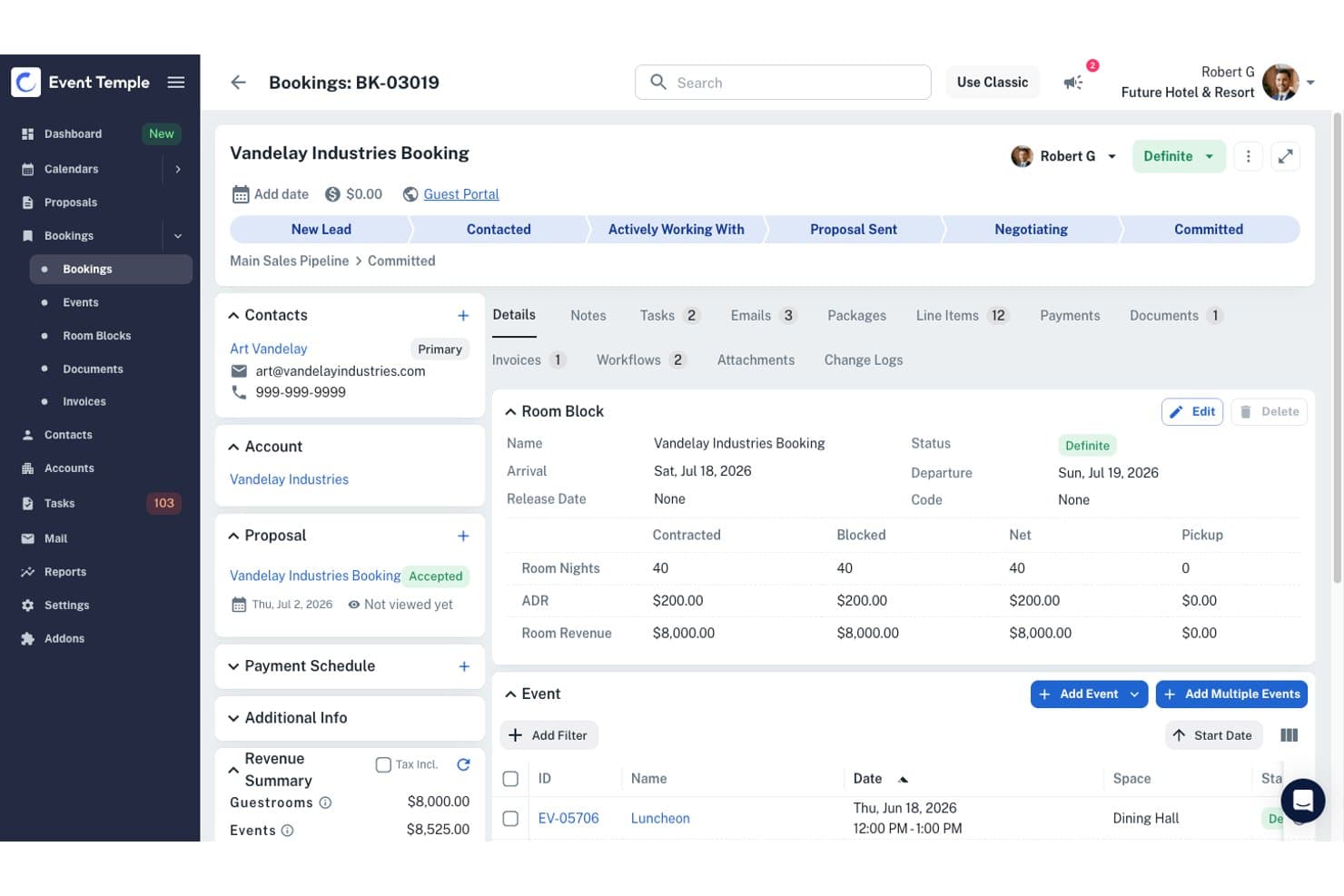
Event Temple centralizes hotel bookings with room block and event tracking. Event Temple is a hotel sales and catering platform that combines a sales CRM, group room block management, event coordination, BEO creation, e-proposals, and multi-property chain management in one system.
Who Is Event Temple Best For?
Event Temple is a strong fit for hotel sales and catering teams managing group business across one or more properties.
Why I Picked Event Temple
I picked Event Temple as one of the best because of how tightly it connects hotel group sales with PMS data. The Guest Room Control snapshot gives my team a live view of upcoming groups, including arrival and departure dates, ADR, and pickup, all without jumping between systems. Pair that with two-way sync across PMS partners like Opera Cloud and Mews, and room blocks stay current on both sides automatically.
Event Temple Key Features
- AI Sales Coordinator: Classifies incoming RFPs, extracts booking details, and drafts email replies for staff review before sending.
- Digital invoicing: Generates itemized invoices with taxes, discounts, and service charges, with online credit card payment for clients.
- Workflow automation: Schedules emails and tasks around event milestones and payment deadlines using configurable triggers and reusable checklists.
- E-proposals with e-signature: Lets your team create customized proposals and send them directly to clients for electronic signature.
Event Temple Integrations
Event Temple integrates with Oracle OPERA Cloud, Apaleo, Cloudbeds, Mews, and Stayntouch for property management, SeatPlan for event seating and floor plans, and Roosted for staffing operations.
Pros and Cons
Pros:
- Chain dashboards roll up sales across properties
- Proposals, contracts, and BEOs share workflows
- Group room blocks show pickup and ADR
Cons:
- Multi-day packages can require manual edits
- Sales reports offer limited configuration
Learn more about Event Temple: 3Best for hotel group bookings and BEO automation
iVvy
- Free demo available
- Pricing upon request
Visit WebsiteCustomer Rating:4.7/5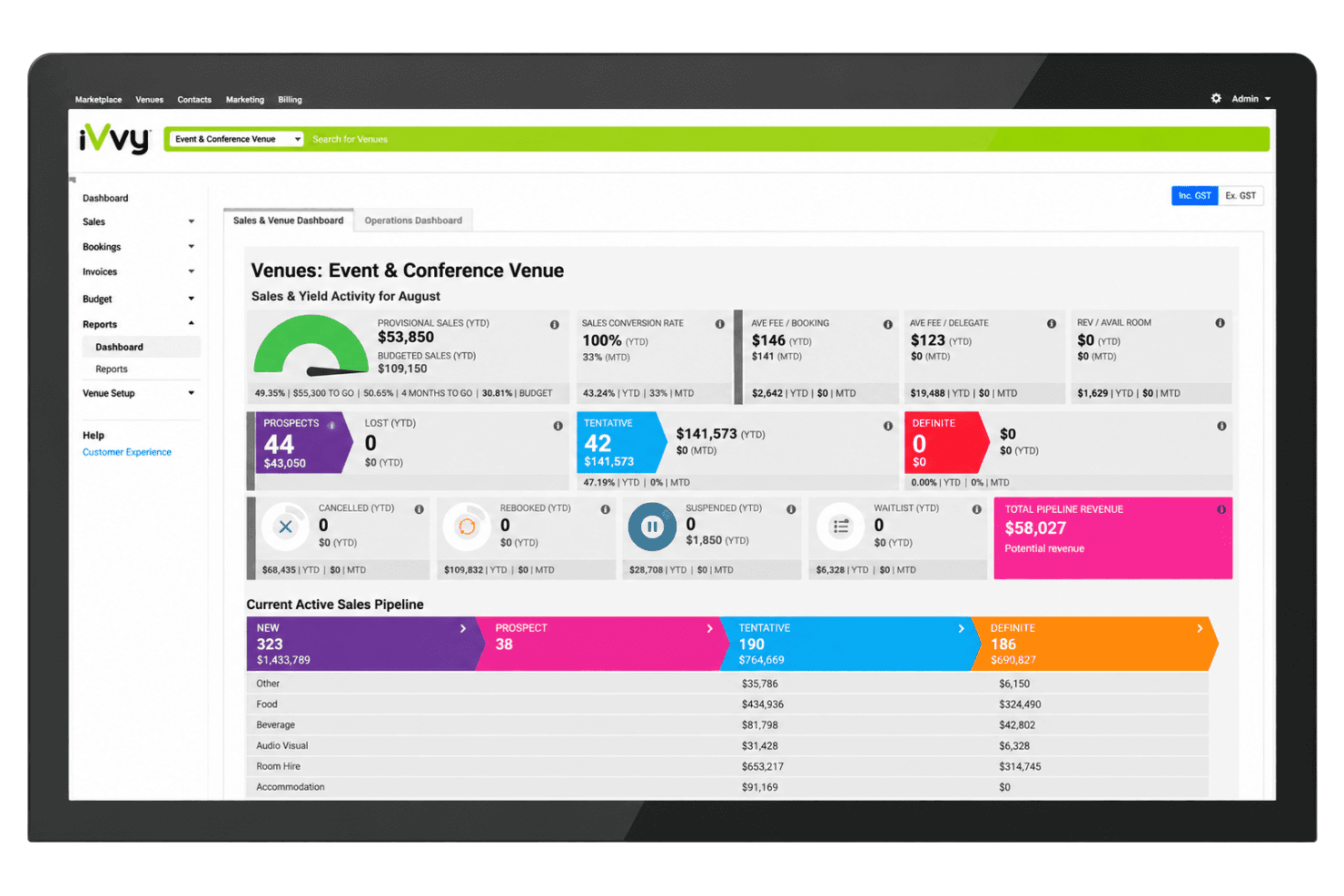
iVvy gives venues a real-time sales pipeline and revenue dashboard. iVvy is a cloud-based venue and event management platform for hotels that handles function-space bookings, group room blocks, proposals, contracts, BEOs, CRM, and multi-property availability in one system.
Who Is iVvy Best For?
iVvy fits hotel sales teams managing group bookings, function spaces, and event documents across single or multi-property portfolios.
Why I Picked iVvy
iVvy earns its spot on my shortlist because of how it handles the full arc of a group booking, from the initial enquiry through to live BEOs and run sheets on the day of the event. I particularly like that BEOs auto-populate directly from booking data and track version changes automatically, so your kitchen and operations teams are always working from the current document rather than hunting through email threads. The shared function diary, which flags clashes across simultaneous bookings and displays quoted, tentative, and confirmed reservations in one view, makes it genuinely useful for hotels managing multiple function spaces at once.
iVvy Key Features
- CRM with automated follow-ups: Captures leads, logs activities and email communications, and triggers follow-up reminders so no enquiry goes unattended.
- Group room block management: Links sleeping-room blocks to event bookings, supports rooming lists and group reservations, and tracks availability across properties.
- iVvyAI email and lead qualification agents: Reads inbound enquiry emails, extracts event details, scores leads against your criteria, and prepares draft proposals for team review.
- PACE reporting: Compares revenue performance across time periods to help you spot booking trends and identify gaps in your forward pipeline.
iVvy Integrations
iVvy integrates with over 55 platforms, including Oracle OPERA, RMS Cloud, Mews, Salesforce, Xero, and Stripe, covering property management, CRM, accounting, and payment processing.
Pros and Cons
Pros:
- Proposals and e-signatures in one workflow
- Shared diary flags booking clashes
- Live BEOs keep teams current
Cons:
- Reporting customization can frustrate hotel teams
- Floor-plan editing details remain limited
Learn more about iVvy: Best for proposal-to-BEO booking workflows
- Free demo available
- Pricing upon request
Visit WebsiteCustomer Rating:4.2/5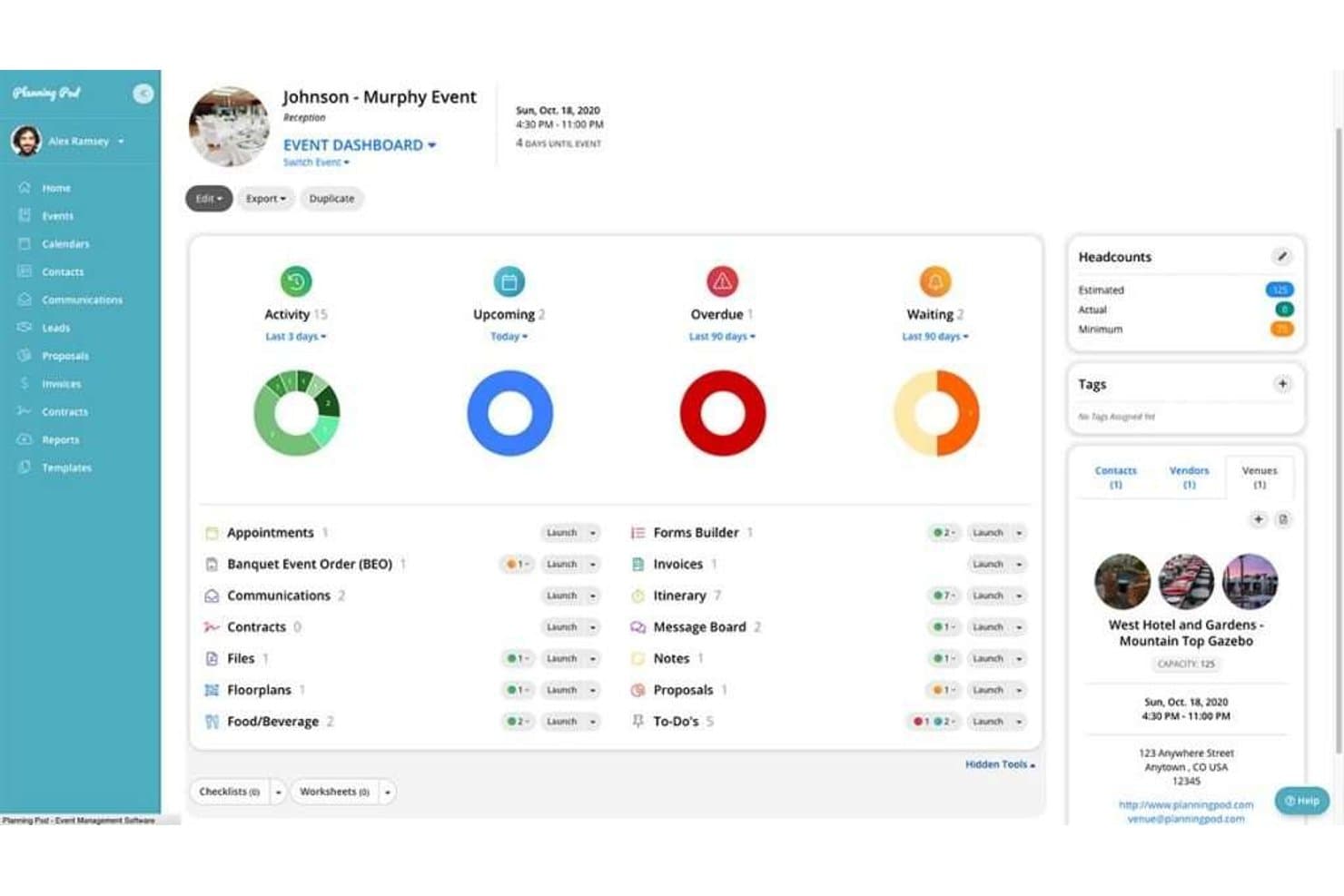
Planning Pod centralizes event tasks, invoices, and headcounts. Planning Pod is a venue and event management platform covering lead capture, sales pipeline tracking, booking calendars, floor plans, BEOs, catering order management, proposals, and e-signature contracts.
Who Is Planning Pod Best For?
Planning Pod is a good fit for hotel sales managers and events teams who need to manage the full cycle from inquiry to signed BEO in one place.
Why I Picked Planning Pod
I picked Planning Pod as one of the best because it handles the full booking paper trail in one place, from initial inquiry through signed BEO, without jumping between tools. I especially like how BEOs can pull in food-and-beverage package templates, room setup instructions, and A/V custom fields, then go out for e-signature directly from the same record. When a client requests changes post-signature, the change-order workflow locks the original and creates a clean amendment trail automatically.
Planning Pod Key Features
- Lead capture webforms: Embed customizable inquiry forms on your hotel website to feed new leads directly into the sales pipeline.
- Drag-and-drop floor plan builder: Build to-scale event space layouts with tables, chairs, A/V elements, and staging objects, then export a PDF or equipment list.
- Food-and-beverage package templates: Create reusable F&B packages with fixed, per-head, or item-and-quantity pricing that pull directly into events and BEOs.
- Online client portal: Give clients a branded portal to review event details, sign documents, make payments, and complete assigned tasks.
Planning Pod Integrations
Planning Pod integrates with WeddingWire and The Knot for lead capture, Adyen for payment processing, and QuickBooks Online for accounting. It also offers direct connections with Salesforce and Mailchimp, one-way calendar synchronization with Google Calendar, Outlook, and Apple Calendar, and Zapier connections to Xero and other applications.
Pros and Cons
Pros:
- Lead tracking centralizes event details and follow-ups
- Custom BEOs gather schedules, setup, and catering
- Proposals, signatures, and reminders support booking follow-through
Cons:
- No room-block, rooming-list, or attrition tools
- Floor-plan usability draws reviewer criticism
Learn more about Planning Pod: Best for catering-led venue and room block ops
- Not available
- From $99/month (billed annually)
Visit WebsiteCustomer Rating:4.1/5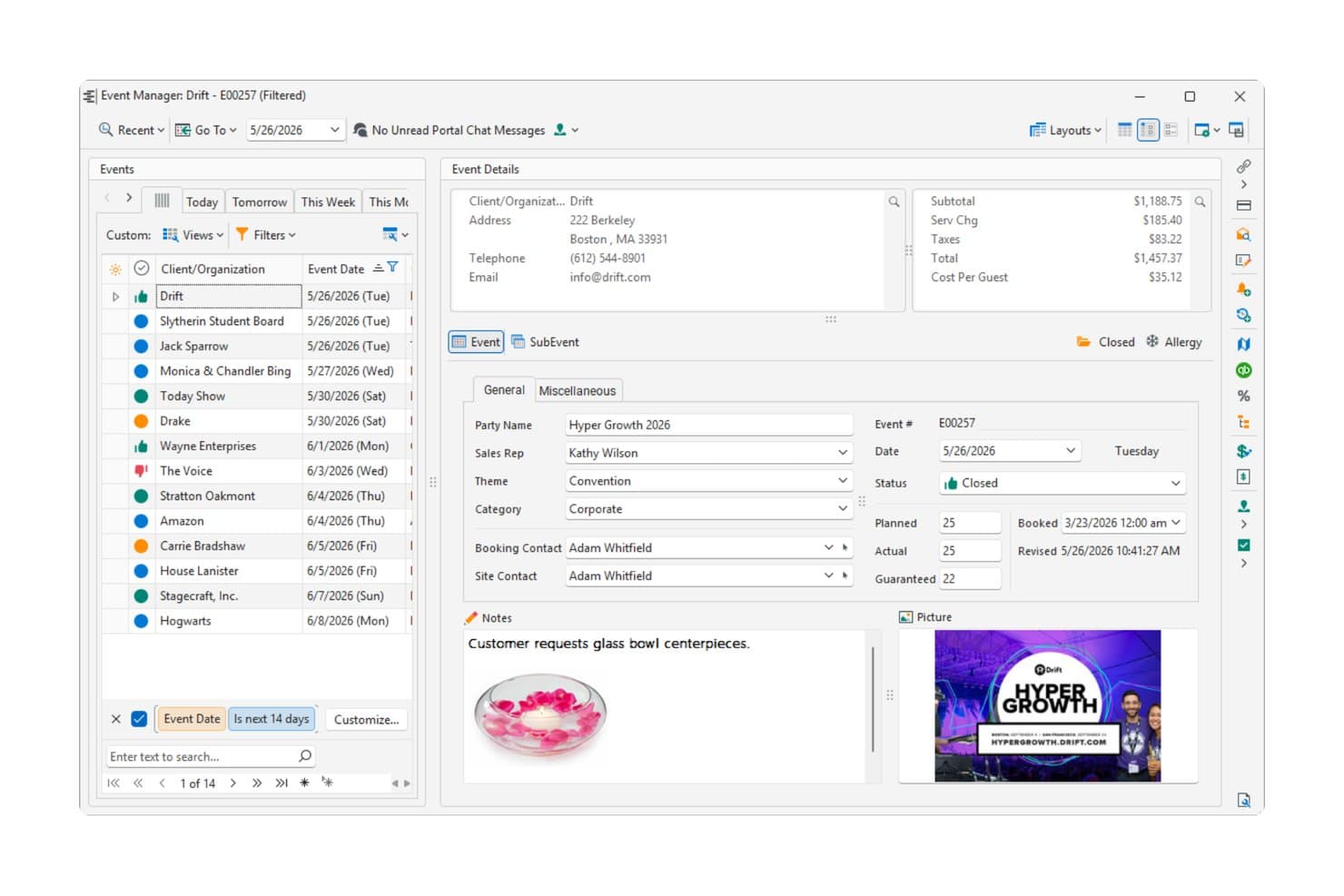
Caterease centralizes event details, financials, and notes. Caterease is a catering and event management platform that covers event booking, banquet room assignment, group room blocks, menu building, staffing, floor plan diagramming, and lead-to-event sales tracking.
Who Is Caterease Best For?
Caterease is a strong fit for catering and events directors who need to manage menus, staffing, room assignments, and group room blocks in one place.
Why I Picked Caterease
I've included Caterease in my top picks because it covers the catering-to-room-block workflow in a way few tools do. The Guestrooms Manager tracks room inventory by type, flags overbooking in real time, and links group room contracts directly to events. Pair that with the Room Selection Wizard, which catches double-booking and capacity conflicts across banquet spaces, and you get a solid foundation for managing catering-led venue ops without juggling separate systems.
Caterease Key Features
- Placez floor plan diagramming: Build and share 2D, 3D, and 360-degree event layouts with drag-and-drop object placement and a customizable inventory library.
- Prospect Manager: Track leads through configurable statuses with next actions, action dates, contact history, and proposal creation and conversion to events.
- Menu and recipe management: Attach detailed recipes to menu items and auto-generate quantified equipment packing lists as event menus are built.
- E-signatures and payment processing: Send proposals for electronic signature and collect payments via Mosaic using payment links or tokenized cards.
Caterease Integrations
Caterease supports connections with QuickBooks, Nowsta, Social Tables, StaffMate, ChefTec, and ClientPoint for accounting, staffing, and event operations. It also offers Mosaic for payment requests, shareable payment links, and tokenized card processing.
Pros and Cons
Pros:
- Proposals convert directly into events
- Room wizard flags capacity conflicts
- Kitchen teams get quantified prep lists
Cons:
- Mobile access lacks SLA assurances
- No documented BEO-generation workflow
Learn more about Caterease: Best for venue booking with built-in floor plan tools
- Free demo available
- Pricing upon request
Visit WebsiteCustomer Rating:4.1/5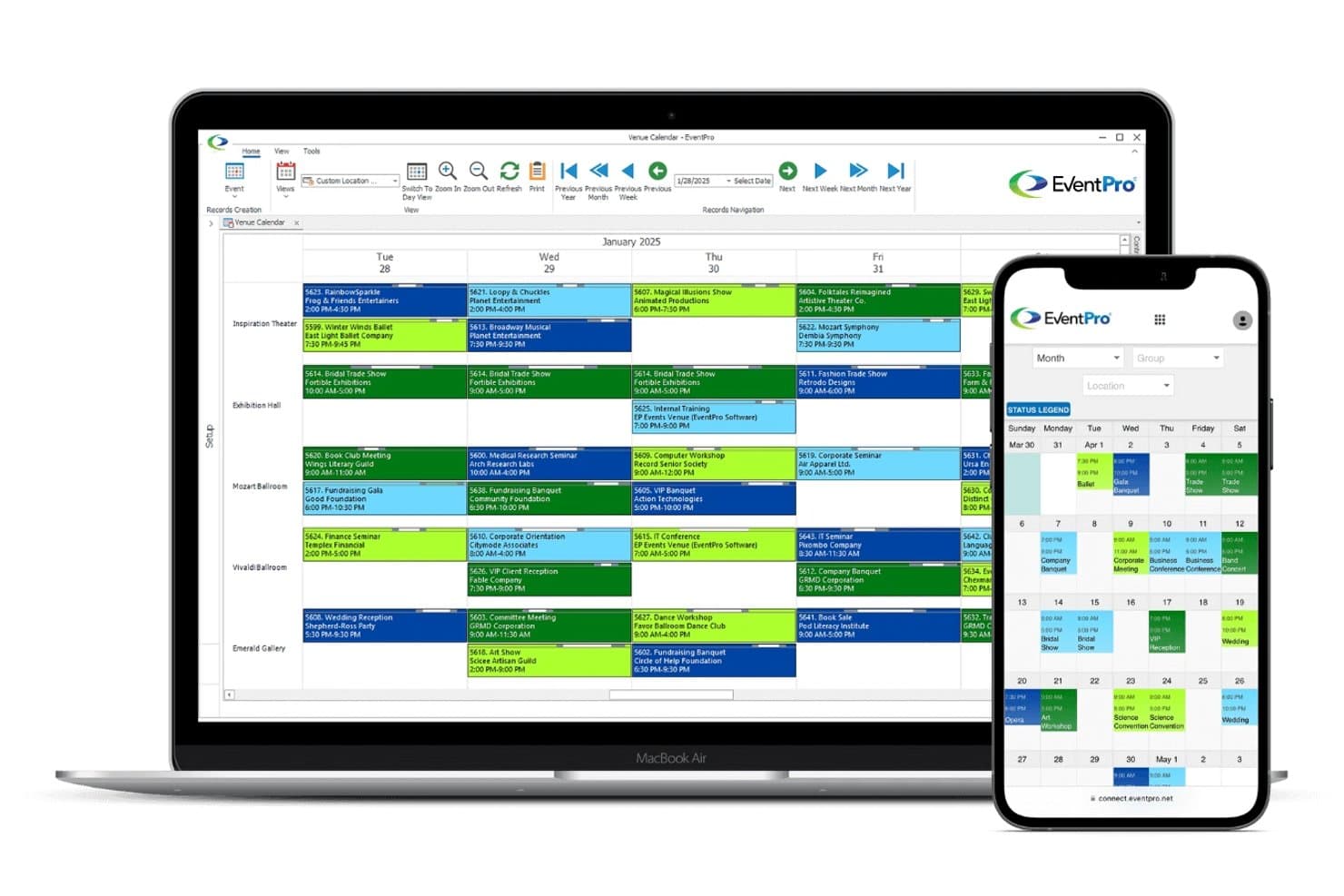
EventPro displays venue bookings across rooms in a weekly calendar view. EventPro is an event and venue management system that combines space booking, floor plan design, catering coordination, and event planning tools for hotels, resorts, and multi-venue operations.
Who Is EventPro Best For?
EventPro is a good fit for venue and event teams at hotels, resorts, and multi-space properties that need a single system to manage space bookings, floor plan design, and catering coordination.
Why I Picked EventPro
I've included EventPro in my top picks because its built-in Floor Plan Designer lets you drag and drop chairs, tables, and room objects directly onto a loaded venue image, and linking those objects to setup resources automatically adds the corresponding items, quantities, and charges to the event booking. I also like that setup types can carry default floor plans, so swapping a room's configuration updates the layout without starting from scratch.
EventPro Key Features
- Catering package builder: Create pre-built or on-the-fly packages that bundle catering, beverage, setup, and staffing items with flat-rate or per-person pricing tied to an event booking.
- Lead and opportunity tracking: Record leads and potential event opportunities separately from the booking calendar, then convert approved opportunities into confirmed bookings without re-entering details.
- Multi-view booking calendar: View event and venue schedules across Day, Week, Work Week, Month, and Timeline views, with color-coded statuses and grouping by event manager, category, or location.
- Electronic signature module: Send EventPro documents for signing via DocuSign or Adobe Sign, with signing status and a PDF copy of the completed document returned directly to the booking record.
EventPro Integrations
EventPro integrates with DocuSign and Adobe Sign for electronic signatures, Azure AD, OneLogin, and Ping Identity for single sign-on, and Cisco Duo for multi-factor authentication. It also offers a two-way API for custom connections with accounting, HR, and other external applications.
Pros and Cons
Pros:
- Floor plans link layouts to setup resources
- Calendar checks help flag overlapping bookings
- Reviewers praise organized event records
Cons:
- Sales pipeline requires a separate module
- Warning settings can allow booking conflicts
Learn more about EventPro: Best for hotel group sales and PMS-linked blocks
- Free demo available
- Pricing upon request
Visit WebsiteCustomer Rating:4.8/5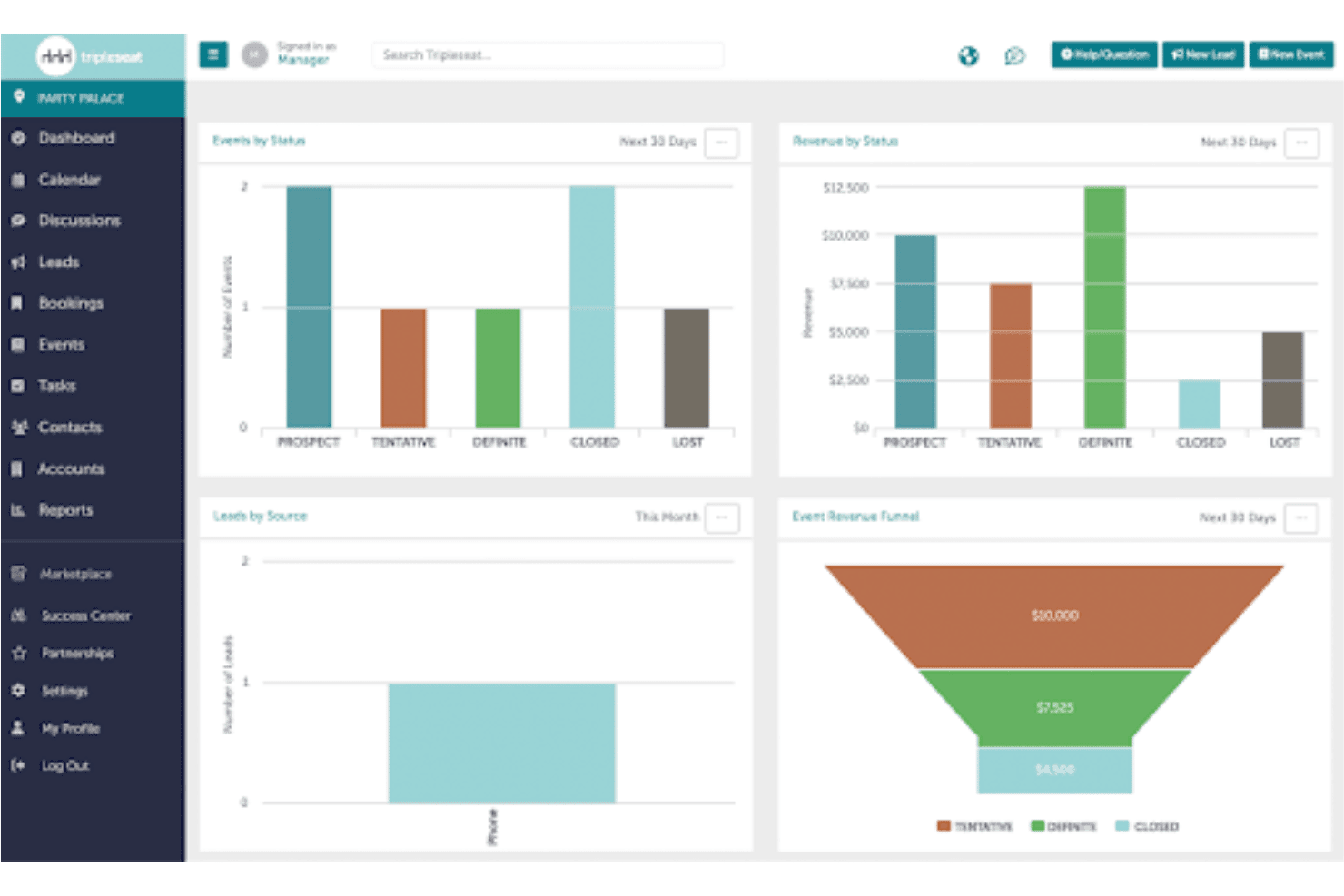
Tripleseat tracks event revenue and leads through visual dashboard charts. Tripleseat is a hotel event management platform that covers group room blocks, multi-day event coordination, PMS-linked availability, lead capture, proposals, BEOs, digital signatures, floor plans, and sales pipeline tracking.
Who Is Tripleseat Best For?
Tripleseat is a strong fit for hotel sales managers who need to manage group room blocks, multi-day events, and PMS-linked availability from a single platform.
Why I Picked Tripleseat
I've included Tripleseat in my top picks because it's built specifically for hotel group sales workflows that most event platforms don't support. The Guest Room Control displays room-block availability, rates, and associated events on a single timeline, and the Tripleseat Hotels package syncs that block data directly with your PMS, so pickup figures from Cloudbeds or Mews flow back automatically. I especially like that Definite events count toward sales goals in the Sales Productivity Report, giving hotel sales managers a clear view of booked room nights and ADR by manager and location.
Tripleseat Key Features
- Shared calendar: View and manage all team events in one place, with filters for room, date, manager, and status, plus color-coding by location or room type.
- Guest Portal: Give clients a branded space to review event details, sign documents, make payments, and message your team directly.
- Sales Productivity Report: Track room nights, ADR, New Definite, Net Definite, and event revenue by sales manager, location, and date range.
- Direct Book: Let guests book events, private dining, or large reservations online, with configurable availability, minimums, and deposit requirements.
Tripleseat Integrations
Tripleseat offers documented integrations with Mews, Cloudbeds, OpenTable, SevenRooms, and Cvent. It also provides a public API with webhooks for custom integrations.
Pros and Cons
Pros:
- Floor plans clarify banquet setups for teams
- Sales reports track room nights and ADR
- Room blocks and events share one view
Cons:
- Catering tools don’t track resource quantities
- Timeline view omits bookings and room blocks
Learn more about Tripleseat: Best for complex multi-venue event sales workflows
- Free demo available
- Pricing upon request
Visit WebsiteCustomer Rating:4.4/5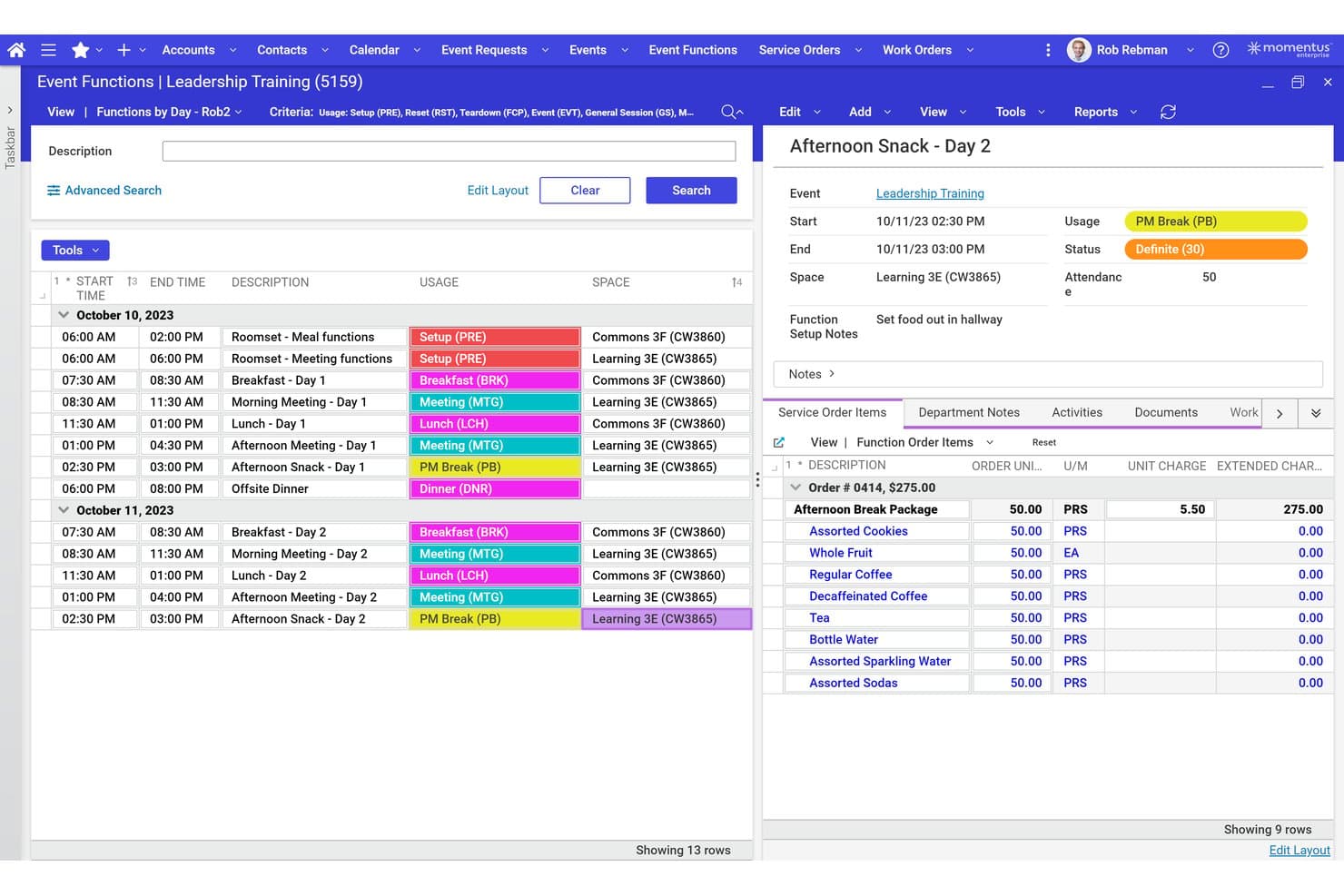
Momentus Technologies manages event functions, schedules, and F&B orders. Momentus Technologies is an enterprise-grade event and venue management platform that covers event sales, proposal and contract generation, catering coordination, service orders, and financial workflows across multi-venue operations.
Who Is Momentus Technologies Best For?
Momentus Technologies is a strong fit for large hotel groups and convention venues running complex, multi-space event operations that need a single system to manage sales pipelines, proposals, BEOs, and catering coordination across multiple properties.
Why I Picked Momentus Technologies
I've included Momentus Technologies in my top picks because it handles the kind of layered, multi-venue event sales complexity that most hotel venue tools struggle to support. I particularly like how the pipeline tracks leads from RFP through contract, with configurable scoring and routing, while service orders tie catering, AV, housekeeping, and security directly to each event record. In practice, my team can generate proposals and contracts, push them to DocuSign, and have signed documents automatically returned to the corresponding event without leaving the platform.
Momentus Technologies Key Features
- Lead scoring and routing: Configure scoring rules and routing logic to prioritize inbound event inquiries and RFPs as they enter the sales pipeline.
- Work order management: Create, assign, and track work orders tied to event operations, with mobile access for capturing photos and signatures on-site.
- Accounts receivable and payment portal: Generate AR invoices, manage collections, and give clients a dedicated portal to submit event-related payments.
- Momentus Analytics dashboards: Access interactive dashboards covering sales funnel performance, revenue trends, and forecasting across your event portfolio.
Momentus Technologies Integrations
Momentus Technologies integrates with Salesforce, HubSpot, NetSuite, SAP, Oracle Financials, Microsoft Dynamics, QuickBooks, Sage, and DocuSign for CRM, financial management, and electronic signatures. Momentus Connect also supports custom connections through REST APIs, OData endpoints, and webhooks.
Pros and Cons
Pros:
- Service orders connect catering and AV teams
- Contract records stay tied to events
- Shared calendars expose cross-venue bookings
Cons:
- No verified hotel PMS two-way sync
- Diagramming requires a separately scoped add-on
Learn more about Momentus Technologies: Best for Salesforce-native hotel event sales
- Free discovery call available
- Pricing upon request
Visit WebsiteCustomer Rating:4.8/5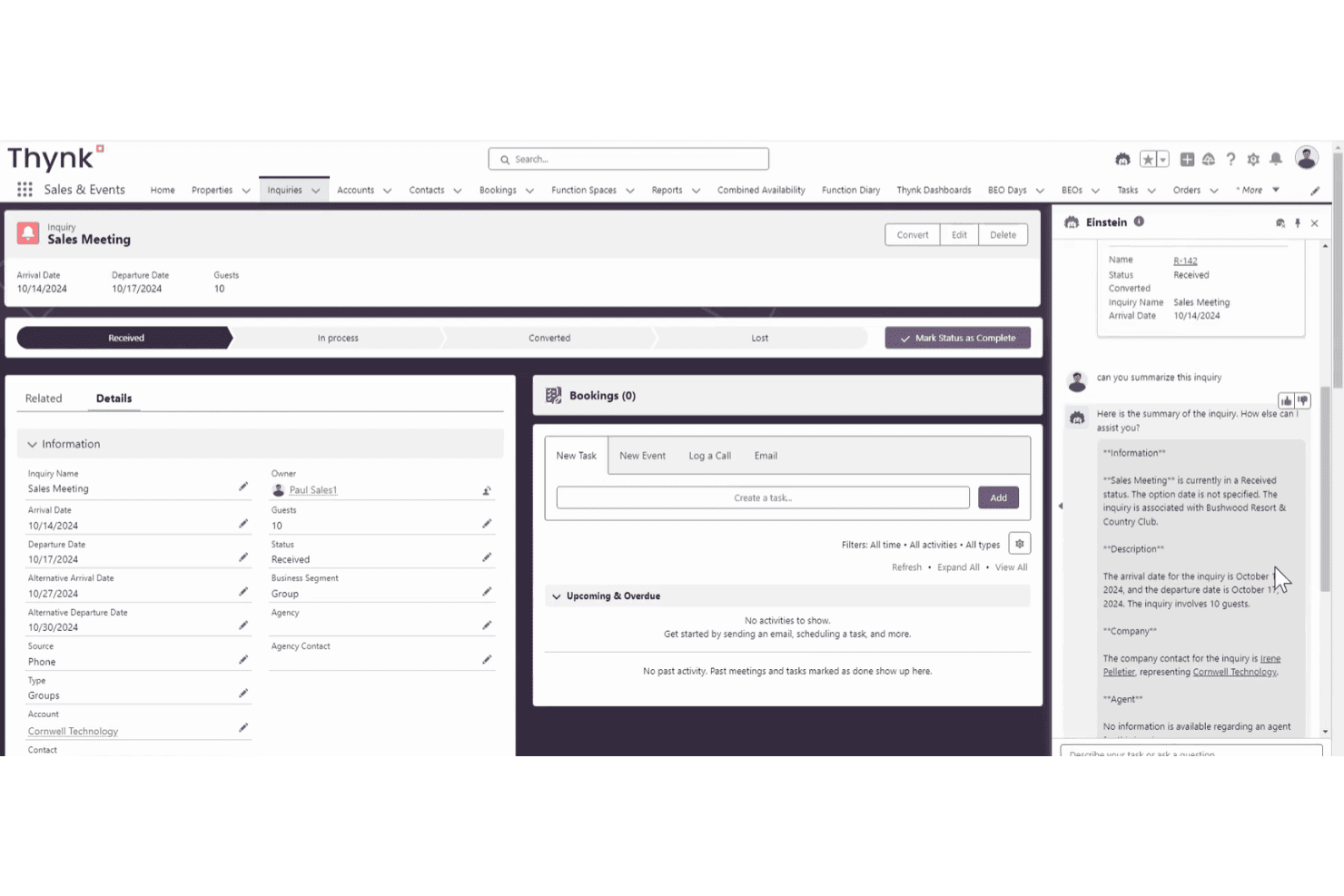
Thynk provides AI-assisted group sales inquiry, booking, and event information. Thynk is a Salesforce-native hotel and venue management platform that covers sales CRM, event bookings, group room blocks, BEO generation, catering coordination, and multi-property analytics.
Who Is Thynk Best For?
Thynk is a strong fit for hotel sales and events teams that already operate within—or are ready to adopt—the Salesforce ecosystem.
Why I Picked Thynk
Thynk earns its spot on my shortlist because it's built entirely on Salesforce, which means your hotel sales team works from a CRM infrastructure that handles multi-property pipeline visibility, lead scoring, and inquiry routing out of the box. I particularly like how BEOs render from live booking data rather than a separate document, pulling in all 26 content blocks, from F&B and AV to dietary alerts and billing, so changes to a booking carry through automatically. The multi-venue dashboards for account production, pace, and confirmed business against budget also give sales managers a genuinely consolidated view across properties.
Thynk Key Features
- Room diagramming: Create event floor plans from scratch or import DXF drawings, with real furniture dimensions and seat-level guest assignments showing dietary, accessibility, and VIP needs.
- Group room block management: Build and manage room blocks across multiple properties, track guest pickup, and schedule deposits with automated invoicing.
- Inquiry routing and lead scoring: Automatically route inbound inquiries based on capacity, dates, venue type, and account tier, with conversion tracking by venue, space, source, and seller.
- Supplier and Operations Portals: Give internal teams and external partners separate but connected portals to manage work orders, task status, and event deliveries from the same booking record.
Thynk Integrations
Thynk integrates with Mews, HotelKey, and SIHOT for property management, Cvent and Prismm for event operations, and SAP, Microsoft Dynamics, Oracle Financials, and NetSuite for financial management. It also connects with Outlook and Gmail for email correspondence and provides REST APIs, JSON, OpenAPI specifications, and Postman collections for custom integrations.
Pros and Cons
Pros:
- Multi-property dashboards show account production
- Live BEOs reflect booking changes
- Centralizes event bookings and sales records
Cons:
- Closed bookings can resist stage reversal
- Some reports require Excel cleanup
Learn more about Thynk: Best for group blocks and catering BEO workflows
- Free demo available
- Pricing upon request
Visit WebsiteCustomer Rating:4.2/5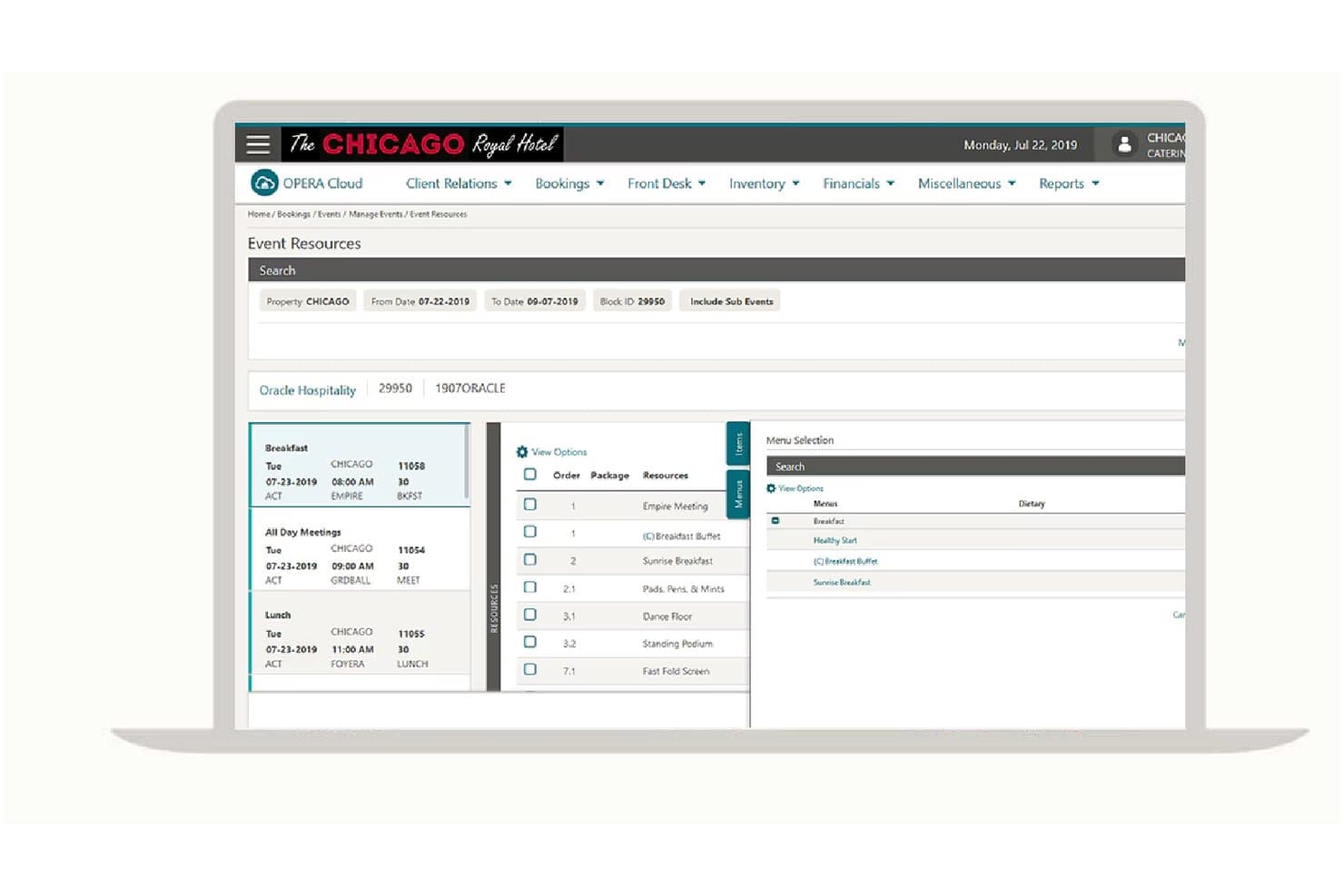
Oracle manages catering event resources and menu selections in one view. OPERA Cloud Sales and Event Management is a cloud-based hotel sales and catering platform that manages group room blocks, function-space bookings, catering events, BEOs, and sales pipelines across single and multi-property operations.
Who Is OPERA Cloud Sales and Event Management Best For?
It's a strong fit for catering and events teams at full-service and multi-property hotels that need to manage group room blocks, function-space bookings, and BEOs in one connected system.
Why I Picked Oracle Hospitality OPERA Cloud Sales and Event Management
I chose OPERA Cloud Sales and Event Management because it manages group room blocks and catering BEOs in a single connected workflow, exactly what full-service hotel events teams need. The Function Diary gives me a graphical view of space availability across combination rooms and shareable spaces, with color-coded event statuses so I can see conflicts at a glance. When I'm building a BEO, I can pull in event resources like menus, AV equipment, and decorations, then email the finished report as a PDF directly from the system.
OPERA Cloud Sales and Event Management Key Features
- Group Rooms Control: View group room inventory across segments in a shared display to support inventory control and sales strategy.
- Activity auto traces: Automatically generate follow-up activities for contacts, sales accounts, blocks, and activities using configurable rules.
- Event templates: Save and reuse collections of events and default resources for repeatable catering bookings.
- Sales manager goals: Set and track individual sales manager targets for group rooms, catering, transient rooms, and activities.
OPERA Cloud Sales and Event Management Integrations
OPERA Cloud Sales and Event Management connects with OPERA Cloud Property Management, OPERA Cloud Loyalty, OPERA Cloud Distribution, and OPERA Cloud Central to coordinate hotel reservations, guest profiles, loyalty programs, and property operations. It also supports custom hospitality integrations through the Oracle Hospitality Integration Platform (OHIP).
Pros and Cons
Pros:
- BEOs can be emailed as configurable PDFs
- Group blocks track allocations across dates and room types
- One diary combines bedrooms and event spaces
Cons:
- Reviewers report slow performance and occasional bugs
- No interactive floor-plan editing
Learn more about OPERA Cloud Sales and Event Management:
Other Hotel Venue Management Software
Here are a few additional options that didn’t make my shortlist but are still worth checking out:
- 111pmBest for hotel conference and catering sales
- 12MeetingPackage.comBest for M&E RFP automation and distribution
- 13Better CaterBest for catering ops without hotel complexity
- 14VenueArcBest for community venue and facility booking ops
- 15Agilysys Sales & CateringBest for BEO and catering ops within hotel tech
- 16SIHOTBest for PMS-native hotel event and sales ops
- 17Prismm by CventBest for 3D event layout and space visualization
- 18Venus Hotel SoftwareBest for hotel ops with venue booking built in
- 19HIS VenueCoreBest for on-premise banquet and event diary ops
- 20DelphiBest for hotel sales pipeline and BEO docs
How I Evaluate Hotel Venue Management Software
I split my evaluation into three parts, giving most weight to core functionality: reserve spaces without conflicts and create booking-linked proposals and BEOs. Next, I consider differentiators such as PMS-linked room blocks and event floor plans. Finally, I weigh onboarding, support, and value for your property's scale.
Core Functionality (Table Stakes For This List)
When I'm selecting tools for my list, I score each one on a scale from 0 (does not offer the functionality) to 5 (excels in this area) for each core functionality listed below. I then convert the total into a percentage to help assess each tool's overall fit, with extra weight on any functionalities I’ve deemed essential.
- Space & Booking Management (Essential): I check whether teams can manage multiple spaces, spot date conflicts, and handle room combinations or holds for events.
- Proposals & BEOs (Essential): I look for booking-linked proposals, contracts, and BEOs that keep details like menus, timings, and setups consistent.
- Event Floor Plans: I assess whether teams can build practical layouts, arrange seating, and share room plans with clients or event staff.
- Catering & Resources: I look for event-level tracking of menus, equipment, and staffing so teams can coordinate requirements as bookings change.
- Lead Tracking: I check whether inquiries move through clear sales stages, with follow-up tools to track group business from first request to booking.
- Calendar Views: I evaluate multi-space calendars and filters that help teams check availability across dates, event types, and booking statuses.
Once I have a list of tools that meet the criteria, I consider what sets each platform apart.
Differentiating Factors (What Sets Vendors Apart)
Here's how I compare and contrast different vendors:
Standout Features
PMS two-way sync is the first thing I check. A real-time connection to your PMS means room blocks update alongside overall hotel inventory, so your front desk and events team aren't working from different numbers. I also look at group room block management—specifically whether rooming lists and attrition tracking live inside the same workflow as meeting space bookings. When a conference shrinks from 200 to 150 attendees, that change should hit your room block and BEO details without manual fixes. E-signature with built-in payment collection matters too, since faster contract turnaround directly protects revenue during busy RFP seasons. For hotel groups, I evaluate multi-property dashboards that give sales leaders portfolio-wide pipeline visibility rather than logging into each property separately.
Beyond Features
I check how deeply each tool connects to your existing hotel tech stack—especially PMS platforms like Opera Cloud or Mews. A native, verified connector means room blocks update without manual re-entry, while a shallow integration creates gaps between your events team and front desk. I also evaluate onboarding support, since BEO workflows and floor plan tools take real training to adopt. Vendors that offer dedicated customer success managers and data migration help cut months off the learning curve, which matters most during peak booking seasons.
How to Choose Hotel Venue Management Software
Choose a system by testing how your team handles an event from inquiry through final BEO, especially when room inventory or event details change.
| If Your Priority Is | Look For |
|---|---|
| If Your Priority IsPreventing space conflicts | Look ForBooking rules that handle overlapping holds and combined rooms |
| If Your Priority IsKeeping room blocks aligned | Look ForA clear path for changes between event records and PMS inventory |
| If Your Priority IsReducing BEO revisions | Look ForConsistent details across the approved proposal and final BEO |
| If Your Priority IsCoordinating event setup | Look ForCurrent timings, layouts, and resource needs in the booking record |
How to Vet Your Shortlist
- Run a booking trial: In a 30-minute session, enter an inquiry for an overlapping event, place and release a hold, then combine spaces; record results against your property’s rules.
- Trace a room-block change: Ask the vendor to demonstrate reducing pickup from 200 rooms to 150, and provide an integration map showing which PMS records update and when.
- Audit document versions: Request a proposal, contract, and BEO for the same event; verify that a changed menu, timing, and setup appear consistently in the final documents.
- Choose your decision filter: Compare a hotel-focused system with a venue-wide event platform using a one-page scorecard; prioritize PMS and room-block coordination or flexible event workflows, then note which gap your team can manage manually.
What Is Hotel Venue Management Software?
Hotel venue management software helps hotel teams manage event inquiries, venue bookings, room blocks, and banquet event orders in one system. Sales and operations staff use it to track availability, coordinate event details, and keep booking documents current as plans change. It can also support floor plans, catering requirements, and connections to a property management system.
Features of Hotel Venue Management Software
Here are the main features I look for in hotel venue management software:
- Space and booking management: Create event bookings for multiple rooms, track holds, and flag date or space conflicts. Room-combination rules help your team assign adjoining spaces without double-booking them.
- Proposals and BEOs: Build proposals, contracts, and banquet event orders (BEOs) from booking details. When menus, timings, or setups change, linked documents help keep the latest event information consistent.
- Event floor plans: Create room layouts with tables, seating, and other setup details. Your team can share plans with clients and event staff so everyone can review the intended arrangement.
- Catering and resource tracking: Add menus, equipment, and staffing requirements to an event record. This gives your team a place to check what each function needs as plans change.
- Lead tracking: Record inquiries and follow their progress through sales stages, from initial request to confirmed booking. Follow-up tasks help your team keep prospective group business moving.
- Calendar views: View bookings across spaces and dates, with filters for event types or booking statuses. A shared calendar helps staff check availability before they confirm a request.
- PMS integration: Connect event bookings with a property management system (PMS) to exchange relevant booking or room inventory details. Check which records sync, how often updates occur, and whether the connection works both ways.
- Group room block management: Track room blocks, pickup, and rooming lists alongside event bookings. Attrition tracking helps your team monitor block performance against its agreed terms.
Benefits of Hotel Venue Management Software
Here are a few common benefits you can expect from hotel venue management software:
- Clearer space availability: Multi-space calendars, holds, and conflict checks help your team review bookings before confirming an event.
- Coordinated room blocks: Room-block tracking and PMS connections can keep event bookings and room inventory details aligned.
- More consistent event documents: Booking-linked proposals and BEOs carry approved menus, timings, and setups into event paperwork.
- Better setup coordination: Floor plans and event-level catering and resource details give staff a shared reference for layouts and requirements.
- More visible sales follow-up: Lead stages and follow-up tasks help your team track inquiries from initial request through confirmed booking.
- Portfolio-level sales visibility: Multi-property dashboards can give sales leaders a view of pipeline activity across participating properties.
Costs and Pricing of Hotel Venue Management Software
Pricing often depends on property size, features, and integrations, and many vendors provide quotes rather than published rates. Use these ranges as general budgeting estimates, since actual plans and pricing vary by provider.
Hotel Venue Management Software Plan Comparison
| Plan Type | Average Price | Common Features |
|---|---|---|
| Plan TypePersonal Plan | Average Price$50–$200/month | Common FeaturesSpace calendars, booking records, lead tracking, and basic reports. |
| Plan TypeBusiness Plan | Average Price$200–$800/month | Common FeaturesMulti-space booking management, proposals and BEOs, resource tracking, and team access. |
| Plan TypeEnterprise Plan | Average Price$800+/month | Common FeaturesMulti-property dashboards, PMS integration, group room block tools, and dedicated onboarding. |
FAQs
Here are answers to common questions about hotel venue management software:
Does hotel venue management software replace a PMS?
No. Hotel venue management software supports event sales and operations, while a property management system (PMS) manages guest reservations and stay records. Some platforms connect the two, but that doesn’t make them interchangeable. Before buying, map which system owns each record: the PMS for guest and room inventory, and the event system for inquiries, function details, and BEOs. Then verify which updates sync, how quickly they sync, and what happens if the connection fails.
What should we prepare before migrating event records?
Before switching, identify which records you need: active bookings, future leads, room blocks, signed contracts, and historical BEOs. Decide whether to migrate closed events or archive them separately. Ask the vendor which fields transfer, whether attachments and notes are included, and who validates the import. Keep a read-only copy of your source records until staff reconcile sample bookings against the new system. Set a cutoff date and assign one owner for corrections, so old and new records don’t diverge.
Who should be involved in evaluating the software?
Include sales, event operations, front desk, and IT in the evaluation; each team handles a different part of the booking lifecycle. Ask sales to test inquiry and proposal steps, banquet staff to verify BEO and resource details, and front desk to review room-block workflows. Have IT confirm access controls, data exports, and integrations. Give each group the same event scenario, collect gaps, and name a decision owner. This helps surface handoff issues and clarify who will own setup and training.