

Hotel booking software free lets you manage reservations, accept online bookings, and organize guest details without upfront costs. If you’re struggling to handle increasing bookings with limited resources, these free tools can take pressure off your front desk and help your team deliver reliable service every day. In this list, you’ll find the top free options that hoteliers rely on to simplify reservations and boost operational control—so you can pick a solution that matches your business, your budget, and your team’s workflow.
Why Trust Our Software Recommendations
6,700+
Reviews
20
Industry experts
16+
Evaluation factors
14
Years
Our team has been testing and reviewing software since 2012. As hospitality leaders ourselves, we know how difficult—and important—it is to choose the right software.
For this guide, we evaluated tools using hands-on testing and independent research, scoring tools using our selection criteria.
Our reviews reflect our human editorial judgment, not a sales pitch.
Hotel Booking Software Free Comparison Table
This comparison table summarizes pricing details for my top hotel booking software free selections:
| Tool | Best For | Trial Info | Price | ||
|---|---|---|---|---|---|
| 1 | Best for open-source website storefronts | Free plan available (self-hosted) | From $$41.67/month (billed annually) | Website | |
| 2 | Best for small accommodation providers | 30-day free trial | From $1/day + 1% booking fee | Website | |
| 3 | Best for integrated payment processing | 14-day free trial + free demo available | From $207/month (billed annually) | Website | |
| 4 | Best for micro-property front desk logs | Free plan available | Pricing upon request | Website | |
| 5 | Best for OTA and channel integration | Free plan available | From £1.50/booking | Website | |
| 6 | Best for guest check-in automation | 14-day free trial + free demo available | Pricing upon request | Website | |
| 7 | Best for open-source property management | Free plan available | Pricing upon request | Website | |
| 8 | Best for multi-property reservation management | Free plan available | From €15/month | Website | |
| 9 | Best for Joomla-based property management | Free dmeo available | Pricing upon request | Website | |
| 10 | Best for direct online reservation setup | Free plan available | Pricing upon request | Website |


Best Hotel Booking Software Free Reviews
Below are my detailed summaries of hotel booking software free that made it onto my shortlist. My reviews offer a detailed look at the features, best use cases, and integrations of each platform to help you find the best one for you.
 Best for open-source website storefronts
- Free plan available (self-hosted)
- From $$41.67/month (billed annually)
Visit WebsiteCustomer Rating:4.6/5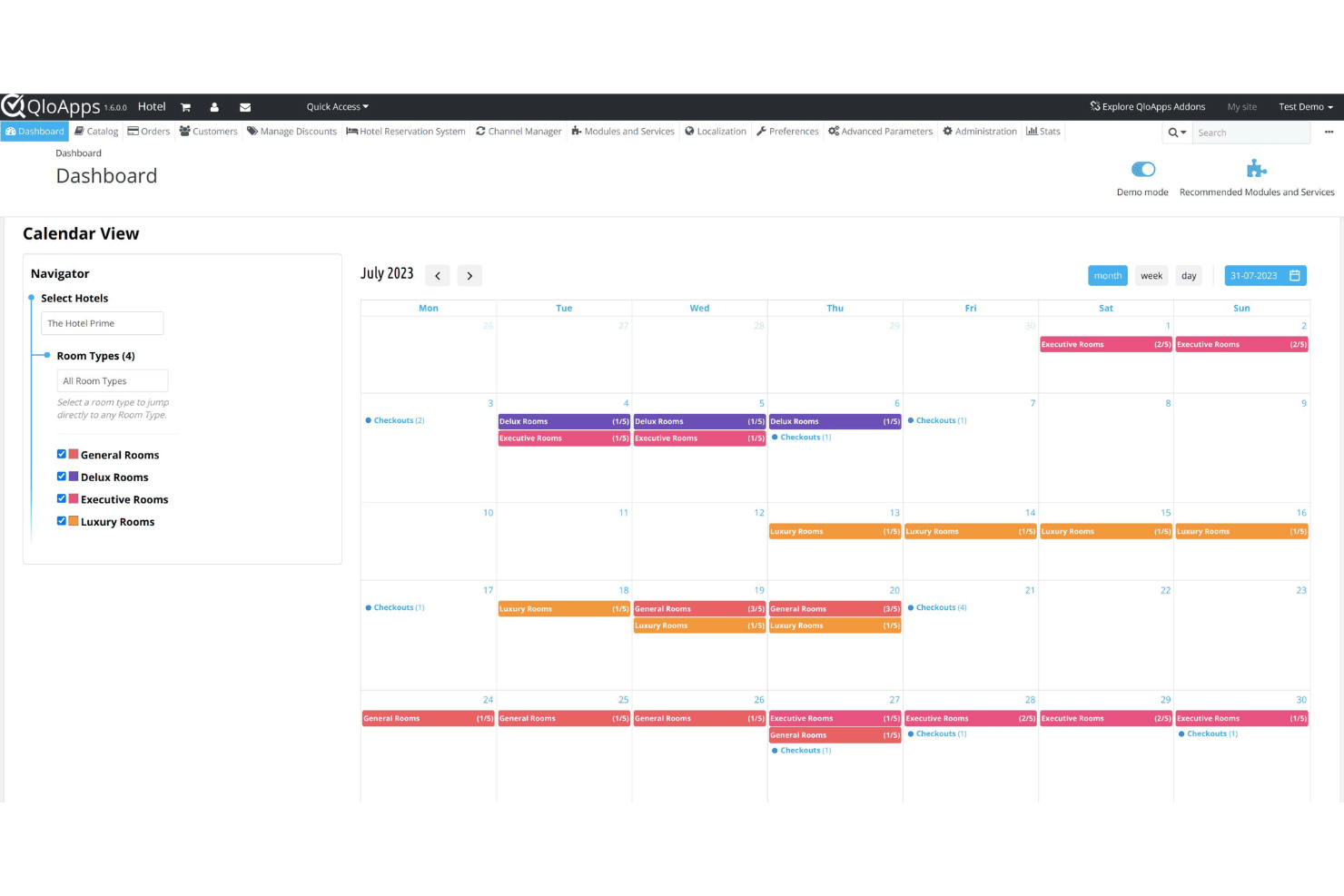
QloApps centralizes hotel bookings and daily reservation operations in one dashboard. QloApps is a free, open-source hotel management system that includes a PMS, a customizable hotel website builder, a direct booking engine, and a channel manager.
Who Is QloApps Best For?
QloApps is a strong fit for independent hotels and small properties that want to self-host their own booking system and customize it without licensing fees.
Why I Picked QloApps
I picked QloApps as one of the best because its open-source hotel website builder gives you full control over your storefront's code, design, and content, which most SaaS hotel booking tools simply won't allow. I use the multiple theme options and back-office customization to match the website's branding to the property, including logos, taglines, room imagery, and upsell services. The built-in SEO tools and multilingual and multicurrency support also let me optimize the storefront for local search and international guests without needing a separate CMS.
QloApps Key Features
- Room type configuration: Define unlimited room types with custom bed counts, occupancy limits, facilities, and room-specific images directly from the back office.
- Rate plan management: Create and manage multiple rate plans per room type, including seasonal pricing, weekend rates, and early-bird offers.
- Front desk dashboard: View and manage live reservations, check-ins, and check-outs from a centralized calendar interface.
- Add-on module marketplace: Extend core functionality with paid and free community-built modules for features like invoicing, coupons, and reporting.
QloApps Integrations
QloApps connects to popular OTA channels like Booking.com, Expedia, Airbnb, Agoda, and Google Hotels through its channel manager, which syncs inventory, rates, and bookings in real time. It also includes a PayPal Checkout add-on for payment processing. An open API is available for custom integrations and further customization.
Pros and Cons
Pros:
- Modular add-ons for extended functionality
- Self-hosting keeps guest data in-house
- Fully open-source with no license fees
Cons:
- Community support instead of dedicated help
- Requires complex manual database configuration
Learn more about QloApps: Best for small accommodation providers
- 30-day free trial
- From $1/day + 1% booking fee
Visit WebsiteCustomer Rating:4/5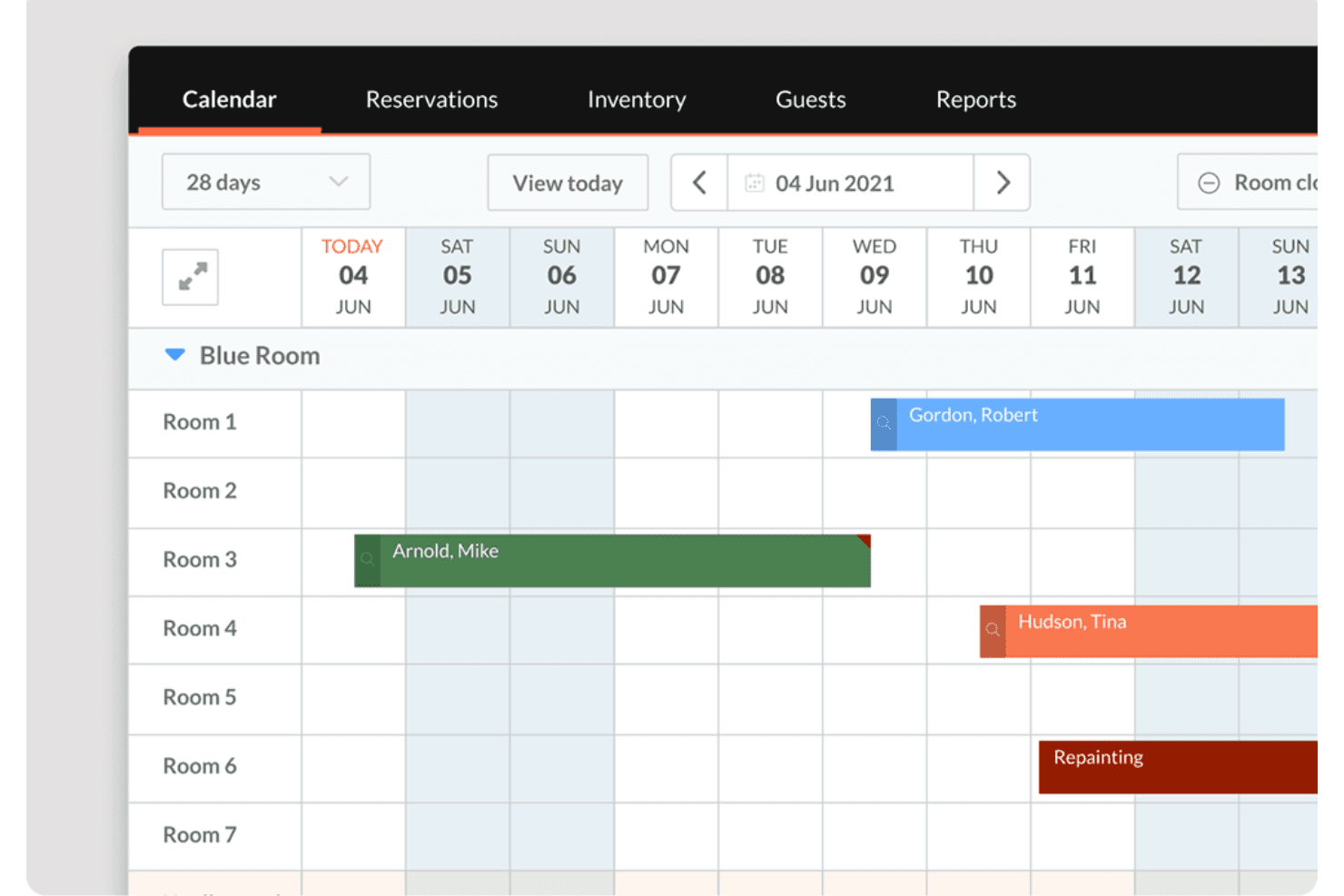
Little Hotelier offers a visual calendar view that displays room reservations, guest names, and maintenance blocks across multiple rooms over a 28-day period. Little Hotelier is a property management system designed for small accommodations like B&Bs, guesthouses, and small hotels, combining front desk management, a direct booking engine, and a channel manager in one platform built for limited-staff operations.
Who Is Little Hotelier Best For?
Little Hotelier is a strong fit for independent B&Bs, guesthouses, and small inns that need an all-in-one system without the complexity of enterprise hotel software.
Why I Picked Little Hotelier
I picked Little Hotelier as one of the best because it's built from the ground up for small properties, not scaled down from enterprise software. I like how the front desk system lets you manage room assignments, guest check-ins, and reservations from a single view. The channel manager syncs availability across Booking.com, Airbnb, and Expedia in real time, so overbookings aren't a concern even when running a property solo.
Little Hotelier Key Features
- Direct booking engine: Lets guests book directly through your property website or social media pages, bypassing OTA commission fees.
- Guest communication automation: Sends personalized automated emails to guests at key points in their stay, from confirmation through checkout.
- Rate and inventory management: Updates pricing and availability across all connected channels from a single inventory grid, with availability rules to control distribution.
- Mobile app: Lets you manage reservations, view guest details, and receive arrival and departure notifications from your phone.
Little Hotelier Integrations
Little Hotelier offers a curated app store (via the SiteMinder Hotel Exchange) with 25+ third-party integrations covering accounting, guest experience, keyless entry, and other operational tools. Verified integrations include Duve, RoomPriceGenie, CheKin, Akia, GuestTouch, and TripAdvisor, among others. A public API for custom integrations is not available.
Pros and Cons
Pros:
- Automated guest messaging reduces manual follow-up
- Mobile app supports remote reservation management
- Channel manager syncs with major OTAs instantly
Cons:
- Some reports require exporting for full details
- Limited customization for booking engine
Learn more about Little Hotelier: Best for integrated payment processing
- 14-day free trial + free demo available
- From $207/month (billed annually)
Visit WebsiteCustomer Rating:4.4/5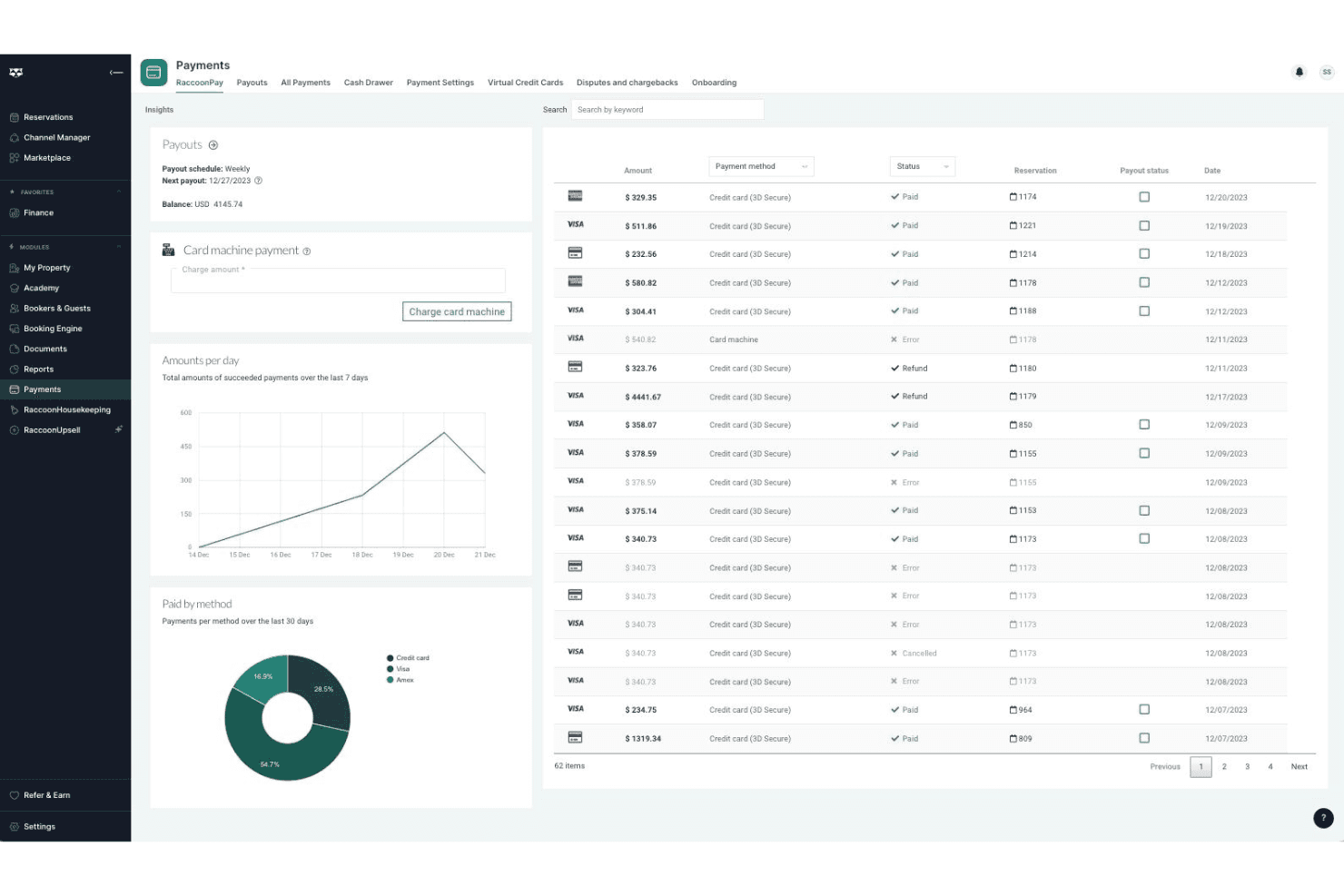
RoomRaccoon centralizes reservations and guest stays in one booking calendar. Built specifically for independent hotels and B&Bs, RoomRaccoon is a cloud-based property management system that combines front desk management, a booking engine, channel management, and payment processing in one platform.
Who Is RoomRaccoon Best For?
RoomRaccoon is a strong fit for independent hotels, boutique properties, and B&Bs that want an all-in-one PMS without stitching together separate tools for payments, bookings, and front desk operations.
Why I Picked RoomRaccoon
I've included RoomRaccoon in my top picks because its payment processing is built directly into the PMS, not bolted on through a third-party add-on. I like that it includes an integrated card machine that auto-reconciles in-person payments against reservations, and that online card tokenization lets you charge guests at check-in without re-entering details. In practice, that means your front desk handles deposits, no-shows, and final checkouts from one screen.
RoomRaccoon Key Features
- Channel manager: Syncs real-time rates and availability across OTAs like Booking.com, Expedia, and Airbnb from a single dashboard.
- Direct booking engine: A commission-free booking widget that embeds directly into your hotel website for guest reservations.
- Online check-in: Sends automated pre-arrival emails that let guests complete check-in, upload ID, and sign registration cards before arrival.
- Yield management tool: Automatically adjusts room rates based on occupancy thresholds and demand rules you configure.
RoomRaccoon Integrations
RoomRaccoon offers over 400 integrations with business solutions such as Lightspeed, Sage, Booking.com, and Expedia, available through its Integrations Marketplace. Verified integrations include Adyen, SiteMinder, Xero, Stripe, PriceLabs, Toast POS, Epos Now, QuickBooks, RemoteLock, and GuestRevu, and an API is available for custom integrations.
Pros and Cons
Pros:
- Built-in channel manager syncs with major OTAs
- Multi-currency support for international guests
- Automated invoicing reduces manual billing tasks
Cons:
- Mobile app not available for all devices
- Reporting features lack advanced filtering options
Learn more about RoomRaccoon: Best for micro-property front desk logs
- Free plan available
- Pricing upon request
Visit WebsiteCustomer Rating:4.2/5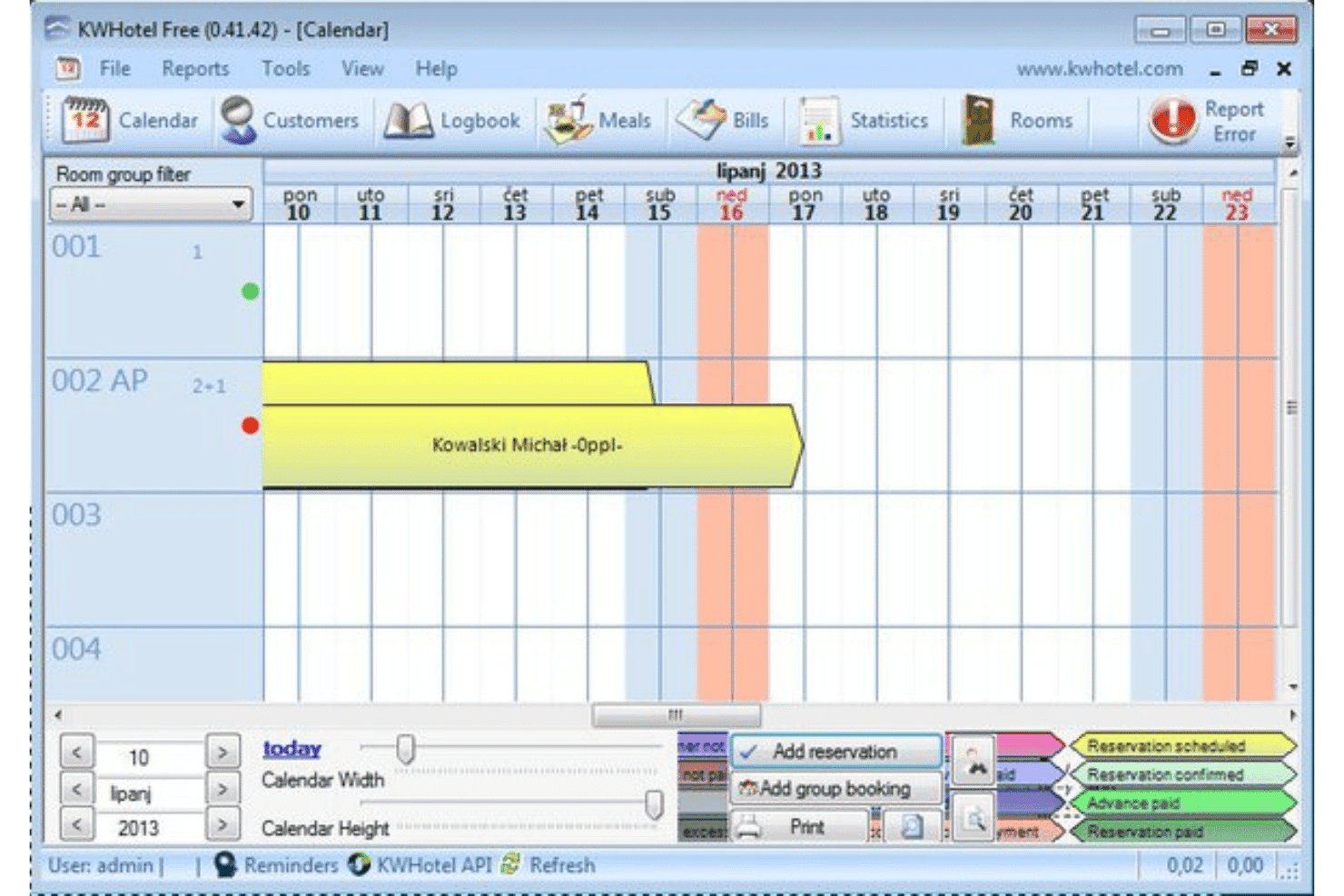
KWHotel tracks guest reservations with a centralized front desk booking calendar. Built for small independent properties, KWHotel is a Windows-based PMS that handles reservations, front desk operations, invoicing, housekeeping coordination, and channel management from a single locally installed application.
Who Is KWHotel Best For?
KWHotel suits owner-operated hotels, hostels, and apartment rentals where the same person managing bookings is also handling check-ins, invoicing, and housekeeping coordination.
Why I Picked KWHotel
I've included KWHotel in my top picks because it treats the front desk log as a first-class feature, not an afterthought. Each reservation carries an internal notes field where I can document guest preferences, complaints, or special requests, and those notes persist across the entire stay. I also appreciate the night audit report, which generates a daily snapshot of all front desk activity so nothing from a busy shift gets missed.
KWHotel Key Features
- Drag-and-drop reservation calendar: Move, extend, or shorten bookings directly on a color-coded room timeline view.
- Channel manager connection: Sync availability and rates to OTAs like Booking.com and Expedia to prevent double bookings.
- Customizable invoice templates: Generate itemized invoices with your property's logo, tax rates, and payment terms.
- Guest history database: Store returning guest profiles with past stay records and contact details for repeat bookings.
KWHotel Integrations
KWHotel integrates with the channel managers YieldPlanet, SiteMinder, and WuBook, as well as directly with Booking.com and Expedia. It also offers a direct synchronization with POSbistro POS system, SMSAPI for automated guest text messaging, and Sezam24 for self-check-in kiosks. KWHotel also supports integrations with accounting systems, payment gateways, and door access control systems. An API is available for custom integrations.
Pros and Cons
Pros:
- Guest document storage included in free plan
- Calendar view shows all reservations clearly
- Free plan supports unlimited room bookings
Cons:
- Requires manual guest confirmation tracking
- No built-in payment processing tools
Learn more about KWHotel:
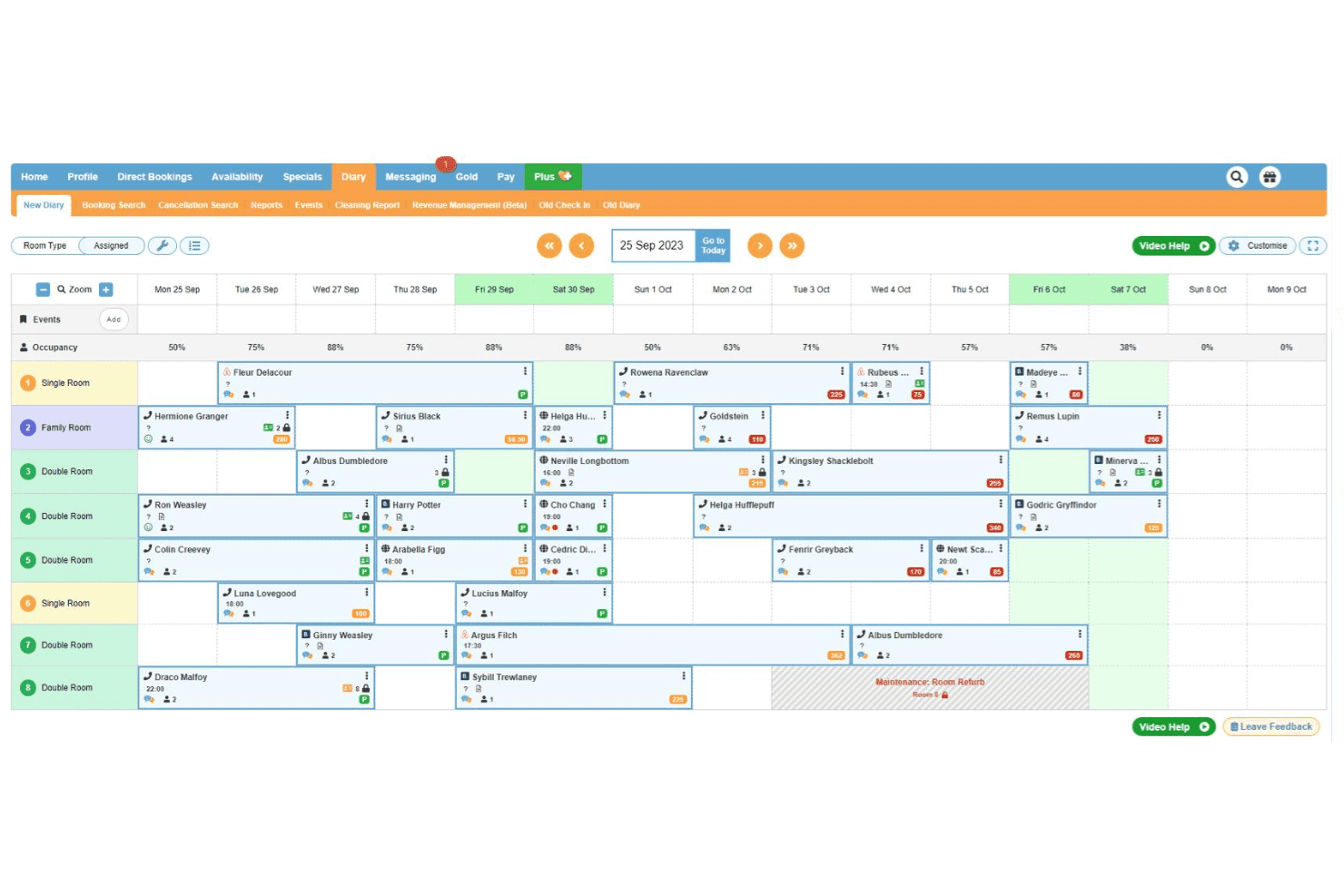
freetobook manages reservations with a centralized booking calendar interface. freetobook is a hotel booking and channel management platform for independent properties that includes a direct booking engine, OTA channel connections, dynamic pricing, guest messaging, and reputation management tools.
Who Is freetobook Best For?
freetobook is a natural fit for independent hotels, B&Bs, and guesthouses that want to manage direct bookings and OTA listings without paying per-reservation fees.
Why I Picked freetobook
I picked freetobook as one of the best because its channel manager gives you real control over how your property appears across OTAs, not just passive syncing. I can apply surcharges or restrict availability on peak dates to push guests toward direct bookings. The two-way sync keeps rates and availability current across Booking.com, Airbnb, Agoda, and others from a single dashboard, which eliminates double bookings without manual updates.
freetobook Key Features
- Direct booking widget: Embed a commission-free booking engine directly on your property website to capture reservations without OTA fees.
- Automated guest messaging: Send pre-arrival, booking confirmation, and post-stay emails automatically based on reservation triggers.
- Dynamic pricing tool: Adjust room rates automatically based on demand, occupancy thresholds, or date ranges you define.
- Review management dashboard: Monitor and respond to guest reviews from multiple platforms in one place.
freetobook Integrations
freetobook offers a small set of integrations, including Stripe and RoomPriceGenie. Its channel manager connects to OTA platforms like Booking.com, Airbnb, Agoda, TripAdvisor, Hostelworld, and HRS. Zapier and API support are not clearly documented.
Pros and Cons
Pros:
- Supports multiple payment gateway integrations
- Channel manager available as a paid add-on
- Automated guest messaging for confirmations
Cons:
- Limited customization for booking engine appearance
- Channel manager not included in free plan
Learn more about freetobook: Best for guest check-in automation
- 14-day free trial + free demo available
- Pricing upon request
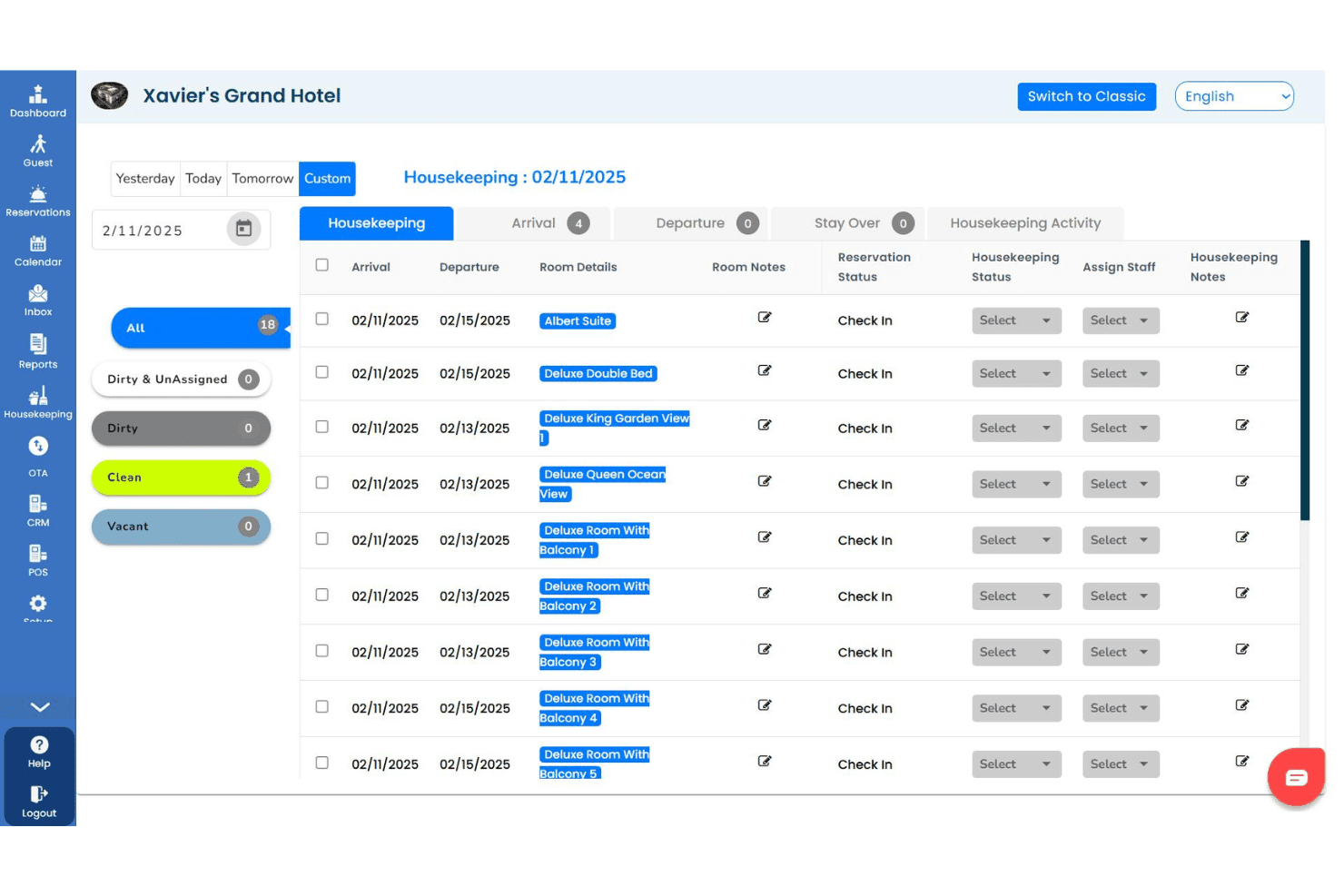
GraceSoft centralizes guest reservations, invoices, and check-in details. GraceSoft is a hotel management software that covers reservations, front desk operations, housekeeping, a direct online booking engine, channel management, and guest communication from a single platform.
Who Is GraceSoft Best For?
GraceSoft is a strong fit for small to mid-sized independent hotels and inns that need a free starting point before committing to a paid system.
Why I Picked GraceSoft
I picked GraceSoft as one of the best because its front desk check-in flow is genuinely built to reduce manual handling at arrival. The drag-and-drop reservation calendar lets staff check in walk-ins or modify existing bookings in seconds, with no extra steps. I also like the pre-arrival messaging feature, which sends automated check-in reminders via email, SMS, or WhatsApp to prepare guests before they arrive. On top of that, the built-in AI assistant handles guest questions around the clock, so front desk staff aren't fielding the same arrival queries repeatedly.
GraceSoft Key Features
- Housekeeping management: Track room cleaning status in real time, assign tasks to staff, and send maintenance alerts, all accessible from mobile devices.
- Built-in POS system: Charge guest restaurant, spa, or gift shop purchases directly to room folios for consolidated billing.
- Guest CRM and loyalty tools: Store guest history and preferences, and run automated repeat-guest marketing campaigns.
- Yield management: Set occupancy-based pricing rules, seasonal rates, and package pricing to adjust room rates automatically.
GraceSoft Integrations
GraceSoft offers a smaller set of native integrations, including SiteMinder, Authorize.net, Stripe, and QuickBooks. It connects with major OTAs like Airbnb, Booking.com, and Expedia, as well as VRBO, and PayPal. Facebook and Google Analytics integrations are also available. Zapier and API support are not clearly documented.
Pros and Cons
Pros:
- Direct website booking engine included
- Free plan supports unlimited reservations
- Multi-property dashboard for centralized management
Cons:
- Limited third-party integrations available
- Requires manual property inventory sync
Learn more about GraceSoft: Best for open-source property management
- Free plan available
- Pricing upon request
Visit WebsiteCustomer Rating:4/5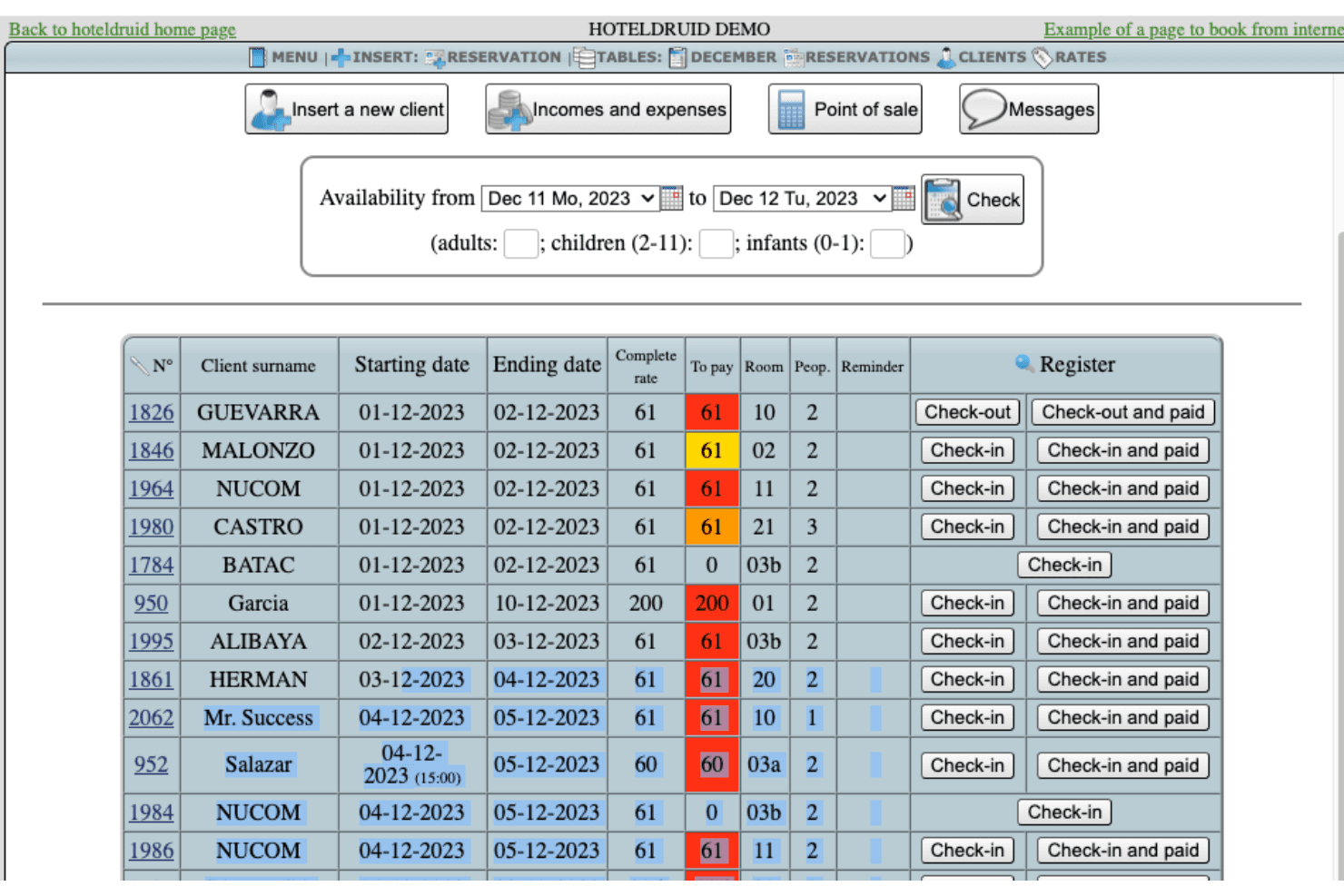
HotelDruid displays a reservations management table with client check-in, check-out, payment status, and room assignments. Built by DigitalDruid.Net, HotelDruid is an open-source property management system covering reservations, room assignments, invoicing, rate management, POS, and occupancy reporting for accommodation properties of any size.
Who Is HotelDruid Best For?
HotelDruid suits tech-comfortable operators at small independent hotels, hostels, or B&Bs who prefer self-hosted software over cloud-based subscriptions.
Why I Picked HotelDruid
I picked HotelDruid as one of the best on my shortlist because its open-source foundation means you can actually modify the codebase to fit your property, not the other way around. I particularly like the automatic room assignment engine, where you define the rules and HotelDruid handles placement logic across your inventory. The built-in POS for bars and restaurants with inventory tracking is also a feature I rarely see included at this level without an added cost.
HotelDruid Key Features
- Online booking widget: An embeddable reservation widget you can add directly to your property's website to accept bookings without a third-party booking engine.
- Dynamic rate management: Set seasonal rates, minimum stays, and occupancy-based pricing rules across individual room types.
- Invoice and document generation: Automatically generate invoices, receipts, and guest documents from completed reservations.
- Multi-property management: Manage multiple properties from a single HotelDruid installation using one login.
HotelDruid Integrations
HotelDruid's channel manager provides direct two-way connections with Booking.com and Expedia, and one-way availability syncing with Airbnb, Google, and several other portals. Additional channel connections through Agoda, Hostelworld, HRS, and dozens more OTAs are available via an intermediate connection through Octorate. The booking engine supports PayPal, Stripe, and Mercadopago for payment processing, and an iCal export is available for calendar syncing.
Pros and Cons
Pros:
- Automated rate changes based on occupancy rules
- Booking engine can be embedded on any website
- Free plan includes unlimited properties and rooms
Cons:
- Limited customer support for free users
- Requires manual calendar synchronization
Learn more about HotelDruid:
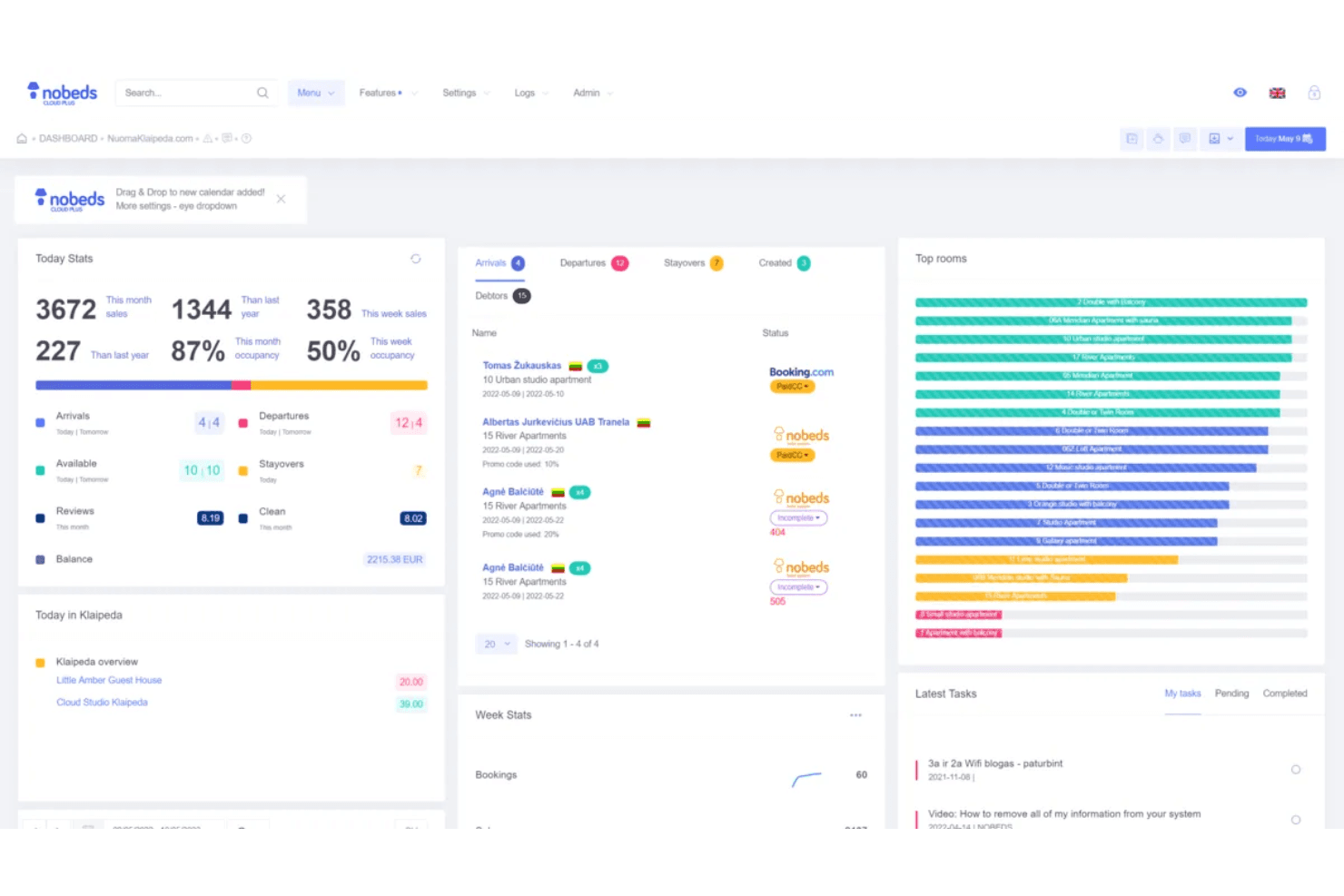
Nobeds offers a comprehensive property management dashboard displaying today's stats, arrivals, departures, top rooms, and latest tasks in one centralized view. Nobeds is a cloud-based property management system that combines a channel manager, reservation dashboard, direct booking engine, and automated guest communications for hotels, hostels, apartments, and vacation rentals.
Who Is Nobeds Best For?
Nobeds is a good fit for independent hoteliers and property managers who oversee multiple listings across different booking platforms.
Why I Picked Nobeds
Nobeds earns its spot on my shortlist because I love how it handles multi-property reservation management across a single dashboard. The real-time two-way channel manager syncs availability and pricing across up to 30 channels, so I'm never manually updating rates per property. I also use the owner reporting feature, which lets me generate property-specific revenue reports, which is genuinely useful when managing units under different ownership.
Nobeds Key Features
- Direct booking engine: Lets guests book reservations directly through your property's website, bypassing OTA commissions entirely.
- Self check-in automation: Integrates with smart locks and sends automated access instructions to guests ahead of arrival.
- Automated messaging: Schedules and sends pre-written welcome emails, SMS messages, and review requests at set intervals throughout the guest journey.
- Shift management: Tracks staff shifts and logs individual user actions across the system for accountability.
Nobeds Integrations
Nobeds connects directly to OTA channels like Booking.com, Airbnb, and Expedia through certified API connections that sync availability, pricing, and reservations in real time. An open REST API is available to connect Nobeds to any third-party application, and the platform also supports Model Context Protocol (MCP) integration for connecting AI agents directly to your property database.
Pros and Cons
Pros:
- Direct booking engine for your website
- Free plan includes core booking features
- Unlimited property and room listings allowed
Cons:
- Lacks automated nightly audit reporting
- No built-in channel manager for all OTAs
Learn more about Nobeds: Best for Joomla-based property management
- Free dmeo available
- Pricing upon request
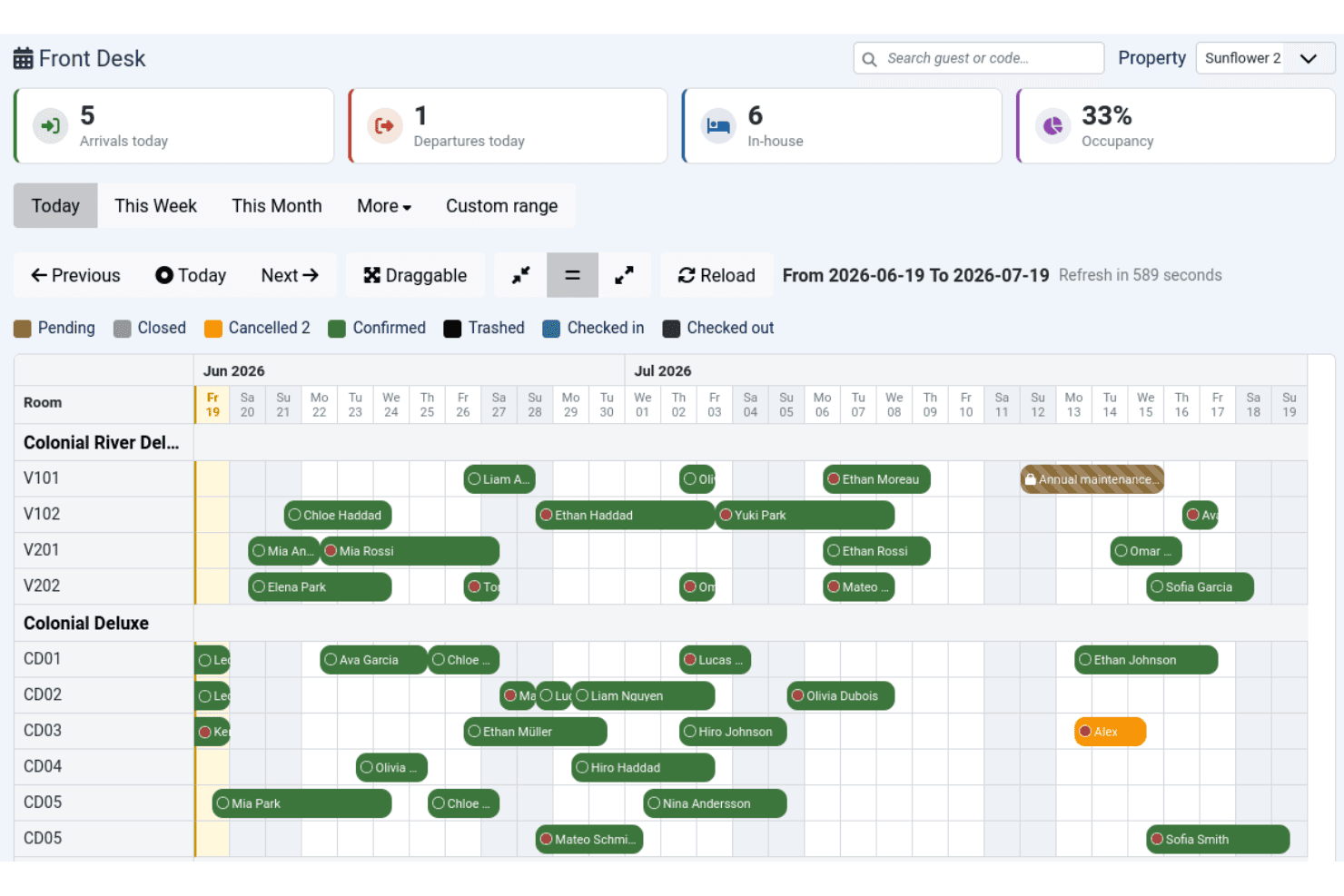
Solidres manages hotel reservations with a centralized front desk calendar. Solidres is an open-source hotel booking and reservation plugin for Joomla that handles room management, availability calendars, tariff configuration, and front desk operations.
Who Is Solidres Best For?
Solidres is a strong fit for small to mid-size property owners who already run a Joomla-based website and want native booking functionality without switching platforms.
Why I Picked Solidres
Solidres earns its spot on my shortlist because it's the only hotel booking plugin built specifically to live inside Joomla as a native component, not a bolted-on widget. I particularly like its Front Desk module, which gives you an interactive booking calendar to manage arrivals and departures in one view. The complex tariff system also lets you configure per-night or per-person rate plans with multiple tariffs per room type, which is more granular than most free-tier tools offer.
Solidres Key Features
- Housekeeping management: Assign and track housekeeping tasks across rooms through a dedicated interface in the backend.
- Flex Search: Suggests alternative available dates to guests when their selected dates are fully booked.
- Deposit configuration: Set deposit rules as a fixed amount, percentage, or based on number of booked nights at the room level.
- iCal export and import: Sync reservation data with external calendars using standard iCal format.
Solidres Integrations
Solidres offers channel management through its integration with MyAllocator (Cloudbeds), which syncs rates and availability with OTA booking channels. It also integrates with Google Analytics, Facebook Pixel, Google Ads, and supports payment gateways including PayPal, Stripe, Square, Mollie, Authorize.net, and Braintree. No public API is documented for custom integrations.
Pros and Cons
Pros:
- Built specifically for Joomla CMS users
- Supports multi-property booking portals natively
- Open-source code with full data ownership
Cons:
- Community support can be slow to respond
- Limited to Joomla and WordPress only
Learn more about Solidres: Best for direct online reservation setup
- Free plan available
- Pricing upon request
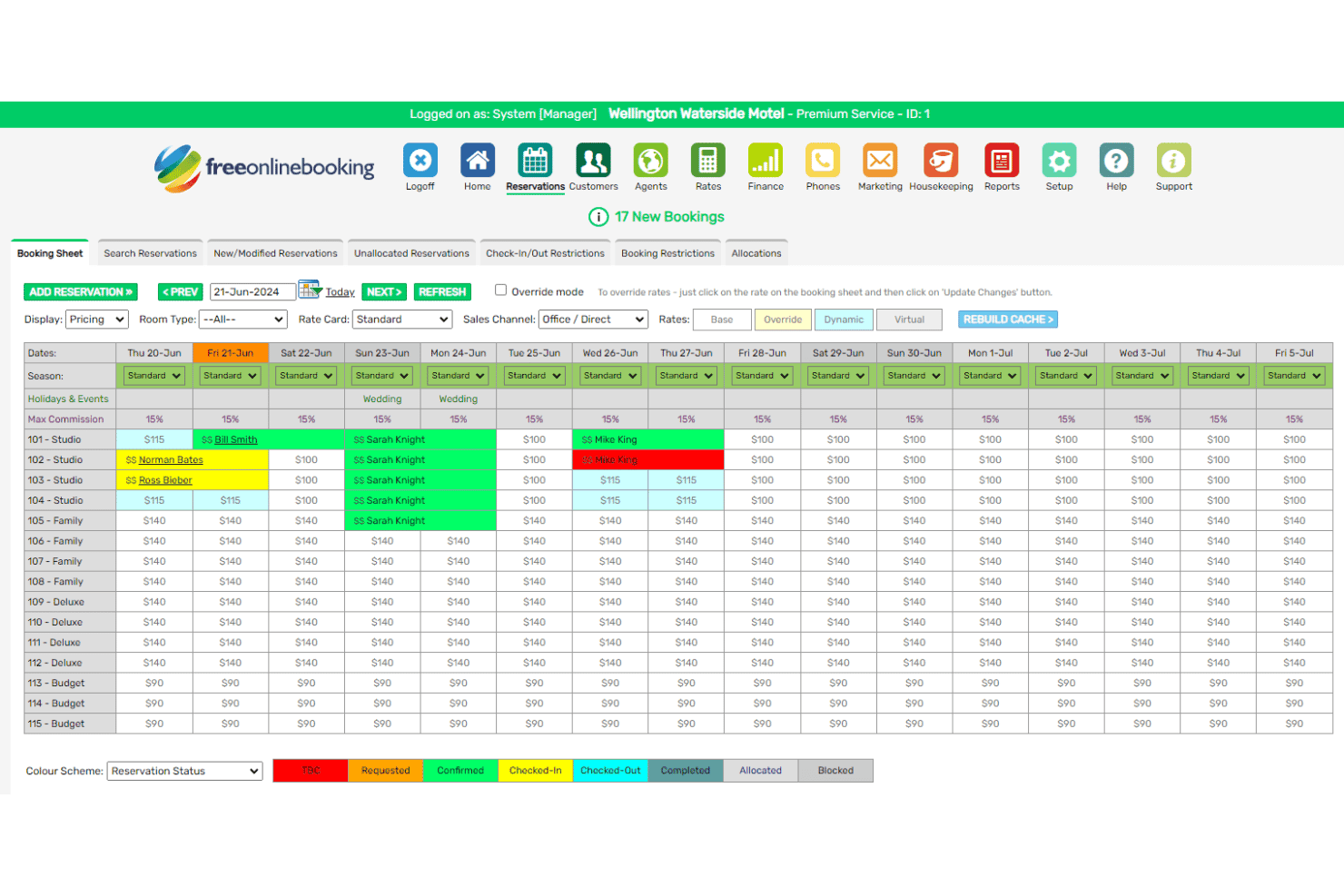
freeonlinebooking manages direct reservations with a centralized booking sheet. freeonlinebooking is a free hotel booking software that gives independent properties a commission-free direct booking engine, guest management tools, and a built-in property management system.
Who Is freeonlinebooking Best For?
It's a strong fit for small, independent hotels and B&Bs looking to take direct bookings online without paying commission or subscription fees.
Why I Picked freeonlinebooking
I picked freeonlinebooking as one of the best because of how directly it's built around getting reservations in the door without middleware or OTA commissions eating into revenue. The direct booking engine embeds into your existing website and lets guests search availability, select rooms, and pay in a single flow. I also like that the free tier isn't a stripped-down teaser: it includes a real booking engine, availability calendar, and guest record management out of the box, making it genuinely usable from day one.
freeonlinebooking Key Features
- Multiple rate plan support: Set seasonal rates, special offers, advance purchase rates, and minimum stay restrictions across your room types.
- Room availability grid: Display a visual grid of open dates so guests can spot availability at a glance when their preferred dates are taken.
- Auto invoicing and payments: Automatically generate invoices and charge stored guest payment cards based on deposit or balance schedules you define.
- 2-way SMS messaging: Send automated text messages to guests at each stage of their stay and receive replies directly within the system.
freeonlinebooking Integrations
freeonlinebooking's channel manager connects to OTA channels including Booking.com, Expedia, Agoda, Tripadvisor, and Airbnb, with a full 2-way link for Airbnb. It also integrates with GDS systems via Reconline, covering Sabre, Amadeus, Galileo, and Worldspan, plus Google Free Hotel Links. Additional native integrations include Xero, PriceLabs, RoomPriceGenie, Presto POS, Windcave, Kovena, 4WiFi, and Pitchup.
Pros and Cons
Pros:
- Responsive customer support with 24/7 availability
- Supports many property types globally
- Zero commission on direct website bookings
Cons:
- Limited third-party review coverage online
- Only available in the English language
Learn more about freeonlinebooking:
Other Hotel Booking Software Free
Here are some additional hotel booking software free options that didn’t make it onto my shortlist, but are still worth checking out:
- 11JomresBest for WordPress and Joomla compatibility
- 12HotelieraBest for automated room assignment
- 13SimplyBook.meBest for ancillary guest amenity scheduling
- 14SetmoreBest for calendar-based scheduling needs
- 15SirvoyBest for real-time room availability updates
- 16Zoho CreatorBest for custom workflow automation
- 17MewsBest for cloud terminal kiosk integrations
- 18HotelRunnerBest for online distribution management
- 19MewsBest for self-service guest check-in
- 20HotelBeeBest for visual booking calendar interface
How I Evaluate Free Hotel Booking Software
When a boutique hotel or B&B owner needs to take direct bookings without paying monthly fees, I look for two things: whether a tool meets baseline requirements, and what sets it apart.
Core Functionality (Table Stakes For This List)
When I'm selecting tools for my list, I rank each one on a scale from 0 (does not offer the functionality) to 5 (excels in this area) for each core functionality listed below. Then, I calculate the tool's total score into a percentage. Each tool needs to achieve a minimum total score of 65% to be considered for inclusion.
- Online Booking Engine: I check whether guests can complete a reservation from the property's own website or a branded page, rather than being redirected to an external platform.
- Reservation Management: A central dashboard where you can view, edit, and cancel bookings matters—especially when a walk-in guest needs a room that was just released from a cancellation.
- Room & Rate Inventory: I evaluate how each tool handles room types, seasonal pricing, and real-time availability so front-desk staff aren't manually updating spreadsheets during peak check-in hours.
- Channel/OTA Synchronization: Listing rooms on Booking.com or Airbnb while also taking direct bookings creates double-booking risk, so I look for automatic two-way sync with major OTAs.
- Genuine Free Plan: I confirm each tool offers a true free tier for ongoing use—not a 14-day trial—so an owner-operator can run live bookings without a subscription cost.
- Payment Processing Support: Whether it's collecting card details at booking or charging deposits through Stripe or PayPal, I look for at least one built-in or integrated payment option.
Once I have a list of tools that meet this criteria, I consider what sets each platform apart.
Differentiating Factors (What Sets Vendors Apart)
Here's how I compare and contrast different vendors:
Standout Features
A mobile app makes a real difference for owner-operators who manage check-ins and cancellations away from the front desk. I also look for built-in guest communication—automated booking confirmations and pre-arrival messages save hours compared to sending each one manually. Reporting features matter too. Even basic occupancy and revenue reports help a small property spot slow periods and adjust rates before rooms sit empty.
Beyond Features
Free plan caps are the first thing I check—some tools limit room count or monthly bookings, and a 10-room guesthouse that hits that ceiling mid-season has a problem. I also evaluate how easy setup is for non-technical operators; a B&B owner shouldn't need a developer to go live. Integration options matter just as much, since connecting to accounting tools like QuickBooks or Xero keeps revenue data flowing without manual entry after every booking.
How to Choose Hotel Booking Software Free
It’s easy to get bogged down in long feature lists and complex pricing structures. To help you stay focused as you work through your unique software selection process, here’s a checklist of factors to keep in mind:
| Factor | What to Consider |
|---|---|
| FactorScalability | What to ConsiderCan the free plan accommodate your current and future room count, seasonal demand, or multiple properties without forcing an upgrade sooner than you want? |
| FactorIntegrations | What to ConsiderDoes the software connect to major OTAs and payment gateways you rely on? Are integrations available on the free tier, or only in paid plans? |
| FactorCustomizability | What to ConsiderHow well can you adapt booking forms, guest communications, or branding without developer help? Watch for rigid templates or upsells on key custom options. |
| FactorEase of use | What to ConsiderWill you and your staff be able to navigate the dashboard, update rates, and clear reservations with minimal training? Try demos or tutorials where available. |
| FactorImplementation and onboarding | What to ConsiderWhat resources—setup guides, migration tools, or onboarding support—are available to non-technical teams? Can you migrate from spreadsheets without paid help? |
| FactorCost | What to ConsiderDoes “free” include all your critical workflows, or are you likely to need a paid plan for core booking or payment features? Look at free plan limits and add-ons. |
| FactorSecurity safeguards | What to ConsiderHow does the platform protect guest payment and personal data? Check for PCI DSS compliance, SSL, and regional privacy standards like GDPR support. |
| FactorSupport availability | What to ConsiderIs timely help available via chat, email, or phone—especially during peak check-in times? Are support channels open to free plan users, or only for paid customers? |
What Are Hotel Booking Software Free?
Hotel booking software free are digital tools that let hotels, B&Bs, and lodging providers accept and manage online reservations without upfront cost. These platforms typically offer a booking engine, reservation dashboard, basic availability management, and limited integration with OTAs, allowing smaller properties to centralize bookings and payments even with constrained budgets.
Features of Hotel Booking Software Free
When selecting hotel booking software free, keep an eye out for the following key features:
- Online booking engine: Lets guests view availability and reserve rooms directly from your website or a branded booking page, often updated in real time.
- Reservation management dashboard: Centralizes all bookings, giving you a single view to confirm, modify, or cancel reservations and manage guest details.
- Room and rate inventory: Enables setup and editing of room types, occupancy limits, and rate plans—helpful for seasonal pricing or special event rates.
- OTA/channel integration: Syncs your inventory with external booking platforms like Booking.com or Airbnb to avoid double-bookings and keep data accurate.
- Payment gateway support: Captures guest payment information or deposits at booking, helping you manage advanced payments or no-show protection.
- Automated guest communications: Sends confirmation emails, check-in instructions, or feedback requests so you don’t have to handle each message manually.
- Calendar view: Provides a visual, date-based overview of booking patterns and room status, making it easier to spot gaps or overbookings.
- Multi-language and multi-currency: Serves international guests by displaying booking pages and payment options in multiple languages and currencies.
- Housekeeping tools: Tracks room status and cleaning schedules, ensuring seamless turnover between stays without needing extra software.
- Reporting and analytics: Delivers data on occupancy, revenue, and guest history so you can monitor performance and identify trends over time.
Hotel booking software free solutions do not typically include AI as part of their feature offering.
Benefits of Hotel Booking Software Free
Implementing hotel booking software free provides several benefits for your team and your business. Here are a few you can look forward to:
- Lower operating costs: You can manage online reservations and guest communications without paying for costly software licenses or subscriptions.
- Centralized booking management: All reservations, payments, and guest data are accessible in one dashboard, making it easy to keep track of your business in real time.
- Improved guest experience: Guests enjoy instant confirmations, clear communication, and secure payment processing thanks to built-in booking engines and email tools.
- Reduced overbooking risk: Channel and OTA integration ensures room availability is always in sync, which prevents double-bookings and related guest issues.
- Faster setup and onboarding: Many free solutions offer self-serve setup, migration tools, and support resources that simplify the transition from spreadsheets or manual tracking.
- Global reach: Multi-language and multi-currency support lets you welcome international guests without barriers.
- Actionable business insights: Built-in reporting and analytics make it easy to monitor occupancy, rate trends, and revenue so you can make better decisions.
Costs and Pricing of Hotel Booking Software Free
Selecting hotel booking software free requires an understanding of the various pricing models and plans available. Costs vary based on features, team size, add-ons, and more. The table below summarizes common plans, their average prices, and typical features included in hotel booking software free solutions:
Plan Comparison Table for Hotel Booking Software Free
| Plan Type | Average Price | Common Features |
|---|---|---|
| Plan TypeFree Plan | Average Price$0 | Common FeaturesBasic online booking, reservation dashboard, limited OTA integration, email confirmations, and simple reporting. |
| Plan TypePersonal Plan | Average Price$10-$25/month | Common FeaturesAll free features, more rooms, custom branding, simple payment processing, and more guest communications tools. |
| Plan TypeBusiness Plan | Average Price$35-$70/month | Common FeaturesAll personal features, advanced OTA integrations, unlimited rooms, housekeeping tools, and multi-user access. |
| Plan TypeEnterprise Plan | Average Price$100-$250/month | Common FeaturesAll business features, custom API access, dedicated support, white-label options, and advanced analytics and automation. |
Hotel Booking Software Free FAQs
Here are some answers to common questions about hotel booking software free:
Can I use hotel booking software for free for multiple properties?
Yes, some free hotel booking software supports multiple properties, but many limit this feature to paid plans. Always check the plan details to see if multi-property property management system (PMS) functionality is included, or if you’ll need to upgrade your hotel management system to a premium all-in-one tier as your business grows.
Are there hidden costs with hotel booking software free?
Yes, some free plans may include hidden costs such as booking commissions, payment processing fees, or charges for premium integrations. For example, connecting your pos system or standard pos hardware might require a paid add-on. Review the pricing page and terms of service to understand what’s truly free and what may incur extra charges.
How secure is guest data in free hotel booking software?
Security varies by provider, but reputable free hotel management software should offer basic safeguards like encrypted data storage and user permissions to protect your client profiles and crm data. Because these are typically cloud-based tools, always confirm compliance with privacy regulations and ask about security certifications before entering sensitive guest information.
Can I integrate free hotel booking software with my website?
Yes, most free hotel booking software offers a booking engine or widget you can embed on your website or link to from social media. However, customization options and branding may be limited compared to paid versions, so test the integration to ensure it provides a user-friendly experience that fits your needs. It is also wise to check if the guest portal displays properly on both iOS and Android devices.
What support options are available with free hotel booking software?
Support for free plans is often limited to email, help centers, or community forums. Live chat and phone support are usually reserved for paid plans, so consider your support needs before choosing a free solution.