
Software-ul pentru programarea personalului hotelier vă ajută să creați, să gestionați și să ajustați turele de lucru pentru membrii echipei din diferite departamente. Dacă sunteți în căutarea celui mai bun software pentru programarea personalului din industria ospitalității, probabil vă confruntați cu provocări consumatoare de timp legate de acoperirea turelor, schimbările de ultim moment și menținerea costurilor cu forța de muncă sub control, oferind în același timp experiențe excelente oaspeților, de la sosire până la plecare. Acest ghid vă va ajuta să comparați soluții de top, ușor de utilizat, să înțelegeți ce diferențiază fiecare opțiune și să alegeți soluția potrivită pentru a vă menține operațiunile eficiente și personalul din industria ospitalității implicat, adesea chiar înainte de a avea nevoie de un card de credit pentru a începe o perioadă de testare.
Why Trust Our Software Recommendations
6,700+
Reviews
20
Industry experts
16+
Evaluation factors
14
Years
Our team has been testing and reviewing software since 2012. As hospitality leaders ourselves, we know how difficult—and important—it is to choose the right software.
For this guide, we evaluated tools using hands-on testing and independent research, scoring tools using our selection criteria.
Our reviews reflect our human editorial judgment, not a sales pitch.
Tabel comparativ al software-ului pentru programarea personalului hotelier
Tabelul de mai jos compară detaliile privind prețurile pentru selecțiile mele de top de software pentru programarea personalului hotelier.
Score legend (out of 5)
- Excellent4.5–5
- Good4–4.4
- Average3–3.9
- Below average2–2.9
- Poor1–1.9
Sorted by: Default
| Tool | Starting Price | Website | |||||||
|---|---|---|---|---|---|---|---|---|---|
Best for payroll-connected hotel shift scheduling | 3.7 out of 5 | 3 | 4 | 4 | 4 | 4 | 3 | $50/month 30-day free trial | Website |
Best with built-in tip management | 4.0 out of 5 | 4 | 5 | 4 | 4 | 4 | 3 | $44.99/month Free plan + 14-day free trial + free demo available | Website |
Best for compliance-ready scheduling in hotels | 3.7 out of 5 | 3 | 4 | 4 | 4 | 4 | 3 | $5/user/month Up to 31-day free trial + free demo available | Website |
Best for housekeeping and front-of-house rotas | 3.8 out of 5 | 4 | 4 | 4 | 4 | 4 | 3 | $2.99/user/month 30-day free trial | Website |
Best for multi-location workforce scheduling | 3.7 out of 5 | 3 | 4 | 4 | 4 | 3 | 4 | Pricing upon request Free demo available | Website |
Best for automated labor forecasting in hospitality | 4.0 out of 5 | 4 | 4 | 3 | 5 | 4 | 4 | Pricing upon request Free demo available | Website |
Best for all-in-one staff communication tools | 3.7 out of 5 | 3 | 4 | 4 | 4 | 4 | 3 | Pricing upon request Free plan + 14-day free trial available | Website |
Best for real-time attendance tracking in hotels | 3.8 out of 5 | 3 | 4 | 5 | 4 | 4 | 3 | $5/user/month Free trial + free demo available | Website |
Best for scheduling staff by hotel area | 4.2 out of 5 | 4 | 4 | 3 | 5 | 4 | 5 | Pricing upon request Free demo available | Website |
Best for quick shift swaps among hotel staff | 3.7 out of 5 | 3 | 4 | 3 | 4 | 4 | 4 | $2.50/user/month 14-day free trial | Website |


Recenzii ale software-ului pentru programarea personalului hotelier
Mai jos sunt prezentate rezumatele mele detaliate ale celor mai bune soluții software pentru programarea personalului hotelier care au ajuns pe lista mea scurtă. Recenziile mele oferă o analiză detaliată a funcțiilor, cazurilor de utilizare recomandate și integrărilor fiecărei platforme, pentru a vă ajuta să găsiți cea mai potrivită opțiune pentru dumneavoastră.
 Best for payroll-connected hotel shift scheduling
- 30-day free trial
- From $50/month (billed annually)
Visit WebsiteCustomer Rating:4.5/5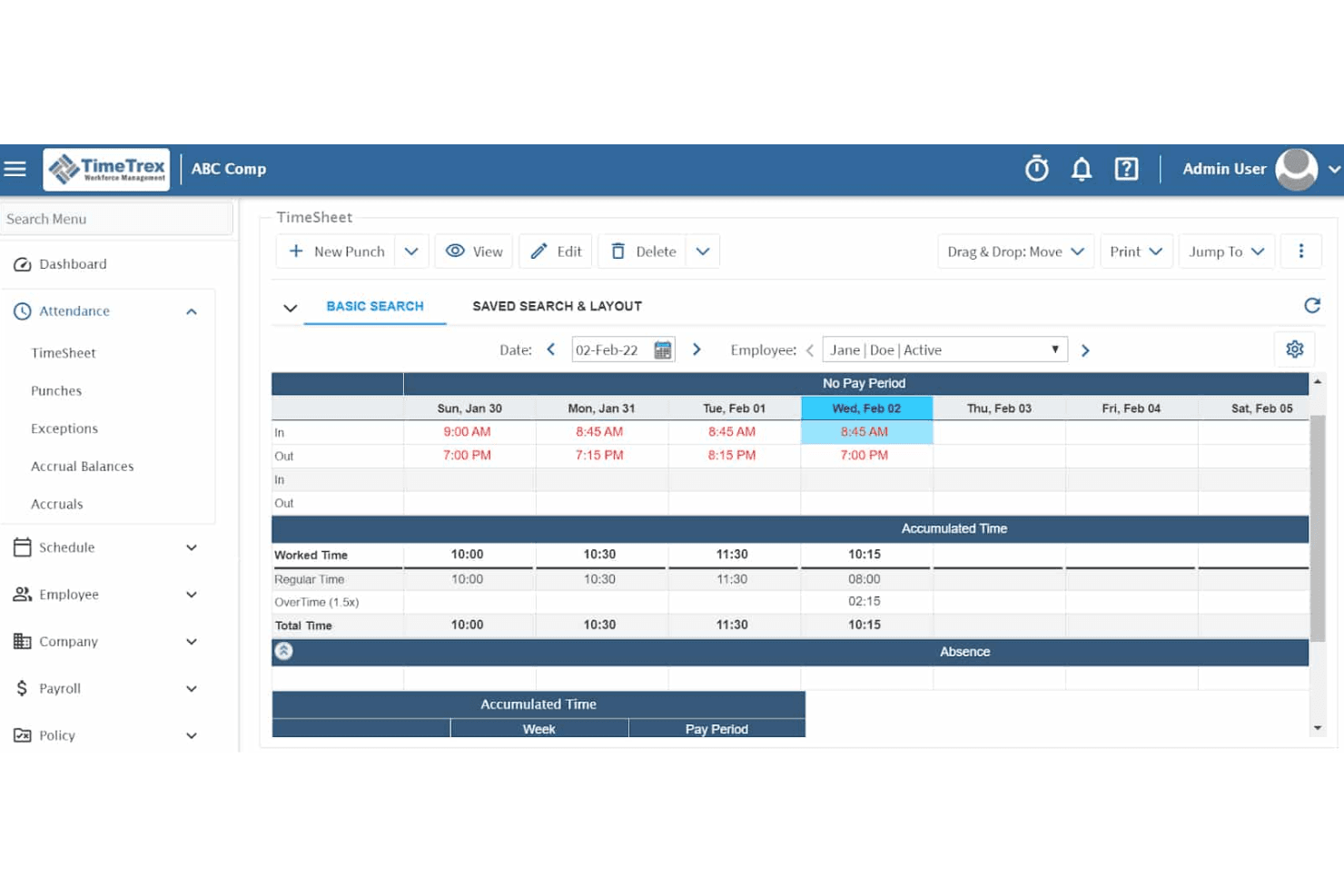
TimeTrex tracks employee punch times and overtime in a weekly timesheet view. TimeTrex is a workforce management platform that combines employee scheduling, time and attendance tracking, payroll processing, leave management, and HR tools for hotel operations.
Who Is TimeTrex Best For?
TimeTrex is a strong fit for hotel HR and operations managers who need scheduling, time tracking, and payroll running through a single platform.
Why I Picked TimeTrex
I picked TimeTrex as one of the best because it's the only tool on my list that ties shift scheduling directly into a built-in payroll engine. When a manager approves a Fair Workweek change inside a protected scheduling window, TimeTrex automatically codes predictability pay to payroll without any manual entry. I also like how the platform flags overtime risk before a shift is assigned, so a front desk supervisor building a 2-2-3 rotation can catch budget overruns at the scheduling stage rather than after the pay period closes.
TimeTrex Key Features
- Drag-and-drop schedule editor: Managers can build and adjust multi-department hotel schedules using a visual drag-and-drop interface with reusable shift templates.
- Biometric facial recognition time clock: Employees clock in and out via facial scan, reducing buddy punching across front desk, housekeeping, and F&B teams.
- Mobile availability and time-off requests: Staff submit unavailability and time-off requests through the iOS or Android app, with manager approvals handled in the same workflow.
- Skill-tagged open shift broadcasting: Open shifts can be tagged with required skills so only qualified employees see and bid on vacancies.
TimeTrex Integrations
TimeTrex lists integrations with ADP, QuickBooks, Sage, Paychex, Surepay, and Ceridian for payroll and accounting workflows. It also supports REST API, two-way, and flat-file integrations for custom connectivity; no hotel PMS or POS integrations are documented.
Pros and Cons
Pros:
- Reviewers praise patient, knowledgeable support
- Punch records feed attendance and payroll workflows
- Recurring rotations support hotel shift planning
Cons:
- Occupancy-based staffing depends on data imports
- Reviewers report dated, clunky navigation
Learn more about TimeTrex: Best with built-in tip management
- Free plan + 14-day free trial + free demo available
- From $44.99/month
Visit WebsiteCustomer Rating:4.7/5
7shifts print settings and a weekly BOH/FOH staff schedule preview for Leslieville. 7shifts is a staff scheduling and team management platform that combines shift building, labor cost tracking, time clocking, payroll processing, and tip management.
Who Is 7shifts Best For?
7shifts suits hospitality operators running food and beverage outlets—hotel restaurants, bars, or café spaces—where tip management and labor cost tracking are as important as scheduling.
Why I Picked 7shifts
7shifts earns its spot on my shortlist because its built-in tip management goes further than most scheduling tools attempt. I love that it automates tip calculations using POS data, then distributes them by hours worked or weighted points, and sends payouts directly to employee debit accounts—no manual math or separate payout tools needed. For hotel F&B outlets where tip splits across bar, floor, and support staff get complicated fast, that level of automation is genuinely useful.
7shifts Key Features
- Shift Pool: Employees can claim open shifts or offer their own shifts to coworkers, with manager approval required before changes take effect.
- Labor cost targets: Set labor budget targets against projected sales so you can schedule staff without exceeding your cost thresholds.
- AI sales forecasting: Uses historical sales and labor data to predict staffing needs and recommend schedules aligned to your labor budget.
- Employee certification tracking: Store employee certifications and receive automatic notifications when they're approaching expiry.
7shifts Integrations
Marketplace integrations include Oracle Micros Simphony, Toast, Square, Lightspeed, ADP Workforce Now, Gusto, UKG, Paychex, and QuickBooks. 7shifts also offers a REST API, webhooks, and Embed SDK for custom integrations, but no hotel PMS integration is documented.
Pros and Cons
Pros:
- Announcements keep frontline teams coordinated
- Built-in tip pooling aids hotel dining teams
- Fast shift swaps and coverage requests
Cons:
- Missed notifications can disrupt shift changes
- No documented housekeeping or front-desk workflows
Learn more about 7shifts: Best for compliance-ready scheduling in hotels
- Up to 31-day free trial + free demo available
- From $5/user/month (billed annually)
Visit WebsiteCustomer Rating:4.6/5
Deputy helps hotels manage schedules, attendance, and compliance. Deputy offers hotel managers a way to coordinate staff schedules while keeping compliance top of mind. The platform is designed for hospitality teams that need to manage changing shifts, track attendance, and handle labor law requirements. If you’re looking for a scheduling tool that helps reduce manual admin and supports regulatory needs, Deputy is worth considering.
Who Is Deputy Best For?
Deputy is a good fit for hotel managers and HR teams who need to ensure labor compliance while scheduling hourly staff.
Why I Picked Deputy
I picked Deputy because it’s built to help hotels manage scheduling while staying compliant with labor laws and union rules. The platform lets you set up custom break policies, maximum shift lengths, and overtime alerts, so you can avoid accidental violations. I also appreciate that Deputy tracks certifications and work eligibility, which is important for hotels with diverse teams and strict regulatory requirements. These compliance-focused features make Deputy a strong choice for hotels that need to balance flexible scheduling with legal obligations.
Deputy Key Features
Some other features that make Deputy useful for hotel staff scheduling include:
- Auto-scheduling engine: This tool automatically builds optimized shift rosters based on forecasted demand and staff availability.
- Mobile clock-in with geolocation: Staff can clock in and out from their phones, with location tracking to confirm they’re on site.
- Task assignment: Managers can assign and track daily housekeeping or front desk tasks directly within the schedule.
- Real-time shift swapping: Employees can offer, claim, or swap shifts instantly through the mobile app.
Deputy Integrations
Integrations include ADP, BambooHR, Clover, Lightspeed, QuickBooks, Paychex, Paycor, Square, Xero, and Rippling.
Pros and Cons
Pros:
- Seamless hotel payroll sync
- Geofenced mobile clock-ins
- Break and overtime alerts
Cons:
- Complex permission settings
- Add-ons hike up the price
Learn more about Deputy: Best for housekeeping and front-of-house rotas
- 30-day free trial
- From $2.99/user/month
Visit WebsiteCustomer Rating:4.4/5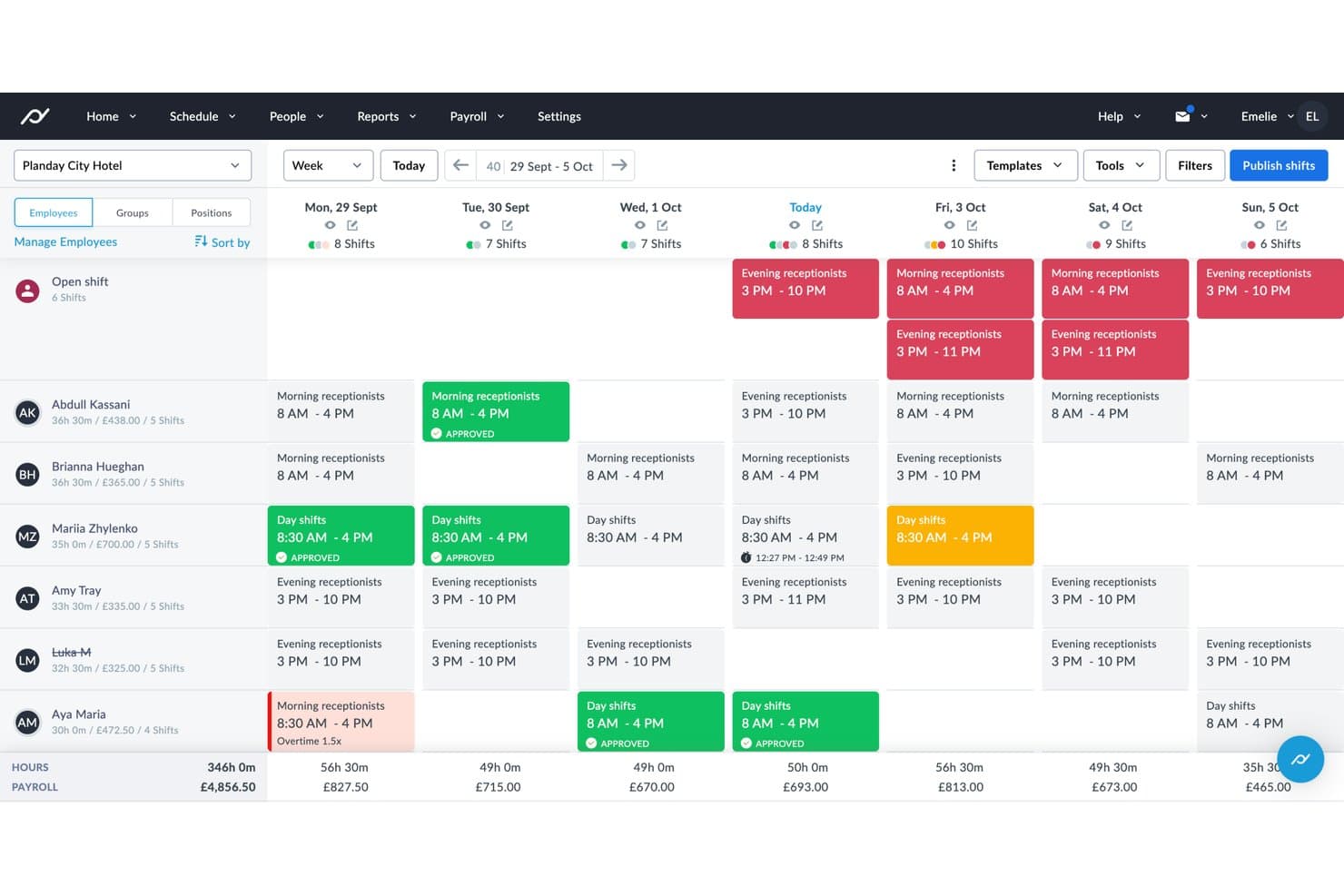
Planday's weekly rota view showing hotel shifts, staff hours and payroll totals across the week. Planday is a workforce management platform for shift-based teams that covers department rostering, time tracking, payroll preparation, employee self-service, and team communication—with dedicated scheduling support for hotel operations across housekeeping and front-of-house.
Who Is Planday Best For?
Planday is a strong fit for hotel operations managers who need to coordinate housekeeping and front-of-house rotas across multiple departments without losing track of labor costs.
Why I Picked Planday
Planday earns its spot on my shortlist because of how well it handles department-level rotas across housekeeping and front-of-house teams. I like that you can build repeatable schedule templates per department and see labor costs directly in the schedule view, so you're not toggling between reports to check if you're overstaffed on a quiet Tuesday. Staff can also pick up open shifts and swap within their department, with manager approval keeping things controlled.
Planday Key Features
- Mobile punch clock: Staff clock in and out directly from the Planday app, with geolocation restrictions to keep clock-ins tied to the right property or department.
- Payroll integrations: Approved hours sync to payroll systems including ADP, Xero, QuickBooks Online, Sage, and Paychex, reducing manual data entry between scheduling and payroll.
- Leave and absence management: Managers can review and approve leave requests, manage balances, and set overtime and time-off-in-lieu policies from within the platform.
- Working-time compliance alerts: Planday flags schedule conflicts and rule breaches as you build rotas, with audit logs that track all schedule changes and deletions.
Planday Integrations
Planday offers integrations with Mews, Xero, ADP, Sage, QuickBooks Online, Paychex, TriNet, Heartland, and Lightspeed, plus an API for custom connections.
Pros and Cons
Pros:
- Staff-requested shift swaps reduce rota admin
- Labor costs visible while building schedules
- Department-level hotel rotas with repeatable templates
Cons:
- Web version needed for some leave tasks
- Mobile app loading delays reported by staff
Learn more about Planday: Best for multi-location workforce scheduling
- Free demo available
- Pricing upon request
Visit WebsiteCustomer Rating:4.3/5
Humanity helps hotels coordinate shifts across teams and locations. Humanity is a cloud-based scheduling platform designed for hospitality businesses managing staff across several locations. It appeals to hotel managers who need to coordinate large, distributed teams and handle complex shift patterns. The tool helps reduce scheduling conflicts and supports compliance with labor regulations.
Who Is Humanity Best For?
Humanity fits hotel groups and hospitality businesses that need to schedule and manage staff across multiple properties or locations.
Why I Picked Humanity
What makes Humanity stand out for hotel staff scheduling is its ability to handle multi-location workforce management from a single dashboard. I picked it because you can create, adjust, and monitor schedules for several properties at once, which is essential for hotel groups or brands with multiple sites. The platform also lets you set location-specific rules and compliance settings, so each property can follow its own labor requirements without extra manual work. For hotels juggling staff across different venues, these features help keep scheduling organized and consistent.
Humanity Key Features
Some other features that make Humanity useful for hotel staff scheduling include:
- Shift swap approvals: Managers can review and approve staff-initiated shift swaps directly in the platform.
- Mobile scheduling app: Staff and managers can view, update, and manage schedules from their smartphones.
- Automated overtime alerts: The system notifies managers when staff are approaching overtime thresholds.
- Availability management: Employees can submit their preferred working hours and time-off requests for manager review.
Humanity Integrations
Integrations include Workday, BambooHR, Oracle HCM, SAP SuccessFactors, and ADP.
Pros and Cons
Pros:
- Tracks specific hotel roles
- Clean and modern interface
- Real-time shift adjustments
Cons:
- Lacks deep financial sync
- Complex initial onboarding
Learn more about Humanity: Best for automated labor forecasting in hospitality
- Free demo available
- Pricing upon request
Visit WebsiteCustomer Rating:4/5
Unifocus helps hotels manage staffing across teams and locations. Unifocus offers hotel operators a platform designed to simplify staff scheduling and workforce management. It’s a strong choice for hospitality teams that need to coordinate labor across multiple departments and properties. The system helps address challenges like fluctuating occupancy, compliance, and labor cost control.
Who Is Unifocus Best For?
Unifocus is a good fit for hospitality businesses and hotel operators who need to manage complex, multi-department staff scheduling and labor forecasting.
Why I Picked Unifocus
I picked Unifocus because its automated labor forecasting tools help hotel managers align staffing with real-time business needs. The platform uses historical data, occupancy trends, and event schedules to generate precise labor forecasts for each department. I appreciate how the system automatically adjusts recommendations as demand changes, so you can avoid both overstaffing and understaffing. This approach is especially valuable for hotels that experience frequent fluctuations in occupancy and guest activity.
Unifocus Key Features
In addition to its forecasting capabilities, Unifocus offers several other features that support hotel staff scheduling:
- Mobile scheduling app: Staff can view schedules, swap shifts, and request time off directly from their smartphones.
- Automated time and attendance tracking: The system records clock-ins and clock-outs, helping managers monitor attendance and reduce time theft.
- Labor compliance monitoring: Unifocus tracks labor law requirements, including overtime and break rules, to help hotels stay compliant.
- Payroll system integration: The platform connects with leading payroll providers to simplify payroll processing and reduce manual data entry.
Unifocus Integrations
Integrations include Oracle, Infor HMS, Maestro PMS, ADP, Paycor, Workday, BambooHR, Ceridian, Novatime, and StayNTouch.
Pros and Cons
Pros:
- Ensures union labor compliance
- Matches shifts with occupancy
- Easy mobile punch-in for staff
Cons:
- Slows down during peak usage
- Hard for beginners to learn
Learn more about Unifocus: Best for all-in-one staff communication tools
- Free plan + 14-day free trial available
- Pricing upon request
Visit WebsiteCustomer Rating:4.6/5
Connecteam helps hotel teams manage shifts, tasks, and updates. Connecteam gives hotel teams a single platform to manage scheduling, daily tasks, and staff communication. It’s a good fit for hospitality businesses that want to keep everyone connected, from front desk to housekeeping. If you need to coordinate shifts and share updates with staff who aren’t always at a desk, Connecteam addresses those challenges.
Who Is Connecteam Best For?
Connecteam suits hotel managers and hospitality teams who need to coordinate schedules, tasks, and communication across multiple departments or locations.
Why I Picked Connecteam
What stands out about Connecteam is how it brings together scheduling, chat, and task management in one place for hotel teams. I picked it because the in-app chat and announcement tools let managers reach staff instantly, whether they’re on the floor or off-site. The ability to share shift updates, policy changes, and urgent messages directly through the app helps keep everyone aligned without relying on group texts or emails. For hotels where clear, fast communication is essential to smooth operations, these all-in-one tools make a real difference.
Connecteam Key Features
Some other features that make Connecteam useful for hotel staff scheduling include:
- Drag-and-drop shift scheduler: Managers can quickly assign, copy, or adjust shifts using a visual calendar interface.
- Time clock with GPS tracking: Staff can clock in and out from their phones, with location data to verify attendance.
- Automated shift reminders: The app sends push notifications to remind staff of upcoming shifts or changes.
- Customizable forms and checklists: Managers can create digital forms for daily tasks, inspections, or incident reports.
Connecteam Integrations
Integrations include Gusto, QuickBooks, Paychex, Xero, ADP, Wix, Lightspeed, PrismHR, Square, and BambooHR.
Pros and Cons
Pros:
- Very budget-friendly
- Custom employee forms
- Great training modules
Cons:
- Limited complex payroll
- Desktop app is very clunky
Learn more about Connecteam: Best for real-time attendance tracking in hotels
- Free trial + free demo available
- From $5/user/month (billed annually)
Visit WebsiteCustomer Rating:4.7/5
Workforce.com helps hotels manage schedules, attendance, and labor costs. Workforce.com gives hotel operators a way to manage staff scheduling and attendance in one platform. The system is designed for hospitality teams that need to coordinate large, shift-based workforces and keep labor costs in check. If you’re looking for a tool that helps you track who’s on site and keep schedules organized, Workforce.com is worth considering.
Who Is Workforce.com Best For?
Workforce.com fits hotel HR managers and operations leaders who need to monitor attendance and manage hourly staff across multiple locations.
Why I Picked Workforce.com
I picked Workforce.com because it gives hotel managers a clear, real-time view of who is on the clock and where staff are located. The live attendance dashboard updates instantly as employees clock in or out, which helps prevent missed punches and unplanned absences from slipping through the cracks. I also appreciate the mobile time clock with geolocation, since it helps verify that staff are actually on site when they start their shifts. For hotels with large teams and multiple departments, these features make it much easier to keep track of attendance and ensure every shift is covered.
Workforce.com Key Features
Some other features that make Workforce.com useful for hotel staff scheduling include:
- Drag-and-drop schedule builder: Managers can quickly create and adjust staff schedules using a visual interface.
- Shift swapping and open shift management: Employees can claim open shifts or swap with coworkers directly in the app.
- Labor cost forecasting: The system projects labor costs based on scheduled hours and wage rates.
- Compliance alerts: Automated notifications help managers stay on top of labor law requirements and overtime rules.
Workforce.com Integrations
Integrations include ADP, Gusto, Paychex, QuickBooks, Oracle, Workday, Lightspeed, Square, Clover, and Revel Systems.
Pros and Cons
Pros:
- Great multi-location sync
- Good wage compliance rules
- Smart labor demand analytics
Cons:
- Expensive enterprise pricing
- Clunky back-end interface
Learn more about Workforce.com: Best for scheduling staff by hotel area
- Free demo available
- Pricing upon request
Visit WebsiteCustomer Rating:4.6/5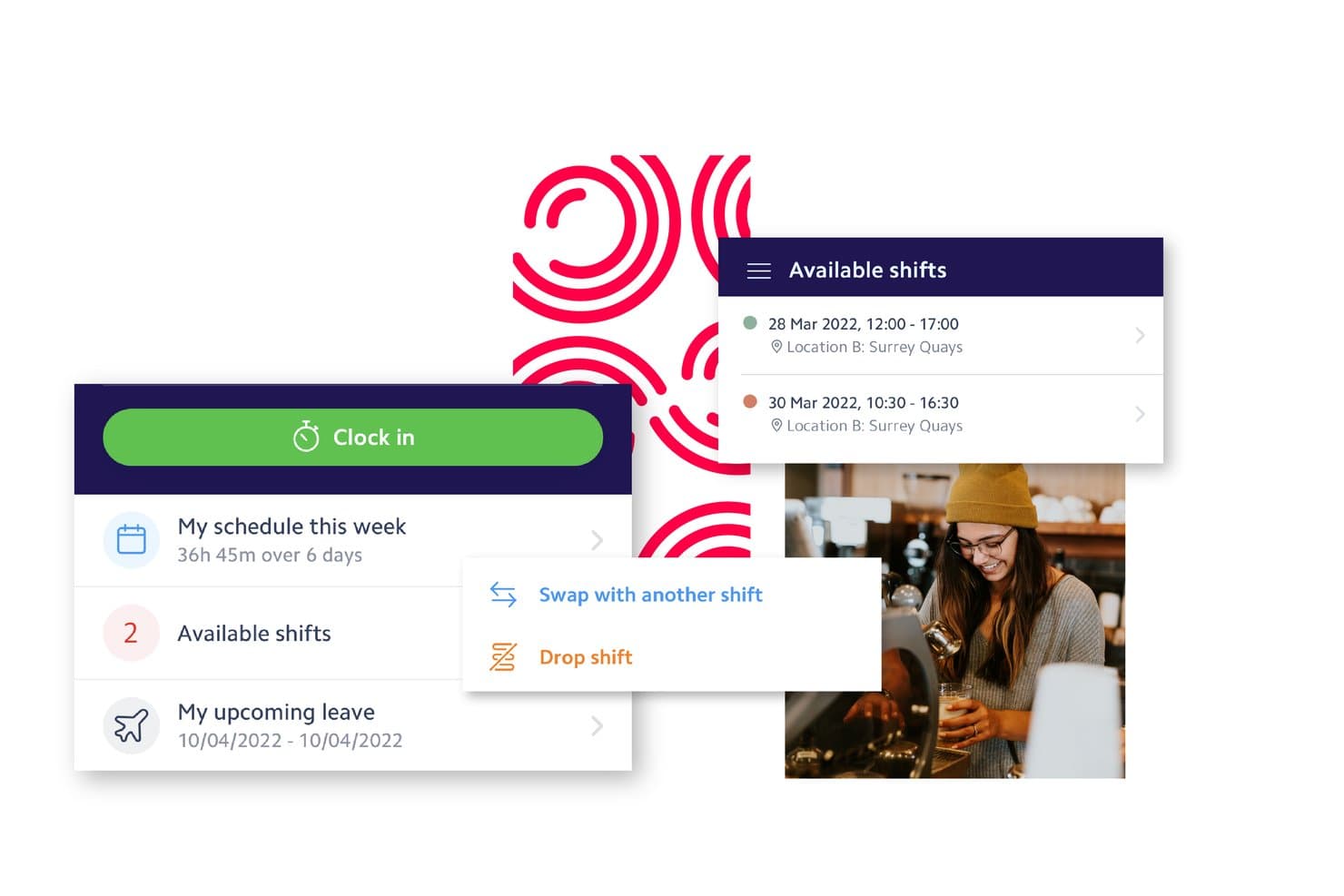
Rotageek's staff app lets employees clock in, view their weekly schedule, pick up open shifts, and swap or drop shifts. Rotageek is a workforce scheduling platform built for multi-site operations that covers rota building, demand forecasting, labor cost tracking, time and attendance, and employee self-service across departments and locations.
Who Is Rotageek Best For?
Rotageek is a strong fit for multi-property hotel operators who need to schedule staff across distinct areas like housekeeping, food and beverage, and front desk from a single platform.
Why I Picked Rotageek
Rotageek earns its spot on my shortlist because of how well it handles scheduling across distinct hotel areas like housekeeping, front desk, and food and beverage from one platform. I like that you can assign positions to specific locations, so a housekeeping rota stays separate from your bar team's without any overlap. The intraday demand view breaks staffing needs into 15-minute intervals by activity, which I find genuinely useful when forecasting cover across a busy hotel with multiple service areas running at once.
Rotageek Key Features
- Schedule compliance analysis: Before publishing a rota, Rotageek checks it against legal requirements, business rules, and fairness principles so you can catch problems early.
- Employee shift swaps: Staff can swap or drop shifts directly in the mobile app, with manager or automatic approval based on skills and availability.
- Timesheet approval workflow: Managers can audit hours worked against scheduled hours and push approved timesheets to payroll via configurable paycodes.
- Labour cost tracking: The schedule costing view shows live labour costs, sales-to-labour ratios, and budget variances as you build or adjust rotas.
Rotageek Integrations
Rotageek has three documented native identity integrations: Microsoft Entra ID, Okta, and Google. It also offers a REST API, webhooks, and CSV exchange through SFTP for custom HR, payroll, or operational connections.
Pros and Cons
Pros:
- Staff self-service handles swaps and leave
- Intraday demand views support service-area coverage
- Separate housekeeping roles by hotel location
Cons:
- Auto-schedules may unevenly distribute weekends
- Clock-in app failures risk attendance gaps
Learn more about Rotageek: Best for quick shift swaps among hotel staff
- 14-day free trial
- From $2.50/user/month

When I Work helps hotels manage shifts, attendance, and team updates. When I Work gives hotel managers a way to coordinate staff schedules and handle last-minute changes with less hassle. The platform is designed for hospitality teams that need to manage hourly workers, track attendance, and communicate quickly. If you’re looking for a scheduling tool that helps keep shifts covered and teams connected, When I Work is worth a look.
Who Is When I Work Best For?
When I Work suits hotel managers and supervisors who need to coordinate hourly staff and enable quick shift changes.
Why I Picked When I Work
I chose When I Work because it makes shift swapping fast and straightforward for hotel teams. The platform lets staff request, offer, and accept shift changes directly from their phones, so managers don’t have to mediate every swap. I also like that notifications and approvals happen in real time, which helps keep schedules accurate and ensures no shift goes uncovered. This focus on quick, self-service shift management is especially useful for hotels with large, dynamic teams and frequent last-minute changes.
When I Work Key Features
Some other features that make When I Work useful for hotel staff scheduling include:
- Time clock with GPS verification: Staff can clock in and out from their phones, with GPS tracking to confirm they are on site.
- Team messaging: Managers and staff can communicate directly within the app, keeping all scheduling conversations in one place.
- Availability and time-off requests: Employees can submit their availability and request time off, which managers can review and approve in the system.
- Auto-scheduling: The tool can automatically generate schedules based on staff availability, roles, and business needs.
When I Work Integrations
Integrations include QuickBooks, Gusto, ADP, Paychex, and Square.
Pros and Cons
Pros:
- Great for casual hotel staff
- High employee adoption rate
- Excellent team chat features
Cons:
- Basic auto-scheduling AI
- No complex union compliance
Learn more about When I Work:
How I Evaluate Hotel Staff Scheduling Software
I split my evaluation into three parts, giving the most weight to core functions: publishing cross-department schedules and tracking hours and labor costs. Next, I consider differentiators like occupancy-based staffing forecasts. Finally, I weigh hotel-specific onboarding, support, and pricing value.
Core Functionality (Table Stakes For This List)
When I'm selecting tools for my list, I score each one on a scale from 0 (does not offer the functionality) to 5 (excels in this area) for each core functionality listed below. I then convert the total into a percentage to help assess each tool's overall fit, with extra weight on any functionalities I’ve deemed essential.
- Shift Scheduling (Essential): I look for ways to build, edit, and publish schedules across roles and shifts, then adjust coverage when occupancy or service needs change.
- Labor Cost Tracking (Essential): I assess whether managers can compare scheduled hours and labor costs with budgets, including visibility by department.
- Staff Self-Service: I check whether staff can view schedules, request time off, set availability, and propose swaps without relying on manual messages.
- Time & Attendance: I look for clock-in/out tools or integrations that help managers compare worked hours with scheduled shifts and spot variances.
- Multi-Property Support: I consider whether schedules can cover departments like housekeeping and front desk, with useful visibility across hotel locations.
- Payroll Connections: I check whether scheduling and hours data can be exported or synced to payroll, reducing re-entry during pay processing.
Once I have a list of tools that meet the criteria, I consider what sets each platform apart.
Differentiating Factors (What Sets Vendors Apart)
Here's how I compare and contrast different vendors:
Standout Features
I evaluate whether a tool can forecast staffing needs using occupancy and booking data, since a platform that auto-generates shift recommendations by department saves hours of manual planning during demand swings. I also check for skills and certification tagging—when a late-night front desk shift requires a specific language or safety credential, the scheduler should surface only qualified staff. Multilingual mobile access matters too, especially for properties with diverse hourly teams who need translated schedules and alerts to stay coordinated across shifts.
Beyond Features
I check whether vendors offer onboarding tailored to hotel operations, like department-specific templates for housekeeping or F&B, since generic setup wastes weeks a seasonal property can't spare. PMS integration matters just as much—scheduling tools that sync with systems like Opera or Infor HMS pull real occupancy data into staffing decisions instead of forcing managers to guess. I also evaluate how licensing scales for seasonal headcount swings, because a resort that triples its staff each summer shouldn't pay flat per-seat rates year-round.
Cum să alegeți software-ul pentru programarea personalului hotelier
Este ușor să vă pierdeți în liste lungi de funcții și structuri complexe de prețuri. Pentru a vă ajuta să rămâneți concentrat pe parcursul procesului dumneavoastră specific de selectare a software-ului, iată o listă de verificare a factorilor de care trebuie să țineți cont:
| Factor | Ce trebuie avut în vedere |
|---|---|
| FactorScalabilitate | Ce trebuie avut în vedereVa putea software-ul să gestioneze numărul actual și viitor de proprietăți, dimensiunea personalului și nevoile departamentelor dumneavoastră? Căutați soluții care pot evolua odată cu afacerea dumneavoastră. |
| FactorIntegrări | Ce trebuie avut în vedereSe conectează instrumentul în mod nativ la sistemele dumneavoastră de salarizare, resurse umane și management al proprietății? Verificați compatibilitatea cu infrastructura tehnologică existentă. |
| FactorPosibilități de personalizare | Ce trebuie avut în vederePuteți adapta regulile de programare, fluxurile de aprobare și notificările pentru a corespunde politicilor unice ale hotelului dumneavoastră și acordurilor sindicale? |
| FactorUșurință în utilizare | Ce trebuie avut în vedereVor adopta managerii și angajații rapid instrumentul? Testați navigarea intuitivă, vizualizările clare ale programului și cerințele minime de instruire. |
| FactorImplementare și integrare inițială | Ce trebuie avut în vedereCât timp va dura să începeți să utilizați soluția? Întrebați despre migrarea datelor, resursele de instruire și asistența oferită în timpul implementării, mai ales dacă aveți mai multe locații. |
| FactorCost | Ce trebuie avut în vedereSunt nivelurile de preț clare și previzibile? Luați în calcul toți utilizatorii, locațiile și eventualele taxe pentru funcții suplimentare, pentru a evita surprizele pentru buget. |
| FactorMăsuri de securitate | Ce trebuie avut în vedereFurnizorul oferă acces bazat pe roluri, criptarea datelor și conformitate cu standardele privind datele din industria ospitalității? Protejarea datelor oaspeților și ale angajaților este esențială. |
| FactorDisponibilitatea asistenței | Ce trebuie avut în vedereEste disponibilă asistență atunci când aveți nevoie de ea, mai ales noaptea, în weekend sau în perioadele de vârf? Confirmați programul și canalele de asistență înainte de a lua o decizie. |
Ce este software-ul pentru programarea personalului hotelier?
Software-ul pentru programarea personalului hotelier este un instrument digital care ajută hotelurile să creeze, să gestioneze și să comunice programele de lucru ale angajaților din departamente precum curățenie, recepție și servicii de alimentație. Aceste platforme automatizează alocarea turelor, monitorizează prezența și gestionează cererile de concediu, facilitând coordonarea necesarului de personal de către manageri, respectarea normelor de muncă și asigurarea unei acoperiri constante în întreaga proprietate.
Funcții
Când selectați software pentru programarea personalului hotelier, urmăriți următoarele funcții esențiale:
- Programarea turelor: Permite managerilor să atribuie, să editeze și să publice turele personalului pentru diferite roluri și departamente, asigurând acoperirea corespunzătoare în permanență.
- Monitorizarea timpului și a prezenței: Înregistrează momentele în care angajații încep și încheie programul, contribuind la monitorizarea punctualității, gestionarea orelor suplimentare și menținerea unor evidențe exacte pentru salarizare.
- Gestionarea schimbului de ture: Permite personalului să solicite și să accepte schimburi de ture în cadrul sistemului, reducând coordonarea manuală și problemele de programare de ultim moment.
- Solicitări privind timpul liber și disponibilitatea: Le permite angajaților să trimită spre analiză și aprobare managerilor solicitări pentru concediu, concediu medical sau orele de lucru preferate.
- Notificări automatizate: Trimite alerte în timp real personalului cu privire la programele noi, modificările turelor sau turele care urmează, minimizând comunicarea deficitară și absențele nemotivate.
- Instrumente pentru conformitatea cu legislația muncii: Îi ajută pe manageri să respecte legislația muncii și regulamentele sindicale, semnalând potențiale încălcări precum orele suplimentare excesive sau pauzele omise.
- Acces mobil: Oferă personalului și managerilor posibilitatea de a vizualiza și gestiona programele de pe smartphone-uri sau tablete, sprijinind operațiunile desfășurate din mers.
- Rapoarte și analize: Generează rapoarte privind costurile cu forța de muncă, tendințele prezenței și eficiența programării, pentru a sprijini luarea deciziilor pe baza datelor.
- Posibilități de integrare: Se conectează la sistemele de salarizare, resurse umane și administrare a proprietății pentru a simplifica sarcinile administrative și a reduce introducerea duplicată a datelor.
Beneficii
Implementarea unui software pentru programarea personalului hotelier oferă mai multe beneficii pentru echipa și afacerea dumneavoastră. Iată câteva dintre acestea:
- Acoperire îmbunătățită a turelor: Programarea automatizată și notificările în timp real contribuie la asigurarea ocupării fiecărei ture și reduc riscul de insuficiență a personalului.
- Reducerea volumului de muncă administrativ: Instrumentele digitale pentru schimburi de ture, solicitări de timp liber și monitorizarea prezenței reduc la minimum sarcinile manuale de programare pentru manageri.
- Respectarea mai riguroasă a legislației muncii: Verificările și alertele integrate privind conformitatea vă ajută să evitați încălcările legislației muncii și ale acordurilor sindicale.
- Comunicare îmbunătățită în cadrul echipei: Mesageria centralizată și accesul mobil mențin personalul informat cu privire la programe, modificări și actualizări importante.
- Procesarea exactă a salariilor: Datele integrate privind timpul și prezența susțin calcule precise ale salariilor și reduc erorile.
- Luarea deciziilor pe baza datelor: Funcțiile de raportare și analiză oferă informații despre costurile cu forța de muncă, tendințele orelor suplimentare și eficiența programării.
- Satisfacție mai mare a angajaților: Funcțiile de autoservire pentru disponibilitate, schimburi de ture și solicitări de timp liber oferă personalului mai mult control și flexibilitate asupra programelor proprii.
Costuri și prețuri
Alegerea unui software pentru programarea personalului hotelier necesită înțelegerea diferitelor modele de preț și planuri disponibile. Costurile variază în funcție de funcții, dimensiunea echipei, suplimente și alți factori. Tabelul de mai jos prezintă pe scurt planurile obișnuite, prețurile medii ale acestora și funcțiile incluse de regulă în soluțiile software pentru programarea personalului hotelier:
Tabel comparativ al planurilor pentru software-ul de programare a personalului hotelier
| Tipul planului | Preț mediu | Funcții obișnuite |
|---|---|---|
| Tipul planuluiPlan gratuit | Preț mediu$0 | Funcții obișnuiteProgramarea de bază a turelor, număr limitat de utilizatori, acces mobil și notificări de bază. |
| Tipul planuluiPlan personal | Preț mediu$2-$5/utilizator/lună | Funcții obișnuiteProgramarea turelor, solicitări de timp liber, aplicație mobilă și raportare de bază. |
| Tipul planuluiPlan pentru afaceri | Preț mediu$6-$10/utilizator/lună | Funcții obișnuiteProgramare avansată, monitorizarea timpului și a prezenței, schimburi de ture, integrări și instrumente pentru conformitate. |
| Tipul planuluiPlan pentru întreprinderi | Preț mediu$11-$25/utilizator/lună | Funcții obișnuiteGestionarea mai multor locații, fluxuri de lucru personalizate, analize avansate, asistență dedicată și acces API. |
Întrebări frecvente despre software-ul de programare a personalului hotelier
Iată câteva răspunsuri la întrebările frecvente despre software-ul de programare a personalului hotelier:
Poate software-ul de programare a personalului hotelier să gestioneze mai multe departamente și locații?
Da, majoritatea soluțiilor software pentru programarea personalului hotelier pot gestiona programele din departamente diferite și din mai multe proprietăți. Căutați soluții cu suport pentru mai multe locații și roluri personalizabile, pentru a vă asigura că puteți coordona necesarul de personal pentru curățenie, recepție, servicii de alimentație și multe altele.
Cum ajută software-ul de programare a personalului hotelier la respectarea legislației muncii?
Software-ul de programare a personalului hotelier include adesea instrumente integrate pentru respectarea legislației, care semnalează posibile încălcări, cum ar fi orele suplimentare excesive sau pauzele omise. Aceste funcții îi ajută pe manageri să respecte legislația locală a muncii și acordurile sindicale, reducând riscul unor penalități costisitoare.
Este posibil ca personalul să schimbe turele sau să solicite zile libere prin intermediul software-ului?
Da, majoritatea platformelor le permit angajaților să solicite schimburi de ture și zile libere direct în sistem. Managerii pot analiza și aproba aceste solicitări, ceea ce simplifică comunicarea și reduce conflictele de program.
Ce integrări ar trebui să caut într-un software de programare a personalului hotelier?
Acordați prioritate integrărilor cu sistemele de salarizare, resurse umane și administrare a proprietății. Aceste conexiuni ajută la automatizarea transferului de date, reduc introducerea manuală a datelor și asigură acuratețea salarizării și a rapoartelor.
Cât timp durează implementarea software-ului de programare a personalului hotelier?
Durata implementării variază, însă multe soluții bazate pe cloud pot fi configurate în câteva zile până la câteva săptămâni. Factori precum migrarea datelor, instruirea personalului și numărul de locații pot afecta calendarul. Căutați furnizori care oferă asistență pentru integrare și resurse de instruire.