

Deputy Review: Pros, Cons, Features and Pricing
I see Deputy as a practical hotel scheduling contender, but shift coverage is only half the decision: this review weighs its features and pricing against the tradeoffs for your team.

We review tools independently, and commissions help fund our testing. See our transparency policy, our methodology, or suggest a tool.
Deputy is a hotel scheduling software platform for creating shift schedules, tracking time, and managing labor rules. I’d consider it when front desk, housekeeping, and service rosters shift with occupancy and you need labor forecasts and wage costs alongside schedule planning. Compared with When I Work, Deputy is a stronger fit if you want forecasting and wage-versus-sales visibility built into scheduling.
Deputy Evaluation Summary
4.6/5
- From $5/user/month (billed annually)
- Up to 31-day free trial + free demo available
Why Trust Our Software Recommendations
6,700+
Reviews
20
Industry experts
16+
Evaluation factors
14
Years
Our team has been testing and reviewing software since 2012. As hospitality leaders ourselves, we know how difficult—and important—it is to choose the right software.
For this guide, we evaluated tools using hands-on testing and independent research, scoring tools using our selection criteria.
Our reviews reflect our human editorial judgment, not a sales pitch.
Deputy Overview
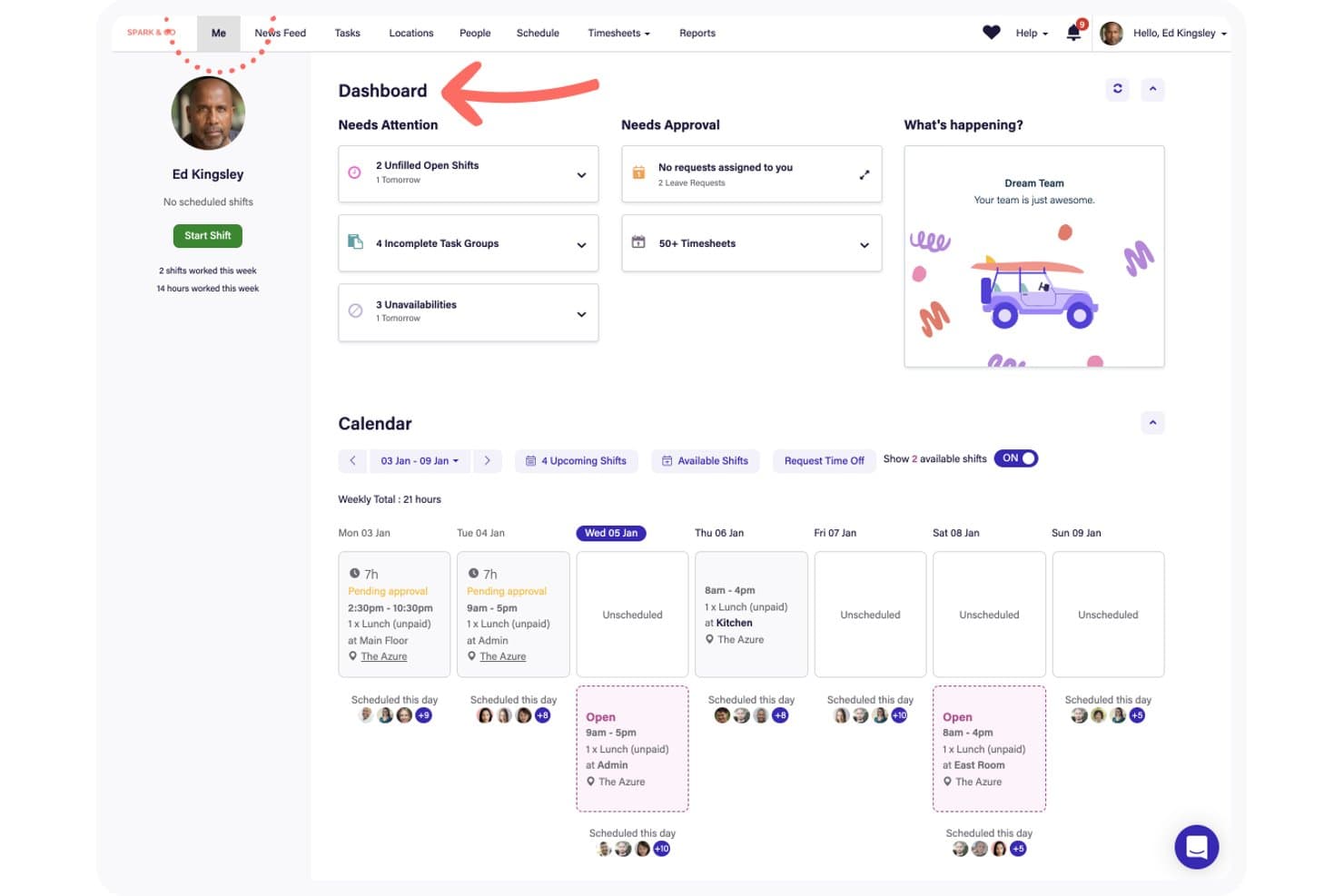
I'd recommend Deputy for hotels needing employee scheduling, labor cost tracking, and demand forecasting. Its shift swapping, GPS time tracking, timesheets, and labor compliance tools support front desk, housekeeping, and service teams. Demand forecasting and Square integrations allow managers to adjust staffing based on demand and labor costs.
Pricing starts at $5 per user per month, with forecasting available for $6.50. Eligible plans offer self-service onboarding and customer success support for flexibility, though minimum monthly charges apply. I'd choose Deputy for workforce management rather than broader hotel operations.
Pros
- Forecasts and wage-to-sales tracking inform labor-costed schedules.
- Reviewers praise reusable rosters, availability flags, and shift swaps.
- GPS clock-ins and live attendance visibility support shift oversight.
Cons
- Deputy lacks hotel-specific occupancy forecasting and labor benchmarks.
- Reviewers report app lag, loading failures, and missed notifications.
- Per-user pricing can make large hotel teams costly.


How We Test & Score Tools
We’ve spent years building, refining, and improving our software testing and scoring system. The rubric is designed to capture the nuances of software selection and what makes a tool effective, focusing on critical aspects of the decision-making process.
Below, you can see exactly how our testing and scoring works across seven criteria. It allows us to provide an unbiased evaluation of the software based on core functionality, standout features, ease of use, onboarding, customer support, integrations, customer reviews, and value for money.
Core Functionality (25% of final scoring)
The starting point of our evaluation is always the core functionality of the tool. Does it have the basic features and functions that a user would expect to see? Are any of those core features locked to higher-tiered pricing plans? At its core, we expect a tool to stand up against the baseline capabilities of its competitors.
Standout Features (25% of final scoring)
Next, we evaluate uncommon standout features that go above and beyond the core functionality typically found in tools of its kind. A high score reflects specialized or unique features that make the product faster, more efficient, or offer additional value to the user.
We also evaluate how easy it is to integrate with other tools typically found in the tech stack to expand the functionality and utility of the software. Tools offering plentiful native integrations, 3rd party connections, and API access to build custom integrations score best.
Ease of Use (10% of final scoring)
We consider how quick and easy it is to execute the tasks defined in the core functionality using the tool. High scoring software is well designed, intuitive to use, offers mobile apps, provides templates, and makes relatively complex tasks seem simple.
Onboarding (10% of final scoring)
We know how important rapid team adoption is for a new platform, so we evaluate how easy it is to learn and use a tool with minimal training. We evaluate how quickly a team member can get set up and start using the tool with no experience. High scoring solutions indicate little or no support is required.
Customer Support (10% of final scoring)
We review how quick and easy it is to get unstuck and find help by phone, live chat, or knowledge base. Tools and companies that provide real-time support score best, while chatbots score worst.
Customer Reviews (10% of final scoring)
Beyond our own testing and evaluation, we consider the net promoter score from current and past customers. We review their likelihood, given the option, to choose the tool again for the core functionality. A high scoring software reflects a high net promoter score from current or past customers.
Value for Money (10% of final scoring)
Lastly, in consideration of all the other criteria, we review the average price of entry level plans against the core features and consider the value of the other evaluation criteria. Software that delivers more, for less, will score higher.
Core Features
Auto-Scheduling
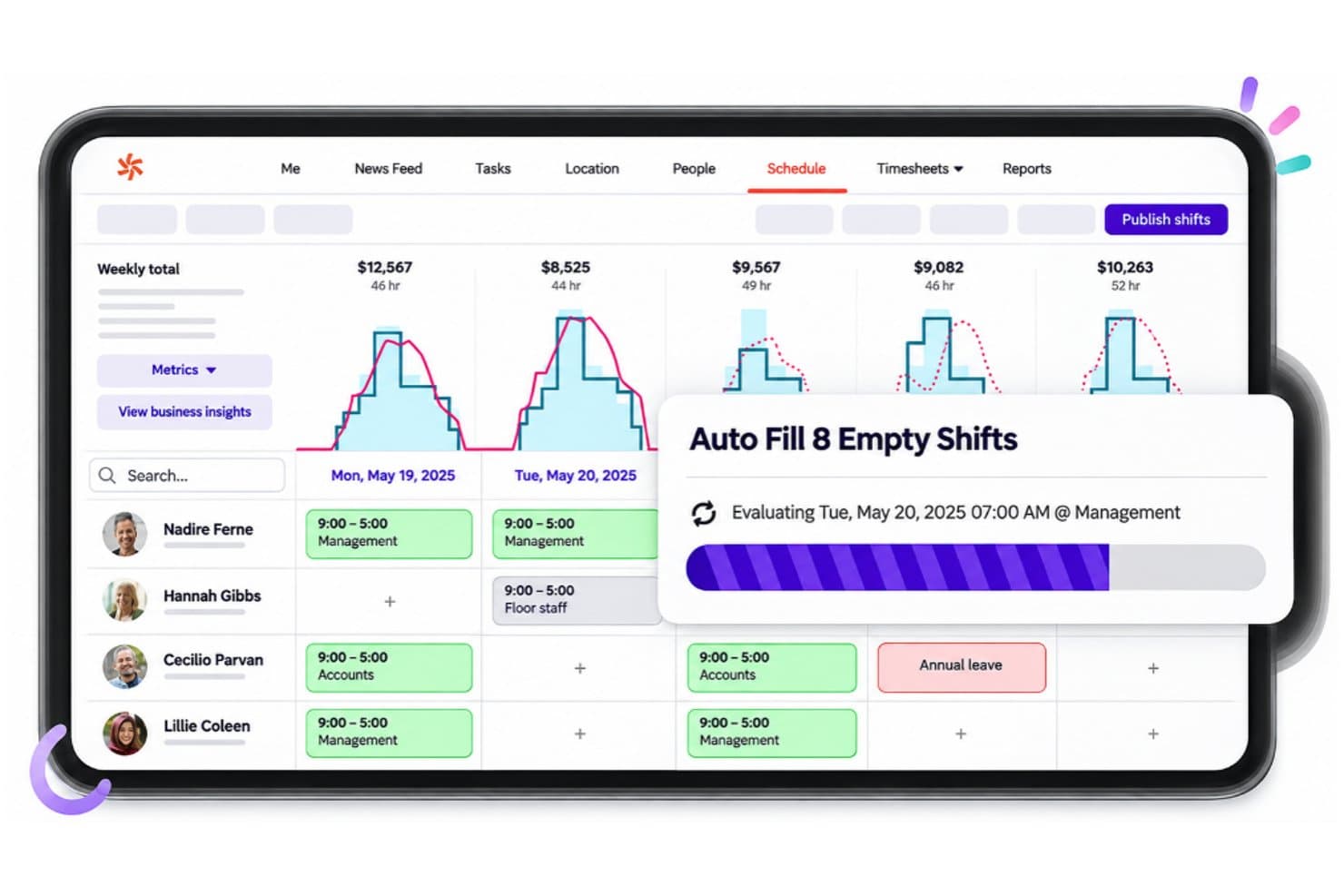
Deputy's auto-scheduling feature fills open shifts based on staffing requirements and employee availability. Managers can use the Auto Fill function to assign employees to vacant shifts, reducing manual scheduling work when preparing weekly hotel staff rosters.
Shift Replacement
Deputy allows managers to find replacement employees when scheduled staff become unavailable. The system displays recommended replacements and provides an option to invite eligible employees to cover an open shift, reducing disruptions to hotel staffing.
Multi-Location Scheduling
Deputy displays employee schedules across different locations through a shared scheduling interface. Managers can review shifts, monitor employee availability, and switch between locations to coordinate staffing across multiple hotel properties or departments.
Micro-Scheduling
Deputy allows managers to divide individual shifts into separate work areas and time blocks. Employees can view their assigned duties, locations, and break times within a single shift, making it possible to coordinate front desk, restaurant, and event staffing throughout the day.
Leave Management
Deputy allows employees to submit leave requests while managers review how absences affect existing schedules. When requested leave overlaps with published shifts, managers can make those shifts available, remove the employee, or retain the assignments before processing the request.
Time-Off Visibility
Deputy's scheduling calendar displays approved time off alongside employee shifts. Managers and employees can view leave periods and adjust calendar settings to show or hide leave and unavailability, making it easier to identify staffing gaps before publishing schedules.
Ease of Use
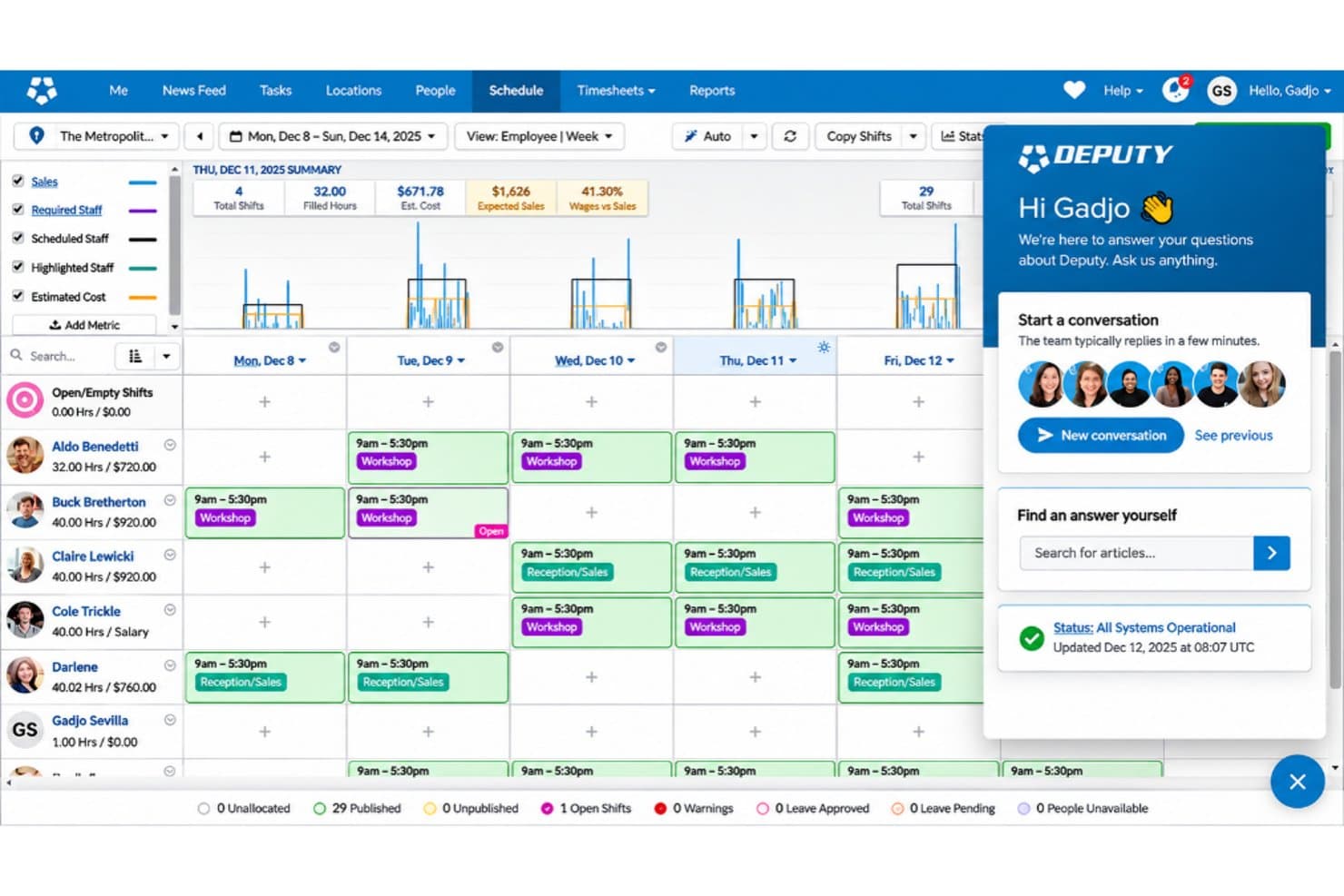
I find Deputy practical for routine hotel scheduling, with employee availability, reusable schedules, labor costs, and shift swaps accessible in one interface. Reviewers praise its straightforward scheduling tools, though some report app lag, loading issues, and inconsistent notifications that can disrupt last-minute shift changes. I'd consider it easier to navigate than broader hotel management platforms, particularly for teams focused on workforce scheduling.
Integrations
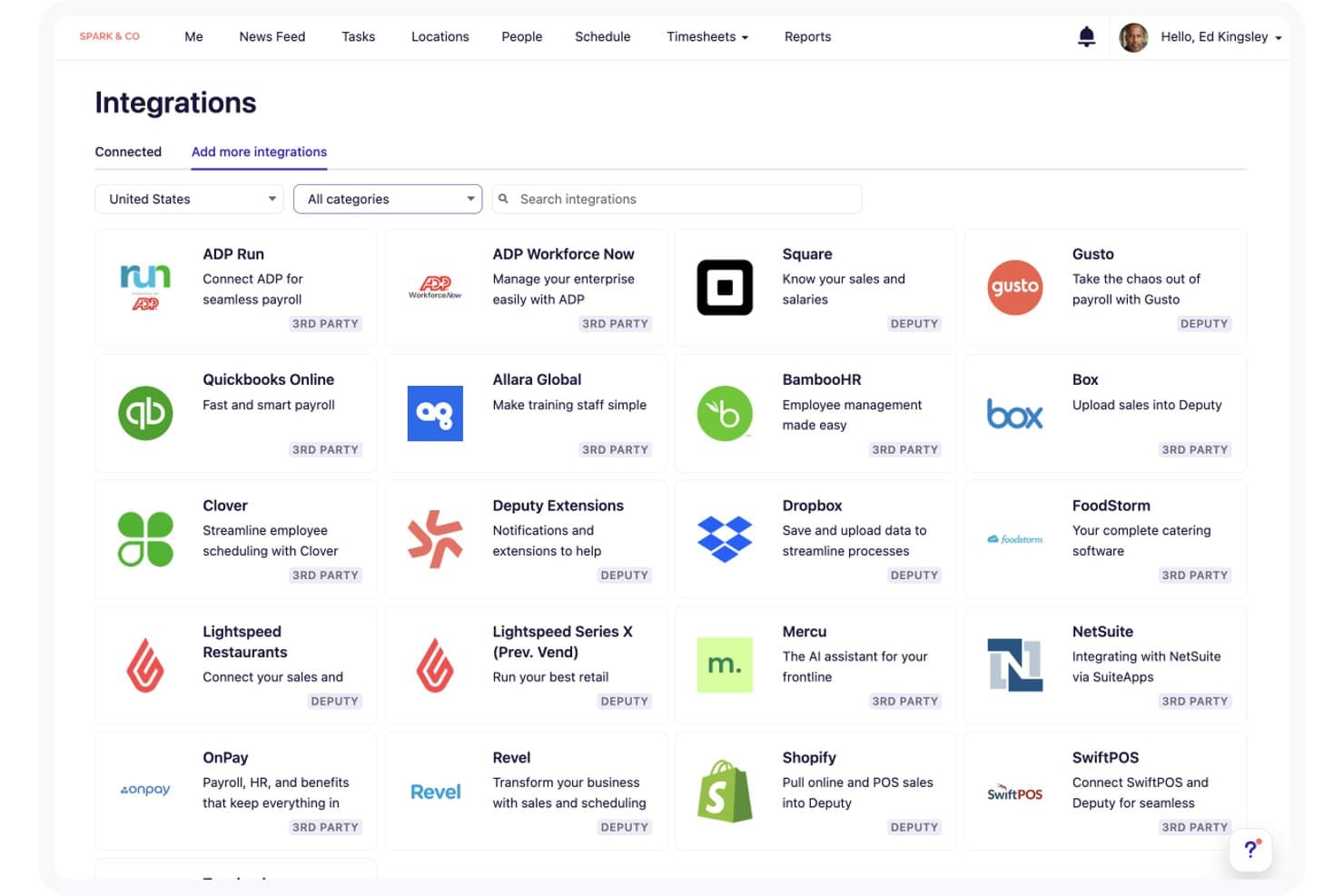
Deputy integrates with hospitality platforms such as FoodStorm, Lightspeed Restaurant, Revel, Clover, Square, SwiftPOS, Epos Now, Flex Catering, Tenzo, TipHaus, and PEISO for POS operations, catering, labor planning, and tip management.
It also connects with ADP Run, ADP Workforce Now, BambooHR, Gusto, QuickBooks Online, Allara Global, Box, Dropbox, Mercu, NetSuite, OnPay, and Shopify. Deputy provides a REST API for custom integrations and supports third-party automation through Zapier and Workato.
Deputy Specs
- 2-Factor Authentication: Yes
- 360 Degree Feedback: No
- API: Yes
- Application Tracking: No
- Attendance Tracking: Yes
- Batch Permissions & Access: No
- Budgeting: Yes
- Calendar Management: Yes
- Dashboard: Yes
- Data Export: Yes
- Data Import: Yes
- Data Visualization: Yes
- Employee Database: Yes
- Employee Engagement: No
- Employee Incentive Management: No
- Employee Onboarding: Yes
- Expense Tracking: No
- External Integrations: Yes
- Feedback Management: Yes
- Forecasting: Yes
- Multi-User: No
- Notifications: Yes
- Onboarding: Yes
- Payroll: No
- Project Management: No
- Scheduling: Yes
- Time Management: Yes
- Timesheets: Yes
- Travel Management: No
- Vacation & Absence Calendar: Yes


