

Å administrere arrangementer på hotell betyr å holde selskapslokaler, blokker med gjesterom, cateringdetaljer, ansatte og utstyr samordnet uten å skape planleggingskonflikter. Den rette programvaren for arrangementsplanlegging kan samle disse bevegelige delene på ett sted og gi teamet ditt bedre oversikt over alle bestillinger.
Jeg har gjennomgått de ledende alternativene for hoteller og serveringssteder, med fokus på verktøy som støtter arrangementsplanlegging, administrasjon av selskapslokaler, BEO-er, gruppebestillinger, koordinering av ressurser og integrasjoner for hotell- og serveringsbransjen.
I denne veiledningen går jeg gjennom den beste programvaren for arrangementsplanlegging for hotellteam, inkludert funksjonene, styrkene og bruksområdene som skiller hvert alternativ fra de andre, slik at du kan velge det som passer best for ditt hotell.
Why Trust Our Software Recommendations
6,700+
Reviews
20
Industry experts
16+
Evaluation factors
14
Years
Our team has been testing and reviewing software since 2012. As hospitality leaders ourselves, we know how difficult—and important—it is to choose the right software.
For this guide, we evaluated tools using hands-on testing and independent research, scoring tools using our selection criteria.
Our reviews reflect our human editorial judgment, not a sales pitch.
Sammenligningstabell: Programvare for arrangementsplanlegging
Denne sammenligningstabellen oppsummerer prisdetaljene for mine utvalgte programmer for arrangementsplanlegging.
| Tool | Best For | Trial Info | Price | ||
|---|---|---|---|---|---|
| 1 | Best with automated BEO and proposal generation | 14-day free trial | From $199/month (billed annually) | Website | |
| 2 | Best with interactive 3D event space diagramming | Free demo available | Pricing upon request | Website | |
| 3 | Best for venue-wide shared scheduling dashboards | Free demo available | Pricing upon request | Website | |
| 4 | Best with AI-powered event management tools | Free demo available | From $99/month (billed annually) | Website | |
| 5 | Best with unlimited user access for event teams | Free demo available | Pricing upon request | Website | |
| 6 | Best with multi-property chain management | Free trial + free demo available | From $249/month (billed annually) | Website | |
| 7 | Best with Salesforce-powered group sales | Free demo available | Pricing upon request | Website | |
| 8 | Best with AI inquiry and booking automation | Free demo available | Pricing upon request | Website | |
| 9 | Best with instant live event space availability | Free demo available | Pricing upon request | Website | |
| 10 | Best with integrated proposals and payments | Free demo available | From $199/month | Website |


Anmeldelser av den beste programvaren for arrangementsplanlegging
Nedenfor finner du mine detaljerte sammendrag av de beste programmene for arrangementsplanlegging som kom med på kortlisten. Anmeldelsene mine gir en detaljert gjennomgang av funksjonene, de beste bruksområdene og egenskapene til hver plattform, slik at du kan finne den beste løsningen for deg.
 Best with automated BEO and proposal generation
- 14-day free trial
- From $199/month (billed annually)
Visit WebsiteCustomer Rating:4.8/5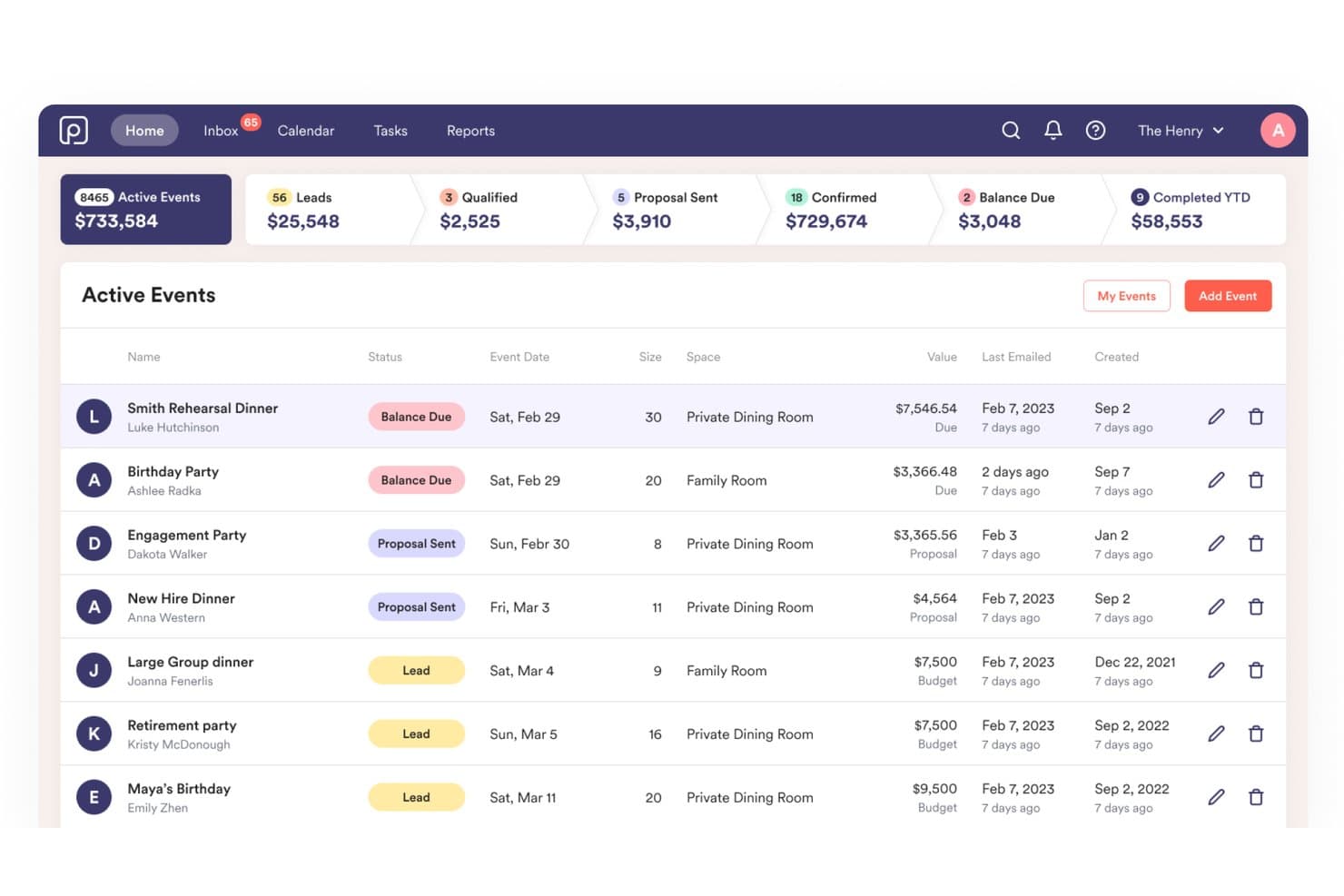
Perfect Venue displays an active events dashboard with pipeline metrics, event statuses, and booking details for venue managers. Perfect Venue is a private event management platform built for restaurants and event venues, combining a central booking calendar, automated BEO generation, proposal tools, payment processing, and guest communication in one system.
Who Is Perfect Venue Best For?
Perfect Venue is a strong fit for independent restaurants, breweries, and standalone event venues managing private dining and hosted events.
Why I Picked Perfect Venue
Perfect Venue earns its spot on my shortlist because of how it handles document generation. When a booking comes in, it auto-builds the BEO, including menus, timing, and staffing, and sends a branded proposal to the guest without me touching a template. The Staff BEO feature then distributes event details directly to kitchen and floor teams. I also like that clients can review, sign, and pay via the Guest Portal without any back-and-forth.
Perfect Venue Key Features
- Centralized event calendar: View all event bookings, inquiries, and availability across multiple venues in one calendar.
- Express Book guest booking flow: Let guests view availability, select menu items, and pay deposits directly online.
- Mobile event management app: Manage bookings, update event details, and access guest information on iOS devices.
- Team task assignment: Assign, track, and notify staff of event-related tasks and deadlines in real time.
Perfect Venue Integrations
Perfect Venue offers native integrations with Stripe, Square, HubSpot, Mailchimp, 7shifts, and Tock, and connects with Zapier. An API is available for custom integrations.
Pros and Cons
Pros:
- Staff BEO distribution keeps kitchen teams aligned
- Guest Portal enables self-service deposits and signatures
- Automated BEO generation saves significant admin time
Cons:
- No built-in floorplan or room diagramming
- Limited functionality for large hotel properties
Learn more about Perfect Venue: Best with interactive 3D event space diagramming
- Free demo available
- Pricing upon request
Visit WebsiteCustomer Rating:4.3/5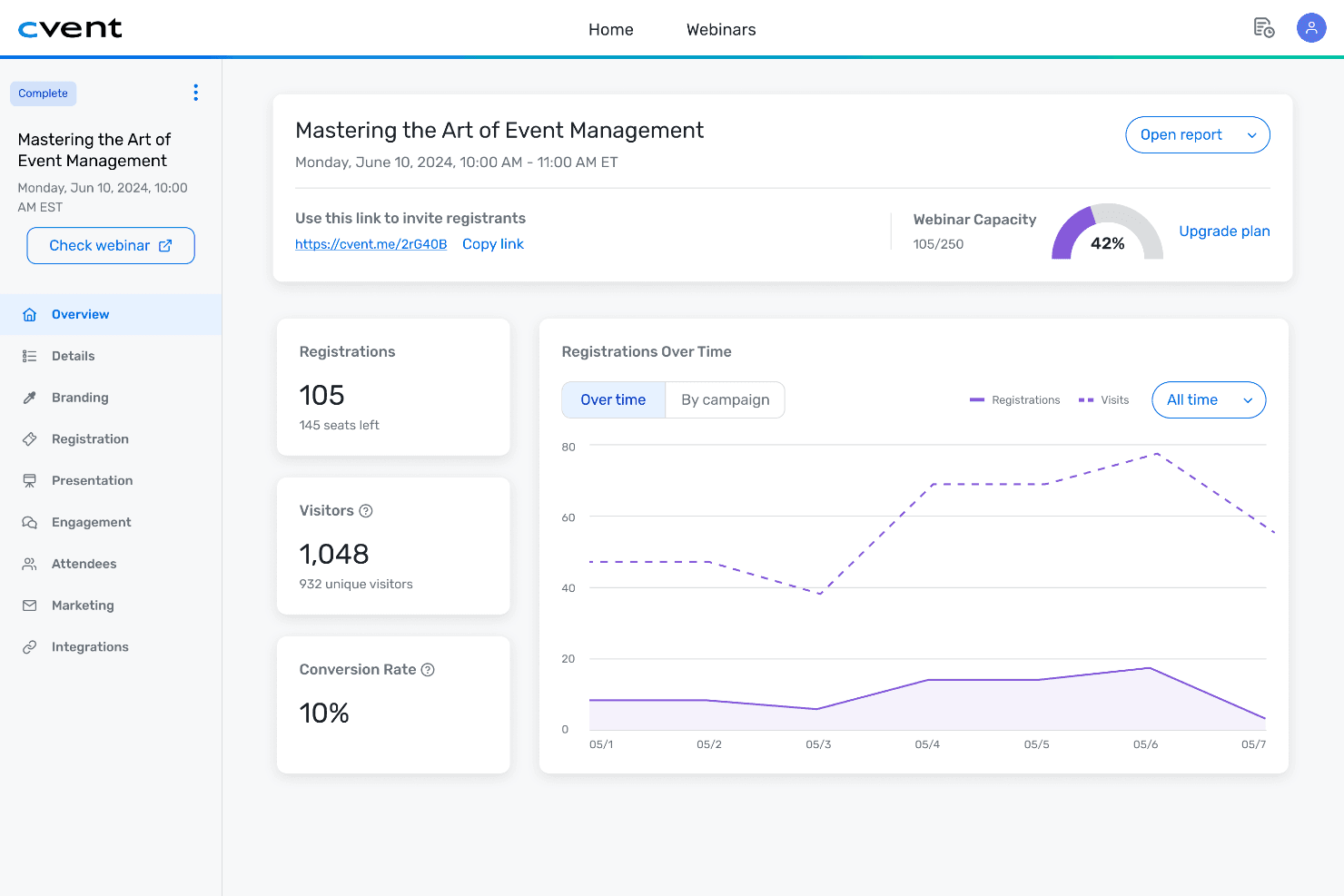
Cvent centralizes event data, metrics, and attendee insights in one dashboard. Cvent is an end-to-end event management platform covering registration, venue sourcing, group room blocks, space diagramming, attendee engagement, and post-event reporting for in-person, virtual, and hybrid events.
Who Is Cvent Best For?
Cvent suits enterprise hotels, conference centers, and large corporate event teams managing high volumes of complex, multi-space events.
Why I Picked Cvent
Cvent earns its spot on my shortlist because no other event scheduling platform comes close on 3D space visualization. I love that you can drag a BEO directly into Cvent Event Diagramming and CventIQ AI instantly extracts all the setup details, skipping manual data entry entirely. From there, the photo-realistic 3D walkthrough lets me share a link with clients so they can see the exact room configuration before a single chair moves.
Cvent Key Features
- BEO extraction with CventIQ AI: Drag and drop BEOs directly into the platform to have event details automatically extracted.
- Resource assignment and inventory tracking: Assign staff, AV, and equipment to each event with real-time inventory management.
- PMS and CRM integrations: Connects with leading hotel PMS and sales platforms to sync events, bookings, and attendee records.
- Multi-user collaboration and commenting: Enable simultaneous edits, real-time notifications, and internal or external team communication on any event workspace.
Cvent Integrations
Cvent offers native integrations with Salesforce, HubSpot, Marketo, Oracle Hospitality OPERA, Amadeus Delphi, and Oracle Sales Cloud. An API is available for custom integrations.
Pros and Cons
Pros:
- Client portals support real-time proposal approvals
- AI extracts BEO details automatically
- Industry-leading 3D floorplan diagramming tools
Cons:
- Reporting customization requires additional configuration
- Implementation takes significantly longer than competitors
 Best for venue-wide shared scheduling dashboards
- Free demo available
- Pricing upon request
Visit WebsiteCustomer Rating:4.4/5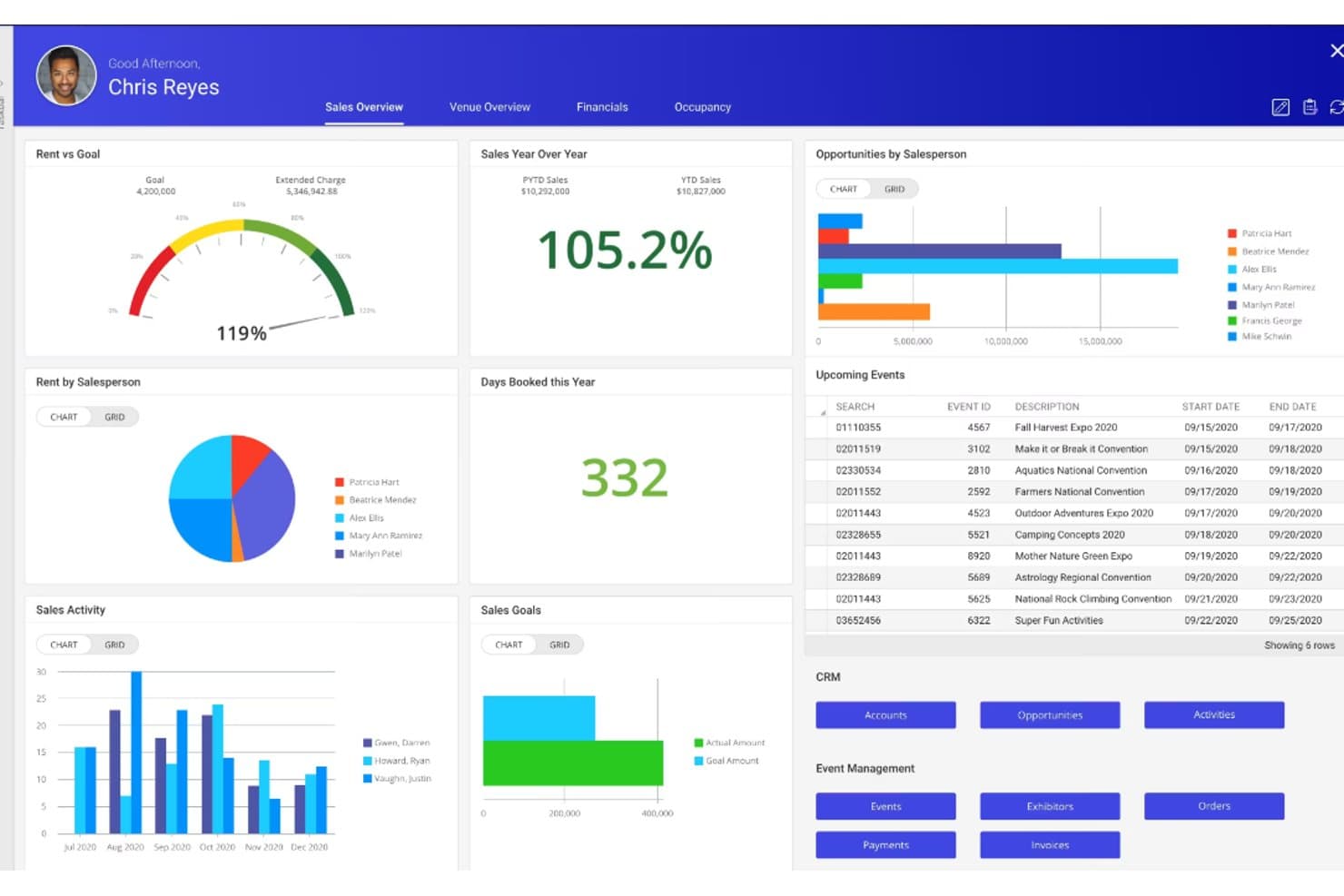
Momentus Technologies offers a comprehensive sales dashboard with rent tracking, salesperson performance, upcoming events, and CRM tools. Momentus Technologies is a venue and event management platform that combines space booking, CRM, catering management, event order generation, operations scheduling, and multi-space calendar management for complex venue environments.
Who Is Momentus Technologies Best For?
It's a strong fit for conference services directors and catering sales teams managing high-volume events across convention centers, arenas, stadiums, or university campuses.
Why I Picked Momentus Technologies
Momentus Technologies earns its spot on my shortlist because no other platform gives multi-department venue teams a shared calendar view quite like this. I particularly like the Avails Calendar, which shows real-time space availability across every bookable area at once, and the custom Operations View, which keeps catering, AV, and floor crews on the same event timeline. With unlimited users on one live dashboard, I've found it eliminates the version-control chaos that typically breaks down between sales and operations teams.
Momentus Technologies Key Features
- 2D and 3D room diagramming: Design detailed floorplans and seating layouts for every event space.
- End-to-end group booking management: Handle proposals, contracts, deposits, and revenue forecasting within a single platform.
- Event order creation and editing: Generate, customize, and distribute comprehensive event orders detailing catering and setup needs.
- Open API for system integrations: Connect with other workplace tools or build custom integrations for complex hotel operations.
Momentus Technologies Integrations
Momentus Technologies offers native integrations with DocuSign, Tessitura, EventDraw, Microsoft Outlook, Mailchimp, and WeTrack. An open API is available for custom integrations. Native PMS or POS integrations are not documented.
Pros and Cons
Pros:
- Built-in 3D floorplan and room diagramming
- Detailed event orders distributed to multiple departments
- Real-time availability across all venue spaces
Cons:
- Steeper implementation curve for smaller properties
- No documented native PMS integration
Learn more about Momentus Technologies : Best with AI-powered event management tools
- Free demo available
- From $99/month (billed annually)
Visit WebsiteCustomer Rating:4.1/5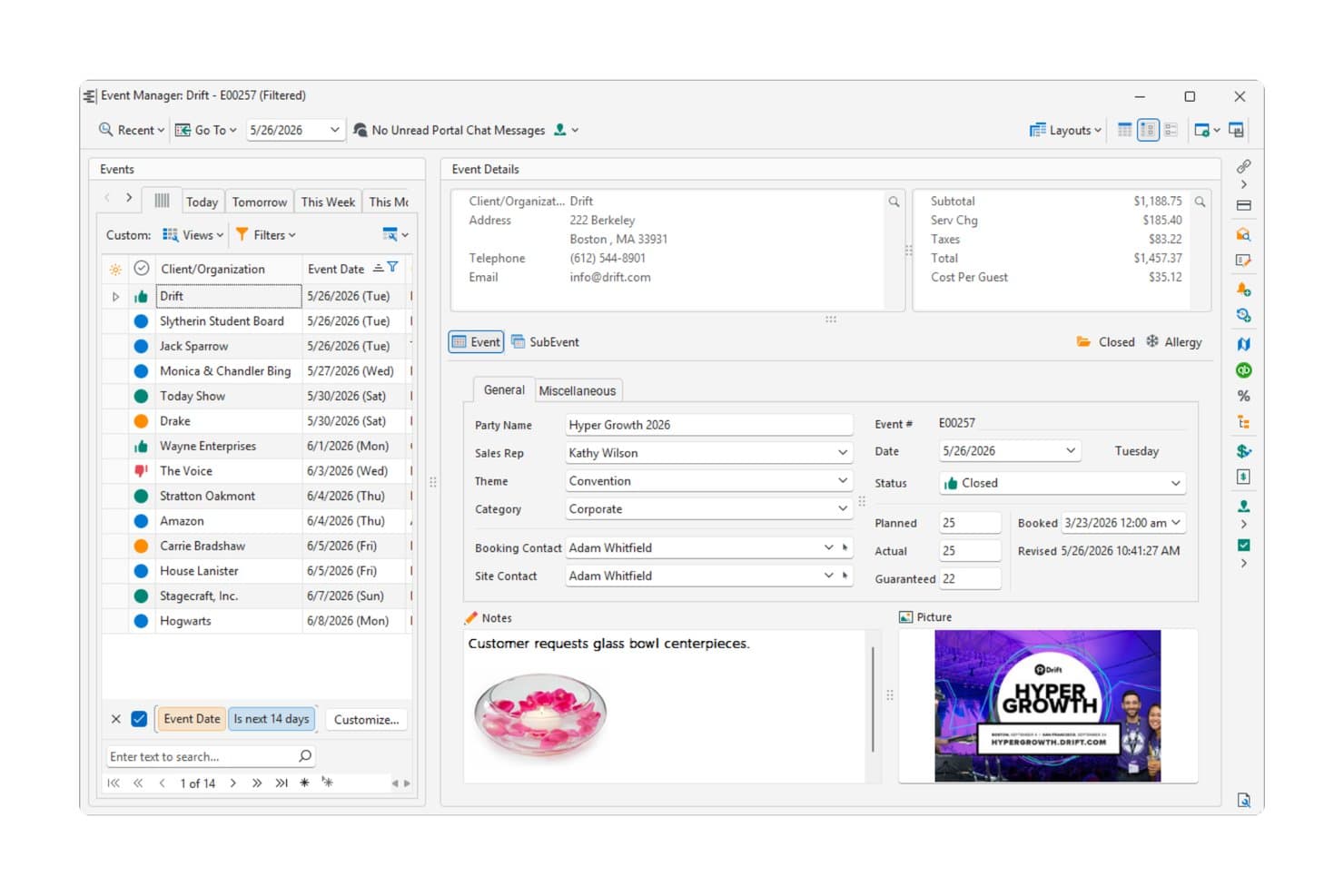
Caterease displays a detailed event management dashboard with client info, financials, and event notes for a corporate convention. Caterease is a catering and event management platform built around wizard-driven booking, BEO generation, menu management, staffing, and AI-powered reporting through its Horizon Hub.
Who Is Caterease Best For?
Caterease is a strong fit for catering teams and hotel F&B operations managing high volumes of events with complex menu, staffing, and billing requirements.
Why I Picked Caterease
I picked Caterease as one of the best because its Horizon Hub genuinely changes how event data is accessed day-to-day. The Cai Assistant lets me pull event details, client records, and reports using plain-language queries instead of navigating nested menus. Smart Reports generates on-demand analytics without manual setup, and Industry Trends benchmarks my operation against anonymized data from across the Caterease customer base, which is context I can't easily get elsewhere.
Caterease Key Features
- Dynamic event booking wizard: Guides users through capturing all required event, client, and venue details with conditional fields for each event type.
- Customizable BEO and proposal templates: Lets you design and generate tailored Banquet Event Orders, contracts, and proposals for each client or function.
- Integrated kitchen display system: Provides a live, color-coded view of menu items and prep changes to the back-of-house team for each event.
- Multi-space calendar with grouping: Displays bookings and status across multiple function spaces, allowing quick visual review and scheduling.
Caterease Integrations
Caterease offers native integrations with QuickBooks, Outlook, Google Calendar, Mailchimp, Constant Contact, Salesforce, and DocuSign. An API is available for custom integrations.
Pros and Cons
Pros:
- Highly detailed BEO generation and customization
- Wizard-driven booking captures all event details quickly
- AI assistant queries events using plain language
Cons:
- Mobile experience lags behind desktop functionality
- Interface feels dated compared to newer platforms
Learn more about Caterease: Best with unlimited user access for event teams
- Free demo available
- Pricing upon request
Visit WebsiteCustomer Rating:4.7/5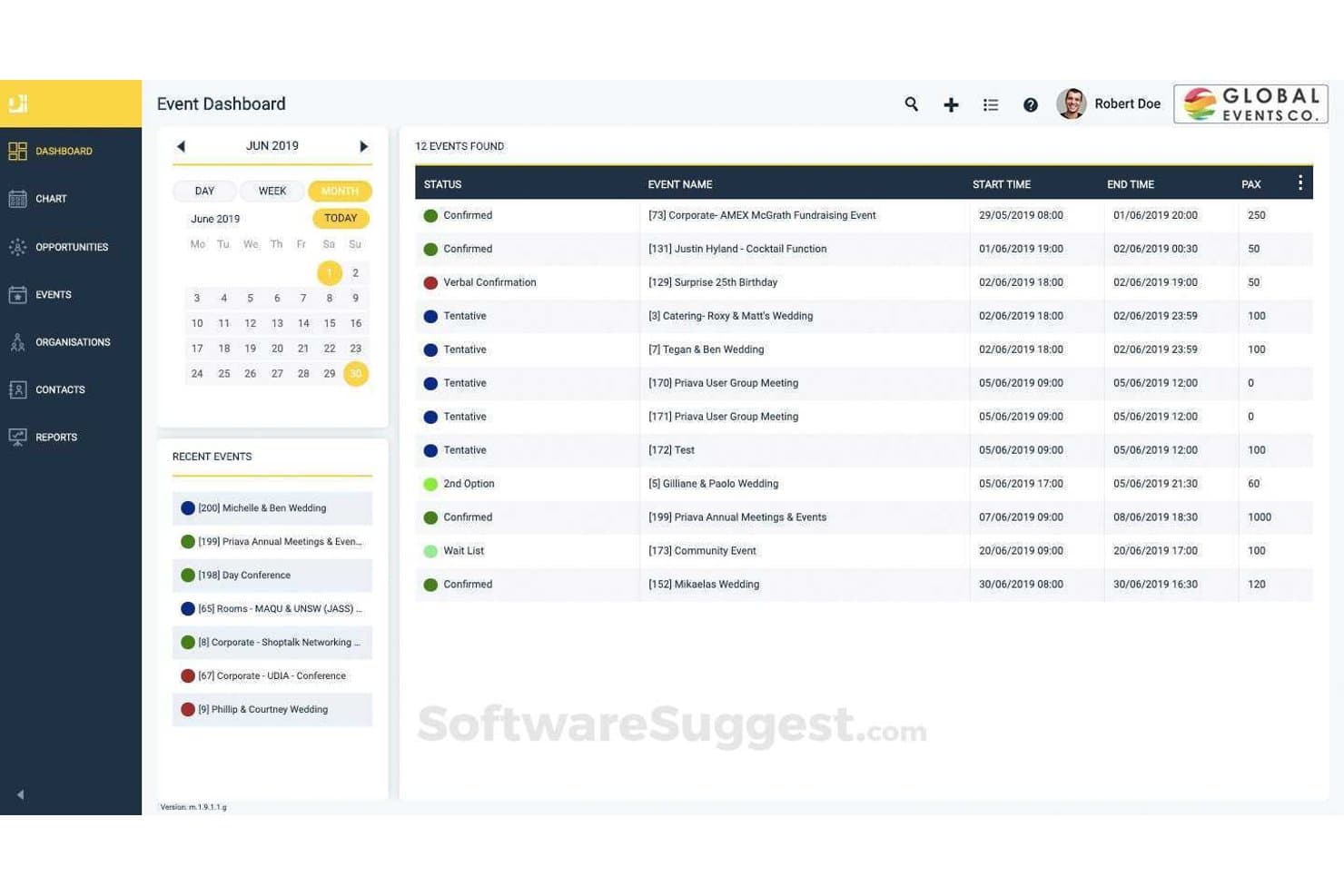
Priava offers an event dashboard with a calendar view, status tracking, and a detailed list of scheduled events including start/end times and attendee counts. Priava is a cloud-based venue booking and event management platform covering space scheduling, catering coordination, resource assignment, CRM, and conflict detection across multiple venue types.
Who Is Priava Best For?
Priava fits mid-to-large venues—conference centres, performing arts spaces, universities, and arenas—managing high event volumes across multiple spaces simultaneously.
Why I Picked Priava
I've included Priava in my top picks because its unlimited user model means every coordinator, catering manager, and operations lead works in the same system without escalating licence costs. I particularly like how the platform handles simultaneous multi-venue scheduling with built-in conflict checks, so two team members can't accidentally double-book the same space. Shared task management and service order tracking keep every department aligned on a single event record.
Priava Key Features
- Customizable event document templates: Generate proposals, contracts, and client-facing materials tailored to each event and venue.
- Native CRM for lead and inquiry management: Track and manage event inquiries, client interactions, and sales opportunities from within the platform.
- Resource availability and services tracking: Assign AV, catering, and logistical resources to bookings while monitoring inventory and support needs.
- Detailed multi-venue reporting: Produce operational and financial reports across multiple spaces or properties for forecasting and performance tracking.
Priava Integrations
Priava offers native integrations with Salesforce, NetSuite, HubSpot, MailChimp, SAP, and Microsoft Outlook. An API is available for custom integrations.
Pros and Cons
Pros:
- Manages catering, resources, and spaces together
- Real-time conflict detection across multiple venues
- Unlimited users across the whole event team
Cons:
- Setup requires time for complex configurations
- Mobile access is limited for floor staff
Learn more about Priava: Best with multi-property chain management
- Free trial + free demo available
- From $249/month (billed annually)
Visit WebsiteCustomer Rating:4.9/5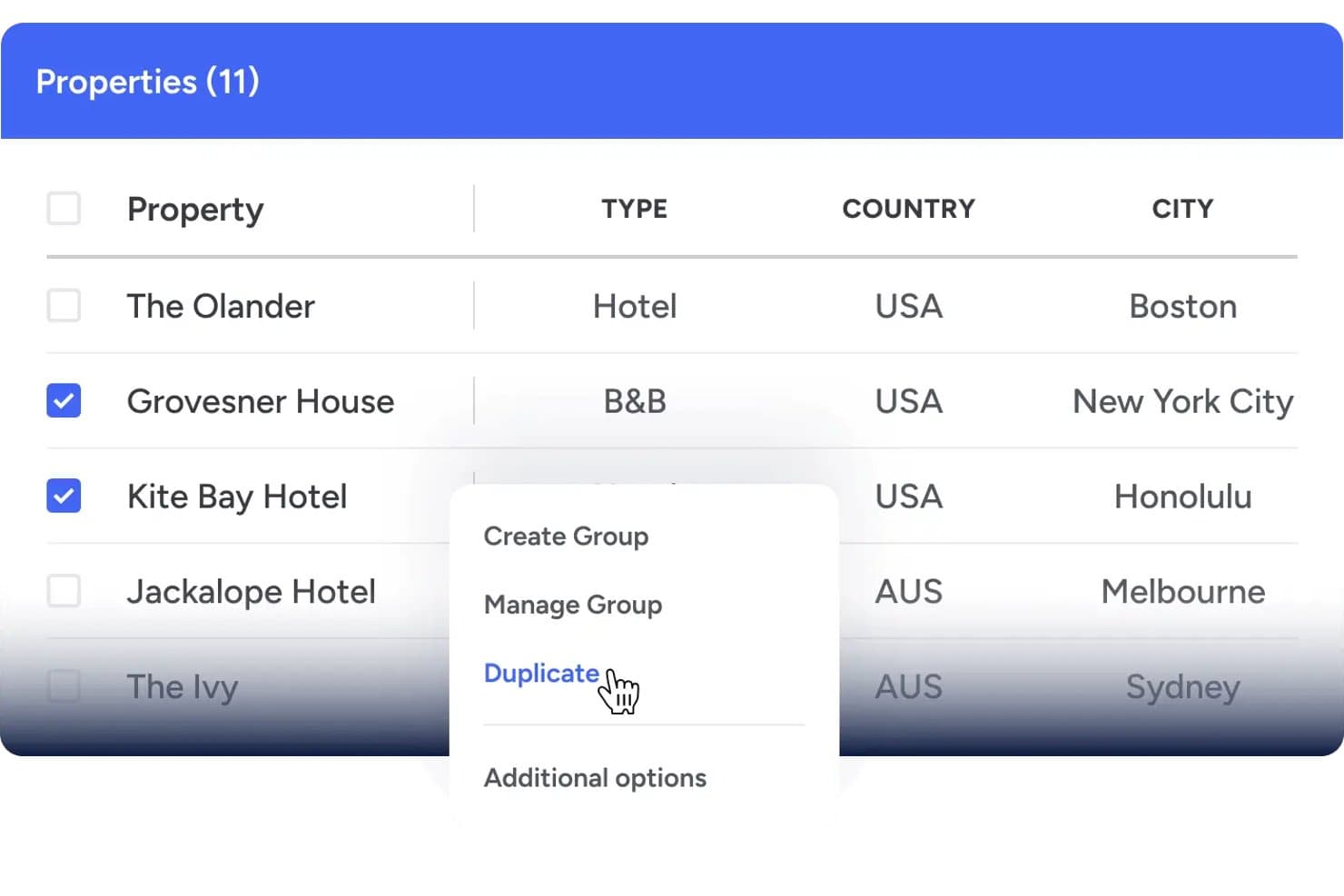
Event Temple offers a multi-property management interface that allows users to select and duplicate properties across different locations. Event Temple is a hospitality-focused event scheduling and sales CRM platform that manages group bookings, catering contracts, BEOs, e-proposals, and function space calendars for hotels and venues.
Who Is Event Temple Best For?
It's a strong fit for catering and events teams at hotel chains and multi-property groups that need centralized visibility across locations.
Why I Picked Event Temple
Event Temple earns its spot on my shortlist because its Chain Management module solves something most event scheduling tools ignore: coordinating group sales and bookings across multiple properties from one place. I especially like the chain dashboard, which lets national sales teams toggle between properties and access a shared view of accounts and contacts to spot cross-selling opportunities. The multi-property roll-up reports make portfolio-level performance tracking genuinely practical.
Event Temple Key Features
- Customizable BEO templates: Lets teams create, edit, and distribute Banquet Event Orders tailored for each event.
- Integrated proposal and e-signature workflows: Generates digital proposals and contracts that clients can review and sign online.
- Visual function space calendar: Offers a drag-and-drop calendar for booking and managing multiple event spaces simultaneously.
- Opera Cloud PMS integration: Enables real-time syncing of event bookings and guest room blocks with leading property management systems.
Event Temple Integrations
Event Temple offers native integrations with Opera Cloud PMS, Salesforce, Mailchimp, Tripleseat, Duetto, For-Sight CRM, GuestRevu, and Zapier. An API is also available for custom integrations.
Pros and Cons
Pros:
- BEO generation with automated distribution workflows
- Dedicated hospitality CRM built for hotels
- Strong multi-property chain management dashboard
Cons:
- Reporting customization options are somewhat restricted
- Limited floorplan diagramming compared to competitors
Learn more about Event Temple: Best with Salesforce-powered group sales
- Free demo available
- Pricing upon request
Visit WebsiteCustomer Rating:4.7/5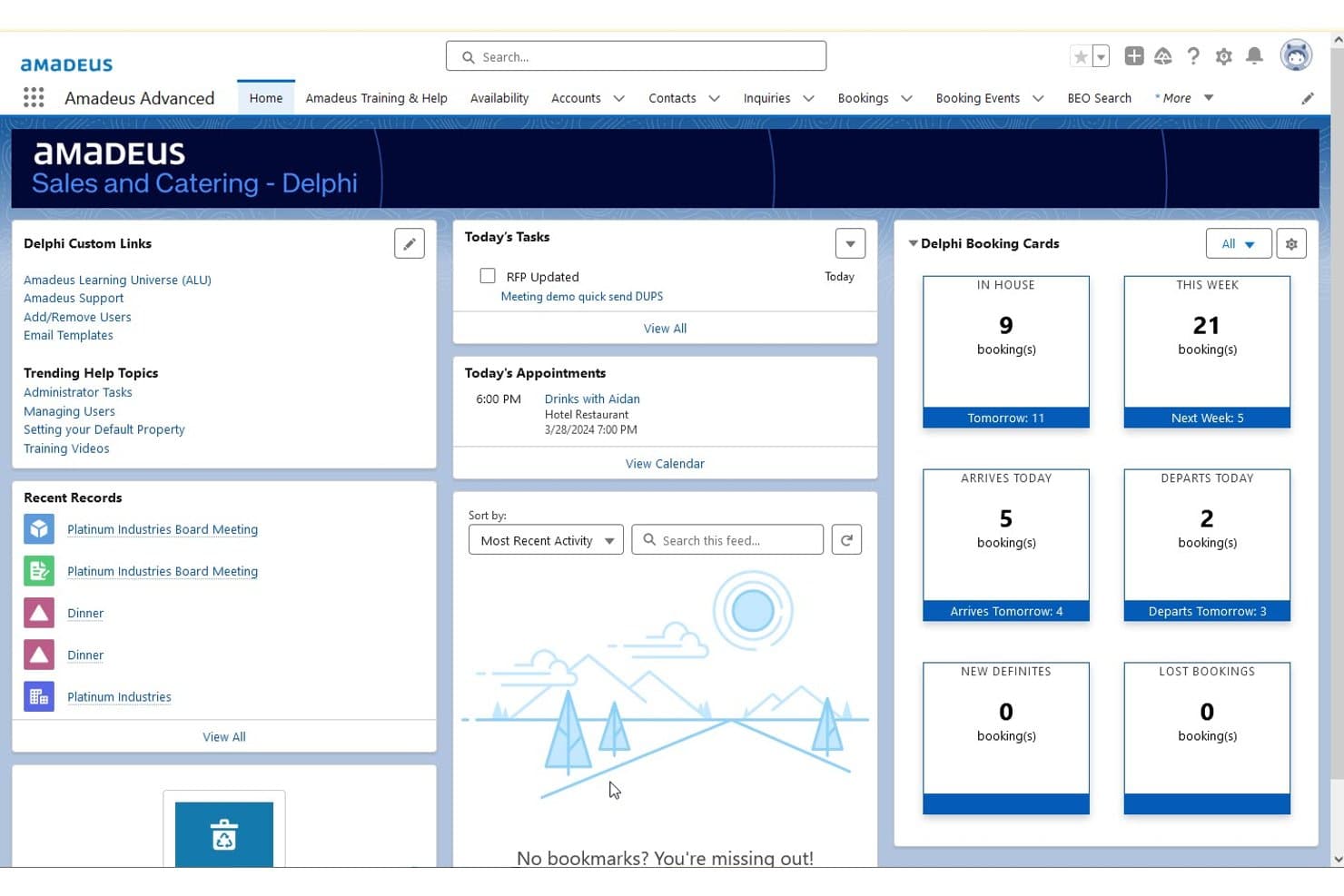
Amadeus Delphi offers a centralized home dashboard displaying booking cards, today's tasks, appointments, and recent records for event and catering management. Amadeus Delphi is a hotel sales and catering management platform built on Salesforce that handles group bookings, BEO generation, function space scheduling, and catering contracts across single and multi-property portfolios.
Who Is Amadeus Delphi Best For?
Delphi is a strong fit for full-service and multi-property hotels with dedicated catering sales teams managing high volumes of group and event business.
Why I Picked Amadeus Delphi
Amadeus Delphi earns its spot on my shortlist because it's the only hotel event scheduling platform built natively on Salesforce, which means group sales pipelines, contract tracking, and client follow-ups all live in one CRM. I particularly like the 3-click proposal and contract generation, which keeps sales teams moving fast on inbound group leads. The automated BEO workflow also ties catering, setup, and staffing details directly to each booking, so nothing slips between departments.
Amadeus Delphi Key Features
- 3D floorplan diagramming: Design and visualize event space layouts to scale with interactive floorplans.
- Mobile BEO access: Give banquet, kitchen, and operations staff real-time BEO and changes access on mobile devices.
- Lead and inquiry routing: Automatically distribute meeting and group leads from major sales channels to assigned managers.
- Multi-property portfolio management: Manage shared inventory, templates, and reporting across multiple properties from one system.
Amadeus Delphi Integrations
Amadeus Delphi offers native integrations with StayNTouch PMS, IDeaS G3 RMS, Cvent, Sertifi, Canary, and MeetingPackage, and provides an API for custom integrations.
Pros and Cons
Pros:
- Supports multi-property portfolio management in one system
- Automated BEOs distributed directly to each department
- Native Salesforce CRM powers group sales pipeline
Cons:
- Interface feels dated vs. newer competitors
- Implementation takes months for large properties
Learn more about Amadeus Delphi: Best with AI inquiry and booking automation
- Free demo available
- Pricing upon request
Visit WebsiteCustomer Rating:4.5/5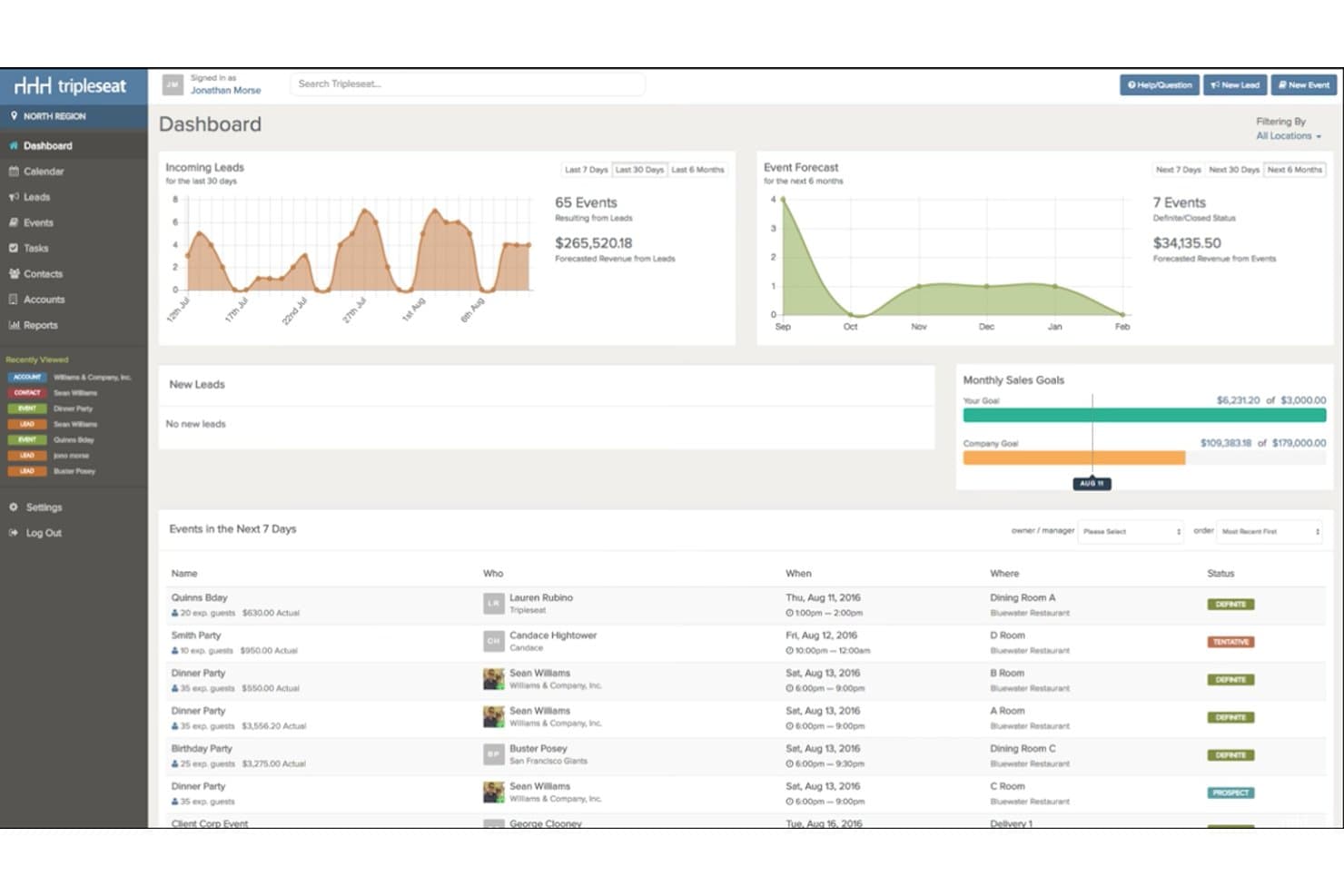
Tripleseat offers a centralized dashboard displaying incoming leads, event forecasts, monthly sales goals, and upcoming events in a single view. Tripleseat is a hospitality-focused event sales and management platform that handles function space booking, BEO generation, catering proposals, group contracts, and multi-venue calendar coordination for hotels, restaurants, and unique venues.
Who Is Tripleseat Best For?
Tripleseat is a strong fit for hotel event teams, catering managers, and multi-venue operators who need a purpose-built platform to manage the full event sales cycle.
Why I Picked Tripleseat
I've included Tripleseat in my top picks because Tripleseat Intelligence handles the inquiry lifecycle without manual intervention: instant auto-responses acknowledge new leads, AI drafts contracts from event details, and automated nudges trigger when a proposal sits unsigned too long. I also like Direct Book, which lets guests confirm space reservations 24/7 without a phone call. In practice, my team is converting inquiries that would otherwise stall mid-pipeline.
Tripleseat Key Features
- 2D and 3D floorplan diagramming: Design detailed event layouts with drag-and-drop tools for room setup and seating.
- Banquet event order (BEO) generation: Create, customize, and distribute BEOs outlining menus, timing, and staffing for each event.
- Native PMS and POS integrations: Connect event details with leading hotel property management and point-of-sale systems for seamless operations.
- Multi-space visual calendar: Book, block, and manage availability across multiple venues and function spaces in a centralized dashboard.
Tripleseat Integrations
Tripleseat offers native integrations with GoTab POS, OpenTable, SevenRooms, CardConnect, DoorDash for Merchants, Outlook, Google Calendar, and Prismm. An API is available for custom integrations.
Pros and Cons
Pros:
- Strong BEO creation and distribution tools
- AI automates inquiry responses and follow-ups
- Dedicated event sales pipeline built in
Cons:
- Steep setup time for multi-property configurations
- Reporting customization options are limited
Learn more about Tripleseat: 9Best with instant live event space availability
iVvy
- Free demo available
- Pricing upon request
Visit WebsiteCustomer Rating:4.7/5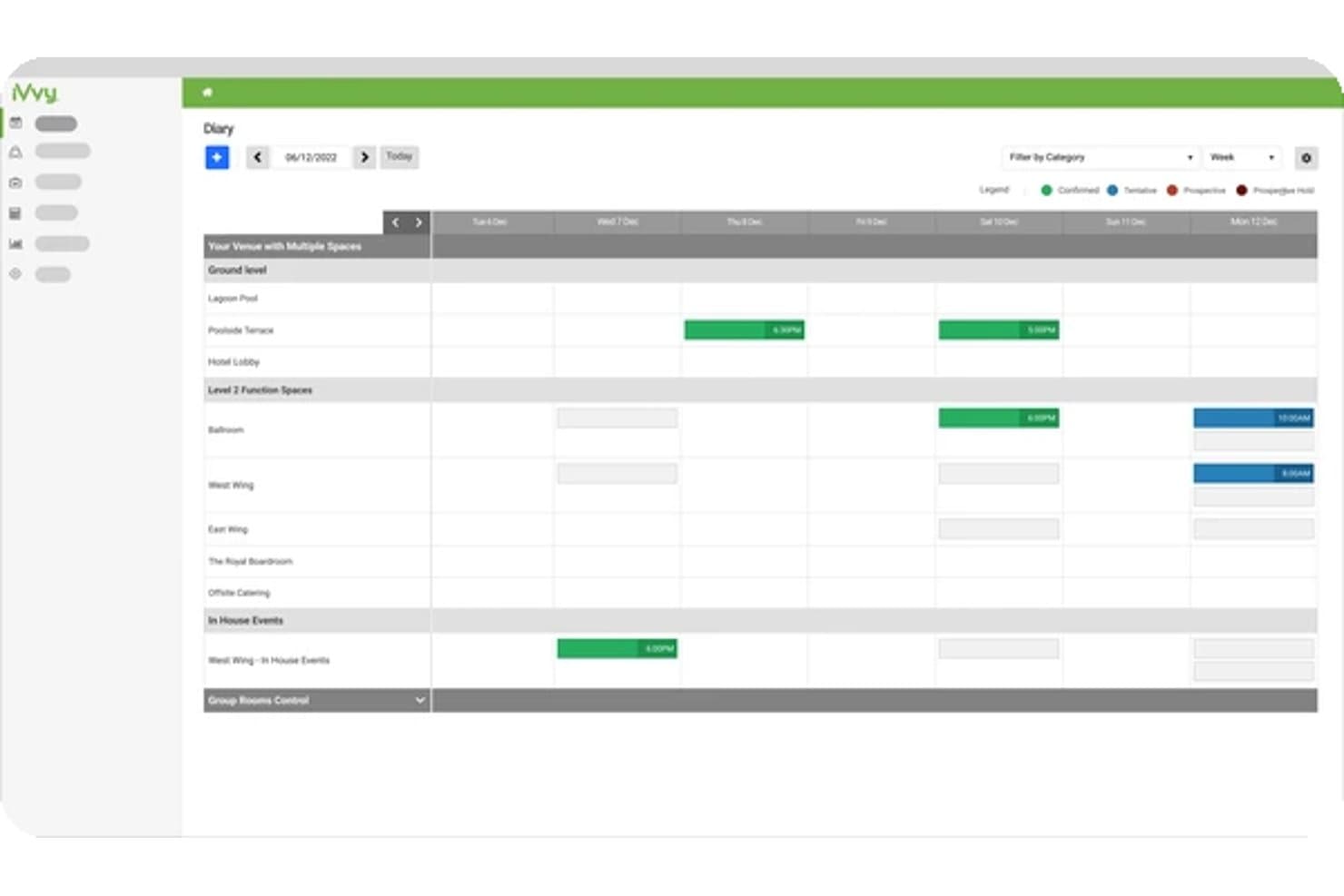
iVvy offers a weekly diary view for scheduling and managing events across multiple venue spaces and categories. iVvy is a hotel sales and catering platform that combines function space management, BEO generation, group booking coordination, CRM, and catering contracts in one system built for hotels and event venues.
Who Is iVvy Best For?
iVvy fits catering sales and events teams at hotels, function centers, and multi-property hospitality groups managing high volumes of group and conference bookings.
Why I Picked iVvy
iVvy earns its spot on my shortlist because of how it handles live event space availability across a hotel's entire function diary. I love that the Function Diary shows quoted, tentative, and confirmed bookings for both meeting rooms and guest room blocks in a single view, making double-booking a non-issue. The Booking Engine then exposes that real-time availability directly on a hotel's website, so enquiries arrive pre-qualified against what's actually open.
iVvy Key Features
- Banquet event order (BEO) generation: Create, edit, and send detailed BEOs with menus, timelines, and staffing needs for each event.
- Revenue reporting and analytics: Access dashboards, pacing reports, and customizable templates for tracking event revenue and forecasting sales.
- CRM and lead management: Capture all enquiries, manage customer data, and track activities and communication in one system.
- Digital proposals and e-signatures: Generate branded proposals and contracts quickly, then send for client e-signature with version tracking.
iVvy Integrations
iVvy offers native integrations with Opera Cloud, Mews, StayNTouch, RMS, Agilysys, Protel Air, Jonas Chorum, Xero, MYOB, NetSuite, Infor, Salesforce, Cvent, IdeaS, and SevenRooms. An API is available for custom integrations.
Pros and Cons
Pros:
- Built specifically for hotel events and catering
- Live availability displays directly on hotel websites
- Real-time function diary prevents double-bookings
Cons:
- Reporting dashboards offer limited customization options
- Initial setup requires significant configuration time
Learn more about iVvy: Best with integrated proposals and payments
- Free demo available
- From $199/month
Visit WebsiteCustomer Rating:4.2/5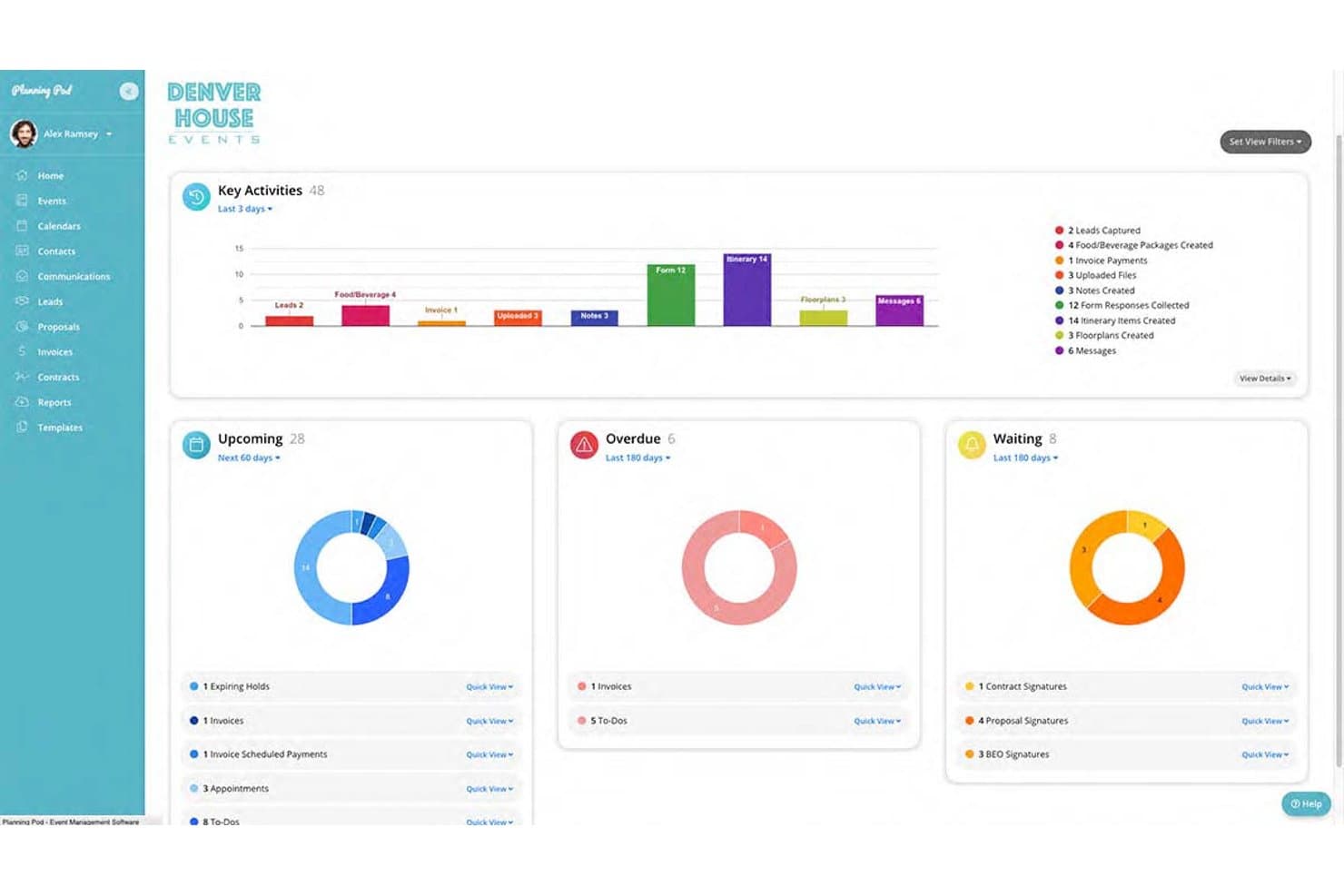
Planning Pod displays a centralized event management dashboard with key activity charts, upcoming tasks, overdue items, and waiting signatures. Planning Pod is a venue and event management platform built for hotels, banquet halls, and event centers, combining function space booking, BEO generation, F&B management, catering proposals, and client communication tools in one system.
Who Is Planning Pod Best For?
Planning Pod suits independent hotels, boutique venues, and standalone event centers that manage their own events, catering, and client billing without a full PMS ecosystem.
Why I Picked Planning Pod
Planning Pod earns its spot on my shortlist because of how tightly it connects proposals, contracts, and payments to a single booking record. I like that once a client signs a proposal via eSignature, the platform carries those details straight into an invoice with installment schedules already built in. My team can then collect deposits through branded client portals, with credit card and ACH processed natively through Adyen, without switching tools.
Planning Pod Key Features
- Floor plan diagramming: Build and edit scaled layouts for event spaces, including tables, chairs, and staging.
- BEO generation and distribution: Create customizable banquet event orders for FOH, kitchen, and delivery teams.
- Task manager with staff assignment: Assign and track tasks by team member across event workflows.
- Lead capture webforms: Collect event inquiries from your venue website directly into the sales pipeline.
Planning Pod Integrations
Planning Pod offers native integrations with QuickBooks Online, WeddingWire, The Knot, Google Calendar, Apple Calendar, and Microsoft Outlook Calendar. It also connects with Zapier and provides an API for custom integrations.
Pros and Cons
Pros:
- Clients can self-serve via branded portal
- Built-in floor plan diagramming for events
- Proposals, contracts, and payments flow automatically
Cons:
- Not built for large multi-property portfolios
- Reporting lacks deep revenue and yield analytics
Learn more about Planning Pod:
Annen programvare for arrangementsplanlegging
- 11SwoogoBest for flexible event registration workflows
- 12EventbriteBest for maximizing public event discoverability
- 13HoneyBookBest for client portal collaboration and payments
- 14SkeddaBest for advanced booking rules and automation
- 15AcceleventsBest with agenda and speaker management at scale
How I Evaluate Event Scheduling Software
I evaluate event scheduling software in two layers: the baseline—event scheduling, venue and resource management, booking workflows, and conflict prevention—and the differentiators that set the strongest hospitality and venue-focused options apart.
Core Functionality (Table Stakes For This List)
When I'm selecting tools for my list, I rank each one on a scale from 0 (does not offer the functionality) to 5 (excels in this area) for each core functionality listed below. Then, I calculate the tool's total score into a percentage. Each tool needs to achieve a minimum total score of 65% to be considered for inclusion.
- Event & Function Space Scheduling: I look for a centralized calendar, function diary, or booking grid that lets teams schedule meeting rooms, ballrooms, event spaces, and other bookable areas while checking availability at a glance.
- Booking & Sales Management: I evaluate how well the platform handles the process from an initial inquiry or RFP through proposals, contracts, confirmations, and payments.
- Conflict Detection: The software should help prevent overlapping bookings by showing space and resource availability and flagging potential scheduling conflicts before an event is confirmed.
- Event Resource Management: I check whether teams can assign equipment, catering requirements, room setups, staff, and other resources to individual events and keep those requirements connected to the booking.
- Event Documents & Communication: I look for tools that help teams create and share proposals, contracts, event summaries, BEOs, run sheets, or other operational documents while keeping clients and internal teams updated.
- Integrations: The platform should connect with relevant hospitality or business systems, such as PMS, POS, CRM, accounting, payment, calendar, or marketing tools, so teams can reduce duplicate data entry.
Once I have a list of tools that meet this criteria, I consider what sets each platform apart.
Differentiating Factors (What Sets Vendors Apart)
Here's how I compare and contrast different vendors:
Standout Features
I look closely at hospitality-specific capabilities such as BEO generation, group room block management, catering workflows, and function space diagramming. Tools that provide 2D or 3D floor plans can help sales teams create accurate room layouts and share them with clients before an event is finalized. Client-facing portals are another differentiator because organizers can review proposals, sign contracts, make payments, and communicate changes without relying on long email threads. Mobile access also matters for operational teams that need to check schedules, BEOs, room setups, or last-minute event changes while working around the property.
Beyond Features
Integration depth is especially important for hotels and hospitality venues. I check whether the platform connects with property management systems such as Oracle OPERA, Mews, Cloudbeds, or Stayntouch, as well as POS, CRM, accounting, and payment platforms where relevant. For hotel-focused tools, reliable PMS connectivity can help keep group room blocks, event details, and property operations aligned.
Property type and operational scale also influence my evaluation. A full-service resort managing multiple ballrooms, catering teams, and group room blocks has different requirements than a restaurant handling private dining events or a boutique hotel with one meeting space. I also consider implementation requirements, ease of use, available integrations, and pricing structure, particularly whether pricing is based on users, properties, modules, or overall event volume.
Slik velger du programvare for arrangementsplanlegging
Det er lett å gå seg vill i lange funksjonslister og kompliserte prisstrukturer. For å hjelpe deg med å holde fokus mens du arbeider deg gjennom den unike prosessen med å velge programvare, får du her en sjekkliste over faktorer du bør ha i tankene:
| Faktor | Hva du bør vurdere |
| Skalerbarhet | Vil programvaren støtte flere arrangementer, selskapslokaler, eiendommer og brukere etter hvert som virksomheten vokser? Vurder om den kan håndtere alt fra ett enkelt møterom til arrangementsdrift på flere eiendommer. |
| Integrasjoner | Kan den kobles til systemene dere allerede bruker? Se etter integrasjoner med PMS, POS, CRM, regnskapsprogramvare, betalingsverktøy og kalendere for å redusere manuell dataregistrering. |
| Tilpasningsmuligheter | Kan dere tilpasse tilbud, BEO-er, kontrakter, arrangementsmaler, bestillingsarbeidsflyter og rapporter slik at de samsvarer med hvordan eiendommen drives? |
| Brukervennlighet | Er det enkelt for salgs-, catering-, bankett- og driftsteam å bruke? Se etter intuitive kalendere, tydelig navigasjon og enkle arrangementsoppdateringer for å redusere opplæringstiden. |
| Implementering og oppstart | Hvor raskt kan teamet komme i gang? Vurder datamigrering, PMS-oppsett, konfigurering av arbeidsflyter, opplæringsressurser og leverandørstyrt støtte ved oppstart. |
| Kostnad | Passer prismodellen for eiendommen? Sammenlign priser per bruker, per eiendom og basert på moduler, og ta hensyn til implementeringskostnader, integrasjoner og valgfrie tillegg. |
| Sikkerhetstiltak | Hvordan beskytter plattformen gjeste-, betalings- og arrangementsdata? Se etter tilgangskontroller, kryptering, sikker betalingsbehandling og relevante tiltak for etterlevelse av regelverk. |
| Tilgjengelig kundestøtte | Kan dere få hjelp når det oppstår et problem under et arrangement? Vurder åpningstider for kundestøtte, svartider, hjelp ved oppstart og tilgjengelige kanaler som telefon, e-post og chat. |
Hva er programvare for arrangementsplanlegging?
Programvare for arrangementsplanlegging hjelper hoteller, arenaer og serverings- og arrangementsteam med å administrere arrangementsbestillinger, selskapslokaler, gruppevirksomhet, cateringbehov og arrangementsressurser fra ett system. Hotellsjefer, salgsteam, cateringansvarlige og arrangementskoordinatorer bruker disse plattformene til å organisere tilgjengelighet, forhindre dobbeltbookinger, opprette arrangementsdokumenter og koordinere avdelinger.
Mange plattformer som er utviklet for hotell- og serveringsbransjen, går lenger enn enkel kalenderplanlegging ved å støtte BEO-er, tilbud, kontrakter, romblokker, depositum, plantegninger og integrasjoner med eiendomsstyrings- og kassasystemer. Dette gir salgs- og driftsteam en mer sentralisert måte å administrere arrangementer på, fra den første forespørselen til gjennomføringen.
Funksjoner i programvare for arrangementsplanlegging
Når dere velger programvare for arrangementsplanlegging, bør dere se etter følgende nøkkelfunksjoner:
- Administrasjon av selskapslokaler: Gjør det mulig å se og planlegge ballrom, møterom, private spiserom og andre arrangementsområder i en sentralisert kalender.
- Generering av BEO-er: Hjelper catering- og bankettteam med å opprette og distribuere bestillinger for bankettarrangementer som inneholder menyer, krav til oppsett, tidsplaner og operative instruksjoner.
- Administrasjon av gruppebestillinger: Støtter gruppeforespørsler, tilbud, kontrakter, romblokker, depositum og andre trinn i salgsprosessen for arrangementer.
- Konfliktdeteksjon: Identifiserer overlappende bestillinger av lokaler, utstyr eller ressurser før de skaper driftsproblemer.
- Tilbud og kontrakter: Gjør det mulig for salgsteam å opprette tilbud, avtaler og kontrakter med egen profil og innhente elektroniske signaturer.
- Ressursplanlegging: Hjelper med å tilordne medarbeidere, AV-utstyr, møbler, cateringbehov og andre ressurser til bestemte arrangementer.
- Verktøy for plantegninger og diagrammer: Gjør det mulig for team å opprette romløsninger og sitteplaner for møter, brylluper, konferanser og banketter.
- PMS- og POS-integrasjoner: Kobler arrangementsinformasjon sammen med eiendomsstyrings- og kassasystemer for å redusere dobbeltregistrering av data.
- Klientportaler: Gir arrangører et sted der de kan gjennomgå dokumenter, utføre betalinger, sende inn informasjon og kommunisere med arrangementsstedet.
- Analyse og rapportering: Sporer arrangementsinntekter, konverteringsfrekvenser, utnyttelse av lokaler, gruppevirksomhet og andre resultatmål.
Fordeler med programvare for arrangementsplanlegging
Implementering av programvare for arrangementsplanlegging gir flere fordeler for teamet og virksomheten. Her er noen av fordelene dere kan se frem til:
- Færre bookingkonflikter: Tilgjengelighet for arrangementslokaler i sanntid gjør det enklere å unngå dobbeltbookinger og overlappende ressurstildelinger.
- Bedre koordinering mellom avdelingene: Sentraliserte arrangementsdetaljer gir salgs-, catering-, bankett-, kjøkken- og resepsjonsteam tilgang til den samme informasjonen.
- Raskere arrangementsalg: Digitale tilbud, kontrakter, betalingsinnkreving og automatiserte arbeidsflyter kan forkorte tiden fra forespørsel til bekreftet booking.
- Mer nøyaktig gjennomføring av arrangementer: BEO-er, plantegninger, tidslinjer og ressursplaner hjelper teamene med å forstå nøyaktig hva hvert arrangement krever.
- Mindre manuell dataregistrering: Integrasjoner med PMS, POS, CRM, regnskap og betaling reduserer behovet for å registrere arrangements- og gjesteinformasjon på nytt i flere systemer.
- Forbedret gjesteopplevelse: Raskere kommunikasjon, kundeportaler og organiserte arrangementsdetaljer gjør det enklere å svare arrangører og håndtere endringer.
- Bedre oversikt over inntektene: Rapporteringsverktøy hjelper deg med å forstå arrangementsinntekter, konverteringsrater, utnyttelse av arrangementslokaler og resultatene for gruppevirksomheten.
Kostnader & priser for programvare for arrangementsplanlegging
Valg av programvare for arrangementsplanlegging krever en forståelse av de ulike prismodellene og abonnementene som er tilgjengelige. Kostnadene varierer basert på eiendommens størrelse, antall brukere, arrangementslokaler, integrasjoner, moduler og implementeringskrav. Mange leverandører som fokuserer på hotell- og reiselivsnæringen, bruker tilpassede priser i stedet for å publisere faste månedspriser.
Tabellen nedenfor oppsummerer vanlige prismodeller og funksjonene som vanligvis er inkludert i løsninger for programvare for arrangementsplanlegging:
Sammenligningstabell for abonnementer for programvare for arrangementsplanlegging
| Abonnementstype | Typisk pris | Vanlige funksjoner |
| Startnivåabonnement | Rundt $50-$150/måned | Arrangementskalender, grunnleggende bookinger, kontaktadministrasjon, tilbud og enkel rapportering |
| Profesjonelt abonnement | Rundt $150-$500/måned | BEO-er, kontrakter, betalinger, ressursplanlegging, automatisering og avansert rapportering |
| Eiendomsbasert abonnement | Tilpasset pris | Administrasjon av arrangementslokaler, gruppesalg, arbeidsflyter for servering, PMS-integrasjoner og tilgang for flere brukere |
| Bedriftsabonnement | Tilpasset pris | Administrasjon av flere eiendommer, avanserte integrasjoner, sentralisert rapportering, API-er, dedikert kundestøtte og tilpassede arbeidsflyter |
Vanligste spørsmål om programvare for planlegging av arrangementer (ofte stilte spørsmål)
Hvordan integrerer jeg programvare for planlegging av arrangementer med de eksisterende hotellsystemene mine?
De fleste plattformer for arrangementsplanlegging kobler seg til systemer som eiendomsforvaltningssystemer, kassasystemer, CRM-systemer, regnskapsverktøy, betalingsplattformer og kalendere. Før du velger et verktøy, bør du undersøke om det tilbyr integrasjoner med ditt eksisterende PMS- eller POS-system. Hvis en direkte integrasjon ikke er tilgjengelig, støtter enkelte plattformer også API-er eller tredjepartskoblinger.
Kan programvare for planlegging av arrangementer håndtere gjentakende arrangementer?
Ja, mange verktøy for arrangementsplanlegging støtter gjentakende bestillinger for møter, konferanser, opplæringsøkter og andre gjentakende arrangementer. Avhengig av plattformen kan du kanskje angi hvor ofte arrangementet skal gjentas, reservere det samme arrangementsområdet, tildele ressurser og kopiere arrangementsdetaljer fra én bestilling til den neste.
Hvor tilpasningsdyktig er programvare for planlegging av arrangementer?
Tilpasningsmulighetene varierer fra plattform til plattform. Noen verktøy lar deg tilpasse tilbud, kontrakter, arrangementsordre, bestillingsskjemaer, arrangementsmaler, brukertillatelser, arbeidsflyter og rapporter. Hotell- og arrangementssteder bør se etter programvare som kan gjenspeile de eksisterende salgs-, serverings- og arrangementsprosessene, i stedet for å tvinge dem inn i en rigid arbeidsflyt.
Finnes det støtte for opplæring av nye brukere?
Mange leverandører tilbyr hjelp med oppstart gjennom opplæringsøkter, veiledninger, kunnskapsbaser, webinarer og kundestøtte. Mer avanserte plattformer for hotell- og arrangementsbransjen kan også tilby implementeringsspesialister som hjelper med å konfigurere arrangementsområder, integrasjoner, maler, brukertillatelser og arbeidsflyter før lansering.
Hvordan vurderer jeg kostnadseffektiviteten til programvare for planlegging av arrangementer?
Begynn med å sammenligne programvarens totale kostnad med den operative verdien den gir. Ta hensyn til abonnementsavgifter, implementeringskostnader, integrasjoner, tillegg og om prisen er basert på brukere, eiendommer eller moduler. Se deretter på om plattformen kan redusere dobbeltbookinger, manuell dataregistrering, administrativt arbeid og tiden som brukes på koordinering av arrangementer, samtidig som teamet ditt kan håndtere mer gruppe- og arrangementsvirksomhet.