

Il software per la gestione dei ristoranti degli hotel è una categoria di strumenti digitali progettati per aiutare gli hotel a gestire il ristorante e le attività di ristorazione, dalle prenotazioni e dagli ordini alla gestione dell'inventario e alla pianificazione dei turni del personale.
Se stai cercando il miglior software per la gestione dei ristoranti nel settore dell'ospitalità, probabilmente vuoi coordinare i servizi di ristorazione con le attività più ampie della tua struttura, soddisfare le aspettative degli ospiti e ridurre il lavoro manuale del tuo team.
Molte piattaforme supportano le attività quotidiane con funzionalità come CRM, gestione amministrativa e analisi dei dati aziendali, spesso potenziate da funzionalità basate sull'intelligenza artificiale. Questi strumenti aiutano le aziende del settore dell'ospitalità a migliorare l'efficienza mantenendo un'esperienza intuitiva per il personale.
Questo elenco ti aiuterà a confrontare le principali opzioni, capire in cosa eccelle ciascun sistema e scegliere la soluzione più adatta alle esigenze specifiche del tuo hotel; molti team consultano anche casi di studio per valutare prestazioni e risultati.
Perché fidarsi dei nostri consigli sui software
6,700+
Reviews
20
Industry experts
16+
Evaluation factors
14
Years
Il nostro team testa e recensisce software dal 2012. In quanto leader del settore alberghiero noi stessi, sappiamo quanto sia difficile — e importante — scegliere il software giusto.
Per questa guida, abbiamo valutato gli strumenti attraverso test pratici e ricerche indipendenti, assegnando un punteggio agli strumenti in base ai nostri criteri di selezione.
Le nostre recensioni riflettono il nostro giudizio editoriale umano, non un discorso di vendita.
Tabella comparativa dei software per la gestione dei ristoranti degli hotel
Questa tabella comparativa riassume i dettagli sui prezzi delle mie migliori selezioni di software per la gestione dei ristoranti degli hotel:
| Tool | Best For | Trial Info | Price | ||
|---|---|---|---|---|---|
| 1 | Ideale per il monitoraggio dei costi alimentari nelle attività F&B | Prova gratuita di 90 giorni | A partire da 100 $ al mese | Website | |
| 2 | Ideale per la gestione di eventi di gruppo nei ristoranti | Demo gratuita disponibile | Prezzo su richiesta | Website | |
| 3 | Ideale per strumenti di ingegneria del menù | Consulenza esperta disponibile | Prezzo su richiesta | Website | |
| 4 | Ideale per le funzionalità di ordinazione al tavolo | Piano gratuito disponibile | Da $69/mese | Website | |
| 5 | Ideale per l'integrazione contabile | Demo gratuita disponibile | Prezzo su richiesta | Website | |
| 6 | Ideale per l'integrazione cloud delle strutture ricettive | Demo gratuita disponibile | Prezzi su richiesta | Website | |
| 7 | Ideale per il coordinamento di più punti vendita | Demo gratuita disponibile | Prezzo su richiesta | Website | |
| 8 | Ideale per operazioni mobile-first | Demo gratuita disponibile | Prezzo su richiesta | Website | |
| 9 | Ideale per il monitoraggio di inventario e approvvigionamenti | Demo gratuita disponibile | Prezzo su richiesta | Website | |
| 10 | Ideale per analisi di livello enterprise | Demo gratuita disponibile | Prezzo su richiesta | Website |


Recensioni dei migliori software per la gestione dei ristoranti degli hotel
Di seguito trovi i miei riepiloghi dettagliati dei software per la gestione dei ristoranti degli hotel inclusi nella mia selezione. Le mie recensioni offrono una panoramica dettagliata delle funzionalità, delle integrazioni e dei casi d’uso migliori di ciascuna piattaforma, per aiutarti a trovare quella più adatta a te.
 Ideale per il monitoraggio dei costi alimentari nelle attività F&B
- Prova gratuita di 90 giorni
- A partire da 100 $ al mese
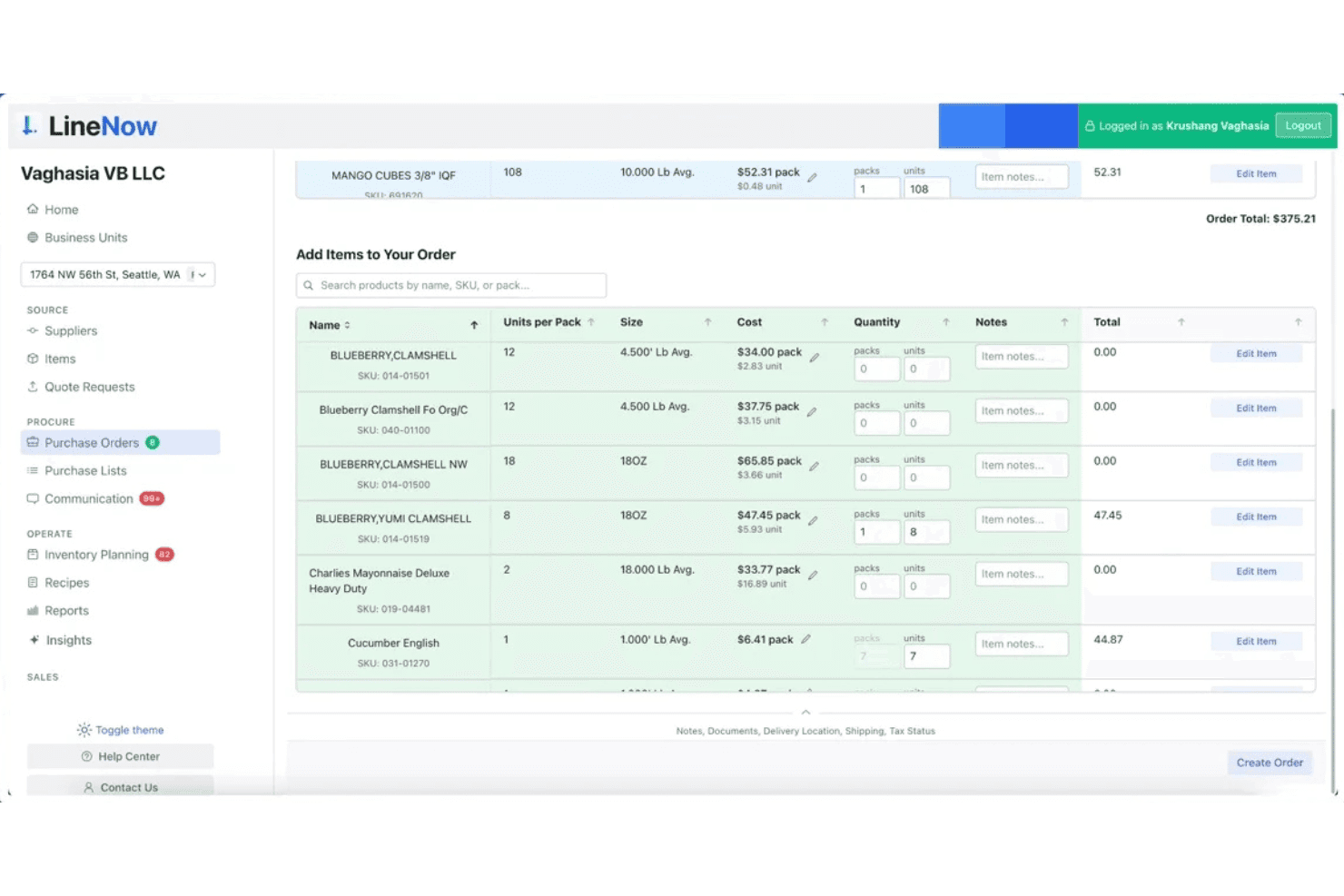
LineNow consente agli utenti di creare e gestire ordini di acquisto con ricerca degli articoli e dei prezzi. LineNow è una piattaforma per la gestione degli acquisti e dell'inventario progettata per gli operatori del settore alimentare e delle bevande, che comprende la creazione degli ordini di acquisto, la comunicazione con i fornitori, il calcolo dei costi delle ricette e il monitoraggio dei costi alimentari collegato al POS, per attività con una o più sedi.
Per chi è più indicato LineNow?
LineNow è adatto agli operatori F&B che necessitano di un controllo più rigoroso dei costi alimentari, degli acquisti e del calcolo dei costi delle ricette, come soluzione aggiuntiva per le operazioni amministrative integrata al POS esistente.
Perché ho scelto LineNow
Ho incluso LineNow tra le mie scelte principali perché è uno dei pochi strumenti che collega direttamente il calcolo dei costi delle ricette ai dati di vendita in tempo reale del POS, offrendo agli operatori F&B una visione aggiornata di quali voci del menu generano effettivamente profitti. Apprezzo il modo in cui il calcolo dei livelli PAR, sensibile al deterioramento, tiene conto degli ingredienti deperibili, evitando di ordinare quantità eccessive di proteine che scadrebbero prima del servizio. Il suo processo di acquisto basato sull'IA, dalla creazione automatica degli ordini di acquisto all'analisi delle risposte dei fornitori ricevute tramite WhatsApp o e-mail, mantiene sotto controllo i costi delle attività amministrative senza doverli sollecitare manualmente.
Funzionalità principali di LineNow
- Analisi delle risposte dei fornitori: Converte automaticamente le risposte dei fornitori ricevute tramite WhatsApp ed e-mail in aggiornamenti strutturati degli ordini, comprese sostituzioni e quantità inevase.
- Gestione dei livelli PAR per più sedi: Imposta e monitora i livelli di riordino per ciascuna sede, con un calcolo sensibile al deterioramento pensato per gli ingredienti deperibili.
- Flusso di lavoro per la ricezione: Aggiorna le quantità di inventario in base alle quantità effettivamente consegnate, non solo a quelle ordinate, mantenendo accurati i registri delle scorte.
- Sincronizzazione con QuickBooks e Xero: Invia i dati confermati della ricezione al software di contabilità, in modo che le fatture riflettano quanto è stato effettivamente ricevuto.
Integrazioni di LineNow
L'integrazione comprende Toast, Square, Clover, Lightspeed X-Series e R-Series, Shopify POS, QuickBooks e Xero.
Pros and Cons
Pros:
- Monitoraggio in tempo reale dei costi alimentari e dei margini
- L'IA analizza le risposte dei fornitori e le converte in ordini
- Livelli PAR per più sedi e prodotti deperibili
Cons:
- Nessun collegamento al PMS dell'hotel o ai conti degli ospiti
- Mancano funzionalità per le prenotazioni e la ristorazione in camera
Learn more about LineNow: Ideale per la gestione di eventi di gruppo nei ristoranti
- Demo gratuita disponibile
- Prezzo su richiesta
Visit WebsiteCustomer Rating:4.5/5
Tripleseat gestisce eventi con prenotazioni, layout degli spazi e dati approfonditi. Tripleseat è progettato per hotel e location che devono gestire eventi di gruppo e prenotazioni private con meno coordinamento manuale. Questa piattaforma aiuta i team di vendita e di eventi a centralizzare la comunicazione, monitorare i lead e automatizzare i dettagli degli eventi. Se la tua struttura ospita frequentemente banchetti, riunioni o occasioni speciali, Tripleseat può aiutarti a mantenere ogni dettaglio organizzato dalla richiesta all’esecuzione.
Perché ho scelto Tripleseat
Gestire eventi di gruppo in ambito alberghiero richiede strumenti pensati per una coordinazione complessa, ed è qui che Tripleseat si distingue. Ho scelto Tripleseat perché offre funzionalità specifiche per gli eventi, come moduli di prenotazione personalizzabili e generazione automatica delle proposte, che aiutano i team degli hotel a gestire tutto, dalla richiesta iniziale alla fatturazione finale. La piattaforma include anche un calendario centralizzato e un sistema di gestione delle attività, rendendo più facile seguire più eventi e evitare conflitti di programmazione. Queste capacità rendono Tripleseat una scelta solida per hotel che ospitano regolarmente banchetti, conferenze o cene private.
Caratteristiche principali di Tripleseat
Altre funzionalità utili di Tripleseat per i team dei ristoranti di hotel includono:
- Modelli di documenti: Crea e riutilizza contratti, BEO e fatture con il tuo brand per una documentazione degli eventi coerente.
- Gestione della lista degli ospiti: Tieni traccia di RSVP, preferenze alimentari e disposizioni dei posti direttamente nel file dell’evento.
- Promemoria attività: Imposta promemoria automatici per follow-up, scadenze e tappe dell’evento per mantenere il team sulla buona strada.
- Dashboard dei report: Accedi ad analytics in tempo reale su vendite degli eventi, tendenze di prenotazione e performance del team.
Integrazioni di Tripleseat
Le integrazioni includono OpenTable, SevenRooms, Mailchimp, Constant Contact, Stripe, Square, Oracle Hospitality, Infor, Mews, Maestro e altro ancora.
Pros and Cons
Pros:
- Traccia esigenze e preferenze alimentari degli ospiti
- Supporta la gestione multi-location e multi-spazio
- Fornisce report in tempo reale sulle vendite degli eventi
Cons:
- Nessuna gestione integrata dei tavoli per la ristorazione quotidiana
- Strumenti limitati per l’ingegneria o il calcolo dei costi dei menù
Learn more about Tripleseat: Ideale per strumenti di ingegneria del menù
- Consulenza esperta disponibile
- Prezzo su richiesta
Visit WebsiteCustomer Rating:4.5/5
Apicbase monitora inventario e costi ricetta con informazioni in tempo reale. Apicbase è progettato per i team dell'ospitalità che desiderano avere il controllo sull'ingegneria del menù e sulla gestione dei costi alimentari. Questa piattaforma offre a chef e responsabili F&B strumenti dettagliati per il calcolo dei costi delle ricette, il monitoraggio degli allergeni e l'analisi delle performance dei menù. Se hai bisogno di ottimizzare la redditività e la coerenza tra i punti di ristoro dell'hotel, Apicbase fornisce approfondimenti basati sui dati a supporto di ogni decisione relativa al menù.
Perché ho scelto Apicbase
Quando si tratta di ingegneria del menù, Apicbase si distingue per la sua profondità e l'attenzione alle decisioni guidate dai dati. Ho scelto Apicbase perché offre ai team dei ristoranti degli hotel un controllo granulare sul costo delle ricette, il tracciamento degli ingredienti e l'analisi della redditività dei menù. I dashboard sulle performance dei menù e gli strumenti di gestione degli allergeni della piattaforma aiutano a perfezionare l'offerta e garantire la conformità in tutte le sedi. Per gli hotel che desiderano massimizzare i margini e mantenere la coerenza, Apicbase offre funzionalità specializzate che vanno oltre i semplici sistemi di inventario o POS.
Caratteristiche principali di Apicbase
Altre caratteristiche che rendono Apicbase prezioso per i team di ristoranti d'hotel includono:
- Gestione fornitori: Permette di tenere traccia dei dettagli dei fornitori, dei prezzi e degli storici ordini in un unico luogo.
- Previsione dell'inventario: Utilizza i dati storici per prevedere i bisogni futuri di magazzino e ridurre gli sprechi.
- Gestione multi-sede: Supporta il controllo e la reportistica centralizzati per più sedi di ristoranti.
- Pianificazione della produzione: Aiuta i team di cucina a pianificare e organizzare i lavori di preparazione in base alla domanda in tempo reale.
Integrazioni di Apicbase
Le integrazioni includono Lightspeed, Revel, Deliverect, Foodics, Trivec, Square, Mews, Planday, Tenzo e altri.
Pros and Cons
Pros:
- Dashboard centralizzato per gestione multi-sede
- Gli aggiornamenti di prezzo dei fornitori si sincronizzano direttamente nelle ricette
- La previsione dell'inventario utilizza dati storici di consumo
Cons:
- La gestione delle foto del menù può essere ingombrante
- Le esportazioni dei report sono limitate a determinati formati
Learn more about Apicbase: Ideale per le funzionalità di ordinazione al tavolo
- Piano gratuito disponibile
- Da $69/mese
Visit WebsiteCustomer Rating:4.2/5
Toast gestisce POS per ristoranti, ordini e pagamenti in un unico sistema. Se il ristorante del tuo hotel ha bisogno di ordinazioni rapide e flessibili al tavolo, Toast è la soluzione pensata per te. Questa piattaforma POS è progettata per i team della ristorazione che vogliono velocizzare il servizio e ridurre gli errori negli ordini. I dispositivi portatili di Toast e gli strumenti di ordinazione digitale aiutano il personale di sala a ricevere e inviare gli ordini direttamente dal tavolo, mantenendo l’operatività anche nei momenti di maggiore affluenza.
Perché ho scelto Toast
Per i ristoranti d’hotel che vogliono velocizzare il servizio e migliorare l’accuratezza degli ordini, le funzionalità di ordinazione al tavolo di Toast sono particolarmente indicate. Ho scelto Toast perché i suoi dispositivi POS portatili permettono al personale di sala di prendere ordini e accettare pagamenti direttamente al tavolo, riducendo i tempi di attesa e gli errori. La piattaforma supporta anche menu digitali e ordinazione autonoma da parte degli ospiti, così puoi offrire opzioni di servizio flessibili durante le ore di punta. Queste caratteristiche rendono Toast particolarmente utile nei ristoranti d’hotel affollati, dove è fondamentale mantenere i clienti soddisfatti e garantire un veloce ricambio dei tavoli.
Caratteristiche principali di Toast
Altre funzioni che rendono Toast utile per i team dei ristoranti d’hotel includono:
- Monitoraggio delle scorte: Tiene sotto controllo i livelli degli ingredienti e avvisa quando è il momento di riordinare.
- Sistema di visualizzazione cucina: Invia gli ordini direttamente agli schermi in cucina per una preparazione più rapida e meno errori.
- Gestione programmi fedeltà: Ti consente di creare e gestire ricompense e promozioni per gli ospiti.
- Reportistica multi-sede: Consolida dati di vendita e performance di tutti i tuoi ristoranti d’hotel.
Integrazioni Toast
Le integrazioni includono Grubhub, Uber Eats, DoorDash, xtraCHEF, QuickBooks, 7shifts, Compeat, BevSpot, PeachWorks e Ctuit.
Pros and Cons
Pros:
- I dispositivi POS portatili supportano i pagamenti direttamente al tavolo
- Le modifiche al menu si sincronizzano istantaneamente su tutte le postazioni
- Report dettagliati dei turni per i responsabili di sala
Cons:
- La sostituzione dell’hardware può essere costosa
- Supporto limitato per valute internazionali
Learn more about Toast: Ideale per l'integrazione contabile
- Demo gratuita disponibile
- Prezzo su richiesta
Visit WebsiteCustomer Rating:4.2/5
Restaurant365 gestisce la contabilità del ristorante, l'inventario e il monitoraggio dei costi. Restaurant365 è progettato per i team dell'ospitalità che desiderano collegare le operazioni di ristorazione con la contabilità su un'unica piattaforma. Questo strumento è ideale per i responsabili F&B degli hotel e i responsabili finanziari che necessitano di una visibilità in tempo reale su costi, fatture e performance finanziaria. Se desideri automatizzare le attività contabili mentre gestisci le operazioni del ristorante, Restaurant365 integra entrambe le esigenze in un unico sistema.
Perché ho scelto Restaurant365
Quando i ristoranti degli hotel hanno bisogno di colmare il divario tra operazioni quotidiane e contabilità, Restaurant365 si distingue per la sua integrazione diretta con la contabilità. Ho scelto Restaurant365 perché permette di automatizzare l'elaborazione delle fatture e sincronizzare i dati di vendita direttamente nel libro mastro generale, un grande vantaggio per i team finanziari. Gli strumenti di rendicontazione finanziaria in tempo reale e riconciliazione bancaria aiutano i responsabili F&B degli hotel a tenere sotto controllo la redditività. Se vuoi ridurre l'inserimento manuale dei dati e collegare le performance del ristorante ai risultati finanziari, Restaurant365 è pensato proprio per questa esigenza.
Funzionalità principali di Restaurant365
Altre funzionalità che rendono Restaurant365 prezioso per i team di ristoranti in hotel includono:
- Modulo di calcolo dei costi delle ricette: Monitora i costi degli ingredienti e calcola il costo dei piatti per le voci di menu.
- Strumenti di gestione dell'inventario: Monitora i livelli delle scorte e automatizza i punti di riordino dei fornimenti.
- Pianificazione del lavoro: Crea i turni dello staff e monitora i costi del personale rispetto alle vendite.
- Gestione fornitori: Centralizza le informazioni sui fornitori e gestisce gli ordini d'acquisto in un unico luogo.
Integrazioni di Restaurant365
Le integrazioni includono Square, Aloha, Clover, Micros, POSitouch, Upserve, QuickBooks, ADP e altro.
Pros and Cons
Pros:
- Monitoraggio in tempo reale dei costi di cibo e personale
- Calcolo dei costi delle ricette e analisi dei menu integrati
- Report finanziari consolidati per più punti vendita
Cons:
- Supporto limitato per la conformità fiscale extra USA
- Ritardi occasionali nella sincronizzazione dei dati POS
Learn more about Restaurant365: 6Ideale per l'integrazione cloud delle strutture ricettive
Mews
- Demo gratuita disponibile
- Prezzi su richiesta

Mews gestisce le operazioni alberghiere con prenotazioni, check-in e pagamenti. Mews unisce la gestione alberghiera e le operazioni di ristorazione nel cloud per hotel che desiderano unificare le esperienze degli ospiti e della ristorazione. Questa piattaforma è adatta per le proprietà che vogliono collegare in tempo reale prenotazioni, POS e profili ospite fra camere e ristoranti. Se hai bisogno di un sistema che aiuti i tuoi team a coordinare servizio e dati tra reception e punti F&B, Mews offre una piattaforma unica per colmare queste lacune.
Perché ho scelto Mews
Per gli hotel che vogliono connettere la gestione della struttura e le operazioni di ristorazione nel cloud, Mews offre un approccio unificato. Ho scelto Mews perché permette di gestire profili ospiti, prenotazioni camere e prenotazioni ristorante in un unico sistema, aiutando i team a offrire un'esperienza ospite più coordinata. La condivisione dei dati in tempo reale fra reception e punti F&B consente allo staff di visualizzare immediatamente preferenze e addebiti degli ospiti, riducendo i passaggi manuali. Questo livello di integrazione risulta particolarmente prezioso per le strutture che vogliono semplificare le operazioni e personalizzare il servizio ad ogni punto di contatto.
Funzionalità principali di Mews
Altre funzionalità di Mews che potrebbero risultare utili ai team dei ristoranti d'hotel includono:
- POS integrato: Collega le vendite del ristorante direttamente ai conti ospiti e alle anagrafiche della struttura.
- Ordini da mobile: Permette agli ospiti di effettuare ordini F&B dai propri dispositivi, sia in camera che all'interno della struttura.
- Fatturazione automatica: Consolida gli addebiti di camere, ristoranti e servizi in un'unica fattura.
- Reportistica personalizzabile: Offre analisi dettagliate su ricavi del ristorante, coperti e modelli di spesa degli ospiti.
Integrazioni Mews
Le integrazioni includono Booking.com, SiteMinder, Expedia, Tripadvisor, profitize, BEONX, 1CHECK, 20Tabs, 24SevenOffice, Abacus e altro ancora.
Pros and Cons
Pros:
- Offre sincronizzazione in tempo reale dei profili ospite
- Consente la registrazione automatica degli addebiti nei conti ospiti
- Include reportistica personalizzabile per punti F&B
Cons:
- Non dispone di una gestione integrata delle prenotazioni dei tavoli
- L'interfaccia di ordinazione per gli ospiti non è brandizzata
Learn more about Mews: Ideale per il coordinamento di più punti vendita
- Demo gratuita disponibile
- Prezzo su richiesta
Visit WebsiteCustomer Rating:4.5/5
Agilysys unifica PMS, POS e pagamenti dell'hotel in un'unica piattaforma. Agilysys è progettato per hotel e resort che gestiscono più ristoranti, bar e punti vendita sotto lo stesso tetto. Questa piattaforma aiuta i responsabili food & beverage a coordinare menu, inventario e servizio su diversi locali tramite un unico sistema. Se la tua struttura ha bisogno di unificare le operazioni e la reportistica di punti vendita diversi, Agilysys offre un controllo centralizzato in ambienti alberghieri complessi.
Perché ho scelto Agilysys
Coordinare più punti vendita all’interno di un unico hotel o resort può essere complicato, e Agilysys nasce proprio per gestire questa complessità. Ho scelto Agilysys perché consente di amministrare menu, magazzino e personale di diversi ristoranti, bar e punti di servizio da un’unica dashboard centralizzata. La piattaforma supporta anche profili ospite condivisi e reportistica unificata, così puoi monitorare le performance e le preferenze degli ospiti su tutti i locali. Questo livello di coordinamento è particolarmente prezioso per le strutture che desiderano offrire un servizio coerente e ottimizzare le operazioni nelle varie aree food & beverage.
Funzionalità principali di Agilysys
Altre funzionalità che rendono Agilysys utile per i team di ristorazione in hotel sono:
- Ordini da dispositivi mobili: Consente agli ospiti di effettuare ordini da smartphone o tablet.
- Gestione dei tavoli: Permette allo staff di assegnare, monitorare e ottimizzare l’utilizzo dei tavoli in tempo reale.
- Integrazione programmi fedeltà: Collega gli acquisti degli ospiti ai premi e alle promozioni dei programmi fedeltà.
- Sistema di visualizzazione cucina (KDS): Invia gli ordini direttamente agli schermi della cucina per una preparazione e un monitoraggio più rapidi.
Integrazioni Agilysys
Le integrazioni includono Book4Time, Oracle, Infor, Amadeus, Sabre, Springer-Miller, Shift4, FreedomPay, Elavon e altre ancora.
Pros and Cons
Pros:
- Gestione integrata di profili ospite e programmi fedeltà
- Ordini e pagamenti da dispositivi mobili per gli ospiti
- Reportistica dettagliata per ogni punto vendita e struttura
Cons:
- La compatibilità hardware varia in base alla sede
- Gli aggiornamenti dei menu richiedono la sincronizzazione manuale tra i punti vendita
Learn more about Agilysys: Ideale per operazioni mobile-first
- Demo gratuita disponibile
- Prezzo su richiesta

HotelKey gestisce le attività dell'hotel, le pulizie e le operazioni con gli ospiti. HotelKey offre un approccio mobile-first alla gestione dei ristoranti all’interno degli hotel, risultando particolarmente adatto alle squadre che necessitano di flessibilità in movimento. Questa piattaforma è pensata per le strutture che desiderano gestire prenotazioni, ordini e richieste degli ospiti da qualsiasi dispositivo e ovunque all’interno della proprietà. Grazie ai suoi strumenti basati sul cloud, HotelKey aiuta i ristoranti degli hotel a mantenere il servizio sempre fluido senza essere vincolati al banco reception o a terminali fissi.
Perché ho scelto HotelKey
Quando la flessibilità mobile è una priorità per le squadre dei ristoranti degli hotel, HotelKey spicca per il suo design mobile-first. Ho scelto HotelKey perché permette allo staff di gestire prenotazioni, ordini e richieste degli ospiti direttamente da smartphone o tablet, così il servizio non è limitato a una postazione fissa. La dashboard cloud della piattaforma offre ai manager una visibilità in tempo reale sulle operazioni del ristorante, ovunque si trovino nella struttura. Questo approccio è particolarmente utile per gli hotel che vogliono mantenere il personale attivo e reattivo durante tutta l’esperienza degli ospiti.
Funzionalità chiave di HotelKey
Altre funzionalità che rendono HotelKey utile per la gestione dei ristoranti degli hotel includono:
- Gestione del menù: consente di aggiornare piatti, prezzi e disponibilità in tempo reale.
- Strumenti di assegnazione tavoli: aiutano il personale ad assegnare e monitorare i tavoli per una gestione efficiente dei posti e del servizio.
- Elaborazione pagamenti integrata: supporta più modalità di pagamento direttamente dalla piattaforma.
- Reportistica personalizzabile: genera report dettagliati su vendite e performance, adattandosi alle esigenze del tuo ristorante.
Integrazioni di HotelKey
Le integrazioni includono QuickBooks, M3, Revinate, GuestTek, Dormakaba, FreedomPay, Stripe, Virdee, Adyen, Sage e altre.
Pros and Cons
Pros:
- App mobile che supporta l’intera operatività del ristorante
- Aggiornamenti del menù in tempo reale da qualsiasi dispositivo
- Strumenti di assegnazione tavoli per sale da pranzo affollate
Cons:
- Le opzioni di design del menù sono basiche
- Nessuna gestione dell’inventario integrata per i ristoranti
Learn more about HotelKey: Ideale per il monitoraggio di inventario e approvvigionamenti
- Demo gratuita disponibile
- Prezzo su richiesta

Craftable gestisce inventario, acquisti e costi con dati in tempo reale. Se il ristorante del tuo hotel necessita di un controllo più rigoroso su inventario e acquisti, Craftable è la soluzione progettata per te. Questa piattaforma è pensata per i team dell’ospitalità che desiderano monitorare le scorte, gestire gli approvvigionamenti e tenere traccia dei costi su più punti vendita. Con Craftable, puoi automatizzare la gestione degli ordini e ottenere una visibilità in tempo reale sull’uso di cibi e bevande, aiutandoti a ridurre gli sprechi e aumentare i margini.
Perché ho scelto Craftable
Il monitoraggio di inventario e approvvigionamenti rappresenta spesso la sfida più grande per i ristoranti d’hotel con più punti vendita o volumi elevati. Ho scelto Craftable perché consente di avere un controllo dettagliato su livelli di scorte, acquisti e gestione dei fornitori in un’unica piattaforma. Il tracciamento automatizzato degli ordini e gli aggiornamenti in tempo reale dell’inventario aiutano a prevenire ordini eccessivi e esaurimenti, elementi cruciali per le cucine più trafficate. Se vuoi monitorare con attenzione i costi di cibi e bevande semplificando al contempo gli acquisti, Craftable è creato appositamente per questa esigenza.
Funzionalità principali di Craftable
Altre funzionalità che rendono Craftable utile per i team dei ristoranti d’hotel includono:
- Gestione ricette: ti permette di creare, calcolare e aggiornare ricette con i prezzi aggiornati del tuo inventario.
- Monitoraggio prezzi fornitori: controlla le variazioni di prezzo dei fornitori e segnala le fluttuazioni dei costi.
- Acquisizione fatture: digitalizza e archivia le fatture per un facile accesso e riconciliazione.
- Gestione multi-sede: controlla inventario e approvvigionamenti su diversi punti vendita da un’unica dashboard.
Integrazioni con Craftable
Le integrazioni native non sono attualmente elencate.
Pros and Cons
Pros:
- Tiene traccia della diminuzione dell'inventario sulla base dell'uso delle ricette
- Monitora le variazioni di prezzo dei fornitori nel tempo
- Offre analisi dettagliate sui costi di cibi e bevande
Cons:
- Nessuna integrazione POS o PMS incorporata
- Non offre menu o strumenti di ordinazione rivolti agli ospiti
Learn more about Craftable: Ideale per analisi di livello enterprise
- Demo gratuita disponibile
- Prezzo su richiesta

Infor Hospitality gestisce le operazioni alberghiere con cloud PMS e servizi per gli ospiti. Progettato per grandi gruppi alberghieri e resort, Infor Hospitality porta analisi avanzate e decisioni guidate dai dati nelle operazioni dell’ospitalità. Questa piattaforma è adatta a dirigenti e manager che devono unificare i dati di proprietà, ristoranti e ospiti attraverso più sedi. Con Infor Hospitality puoi analizzare le tendenze delle prestazioni, ottimizzare i ricavi e coordinare le operazioni su larga scala.
Perché ho scelto Infor Hospitality
Quando è necessario gestire operazioni complesse e analizzare le prestazioni di più proprietà, Infor Hospitality si distingue per le sue analisi di livello enterprise. Ho scelto questa piattaforma perché riunisce i dati del tuo hotel, ristorante e spazi per eventi, offrendo una visione unificata della tua attività. I suoi strumenti di analisi consentono di monitorare in tempo reale ricavi, costi e tendenze degli ospiti, fondamentale per prendere decisioni informate su larga scala. Per i gruppi alberghieri che vogliono ottimizzare le operazioni e aumentare la redditività grazie ai dati, Infor Hospitality offre la profondità e la flessibilità necessarie.
Funzionalità principali di Infor Hospitality
Altre funzionalità che rendono Infor Hospitality prezioso per i team dei ristoranti degli hotel includono:
- Strumenti di Menu Engineering: Consentono di analizzare le prestazioni del menu e modificare le offerte in base ai dati di vendita e redditività.
- Gestione centralizzata degli acquisti: Supporta acquisti e gestione fornitori su più proprietà da un’unica piattaforma.
- Modulo di pianificazione del personale: Aiuta a pianificare e monitorare i turni dello staff sia per la sala che per la cucina.
- App di gestione mobile: Offre ai manager l’accesso ai dati operativi e alle approvazioni da qualsiasi luogo.
Integrazioni di Infor Hospitality
Attualmente non sono elencate integrazioni native.
Pros and Cons
Pros:
- Consolida i dati di più proprietà per analisi
- Offre avanzate capacità di menu engineering
- Fornisce accesso mobile per manager sempre in movimento
Cons:
- L’implementazione può richiedere risorse IT significative
- La personalizzazione richiede spesso l’intervento del fornitore
Learn more about Infor Hospitality:
Altri software per la gestione dei ristoranti degli hotel
Ecco alcune ulteriori opzioni di software per la gestione dei ristoranti degli hotel che non sono entrate nella mia selezione, ma che vale comunque la pena prendere in considerazione:
- 11Kitchen CUTIdeale per la gestione di ricette e allergeni
- 12AveroIdeale per report su vendite e personale
- 13Focus e-RMSIdeale per opzioni di reporting personalizzabili
- 14OloIdeale per l'integrazione degli ordini digitali
Come Valuto il Software per Ristoranti d'Hotel
Divido la mia valutazione in criteri di base—come l'addebito su camera tramite PMS e POS multi-punto vendita—e i fattori di differenziazione che separano una vera piattaforma nativa per hotel da uno strumento per ristoranti riadattato.
Funzionalità Core (Requisiti Minimi per Questa Lista)
Quando seleziono gli strumenti per la mia lista, valuto ciascuno su una scala da 0 (non offre la funzionalità) a 5 (eccelle in quest'area) per ogni funzionalità principale elencata qui sotto. Poi, calcolo il punteggio totale dello strumento in percentuale. Ogni strumento deve raggiungere un punteggio totale minimo del 65% per essere preso in considerazione.
- Integrazione PMS & Addebiti in Camera: Verifico se le spese dei pasti degli ospiti vengono addebitate direttamente sui conti delle camere tramite connessioni PMS native, così il personale della reception non deve riconciliare manualmente durante la chiusura notturna.
- Capacità POS Multi-Punto Vendita: Ogni punto vendita—bar della hall, grill a bordo piscina, lounge panoramico—dovrebbe gestire propri menu e regole fiscali sotto un unico sistema POS centralizzato.
- Gestione Tavoli & Prenotazioni: Valuto strumenti per la gestione della piantina, gestione della lista d’attesa e funzionalità di prenotazione, per vedere quanto bene il sistema gestisce i coperti durante brunch affollati o eventi con menu fisso.
- Servizio in Camera & Dining in Camera: La piattaforma dovrebbe supportare i workflow del dining in camera, come l'invio degli ordini alla cucina, il tracciamento delle consegne e l'addebito diretto su conto senza doppia registrazione dei dati.
- Gestione Magazzino F&B & Menu: Guardo il costing delle ricette, la riduzione in tempo reale delle scorte tra i vari punti vendita e gli strumenti di menu engineering che aiutano i direttori F&B a monitorare la redditività di ogni piatto.
- Reportistica F&B & Analytics: I report su ricavi, coperti, scontrino medio e costi devono essere consolidati su tutti i punti vendita e visibili in dashboard globali a livello hotel per il GM.
Una volta che ho una lista di strumenti che soddisfano questi criteri, considero ciò che distingue ogni piattaforma.
Fattori Differenzianti (Cosa Distingue i Fornitori)
Ecco come confronto i diversi fornitori:
Funzionalità Distintive
La gestione di banchetti e catering è un fattore di forte differenziazione. Cerco strumenti che gestiscono BEO, menu di gruppo e coordinamento degli spazi evento così il team eventi non deve usare fogli di calcolo insieme al POS. La gestione multi-proprietà conta per i gruppi alberghieri che necessitano di controllo centralizzato dei menu e reportistica aggregata tra più sedi. Valuto anche l’ordinazione contactless degli ospiti, dove gli ospiti scansionano un QR code al bar della piscina o in camera per ordinare direttamente, riducendo i tempi d’attesa nelle ore di punta.
Oltre le Funzionalità
Mi concentro innanzitutto sull’ecosistema di integrazione. Una piattaforma con connessioni PMS certificate a sistemi come Opera, Mews o Cloudbeds fa risparmiare settimane di problemi di implementazione rispetto a una che si basa solo su workaround API generici. Valuto inoltre la flessibilità di deployment: gli hotel necessitano di una modalità POS offline, così che un blackout Wi-Fi durante la cena non blocchi gli ordini. E anche il supporto all’implementazione è importante, soprattutto la formazione specifica per l’hospitality che include configurazione di menu e PMS, dato che i team F&B con alto turnover hanno bisogno di risorse formative basate sui ruoli sin dal primo giorno.
Come scegliere il software per la gestione dei ristoranti degli hotel
È facile perdersi tra lunghi elenchi di funzionalità e strutture tariffarie complesse. Per aiutarti a rimanere concentrato mentre affronti il tuo processo di selezione del software, ecco un elenco di fattori da tenere a mente:
| Fattore | Cosa considerare |
|---|---|
| FattoreScalabilità | Cosa considerareIl software supporterà la tua struttura quando aggiungerai punti vendita, amplierai i menu o aumenterai il numero di ospiti? |
| FattoreIntegrazioni | Cosa considerareSi collega nativamente al tuo PMS, ai sistemi contabili e ai sistemi di pagamento oppure dovrai ricorrere a soluzioni alternative? |
| FattorePersonalizzazione | Cosa considerarePuoi personalizzare report, menu e flussi di lavoro in base alle caratteristiche specifiche delle tue attività F&B e del tuo marchio? |
| FattoreFacilità d'uso | Cosa considerareIl tuo personale, sia di sala sia di cucina, riuscirà a utilizzarlo rapidamente oppure sarà necessaria una formazione approfondita? |
| FattoreImplementazione e avviamento | Cosa considerareQuanto tempo servirà per rendere operativo il sistema e di quali risorse o supporto avrai bisogno durante l'implementazione? |
| FattoreCosti | Cosa considerareTutte le tariffe sono chiare, inclusi configurazione, supporto e componenti aggiuntivi? I prezzi sono compatibili con il tuo budget e il tuo modello di business? |
| FattoreMisure di sicurezza | Cosa considerareIl software offre autorizzazioni utente, crittografia dei dati e conformità agli standard di sicurezza dei pagamenti? |
| FattoreDisponibilità dell'assistenza | Cosa considerarePuoi contattare l'assistenza quando ne hai bisogno, soprattutto durante le ore di punta del servizio o in caso di interruzioni del sistema? |
Che cos'è il software per ristoranti alberghieri?
Il software per ristoranti alberghieri è una piattaforma digitale progettata per gestire le attività di ristorazione e bevande all'interno degli hotel. Centralizza attività come la prenotazione dei tavoli, l'elaborazione degli ordini, il monitoraggio dell'inventario e la reportistica sulle vendite.
Questi sistemi aiutano i team degli hotel a coordinare il servizio tra i vari punti di ristorazione, a mantenere registri accurati e a integrarsi con gli strumenti più ampi di gestione alberghiera per offrire un'esperienza coerente agli ospiti.
Funzionalità
Quando scegli un software per ristoranti alberghieri, presta attenzione alle seguenti funzionalità principali:
- Gestione dei tavoli: Organizza prenotazioni, assegnazioni dei posti e liste d'attesa per ottimizzare il flusso della sala e il ricambio degli ospiti.
- Elaborazione degli ordini: Acquisisce gli ordini degli ospiti al tavolo o al bancone, li invia alla cucina e ne monitora lo stato in tempo reale.
- Monitoraggio dell'inventario: Controlla i livelli delle scorte di alimenti, bevande e forniture e avvisa il personale quando è necessario effettuare un nuovo ordine.
- Gestione dei menu: Consente di creare, aggiornare e personalizzare i menu digitali, inclusi prezzi, descrizioni e piatti del giorno.
- Reportistica sulle vendite: Genera report dettagliati su vendite, ricavi e rendimento dei singoli articoli per supportare decisioni basate sui dati.
- Supporto per più punti di ristorazione: Gestisce le attività di più ristoranti, bar o punti di ristorazione all'interno di un'unica struttura alberghiera.
- Elaborazione dei pagamenti: Accetta diversi metodi di pagamento, tra cui carte di credito, pagamenti mobili e addebiti sulla camera, con una gestione sicura delle transazioni.
- Integrazione con il PMS: Si collega direttamente al sistema di gestione della struttura per sincronizzare i profili degli ospiti, gli addebiti sulla camera e le informazioni di fatturazione.
- Strumenti per ricette e determinazione dei costi: Monitorano l'utilizzo degli ingredienti e calcolano il costo di ogni voce del menu per contribuire a controllare i margini e ridurre gli sprechi.
- Autorizzazioni degli utenti: Imposta i livelli di accesso per i diversi ruoli del personale, assicurando che dati e funzioni sensibili siano disponibili solo agli utenti autorizzati.
Le soluzioni software per ristoranti alberghieri generalmente non includono l'intelligenza artificiale tra le funzionalità offerte.
Vantaggi
L'implementazione di un software per ristoranti alberghieri offre diversi vantaggi al tuo team e alla tua attività. Ecco alcuni dei benefici che puoi aspettarti:
- Attività centralizzate: Gestisci prenotazioni, ordini e inventario da un'unica piattaforma, riducendo il coordinamento manuale tra i vari punti di ristorazione.
- Esperienza migliorata per gli ospiti: Coordina il servizio e personalizza le interazioni integrando profili e preferenze degli ospiti con i dati relativi agli ordini e ai posti a sedere.
- Monitoraggio accurato delle vendite e dell'inventario: Genera report in tempo reale e monitora i livelli delle scorte per supportare acquisti migliori e ridurre gli sprechi.
- Elaborazione più rapida degli ordini: Invia gli ordini direttamente alla cucina ed elabora rapidamente i pagamenti, riducendo al minimo i tempi di attesa degli ospiti.
- Maggiore sicurezza dei dati: Controlla l'accesso degli utenti e proteggi le informazioni sensibili con autorizzazioni integrate e misure di conformità.
- Gestione semplificata di più punti di ristorazione: Supervisiona più ristoranti, bar o punti di servizio all'interno del tuo hotel da un unico sistema.
- Informazioni aziendali utili: Accedi ad analisi dettagliate e report personalizzabili per orientare le decisioni relative alla pianificazione del menu, al personale e ai prezzi.
Costi e prezzi
La scelta di un software per ristoranti alberghieri richiede la conoscenza dei diversi modelli e piani tariffari disponibili, dai software gratuiti per la gestione dei ristoranti alle opzioni a pagamento più avanzate. I costi variano in base alle funzionalità, alle dimensioni del team, ai componenti aggiuntivi e ad altri fattori. La tabella seguente riepiloga i piani più comuni, i relativi prezzi medi e le funzionalità tipicamente incluse nelle soluzioni software per ristoranti alberghieri:
Tabella comparativa dei piani per il software per ristoranti alberghieri
| Tipo di piano | Prezzo medio | Funzionalità comuni |
|---|---|---|
| Tipo di pianoPiano gratuito | Prezzo medio$0 | Funzionalità comuniInserimento di base degli ordini, gestione limitata del menu, reportistica semplice e supporto via e-mail. |
| Tipo di pianoPiano personale | Prezzo medio$20-$50/utente/mese | Funzionalità comuniGestione dei tavoli, personalizzazione del menu, monitoraggio di base dell'inventario, elaborazione dei pagamenti e supporto via chat. |
| Tipo di pianoPiano aziendale | Prezzo medio$60-$150/utente/mese | Funzionalità comuniSupporto per più punti vendita, reportistica avanzata, integrazione con il PMS, autorizzazioni degli utenti e supporto telefonico. |
| Tipo di pianoPiano per grandi aziende | Prezzo medio$200+/utente/mese | Funzionalità comuniIntegrazioni personalizzate, gestione dedicata dell'account, analisi avanzate, assistenza all'avviamento e supporto prioritario. |
Domande frequenti sul software per la ristorazione alberghiera
Ecco alcune risposte alle domande comuni sul software per la ristorazione alberghiera:
In che modo il software per la ristorazione alberghiera si integra con un sistema di gestione della struttura?
Il software per la ristorazione alberghiera si collega generalmente al sistema di gestione della struttura (PMS) tramite integrazioni dirette o API. Ciò consente di addebitare i consumi del ristorante alle camere degli ospiti, sincronizzare i profili degli ospiti e consolidare la fatturazione, semplificando la gestione dei conti degli ospiti e le operazioni.
Il software per la ristorazione alberghiera può gestire più punti vendita o sedi?
Sì, la maggior parte dei software per la ristorazione alberghiera supporta la gestione di più punti vendita. È possibile supervisionare diversi ristoranti, bar o punti di servizio all’interno di una struttura o in più sedi, con reportistica centralizzata e monitoraggio dell’inventario per ciascun punto vendita.
Cosa devo considerare quando passo da un POS precedente a un software per la ristorazione alberghiera?
Pianifica la migrazione dei dati, la formazione del personale e l’integrazione con i sistemi alberghieri esistenti. Verifica se il nuovo software può importare i dati storici sulle vendite e sui menu e assicurati che il tuo team abbia accesso alle risorse per l’avviamento, come video formativi o supporto in tempo reale, durante la transizione.
È possibile personalizzare i menu e i prezzi per diversi punti vendita?
Sì, molte soluzioni software per la ristorazione alberghiera consentono di creare menu e prezzi specifici per ciascun punto vendita. Questa flessibilità aiuta ad adattare l’offerta ai diversi segmenti di ospiti o agli stili di servizio presenti nell’hotel.
Quali tipi di supporto sono disponibili per gli utenti del software per la ristorazione alberghiera?
Le opzioni di supporto includono spesso chat in tempo reale, telefono, e-mail e basi di conoscenza consultabili. Alcuni fornitori offrono anche assistenza all’avviamento, webinar e responsabili dedicati, soprattutto per i piani aziendali e per grandi aziende.