

El software para restaurantes de hoteles es una categoría de herramientas digitales diseñadas para ayudar a los hoteles a gestionar la administración de sus restaurantes y las operaciones de restauración, desde las reservas y los pedidos hasta el inventario y la planificación de turnos del personal.
Si estás buscando el mejor software de gestión de restaurantes para el sector hotelero, probablemente quieras coordinar los servicios de restauración con las operaciones generales de tu establecimiento, satisfacer las expectativas de los huéspedes y reducir el trabajo manual de tu equipo.
Muchas plataformas facilitan las operaciones diarias con funciones como CRM, gestión administrativa e inteligencia empresarial, a menudo mejoradas con capacidades basadas en IA. Estas herramientas ayudan a las empresas hoteleras a mejorar la eficiencia y, al mismo tiempo, mantener una experiencia sencilla para el personal.
Esta lista te ayudará a comparar las principales opciones, comprender qué hace mejor cada sistema y elegir la solución adecuada para las necesidades específicas de tu hotel. Además, muchos equipos consultan estudios de casos para evaluar el rendimiento y los resultados.
Por qué confiar en nuestras recomendaciones de software
6,700+
Reviews
20
Industry experts
16+
Evaluation factors
14
Years
Nuestro equipo lleva probando y evaluando software desde 2012. Como líderes del sector hotelero, sabemos lo difícil —y lo importante— que es elegir el software adecuado.
Para esta guía, evaluamos las herramientas mediante pruebas prácticas e investigación independiente, puntuando las herramientas según nuestros criterios de selección.
Nuestras reseñas reflejan nuestro criterio editorial humano, no un discurso de ventas.
Tabla comparativa de software para restaurantes de hoteles
Esta tabla comparativa resume los detalles de precios de mi selección principal de software para restaurantes de hoteles:
| Tool | Best For | Trial Info | Price | ||
|---|---|---|---|---|---|
| 1 | Ideal para el seguimiento de costos de alimentos en operaciones de alimentos y bebidas | Prueba gratuita de 90 días | Desde $100/mes | Website | |
| 2 | La mejor opción para gestionar eventos de comidas grupales | Demo gratuita disponible | Precios bajo consulta | Website | |
| 3 | Ideal para herramientas de ingeniería de menús | Consulta experta disponible | Precios bajo consulta | Website | |
| 4 | Ideal para funciones de pedidos en mesa | Plan gratuito disponible | Desde $69/mes | Website | |
| 5 | Ideal para integración contable | Demo gratuita disponible | Precio a consultar | Website | |
| 6 | Ideal para integración hotelera basada en la nube | Demo gratuita disponible | Precios a consultar | Website | |
| 7 | Ideal para la coordinación de múltiples puntos de venta | Demo gratuita disponible | Precios bajo solicitud | Website | |
| 8 | Mejor para operaciones enfocadas en dispositivos móviles | Demostración gratuita disponible | Precio a consultar | Website | |
| 9 | Ideal para el seguimiento de inventario y adquisiciones | Demo gratuita disponible | Precio a consultar | Website | |
| 10 | Mejor para análisis a nivel empresarial | Demo gratuita disponible | Precio bajo solicitud | Website |


Análisis del mejor software para restaurantes de hoteles
A continuación encontrarás mis resúmenes detallados del software para restaurantes de hoteles que incluí en mi selección. Mis análisis ofrecen una visión detallada de las funciones, integraciones y mejores casos de uso de cada plataforma para ayudarte a encontrar la más adecuada para ti.
 Ideal para el seguimiento de costos de alimentos en operaciones de alimentos y bebidas
- Prueba gratuita de 90 días
- Desde $100/mes
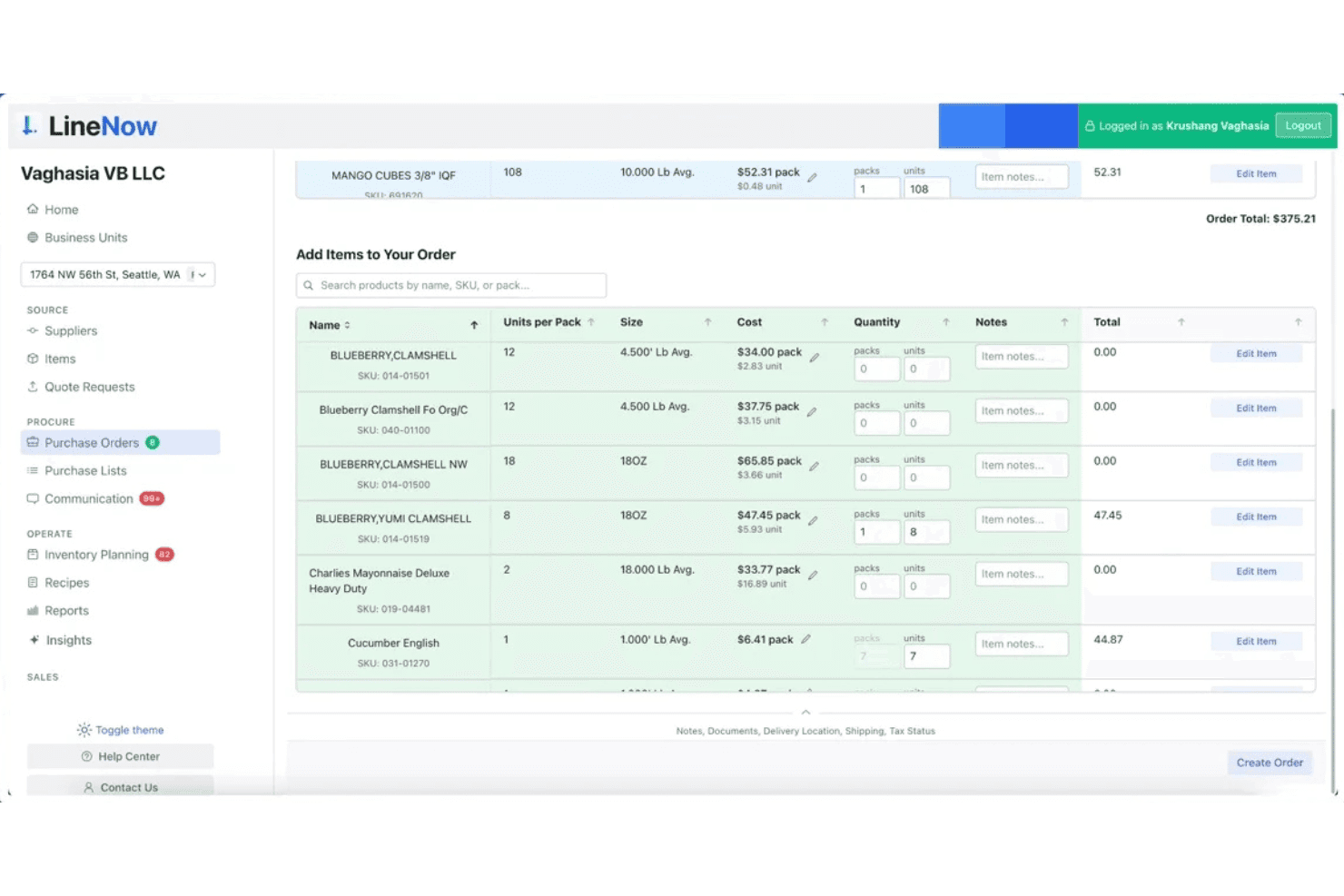
LineNow permite a los usuarios crear y gestionar órdenes de compra con búsqueda de artículos y precios. LineNow es una plataforma de compras y gestión de inventario diseñada para operadores de alimentos y bebidas, que abarca la creación de órdenes de compra, la comunicación con proveedores, el cálculo del costo de recetas y el seguimiento de los costos de alimentos vinculado al punto de venta en configuraciones de una o varias ubicaciones.
¿Para quién es más adecuado LineNow?
LineNow es adecuado para operadores de alimentos y bebidas que necesitan un mayor control sobre los costos de alimentos, las compras y el cálculo del costo de recetas como complemento administrativo de cocina para su configuración actual de punto de venta.
Por qué elegí LineNow
He incluido LineNow entre mis principales opciones porque es una de las pocas herramientas que vincula directamente el cálculo del costo de recetas con los datos de ventas en vivo del punto de venta, lo que proporciona a los operadores de alimentos y bebidas una visión en tiempo real de qué productos del menú realmente generan ganancias. Me gusta cómo sus cálculos de niveles PAR, que tienen en cuenta el deterioro, consideran los ingredientes perecederos, para que no se pidan en exceso proteínas que caduquen antes del servicio. Su ciclo de compras impulsado por IA, desde la creación automática de órdenes de compra hasta el análisis de respuestas de proveedores recibidas por WhatsApp o correo electrónico, mantiene bajo control los costos administrativos de cocina sin tener que hacer seguimientos manuales.
Características principales de LineNow
- Análisis de respuestas de proveedores: Convierte automáticamente las respuestas de proveedores recibidas por WhatsApp y correo electrónico en actualizaciones estructuradas de pedidos, incluidas sustituciones y pedidos pendientes.
- Gestión de niveles PAR para varias ubicaciones: Establece y supervisa los niveles de reposición por ubicación, con cálculos que tienen en cuenta el deterioro y están diseñados para ingredientes perecederos.
- Flujo de trabajo de recepción: Actualiza las cantidades del inventario según las cantidades realmente entregadas, no solo según lo que se pidió, manteniendo precisos los registros de existencias.
- Sincronización con QuickBooks y Xero: Envía los datos confirmados de recepción al software de contabilidad para que las facturas reflejen lo que realmente se recibió.
Integraciones de LineNow
Las integraciones incluyen Toast, Square, Clover, Lightspeed X-Series y R-Series, Shopify POS, QuickBooks y Xero.
Pros and Cons
Pros:
- Seguimiento en tiempo real de costos y márgenes de alimentos
- La IA analiza las respuestas de los proveedores y las convierte en pedidos
- Niveles PAR para varias ubicaciones y productos perecederos
Cons:
- No ofrece enlaces con sistemas PMS hoteleros ni con cuentas de huéspedes
- Carece de funciones de reservas y servicio a la habitación
Learn more about LineNow: La mejor opción para gestionar eventos de comidas grupales
- Demo gratuita disponible
- Precios bajo consulta
Visit WebsiteCustomer Rating:4.5/5
Tripleseat gestiona eventos con reservas, distribución de espacios e informes. Tripleseat está diseñado para hoteles y lugares que necesitan gestionar eventos de comidas grupales y reservas privadas con menos coordinación manual. Esta plataforma ayuda a los equipos de ventas y eventos a centralizar la comunicación, hacer seguimiento de clientes potenciales y automatizar los detalles del evento. Si tu propiedad organiza banquetes, reuniones u ocasiones especiales con frecuencia, Tripleseat puede ayudarte a mantener todos los detalles organizados desde la consulta inicial hasta la ejecución.
Por Qué Elegí Tripleseat
Gestionar eventos de comidas grupales en un hotel requiere herramientas diseñadas para una coordinación compleja, y ahí es donde Tripleseat se destaca. Elegí Tripleseat porque ofrece funciones específicas para eventos como formularios de reserva personalizables y generación automática de propuestas, lo cual ayuda a los equipos hoteleros a gestionar todo, desde la consulta inicial hasta la facturación final. La plataforma también incluye un calendario centralizado y un sistema de gestión de tareas, lo que facilita el seguimiento de varios eventos y evita conflictos de agenda. Estas capacidades hacen de Tripleseat una opción sólida para hoteles que organizan regularmente banquetes, conferencias o experiencias de comedor privado.
Características Clave de Tripleseat
Otras características útiles de Tripleseat para equipos de restaurantes de hotel incluyen:
- Plantillas de Documentos: Crea y reutiliza contratos personalizados, BEOs y facturas para una documentación de eventos coherente.
- Gestión de Lista de Invitados: Haz seguimiento a los RSVPs, preferencias alimentarias y la distribución de asientos directamente en cada archivo de evento.
- Recordatorios de Tareas: Establece recordatorios automáticos para seguimientos, fechas límite y hitos del evento para mantener al equipo en curso.
- Panel de Reportes: Accede a análisis en tiempo real sobre ventas de eventos, tendencias de reservas y rendimiento del equipo.
Integraciones de Tripleseat
Las integraciones incluyen OpenTable, SevenRooms, Mailchimp, Constant Contact, Stripe, Square, Oracle Hospitality, Infor, Mews, Maestro y más.
Pros and Cons
Pros:
- Registra necesidades y preferencias alimentarias de los invitados
- Permite gestionar varios espacios y sedes
- Ofrece reportes en tiempo real sobre ventas de eventos
Cons:
- Sin gestión de mesas incorporada para el servicio diario
- Herramientas limitadas para ingeniería o costos de menús
Learn more about Tripleseat: Ideal para herramientas de ingeniería de menús
- Consulta experta disponible
- Precios bajo consulta
Visit WebsiteCustomer Rating:4.5/5
Apicbase rastrea el inventario y el costo de recetas con información en tiempo real. Apicbase está diseñado para equipos de hostelería que desean tomar el control de la ingeniería de menús y la gestión de costos de alimentos. Esta plataforma ofrece a chefs y responsables de Alimentos y Bebidas herramientas detalladas para el cálculo de recetas, seguimiento de alérgenos y análisis del rendimiento del menú. Si necesitas optimizar la rentabilidad y la consistencia en los puntos de venta de alimentos de tu hotel, Apicbase aporta información basada en datos para cada decisión de menú.
Por qué elegí Apicbase
Cuando se trata de ingeniería de menús, Apicbase destaca por su profundidad y enfoque en la toma de decisiones basada en datos. Elegí Apicbase porque brinda a los equipos de restaurantes de hoteles un control minucioso sobre el costo de las recetas, el seguimiento de ingredientes y el análisis de la rentabilidad del menú. Los paneles de rendimiento del menú y las herramientas de gestión de alérgenos de la plataforma permiten perfeccionar la oferta y asegurar el cumplimiento en todos los puntos de venta. Para hoteles que buscan maximizar sus márgenes y mantener la consistencia, Apicbase ofrece funciones especializadas que van más allá del inventario o los sistemas POS básicos.
Funciones clave de Apicbase
Otras funciones que hacen que Apicbase sea valioso para equipos de restaurantes de hotel incluyen:
- Gestión de proveedores: Permite rastrear los datos de los proveedores, precios e historiales de pedidos en un solo lugar.
- Pronóstico de inventario: Utiliza datos históricos para predecir necesidades futuras de stock y reducir el desperdicio.
- Gestión multi-sucursal: Permite un control y reporte centralizado para varias ubicaciones de restaurantes.
- Planificación de la producción: Ayuda a los equipos de cocina a programar y organizar la preparación según la demanda en tiempo real.
Integraciones de Apicbase
Las integraciones incluyen Lightspeed, Revel, Deliverect, Foodics, Trivec, Square, Mews, Planday, Tenzo y más.
Pros and Cons
Pros:
- Panel centralizado para la gestión de múltiples puntos de venta
- Las actualizaciones de precios de proveedores se sincronizan directamente con las recetas
- El pronóstico de inventario utiliza datos históricos de consumo
Cons:
- La gestión de fotos del menú puede ser complicada
- Las exportaciones de informes están limitadas a ciertos formatos
Learn more about Apicbase: Ideal para funciones de pedidos en mesa
- Plan gratuito disponible
- Desde $69/mes
Visit WebsiteCustomer Rating:4.2/5
Toast gestiona el punto de venta, los pedidos y los pagos de restaurantes en un solo sistema. Si el restaurante de tu hotel necesita pedidos en mesa rápidos y flexibles, Toast está hecho para ti. Esta plataforma de punto de venta está diseñada para equipos de hostelería que desean agilizar el servicio y reducir errores en los pedidos. Los dispositivos portátiles y las herramientas de pedido digital de Toast ayudan a los camareros a tomar y enviar pedidos directamente desde la mesa, manteniendo las operaciones fluidas durante los turnos más concurridos.
Por qué elegí Toast
Para restaurantes de hotel que quieren acelerar el servicio y mejorar la precisión de los pedidos, las funciones de pedido en mesa de Toast son una excelente opción. Elegí Toast porque sus dispositivos portátiles POS permiten a los camareros tomar pedidos y procesar pagos directamente en la mesa, lo que ayuda a reducir los tiempos de espera y los errores. La plataforma también admite menús digitales y pedidos autónomos por parte de los clientes, por lo que puedes ofrecer opciones de servicio flexibles durante las horas pico. Estas características hacen que Toast sea especialmente útil para comedores de hotel ocupados que necesitan mantener a los huéspedes satisfechos y las mesas rotando rápidamente.
Características clave de Toast
Otras características que hacen que Toast sea útil para los equipos de restaurantes de hotel incluyen:
- Seguimiento de inventario: Monitorea los niveles de ingredientes y te avisa cuando es momento de reabastecer.
- Sistema de pantallas en cocina: Envía los pedidos directamente a las pantallas de cocina para una preparación más rápida y menos errores.
- Gestión de programas de fidelidad: Te permite crear y gestionar recompensas y promociones para los huéspedes.
- Reportes para múltiples ubicaciones: Consolida datos de ventas y rendimiento de todas las sucursales de restaurantes de tu hotel.
Integraciones de Toast
Las integraciones incluyen Grubhub, Uber Eats, DoorDash, xtraCHEF, QuickBooks, 7shifts, Compeat, BevSpot, PeachWorks y Ctuit.
Pros and Cons
Pros:
- Los dispositivos POS portátiles admiten pagos en mesa
- Las actualizaciones de menús se sincronizan instantáneamente en todos los terminales
- Informes detallados de turnos para los gerentes de restaurantes
Cons:
- La sustitución de hardware puede ser costosa
- Soporte limitado para monedas internacionales
Learn more about Toast: Ideal para integración contable
- Demo gratuita disponible
- Precio a consultar
Visit WebsiteCustomer Rating:4.2/5
Restaurant365 gestiona la contabilidad del restaurante, inventario y seguimiento de costos. Restaurant365 está diseñado para equipos de hostelería que desean conectar las operaciones del restaurante con la contabilidad en una sola plataforma. Esta herramienta resulta atractiva para los responsables de A&B de hoteles y líderes financieros que necesitan visibilidad en tiempo real de los costos, facturas y desempeño financiero. Si buscas automatizar tareas contables mientras gestionas las operaciones del restaurante, Restaurant365 reúne ambos aspectos en un único sistema.
Por qué elegí Restaurant365
Cuando los restaurantes de hotel necesitan cerrar la brecha entre las operaciones diarias y la contabilidad, Restaurant365 destaca por su integración directa con la contabilidad. Elegí Restaurant365 porque permite automatizar el procesamiento de facturas y sincronizar los datos de ventas directamente con el libro mayor, lo que es una gran ventaja para los equipos financieros. Las herramientas de informes financieros en tiempo real y de conciliación bancaria ayudan a los líderes de A&B hoteleros a vigilar de cerca la rentabilidad. Si deseas reducir la entrada manual de datos y vincular el desempeño del restaurante con los resultados financieros, Restaurant365 está desarrollado especialmente para esa necesidad.
Características clave de Restaurant365
Otras características que hacen valioso a Restaurant365 para equipos de restaurantes de hotel incluyen:
- Módulo de Costeo de Recetas: Rastrea el costo de ingredientes y calcula el costo por plato de los productos del menú.
- Herramientas de Gestión de Inventario: Supervisa los niveles de stock y automatiza los puntos de reorden para suministros.
- Programación de Personal: Crea horarios del personal y compara los costos laborales con las ventas.
- Gestión de Proveedores: Centraliza la información de los proveedores y gestiona órdenes de compra en un solo lugar.
Integraciones de Restaurant365
Las integraciones incluyen Square, Aloha, Clover, Micros, POSitouch, Upserve, QuickBooks, ADP y más.
Pros and Cons
Pros:
- Seguimiento en tiempo real de costos de alimentos y mano de obra
- Costeo de recetas y análisis de menú integrado
- Informes financieros consolidados para múltiples locales
Cons:
- Soporte limitado para cumplimiento fiscal fuera de EE. UU.
- Retrasos ocasionales en la sincronización de datos del POS
Learn more about Restaurant365:

Mews gestiona operaciones hoteleras con reservas, check-ins y pagos. Mews reúne la gestión hotelera en la nube y las operaciones de restaurante para hoteles que buscan unificar las experiencias de alojamiento y restauración. Esta plataforma es ideal para establecimientos que desean conectar reservas, punto de venta (POS) y perfiles de huéspedes entre habitaciones y restaurantes en tiempo real. Si necesitas un sistema que ayude a tus equipos a coordinar el servicio y los datos entre la recepción y los puntos de venta de alimentos y bebidas, Mews ofrece una única plataforma para cerrar esas brechas.
Por qué elegí Mews
Para hoteles que quieren conectar la gestión de la propiedad y las operaciones de restaurante en la nube, Mews ofrece un enfoque unificado. Elegí Mews porque permite gestionar perfiles de huéspedes, reservas de habitaciones y reservas de restaurante todo en un solo sistema, lo que ayuda a los equipos a ofrecer una experiencia de huéspedes más coordinada. El intercambio de datos en tiempo real entre la recepción y los puntos de venta de alimentos y bebidas permite al personal ver al instante las preferencias y cargos de los huéspedes, reduciendo la gestión manual. Este nivel de integración es especialmente valioso para establecimientos que buscan simplificar las operaciones y personalizar el servicio en cada punto de contacto.
Características clave de Mews
Otras funcionalidades de Mews que pueden resultar útiles para los equipos de restaurantes de hotel incluyen:
- Sistema POS integrado: Conecta las ventas del restaurante directamente a las cuentas de huéspedes y a la contabilidad del hotel.
- Pedidos móviles: Permite a los huéspedes hacer pedidos de alimentos y bebidas desde sus propios dispositivos, ya sea en la habitación o en la propiedad.
- Facturación automatizada: Consolida los cargos de habitaciones, restaurantes y servicios en una sola factura.
- Informes personalizables: Ofrece análisis detallados sobre los ingresos del restaurante, número de comensales y patrones de gasto de los huéspedes.
Integraciones de Mews
Las integraciones incluyen Booking.com, SiteMinder, Expedia, Tripadvisor, profitize, BEONX, 1CHECK, 20Tabs, 24SevenOffice, Abacus y más.
Pros and Cons
Pros:
- Ofrece sincronización en tiempo real de los perfiles de los huéspedes
- Proporciona publicación automática de cargos en las cuentas de huéspedes
- Incluye informes personalizables para áreas de alimentos y bebidas
Cons:
- No dispone de gestión integrada de reservas de mesas
- La interfaz de pedidos para huéspedes no es personalizada con la marca
Learn more about Mews: Ideal para la coordinación de múltiples puntos de venta
- Demo gratuita disponible
- Precios bajo solicitud
Visit WebsiteCustomer Rating:4.5/5
Agilysys unifica el PMS, el POS y los pagos del hotel en una sola plataforma. Agilysys está diseñado para hoteles y resorts que operan varios restaurantes, bares y puntos de venta bajo un mismo techo. Esta plataforma ayuda a los gerentes de alimentos y bebidas a coordinar menús, inventarios y servicios en varios locales desde un solo sistema. Si su propiedad necesita unificar operaciones e informes para diferentes establecimientos, Agilysys ofrece control centralizado en entornos hoteleros complejos.
Por qué elegí Agilysys
Coordinar múltiples puntos de venta dentro de un solo hotel o resort puede ser un desafío, y Agilysys está especialmente diseñado para abordar esta complejidad. Elegí Agilysys porque te permite gestionar menús, inventario y personal en varios restaurantes, bares y puntos de servicio desde un panel centralizado. La plataforma también admite perfiles de huéspedes compartidos e informes unificados, por lo que puedes rastrear el rendimiento y las preferencias de los huéspedes en todos los establecimientos. Este nivel de coordinación es especialmente valioso para propiedades que desean brindar un servicio consistente y optimizar las operaciones en diversos puntos de alimentos y bebidas.
Funciones clave de Agilysys
Otras funciones que hacen que Agilysys sea útil para equipos de restaurantes de hoteles incluyen:
- Pedidos móviles: Permite a los huéspedes hacer pedidos desde sus teléfonos inteligentes o tabletas.
- Gestión de mesas: Permite al personal asignar, rastrear y optimizar el uso de mesas en tiempo real.
- Integración de programas de lealtad: Conecta las compras de los huéspedes con recompensas y promociones de fidelización.
- Sistema de pantalla de cocina (KDS): Envía los pedidos directamente a las pantallas de la cocina para una preparación y seguimiento más rápidos.
Integraciones de Agilysys
Las integraciones incluyen Book4Time, Oracle, Infor, Amadeus, Sabre, Springer-Miller, Shift4, FreedomPay, Elavon y más.
Pros and Cons
Pros:
- Gestión incorporada de lealtad y perfiles de huéspedes
- Pedidos y pagos móviles para los huéspedes
- Informes detallados para cada punto de venta y propiedad
Cons:
- La compatibilidad de hardware varía según la ubicación
- Las actualizaciones de menús requieren sincronización manual entre establecimientos
Learn more about Agilysys: Mejor para operaciones enfocadas en dispositivos móviles
- Demostración gratuita disponible
- Precio a consultar

HotelKey gestiona tareas de hotel, limpieza y operaciones de huéspedes. HotelKey adopta un enfoque móvil primero para las operaciones de restaurantes de hotel, lo que lo convierte en una excelente opción para equipos que necesitan flexibilidad en movimiento. Esta plataforma está diseñada para establecimientos que desean gestionar reservas, pedidos y solicitudes de huéspedes desde cualquier dispositivo, en cualquier lugar de la propiedad. Con sus herramientas en la nube, HotelKey ayuda a los restaurantes de hotel a mantener el servicio en movimiento sin estar atados a una recepción o terminal fija.
Por qué elegí HotelKey
Cuando la flexibilidad móvil es la máxima prioridad para los equipos de restaurante de hotel, HotelKey destaca por su diseño móvil primero. Elegí HotelKey porque permite al personal gestionar reservas, pedidos y solicitudes de huéspedes directamente desde teléfonos inteligentes o tabletas, por lo que el servicio no se limita a una estación de trabajo fija. El panel de control basado en la nube de la plataforma brinda a los gerentes visibilidad en tiempo real de las operaciones del restaurante desde cualquier lugar de la propiedad. Este enfoque es especialmente útil para hoteles que quieren mantener al personal en movimiento y receptivo a lo largo de la experiencia del huésped.
Funciones clave de HotelKey
Otras funciones que hacen útil a HotelKey para operaciones de restaurantes de hotel incluyen:
- Gestión de menú: Te permite actualizar elementos del menú, precios y disponibilidad en tiempo real.
- Herramientas para asignación de mesas: Ayudan al personal a asignar y rastrear mesas para lograr una atención y acomodación eficiente.
- Procesamiento de pagos integrado: Permite aceptar múltiples tipos de pago directamente a través de la plataforma.
- Reportes personalizables: Genera reportes detallados de ventas y desempeño adaptados a las necesidades de tu restaurante.
Integraciones de HotelKey
Las integraciones incluyen QuickBooks, M3, Revinate, GuestTek, Dormakaba, FreedomPay, Stripe, Virdee, Adyen, Sage y más.
Pros and Cons
Pros:
- La app móvil permite gestionar por completo el restaurante
- Actualizaciones de menú en tiempo real desde cualquier dispositivo
- Herramientas de asignación de mesas para comedores ocupados
Cons:
- Las opciones de diseño del menú son básicas
- No incluye gestión de inventario para restaurantes
Learn more about HotelKey: Ideal para el seguimiento de inventario y adquisiciones
- Demo gratuita disponible
- Precio a consultar

Craftable gestiona inventario, compras y costos con información en tiempo real. Si el restaurante de tu hotel necesita un control más estricto sobre el inventario y las compras, Craftable está hecho para ti. Esta plataforma está diseñada para equipos de hostelería que desean rastrear existencias, gestionar adquisiciones y controlar los costos en múltiples locales. Con Craftable, puedes automatizar la gestión de pedidos y obtener visibilidad en tiempo real sobre el consumo de alimentos y bebidas, ayudando a reducir el desperdicio y mejorar los márgenes.
Por qué elegí Craftable
El seguimiento de inventario y adquisiciones suele ser el mayor desafío para los restaurantes de hotel con varios puntos de venta o operaciones de alto volumen. Elegí Craftable porque te da un control detallado sobre los niveles de existencias, las compras y la gestión de proveedores en un solo lugar. El seguimiento automatizado de pedidos y las actualizaciones en tiempo real del inventario ayudan a evitar el exceso de pedidos y la falta de stock, algo crucial para cocinas ocupadas. Si deseas monitorizar de cerca los costos de alimentos y bebidas mientras simplificas las compras, Craftable está diseñado específicamente para eso.
Características principales de Craftable
Otras funciones que hacen que Craftable sea útil para equipos de restaurantes de hotel incluyen:
- Gestión de recetas: Permite crear, calcular el coste y actualizar recetas con precios en tiempo real desde tu inventario.
- Seguimiento de precios de proveedores: Controla los cambios de precios de los proveedores y señala fluctuaciones de costes.
- Captura de facturas: Digitaliza y almacena las facturas para un fácil acceso y conciliación.
- Soporte para múltiples ubicaciones: Gestiona el inventario y las compras en varios locales desde un único panel.
Integraciones de Craftable
Actualmente no se mencionan integraciones nativas.
Pros and Cons
Pros:
- Hace el seguimiento del consumo de inventario por uso de recetas
- Controla los cambios de precios de proveedores a lo largo del tiempo
- Ofrece análisis detallados de los costos de alimentos y bebidas
Cons:
- Sin integración nativa con POS ni PMS
- No incluye menú ni herramientas de pedidos orientados al cliente
Learn more about Craftable: Mejor para análisis a nivel empresarial
- Demo gratuita disponible
- Precio bajo solicitud

Infor Hospitality gestiona operaciones hoteleras con PMS en la nube y servicios para huéspedes. Diseñado para grandes cadenas hoteleras y resorts, Infor Hospitality aporta análisis avanzados y toma de decisiones basada en datos a las operaciones hoteleras. Esta plataforma es adecuada para ejecutivos y gerentes que necesitan unificar los datos de propiedades, restaurantes y huéspedes en varias ubicaciones. Con Infor Hospitality, puedes analizar tendencias de rendimiento, optimizar ingresos y coordinar operaciones a gran escala.
Por qué elegí Infor Hospitality
Cuando necesitas gestionar operaciones complejas y analizar el desempeño entre varias propiedades, Infor Hospitality destaca por sus análisis a nivel empresarial. Elegí esta plataforma porque reúne datos de tu hotel, restaurante y espacios para eventos, brindando una visión unificada de tu negocio. Sus herramientas analíticas permiten rastrear ingresos, costos y tendencias de huéspedes en tiempo real, lo cual es esencial para tomar decisiones informadas a gran escala. Para grupos hoteleros que buscan optimizar operaciones y rentabilidad a través de los datos, Infor Hospitality ofrece la profundidad y flexibilidad necesarias.
Características clave de Infor Hospitality
Otras características que hacen que Infor Hospitality sea valioso para los equipos de restaurantes de hoteles incluyen:
- Herramientas de ingeniería de menús: Te permiten analizar el rendimiento del menú y ajustar las ofertas según los datos de ventas y rentabilidad.
- Gestión centralizada de compras: Permite gestionar compras y proveedores en múltiples propiedades desde una sola plataforma.
- Módulo de programación de personal: Te ayuda a planificar y hacer seguimiento de los horarios del personal tanto de salón como de cocina.
- Aplicación de gestión móvil: Da a los gerentes acceso a datos operativos y aprobaciones desde cualquier ubicación.
Integraciones de Infor Hospitality
Actualmente no se indican integraciones nativas.
Pros and Cons
Pros:
- Consolida datos de múltiples propiedades para análisis
- Proporciona capacidades avanzadas de ingeniería de menús
- Ofrece acceso móvil para gerentes en movimiento
Cons:
- La implementación puede requerir importantes recursos de TI
- La personalización suele requerir la intervención del proveedor
Learn more about Infor Hospitality:
Otro software para restaurantes de hoteles
Estas son algunas opciones adicionales de software para restaurantes de hoteles que no incluí en mi selección, pero que merece la pena consultar:
- 11Kitchen CUTIdeal para la gestión de recetas y alérgenos
- 12AveroIdeal para informes de ventas y mano de obra
- 13Focus e-RMSIdeal para opciones de informes personalizables
- 14OloIdeal para integración de pedidos digitales
Cómo evalúo el software para restaurantes de hoteles
Divido mi evaluación en criterios básicos—como la contabilización de cargos de habitación mediante el PMS y el POS para múltiples establecimientos—y los factores diferenciadores que separan una plataforma realmente nativa para hoteles de una herramienta de restaurante adaptada.
Funcionalidades esenciales para esta lista
Al seleccionar herramientas para mi lista, clasifico cada una en una escala de 0 (no ofrece la funcionalidad) a 5 (sobresale en esta área) para cada una de las funcionalidades básicas que se indican a continuación. Después, calculo la puntuación total de la herramienta y la convierto en un porcentaje. Cada herramienta debe alcanzar una puntuación total mínima del 65% para ser considerada para su inclusión.
- Integración con PMS y cargos a la habitación: Compruebo si los cargos de la cena de los huéspedes se contabilizan directamente en las cuentas de habitación mediante conexiones nativas con el PMS, para que el personal de recepción no tenga que conciliarlos manualmente durante el cierre nocturno.
- Capacidades de POS para múltiples establecimientos: Cada establecimiento—bar del vestíbulo, parrilla junto a la piscina, salón en la azotea—debería funcionar con sus propios menús y reglas fiscales dentro de un único sistema POS unificado con control centralizado.
- Gestión de mesas y reservas: Evalúo las herramientas de planos de planta, la gestión de listas de espera y las funciones de reserva para comprobar qué tan bien gestiona el sistema el número de comensales durante un servicio de almuerzo concurrido o un evento con menú de precio fijo.
- Servicio de habitaciones y comidas en la habitación: La plataforma debería admitir flujos de trabajo de comidas en la habitación, como el envío de pedidos a la cocina, el seguimiento de las entregas y la contabilización directa en la cuenta de habitación sin duplicar la introducción de datos.
- Inventario y gestión de menús de F&B: Analizo el cálculo del coste de las recetas, la reducción de existencias en tiempo real en todos los establecimientos y las herramientas de ingeniería de menús que ayudan a los directores de F&B a realizar un seguimiento de la rentabilidad de cada plato.
- Informes y análisis de F&B: Los informes de ingresos, número de comensales, consumo medio y costes deberían consolidarse en todos los establecimientos y resumirse en paneles de rendimiento de todo el hotel para ofrecer visibilidad a nivel de gerente general.
Una vez que tengo una lista de herramientas que cumplen estos criterios, considero qué distingue a cada plataforma.
Factores diferenciadores (lo que distingue a los proveedores)
Así es como comparo y contrasto a los distintos proveedores:
Funciones destacadas
La gestión de banquetes y catering es un factor diferenciador importante. Busco herramientas que gestionen BEOs, menús para grupos y la coordinación de espacios para eventos, de modo que el equipo de eventos no tenga que hacer malabarismos con hojas de cálculo además de utilizar el POS. La gestión de múltiples propiedades es importante para los grupos hoteleros que necesitan un control centralizado de los menús y la consolidación de informes entre ubicaciones. También evalúo los pedidos de los huéspedes sin contacto, en los que estos escanean un código QR en el bar de la piscina o en la habitación para hacer pedidos directamente, reduciendo los tiempos de espera durante los periodos de mayor demanda.
Más allá de las funciones
El ecosistema de integraciones es donde centro mi atención primero. Una plataforma con conexiones certificadas con PMS como Opera, Mews o Cloudbeds ahorra semanas de problemas de implementación en comparación con una que depende de soluciones alternativas mediante API genéricas. También evalúo la flexibilidad de implementación: los hoteles necesitan un modo POS sin conexión para que una interrupción de la conexión Wi-Fi durante el servicio de la cena no detenga los pedidos. El soporte durante la implementación también es importante, especialmente una incorporación específica para el sector hotelero que incluya la configuración de menús y del PMS, ya que los equipos de F&B con una alta rotación de personal necesitan recursos de capacitación basados en roles desde el primer día.
Cómo elegir un software para restaurantes de hoteles
Es fácil perderse entre largas listas de funciones y estructuras de precios complejas. Para ayudarte a mantener el foco mientras avanzas en tu proceso específico de selección de software, aquí tienes una lista de factores que debes tener en cuenta:
| Factor | Qué debes tener en cuenta |
|---|---|
| FactorEscalabilidad | Qué debes tener en cuenta¿El software será compatible con tu establecimiento a medida que añadas puntos de venta, amplíes los menús o aumente el volumen de huéspedes? |
| FactorIntegraciones | Qué debes tener en cuenta¿Se conecta de forma nativa con tu PMS, tus sistemas de contabilidad y de pago, o necesitarás soluciones alternativas? |
| FactorPersonalización | Qué debes tener en cuenta¿Puedes adaptar los informes, los menús y los flujos de trabajo para que se ajusten a tus operaciones de F&B y a tu imagen de marca? |
| FactorFacilidad de uso | Qué debes tener en cuenta¿Tu personal, tanto de atención al público como de cocina, podrá aprender a utilizarlo rápidamente o necesitará una formación extensa? |
| FactorImplementación e incorporación | Qué debes tener en cuenta¿Cuánto tiempo se tardará en ponerlo en marcha y qué recursos o asistencia necesitarás durante el despliegue? |
| FactorCoste | Qué debes tener en cuenta¿Están claras todas las tarifas, incluidas las de configuración, asistencia y complementos? ¿Se ajustan los precios a tu presupuesto y modelo de negocio? |
| FactorMedidas de seguridad | Qué debes tener en cuenta¿El software ofrece permisos de usuario, cifrado de datos y cumplimiento de las normas de seguridad de los pagos? |
| FactorDisponibilidad de asistencia | Qué debes tener en cuenta¿Puedes contactar con el servicio de asistencia cuando lo necesites, especialmente durante las horas punta de servicio o las interrupciones del sistema? |
¿Qué es el software para restaurantes de hoteles?
El software para restaurantes de hoteles es una plataforma digital diseñada para gestionar las operaciones de alimentos y bebidas dentro de los hoteles. Centraliza tareas como las reservas de mesas, el procesamiento de pedidos, el seguimiento del inventario y los informes de ventas.
Estos sistemas ayudan a los equipos del hotel a coordinar el servicio en los distintos establecimientos, mantener registros precisos e integrarse con herramientas más amplias de gestión hotelera para ofrecer una experiencia uniforme a los huéspedes.
Funciones
Al seleccionar un software para restaurantes de hoteles, presta atención a las siguientes funciones clave:
- Gestión de mesas: Organiza las reservas, la asignación de mesas y las listas de espera para optimizar el flujo del comedor y la rotación de huéspedes.
- Procesamiento de pedidos: Registra los pedidos de los huéspedes en la mesa o el mostrador, los envía a la cocina y realiza un seguimiento de su estado en tiempo real.
- Seguimiento del inventario: Supervisa los niveles de existencias de alimentos, bebidas y suministros, y avisa al personal cuando es necesario volver a pedir determinados artículos.
- Gestión de menús: Permite crear, actualizar y personalizar menús digitales, incluidos los precios, las descripciones y las especialidades del día.
- Informes de ventas: Genera informes detallados sobre las ventas, los ingresos y el rendimiento de los artículos para respaldar la toma de decisiones basada en datos.
- Compatibilidad con varios establecimientos: Gestiona las operaciones de varios restaurantes, bares o establecimientos dentro de un mismo hotel.
- Procesamiento de pagos: Acepta diversos métodos de pago, incluidas tarjetas de crédito, pagos móviles y cargos a la habitación, con una gestión segura de las transacciones.
- Integración con el PMS: Se conecta directamente con el sistema de gestión de la propiedad para sincronizar los perfiles de los huéspedes, los cargos a las habitaciones y la información de facturación.
- Herramientas de recetas y costes: Realiza un seguimiento del uso de ingredientes y calcula el coste de cada artículo del menú para ayudar a controlar los márgenes y reducir los residuos.
- Permisos de usuario: Establece niveles de acceso para las distintas funciones del personal, garantizando que los datos y las funciones sensibles solo estén disponibles para los usuarios autorizados.
Las soluciones de software para restaurantes de hoteles no suelen incluir IA como parte de su oferta de funciones.
Ventajas
La implementación de un software para restaurantes de hoteles ofrece varias ventajas para tu equipo y tu negocio. Estas son algunas de las que puedes esperar:
- Operaciones centralizadas: Gestiona las reservas, los pedidos y el inventario desde una única plataforma, reduciendo la coordinación manual entre los distintos establecimientos.
- Mejora de la experiencia de los huéspedes: Coordina el servicio y personaliza las interacciones integrando los perfiles y las preferencias de los huéspedes con los datos de pedidos y asignación de mesas.
- Seguimiento preciso de ventas e inventario: Genera informes en tiempo real y supervisa los niveles de existencias para mejorar las compras y reducir los residuos.
- Procesamiento más rápido de pedidos: Envía los pedidos directamente a la cocina y procesa los pagos rápidamente, reduciendo al mínimo los tiempos de espera de los huéspedes.
- Mayor seguridad de los datos: Controla el acceso de los usuarios y protege la información sensible con permisos integrados y medidas de protección para el cumplimiento normativo.
- Gestión simplificada de varios establecimientos: Supervisa varios restaurantes, bares o puntos de servicio dentro de tu hotel desde un único sistema.
- Información empresarial práctica: Accede a análisis detallados e informes personalizables para orientar las decisiones sobre la planificación del menú, la dotación de personal y los precios.
Costes y precios
Seleccionar un software para restaurantes de hoteles requiere comprender los distintos modelos de precios y planes disponibles, desde el software gratuito de gestión de restaurantes hasta opciones de pago más avanzadas. Los costes varían según las funciones, el tamaño del equipo, los complementos y otros factores. La tabla siguiente resume los planes habituales, sus precios medios y las funciones que suelen incluir las soluciones de software para restaurantes de hoteles:
Tabla comparativa de planes de software para restaurantes de hoteles
| Tipo de plan | Precio medio | Características habituales |
|---|---|---|
| Tipo de planPlan gratuito | Precio medio$0 | Características habitualesIntroducción básica de pedidos, gestión limitada del menú, informes sencillos y asistencia por correo electrónico. |
| Tipo de planPlan personal | Precio medio$20-$50/usuario/mes | Características habitualesGestión de mesas, personalización del menú, seguimiento básico del inventario, procesamiento de pagos y asistencia por chat. |
| Tipo de planPlan empresarial | Precio medio$60-$150/usuario/mes | Características habitualesCompatibilidad con múltiples establecimientos, informes avanzados, integración con PMS, permisos de usuario y asistencia telefónica. |
| Tipo de planPlan para empresas | Precio medio$200+/usuario/mes | Características habitualesIntegraciones personalizadas, gestión exclusiva de cuentas, análisis avanzados, asistencia para la incorporación y soporte prioritario. |
Preguntas frecuentes sobre el software para restaurantes de hoteles
Estas son algunas respuestas a preguntas frecuentes sobre el software para restaurantes de hoteles:
¿Cómo se integra el software para restaurantes de hoteles con un sistema de gestión de propiedades?
El software para restaurantes de hoteles suele conectarse con el sistema de gestión de propiedades (PMS) mediante integraciones directas o API. Esto permite cargar los gastos del restaurante en las habitaciones de los huéspedes, sincronizar sus perfiles y consolidar la facturación, lo que facilita la gestión de las cuentas de los huéspedes y simplifica las operaciones.
¿Puede el software para restaurantes de hoteles gestionar varios establecimientos o ubicaciones?
Sí, la mayoría de las soluciones de software para restaurantes de hoteles admiten la gestión de varios establecimientos. Puedes supervisar varios restaurantes, bares o puntos de servicio dentro de una misma propiedad o en varias ubicaciones, con informes centralizados y seguimiento del inventario para cada establecimiento.
¿Qué debo tener en cuenta al migrar de un TPV antiguo a un software para restaurantes de hoteles?
Planifica la migración de datos, la formación del personal y la integración con los sistemas hoteleros existentes. Comprueba si el nuevo software puede importar los datos históricos de ventas y del menú, y asegúrate de que tu equipo tenga acceso a recursos de incorporación, como vídeos de formación o asistencia en directo durante la transición.
¿Es posible personalizar los menús y los precios para distintos establecimientos?
Sí, muchas soluciones de software para restaurantes de hoteles permiten crear menús y precios únicos para cada establecimiento. Esta flexibilidad te ayuda a adaptar la oferta a distintos segmentos de huéspedes o estilos de servicio dentro del hotel.
¿Qué tipos de asistencia están disponibles para los usuarios del software para restaurantes de hoteles?
Las opciones de asistencia suelen incluir chat en directo, teléfono, correo electrónico y bases de conocimientos con buscador. Algunos proveedores también ofrecen asistencia para la incorporación, seminarios web y gestores de cuentas exclusivos, especialmente para los planes empresariales y para empresas.