

Gestionar eventos en hoteles implica mantener coordinados los espacios para eventos, los bloques de habitaciones, los detalles del servicio de comidas, el personal y el equipo, sin crear conflictos de programación. El software adecuado para programar eventos puede reunir todos esos elementos en un solo lugar y ofrecer a tu equipo una mejor visibilidad de cada reserva.
He revisado las principales opciones para hoteles y establecimientos de hostelería, centrándome en herramientas compatibles con la programación de eventos, la gestión de espacios para eventos, los BEO, las reservas de grupos, la coordinación de recursos y las integraciones para hostelería.
En esta guía, te mostraré el mejor software para programar eventos dirigido a equipos hoteleros, incluidas las funciones, ventajas y situaciones de uso que distinguen a cada opción, para que puedas elegir la más adecuada para tu establecimiento.
Por qué confiar en nuestras recomendaciones de software
6,700+
Reviews
20
Industry experts
16+
Evaluation factors
14
Years
Nuestro equipo lleva probando y evaluando software desde 2012. Como líderes del sector hotelero, sabemos lo difícil —y lo importante— que es elegir el software adecuado.
Para esta guía, evaluamos las herramientas mediante pruebas prácticas e investigación independiente, puntuando las herramientas según nuestros criterios de selección.
Nuestras reseñas reflejan nuestro criterio editorial humano, no un discurso de ventas.
Resumen del mejor software para programar eventos
Esta tabla comparativa resume los detalles de precios de mi selección del mejor software para programar eventos, para ayudarte a encontrar la opción más adecuada para tu presupuesto y las necesidades de tu negocio.
| Tool | Best For | Trial Info | Price | ||
|---|---|---|---|---|---|
| 1 | La mejor opción para la generación automatizada de BEO y propuestas | Prueba gratuita de 14 días | Desde $199/mes (facturado anualmente) | Website | |
| 2 | Ideal para la diagramación interactiva de espacios de eventos en 3D | Plan gratuito disponible | Desde $150/mes | Website | |
| 3 | Ideal para paneles de programación compartida en todo el espacio | Demostración gratuita disponible | Precio bajo solicitud | Website | |
| 4 | La mejor opción con herramientas de gestión de eventos impulsadas por IA | No disponible | Desde $99/mes (facturado anualmente) | Website | |
| 5 | Ideal con acceso ilimitado para los equipos de eventos | Demostración gratuita disponible | Precios disponibles bajo solicitud | Website | |
| 6 | La mejor opción para la gestión de cadenas con varias propiedades | Prueba gratuita disponible | Desde $249/mes (facturado anualmente) | Website | |
| 7 | La mejor opción para ventas de grupos basadas en Salesforce | No disponible | Precios disponibles previa solicitud | Website | |
| 8 | La mejor opción para la automatización de consultas y reservas con IA | Demostración gratuita disponible | Precios disponibles previa solicitud | Website | |
| 9 | La mejor opción con disponibilidad inmediata y en tiempo real de espacios para eventos | Demostración gratuita disponible | Precios disponibles previa solicitud | Website | |
| 10 | Ideal para propuestas y pagos integrados | Demostración gratuita disponible | Desde $199/mes | Website |


Reseñas del mejor software para programar eventos
A continuación encontrarás mis resúmenes detallados de los mejores programas para programar eventos que llegaron a mi lista de selección. Mis reseñas ofrecen una visión detallada de las funciones, las situaciones de uso más adecuadas y las capacidades de cada plataforma para ayudarte a encontrar la mejor opción para ti.
 La mejor opción para la generación automatizada de BEO y propuestas
- Prueba gratuita de 14 días
- Desde $199/mes (facturado anualmente)
Visit WebsiteCustomer Rating:4.8/5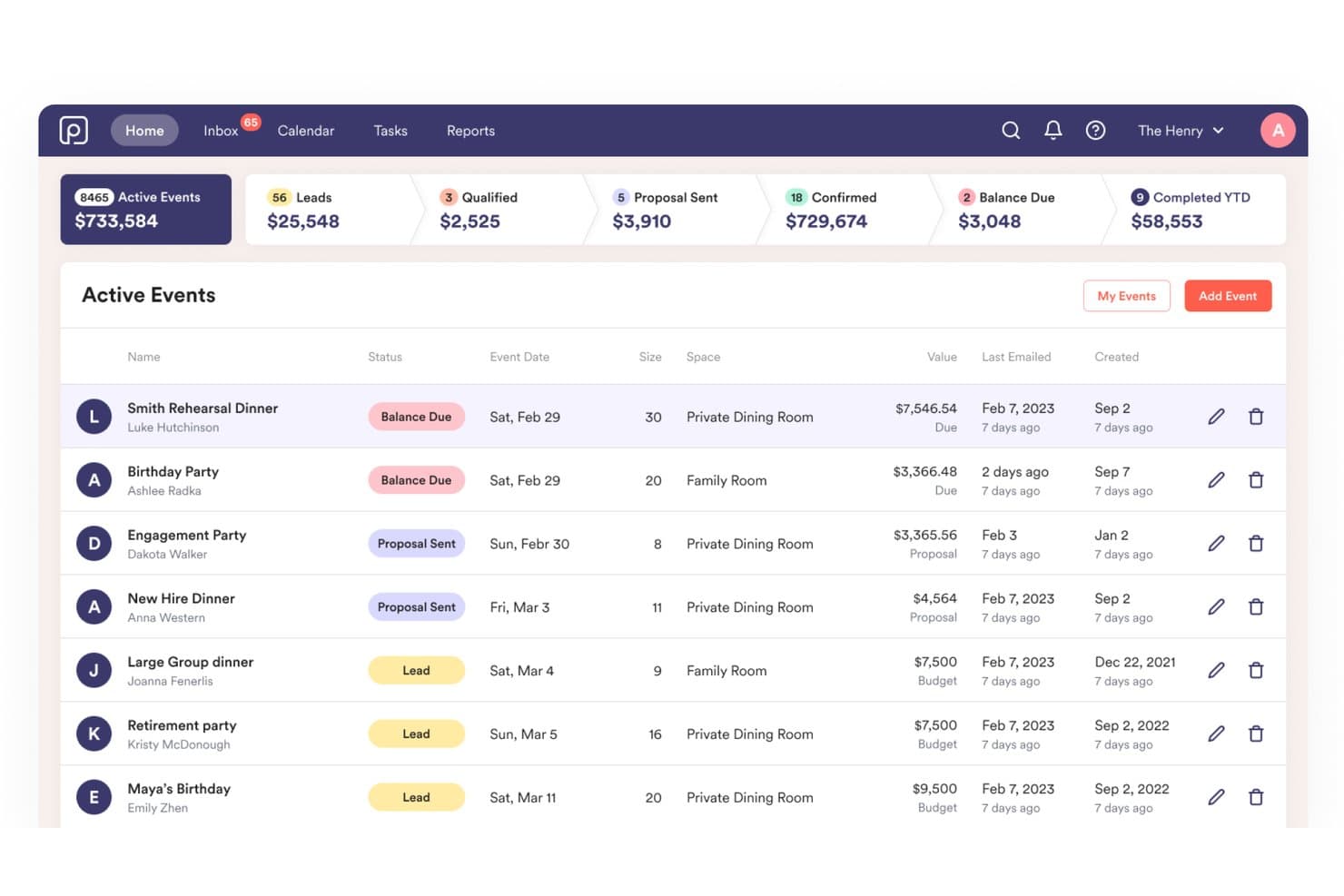
Perfect Venue muestra un panel de eventos activos con métricas del proceso, estados de los eventos y detalles de las reservas para los responsables de los espacios. Perfect Venue es una plataforma privada de gestión de eventos diseñada para restaurantes y espacios para eventos, que combina un calendario central de reservas, generación automatizada de BEO, herramientas de propuestas, procesamiento de pagos y comunicación con los invitados en un solo sistema.
¿Para quién es más adecuado Perfect Venue?
Perfect Venue es una excelente opción para restaurantes independientes, cervecerías y espacios independientes para eventos que gestionan cenas privadas y eventos organizados.
Por qué elegí Perfect Venue
Perfect Venue ocupa un lugar destacado en mi lista debido a la forma en que gestiona la generación de documentos. Cuando llega una reserva, crea automáticamente el BEO, incluidos los menús, los horarios y el personal, y envía una propuesta con la marca al invitado sin que tenga que modificar una plantilla. La función BEO para el personal distribuye después los detalles del evento directamente a los equipos de cocina y de sala. También me gusta que los clientes puedan revisar, firmar y pagar a través del portal del cliente sin intercambios adicionales.
Funciones principales de Perfect Venue
- Calendario de eventos centralizado: Consulta todas las reservas de eventos, solicitudes y disponibilidad de varios espacios en un solo calendario.
- Flujo de reserva para invitados con Express Book: Permite que los invitados consulten la disponibilidad, seleccionen elementos del menú y paguen depósitos directamente en línea.
- Aplicación móvil de gestión de eventos: Gestiona reservas, actualiza los detalles de los eventos y accede a la información de los invitados en dispositivos iOS.
- Asignación de tareas al equipo: Asigna, supervisa y notifica al personal sobre las tareas y los plazos relacionados con los eventos en tiempo real.
Integraciones de Perfect Venue
Perfect Venue ofrece integraciones nativas con Stripe, Square, HubSpot, Mailchimp, 7shifts y Tock, y se conecta con Zapier. Hay una API disponible para integraciones personalizadas.
Pros and Cons
Pros:
- La generación automatizada de BEO ahorra una cantidad considerable de tiempo administrativo
- El portal del cliente permite gestionar depósitos y firmas sin asistencia
- La distribución del BEO al personal mantiene coordinados a los equipos de cocina
Cons:
- Funcionalidad limitada para grandes establecimientos hoteleros
- No incluye funciones integradas para planos de planta o diagramas de salas
Learn more about Perfect Venue: Ideal para la diagramación interactiva de espacios de eventos en 3D
- Plan gratuito disponible
- Desde $150/mes
Visit WebsiteCustomer Rating:4.4/5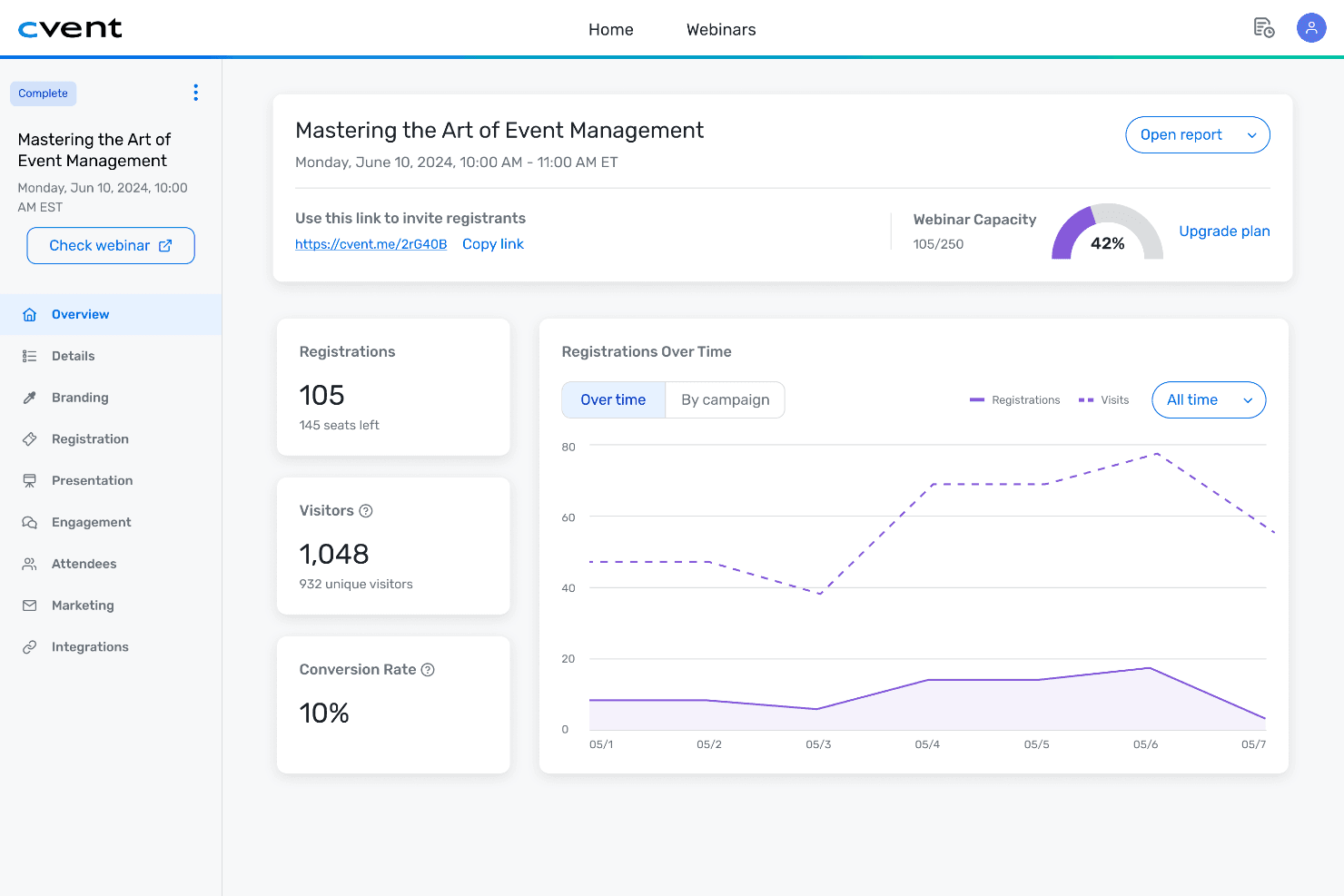
Cvent centraliza los datos de eventos, las métricas y la información de los asistentes en un solo panel. Cvent es una plataforma integral de gestión de eventos que abarca el registro, la búsqueda de sedes, los bloques de habitaciones para grupos, la diagramación de espacios, la participación de los asistentes y los informes posteriores al evento para eventos presenciales, virtuales e híbridos.
¿Para quién es mejor Cvent?
Cvent es ideal para hoteles empresariales, centros de conferencias y equipos corporativos de eventos grandes que gestionan grandes volúmenes de eventos complejos en múltiples espacios.
Por qué elegí Cvent
Cvent ocupa un lugar en mi lista de opciones principales porque ninguna otra plataforma de programación de eventos se acerca a su nivel de visualización de espacios en 3D. Me encanta que puedas arrastrar un BEO directamente a Cvent Event Diagramming y que CventIQ AI extraiga al instante todos los detalles de configuración, evitando por completo la introducción manual de datos. A partir de ahí, el recorrido 3D fotorrealista me permite compartir un enlace con los clientes para que puedan ver la configuración exacta de la sala antes de mover una sola silla.
Características principales de Cvent
- Extracción de BEO con CventIQ AI: Arrastra y suelta BEO directamente en la plataforma para extraer automáticamente los detalles del evento.
- Asignación de recursos y seguimiento del inventario: Asigna personal, equipos audiovisuales y equipamiento a cada evento con gestión del inventario en tiempo real.
- Integraciones con PMS y CRM: Se conecta con las principales plataformas PMS y de ventas hoteleras para sincronizar eventos, reservas y registros de asistentes.
- Colaboración y comentarios multiusuario: Permite ediciones simultáneas, notificaciones en tiempo real y comunicación interna o externa del equipo en cualquier espacio de trabajo de eventos.
Integraciones de Cvent
Cvent ofrece integraciones nativas con Salesforce, HubSpot, Marketo, Oracle Hospitality OPERA, Amadeus Delphi y Oracle Sales Cloud. También hay una API disponible para integraciones personalizadas.
Pros and Cons
Pros:
- Herramientas líderes del sector para la diagramación de planos en 3D
- La IA extrae automáticamente los detalles de los BEO
- Los portales para clientes permiten aprobar propuestas en tiempo real
Cons:
- La implementación tarda considerablemente más que la de sus competidores
- La personalización de los informes requiere configuración adicional
 Ideal para paneles de programación compartida en todo el espacio
- Demostración gratuita disponible
- Precio bajo solicitud
Visit WebsiteCustomer Rating:4.4/5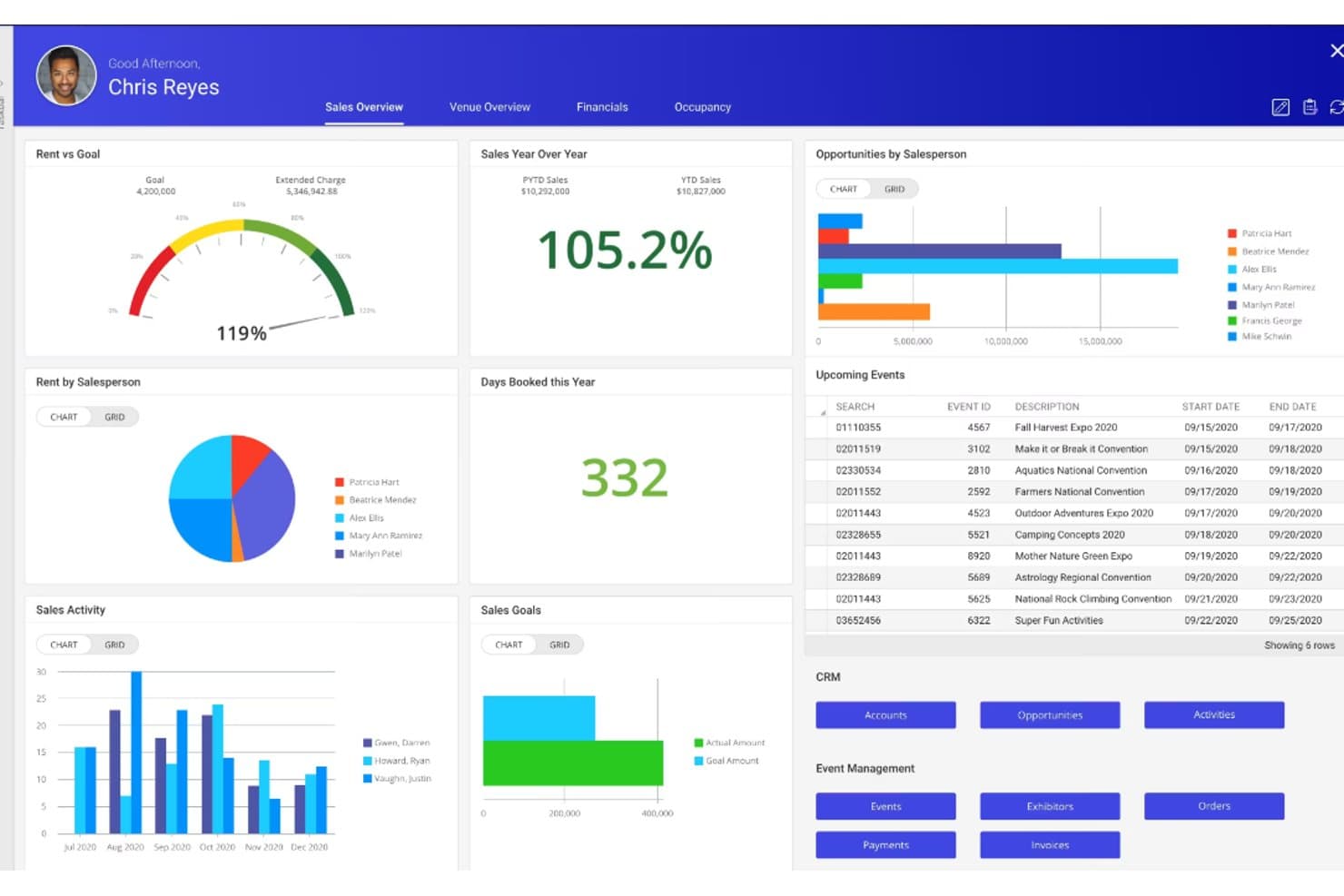
Momentus Technologies ofrece un panel de ventas completo con seguimiento de alquileres, rendimiento de los vendedores, próximos eventos y herramientas de CRM. Momentus Technologies es una plataforma de gestión de espacios y eventos que combina la reserva de espacios, la gestión de CRM, la gestión de catering, la generación de órdenes de eventos, la programación de operaciones y la gestión de calendarios de múltiples espacios para entornos complejos.
¿Para quién es más adecuada Momentus Technologies?
Es una opción especialmente adecuada para directores de servicios de conferencias y equipos de ventas de catering que gestionan eventos de gran volumen en centros de convenciones, estadios cubiertos, estadios al aire libre o campus universitarios.
Por qué elegí Momentus Technologies
Momentus Technologies ocupa un lugar en mi lista de opciones destacadas porque ninguna otra plataforma ofrece a los equipos de espacios de múltiples departamentos una vista de calendario compartida comparable. Me gusta especialmente el Calendario de disponibilidad, que muestra en tiempo real la disponibilidad de espacios en todas las áreas que se pueden reservar, y la Vista de operaciones personalizada, que mantiene a los equipos de catering, audiovisuales y montaje en la misma línea temporal del evento. Con usuarios ilimitados en un único panel activo, he comprobado que elimina el caos del control de versiones que suele producirse entre los equipos de ventas y operaciones.
Funciones principales de Momentus Technologies
- Diagramación de salas en 2D y 3D: Diseña planos detallados y distribuciones de asientos para cada espacio del evento.
- Gestión integral de reservas de grupos: Gestiona propuestas, contratos, depósitos y previsiones de ingresos desde una única plataforma.
- Creación y edición de órdenes de eventos: Genera, personaliza y distribuye órdenes de eventos completas con los detalles de las necesidades de catering y montaje.
- API abierta para integraciones de sistemas: Conecta con otras herramientas de trabajo o crea integraciones personalizadas para operaciones hoteleras complejas.
Integraciones de Momentus Technologies
Momentus Technologies ofrece integraciones nativas con DocuSign, Tessitura, EventDraw, Microsoft Outlook, Mailchimp y WeTrack. También hay disponible una API abierta para integraciones personalizadas. No se han documentado integraciones nativas con PMS o POS.
Pros and Cons
Pros:
- Disponibilidad en tiempo real de todos los espacios del recinto
- Órdenes de eventos detalladas distribuidas a varios departamentos
- Diagramación de planos y salas en 3D integrada
Cons:
- No se ha documentado ninguna integración nativa con PMS
- Curva de implementación más pronunciada para propiedades pequeñas
Learn more about Momentus Technologies : La mejor opción con herramientas de gestión de eventos impulsadas por IA
- No disponible
- Desde $99/mes (facturado anualmente)
Visit WebsiteCustomer Rating:4.1/5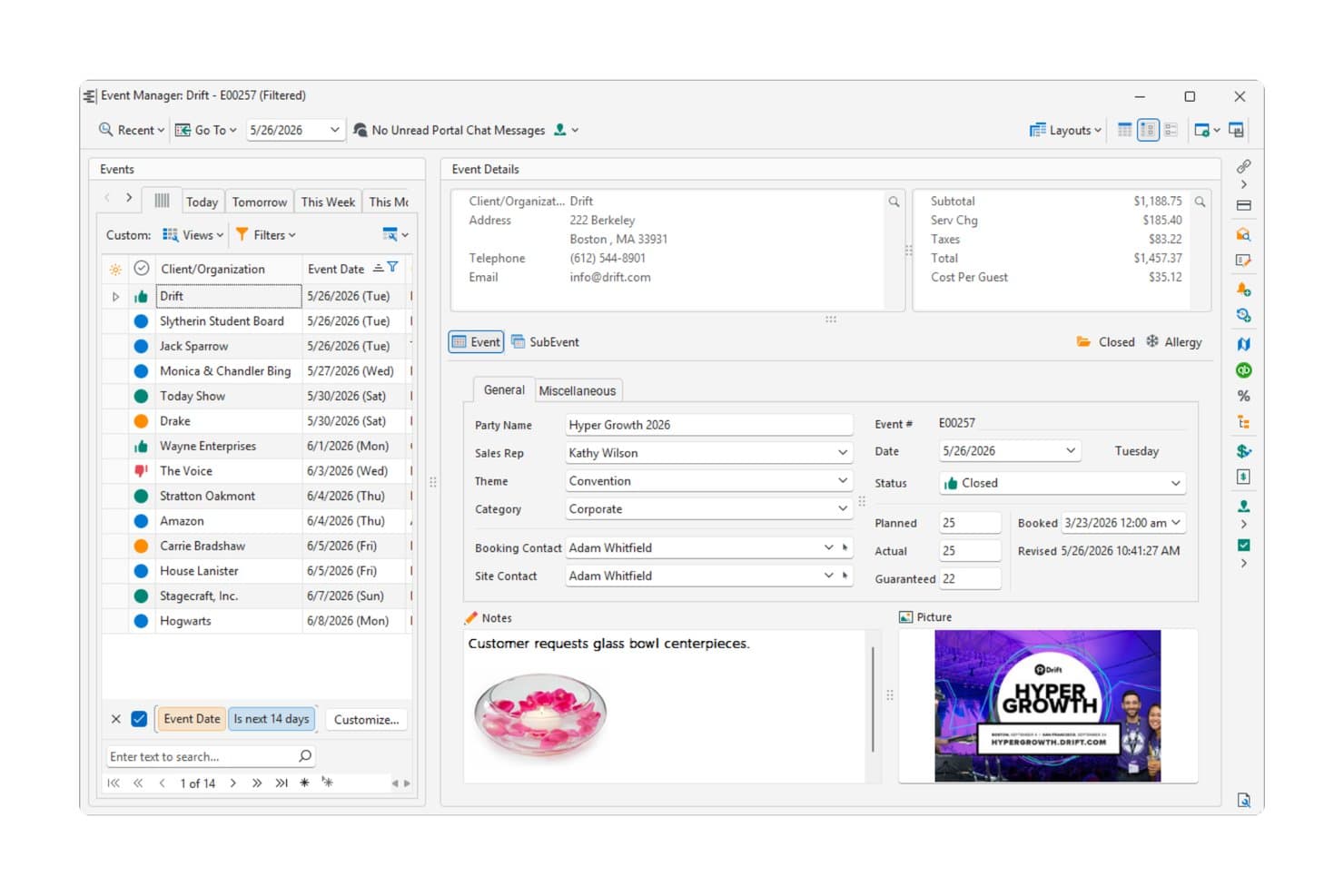
Caterease muestra un panel detallado de gestión de eventos con información del cliente, datos financieros y notas del evento para una convención corporativa. Caterease es una plataforma de gestión de catering y eventos basada en reservas guiadas por asistentes, generación de órdenes para banquetes, gestión de menús, personal y generación de informes mediante IA a través de su Horizon Hub.
¿Para quién es más adecuado Caterease?
Caterease es una opción excelente para equipos de catering y operaciones de alimentos y bebidas de hoteles que gestionan grandes volúmenes de eventos con requisitos complejos de menús, personal y facturación.
Por qué elegí Caterease
Elegí Caterease como una de las mejores opciones porque su Horizon Hub cambia realmente la forma en que se accede diariamente a los datos de los eventos. El asistente Cai me permite consultar detalles de eventos, registros de clientes e informes mediante consultas en lenguaje natural, en lugar de tener que navegar por menús anidados. Smart Reports genera análisis bajo demanda sin configuración manual, e Industry Trends compara mi operación con datos anonimizados de toda la base de clientes de Caterease, un contexto que no puedo obtener fácilmente en ningún otro lugar.
Características principales de Caterease
- Asistente dinámico para reservas de eventos: Guía a los usuarios para registrar todos los datos necesarios del evento, el cliente y el lugar, con campos condicionales para cada tipo de evento.
- Plantillas personalizables de órdenes para banquetes y propuestas: Permite diseñar y generar órdenes para banquetes, contratos y propuestas adaptados a cada cliente o función.
- Sistema integrado de visualización para cocina: Proporciona al equipo de cocina una vista en directo y codificada por colores de los platos del menú y los cambios de preparación de cada evento.
- Calendario multiespacio con agrupación: Muestra las reservas y el estado de múltiples espacios para eventos, lo que permite revisar visualmente y programar con rapidez.
Integraciones de Caterease
Caterease ofrece integraciones nativas con QuickBooks, Outlook, Google Calendar, Mailchimp, Constant Contact, Salesforce y DocuSign. También dispone de una API para integraciones personalizadas.
Pros and Cons
Pros:
- El asistente de IA consulta eventos mediante lenguaje natural
- Las reservas guiadas por asistentes registran rápidamente todos los detalles del evento
- Generación y personalización muy detalladas de órdenes para banquetes
Cons:
- La interfaz parece anticuada en comparación con las plataformas más recientes
- La experiencia móvil está por detrás de la funcionalidad de escritorio
Learn more about Caterease: Ideal con acceso ilimitado para los equipos de eventos
- Demostración gratuita disponible
- Precios disponibles bajo solicitud
Visit WebsiteCustomer Rating:4.7/5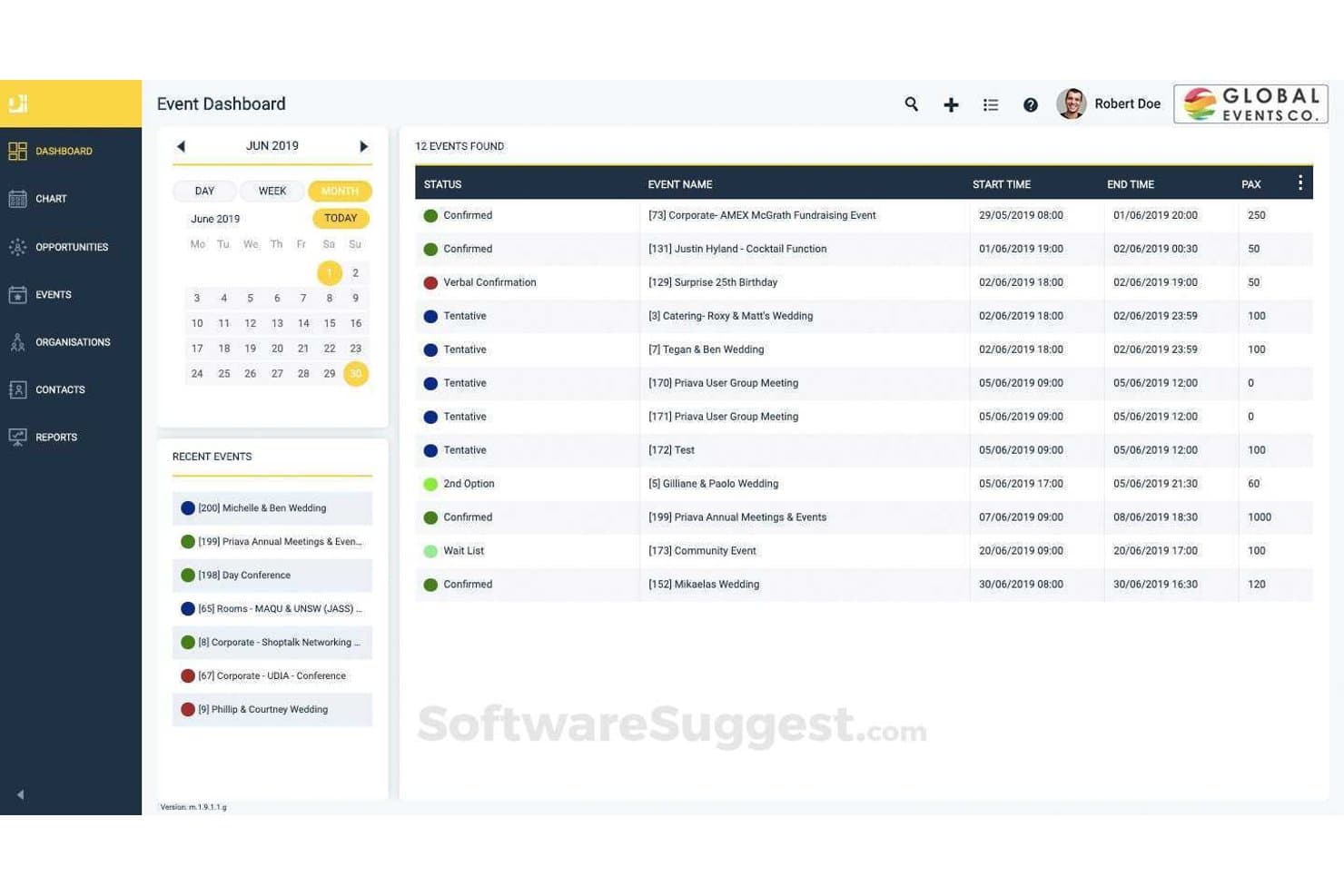
Priava ofrece un panel de eventos con una vista de calendario, seguimiento del estado y una lista detallada de los eventos programados, incluidos los horarios de inicio y finalización y el número de asistentes. Priava es una plataforma de reserva de espacios y gestión de eventos basada en la nube que abarca la programación de espacios, la coordinación del catering, la asignación de recursos, el CRM y la detección de conflictos en múltiples tipos de espacios.
¿Para quién es más adecuada Priava?
Priava es adecuada para espacios medianos y grandes —centros de conferencias, espacios de artes escénicas, universidades y estadios— que gestionan grandes volúmenes de eventos en varios espacios simultáneamente.
Por qué elegí Priava
He incluido Priava entre mis principales opciones porque su modelo de usuarios ilimitados permite que cada coordinador, responsable de catering y líder de operaciones trabaje en el mismo sistema sin que aumenten los costes de licencia. Me gusta especialmente cómo la plataforma gestiona la programación simultánea de múltiples espacios con comprobaciones de conflictos integradas, de modo que dos miembros del equipo no puedan reservar accidentalmente el mismo espacio dos veces. La gestión compartida de tareas y el seguimiento de órdenes de servicio mantienen a todos los departamentos alineados en un único registro del evento.
Características principales de Priava
- Plantillas personalizables de documentos para eventos: Genera propuestas, contratos y materiales destinados a los clientes adaptados a cada evento y espacio.
- CRM nativo para la gestión de clientes potenciales y consultas: Realiza el seguimiento y gestiona las consultas sobre eventos, las interacciones con los clientes y las oportunidades de venta desde la plataforma.
- Seguimiento de la disponibilidad de recursos y servicios: Asigna recursos audiovisuales, de catering y logísticos a las reservas mientras supervisas el inventario y las necesidades de asistencia.
- Informes detallados de múltiples espacios: Elabora informes operativos y financieros de varios espacios o propiedades para realizar previsiones y hacer un seguimiento del rendimiento.
Integraciones de Priava
Priava ofrece integraciones nativas con Salesforce, NetSuite, HubSpot, MailChimp, SAP y Microsoft Outlook. Hay una API disponible para integraciones personalizadas.
Pros and Cons
Pros:
- Usuarios ilimitados para todo el equipo de eventos
- Detección de conflictos en tiempo real en múltiples espacios
- Gestiona el catering, los recursos y los espacios conjuntamente
Cons:
- El acceso móvil es limitado para el personal de planta
- La configuración requiere tiempo debido a las configuraciones complejas
Learn more about Priava: La mejor opción para la gestión de cadenas con varias propiedades
- Prueba gratuita disponible
- Desde $249/mes (facturado anualmente)
Visit WebsiteCustomer Rating:4.9/5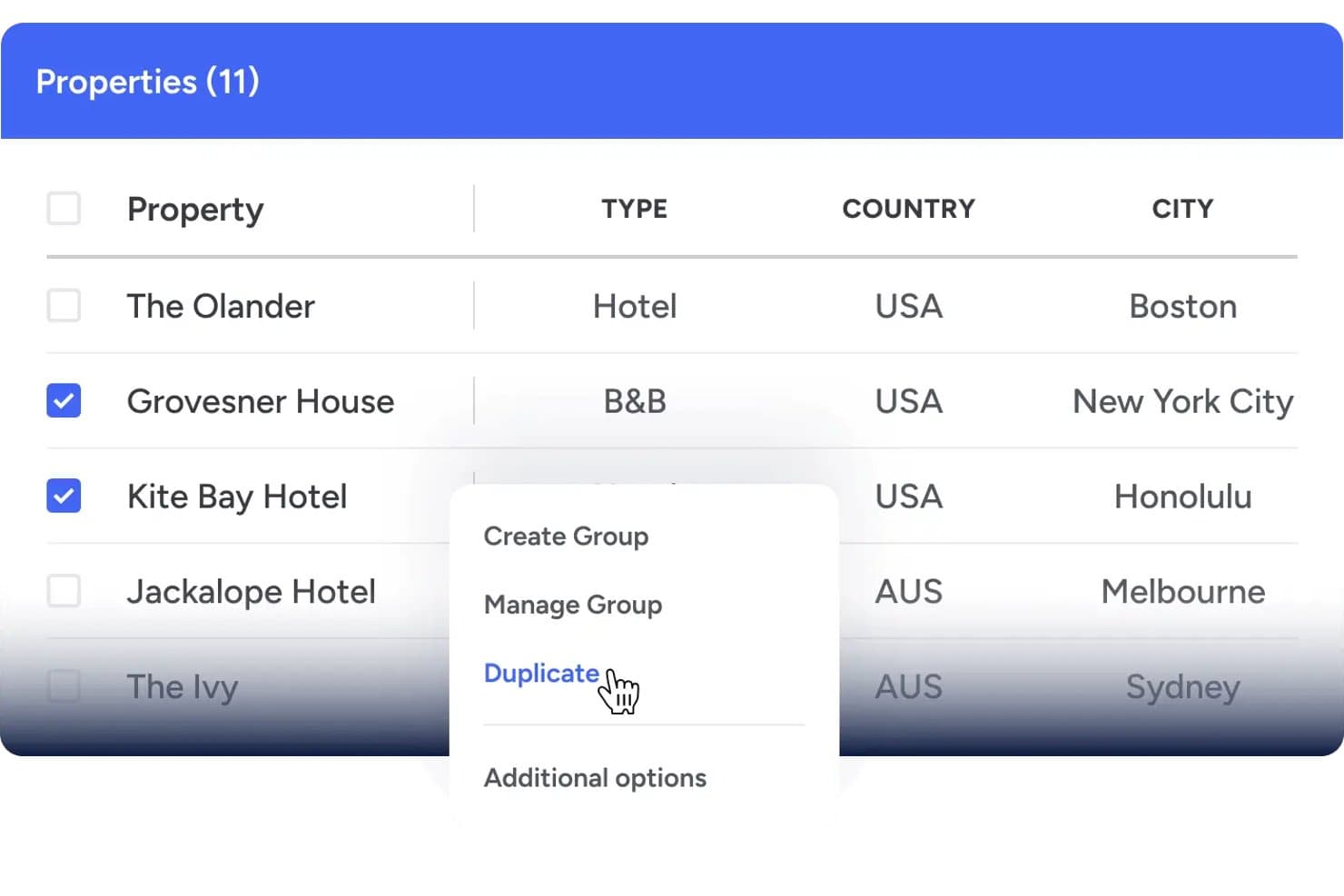
Event Temple ofrece una interfaz de gestión de varias propiedades que permite a los usuarios seleccionar y duplicar propiedades en distintas ubicaciones. Event Temple es una plataforma de CRM de programación de eventos y ventas centrada en la hostelería que gestiona reservas de grupos, contratos de catering, BEO, propuestas electrónicas y calendarios de espacios para eventos de hoteles y establecimientos.
¿Para quién es más adecuado Event Temple?
Es una opción muy adecuada para los equipos de catering y eventos de cadenas hoteleras y grupos con varias propiedades que necesitan una visibilidad centralizada en todas sus ubicaciones.
Por qué elegí Event Temple
Event Temple ocupa un lugar en mi lista de opciones principales porque su módulo de Gestión de cadenas resuelve algo que la mayoría de las herramientas de programación de eventos pasa por alto: coordinar las ventas y reservas de grupos en varias propiedades desde un solo lugar. Me gusta especialmente el panel de la cadena, que permite a los equipos de ventas nacionales alternar entre propiedades y acceder a una vista compartida de cuentas y contactos para detectar oportunidades de venta cruzada. Los informes consolidados de varias propiedades hacen que el seguimiento del rendimiento a nivel de cartera sea realmente práctico.
Características principales de Event Temple
- Plantillas de BEO personalizables: Permite a los equipos crear, editar y distribuir órdenes de eventos para banquetes adaptadas a cada evento.
- Flujos de trabajo integrados para propuestas y firmas electrónicas: Genera propuestas y contratos digitales que los clientes pueden revisar y firmar en línea.
- Calendario visual de espacios para eventos: Ofrece un calendario de arrastrar y soltar para reservar y gestionar varios espacios para eventos simultáneamente.
- Integración con Opera Cloud PMS: Permite sincronizar en tiempo real las reservas de eventos y los bloques de habitaciones de huéspedes con los principales sistemas de gestión de propiedades.
Integraciones de Event Temple
Event Temple ofrece integraciones nativas con Opera Cloud PMS, Salesforce, Mailchimp, Tripleseat, Duetto, For-Sight CRM, GuestRevu y Zapier. También hay una API disponible para integraciones personalizadas.
Pros and Cons
Pros:
- Potente panel de gestión de cadenas con varias propiedades
- CRM especializado en hostelería diseñado para hoteles
- Generación de BEO con flujos de trabajo de distribución automatizados
Cons:
- Diagramación de planos limitada en comparación con la competencia
- Las opciones de personalización de informes son algo limitadas
Learn more about Event Temple: La mejor opción para ventas de grupos basadas en Salesforce
- No disponible
- Precios disponibles previa solicitud
Visit WebsiteCustomer Rating:4.7/5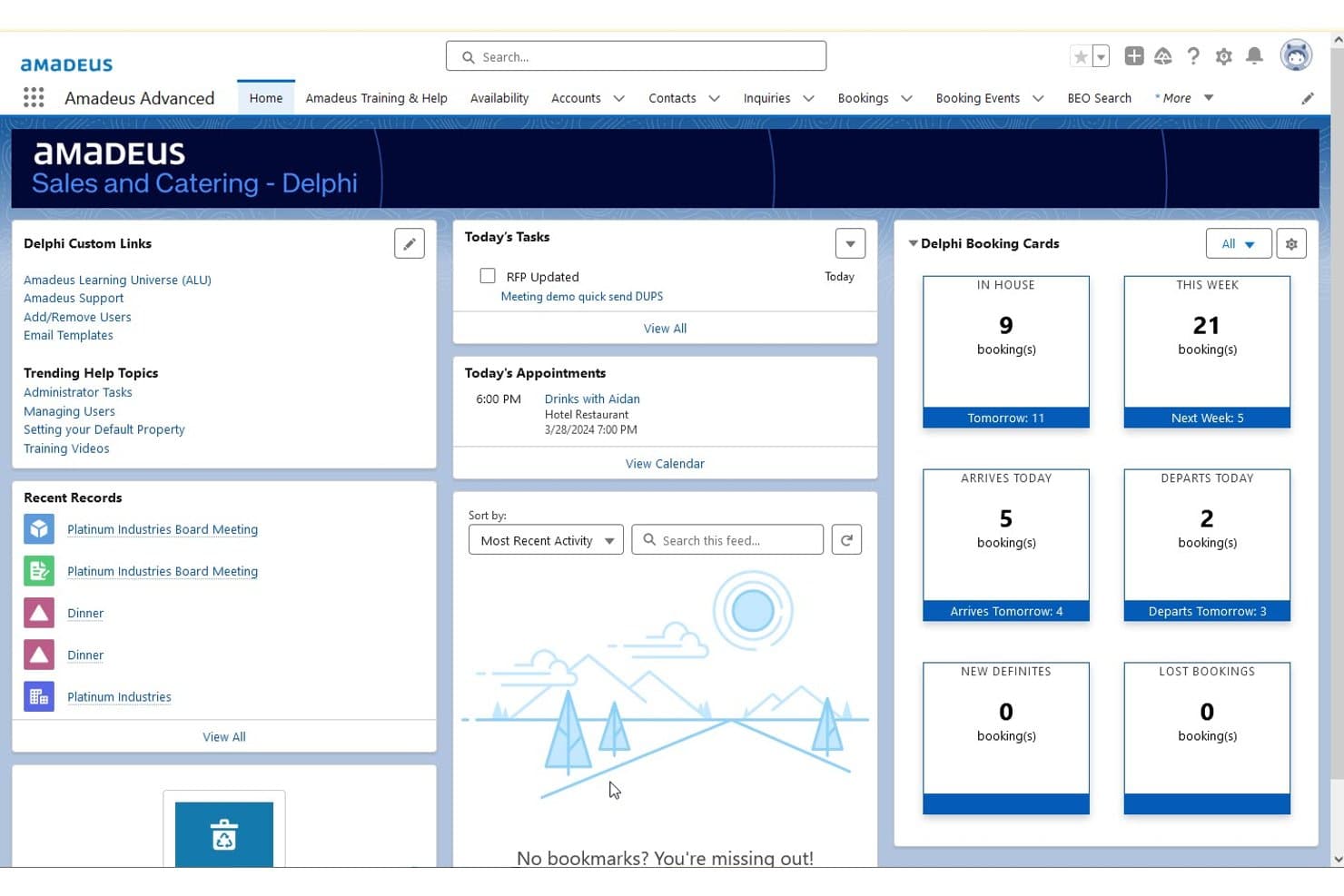
Amadeus Delphi ofrece un panel de inicio centralizado que muestra tarjetas de reservas, las tareas de hoy, citas y registros recientes para la gestión de eventos y catering. Amadeus Delphi es una plataforma de gestión de ventas y catering hotelero basada en Salesforce que gestiona reservas de grupos, generación de BEO, programación de espacios para eventos y contratos de catering en carteras de una o varias propiedades.
¿Para quién es más adecuado Amadeus Delphi?
Delphi es una opción ideal para hoteles de servicio completo y con varias propiedades que cuentan con equipos dedicados de ventas de catering y gestionan grandes volúmenes de eventos y reservas de grupos.
Por qué elegí Amadeus Delphi
Amadeus Delphi ocupa un lugar en mi lista de favoritos porque es la única plataforma de programación de eventos hoteleros desarrollada de forma nativa en Salesforce, lo que significa que los embudos de ventas de grupos, el seguimiento de contratos y los contactos posteriores con los clientes se gestionan en un único CRM. Me gusta especialmente la generación de propuestas y contratos en 3 clics, que permite a los equipos de ventas avanzar rápidamente con los clientes potenciales de grupos entrantes. El flujo de trabajo automatizado de BEO también vincula directamente los detalles del catering, la preparación y el personal con cada reserva, de modo que nada se pierda entre departamentos.
Funciones principales de Amadeus Delphi
- Diagramación de planos en 3D: Diseña y visualiza a escala la distribución de los espacios para eventos mediante planos interactivos.
- Acceso móvil a los BEO: Proporciona al personal de banquetes, cocina y operaciones acceso en tiempo real a los BEO y sus cambios desde dispositivos móviles.
- Distribución de clientes potenciales y consultas: Distribuye automáticamente los clientes potenciales de reuniones y grupos procedentes de los principales canales de ventas a los responsables asignados.
- Gestión de carteras de varias propiedades: Gestiona el inventario compartido, las plantillas y los informes de varias propiedades desde un único sistema.
Integraciones de Amadeus Delphi
Amadeus Delphi ofrece integraciones nativas con StayNTouch PMS, IDeaS G3 RMS, Cvent, Sertifi, Canary y MeetingPackage, además de una API para integraciones personalizadas.
Pros and Cons
Pros:
- El CRM nativo de Salesforce impulsa el embudo de ventas de grupos
- BEO automatizados distribuidos directamente a cada departamento
- Admite la gestión de carteras de varias propiedades en un único sistema
Cons:
- La implementación tarda meses en propiedades grandes
- La interfaz parece anticuada frente a competidores más recientes
Learn more about Amadeus Delphi: La mejor opción para la automatización de consultas y reservas con IA
- Demostración gratuita disponible
- Precios disponibles previa solicitud
Visit WebsiteCustomer Rating:4.5/5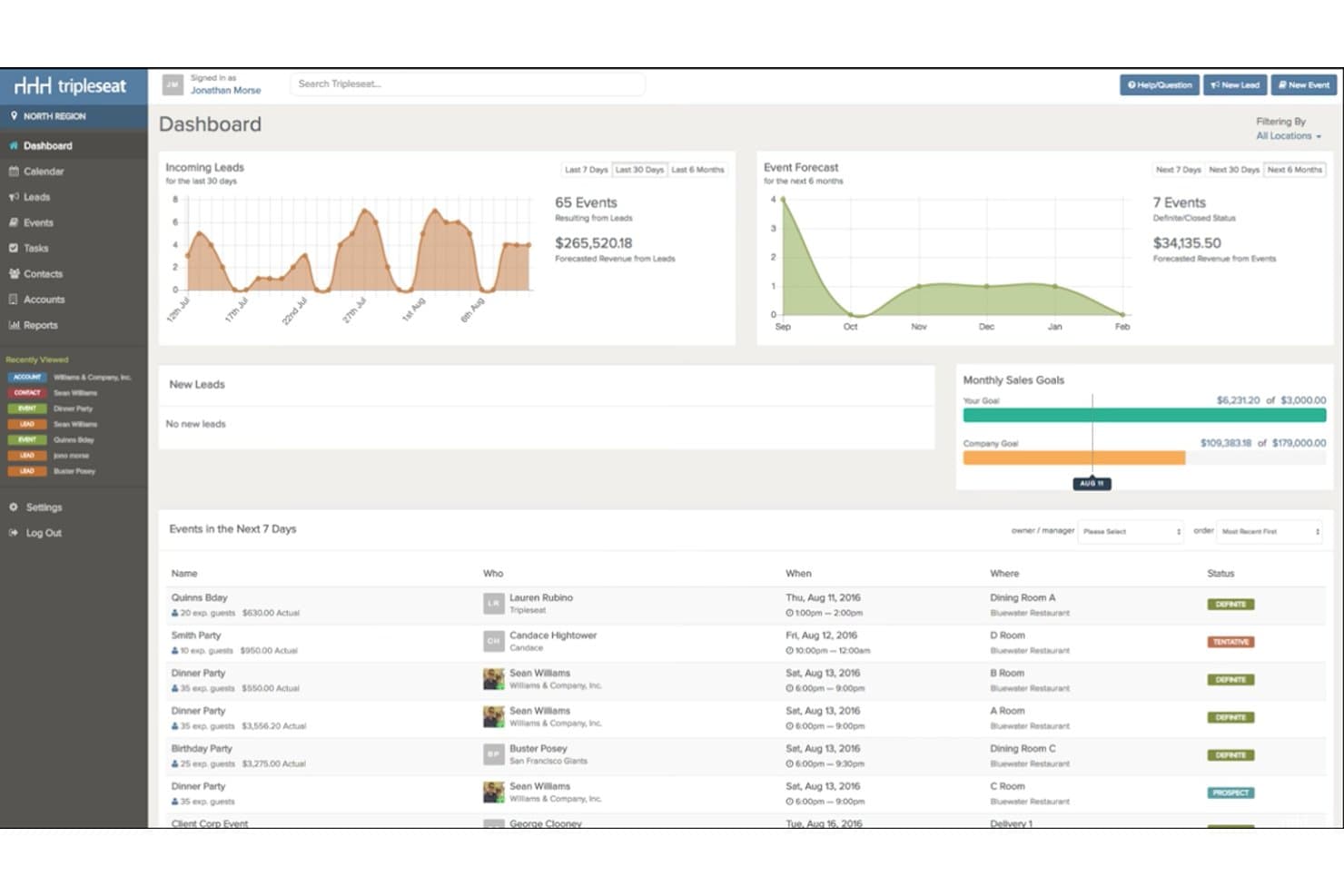
Tripleseat ofrece un panel centralizado que muestra los clientes potenciales entrantes, las previsiones de eventos, los objetivos de ventas mensuales y los próximos eventos en una sola vista. Tripleseat es una plataforma de ventas y gestión de eventos centrada en la hostelería que gestiona la reserva de espacios para eventos, la generación de BEO, las propuestas de catering, los contratos de grupos y la coordinación de calendarios de múltiples establecimientos para hoteles, restaurantes y espacios singulares.
¿Para quién es más adecuado Tripleseat?
Tripleseat es una opción excelente para equipos de eventos de hoteles, responsables de catering y operadores de múltiples establecimientos que necesitan una plataforma diseñada específicamente para gestionar todo el ciclo de ventas de eventos.
Por qué elegí Tripleseat
He incluido Tripleseat entre mis principales opciones porque Tripleseat Intelligence gestiona el ciclo de vida de las consultas sin intervención manual: las respuestas automáticas instantáneas acusan recibo de los nuevos clientes potenciales, la IA redacta contratos a partir de los detalles del evento y los recordatorios automatizados se activan cuando una propuesta lleva demasiado tiempo sin firmarse. También me gusta Reserva directa, que permite a los invitados confirmar reservas de espacios las 24 horas del día, los 7 días de la semana, sin necesidad de llamar por teléfono. En la práctica, mi equipo está convirtiendo consultas que, de otro modo, se estancarían a mitad del proceso de ventas.
Características principales de Tripleseat
- Diagramación de planos en 2D y 3D: Diseña distribuciones detalladas para eventos con herramientas de arrastrar y soltar destinadas a la configuración de salas y los asientos.
- Generación de órdenes de eventos de banquete (BEO): Crea, personaliza y distribuye BEO con los menús, horarios y personal de cada evento.
- Integraciones nativas con PMS y POS: Conecta los detalles de los eventos con los principales sistemas de gestión de establecimientos hoteleros y puntos de venta para lograr operaciones fluidas.
- Calendario visual de múltiples espacios: Reserva, bloquea y gestiona la disponibilidad de varios establecimientos y espacios para eventos desde un panel centralizado.
Integraciones de Tripleseat
Tripleseat ofrece integraciones nativas con GoTab POS, OpenTable, SevenRooms, CardConnect, DoorDash for Merchants, Outlook, Google Calendar y Prismm. También hay una API disponible para integraciones personalizadas.
Pros and Cons
Pros:
- Incluye un proceso de ventas de eventos específico
- La IA automatiza las respuestas y los seguimientos de las consultas
- Potentes herramientas para crear y distribuir BEO
Cons:
- Las opciones de personalización de informes son limitadas
- La configuración de instalaciones múltiples requiere mucho tiempo
Learn more about Tripleseat: 9La mejor opción con disponibilidad inmediata y en tiempo real de espacios para eventos
iVvy
- Demostración gratuita disponible
- Precios disponibles previa solicitud
Visit WebsiteCustomer Rating:4.7/5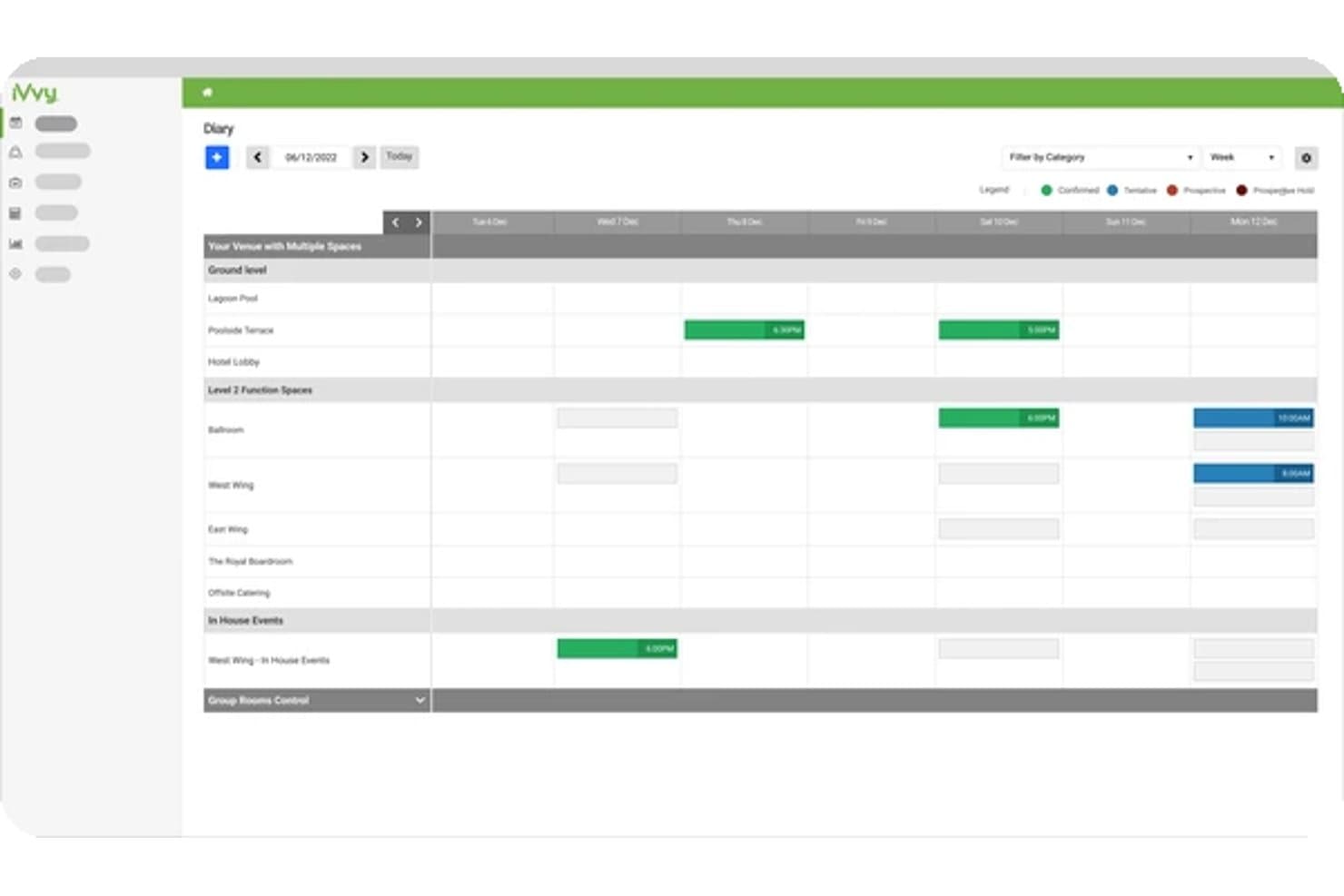
iVvy ofrece una vista semanal de la agenda para programar y gestionar eventos en múltiples espacios y categorías del recinto. iVvy es una plataforma de ventas hoteleras y servicios de catering que combina la gestión de espacios para eventos, la generación de BEO, la coordinación de reservas de grupos, el CRM y los contratos de catering en un solo sistema diseñado para hoteles y espacios para eventos.
¿Para quién es más adecuado iVvy?
iVvy es ideal para los equipos de ventas de catering y eventos de hoteles, centros de eventos y grupos hoteleros con múltiples propiedades que gestionan grandes volúmenes de reservas de grupos y conferencias.
Por qué elegí iVvy
iVvy ocupa un lugar en mi preselección por la forma en que gestiona la disponibilidad en tiempo real de los espacios para eventos en toda la agenda de eventos de un hotel. Me encanta que la Agenda de eventos muestre las reservas cotizadas, provisionales y confirmadas tanto de salas de reuniones como de bloques de habitaciones en una sola vista, lo que evita las dobles reservas. El motor de reservas muestra entonces esa disponibilidad en tiempo real directamente en el sitio web del hotel, de modo que las consultas llegan precalificadas según lo que realmente está disponible.
Características principales de iVvy
- Generación de órdenes de eventos de banquete (BEO): Crea, edita y envía BEO detalladas con menús, cronogramas y necesidades de personal para cada evento.
- Informes y análisis de ingresos: Accede a paneles, informes de ritmo de ventas y plantillas personalizables para hacer un seguimiento de los ingresos de los eventos y prever las ventas.
- CRM y gestión de clientes potenciales: Registra todas las consultas, gestiona los datos de los clientes y realiza un seguimiento de las actividades y comunicaciones en un solo sistema.
- Propuestas digitales y firmas electrónicas: Genera rápidamente propuestas y contratos con la imagen de marca, y envíalos para que los clientes los firmen electrónicamente con seguimiento de versiones.
Integraciones de iVvy
iVvy ofrece integraciones nativas con Opera Cloud, Mews, StayNTouch, RMS, Agilysys, Protel Air, Jonas Chorum, Xero, MYOB, NetSuite, Infor, Salesforce, Cvent, IdeaS y SevenRooms. También hay una API disponible para integraciones personalizadas.
Pros and Cons
Pros:
- La agenda de eventos en tiempo real evita las dobles reservas
- Muestra la disponibilidad en tiempo real directamente en los sitios web de los hoteles
- Diseñado específicamente para eventos y catering de hoteles
Cons:
- La configuración inicial requiere bastante tiempo
- Los paneles de informes ofrecen opciones de personalización limitadas
Learn more about iVvy: Ideal para propuestas y pagos integrados
- Demostración gratuita disponible
- Desde $199/mes
Visit WebsiteCustomer Rating:4.2/5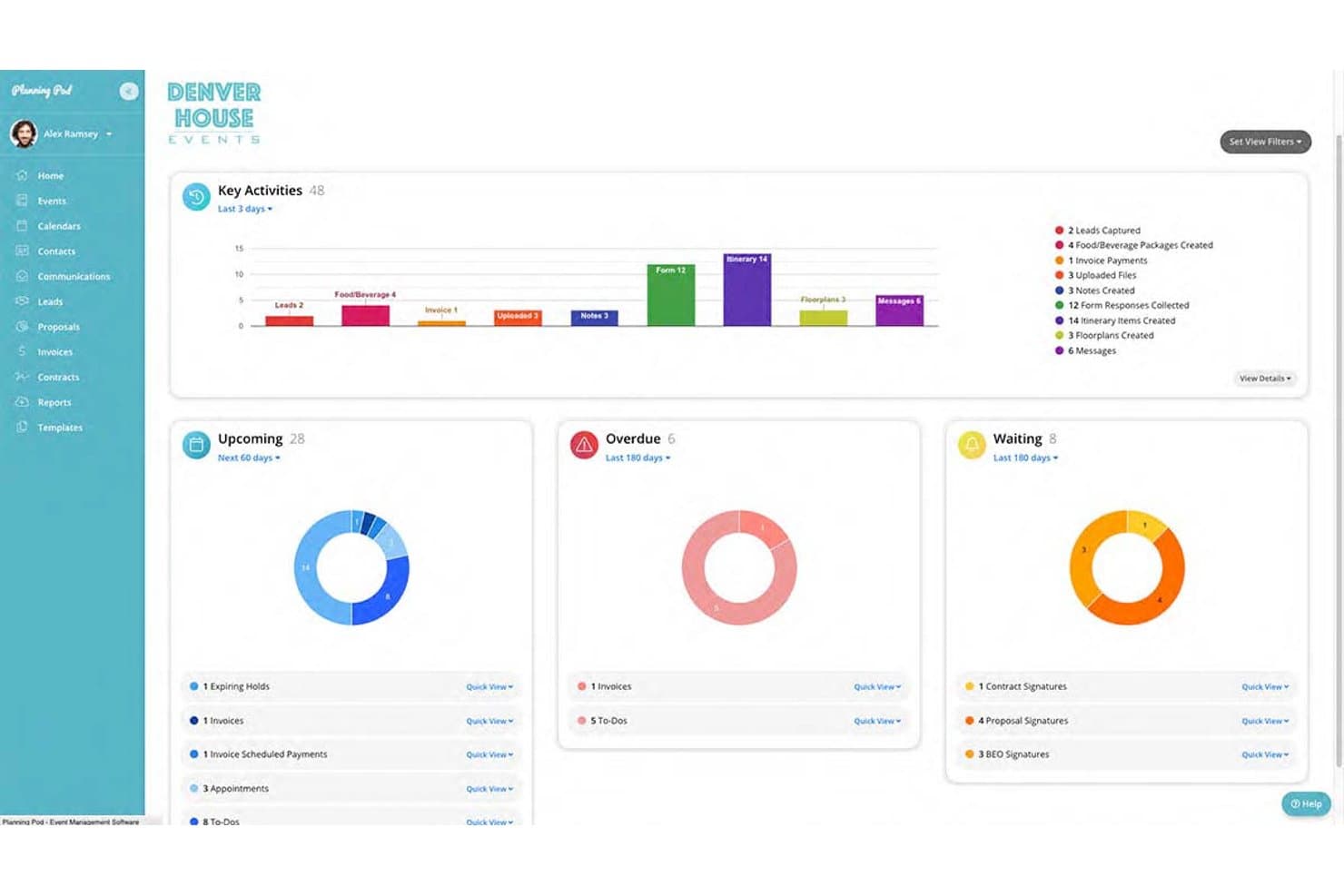
Planning Pod muestra un panel centralizado de gestión de eventos con gráficos de actividad clave, próximas tareas, elementos atrasados y firmas pendientes. Planning Pod es una plataforma de gestión de espacios y eventos diseñada para hoteles, salones de banquetes y centros de eventos, que combina la reserva de espacios funcionales, la generación de BEO, la gestión de F&B, las propuestas de catering y las herramientas de comunicación con clientes en un solo sistema.
¿Para quién es más adecuado Planning Pod?
Planning Pod es adecuado para hoteles independientes, espacios boutique y centros de eventos independientes que gestionan sus propios eventos, servicios de catering y facturación de clientes sin un ecosistema PMS completo.
Por qué elegí Planning Pod
Planning Pod ocupa un lugar en mi lista de favoritos por la estrecha conexión que establece entre propuestas, contratos y pagos dentro de un único registro de reserva. Me gusta que, una vez que un cliente firma una propuesta mediante firma electrónica, la plataforma transfiera esos detalles directamente a una factura con calendarios de cuotas ya incorporados. Después, mi equipo puede cobrar depósitos a través de portales de clientes personalizados, con pagos mediante tarjeta de crédito y ACH procesados de forma nativa a través de Adyen, sin tener que cambiar de herramienta.
Características principales de Planning Pod
- Diagramación de planos: Crea y edita diseños a escala para espacios de eventos, incluidas mesas, sillas y escenarios.
- Generación y distribución de BEO: Crea órdenes de eventos para banquetes personalizables para los equipos de FOH, cocina y entrega.
- Gestor de tareas con asignación de personal: Asigna y realiza el seguimiento de tareas por miembro del equipo en los distintos flujos de trabajo de eventos.
- Formularios web de captación de clientes potenciales: Recopila consultas sobre eventos desde el sitio web de tu espacio directamente en el embudo de ventas.
Integraciones de Planning Pod
Planning Pod ofrece integraciones nativas con QuickBooks Online, WeddingWire, The Knot, Google Calendar, Apple Calendar y Microsoft Outlook Calendar. También se conecta con Zapier y proporciona una API para integraciones personalizadas.
Pros and Cons
Pros:
- Las propuestas, los contratos y los pagos avanzan automáticamente
- Diagramación de planos integrada para eventos
- Los clientes pueden gestionar sus operaciones de forma autónoma mediante un portal personalizado
Cons:
- Los informes carecen de análisis detallados de ingresos y rendimiento
- No está diseñado para grandes carteras de múltiples propiedades
Learn more about Planning Pod:
Otros programas para programar eventos
- 11SwoogoIdeal para flujos de trabajo flexibles de registro de eventos
- 12EventbriteIdeal para maximizar la visibilidad de eventos públicos
- 13HoneyBookIdeal para la colaboración y los pagos en el portal del cliente
- 14SkeddaIdeal para reglas de reserva avanzadas y automatización
- 15AcceleventsIdeal para la gestión de agendas y ponentes a gran escala
Cómo evalúo el software de programación de eventos
Evalúo el software de programación de eventos en dos niveles: la línea base —programación de eventos, gestión de espacios y recursos, flujos de trabajo de reservas y prevención de conflictos— y los factores diferenciadores que distinguen a las opciones más sólidas orientadas a la hostelería y los espacios para eventos.
Funcionalidad principal (requisitos esenciales para esta lista)
Al seleccionar herramientas para mi lista, clasifico cada una en una escala de 0 (no ofrece la funcionalidad) a 5 (sobresale en esta área) para cada funcionalidad principal que se indica a continuación. Después, calculo la puntuación total de la herramienta como porcentaje. Cada herramienta debe alcanzar una puntuación total mínima del 65% para que se la considere para su inclusión.
- Programación de eventos y espacios funcionales: Busco un calendario centralizado, un diario de eventos o una cuadrícula de reservas que permita a los equipos programar salas de reuniones, salones de baile, espacios para eventos y otras áreas reservables, comprobando la disponibilidad de un vistazo.
- Gestión de reservas y ventas: Evalúo qué tan bien gestiona la plataforma el proceso desde una consulta inicial o RFP hasta las propuestas, los contratos, las confirmaciones y los pagos.
- Detección de conflictos: El software debe ayudar a evitar reservas superpuestas mostrando la disponibilidad de espacios y recursos, y señalando posibles conflictos de programación antes de confirmar un evento.
- Gestión de recursos del evento: Compruebo si los equipos pueden asignar equipos, requisitos de catering, configuraciones de salas, personal y otros recursos a eventos individuales, y mantener esos requisitos vinculados a la reserva.
- Documentos y comunicación del evento: Busco herramientas que ayuden a los equipos a crear y compartir propuestas, contratos, resúmenes de eventos, BEOs, hojas de operaciones u otros documentos operativos, manteniendo informados a los clientes y a los equipos internos.
- Integraciones: La plataforma debe conectarse con sistemas relevantes de hostelería o empresariales, como PMS, POS, CRM, contabilidad, pagos, calendarios o herramientas de marketing, para que los equipos puedan reducir la introducción de datos duplicados.
Una vez que tengo una lista de herramientas que cumplen este criterio, considero qué distingue a cada plataforma.
Factores diferenciadores (lo que distingue a los proveedores)
Así es como comparo y contrasto a los distintos proveedores:
Funciones destacadas
Analizo detenidamente las capacidades específicas para la hostelería, como la generación de BEOs, la gestión de bloques de habitaciones para grupos, los flujos de trabajo de catering y la representación gráfica de espacios funcionales. Las herramientas que ofrecen planos en 2D o 3D pueden ayudar a los equipos de ventas a crear distribuciones precisas de las salas y compartirlas con los clientes antes de finalizar un evento. Los portales orientados al cliente son otro factor diferenciador, ya que los organizadores pueden revisar propuestas, firmar contratos, realizar pagos y comunicar cambios sin depender de largas cadenas de correos electrónicos. El acceso móvil también es importante para los equipos operativos que necesitan consultar horarios, BEOs, configuraciones de salas o cambios de última hora en los eventos mientras trabajan por las instalaciones.
Más allá de las funciones
La profundidad de las integraciones es especialmente importante para los hoteles y los espacios de hostelería. Compruebo si la plataforma se conecta con sistemas de gestión de propiedades como Oracle OPERA, Mews, Cloudbeds o Stayntouch, además de plataformas de POS, CRM, contabilidad y pagos cuando corresponde. En el caso de las herramientas centradas en hoteles, una conectividad fiable con el PMS puede ayudar a mantener alineados los bloques de habitaciones para grupos, los detalles de los eventos y las operaciones del establecimiento.
El tipo de establecimiento y la escala operativa también influyen en mi evaluación. Un complejo turístico con servicio completo que gestiona varios salones de baile, equipos de catering y bloques de habitaciones para grupos tiene requisitos diferentes a los de un restaurante que organiza eventos de comedor privado o un hotel boutique con una sola sala de reuniones. También considero los requisitos de implementación, la facilidad de uso, las integraciones disponibles y la estructura de precios, especialmente si los precios se basan en usuarios, establecimientos, módulos o el volumen total de eventos.
Cómo elegir un software para programar eventos
Es fácil perderse entre largas listas de funciones y estructuras de precios complejas. Para ayudarte a mantener la atención mientras avanzas en tu proceso de selección de software, que es único, aquí tienes una lista de factores que debes tener en cuenta:
| Factor | Qué considerar |
| Escalabilidad | ¿El software admitirá más eventos, espacios para funciones, propiedades y usuarios a medida que crezca su operación? Considere si puede gestionar desde una única sala de reuniones hasta operaciones de eventos en varias propiedades. |
| Integraciones | ¿Se conecta con los sistemas que ya utiliza? Busque integraciones con su PMS, POS, CRM, software de contabilidad, herramientas de pago y calendarios para reducir la introducción manual de datos. |
| Personalización | ¿Puede adaptar las propuestas, los BEO, los contratos, las plantillas de eventos, los flujos de trabajo de reservas y los informes para ajustarlos al funcionamiento de su propiedad? |
| Facilidad de uso | ¿Es sencillo de utilizar para los equipos de ventas, catering, banquetes y operaciones? Busque calendarios intuitivos, una navegación clara y actualizaciones de eventos sencillas para reducir el tiempo de formación. |
| Implementación e incorporación | ¿Con qué rapidez puede empezar su equipo? Considere la migración de datos, la configuración del PMS, la configuración de los flujos de trabajo, los recursos de formación y el soporte de incorporación dirigido por el proveedor. |
| Coste | ¿El modelo de precios se adapta a su propiedad? Compare los precios por usuario, por propiedad y por módulo, y tenga en cuenta los costes de implementación, las integraciones y los complementos opcionales. |
| Medidas de seguridad | ¿Cómo protege la plataforma los datos de los huéspedes, los pagos y los eventos? Busque controles de acceso, cifrado, gestión segura de pagos y medidas de cumplimiento pertinentes. |
| Disponibilidad del soporte | ¿Puede obtener ayuda cuando surge un problema durante un evento? Considere el horario de soporte, los tiempos de respuesta, la asistencia durante la incorporación y los canales disponibles, como teléfono, correo electrónico y chat. |
¿Qué es el software de planificación de eventos?
El software de planificación de eventos ayuda a hoteles, espacios y equipos de hostelería a gestionar las reservas de eventos, los espacios para funciones, los grupos, las necesidades de catering y los recursos de los eventos desde un único sistema. Los directores de hotel, los equipos de ventas, los responsables de catering y los coordinadores de eventos utilizan estas plataformas para organizar la disponibilidad, evitar reservas duplicadas, crear documentos de eventos y coordinar departamentos.
Muchas plataformas centradas en la hostelería van más allá de la planificación básica en calendarios al admitir BEO, propuestas, contratos, bloques de habitaciones, depósitos, planos de planta e integraciones con sistemas de gestión de propiedades y puntos de venta. Esto proporciona a los equipos de ventas y operaciones una forma más centralizada de gestionar los eventos desde la consulta inicial hasta su ejecución.
Características del software de planificación de eventos
Al seleccionar un software de planificación de eventos, preste atención a las siguientes características clave:
- Gestión de espacios para funciones: Permite consultar y programar salones de baile, salas de reuniones, espacios privados para comidas y otras áreas para eventos desde un calendario centralizado.
- Generación de BEO: Ayuda a los equipos de catering y banquetes a crear y distribuir órdenes de eventos de banquete que contienen menús, requisitos de montaje, cronogramas e instrucciones operativas.
- Gestión de reservas de grupos: Admite consultas de grupos, propuestas, contratos, bloques de habitaciones, depósitos y otros pasos del proceso de ventas de eventos.
- Detección de conflictos: Identifica las reservas superpuestas de espacios, equipos o recursos antes de que generen problemas operativos.
- Propuestas y contratos: Permite a los equipos de ventas crear propuestas, acuerdos y contratos con la imagen de marca, además de recopilar firmas electrónicas.
- Programación de recursos: Ayuda a asignar personal, equipos audiovisuales, mobiliario, necesidades de catering y otros recursos a eventos específicos.
- Herramientas para planos de planta y diagramas: Permite a los equipos crear distribuciones de salas y planes de asientos para reuniones, bodas, conferencias y banquetes.
- Integraciones con PMS y POS: Conecta la información de los eventos con los sistemas de gestión de propiedades y puntos de venta para reducir la introducción duplicada de datos.
- Portales para clientes: Ofrece a los organizadores de eventos un espacio para revisar documentos, realizar pagos, enviar información y comunicarse con el establecimiento.
- Análisis e informes: Realiza un seguimiento de los ingresos de los eventos, las tasas de conversión, la utilización de los espacios, los grupos y otras métricas de rendimiento.
Ventajas del software de planificación de eventos
La implementación de un software de planificación de eventos ofrece varias ventajas para su equipo y su negocio. Estas son algunas de las que puede esperar:
- Menos conflictos de reservas: La disponibilidad de los espacios para eventos en tiempo real facilita evitar las reservas duplicadas y las asignaciones de recursos solapadas.
- Mejor coordinación entre departamentos: Los detalles centralizados de los eventos permiten que los equipos de ventas, catering, banquetes, cocina y recepción accedan a la misma información.
- Ventas de eventos más rápidas: Las propuestas digitales, los contratos, el cobro de pagos y los flujos de trabajo automatizados pueden reducir el tiempo entre la consulta y la confirmación de la reserva.
- Ejecución de eventos más precisa: Los BEOs, los planos de planta, los cronogramas y los calendarios de recursos ayudan a los equipos a comprender exactamente qué necesita cada evento.
- Menos introducción manual de datos: Las integraciones con PMS, POS, CRM, contabilidad y pagos reducen la necesidad de volver a introducir la información de eventos y huéspedes en distintos sistemas.
- Mejor experiencia para los huéspedes: Una comunicación más rápida, los portales para clientes y los detalles de eventos organizados facilitan responder a los organizadores y adaptarse a los cambios.
- Mayor visibilidad de los ingresos: Las herramientas de informes ayudan a comprender los ingresos de los eventos, las tasas de conversión, la utilización de los espacios para eventos y el rendimiento del negocio de grupos.
Costes y precios del software de programación de eventos
Seleccionar un software de programación de eventos requiere comprender los distintos modelos de precios y planes disponibles. Los costes varían en función del tamaño del establecimiento, el número de usuarios, los espacios para eventos, las integraciones, los módulos y los requisitos de implementación. Muchos proveedores centrados en el sector hotelero utilizan precios personalizados en lugar de publicar tarifas mensuales fijas.
La tabla siguiente resume los enfoques de precios habituales y las funciones que suelen incluir las soluciones de software de programación de eventos:
Tabla comparativa de planes para software de programación de eventos
| Tipo de plan | Precios habituales | Funciones comunes |
| Plan inicial | Aproximadamente $50-$150/mes | Calendario de eventos, reservas básicas, gestión de contactos, propuestas e informes sencillos |
| Plan profesional | Aproximadamente $150-$500/mes | BEOs, contratos, pagos, programación de recursos, automatización e informes avanzados |
| Plan por establecimiento | Precios personalizados | Gestión de espacios para eventos, ventas de grupos, flujos de trabajo de catering, integraciones con PMS y acceso multiusuario |
| Plan empresarial | Precios personalizados | Gestión de varios establecimientos, integraciones avanzadas, informes centralizados, API, asistencia especializada y flujos de trabajo personalizados |
Preguntas más comunes sobre el software de programación de eventos (Preguntas frecuentes)
¿Cómo integro el software de programación de eventos con los sistemas hoteleros que ya utilizo?
La mayoría de las plataformas de programación de eventos se conectan con sistemas como software de gestión de propiedades, sistemas de punto de venta, CRM, herramientas de contabilidad, plataformas de pago y calendarios. Antes de elegir una herramienta, comprueba si ofrece integraciones nativas con tu PMS o POS actuales. Si no existe una integración directa, algunas plataformas también son compatibles con API o conectores de terceros.
¿Puede el software de programación de eventos gestionar eventos recurrentes?
Sí, muchas herramientas de programación de eventos admiten reservas recurrentes para reuniones, conferencias, sesiones de formación y otros eventos repetitivos. Según la plataforma, es posible que puedas establecer la frecuencia de repetición, reservar el mismo espacio para eventos, asignar recursos y copiar los detalles del evento de una reserva a la siguiente.
¿Hasta qué punto se puede personalizar el software de programación de eventos?
La posibilidad de personalización varía según la plataforma. Algunas herramientas permiten adaptar propuestas, contratos, BEO, formularios de reserva, plantillas de eventos, permisos de usuario, flujos de trabajo e informes. Los equipos de hoteles y espacios para eventos deberían buscar un software que refleje sus operaciones actuales de ventas, catering y eventos, en lugar de obligarlos a seguir un flujo de trabajo rígido.
¿Existe asistencia para incorporar a nuevos usuarios?
Muchos proveedores ofrecen asistencia para la incorporación mediante sesiones de formación, tutoriales, bases de conocimientos, seminarios web y atención al cliente. Las plataformas hoteleras más avanzadas también pueden proporcionar especialistas en implementación que ayudan a configurar los espacios para eventos, las integraciones, las plantillas, los permisos de usuario y los flujos de trabajo antes del lanzamiento.
¿Cómo evalúo la rentabilidad del software de programación de eventos?
Empieza comparando el coste total del software con el valor operativo que aporta. Ten en cuenta las tarifas de suscripción, los costes de implementación, las integraciones, los complementos y si el precio se basa en usuarios, propiedades o módulos. Después, analiza si la plataforma puede reducir las reservas duplicadas, la introducción manual de datos, el trabajo administrativo y el tiempo de coordinación de eventos, al tiempo que ayuda a tu equipo a gestionar un mayor volumen de grupos y eventos.