

Gratis programvare for hotellbooking lar deg administrere reservasjoner, ta imot bestillinger på nett og organisere gjestedetaljer uten kostnader på forhånd. Hvis du sliter med å håndtere et økende antall bestillinger med begrensede ressurser, kan disse gratisverktøyene avlaste resepsjonen og hjelpe teamet ditt med å levere pålitelig service hver dag. I denne listen finner du de beste gratisalternativene hotelleiere bruker for å forenkle reservasjonshåndteringen og få bedre kontroll over driften – slik at du kan velge en løsning som passer virksomheten, budsjettet og arbeidsflyten til teamet ditt.
Hvorfor du kan stole på våre programvareanbefalinger
6,700+
Reviews
20
Industry experts
16+
Evaluation factors
14
Years
Teamet vårt har testet og anmeldt programvare siden 2012. Vi er selv ledere i hotell- og restaurantbransjen, så vi vet hvor vanskelig og hvor viktig det er å velge riktig programvare.
I denne guiden har vi vurdert verktøyene gjennom praktisk testing og uavhengig research og gitt dem poeng ut fra våre utvelgelseskriterier.
Anmeldelsene våre bygger på vår egen redaksjonelle vurdering. De er ikke et salgsargument.
Sammenligningstabell for gratis programvare for hotellbooking
Denne sammenligningstabellen oppsummerer prisdetaljene for mine beste utvalgte gratisprogrammer for hotellbooking:
| Tool | Best For | Trial Info | Price | ||
|---|---|---|---|---|---|
| 1 | Best for open-source website storefronts | Free plan available (self-hosted) | From $$41.67/month (billed annually) | Website | |
| 2 | Best for micro-property front desk logs | Free plan available | Pricing upon request | Website | |
| 3 | Best for small accommodation providers | 30-day free trial | From $39/month | Website | |
| 4 | Best for integrated payment processing | 14-day free trial + free demo available | From $207/month (billed annually) | Website | |
| 5 | Best for open-source property management | Free plan available | Pricing upon request | Website | |
| 6 | Best for OTA and channel integration | Free plan available | From £1.50/booking | Website | |
| 7 | Best for multi-property reservation management | Free plan available | From €15/month | Website | |
| 8 | Best for guest check-in automation | 14-day free trial + free demo available | Pricing upon request | Website | |
| 9 | Best for automated room assignment | Free plan available | From €15/month | Website | |
| 10 | Best for Joomla-based property management | Free dmeo available | Pricing upon request | Website |


Anmeldelser av den beste gratis programvaren for hotellbooking
Nedenfor finner du mine detaljerte sammendrag av gratis programvare for hotellbooking som kom med på kortlisten. Anmeldelsene mine gir en grundig gjennomgang av funksjonene, de beste bruksområdene og integrasjonene til hver plattform, slik at du kan finne den beste løsningen for deg.
 Best for open-source website storefronts
- Free plan available (self-hosted)
- From $$41.67/month (billed annually)
Visit WebsiteCustomer Rating:4.6/5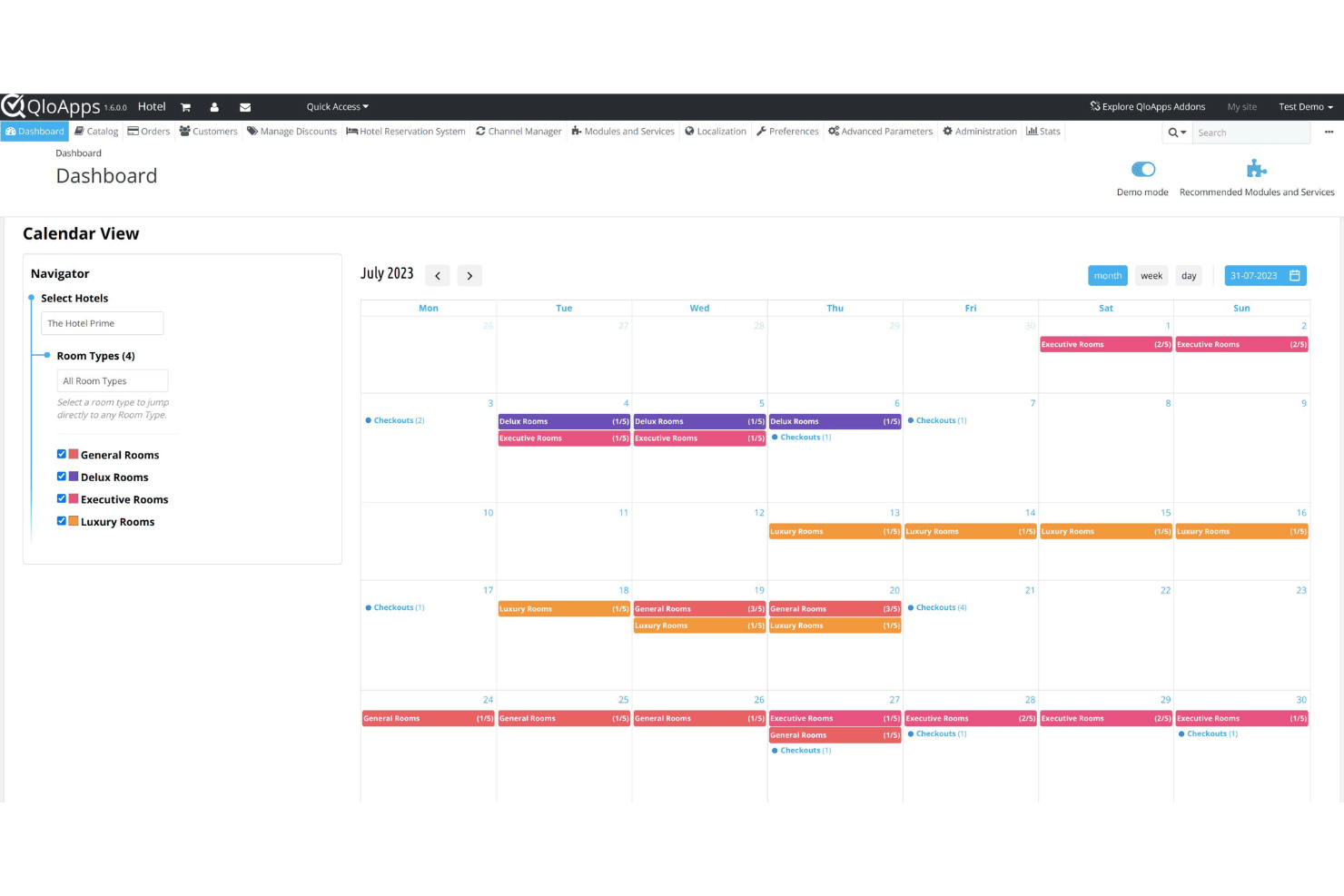
QloApps centralizes hotel bookings and daily reservation operations in one dashboard. QloApps is a free, open-source hotel management system that includes a PMS, a customizable hotel website builder, a direct booking engine, and a channel manager.
Who Is QloApps Best For?
QloApps is a strong fit for independent hotels and small properties that want to self-host their own booking system and customize it without licensing fees.
Why I Picked QloApps
I picked QloApps as one of the best because its open-source hotel website builder gives you full control over your storefront's code, design, and content, which most SaaS hotel booking tools simply won't allow. I use the multiple theme options and back-office customization to match the website's branding to the property, including logos, taglines, room imagery, and upsell services. The built-in SEO tools and multilingual and multicurrency support also let me optimize the storefront for local search and international guests without needing a separate CMS.
QloApps Key Features
- Room type configuration: Define unlimited room types with custom bed counts, occupancy limits, facilities, and room-specific images directly from the back office.
- Rate plan management: Create and manage multiple rate plans per room type, including seasonal pricing, weekend rates, and early-bird offers.
- Front desk dashboard: View and manage live reservations, check-ins, and check-outs from a centralized calendar interface.
- Add-on module marketplace: Extend core functionality with paid and free community-built modules for features like invoicing, coupons, and reporting.
QloApps Integrations
QloApps connects to popular OTA channels like Booking.com, Expedia, Airbnb, Agoda, and Google Hotels through its channel manager, which syncs inventory, rates, and bookings in real time. It also includes a PayPal Checkout add-on for payment processing. An open API is available for custom integrations and further customization.
Pros and Cons
Pros:
- Modular add-ons for extended functionality
- Self-hosting keeps guest data in-house
- Fully open-source with no license fees
Cons:
- Community support instead of dedicated help
- Requires complex manual database configuration
Learn more about QloApps: Best for micro-property front desk logs
- Free plan available
- Pricing upon request
Visit WebsiteCustomer Rating:4.3/5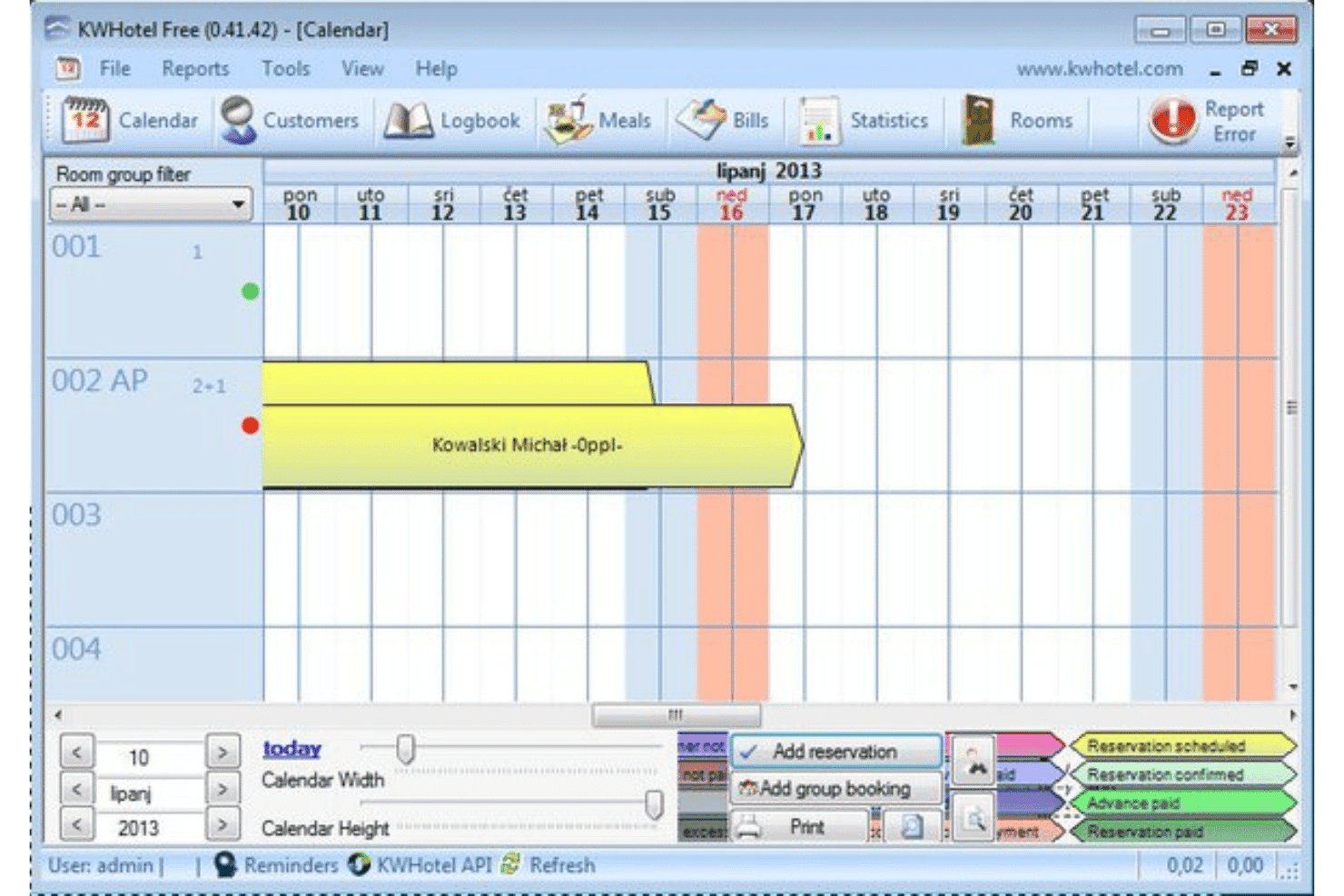
KWHotel tracks guest reservations with a centralized front desk booking calendar. Built for small independent properties, KWHotel is a Windows-based PMS that handles reservations, front desk operations, invoicing, housekeeping coordination, and channel management from a single locally installed application.
Who Is KWHotel Best For?
KWHotel suits owner-operated hotels, hostels, and apartment rentals where the same person managing bookings is also handling check-ins, invoicing, and housekeeping coordination.
Why I Picked KWHotel
I've included KWHotel in my top picks because it treats the front desk log as a first-class feature, not an afterthought. Each reservation carries an internal notes field where I can document guest preferences, complaints, or special requests, and those notes persist across the entire stay. I also appreciate the night audit report, which generates a daily snapshot of all front desk activity so nothing from a busy shift gets missed.
KWHotel Key Features
- Drag-and-drop reservation calendar: Move, extend, or shorten bookings directly on a color-coded room timeline view.
- Channel manager connection: Sync availability and rates to OTAs like Booking.com and Expedia to prevent double bookings.
- Customizable invoice templates: Generate itemized invoices with your property's logo, tax rates, and payment terms.
- Guest history database: Store returning guest profiles with past stay records and contact details for repeat bookings.
KWHotel Integrations
KWHotel integrates with the channel managers YieldPlanet, SiteMinder, and WuBook, as well as directly with Booking.com and Expedia. It also offers a direct synchronization with POSbistro POS system, SMSAPI for automated guest text messaging, and Sezam24 for self-check-in kiosks. KWHotel also supports integrations with accounting systems, payment gateways, and door access control systems. An API is available for custom integrations.
Pros and Cons
Pros:
- Guest document storage included in free plan
- Calendar view shows all reservations clearly
- Free plan supports unlimited room bookings
Cons:
- Requires manual guest confirmation tracking
- No built-in payment processing tools
Learn more about KWHotel: Best for small accommodation providers
- 30-day free trial
- From $39/month
Visit WebsiteCustomer Rating:4/5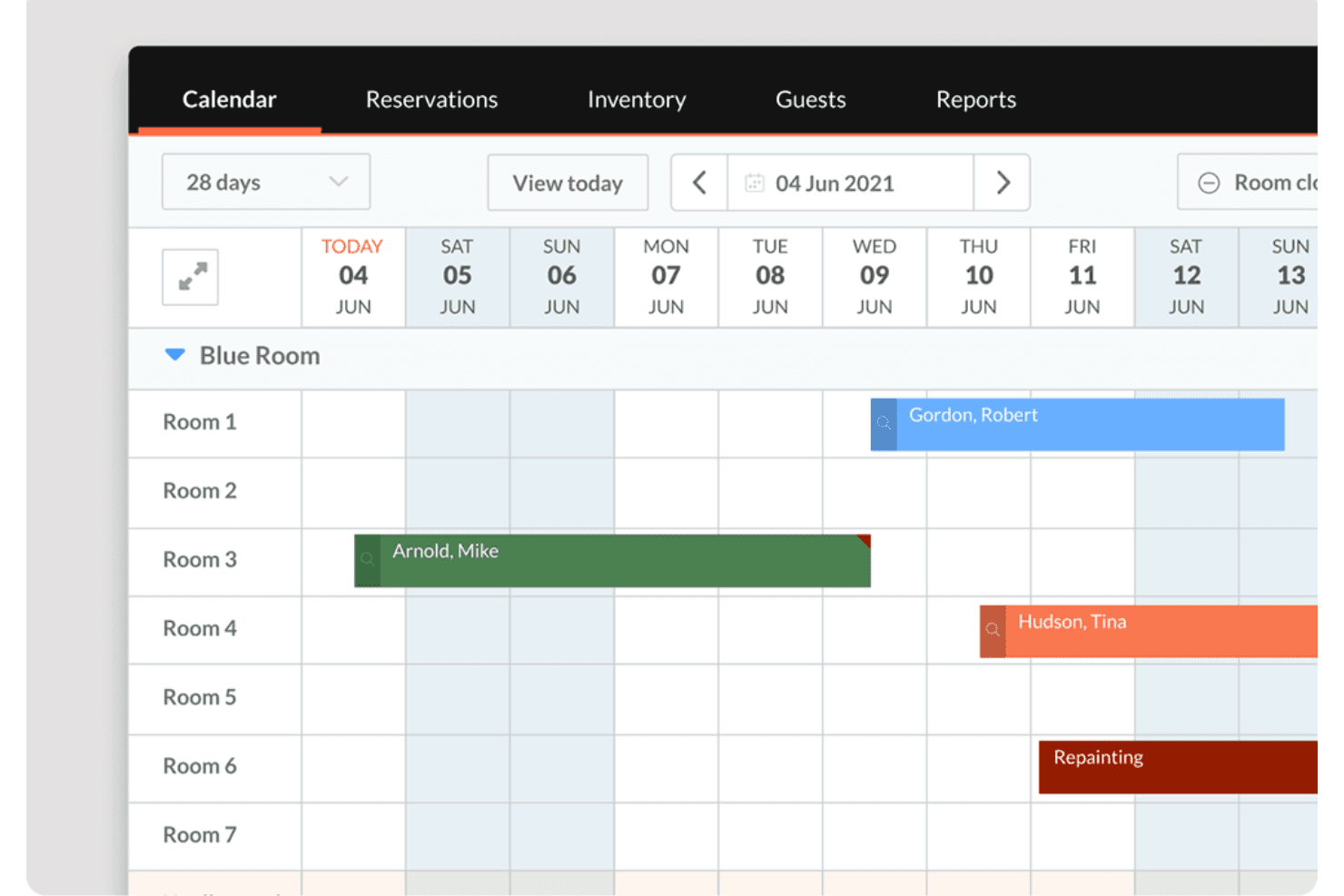
Little Hotelier offers a visual calendar view that displays room reservations, guest names, and maintenance blocks across multiple rooms over a 28-day period. Little Hotelier is a property management system designed for small accommodations like B&Bs, guesthouses, and small hotels, combining front desk management, a direct booking engine, and a channel manager in one platform built for limited-staff operations.
Who Is Little Hotelier Best For?
Little Hotelier is a strong fit for independent B&Bs, guesthouses, and small inns that need an all-in-one system without the complexity of enterprise hotel software.
Why I Picked Little Hotelier
I picked Little Hotelier as one of the best because it's built from the ground up for small properties, not scaled down from enterprise software. I like how the front desk system lets you manage room assignments, guest check-ins, and reservations from a single view. The channel manager syncs availability across Booking.com, Airbnb, and Expedia in real time, so overbookings aren't a concern even when running a property solo.
Little Hotelier Key Features
- Direct booking engine: Lets guests book directly through your property website or social media pages, bypassing OTA commission fees.
- Guest communication automation: Sends personalized automated emails to guests at key points in their stay, from confirmation through checkout.
- Rate and inventory management: Updates pricing and availability across all connected channels from a single inventory grid, with availability rules to control distribution.
- Mobile app: Lets you manage reservations, view guest details, and receive arrival and departure notifications from your phone.
Little Hotelier Integrations
Little Hotelier offers a curated app store (via the SiteMinder Hotel Exchange) with 25+ third-party integrations covering accounting, guest experience, keyless entry, and other operational tools. Verified integrations include Duve, RoomPriceGenie, CheKin, Akia, GuestTouch, and TripAdvisor, among others. A public API for custom integrations is not available.
Pros and Cons
Pros:
- Automated guest messaging reduces manual follow-up
- Mobile app supports remote reservation management
- Channel manager syncs with major OTAs instantly
Cons:
- Some reports require exporting for full details
- Limited customization for booking engine
Learn more about Little Hotelier: Best for integrated payment processing
- 14-day free trial + free demo available
- From $207/month (billed annually)
Visit WebsiteCustomer Rating:4.4/5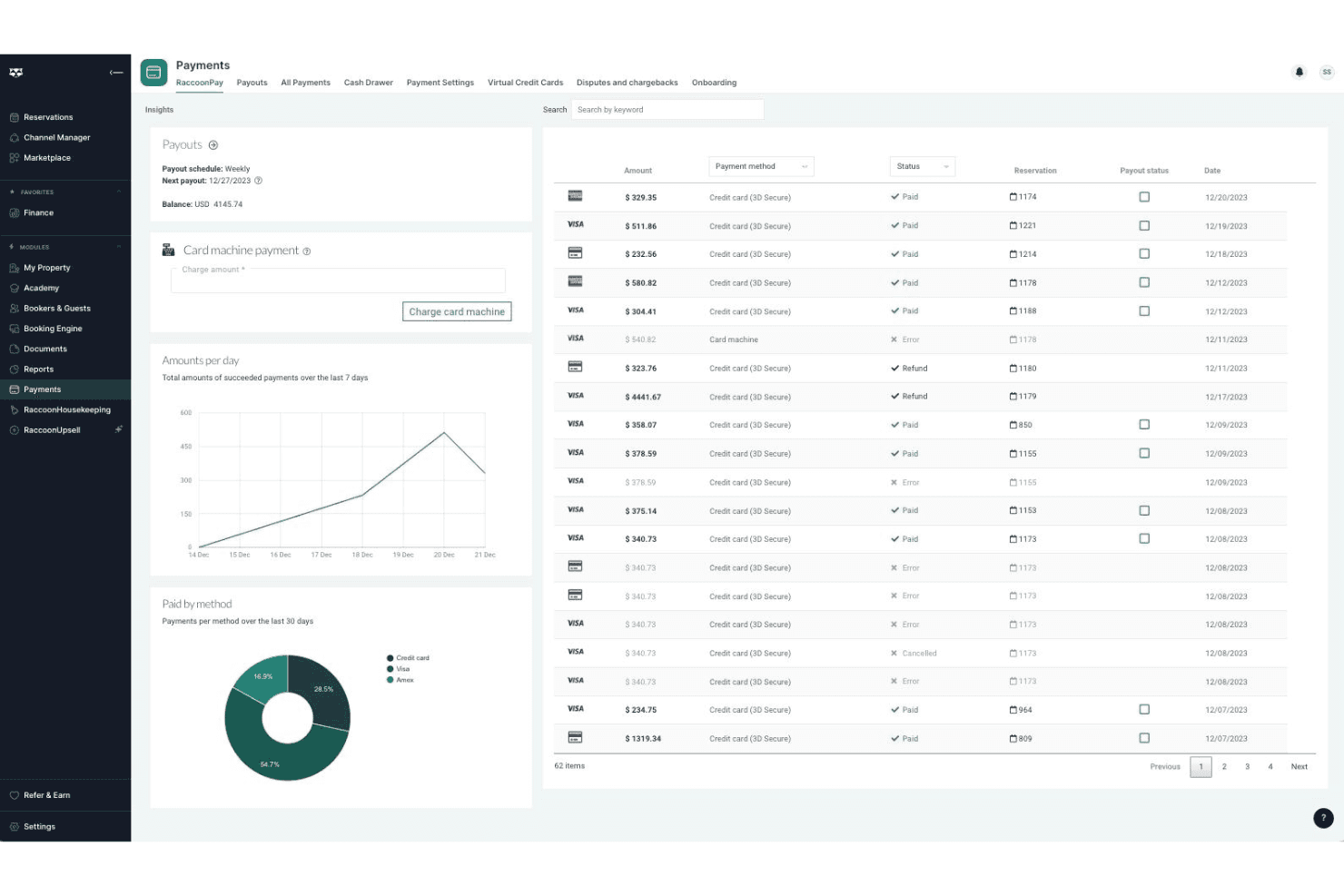
RoomRaccoon centralizes reservations and guest stays in one booking calendar. Built specifically for independent hotels and B&Bs, RoomRaccoon is a cloud-based property management system that combines front desk management, a booking engine, channel management, and payment processing in one platform.
Who Is RoomRaccoon Best For?
RoomRaccoon is a strong fit for independent hotels, boutique properties, and B&Bs that want an all-in-one PMS without stitching together separate tools for payments, bookings, and front desk operations.
Why I Picked RoomRaccoon
I've included RoomRaccoon in my top picks because its payment processing is built directly into the PMS, not bolted on through a third-party add-on. I like that it includes an integrated card machine that auto-reconciles in-person payments against reservations, and that online card tokenization lets you charge guests at check-in without re-entering details. In practice, that means your front desk handles deposits, no-shows, and final checkouts from one screen.
RoomRaccoon Key Features
- Channel manager: Syncs real-time rates and availability across OTAs like Booking.com, Expedia, and Airbnb from a single dashboard.
- Direct booking engine: A commission-free booking widget that embeds directly into your hotel website for guest reservations.
- Online check-in: Sends automated pre-arrival emails that let guests complete check-in, upload ID, and sign registration cards before arrival.
- Yield management tool: Automatically adjusts room rates based on occupancy thresholds and demand rules you configure.
RoomRaccoon Integrations
RoomRaccoon offers over 400 integrations with business solutions such as Lightspeed, Sage, Booking.com, and Expedia, available through its Integrations Marketplace. Verified integrations include Adyen, SiteMinder, Xero, Stripe, PriceLabs, Toast POS, Epos Now, QuickBooks, RemoteLock, and GuestRevu, and an API is available for custom integrations.
Pros and Cons
Pros:
- Built-in channel manager syncs with major OTAs
- Multi-currency support for international guests
- Automated invoicing reduces manual billing tasks
Cons:
- Mobile app not available for all devices
- Reporting features lack advanced filtering options
Learn more about RoomRaccoon: Best for open-source property management
- Free plan available
- Pricing upon request
Visit WebsiteCustomer Rating:4.5/5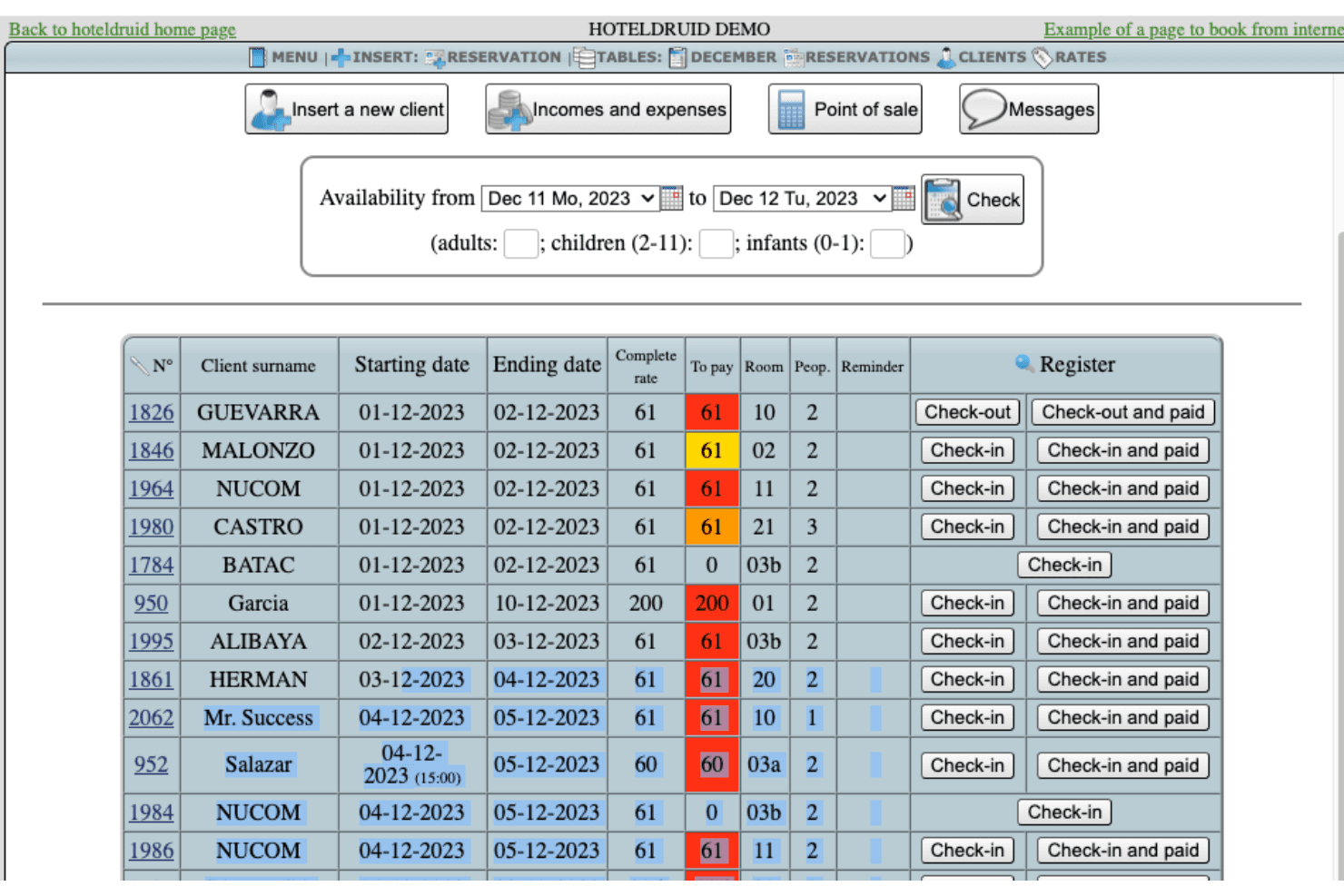
HotelDruid displays a reservations management table with client check-in, check-out, payment status, and room assignments. Built by DigitalDruid.Net, HotelDruid is an open-source property management system covering reservations, room assignments, invoicing, rate management, POS, and occupancy reporting for accommodation properties of any size.
Who Is HotelDruid Best For?
HotelDruid suits tech-comfortable operators at small independent hotels, hostels, or B&Bs who prefer self-hosted software over cloud-based subscriptions.
Why I Picked HotelDruid
I picked HotelDruid as one of the best on my shortlist because its open-source foundation means you can actually modify the codebase to fit your property, not the other way around. I particularly like the automatic room assignment engine, where you define the rules and HotelDruid handles placement logic across your inventory. The built-in POS for bars and restaurants with inventory tracking is also a feature I rarely see included at this level without an added cost.
HotelDruid Key Features
- Online booking widget: An embeddable reservation widget you can add directly to your property's website to accept bookings without a third-party booking engine.
- Dynamic rate management: Set seasonal rates, minimum stays, and occupancy-based pricing rules across individual room types.
- Invoice and document generation: Automatically generate invoices, receipts, and guest documents from completed reservations.
- Multi-property management: Manage multiple properties from a single HotelDruid installation using one login.
HotelDruid Integrations
HotelDruid's channel manager provides direct two-way connections with Booking.com and Expedia, and one-way availability syncing with Airbnb, Google, and several other portals. Additional channel connections through Agoda, Hostelworld, HRS, and dozens more OTAs are available via an intermediate connection through Octorate. The booking engine supports PayPal, Stripe, and Mercadopago for payment processing, and an iCal export is available for calendar syncing.
Pros and Cons
Pros:
- Automated rate changes based on occupancy rules
- Booking engine can be embedded on any website
- Free plan includes unlimited properties and rooms
Cons:
- Limited customer support for free users
- Requires manual calendar synchronization
Learn more about HotelDruid:
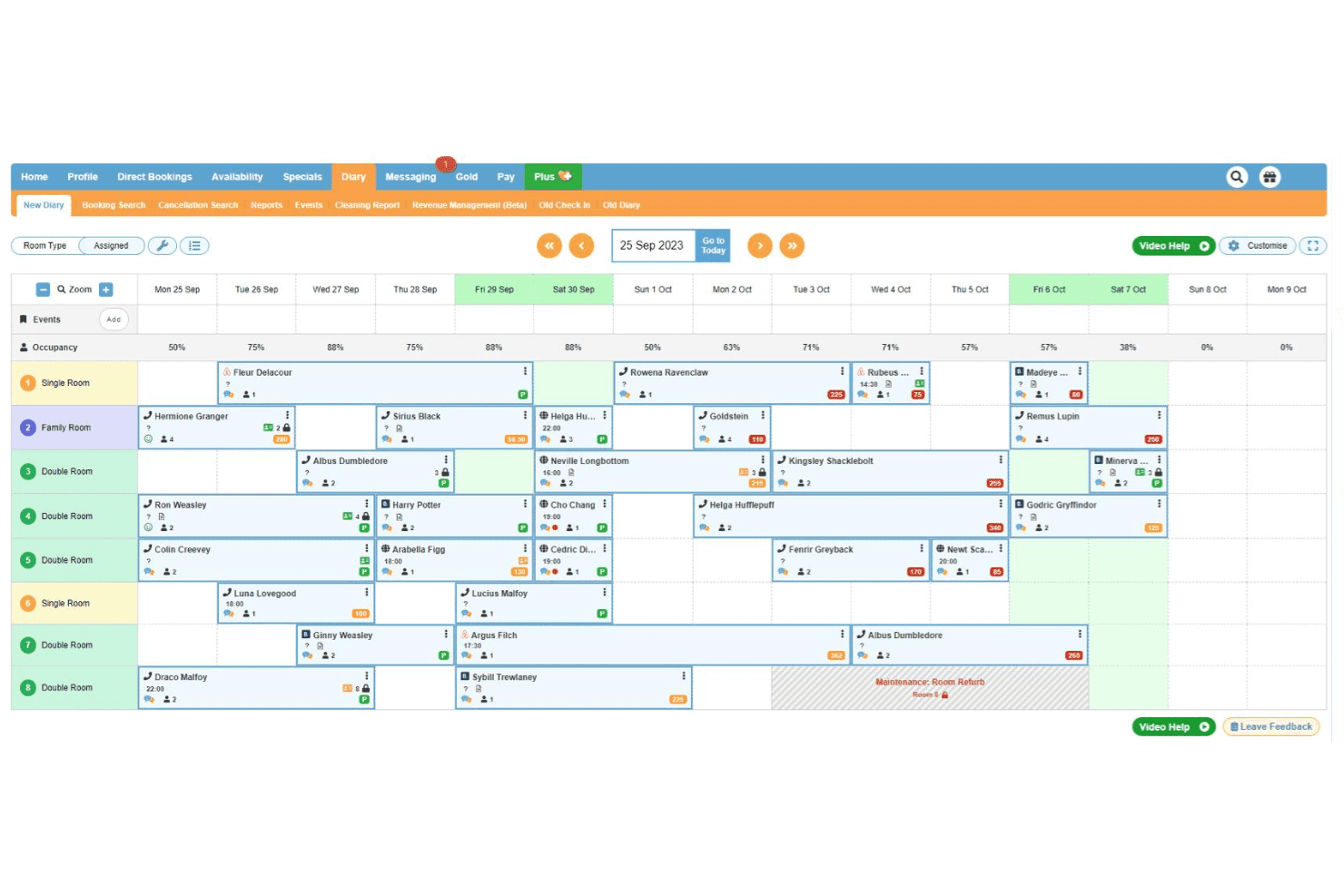
freetobook manages reservations with a centralized booking calendar interface. freetobook is a hotel booking and channel management platform for independent properties that includes a direct booking engine, OTA channel connections, dynamic pricing, guest messaging, and reputation management tools.
Who Is freetobook Best For?
freetobook is a natural fit for independent hotels, B&Bs, and guesthouses that want to manage direct bookings and OTA listings without paying per-reservation fees.
Why I Picked freetobook
I picked freetobook as one of the best because its channel manager gives you real control over how your property appears across OTAs, not just passive syncing. I can apply surcharges or restrict availability on peak dates to push guests toward direct bookings. The two-way sync keeps rates and availability current across Booking.com, Airbnb, Agoda, and others from a single dashboard, which eliminates double bookings without manual updates.
freetobook Key Features
- Direct booking widget: Embed a commission-free booking engine directly on your property website to capture reservations without OTA fees.
- Automated guest messaging: Send pre-arrival, booking confirmation, and post-stay emails automatically based on reservation triggers.
- Dynamic pricing tool: Adjust room rates automatically based on demand, occupancy thresholds, or date ranges you define.
- Review management dashboard: Monitor and respond to guest reviews from multiple platforms in one place.
freetobook Integrations
freetobook offers a small set of integrations, including Stripe and RoomPriceGenie. Its channel manager connects to OTA platforms like Booking.com, Airbnb, Agoda, TripAdvisor, Hostelworld, and HRS. Zapier and API support are not clearly documented.
Pros and Cons
Pros:
- Supports multiple payment gateway integrations
- Channel manager available as a paid add-on
- Automated guest messaging for confirmations
Cons:
- Limited customization for booking engine appearance
- Channel manager not included in free plan
Learn more about freetobook: Best for multi-property reservation management
- Free plan available
- From €15/month
Visit WebsiteCustomer Rating:3.1/5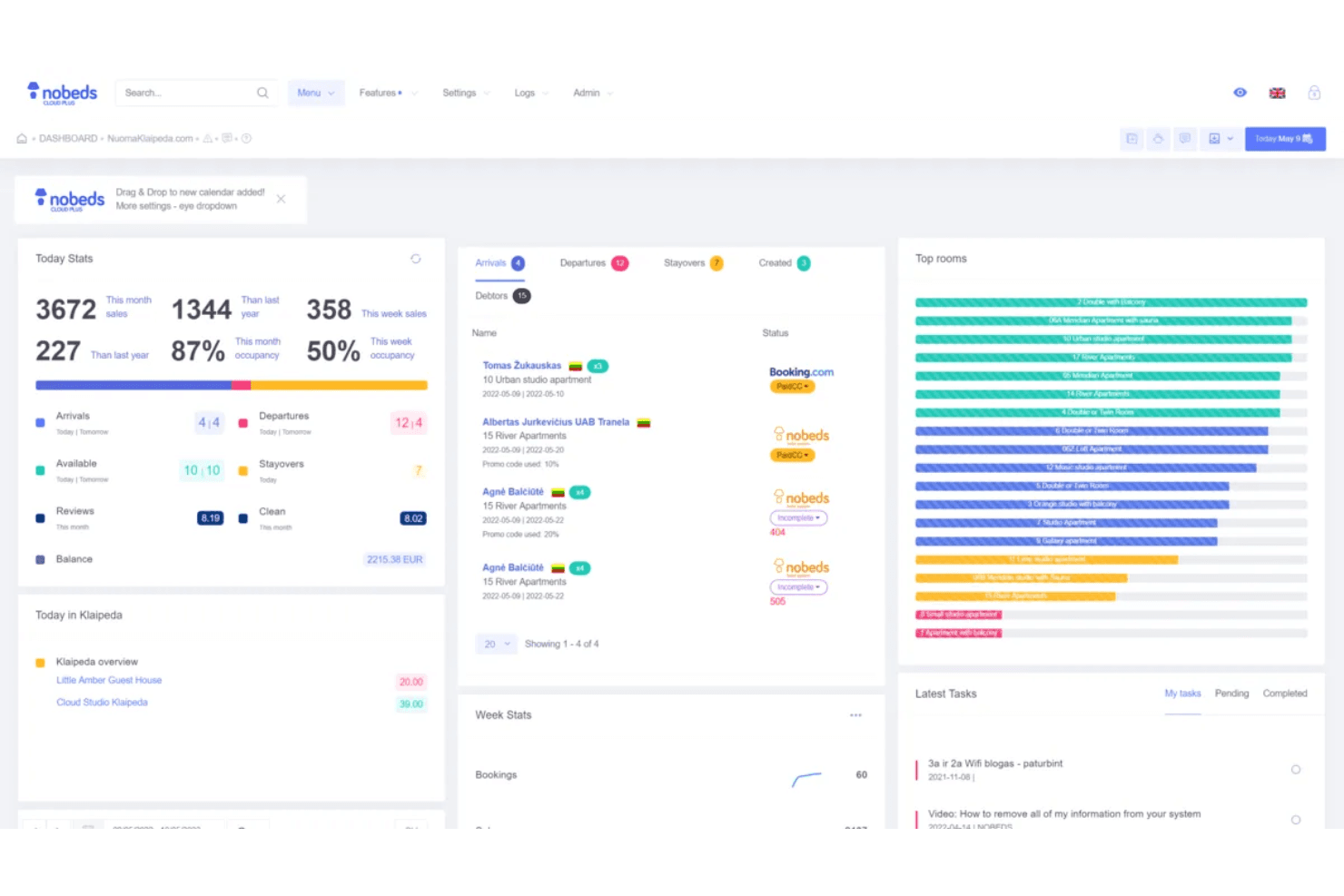
Nobeds offers a comprehensive property management dashboard displaying today's stats, arrivals, departures, top rooms, and latest tasks in one centralized view. Nobeds is a cloud-based property management system that combines a channel manager, reservation dashboard, direct booking engine, and automated guest communications for hotels, hostels, apartments, and vacation rentals.
Who Is Nobeds Best For?
Nobeds is a good fit for independent hoteliers and property managers who oversee multiple listings across different booking platforms.
Why I Picked Nobeds
Nobeds earns its spot on my shortlist because I love how it handles multi-property reservation management across a single dashboard. The real-time two-way channel manager syncs availability and pricing across up to 30 channels, so I'm never manually updating rates per property. I also use the owner reporting feature, which lets me generate property-specific revenue reports, which is genuinely useful when managing units under different ownership.
Nobeds Key Features
- Direct booking engine: Lets guests book reservations directly through your property's website, bypassing OTA commissions entirely.
- Self check-in automation: Integrates with smart locks and sends automated access instructions to guests ahead of arrival.
- Automated messaging: Schedules and sends pre-written welcome emails, SMS messages, and review requests at set intervals throughout the guest journey.
- Shift management: Tracks staff shifts and logs individual user actions across the system for accountability.
Nobeds Integrations
Nobeds connects directly to OTA channels like Booking.com, Airbnb, and Expedia through certified API connections that sync availability, pricing, and reservations in real time. An open REST API is available to connect Nobeds to any third-party application, and the platform also supports Model Context Protocol (MCP) integration for connecting AI agents directly to your property database.
Pros and Cons
Pros:
- Direct booking engine for your website
- Free plan includes core booking features
- Unlimited property and room listings allowed
Cons:
- Lacks automated nightly audit reporting
- No built-in channel manager for all OTAs
Learn more about Nobeds: Best for guest check-in automation
- 14-day free trial + free demo available
- Pricing upon request
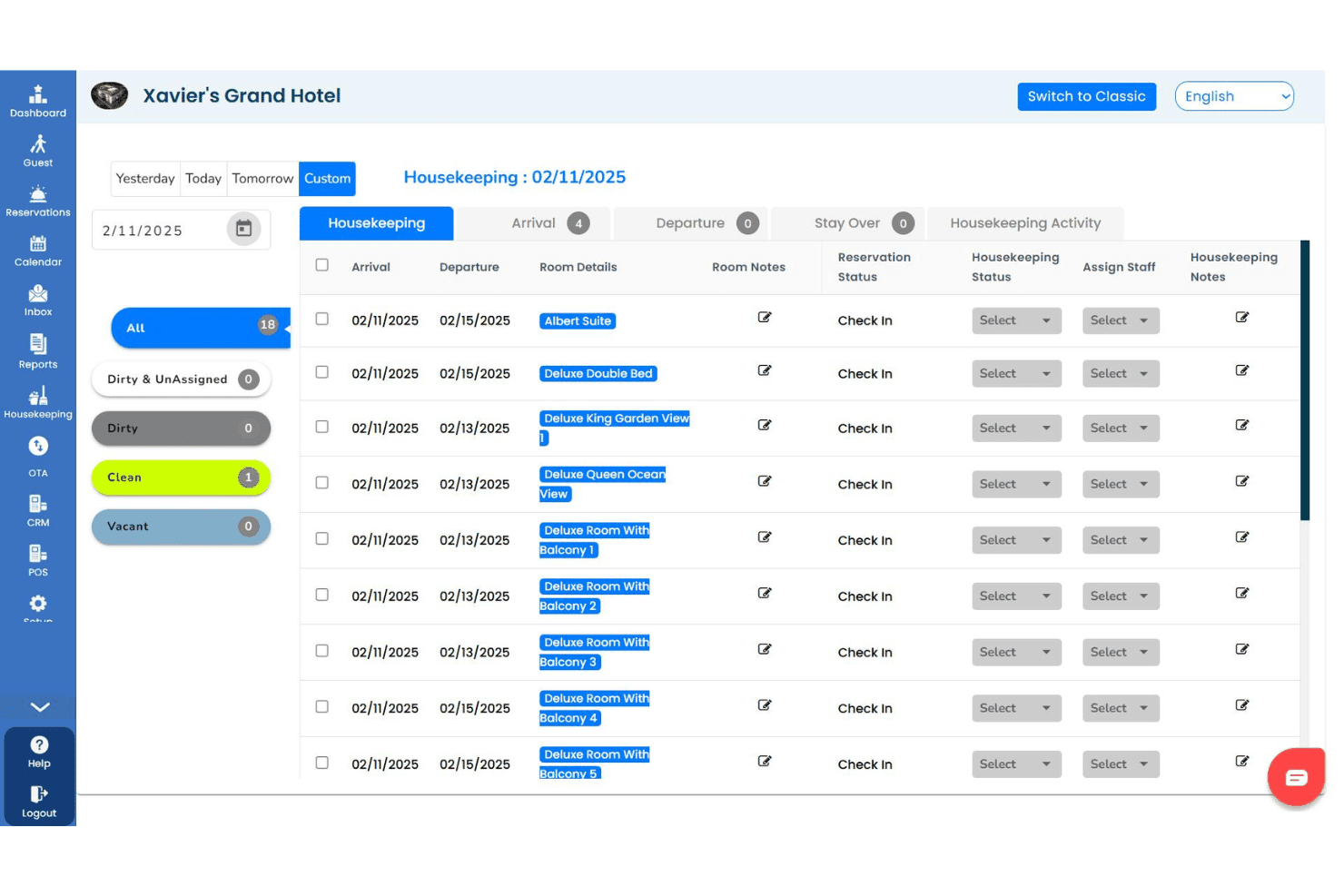
GraceSoft centralizes guest reservations, invoices, and check-in details. GraceSoft is a hotel management software that covers reservations, front desk operations, housekeeping, a direct online booking engine, channel management, and guest communication from a single platform.
Who Is GraceSoft Best For?
GraceSoft is a strong fit for small to mid-sized independent hotels and inns that need a free starting point before committing to a paid system.
Why I Picked GraceSoft
I picked GraceSoft as one of the best because its front desk check-in flow is genuinely built to reduce manual handling at arrival. The drag-and-drop reservation calendar lets staff check in walk-ins or modify existing bookings in seconds, with no extra steps. I also like the pre-arrival messaging feature, which sends automated check-in reminders via email, SMS, or WhatsApp to prepare guests before they arrive. On top of that, the built-in AI assistant handles guest questions around the clock, so front desk staff aren't fielding the same arrival queries repeatedly.
GraceSoft Key Features
- Housekeeping management: Track room cleaning status in real time, assign tasks to staff, and send maintenance alerts, all accessible from mobile devices.
- Built-in POS system: Charge guest restaurant, spa, or gift shop purchases directly to room folios for consolidated billing.
- Guest CRM and loyalty tools: Store guest history and preferences, and run automated repeat-guest marketing campaigns.
- Yield management: Set occupancy-based pricing rules, seasonal rates, and package pricing to adjust room rates automatically.
GraceSoft Integrations
GraceSoft offers a smaller set of native integrations, including SiteMinder, Authorize.net, Stripe, and QuickBooks. It connects with major OTAs like Airbnb, Booking.com, and Expedia, as well as VRBO, and PayPal. Facebook and Google Analytics integrations are also available. Zapier and API support are not clearly documented.
Pros and Cons
Pros:
- Direct website booking engine included
- Free plan supports unlimited reservations
- Multi-property dashboard for centralized management
Cons:
- Limited third-party integrations available
- Requires manual property inventory sync
Learn more about GraceSoft:
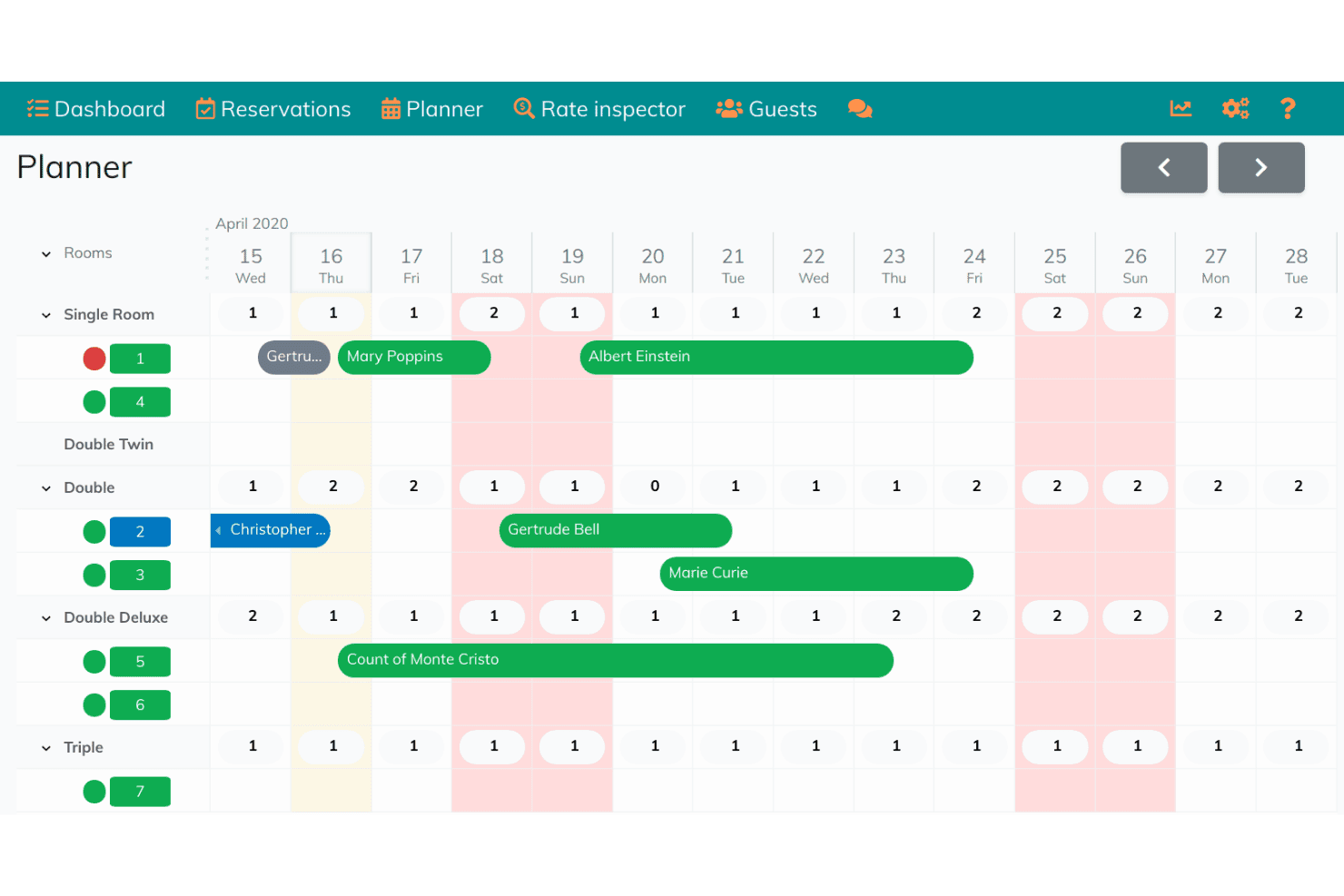
Hoteliera automates room assignments with a visual reservation planner. Hoteliera is a free hotel property management system that covers front desk operations, reservation management, housekeeping tracking, and guest communication in a single platform.
Who Is Hoteliera Best For?
Hoteliera is a good fit for independent hotels and boutique properties that want a free PMS with automated room assignment built in.
Why I Picked Hoteliera
I picked Hoteliera as one of the best because its automated room assignment sits inside a fully free PMS, which is rare in this space. The smart room planner auto-assigns rooms based on check-in and check-out schedules, and the housekeeping module updates room status in real time as staff move through the property. I also like that the guest portal handles mobile check-in without requiring guests to download anything.
Hoteliera Key Features
- Invoicing and accounting: Generate proforma, fiscal, and storno invoices automatically, with support for multiple taxes, currencies, and pre-filled charges.
- Smart dashboard: Manage staff logins with granular permissions and handle check-in, check-out, financials, and booking management from one view.
- Extras and upselling: Offer add-ons like spa treatments, bicycle rentals, and restaurant vouchers directly through the guest portal.
- Multi-property management: Switch between multiple properties from a single account, each with its own rooms, reservations, and staff settings.
Hoteliera Integrations
Hoteliera's channel manager connects to Booking.com, Airbnb, and Expedia for real-time rate and availability syncing.
Pros and Cons
Pros:
- Mobile guest portal requires no app download
- AI website builder auto-generates property pages
- Free PMS plan includes unlimited rooms
Cons:
- No documented API or third-party integrations
- Channel manager limited to three OTAs
Learn more about Hoteliera:
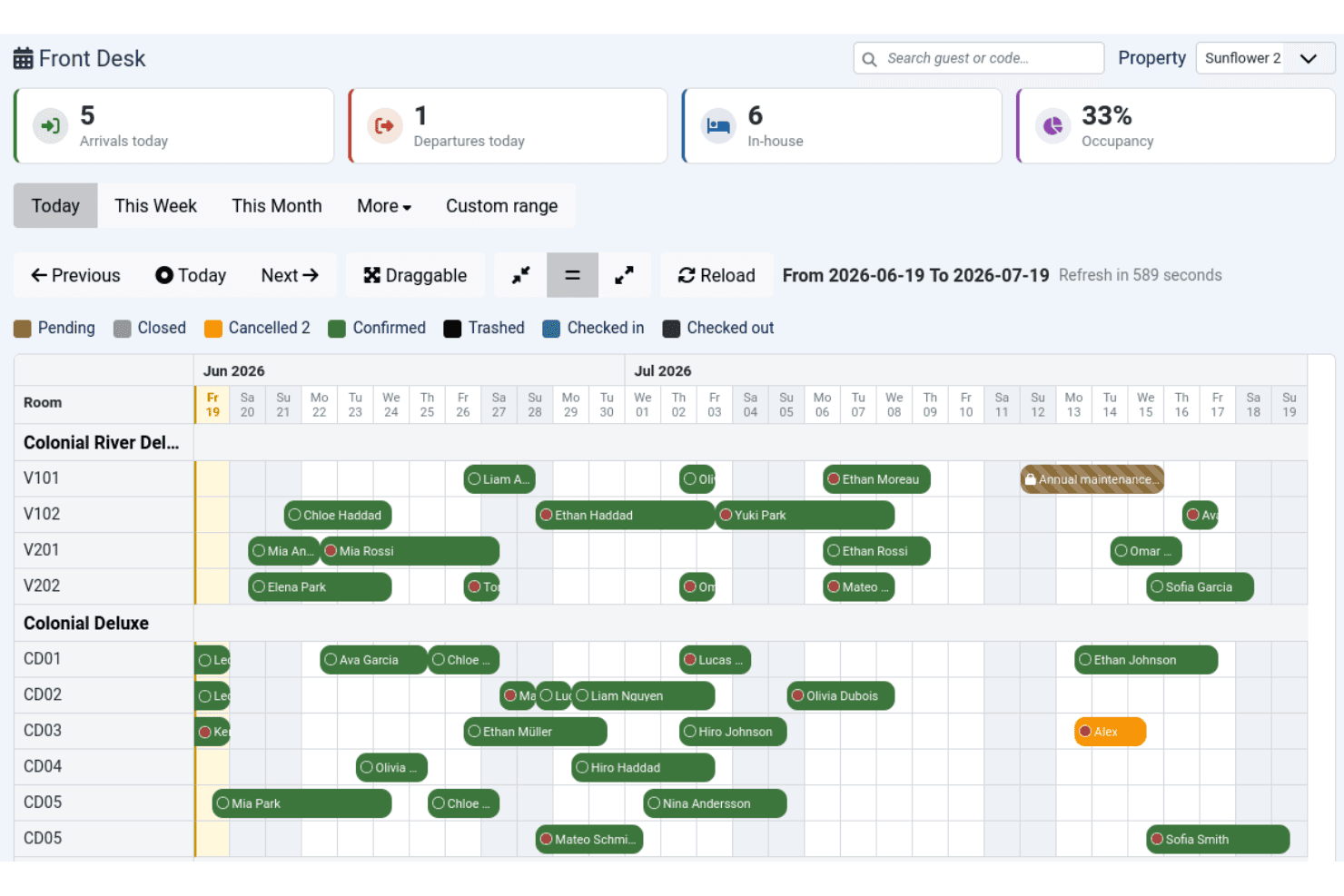
Solidres manages hotel reservations with a centralized front desk calendar. Solidres is an open-source hotel booking and reservation plugin for Joomla that handles room management, availability calendars, tariff configuration, and front desk operations.
Who Is Solidres Best For?
Solidres is a strong fit for small to mid-size property owners who already run a Joomla-based website and want native booking functionality without switching platforms.
Why I Picked Solidres
Solidres earns its spot on my shortlist because it's the only hotel booking plugin built specifically to live inside Joomla as a native component, not a bolted-on widget. I particularly like its Front Desk module, which gives you an interactive booking calendar to manage arrivals and departures in one view. The complex tariff system also lets you configure per-night or per-person rate plans with multiple tariffs per room type, which is more granular than most free-tier tools offer.
Solidres Key Features
- Housekeeping management: Assign and track housekeeping tasks across rooms through a dedicated interface in the backend.
- Flex Search: Suggests alternative available dates to guests when their selected dates are fully booked.
- Deposit configuration: Set deposit rules as a fixed amount, percentage, or based on number of booked nights at the room level.
- iCal export and import: Sync reservation data with external calendars using standard iCal format.
Solidres Integrations
Solidres offers channel management through its integration with MyAllocator (Cloudbeds), which syncs rates and availability with OTA booking channels. It also integrates with Google Analytics, Facebook Pixel, Google Ads, and supports payment gateways including PayPal, Stripe, Square, Mollie, Authorize.net, and Braintree. No public API is documented for custom integrations.
Pros and Cons
Pros:
- Built specifically for Joomla CMS users
- Supports multi-property booking portals natively
- Open-source code with full data ownership
Cons:
- Community support can be slow to respond
- Limited to Joomla and WordPress only
Learn more about Solidres:
Annen gratis programvare for hotellbooking
Her er noen flere gratisalternativer for hotellbooking som ikke kom med på kortlisten, men som likevel er verdt å undersøke:
- 11freeonlinebookingBest for direct online reservation setup
- 12JomresBest for WordPress and Joomla compatibility
- 13SimplyBook.meBest for ancillary guest amenity scheduling
- 14SetmoreBest for calendar-based scheduling needs
- 15SirvoyBest for real-time room availability updates
- 16Zoho CreatorBest for custom workflow automation
- 17MewsBest for cloud terminal kiosk integrations
- 18HotelRunnerBest for online distribution management
- 19MewsBest for self-service guest check-in
- 20HotelBeeBest for visual booking calendar interface
How I Evaluate Free Hotel Booking Software
When a boutique hotel or B&B owner needs to take direct bookings without paying monthly fees, I look for two things: whether a tool meets baseline requirements, and what sets it apart.
Core Functionality (Table Stakes For This List)
When I'm selecting tools for my list, I rank each one on a scale from 0 (does not offer the functionality) to 5 (excels in this area) for each core functionality listed below. Then, I calculate the tool's total score into a percentage. Each tool needs to achieve a minimum total score of 65% to be considered for inclusion.
- Online Booking Engine: I check whether guests can complete a reservation from the property's own website or a branded page, rather than being redirected to an external platform.
- Reservation Management: A central dashboard where you can view, edit, and cancel bookings matters—especially when a walk-in guest needs a room that was just released from a cancellation.
- Room & Rate Inventory: I evaluate how each tool handles room types, seasonal pricing, and real-time availability so front-desk staff aren't manually updating spreadsheets during peak check-in hours.
- Channel/OTA Synchronization: Listing rooms on Booking.com or Airbnb while also taking direct bookings creates double-booking risk, so I look for automatic two-way sync with major OTAs.
- Genuine Free Plan: I confirm each tool offers a true free tier for ongoing use—not a 14-day trial—so an owner-operator can run live bookings without a subscription cost.
- Payment Processing Support: Whether it's collecting card details at booking or charging deposits through Stripe or PayPal, I look for at least one built-in or integrated payment option.
Once I have a list of tools that meet this criteria, I consider what sets each platform apart.
Differentiating Factors (What Sets Vendors Apart)
Here's how I compare and contrast different vendors:
Standout Features
A mobile app makes a real difference for owner-operators who manage check-ins and cancellations away from the front desk. I also look for built-in guest communication—automated booking confirmations and pre-arrival messages save hours compared to sending each one manually. Reporting features matter too. Even basic occupancy and revenue reports help a small property spot slow periods and adjust rates before rooms sit empty.
Beyond Features
Free plan caps are the first thing I check—some tools limit room count or monthly bookings, and a 10-room guesthouse that hits that ceiling mid-season has a problem. I also evaluate how easy setup is for non-technical operators; a B&B owner shouldn't need a developer to go live. Integration options matter just as much, since connecting to accounting tools like QuickBooks or Xero keeps revenue data flowing without manual entry after every booking.
Slik velger du gratis programvare for hotellbooking
Det er lett å gå seg vill i lange funksjonslister og kompliserte prismodeller. For å hjelpe deg med å holde fokus mens du går gjennom den unike prosessen med å velge programvare, får du her en sjekkliste over faktorer du bør ha i bakhodet:
| Faktor | Hva du bør vurdere |
|---|---|
| FaktorSkalerbarhet | Hva du bør vurdereKan gratisabonnementet håndtere det nåværende og fremtidige antallet rom, sesongbasert etterspørsel eller flere eiendommer uten at du må oppgradere tidligere enn ønsket? |
| FaktorIntegrasjoner | Hva du bør vurdereKan programvaren kobles til de viktigste OTA-ene og betalingsløsningene du er avhengig av? Er integrasjoner tilgjengelige i gratisabonnementet, eller bare i betalte abonnementer? |
| FaktorTilpasningsmuligheter | Hva du bør vurdereHvor enkelt kan du tilpasse bestillingsskjemaer, kommunikasjon med gjester eller merkevareprofilen uten hjelp fra en utvikler? Vær oppmerksom på rigide maler eller mersalg for viktige tilpasningsalternativer. |
| FaktorBrukervennlighet | Hva du bør vurdereVil du og de ansatte kunne navigere i kontrollpanelet, oppdatere priser og rydde opp i reservasjoner med minimal opplæring? Prøv demoer eller veiledninger der det finnes. |
| FaktorImplementering og oppstart | Hva du bør vurdereHvilke ressurser – oppsettveiledninger, migreringsverktøy eller støtte ved oppstart – er tilgjengelige for team uten teknisk kompetanse? Kan du flytte data fra regneark uten betalt hjelp? |
| FaktorKostnad | Hva du bør vurdereInkluderer «gratis» alle de kritiske arbeidsflytene dine, eller vil du sannsynligvis trenge et betalt abonnement for viktige funksjoner for bestilling eller betaling? Se på begrensningene og tilleggene i gratisabonnementet. |
| FaktorSikkerhetstiltak | Hva du bør vurdereHvordan beskytter plattformen gjestenes betalings- og personopplysninger? Se etter PCI DSS-samsvar, SSL og regionale personvernstandarder som støtte for GDPR. |
| FaktorTilgjengelig kundestøtte | Hva du bør vurdereEr rask hjelp tilgjengelig via chat, e-post eller telefon – spesielt i perioder med mange innsjekkinger? Er støttekanalene åpne for brukere av gratisabonnementet, eller bare for betalende kunder? |
Hva er gratis programvare for hotellbooking?
Gratis programvare for hotellbestilling er digitale verktøy som lar hoteller, B&B-er og overnattingssteder ta imot og administrere nettbaserte reservasjoner uten kostnader på forhånd. Disse plattformene tilbyr vanligvis en bestillingsmotor, et reservasjonsdashboard, grunnleggende tilgjengelighetsstyring og begrenset integrasjon med OTA-er, slik at mindre overnattingssteder kan samle bestillinger og betalinger på ett sted, selv med begrensede budsjetter.
Funksjoner i gratis programvare for hotellbestilling
Når du velger gratis programvare for hotellbestilling, bør du se etter følgende viktige funksjoner:
- Nettbasert bestillingsmotor: Lar gjestene se tilgjengelighet og reservere rom direkte fra nettstedet ditt eller en profilert bestillingsside, ofte oppdatert i sanntid.
- Dashboard for reservasjonsstyring: Samler alle bestillinger og gir deg én samlet oversikt for å bekrefte, endre eller avbestille reservasjoner samt administrere gjestedetaljer.
- Rom- og prisbeholdning: Gjør det mulig å konfigurere og redigere romtyper, kapasitetsgrenser og prisplaner – nyttig for sesongbaserte priser eller priser ved spesielle arrangementer.
- OTA-/kanalintegrasjon: Synkroniserer beholdningen din med eksterne bestillingsplattformer som Booking.com eller Airbnb for å unngå dobbeltbestillinger og holde dataene korrekte.
- Støtte for betalingsløsninger: Registrerer gjestenes betalingsinformasjon eller depositum ved bestilling, slik at du kan håndtere forskuddsbetalinger eller beskyttelse mot manglende oppmøte.
- Automatisert gjestekommunikasjon: Sender bekreftelses-e-poster, instruksjoner for innsjekking eller forespørsler om tilbakemeldinger, slik at du slipper å håndtere hver melding manuelt.
- Kalendervisning: Gir en visuell, datobasert oversikt over bestillingsmønstre og romstatus, slik at det blir enklere å oppdage ledige perioder eller overbookinger.
- Flerspråklig og med støtte for flere valutaer: Betjener internasjonale gjester ved å vise bestillingssider og betalingsalternativer på flere språk og i flere valutaer.
- Verktøy for renhold: Holder oversikt over romstatus og rengjøringsplaner, slik at det blir smidig bytte mellom opphold uten behov for ekstra programvare.
- Rapportering og analyse: Leverer data om belegg, inntekter og gjestehistorikk, slik at du kan følge med på resultatene og identifisere trender over tid.
Gratis løsninger for programvare til hotellbestilling inkluderer vanligvis ikke KI som en del av funksjonstilbudet.
Fordeler med gratis programvare for hotellbestilling
Implementering av gratis programvare for hotellbestilling gir flere fordeler for teamet og virksomheten din. Her er noen av fordelene du kan se frem til:
- Lavere driftskostnader: Du kan administrere nettbaserte reservasjoner og gjestekommunikasjon uten å betale for kostbare programvarelisenser eller abonnementer.
- Sentralisert bestillingsstyring: Alle reservasjoner, betalinger og gjestedata er tilgjengelige i ett dashboard, slik at det blir enkelt å holde oversikt over virksomheten i sanntid.
- Bedre gjesteopplevelse: Gjestene får umiddelbare bekreftelser, tydelig kommunikasjon og sikker betalingsbehandling takket være innebygde bestillingsmotorer og e-postverktøy.
- Redusert risiko for overbooking: Integrasjon med kanaler og OTA-er sørger for at romtilgjengeligheten alltid er synkronisert, noe som forhindrer dobbeltbestillinger og relaterte problemer for gjestene.
- Raskere oppsett og innføring: Mange gratis løsninger tilbyr selvbetjent oppsett, migreringsverktøy og støtteressurser som forenkler overgangen fra regneark eller manuell oppfølging.
- Global rekkevidde: Støtte for flere språk og valutaer gjør det mulig å ønske internasjonale gjester velkommen uten hindringer.
- Handlingsrettet forretningsinnsikt: Innebygd rapportering og analyse gjør det enkelt å følge med på belegg, prisutvikling og inntekter, slik at du kan ta bedre beslutninger.
Kostnader og priser for gratis programvare for hotellbestilling
Ved valg av gratis programvare for hotellbestilling er det viktig å forstå de ulike prismodellene og planene som er tilgjengelige. Kostnadene varierer basert på funksjoner, teamstørrelse, tillegg og mer. Tabellen nedenfor oppsummerer vanlige planer, gjennomsnittsprisene deres og typiske funksjoner som er inkludert i gratis løsninger for programvare til hotellbestilling:
Sammenligningstabell for planer for gratis programvare for hotellbestilling
| Plantype | Gjennomsnittspris | Vanlige funksjoner |
|---|---|---|
| PlantypeGratisplan | Gjennomsnittspris$0 | Vanlige funksjonerGrunnleggende nettbestilling, reservasjonsoversikt, begrenset OTA-integrasjon, e-postbekreftelser og enkel rapportering. |
| PlantypePersonlig plan | Gjennomsnittspris$10-$25/måned | Vanlige funksjonerAlle funksjonene i gratisplanen, flere rom, tilpasset profilering, enkel betalingsbehandling og flere verktøy for gjestekommunikasjon. |
| PlantypeBedriftsplan | Gjennomsnittspris$35-$70/måned | Vanlige funksjonerAlle funksjonene i den personlige planen, avanserte OTA-integrasjoner, ubegrenset antall rom, renholdsverktøy og tilgang for flere brukere. |
| PlantypeForetaksplan | Gjennomsnittspris$100-$250/måned | Vanlige funksjonerAlle funksjonene i bedriftsplanen, tilpasset API-tilgang, dedikert kundestøtte, alternativer for hvitmerking og avansert analyse og automatisering. |
Vanlige spørsmål om gratis programvare for hotellbestilling
Her er noen svar på vanlige spørsmål om gratis programvare for hotellbestilling:
Kan jeg bruke hotellbestillingsprogramvare gratis for flere eiendommer?
Ja, noe gratis hotellbestillingsprogramvare støtter flere eiendommer, men mange begrenser denne funksjonen til betalte abonnementer. Sjekk alltid abonnementsdetaljene for å se om funksjonalitet for eiendomsforvaltningssystem (PMS) for flere eiendommer er inkludert, eller om du må oppgradere hotelladministrasjonssystemet ditt til et førsteklasses alt-i-ett-nivå etter hvert som virksomheten vokser.
Finnes det skjulte kostnader med gratis hotellbestillingsprogramvare?
Ja, noen gratisabonnementer kan ha skjulte kostnader, for eksempel bestillingsprovisjoner, betalingsbehandlingsgebyrer eller kostnader for førsteklasses integrasjoner. Det kan for eksempel kreve et betalt tillegg å koble til POS-systemet eller standard POS-maskinvare. Gå gjennom prissiden og bruksvilkårene for å forstå hva som faktisk er gratis, og hva som kan medføre ekstra kostnader.
Hvor sikre er gjestedata i gratis hotellbestillingsprogramvare?
Sikkerheten varierer fra leverandør til leverandør, men anerkjent gratis hotelladministrasjonsprogramvare bør tilby grunnleggende sikkerhetstiltak som kryptert datalagring og brukertillatelser for å beskytte klientprofilene og CRM-dataene dine. Fordi dette vanligvis er skybaserte verktøy, bør du alltid bekrefte at de overholder personvernreglene og spørre om sikkerhetssertifiseringer før du legger inn sensitiv gjesteinformasjon.
Kan jeg integrere gratis hotellbestillingsprogramvare med nettstedet mitt?
Ja, de fleste gratis hotellbestillingsprogrammer tilbyr en bestillingsmotor eller widget som du kan bygge inn på nettstedet ditt eller lenke til fra sosiale medier. Tilpasningsmulighetene og profileringen kan imidlertid være begrenset sammenlignet med betalte versjoner, så test integrasjonen for å sikre at den gir en brukervennlig opplevelse som passer behovene dine. Det er også lurt å sjekke om gjesteportalen vises riktig på både iOS- og Android-enheter.
Hvilke kundestøttealternativer er tilgjengelige med gratis hotellbestillingsprogramvare?
Kundestøtte for gratisabonnementer er ofte begrenset til e-post, hjelpesentre eller brukerfora. Direktechat og telefonstøtte er vanligvis forbeholdt betalte abonnementer, så vurder behovene dine for kundestøtte før du velger en gratis løsning.