

I software gratuiti per la prenotazione alberghiera ti consentono di gestire le prenotazioni, accettare prenotazioni online e organizzare i dettagli degli ospiti senza costi iniziali. Se fai fatica a gestire un numero crescente di prenotazioni con risorse limitate, questi strumenti gratuiti possono alleggerire il carico della reception e aiutare il tuo team a offrire ogni giorno un servizio affidabile. In questo elenco troverai le migliori opzioni gratuite su cui gli albergatori fanno affidamento per semplificare le prenotazioni e migliorare il controllo operativo, così potrai scegliere una soluzione adatta alla tua attività, al tuo budget e al flusso di lavoro del tuo team.
Perché fidarsi dei nostri consigli sui software
6,700+
Reviews
20
Industry experts
16+
Evaluation factors
14
Years
Il nostro team testa e recensisce software dal 2012. In quanto leader del settore alberghiero noi stessi, sappiamo quanto sia difficile — e importante — scegliere il software giusto.
Per questa guida, abbiamo valutato gli strumenti attraverso test pratici e ricerche indipendenti, assegnando un punteggio agli strumenti in base ai nostri criteri di selezione.
Le nostre recensioni riflettono il nostro giudizio editoriale umano, non un discorso di vendita.
Tabella comparativa dei software gratuiti per la prenotazione alberghiera
Questa tabella comparativa riassume i dettagli dei prezzi delle mie migliori selezioni di software gratuiti per la prenotazione alberghiera:
| Tool | Best For | Trial Info | Price | ||
|---|---|---|---|---|---|
| 1 | Ideale per vetrine di siti web open-source | Piano gratuito disponibile (self-hosted) | Da $$41.67/mese (fatturato annualmente) | Website | |
| 2 | Ideale per log di reception di micro-strutture | Piano gratuito + demo gratuita disponibile | Prezzo su richiesta | Website | |
| 3 | Ideale per piccoli fornitori di alloggi | Prova gratuita + demo gratuita disponibile | Da $39/mese + 1% di commissione sulle prenotazioni | Website | |
| 4 | Ideale per la gestione integrata dei pagamenti | Prova gratuita di 14 giorni + demo gratuita disponibile | A partire da $207/mese (fatturazione annuale) | Website | |
| 5 | Ideale per la gestione immobiliare open-source | Piano gratuito per sempre + Demo gratuita disponibile | Utilizzo gratuito | Website | |
| 6 | Ideale per integrazione OTA e canali | Piano gratuito disponibile | Da £1.50/prenotazione | Website | |
| 7 | Ideale per la gestione delle prenotazioni di più strutture | Piano gratuito disponibile | A partire da €15/mese | Website | |
| 8 | Ideale per l'automazione del check-in ospiti | Prova gratuita di 14 giorni + demo gratuita disponibile | Prezzo su richiesta | Website | |
| 9 | Ideale per assegnazione automatica delle camere | Piano gratuito + demo gratuita disponibile | Da €15/mese | Website | |
| 10 | Ideale per la gestione immobiliare basata su Joomla | Demo gratuita disponibile | Prezzo su richiesta | Website |


Recensioni dei migliori software gratuiti per la prenotazione alberghiera
Di seguito sono riportati i miei riepiloghi dettagliati dei software gratuiti per la prenotazione alberghiera inclusi nella mia selezione. Le mie recensioni offrono uno sguardo approfondito sulle funzionalità, sui casi d’uso migliori e sulle integrazioni di ogni piattaforma, per aiutarti a trovare quella più adatta a te.
 Ideale per vetrine di siti web open-source
- Piano gratuito disponibile (self-hosted)
- Da $$41.67/mese (fatturato annualmente)
Visit WebsiteCustomer Rating:4.6/5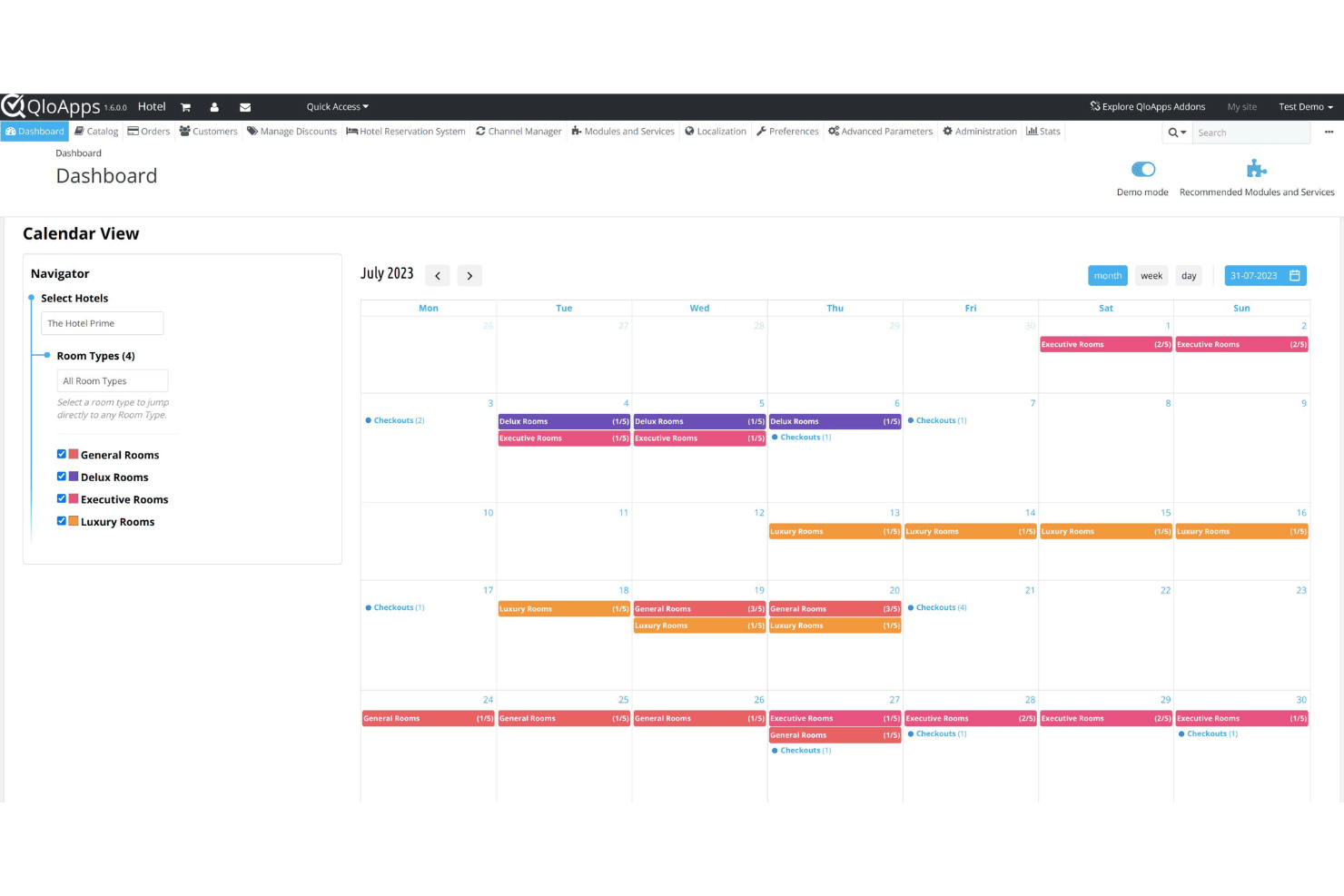
QloApps centralizza le prenotazioni alberghiere e le operazioni giornaliere in una sola dashboard. QloApps è un sistema di gestione alberghiera gratuito e open-source che include un PMS, un costruttore di siti web per hotel personalizzabile, un motore di prenotazione diretta e un channel manager.
Per chi è QloApps?
QloApps è particolarmente adatto per hotel indipendenti e piccole strutture che desiderano ospitare autonomamente il proprio sistema di prenotazione e personalizzarlo senza costi di licenza.
Perché ho scelto QloApps
Ho scelto QloApps come uno dei migliori perché il suo costruttore di siti web per hotel open-source offre il pieno controllo sul codice, sul design e sui contenuti del tuo negozio online, cosa che la maggior parte degli strumenti SaaS per la prenotazione alberghiera non consente. Utilizzo le molteplici opzioni di tema e la personalizzazione del back office per adattare il branding del sito alla struttura, inclusi loghi, slogan, immagini delle camere e servizi aggiuntivi. Gli strumenti SEO integrati e il supporto multilingue e multivaluta permettono inoltre di ottimizzare il sito per la ricerca locale e per gli ospiti internazionali, senza la necessità di un CMS separato.
Caratteristiche principali di QloApps
- Configurazione dei tipi di camera: Definisci un numero illimitato di tipi di camera con conteggi letti personalizzati, limiti di occupazione, servizi e immagini specifiche direttamente dal back office.
- Gestione dei piani tariffari: Crea e gestisci più piani tariffari per ogni tipo di camera, inclusi prezzi stagionali, tariffe per il weekend e offerte prenota prima.
- Dashboard della reception: Visualizza e gestisci prenotazioni attive, check-in e check-out da un'interfaccia centralizzata a calendario.
- Marketplace dei moduli aggiuntivi: Estendi le funzionalità principali con moduli aggiuntivi gratuiti e a pagamento sviluppati dalla community per funzioni come fatturazione, coupon e reportistica.
Integrazioni di QloApps
QloApps si collega ai principali canali OTA come Booking.com, Expedia, Airbnb, Agoda e Google Hotels tramite il proprio channel manager, che sincronizza inventario, tariffe e prenotazioni in tempo reale. Include inoltre un componente aggiuntivo PayPal Checkout per l'elaborazione dei pagamenti. È disponibile un'API aperta per integrazioni personalizzate e ulteriore personalizzazione.
Pros and Cons
Pros:
- Completamente open-source senza costi di licenza
- L'auto-ospitato mantiene i dati degli ospiti interni
- Componenti modulari aggiuntivi per funzionalità estese
Cons:
- Richiede una configurazione manuale e complessa del database
- Supporto tramite community anziché dedicato
Learn more about QloApps: Ideale per log di reception di micro-strutture
- Piano gratuito + demo gratuita disponibile
- Prezzo su richiesta
Visit WebsiteCustomer Rating:4.3/5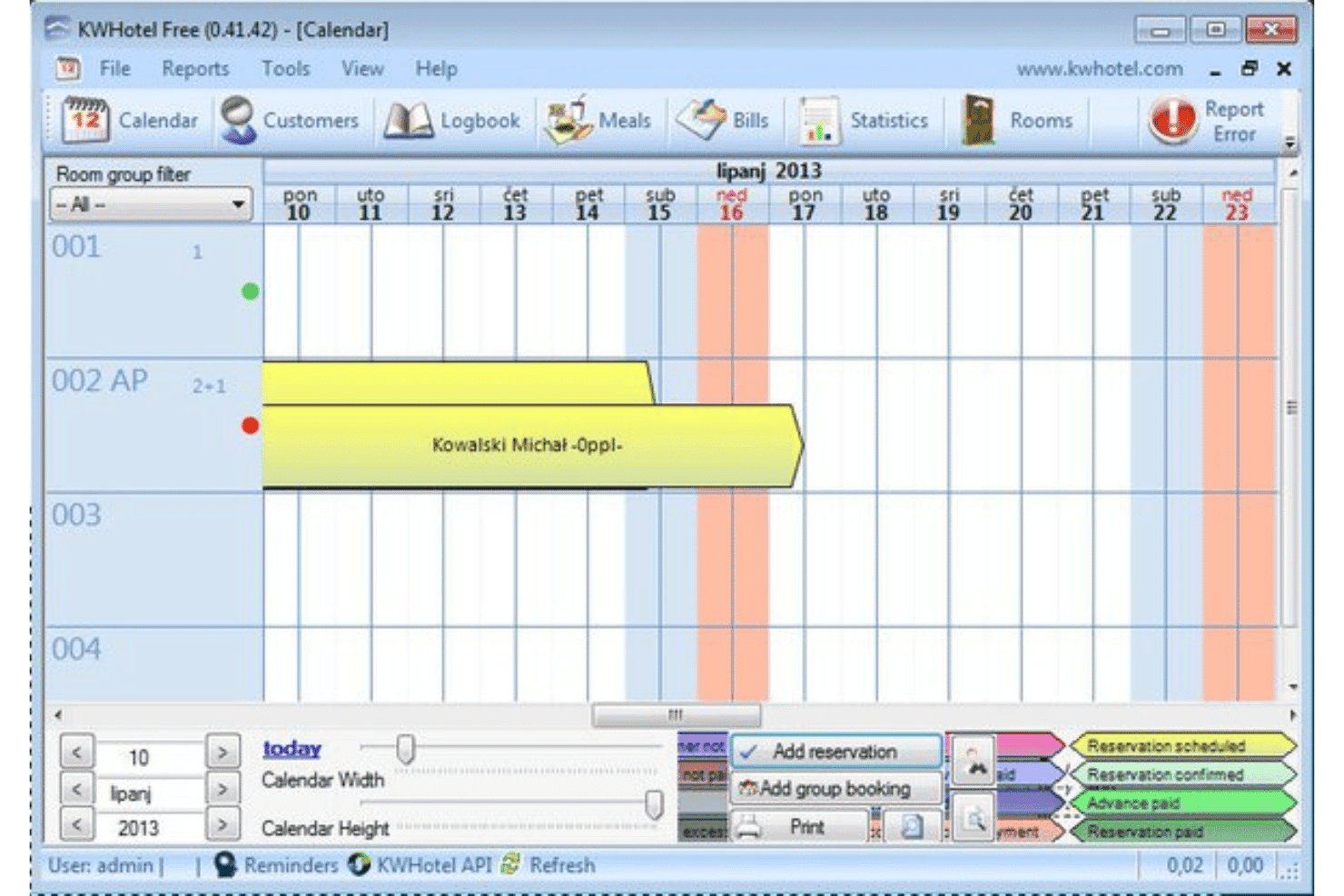
KWHotel traccia le prenotazioni degli ospiti con un calendario centralizzato della reception. Progettato per piccole strutture indipendenti, KWHotel è un PMS (Property Management System) per Windows che gestisce prenotazioni, operazioni di reception, fatturazione, coordinamento delle pulizie e channel management da un'unica applicazione installata localmente.
Per chi è ideale KWHotel?
KWHotel è adatto a hotel gestiti dai proprietari, ostelli e affitti di appartamenti dove la stessa persona che gestisce le prenotazioni si occupa anche di check-in, fatturazione e coordinamento delle pulizie.
Perché ho scelto KWHotel
Ho incluso KWHotel tra le mie migliori scelte perché considera il registro della reception una funzionalità di prima classe, non una semplice aggiunta. Ogni prenotazione include un campo note interne dove posso annotare preferenze degli ospiti, reclami o richieste speciali, e queste note rimangono disponibili per tutta la durata del soggiorno. Apprezzo anche il report di audit notturno, che genera un riepilogo giornaliero di tutte le attività della reception, così da non perdere nulla anche durante i turni più impegnativi.
Caratteristiche principali di KWHotel
- Calendario prenotazioni drag-and-drop: Sposta, estendi o riduci le prenotazioni direttamente su una visualizzazione a timeline delle camere codificata per colore.
- Connessione al channel manager: Sincronizza disponibilità e tariffe su OTA come Booking.com ed Expedia per evitare doppie prenotazioni.
- Modelli di fattura personalizzabili: Genera fatture dettagliate con il logo della struttura, aliquote fiscali e termini di pagamento.
- Database storico ospiti: Archivia i profili degli ospiti di ritorno con le informazioni dei soggiorni passati e i contatti per prenotazioni ripetute.
Integrazioni di KWHotel
KWHotel si integra con i channel manager YieldPlanet, SiteMinder e WuBook, oltre che direttamente con Booking.com ed Expedia. Offre anche una sincronizzazione diretta con il sistema POSbistro POS, SMSAPI per l'invio automatico di messaggi di testo agli ospiti e Sezam24 per i chioschi di self check-in. KWHotel supporta inoltre integrazioni con sistemi di contabilità, gateway di pagamento e sistemi di controllo accessi alle porte. È disponibile un'API per integrazioni personalizzate.
Pros and Cons
Pros:
- Il piano gratuito supporta prenotazioni illimitate di camere
- Vista calendario mostra chiaramente tutte le prenotazioni
- Conservazione dei documenti degli ospiti inclusa nel piano gratuito
Cons:
- Nessun strumento di pagamento integrato
- Richiede il tracciamento manuale della conferma ospiti
Learn more about KWHotel: Ideale per piccoli fornitori di alloggi
- Prova gratuita + demo gratuita disponibile
- Da $39/mese + 1% di commissione sulle prenotazioni
Visit WebsiteCustomer Rating:4/5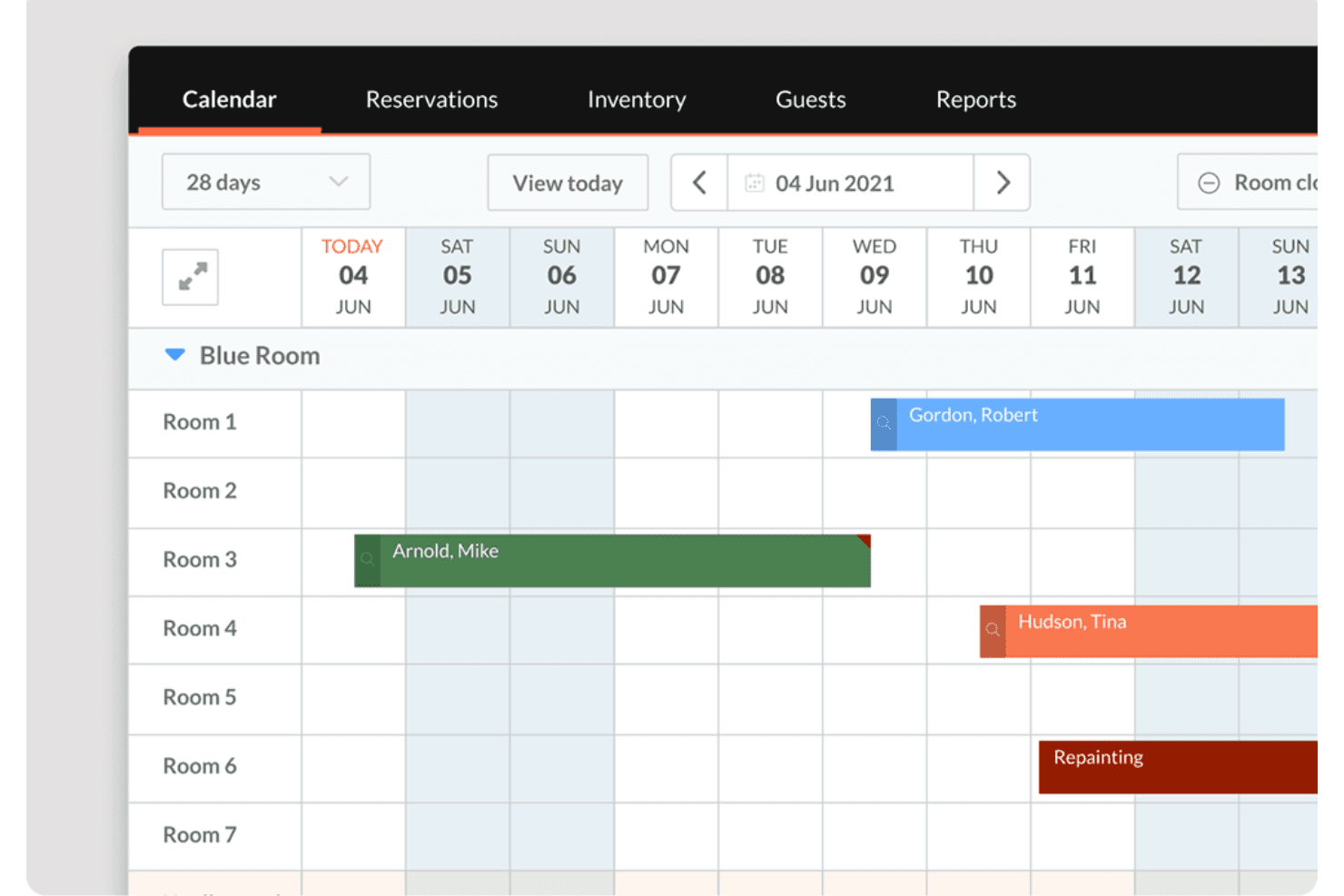
Little Hotelier offre una vista calendario visuale che mostra prenotazioni delle camere, nomi degli ospiti e blocchi di manutenzione su più camere in un periodo di 28 giorni. Little Hotelier è un sistema di gestione delle proprietà progettato per piccole strutture ricettive come B&B, guesthouse e piccoli hotel, che unisce gestione della reception, motore di prenotazione diretta e channel manager in un'unica piattaforma pensata per operazioni con personale limitato.
Per chi è più indicato Little Hotelier?
Little Hotelier è particolarmente adatto a B&B indipendenti, guesthouse e piccole locande che necessitano di un sistema tutto-in-uno senza la complessità dei software gestionali per hotel di livello enterprise.
Perché ho scelto Little Hotelier
Ho scelto Little Hotelier come uno dei migliori perché nasce appositamente per le piccole strutture, non è una versione ridotta di software aziendali. Mi piace come il sistema reception consenta di gestire assegnazione delle camere, check-in degli ospiti e prenotazioni da un'unica vista. Il channel manager sincronizza la disponibilità in tempo reale su Booking.com, Airbnb ed Expedia, quindi non ci sono problemi di overbooking anche gestendo la struttura da soli.
Caratteristiche chiave di Little Hotelier
- Motore di prenotazione diretta: Permette agli ospiti di prenotare direttamente dal sito web della struttura o dalle pagine social, evitando le commissioni delle OTA.
- Automazione delle comunicazioni con gli ospiti: Invia email automatiche personalizzate agli ospiti nei momenti chiave del soggiorno, dalla conferma del soggiorno al checkout.
- Gestione tariffe e disponibilità: Aggiorna prezzi e disponibilità su tutti i canali collegati da un'unica griglia inventario, con regole di disponibilità per controllare la distribuzione.
- App mobile: Consente di gestire prenotazioni, visualizzare i dettagli degli ospiti e ricevere notifiche di arrivi e partenze direttamente dal telefono.
Integrazioni di Little Hotelier
Little Hotelier offre un app store dedicato (tramite SiteMinder Hotel Exchange) con più di 25 integrazioni di terze parti che coprono contabilità, guest experience, accesso senza chiave e altri strumenti operativi. Le integrazioni verificate includono Duve, RoomPriceGenie, CheKin, Akia, GuestTouch e TripAdvisor, tra le altre. Non è disponibile un'API pubblica per integrazioni personalizzate.
Pros and Cons
Pros:
- Il channel manager si sincronizza istantaneamente con le principali OTA
- L'app mobile consente la gestione delle prenotazioni a distanza
- La messaggistica automatizzata agli ospiti riduce il lavoro manuale di follow-up
Cons:
- Personalizzazione limitata per il motore di prenotazione
- Alcuni report necessitano di esportazione per visualizzare i dettagli completi
Learn more about Little Hotelier: Ideale per la gestione integrata dei pagamenti
- Prova gratuita di 14 giorni + demo gratuita disponibile
- A partire da $207/mese (fatturazione annuale)
Visit WebsiteCustomer Rating:4.4/5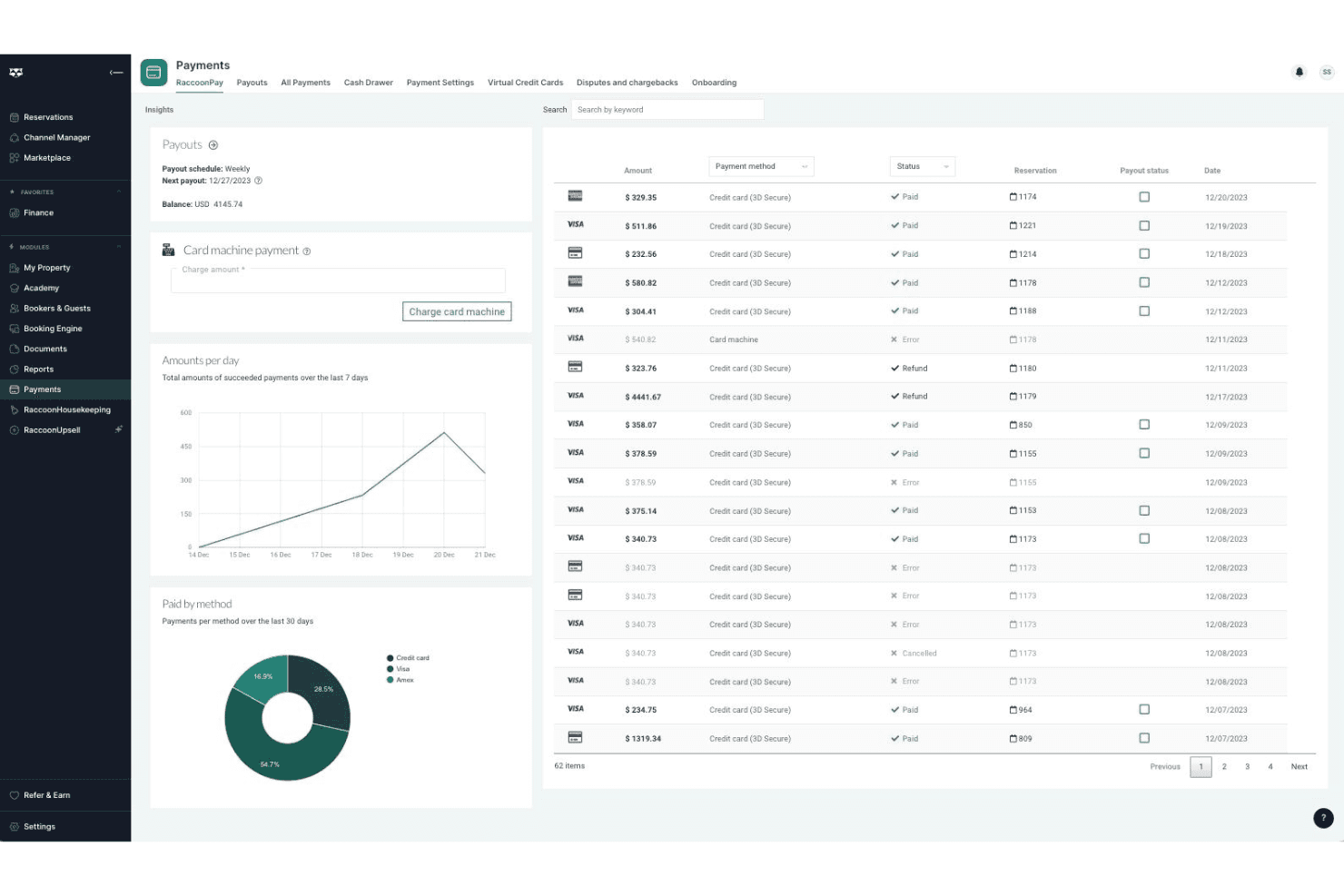
RoomRaccoon centralizza prenotazioni e soggiorni ospiti in un unico calendario di prenotazione. Progettato specificamente per hotel indipendenti e B&B, RoomRaccoon è un sistema di gestione proprietà basato su cloud che combina gestione della reception, motore di prenotazione, channel manager e gestione dei pagamenti in un'unica piattaforma.
Per chi è più adatto RoomRaccoon?
RoomRaccoon è particolarmente indicato per hotel indipendenti, strutture boutique e B&B che desiderano un PMS tutto-in-uno senza dover integrare strumenti separati per pagamenti, prenotazioni e operazioni di reception.
Perché ho scelto RoomRaccoon
Ho inserito RoomRaccoon tra le mie migliori scelte perché l'elaborazione dei pagamenti è integrata direttamente nel PMS, non aggiunta come componente di terze parti. Mi piace il fatto che includa un terminale per carte integrato che riconcilia automaticamente i pagamenti in presenza con le prenotazioni e che la tokenizzazione delle carte online permetta di addebitare gli ospiti al check-in senza reinserire i dati. In pratica, significa che la tua reception gestisce depositi, 'no-show' e check-out finali da un'unica schermata.
Caratteristiche principali di RoomRaccoon
- Channel manager: Sincronizza tariffe e disponibilità in tempo reale su OTA come Booking.com, Expedia e Airbnb da una sola dashboard.
- Motore di prenotazione diretta: Un widget di prenotazione senza commissioni che si integra direttamente nel sito web dell'hotel per le prenotazioni degli ospiti.
- Check-in online: Invia e-mail automatiche pre-arrivo che permettono agli ospiti di completare il check-in, caricare i documenti d'identità e firmare le schede di registrazione prima dell'arrivo.
- Strumento di yield management: Regola automaticamente le tariffe delle camere in base a soglie di occupazione e regole di domanda configurate da te.
Integrazioni di RoomRaccoon
RoomRaccoon offre oltre 400 integrazioni con soluzioni aziendali come Lightspeed, Sage, Booking.com ed Expedia, disponibili tramite il suo Marketplace delle Integrazioni. Le integrazioni verificate includono Adyen, SiteMinder, Xero, Stripe, PriceLabs, Toast POS, Epos Now, QuickBooks, RemoteLock e GuestRevu, e un'API è disponibile per integrazioni personalizzate.
Pros and Cons
Pros:
- Fatturazione automatizzata che riduce le attività manuali
- Supporto multivaluta per ospiti internazionali
- Channel manager integrato che si sincronizza con le principali OTA
Cons:
- Le funzionalità di reportistica non consentono filtri avanzati
- L'app mobile non è disponibile per tutti i dispositivi
Learn more about RoomRaccoon: Ideale per la gestione immobiliare open-source
- Piano gratuito per sempre + Demo gratuita disponibile
- Utilizzo gratuito
Visit WebsiteCustomer Rating:4.5/5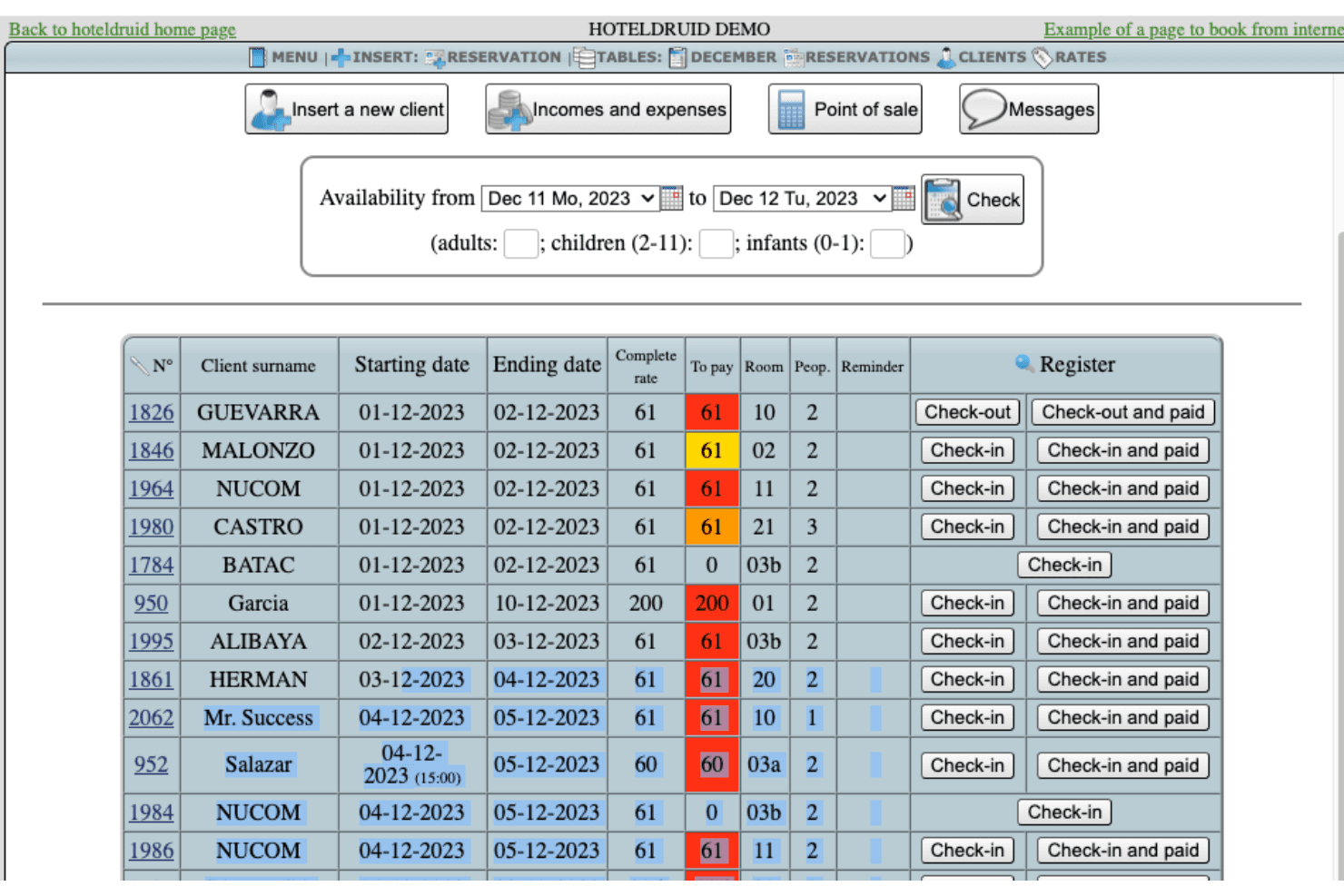
HotelDruid mostra una tabella di gestione delle prenotazioni con check-in, check-out, stato dei pagamenti e assegnazione delle camere dei clienti. Sviluppato da DigitalDruid.Net, HotelDruid è un sistema open-source di gestione delle proprietà che copre prenotazioni, assegnazione delle camere, fatturazione, gestione delle tariffe, POS e report sull'occupazione per strutture ricettive di qualsiasi dimensione.
Per chi è HotelDruid?
HotelDruid è adatto a operatori tecnologicamente esperti in piccoli hotel indipendenti, ostelli o B&B che preferiscono un software autogestito rispetto agli abbonamenti cloud.
Perché ho scelto HotelDruid
Ho scelto HotelDruid come uno dei migliori nella mia selezione perché la sua base open-source ti permette di modificare effettivamente il codice per adattarlo alla tua struttura, e non il contrario. Mi piace in particolare il motore automatico di assegnazione delle camere, in cui definisci le regole e HotelDruid gestisce la logica di assegnazione su tutto il tuo inventario. Il POS integrato per bar e ristoranti con monitoraggio dell'inventario è inoltre una funzione che raramente vedo inclusa a questo livello senza costi aggiuntivi.
Funzionalità principali di HotelDruid
- Widget di prenotazione online: Un widget di prenotazione integrabile che puoi aggiungere direttamente al sito web della tua struttura per accettare prenotazioni senza un motore di prenotazione di terze parti.
- Gestione dinamica delle tariffe: Imposta tariffe stagionali, soggiorni minimi e regole di tariffazione basate sull'occupazione per ogni tipologia di camera.
- Generazione di fatture e documenti: Genera automaticamente fatture, ricevute e documentazione ospiti dalle prenotazioni concluse.
- Gestione multi-proprietà: Gestisci più strutture da una singola installazione di HotelDruid utilizzando un solo accesso.
Integrazioni HotelDruid
Il channel manager di HotelDruid prevede connessioni dirette bidirezionali con Booking.com ed Expedia e la sincronizzazione unidirezionale della disponibilità con Airbnb, Google e diversi altri portali. Connessioni aggiuntive con Agoda, Hostelworld, HRS e molte altre OTA sono disponibili tramite una connessione intermedia con Octorate. Il motore di prenotazione supporta PayPal, Stripe e Mercadopago per l'elaborazione dei pagamenti ed è disponibile un'esportazione iCal per la sincronizzazione dei calendari.
Pros and Cons
Pros:
- Il piano gratuito include proprietà e camere illimitate
- Il motore di prenotazione può essere integrato in qualsiasi sito web
- Modifiche automatiche delle tariffe in base alle regole di occupazione
Cons:
- Richiede la sincronizzazione manuale dei calendari
- Assistenza clienti limitata per gli utenti gratuiti
Learn more about HotelDruid: Ideale per integrazione OTA e canali
- Piano gratuito disponibile
- Da £1.50/prenotazione
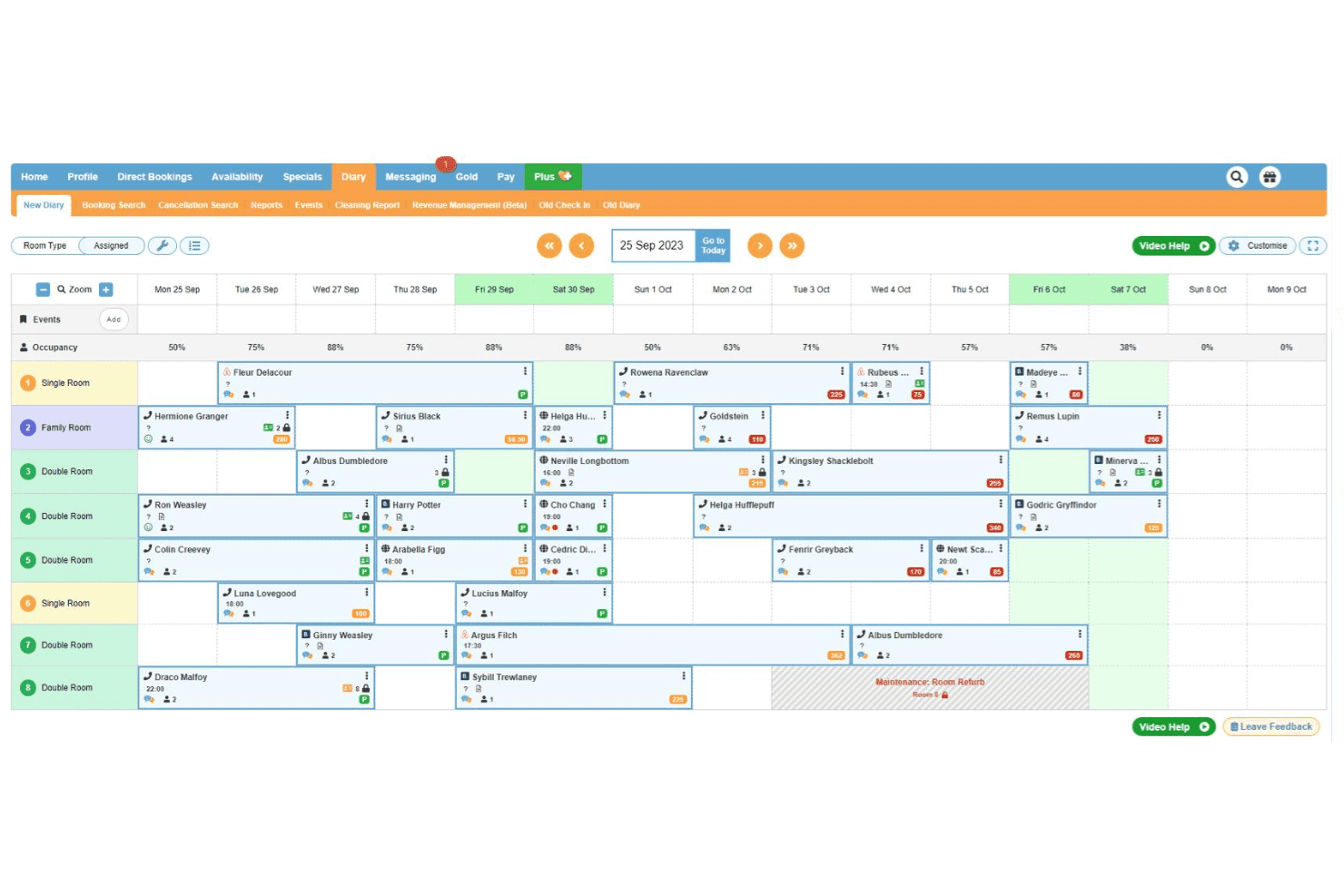
freetobook gestisce le prenotazioni con un'interfaccia centralizzata del calendario. freetobook è una piattaforma di prenotazione alberghiera e gestione dei canali per strutture indipendenti che include un motore di prenotazione diretta, connessioni ai canali OTA, tariffe dinamiche, messaggistica per gli ospiti e strumenti di gestione della reputazione.
Per chi è ideale freetobook?
freetobook è particolarmente adatto a hotel indipendenti, B&B e guesthouse che desiderano gestire le prenotazioni dirette e le inserzioni OTA senza pagare commissioni per ogni prenotazione.
Perché ho scelto freetobook
Ho scelto freetobook tra i migliori perché il suo channel manager offre un vero controllo su come la proprietà appare nei vari OTA, non solo una semplice sincronizzazione. Posso applicare supplementi o limitare la disponibilità nei periodi di punta per incentivare le prenotazioni dirette. La sincronizzazione bidirezionale mantiene tariffe e disponibilità aggiornate su Booking.com, Airbnb, Agoda e altri da un'unica dashboard, eliminando le doppie prenotazioni senza aggiornamenti manuali.
Caratteristiche principali di freetobook
- Widget di prenotazione diretta: Integra un motore di prenotazione senza commissioni direttamente sul sito della struttura per acquisire prenotazioni senza costi OTA.
- Messaggistica automatica per gli ospiti: Invia automaticamente email pre-arrivo, conferma di prenotazione e post-soggiorno in base a trigger di prenotazione.
- Strumento di prezzi dinamici: Regola automaticamente le tariffe delle camere in base alla domanda, alle soglie di occupazione o agli intervalli di date definiti dall'utente.
- Dashboard di gestione delle recensioni: Monitora e rispondi alle recensioni degli ospiti da più piattaforme in un solo posto.
Integrazioni di freetobook
freetobook offre un set ristretto di integrazioni, tra cui Stripe e RoomPriceGenie. Il suo channel manager si collega a piattaforme OTA come Booking.com, Airbnb, Agoda, TripAdvisor, Hostelworld e HRS. Non è chiaramente documentato il supporto a Zapier e API.
Pros and Cons
Pros:
- Messaggistica automatica per gli ospiti per le conferme
- Channel manager disponibile come componente aggiuntivo a pagamento
- Supporta molteplici integrazioni con gateway di pagamento
Cons:
- Channel manager non incluso nel piano gratuito
- Personalizzazione limitata dell'aspetto del motore di prenotazione
Learn more about freetobook: Ideale per la gestione delle prenotazioni di più strutture
- Piano gratuito disponibile
- A partire da €15/mese
Visit WebsiteCustomer Rating:3.1/5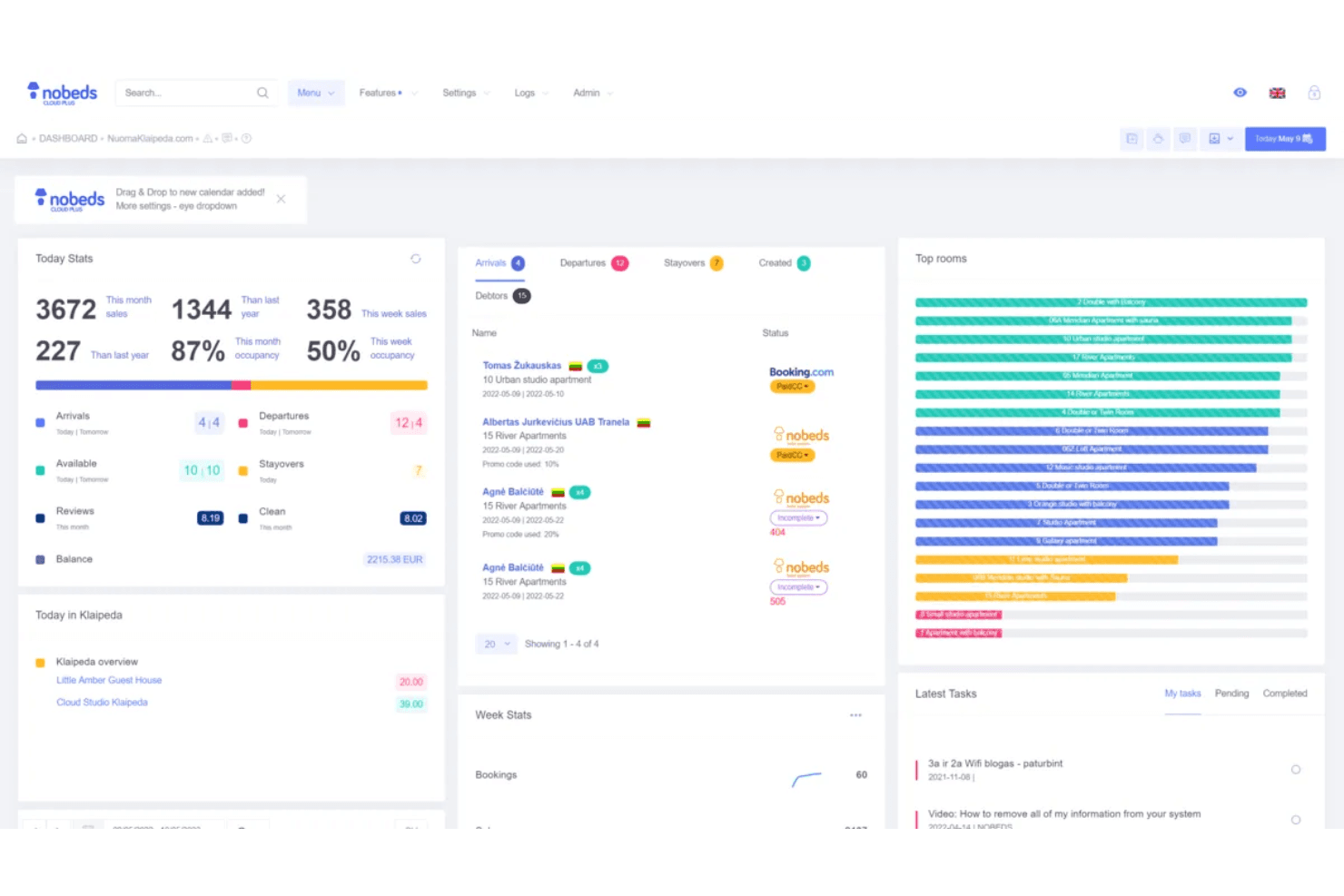
Nobeds offre un pannello completo per la gestione delle strutture, che mostra in un'unica vista centralizzata le statistiche di oggi, gli arrivi, le partenze, le camere principali e le attività più recenti. Nobeds è un sistema di gestione delle strutture basato sul cloud che combina un gestore dei canali, un pannello di controllo delle prenotazioni, un motore di prenotazione diretta e comunicazioni automatizzate con gli ospiti per hotel, ostelli, appartamenti e case vacanze.
Per chi è più adatto Nobeds?
Nobeds è una soluzione adatta agli albergatori indipendenti e ai gestori di strutture che supervisionano più annunci su diverse piattaforme di prenotazione.
Perché ho scelto Nobeds
Nobeds è entrato nella mia selezione perché apprezzo il modo in cui gestisce le prenotazioni di più strutture da un unico pannello di controllo. Il gestore dei canali bidirezionale in tempo reale sincronizza disponibilità e prezzi su un massimo di 30 canali, così non devo mai aggiornare manualmente le tariffe per ogni struttura. Utilizzo anche la funzione di reportistica per i proprietari, che mi consente di generare report sui ricavi specifici per struttura: è davvero utile quando gestisco unità appartenenti a proprietari diversi.
Funzionalità principali di Nobeds
- Motore di prenotazione diretta: consente agli ospiti di prenotare direttamente tramite il sito web della struttura, evitando completamente le commissioni delle OTA.
- Automazione del check-in autonomo: si integra con le serrature intelligenti e invia agli ospiti istruzioni automatizzate per l'accesso prima del loro arrivo.
- Messaggistica automatizzata: programma e invia email di benvenuto preimpostate, messaggi SMS e richieste di recensione a intervalli stabiliti durante tutto il soggiorno dell'ospite.
- Gestione dei turni: monitora i turni del personale e registra le azioni dei singoli utenti nel sistema per garantire la responsabilità.
Integrazioni di Nobeds
Nobeds si collega direttamente ai canali OTA come Booking.com, Airbnb ed Expedia tramite connessioni API certificate che sincronizzano disponibilità, prezzi e prenotazioni in tempo reale. È disponibile un'API REST aperta per collegare Nobeds a qualsiasi applicazione di terze parti; la piattaforma supporta inoltre l'integrazione con il Protocollo di contesto del modello (MCP) per collegare direttamente gli agenti di IA al database della struttura.
Pros and Cons
Pros:
- Sono consentiti annunci di strutture e camere illimitati
- Il piano gratuito include le funzionalità essenziali per le prenotazioni
- Motore di prenotazione diretta per il tuo sito web
Cons:
- Nessun gestore dei canali integrato per tutte le OTA
- Manca la reportistica automatizzata del controllo notturno
Learn more about Nobeds: Ideale per l'automazione del check-in ospiti
- Prova gratuita di 14 giorni + demo gratuita disponibile
- Prezzo su richiesta
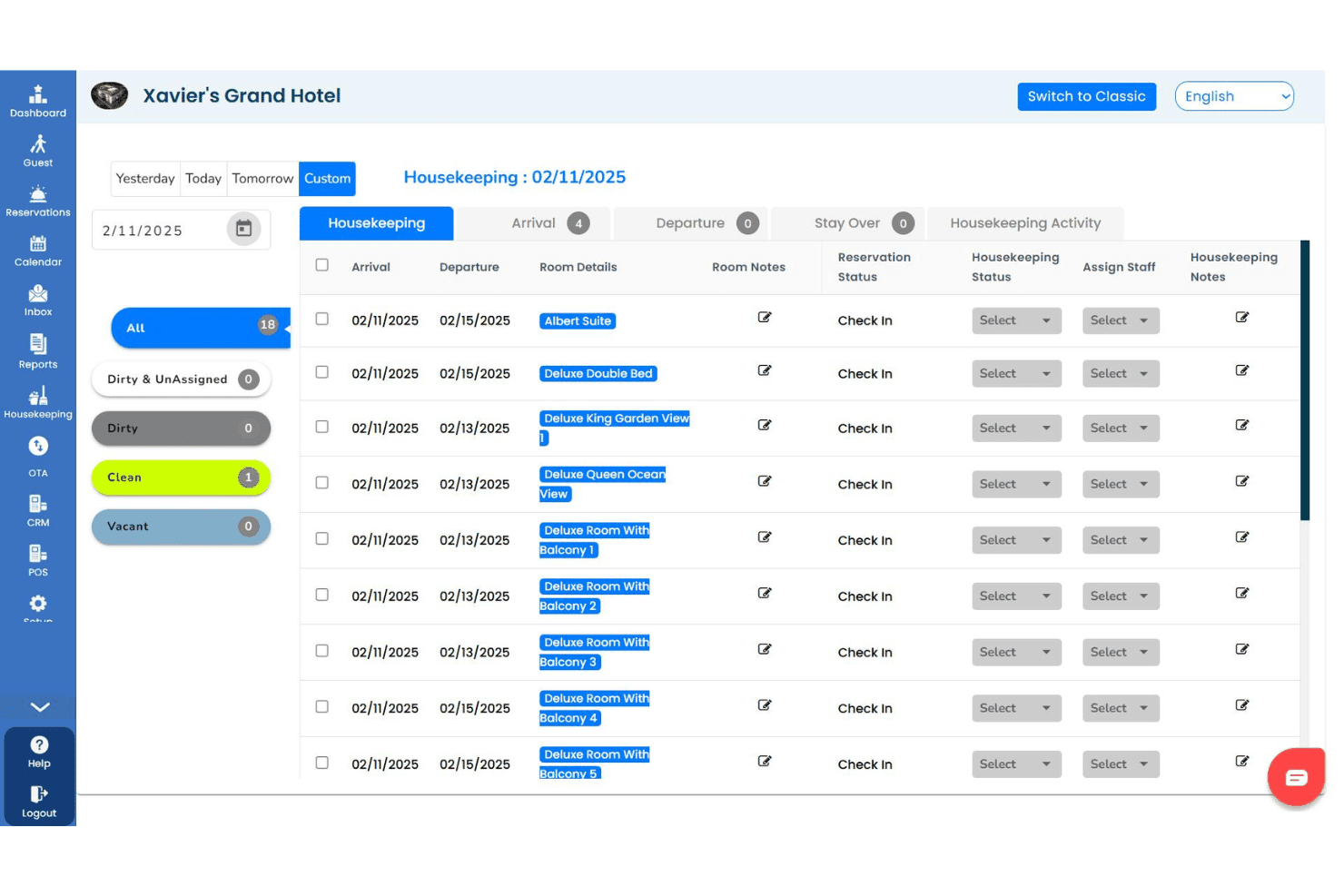
GraceSoft centralizza prenotazioni degli ospiti, fatture e dettagli del check-in. GraceSoft è un software di gestione alberghiera che copre prenotazioni, operazioni di reception, gestione delle pulizie, un motore di prenotazione online diretto, channel management e comunicazione con gli ospiti da un'unica piattaforma.
Per chi è ideale GraceSoft?
GraceSoft è particolarmente adatto a hotel e locande indipendenti di piccole e medie dimensioni che hanno bisogno di un punto di partenza gratuito prima di impegnarsi in un sistema a pagamento.
Perché ho scelto GraceSoft
Ho scelto GraceSoft tra i migliori perché il suo flusso di check-in in reception è davvero progettato per ridurre la gestione manuale all'arrivo. Il calendario delle prenotazioni con funzione drag-and-drop permette al personale di effettuare il check-in degli ospiti senza prenotazione o modificare le prenotazioni già esistenti in pochi secondi, senza passaggi aggiuntivi. Apprezzo inoltre la funzione di messaggistica pre-arrivo, che invia promemoria di check-in automatici via email, SMS o WhatsApp per preparare gli ospiti prima dell’arrivo. In aggiunta, l’assistente AI integrato gestisce le domande degli ospiti 24 ore su 24, consentendo al personale della reception di non dover rispondere sempre alle stesse richieste sull’arrivo.
Caratteristiche principali di GraceSoft
- Gestione delle pulizie: Monitora in tempo reale lo stato di pulizia delle camere, assegna i compiti al personale e invia avvisi per la manutenzione, il tutto accessibile da dispositivi mobili.
- Sistema POS integrato: Addebita gli acquisti effettuati dagli ospiti in ristorante, spa o negozio di souvenir direttamente al conto camera per una fatturazione consolidata.
- CRM ospiti e strumenti di fidelizzazione: Conserva la cronologia e le preferenze degli ospiti e avvia campagne di marketing automatizzate per i clienti abituali.
- Gestione dei ricavi: Imposta regole tariffarie in base all’occupazione, tariffe stagionali e prezzi dei pacchetti per regolare automaticamente le tariffe delle camere.
Integrazioni di GraceSoft
GraceSoft offre un set più ristretto di integrazioni native, tra cui SiteMinder, Authorize.net, Stripe e QuickBooks. Si collega anche con le principali OTA come Airbnb, Booking.com ed Expedia, oltre a VRBO e PayPal. Sono disponibili anche integrazioni con Facebook e Google Analytics. Il supporto per Zapier e API non è chiaramente documentato.
Pros and Cons
Pros:
- Dashboard multi-proprietà per gestione centralizzata
- Il piano gratuito supporta prenotazioni illimitate
- Motore di prenotazione diretto incluso
Cons:
- Richiede la sincronizzazione manuale dell'inventario della struttura
- Limitate integrazioni con terze parti disponibili
Learn more about GraceSoft: Ideale per assegnazione automatica delle camere
- Piano gratuito + demo gratuita disponibile
- Da €15/mese
Visit WebsiteCustomer Rating:5/5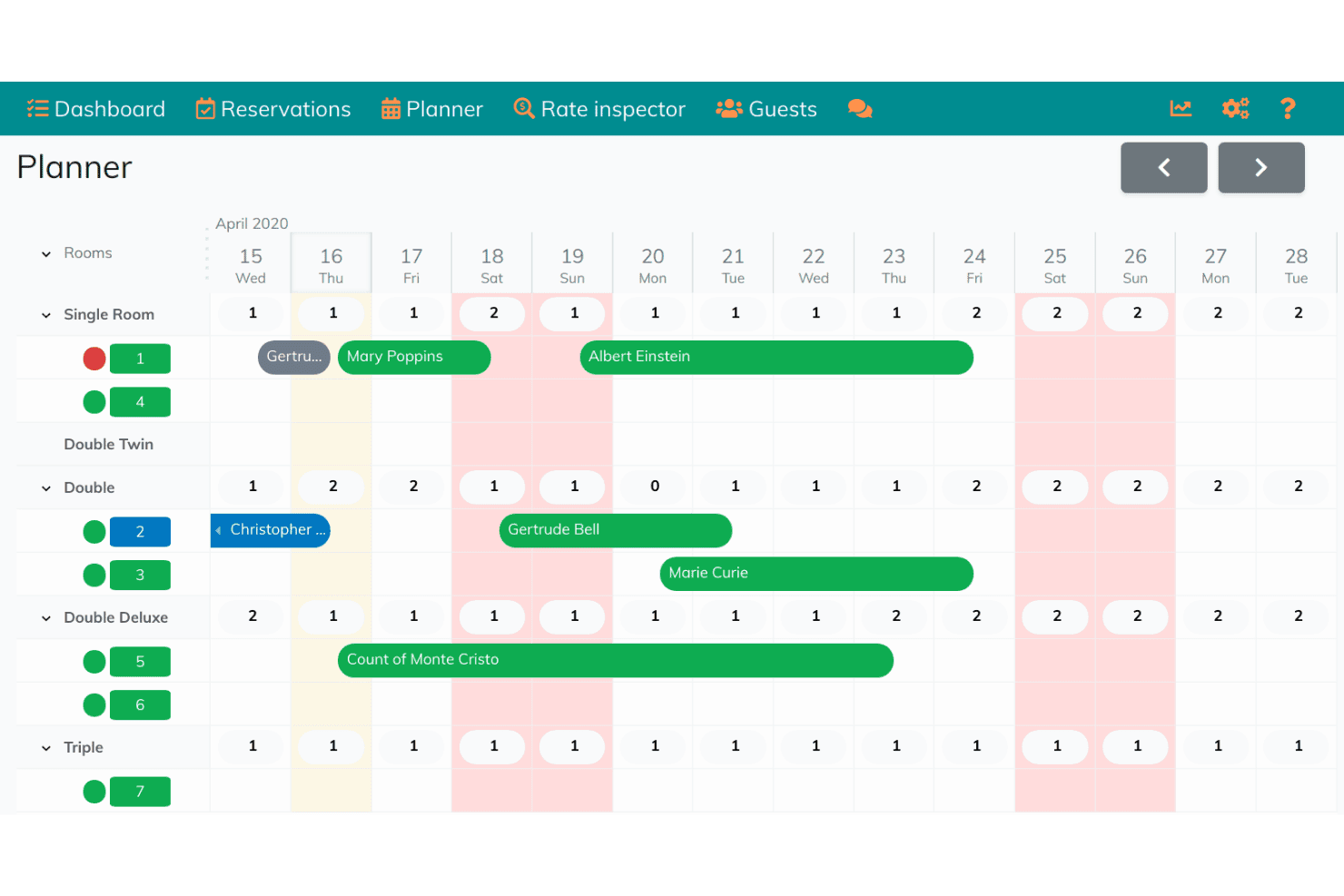
Hoteliera automatizza l'assegnazione delle camere con un planner visivo delle prenotazioni. Hoteliera è un sistema gratuito di gestione alberghiera che copre le operazioni di reception, gestione delle prenotazioni, monitoraggio delle pulizie e comunicazione con gli ospiti in un'unica piattaforma.
Per chi è Hoteliera?
Hoteliera è adatto a hotel indipendenti e strutture boutique che desiderano un PMS gratuito con assegnazione automatica delle camere integrata.
Perché ho scelto Hoteliera
Ho scelto Hoteliera tra i migliori perché la sua assegnazione automatica delle camere è inclusa in un PMS completamente gratuito, cosa rara in questo settore. Il pianificatore intelligente assegna automaticamente le camere in base agli orari di check-in e check-out, e il modulo housekeeping aggiorna lo stato delle camere in tempo reale man mano che lo staff si sposta nella struttura. Apprezzo anche che il portale ospite gestisca il check-in mobile senza richiedere il download di alcuna app.
Funzionalità principali di Hoteliera
- Fatturazione e contabilità: Generazione automatica di fatture proforma, fiscali e storno, con supporto a più imposte, valute e addebiti pre-compilati.
- Dashboard intelligente: Gestione degli accessi dello staff con permessi granulari e possibilità di gestire check-in, check-out, finanze e prenotazioni da un'unica schermata.
- Extra e up-selling: Offri servizi aggiuntivi come trattamenti spa, noleggio biciclette e voucher ristorante direttamente tramite il portale ospite.
- Gestione multi-struttura: Passa da una struttura all'altra con un solo account, ciascuna con proprie camere, prenotazioni e impostazioni dello staff.
Integrazioni di Hoteliera
Il channel manager di Hoteliera si collega a Booking.com, Airbnb ed Expedia per la sincronizzazione in tempo reale di tariffe e disponibilità.
Pros and Cons
Pros:
- Il piano PMS gratuito include camere illimitate
- Il sito web viene creato automaticamente dall'AI del costruttore
- Il portale ospiti mobile non richiede download di app
Cons:
- Channel manager limitato a tre OTA
- Nessuna API documentata o integrazioni terze parti
Learn more about Hoteliera: 10Ideale per la gestione immobiliare basata su Joomla
Solidres
- Demo gratuita disponibile
- Prezzo su richiesta
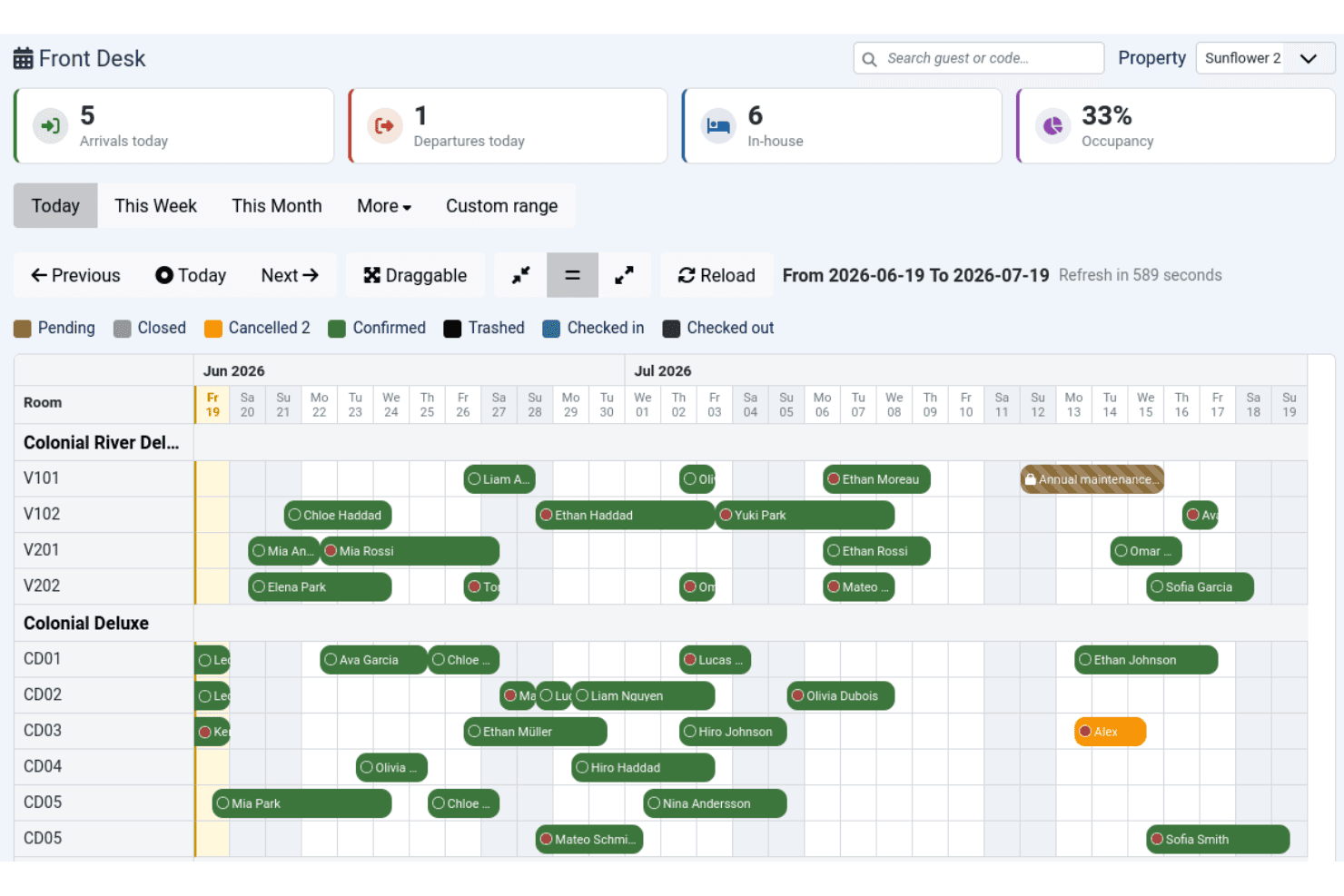
Solidres gestisce le prenotazioni alberghiere con un calendario centralizzato di reception. Solidres è un plugin open-source per la prenotazione e la gestione di hotel per Joomla che gestisce la gestione delle camere, i calendari di disponibilità, la configurazione delle tariffe e le operazioni di reception.
Per chi è ideale Solidres?
Solidres è particolarmente adatto ai proprietari di strutture di piccole e medie dimensioni che già gestiscono un sito web basato su Joomla e desiderano funzionalità di prenotazione native senza dover cambiare piattaforma.
Perché ho scelto Solidres
Solidres si guadagna il suo posto nella mia lista perché è l'unico plugin per la prenotazione di hotel costruito appositamente per funzionare come un componente nativo all'interno di Joomla, non come un semplice widget aggiunto. Apprezzo in particolare il suo modulo Front Desk, che offre un calendario interattivo delle prenotazioni per gestire arrivi e partenze in un'unica vista. Il sistema tariffario complesso consente inoltre di configurare piani tariffari per notte o per persona con più tariffe per tipologia di camera, un livello di dettaglio superiore rispetto alla maggior parte degli strumenti gratuiti disponibili.
Funzionalità principali di Solidres
- Gestione delle pulizie: Assegna e traccia le attività di housekeeping nelle camere tramite un'interfaccia dedicata nell'area di amministrazione.
- Flex Search: Suggerisce agli ospiti date alternative disponibili quando quelle selezionate sono al completo.
- Configurazione del deposito cauzionale: Imposta le regole per il deposito come importo fisso, percentuale o in base al numero di notti prenotate a livello di camera.
- Esportazione e importazione iCal: Sincronizza i dati delle prenotazioni con calendari esterni usando il formato standard iCal.
Integrazioni di Solidres
Solidres offre la gestione dei canali tramite l'integrazione con MyAllocator (Cloudbeds), che sincronizza tariffe e disponibilità con i canali di prenotazione OTA. Si integra inoltre con Google Analytics, Facebook Pixel, Google Ads e supporta i gateway di pagamento tra cui PayPal, Stripe, Square, Mollie, Authorize.net e Braintree. Non è documentata alcuna API pubblica per integrazioni personalizzate.
Pros and Cons
Pros:
- Codice open-source con pieno controllo dei dati
- Supporta nativamente portali di prenotazione multi-struttura
- Creato appositamente per utenti del CMS Joomla
Cons:
- Limitato solo a Joomla e WordPress
- Il supporto dalla community può essere lento
Learn more about Solidres:
Altri software gratuiti per la prenotazione alberghiera
Ecco alcune opzioni aggiuntive di software gratuiti per la prenotazione alberghiera che non sono entrate nella mia selezione, ma che vale comunque la pena prendere in considerazione:
- 11freeonlinebookingIdeale per configurare prenotazioni dirette online
- 12JomresIdeale per la compatibilità WordPress e Joomla
- 13SimplyBook.meIdeale per la programmazione dei servizi accessori per gli ospiti
- 14SetmoreIdeale per le esigenze di pianificazione basate sul calendario
- 15SirvoyIdeale per aggiornamenti in tempo reale sulla disponibilità delle stanze
- 16MewsIdeale per integrazioni con chioschi terminali cloud
- 17HotelRunnerIdeale per la gestione della distribuzione online
- 18HotelBeeIdeale per interfaccia calendario di prenotazione visiva
- 19upbookingIdeale per moduli white label senza commissioni
Come valuto i software gratuiti per la prenotazione di hotel
Quando un proprietario di boutique hotel o B&B ha bisogno di ricevere prenotazioni dirette senza pagare canoni mensili, valuto due aspetti: se uno strumento soddisfa i requisiti di base e cosa lo distingue rispetto agli altri.
Funzionalità di base (Requisiti Minimi per Questa Lista)
Quando seleziono gli strumenti per la mia lista, valuto ognuno su una scala da 0 (non offre la funzionalità) a 5 (eccelle in quest'area) per ciascuna delle funzionalità di base di seguito elencate. In seguito, calcolo il punteggio totale dello strumento in percentuale. Ogni strumento deve raggiungere un punteggio totale minimo del 65% per essere preso in considerazione.
- Motore di prenotazione online: Verifico se gli ospiti possono completare una prenotazione direttamente dal sito della struttura o da una pagina personalizzata, senza essere reindirizzati a una piattaforma esterna.
- Gestione delle prenotazioni: È importante avere un pannello centrale dove visualizzare, modificare e cancellare prenotazioni — soprattutto quando arriva un ospite senza prenotazione e necessita di una camera appena liberata da una cancellazione.
- Gestione camere & tariffe: Valuto come ogni strumento gestisce le tipologie di camere, i prezzi stagionali e la disponibilità in tempo reale, così il personale alla reception non deve aggiornare manualmente i fogli di calcolo nei momenti di punta del check-in.
- Sincronizzazione con canali/OTA: Mettere le camere in vendita su Booking.com o Airbnb e allo stesso tempo accettare prenotazioni dirette comporta il rischio di doppie prenotazioni, quindi cerco la sincronizzazione automatica bidirezionale con le principali OTA.
- Piano gratuito reale: Confermo che ogni strumento offra una vera versione gratuita per l’uso continuativo — non una prova di 14 giorni — così un piccolo proprietario può gestire prenotazioni reali senza costi di abbonamento.
- Supporto ai pagamenti: Che si tratti di raccogliere i dati della carta in fase di prenotazione o di gestire acconti tramite Stripe o PayPal, cerco almeno una soluzione integrata o integrabile per i pagamenti.
Una volta definita la lista degli strumenti che soddisfano questi criteri, considero cosa distingue ciascuna piattaforma.
Fattori Differenzianti (Cosa Distingue i Fornitori)
Ecco come confronto i diversi fornitori:
Funzionalità di rilievo
Un'app mobile fa davvero la differenza per chi gestisce check-in e cancellazioni anche lontano dalla reception. Verifico anche la presenza di comunicazioni integrate con l’ospite — conferme automatiche e messaggi pre-arrivo fanno risparmiare ore rispetto all’invio manuale. Anche le funzionalità di reportistica sono utili. Anche i report basilari su occupazione e ricavi aiutano una piccola struttura ad individuare i periodi di minore attività e modificare i prezzi prima che le camere restino vuote.
Oltre le funzionalità
I limiti dei piani gratuiti sono la prima cosa che controllo: alcuni strumenti pongono restrizioni su numero di camere o prenotazioni mensili, e per una guesthouse da 10 camere raggiungere il limite a metà stagione è un problema. Valuto anche la semplicità d’uso per operatori senza grandi competenze tecniche; un proprietario di B&B non dovrebbe aver bisogno di uno sviluppatore per andare online. Le opzioni di integrazione sono altrettanto importanti, perché collegarsi a strumenti di contabilità come QuickBooks o Xero permette di mantenere aggiornati i ricavi senza inserimenti manuali dopo ogni prenotazione.
Come scegliere un software gratuito per la prenotazione alberghiera
È facile perdersi in lunghi elenchi di funzionalità e strutture tariffarie complesse. Per aiutarti a rimanere concentrato mentre affronti il tuo particolare processo di selezione del software, ecco una lista di fattori da tenere a mente:
| Fattore | Cosa considerare |
|---|---|
| FattoreScalabilità | Cosa considerareIl piano gratuito può supportare il numero attuale e futuro di camere, la domanda stagionale o più strutture senza costringerti a effettuare un upgrade prima del previsto? |
| FattoreIntegrazioni | Cosa considerareIl software si collega alle principali OTA e ai gateway di pagamento su cui fai affidamento? Le integrazioni sono disponibili nel piano gratuito o solo nei piani a pagamento? |
| FattorePersonalizzazione | Cosa considerareQuanto puoi adattare i moduli di prenotazione, le comunicazioni con gli ospiti o il branding senza l'aiuto di uno sviluppatore? Fai attenzione ai modelli rigidi o ai costi aggiuntivi per le principali opzioni di personalizzazione. |
| FattoreFacilità d'uso | Cosa considerareTu e il tuo staff riuscirete a navigare nella dashboard, aggiornare le tariffe e gestire le prenotazioni con una formazione minima? Quando disponibili, prova le demo o i tutorial. |
| FattoreImplementazione e avviamento | Cosa considerareQuali risorse, come guide alla configurazione, strumenti di migrazione o assistenza per l'avviamento, sono disponibili per i team non tecnici? Puoi effettuare la migrazione dai fogli di calcolo senza assistenza a pagamento? |
| FattoreCosto | Cosa considerareIl termine “gratuito” include tutti i flussi di lavoro fondamentali oppure è probabile che ti serva un piano a pagamento per le funzioni principali di prenotazione o pagamento? Esamina i limiti del piano gratuito e gli eventuali componenti aggiuntivi. |
| FattoreMisure di sicurezza | Cosa considerareIn che modo la piattaforma protegge i dati personali e di pagamento degli ospiti? Verifica la conformità allo standard PCI DSS, la presenza del protocollo SSL e il supporto agli standard regionali sulla privacy come il GDPR. |
| FattoreDisponibilità dell'assistenza | Cosa considerareÈ disponibile un aiuto tempestivo tramite chat, e-mail o telefono, soprattutto durante i periodi di punta per il check-in? I canali di assistenza sono aperti agli utenti del piano gratuito o solo ai clienti paganti? |
Cosa sono i software gratuiti per la prenotazione alberghiera?
I software gratuiti per la prenotazione alberghiera sono strumenti digitali che consentono a hotel, B&B e strutture ricettive di accettare e gestire prenotazioni online senza costi iniziali. Queste piattaforme offrono generalmente un motore di prenotazione, un pannello di controllo per le prenotazioni, una gestione di base della disponibilità e un'integrazione limitata con le OTA, consentendo alle strutture più piccole di centralizzare prenotazioni e pagamenti anche con budget limitati.
Funzionalità dei software gratuiti per la prenotazione alberghiera
Quando scegli un software gratuito per la prenotazione alberghiera, presta attenzione alle seguenti funzionalità principali:
- Motore di prenotazione online: consente agli ospiti di visualizzare la disponibilità e prenotare le camere direttamente dal tuo sito web o da una pagina di prenotazione personalizzata, spesso aggiornata in tempo reale.
- Pannello di controllo per la gestione delle prenotazioni: centralizza tutte le prenotazioni, offrendo una visione unica per confermare, modificare o annullare le prenotazioni e gestire i dati degli ospiti.
- Inventario di camere e tariffe: consente di configurare e modificare le tipologie di camere, i limiti di occupazione e i piani tariffari, utile per le tariffe stagionali o quelle relative a eventi speciali.
- Integrazione con OTA e canali: sincronizza il tuo inventario con piattaforme di prenotazione esterne come Booking.com o Airbnb per evitare doppie prenotazioni e mantenere aggiornati i dati.
- Supporto per i sistemi di pagamento: acquisisce i dati di pagamento degli ospiti o i depositi al momento della prenotazione, aiutandoti a gestire i pagamenti anticipati o la protezione contro le mancate presentazioni.
- Comunicazioni automatizzate con gli ospiti: invia email di conferma, istruzioni per il check-in o richieste di riscontri, così non devi gestire ogni messaggio manualmente.
- Visualizzazione del calendario: offre una panoramica visiva, basata sulle date, dei modelli di prenotazione e dello stato delle camere, facilitando l'individuazione di disponibilità o di prenotazioni in eccesso.
- Multilingua e multivaluta: serve gli ospiti internazionali mostrando le pagine di prenotazione e le opzioni di pagamento in più lingue e valute.
- Strumenti per le pulizie: monitora lo stato delle camere e i programmi di pulizia, garantendo un ricambio fluido tra un soggiorno e l'altro senza bisogno di software aggiuntivo.
- Report e analisi: fornisce dati su occupazione, ricavi e storico degli ospiti, consentendoti di monitorare le prestazioni e individuare le tendenze nel tempo.
Le soluzioni software gratuite per la prenotazione alberghiera generalmente non includono l'AI tra le funzionalità offerte.
Vantaggi dei software gratuiti per la prenotazione alberghiera
L'implementazione di un software gratuito per la prenotazione alberghiera offre diversi vantaggi al tuo team e alla tua attività. Ecco alcuni dei vantaggi che puoi aspettarti:
- Costi operativi inferiori: puoi gestire le prenotazioni online e le comunicazioni con gli ospiti senza pagare costose licenze o abbonamenti software.
- Gestione centralizzata delle prenotazioni: tutte le prenotazioni, i pagamenti e i dati degli ospiti sono accessibili in un unico pannello di controllo, rendendo semplice tenere sotto controllo la tua attività in tempo reale.
- Migliore esperienza degli ospiti: gli ospiti usufruiscono di conferme istantanee, comunicazioni chiare ed elaborazione sicura dei pagamenti grazie ai motori di prenotazione e agli strumenti email integrati.
- Riduzione del rischio di sovraprenotazione: l'integrazione con i canali e le OTA garantisce che la disponibilità delle camere sia sempre sincronizzata, prevenendo le doppie prenotazioni e i problemi correlati per gli ospiti.
- Configurazione e avvio più rapidi: molte soluzioni gratuite offrono configurazione autonoma, strumenti di migrazione e risorse di supporto che semplificano il passaggio da fogli di calcolo o monitoraggio manuale.
- Portata globale: il supporto multilingua e multivaluta ti consente di accogliere gli ospiti internazionali senza barriere.
- Informazioni utili per l'attività: i report e le analisi integrati facilitano il monitoraggio dell'occupazione, delle tendenze tariffarie e dei ricavi, consentendoti di prendere decisioni migliori.
Costi e prezzi dei software gratuiti per la prenotazione alberghiera
La scelta di un software gratuito per la prenotazione alberghiera richiede la comprensione dei vari modelli e piani tariffari disponibili. I costi variano in base alle funzionalità, alle dimensioni del team, ai componenti aggiuntivi e ad altri fattori. La tabella seguente riassume i piani più comuni, i relativi prezzi medi e le funzionalità tipicamente incluse nelle soluzioni software gratuite per la prenotazione alberghiera:
Tabella comparativa dei piani per i software gratuiti per la prenotazione alberghiera
| Tipo di piano | Prezzo medio | Funzionalità comuni |
|---|---|---|
| Tipo di pianoPiano gratuito | Prezzo medio$0 | Funzionalità comuniPrenotazione online di base, cruscotto delle prenotazioni, integrazione limitata con le OTA, conferme via email e reportistica semplice. |
| Tipo di pianoPiano personale | Prezzo medio$10-$25/mese | Funzionalità comuniTutte le funzionalità gratuite, più camere, marchio personalizzato, elaborazione semplice dei pagamenti e più strumenti per comunicare con gli ospiti. |
| Tipo di pianoPiano aziendale | Prezzo medio$35-$70/mese | Funzionalità comuniTutte le funzionalità del piano personale, integrazioni avanzate con le OTA, camere illimitate, strumenti per le pulizie e accesso multiutente. |
| Tipo di pianoPiano per grandi aziende | Prezzo medio$100-$250/mese | Funzionalità comuniTutte le funzionalità del piano aziendale, accesso API personalizzato, assistenza dedicata, opzioni con marchio personalizzato e analisi e automazione avanzate. |
Domande frequenti sul software gratuito per le prenotazioni alberghiere
Ecco alcune risposte alle domande comuni sul software gratuito per le prenotazioni alberghiere:
Posso utilizzare gratuitamente il software per le prenotazioni alberghiere per più strutture?
Sì, alcuni software gratuiti per la gestione delle prenotazioni alberghiere supportano più strutture, ma molti limitano questa funzionalità ai piani a pagamento. Controlla sempre i dettagli del piano per verificare se è inclusa la funzionalità del sistema di gestione delle strutture ricettive (PMS) per più proprietà o se, con la crescita della tua attività, dovrai passare a un livello premium tutto-in-uno del tuo sistema di gestione alberghiera.
Il software gratuito per le prenotazioni alberghiere presenta costi nascosti?
Sì, alcuni piani gratuiti possono includere costi nascosti come commissioni sulle prenotazioni, commissioni di elaborazione dei pagamenti o addebiti per le integrazioni premium. Ad esempio, il collegamento al tuo sistema POS o l’utilizzo di hardware POS standard potrebbe richiedere un componente aggiuntivo a pagamento. Esamina la pagina dei prezzi e i termini del servizio per capire cosa è veramente gratuito e cosa potrebbe comportare costi aggiuntivi.
Quanto sono sicuri i dati degli ospiti nei software gratuiti per la gestione alberghiera?
La sicurezza varia a seconda del fornitore, ma un software gratuito affidabile per la gestione alberghiera dovrebbe offrire misure di protezione di base come l’archiviazione dei dati crittografata e le autorizzazioni degli utenti per proteggere i profili dei clienti e i dati del CRM. Poiché si tratta generalmente di strumenti basati sul cloud, verifica sempre la conformità alle normative sulla privacy e informati sulle certificazioni di sicurezza prima di inserire informazioni sensibili sugli ospiti.
Posso integrare il software gratuito per le prenotazioni alberghiere con il mio sito web?
Sì, la maggior parte dei software gratuiti per le prenotazioni alberghiere offre un motore di prenotazione o un componente interattivo che puoi incorporare nel tuo sito web o collegare dai social media. Tuttavia, le opzioni di personalizzazione e il marchio possono essere limitati rispetto alle versioni a pagamento, quindi testa l’integrazione per assicurarti che offra un’esperienza intuitiva adatta alle tue esigenze. È inoltre consigliabile verificare che il portale degli ospiti venga visualizzato correttamente sui dispositivi iOS e Android.
Quali opzioni di assistenza sono disponibili con il software gratuito per le prenotazioni alberghiere?
L’assistenza per i piani gratuiti è spesso limitata all’email, ai centri assistenza o ai forum della comunità. La chat dal vivo e l’assistenza telefonica sono generalmente riservate ai piani a pagamento, quindi valuta le tue esigenze di assistenza prima di scegliere una soluzione gratuita.