

Le soluzioni WiFi per hotel consentono di controllare, monitorare e personalizzare l’accesso a Internet degli ospiti della struttura da un’unica piattaforma. Se stai cercando il miglior software per la gestione del WiFi in hotel, probabilmente devi fornire una connettività veloce e affidabile, bilanciando al contempo sicurezza, conformità normativa e soddisfazione degli ospiti. La soluzione giusta può aiutarti a gestire la larghezza di banda, automatizzare gli accessi degli ospiti e integrarsi con il tuo PMS o con gli strumenti di marketing, senza aggiungere complessità al lavoro del tuo team. In questa guida troverai un confronto chiaro delle principali opzioni per il 2026, così potrai scegliere quella più adatta alle esigenze della tua struttura e alle aspettative degli ospiti.
Perché fidarsi dei nostri consigli sui software
6,700+
Reviews
20
Industry experts
16+
Evaluation factors
14
Years
Il nostro team testa e recensisce software dal 2012. In quanto leader del settore alberghiero noi stessi, sappiamo quanto sia difficile — e importante — scegliere il software giusto.
Per questa guida, abbiamo valutato gli strumenti attraverso test pratici e ricerche indipendenti, assegnando un punteggio agli strumenti in base ai nostri criteri di selezione.
Le nostre recensioni riflettono il nostro giudizio editoriale umano, non un discorso di vendita.
Tabella comparativa delle soluzioni WiFi per hotel
Questa tabella comparativa riassume i dettagli sui prezzi delle migliori soluzioni WiFi per hotel che ho selezionato:
| Tool | Best For | Trial Info | Price | ||
|---|---|---|---|---|---|
| 1 | Ideale per usare il Wi-Fi degli ospiti come canale di marketing | Demo gratuita disponibile | Prezzi su richiesta | Website | |
| 2 | Ideale per il controllo aziendale delle reti su più sedi | Prova gratuita di 90 giorni | Prezzo su richiesta | Website | |
| 3 | Ideale per IoT alberghiero e Wi-Fi 7 di livello aziendale | Prova gratuita di 90 giorni | A partire da $150/AP/anno (fatturati annualmente) | Website | |
| 4 | Ideale per team IT multi-struttura con elevati requisiti di conformità | Prova gratuita di 14 giorni | A partire da 13 $/punto di accesso/mese | Website | |
| 5 | Ideale per monetizzare i piani WiFi per ospiti a più livelli | Non disponibile | Da $59/AP/anno | Website | |
| 6 | Ideale per il casting dai dispositivi degli ospiti tramite reti private | Piano gratuito disponibile e prova gratuita di 30 giorni | Prezzi su richiesta | Website | |
| 7 | Ideale per il roaming Wi-Fi fluido basato su Passpoint | Non disponibile | Prezzi su richiesta | Website | |
| 8 | Ideale per la fornitura del Wi-Fi collegata al PMS | Non disponibile | Prezzi su richiesta | Website | |
| 9 | Ideale per la segmentazione privata della rete stanza per stanza | Demo gratuita disponibile | Prezzi su richiesta | Website | |
| 10 | Ideale per l'accesso degli ospiti a una rete privata per i propri dispositivi | Demo gratuita disponibile | Prezzi su richiesta | Website |


Recensioni delle soluzioni WiFi per hotel
Di seguito trovi le mie sintesi dettagliate delle soluzioni WiFi per hotel che sono entrate nella mia selezione. Le mie recensioni offrono un’analisi approfondita delle funzionalità, delle integrazioni e dei casi d’uso migliori di ciascuna piattaforma, per aiutarti a trovare quella più adatta alle tue esigenze.
 Ideale per usare il Wi-Fi degli ospiti come canale di marketing
- Demo gratuita disponibile
- Prezzi su richiesta
Visit WebsiteCustomer Rating:4.8/5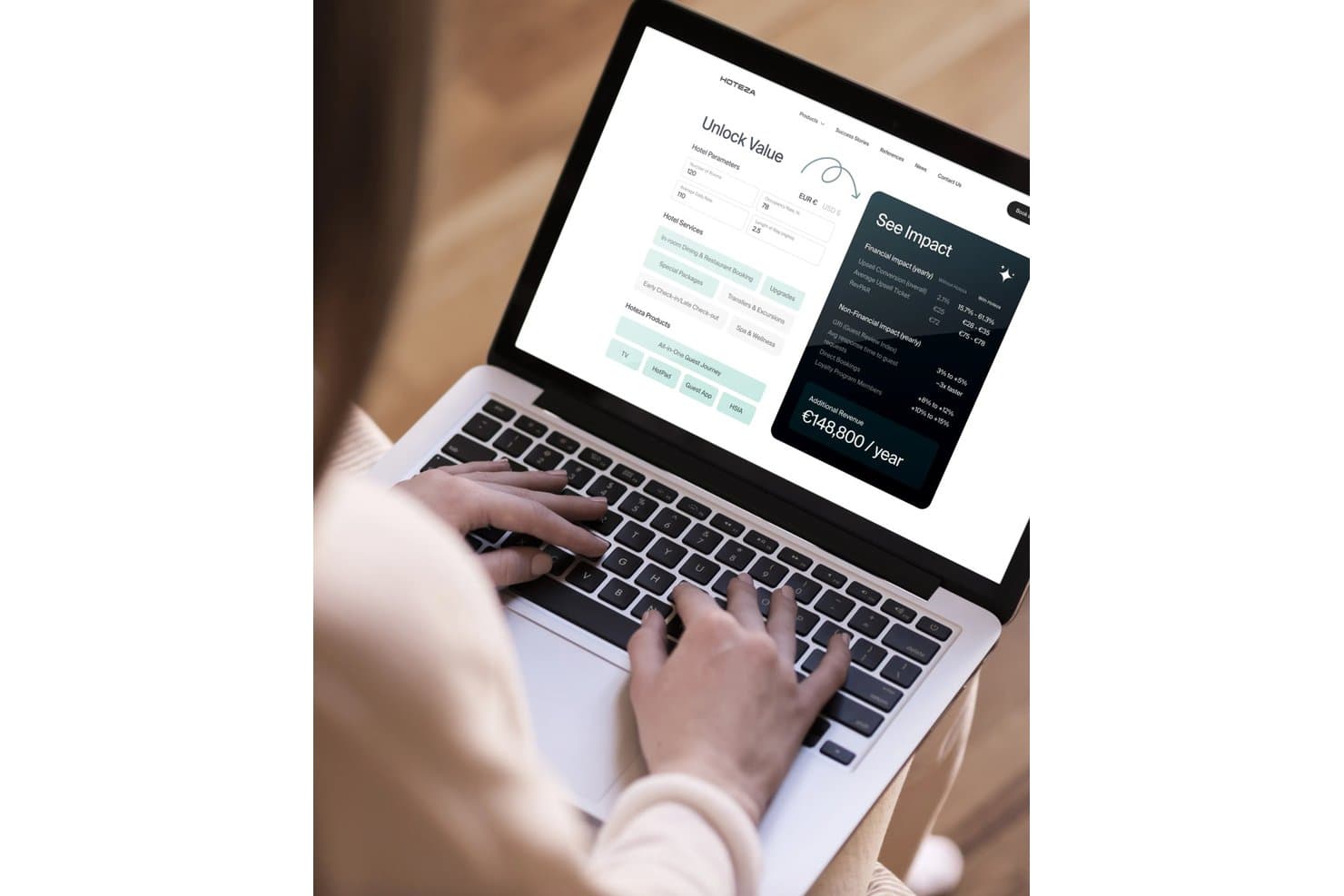
Hoteza consente agli utenti di calcolare l'impatto annuo previsto sui ricavi derivante dai servizi alberghieri. Hoteza è una piattaforma di gestione Wi-Fi nativa per il settore alberghiero che combina un portale di accesso personalizzato con il marchio, il controllo della larghezza di banda su più livelli, l'autenticazione degli ospiti integrata con il PMS e il monitoraggio della rete per più strutture, con supporto per la trasmissione dei contenuti e un livello integrato di marketing per gli ospiti.
Per chi è più indicato Hoteza?
Hoteza è particolarmente adatto a hotel di medie e grandi dimensioni e a gruppi con più strutture che desiderano trasformare il Wi-Fi per gli ospiti in un canale attivo di ricavi e marketing, anziché in un semplice servizio accessorio.
Perché ho scelto Hoteza
Hoteza è entrato nella mia selezione perché il portale di accesso è stato realmente progettato per fare marketing, non solo per autenticare gli utenti. Mi piace il fatto che, al momento dell'accesso, il portale possa mostrare offerte aggiuntive, raccogliere le email degli ospiti con il loro consenso e sincronizzare questi dati direttamente con un CRM, tutto in un unico flusso. Gli ospiti di ritorno ricevono automaticamente un messaggio personalizzato di bentornato, trasformando un normale accesso al Wi-Fi in un punto di contatto che favorisce l'iscrizione ai programmi fedeltà e i ricavi durante il soggiorno.
Funzionalità principali di Hoteza
- Accesso familiare: Consente a una singola sessione di autenticazione dell'ospite di coprire più dispositivi contemporaneamente, così i membri dello stesso gruppo di viaggio non devono effettuare l'accesso separatamente.
- Prioritizzazione intelligente del traffico: Assegna dinamicamente la larghezza di banda in tempo reale per evitare congestioni durante i periodi di maggiore utilizzo.
- Addebito sul conto tramite PMS: Addebita automaticamente i costi Internet su più livelli direttamente sul conto della camera dell'ospite tramite l'integrazione bidirezionale con il PMS.
- Pannello di controllo per gruppi di strutture: Offre ai responsabili operativi un unico portale per monitorare contemporaneamente lo stato della rete e gli avvisi di tutte le strutture.
Integrazioni di Hoteza
Hoteza documenta oltre 200 integrazioni, tra cui Oracle OPERA, Mews, Protel, Shiji PMS, StayNTouch, Micros Simphony, Stripe, HPE Networking Instant On, Aruba Central, Google Cast e Apple AirPlay. La sua API REST supporta integrazioni personalizzate.
Pros and Cons
Pros:
- Portale di accesso personalizzato con il marchio, progettato per il marketing rivolto agli ospiti
- Autenticazione PMS e addebito sul conto automatizzati
- L'accesso familiare copre contemporaneamente i dispositivi di un gruppo
Cons:
- Nessuna conformità PCI-DSS documentata per HSIA
- Nessuna funzionalità di roaming rapido PAN o Passpoint
Learn more about Hoteza: Ideale per il controllo aziendale delle reti su più sedi
- Prova gratuita di 90 giorni
- Prezzo su richiesta
Visit WebsiteCustomer Rating:4.3/5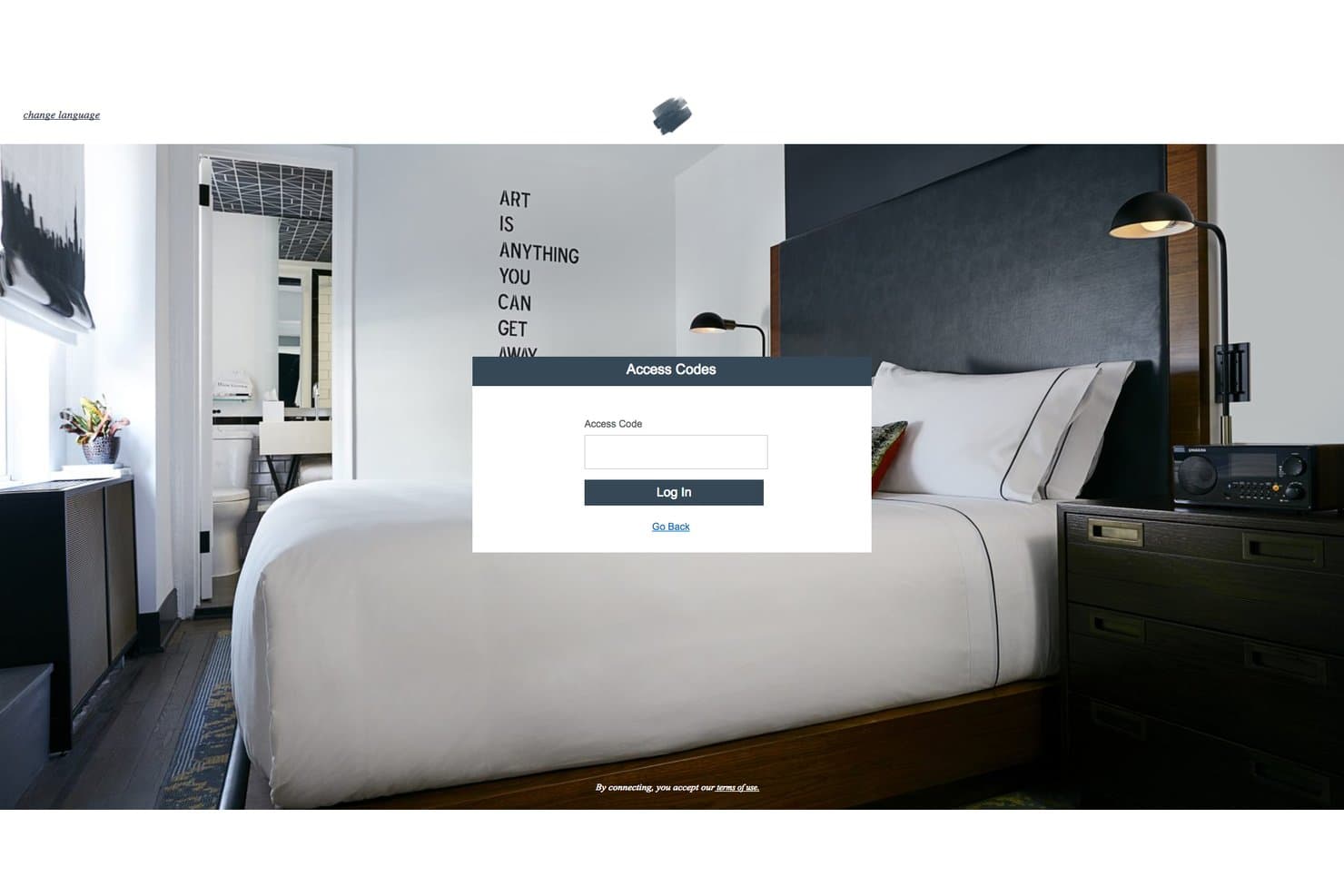
Cisco Meraki mostra un portale per gli ospiti con accesso tramite codice per gli hotel. Cisco Meraki è una piattaforma aziendale per la gestione delle reti che offre infrastrutture Wi-Fi basate sul cloud, monitoraggio centralizzato di più sedi tramite il pannello di controllo Meraki, controlli della larghezza di banda e della gestione del traffico, autenticazione degli ospiti tramite pagina splash e strumenti di sicurezza di rete, tra cui segmentazione VLAN e gestione del firewall.
Per chi è più adatto Cisco Meraki?
Cisco Meraki è la soluzione ideale per i gruppi alberghieri con più strutture e per gli operatori dell'ospitalità su larga scala i cui team IT necessitano di visibilità e controllo centralizzati su decine o centinaia di sedi da un unico pannello di controllo.
Perché ho scelto Cisco Meraki
Cisco Meraki si è guadagnato un posto nella mia lista ristretta perché nessun'altra piattaforma è paragonabile alla sua visibilità su più sedi su scala aziendale. Apprezzo molto il fatto che il pannello di controllo Meraki consenta ai team IT di monitorare ogni struttura da un'unica schermata, con Meraki Insight che aggiunge il monitoraggio dello stato della WAN, della qualità del VoIP e delle prestazioni delle applicazioni web. Anche la funzionalità Rete personale Wi-Fi (WPN) è davvero notevole: offre a ogni ospite il proprio segmento di rete privato su un SSID condiviso, consentendogli di utilizzare AirPlay o trasmettere contenuti ai propri dispositivi senza esporre nulla agli altri ospiti.
Funzionalità principali di Cisco Meraki
- Supporto per Hotspot 2.0 / Passpoint: autentica automaticamente i membri del programma fedeltà alla rete tramite certificati del dispositivo, ignorando completamente la pagina splash.
- Gestione del traffico di livello 7: consente di limitare, dare priorità o bloccare il traffico in base alla categoria dell'applicazione — ad esempio P2P, streaming video o social media — su qualsiasi SSID.
- Acquisizione remota dei pacchetti: acquisisce il traffico di rete in tempo reale da qualsiasi punto di accesso in qualsiasi struttura direttamente tramite il pannello di controllo, senza che sia necessaria la presenza di personale sul posto.
- App mobile Meraki: offre ai team IT in mobilità l'accesso allo stato dei dispositivi, al numero di client e allo stato della rete in tutte le strutture direttamente dai loro telefoni.
Integrazioni di Cisco Meraki
Le integrazioni includono Cisco ISE, Mews tramite l'API Cisco Developer Hub e Opera Micros tramite Splash Access. Cloud4Wi è disponibile nel Meraki Marketplace, mentre l'API Meraki supporta sistemi PMS personalizzati e flussi di lavoro per il settore alberghiero.
Pros and Cons
Pros:
- Eccelle nel controllo centralizzato delle reti di più strutture
- La rete personale Wi-Fi garantisce la privacy dei dispositivi degli ospiti
- Dashboard cloud completo per il monitoraggio in tempo reale
Cons:
- L'integrazione con i PMS richiede soluzioni di terze parti
- Il portale captive nativo non offre funzionalità di marketing per gli ospiti
Learn more about Cisco Meraki: Ideale per IoT alberghiero e Wi-Fi 7 di livello aziendale
- Prova gratuita di 90 giorni
- A partire da $150/AP/anno (fatturati annualmente)
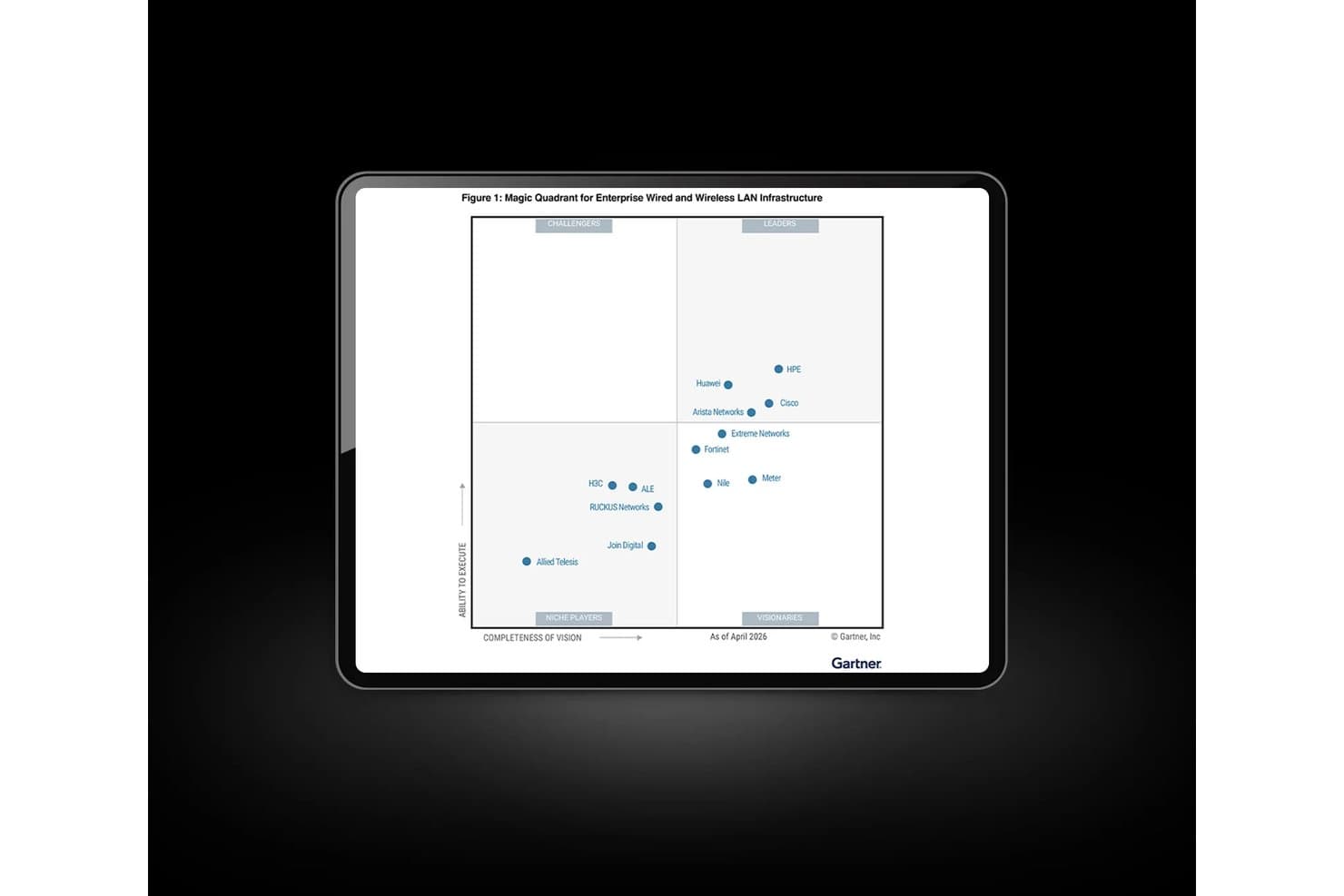
HPE Aruba Networking è classificata come leader nel Quadrante magico 2026 di Gartner. HPE Aruba Networking è una piattaforma di rete aziendale progettata per gli ambienti alberghieri, che offre Wi-Fi gestito dal cloud, connettività per dispositivi IoT, sicurezza di rete e monitoraggio di più strutture tramite la suite di gestione Aruba Central e punti di accesso progettati specificamente per il settore alberghiero.
Per chi è più adatto HPE Aruba Networking?
HPE Aruba Networking è la scelta giusta per gruppi alberghieri con più strutture e catene alberghiere aziendali con team IT dedicati alla gestione di infrastrutture di rete su larga scala in decine o centinaia di sedi.
Perché ho scelto HPE Aruba Networking
HPE Aruba Networking si è guadagnato un posto nella mia lista ristretta perché i suoi punti di accesso Wi-Fi 7 720H sono progettati specificamente per le camere d'albergo, con radio BLE e Zigbee integrate che collegano serrature intelligenti, termostati e illuminazione dallo stesso AP che fornisce il Wi-Fi agli ospiti. Apprezzo anche il motore AIOps per più strutture di Aruba Central, che rileva proattivamente i problemi in ogni sede prima che gli ospiti se ne accorgano. L'implementazione globale di Nobu Hotels dimostra che questa infrastruttura è in grado di supportare operazioni su larga scala.
Caratteristiche principali di HPE Aruba Networking
- Portale ospiti ClearPass: Offre pagine di benvenuto personalizzabili con il marchio e diverse opzioni di autenticazione, tra cui verifica tramite SMS, accesso tramite reti sociali e autoregistrazione con nome utente e password.
- QoS Air Slice: Consente la definizione di priorità basata su criteri per il traffico delle applicazioni e contratti di larghezza di banda per utente, distinguendo tra livelli di Internet gratuito e premium per gli ospiti.
- Rilevamento RAPIDS degli AP non autorizzati: Scansiona continuamente l'ambiente RF per identificare e segnalare punti di accesso non autorizzati che potrebbero compromettere la sicurezza della rete degli ospiti.
- Supporto al roaming 802.11r/k/v: Consente il passaggio rapido e basato su standard dei client tra i punti di accesso, mantenendo connessi i dispositivi degli ospiti mentre si spostano nella struttura.
Integrazioni di HPE Aruba Networking
Le integrazioni includono Nevotek, Xpossible, Purple, MyWiFi Networks, Cloudi-Fi, AWS, Azure, Zscaler e Palo Alto Networks. HPE Aruba Networking supporta inoltre API REST, Active Directory, piattaforme MDM e sistemi SIEM per una connettività personalizzata.
Pros and Cons
Pros:
- Progettato per la gestione cloud della rete di più strutture
- Punti di accesso Wi-Fi 7 con radio IoT
- Architettura di sicurezza a fiducia zero avanzata
Cons:
- Nessun modulo di integrazione PMS integrato
- Richiede partner per il marketing del Wi-Fi per gli ospiti
Learn more about HPE Aruba Networking: Ideale per team IT multi-struttura con elevati requisiti di conformità
- Prova gratuita di 14 giorni
- A partire da 13 $/punto di accesso/mese
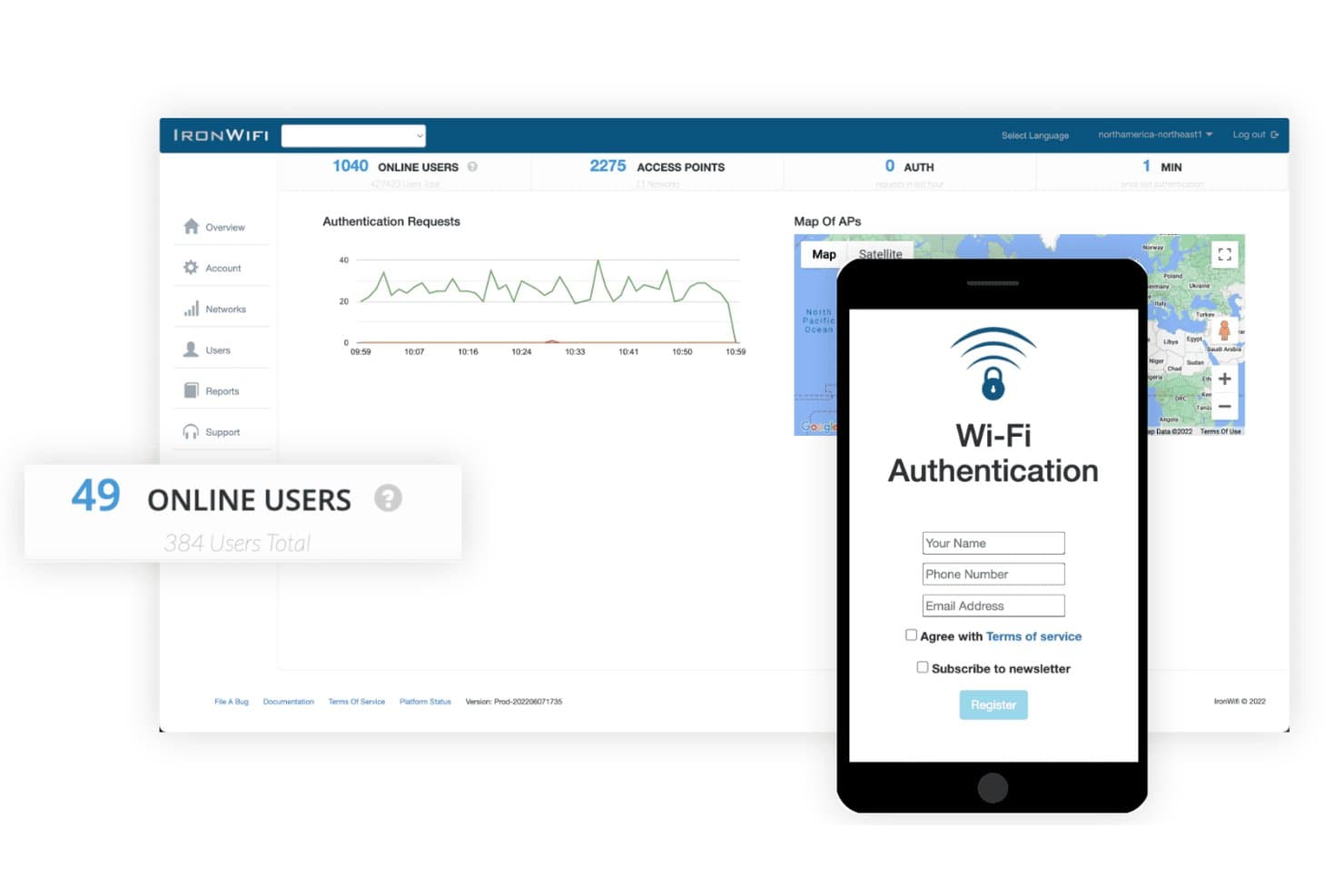
IronWiFi mostra un modulo di accesso al portale captive per l'accesso Wi-Fi degli ospiti dell'hotel. IronWiFi è una piattaforma di identità Wi-Fi gestita dal cloud che combina l'autenticazione degli ospiti basata su RADIUS, portali captive personalizzati, accesso tramite numero di camera collegato al PMS, livelli di larghezza di banda e sicurezza conforme agli standard di conformità per reti alberghiere multi-struttura.
Per chi è più adatto IronWiFi?
IronWiFi è adatto ai direttori IT e agli amministratori di rete che gestiscono portafogli alberghieri multi-struttura, dove la conformità, la sicurezza e l'autenticazione di livello aziendale hanno la priorità rispetto agli strumenti di marketing rivolti agli ospiti.
Perché ho scelto IronWiFi
IronWiFi si è guadagnato un posto nella mia selezione perché nessun altro strumento di questo elenco offre lo stesso livello di conformità per le reti alberghiere multi-struttura. L'ho scelto in particolare per i team guidati dall'IT che gestiscono catene aziendali, dove la preparazione a SOC 2 Type II, GDPR e PCI DSS non è facoltativa. In pratica, ciò significa che l'amministratore di rete può applicare l'autenticazione 802.1X/WPA3-Enterprise e la crittografia RadSec su oltre 50 marchi di punti di accesso senza sostituire l'hardware esistente. Apprezzo anche il fatto che l'accesso tramite numero di camera e cognome si colleghi direttamente a Oracle Opera, Mews o Cloudbeds per fornire e revocare automaticamente l'accesso degli ospiti al momento del check-in e del check-out.
Funzionalità principali di IronWiFi
- Supporto Passpoint (Hotspot 2.0): consente ai dispositivi di connettersi automaticamente alla rete Wi-Fi senza visualizzare una schermata di accesso, utilizzando la crittografia WPA3-Enterprise per tutta la durata del soggiorno dell'ospite.
- Metodi di accesso tramite social network e SMS: gli ospiti possono autenticarsi tramite Facebook, Google, Instagram, Apple ID o verifica SMS attraverso Twilio o Clickatell nel portale captive.
- Livelli Wi-Fi con pagamento: si integra con Stripe, PayPal, Square e Shift4, consentendo agli ospiti di acquistare pacchetti di larghezza di banda premium direttamente tramite il portale captive.
- Esportazione SIEM e syslog: invia i registri di autenticazione a Splunk, Datadog, Microsoft Sentinel o qualsiasi piattaforma compatibile con CEF per il monitoraggio centralizzato della sicurezza.
Integrazioni di IronWiFi
IronWiFi offre integrazioni native con Oracle Opera, Mews, Cloudbeds, Protel, RMS Cloud, RoomRaccoon, Apaleo, Stripe, PayPal e Square. Supporta inoltre REST API, webhook, Syslog/CEF e Zapier per connettività personalizzata.
Pros and Cons
Pros:
- Passpoint e OpenRoaming consentono il roaming continuo dei dispositivi
- Gli standard di conformità sono in linea con le attività alberghiere globali
- L'accesso degli ospiti collegato al PMS automatizza l'accesso al check-in
Cons:
- Nessuno strumento integrato di automazione del marketing
- Nessun supporto per reti personali o trasmissione di contenuti
Learn more about IronWiFi: Ideale per monetizzare i piani WiFi per ospiti a più livelli
- Non disponibile
- Da $59/AP/anno

Antamedia offre ai piccoli hotel una soluzione WiFi per gestire efficacemente l’accesso e la fatturazione degli ospiti. Antamedia offre un software di gestione del WiFi alberghiero progettato per le strutture che necessitano di un controllo granulare sull’accesso a Internet degli ospiti. È una soluzione adatta a hotel, resort e strutture boutique che desiderano personalizzare i metodi di accesso, i limiti di larghezza di banda e l’autenticazione degli utenti. Se desideri adattare l’accesso degli ospiti e gestire in dettaglio le politiche di utilizzo della rete, Antamedia offre una soluzione flessibile.
Perché ho scelto Antamedia
Ho scelto Antamedia per questo elenco perché i suoi controlli personalizzabili sull’accesso degli ospiti la distinguono dalle altre opzioni di gestione del WiFi alberghiero. La piattaforma consente di definire metodi di accesso personalizzati, come voucher, social media o integrazione con il PMS, così da adattare l’accesso alle esigenze della struttura. Puoi anche impostare limiti di larghezza di banda e durate delle sessioni per diversi tipi di ospiti, contribuendo a gestire il carico della rete e a garantire un utilizzo equo. Queste funzionalità rendono Antamedia una scelta valida per gli hotel che desiderano un controllo preciso sul modo in cui gli ospiti si connettono e utilizzano il WiFi.
Funzionalità principali di Antamedia
Alcune altre funzionalità di Antamedia utili per la gestione del WiFi alberghiero includono:
- Integrazione automatizzata della fatturazione: Si connette ai sistemi di gestione della struttura per automatizzare la fatturazione agli ospiti relativa all’utilizzo di Internet.
- Pagine iniziali personalizzabili: Consente di progettare schermate di accesso e di benvenuto personalizzate con il marchio per gli ospiti che accedono alla rete WiFi.
- Monitoraggio remoto della rete: Consente di monitorare lo stato della rete e l’attività degli utenti da una dashboard centralizzata.
- Filtraggio dei contenuti: Permette di bloccare l’accesso a siti web o categorie specifiche per mantenere un ambiente di navigazione sicuro per gli ospiti.
Integrazioni di Antamedia
Le integrazioni non sono elencate pubblicamente.
Pros and Cons
Pros:
- Offre un controllo granulare sull’accesso degli ospiti e sui limiti di larghezza di banda
- Offre pagine iniziali personalizzabili per la promozione del marchio
- Consente la gestione remota tramite Omada Cloud
Cons:
- Richiede la configurazione di hardware in sede
- Automazione limitata per le opzioni di gestione autonoma degli ospiti
Learn more about Antamedia: Ideale per il casting dai dispositivi degli ospiti tramite reti private
- Piano gratuito disponibile e prova gratuita di 30 giorni
- Prezzi su richiesta
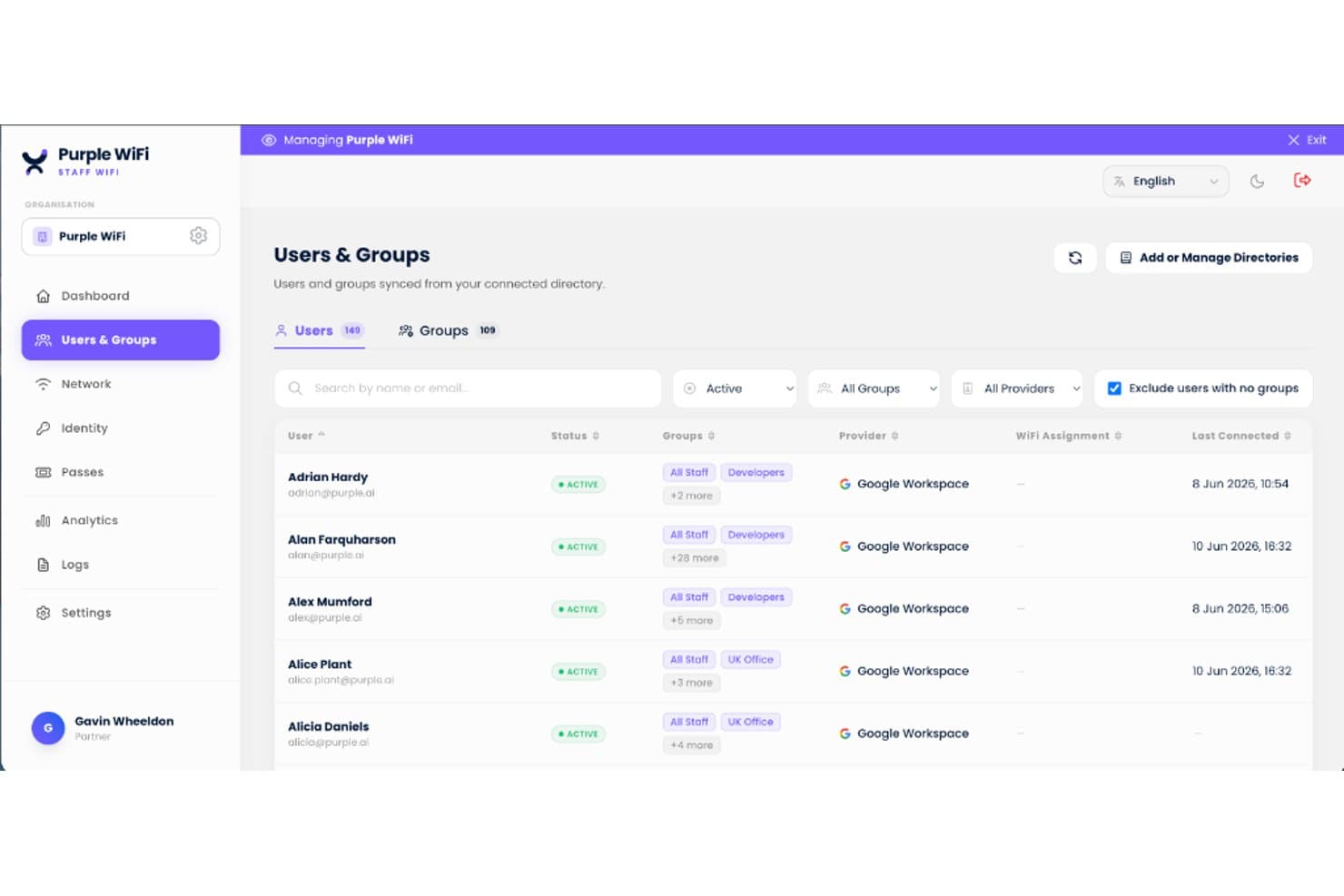
Purple centralizza in un'unica dashboard la gestione degli utenti e dei gruppi WiFi del personale. Purple è una piattaforma cloud per la gestione del WiFi alberghiero che combina la creazione di portali captive con il brand, le reti personali alimentate da iPSK, la raccolta dei dati degli ospiti e l'analisi della rete su più strutture attraverso infrastrutture wireless indipendenti dal fornitore.
Per chi è più adatto Purple?
Purple è particolarmente adatto ai gruppi alberghieri con più strutture che desiderano offrire agli ospiti una connettività privata, simile a quella di casa, per il casting e lo streaming sui propri dispositivi.
Perché ho scelto Purple
Purple si è guadagnato un posto nella mia selezione perché le sue reti personali alimentate da iPSK risolvono uno dei problemi di connettività più frustranti negli hotel: gli ospiti non riescono a trasmettere contenuti sui dispositivi Chromecast o Apple TV presenti nelle camere perché i portali captive bloccano l'autenticazione dei dispositivi privi di interfaccia. Con Purple, ogni prenotazione riceve una passphrase WPA2/WPA3 univoca che inserisce tutti i dispositivi dell'ospite in una micro-VLAN isolata, così il casting funziona esattamente come a casa. Le integrazioni PMS con OPERA Cloud, Mews e Cloudbeds automatizzano l'assegnazione della passphrase al check-in e la revoca al check-out.
Funzionalità principali di Purple
- Creatore di portali captive con branding: Un editor di portali con funzionalità di trascinamento supporta più di 25 lingue con rilevamento automatico, diversi flussi di autenticazione e la raccolta del consenso conforme al GDPR durante l'accesso.
- RADIUS cloud come servizio: Purple fornisce l'autenticazione aziendale 802.1X senza alcun server on-premise, sincronizzandosi con Microsoft Entra ID, Okta e Google Workspace per il WiFi del personale.
- Richieste automatiche di recensione dopo il soggiorno: Al check-out, Purple invia richieste di recensione su TripAdvisor e Google, mentre l'esportazione verso il CRM trasferisce i dati degli ospiti a più di 400 strumenti, tra cui Salesforce e Mailchimp.
- Segmentazione VLAN per l'IoT: L'isolamento di una rete IoT dedicata mantiene smart TV, termostati e serrature elettroniche su una VLAN separata, con regole firewall limitate per impedire i movimenti laterali.
Integrazioni di Purple
Purple dispone di cinque integrazioni PMS native documentate: Oracle Hospitality OPERA Cloud, Mews, Cloudbeds, Stayntouch e Apaleo. Si connette inoltre a Cisco Meraki, HPE Aruba, Ruckus, Ubiquiti UniFi, Juniper Mist e a più di 400 strumenti CRM tramite API REST e webhook.
Pros and Cons
Pros:
- Consente il casting dai dispositivi degli ospiti tramite reti private
- Le reti personali isolano i dispositivi di ciascun ospite
- Automazione efficace delle credenziali WiFi basata sul PMS
Cons:
- L'editor della pagina iniziale richiede HTML per la personalizzazione
- La qualità dell'assistenza varia in base al piano e alla regione
Learn more about Purple : Ideale per il roaming Wi-Fi fluido basato su Passpoint
- Non disponibile
- Prezzi su richiesta
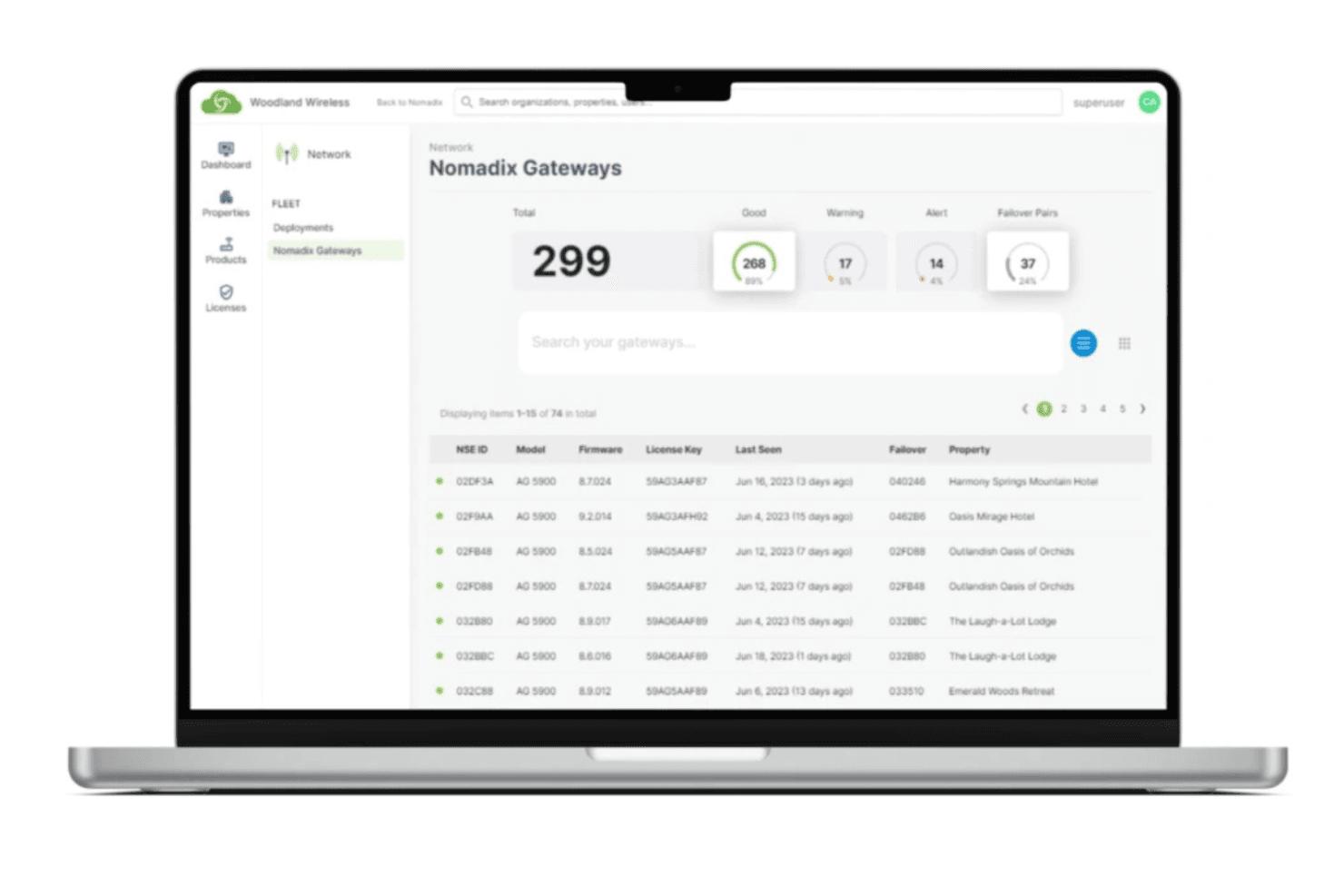
Nomadix offre una soluzione WiFi globale che garantisce una connettività uniforme in tutte le sedi del mondo. Nomadix è una piattaforma per la gestione del Wi-Fi nel settore alberghiero basata su hardware gateway per Internet, che offre gestione del captive portal, controllo brevettato della larghezza di banda, autenticazione degli ospiti basata su Passpoint, monitoraggio della rete su più strutture e integrazioni con sistemi di trasmissione, telefonia cloud e gestione energetica.
Per chi è più adatto Nomadix?
Nomadix è pensato per hotel e resort di medie e grandi dimensioni e per gruppi con più strutture che necessitano di un'infrastruttura di rete di livello enterprise, con roaming Wi-Fi degli ospiti fluido e senza interruzioni su larga scala.
Perché ho scelto Nomadix
Nomadix è entrato nella mia rosa dei candidati perché ha contribuito a definire lo standard Passpoint/Hotspot 2.0, e questa esperienza si riflette nella sua implementazione. Una volta autenticato, Passpoint gestisce automaticamente ogni riconnessione futura, tra camere, hall e aree esterne, proprio come avviene con il roaming cellulare. L'SDK Passpoint del 2025 fa un ulteriore passo avanti, consentendo agli hotel di integrare questa registrazione fluida direttamente nelle proprie app fedeltà.
Funzionalità principali di Nomadix
- Creazione di captive portal: Un portale basato su modelli, senza codice, con supporto multilingue e diverse opzioni di autenticazione, tra cui SMS, accesso tramite social network, voucher e ricerca della camera nel PMS.
- Ridistribuzione dinamica della larghezza di banda: Tecnologia gateway brevettata che rialloca in tempo reale la larghezza di banda inutilizzata dagli utenti con priorità inferiore ai livelli con priorità maggiore.
- Dashboard della flotta: Un'interfaccia di monitoraggio basata sul cloud che mostra lo stato della connettività in tempo reale, le versioni del firmware e i dettagli delle licenze per ogni struttura del portafoglio.
- Pianificatore delle sale conferenze: Un modulo dedicato che consente ai responsabili IT di impostare limiti di larghezza di banda per evento, limiti sul numero di dispositivi e pagine di destinazione personalizzate per singole sale riunioni o eventi.
Integrazioni di Nomadix
Nomadix offre nove integrazioni PMS documentate, tra cui Oracle Hospitality (OPERA), Maestro PMS, Stayntouch, WebRezPro, SkyTouch Technology, RoomKey PMS, roommaster, Priority Software e Planet. Fornisce inoltre API per integrazioni personalizzate e supporta CAPPORT API, SIP, Zigbee e BLE.
Pros and Cons
Pros:
- Roaming basato su Passpoint tra grandi portafogli alberghieri
- Larghezza di banda con priorità dinamica per conferenze e ospiti VIP
- Il gateway indipendente dal fornitore funziona con qualsiasi punto di accesso
Cons:
- Le funzionalità avanzate richiedono hardware gateway installato in loco
- Nessuna suite integrata per il marketing o l'analisi degli ospiti
Learn more about Nomadix: Ideale per la fornitura del Wi-Fi collegata al PMS
- Non disponibile
- Prezzi su richiesta

Eleven Software offre una soluzione WiFi che raccoglie dati analitici sugli ospiti e informazioni utili per intraprendere azioni concrete. Eleven Software si distingue per gli hotel che necessitano di una gestione del WiFi strettamente integrata con il proprio sistema di gestione della struttura. È progettato per le attività del settore alberghiero che desiderano automatizzare l'autenticazione degli ospiti e semplificare l'accesso alla rete tramite connessioni PMS. Se desideri collegare direttamente l'accesso WiFi alle prenotazioni e ai profili degli ospiti, Eleven Software offre una soluzione progettata appositamente.
Perché ho scelto Eleven Software
Ciò che mi ha spinto a scegliere Eleven Software è la sua attenzione all'integrazione con i PMS, una priorità assoluta per molti hotel che desiderano collegare l'accesso WiFi alla gestione degli ospiti. La piattaforma si collega direttamente ai principali sistemi di gestione delle strutture, consentendo di automatizzare l'autenticazione degli ospiti e associare l'accesso WiFi ai dati delle prenotazioni. Apprezzo il supporto alla sincronizzazione in tempo reale offerto da Eleven Software, che contribuisce a garantire che solo gli ospiti attualmente registrati possano accedere e che l'accesso venga revocato al momento della partenza. Questo livello di integrazione è particolarmente utile per le strutture che desiderano ridurre il lavoro manuale e offrire un'esperienza più personalizzata agli ospiti.
Funzionalità principali di Eleven Software
Alcune altre funzionalità di Eleven Software utili per la gestione del WiFi negli hotel includono:
- Gestione centralizzata della rete: consente di supervisionare più strutture e reti da un unico pannello di controllo.
- Portali per gli ospiti personalizzabili: permette di progettare pagine di accesso e modalità di utilizzo personalizzate con il proprio marchio.
- Strumenti per la gestione della larghezza di banda: consentono di impostare limiti di utilizzo e dare priorità al traffico per diversi gruppi di utenti.
- Riconoscimento automatico dei dispositivi: rileva i dispositivi degli ospiti abituali e semplifica il processo di accesso per i visitatori che tornano.
Integrazioni di Eleven Software
Le integrazioni non sono elencate pubblicamente.
Pros and Cons
Pros:
- Si sincronizza con i sistemi dell'hotel per la registrazione degli ospiti
- Memorizza i dispositivi degli ospiti abituali per un accesso più rapido
- Dà priorità alla larghezza di banda ad alta velocità per gli ospiti VIP
Cons:
- Richiede componenti fisici invece di una configurazione nel cloud
- Richiede il supporto di esperti IT per la configurazione iniziale
Learn more about Eleven Software: Ideale per la segmentazione privata della rete stanza per stanza
- Demo gratuita disponibile
- Prezzi su richiesta

Ruckus Networks offre una soluzione WiFi ad alta velocità che garantisce una connettività rapida e affidabile per gli ospiti. Ruckus Networks è progettato per hotel e resort che necessitano di un sistema WiFi affidabile in aree ad alta affluenza come hall, sale conferenze e camere degli ospiti. Le sue soluzioni hardware e software, inclusi router e punti di accesso di livello enterprise, sono progettate per gestire un numero elevato di connessioni simultanee senza sacrificare velocità o stabilità. La piattaforma supporta inoltre la distribuzione sicura di hotspot WiFi e collabora strettamente con i fornitori di servizi per offrire una connettività scalabile. Questo la rende particolarmente adatta alle strutture che ospitano eventi, accolgono viaggiatori d'affari o desiderano garantire una connettività uniforme in tutta la proprietà.
Perché ho scelto Ruckus Networks
Per gli hotel che devono supportare centinaia o persino migliaia di dispositivi contemporaneamente, Ruckus Networks si distingue per le sue capacità di rete ad alta densità. La piattaforma utilizza una tecnologia brevettata per le antenne e una gestione avanzata del traffico per mantenere connessioni forti e stabili anche negli spazi affollati. Ho scelto Ruckus Networks perché è progettato per gestire le esigenze di grandi strutture, sedi di eventi affollate e aree dedicate agli ospiti in cui la congestione WiFi rappresenta una reale preoccupazione. L'attenzione alle prestazioni affidabili in ambienti difficili lo rende una scelta ideale per gli hotel che non possono permettersi problemi di connettività.
Funzionalità principali di Ruckus Networks
Altre funzionalità che rendono Ruckus Networks interessante per la gestione del WiFi negli hotel includono:
- Gestione della rete basata sul cloud: consente di monitorare e configurare l'intera rete da un'unica dashboard online.
- Portali di accesso per gli ospiti: fornisce pagine di accesso personalizzabili per gli ospiti, incluse opzioni di branding e autenticazione.
- Controlli degli accessi basati sui ruoli: consente di impostare autorizzazioni di rete diverse per personale, ospiti e fornitori.
- Aggiornamenti di sicurezza automatici: distribuisce regolarmente aggiornamenti firmware e patch di sicurezza a tutti i dispositivi connessi senza intervento manuale.
Integrazioni di Ruckus Networks
Le integrazioni non sono elencate pubblicamente.
Pros and Cons
Pros:
- Gestisce numerose connessioni simultanee degli ospiti
- Le antenne brevettate migliorano la copertura in ambienti complessi
- La dashboard cloud semplifica la gestione di più strutture
Cons:
- Documentazione limitata per la risoluzione dei problemi nel settore alberghiero
- La personalizzazione del portale per gli ospiti è meno flessibile
Learn more about Ruckus Networks: Ideale per l'accesso degli ospiti a una rete privata per i propri dispositivi
- Demo gratuita disponibile
- Prezzi su richiesta
Fourteen IP offre una guida scalabile alle comunicazioni alberghiere per i gruppi di gestione. Fourteen IP è una piattaforma WiFi alberghiera completamente gestita che copre la progettazione della rete, l'implementazione, la gestione del portale captive, il controllo della larghezza di banda a livelli, il monitoraggio di più strutture e la gestione dei dispositivi degli ospiti tramite gli strumenti Evolution Gateway ed Evolution Monitoring.
Per chi è più adatto Fourteen IP?
Fourteen IP è una soluzione particolarmente adatta agli operatori alberghieri con più strutture e alle società di gestione che desiderano un servizio WiFi completamente gestito, dall'analisi del sito al monitoraggio 24 ore su 24, 7 giorni su 7, senza gravare sui team IT interni.
Perché ho scelto Fourteen IP
Ho scelto Fourteen IP come una delle soluzioni migliori perché la sua funzionalità di rete personale (PAN) la distingue concretamente per gli hotel in cui gli ospiti si aspettano che i propri dispositivi possano comunicare tra loro. Un ospite può connettere telefono, laptop e dispositivo per lo streaming a un SSID privato con la propria PSK, mantenendo intatto il proprio ecosistema di dispositivi personali. Fourteen IP consente inoltre agli hotel di offrire l'accesso alla PAN come incentivo alla compilazione di un sondaggio, trasformando i riscontri degli ospiti in uno scambio di valore.
Funzionalità principali di Fourteen IP
- Pannello di monitoraggio Evolution: un pannello cloud centralizzato che monitora lo stato degli AP, le versioni del firmware, l'utilizzo della larghezza di banda e gli eventi di rete in tutte le strutture senza costi aggiuntivi.
- Aggiornamenti di livello attivati dal sondaggio: agli ospiti che completano un sondaggio può essere concesso automaticamente l'accesso a un livello di servizio superiore, collegando la raccolta dei riscontri degli ospiti a un incentivo per l'accesso WiFi.
- Registrazione iniziale 802.1X: gli ospiti vengono registrati automaticamente con profili WiFi sicuri sui propri dispositivi, con supporto nativo per l'installazione automatica dei profili sui prodotti Apple.
- Infrastruttura AP pronta per l'IoT: i punti di accesso di nuova generazione includono radio integrate che supportano il tracciamento delle risorse, l'accesso senza chiavi, la delimitazione geografica e la gestione dei sensori intelligenti delle camere su una rete convergente.
Integrazioni di Fourteen IP
Fourteen IP si connette a oltre 100 sistemi PMS tramite TigerTMS e Comtrol Lodging Link, tra cui Opera, Mews, Cloudbeds, Amadeus, Agilysys, Infor HMS, Maestro, Hilton OnQ e Fosse. Supporta inoltre l'hardware HPE Aruba e Ruckus Wireless.
Pros and Cons
Pros:
- Reti personali per la privacy dei dispositivi degli ospiti
- Pannello centralizzato per portafogli con più strutture
- Monitoraggio proattivo 24 ore su 24, 7 giorni su 7 e supporto NOC
Cons:
- Nessun prezzo pubblico o prova autonoma
- Accesso social al portale degli ospiti non documentato
Learn more about Fourteen IP:
Altre soluzioni WiFi per hotel
Ecco alcune soluzioni WiFi aggiuntive per hotel che non sono entrate nella mia selezione, ma che vale comunque la pena valutare:
- 11WifirstIdeale per i servizi di rete alberghiera gestiti in Europa
- 12DatavaletIdeale per reti private di dispositivi per ciascun ospite
- 13Hotel Internet ServicesIdeale per l'integrazione dell'intrattenimento in camera
- 14Cloud4WiIdeale per la raccolta di dati di marketing tramite il WiFi degli ospiti
Come valuto le soluzioni WiFi per hotel
Divido la mia valutazione in criteri di base, come i portali captive autenticati tramite PMS e la suddivisione della larghezza di banda, e fattori distintivi che separano le opzioni migliori dalle altre.
Funzionalità principali (Requisiti fondamentali per questo elenco)
Quando seleziono gli strumenti da inserire nel mio elenco, valuto ciascuno su una scala da 0 (non offre la funzionalità) a 5 (eccelle in quest'area) per ogni funzionalità principale indicata di seguito. Successivamente, trasformo il punteggio totale dello strumento in una percentuale. Ogni strumento deve raggiungere un punteggio totale minimo del 55% per essere preso in considerazione.
- Gestione del portale captive: valuto il livello di controllo offerto sull'esperienza di accesso degli ospiti, comprese pagine di benvenuto personalizzate con il marchio, diversi metodi di autenticazione come SMS o numero della camera e il supporto multilingue.
- Controllo della larghezza di banda e degli accessi a livelli: ogni piattaforma dovrebbe consentire di impostare limiti per dispositivo o per camera e offrire piani a livelli, come il Wi-Fi di base gratuito più un livello premium a pagamento per lo streaming.
- Integrazione con il PMS: verifico se lo strumento si connette alle principali piattaforme PMS, come Opera, Mews o Cloudbeds, per autenticare automaticamente gli ospiti utilizzando il numero della camera e il cognome al momento del check-in.
- Monitoraggio della rete per più strutture: per gli operatori che gestiscono più di una sede, valuto se viene fornito un pannello di controllo centralizzato con disponibilità in tempo reale, numero di dispositivi e avvisi per tutte le strutture.
- Sicurezza dei dati degli ospiti e conformità: ogni strumento dovrebbe supportare l'isolamento della rete degli ospiti, sessioni crittografate e framework di conformità come PCI-DSS e GDPR applicabili alle reti Wi-Fi pubbliche degli hotel.
- Roaming e passaggio da un dispositivo all'altro: cerco il supporto al roaming rapido (802.11r/k/v), in modo che gli ospiti rimangano connessi mentre si spostano tra la camera, la hall e le aree della piscina senza interruzioni o una nuova autenticazione.
Una volta ottenuto un elenco di strumenti che soddisfano questi criteri, considero ciò che distingue ciascuna piattaforma.
Fattori distintivi (Ciò che differenzia i fornitori)
Ecco come confronto e metto a confronto i diversi fornitori:
Funzionalità di rilievo
Le funzionalità di marketing e analisi per gli ospiti trasformano il portale captive in un canale di ricavi: valuto se le piattaforme possono raccogliere gli indirizzi email degli ospiti, proporre offerte aggiuntive per la spa o la ristorazione e trasferire i dati nei programmi fedeltà. Anche il supporto al casting e allo streaming è importante, poiché gli ospiti si aspettano di poter guardare i propri contenuti sui televisori in camera senza complicazioni nell'associazione. Considero inoltre il supporto per l'IoT e le camere intelligenti, in cui la piattaforma segmenta il traffico per serrature intelligenti, termostati e assistenti vocali su VLAN dedicate.
Oltre le funzionalità
Il modello di implementazione è molto importante in questo caso: verifico se una piattaforma è gestita tramite cloud, richiede controller locali oppure vincola l'utente a punti di accesso proprietari di fornitori come Ruckus o Aruba. Anche la tipologia della struttura e l'idoneità per il portafoglio sono altrettanto importanti, poiché un boutique hotel di 30 camere ha esigenze molto diverse rispetto a un resort di 500 camere con sale conferenze e terrazze a bordo piscina. Valuto inoltre il supporto all'implementazione, compreso il fatto che il fornitore offra sopralluoghi, installazione degli AP e garanzie di disponibilità coperte da SLA con monitoraggio NOC 24 ore su 24, 7 giorni su 7.
Come scegliere le soluzioni WiFi per hotel
È facile perdersi in lunghi elenchi di funzionalità e strutture tariffarie complesse. Per aiutarti a rimanere concentrato mentre affronti il tuo specifico processo di selezione del software, ecco una lista di fattori da tenere a mente:
| Fattore | Che cosa considerare |
|---|---|
| FattoreScalabilità | Che cosa considerareIl software supporterà la tua struttura quando aggiungerai camere, sedi o nuovo hardware di rete? |
| FattoreIntegrazioni | Che cosa considerareSi connette nativamente al tuo PMS, CRM o ad altri sistemi alberghieri principali senza richiedere uno sviluppo personalizzato? |
| FattorePersonalizzazione | Che cosa considerarePuoi adattare i flussi di accesso degli ospiti, il branding e le policy di accesso alle esigenze della tua struttura? |
| FattoreFacilità d’uso | Che cosa considerareIl personale della reception e quello IT saranno in grado di gestire il sistema con una formazione minima? |
| FattoreImplementazione e onboarding | Che cosa considerareQuanto tempo sarà necessario per la distribuzione e di quali risorse o competenze avrai bisogno per iniziare? |
| FattoreCosti | Che cosa considerareTutte le tariffe sono chiare fin dall’inizio e il modello tariffario si adatta ai tuoi tassi di occupazione e al tuo budget? |
| FattoreMisure di sicurezza | Che cosa considerareLa piattaforma offre l’isolamento dei dati degli ospiti, la crittografia e la conformità alle normative locali? |
| FattoreDisponibilità dell’assistenza | Che cosa considerarePuoi contattare rapidamente l’assistenza durante le interruzioni del servizio o nelle ore di punta per gli ospiti, utilizzando il tuo canale preferito? |
Che cosa sono le soluzioni WiFi per hotel?
Le soluzioni WiFi per hotel sono piattaforme che consentono agli alberghi di controllare, monitorare e proteggere le proprie reti wireless per ospiti e dipendenti. Offrono strumenti per gestire gli accessi degli utenti, personalizzare i portali di accesso, impostare limiti di larghezza di banda e monitorare l’utilizzo della rete. Questi sistemi aiutano i team degli hotel a fornire un servizio Internet affidabile, proteggere i dati degli ospiti e adattare le policy di rete alle variazioni dell’occupazione e delle esigenze operative.
Funzionalità delle soluzioni WiFi per hotel
Quando selezioni soluzioni WiFi per hotel, presta attenzione alle seguenti funzionalità chiave:
- Controlli di accesso degli ospiti: consentono di gestire il modo in cui gli ospiti si connettono al WiFi, inclusi i metodi di autenticazione, i limiti di durata delle sessioni e le restrizioni sui dispositivi.
- Portali captive personalizzabili: consentono di progettare pagine di accesso con il marchio e opzioni per l'accesso tramite social network, codici voucher o autenticazione tramite numero di camera.
- Gestione della larghezza di banda: consente di impostare limiti di banda e dare priorità al traffico per diversi gruppi di utenti, contribuendo a garantire un accesso a Internet equo e affidabile.
- Dashboard di monitoraggio della rete: fornisce visibilità in tempo reale sullo stato della rete, sullo stato dei dispositivi e sui modelli di utilizzo, così da poter identificare e risolvere rapidamente i problemi.
- Analisi e report sull'utilizzo: fornisce report dettagliati sulle sessioni degli ospiti, sul consumo di dati e sulle prestazioni della rete per supportare le decisioni operative.
- Supporto per più dispositivi: supporta connessioni simultanee da più dispositivi per ospite, soddisfacendo le aspettative dei viaggiatori moderni.
- Accesso basato sui ruoli: consente di assegnare autorizzazioni diverse al personale, al reparto IT e alla dirigenza, garantendo un accesso al sistema sicuro e appropriato.
- Gestione di voucher e coupon: consente di generare, distribuire e monitorare i codici di accesso WiFi per ospiti, eventi o promozioni.
- Gestione remota: consente di configurare, monitorare e risolvere i problemi della rete da qualsiasi luogo, risultando particolarmente utile per le attività con più strutture.
- Misure di sicurezza: include funzionalità come l'isolamento della rete degli ospiti, la crittografia e gli strumenti di conformità per proteggere i dati degli ospiti e soddisfare i requisiti normativi.
Le soluzioni software per la gestione del WiFi degli hotel generalmente non includono l'IA tra le funzionalità offerte.
Vantaggi delle soluzioni WiFi per hotel
L'implementazione di soluzioni WiFi per hotel offre diversi vantaggi al tuo team e alla tua attività. Ecco alcuni dei vantaggi che puoi aspettarti:
- Connettività costante per gli ospiti: controlli di accesso affidabili e gestione della larghezza di banda contribuiscono a garantire che ogni ospite possa usufruire di una connessione Internet stabile e di alta qualità durante tutto il soggiorno.
- Maggiore sicurezza dei dati: misure di sicurezza integrate come l'isolamento della rete degli ospiti e la crittografia proteggono le informazioni sensibili degli ospiti e dell'azienda.
- Supervisione semplificata della rete: dashboard centralizzate e monitoraggio in tempo reale facilitano la gestione, la risoluzione dei problemi e l'ottimizzazione del WiFi da parte del personale in tutta la struttura.
- Esperienze personalizzabili per gli ospiti: portali captive con il marchio e opzioni di autenticazione flessibili consentono di adattare il processo di accesso agli standard della struttura e alle aspettative degli ospiti.
- Informazioni utili sull'utilizzo: analisi e report dettagliati offrono visibilità sui modelli di utilizzo della rete, aiutandoti a prendere decisioni operative e di investimento consapevoli.
- Supporto efficiente per più dispositivi: il supporto per più dispositivi per ospite soddisfa le esigenze dei viaggiatori di oggi senza sovraccaricare la rete.
- Gestione flessibile degli accessi: i sistemi di voucher e coupon consentono di controllare e monitorare facilmente l'accesso WiFi per ospiti, eventi o promozioni.
Costi e prezzi
La scelta di un software per la gestione del WiFi degli hotel richiede la comprensione dei diversi modelli e piani tariffari disponibili. I costi variano in base alle funzionalità, alle dimensioni del team, ai componenti aggiuntivi e ad altri fattori. La tabella seguente riassume i piani più comuni, i relativi prezzi medi e le funzionalità tipicamente incluse nelle soluzioni software per la gestione del WiFi degli hotel:
Tabella comparativa dei piani per le soluzioni WiFi per hotel
| Tipo di piano | Prezzo medio | Funzionalità comuni |
|---|---|---|
| Tipo di pianoPiano gratuito | Prezzo medio$0 | Funzionalità comuniControlli di base per l'accesso degli ospiti, gestione limitata della larghezza di banda, portale captive semplice e report di base. |
| Tipo di pianoPiano personale | Prezzo medio$10–$30/mese | Funzionalità comuniPagine di accesso personalizzabili, supporto per più dispositivi, analisi dell'utilizzo e assistenza via e-mail. |
| Tipo di pianoPiano aziendale | Prezzo medio$50–$150/mese | Funzionalità comuniMonitoraggio avanzato della rete, accesso basato sui ruoli, integrazioni con i sistemi di gestione delle strutture ricettive e gestione dei voucher. |
| Tipo di pianoPiano per grandi aziende | Prezzo medio$200–$500/mese | Funzionalità comuniGestione di più strutture, accesso API, SLA personalizzati, misure di sicurezza avanzate e assistenza 24 ore su 24, 7 giorni su 7. |
Domande frequenti sulle soluzioni Wi-Fi per hotel
Ecco alcune risposte alle domande frequenti sul software di gestione del Wi-Fi per hotel:
In che modo il software di gestione del Wi-Fi per hotel migliora la soddisfazione degli ospiti?
Il software di gestione del Wi-Fi per hotel migliora la soddisfazione degli ospiti offrendo un accesso a Internet affidabile e ad alta velocità, oltre a procedure di accesso semplici. Funzionalità come i portali di accesso vincolato personalizzabili e la gestione della larghezza di banda contribuiscono a garantire che gli ospiti possano connettersi rapidamente e usufruire di un servizio costante durante tutto il soggiorno.
Il software di gestione del Wi-Fi per hotel può integrarsi con il mio sistema di gestione della struttura?
Sì, molte soluzioni software di gestione del Wi-Fi per hotel offrono integrazioni con i sistemi di gestione delle strutture più diffusi. Ciò consente di automatizzare l’autenticazione degli ospiti, personalizzare le procedure di accesso e semplificare l’accesso alla rete sulla base dei dati delle prenotazioni.
Quali misure di sicurezza devo cercare in un software di gestione del Wi-Fi per hotel?
Cerca funzionalità come l’isolamento della rete degli ospiti, la crittografia dei dati e la conformità alle normative locali sulla privacy. Queste misure di sicurezza aiutano a proteggere le informazioni degli ospiti e a ridurre il rischio di accessi non autorizzati o violazioni dei dati.
È possibile gestire più strutture da un unico pannello di controllo?
Sì, molte soluzioni supportano la gestione di più strutture da un pannello di controllo centralizzato. Ciò consente di monitorare, configurare e risolvere i problemi delle reti in diverse sedi senza dover utilizzare credenziali o sistemi separati.
Quale tipo di assistenza è disponibile in caso di problemi con il software di gestione del Wi-Fi per hotel?
La maggior parte dei fornitori offre assistenza tramite canali come chat dal vivo, e-mail e telefono. Alcuni forniscono anche assistenza 24 ore su 24, 7 giorni su 7, gestori dell’account dedicati e accesso a basi di conoscenza o centri di assistenza per la risoluzione dei problemi e la formazione.