

Hospitality project management software helps hotels and hospitality teams plan, track, and deliver projects like renovations, openings, and upgrades across multiple departments. If you’re searching for these tools, you’re likely feeling pressure to keep projects running on time, prevent details from slipping through the cracks, and ensure every team is in sync—especially when staff turnover, changing guest needs, or budget changes threaten to derail plans. In this guide, you’ll see exactly how the top options address those challenges, so you can pick a platform that matches your hotel’s style of working and drives performance from day one.
Why Trust Our Software Recommendations
6,700+
Reviews
20
Industry experts
16+
Evaluation factors
14
Years
Our team has been testing and reviewing software since 2012. As hospitality leaders ourselves, we know how difficult—and important—it is to choose the right software.
For this guide, we evaluated tools using hands-on testing and independent research, scoring tools using our selection criteria.
Our reviews reflect our human editorial judgment, not a sales pitch.
Hospitality Project Management Software Comparison Table
This comparison table summarizes pricing details for my top hospitality project management software selections:
| Tool | Best For | Trial Info | Price | ||
|---|---|---|---|---|---|
| 1 | Best for cross-team hotel projects | Free plan + trial + demo available | From $10.99/user/month (billed annually) | Website | |
| 2 | Best for technical hospitality projects | Free plan + 7-day free trial available | From $8.48/user/month | Website | |
| 3 | Best for hospitality team training | 14-day free trial | From $79/month | Website | |
| 4 | Best for hotel operations workflows | Free demo available | Pricing upon request | Website | |
| 5 | Best for hotel project and expense tracking | Free demo available | Pricing upon request | Website | |
| 6 | Best for hotel construction projects | Free demo available | Pricing upon request | Website | |
| 7 | Best for hotel pre-opening projects | Free plan + 14-day free trial available | From $15/user/month (billed annually) | Website | |
| 8 | Best for hospitality project coordination | Free trial available | From $99.99/user/month (billed annually) | Website | |
| 9 | Best for hotel capital project oversight | Free plan available | From $165/project/month | Website | |
| 10 | Best for hospitality project tracking | 30-day free trial | From $42/user/month | Website |


Hospitality Project Management Software Reviews
Below are my detailed summaries of the best hospitality project management software that made it onto my shortlist. My reviews offer a detailed look at the features, best use cases, and integrations of each platform to help you find the best one for you.
 Best for cross-team hotel projects
- Free plan + trial + demo available
- From $10.99/user/month (billed annually)
Visit WebsiteCustomer Rating:4.4/5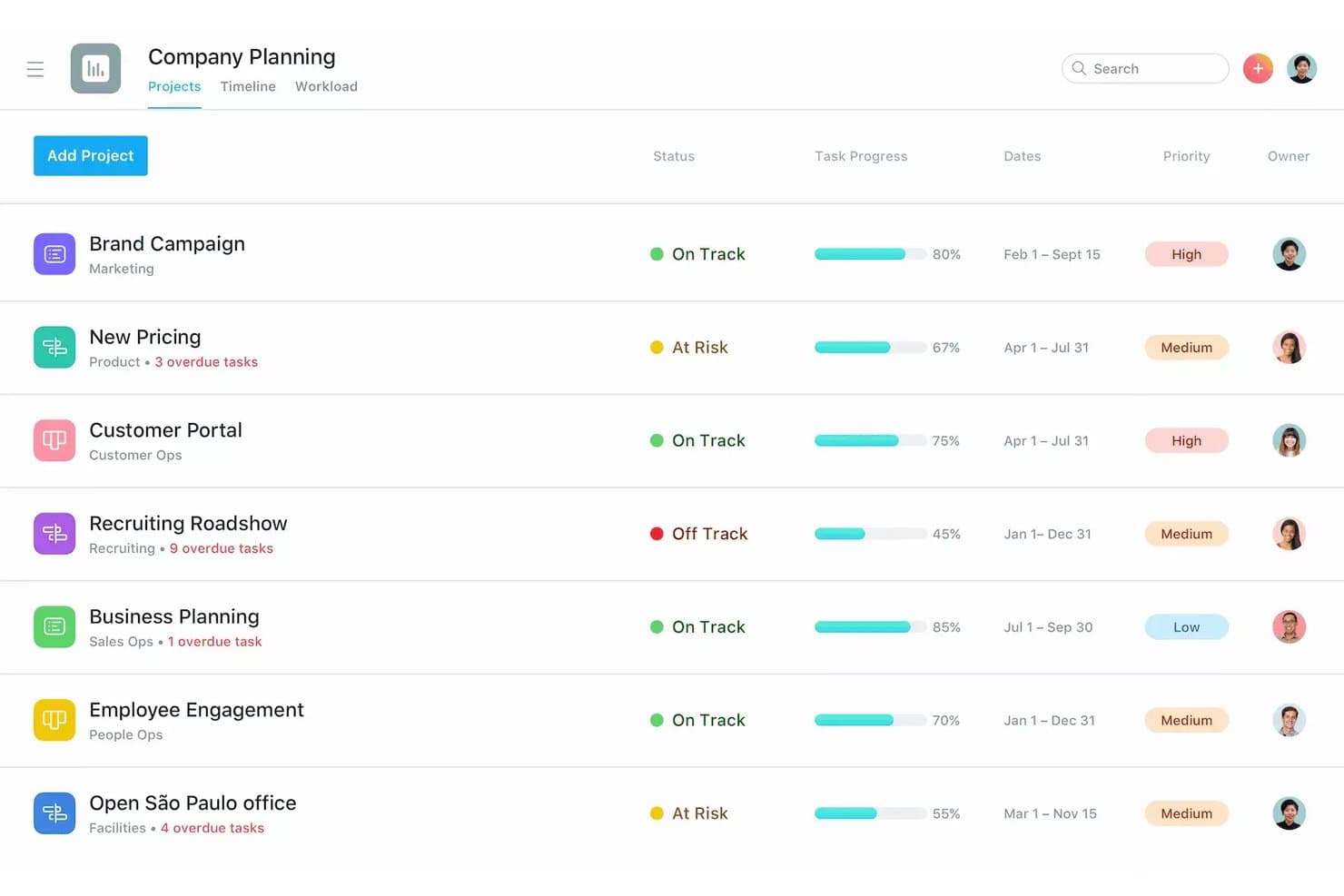
Asana offers a company planning projects view with status tracking, task progress bars, priority levels, and date ranges across multiple departments. Asana is a general-purpose work management platform that combines task assignment, timeline planning, workflow automation, and cross-team portfolio tracking across projects of any scale.
Who Is Asana Best For?
Asana suits hotel operations and project teams that need to coordinate work across multiple departments without a purpose-built hospitality tool.
Why I Picked Asana
I picked Asana as one of the best because its Timeline view and task dependencies make it practical for coordinating multi-department hotel projects. I use Workflow Builder to automate handoff notifications between teams, so nothing stalls waiting on a manual update. The Portfolio view lets me monitor multiple concurrent projects, which matters when a property is running a renovation alongside a staff onboarding rollout at the same time.
Asana Key Features
- Workflow Builder: Automate complex, multi-step processes and standardize recurring tasks for projects across properties.
- Custom fields: Track room types, contractor roles, phases, or asset categories within each project.
- Portfolio dashboard: Monitor progress of multiple hotel projects side by side, tagging by property or renovation type.
- Guest access: Invite external collaborators such as contractors, designers, or vendors with limited permission controls.
Asana Integrations
Asana offers native integrations with Google Workspace, Microsoft 365, Slack, Salesforce, Jira Cloud, Zapier, Adobe Creative Cloud, Dropbox, Box, Zoom, and DocuSign. An API is available for custom integrations.
Pros and Cons
Pros:
- Templates speed up recurring project setup
- Portfolio view spans multiple hotel properties
- Strong timeline and dependency tracking tools
Cons:
- No hospitality-specific project templates included
- No built-in budget or cost tracking
Learn more about Asana: 2Best for technical hospitality projects
Jira
- Free plan + 7-day free trial available
- From $8.48/user/month
Visit WebsiteCustomer Rating:4.4/5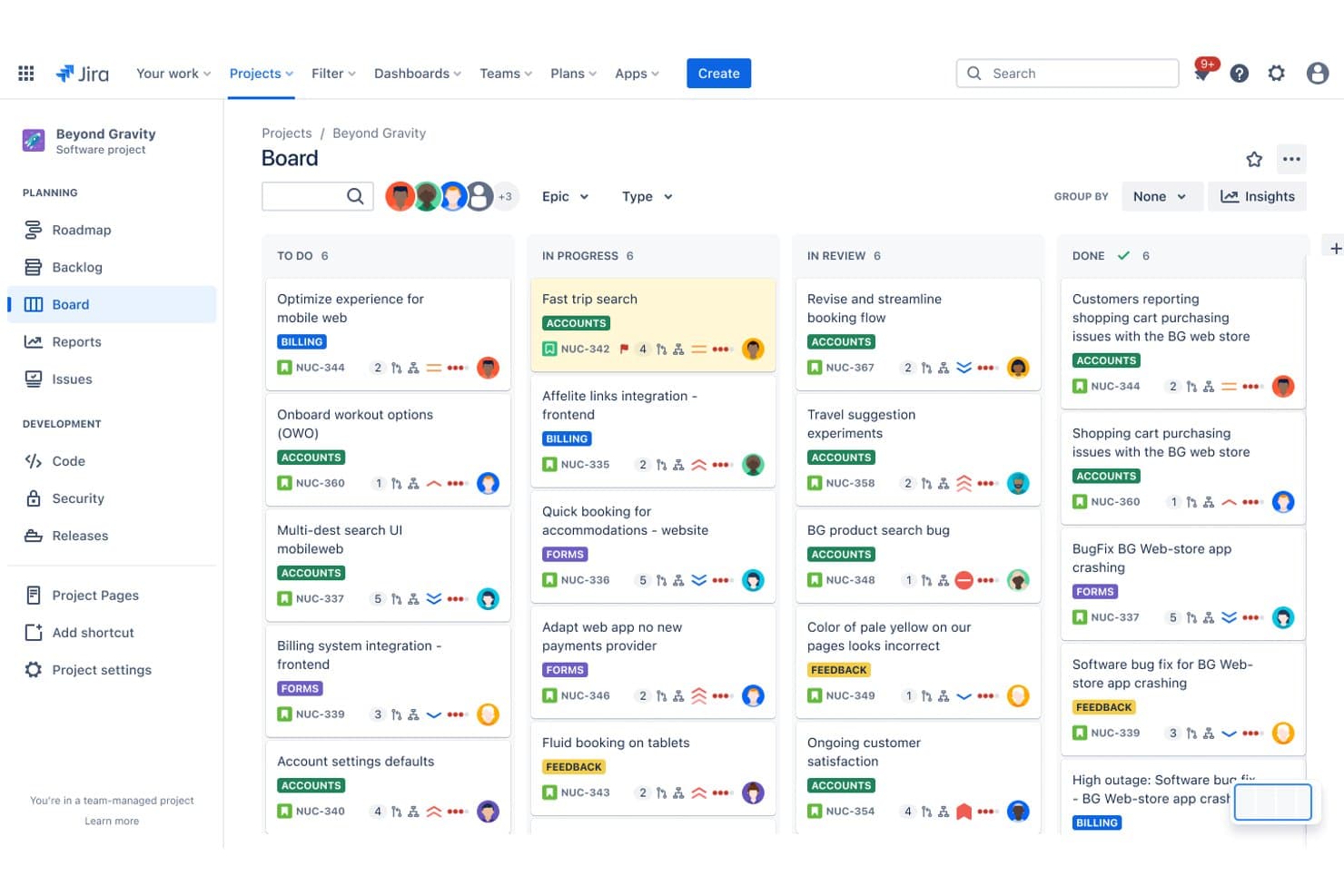
Jira offers a Kanban board view for managing hospitality software projects across To Do, In Progress, In Review, and Done columns with labeled epics and task assignments. Jira is an agile project management and issue tracking platform built by Atlassian that supports technical teams with customizable workflows, Scrum and Kanban boards, cross-team roadmaps, and task and dependency tracking.
Who Is Jira Best For?
Jira is a strong fit for hotel IT and technology teams managing technical projects like PMS migrations, system integrations, or digital infrastructure rollouts.
Why I Picked Jira
I picked Jira for technical hospitality projects because hotel IT teams managing PMS migrations or digital-key rollouts need dependency tracking, not just task lists. Jira's Advanced Roadmaps let me track cross-team dependencies across multiple workstreams, so I can see exactly where a delayed API integration blocks downstream testing. I also use automation rules to trigger status updates and assignee changes without manually touching every ticket.
Jira Key Features
- Custom workflow builder: Design tailored project workflows that match department or project-specific processes.
- Confluence integration: Link projects with Confluence to organize and access project documentation in one place.
- Advanced permissions management: Control access and visibility for teams, contractors, and vendors at a granular level.
- Bulk issue editing: Update, transition, or assign multiple tasks and tickets at once for efficient project administration.
Jira Integrations
Jira offers 3,000+ marketplace integrations and native integrations with Slack, Microsoft Teams, Google Drive, GitHub, Zendesk, Salesforce, Trello, Bitbucket, and Confluence. An API is available for custom integrations.
Pros and Cons
Pros:
- Granular permission controls for external vendors
- Scrum and Kanban boards suit IT rollouts
- Highly configurable workflows for complex technical projects
Cons:
- No hospitality-specific templates or PIP tools
- Not built for non-technical hospitality workflows
Learn more about Jira:
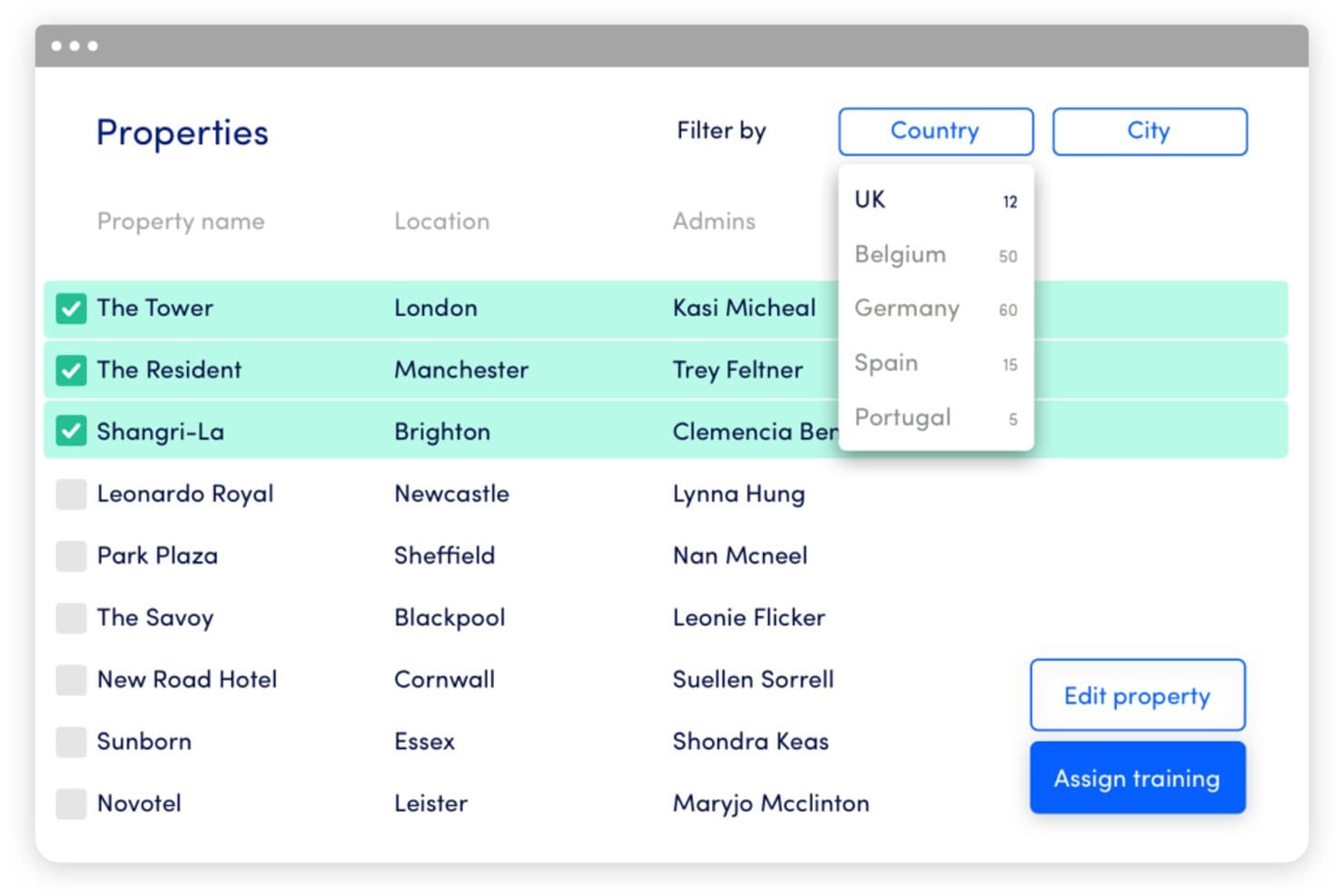
Innform offers a property management interface with filtering by country, bulk selection, and training assignment capabilities for hospitality teams. Innform is a hotel renovation project management platform built around PIP workflows, covering scope estimation, vendor coordination, procurement tracking, and owner invoicing across single and multi-property portfolios.
Who Is Innform Best For?
Innform suits multi-property hotel operators and capex directors who manage recurring PIP-driven renovations across multiple properties simultaneously.
Why I Picked Innform
Innform earns its spot on my shortlist because it's purpose-built for the hotel PIP cycle in a way generic project management tools simply aren't. I like how the PIP PDF import parses brand-standard scope directly into priced, section-level line items, which means my team gets oriented on a new renovation project without hours of manual data entry. The portfolio rollup then gives me real-time variance and committed spend across every active property at once, which is exactly the kind of visibility renovation directors need.
Innform Key Features
- Vendor and procurement management: Track RFQs, purchase orders, and vendor lead times tied to renovation scopes.
- Owner invoicing module: Generate branded invoices for property owners with project line-item visibility.
- Role-based permissions: Assign access levels for internal teams, owners, and vendors across projects.
- Portfolio dashboards: View active projects, overdue tasks, and committed spend across multiple properties in one interface.
Innform Integrations
Native integrations are not clearly documented. An API is available for custom integrations.
Pros and Cons
Pros:
- Owner-branded invoices generated within the platform
- Real-time estimate-vs-actual variance tracking
- PIP PDF import eliminates manual scope entry
Cons:
- Limited user seats on lower-tier plans
- No documented integrations with PMS or accounting systems
Learn more about Innform: Best for hotel operations workflows
- Free demo available
- Pricing upon request
Visit WebsiteCustomer Rating:4.5/5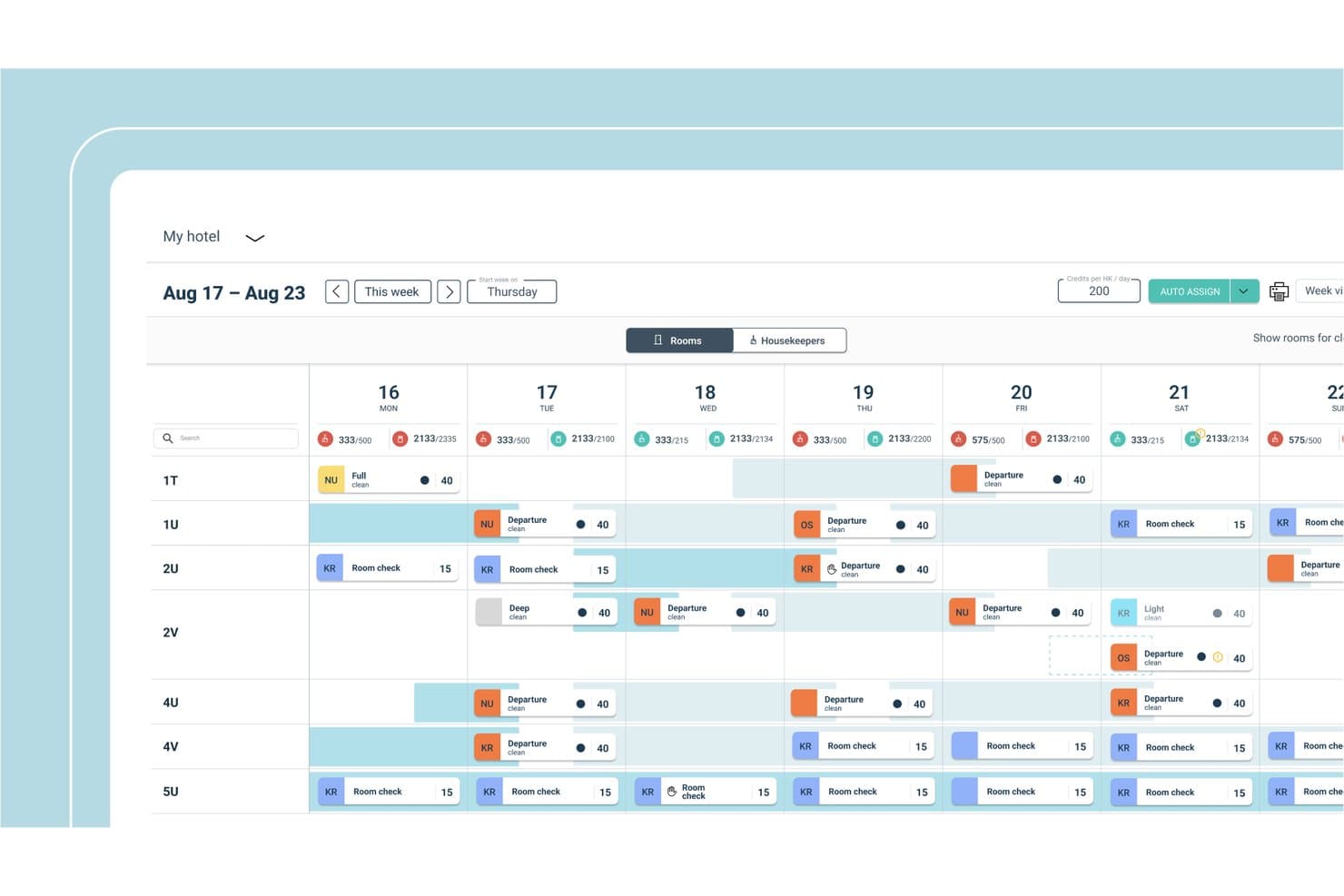
Flexkeeping offers an automated cleaning schedule view that displays room assignments, housekeeping tasks, and credit tracking across a weekly calendar. Flexkeeping is a hotel operations platform built around housekeeping scheduling, maintenance task management, interdepartmental collaboration, and quality assurance workflows.
Who Is Flexkeeping Best For?
Flexkeeping is a strong fit for hotel operations teams at properties of any size that need to coordinate housekeeping, maintenance, and guest services across departments.
Why I Picked Flexkeeping
Flexkeeping earns its spot on my shortlist because of how tightly it ties operational workflows across housekeeping, maintenance, and guest services into a single coordinated system. I particularly like the AI voice assistant, which lets staff log maintenance tasks in any language without stopping work. The Quality Assurance Suite's digital SOPs give department leads a live view of whether standards are being met, which is exactly the kind of task accountability hotel operations need.
Flexkeeping Key Features
- Multi-property dashboard: Lets you view tasks and operational statuses across multiple hotel properties from a centralized screen.
- Customizable digital checklists: Allows managers to create and assign property-specific checklists for routine or one-off operational tasks.
- Automated room assignment: Uses integrated rules to assign housekeeping tasks based on guest departures, arrivals, and special requests.
- Mobile task management app: Staff can receive updates, log completed work, and communicate in real time from any mobile device.
Flexkeeping Integrations
Native integrations are not clearly documented. Flexkeeping offers an API for custom integrations.
Pros and Cons
Pros:
- Scales across multi-property hotel portfolios
- AI voice logging works in multiple languages
- Real-time task visibility across all departments
Cons:
- Reporting lacks hospitality project management depth
- Limited capex and budget tracking for renovations
Learn more about Flexkeeping: Best for hotel project and expense tracking
- Free demo available
- Pricing upon request
Visit WebsiteCustomer Rating:5/5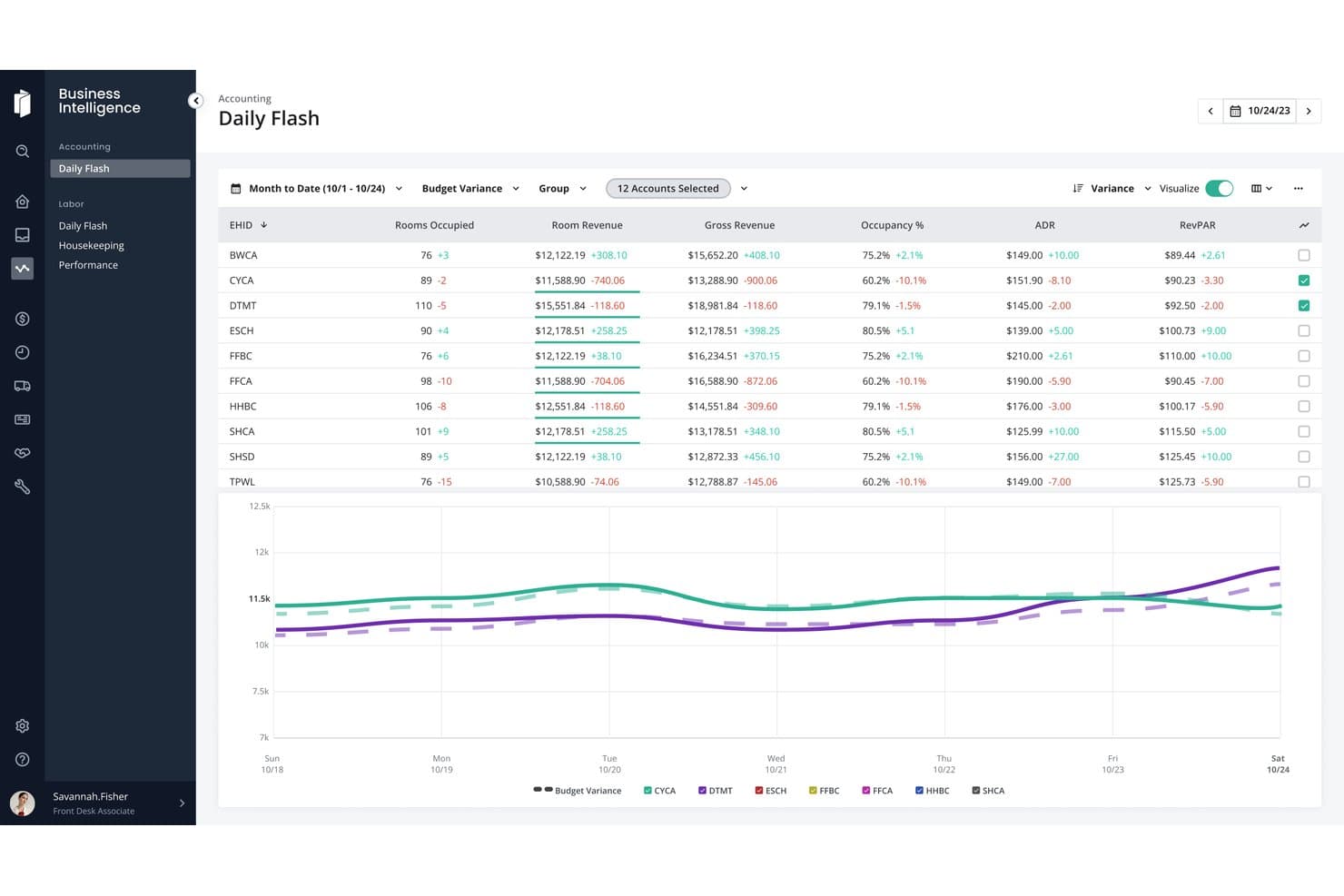
Inn-Flow's Daily Flash dashboard displays real-time accounting metrics including rooms occupied, room revenue, gross revenue, occupancy rate, ADR, and RevPAR across multiple hotel properties. Inn-Flow is a hotel-specific back-office platform covering accounting, procurement, labor management, and project expense tracking for Property Improvement Plans.
Who Is Inn-Flow Best For?
Inn-Flow suits hotel owners and multi-property operators who need to track PIP budgets, vendor contracts, and capex spend within their existing accounting workflow.
Why I Picked Inn-Flow
I picked Inn-Flow as one of the best because it's the only tool on my shortlist that embeds PIP tracking directly inside a hotel accounting module. I like that you can set up project budgets using your existing chart of accounts, link vendor contracts with change order tracking, and tie every invoice payment back to a specific project. Running a payments-vs-contracts report then shows exactly where a renovation stands financially, without leaving the accounting workflow.
Inn-Flow Key Features
- Multi-property portfolio reporting: View consolidated performance and project spend across all hotels in your portfolio from one dashboard.
- USALI-compliant financial reporting: Access detailed hospitality-specific reports aligned with industry accounting standards.
- Automated labor and scheduling tools: Create staff schedules, track time, and manage approvals with real-time integration to payroll.
- Integrated procurement management: Track purchase orders, manage vendors, and monitor inventory levels within your core accounting workflow.
Inn-Flow Integrations
Native integrations are not clearly documented. An API is available for custom integrations.
Pros and Cons
Pros:
- Tracks vendor contracts and change orders
- Built specifically for hotel back-office workflows
- PIP budget tracking tied to accounting
Cons:
- No dedicated multi-property portfolio dashboard
- Limited standalone project scheduling tools
Learn more about Inn-Flow: Best for hotel construction projects
- Free demo available
- Pricing upon request
Visit WebsiteCustomer Rating:4.5/5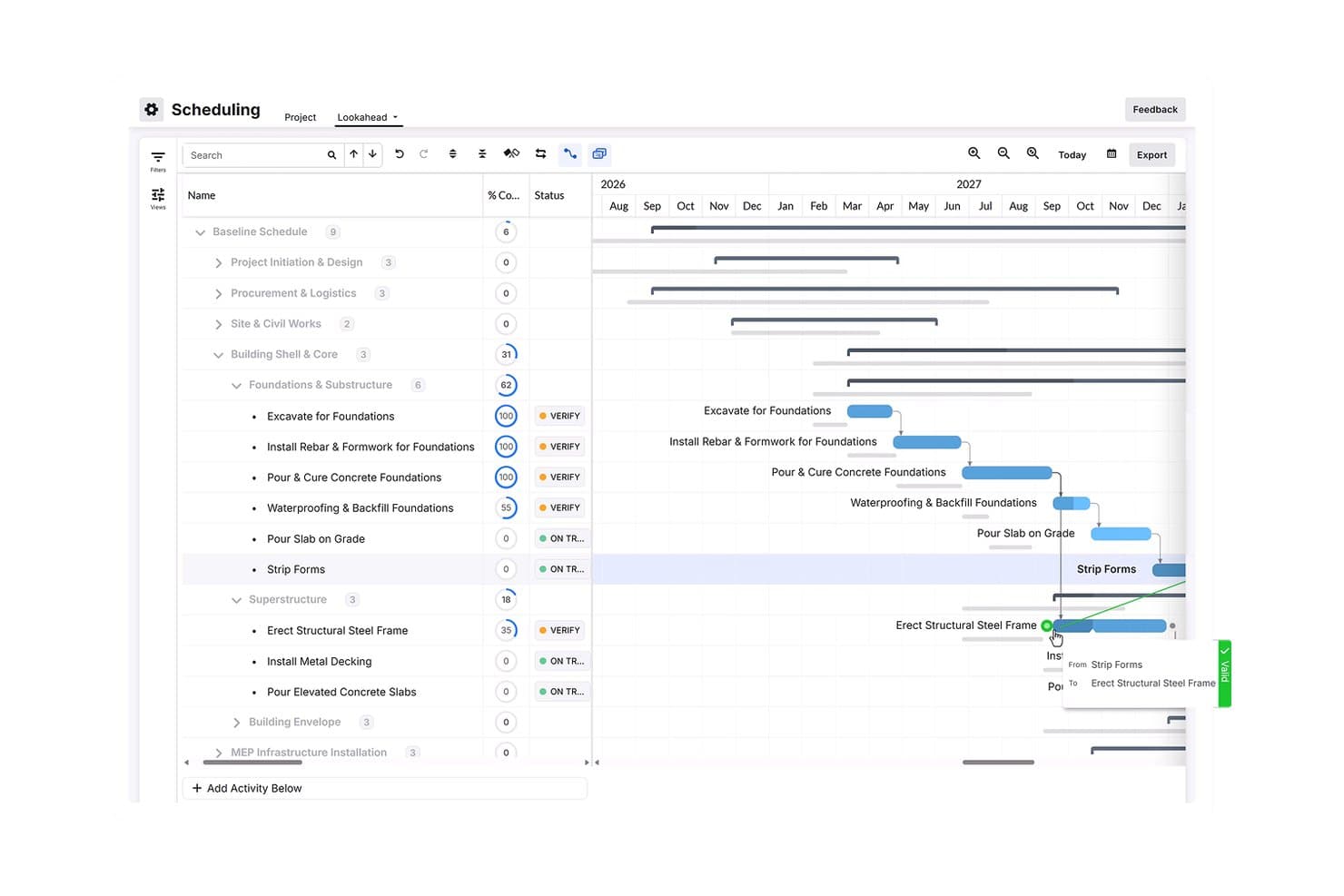
Procore offers a Gantt-chart scheduling view that allows hospitality project managers to track construction phases, task completion percentages, and activity dependencies in real time. Procore is a construction project management platform built for commercial builds, combining preconstruction, scheduling, document control, workforce management, and financial tracking across hotel and hospitality construction projects.
Who Is Procore Best For?
Procore is a strong fit for general contractors, hotel developers, and construction project managers overseeing large-scale hotel builds or major renovation projects.
Why I Picked Procore
I picked Procore as one of the best because no other tool on this list handles hotel construction financial complexity the same way. The budget module links change orders directly to FF&E procurement lines, so cost overruns on custom millwork or lobby furniture get flagged before they cascade into bigger problems. I also rely on the punch list and submittal tracking tools during final fit-out, where managing hundreds of open items across multiple floors is where most hotel projects lose time.
Procore Key Features
- Portfolio analytics dashboard: Provides cross-project reporting with property tags and customizable metrics for multi-site tracking.
- Mobile field tools: Enables field staff to upload drawings, photos, and punch items from job sites using iOS or Android devices.
- Integrated submittals management: Centralizes contract drawings, vendor submittals, and approvals in a single platform.
- Unlimited user access: Allows general contractors, subs, owners, and consultants to collaborate without per-user fees.
Procore Integrations
Procore offers native integrations with DocuSign, Sage 300 CRE, Viewpoint Vista, Microsoft Project, Box, SharePoint, and QuickBooks, plus has an open API for custom integrations.
Pros and Cons
Pros:
- Change order tracking tied to project budgets
- Strong punch list tools for hotel handovers
- Handles complex construction document control well
Cons:
- No hospitality-specific PIP reporting templates built in
- Overkill for ongoing operational hotel task management
Learn more about Procore: Best for hotel pre-opening projects
- Free plan + 14-day free trial available
- From $15/user/month (billed annually)
Visit WebsiteCustomer Rating:4.5/5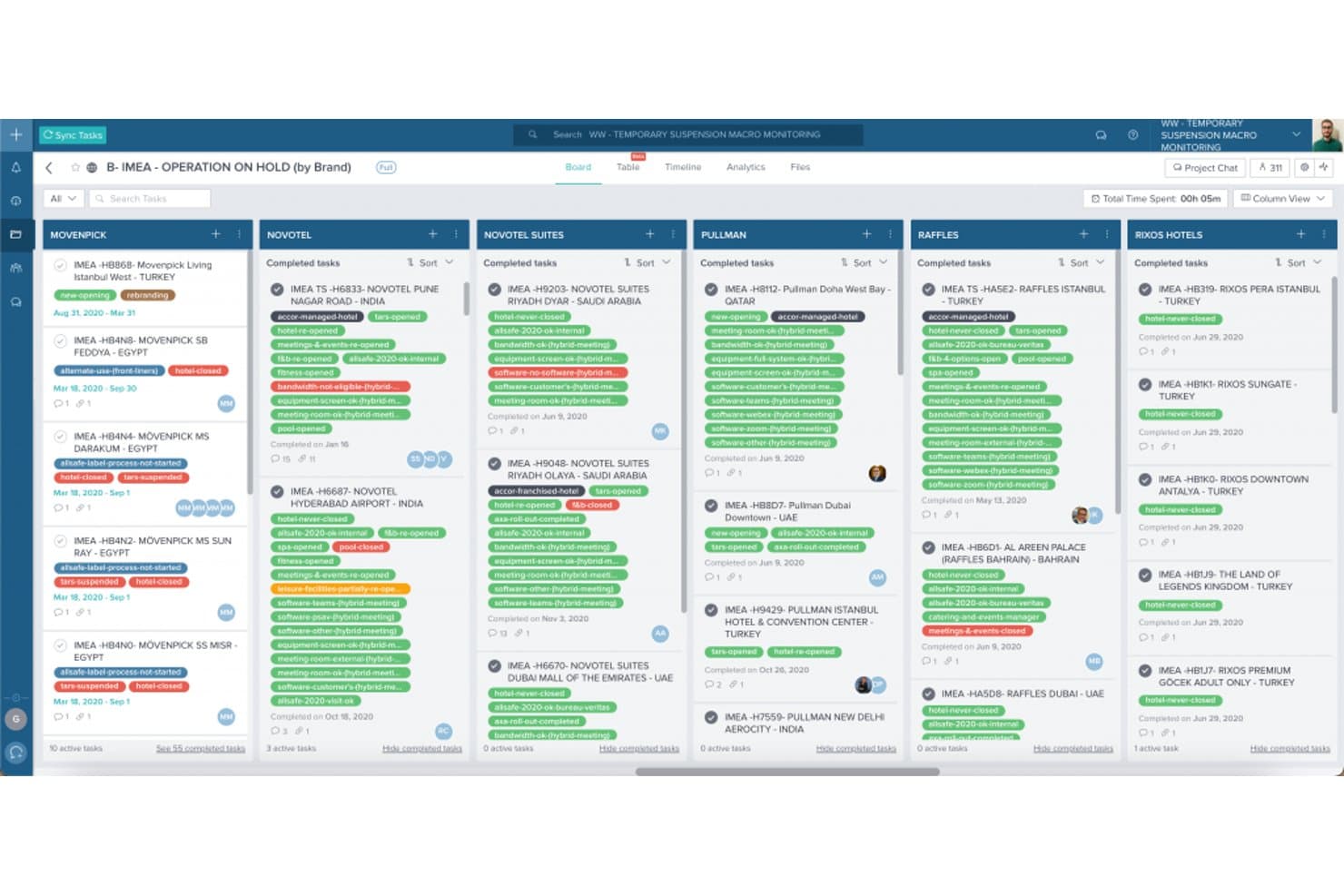
Taskworld offers a kanban-style board view for managing hotel operations on hold, organized by hospitality brand with color-coded task tags. Taskworld is a project management platform built for hospitality teams, offering pre-opening retro-planning templates, multi-department task coordination, role-based dashboards, and real-time progress monitoring across properties and regions.
Who Is Taskworld Best For?
Taskworld suits hotel development and operations teams at multi-property groups managing complex, cross-departmental pre-opening projects.
Why I Picked Taskworld
I picked Taskworld as one of the best because its retro-planning feature lets pre-opening teams build reverse timelines from a target opening date, with pre-assigned tasks and dependencies mapped across every department. I also like the role-based dashboard hierarchy, which gives HQ, general managers, and heads of division separate visibility into the same project. In practice, that means a corporate team can monitor a hotel opening across dozens of departments without relying on manual status calls.
Taskworld Key Features
- Integrated chat app: Message team members or vendors directly within the platform to keep project communication in one place.
- Project analytics dashboard: Monitor project health and task progress using visual analytics and exportable reports.
- Guest access for external collaborators: Invite suppliers, consultants, or contractors to specific projects with controlled permissions.
- Cloud SOP library: Store and access standardized operating procedures and compliance documents for hotel projects centrally.
Taskworld Integrations
Native integrations are not clearly documented. An API is available for custom integrations.
Pros and Cons
Pros:
- Dedicated onboarding support for hotel pre-openings
- Role-level dashboards for HQ, GMs, and HODs
- Pre-opening retro-planning templates built for hotels
Cons:
- Limited native integrations with hotel tech stacks
- No hospitality-specific budget or FF&E tracking
Learn more about Taskworld: Best for hospitality project coordination
- Free trial available
- From $99.99/user/month (billed annually)
Visit WebsiteCustomer Rating:3/5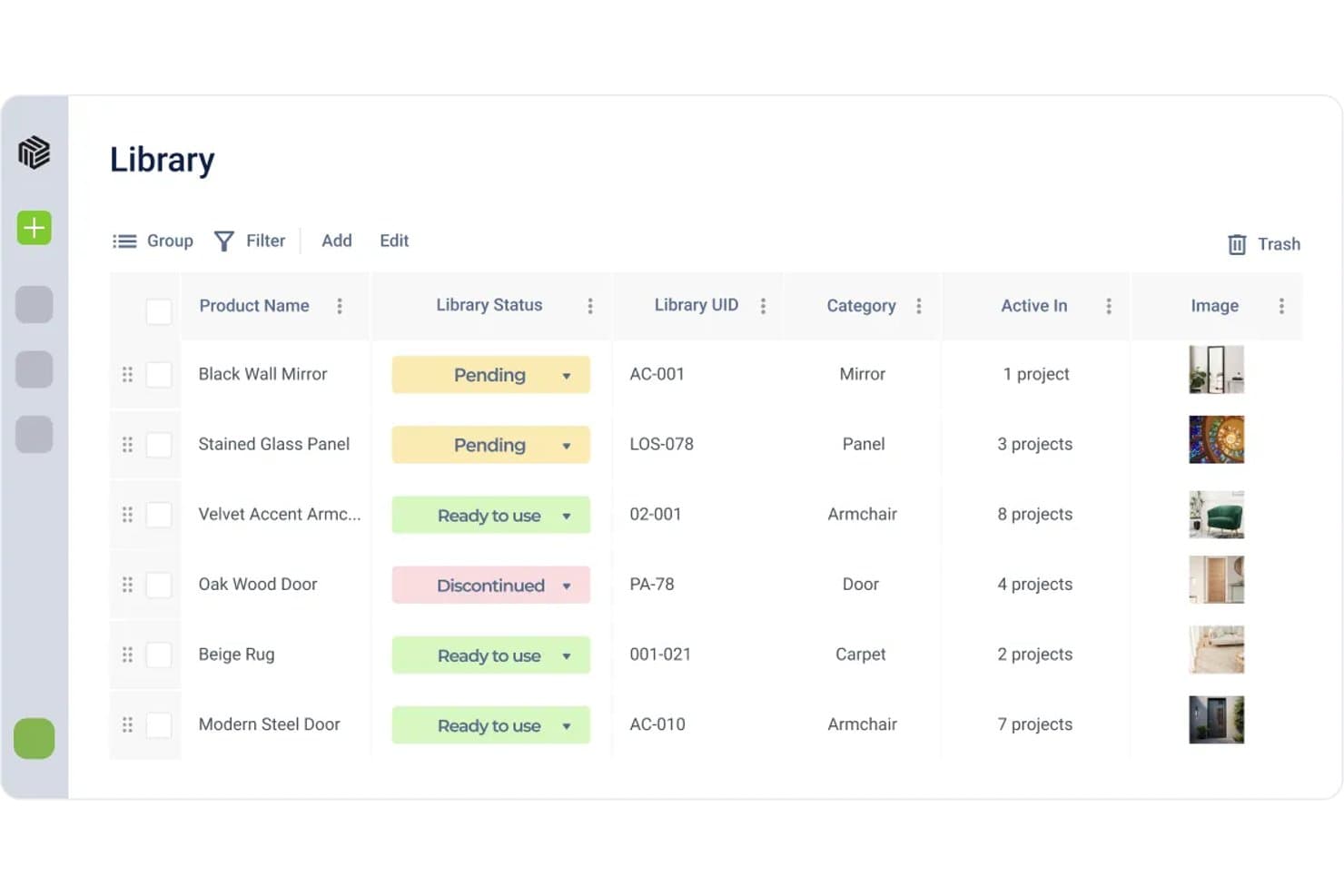
Fohlio offers a Library module where hospitality project managers can track product statuses, categories, and project usage in one organized table view. Fohlio is a specification and procurement management platform built for hospitality projects, centralizing FF&E and OS&E management, capital budgeting, vendor sourcing, and brand-standard compliance across multi-property portfolios.
Who Is Fohlio Best For?
Fohlio suits hotel development project managers and renovation directors who need to coordinate design specifications, procurement, and brand standards across property rollouts.
Why I Picked Fohlio
I picked Fohlio as one of the best because it handles hospitality project coordination at the specification level in a way no other tool on this list does. My team uses the brand-approved FF&E product library to lock in approved specs, manage discontinuations, and reuse those standards across every property in the portfolio. The cost-per-key capital budgeting tool is especially practical for PIP planning, giving renovation directors a clear financial anchor before procurement begins.
Fohlio Key Features
- Multi-property analytics: Aggregate financial and procurement data across entire hotel portfolios for regional or brand-level reporting.
- Revit integration: Sync design specifications directly with BIM models to reflect current FF&E and finish plans.
- QuickBooks integration: Export purchase orders, client proposals, and invoices from Fohlio into QuickBooks Online for streamlined accounting.
- Web clipper browser extension: Capture and import FF&E product data from vendor sites or Pinterest into your centralized product library.
Fohlio Integrations
Fohlio offers native integrations with QuickBooks Online and Autodesk Revit. An API is available for custom integrations.
Pros and Cons
Pros:
- Granular room-level tracking within multi-property projects
- Spec sheets auto-generated from product data
- Centralized FF&E library reusable across properties
Cons:
- Steeper setup time for large product libraries
- No native Gantt chart scheduling for timelines
Learn more about Fohlio: Best for hotel capital project oversight
- Free plan available
- From $165/project/month
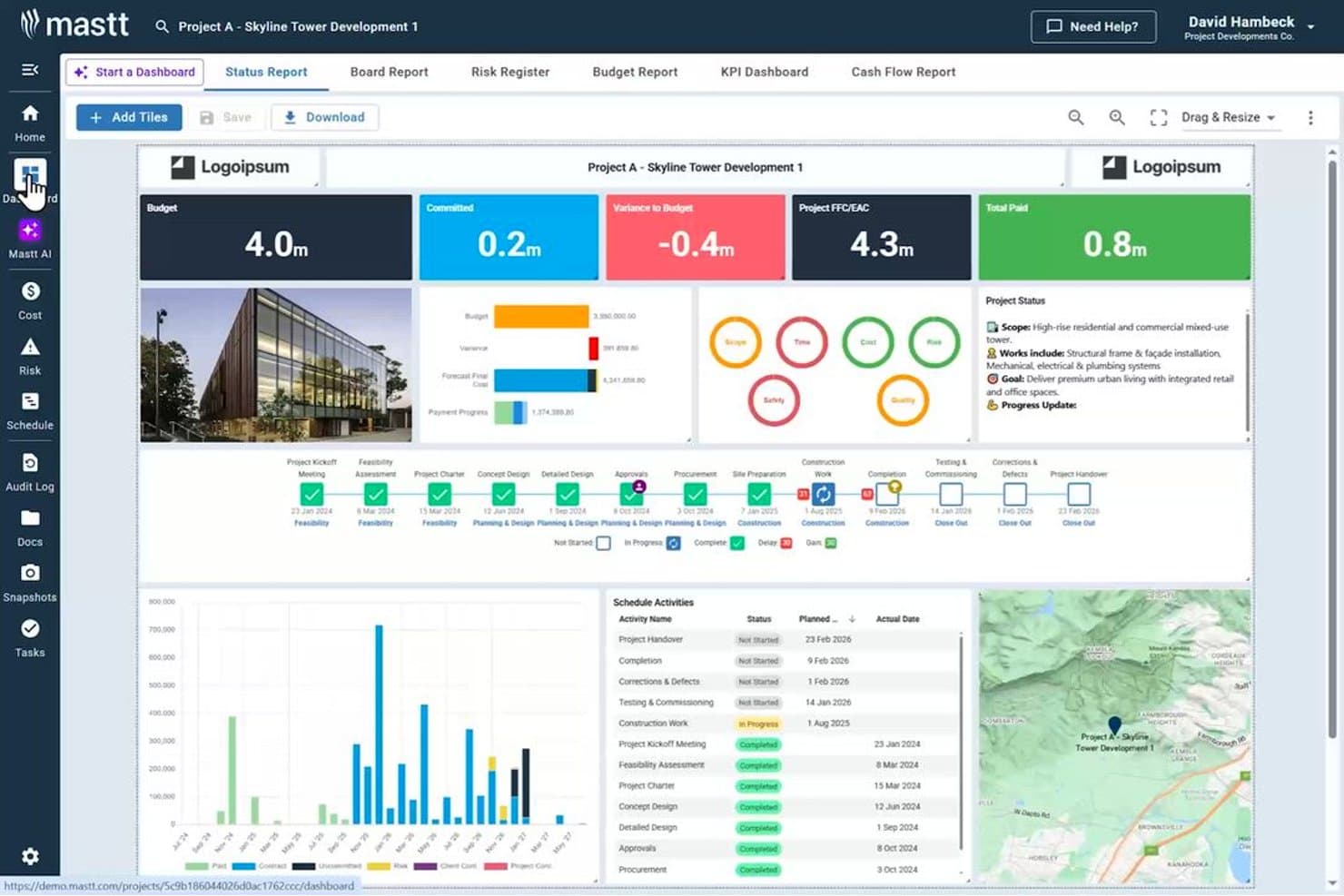
Mastt offers a comprehensive project dashboard with budget tracking, schedule milestones, and cost reporting for large-scale construction projects. Mastt is a capital project management platform for hotel owners and developers that covers cost management, contract administration, risk tracking, scheduling, and portfolio reporting across construction and renovation projects.
Who Is Mastt Best For?
Mastt is a strong fit for hotel developers, capex directors, and owner's reps managing construction, renovation, or multi-property capital programs.
Why I Picked Mastt
Mastt earns its spot on my shortlist because of how it handles capital cost control for hotel construction and renovation projects. I particularly like the way it tracks budgets, change orders, contingency, and cash flow forecasting in one place, giving capex directors a live picture of where a project stands financially. The AI-powered contract and payment review feature is also notable, autonomously checking invoices against contracted values before approval, which adds a layer of financial oversight that most project management tools simply don't offer.
Mastt Key Features
- Portfolio and program dashboards: Track and report on progress and financials across multiple hotels and projects in one centralized view.
- Risk management module: Log, assess, and manage project risks with a configurable risk matrix designed for capital projects.
- Hospitality-specific reporting templates: Access ready-to-use templates tailored for hotel construction budgets, project status, and risk registers.
- AI-powered document analysis: Automatically review contracts and project documents to extract key data and flag potential issues.
Mastt Integrations
Native integrations are not clearly documented. Mastt offers an API for custom integrations.
Pros and Cons
Pros:
- AI-driven contract and invoice review built in
- Built specifically for construction and renovation oversight
- Live financial tracking across capital project portfolios
Cons:
- Reporting customization takes time to configure
- Not suited for operational or day-to-day hotel tasks
Learn more about Mastt:
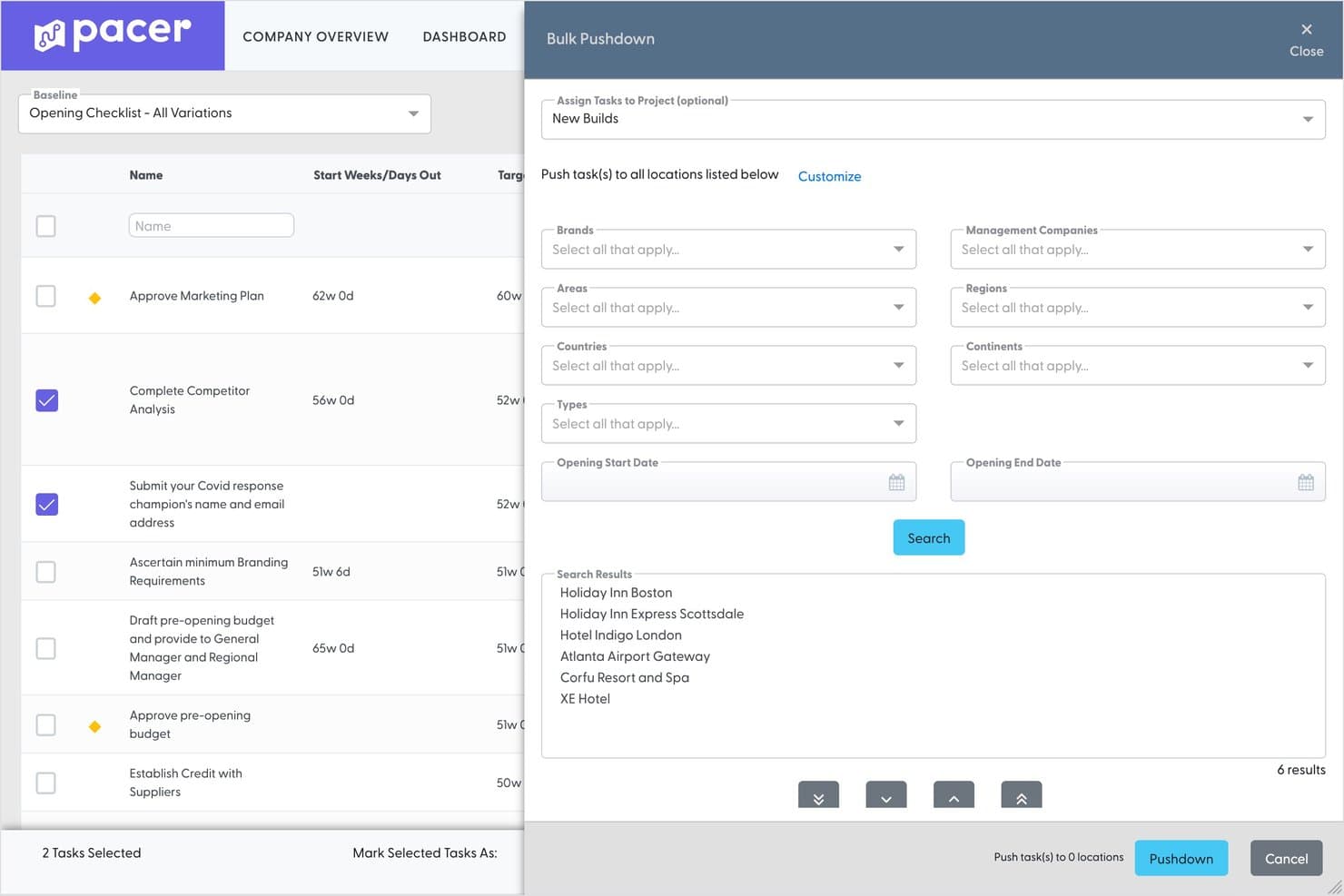
Pacer offers a Bulk Pushdown feature that lets hospitality project managers push selected baseline tasks to multiple hotel locations at once using filters like brand, region, and country. Pacer is a project management platform purpose-built for hospitality teams, combining pre-opening checklists, multi-property task tracking, Gantt scheduling, and audience-specific dashboards for hotel openings and brand rollouts.
Who Is Pacer Best For?
Pacer is a strong fit for multi-property hotel groups and hospitality brands managing large-scale openings, transitions, or brand-standard rollouts across multiple locations.
Why I Picked Pacer
Pacer earns its spot on my shortlist because no other tool I've tested is built as specifically around hotel project tracking as this one. I particularly like the template blending feature, which lets each property pull only the tasks relevant to its amenities and opening scope. On top of that, the audience-specific dashboards give Area Directors a rolled-up portfolio view while property teams see only their own assignments, which keeps reporting clean without extra manual filtering.
Pacer Key Features
- Aggregated multi-location dashboards: View and manage projects across all properties from a single, centralized dashboard.
- Dynamic access rights: User permissions update automatically based on portfolio or role assignments.
- Automated workflow actions: Configure rules to trigger approvals, notifications, or task status changes without manual input.
- Mobile app for on-site execution: Access tasks, upload photos, and update progress from the field using iOS or Android devices.
Pacer Integrations
Pacer offers native integrations with Slack, Microsoft Teams, and Outlook, and provides an API for custom integrations.
Pros and Cons
Pros:
- Purpose-built onboarding from hospitality industry professionals
- Master checklist syncs across all properties instantly
- Built-in multi-language translation for global teams
Cons:
- No native FF&E or procurement tracking tools
- Limited beyond pre-opening and transition use cases
Learn more about Pacer:
Other Hospitality Project Management Software
Here are some additional hospitality project management software options that didn’t make it onto my shortlist, but are still worth checking out:
- 11ZepthBest for hotel CAPEX management
- 12SmartsheetBest for customizable hotel projects
- 13OditlyBest for hotel operations management
- 14CMX1Best for hospitality compliance projects
- 15PulseBest for hotel inspections and audits
Related Reviews
How I Evaluate Hospitality Project Management Software
I evaluate these tools in two layers: baseline must-haves like Gantt scheduling and PIP tracking, then differentiators like multi-property views and FF&E procurement workflows.
Core Functionality (Table Stakes For This List)
When I'm selecting tools for my list, I rank each one on a scale from 0 (does not offer the functionality) to 5 (excels in this area) for each core functionality listed below. I then calculate the tool's total score into a percentage, using 55% as a benchmark to help assess its overall fit for the list.
- Project Planning & Scheduling: I look for Gantt charts with dependencies and milestones that can map a full renovation timeline or pre-opening countdown by phase.
- Multi-Property Portfolio Management: A centralized dashboard should let you segment by property, brand, or region so capital projects across a portfolio stay visible.
- Task & Team Collaboration: I evaluate whether contractors, designers, and on-site staff can all receive assignments, post updates, and communicate in one place.
- Budget & Cost Tracking: Tracking budget vs. actuals matters, especially for FF&E purchase orders and change orders that shift capex mid-project.
- Document & Brand Standards Management: I check for version-controlled storage of blueprints, punch lists, and franchise compliance documents tied to each property.
- Hospitality-Specific Reporting: Dashboards should go beyond generic charts to offer PIP progress views, capex cycle summaries, or hotel KPI templates out of the box.
Once I have a list of tools that meet the criteria, I consider what sets each platform apart.
Differentiating Factors (What Sets Vendors Apart)
Here's how I compare and contrast different vendors:
Standout Features
Guest-impact scheduling is a key differentiator. I look for Gantt views that factor in occupancy and blackout dates so renovation work doesn't disrupt booked guests. FF&E procurement tracking also matters—dedicated workflows that tie vendor lead times and installation schedules to your project timeline prevent costly delays. Punch list tools round things out, especially mobile-first options with photo annotation that let your team log defects room by room during walkthroughs.
Beyond Features
Integration with your existing hospitality tech stack is a big one. I check whether a platform connects to PMS tools like Opera or Mews and accounting systems like Sage Intacct or M3 for budget reconciliation. Pricing structure also shapes long-term value—per-user licensing works differently than per-property models, especially when you need seats for contractors and designers on a single renovation. Scalability matters too, from a boutique independent running one PIP to a management company overseeing 100+ properties.
How to Choose a Hospitality Project Management Software
The right project management platform can make or break your projects—so how should you weigh your options for different hotel renovations, rollouts, or openings?
| If your priority is... | Prioritize... |
| Multi-property visibility | Strong portfolio segmentation and roll-up dashboards |
| Brand standards compliance | Templated checklists tied to franchisor requirements |
| Reducing guest disruption | Occupancy-aware scheduling and blackout date tools |
| Contractor/vendor accountability | Mobile punch lists with assignment tracking |
| Procurement and FF&E coordination | Integrated supplier PO and lead time tracking |
How to Vet Your Shortlist
- Request a PIP template library: Ask for at least two template examples used for brand-standard renovations.
- Run a real project scenario trial: Map out a capex project—assign tasks, upload brand guidelines, and simulate punch list walkthroughs.
- Test reporting outputs: Export a portfolio-level dashboard or KPI report for two distinct properties.
- Validate tech stack integrations: Request a demonstration of PMS or accounting system connections using your actual property IDs.
- Tradeoff to weigh: Decide if you need hospitality-specific workflows and built-in templates or flexible, horizontal tools with broader integration options.
What Is Hospitality Project Management Software?
Hospitality project management software is a specialized tool designed to help hotels and hospitality teams plan, track, and deliver projects such as renovations, new openings, or brand-standard upgrades. It brings together scheduling, multi-property management, task assignment, cost tracking, and compliance documentation in one system. These platforms let you coordinate departments, contractors, and vendors—so nothing falls through the cracks during complex hotel projects.
Features of Hospitality Project Management Software
When selecting hospitality project management software, keep an eye out for the following key features:
- Project planning and scheduling: Lets you build Gantt charts and timelines, assign milestones, and manage task dependencies for hotel renovation or pre-opening projects.
- Multi-property management: Centralizes oversight of all ongoing projects across several properties, letting you filter, report, and coordinate by property, brand, or region.
- Task and team collaboration: Provides tools for staff, vendors, and contractors to communicate, upload updates, assign work, and monitor progress in real time.
- Budget and cost tracking: Tracks budgets, actual spend, purchase orders, and cost forecasts, giving you financial visibility across FF&E procurement and capital projects.
- Document and compliance management: Stores and organizes all contracts, blueprints, brand standards checklists, and compliance documents with version history and permissions.
- Hospitality-specific reporting: Offers pre-built reporting for hotel KPIs, property improvement plans (PIPs), capex cycles, and occupancy impacts.
- Punch list and snagging tools: Enables mobile logging of defects or outstanding work, room-by-room, with photos and contractor assignments for efficient closeout.
- Guest-impact scheduling: Allows you to coordinate project timelines around occupancy rates, events, and blackout dates to minimize disruptions to guest experience.
- FF&E procurement workflows: Integrates supplier management, PO creation, lead times, and installation tracking directly into your project timeline for smoother purchasing and delivery.
- Brand standards templates: Includes ready-to-use templates and checklists to help maintain consistency and compliance with hotel brand requirements during every phase of the project.
Benefits of Hospitality Project Management Software
Implementing hospitality project management software provides several benefits for your team and your business. Here are a few you can look forward to:
- Improved project visibility: Centralized dashboards and multi-property tracking keep renovation, opening, and capex projects on track with a clear overview for all stakeholders.
- Faster project delivery: Gantt charts, task assignments, and workflow automation help you coordinate teams and contractors, reducing project delays and miscommunication.
- Better budget control: Built-in budget tracking, procurement tools, and automated reporting make it easier to manage FF&E spend and adhere to financial targets.
- Consistent brand compliance: Templates for brand standards and audit checklists ensure every project meets franchise or flag requirements from day one.
- Minimized guest disruption: Occupancy-aware scheduling and guest-impact mapping let you plan work around bookings, reducing noise and disruptions for hotel guests.
- Streamlined punch list closeout: Mobile snagging and punch list tools speed up defect resolution, ensuring handovers and pre-openings go smoothly.
- Enhanced collaboration: Real-time communication, document sharing, and workflow visibility keep property teams, vendors, and corporate aligned at every step.
Costs and Pricing of Hospitality Project Management Software
Selecting hospitality project management software requires an understanding of the various pricing models and plans available. Costs vary based on features, team size, add-ons, and more. The table below summarizes common plans, their average prices, and typical features included in hospitality project management software solutions:
Plan Comparison Table for Hospitality Project Management Software
| Plan Type | Average Price | Common Features |
| Free Plan | $0 | Basic task tracking, simple project boards, limited users, and minimal document storage. |
| Personal Plan | 10–25/user/month | Project templates, file attachments, standard Gantt charts, mobile access, and limited reporting. |
| Business Plan | 30–60/user/month | Multi-property dashboards, budget and cost tracking, FF&E procurement tools, and guest scheduling. |
| Enterprise Plan | 80–150/user/month | Portfolio management, advanced reporting, open API integrations, audit trails, and custom onboarding. |
Hospitality Project Management Software FAQs
Here are some answers to common questions about hospitality project management software:
What types of projects can hospitality project management software manage?
Hospitality project management software can handle renovations, new-build constructions, brand conversions, capital improvement plans, and pre-opening checklists for both single and multi-property portfolios.
Can hospitality project management software integrate with property management systems (PMS)?
Yes, many platforms offer integrations with leading PMS solutions, allowing you to sync occupancy data and room status to plan work around bookings and minimize guest disruption.
How does punch list and snagging work in these tools?
Most platforms feature mobile-first punch list tools that let you log defects with photos, assign issues to contractors, and track each item’s status for smooth project closeout.
Is hospitality project management software suitable for small hotels as well as large groups?
Yes, solutions exist for boutique independents and large chains alike, with some tools built to scale from one property to entire global portfolios.
What should I look for when choosing a solution for multi-property management?
Look for centralized dashboards, property hierarchies, and reporting that allow you to filter, compare, and monitor progress across several properties in one place.