

Free offline hotel management software lets you run reservations, billing, and daily front desk tasks without needing a constant internet connection—and with no hidden monthly fees. If you want full control on-premise, reliable access even during outages, or a way to avoid expensive subscriptions, you’re in the right place. In this guide, you’ll get a direct comparison of the top free options for offline hotel management, with details on features, limitations, and the types of properties each tool fits best. Find out which ones cover your must-haves and how to keep every shift running smoothly, no matter your Wi-Fi.
Why Trust Our Software Recommendations
6,700+
Reviews
20
Industry experts
16+
Evaluation factors
14
Years
Our team has been testing and reviewing software since 2012. As hospitality leaders ourselves, we know how difficult—and important—it is to choose the right software.
For this guide, we evaluated tools using hands-on testing and independent research, scoring tools using our selection criteria.
Our reviews reflect our human editorial judgment, not a sales pitch.
Best Free Offline Hotel Management Software
This comparison chart summarizes pricing details for my top free offline hotel management software selections to help you find the best one for your budget and practice needs.
| Tool | Best For | Trial Info | Price | ||
|---|---|---|---|---|---|
| 1 | Best for cloud-based multi-property hotel workflows | Free demo available | From $198/month | Website | |
| 2 | Best free plan for small inns under 10 rooms | Free plan available; 14-day free trial | From $69/month | Website | |
| 3 | Best for one-time license, on-premise billing | 30-day free trial | From $179.99/license | Website | |
| 4 | Best for cloud-based multi-channel hotel ops | 14-day free trial | From €40/month | Website | |
| 5 | Best for on-premise front desk with night audit | Free plan available | Free | Website | |
| 6 | Best for on-premise PMS with LAN multi-user access | 30-day free trial | From ₹1,150 one-time | Website | |
| 7 | Best for AI-driven on-premise hotel ops | Free demo available | Free plan available | Website | |
| 8 | Best for open-source, fully local PMS | Free plan available | Pricing upon request | Website | |
| 9 | Best for offline-first PMS with fiscal invoicing | Free plan available | Pricing upon request | Website | |
| 10 | Best for self-hosted, open-source PMS billing | Free demo available | Pricing upon request | Website |


Free Offline Hotel Management Software Reviews
Below are my detailed summaries of the free offline hotel management software that made it onto my shortlist. My reviews offer a detailed look at the features, best use cases, and pricing of each system to help you find the best one for you.
 Best for cloud-based multi-property hotel workflows
- Free demo available
- From $198/month
Visit WebsiteCustomer Rating:4.5/5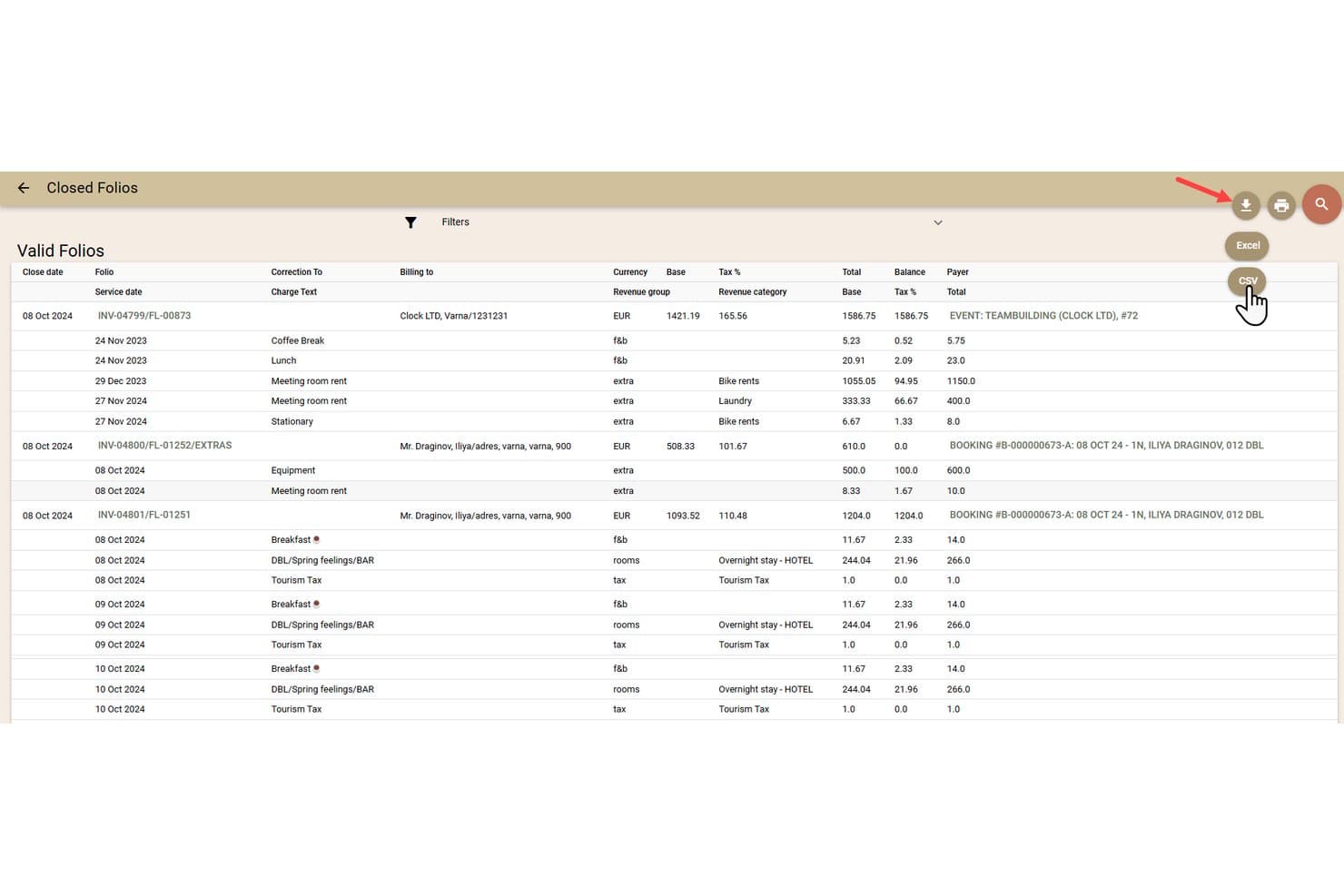
Clock PMS+ lets users export closed folios to Excel or CSV. Clock PMS+ is a cloud-based property management system for hotels that covers reservations, front desk operations, room inventory, guest billing, housekeeping, guest messaging, and integrations with booking channels and payment providers.
Who Is Clock PMS+ Best For?
Clock PMS+ suits multi-property hotel operators and boutique brands who need an all-in-one, cloud-based system and global support.
Why I Picked Clock PMS+
I picked Clock PMS+ because I value its cloud-based multi-property workflows, which let me manage reservations, front desk, and housekeeping across several hotels in one place. Features like live room inventory, automated group bookings, and real-time housekeeping sync help me keep operations tight, especially when handling complex properties with varied needs.
Clock PMS+ Key Features
- Automated night audit: Runs end-of-day procedures automatically for every property, including revenue postings and audit trails.
- Open API access: Lets you connect external apps or build custom integrations for your unique workflow needs.
- Multi-currency and tax configuration: Supports invoicing and guest billing in any currency with region-specific tax setups.
- Mobile housekeeping app: Allows cleaning staff to view task lists, post minibar charges, and report maintenance directly from their phones.
Clock PMS+ Integrations
Clock PMS+ offers 30+ native integrations, including SiteMinder, RoomCloud, QuickBooks, Stripe, Adyen, Revinate, Cendyn, Lightspeed, Assa Abloy, Whistle, and Mailchimp. An open API is available for custom integrations.
What's Free?
Clock PMS+ offers a 30-day free trial. After the trial, you’ll need to purchase a paid plan—there is no free-forever version, and all standard features are available during the trial.
Pros and Cons
Pros:
- Supports multi-property management in one system
- Highly detailed housekeeping and billing functions
- Advanced front desk and reservation features
Cons:
- No free-forever or downloadable version available
- No offline or local installation option
Learn more about Clock PMS+: Best free plan for small inns under 10 rooms
- Free plan available; 14-day free trial
- From $69/month
Visit WebsiteCustomer Rating:4.5/5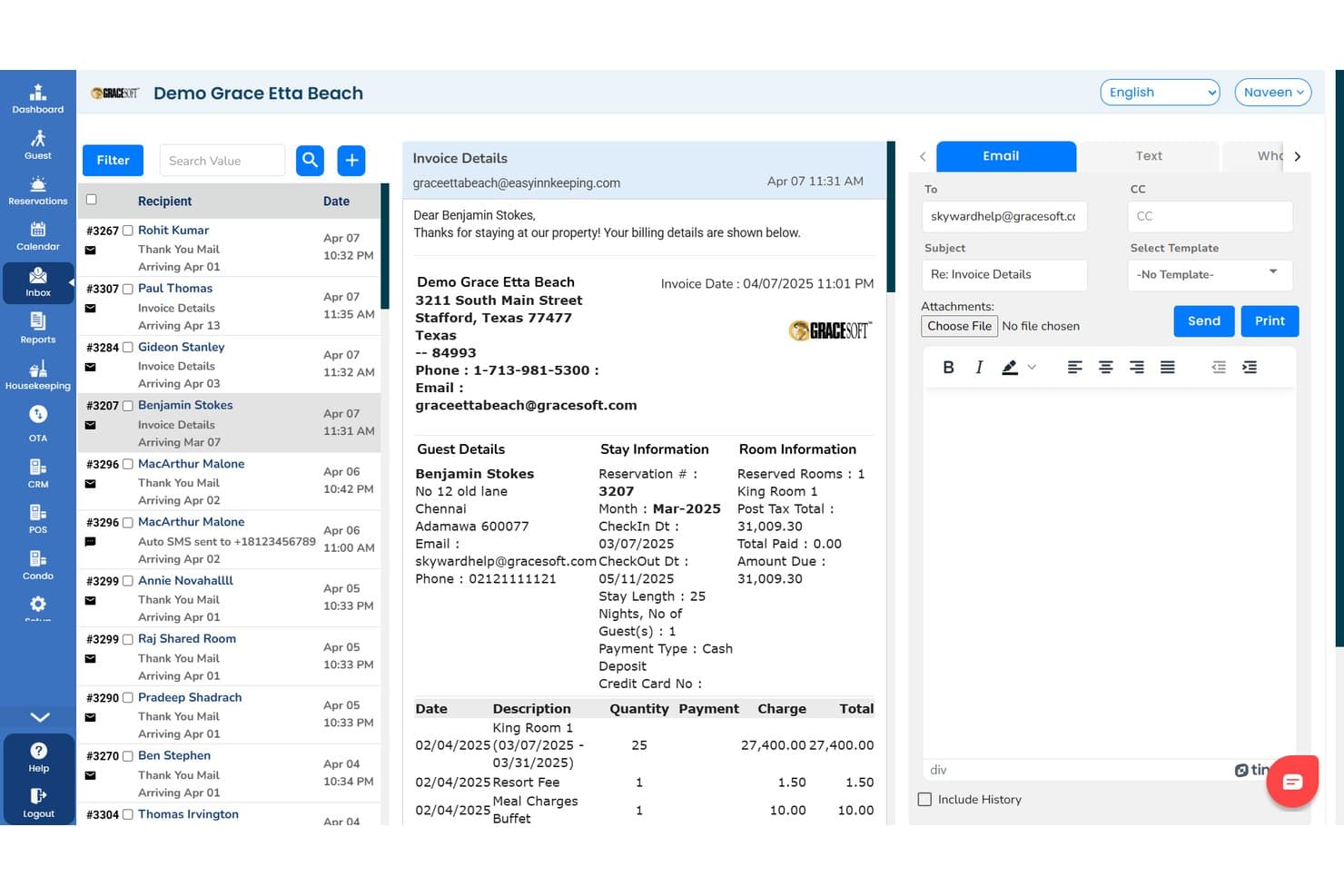
Easy InnKeeping displays guest invoices with billing and stay details. Easy InnKeeping is a cloud-based property management system with reservation management, front desk operations, room inventory tracking, guest billing, guest CRM, and housekeeping modules, designed for small inns, B&Bs, hotels, and vacation rentals.
Who Is Easy InnKeeping Best For?
Small inn or B&B owners who want a cloud-based, user-friendly PMS with a free plan for fewer than 10 rooms.
Why I Picked Easy InnKeeping
I picked Easy InnKeeping as one of the best because it genuinely offers a free-for-life Lite plan for small inns under 10 rooms, which is rare in hotel management. My team can manage reservations with a real-time calendar and use direct Vrbo integration at no extra cost for up to 250 bookings each year.
Easy InnKeeping Key Features
- Guest profile CRM: Store guest history, preferences, loyalty points, and communication records in one place.
- Point of sale (POS) module: Manage sales from restaurants, gift shops, and bar outlets within the property.
- Housekeeping assignment tools: Assign tasks to staff, update room statuses, and add notes directly from the calendar.
- Group reservation invoicing: Generate single consolidated invoices for group bookings and events like weddings or conferences.
Easy InnKeeping Integrations
Easy InnKeeping provides native integrations with Booking.com, Expedia, Airbnb, Vrbo, Google Hotels, TripAdvisor, Stripe, Square, Authorize.Net, PayPal, QuickBooks, and PriceLabs. The platform also offers WhatsApp messaging integration and an API for custom integrations.
What's Free?
Easy InnKeeping offers a free-for-life Lite plan for small inns with fewer than 10 rooms. The free plan includes core PMS features and supports up to 250 bookings per year, with some advanced features and integrations reserved for paid plans.
Pros and Cons
Pros:
- Reservation calendar supports drag-and-drop bookings
- Includes direct Vrbo integration in free tier
- Offers free Lite plan for small inns
Cons:
- No downloadable or offline operational mode
- Cannot function without internet connection
Learn more about Easy InnKeeping: Best for one-time license, on-premise billing
- 30-day free trial
- From $179.99/license
Visit WebsiteCustomer Rating:4.5/5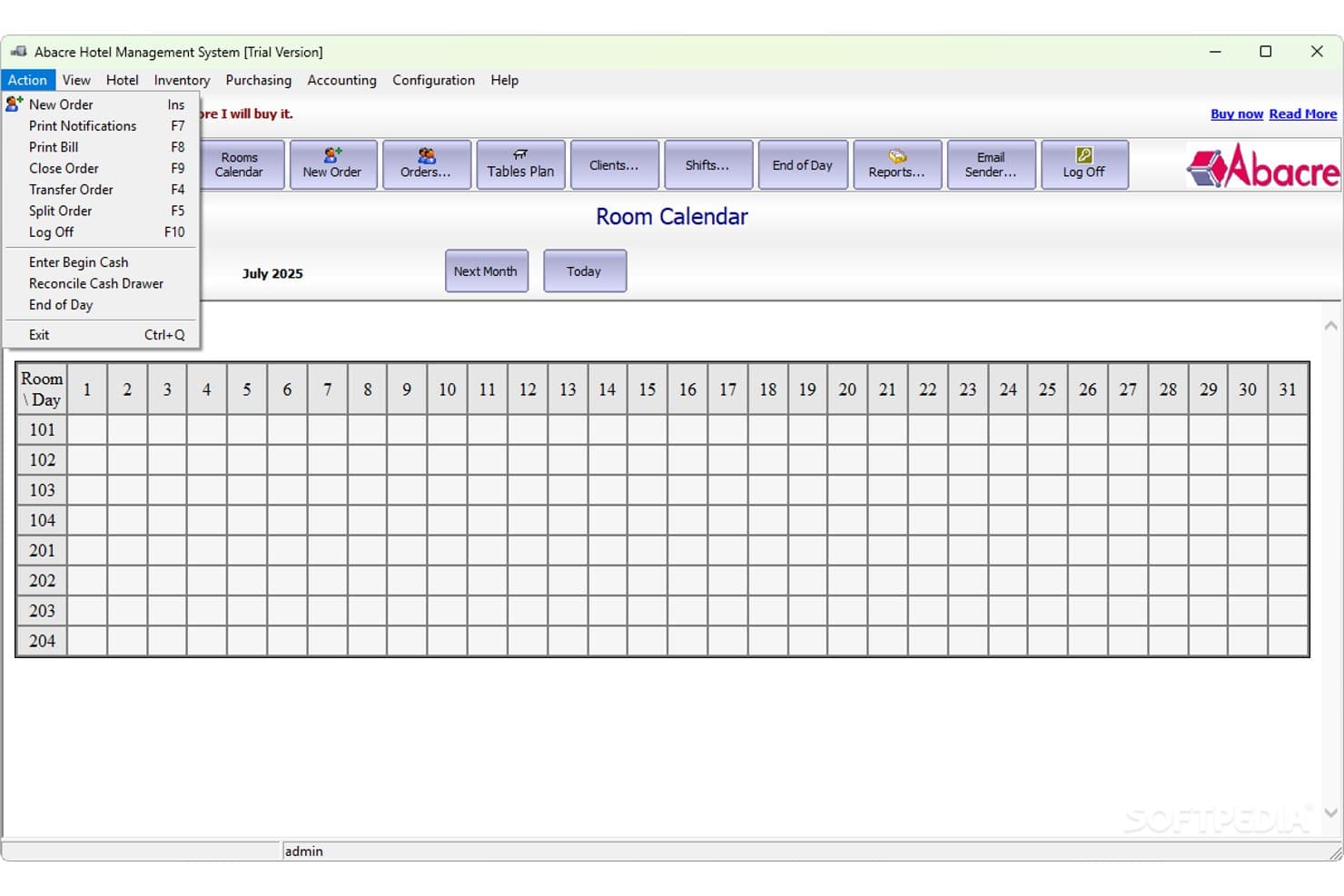
Abacre Hotel Management System tracks room availability across all days in a monthly calendar view. Abacre Hotel Management System is a Windows-based offline hotel management platform offering local reservations, guest profiles, billing, POS integration, housekeeping coordination, inventory, staff roles, and reporting features with LAN multi-terminal support and broad hardware compatibility.
Who Is Abacre Hotel Management System Best For?
Independent hotels and B&Bs that want a one-time license for a fully offline, Windows-based property management system with local network support.
Why I Picked Abacre Hotel Management System
I picked Abacre Hotel Management System because I like how it’s a Windows-based, on-premise PMS with real LAN multi-terminal capability and peripheral support. I think its encrypted local database and integrated POS for posting restaurant or bar charges right to guest folios stand out when you need everything to run offline and with a one-time license.
Abacre Hotel Management System Key Features
- Role-based staff management: Assign specific permissions and access levels for admin, front desk, housekeeping, and POS staff within the system.
- Integrated POS module: Post restaurant, bar, or shop charges directly to guest folios using the built-in order entry feature.
- Automatic local backup and recovery: Schedule encrypted database backups and restore them easily with integrated recovery tools.
- Multi-currency and tax configuration: Set up multiple currencies, tax rates, and exemptions to match your property's regional requirements.
Abacre Hotel Management System Integrations
Abacre Hotel Management System doesn't have any native software integrations. It supports connectivity with hospitality hardware like receipt printers, cash drawers, barcode scanners, MSR card readers, touch screens, and door-lock systems via OPOS, Windows, and COM-port drivers. No API is advertised.
What's Free?
Abacre Hotel Management System offers a 30-day free trial. You get full access during the trial, but you’ll need to buy a license to keep using it after the trial ends. There isn’t a free-forever plan.
Pros and Cons
Pros:
- Built-in POS for restaurant and bar
- Local network sync across multiple terminals
- Runs entirely offline on Windows PCs
Cons:
- No cloud or mobile app available
- Only a 30-day free trial offered
Learn more about Abacre Hotel Management System: Best for cloud-based multi-channel hotel ops
- 14-day free trial
- From €40/month
Visit WebsiteCustomer Rating:5/5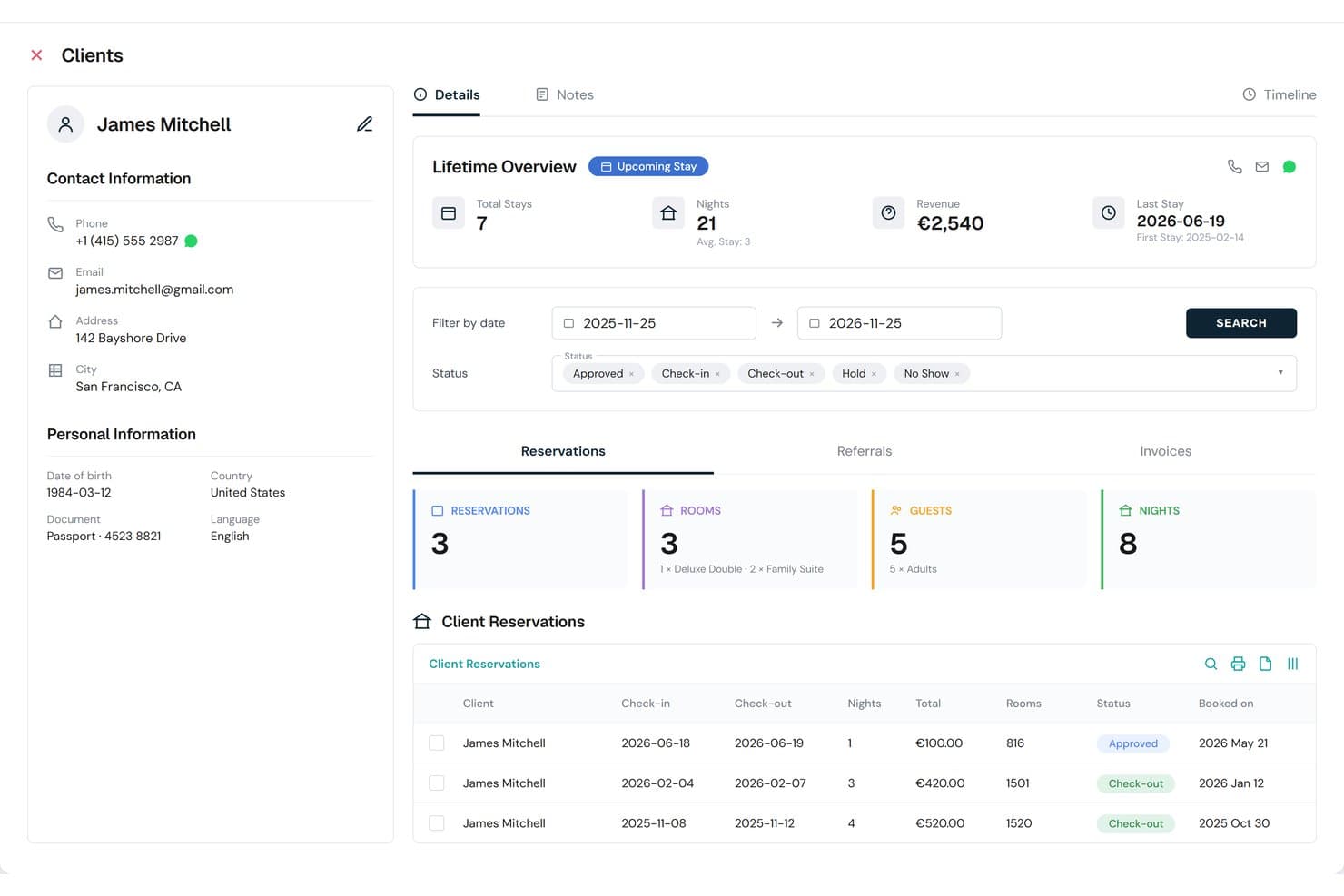
HotelBee tracks full client reservation history and lifetime stay metrics. HotelBee is a cloud-based hotel management system that brings together reservation management, front desk operations, POS, channel manager, and guest experience modules in a single browser-accessible platform.
Who Is HotelBee Best For?
HotelBee suits boutique hotels, hostels, and B&Bs looking for an all-in-one, cloud-based property management solution with native OTA integrations.
Why I Picked HotelBee
I picked HotelBee because it brings together a strong cloud-based multi-channel platform, with a PMS, POS, and channel manager that work in real time for busy boutique hotels and hostels. I’ve used its bed-level inventory and nearly instant OTA sync to manage reservations and rates across dozens of sites without missing a booking.
HotelBee Key Features
- HotelBee Payments: Accept card payments, automate deposits and no-show fees, and handle refunds directly from your dashboard.
- Bed-level inventory: Track and allocate individual beds in mixed dorms or hostels, supporting auto-allocation and restocking mid-stay.
- Guest portal and upselling: Offer online check-in, digital ordering, and upsell services with guest self-service tools and digital key delivery.
- Native fiscal and e-invoicing: Generate invoices compliant with fiscal regulations for Albania, Italy, Spain, Germany, Greece, and Croatia.
HotelBee Integrations
HotelBee offers native integrations with channel managers like Channex and Beds24, major OTAs including Booking.com, Expedia, Airbnb, Hostelworld, Agoda, and payment processors like Stripe and Adyen. It supports accounting tools like QuickBooks and Xero (on request), and provides a public REST API for custom integrations.
What's Free?
HotelBee offers a 14-day free trial with access to all core features. After the trial, continued use requires a paid plan, and there’s no free-forever option.
Pros and Cons
Pros:
- Native guest portal with digital check-in
- Bed-level inventory for hostel operators
- Full-featured PMS and channel manager suite
Cons:
- Guest data always stored in the cloud
- No offline or local install option
Learn more about HotelBee:
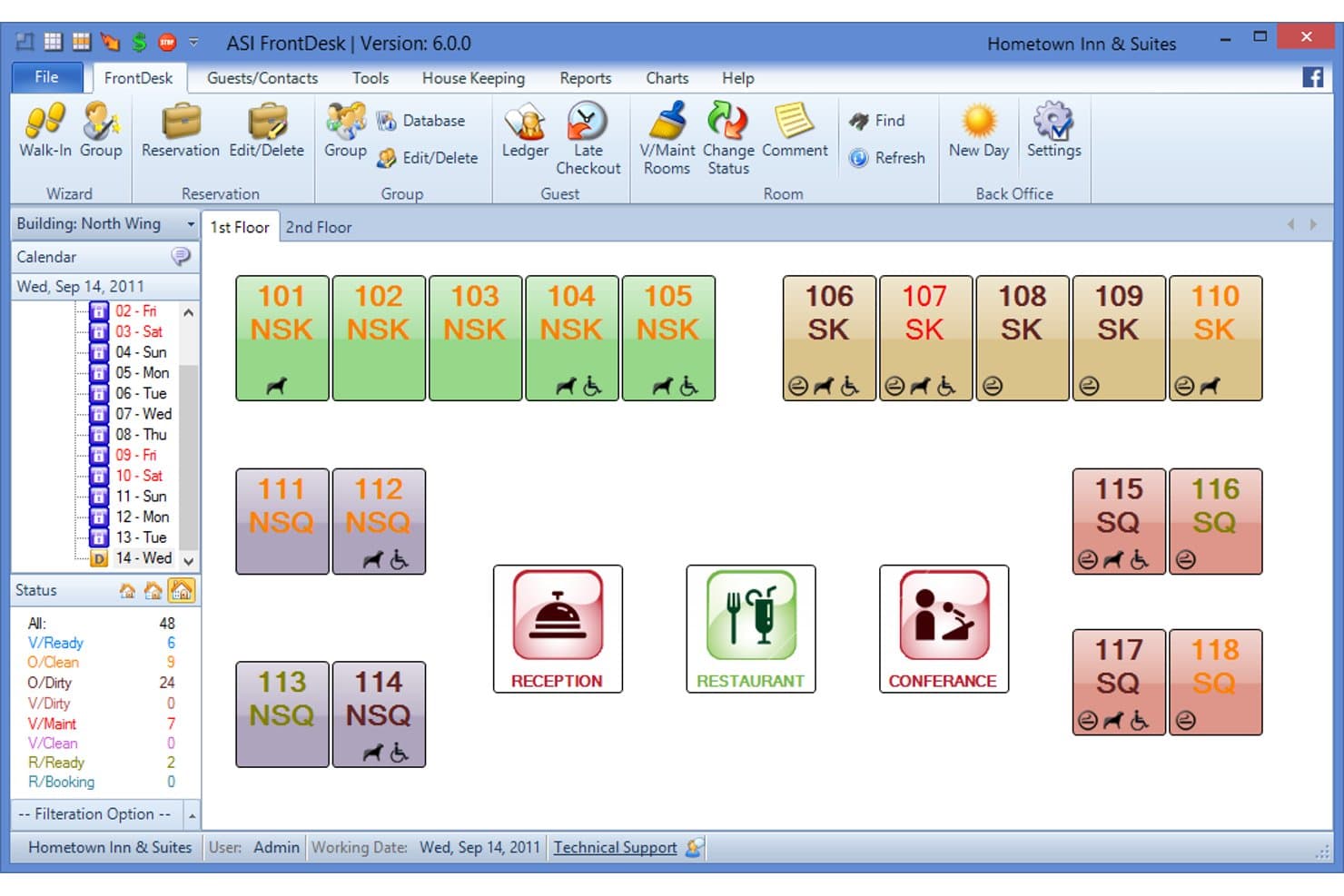
ASI FrontDesk displays a color-coded room grid for real-time occupancy tracking. ASI FrontDesk is a free offline hotel property management system for Windows that handles reservations, walk-in check-ins, folio billing, night audit, housekeeping, guest database, and reporting from a locally installed application.
Who Is ASI FrontDesk Best For?
Independent hotel and guesthouse operators who want a free, offline Windows system to manage reservations, check-ins, folios, and night audit without recurring costs.
Why I Picked ASI FrontDesk
I picked ASI FrontDesk because it gives me a truly offline, on-premise system with free reservation, check-in, folio, and night audit functions built for Windows. I like that my team can handle walk-ins, issue invoices, and complete nightly audits entirely from a local PC, which feels ideal for properties with spotty internet or strict data control needs.
ASI FrontDesk Key Features
- Multi-currency and tax management: Configure multiple currencies and set up detailed tax rules for guest folios and invoices.
- Housekeeping status module: Track room cleaning status and update out-of-order rooms directly within the application.
- Advance guest search: Find and manage guest profiles, including stay history and special remarks, using built-in search filters.
- 80+ built-in reports: Access a wide range of operations, occupancy, and financial reports generated locally on your Windows PC.
ASI FrontDesk Integrations
ASI FrontDesk’s freeware version supports integrations mainly through paid add-on modules, including QuickBooks, Shift4 and Fortis payment gateways, POS systems, electronic key locks, magnetic card readers, ID scanners, signature pads, and call accounting interfaces. Native integrations are not clearly documented.
What's Free?
ASI FrontDesk offers a free-forever offline hotel management system for Windows. The freeware version has no ongoing costs, but integrations and some advanced modules require paid add-ons.
Pros and Cons
Pros:
- Tracks housekeeping and out-of-order rooms
- Handles night audit and folio billing
- Runs fully offline on Windows computers
Cons:
- Advanced features require paid add-ons
- No direct online booking capability
Learn more about ASI FrontDesk: Best for on-premise PMS with LAN multi-user access
- 30-day free trial
- From ₹1,150 one-time
Visit WebsiteCustomer Rating:4.5/5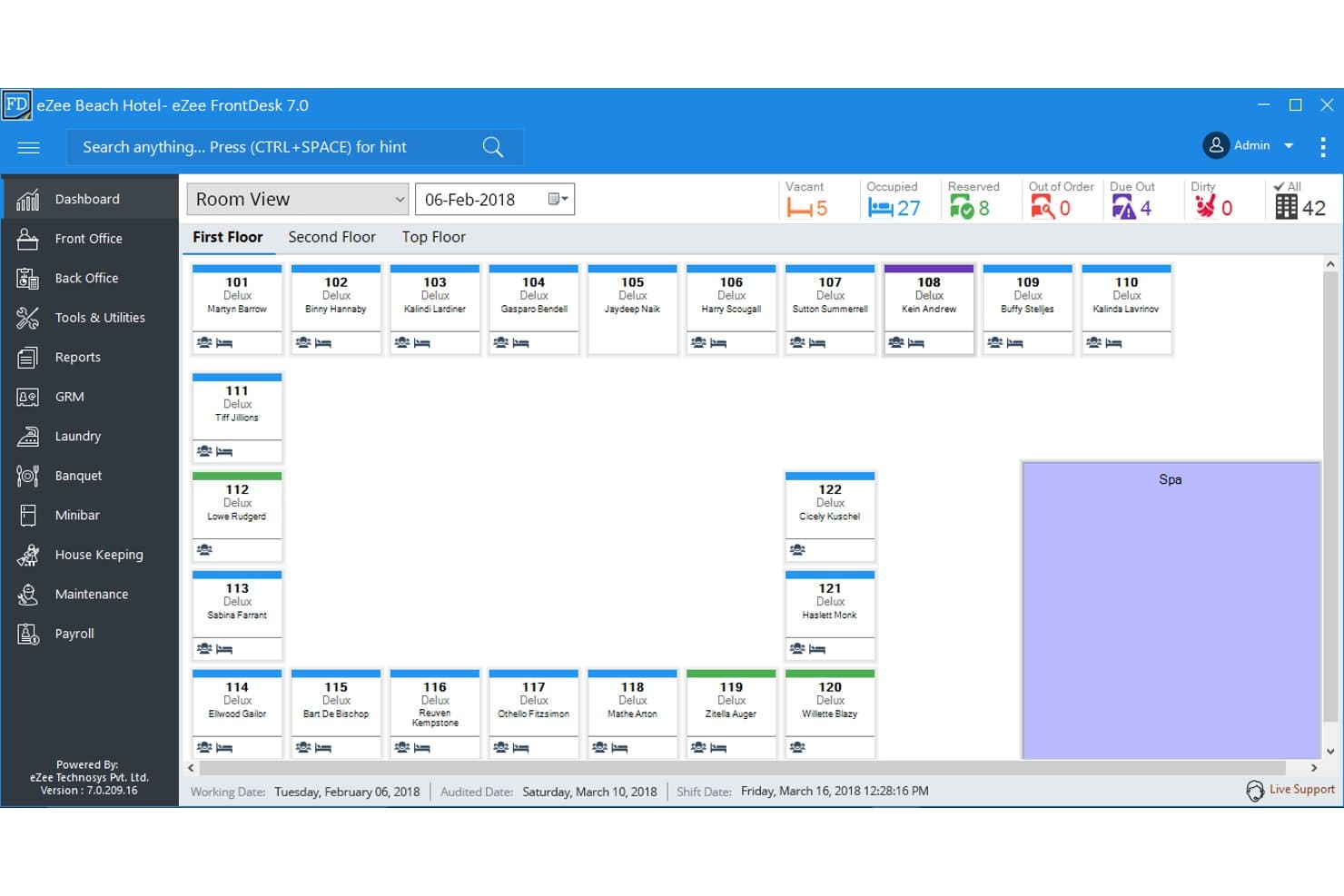
eZee FrontDesk displays real-time room status across all hotel floors. eZee FrontDesk is an on-premise hotel property management system for Windows that handles reservations, front desk operations, room inventory, guest billing, and guest profiles entirely offline with multi-user LAN access.
Who Is eZee FrontDesk Best For?
Independent hotels, motels, and boutique properties needing a locally managed PMS with multi-user LAN access and detailed guest and billing controls.
Why I Picked eZee FrontDesk
I picked eZee FrontDesk because the on-premise Windows deployment gives you full control and reliable offline access, especially with LAN multi-user support. I like how the system covers everything from guest profiles and folios to live tape chart management and statutory reporting without depending on the cloud. The built-in role-based access and housekeeping tools keep daily operations running smoothly.
eZee FrontDesk Key Features
- Reservation center calendar: View, create, modify, and cancel bookings from a centralized tape chart.
- Guest profile database: Store guest contact information, ID/passport details, preferences, and stay history locally.
- Multi-currency folio management: Create guest folios with charges, discounts, and taxes in multiple currencies.
- Housekeeping module: Track live room status and assign cleaning or maintenance tasks with real-time updates.
eZee FrontDesk Integrations
eZee FrontDesk integrates natively with eZee Centrix (channel manager), eZee Reservation (booking engine), eZee BurrP! (restaurant POS), eZee Panorama (hotel website builder), and supports integration with Tally ERP for accounting. An API is available for custom integrations.
What's Free?
eZee FrontDesk offers a 30-day free trial of its on-premise PMS. After the trial, you’ll need to purchase a license to continue using the software. There are no long-term free-forever plans available.
Pros and Cons
Pros:
- Detailed housekeeping and audit features included
- Multi-user LAN supports teamwork offline
- Local database keeps guest data private
Cons:
- Only runs on Windows desktop systems
- No free-forever or open-source version
Learn more about eZee FrontDesk: Best for AI-driven on-premise hotel ops
- Free demo available
- Free plan available
Visit WebsiteCustomer Rating:4.3/5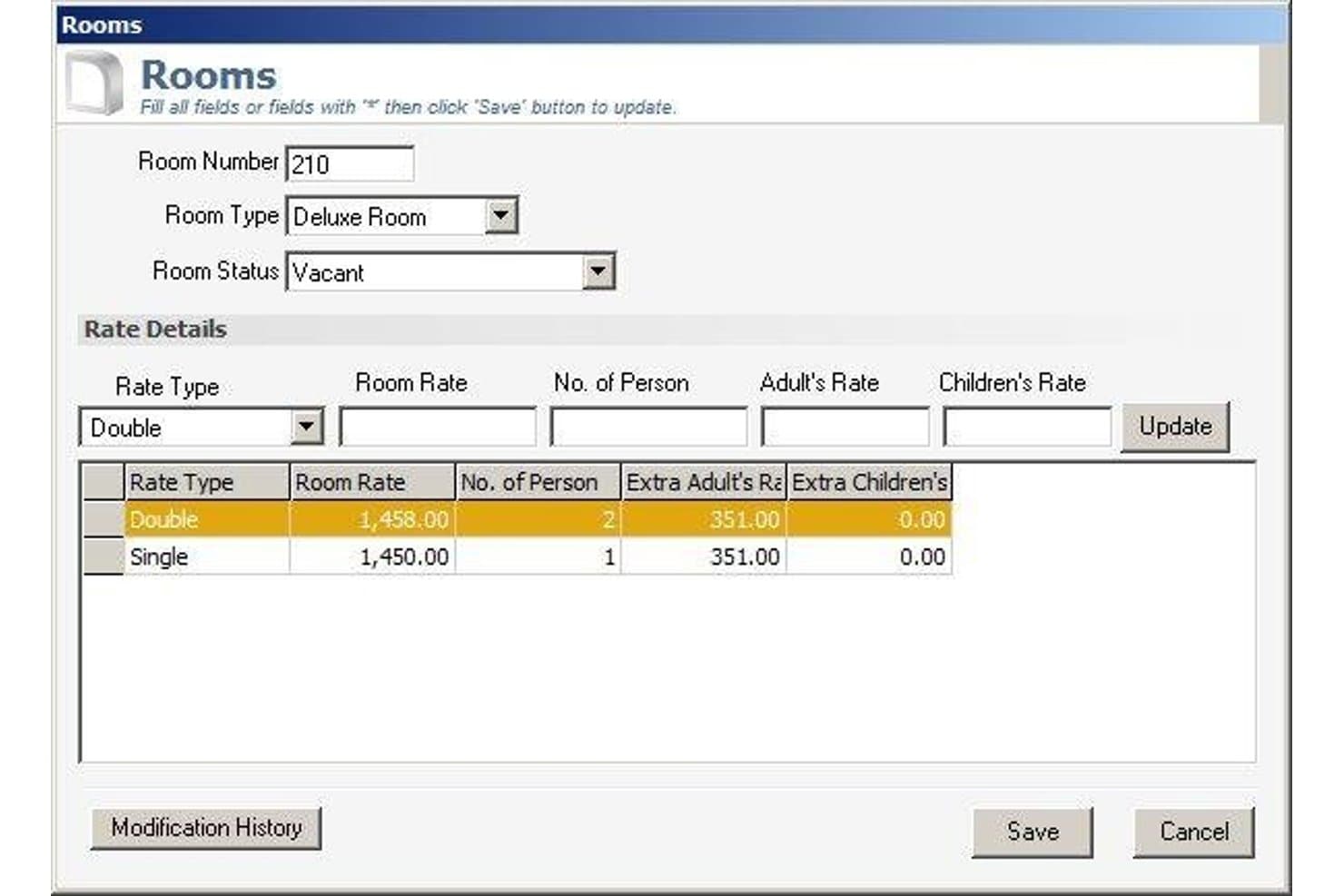
SourceForge lets users manage room rates and availability by room type. SourceForge’s HAIP is an open-source hotel management system you can self-host, featuring full reservations, front desk, inventory, billing, guest profiles, and built-in AI agents for advanced on-premise hotel operations.
Who Is SourceForge Best For?
Boutique hotel IT administrators or multi-property operators who want full control of an advanced, self-hosted property management system.
Why I Picked SourceForge
I picked SourceForge because I like how its HAIP platform lets me run a full-featured hotel management system directly on my own hardware, completely offline. The built-in AI agents automate night audits and housekeeping optimization, while real-time inventory dashboards and a multi-property setup keep operations flexible for boutique or multi-site hotels.
SourceForge Key Features
- Automated night audit anomaly detection: Identifies unposted charges, duplicate folios, and cash variances automatically during night audit workflows.
- Commission-free direct booking engine: Lets you embed a booking widget and manage public API access without relying on third-party OTA platforms.
- Role-based access control (RBAC): Allows flexible multi-level permissions and roles for property, department, or team member access management.
- Real-time housekeeping workload dashboard: Displays digital checklists and cleaning prioritization based on VIP and early check-in status.
SourceForge Integrations
SourceForge HAIP offers documented integrations with Booking.com, Expedia EQC, SiteMinder, DerbySoft (for OTA channels), Stripe (payments), Keycloak (authentication), Twilio (messaging), and S3/MinIO (media storage). It also provides a REST API and event-driven webhooks for custom integrations.
What's Free?
SourceForge HAIP is free to use as open-source software you can host on your own servers. There’s no user or property limit, but you’ll need to handle your own hosting, updates, and support. Paid support and managed hosting options aren’t included in the free version.
Pros and Cons
Pros:
- Direct booking widget with no commissions
- Built-in AI agents automate hotel operations
- Runs fully offline on local hardware
Cons:
- No desktop installer or printer integration
- Requires Docker and command-line setup
Learn more about SourceForge: Best for open-source, fully local PMS
- Free plan available
- Pricing upon request
Visit WebsiteCustomer Rating:4.5/5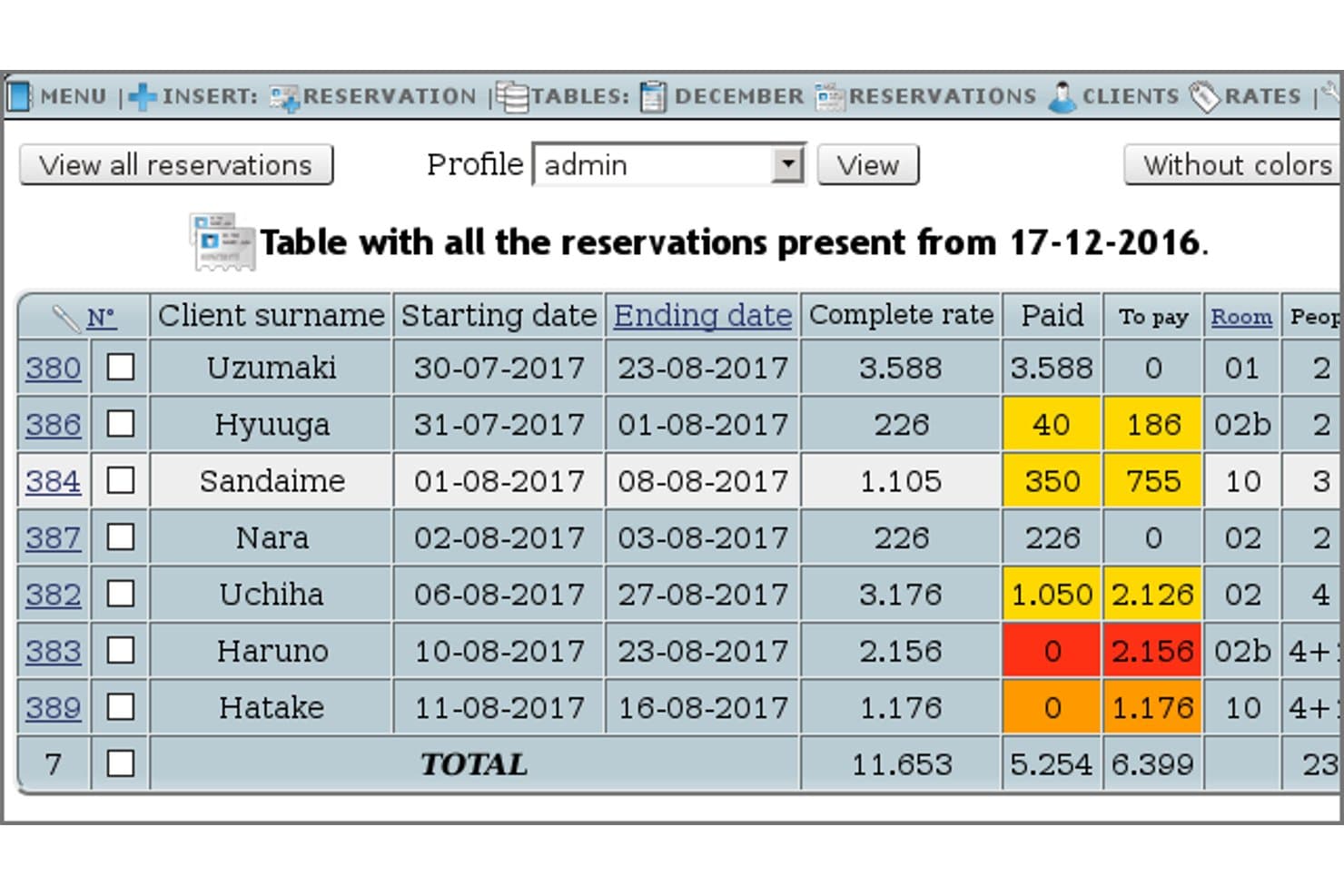
HotelDruid tracks all reservations with payment status and room details. HotelDruid is a free open-source property management system that handles offline reservations, guest billing, point of sale, inventory, and multi-user permissions on Windows or Linux with full local data storage.
Who Is HotelDruid Best For?
HotelDruid is a strong choice for independent hotels, B&Bs, and hostels needing a free, fully offline PMS with local data control and multi-user access.
Why I Picked HotelDruid
I picked HotelDruid for its open-source, fully local PMS setup that works even without internet. My team can run it entirely offline with a local Windows or Linux server and manage reservations, invoicing, and guest folios on-site. I also like the automatic room assignment feature and the granular multi-user privileges, which support clear operation across roles.
HotelDruid Key Features
- Touchscreen-friendly POS: Manage bar and restaurant sales with categorized items and automatic inventory deduction.
- Custom document templates: Create invoices, receipts, rental contracts, and regulatory forms in HTML, RTF, or email formats.
- Multilingual user interface: Access modules in over 14 languages, including English, Spanish, French, and German.
- Batch invoicing: Generate invoices for multiple reservations at once using auto-numbered and country-specific templates.
HotelDruid Integrations
HotelDruid integrates natively with MySQL, PostgreSQL, and SQLite databases. Add-on modules connect to PayPal, Stripe, Mercadopago, Booking.com, Expedia, Airbnb, Google Calendar, and other OTAs via channel manager. An API is not documented for custom integrations.
What's Free?
HotelDruid is free and open-source, so you can use its core property management system with unlimited rooms, users, and properties without time limits. Some add-on modules—like channel manager connectors—require paid upgrades, but all core reservation, billing, and POS features are included at no cost.
Pros and Cons
Pros:
- Drag-and-drop calendar with automatic room assignment
- No recurring subscription for unlimited users
- Fully local, offline operation on any hardware
Cons:
- No dedicated housekeeping status dashboard
- Outdated user interface and visual design
Learn more about HotelDruid: Best for offline-first PMS with fiscal invoicing
- Free plan available
- Pricing upon request
Visit WebsiteCustomer Rating:4.2/5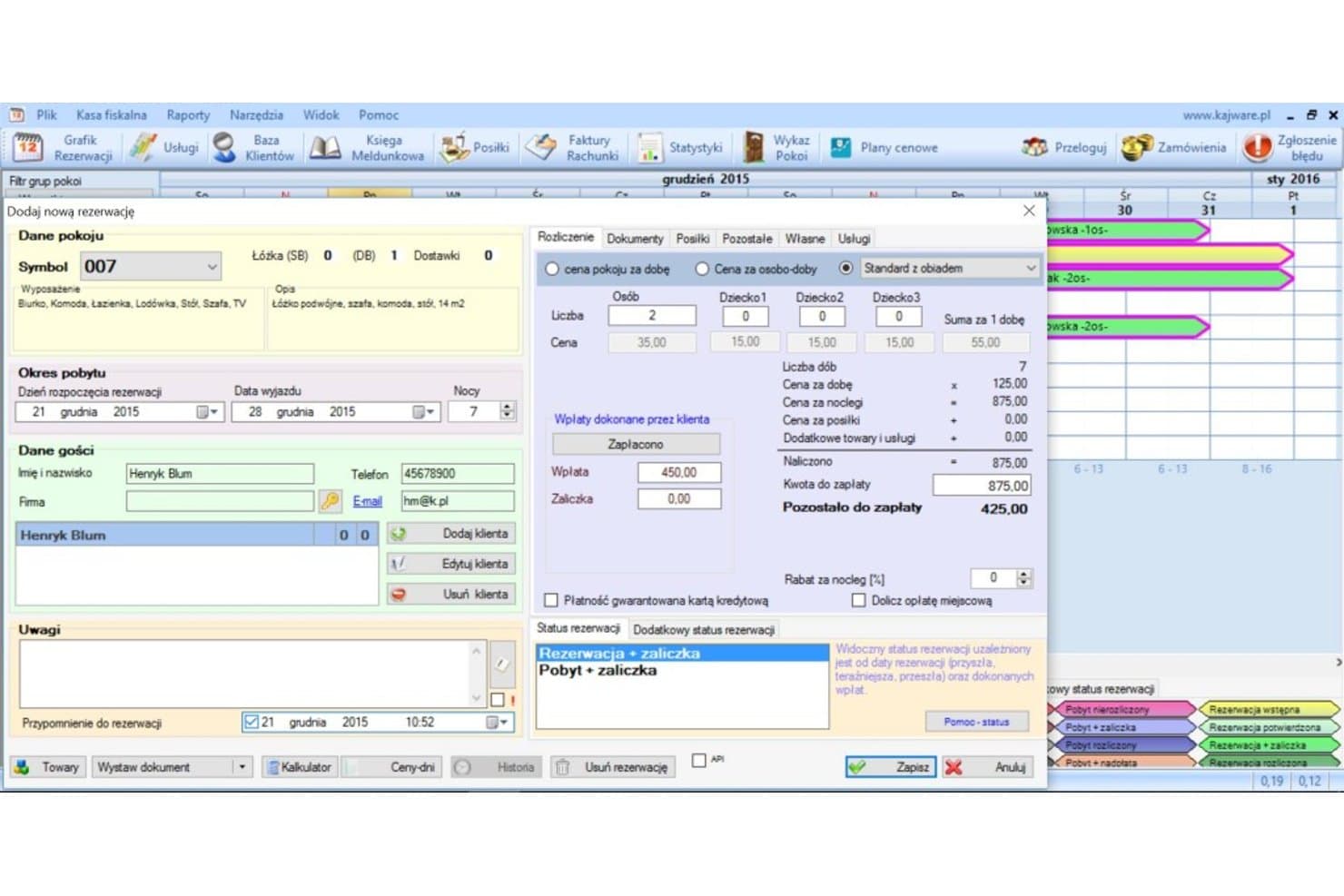
KWHotel lets users manage room bookings and billing in one form. KWHotel is a free offline hotel property management system for Windows that covers reservations, front desk operations, guest billing and invoicing, room inventory, housekeeping, and guest profiles.
Who Is KWHotel Best For?
KWHotel is ideal for independent hotels, guesthouses, and hostels that need a full-featured offline PMS with no ongoing fees.
Why I Picked KWHotel
I picked KWHotel because I’ve installed its free Windows app at properties where having a true offline PMS matters. The offline-first design makes check-in, invoicing, and front desk tasks reliable without internet. I also appreciate the built-in fiscal invoicing tools and housekeeping statuses for busy front desk teams.
KWHotel Key Features
- Integrated housekeeping management: Track room cleaning status directly from the reservation calendar to support daily coordination.
- Detailed guest profiles: Store IDs, tax information, VIP or blacklist status, and booking history for every guest.
- Flexible rate plan engine: Set daily, seasonal, group, and meal-inclusive rates with per-room and per-channel pricing rules.
- Role-based user permissions: Assign access rights and controls for administrators, receptionists, accounting, and other staff levels.
KWHotel Integrations
KWHotel offers native integrations with YieldPlanet, SiteMinder, WuBook, Booking.com, Expedia, Espago, POSbistro, SMSAPI, Sezam24, Google-format export, and the Hotel Clean App. An API is available for additional custom integrations.
What's Free?
KWHotel offers a free-forever Windows app for hotel management with no ongoing fees. The free plan includes reservation management, guest profiles, invoicing, and housekeeping, but may limit some advanced features and integrations to paid plans.
Pros and Cons
Pros:
- Housekeeping status visible on reservation calendar
- No room or booking limits in free version
- Fully offline reservations and invoicing on Windows
Cons:
- Windows-only with no macOS native app
- Free tier limited to one workstation
Learn more about KWHotel:
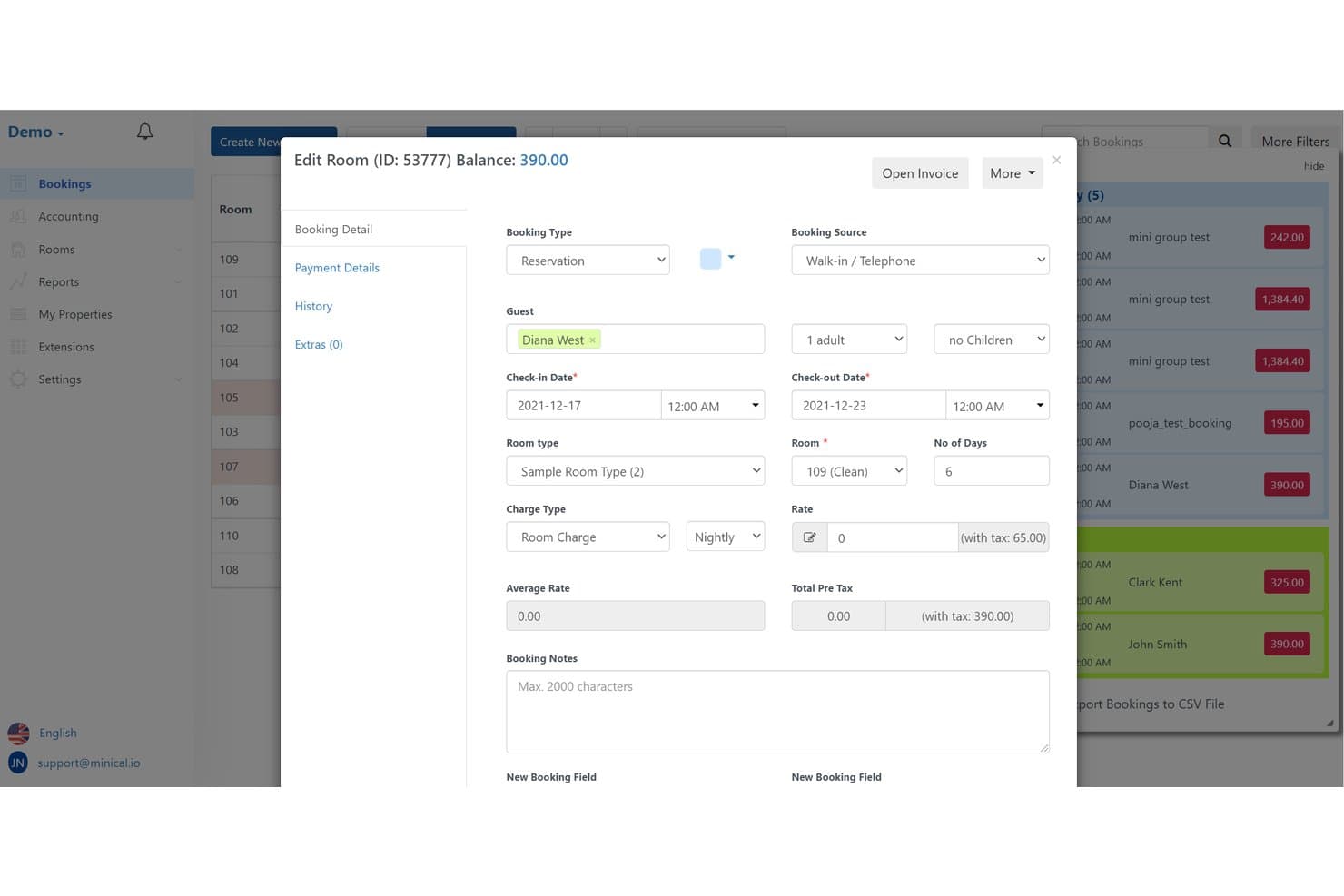
MiniCal lets users edit room bookings with guest and rate details. MiniCal is an open-source hotel property management system you can self-host to handle reservations, front desk workflows, room inventory, billing, guest profiles, and housekeeping, with dozens of modular extensions for payments, channel management, and regulatory reporting.
Who Is MiniCal Best For?
Independent hotel operators or IT admins seeking a self-hosted PMS with advanced billing, reporting, and open-source flexibility.
Why I Picked MiniCal
I picked MiniCal because I like its open-source codebase, which lets my team self-host property management on local hardware. The drag-and-drop reservation calendar and customizable billing modules let us handle reservations, front desk, and housekeeping even without internet access. Full fiscal report support helps us tackle regulatory compliance in offline deployments.
MiniCal Key Features
- Advanced inventory calendar: Visualize and manage room availability, rates, and restrictions in a single dashboard.
- Finance module: Handle detailed ledgers, custom invoice templates, and tax/currency rules for guest billing.
- Housekeeping task assignments: Assign, track, and update housekeeping tasks and room status in real time.
- Modular extension support: Enable specific features like payment gateways, channel management, or compliance tools as needed via add-ons.
MiniCal Integrations
MiniCal offers 70+ marketplace integrations, including Stripe, Square, Authorize.Net, Channex (with Booking.com, Airbnb, Expedia sync), SiteMinder, WordPress, Intercom, Cardknox, and compliance integrations for SERPRO (Brazil FNRH) and fiscal printer hardware. An API is available for custom integrations.
What's Free?
MiniCal offers a free demo so you can try out the platform with no upfront cost. There isn’t a permanent free-forever plan—ongoing use requires a paid license. The demo covers all core features but may limit the number of users or integrations available.
Pros and Cons
Pros:
- Advanced billing and fiscal compliance features
- Full offline deployment possible with core install
- Self-hosted open-source codebase available
Cons:
- Essential extensions cost extra beyond core package
- Free path requires technical server setup
Learn more about MiniCal:
Other Free Offline Hotel Management Software
Here are some additional free offline hotel management software options that didn’t make it onto my shortlist, but are still worth checking out:
- 11Bistone Hotel Reservation SystemBest for one-time licensed, LAN-ready hotel ops
- 12MotelMateBest for NZ motel desk ops without cloud
- 13QloAppsBest for open-source, self-hosted property data control
- 14NobedsBest for cloud-free OTA sync on a free plan
- 15Odoo Pharmacy ManagementBest for ERP-based self-hosted property ops
- 16SolidresBest for Joomla-based self-hosted bookings
- 17HotelioBest for ID-capture guest registration offline
- 18JomresBest for self-hosted, open-source bookings
Related Reviews
How I Evaluate Free Offline Hotel Management Software
First, I define what counts as free. For offline hotel management software, that means a free-forever downloadable version or open-source release—not a trial—since a property's PMS is always-on infrastructure. From there, I split my evaluation into core functionality every tool must cover, like local reservation management and on-premise billing, and the differentiators that separate genuinely useful systems from bare-minimum installs.
Core Functionality (Table Stakes For This List)
In addition to my free offer requirements, I also use a scoring system to select tools for my list. Here's how it works:
When I'm selecting tools for my list, I rank each one on a scale from 0 (does not offer the functionality) to 5 (excels in this area) for each core functionality listed below. I then calculate the tool's total score into a percentage, using 65% as a benchmark to help assess its overall fit for the list.
- Offline/local deployment: I check whether the software installs and runs on local hardware without a live internet connection—for example, completing a guest check-in during an outage.
- Reservation management: I look for a booking calendar that lets you create, modify, and cancel reservations across room types, not just a static log of upcoming stays.
- Front desk operations: Each tool needs to support real check-in/check-out workflows, room assignments, and folio handling so your desk staff can manage walk-ins and scheduled arrivals in one place.
- Room inventory and availability: I evaluate how the system tracks room status and occupancy, including whether housekeeping states or out-of-order flags update the availability view in real time.
- Guest billing and invoicing: I look for folio generation with tax handling and payment recording—things like splitting a folio between a guest and a corporate account or printing a receipt at checkout.
- Guest profile management: The tool should store guest contact details, stay history, and notes in a local database so front desk staff can recognize returning guests and reference past visits.
Once I have a list of tools that meet the criteria, I consider what sets each platform apart.
Differentiating Factors (What Sets Vendors Apart)
Here's how I compare and contrast different vendors:
Standout Features
I look for a housekeeping module that tracks room status locally—clean, dirty, inspected, out-of-order—so front desk and housekeeping coordinate turnovers without a separate app. I also evaluate local reporting dashboards, checking whether occupancy, ADR, and RevPAR reports generate directly from the on-device database. Data backup and restore matters too: I check for one-click backup to an external drive, giving operators full disaster recovery control without depending on a vendor's cloud.
Beyond Features
I check OS compatibility and installation complexity first, since many offline PMS options are Windows-only and independent operators rarely have dedicated IT staff. Data ownership matters just as much—I look for local database encryption and role-based access controls so guest PII stays protected on shared front desk machines. I also evaluate export options like CSV or SQL dumps, because a property that outgrows its free PMS needs a clean migration path.
How to Choose a Free Offline Hotel Management Software
What matters most when evaluating free offline hotel management software is matching your property’s top operational priorities to specific non-negotiable capabilities—not just checking a long features list.
| If your priority is... | Look for... |
| Running without internet interruptions | Solid offline/local install and a documented LAN or backup sync method |
| Avoiding ongoing costs | Free-forever plan or clear one-time license with no hidden renewal fees |
| Handling multi-user/front desk workflows | LAN or multi-user login support with permission controls |
| Staying audit/compliance ready | Built-in local fiscal invoicing and offline reporting modules |
| Data privacy for guest records | On-premise storage and PIN, password, or role-based access controls |
How to Vet Your Shortlist
- Test fully offline mode: Install the desktop or local server version and complete 3 reservation and billing cycles with Wi-Fi disabled.
- Try a multi-user setup: Add at least 2 front desk logins and confirm real-time room status sync over a shared LAN in a trial environment.
- Request a backup/restore demo: Ask for a one-click backup walk-through and restore of property data to a test machine.
- Review compliance documentation: Request sample invoices and reporting artifacts showing offline audit trails or local data retention features.
- Balance open-source control vs. proprietary support: Decide—do you want total data ownership with DIY setup, or easier onboarding with vendor-led support and updates?
What Is Free Offline Hotel Management Software?
Free offline hotel management software is a downloadable system that lets you manage reservations, guest profiles, billing, and daily hotel operations without requiring a continuous internet connection. These tools run on your local hardware, giving you control over data storage and access even during network outages. This approach is ideal for properties that want to avoid ongoing subscription costs and need uninterrupted management capabilities on-premise.
Features of Free Offline Hotel Management Software
Let’s go over the features commonly found in offline hotel management software, and which ones are usually included in free vs. paid plans.
Typically Free Offline Hotel Management Software Features
- Reservation management: Lets you create, edit, and cancel bookings directly on a local calendar so you can see current and future occupancy at a glance—even if the internet goes out.
- Front desk check-in and check-out: Supports real-world arrival and departure workflows so staff can process guests, assign rooms, and handle walk-ins right from the front desk.
- Room inventory and status tracking: Keeps an updated record of which rooms are clean, occupied, vacant, or out of service, allowing for immediate assignment or scheduling housekeeping.
- Local billing and invoicing: Produces guest folios, receipts, and invoices with room charges, taxes, and extras—making it easy to close accounts and track payments without cloud tools.
- Guest profile storage: Stores essential guest details like contact info, historical stays, and preferences on your own hardware, providing continuity for returning visitors and easy data access.
- Basic housekeeping status: Lets you mark rooms as clean, dirty, or inspected, ensuring operations know which rooms are ready for the next guest.
- Simple user management: Allows limited access for multiple staff members with individual logins, so teams can handle their shifts securely.
- Basic reporting: Generates simple, local on-device reports such as daily arrivals, departures, and occupancy for operational visibility.
Typically Paid Offline Hotel Management Software Features
- Advanced multi-user permissions: Offers role-based access where managers, front desk, and housekeeping get tailored controls and restrictions, improving security and accountability.
- Integrated channel management: Syncs reservations with online travel agents (OTAs) or direct booking engines, reducing overbooking and the need for manual updates.
- Fiscal invoice and tax compliance tools: Includes built-in support for complex local fiscal requirements and generates government-compliant invoices, supporting audit and legal standards.
- Customizable reporting dashboards: Provides advanced analytics like revenue per available room (RevPAR), average daily rate (ADR), and forecast reports, all directly from local databases.
- Automated backups and restore: Enables scheduled local or encrypted external backups with one-click restore, so operators can recover quickly from hardware failure or data loss.
- Integration with payment terminals: Connects guest billing directly with on-premise payment terminals, reducing manual entry and errors at checkout.
- Housekeeping scheduling and task assignment: Delivers tools for assigning cleaning or maintenance tasks to staff with status tracking, allowing tight coordination between departments.
- Group booking and block management: Offers tools to quickly reserve and manage blocks of rooms for events, conferences, or group arrivals without manual calendar juggling.
- Detailed audit logs: Tracks every user action, reservation change, and financial modification with time stamps, creating a reliable record for auditing and troubleshooting.
- Migration and export tools: Supports exporting all core data in formats like CSV or SQL, ensuring your property can upgrade or migrate systems without losing historical information.
Benefits of Free Offline Hotel Management Software
Implementing free offline hotel management software provides several benefits for your team and your business. Here are a few you can look forward to:
- Reliable local access: Keep all core functions running—like check-in, billing, and reservations—even during internet outages, since the platform works directly on your property’s hardware.
- No ongoing subscription costs: Operate your hotel management system without paying monthly or annual licensing fees, so you can reinvest savings back into your property’s operations.
- Full control over guest data: Store guest profiles, booking history, and payments on your own servers or computers, reducing risks tied to external data storage and privacy breaches.
- Tailored multi-user workflows: Support multiple staff logins and local permission controls, letting you coordinate front desk, housekeeping, and management tasks without cloud dependencies.
- Fast, on-device reporting: Generate occupancy, billing, and guest stay reports instantly from the local database, so you always have operational data at your fingertips without waiting for cloud syncs.
- Flexible backup and migration: Use local or external backups and export options like CSV or SQL dumps to maintain property data security or prepare for future system upgrades.
- Simplified installation and maintenance: Skip complex IT requirements, as many offline tools offer straightforward installation on Windows or Linux and can be managed without dedicated tech staff.
Costs and Pricing of Offline Hotel Management Software
I realize you came to this article looking for the best offline hotel management software options that are available for free. However, since free plans only offer limited features, there's a good chance you'll need to scale your plan up in the future.
The table below summarizes common plans, their average prices, and typical features included in offline hotel management software:
Plan Comparison Table for Offline Hotel Management Software
| Plan Type | Average Price | Common Features |
| Free Plan | $0 | Local reservation management, basic check-in and check-out, simple room inventory, guest profiles, and simple reporting. |
| Personal Plan | $10-$30/month | All free features, enhanced billing, limited multi-user support, improved inventory status, and data export options. |
| Business Plan | $40-$80/month | LAN multi-user access, role-based permission controls, housekeeping status, advanced invoicing, and offline reporting dashboards. |
| Enterprise Plan | $100-$200/month | All business features, full integration with payment terminals, compliance reporting, automated backups, group bookings, and audit logs. |
Free Offline Hotel Management Software FAQs
Here are some answers to common questions about free offline hotel management software:
Can I run free offline hotel management software on multiple computers?
Yes, some free offline hotel management systems let you run the software across multiple computers on the same local network. This way, your front desk, back office, and even housekeeping can stay in sync without an internet connection. Always check for LAN or multi-user support during setup, since not all free options allow this out of the box.
Is my data secure if I use free offline hotel management software?
Yes, your data is stored locally, so you control access and backups. However, you need to manage password protection, run regular backups, and restrict access with user accounts or roles. Some open-source systems offer database encryption or export features, giving you greater oversight if guest privacy is a top priority.
How hard is it to back up and restore property data with free offline hotel management software?
Backing up is usually a manual process—a lot of free systems provide a one-click export to save your data onto a USB drive or external disk. Restoring is as simple as importing that file onto another system. Just make sure you test your backup and restore process so you’re not caught off guard in case of a hardware failure or staff turnover.
Are there limits to the number of rooms or reservations in free offline hotel management tools?
Often, yes. Some free systems cap the number of rooms or reservations you can manage, or lock advanced features behind a paid plan. Always read the vendor’s limits clearly before onboarding, especially if you’re managing more than a handful of rooms or expect to grow your property over time.
Can I upgrade to paid features later if my needs change?
Yes, most free offline hotel management vendors offer paid upgrades. If you find you need advanced reporting, more users, or integration with online booking channels, you can usually unlock these with a paid plan. Check the platform’s upgrade process and pricing so you’re prepared if your hotel expands.
What features should I look for in free offline hotel management software?
Look for free hotel management software that covers core property management software needs without requiring a constant internet connection. Useful features include booking management, an availability calendar, guest records, room assignments, check-in and check-out, and basic reporting. If you also take direct reservations, check whether the platform can connect to an online booking engine or booking engine when internet access is available. Features such as dynamic pricing and revenue management can also help optimize room rates, while tools such as Hotelogix illustrate the broader feature set available in more advanced hotel systems. These capabilities can be especially useful for small hotels and bed & breakfasts that want simple day-to-day management without a complex setup.