

Otel çizelgeleme yazılımı, departmanlar genelindeki ekip üyeleriniz için çalışma vardiyalarını oluşturmanıza, yönetmenize ve ayarlamanıza yardımcı olur. En iyi konaklama sektörü personeli çizelgeleme yazılımını arıyorsanız, muhtemelen vardiya kapsamı, son dakika değişiklikleri ve iş gücü maliyetlerini kontrol altında tutma gibi zaman alan zorluklarla karşı karşıyasınız; üstelik girişten çıkışa kadar harika konuk deneyimleri sunmaya devam etmeniz gerekir. Bu kılavuz, kullanımı kolay en iyi çözümleri karşılaştırmanıza, her birini farklı kılan özellikleri anlamanıza ve operasyonlarınızı sorunsuz bir şekilde yürütürken konaklama sektörü çalışan tabanınızın bağlılığını korumanıza yardımcı olacak doğru seçeneği belirlemenize yardımcı olur; çoğu zaman denemeyi başlatmak için kredi kartına bile ihtiyacınız olmaz.
Why Trust Our Software Recommendations
6,700+
Reviews
20
Industry experts
16+
Evaluation factors
14
Years
Our team has been testing and reviewing software since 2012. As hospitality leaders ourselves, we know how difficult—and important—it is to choose the right software.
For this guide, we evaluated tools using hands-on testing and independent research, scoring tools using our selection criteria.
Our reviews reflect our human editorial judgment, not a sales pitch.
Otel Personeli Çizelgeleme Yazılımı Karşılaştırma Tablosu
Aşağıdaki tablo, en iyi otel personeli çizelgeleme yazılımı seçimlerimin fiyatlandırma ayrıntılarını karşılaştırmaktadır.
Sorted by: Default
| Tool | Starting Price | Website | |
|---|---|---|---|
Best for payroll-connected hotel shift scheduling | 4.5 out of 5 | $50/user/month 30-day free trial + free demo available | Website |
Best for compliance-ready scheduling in hotels | 4.6 out of 5 | $5/user/month 30-day free trial + free demo available | Website |
Best for collaborative task management in hotels | 4.8 out of 5 | Pricing upon request Free demo available | Website |
Best for mobile-first shift scheduling in hospitality | 4.4 out of 5 | Pricing upon request Free demo available | Website |
Best for multi-location workforce scheduling | 4.3 out of 5 | Pricing upon request Free demo available | Website |
Best for automated labor forecasting in hospitality | 4.0 out of 5 | Pricing upon request Free demo available | Website |
Best for optimizing labor costs with real-time | Not rated | Pricing upon request Free demo available | Website |
Best for integrating labor data with financial reporting | Not rated | Pricing upon request Not available | Website |
Best for all-in-one staff communication tools | 4.6 out of 5 | Pricing upon request Free plan + 14-day free trial available | Website |
Best for real-time attendance tracking in hotels | 4.7 out of 5 | $5/user/month Free trial + free demo available | Website |


Otel Personeli Çizelgeleme Yazılımı İncelemeleri
Kısa listeme giren en iyi otel personeli çizelgeleme yazılımlarına ilişkin ayrıntılı özetlerimi aşağıda bulabilirsiniz. İncelemelerim, size en uygun olanı bulmanıza yardımcı olmak için her platformun özelliklerine, en iyi kullanım alanlarına ve entegrasyonlarına ayrıntılı bir bakış sunar.
 Best for payroll-connected hotel shift scheduling
- 30-day free trial + free demo available
- From $50/user/month
Visit WebsiteCustomer Rating:4.5/5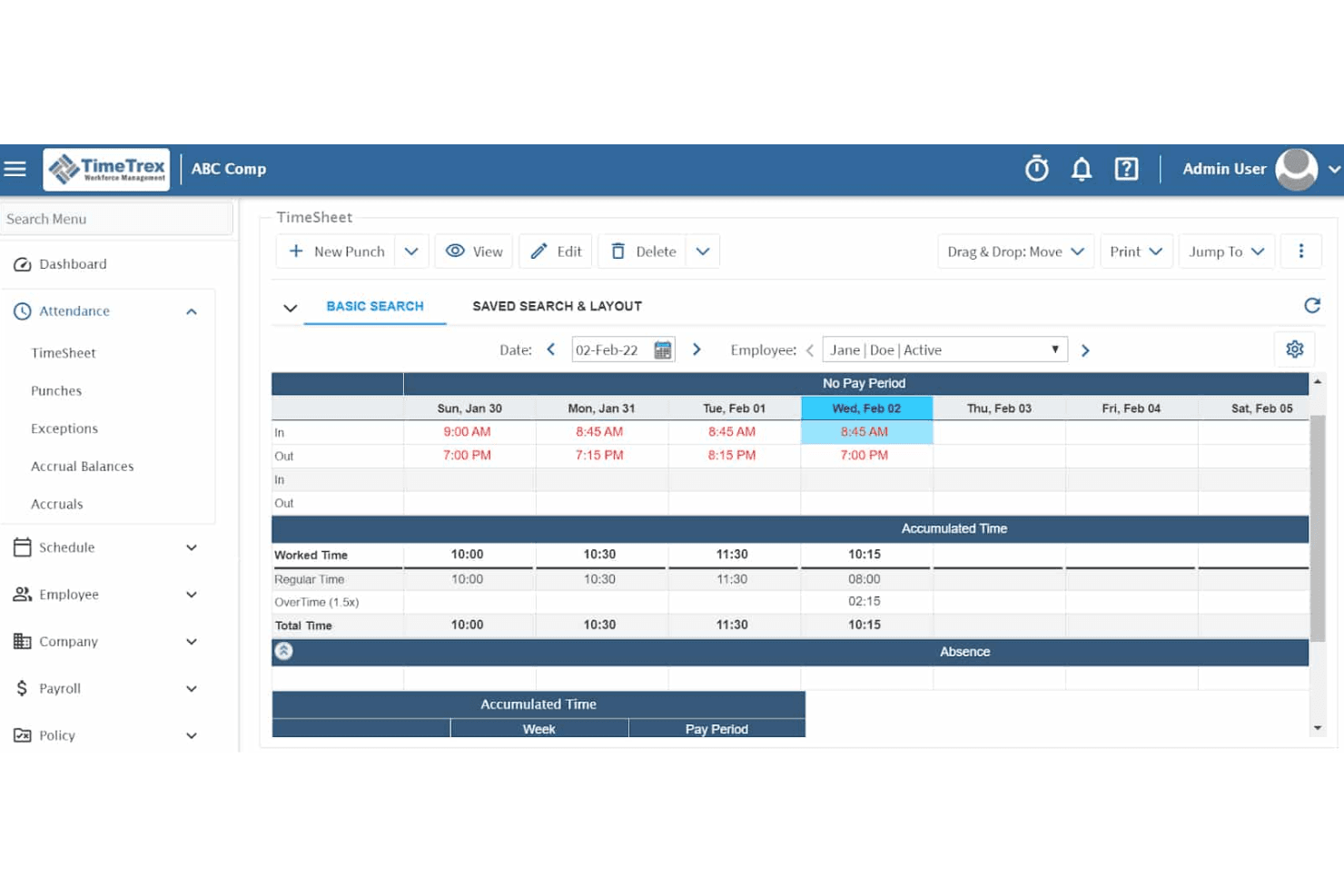
TimeTrex tracks employee punch times and overtime in a weekly timesheet view. TimeTrex is a workforce management platform that combines employee scheduling, time and attendance tracking, payroll processing, leave management, and HR tools for hotel operations.
Who Is TimeTrex Best For?
TimeTrex is a strong fit for hotel HR and operations managers who need scheduling, time tracking, and payroll running through a single platform.
Why I Picked TimeTrex
I picked TimeTrex as one of the best because it's the only tool on my list that ties shift scheduling directly into a built-in payroll engine. When a manager approves a Fair Workweek change inside a protected scheduling window, TimeTrex automatically codes predictability pay to payroll without any manual entry. I also like how the platform flags overtime risk before a shift is assigned, so a front desk supervisor building a 2-2-3 rotation can catch budget overruns at the scheduling stage rather than after the pay period closes.
TimeTrex Key Features
- Drag-and-drop schedule editor: Managers can build and adjust multi-department hotel schedules using a visual drag-and-drop interface with reusable shift templates.
- Biometric facial recognition time clock: Employees clock in and out via facial scan, reducing buddy punching across front desk, housekeeping, and F&B teams.
- Mobile availability and time-off requests: Staff submit unavailability and time-off requests through the iOS or Android app, with manager approvals handled in the same workflow.
- Skill-tagged open shift broadcasting: Open shifts can be tagged with required skills so only qualified employees see and bid on vacancies.
TimeTrex Integrations
TimeTrex lists integrations with ADP, QuickBooks, Sage, Paychex, Surepay, and Ceridian for payroll and accounting workflows. It also supports REST API, two-way, and flat-file integrations for custom connectivity; no hotel PMS or POS integrations are documented.
Pros and Cons
Pros:
- Reviewers praise patient, knowledgeable support
- Punch records feed attendance and payroll workflows
- Recurring rotations support hotel shift planning
Cons:
- Occupancy-based staffing depends on data imports
- Reviewers report dated, clunky navigation
Learn more about TimeTrex: Best for compliance-ready scheduling in hotels
- 30-day free trial + free demo available
- From AUD $5/user/month
Visit WebsiteCustomer Rating:4.6/5
Deputy helps hotels manage schedules, attendance, and compliance. Deputy offers hotel managers a way to coordinate staff schedules while keeping compliance top of mind. The platform is designed for hospitality teams that need to manage changing shifts, track attendance, and handle labor law requirements. If you’re looking for a scheduling tool that helps reduce manual admin and supports regulatory needs, Deputy is worth considering.
Who Is Deputy Best For?
Deputy is a good fit for hotel managers and HR teams who need to ensure labor compliance while scheduling hourly staff.
Why I Picked Deputy
I picked Deputy because it’s built to help hotels manage scheduling while staying compliant with labor laws and union rules. The platform lets you set up custom break policies, maximum shift lengths, and overtime alerts, so you can avoid accidental violations. I also appreciate that Deputy tracks certifications and work eligibility, which is important for hotels with diverse teams and strict regulatory requirements. These compliance-focused features make Deputy a strong choice for hotels that need to balance flexible scheduling with legal obligations.
Deputy Key Features
Some other features that make Deputy useful for hotel staff scheduling include:
- Auto-scheduling engine: This tool automatically builds optimized shift rosters based on forecasted demand and staff availability.
- Mobile clock-in with geolocation: Staff can clock in and out from their phones, with location tracking to confirm they’re on site.
- Task assignment: Managers can assign and track daily housekeeping or front desk tasks directly within the schedule.
- Real-time shift swapping: Employees can offer, claim, or swap shifts instantly through the mobile app.
Deputy Integrations
Integrations include ADP, BambooHR, Clover, Lightspeed, QuickBooks, Paychex, Paycor, Square, Xero, and Rippling.
Pros and Cons
Pros:
- Seamless hotel payroll sync
- Geofenced mobile clock-ins
- Break and overtime alerts
Cons:
- Complex permission settings
- Add-ons hike up the price
Learn more about Deputy: Best for collaborative task management in hotels
- Free demo available
- Pricing upon request
Visit WebsiteCustomer Rating:4.8/5
hotelkit helps hotel teams stay aligned on tasks and shifts. If you’re looking for a platform that brings hotel teams together for daily operations, hotelkit is worth considering. It’s designed for hospitality professionals who want to centralize communication, assign tasks, and keep everyone aligned across shifts and departments. hotelkit helps hotels reduce miscommunication and keep track of recurring and ad hoc tasks in one place.
Who Is hotelkit Best For?
hotelkit is a good fit for hotel operations teams that need a centralized platform for managing daily tasks and internal communication.
Why I Picked hotelkit
I picked hotelkit because it’s built specifically to help hotel teams collaborate on daily tasks and projects in real time. The platform lets you assign, track, and comment on tasks across departments, which is especially useful for coordinating schedules and shift handovers. I appreciate how hotelkit’s shared calendars and digital handover logs keep everyone in the loop, reducing the risk of missed assignments or miscommunication. This focus on collaborative task management makes it a strong choice for hotels that want to keep their staff aligned and accountable.
hotelkit Key Features
Some other features that make hotelkit useful for hotel staff scheduling and operations include:
- Automated recurring tasks: Set up tasks that repeat on a daily, weekly, or custom schedule to ensure routine duties are never missed.
- Digital checklists: Create and share step-by-step checklists for housekeeping, maintenance, or front desk procedures.
- Document management: Store and organize SOPs, manuals, and important documents for easy staff access.
- Mobile app access: Enable staff to receive updates, complete tasks, and communicate from their smartphones or tablets.
hotelkit Integrations
Integrations include Oracle OPERA, Mews, Apaleo, Protel, and Fidelio.
Pros and Cons
Pros:
- Encrypted hotel team chats
- Paperless shift handovers
- Strong multi-property support
Cons:
- Add-ons make it expensive
- Lacks offline functionality
Learn more about hotelkit: Best for mobile-first shift scheduling in hospitality
- Free demo available
- Pricing upon request
Visit WebsiteCustomer Rating:4.4/5
HotSchedules helps hospitality teams manage shifts and staffing changes. HotSchedules is a staff scheduling platform designed for hospitality businesses that need to manage complex shift patterns and dynamic teams. It’s especially useful for hotels and restaurants looking to coordinate schedules, time-off requests, and shift changes from anywhere. The tool helps managers and staff stay connected and responsive to last-minute changes or staffing needs.
Who Is HotSchedules Best For?
HotSchedules is a good fit for hospitality businesses with hourly staff who need mobile-first shift scheduling and real-time communication.
Why I Picked HotSchedules
I picked HotSchedules because it’s designed for teams that need to manage shifts and communicate on the go. The mobile app lets hotel staff view schedules, swap shifts, and request time off directly from their phones, which is especially helpful for a workforce that isn’t always at a desk. I also like that managers can approve changes and send updates instantly, keeping everyone aligned even when plans change at the last minute. This mobile-first approach makes HotSchedules a strong fit for hotels that need flexible, real-time scheduling.
HotSchedules Key Features
Some other features that make HotSchedules useful for hotel staff scheduling include:
- Labor compliance tools: The platform helps managers track and enforce labor laws, break requirements, and overtime rules.
- Forecasting and reporting: HotSchedules provides demand forecasting and labor cost reports to support smarter scheduling decisions.
- Task management: Managers can assign and track completion of daily operational tasks alongside shift schedules.
- Document storage: Staff and managers can access important documents, such as policies or training materials, directly within the app.
HotSchedules Integrations
Integrations include Toast, NCR Aloha, Oracle Micros, PAR POS, Lightspeed, Digital Dining, Focus POS, HungerRush, POSitouch, and Restaurant Manager.
Pros and Cons
Pros:
- Syncs with hotel POS systems
- Quick manager approvals
- Strong hospitality focus
Cons:
- Interface feels cluttered
- Constant app update bugs
Learn more about HotSchedules: Best for multi-location workforce scheduling
- Free demo available
- Pricing upon request
Visit WebsiteCustomer Rating:4.3/5
Humanity helps hotels coordinate shifts across teams and locations. Humanity is a cloud-based scheduling platform designed for hospitality businesses managing staff across several locations. It appeals to hotel managers who need to coordinate large, distributed teams and handle complex shift patterns. The tool helps reduce scheduling conflicts and supports compliance with labor regulations.
Who Is Humanity Best For?
Humanity fits hotel groups and hospitality businesses that need to schedule and manage staff across multiple properties or locations.
Why I Picked Humanity
What makes Humanity stand out for hotel staff scheduling is its ability to handle multi-location workforce management from a single dashboard. I picked it because you can create, adjust, and monitor schedules for several properties at once, which is essential for hotel groups or brands with multiple sites. The platform also lets you set location-specific rules and compliance settings, so each property can follow its own labor requirements without extra manual work. For hotels juggling staff across different venues, these features help keep scheduling organized and consistent.
Humanity Key Features
Some other features that make Humanity useful for hotel staff scheduling include:
- Shift swap approvals: Managers can review and approve staff-initiated shift swaps directly in the platform.
- Mobile scheduling app: Staff and managers can view, update, and manage schedules from their smartphones.
- Automated overtime alerts: The system notifies managers when staff are approaching overtime thresholds.
- Availability management: Employees can submit their preferred working hours and time-off requests for manager review.
Humanity Integrations
Integrations include Workday, BambooHR, Oracle HCM, SAP SuccessFactors, and ADP.
Pros and Cons
Pros:
- Tracks specific hotel roles
- Clean and modern interface
- Real-time shift adjustments
Cons:
- Lacks deep financial sync
- Complex initial onboarding
Learn more about Humanity: Best for automated labor forecasting in hospitality
- Free demo available
- Pricing upon request
Visit WebsiteCustomer Rating:4/5
Unifocus helps hotels manage staffing across teams and locations. Unifocus offers hotel operators a platform designed to simplify staff scheduling and workforce management. It’s a strong choice for hospitality teams that need to coordinate labor across multiple departments and properties. The system helps address challenges like fluctuating occupancy, compliance, and labor cost control.
Who Is Unifocus Best For?
Unifocus is a good fit for hospitality businesses and hotel operators who need to manage complex, multi-department staff scheduling and labor forecasting.
Why I Picked Unifocus
I picked Unifocus because its automated labor forecasting tools help hotel managers align staffing with real-time business needs. The platform uses historical data, occupancy trends, and event schedules to generate precise labor forecasts for each department. I appreciate how the system automatically adjusts recommendations as demand changes, so you can avoid both overstaffing and understaffing. This approach is especially valuable for hotels that experience frequent fluctuations in occupancy and guest activity.
Unifocus Key Features
In addition to its forecasting capabilities, Unifocus offers several other features that support hotel staff scheduling:
- Mobile scheduling app: Staff can view schedules, swap shifts, and request time off directly from their smartphones.
- Automated time and attendance tracking: The system records clock-ins and clock-outs, helping managers monitor attendance and reduce time theft.
- Labor compliance monitoring: Unifocus tracks labor law requirements, including overtime and break rules, to help hotels stay compliant.
- Payroll system integration: The platform connects with leading payroll providers to simplify payroll processing and reduce manual data entry.
Unifocus Integrations
Integrations include Oracle, Infor HMS, Maestro PMS, ADP, Paycor, Workday, BambooHR, Ceridian, Novatime, and StayNTouch.
Pros and Cons
Pros:
- Ensures union labor compliance
- Matches shifts with occupancy
- Easy mobile punch-in for staff
Cons:
- Slows down during peak usage
- Hard for beginners to learn
Learn more about Unifocus: Best for optimizing labor costs with real-time
- Free demo available
- Pricing upon request

Hotel Effectiveness helps hotels optimize labor and staffing. Hotel Effectiveness is designed for hotel operators who need precise control over labor management and scheduling. The platform offers tools to help hospitality teams align staffing with occupancy and demand patterns. It’s a strong fit for hotels looking to address labor cost challenges while maintaining service standards.
Who Is Hotel Effectiveness Best For?
Hotel Effectiveness suits hotel managers and operators in the hospitality industry who need to closely monitor and control labor costs across multiple properties or departments.
Why I Picked Hotel Effectiveness
I chose Hotel Effectiveness because its real-time analytics give hotel managers a clear view of labor costs as they schedule and adjust shifts. The platform’s labor dashboards and forecasting tools help you match staffing levels to actual occupancy and demand, reducing unnecessary overtime and understaffing. I appreciate how the system alerts you to potential overages before they happen, so you can make proactive adjustments. These features make it especially useful for hotels that need to keep labor costs tightly aligned with business activity.
Hotel Effectiveness Key Features
Some other features that make Hotel Effectiveness useful for hotel staff scheduling include:
- Mobile scheduling app: Staff and managers can view and update schedules from their smartphones.
- Automated shift approval: Managers can quickly approve or deny shift changes and time-off requests within the platform.
- Compliance tracking: The system monitors labor law compliance, including overtime and break requirements.
- Payroll export tools: Export timesheet and scheduling data directly to payroll systems for accurate processing.
Hotel Effectiveness Integrations
Integrations include ADP Workforce Now, Oracle, Amadeus PMS, Alice, Aptech, Ceridian Dayforce, Attendance On Demand, ChoiceAdvantage, ProfitSword, and ASI.
Pros and Cons
Pros:
- Data-driven daily labor insights
- Prevents costly staff overtime
- Integrates with hotel PMS tools
Cons:
- System feels slightly outdated
- Occasional software glitches
Learn more about Hotel Effectiveness:

M3 connects staffing decisions with hotel budgets and labor costs. M3 offers hotel operators a platform that connects labor management with core financial processes. It’s designed for hospitality businesses that want to track labor costs alongside budgets and actuals in one place. This approach helps finance and operations teams align staffing decisions with real-time financial data.
Who Is M3 Best For?
M3 is a good fit for hotel finance and operations teams that need to connect labor scheduling with financial reporting and analysis.
Why I Picked M3
I picked M3 because it connects labor scheduling directly with financial reporting, which is a priority for many hotel operators. The platform lets you track labor costs in real time and compare them against budgets and forecasts within the same system. I like that you can generate detailed reports that break down labor expenses by department, shift, or property, making it easier to spot trends and control costs. This level of integration helps hotels make staffing decisions that are grounded in up-to-date financial data, not just occupancy or historical patterns.
M3 Key Features
Some other features that make M3 useful for hotel staff scheduling include:
- Automated scheduling templates: Create and reuse shift templates tailored to each department’s needs.
- Mobile time clock: Allow staff to clock in and out from their smartphones or tablets.
- PTO and leave management: Track employee time-off requests and approvals within the platform.
- Audit trail for schedule changes: Maintain a record of all edits and updates to staff schedules.
M3 Integrations
Integrations include Oracle OPERA, ADP, Paychex, ProfitSword, and Stripe.
Pros and Cons
Pros:
- Seamless custom reporting
- Tracks multi-property payroll
- Excellent customer support
Cons:
- Limited users per account plan
- Frequent pricing increases
Learn more about M3: Best for all-in-one staff communication tools
- Free plan + 14-day free trial available
- Pricing upon request
Visit WebsiteCustomer Rating:4.6/5
Connecteam helps hotel teams manage shifts, tasks, and updates. Connecteam gives hotel teams a single platform to manage scheduling, daily tasks, and staff communication. It’s a good fit for hospitality businesses that want to keep everyone connected, from front desk to housekeeping. If you need to coordinate shifts and share updates with staff who aren’t always at a desk, Connecteam addresses those challenges.
Who Is Connecteam Best For?
Connecteam suits hotel managers and hospitality teams who need to coordinate schedules, tasks, and communication across multiple departments or locations.
Why I Picked Connecteam
What stands out about Connecteam is how it brings together scheduling, chat, and task management in one place for hotel teams. I picked it because the in-app chat and announcement tools let managers reach staff instantly, whether they’re on the floor or off-site. The ability to share shift updates, policy changes, and urgent messages directly through the app helps keep everyone aligned without relying on group texts or emails. For hotels where clear, fast communication is essential to smooth operations, these all-in-one tools make a real difference.
Connecteam Key Features
Some other features that make Connecteam useful for hotel staff scheduling include:
- Drag-and-drop shift scheduler: Managers can quickly assign, copy, or adjust shifts using a visual calendar interface.
- Time clock with GPS tracking: Staff can clock in and out from their phones, with location data to verify attendance.
- Automated shift reminders: The app sends push notifications to remind staff of upcoming shifts or changes.
- Customizable forms and checklists: Managers can create digital forms for daily tasks, inspections, or incident reports.
Connecteam Integrations
Integrations include Gusto, QuickBooks, Paychex, Xero, ADP, Wix, Lightspeed, PrismHR, Square, and BambooHR.
Pros and Cons
Pros:
- Very budget-friendly
- Custom employee forms
- Great training modules
Cons:
- Limited complex payroll
- Desktop app is very clunky
Learn more about Connecteam: Best for real-time attendance tracking in hotels
- Free trial + free demo available
- From $5/user/month (billed annually)
Visit WebsiteCustomer Rating:4.7/5
Workforce.com helps hotels manage schedules, attendance, and labor costs. Workforce.com gives hotel operators a way to manage staff scheduling and attendance in one platform. The system is designed for hospitality teams that need to coordinate large, shift-based workforces and keep labor costs in check. If you’re looking for a tool that helps you track who’s on site and keep schedules organized, Workforce.com is worth considering.
Who Is Workforce.com Best For?
Workforce.com fits hotel HR managers and operations leaders who need to monitor attendance and manage hourly staff across multiple locations.
Why I Picked Workforce.com
I picked Workforce.com because it gives hotel managers a clear, real-time view of who is on the clock and where staff are located. The live attendance dashboard updates instantly as employees clock in or out, which helps prevent missed punches and unplanned absences from slipping through the cracks. I also appreciate the mobile time clock with geolocation, since it helps verify that staff are actually on site when they start their shifts. For hotels with large teams and multiple departments, these features make it much easier to keep track of attendance and ensure every shift is covered.
Workforce.com Key Features
Some other features that make Workforce.com useful for hotel staff scheduling include:
- Drag-and-drop schedule builder: Managers can quickly create and adjust staff schedules using a visual interface.
- Shift swapping and open shift management: Employees can claim open shifts or swap with coworkers directly in the app.
- Labor cost forecasting: The system projects labor costs based on scheduled hours and wage rates.
- Compliance alerts: Automated notifications help managers stay on top of labor law requirements and overtime rules.
Workforce.com Integrations
Integrations include ADP, Gusto, Paychex, QuickBooks, Oracle, Workday, Lightspeed, Square, Clover, and Revel Systems.
Pros and Cons
Pros:
- Great multi-location sync
- Good wage compliance rules
- Smart labor demand analytics
Cons:
- Expensive enterprise pricing
- Clunky back-end interface
Learn more about Workforce.com:
Diğer Otel Personeli Çizelgeleme Yazılımları
Bunlar kısa listeme girmeyen ancak yine de göz atmaya değer bazı ek otel personeli çizelgeleme yazılımı seçenekleridir:
- 11When I WorkBest for quick shift swaps among hotel staff
- 127shiftsBest with built-in tip management
- 13CoastBest for maintenance task scheduling
- 14SlingBest for multi-location staff coordination
- 15TeamBridgeBest for customizable workflows across properties
- 16Snap ScheduleBest with skill-based shift assignments
How I Evaluate Hotel Staff Scheduling Software
I split my evaluation into the baseline scheduling and compliance requirements every hotel operator needs, and the differentiators—like PMS integrations—that separate the best options.
Core Functionality (Table Stakes For This List)
When I'm selecting tools for my list, I rank each one on a scale from 0 (does not offer the functionality) to 5 (excels in this area) for each core functionality listed below. Then, I calculate the tool's total score into a percentage. Each tool needs to achieve a minimum total score of 65% to be considered for inclusion.
- Shift Scheduling & Templates: I check whether managers can build weekly schedules using reusable templates for recurring patterns like rotating front desk shifts or weekend housekeeping rosters.
- Occupancy-Driven Staffing Forecasts: Aligning staff levels to guest volume matters, so I evaluate how each tool pulls in reservation or PMS data to inform scheduling decisions.
- Multi-Department Scheduling: Hotels run on coordinated teams, and I look for tools that segment scheduling across front desk, housekeeping, F&B, and maintenance with role-specific rules.
- Mobile Self-Service for Staff: I evaluate whether hourly employees can pick up open shifts, submit swap requests, manage time-off, and clock in from their phones without calling a manager.
- Labor Cost & Compliance Tracking: Real-time visibility into overtime, break adherence, and wage thresholds is something I look for—especially tools that flag violations before payroll runs.
- Built-In Team Communication: Sending a last-minute shift update shouldn't require a group text, so I check for in-app messaging, announcements, and push notifications tied to schedule changes.
Once I have a list of tools that meet the criteria, I consider what sets each platform apart.
Differentiating Factors (What Sets Vendors Apart)
Here's how I compare and contrast different vendors:
Standout Features
Multi-property scheduling matters for hotel groups. I look for tools that let managers share and transfer staff across locations—helpful when one property hits peak occupancy while another is slow. AI-driven demand matching is another key differentiator; the best tools forecast staffing based on group bookings and seasonal trends rather than just historical averages. For hotels with diverse teams, a multilingual employee app improves adoption and cuts down on scheduling miscommunication.
Beyond Features
PMS integration is a major differentiator. I check whether a tool connects natively with systems like Opera, Mews, or Cloudbeds, since that connection drives occupancy-based scheduling. Property size and portfolio fit also matters—a boutique hotel needs a different pricing structure and complexity level than a 15-property management group. I also evaluate contract flexibility, especially for seasonal properties that scale staff up and down throughout the year and benefit from month-to-month terms over rigid annual commitments.
Otel Personeli Çizelgeleme Yazılımı Nasıl Seçilir?
Uzun özellik listeleri ve karmaşık fiyatlandırma yapıları içinde kaybolmak kolaydır. Kendinize özgü yazılım seçim sürecinizde ilerlerken odağınızı korumanıza yardımcı olmak için göz önünde bulundurmanız gereken faktörlerin bir kontrol listesini aşağıda bulabilirsiniz:
| Faktör | Dikkat Edilmesi Gerekenler |
|---|---|
| FaktörÖlçeklenebilirlik | Dikkat Edilmesi GerekenlerYazılım, mevcut ve gelecekteki tesis sayınızı, personel büyüklüğünüzü ve departman ihtiyaçlarınızı karşılayabilecek mi? İşletmenizle birlikte büyüyebilen çözümleri tercih edin. |
| FaktörEntegrasyonlar | Dikkat Edilmesi GerekenlerAraç, bordro, İK ve mülk yönetimi sistemlerinize yerel olarak bağlanabiliyor mu? Mevcut teknoloji altyapınızla uyumluluğunu kontrol edin. |
| FaktörÖzelleştirilebilirlik | Dikkat Edilmesi GerekenlerPlanlama kurallarını, onay iş akışlarını ve bildirimleri otelinizin kendine özgü politikalarına ve sendika anlaşmalarına uyacak şekilde düzenleyebilir misiniz? |
| FaktörKullanım kolaylığı | Dikkat Edilmesi GerekenlerYöneticiler ve personel aracı hızlı bir şekilde benimseyecek mi? Sezgisel gezinmeyi, anlaşılır program görünümlerini ve minimum eğitim gereksinimlerini test edin. |
| FaktörUygulama ve kullanıma alma | Dikkat Edilmesi GerekenlerSistemi çalışır duruma getirmeniz ne kadar sürecek? Özellikle birden fazla lokasyonunuz varsa veri aktarımı, eğitim kaynakları ve kullanıma alma sürecindeki destek hakkında bilgi alın. |
| FaktörMaliyet | Dikkat Edilmesi GerekenlerFiyatlandırma kademeleri şeffaf ve öngörülebilir mi? Bütçenizde sürprizlerle karşılaşmamak için tüm kullanıcıları, lokasyonları ve ek ücretleri hesaba katın. |
| FaktörGüvenlik önlemleri | Dikkat Edilmesi GerekenlerSağlayıcı, role dayalı erişim, veri şifreleme ve konaklama sektörü veri standartlarına uyumluluk sunuyor mu? Misafir ve personel verilerini korumak büyük önem taşır. |
| FaktörDestek erişilebilirliği | Dikkat Edilmesi GerekenlerÖzellikle geceleri, hafta sonlarında veya yoğun sezonlarda ihtiyaç duyduğunuzda destek alabiliyor musunuz? Karar vermeden önce destek saatlerini ve kanallarını doğrulayın. |
Otel Personeli Planlama Yazılımı Nedir?
Otel personeli planlama yazılımı, otellerin kat hizmetleri, resepsiyon ve yiyecek hizmetleri gibi departmanlardaki çalışanlar için çalışma programları oluşturmasına, yönetmesine ve iletişim kurmasına yardımcı olan dijital bir araçtır. Bu platformlar vardiya atamalarını otomatikleştirir, devam durumunu takip eder ve izin taleplerini yönetir. Böylece yöneticilerin personel ihtiyaçlarını koordine etmesini, çalışma kurallarına uymasını ve tesis genelinde tutarlı personel kapsamı sağlamasını kolaylaştırır.
Özellikler
Otel personeli planlama yazılımı seçerken aşağıdaki temel özelliklere dikkat edin:
- Vardiya planlama: Yöneticilerin farklı görevler ve departmanlar için personel vardiyalarını atamasına, düzenlemesine ve yayınlamasına olanak tanıyarak her zaman yeterli personel bulunmasını sağlar.
- Çalışma süresi ve devam takibi: Çalışanların işe giriş ve çıkış saatlerini kaydederek dakikliği izlemeye, fazla mesaiyi yönetmeye ve doğru bordro kayıtlarını korumaya yardımcı olur.
- Vardiya değişimi yönetimi: Personelin sistem üzerinden vardiya değişikliği talep etmesine ve bu talepleri kabul etmesine olanak tanıyarak manuel koordinasyonu ve son dakika planlama sorunlarını azaltır.
- İzin ve uygunluk talepleri: Çalışanların tatil, hastalık izni veya tercih ettikleri çalışma saatlerini yönetici incelemesine ve onayına sunmasını sağlar.
- Otomatik bildirimler: Yeni programlar, vardiya değişiklikleri veya yaklaşan vardiyalar hakkında personele gerçek zamanlı uyarılar göndererek iletişim kopukluklarını ve işe gelmeme durumlarını en aza indirir.
- Çalışma mevzuatına uyum araçları: Aşırı fazla mesai veya atlanan molalar gibi olası ihlalleri işaretleyerek yöneticilerin çalışma yasalarına ve sendika kurallarına uymasına yardımcı olur.
- Mobil erişim: Personel ve yöneticilerin programları akıllı telefon veya tabletlerden görüntüleyip yönetebilmesini sağlayarak hareket hâlindeki operasyonları destekler.
- Raporlama ve analiz: Veriye dayalı karar almayı desteklemek için iş gücü maliyetleri, devam eğilimleri ve planlama verimliliği hakkında raporlar oluşturur.
- Entegrasyon olanakları: Yönetim görevlerini kolaylaştırmak ve yinelenen veri girişini azaltmak için bordro, İK ve mülk yönetimi sistemlerine bağlanır.
Avantajlar
Otel personeli planlama yazılımını uygulamak, ekibiniz ve işletmeniz için çeşitli avantajlar sağlar. Yararlanabileceğiniz avantajlardan bazıları şunlardır:
- Geliştirilmiş vardiya kapsamı: Otomatik planlama ve gerçek zamanlı bildirimler, her vardiyanın doldurulmasını sağlamaya ve yetersiz personel bulundurma riskini azaltmaya yardımcı olur.
- Azalan idari iş yükü: Vardiya değişiklikleri, izin talepleri ve devam takibi için dijital araçlar, yöneticilerin manuel planlama görevlerini en aza indirir.
- Çalışma mevzuatına daha iyi uyum: Yerleşik uyum kontrolleri ve uyarılar, çalışma yasalarını ve sendika anlaşmalarını ihlal etmekten kaçınmanıza yardımcı olur.
- Geliştirilmiş ekip iletişimi: Merkezi mesajlaşma ve mobil erişim, personelin programlar, değişiklikler ve önemli güncellemeler hakkında bilgi sahibi olmasını sağlar.
- Doğru bordro işlemleri: Entegre çalışma süresi ve devam verileri, hassas bordro hesaplamalarını destekler ve hataları azaltır.
- Veriye dayalı karar alma: Raporlama ve analiz özellikleri, iş gücü maliyetleri, fazla mesai eğilimleri ve planlama verimliliği hakkında içgörüler sunar.
- Daha yüksek çalışan memnuniyeti: Uygunluk, vardiya değişiklikleri ve izin talepleri için kendi kendine hizmet özellikleri, personele çalışma programları üzerinde daha fazla kontrol ve esneklik sağlar.
Maliyetler ve Fiyatlandırma
Otel personeli vardiya planlama yazılımını seçmek, mevcut çeşitli fiyatlandırma modelleri ve planların anlaşılmasını gerektirir. Maliyetler özelliklere, ekip büyüklüğüne, eklentilere ve daha fazlasına göre değişir. Aşağıdaki tablo, otel personeli vardiya planlama yazılımı çözümlerinde yaygın planları, ortalama fiyatlarını ve genellikle sunulan özellikleri özetlemektedir:
Otel Personeli Vardiya Planlama Yazılımı İçin Plan Karşılaştırma Tablosu
| Plan Türü | Ortalama Fiyat | Yaygın Özellikler |
|---|---|---|
| Plan TürüÜcretsiz Plan | Ortalama Fiyat$0 | Yaygın ÖzelliklerTemel vardiya planlama, sınırlı kullanıcı sayısı, mobil erişim ve temel bildirimler. |
| Plan TürüBireysel Plan | Ortalama Fiyat$2-$5/kullanıcı/ay | Yaygın ÖzelliklerVardiya planlama, izin talepleri, mobil uygulama ve temel raporlama. |
| Plan Türüİşletme Planı | Ortalama Fiyat$6-$10/kullanıcı/ay | Yaygın ÖzelliklerGelişmiş planlama, çalışma süresi ve devam takibi, vardiya değişimleri, entegrasyonlar ve uyumluluk araçları. |
| Plan TürüKurumsal Plan | Ortalama Fiyat$11-$25/kullanıcı/ay | Yaygın ÖzelliklerBirden fazla konum yönetimi, özel iş akışları, gelişmiş analizler, özel destek ve API erişimi. |
Otel Personeli Vardiya Planlama Yazılımı Hakkında SSS
Otel personeli vardiya planlama yazılımı hakkında sık sorulan bazı soruların yanıtları aşağıdadır:
Otel personeli vardiya planlama yazılımı birden fazla departmanı ve konumu yönetebilir mi?
Evet, çoğu otel personeli vardiya planlama yazılımı farklı departmanlar ve birden fazla tesis arasındaki programları yönetebilir. Kat hizmetleri, resepsiyon, yiyecek hizmetleri ve daha fazlası için personel ihtiyaçlarını koordine edebilmenizi sağlamak amacıyla birden fazla konum desteği ve özelleştirilebilir roller sunan çözümleri tercih edin.
Otel personeli vardiya planlama yazılımı iş hukuku uyumluluğuna nasıl yardımcı olur?
Otel personeli vardiya planlama yazılımı genellikle aşırı fazla mesai veya kaçırılan molalar gibi olası ihlalleri işaretleyen yerleşik uyumluluk araçları içerir. Bu özellikler, yöneticilerin yerel iş yasaları ve sendika sözleşmeleriyle uyumlu kalmasına yardımcı olarak maliyetli cezalarla karşılaşma riskini azaltır.
Personelin yazılım üzerinden vardiya değişimi yapması veya izin talep etmesi mümkün mü?
Evet, çoğu platform çalışanların doğrudan sistem üzerinden vardiya değişimi talep etmesine ve izin taleplerini iletmesine olanak tanır. Yöneticiler bu talepleri inceleyip onaylayabilir; bu da iletişimi kolaylaştırır ve planlama çakışmalarını azaltır.
Otel personeli vardiya planlama yazılımında hangi entegrasyonları aramalıyım?
Bordro, insan kaynakları ve tesis yönetim sistemleriyle entegrasyonlara öncelik verin. Bu bağlantılar veri aktarımını otomatikleştirmeye, manuel veri girişini azaltmaya ve doğru bordro ile raporlama yapılmasını sağlamaya yardımcı olur.
Otel personeli vardiya planlama yazılımını uygulamak ne kadar sürer?
Uygulama süresi değişir; ancak bulut tabanlı birçok çözüm birkaç gün ila birkaç hafta içinde kurulabilir. Veri aktarımı, personel eğitimi ve konum sayısı gibi faktörler takvimi etkileyebilir. Kurulum desteği ve eğitim kaynakları sunan sağlayıcıları tercih edin.