

Programele pentru restaurante hoteliere reprezintă o categorie de instrumente digitale concepute pentru a ajuta hotelurile să gestioneze administrarea restaurantului și operațiunile de servire a mesei, de la rezervări și comenzi până la gestionarea stocurilor și programarea personalului.
Dacă sunteți în căutarea celui mai bun program de gestionare a restaurantelor pentru industria ospitalității, probabil doriți să coordonați serviciile de alimentație cu operațiunile generale ale proprietății, să țineți pasul cu așteptările oaspeților și să reduceți munca manuală pentru echipa dumneavoastră.
Multe platforme sprijină operațiunile de zi cu zi prin funcții precum CRM, gestionarea activităților administrative și analiza datelor de afaceri, îmbunătățite adesea cu funcții bazate pe inteligență artificială. Aceste instrumente ajută companiile din industria ospitalității să își îmbunătățească eficiența, menținând în același timp o experiență ușor de utilizat pentru personal.
Această listă vă va ajuta să comparați opțiunile de top, să înțelegeți la ce excelează fiecare sistem și să alegeți soluția potrivită pentru nevoile unice ale hotelului dumneavoastră, multe echipe consultând, de asemenea, studii de caz pentru a evalua performanța și rezultatele.
Why Trust Our Software Recommendations
6,700+
Reviews
20
Industry experts
16+
Evaluation factors
14
Years
Our team has been testing and reviewing software since 2012. As hospitality leaders ourselves, we know how difficult—and important—it is to choose the right software.
For this guide, we evaluated tools using hands-on testing and independent research, scoring tools using our selection criteria.
Our reviews reflect our human editorial judgment, not a sales pitch.
Tabel comparativ al programelor pentru restaurante hoteliere
Acest tabel comparativ sintetizează detaliile privind prețurile pentru selecția mea de top de programe pentru restaurante hoteliere:
Score legend (out of 5)
- Excellent4.5–5
- Good4–4.4
- Average3–3.9
- Below average2–2.9
- Poor1–1.9
Sorted by: Default
| Tool | Starting Price | Website | |||||||
|---|---|---|---|---|---|---|---|---|---|
Best for food cost tracking in F&B ops | Not rated | Not rated | 2 | 1 | Not rated | 4 | Not rated | $100/month 90-day free trial | Website |
Best for unified reservations and POS | Not rated | 5 | 3 | 4 | 3 | Not rated | 3 | Pricing upon request Free demo available | Website |
Best for tableside ordering features | 3.5 out of 5 | 4 | 4 | 4 | 4 | 3 | 2 | $90/month Free demo available | Website |
Best for hotels using eZee Absolute | 3.3 out of 5 | 3 | 3 | 4 | 4 | 4 | 2 | $90/outlet/month 14-day free trial + free demo available | Website |
Best for hotel revenue-center reporting | 3.7 out of 5 | 4 | 4 | 4 | 4 | 3 | 3 | $69 Free demo available | Website |
Best for free-plan standalone outlet pilots | Not rated | Not rated | 4 | 4 | 5 | 3 | 3 | $35/month + transaction fees Free plan available | Website |
Best for multi-outlet coordination | 3.0 out of 5 | 3 | 4 | 4 | 4 | 2 | 1 | Pricing upon request Free demo available | Website |
Best for mobile service between floor and dock | 3.3 out of 5 | 2 | 5 | 4 | 4 | 2 | 3 | Pricing upon request Free demo available | Website |
Best for hosted or self-hosted hotel POS | 3.3 out of 5 | 4 | 4 | 4 | 4 | 1 | 3 | Pricing upon request Free demo available | Website |
Best for supported hotel EPOS rollouts | 3.7 out of 5 | 3 | 4 | 4 | 4 | 4 | 3 | Pricing upon request Not available | Website |


Recenzii ale celor mai bune programe pentru restaurante hoteliere
Mai jos sunt prezentate rezumatele mele detaliate ale programelor pentru restaurante hoteliere care au ajuns pe lista mea scurtă. Recenziile mele oferă o analiză detaliată a funcțiilor, integrărilor și celor mai potrivite cazuri de utilizare pentru fiecare platformă, pentru a vă ajuta să găsiți cea mai bună opțiune pentru dumneavoastră.
 Best for food cost tracking in F&B ops
- 90-day free trial
- From $100/month
Visit WebsiteCustomer Rating:4.3/5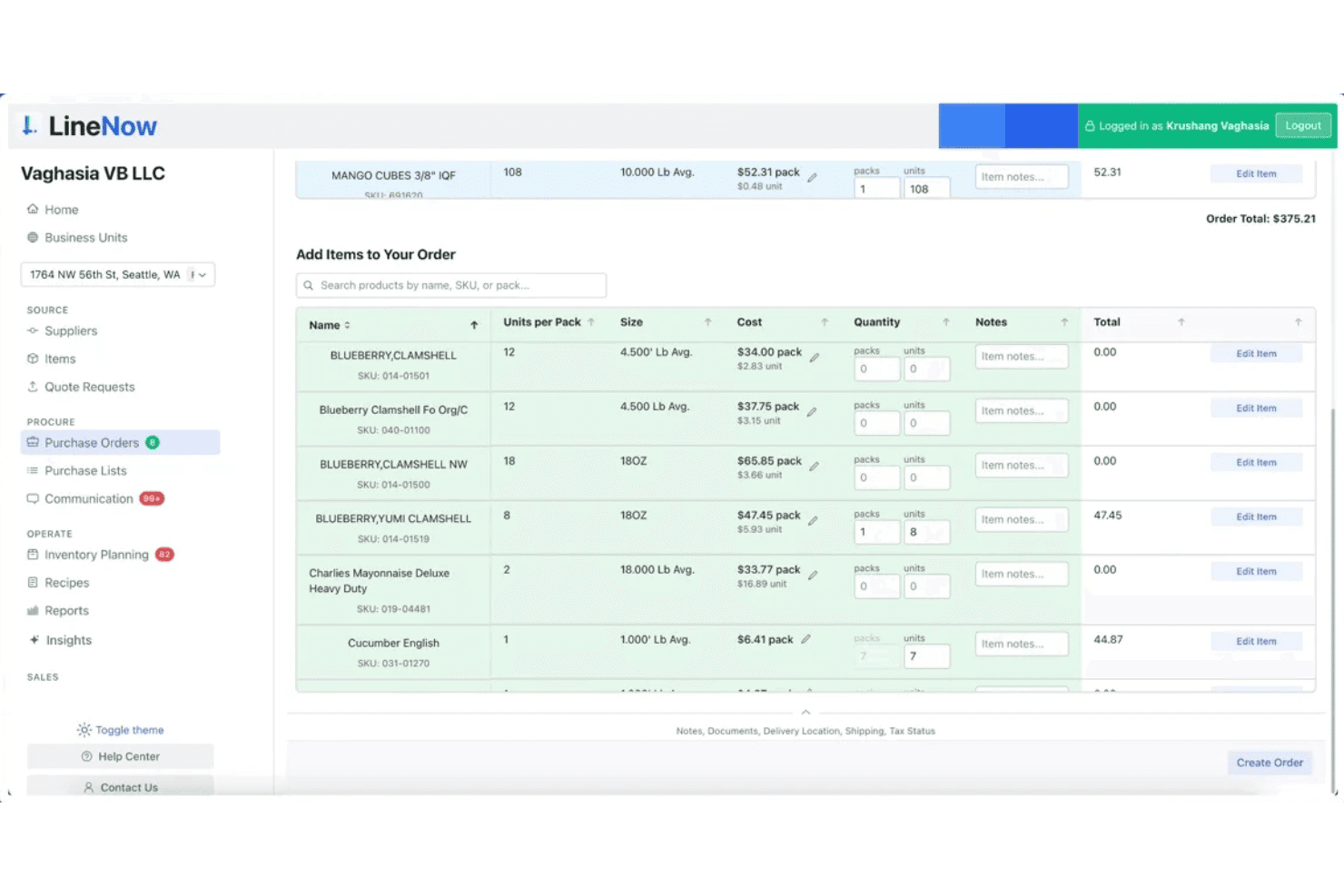
LineNow lets users build and manage purchase orders with item search and pricing. LineNow is a procurement and inventory management platform built for food & beverage operators, covering purchase order creation, supplier communication, recipe costing, and POS-linked food cost tracking across single and multi-location setups.
Who Is LineNow Best For?
LineNow suits F&B operators who need tighter control over food costs, procurement, and recipe costing as a back-of-house add-on to their existing POS setup.
Why I Picked LineNow
I've included LineNow in my top picks because it's one of the few tools that directly ties recipe costing to live POS sales data, giving F&B operators a real-time read on which menu items are actually making money. I like how its decay-aware PAR level math accounts for perishable ingredients, so you're not over-ordering proteins that expire before service. Its AI-powered procurement loop, from auto-building purchase orders to parsing supplier replies from WhatsApp or email, keeps back-of-house costs in check without manual chasing.
LineNow Key Features
- Supplier reply parsing: Automatically converts supplier responses from WhatsApp and email into structured order updates, including substitutions and backorders.
- Multi-location PAR management: Sets and tracks reorder levels per location, with decay-aware math built for perishable ingredients.
- Receiving workflow: Updates inventory counts based on actual delivered quantities, not just what was ordered, keeping stock records accurate.
- QuickBooks and Xero sync: Pushes confirmed receiving data to your accounting software so invoices reflect what was actually received.
LineNow Integrations
Integration includes Toast, Square, Clover, Lightspeed X-Series and R-Series, Shopify POS, QuickBooks, and Xero.
Pros and Cons
Pros:
- Multi-location PAR levels for perishables
- AI parses supplier replies into orders
- Real-time food cost and margin tracking
Cons:
- Lacks reservations and in-room dining features
- No hotel PMS or guest folio links
Learn more about LineNow: Best for unified reservations and POS
- Free demo available
- Pricing upon request
Visit WebsiteCustomer Rating:4.3/5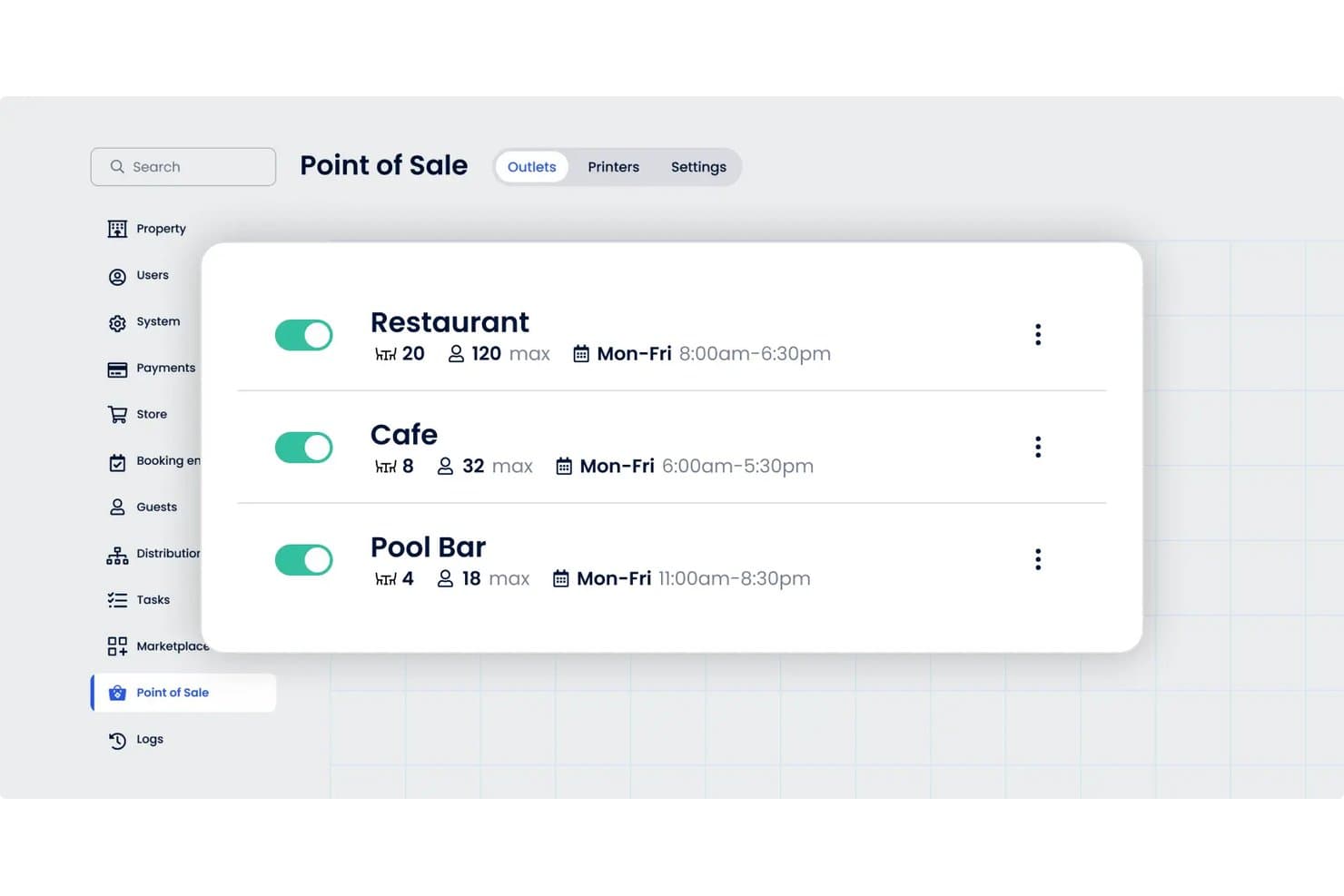
Cloudbeds manages restaurant, cafe, and pool bar outlets in one view. Cloudbeds is a unified hospitality platform with a built-in POS module that handles hotel outlet ordering, payment processing, and direct posting of charges to guest folios across restaurants, bars, and other on-property venues.
Who Is Cloudbeds Best For?
Cloudbeds is a strong fit for hotel general managers and operations teams who want F&B charges, reservations, and property reporting all running from a single platform.
Why I Picked Cloudbeds
I've included Cloudbeds in my top picks because it's the only tool on this list where the POS and PMS are the same platform, not a paired integration. When a guest charges dinner to their room, that transaction posts to their folio in real time, with no middleware or sync delay. I also like that you can configure each outlet, whether it's the bar, pool, or café, with its own menu, hours, and discount rules, all managed from one place.
Cloudbeds Key Features
- Multi-outlet configuration: Set up each hotel outlet—restaurant, bar, café, or pool bar—with its own menu, hours, and discount rules.
- Offline order management: Continue taking orders, applying discounts, and accepting cash payments when connectivity drops, then sync everything when you're back online.
- Discount governance: Set discount limits, require staff to enter a reason, and trigger manager PIN approval for any discount that exceeds your defined threshold.
- Kitchen and bar printing: Route orders directly to kitchen or bar printers from the POS to keep service moving without manual handoffs.
Cloudbeds Integrations
Cloudbeds has 450+ integration partners via API, including marketplace integrations with Aloha, Lightspeed, and Oracle MICROS Simphony for hotel restaurant POS connectivity. Its REST, GraphQL, webhook, Report, and Data APIs support custom integrations.
Pros and Cons
Pros:
- Multi-outlet menus, modifiers, and discount controls
- Real-time folio posting within the unified PMS
- Reviewers praise consolidated hotel operations
Cons:
- No inventory tracking or food-cost tools
- Beta status carries operational risks
 Best for tableside ordering features
- Free demo available
- From $90/month
Visit WebsiteCustomer Rating:4.2/5
Toast runs restaurant POS, orders, and payments in one system. If your hotel restaurant needs fast, flexible tableside ordering, Toast is built for you. This point-of-sale platform is designed for hospitality teams that want to speed up service and reduce order errors. Toast’s handheld devices and digital ordering tools help servers take and send orders directly from the table, keeping operations moving during busy shifts.
Why I Picked Toast
For hotel restaurants that want to speed up service and improve order accuracy, Toast’s tableside ordering features are a strong fit. I picked Toast because its handheld POS devices let servers take orders and process payments right at the table, which helps reduce wait times and mistakes. The platform also supports digital menus and guest self-ordering, so you can offer flexible service options during peak hours. These features make Toast especially useful for busy hotel dining rooms that need to keep guests happy and tables turning quickly.
Toast Key Features
Some other features that make Toast useful for hotel restaurant teams include:
- Inventory Tracking: Monitors ingredient levels and alerts you when it’s time to reorder.
- Kitchen Display System: Sends orders directly to kitchen screens for faster prep and fewer errors.
- Loyalty Program Management: Lets you create and manage guest rewards and promotions.
- Multi-Location Reporting: Consolidates sales and performance data across all your hotel restaurant outlets.
Toast Integrations
Integrations include Grubhub, Uber Eats, DoorDash, xtraCHEF, QuickBooks, 7shifts, Compeat, BevSpot, PeachWorks, and Ctuit.
Pros and Cons
Pros:
- Detailed shift reports for restaurant managers
- Menu updates sync instantly across all terminals
- Handheld POS devices support tableside payments
Cons:
- Limited support for international currencies
- Hardware replacement can be expensive
Learn more about Toast: Best for hotels using eZee Absolute
- 14-day free trial + free demo available
- From $90/outlet/month (billed annually)
Visit WebsiteCustomer Rating:4.7/5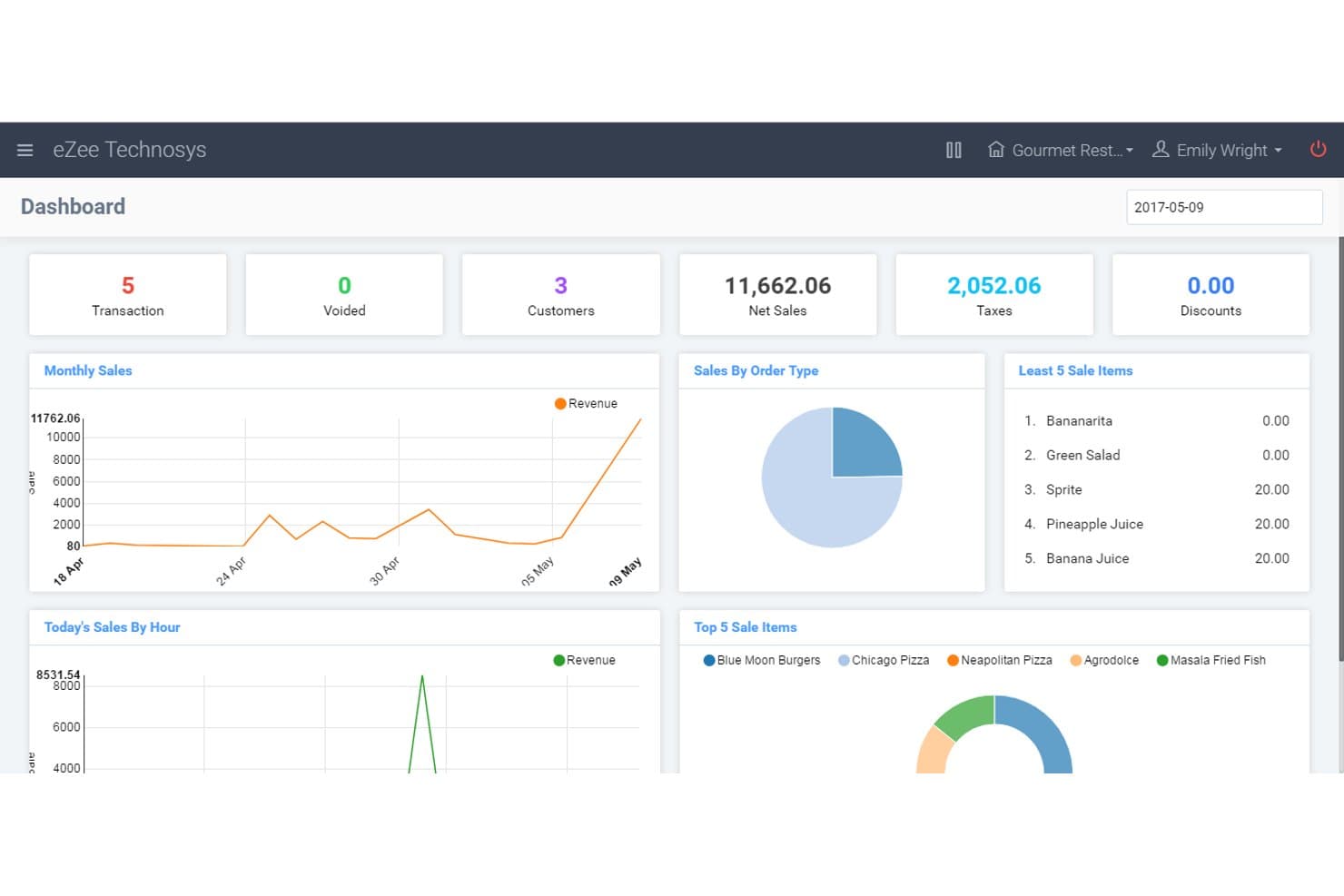
eZee Optimus tracks sales, taxes, and transactions on one dashboard. eZee Optimus is a cloud-based restaurant POS built for hotel F&B operations, covering order management, table management, inventory tracking, menu configuration, and multi-outlet reporting with native integration into hotel property management.
Who Is eZee Optimus Best For?
eZee Optimus is a natural fit for hotel F&B teams already running eZee Absolute as their property management system.
Why I Picked eZee Optimus
I've included eZee Optimus in my top picks because it's the most logical F&B POS choice if your hotel already runs eZee Absolute as your PMS. The native integration lets you post food and beverage charges directly to guest folios without manual reconciliation, and hotel staff can configure separate room-service menus and rates within the same system. I also like that minibar inventory is tracked automatically, so outlet managers aren't chasing consumption records at the end of a shift.
eZee Optimus Key Features
- Multi-outlet stock transfer: Staff can transfer stock between outlets directly in the system, keeping inventory balanced across all F&B locations.
- Role-based outlet access: Administrators can assign staff access to specific outlets based on their role, limiting what each user can view or manage.
- Delivery order management: The system lets staff assign delivery orders to drivers and track their status from a single dashboard.
- RapidServe offline ordering app: Waitstaff can take dine-in and takeaway orders on Android or iOS devices, with the app syncing to the POS once connectivity is restored.
eZee Optimus Integrations
eZee Optimus has a native eZee Absolute integration for hotel PMS connectivity. The vendor claims 650+ third-party integrations, including Zomato, Swiggy, Deliveroo, Talabat, Tally, QuickBooks, CyberSource, and Zeamster.
Pros and Cons
Pros:
- Minibar tracking reduces manual consumption checks
- Remote reports support multi-outlet oversight
- Recipe-based stock tracking helps control waste
Cons:
- Kitchen display support remains a reviewer-requested gap
- Reservation and waitlist tools aren't documented
Learn more about eZee Optimus: Best for hotel revenue-center reporting
- Free demo available
- From $69
Visit WebsiteCustomer Rating:4.3/5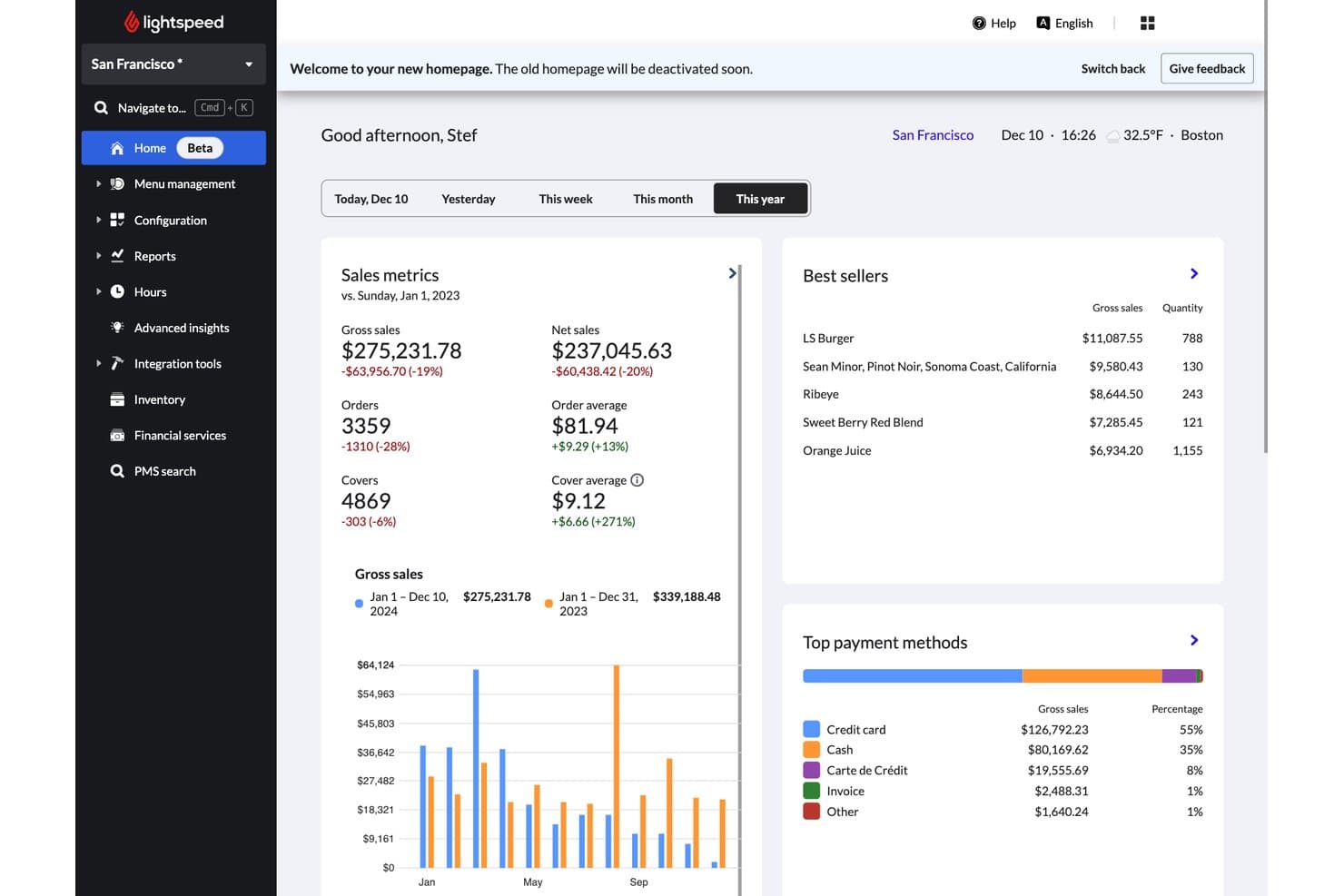
Lightspeed Restaurant tracks sales metrics and best sellers in real time. Lightspeed Restaurant is a cloud-based restaurant POS platform that handles order management, tableside payments, inventory tracking, multi-outlet operations, and PMS integration for hotel F&B environments.
Who Is Lightspeed Restaurant Best For?
Lightspeed Restaurant is a strong fit for hotel F&B directors and general managers who need to track revenue across multiple outlets—restaurants, bars, and room service—from one platform.
Why I Picked Lightspeed Restaurant
Lightspeed Restaurant earns its spot on my shortlist because of how it handles hotel revenue-center reporting across multiple F&B outlets. I like that you can create dedicated revenue and cost centers directly in the POS and roll them into consolidated F&B reports, so your restaurant, bar, and room service aren't just separate silos. The Advanced Insights dashboard pulls performance data across all those centers, which means a hotel F&B director can see exactly where revenue is coming from without manually reconciling reports from different systems.
Lightspeed Restaurant Key Features
- PMS room-charge posting: Connect to hotel property management systems like Oracle OPERA, Mews, and Cloudbeds so guests can charge restaurant and bar purchases directly to their room folio.
- Offline mode: Keep the POS running during internet outages, with locally stored data syncing back to the cloud once connectivity is restored.
- Adjustable floor plans: Configure table layouts, sections, and position numbers to match your hotel restaurant's physical setup across dine-in and room service.
- Pre-auth bar mode: Open guest tabs using swipe-to-open pre-authorization and close them out in one click.
Lightspeed Restaurant Integrations
Lightspeed Restaurant integrates with Oracle OPERA, Mews, Cloudbeds, Clock PMS+, Protel, Preno, Apaleo, and WebRezPro for hotel workflows. It also offers raw API access for custom integrations, while availability and setup can vary by location and partner.
Pros and Cons
Pros:
- Ingredient-level stock tracking across outlets
- Offline sales sync after outages
- Consolidated revenue-center reporting
Cons:
- Printer and kitchen connectivity issues disrupt service
- Support response times can vary
Learn more about Lightspeed Restaurant: Best for free-plan standalone outlet pilots
- Free plan available
- From $35/month + transaction fees
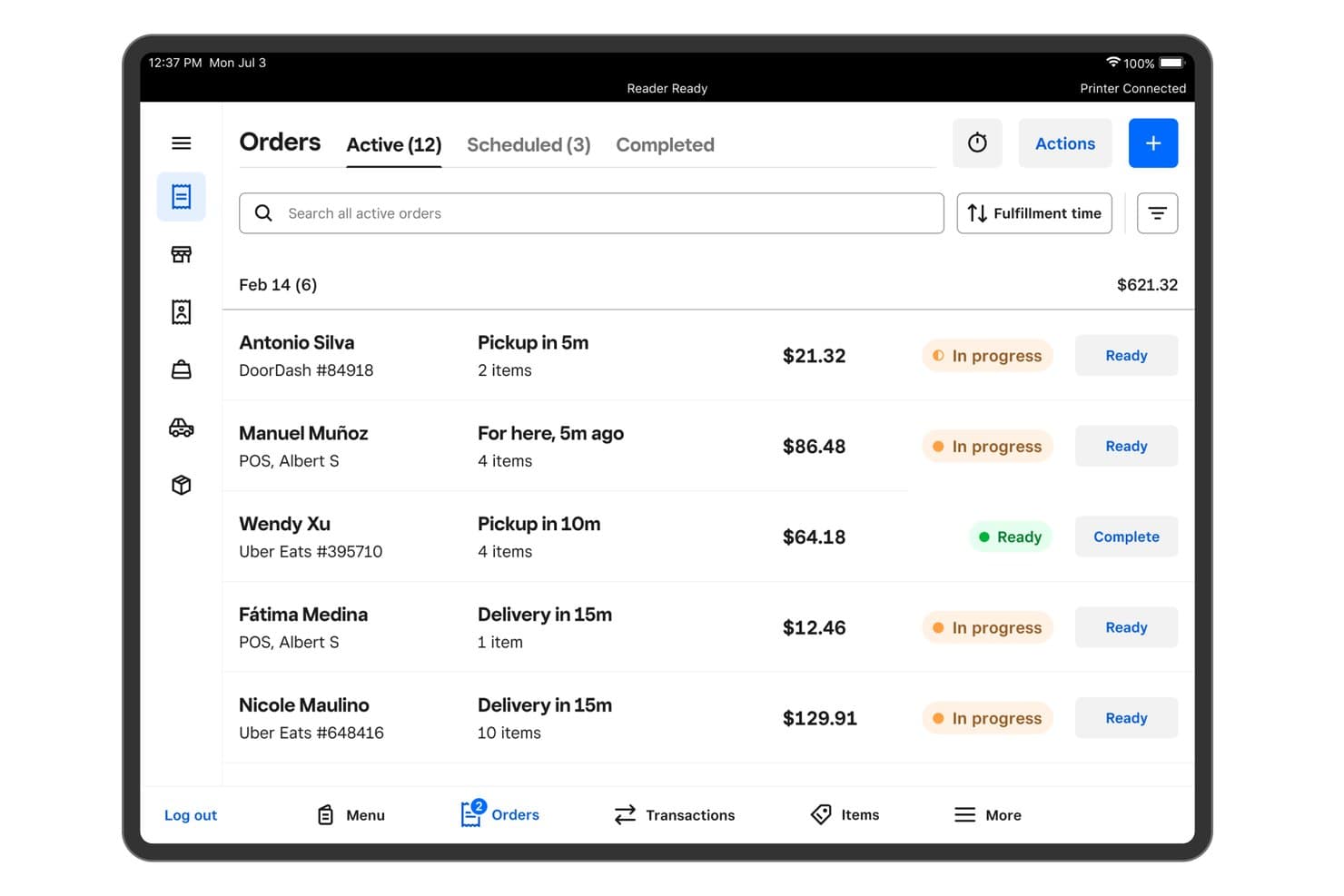
Square for Restaurants tracks active orders with status and fulfillment times. Square for Restaurants is a restaurant POS built for food and beverage operations, covering order management, menu configuration, table and seat tracking, kitchen display routing, inventory, and multi-location reporting.
Who Is Square for Restaurants Best For?
Square for Restaurants suits hotel F&B teams piloting a standalone outlet—like a lobby café or rooftop bar—where a low-cost, easy-to-launch POS matters more than deep PMS integration.
Why I Picked Square for Restaurants
Square for Restaurants earns its spot on my shortlist because its free plan makes it genuinely viable for piloting a standalone hotel outlet, like a lobby café or rooftop bar, without committing to a costly contract. I like that auto-86 availability updates pull directly from stock levels, so a small bar team isn't manually managing what's sold out mid-rush. Catalog reporting across seven sales sources also means I can see how an outlet performs across in-person POS and delivery channels in one view.
Square for Restaurants Key Features
- Multi-channel order routing: The Orders tab consolidates on-premise, online, and delivery-partner orders in one place, with filtering by status or source.
- Kitchen Display System: Square KDS routes tickets to kitchen stations with customizable layouts, ticket timers, real-time updates, and performance reporting.
- Check splitting: Staff can divide checks by items, seats, or equal payments, and reopen closed checks to adjust, comp, or void items.
- Close-of-day reporting: Daily reports cover sales activity, tip payouts, payment methods, and category and item sales across the outlet.
Square for Restaurants Integrations
Square for Restaurants has three documented marketplace integrations: DoorDash, Uber Eats, and OpenTable. Square APIs, SDKs, GraphQL tools, and webhooks support custom integrations.
Pros and Cons
Pros:
- Central reporting compares outlet sales channels
- Auto-86 updates reduce sold-out surprises
- Quick setup suits standalone café pilots
Cons:
- Complex outlet workflows can strain ticket routing
- No room-folio posting to PMS
Learn more about Square for Restaurants: Best for multi-outlet coordination
- Free demo available
- Pricing upon request
Visit WebsiteCustomer Rating:4.5/5
Agilysys unifies hotel PMS, POS, and payments in one platform. Agilysys is built for hotels and resorts that operate multiple restaurants, bars, and outlets under one roof. This platform helps food and beverage managers coordinate menus, inventory, and service across several venues from a single system. If your property needs to unify operations and reporting for diverse outlets, Agilysys brings centralized control to complex hospitality environments.
Why I Picked Agilysys
Coordinating multiple outlets within a single hotel or resort can be challenging, and Agilysys is purpose-built to address this complexity. I picked Agilysys because it lets you manage menus, inventory, and staffing across several restaurants, bars, and service points from one centralized dashboard. The platform also supports shared guest profiles and unified reporting, so you can track performance and guest preferences across all outlets. This level of coordination is especially valuable for properties that want to deliver consistent service and optimize operations across diverse food and beverage venues.
Agilysys Key Features
Some other features that make Agilysys useful for hotel restaurant teams include:
- Mobile Ordering: Allows guests to place orders from their smartphones or tablets.
- Table Management: Lets staff assign, track, and optimize table usage in real time.
- Loyalty Program Integration: Connects guest purchases to loyalty rewards and promotions.
- Kitchen Display System (KDS): Sends orders directly to kitchen screens for faster preparation and tracking.
Agilysys Integrations
Integrations include Book4Time, Oracle, Infor, Amadeus, Sabre, Springer-Miller, Shift4, FreedomPay, Elavon, and more.
Pros and Cons
Pros:
- Detailed reporting for each outlet and property
- Mobile ordering and payment for guests
- Built-in loyalty and guest profile management
Cons:
- Menu updates require manual sync across outlets
- Hardware compatibility varies by location
Learn more about Agilysys: Best for mobile service between floor and dock
- Free demo available
- Pricing upon request
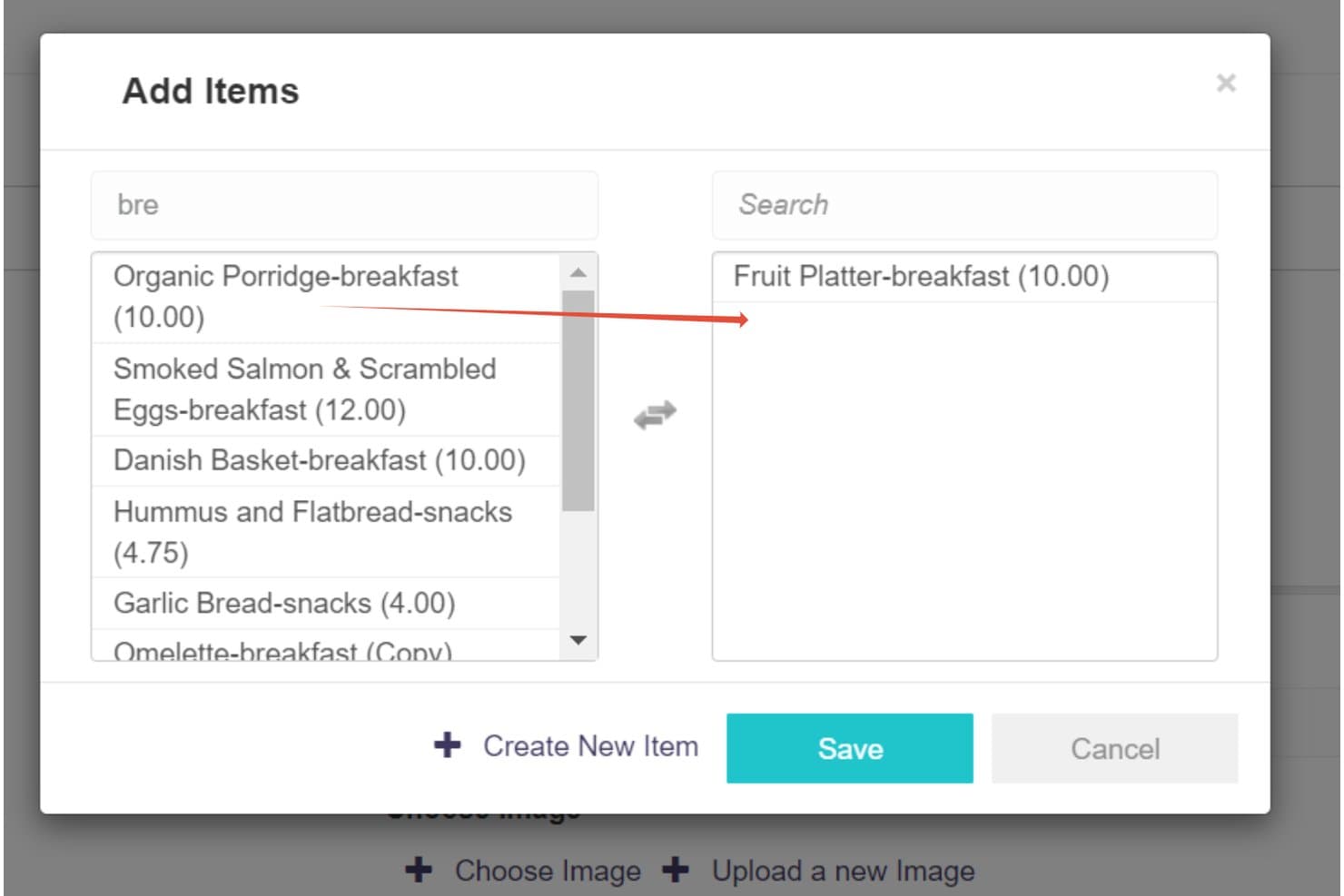
Infrasys lets users add and assign menu items across categories. Infrasys is a cloud-based hotel F&B point-of-sale system from Shiji that covers tableside ordering, mobile ordering, menu management, multi-outlet reporting, and kitchen integration across restaurant, bar, and poolside operations.
Who Is Infrasys Best For?
Infrasys is a strong fit for F&B directors and operations managers at full-service hotels who need mobile ordering across multiple outlets—from the dining room to the pool deck.
Why I Picked Infrasys
I picked Infrasys as one of the best because of how well its Move feature handles the gap between mobile service and a fixed station. Staff carry an iPad to take orders poolside or on the floor, then dock it at a charging station when they need to switch to fixed-terminal mode. That Move, Service, and Dock workflow is what makes Infrasys genuinely useful for properties where service moves between the dining room and the pool deck in the same shift.
Infrasys Key Features
- Multi-outlet enterprise reporting: View sales, revenue, and performance data by brand, property, or individual outlet using hundreds of pre-built or custom reports.
- Guest mobile ordering: Guests can order directly from their phones across outlets like pool decks, coffee bars, and lobbies, with orders sent straight to the kitchen.
- Flexible payment processing: Staff can handle partial payments, bar tabs, tips, QR codes, digital wallets, and direct device tipping from a single terminal.
- Multi-platform POS support: The system runs on Windows, iOS, Android, and Linux, letting properties use existing hardware or Shiji-supplied devices.
Infrasys Integrations
Infrasys integrates with over 100 partners, including Agilysys ResortSuite, ProfitSword, and Aigens Online Takeaway & Delivery. It offers an open API for custom integrations.
Pros and Cons
Pros:
- Reviewers praise responsive implementation support
- Consolidated reporting spans outlets and properties
- Mobile orders reach kitchens from anywhere
Cons:
- Room-service checks can require workarounds
- Peak-hour lag can slow service
Learn more about Infrasys: Best for hosted or self-hosted hotel POS
- Free demo available
- Pricing upon request
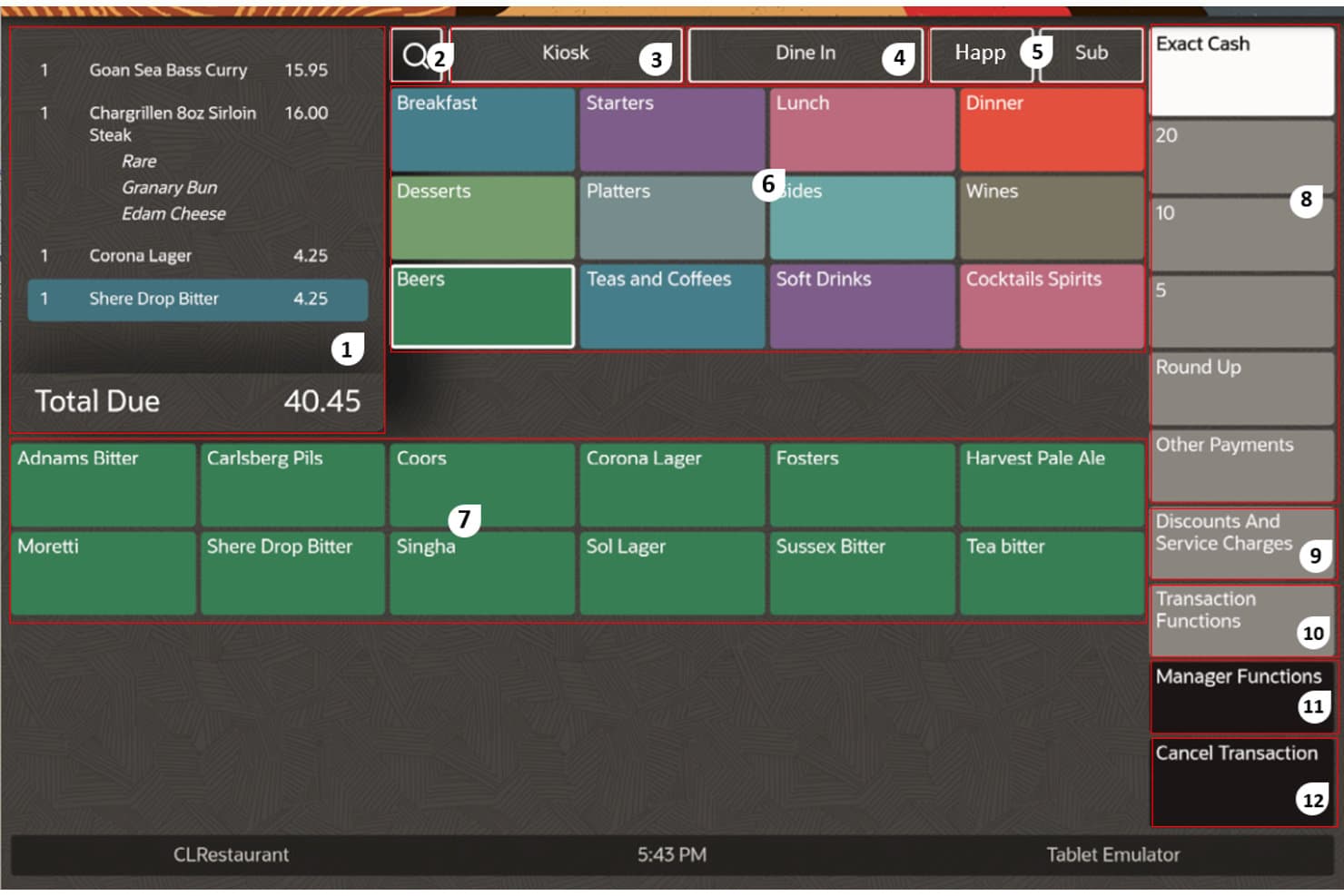
Oracle Simphony POS organizes menu categories and order totals in one view. Oracle Simphony POS is a cloud-based hotel restaurant POS system built by Oracle that handles multi-outlet order management, PMS folio integration, kitchen display, menu management, and F&B reporting across hotel properties.
Who Is Oracle Simphony POS Best For?
Oracle Simphony POS is a strong fit for multi-property hotel groups that run OPERA Cloud and need a tightly integrated F&B POS across several outlets.
Why I Picked Oracle Simphony POS
Oracle Simphony POS earns its spot on my shortlist because it's one of the few hotel POS systems that can run either hosted on Oracle's cloud or self-hosted at a single property, giving IT teams real control over deployment. I particularly like its OPERA Connection, which posts room charges to guest folios in real time, handles partial tenders with automatic proration, and supports full guest lookup by name, room number, or loyalty account. The Frontline Manager web dashboard lets me update menus and pricing across every outlet and workstation from one place, without touching each terminal.
Oracle Simphony POS Key Features
- Kitchen display system integration: Consolidates orders from tableside, kiosk, mobile, and third-party delivery channels onto kitchen screens to help staff manage timing and prioritize preparation.
- Hotel mobile ordering: Lets guests order food and beverages via QR-code menus, a website widget, or a white-label mobile app for room service and on-premises dining.
- Labor management tools: Uses sales forecasting and employee data to support shift scheduling, minimize overtime, and handle onboarding and time-off requests.
- CrowdTwist loyalty integration: Connects guest profiles to a built-in loyalty and engagement platform that supports personalized rewards and gamified promotions across locations.
Oracle Simphony POS Integrations
Oracle Simphony POS has native integrations with OPERA Cloud, Oracle Payment Cloud Service, Oracle Hospitality Kitchen Display Systems, and CrowdTwist. It also offers 200+ marketplace integrations and RESTful APIs for custom connections.
Pros and Cons
Pros:
- Kitchen operations can continue during outages
- Reliable ordering and billing workflows
- Centralized menu and pricing control
Cons:
- Changes can require costly outside help
- Back-office setup demands substantial training
Learn more about Oracle Simphony POS:
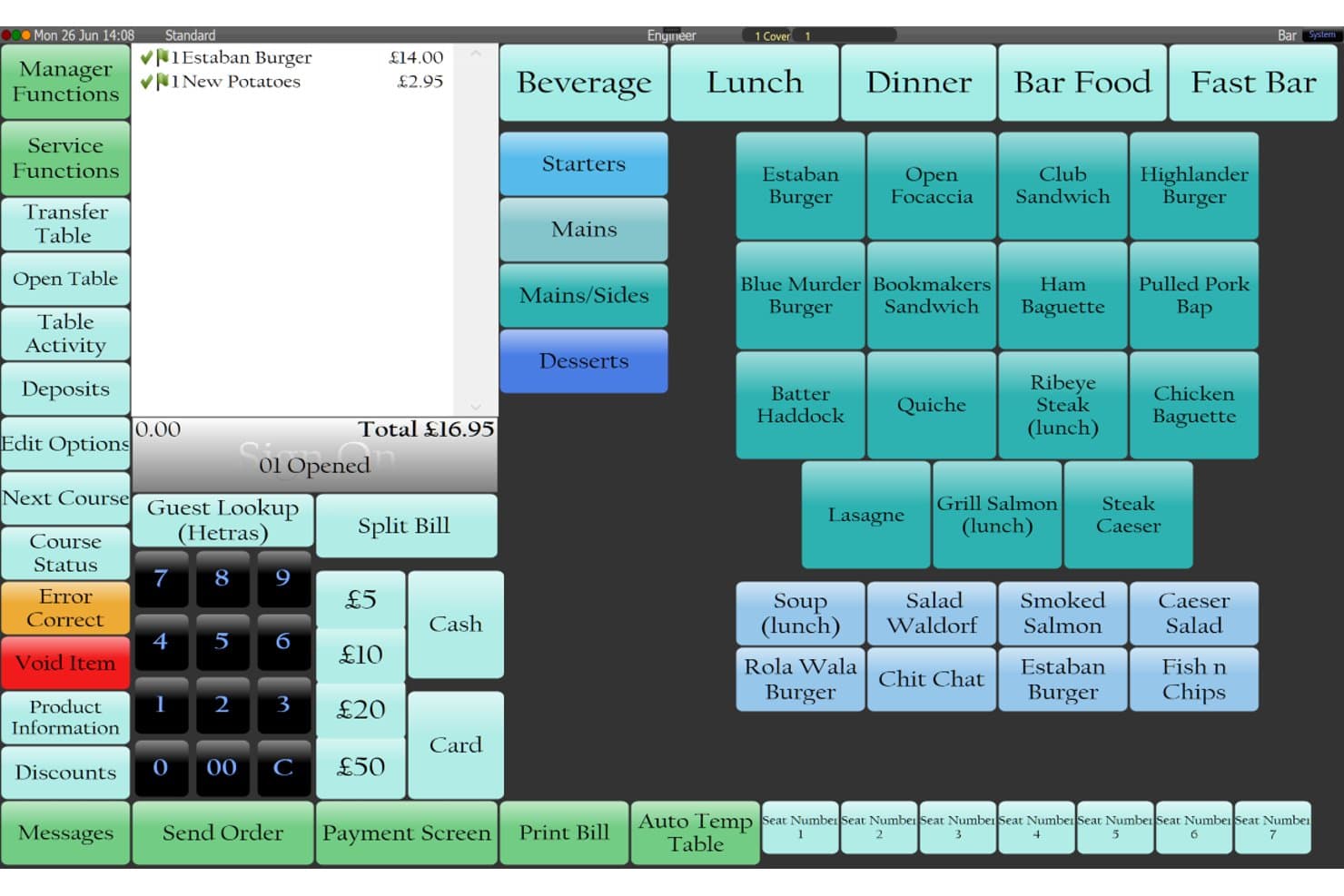
Tevalis lets hotel restaurant staff manage table orders and menus. Tevalis is a hospitality EPOS platform that brings point-of-sale, mobile ordering, table management, kitchen management, stock control, and multi-site reporting together for hotel F&B operations.
Who Is Tevalis Best For?
Tevalis suits mid-market hotel F&B teams that need a guided, hands-on EPOS rollout with dedicated support through go-live and beyond.
Why I Picked Tevalis
Tevalis earns its spot on my shortlist because of how seriously it takes the go-live experience. From quote confirmation to launch, the rollout runs 6–8 weeks with on-site training and installation built in, plus a dedicated project team covering the first two weeks post-launch. I also like that hotel PMS room-charge posting is native to both the fixed EPOS and mPOS, so servers can close a table directly to a guest's folio from a handheld device.
Tevalis Key Features
- Self-service kiosks: Customers can browse menus, customize orders, choose dine-in or takeaway, and pay without staff assistance.
- Business analytics dashboard: Delivers 300+ report filters across sales, service, and kitchen performance, with cross-site comparisons and sales forecasting.
- Centralized menu and pricing management: Lets head office push product updates, pricing changes, and promotions across all venues from one place.
- Stock management with recipe costing: Calculates recipe cost prices, tracks wastage, and suggests selling prices based on your target gross-profit margin.
Tevalis Integrations
Tevalis cites 200+ integrations, including Mews, OpenTable, Xero, Dojo, BookedIt, Procurement Wizard, and Acteol/Atreemo. It also offers an API for custom integrations, with access managed through certified partners.
Pros and Cons
Pros:
- Guided hotel go-live includes onsite training
- Recipe costing and wastage tracking
- Responsive support resolves operational issues
Cons:
- No documented reservation or waitlist tools
- Support quality varies after launch
Learn more about Tevalis:
How I Evaluate Hotel Restaurant Software
I split my evaluation into three parts, giving the most weight to core needs: process outlet orders and payments, post charges to guest folios, and manage menus. Next, I consider standout features such as tableside ordering. Finally, I assess beyond-feature value, including onboarding and round-the-clock support.
Core Functionality (Table Stakes For This List)
When I'm selecting tools for my list, I score each one on a scale from 0 (does not offer the functionality) to 5 (excels in this area) for each core functionality listed below. I then convert the total into a percentage to help assess each tool's overall fit, with extra weight on any functionalities I’ve deemed essential.
- Point-of-Sale Processing (Essential): I look for order entry, modifiers, split checks, and payment options that work across restaurant, bar, and room-service transactions.
- PMS Folio Integration (Essential): I check whether staff can post restaurant charges to the correct guest folio through the hotel's PMS, avoiding duplicate entry at checkout.
- Menu & Order Management: I assess menu editing, modifiers, and routing for dine-in, room service, and takeout, including how teams handle item availability.
- Table & Reservation Management: Floor plans, seating assignments, reservations, and waitlists matter when managers need to balance bookings with walk-ins during service.
- Inventory & Food Costs: I evaluate ingredient-level stock and recipe costs, including whether usage from a dinner or banquet order informs food-cost reporting.
- Multi-Outlet Reporting: Reports should bring sales, labor, and outlet performance together so managers can compare a lobby bar with the restaurant.
Once I have a list of tools that meet the criteria, I consider what sets each platform apart.
Differentiating Factors (What Sets Vendors Apart)
Here's how I compare and contrast different vendors:
Standout Features
I check whether the POS keeps processing orders during network outages—a resort pool bar can't pause service because Wi-Fi drops. Mobile tableside ordering matters just as much, since handheld devices let servers fire courses and close checks without leaving the guest. I also evaluate multi-property management tools, looking at whether one dashboard can push menu updates and pull consolidated reports across every property in a portfolio.
Beyond Features
I check whether vendors offer 24/7 live support, since hotel F&B runs overnight and a downed POS during a late room-service rush can't wait until morning. PCI-DSS compliance documentation matters too—I look for clear evidence of end-to-end encryption and tokenization, especially when payment data flows between the POS and PMS. I also evaluate deployment flexibility, because a resort with spotty connectivity needs on-premise or hybrid options, while a multi-property group benefits from cloud-based remote management.
Cum să alegeți un program pentru restaurante hoteliere
Este ușor să vă pierdeți în liste lungi de funcții și structuri complexe de prețuri. Pentru a vă ajuta să rămâneți concentrați în timp ce parcurgeți procesul unic de selecție a programului, iată o listă de verificare a factorilor de care trebuie să țineți cont:
| Factor | Aspecte de luat în considerare |
|---|---|
| FactorScalabilitate | Aspecte de luat în considerareVa susține programul proprietatea dumneavoastră pe măsură ce adăugați puncte de servire, extindeți meniurile sau creșteți volumul de oaspeți? |
| FactorIntegrări | Aspecte de luat în considerareSe conectează nativ la PMS-ul, sistemele de contabilitate și sistemele de plată sau veți avea nevoie de soluții alternative? |
| FactorPosibilități de personalizare | Aspecte de luat în considerarePuteți adapta rapoartele, meniurile și fluxurile de lucru pentru a corespunde operațiunilor F&B și identității vizuale unice? |
| FactorUșurință în utilizare | Aspecte de luat în considerareÎl va învăța rapid personalul dumneavoastră — din zona de servire și din bucătărie — sau va fi nevoie de instruire extinsă? |
| FactorImplementare și integrare inițială | Aspecte de luat în considerareCât timp va dura să fie pus în funcțiune și de ce resurse sau tip de asistență veți avea nevoie în timpul lansării? |
| FactorCost | Aspecte de luat în considerareSunt toate taxele clare, inclusiv cele pentru configurare, asistență și module suplimentare? Se potrivește prețul bugetului și modelului dumneavoastră de afaceri? |
| FactorMăsuri de securitate | Aspecte de luat în considerareOferă programul permisiuni pentru utilizatori, criptarea datelor și conformitate cu standardele de securitate a plăților? |
| FactorDisponibilitatea asistenței | Aspecte de luat în considerarePuteți contacta serviciul de asistență atunci când aveți nevoie, în special în perioadele de vârf ale serviciului sau în cazul întreruperilor sistemului? |
Ce este un program pentru restaurante hoteliere?
Programele pentru restaurante hoteliere sunt platforme digitale concepute pentru gestionarea operațiunilor de alimentație și băuturi din cadrul hotelurilor. Acestea centralizează activități precum rezervarea meselor, procesarea comenzilor, monitorizarea stocurilor și raportarea vânzărilor.
Aceste sisteme ajută echipele hotelului să coordoneze serviciile în toate punctele de servire, să păstreze evidențe exacte și să se integreze cu instrumentele mai ample de gestionare a hotelului, pentru a oferi o experiență consecventă oaspeților.
Funcții
Atunci când alegeți un program pentru restaurante hoteliere, urmăriți următoarele funcții esențiale:
- Gestionarea meselor: Organizează rezervările, repartizarea meselor și listele de așteptare pentru a optimiza fluxul din sala de mese și rotația oaspeților.
- Procesarea comenzilor: Înregistrează comenzile oaspeților la masă sau la tejghea, le transmite bucătăriei și urmărește în timp real starea comenzilor.
- Urmărirea inventarului: Monitorizează nivelurile stocurilor de alimente, băuturi și consumabile și alertează personalul când articolele trebuie reaprovizionate.
- Gestionarea meniului: Vă permite să creați, actualizați și personalizați meniuri digitale, inclusiv prețuri, descrieri și oferte speciale zilnice.
- Rapoarte privind vânzările: Generează rapoarte detaliate despre vânzări, venituri și performanța articolelor pentru a sprijini luarea deciziilor pe baza datelor.
- Suport pentru mai multe locații: Gestionează operațiunile mai multor restaurante, baruri sau locații din cadrul aceleiași proprietăți hoteliere.
- Procesarea plăților: Acceptă diverse metode de plată, inclusiv carduri de credit, plăți mobile și debitarea costurilor în cameră, cu gestionarea securizată a tranzacțiilor.
- Integrarea cu PMS: Se conectează direct la sistemul de administrare a proprietății pentru a sincroniza profilurile oaspeților, costurile în cameră și informațiile de facturare.
- Instrumente pentru rețete și calcularea costurilor: Urmărește utilizarea ingredientelor și calculează costul fiecărui articol din meniu pentru a ajuta la controlul marjelor și la reducerea risipei.
- Permisiuni pentru utilizatori: Stabilește niveluri de acces pentru diferite roluri ale personalului, asigurând astfel că datele și funcțiile sensibile sunt disponibile numai utilizatorilor autorizați.
Soluțiile software pentru restaurante hoteliere nu includ de obicei inteligență artificială în oferta lor de funcții.
Beneficii
Implementarea unui software pentru restaurante hoteliere oferă mai multe beneficii echipei și companiei dumneavoastră. Iată câteva dintre avantajele de care vă puteți bucura:
- Operațiuni centralizate: Gestionați rezervările, comenzile și inventarul de pe o singură platformă, reducând coordonarea manuală între locații.
- Experiență îmbunătățită pentru oaspeți: Coordonați serviciile și personalizați interacțiunile prin integrarea profilurilor și preferințelor oaspeților cu datele despre comenzi și repartizarea meselor.
- Urmărirea precisă a vânzărilor și inventarului: Generați rapoarte în timp real și monitorizați nivelurile stocurilor pentru a sprijini achizițiile mai eficiente și a reduce risipa.
- Procesarea mai rapidă a comenzilor: Transmiteți comenzile direct bucătăriei și procesați rapid plățile, minimizând timpii de așteptare pentru oaspeți.
- Securitate îmbunătățită a datelor: Controlați accesul utilizatorilor și protejați informațiile sensibile cu ajutorul permisiunilor integrate și al măsurilor de protecție pentru conformitate.
- Gestionare simplificată a mai multor locații: Supravegheați mai multe restaurante, baruri sau puncte de servicii din hotelul dumneavoastră, folosind un singur sistem.
- Informații utile pentru afacere: Accesați analize detaliate și rapoarte personalizabile pentru a fundamenta deciziile privind planificarea meniului, personalul și prețurile.
Costuri și prețuri
Alegerea unui software pentru restaurante hoteliere necesită înțelegerea diferitelor modele de preț și planuri disponibile, de la software gratuit de gestionare a restaurantelor până la opțiuni plătite mai avansate. Costurile variază în funcție de funcții, dimensiunea echipei, extensii suplimentare și alți factori. Tabelul de mai jos rezumă planurile comune, prețurile medii ale acestora și funcțiile incluse de obicei în soluțiile software pentru restaurante hoteliere:
Tabel comparativ al planurilor pentru software-ul destinat restaurantelor hoteliere
| Tipul planului | Preț mediu | Funcții comune |
|---|---|---|
| Tipul planuluiPlan gratuit | Preț mediu$0 | Funcții comuneIntroducerea de bază a comenzilor, gestionarea limitată a meniului, rapoarte simple și asistență prin e-mail. |
| Tipul planuluiPlan personal | Preț mediu$20-$50/utilizator/lună | Funcții comuneGestionarea meselor, personalizarea meniului, urmărirea de bază a inventarului, procesarea plăților și asistență prin chat. |
| Tipul planuluiPlan pentru companii | Preț mediu$60-$150/utilizator/lună | Funcții comuneSuport pentru mai multe locații, rapoarte avansate, integrare cu PMS, permisiuni pentru utilizatori și asistență telefonică. |
| Tipul planuluiPlan pentru întreprinderi | Preț mediu$200+/utilizator/lună | Funcții comuneIntegrări personalizate, gestionarea dedicată a contului, analize avansate, asistență la integrare și asistență prioritară. |
Întrebări frecvente despre software-ul pentru restaurante hoteliere
Iată câteva răspunsuri la întrebările frecvente despre software-ul pentru restaurante hoteliere:
Cum se integrează software-ul pentru restaurante hoteliere cu un sistem de gestionare a proprietății?
Software-ul pentru restaurante hoteliere se conectează de obicei la sistemul de gestionare a proprietății (PMS) prin integrări directe sau API-uri. Acest lucru vă permite să înregistrați notele de plată ale restaurantului în camerele oaspeților, să sincronizați profilurile oaspeților și să consolidați facturarea, facilitând gestionarea conturilor oaspeților și simplificând operațiunile.
Poate software-ul pentru restaurante hoteliere să gestioneze mai multe puncte de servire sau locații?
Da, majoritatea soluțiilor software pentru restaurante hoteliere acceptă gestionarea mai multor puncte de servire. Puteți coordona mai multe restaurante, baruri sau puncte de servicii în cadrul aceleiași proprietăți sau în mai multe locații, beneficiind de rapoarte centralizate și de monitorizarea stocurilor pentru fiecare punct de servire.
Ce ar trebui să iau în considerare atunci când migrez de la un sistem POS vechi la un software pentru restaurante hoteliere?
Planificați migrarea datelor, instruirea personalului și integrarea cu sistemele hoteliere existente. Verificați dacă noul software poate importa date istorice despre vânzări și meniuri și asigurați-vă că echipa are acces la resurse de inițiere, precum videoclipuri de instruire sau asistență în timp real, pe durata tranziției.
Este posibilă personalizarea meniurilor și a prețurilor pentru diferite puncte de servire?
Da, multe soluții software pentru restaurante hoteliere vă permit să creați meniuri și prețuri distincte pentru fiecare punct de servire. Această flexibilitate vă ajută să adaptați oferta la diferite categorii de oaspeți sau stiluri de servire din hotelul dumneavoastră.
Ce tipuri de asistență sunt disponibile pentru utilizatorii software-ului pentru restaurante hoteliere?
Opțiunile de asistență includ adesea chat în timp real, asistență telefonică, e-mail și baze de cunoștințe cu funcție de căutare. Unii furnizori oferă, de asemenea, asistență pentru inițiere, seminare web și manageri de cont dedicați, în special pentru planurile destinate companiilor și întreprinderilor.