Learning how to use hotel property management software is the fastest way to take control of your front desk, reservations, and room operations from one place. Most properties go live without a clear setup plan and pay for it in missed bookings, billing errors, and frustrated staff.
I'll walk you through five practical steps to configure your system, manage reservations, connect payments, and train your team. Follow this guide and you'll have a working daily workflow—not just a system that's switched on.
Selecting the Best Hotel Property Management Software
The right hotel PMS shapes every part of your operation, so the evaluation criteria matter. Keep these considerations in mind as you compare your options:
Channel manager integration: Your PMS should connect directly with booking engines and OTAs to keep availability and rates synchronized in real time, preventing overbookings and manual rate updates across platforms.
Cloud vs. on-premise architecture: Cloud-based systems give your team remote access, automatic updates, and lower IT infrastructure costs, which matters most for properties without dedicated technical staff.
Revenue management capability: Look for built-in or tightly integrated dynamic pricing tools that adjust rates based on occupancy, seasonality, and local demand—not just a static rate grid you have to update yourself.
Open API and third-party integrations: Your PMS needs to connect with the tools already running your property, including POS systems, CRM platforms, and smart lock hardware, without expensive custom development.
Scalability for property growth: If you plan to add room types, rate plans, or additional properties, your PMS should handle that expansion without requiring a full platform migration.
24/7 customer support and onboarding: Hospitality runs around the clock, so a vendor that only offers business-hours support creates real operational risk during night shifts, peak periods, and system outages.
Step-by-Step Guide to Using Hotel Property Management Software
Start with your property setup, then connect reservations, payments, room operations, and staff workflows in that order. This sequence gives your team a reliable operating foundation before you handle daily bookings and guest requests:

Have an account? Log In
1. Configure Your Property, Room Types, and Rate Plans
Configuration is where your PMS becomes usable. Start by entering your exact room inventory, including room numbers, categories, bed types, floors, and special room attributes. Then build your pricing structure with your BAR as the baseline before adding packages, corporate rates, restrictions, taxes, and cancellation policies.
Set user roles and permissions during this stage as well. Before connecting OTAs or other distribution channels, run sample reservations to confirm that room availability, pricing, taxes, and fees calculate correctly.
Use this comparison to avoid the most common configuration mistakes during PMS setup:
| Do | Don't |
|---|---|
| DoEnter exact room inventory: Map actual room numbers, bed types, and floor assignments as they exist on your property. | Don'tUse placeholder room names: Generic labels like "Room A" or "Standard Room" break housekeeping assignments and rate displays downstream. |
| DoConfigure rate plans before connecting OTAs: Set your BAR, package, and corporate rate hierarchy first—then link your channel manager. | Don'tConnect OTAs before rates are ready: Syncing before rate plans are configured pushes incorrect pricing live immediately. |
| DoSet user roles and permissions early: Define what front desk, housekeeping, and management staff can access before anyone logs in. | Don'tGive everyone admin access: Unrestricted access to rate management and billing settings creates audit and security risks. |
| DoRun a full test reservation cycle: Complete a check-in to check-out sequence in a staging or demo environment before going live. | Don'tGo live on a peak arrival day: First-day configuration issues hit hardest when your team has no bandwidth to troubleshoot. |
| DoUse a cloud-based system: Platforms like Cloudbeds, Mews, or Oracle OPERA Cloud require no local hardware installation and allow remote access. | Don'tAssume hardware compatibility: Verify that existing front desk terminals, receipt printers, and key encoders integrate before committing to a platform. |
| DoDocument your configuration decisions: Record every rate plan rule, room category, and policy setting in a shared reference file. | Don'tConfigure from memory alone: Undocumented setup choices create confusion when onboarding new staff or troubleshooting billing errors. |
2. Import Existing Guest and Reservation Data
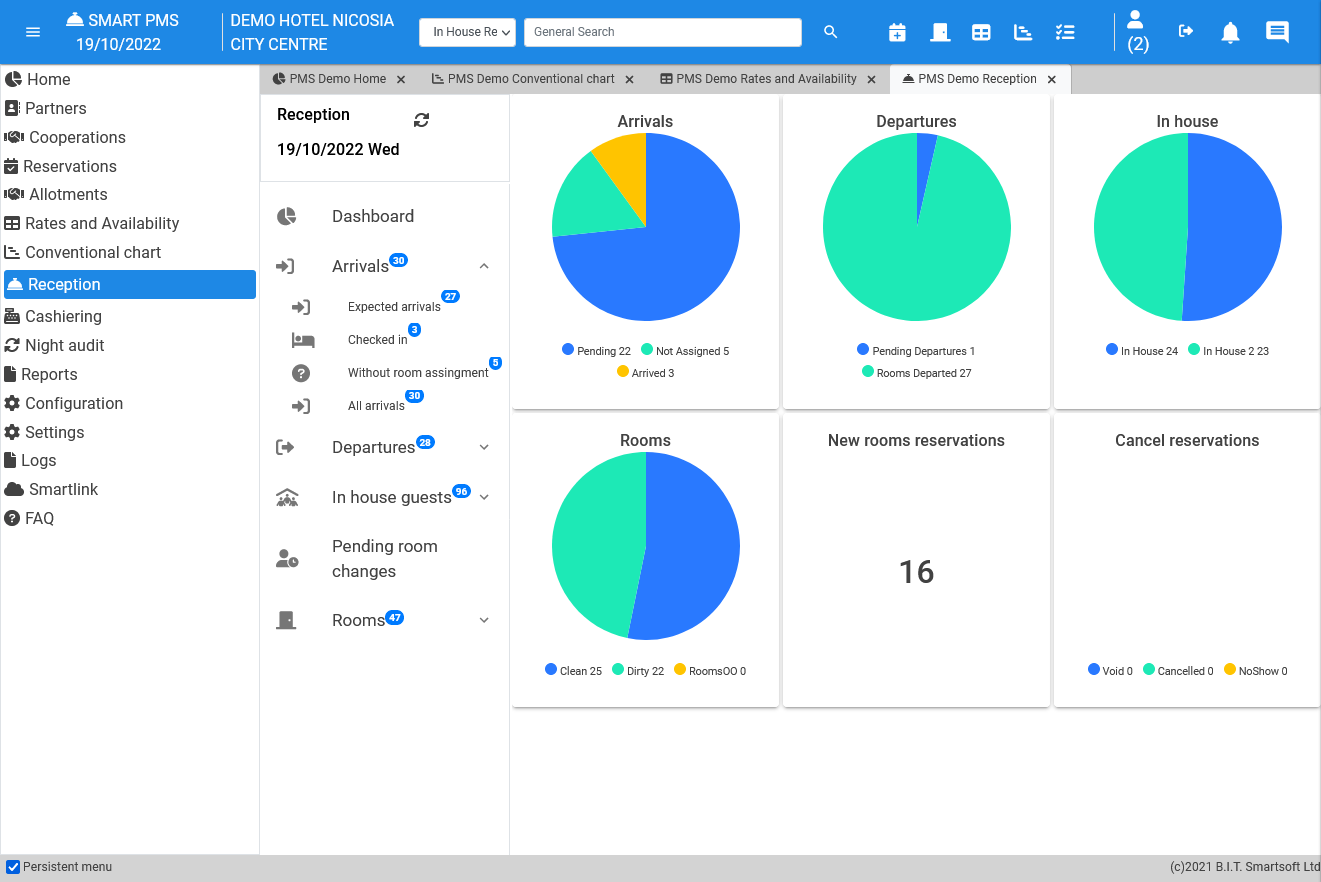
Before going live, migrate your active reservations, guest profiles, reservation history, and loyalty information. Clean and deduplicate records before importing them, and prioritize upcoming bookings so your arrival calendar is accurate from day one.
Keep a backup of the original export and validate migrated records before relying on the new PMS.
Migrating to a new software can be really intimidating and there are lots of areas to consider like the integrity of the data migration, the training, the user adoption, and the compatibility with some of our existing systems.
Use this comparison to protect your guest data and avoid common migration mistakes:
| Do | Don't |
|---|---|
| DoExport data before switching: Pull a full CSV of guest profiles, reservation history, and loyalty records from your current system before deactivating it. | Don'tAssume your old system stays accessible: Many vendors restrict access after contract termination, cutting off your data permanently. |
| DoDeduplicate guest profiles first: Merge duplicate records before importing so your new PMS starts with clean, accurate profiles rather than fragmented histories. | Don'tImport raw exports without cleaning: Unfiltered data from legacy systems often contains outdated contact details, duplicate entries, and formatting errors that corrupt your new database. |
| DoUse the vendor's migration template: Platforms like Cloudbeds and Mews provide structured import templates that map fields correctly—use them instead of reformatting data yourself. | Don'tMap fields manually without validation: Mismatched field mapping (e.g., check-in date into the name field) silently corrupts records with no immediate error. |
| DoPrioritize active reservations first: Import upcoming bookings before historical data so your team can operate on day one without gaps in the arrival calendar. | Don'tMigrate everything at once without staging: Bulk imports without phased validation make it nearly impossible to trace where data errors originated. |
| DoConfirm loyalty tier data transfers correctly: Repeat guests expect staff to recognize their status—verify that stay counts and earned perks carry over before going live. | Don'tManually re-enter loyalty data post-launch: Recreating this from memory or paper records introduces errors and undermines guest trust immediately. |
| DoArchive your original export file: Keep a dated backup of the raw export in a shared drive so you have a reference point if records need to be verified or restored. | Don'tDelete source data after import: If migration errors surface weeks later, you'll have no baseline to reconcile against. |
3. Train Staff on Core System Functions
Once your PMS is configured and guest data has been migrated, train staff on the workflows they'll use every day. Start with role-specific sessions so front desk agents can practice reservations, check-ins, checkouts, and folio adjustments, while housekeeping teams learn room-status updates and managers focus on reporting and access controls.
The training process with my staff has been easy and intuitive. Everyone loves how user-friendly and simple it is.
Use a training or demo environment to run realistic scenarios without affecting live reservations. Give each department a short reference guide, schedule additional training for night auditors, and review common mistakes after the first few weeks of use.
Use this comparison to build a training process your staff can follow from day one:
| Do | Don't |
|---|---|
| DoTrain by role, not by system: Give front desk staff check-in, checkout, and folio adjustment workflows; give housekeeping room status updates; give managers rate overrides and reporting access. | Don'tRun one generic training session: A single walkthrough for all roles leaves housekeepers sitting through rate plan logic they'll never use and front desk staff missing folio correction steps. |
| DoUse a sandbox or demo environment: Platforms like Cloudbeds and Mews offer test environments where staff can practice full reservation cycles without affecting live data. | Don'tPractice on live reservations: Errors made during training on a live system create real billing issues and guest-facing problems that take time to unwind. |
| DoCreate role-specific cheat sheets: Post laminated one-page references at each workstation covering the five or six tasks that role performs every shift. | Don'tRely on the vendor's full manual: A 200-page system guide is a reference document, not a training tool—staff won't read it during a busy check-in rush. |
| DoTrain night auditors separately: End-of-day reporting, no-show processing, and rate reconciliation in systems like Oracle OPERA Cloud require focused walkthroughs—not a five-minute add-on to general training. | Don'tAssume night auditors will figure it out: A missed or incorrect night audit creates reconciliation problems that carry forward into the next day's reports. |
| DoSchedule a refresher after two weeks: Once staff have handled real reservations, a short follow-up session catches the gaps that only surface after live use. | Don'tTreat training as a one-time event: Staff forget steps they don't use immediately, and high-turnover environments make ongoing training a baseline requirement, not an optional follow-up. |
| DoRecord short video walkthroughs: A two-minute screen recording of a folio correction or room move is faster to revisit than scheduling a live session every time a new hire joins. | Don'tRebuild training from scratch for every hire: Without recorded materials, training quality degrades each time it's handed from one senior staff member to another. |
4. Run Daily Reservation and Room Operations
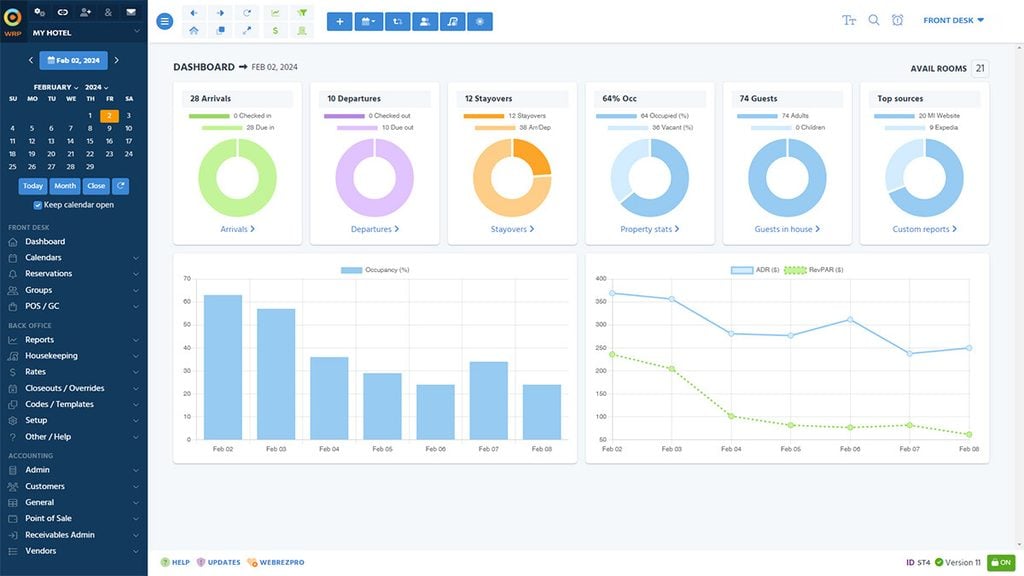
Once the PMS is configured, use it the way your team will during an actual shift. Create and modify reservations, assign rooms, complete check-ins, move guests between rooms, add or correct folio charges, update housekeeping status, process checkouts, and handle no-shows.
At the end of the test day, run the night audit or end-of-day close and confirm that room status, payments, folios, and revenue reports carry forward correctly. I’d test several realistic scenarios here—an early arrival, room move, late checkout, cancelled reservation, and folio adjustment—before treating the system as ready for live use.
Use this table to configure room types and rate plans correctly before connecting any external channels:
| Do | Don't |
| Review arrivals and departures: Check upcoming reservations, early arrivals, late checkouts, and available rooms before each shift | Wait until guests arrive: Unreviewed arrivals can cause room assignment delays and unnecessary guest waiting |
| Verify room status before check-in: Confirm that rooms are cleaned, inspected, and available before assigning them to arriving guests | Assign rooms without checking housekeeping updates: Guests may be sent to rooms that are still occupied or being cleaned |
| Update reservations immediately: Record date changes, cancellations, no-shows, and room moves in the PMS as they happen | Keep reservation changes in handwritten notes: Delayed updates can create conflicting room assignments and inaccurate availability |
| Review guest folios throughout the stay: Check room charges, deposits, refunds, and additional services before checkout | Leave billing corrections until checkout: Missing or incorrect charges can create disputes and slow the checkout process |
| Coordinate with housekeeping in real time: Update room status after cleaning, inspections, maintenance, and guest departures | Rely on verbal room-status updates: Information can be missed during shift changes or busy arrival periods |
| Complete the night audit: Reconcile room revenue, payments, no-shows, and outstanding balances before closing the business day | Skip reconciliation or ignore exceptions: Unresolved discrepancies can carry into the following day's financial reports |
5. Connect Payment Processing and Accounting Tools
Linking your payment processor and accounting software turns your PMS into a complete financial operation. When a guest checks out, charges flow directly from the folio into your accounting platform—no manual exports, no reconciliation gaps. I've seen properties run Cloudbeds alongside QuickBooks, where nightly revenue posts automatically by room category. Without this connection, your front desk closes folios while your finance team works from a separate spreadsheet, and those records rarely match.
Use this table to connect payment processing and accounting tools without creating reconciliation gaps on day one:
| Do | Don't |
|---|---|
| DoMatch your payment gateway to your PMS: Verify native integrations before committing—Cloudbeds connects directly with Stripe and PayPal, while Oracle OPERA Cloud supports a wider range of enterprise processors. | Don'tAssume any gateway will work: Third-party workarounds for incompatible processors create manual reconciliation steps that defeat the purpose of integration. |
| DoMap folio charges to accounting categories first: Define how room revenue, F&B charges, and fees map to your chart of accounts before activating the QuickBooks or Xero connection. | Don'tConnect accounting software with unmapped revenue categories: Unassigned charge types post to a catch-all account and require manual reclassification every close cycle. |
| DoEnable automatic end-of-day posting: Configure nightly revenue to post automatically by room category so your finance team sees accurate figures each morning without manual exports. | Don'tRely on manual CSV exports: Exporting folios by hand introduces timing gaps and version mismatches between what front desk closed and what accounting received. |
| DoTest a full payment cycle in staging: Run a dummy reservation from check-in through checkout—including a refund—before going live, and confirm the transaction appears correctly in your accounting platform. | Don'tSkip refund testing: Refunds are the most common source of reconciliation errors, and discovering the issue post-launch means unwinding real guest transactions. |
| DoSet up separate merchant accounts by revenue center: If your property has a spa, restaurant, or parking operation, separate merchant IDs keep revenue streams distinct and simplify period-end reporting. | Don'tRoute all revenue through one merchant account: Blended deposits obscure which revenue center is performing, making it harder to identify margin issues by department. |
| DoConfirm PCI compliance settings before taking live payments: Most PMS platforms handle tokenization, but verify your gateway configuration meets current PCI DSS requirements with your payment processor directly. | Don'tAssume compliance is automatic: PCI scope depends on how your property handles card data—some configurations still require your own compliance documentation even with a compliant gateway. |
Common Challenges of Using Hotel Property Management Software (and How to Address Them)
Even well-configured PMS platforms create friction once they're live—knowing where the problems typically surface lets you fix them before they affect guests or revenue:
| Problem | Solution |
|---|---|
| ProblemOTA rate parity gaps | SolutionBuild your full rate plan hierarchy in your PMS before activating any channel manager connections, so every OTA pulls from the same BAR-anchored structure. |
| ProblemData corruption after migration | SolutionUse your vendor's structured import template and deduplicate guest profiles before importing—never push a raw export directly into a new system. |
| ProblemNight audit errors carry forward | SolutionTrain night auditors separately on end-of-day reporting, no-show processing, and rate reconciliation rather than folding that training into a general front desk session. |
| ProblemFolio charges miss accounting categories | SolutionMap every revenue type—room charges, F&B, fees—to your chart of accounts before activating your QuickBooks or Xero connection, so nothing posts to a catch-all account. |
| ProblemStaff revert to manual workarounds | SolutionPost laminated, role-specific cheat sheets at each workstation and record short screen walkthroughs so staff have a fast reference during busy shifts instead of improvising. |
| ProblemRefund reconciliation errors post-launch | SolutionRun a complete dummy reservation cycle—including a refund—in a staging environment and confirm the transaction appears correctly in your accounting platform before going live. |
| ProblemUndocumented rate logic breaks on handoff | SolutionKeep a shared reference file that maps every rate plan name, its BAR relationship, applicable room types, and restriction rules so new managers inherit a working system, not a guessing game. |
More Articles
Advanced Uses & Maximizing ROI From Hotel Property Management Software
Once your PMS is configured and your team is past the learning curve, the real returns come from using the system's deeper capabilities to drive revenue and sharpen operations—not just process check-ins faster:
Dynamic rate automation: Move beyond static BAR pricing by connecting your PMS to a revenue management engine. Systems like Cloudbeds and Mews integrate with tools that adjust room rates automatically based on occupancy thresholds, competitor pricing, and local demand signals—so your rates respond to the market in real time without manual intervention.
Guest profile intelligence: Your PMS accumulates stay history, preference notes, and spend patterns across every visit. I've seen properties use this data in Oracle OPERA Cloud to flag returning guests at check-in automatically, triggering room upgrades or personalized amenity placements that cost almost nothing but meaningfully improve loyalty.
Segmented revenue reporting: Rather than reviewing total revenue as one figure, map your folio categories to distinct revenue centers—rooms, F&B, spa, parking—and pull segment-level reports weekly. This surfaces which revenue streams are underperforming and where rate or upsell strategy needs adjustment.
Automated upsell workflows: Configure your PMS to send pre-arrival emails that offer room upgrades, late checkout, or add-on packages at a set price point. This turns your confirmation sequence into a revenue channel without adding front desk workload.
Housekeeping optimization through occupancy data: Connect your room status module to arrival and departure forecasts so housekeeping supervisors can allocate staff by section based on actual turnover demand—rather than running a fixed daily headcount regardless of occupancy.
Multi-property consolidated reporting: If you operate more than one property, platforms like Mews and Oracle OPERA Cloud let you pull cross-property performance dashboards from a single login. This gives ownership-level visibility into RevPAR, occupancy, and ADR across your portfolio without manually compiling reports from each site.
Ready to Put Your PMS to Work?
Once your PMS is configured and your team knows the daily workflows, make sure the system still fits your property’s size and needs. Compare options in our guide to the best hotel property management software to find a platform that grows with your team.