A hotel property management software implementation can make or break your technology investment—get it wrong, and you're looking at staff frustration, data loss, and guest experience gaps that take months to undo. The stakes are high, and the margin for error is slim.
That's exactly why a structured, phased approach matters. Breaking the rollout into clear, sequenced steps removes the guesswork, keeps your team aligned, and gives you the control needed to catch problems before they compound.
My 10 Essential Phases for a Smooth PMS Rollout
Here’s how I break down every successful hotel property management software implementation, step by step:
1. Project Scoping and Implementation Planning
Start here before you touch any software. This phase is about defining what success actually looks like for your property—not just "getting the system live."
Pull together your department heads: front desk, housekeeping, revenue management, and IT. Each team has different daily workflows, and your PMS needs to support all of them. Map out your current processes first, then identify where the gaps are. A 200-room full-service hotel has very different needs than a boutique property with one front desk agent.
“The key to a successful onboarding is project management.
Set a realistic go-live date with buffer time built in. I've seen teams commit to aggressive timelines, skip proper scoping, and spend months untangling the fallout. Nail down your integration requirements early—channel managers, POS systems, and booking engines all need to connect cleanly. Document everything in a shared project plan your vendor and internal team can both reference.
Watch for these common missteps during project scoping and planning to reduce surprises down the road:
- Skipping department input: Missing key workflows creates headaches for front desk or housekeeping later.
- Overpromising go-live timeline: Compressed schedules leave little room to train, test, or catch integration issues.
- Ignoring integration dependencies: Delaying technical conversations risks launch delays with channel managers or POS systems.
- Failing to document agreements: Verbal commitments get lost—capture all decisions in a shared plan.
2. Infrastructure and Environment Readiness
Before your vendor configures anything, audit your physical and technical environment. A PMS rollout can stall fast if your network can't handle the load. Test your internet bandwidth at the front desk, housekeeping stations, and any back-office terminals. Most cloud-based systems need a stable, low-latency connection—a spotty Wi-Fi signal in the lobby will create real problems on go-live day.
“Migrating to a new software can be really intimidating
Loop in your IT team or an external network consultant early. Confirm that your hardware—workstations, tablets, printers, and key card encoders—meets the vendor's minimum specs. I've seen properties skip this step and scramble to replace outdated equipment mid-implementation. Also verify that your firewall settings won't block the PMS from communicating with third-party integrations. Set up a dedicated test environment so your team can validate configurations without touching live reservation data.
Spotting and resolving infrastructure gaps early will keep your project on track—watch for these common issues before your team moves forward:
- Weak Wi-Fi coverage: Unreliable signals mean lost connections during busy shifts.
- Outdated devices: Old workstations or tablets may not support your PMS or integrations.
- Network bottlenecks: Congestion from guest or staff traffic can slow down system access.
- Unverified firewall rules: Locked-down firewalls might block vendor communication or key integrations.
- No test environment: Skipping this step increases the risk of misconfigurations affecting live data.

Have an account? Log In
3. System Configuration and Property Setup
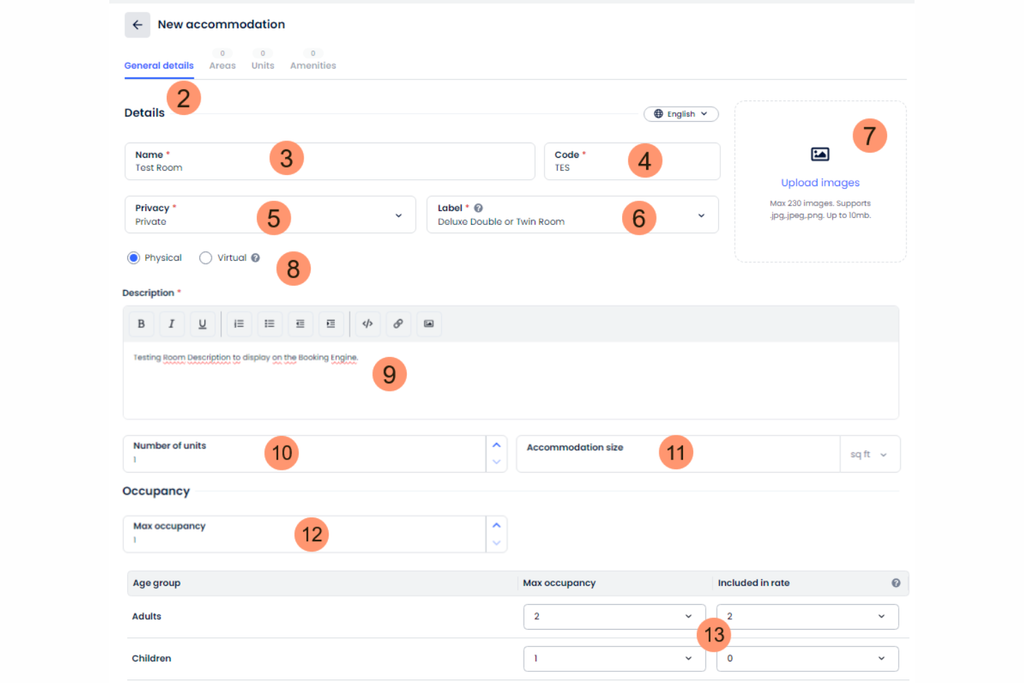
This is where your PMS starts to reflect your actual property. Work directly with your vendor's implementation team to build out your room types, rate plans, and reservation policies. Don't just accept the default configuration—push to replicate how your property actually operates.
Your revenue manager and front office manager need to be in the room here. They'll catch configuration gaps that IT won't spot. A common scenario: a property builds rate plans without accounting for package inclusions, then spends weeks fixing guest billing errors post-launch.
Prioritize accuracy over speed. Every room attribute, tax rule, and cancellation policy you configure now becomes the foundation everything else runs on. Get these wrong and you're correcting live reservations under pressure. Build in a review checkpoint before moving to integrations.
Avoid these common mistakes during system configuration and property setup to save your team costly fixes later:
- Default settings overuse: Applying generic templates without custom adjustments leaves important property-specific rules out.
- Limited team involvement: Only involving IT or management overlooks details daily users rely on.
- Incomplete package setup: Missing package inclusions can lead to guest billing errors and rework.
- Skipping policy alignment: Not aligning cancellation, deposit, and tax rules with your actual operations creates confusion after launch.
- Rushing through reviews: Moving forward without validation checkpoints lets errors slip into your live environment.
4. Data Migration and Legacy System Cleansing
Don't move dirty data into a new system. Before migrating anything, audit your existing guest profiles, reservation history, and rate data for duplicates, outdated records, and formatting inconsistencies. Your front office manager and revenue team should lead this review—they know which records matter and which can be archived.
Work with your vendor to map fields from your legacy system to the new PMS structure. A guest profile field labeled "VIP notes" in your old system might not translate cleanly without manual mapping. Run a test migration with a small data subset first, then validate the output before moving everything over. I'd strongly recommend keeping your legacy system accessible in read-only mode for 30 to 60 days post-launch. Your team will need to reference historical bookings, and having that safety net prevents real service gaps.
Use these practical tips to help your team avoid preventable data headaches during migration:
- Data Audit First: Scrub legacy records for duplicates, empty fields, and outdated guest profiles before importing anything.
- Mapped Fields: Double-check how each legacy field translates to your new PMS, especially loyalty or notes fields.
- Test Migrations: Always run a sample migration with real data and have department leads check the results.
- Maintain Access: Keep your old system in read-only mode after go-live so staff can look up needed history.
- Archive Non-Essentials: Don’t bring over records you’ll never use—archive or delete what doesn’t add value.
5. Third-Party Integration and Channel Connectivity
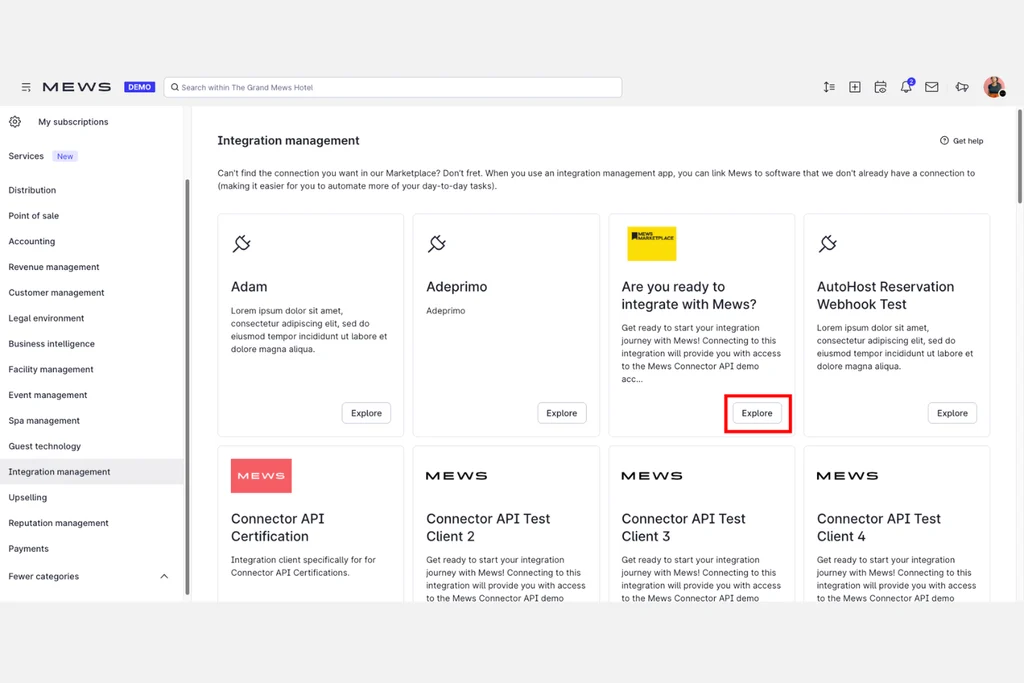
This is where your PMS starts working as a system rather than a standalone tool. Connect your channel manager first—it's the integration that affects revenue most directly. A misconfigured mapping between your PMS room types and OTA listings can push incorrect availability live within hours of go-live.
Your revenue manager needs to be hands-on here, not just IT. They'll catch rate plan mismatches that a technical team won't recognize. Test every connection end to end: push a test reservation through your booking engine, confirm it lands in the PMS correctly, then verify it reflects accurately in your channel manager. Do the same for your POS and any guest messaging tools. Don't assume a connection is working because it's "active"—validate it with real transaction data before you go live.
Use these best practices to make sure your third-party integrations actually work for your property—not just on paper, but in real guest scenarios:
- Active involvement: Bring your revenue manager and front office staff into integration testing to catch real-world data mismatches.
- End-to-end testing: Push a reservation from an OTA through your booking engine and validate that it appears in the PMS and channel manager exactly as expected.
- Documentation review: Confirm that vendor-supplied API mappings match your property’s actual room, rate, and package setup.
- Communication protocol: Set a process for raising and tracking integration issues before go-live—don’t rely on ad hoc phone calls or emails.
- Fallback plan: Create a checklist for reverting to manual processes for reservations or payments if an integration fails during the first week after launch.
6. Internal Testing and Quality Assurance
Run your tests before guests ever see the system. Assign real staff from front desk, housekeeping, and revenue to act as testers—not just your IT team. They'll surface workflow gaps that a technical reviewer won't catch.
Work through your most common scenarios first: check-ins, checkouts, reservation modifications, and payment processing. Then stress-test edge cases like split folios, walk-ins during high occupancy, and rate overrides. Document every issue in a shared log and assign owners with deadlines. Don't sign off on go-live until all critical failures are resolved. A single broken folio workflow can create billing disputes across dozens of reservations in your first week. Build in at least one full-cycle rehearsal where your team runs an entire day's operations in your test environment before touching anything live.
Use these pointers to help your team run internal testing and quality assurance that actually uncovers real issues before go-live:
- Role-based Scenarios: Assign front desk, housekeeping, and revenue staff to test real-world workflows—not just technical ones.
- Edge Case Testing: Script test cases for walk-ins, split bills, and room moves during peak occupancy.
- Shared Issue Log: Capture every problem in a single log with clear owners and deadlines for fixes.
- Full-Cycle Rehearsal: Run at least one mock day from morning arrivals through night audit in your test environment.
- Go-Live Criteria: Hold off on launch until all critical issues are marked resolved and retested.
7. Staff Training and Change Management
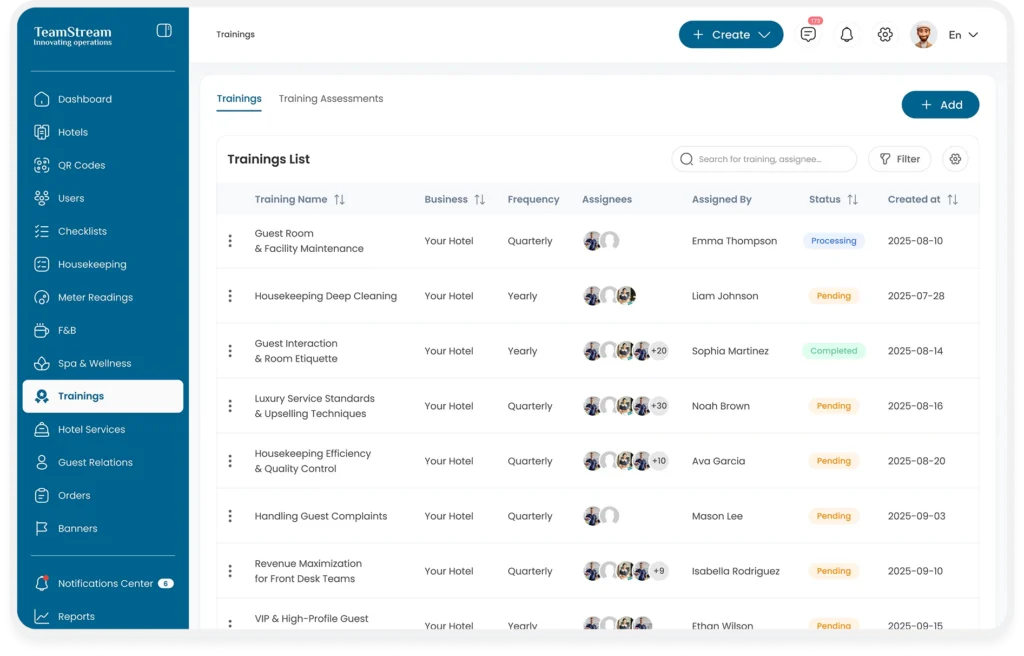
Training works best when it mirrors real workflows. Build your sessions around role-specific tasks—front desk staff need check-in and folio management, not a tour of the entire system. Use your test environment for hands-on practice so your team builds muscle memory before go-live.
Resistance to change is your biggest risk here, not the software itself. Involve department leads early and frame the new PMS around how it makes their jobs easier. Designate a go-to "super user" in each department—someone who's confident enough to answer questions from colleagues on the floor. After launch, expect a short dip in speed at the desk. That's normal. Build in extra staffing for your first week to absorb it without impacting the guest experience.
Plan for a smoother transition by keeping these best practices in mind as you approach staff training and change management:
- Role-Specific Training: Focus on the real-world tasks each team handles most often.
- Hands-On Sessions: Use your PMS test environment so staff can practice using real booking and check-in scenarios.
- Super User Selection: Designate an in-house expert in each department who can answer questions quickly.
- Change Champions: Involve respected team members to model adoption and encourage buy-in from the rest of the staff.
- First-Week Coverage: Schedule extra coverage at the front desk to absorb slower workflows as everyone adjusts.
8. Soft Launch and Pilot Testing
Go live with a limited scope first. Run your new PMS alongside real operations for a short window—typically three to five days—using a single department or a reduced room block. Front desk leads and your operations manager should own this phase, not IT. They'll catch friction points that only show up when real guests are checking in under normal pressure.
Watch for anything that slows the desk down or generates guest-facing errors: folio mismatches, rate plan discrepancies, or payment processing delays. Log every issue in real time and triage by severity. Don't expand access to the full property until your pilot results are clean. A soft launch isn't a formality—it's your last real opportunity to catch what testing missed before volume scales up and fixes become harder to make.
Keep these reminders top of mind to get the most benefit from your pilot without creating new headaches for your team or guests:
- Tight Scope: Limit the test to a single department or small room block before expanding.
- Real-Time Issue Logging: Record problems as they happen and triage by urgency, not just technical difficulty.
- Guest Impact: Monitor for guest-facing slowdowns—like delayed check-ins, incorrect folios, or payment hiccups—that don’t always show up in internal testing.
- Staff Ownership: Make sure operational leads, not IT, take point during pilot days, since they can flag practical challenges early.
- No Expansion Until Clean: Only extend access once your pilot runs smoothly and the most important issues have clear fixes in place.
9. Full Go-Live and System Cutover
Cut over completely only after your pilot results are clean and your team feels confident. On go-live day, have your front office manager and operations lead physically present at the desk—not on call, present. This is when small issues compound fast, and decisions need to happen in real time.
“The processes are very streamlined, very simple, and they have really great people who work at implementation.”
Disable write access to your legacy system that morning so all new reservations flow exclusively through the new PMS. Communicate this clearly to every department beforehand. Keep your vendor's support line open and on standby, not just available by ticket. If something breaks during check-in rush, you can't wait hours for a response.
Watch folio creation, payment processing, and room assignment closely during the first 24 hours. These are where cutover errors surface first. Flag anything unusual immediately—don't let small discrepancies pile up until they become billing disputes.
Use these best practices to help your front office and operations teams manage system cutover smoothly on go-live day:
- Physical Presence: Ensure key managers are at the desk to support quick decisions.
- Legacy Lockdown: Disable write access to the old PMS so all new activity happens in the new system.
- Vendor Readiness: Keep your software provider’s help line open and share it with staff.
- Focused Monitoring: Watch folio creation, payment processing, and room assignments for early signs of trouble.
- Immediate Escalation: Flag and address discrepancies right away—don’t let issues pile up.
More Articles
10. Post-Implementation Review and Optimization
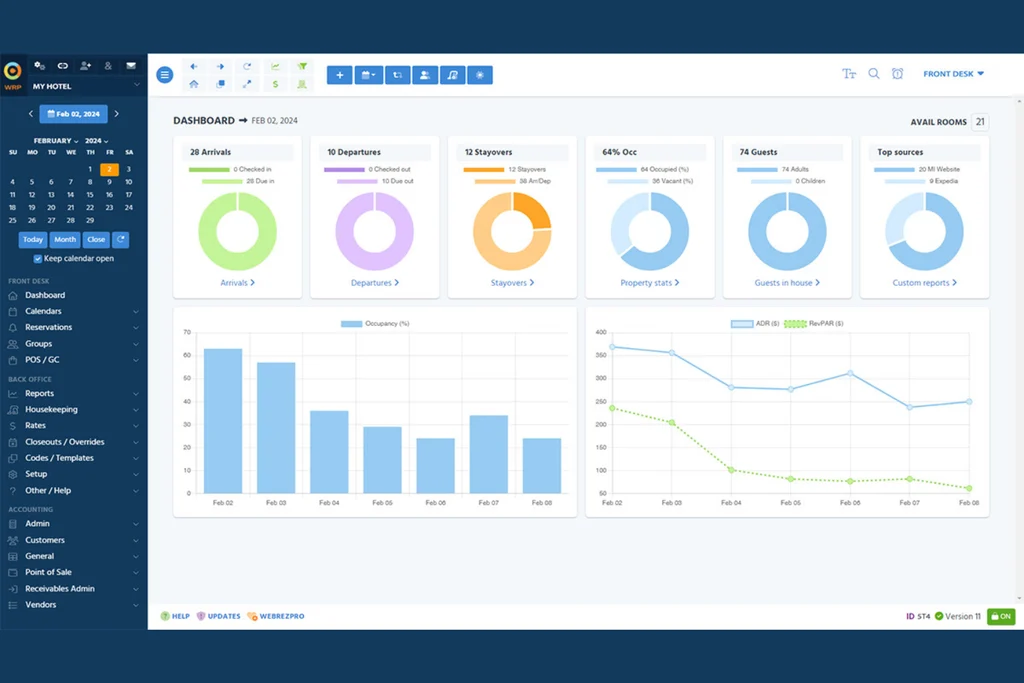
Schedule a structured review two to four weeks after go-live—not six months later. Pull reports from your new PMS and compare actual performance against the benchmarks you set before implementation. Look at check-in times, folio error rates, and OTA parity. Numbers don't lie, but they need context from the people doing the work.
Bring department leads together for an honest debrief. Front desk staff will flag friction points that never made it into an issue log. Revenue managers will spot rate plan behavior that looks fine in the system but performs poorly in practice. Document what's working and what isn't, then prioritize fixes by guest impact. Optimization isn't a one-time task—set a recurring monthly review cadence for your first quarter so improvements stay on the agenda before habits calcify around workarounds.
Use these suggestions to run a meaningful post-implementation review that actually drives improvements—rather than just checking a box:
- Schedule Early: Hold your review two to four weeks after go-live, while experiences are still fresh.
- Gather Real Data: Compare PMS-generated KPIs like check-in time, folio errors, and OTA parity against your pre-launch benchmarks.
- Involve Multiple Voices: Invite department leads and daily users so you hear the real impacts, not just summary statistics.
- Document and Prioritize: List what’s working and what’s not, then focus first on fixes that impact guest experience.
- Make Optimization Ongoing: Set a recurring monthly review during your first quarter to keep improvement momentum going.
Top Hotel Property Management Software to Consider
Here’s my shortlist of the best hotel property management software solutions:
Best Practices for a Successful Hotel Property Management Software Implementation
Getting your hotel property management software implementation right means sidestepping common pitfalls that slow teams down or create problems at the desk. Use this table to compare some typical missteps with actionable, real-world alternatives that keep your rollout on track:
| Don’ts | Instead, Do: |
|---|---|
| Don’tsRely only on vendor training materials | Instead, Do:Build hands-on, role-specific training using your test environment |
| Don’tsSkip testing real guest scenarios | Instead, Do:Script and rehearse realistic workflows from check-in to night audit |
| Don’tsIgnore edge cases like walk-ins or split bills | Instead, Do:Include edge case testing with real users in peak periods |
| Don’tsUnderestimate resistance to change | Instead, Do:Involve department leads early and frame changes around daily benefits |
| Don’tsTrack issues in scattered emails or chats | Instead, Do:Capture all problems in a shared log with clear owners and due dates |
| Don’tsLaunch property-wide without a pilot | Instead, Do:Run a soft launch in one department or a small group of rooms first |
| Don’tsWait to escalate system slowdowns or errors | Instead, Do:Assign leads to monitor high-risk tasks and escalate all anomalies immediately |
| Don’tsDelay post-go-live review for months | Instead, Do:Schedule a review within two to four weeks and set up a monthly improvement cadence |
| Don’tsOnly include IT or management in feedback | Instead, Do:Involve front desk, housekeeping, and revenue staff in every review and optimization session |
| Don’tsKeep the old PMS accessible alongside the new system | Instead, Do:Disable write access to your legacy PMS on go-live morning |
Find the Right Hotel PMS for a Successful Implementation
A successful hotel PMS implementation starts with choosing software that fits your property's workflows, integrations, and operational needs. Before committing to a system, compare how different platforms handle reservations, housekeeping, payments, reporting, and staff onboarding.
Explore my guide to the best hotel property management software to find a solution that supports your team from initial setup through daily operations.