
The features built into hotel property management software shape how smoothly your property runs every single day. From front desk reservation management to channel management, the right combination of tools determines whether your team is ahead of guest needs or constantly catching up. Choosing without a clear picture of what each feature does—and what your property actually needs—leads to gaps that show up at the worst possible moments.
This guide breaks down 11 must-have features so you can evaluate any system with confidence. Whether you're upgrading your current setup or shopping for the first time, you'll know exactly what to look for and why it matters.
11 Hotel PMS Features Your Property Needs
The following features show how each hotel PMS capability works, what it handles, and where it fits into daily hotel operations:
1. Front Desk Reservation Management
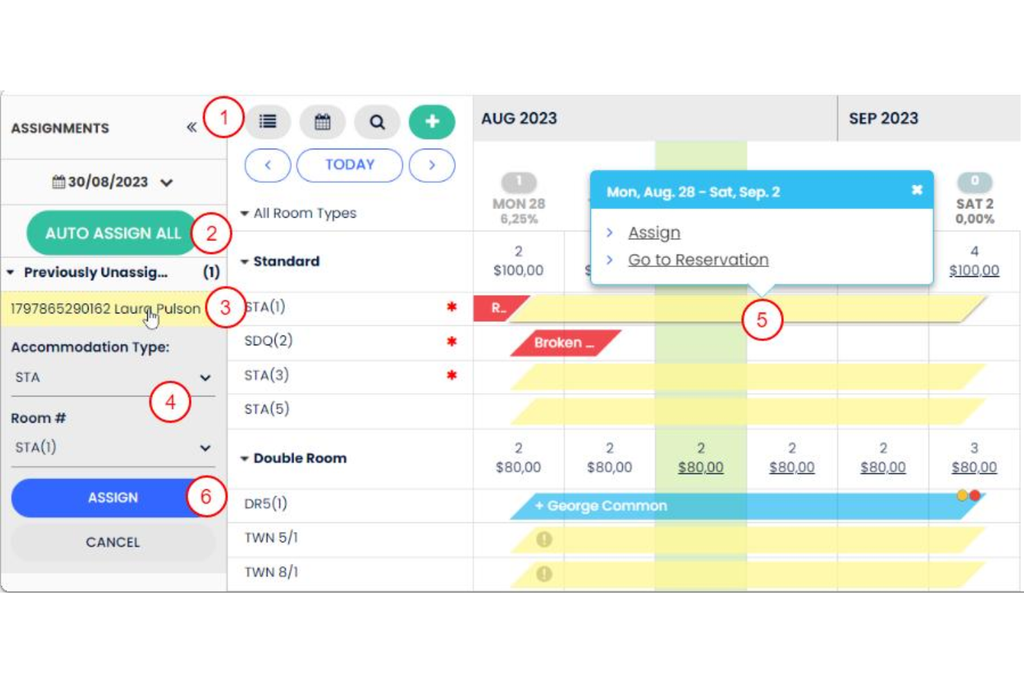
Front desk reservation management is the core of any hotel PMS. It gives your team a single view of all bookings—arrivals, departures, room assignments, and stay details—so nothing slips through the cracks. The PMS stores reservations, guest profiles, room inventory, and folios while allowing staff to manage check-ins and track stay details.
In my experience, this centralized view is what separates a reactive front desk from a proactive one. When your team can see the full picture at a glance, they spend less time digging and more time serving guests.
Here are the key functions front desk reservation management handles day-to-day:
- Room assignment: Assign and reassign rooms based on guest preferences, availability, and housekeeping status—all from one screen.
- Arrival and departure tracking: View real-time arrivals and departures so your team can anticipate busy periods and prep accordingly.
- Guest profile storage: Pull up loyalty history, stay notes, and preferences instantly at check-in—systems like Oracle OPERA and Cloudbeds do this well.
- Folio management: Build, split, and settle guest folios without switching tools.
Every unresolved guest issue, commitment and departmental follow-up must be documented.
2. Channel Management
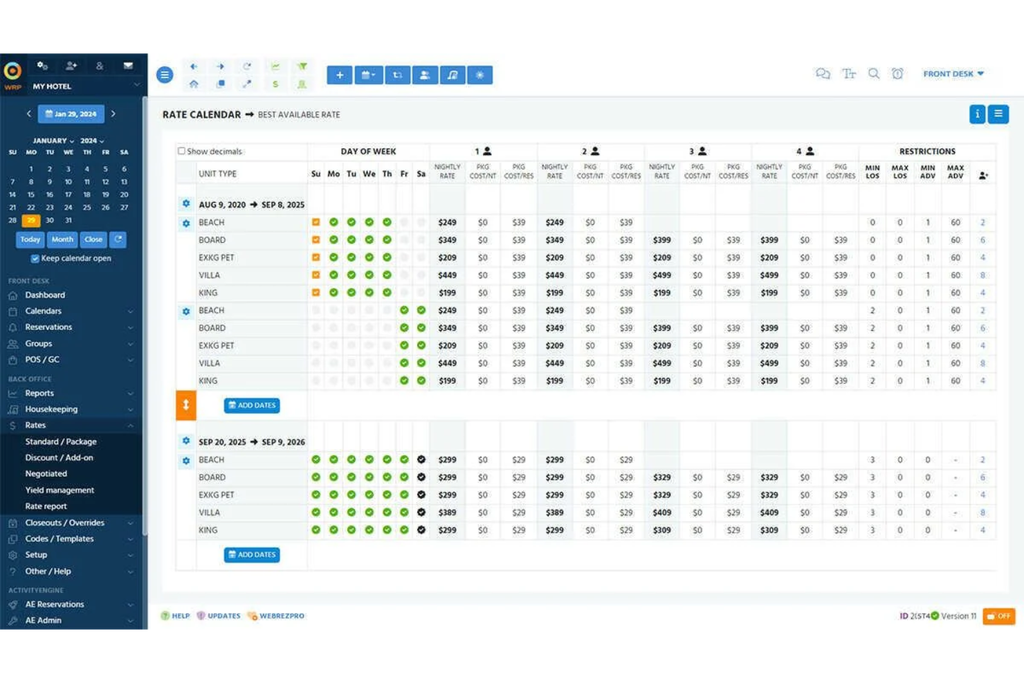
Channel management connects your PMS to every booking platform—OTAs, your direct booking engine, GDS—and keeps rates and availability in sync across all of them automatically. When a room books on Booking.com, your inventory updates instantly everywhere else. That two-way sync is what eliminates overbookings.
In my experience, this is the feature that pays for itself fastest. Without it, rate updates are manual, errors are frequent, and your team spends hours on distribution tasks instead of guests. A built-in channel manager removes that entirely.
Here are the key functions channel management handles across your distribution:
- Real-time inventory sync: When a room books on one platform, availability updates instantly across every connected OTA—Booking.com, Expedia, Airbnb—and your direct booking engine.
- Centralized rate management: Push rate changes to all channels at once instead of logging into each platform separately.
- Two-way data flow: Reservations from any channel land directly in your PMS without manual entry.
- OTA connection breadth: Systems like Cloudbeds connect to 450+ channels, so niche platforms are covered too.
Technology doesn’t replace hotel teams — it supports them.
Have an account? Log In
3. Guest Profile Management
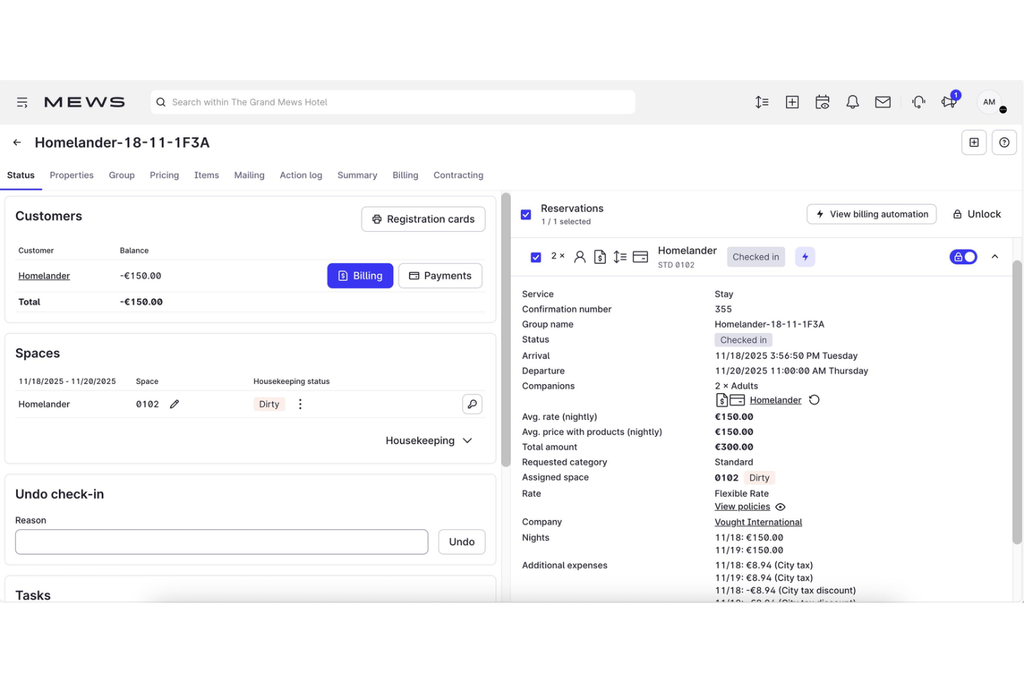
Guest profile management stores each guest's contact details, stay history, preferences, special requests, and communication records in a single digital record inside your PMS. Every time a guest books, that profile updates automatically, so your team walks into every interaction with context already in hand.
I find this feature makes the biggest difference at check-in. Instead of asking returning guests the same questions, your staff can greet them by name and act on known preferences right away. That kind of personalized service is hard to manufacture—but easy to deliver when the data is already there.
Here are the key functions guest profile management handles across your property:
- Contact and stay history: Store guest contact details, past stays, and spend patterns so your team knows exactly who's walking through the door.
- Preference tracking: Log room type preferences, pillow choices, dietary needs, and special requests—systems like Oracle OPERA and Mews surface these automatically at check-in.
- Communication records: Keep a full log of every interaction, from pre-arrival emails to in-stay service requests.
- Loyalty data: Link profiles to loyalty program tiers so front desk staff can recognize and reward repeat guests without asking.
In hospitality, we can have many guests with the same name… but every guest is unique.
4. Housekeeping Management
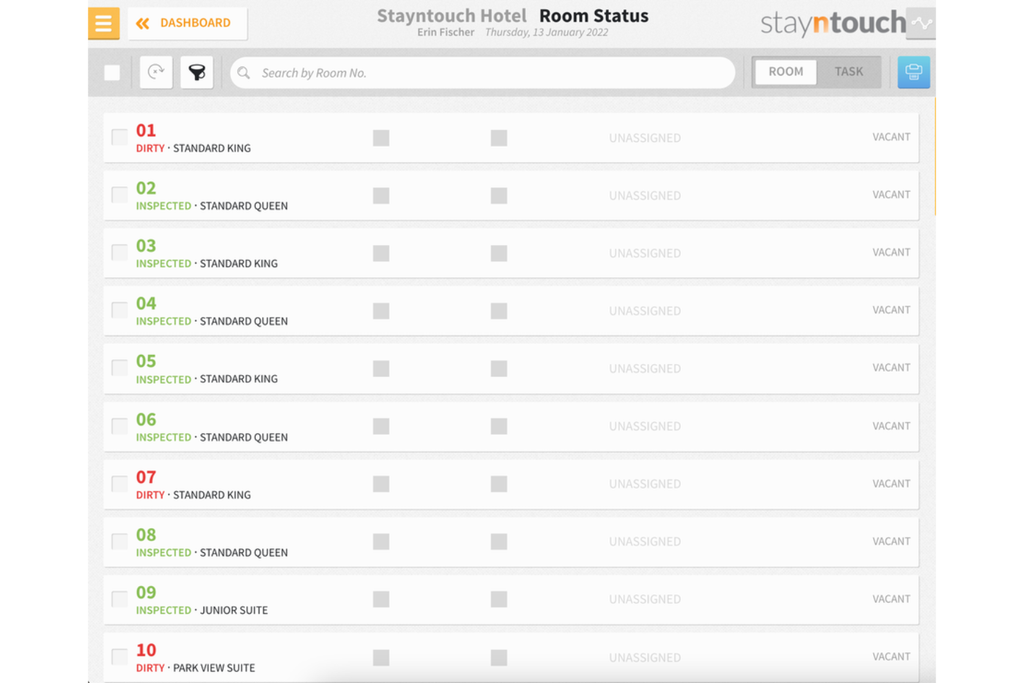
Housekeeping management inside a PMS connects your front desk and housekeeping team in real time. Room statuses update the moment a housekeeper marks a room clean, so the front desk always knows what's ready for assignment. Staff can access task lists, special requests, and add-ons from any mobile device—no paper, no radio chasing.
What I find most valuable is the task automation. Recurring cleans, stayover schedules, and maintenance flags run without manual reminders, which takes a real load off supervisors.
Here are the key functions housekeeping management handles across your property:
- Room status updates: Housekeepers mark rooms clean, dirty, or out of order from a mobile device, and the front desk sees it instantly—no calls, no lag.
- Task automation: Recurring cleans, stayover schedules, and departure cleans generate automatically based on booking data, so supervisors aren't manually building daily task lists.
- Maintenance flagging: Staff log issues directly in the system, which routes them to maintenance without going through the front desk.
- Analytics and performance tracking: Tools like Mews and Flexkeeping track minutes per room and on-time readiness, so you can spot where slowdowns consistently happen.
You can have perfectly cleaned rooms… and still run a weak operation.
5. Revenue Management
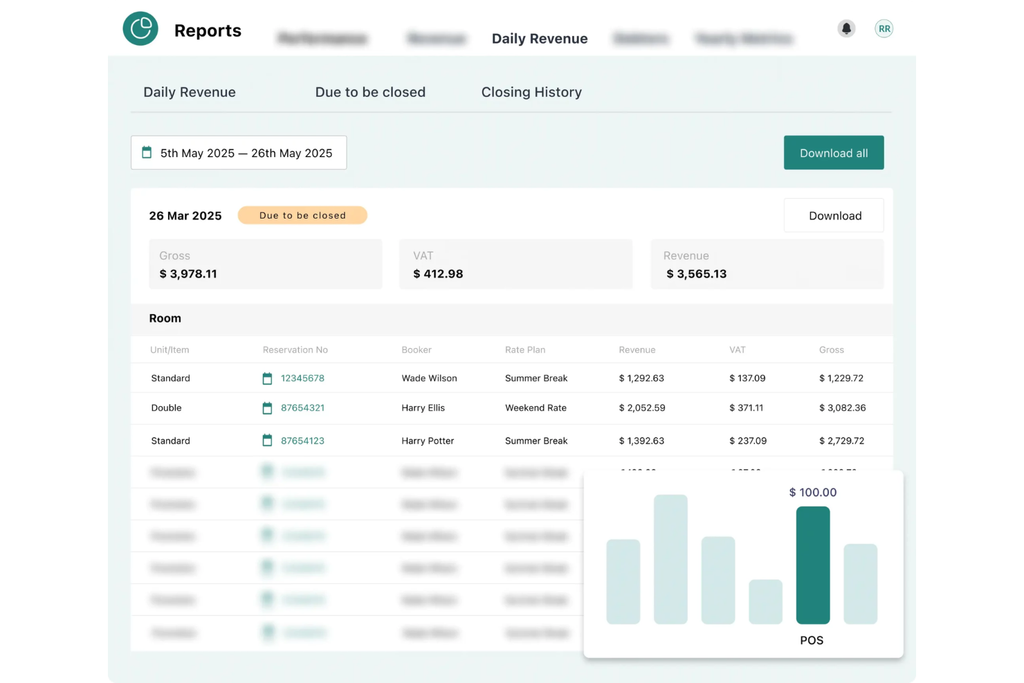
Revenue management inside a PMS uses demand data, occupancy trends, and competitor pricing to adjust your room rates automatically. Instead of setting a flat rate and hoping it holds, the system responds to real-time market conditions to protect your RevPAR and ADR.
I find this is where a PMS shifts from an operational tool to a commercial one. When pricing decisions are driven by live data rather than gut feel, you stop leaving money on the table during peak periods and stop undercutting yourself during slow ones.
Here are the key functions revenue management handles across your property:
- Dynamic rate adjustment: The system raises or lowers rates automatically based on occupancy thresholds, booking pace, and local demand signals—no manual rate changes required.
- Demand forecasting: Historical data and current booking trends generate occupancy projections so you can set rate strategies ahead of high-demand periods.
- Competitor rate monitoring: Tools like IDeaS and Duetto pull in market-wide pricing data and benchmark your rates against comparable properties.
- RevPAR and ADR reporting: Track how rate decisions translate into actual revenue performance at a glance, not after month-end reports.
Rates must move with demand, pace, compression, and inventory.
6. Payment and Billing Processing
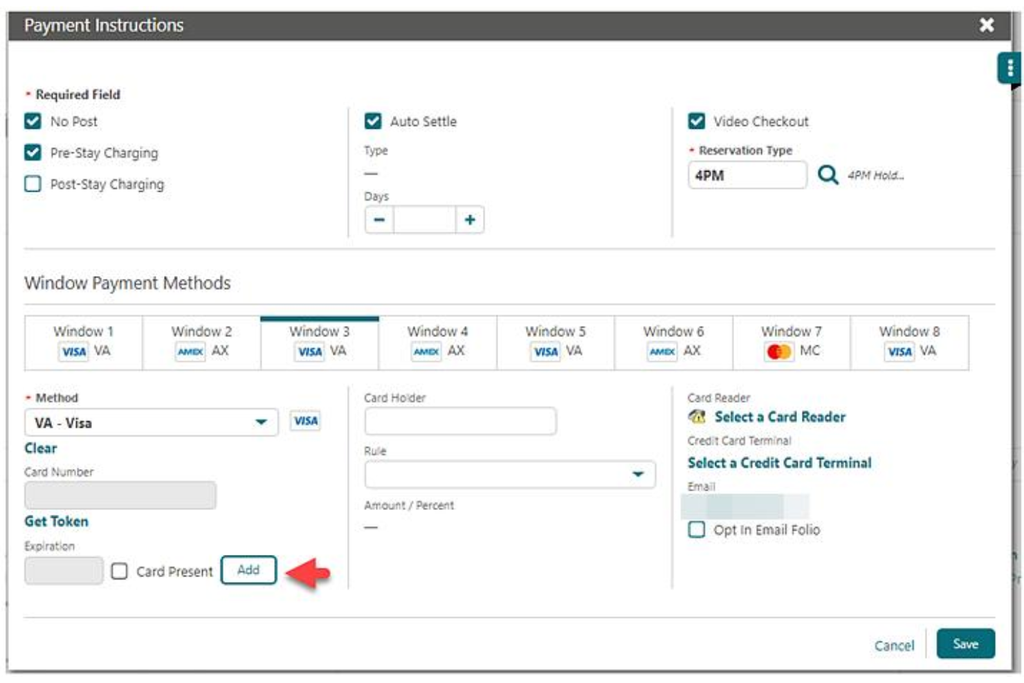
Payment and billing processing handles how your property collects, records, and reconciles guest charges from arrival through checkout. It connects directly to your folio management so every room charge, F&B add-on, and incidental posts automatically—no manual entry.
What I find most valuable is the embedded reconciliation. When payments and folios live inside the same system, end-of-day audits take minutes instead of hours. Features like card tokenization, split billing, deposit scheduling, and pre-authorization workflows give your front desk real control over how charges are handled—and reduce chargeback exposure at the same time.
Here are the key functions payment and billing processing handles across your property:
- Folio posting: Room charges, F&B add-ons, and incidentals post automatically to the guest folio—no manual entry at checkout.
- Split billing: Divide charges across multiple folios or payment methods, which is especially useful for corporate guests separating room rate from expenses.
- Card tokenization: Store payment credentials securely without holding raw card data, reducing PCI compliance exposure.
- Pre-authorization: Place holds at check-in so incidentals are covered before they become disputes.
- End-of-day reconciliation: Systems like Oracle OPERA and Mews close out daily audits in minutes when payments and folios live in the same system.
Booking, payment and refund records should be traceable to the same stay.
7. Point of Sale Integration
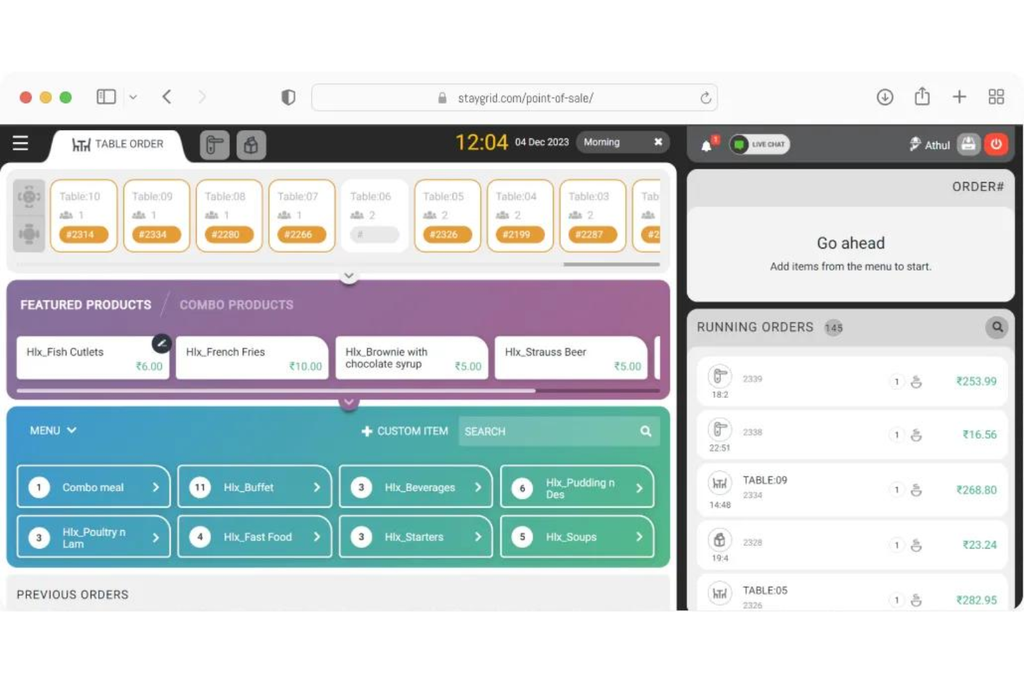
Point of sale (POS) integration connects your hotel's revenue outlets—restaurant, bar, spa, retail—directly to your PMS. When a guest charges a meal or spa service to their room, that charge posts automatically to their folio in real time.
What I find most valuable here is the ability to reduce manual posting. Without integration, staff must transfer charges between systems, which introduces opportunities for billing errors. When POS and PMS systems share transaction data, front desk teams can review consolidated guest charges without manually transferring each transaction.
Here are the key functions POS integration handles across your property's revenue outlets:
- Room charge posting: Guests charge meals, spa services, or retail purchases to their room, and the charge appears on their folio instantly—no manual transfer required.
- Outlet-level reporting: Track revenue by outlet (restaurant, bar, spa) directly inside your PMS dashboard.
- Checkout accuracy: At departure, your front desk presents a single consolidated folio covering every charge from every outlet.
- System connectivity: Platforms like Oracle OPERA and Mews connect natively with leading POS systems, reducing reconciliation gaps.
Connected systems and an integrated operation are not the same thing.
8. Self-Service Guest Check-In
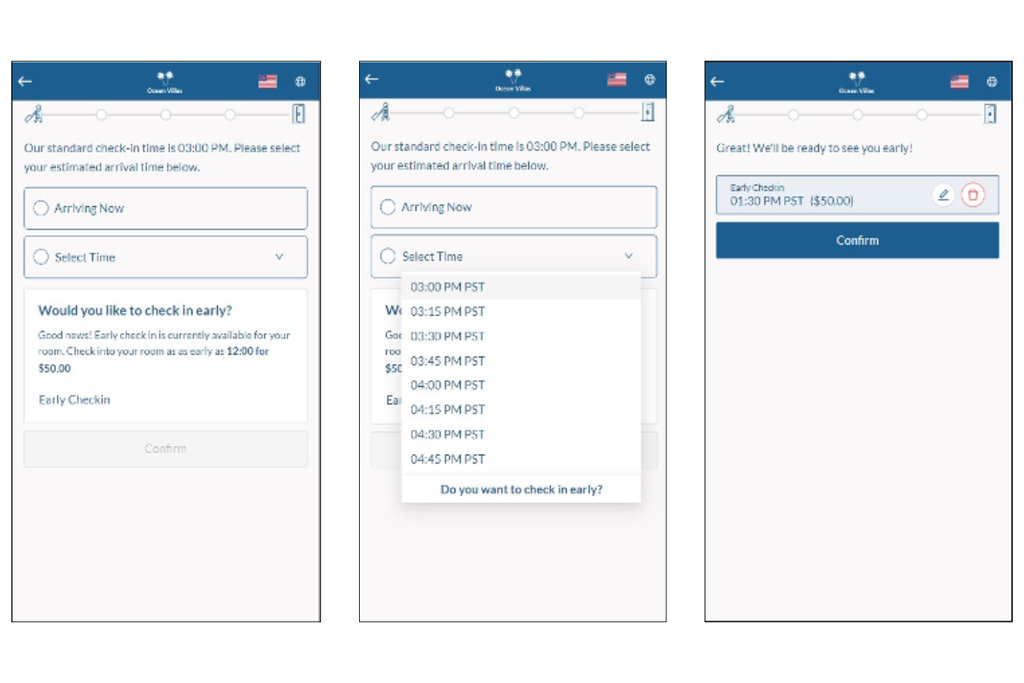
Self-service check-in lets guests complete the entire arrival process—ID verification, payment, and room key delivery—without stopping at the front desk. Inside a PMS, it works through pre-arrival mobile links or lobby kiosks that sync directly with your folio and room status in real time.
I think the biggest operational win is front desk relief during peak arrivals. Guests who've already checked in on their phones don't need to queue, which frees your staff to handle exceptions and give attention where it actually matters.
Here are the key functions self-service check-in handles across your property:
- Pre-arrival mobile check-in: Guests receive an SMS or email link before arrival to complete registration, sign terms, and submit payment—so they're checked in before they reach the property.
- ID verification: Guests scan or upload identity documents directly in the flow, meeting front desk verification requirements without staff involvement.
- Room key delivery: Digital keys go straight to a guest's phone, or a lobby kiosk dispenses a physical keycard after check-in is confirmed.
- Upsell prompts: Systems like Mews and Ariane surface room upgrades and add-ons during the pre-arrival flow, when guests are most receptive.
Technology makes self-check-in possible. Clear ownership, reliable processes, and responsive people make it work.
9. Maintenance and Work Order Management
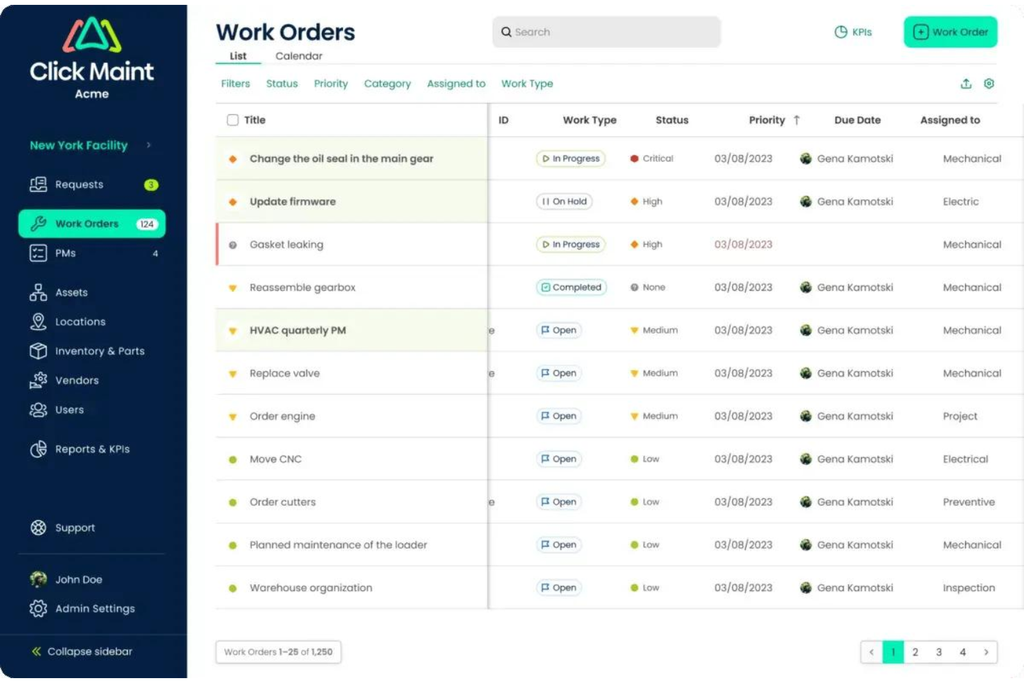
Maintenance and work order management inside a PMS gives your engineering team a direct line from issue to resolution—without routing everything through the front desk. Staff log faults from any device, and the system generates a work order, assigns it, and tracks it to completion.
I find the biggest operational gain is visibility. Supervisors see open, in-progress, and resolved jobs in one place, which makes it easy to catch repeat issues before they affect guests.
Here are the key functions maintenance and work order management handles across your property:
- Work order creation: Staff log issues from any device—with photos and priority flags—so nothing gets tracked in a notebook or lost in a radio call.
- Auto-assignment: The system routes jobs to the right technician based on location, priority, or skill set, cutting the back-and-forth supervisors usually handle manually.
- Preventive maintenance scheduling: Recurring tasks for assets like HVAC units, elevators, and pools generate automatically on a set schedule, so inspections don't slip.
- Asset history tracking: Every repair, replacement, and downtime event is logged against the asset, which makes repeat failures easy to spot.
- Completion tracking: Platforms like HotelKit, Flexkeeping, and MaintainX give supervisors a live view of open, in-progress, and resolved jobs—no follow-up calls required.
The most expensive repair is usually the one you didn’t prevent.
More Articles
10. Automated Guest Communication
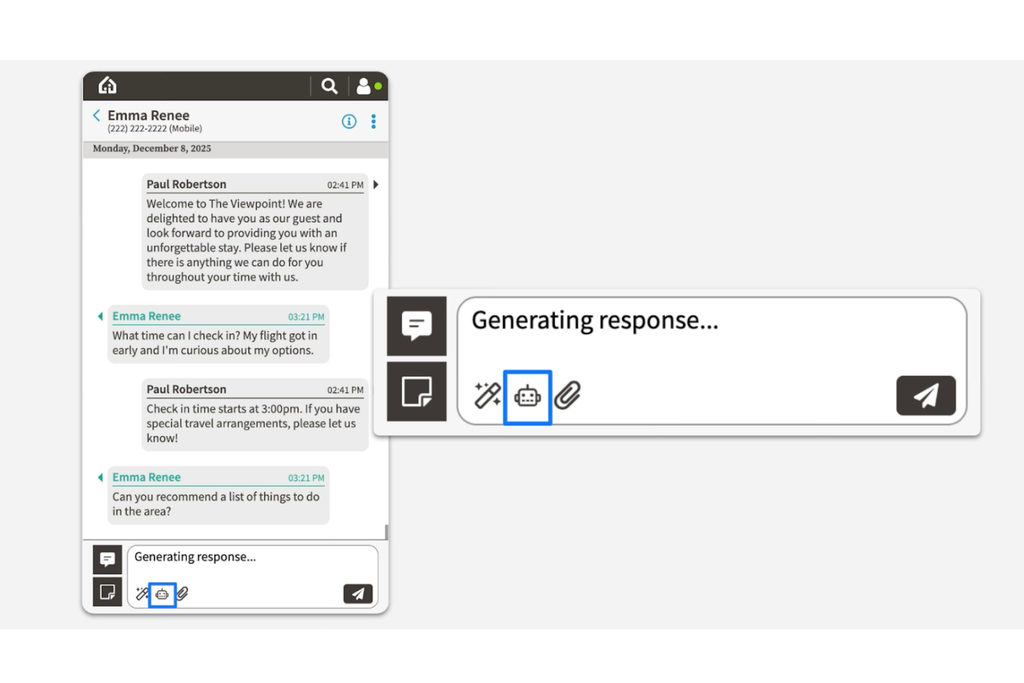
Automated guest communication lets your PMS send the right message to the right guest at the right point in their stay—without your team manually drafting each one. Reservation confirmations, pre-arrival instructions, mid-stay check-ins, and post-checkout review requests all trigger automatically based on booking data and stay milestones.
I think this is one of the quieter wins inside a PMS. Your front desk isn't writing the same email 40 times a day, and guests still feel looked after. When it's connected to your folio and guest profile, platforms like Mews and Cloudbeds can personalize upsell prompts and service requests in the same flow.
Here are the key functions automated guest communication handles across your property:
- Reservation confirmations: Booking details are sent automatically at the moment of reservation—no manual email required.
- Pre-arrival messaging: Guests receive check-in instructions, upsell prompts, and parking details days before they arrive.
- Mid-stay check-ins: A well-timed message asking if everything's going well gives guests a low-friction way to flag issues before they escalate.
- Post-checkout review requests: Platforms like Mews and Cloudbeds trigger review prompts within hours of departure, when the experience is still fresh.
Guests want communication that feels personal, not transactional
11. Reporting and Analytics
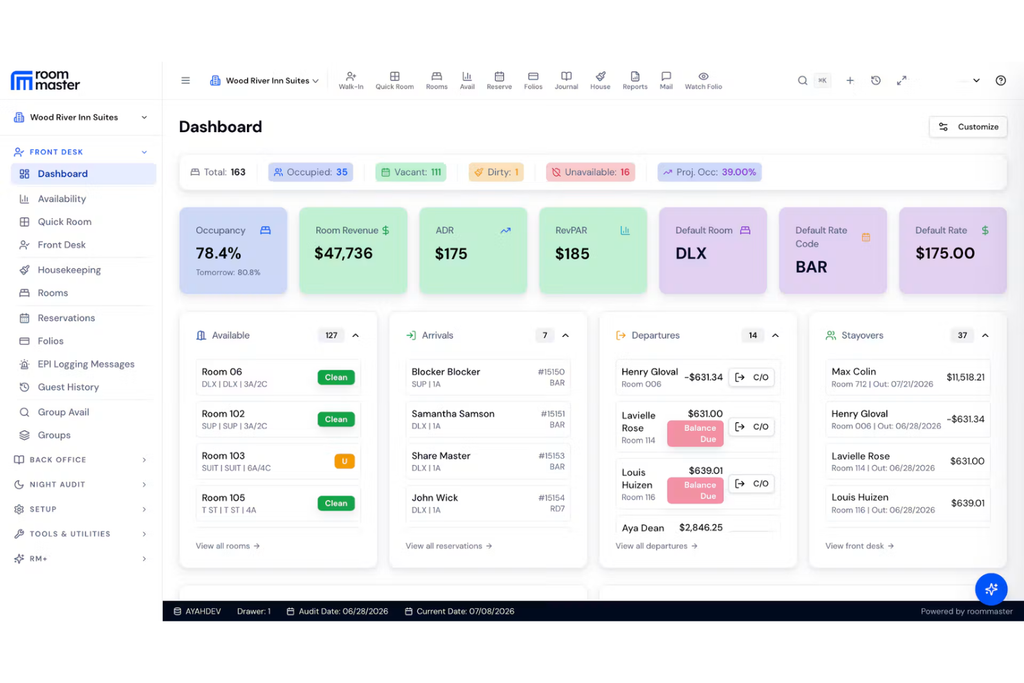
Reporting and analytics in a PMS pull live operational and financial data into dashboards your team can actually act on. Occupancy, RevPAR, ADR, channel performance, and housekeeping productivity are visible in one place—no spreadsheet exports required.
I find this feature separates reactive management from proactive management. When your numbers update in real time, you catch a slow booking window early enough to do something about it, rather than reviewing last month's performance after the fact.
Here are the key metrics and reports your PMS analytics dashboard puts in front of you:
- Occupancy rate: See how full your property is in real time—not just last night, but across any date range you set.
- RevPAR and ADR: Track revenue per available room and average daily rate together to catch pricing gaps before they cost you.
- Channel performance: Break down where bookings are coming from so you can see whether OTAs are eating into margins.
- Housekeeping productivity: Monitor room turnaround times to flag bottlenecks before they delay check-ins.
- Custom report scheduling: Platforms like Cloudbeds and Mews let you automate daily report delivery to your inbox.
From Daily Operations to Strategic Decisions.
Top 10 Hotel Property Management Software
Here's my pick of the 10 best software from the 10 tools reviewed.
Clicks on the links below may earn a commission, which supports our independent testing and review of software and services. Learn more about how we stay transparent.
Ready to Choose Your Next PMS?
Knowing which features to look for is half the battle—understanding the advantages a property management system delivers to your day-to-day operations will help you build the case for the right investment.