

Cvent-beoordeling: voordelen, nadelen, functies en prijzen
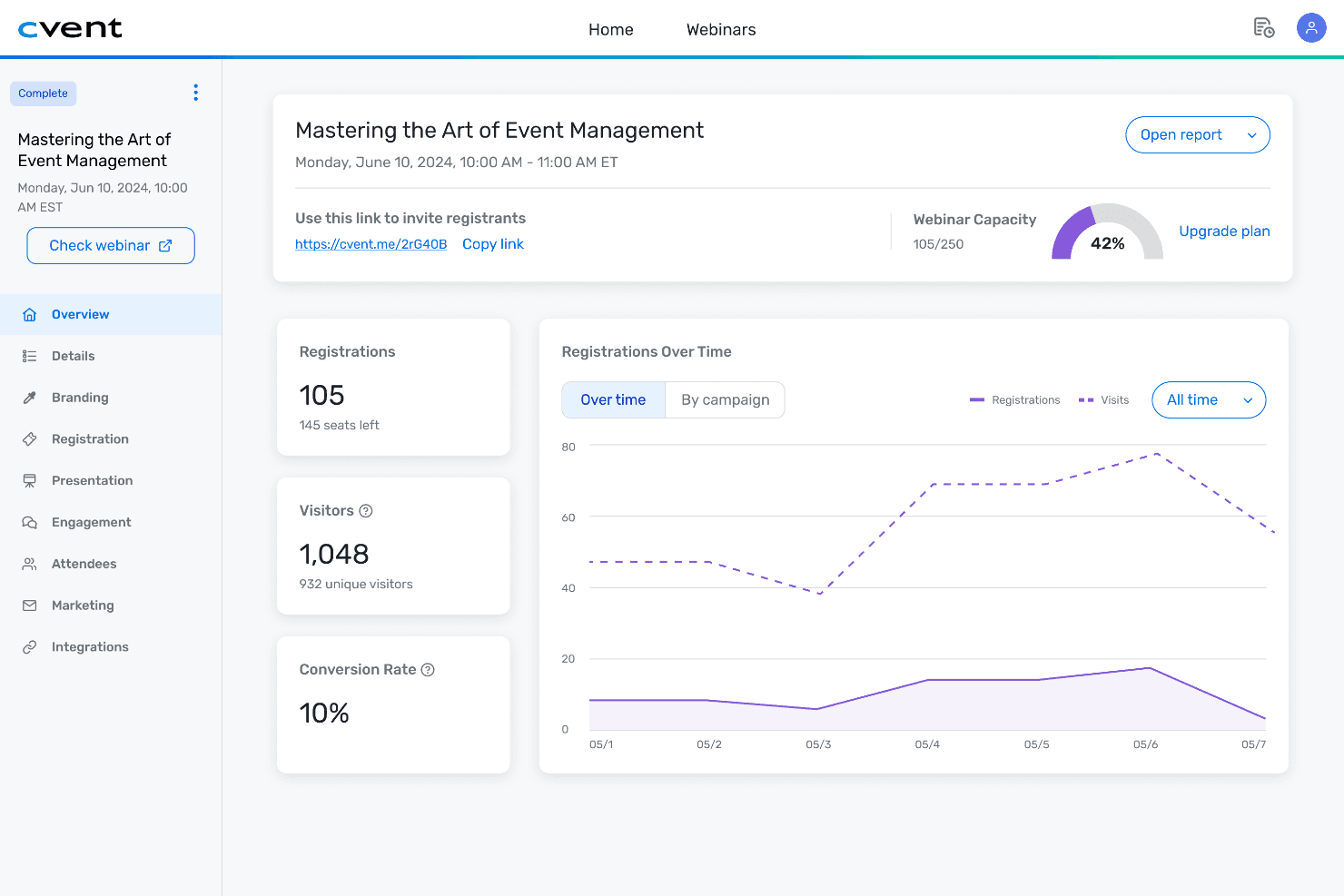
Cvent brengt de planning en het beheer van evenementen samen in één platform, van registratie en het vinden van locaties tot het betrekken van deelnemers, virtuele evenementen en evenementanalyses.

We review tools independently, and commissions help fund our testing. See our transparency policy, our methodology, or suggest a tool.
Cvent is an event management software built for planning, managing, and measuring corporate events, conferences, and meetings at scale. It's worth considering if your property handles significant group business and needs venue sourcing, attendee registration, and onsite check-in managed in one place. If you've looked at Tripleseat, Cvent covers a broader event lifecycle—from initial RFP through post-event reporting—making it the stronger fit for hotels that need to go beyond sales pipeline management and into full event execution.
Cvent Evaluation Summary
4.4/5
- Pricing upon request
- Free demo available
Waarom u onze softwareaanbevelingen kunt vertrouwen
6,700+
Reviews
20
Industry experts
16+
Evaluation factors
14
Years
Ons team test en beoordeelt software sinds 2012. Als leiders in de horeca weten we zelf hoe moeilijk — en belangrijk — het is om de juiste software te kiezen.
Voor deze gids hebben we tools geëvalueerd met behulp van praktijktests en onafhankelijk onderzoek, waarbij we tools beoordeelden aan de hand van onze selectiecriteria.
Onze reviews weerspiegelen ons menselijke redactionele oordeel, geen verkooppraatje.
Cvent Overview
If you’re judging event management software on depth of features and scalability, Cvent stands out with its robust registration, reporting, and venue sourcing tools. I think its interface is more complex than some, but the customization and integration options make it worth the learning curve for larger hotels and conference centers. Pricing is on the higher side, but you get responsive support and detailed onboarding.
If you’re selecting a platform for high-volume, multi-day events or need advanced analytics, Cvent is a top contender. Smaller properties or those seeking simplicity might find it more than they need.
Pros
- Advanced registration and attendee management features.
- Detailed reporting and analytics for event performance.
- Strong venue sourcing and RFP management tools.
Cons
- Pricing is higher than many alternatives.
- Some features require additional paid modules.
- Occasional slow performance during peak usage.
Is Cvent Right For Your Needs?
Who Would be a Good Fit for Cvent?
Cvent is a strong choice for organizations that manage complex, high-volume events and need advanced tools for registration, reporting, and venue sourcing. Its feature set is best suited for teams that require detailed attendee management, custom workflows, and robust analytics.
If your business relies on professional event execution and needs to coordinate with multiple stakeholders, Cvent’s capabilities can help you deliver polished, large-scale experiences.
- Pharmaceutical CompaniesCvent’s compliance tracking and attendee management fit regulated, multi-session events.
- Destination Marketing OrganizationsVenue sourcing and RFP tools help DMOs attract and manage large events.
- AssociationsCvent supports member management, annual meetings, and continuing education events.
- Higher EducationUniversities can manage alumni events, conferences, and campus-wide gatherings efficiently.
- Corporate Event TeamsIts advanced registration, reporting, and budgeting tools support complex corporate events.
- Large HotelsCvent handles group bookings, room blocks, and multi-day conferences seamlessly.
Who Would be a Bad Fit for Cvent?
Cvent is less suitable for smaller businesses, teams with limited budgets, or those who only need basic event management features. Its pricing and complexity can be excessive for simple meetings or infrequent events. If you’re looking for a lightweight, quick-to-deploy solution, Cvent’s extensive feature set may be more than you need.
- Community GroupsLocal clubs or volunteer organizations won’t use most of Cvent’s features.
- Small VenuesSmaller properties don’t need advanced sourcing or analytics tools.
- Internal HR TeamsFor basic training sessions or staff meetings, Cvent is unnecessary.
- Solo Event PlannersFreelancers may find the platform too complex and expensive.
- Nonprofits With Tight BudgetsThe cost structure doesn’t fit organizations with limited event spend.
- Small BusinessesCvent’s pricing and feature set are overkill for simple events.
How We Test & Score Tools
We’ve spent years building, refining, and improving our software testing and scoring system. The rubric is designed to capture the nuances of software selection and what makes a tool effective, focusing on critical aspects of the decision-making process.
Below, you can see exactly how our testing and scoring works across seven criteria. It allows us to provide an unbiased evaluation of the software based on core functionality, standout features, ease of use, onboarding, customer support, integrations, customer reviews, and value for money.
Core Functionality (25% of final scoring)
The starting point of our evaluation is always the core functionality of the tool. Does it have the basic features and functions that a user would expect to see? Are any of those core features locked to higher-tiered pricing plans? At its core, we expect a tool to stand up against the baseline capabilities of its competitors.
Standout Features (25% of final scoring)
Next, we evaluate uncommon standout features that go above and beyond the core functionality typically found in tools of its kind. A high score reflects specialized or unique features that make the product faster, more efficient, or offer additional value to the user.
We also evaluate how easy it is to integrate with other tools typically found in the tech stack to expand the functionality and utility of the software. Tools offering plentiful native integrations, 3rd party connections, and API access to build custom integrations score best.
Ease of Use (10% of final scoring)
We consider how quick and easy it is to execute the tasks defined in the core functionality using the tool. High scoring software is well designed, intuitive to use, offers mobile apps, provides templates, and makes relatively complex tasks seem simple.
Onboarding (10% of final scoring)
We know how important rapid team adoption is for a new platform, so we evaluate how easy it is to learn and use a tool with minimal training. We evaluate how quickly a team member can get set up and start using the tool with no experience. High scoring solutions indicate little or no support is required.
Customer Support (10% of final scoring)
We review how quick and easy it is to get unstuck and find help by phone, live chat, or knowledge base. Tools and companies that provide real-time support score best, while chatbots score worst.
Customer Reviews (10% of final scoring)
Beyond our own testing and evaluation, we consider the net promoter score from current and past customers. We review their likelihood, given the option, to choose the tool again for the core functionality. A high scoring software reflects a high net promoter score from current or past customers.
Value for Money (10% of final scoring)
Lastly, in consideration of all the other criteria, we review the average price of entry level plans against the core features and consider the value of the other evaluation criteria. Software that delivers more, for less, will score higher.
Core Features
Online Registration
Create branded registration pages, collect attendee details, and process payments securely. Custom forms let you capture exactly the information you need.
Event Website Builder
Build event websites with a drag-and-drop designer and customizable templates. Drive registrations and share event details in one central place.
Venue Sourcing
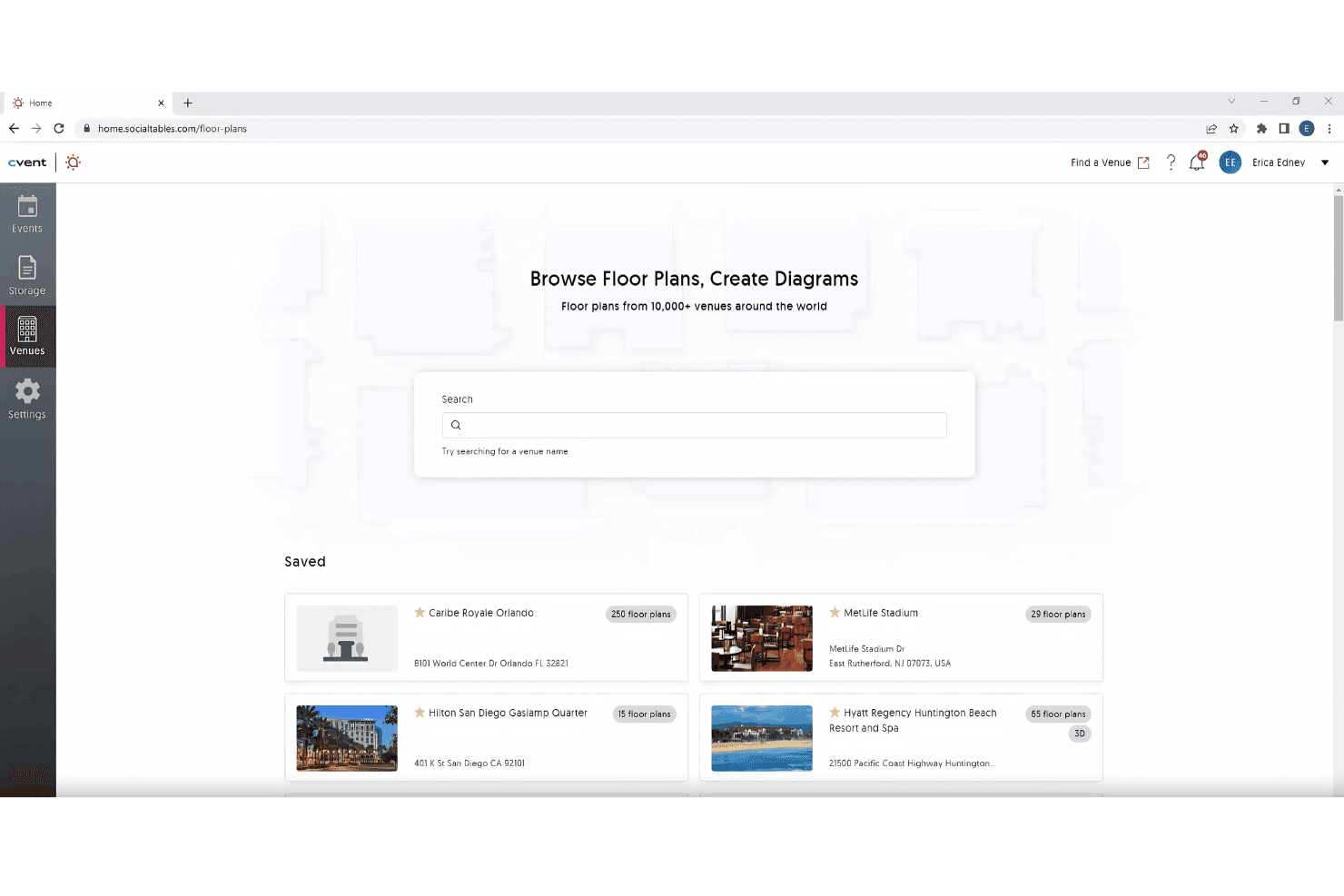
Search a global database of 300,000+ venues and send RFPs directly. Compare bids and manage negotiations all within the platform.
Onsite Check-In and Badging
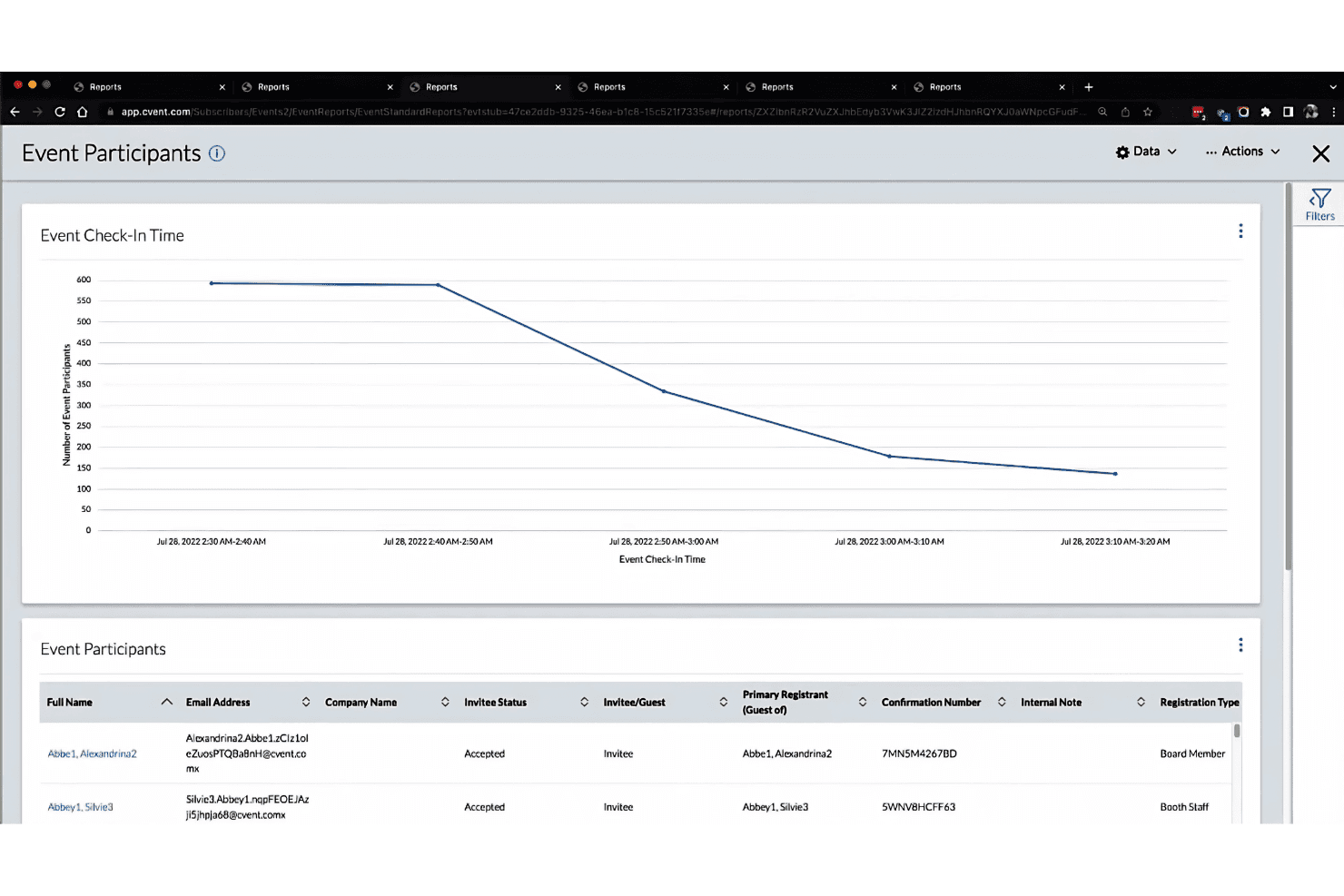
Check in attendees quickly and print badges on demand. Track attendance in real time for accurate reporting.
Attendee Engagement Tools
Offer mobile event apps, live polling, Q&A, and networking features. Keep attendees connected and engaged before, during, and after your event.
Reporting and Analytics
Access detailed dashboards to track registrations, engagement, and ROI. Export custom reports to analyze event performance and share insights with stakeholders.
Ease of Use
Cvent offers a feature-rich platform, but its interface can feel overwhelming for new users or those managing simple events. Many users mention the depth of options and customization, which is great for complex needs but adds to the learning curve.
Once you’re familiar with the system, navigation and workflow automation become strengths, especially for teams handling large-scale or recurring events. The onboarding resources and support help smooth out the initial setup process.
Integrations
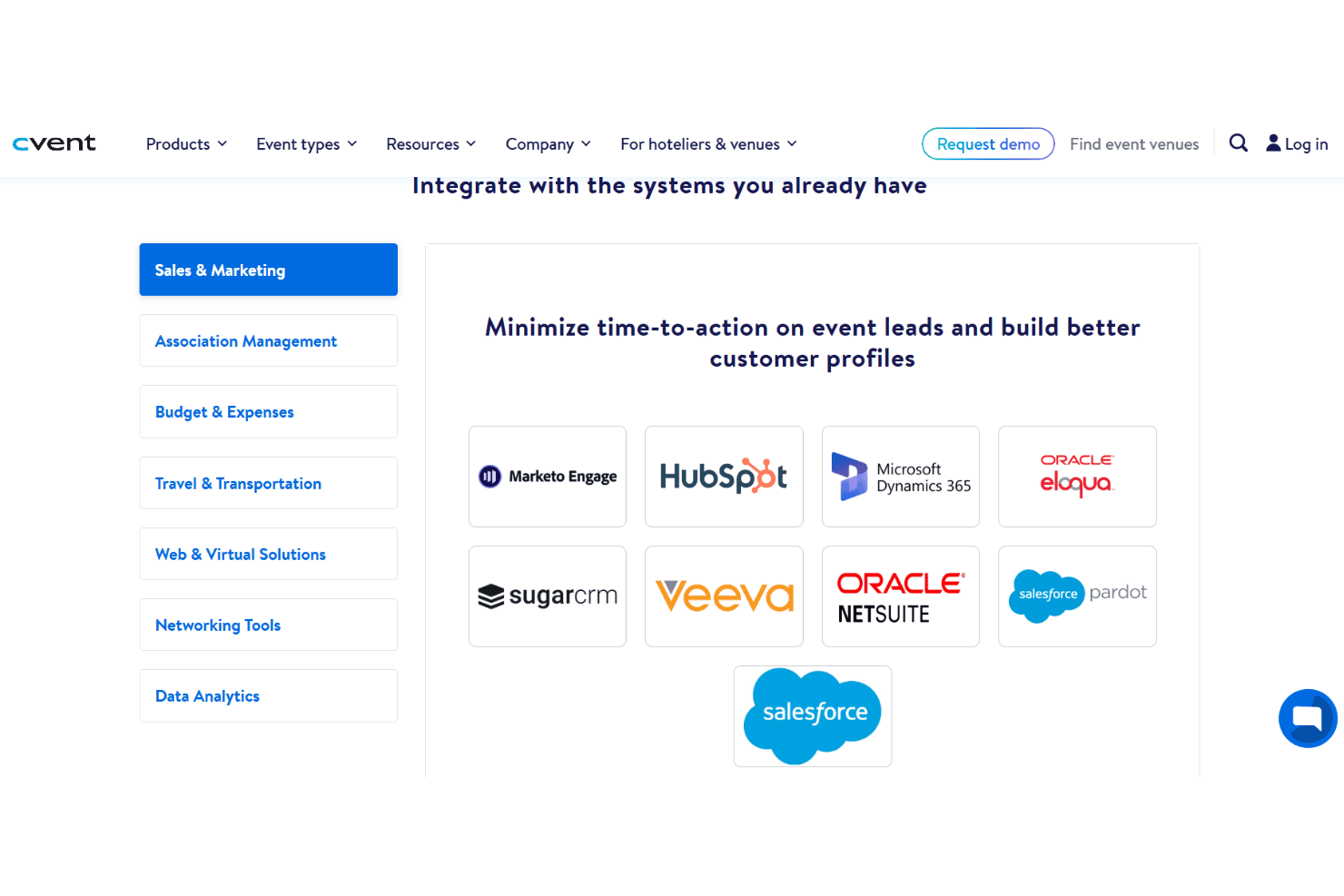
Cvent integrates with Salesforce, Marketo, HubSpot, Microsoft Dynamics 365, Oracle Eloqua, Blackbaud, Sugarcrm, Zoom, Webex, and GoTo Webinar, among others.
Cvent also offers an API and connects with third-party integration tools through its App Marketplace.
Cvent Specs
- Accounts Payable: No
- Accounts Receivable: No
- API: Yes
- Audience Targeting: Yes
- Budgeting: Yes
- Calendar Management: Yes
- Contact Management: Yes
- Customer Management: No
- Dashboard: Yes
- Data Export: Yes
- Data Import: Yes
- Data Visualization: No
- Expense Tracking: Yes
- External Integrations: Yes
- Forecasting: No
- General Account Ledger: No
- Inventory Tracking: No
- Lead Management: No
- Lead Scoring: Yes
- Marketing Automation: Yes
- Multi-User: Yes
- Notifications: Yes
- Project Management: No
- Scheduling: Yes
- Social-Media Integration: Yes
- Supplier Management: No
- Third-Party Plugins/Add-Ons: Yes
- Travel Management: No


