

Recensione di Whova: Pro, Contro, Funzionalità e Prezzi
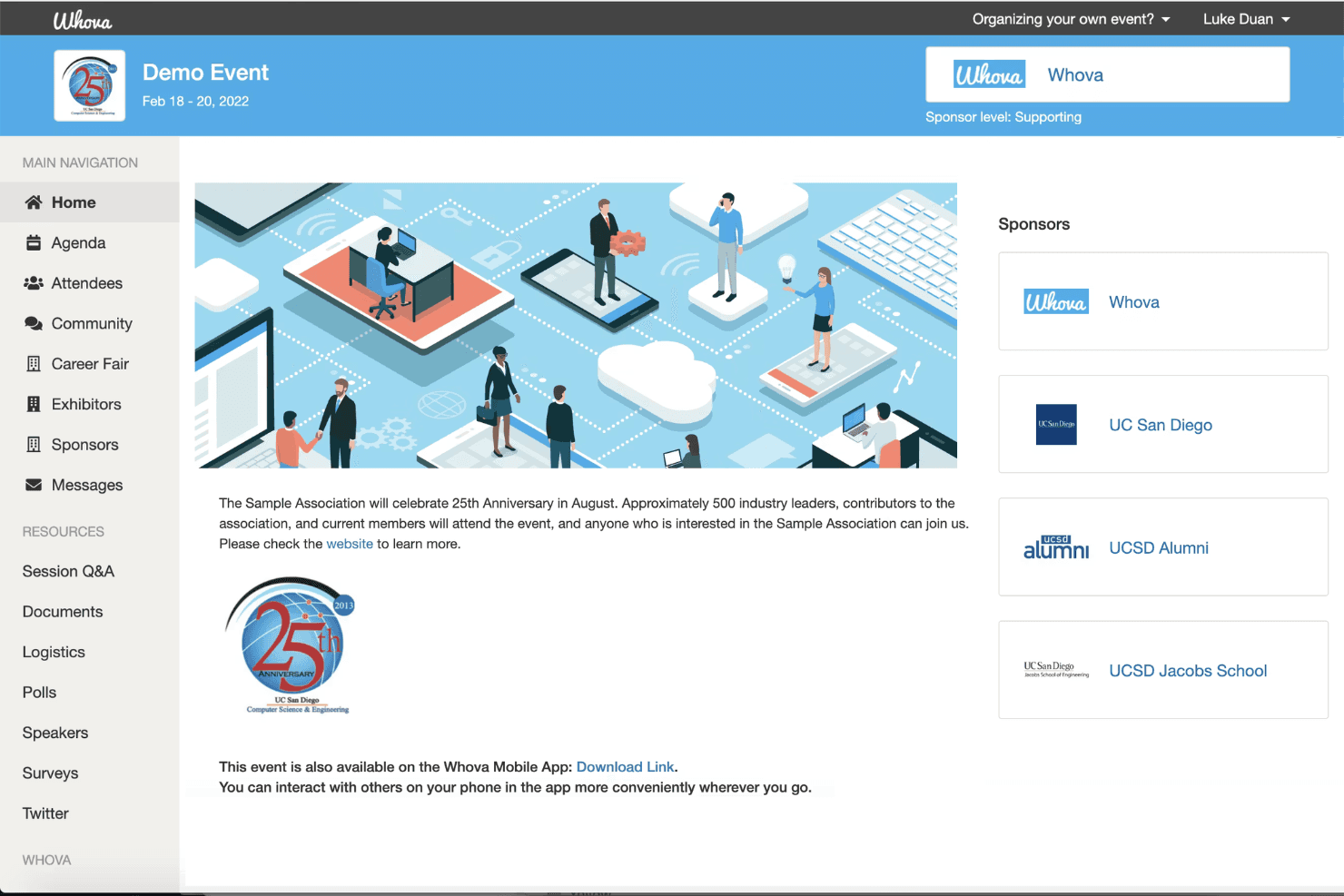
Whova porta l’intero processo di gestione dell’evento su un’unica piattaforma, dalla pianificazione e registrazione al coinvolgimento e networking dei partecipanti.

Recensiamo gli strumenti in modo indipendente e le commissioni ci aiutano a finanziare i nostri test. Consulta la nostra politica sulla trasparenza, la nostra metodologia oppure suggerisci uno strumento.
Whova is an event management software for organizers who need to coordinate attendee registration, session scheduling, networking, and on-site check-in from one platform. I'd consider it a stronger fit than Cvent if you're planning conferences or corporate events and want a platform you can configure without a dedicated implementation team—while still getting a full suite of attendee engagement tools.
Whova Evaluation Summary
4.8/5
- Pricing upon request
- Free demo available
Perché fidarsi dei nostri consigli sui software
6,700+
Reviews
20
Industry experts
16+
Evaluation factors
14
Years
Il nostro team testa e recensisce software dal 2012. In quanto leader del settore alberghiero noi stessi, sappiamo quanto sia difficile — e importante — scegliere il software giusto.
Per questa guida, abbiamo valutato gli strumenti attraverso test pratici e ricerche indipendenti, assegnando un punteggio agli strumenti in base ai nostri criteri di selezione.
Le nostre recensioni riflettono il nostro giudizio editoriale umano, non un discorso di vendita.
Whova Overview
When I compare Whova to other event management software, I think its attendee engagement tools and mobile app are a step ahead, especially for hybrid or multi-day events. The interface is intuitive, onboarding is quick, and support is responsive. Pricing is competitive for the feature set, though some advanced integrations are limited.
I’d suggest Whova is best for hotels or venues that want a unified platform for registration, networking, and agenda management without a steep learning curve. If you’re judging by ease of use and attendee experience, Whova is a strong contender.
Pros
- You can easily manage event logistics with Whova's intuitive interface.
- It enhances attendee engagement through interactive features.
- Your team will appreciate the robust agenda management tools.
Cons
- You might find the customization options somewhat limited.
- Some users feel that the initial setup takes longer than expected.
- Your team may encounter occasional glitches in the mobile app.
Is Whova Right For Your Needs?
Who Would be a Good Fit for Whova?
Whova is perfect for corporate event planners and conference organizers who handle complex events with diverse audiences. Its robust agenda management and attendee engagement features make it ideal for industries such as tech conferences, academic symposia, and trade shows.
If your team needs to manage logistics and boost attendee engagement efficiently, Whova’s intuitive interface and interactive features offer a solid solution.
- Tech ConferencesWhova’s agenda management and networking features enhance both the planning and attendee experience.
- Trade ShowsYou can manage multiple exhibitors and sessions with ease using Whova’s logistics tools.
- Academic SymposiumsWhova’s organized scheduling and attendee interaction tools are a perfect fit for academic gatherings.
- Corporate EventsYour team will appreciate Whova’s ability to handle complex schedules and large audiences smoothly.
- Non-Profit EventsWhova’s cost-effective tools help you engage attendees and manage logistics efficiently.
- Workshops and TrainingWhova’s interactive features keep participants engaged and informed throughout the event.
Who Would be a Bad Fit for Whova?
Whova isn’t the best fit for small businesses or teams hosting simple, one-off events with minimal logistics. If your event doesn’t require extensive scheduling or attendee engagement features, Whova’s comprehensive tools might feel excessive. Small community gatherings or informal meetups may find Whova’s setup and features more than they need, leading to unnecessary complexity.
- Small MeetupsWhova’s robust features could overwhelm simple, casual gatherings with minimal planning needs.
- Local Community EventsYou might find Whova’s setup too complex for small, local events with straightforward logistics.
- Single Department MeetingsIf your meeting requires little more than a basic schedule, Whova’s capabilities may be excessive.
- Simple WorkshopsFor workshops with few participants and basic needs, Whova’s features might feel unnecessary.
- Family ReunionsManaging a casual family gathering doesn’t require Whova’s extensive event management tools.
- One-Time PartiesFor events like birthday parties, Whova’s advanced functionalities are likely overkill.
Come testiamo e valutiamo gli strumenti
Abbiamo trascorso anni a costruire, perfezionare e migliorare il nostro sistema di test e valutazione dei software. Il nostro metodo è progettato per cogliere le sfumature della scelta di un software e ciò che rende uno strumento efficace, concentrandosi sugli aspetti critici del processo decisionale. Qui sotto puoi vedere come funziona il nostro sistema di test e valutazione su sette criteri. Questo ci permette di offrire una valutazione imparziale dei software in base a funzionalità principali, funzioni distintive, facilità d’uso, onboarding, assistenza clienti, integrazioni, recensioni clienti e rapporto qualità-prezzo.
Funzionalità principali (25% del punteggio finale)
Il punto di partenza della nostra valutazione è sempre la funzionalità principale dello strumento. Ha le funzionalità di base che un utente si aspetta? Alcune di queste sono riservate solo a piani tariffari superiori? Ci aspettiamo che uno strumento regga il confronto con le capacità minime offerte dai concorrenti.
Funzioni distintive (25% del punteggio finale)
Successivamente, valutiamo le funzioni originali non comuni che vanno oltre le funzionalità di base normalmente presenti in strumenti simili. Un punteggio elevato riflette funzionalità particolari o uniche che rendono il prodotto più veloce, efficiente, o che offrono valore aggiunto all’utente. Valutiamo inoltre quanto sia facile integrare lo strumento con altri software tipici della struttura tecnologica per ampliare funzionalità e utilità. Gli strumenti che offrono numerose integrazioni native, connessioni di terze parti e accesso API per integrazioni personalizzate ottengono il punteggio migliore.
Facilità d’uso (10% del punteggio finale)
Consideriamo quanto sia rapido e semplice eseguire tramite lo strumento le attività descritte dalle funzionalità principali. Un software con punteggio alto è ben progettato, intuitivo, offre app mobile, fornisce modelli preimpostati e rende semplici anche operazioni complesse.
Onboarding (10% del punteggio finale)
Sappiamo quanto sia importante la rapida adozione di una nuova piattaforma da parte del team, quindi valutiamo quanto sia semplice imparare e utilizzare uno strumento con una formazione minima. Consideriamo quanto velocemente un membro del team possa iniziare a usare lo strumento senza esperienza precedente. Soluzioni con punteggio elevato richiedono poco o nessun supporto.
Assistenza clienti (10% del punteggio finale)
Verifichiamo quanto sia rapido e facile sbloccarsi e ricevere aiuto tramite telefono, chat dal vivo o knowledge base. Gli strumenti e le aziende che offrono assistenza in tempo reale ottengono il punteggio migliore, mentre i chatbot ottengono il punteggio più basso.
Recensioni clienti (10% del punteggio finale)
Oltre ai nostri test e valutazioni, consideriamo il punteggio net promoter dei clienti attuali o passati. Verifichiamo la probabilità che tornino a scegliere lo strumento per le sue funzionalità principali. Un software con punteggio alto rispecchia un elevato net promoter score tra clienti attuali e passati.
Rapporto qualità-prezzo (10% del punteggio finale)
Infine, in considerazione di tutti gli altri criteri, valutiamo il prezzo medio dei piani di ingresso rispetto alle funzionalità principali e teniamo conto del valore degli altri criteri di valutazione. Il software che offre di più spendendo meno otterrà un punteggio più alto.
Core Features
Mobile Event App
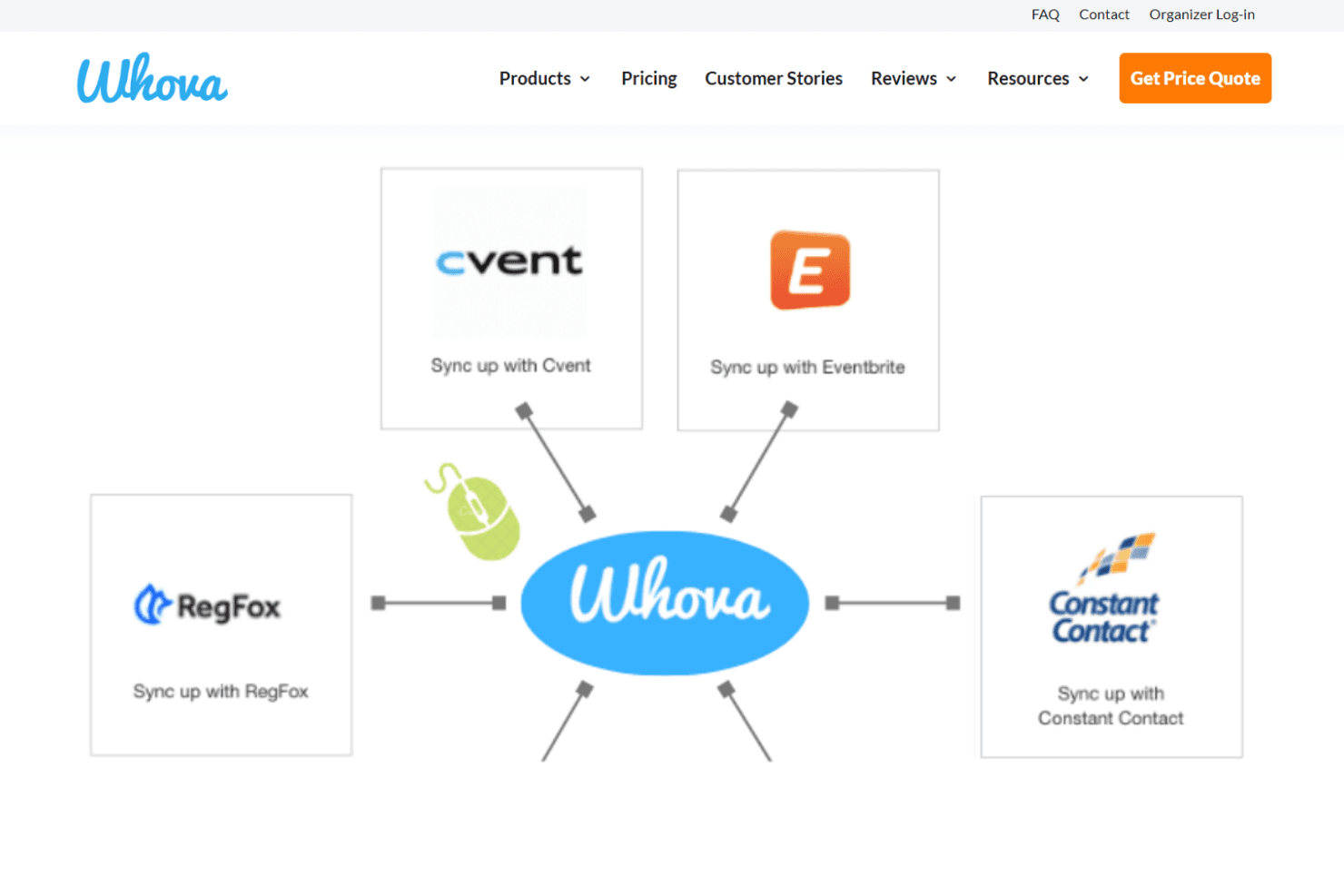
Attendees access schedules, maps, and updates from their phones. The app supports live notifications and interactive features like Q&A.
Agenda Management
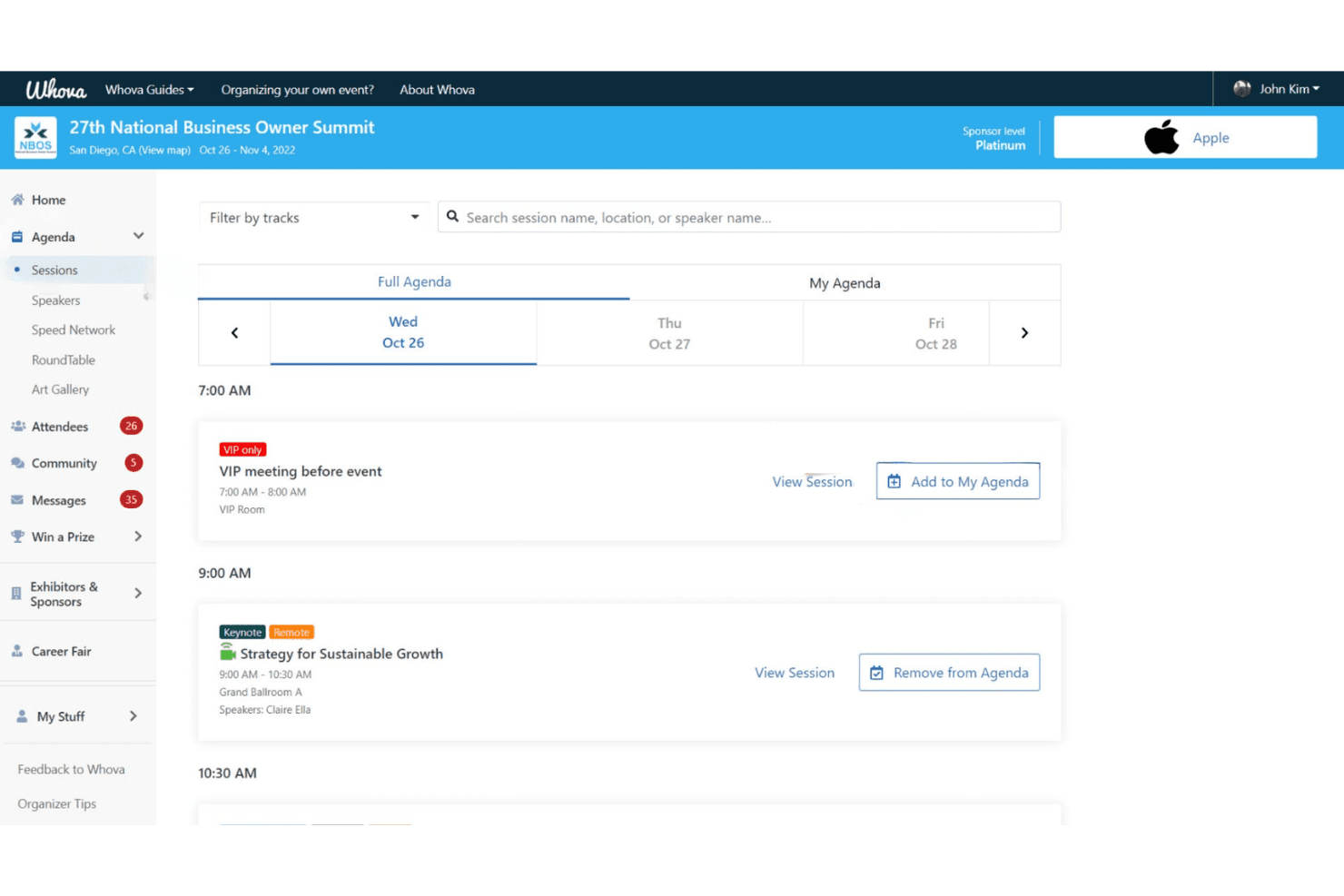
Organizers create, update, and share multi-track agendas in real time. Attendees can personalize their schedules and receive instant changes.
Attendee Networking
Whova offers in-app messaging, community boards, and attendee profiles. These tools help guests connect before, during, and after events.
Registration and Ticketing
Set up custom registration forms, sell tickets, and track sales in one place. Payment processing and attendee check-in are built in.
Live Polling and Surveys
Run polls, collect feedback, and display results instantly during sessions. This boosts engagement and helps gather actionable insights.
Sponsor and Exhibitor Tools
Sponsors get branded listings, lead retrieval, and digital booths. Exhibitors can interact with attendees and track engagement metrics.
Ease of Use
Whova is one of the most user-friendly event management platforms I’ve tried. The dashboard is clean, the setup is guided, and most users can launch events with minimal training. Attendees consistently mention how easy it is to navigate the mobile app, find sessions, and connect with others.
I think the built-in templates, drag-and-drop agenda builder, and real-time updates make Whova especially approachable for busy hotel teams and first-time organizers.
Integrations
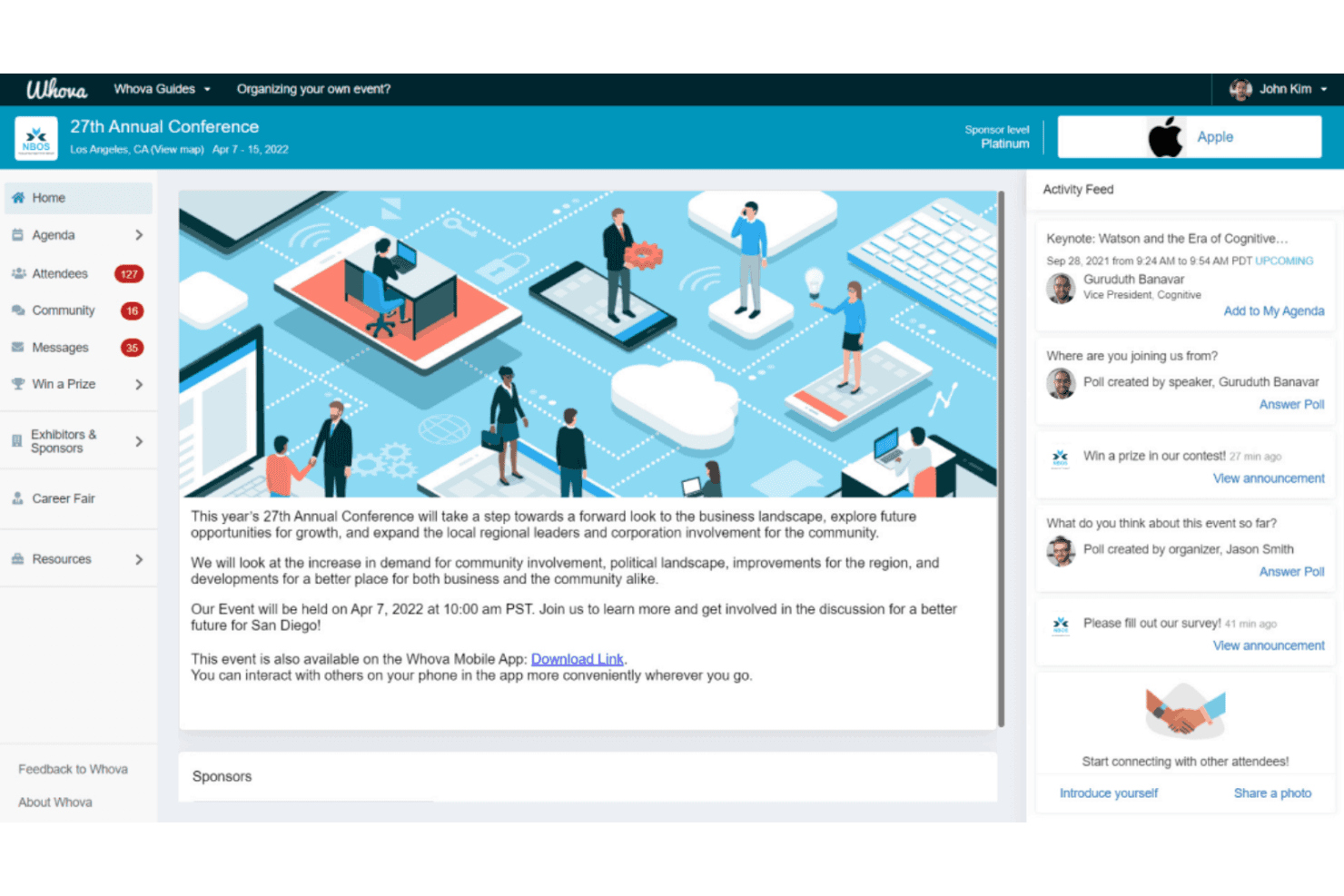
Whova integrates with Eventbrite, Cvent, RegFox, YourMembership, Glue Up, Mailchimp, Constant Contact, Zapier, Jotform, and SurveyMonkey, among others.
Whova also offers an API for custom integrations and connects with third-party integration tools like Zapier.
Whova Specs
- Accounts Payable: No
- Accounts Receivable: No
- API: Yes
- Audience Targeting: No
- Budgeting: No
- Calendar Management: Yes
- Contact Management: Yes
- Customer Management: No
- Dashboard: Yes
- Data Export: Yes
- Data Import: Yes
- Data Visualization: Yes
- Expense Tracking: No
- External Integrations: Yes
- Forecasting: No
- General Account Ledger: No
- Inventory Tracking: No
- Lead Management: Yes
- Lead Scoring: No
- Marketing Automation: Yes
- Multi-User: Yes
- Notifications: Yes
- Project Management: No
- Scheduling: Yes
- Social-Media Integration: Yes
- Supplier Management: No
- Third-Party Plugins/Add-Ons: Yes
- Travel Management: No


