

Reseña de Whova: Ventajas, Desventajas, Funcionalidades y Precios
Whova reúne toda la gestión de tu evento en una sola plataforma, desde la planificación y el registro hasta la participación y networking de los asistentes.

Revisamos las herramientas de forma independiente, y las comisiones ayudan a financiar nuestras pruebas. Consulta nuestra política de transparencia, nuestra metodología o sugiere una herramienta.
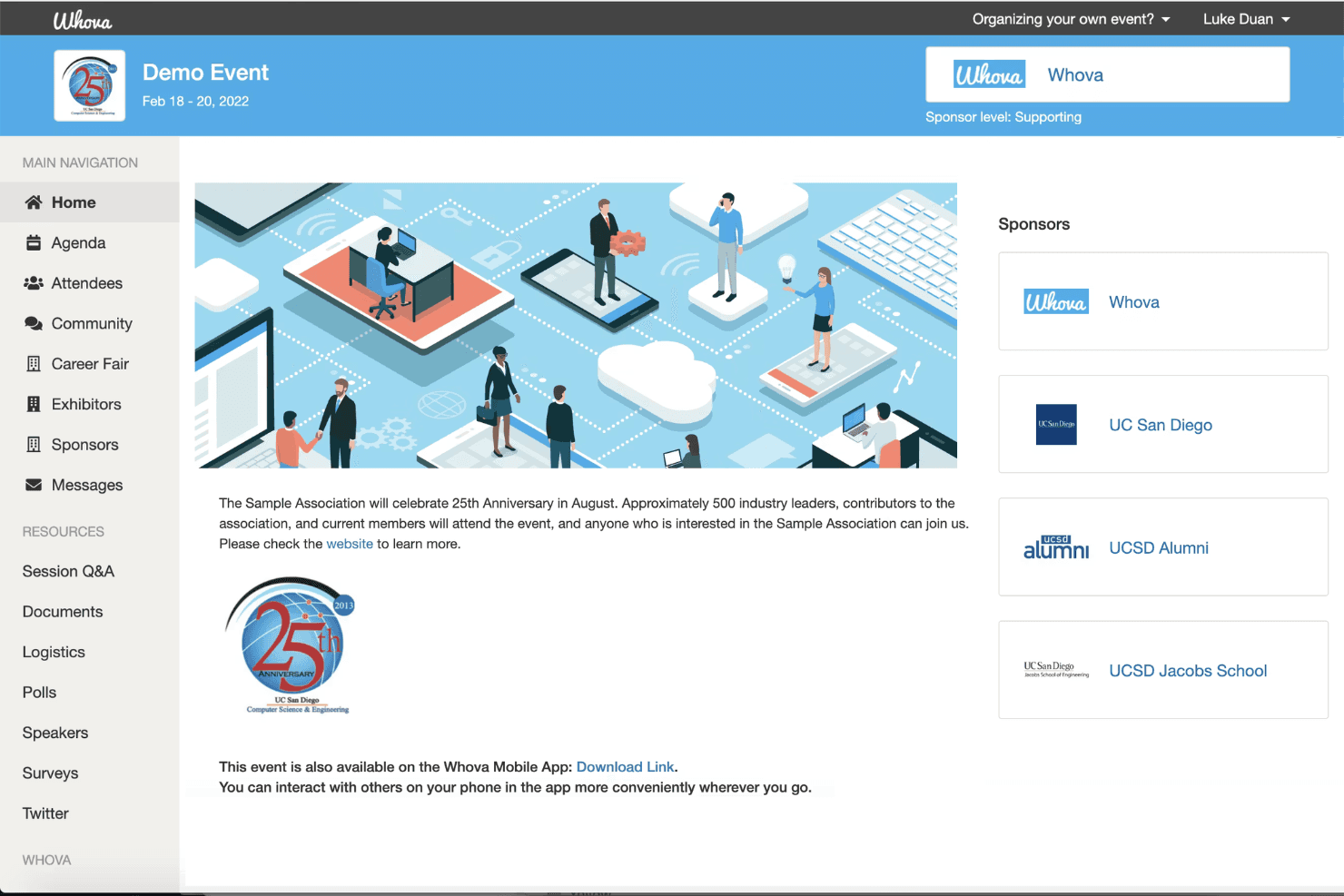
Whova is an event management software for organizers who need to coordinate attendee registration, session scheduling, networking, and on-site check-in from one platform. I'd consider it a stronger fit than Cvent if you're planning conferences or corporate events and want a platform you can configure without a dedicated implementation team—while still getting a full suite of attendee engagement tools.
Whova Evaluation Summary
4.8/5
- Pricing upon request
- Free demo available
Por qué confiar en nuestras recomendaciones de software
6,700+
Reviews
20
Industry experts
16+
Evaluation factors
14
Years
Nuestro equipo lleva probando y evaluando software desde 2012. Como líderes del sector hotelero, sabemos lo difícil —y lo importante— que es elegir el software adecuado.
Para esta guía, evaluamos las herramientas mediante pruebas prácticas e investigación independiente, puntuando las herramientas según nuestros criterios de selección.
Nuestras reseñas reflejan nuestro criterio editorial humano, no un discurso de ventas.
Whova Overview
When I compare Whova to other event management software, I think its attendee engagement tools and mobile app are a step ahead, especially for hybrid or multi-day events. The interface is intuitive, onboarding is quick, and support is responsive. Pricing is competitive for the feature set, though some advanced integrations are limited.
I’d suggest Whova is best for hotels or venues that want a unified platform for registration, networking, and agenda management without a steep learning curve. If you’re judging by ease of use and attendee experience, Whova is a strong contender.
Pros
- You can easily manage event logistics with Whova's intuitive interface.
- It enhances attendee engagement through interactive features.
- Your team will appreciate the robust agenda management tools.
Cons
- You might find the customization options somewhat limited.
- Some users feel that the initial setup takes longer than expected.
- Your team may encounter occasional glitches in the mobile app.
Is Whova Right For Your Needs?
Who Would be a Good Fit for Whova?
Whova is perfect for corporate event planners and conference organizers who handle complex events with diverse audiences. Its robust agenda management and attendee engagement features make it ideal for industries such as tech conferences, academic symposia, and trade shows.
If your team needs to manage logistics and boost attendee engagement efficiently, Whova’s intuitive interface and interactive features offer a solid solution.
- Tech ConferencesWhova’s agenda management and networking features enhance both the planning and attendee experience.
- Trade ShowsYou can manage multiple exhibitors and sessions with ease using Whova’s logistics tools.
- Academic SymposiumsWhova’s organized scheduling and attendee interaction tools are a perfect fit for academic gatherings.
- Corporate EventsYour team will appreciate Whova’s ability to handle complex schedules and large audiences smoothly.
- Non-Profit EventsWhova’s cost-effective tools help you engage attendees and manage logistics efficiently.
- Workshops and TrainingWhova’s interactive features keep participants engaged and informed throughout the event.
Who Would be a Bad Fit for Whova?
Whova isn’t the best fit for small businesses or teams hosting simple, one-off events with minimal logistics. If your event doesn’t require extensive scheduling or attendee engagement features, Whova’s comprehensive tools might feel excessive. Small community gatherings or informal meetups may find Whova’s setup and features more than they need, leading to unnecessary complexity.
- Small MeetupsWhova’s robust features could overwhelm simple, casual gatherings with minimal planning needs.
- Local Community EventsYou might find Whova’s setup too complex for small, local events with straightforward logistics.
- Single Department MeetingsIf your meeting requires little more than a basic schedule, Whova’s capabilities may be excessive.
- Simple WorkshopsFor workshops with few participants and basic needs, Whova’s features might feel unnecessary.
- Family ReunionsManaging a casual family gathering doesn’t require Whova’s extensive event management tools.
- One-Time PartiesFor events like birthday parties, Whova’s advanced functionalities are likely overkill.
Cómo Probamos y Puntamos Herramientas
Hemos pasado años construyendo, refinando y mejorando nuestro sistema de pruebas y puntuación de software. La rúbrica está diseñada para capturar las particularidades de la selección de software y lo que hace que una herramienta sea efectiva, enfocándose en aspectos críticos del proceso de toma de decisiones. A continuación, puedes ver exactamente cómo funcionan nuestras pruebas y puntuaciones en siete criterios. Nos permite proporcionar una evaluación imparcial del software basada en funcionalidad principal, características destacadas, facilidad de uso, incorporación, soporte al cliente, integraciones, opiniones de clientes y relación calidad-precio.
Funcionalidad Principal (25% de la puntuación final)
El punto de partida de nuestra evaluación es siempre la funcionalidad principal de la herramienta. ¿Tiene las características y funciones básicas que un usuario esperaría ver? ¿Alguna de esas funciones básicas está limitada a planes de precios superiores? En esencia, esperamos que una herramienta esté a la altura de las capacidades mínimas de sus competidores.
Características Destacadas (25% de la puntuación final)
Luego, evaluamos las características destacadas poco comunes que van más allá de la funcionalidad principal, típicamente encontrada en herramientas de su tipo. Una puntuación alta refleja funciones especializadas o únicas que hacen que el producto sea más rápido, eficiente u ofrezca valor adicional al usuario. También evaluamos lo fácil que resulta integrar con otras herramientas normalmente presentes en el paquete tecnológico para ampliar la funcionalidad y utilidad del software. Las herramientas con abundantes integraciones nativas, conexiones de terceros y acceso a API para crear integraciones personalizadas obtienen la mejor puntuación.
Facilidad de Uso (10% de la puntuación final)
Consideramos qué tan rápido y fácil es ejecutar las tareas definidas en la funcionalidad principal usando la herramienta. El software que obtiene una puntuación alta está bien diseñado, es intuitivo de usar, ofrece aplicaciones móviles, proporciona plantillas y hace que tareas relativamente complejas parezcan sencillas.
Incorporación (10% de la puntuación final)
Sabemos lo importante que es la adopción rápida del equipo para una nueva plataforma, por eso evaluamos la facilidad para aprender y usar una herramienta con mínima capacitación. Analizamos qué tan rápido un miembro del equipo puede configurarse y comenzar a usar la herramienta sin experiencia. Las soluciones que obtienen una puntuación alta requieren poco o ningún soporte.
Soporte al Cliente (10% de la puntuación final)
Revisamos qué tan rápido y fácil es obtener ayuda por teléfono, chat en vivo o base de conocimientos. Las herramientas y empresas que ofrecen soporte en tiempo real obtienen la mejor puntuación, mientras que los chatbots obtienen la peor.
Opiniones de Clientes (10% de la puntuación final)
Más allá de nuestras propias pruebas y evaluaciones, consideramos el índice neto de promotores de clientes actuales y anteriores. Analizamos la probabilidad de que elijan la herramienta de nuevo para la función principal. Un software con alta puntuación refleja un alto índice neto de promotores de clientes actuales o anteriores.
Relación Calidad-Precio (10% de la puntuación final)
Por último, considerando todos los demás criterios, revisamos el precio promedio de los planes iniciales frente a las características principales y valoramos los otros criterios de evaluación. El software que ofrece más por menos obtiene una mejor puntuación.
Core Features
Mobile Event App
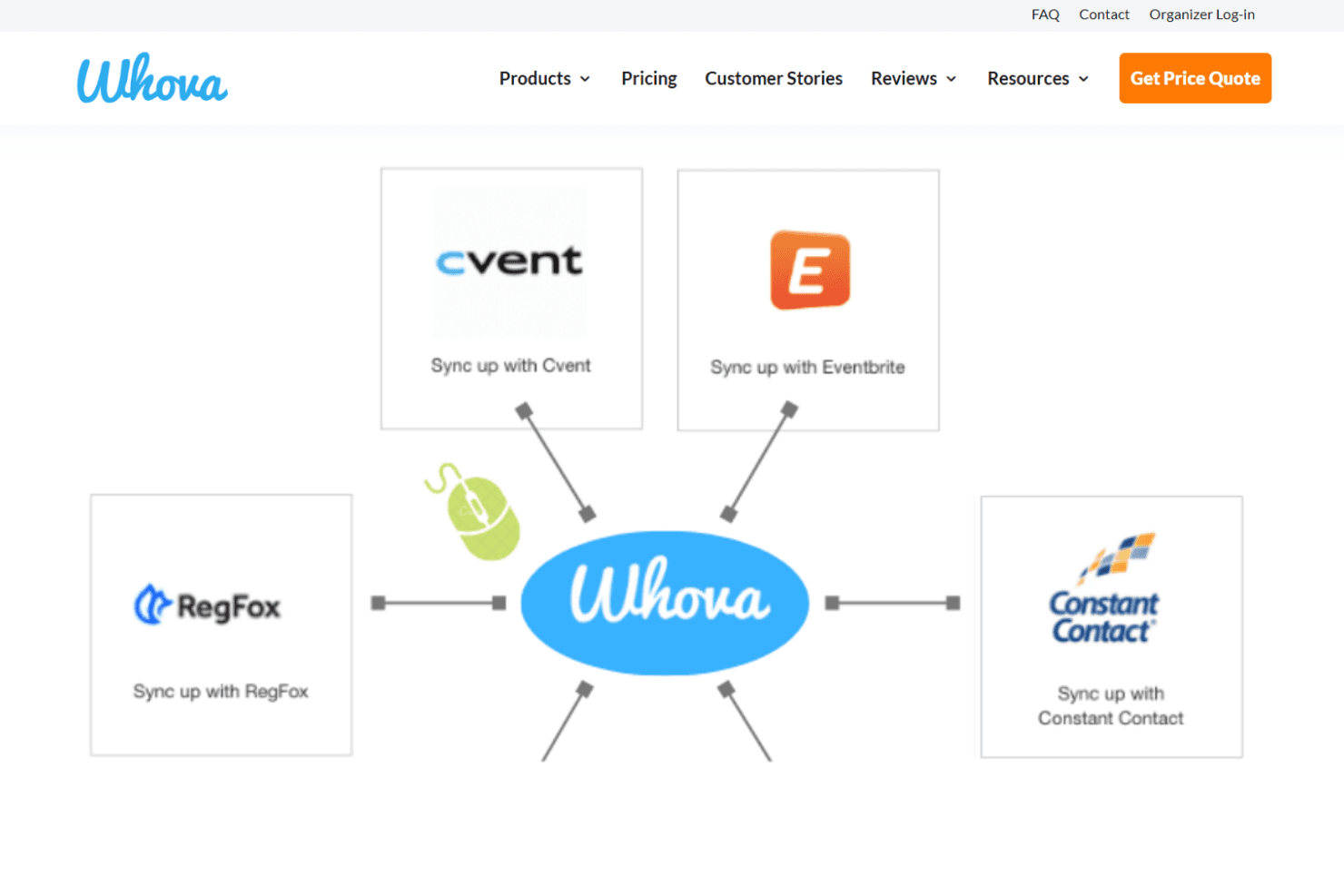
Attendees access schedules, maps, and updates from their phones. The app supports live notifications and interactive features like Q&A.
Agenda Management
Organizers create, update, and share multi-track agendas in real time. Attendees can personalize their schedules and receive instant changes.
Attendee Networking
Whova offers in-app messaging, community boards, and attendee profiles. These tools help guests connect before, during, and after events.
Registration and Ticketing
Set up custom registration forms, sell tickets, and track sales in one place. Payment processing and attendee check-in are built in.
Live Polling and Surveys
Run polls, collect feedback, and display results instantly during sessions. This boosts engagement and helps gather actionable insights.
Sponsor and Exhibitor Tools
Sponsors get branded listings, lead retrieval, and digital booths. Exhibitors can interact with attendees and track engagement metrics.
Ease of Use
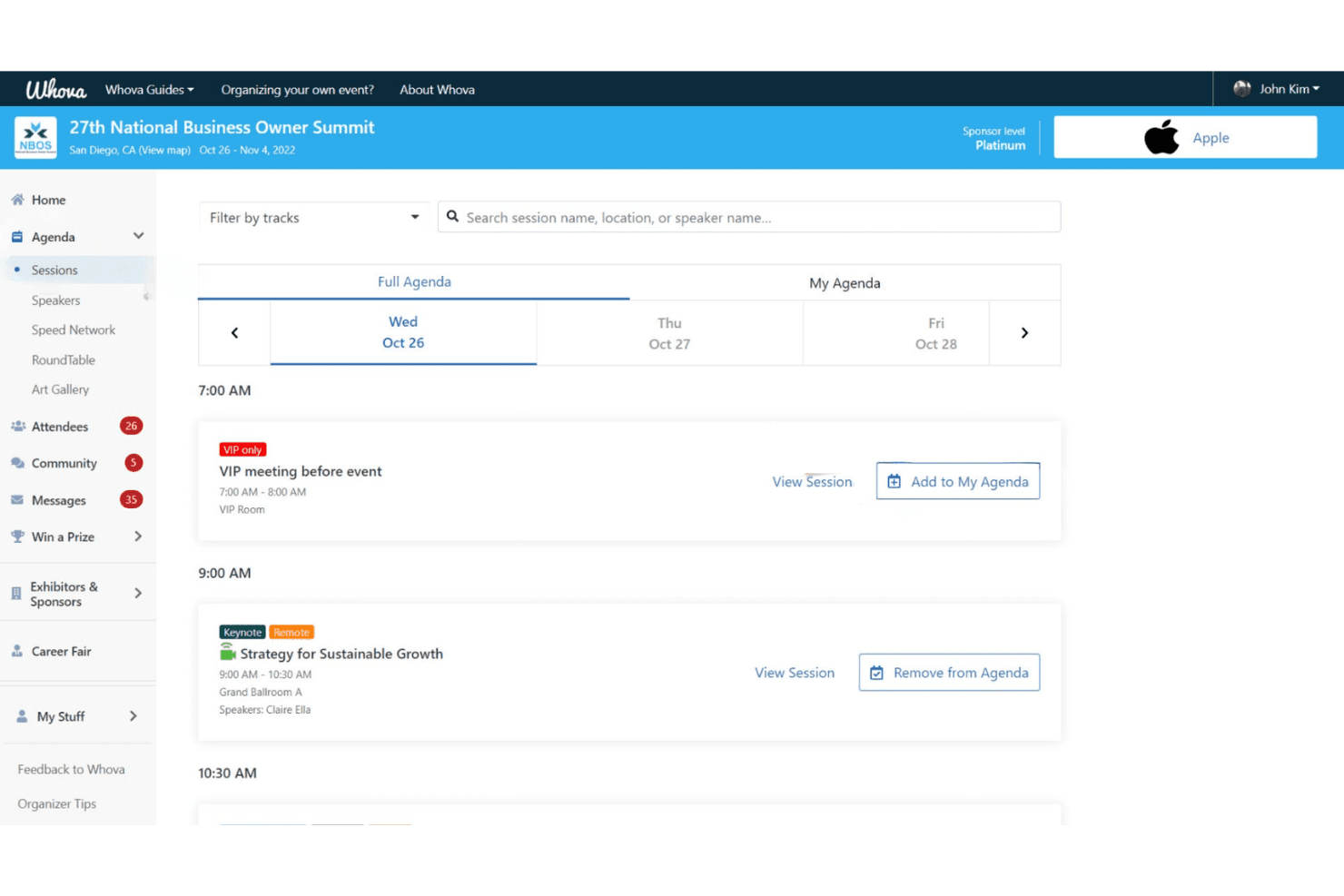
Whova is one of the most user-friendly event management platforms I’ve tried. The dashboard is clean, the setup is guided, and most users can launch events with minimal training. Attendees consistently mention how easy it is to navigate the mobile app, find sessions, and connect with others.
I think the built-in templates, drag-and-drop agenda builder, and real-time updates make Whova especially approachable for busy hotel teams and first-time organizers.
Integrations
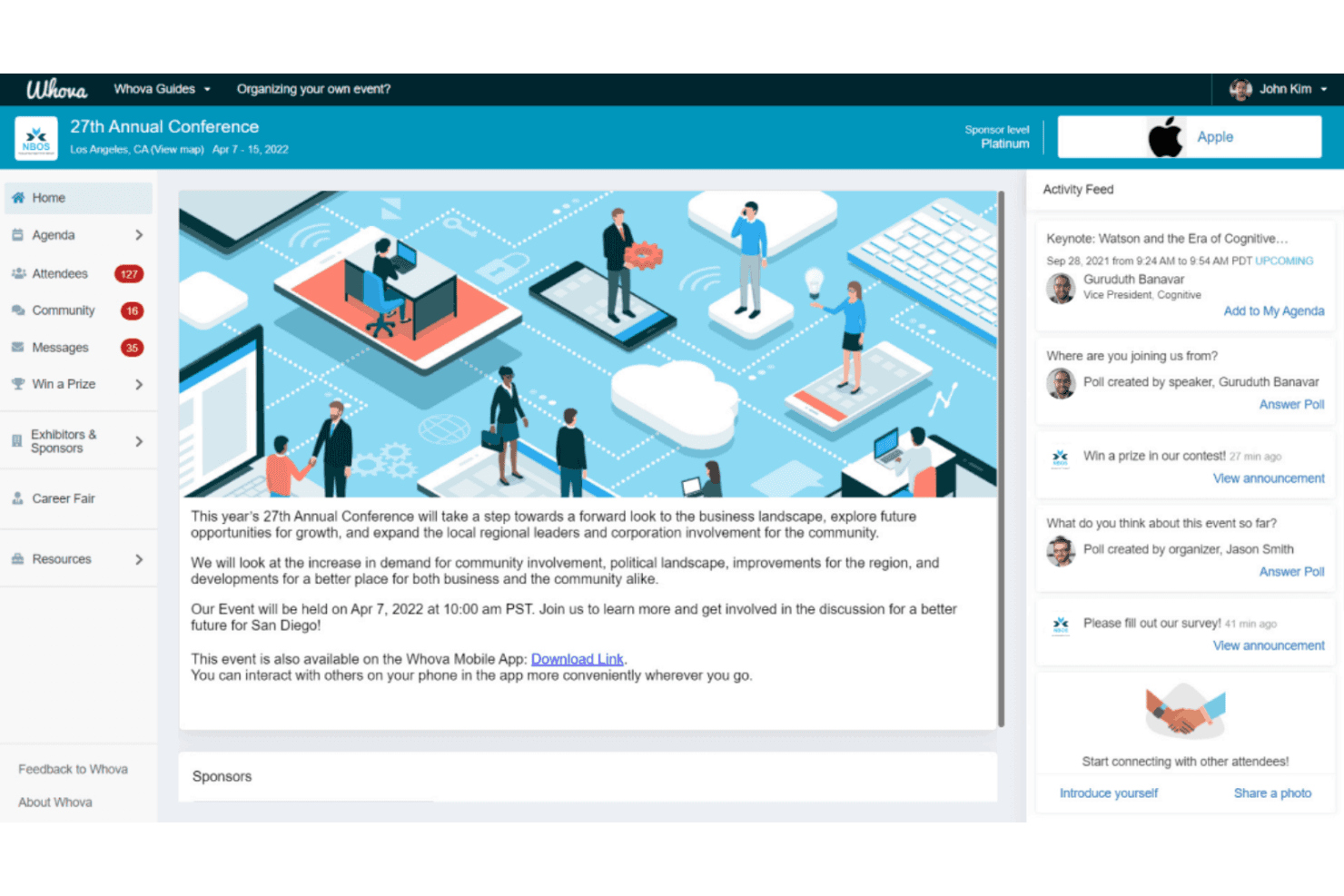
Whova integrates with Eventbrite, Cvent, RegFox, YourMembership, Glue Up, Mailchimp, Constant Contact, Zapier, Jotform, and SurveyMonkey, among others.
Whova also offers an API for custom integrations and connects with third-party integration tools like Zapier.
Whova Specs
- Accounts Payable: No
- Accounts Receivable: No
- API: Yes
- Audience Targeting: No
- Budgeting: No
- Calendar Management: Yes
- Contact Management: Yes
- Customer Management: No
- Dashboard: Yes
- Data Export: Yes
- Data Import: Yes
- Data Visualization: Yes
- Expense Tracking: No
- External Integrations: Yes
- Forecasting: No
- General Account Ledger: No
- Inventory Tracking: No
- Lead Management: Yes
- Lead Scoring: No
- Marketing Automation: Yes
- Multi-User: Yes
- Notifications: Yes
- Project Management: No
- Scheduling: Yes
- Social-Media Integration: Yes
- Supplier Management: No
- Third-Party Plugins/Add-Ons: Yes
- Travel Management: No


