Choosing hotel management software comes down to matching the right tool to how your property actually runs—not just picking the one with the longest feature list. I've been through this process more than once, and the wrong choice costs you in staff frustration, guest experience gaps, and revenue you can't recover. The right one quietly holds your operation together. In this guide, I'll walk you through exactly what to evaluate, what to watch out for, and how to make a decision you won't regret six months later.
5 Things to Look for When Choosing Hotel Management Software
Here are the five features I always zero in on first when I’m choosing hotel management software, based on what’s saved me from headaches—and what I’ll never compromise on:
1. Channel Manager and OTA Integration
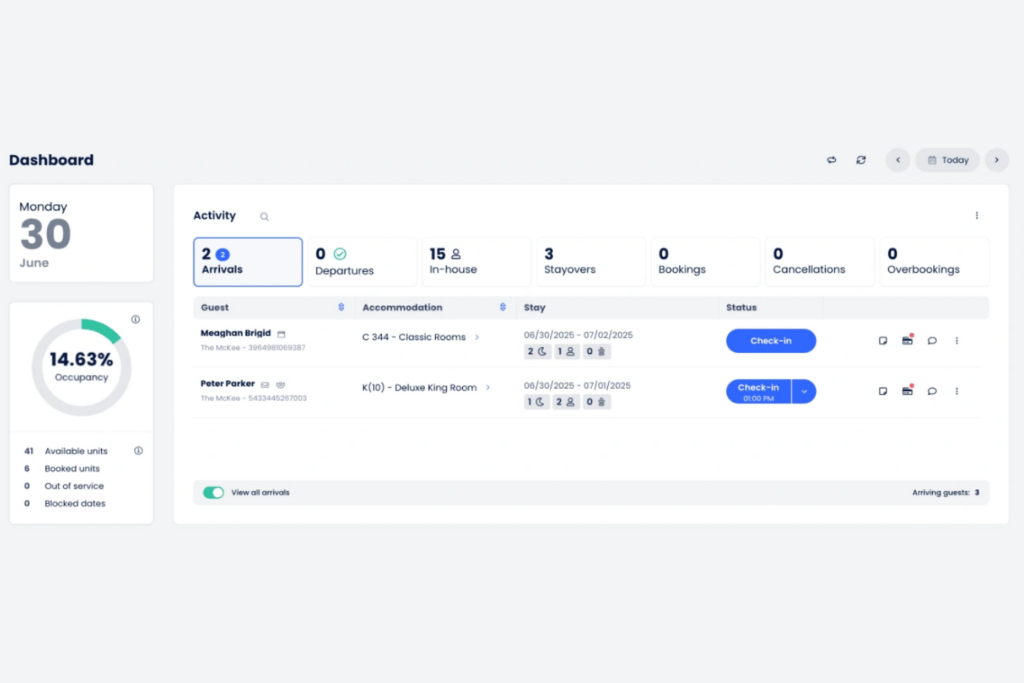
Channel manager and OTA integration connects your property to booking sites like Booking.com or Expedia and updates rates and availability across all channels in real time. This matters because disconnected systems cause double bookings, pricing mistakes, and extra manual work. Look for software that offers direct, two-way integration with your most important OTAs—and ask if there are fees or setup limits on how many channels you can connect.
2. Multi-Property Management Capabilities
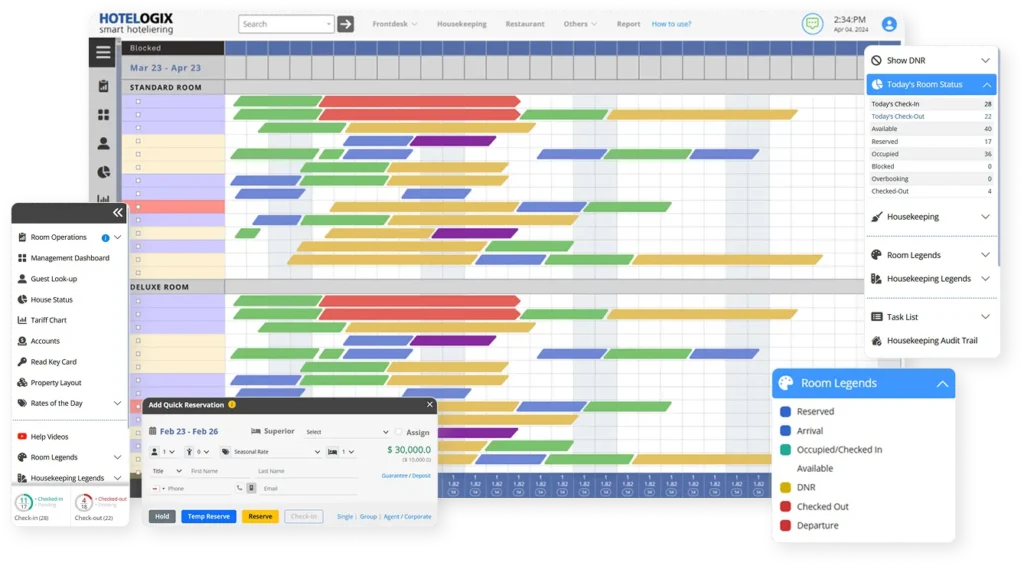
Multi-property management lets you oversee rates, inventory, guest profiles, and reporting for several properties all in one place. This matters if you manage more than one hotel or plan to grow, because juggling separate systems creates errors and extra work. Check if the software lets you switch between properties from a single login—and ask how reporting is handled across locations. If you don’t need this now, consider if you might expand in the near future.

Have an account? Log In
3. Revenue Reporting and Analytics Depth
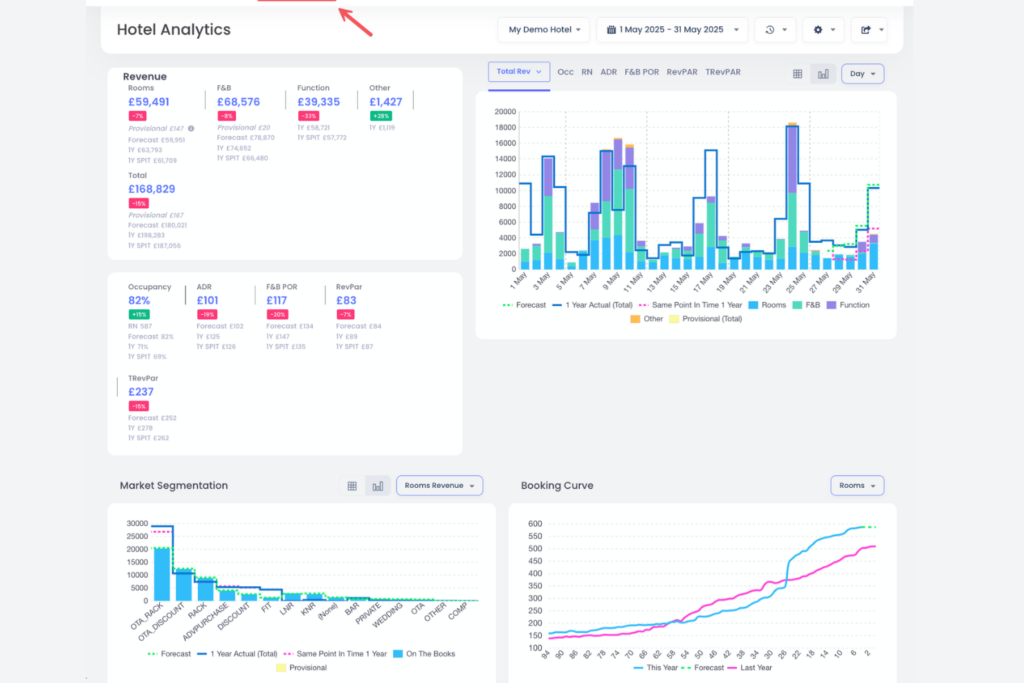
Revenue reporting and analytics let you track sales, occupancy, and performance in real time—giving you a crystal-clear picture of what’s driving your numbers. This matters because weak reporting makes it easy to miss revenue leaks or trends that could help you act fast. Look for dashboards that let you drill down by channel, rate, and segment so you can spot what’s working and what’s costing you. Ask yourself if you need customizable reports or just out-of-the-box templates to stay on top of performance.
4. Guest Data and CRM Access
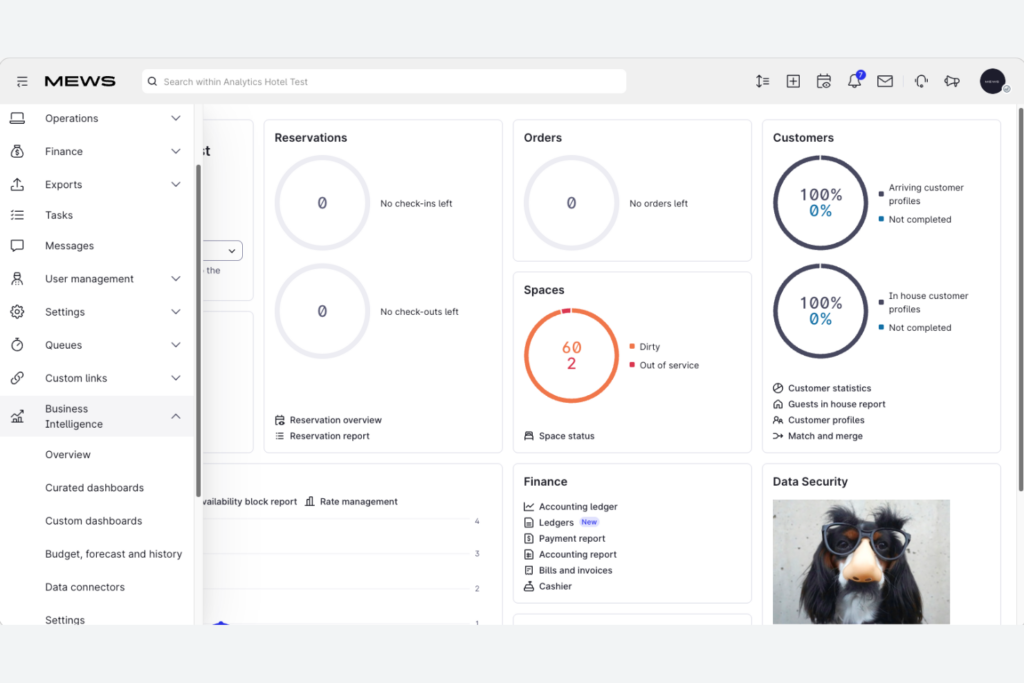
Guest data and CRM access mean you can see complete guest histories, preferences, and communications in one place. This matters because missing or scattered guest info leads to service lapses and lost upsell opportunities. Check that you get easy, centralized access to guest profiles—from any device your staff uses. Ask if data is updated in real time and whether you can control which team members see or edit sensitive info.
5. Staff Role and Permission Controls
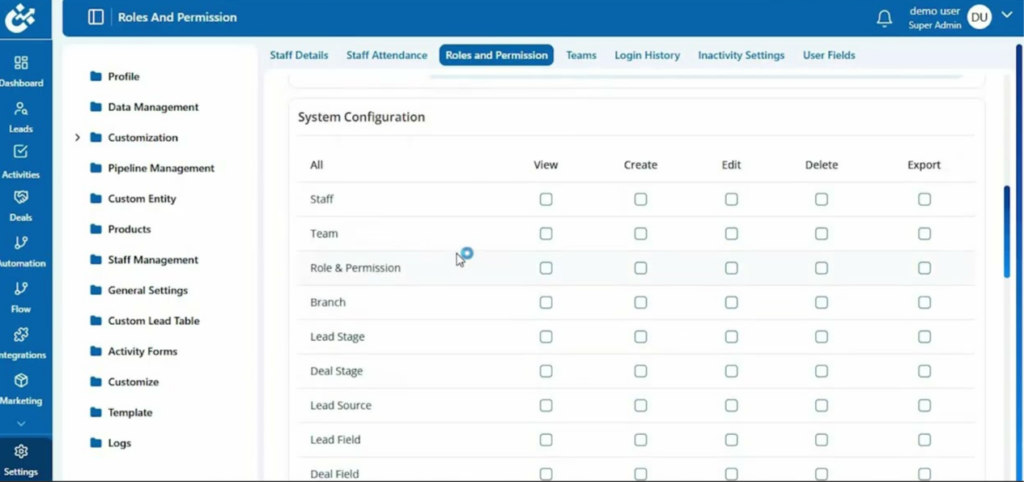
Staff role and permission controls let you decide who can access sensitive data or make key changes in your hotel management software. This matters because limiting access helps prevent errors and keeps guest and business data secure—especially when you have seasonal or part-time staff. Ask yourself if you need customizable permission levels and check whether the software tracks who made changes, so you can audit actions when something goes wrong.
How to Choose Hotel Management Software: A 5-Step Framework
Use this practical five-step process to compare, test, and confidently select hotel management software that matches your needs:
Step 1: Identify Your Needs
Before you look at a single demo or pricing page, get clear on what your property actually needs. This is the step most hoteliers skip—and it's why they end up with software that looked great in a sales call but doesn't fit how their team actually works.
Start by talking to the people who'll use the system every day. In my experience, the front desk team, housekeeping supervisors, and revenue managers all have different frustrations with your current setup—and those frustrations point directly to the gaps your new software needs to fill.
Talk to these stakeholders first:
- Front desk staff: They'll tell you where check-in slows down, where guest data goes missing, and what manual workarounds they've built around your current system.
- Housekeeping supervisors: Ask how they get room status updates and where communication with the front desk breaks down.
- Revenue managers: Find out what data they can't access easily and how long it takes to build reports.
- General manager or ownership: Understand the growth plans—are more properties coming? That changes everything about what you need.
Once you've heard from your team, work through these questions before you evaluate any software:
- What are the top three things your current system can't do?
- Which OTAs and booking channels do you actively use?
- Do you manage multiple properties, or are you planning to?
- How tech-savvy is your staff, and how much training time is realistic?
- What does your current tech stack look like—what systems need to connect?
- What's your monthly budget, including setup, training, and ongoing fees?
Use this table to organize what you learn and prioritize what matters most before you start comparing options:
| Area | Current Problem | Must-Have Fix | Nice to Have |
|---|---|---|---|
| AreaReservations | Current ProblemManual OTA updates | Must-Have FixTwo-way channel sync | Nice to HaveDynamic pricing tools |
| AreaGuest data | Current ProblemScattered across systems | Must-Have FixUnified guest profiles | Nice to HaveAutomated pre-arrival emails |
| AreaReporting | Current ProblemManual spreadsheets | Must-Have FixReal-time dashboards | Nice to HaveCustom report builder |
| AreaHousekeeping | Current ProblemPhone-based updates | Must-Have FixMobile task management | Nice to HaveAutomated room assignments |
| AreaStaff access | Current ProblemShared login | Must-Have FixRole-based permissions | Nice to HaveAudit logs |
By the end of this step, you should have a clear, prioritized list of must-haves versus nice-to-haves. That list becomes your filter for everything that follows—and it stops you from getting distracted by features that look impressive but won't move the needle for your property.
Step 2: Research Hotel Management Software Vendors
Once you know what you need, it's time to figure out which vendors are even worth your attention. I won't pretend this part is fun—there are a lot of options, and most of them will claim to do everything. Your job here is to cut through that noise before you waste time on demos.
I always start my research in a few specific places, not by Googling "best hotel management software" and clicking the first ad I see:
- Review platforms: Sites that aggregate verified user reviews from hoteliers give you unfiltered opinions from people running properties similar to yours. Pay attention to reviews from properties your size and type—a boutique hotel and a 300-room chain have very different needs.
- Industry communities: Hospitality forums, LinkedIn groups, and association networks are underrated. Ask peers what they're actually running and what they'd change. Real operators are more honest than any sales page.
- Your OTA and integration partners: Ask your booking channel contacts which systems integrate cleanly on their end. This saves you from discovering compatibility problems after you've already signed a contract.
- Trade publications and conferences: Hospitality-focused publications and events often feature vendor comparisons and case studies that go deeper than marketing materials.
As you research, track what you find in a simple table so nothing gets lost:
| Vendor | Property Type Fit | Pricing Model | User Review Sentiment | Integration Notes |
|---|---|---|---|---|
| VendorVendor A | Property Type FitBoutique, independent | Pricing ModelPer-room/month | User Review SentimentMixed on support | Integration NotesLimited OTA connections |
| VendorVendor B | Property Type FitMid-size, multi-property | Pricing ModelFlat monthly fee | User Review SentimentStrong for reporting | Integration NotesDirect channel manager |
| VendorVendor C | Property Type FitLarge hotels, chains | Pricing ModelCustom quote | User Review SentimentHigh marks for onboarding | Integration NotesWide integration library |
Keep your notes honest. If a vendor has consistently bad reviews about customer support, that's not a detail to overlook—support quality matters more than most people realize when something breaks at 2 a.m. during a full house.
By the end of this step, you should have a list of vendors worth a closer look—not a shortlist yet, just the ones that aren't immediately ruled out by property type, pricing model, or reputation. That's all you need to move forward.
Top Hotel Management Software to Consider
Here’s my shortlist of the best hotel management software solutions:
Step 3: Make a Hotel Management Software Shortlist
By now, you've got a list of vendors that passed the basic research filter. This step is about cutting that list down to three to five options you'll actually evaluate—and doing it before anyone books a demo or picks up the phone.
Here's how I approach this cut:
- Apply your must-haves as a hard filter: Go back to the priority list you built in Step 1. Any vendor that can't confirm support for your non-negotiables—two-way channel sync, multi-property management, whatever's on your list—is out. Don't negotiate on must-haves at this stage.
- Check property-type fit: A system built for large hotel chains will feel bloated and overpriced for a 30-room boutique. Make sure the vendors still on your list actually serve properties like yours in terms of size, type, and complexity.
- Gut-check pricing models: You don't need exact numbers yet, but you should know whether pricing is per-room, flat monthly, or usage-based—and whether that model makes sense for your property's occupancy patterns and budget.
- Read recent reviews carefully: Don't just look at the star rating. Look at what people complain about. Repeated mentions of slow support, buggy updates, or hidden fees are signals worth taking seriously.
Use this table to score your remaining vendors before making your final shortlist:
| Criteria | Why It Matters | Scoring Tip |
|---|---|---|
| CriteriaMust-have feature coverage | Why It MattersNon-negotiables can't be worked around | Scoring TipPass/fail—no partial credit |
| CriteriaProperty-type fit | Why It MattersWrong-sized tools create friction | Scoring TipCompare vendor case studies to your property |
| CriteriaPricing model transparency | Why It MattersHidden fees derail budgets | Scoring TipAsk for a full cost breakdown upfront |
| CriteriaReview sentiment on support | Why It MattersSupport quality matters most when things go wrong | Scoring TipFlag any pattern of complaints |
| CriteriaIntegration compatibility | Why It MattersGaps here cause the most operational pain | Scoring TipConfirm with your OTA or PMS contacts |
Once you've scored your vendors, pick your top three to five. That's your shortlist. Only then should you reach out to book demos—and when you do, come with your must-have list in hand. A demo without a filter is just a sales call. With your priorities clear, it becomes a real evaluation.
More Articles
Step 4: Build the Business Case
A business case isn't just a formality—it's how you get buy-in from ownership or finance before you spend a cent. I've seen hoteliers skip this step, sign a contract, and then spend months defending the decision. Build the case first, and that conversation becomes much easier.
The goal here is simple: translate your must-haves into numbers that matter to decision-makers. That means estimating what you're currently losing and what you stand to gain.
Work through these areas to build your case:
- Quantify current losses: Calculate how much time your team spends on manual tasks—OTA updates, report building, guest data entry. Multiply that by your average hourly labor cost. That number is your baseline problem.
- Estimate revenue impact: Think about double bookings, missed upsells, and rate errors. Even a conservative estimate of recovered revenue from better channel sync or pricing tools makes a strong argument.
- Build a realistic cost picture: Get pricing from your shortlisted vendors—including setup fees, training costs, and any per-room charges. Don't forget to account for the time your team will spend during implementation.
- Set an implementation timeline: Most properties underestimate this. Plan for data migration, staff training, and a parallel-run period where both systems run simultaneously. Budget at least four to eight weeks minimum.
- Name the risks honestly: What could go wrong? Delays, staff resistance, and integration gaps are the most common. Showing you've thought through risks builds credibility with stakeholders.
Use this table to organize your financial summary before you present it:
| Category | Current State | Post-Implementation Estimate | Notes |
|---|---|---|---|
| CategoryLabor hours (manual tasks) | Current StateX hours/week | Post-Implementation EstimateReduced by estimated % | NotesBased on team interviews |
| CategoryRevenue at risk (errors/gaps) | Current StateEstimated annual loss | Post-Implementation EstimateRecoverable with better sync | NotesConservative estimate |
| CategorySoftware cost | Current State— | Post-Implementation EstimateMonthly/annual total | NotesInclude all fees |
| CategoryImplementation cost | Current State— | Post-Implementation EstimateOne-time total | NotesLabor + training + migration |
| CategoryBreak-even point | Current State— | Post-Implementation EstimateMonth X after go-live | NotesBased on savings vs. cost |
In my experience, decision-makers respond best when you frame the investment in terms of break-even timing—not just total cost. If your numbers show you recover the investment within six months, the conversation shifts from "is this worth it?" to "when do we start?"
A strong business case doesn't need to be long. It needs to be honest, specific, and tied directly to the problems you identified in Step 1.
Step 5: Implement Your Hotel Management Software and Onboard Your Users
This is where most hotel software projects either succeed or fall apart—and in my experience, it's rarely the software itself that causes problems. It's the rollout. A rushed implementation leaves staff confused, data messy, and leadership frustrated before the system has a real chance to prove its value.
Done right, this step ends with your team confident in the new system, your data migrated cleanly, and a feedback loop in place so you can catch problems before they become habits.
Here's how I'd approach it:
- Announce before you launch: Tell your team what's changing, why, and when—before go-live day. Staff who feel blindsided by new software resist it. A brief all-hands meeting or written update goes a long way.
- Assign a system owner: Pick one person—not a committee—who's accountable for the rollout. They manage the vendor relationship, answer internal questions, and escalate issues. Without a clear owner, problems fall through the cracks.
- Run departments separately: Don't train front desk, housekeeping, and revenue teams in the same session. Each group has different workflows. Tailored training sticks better and wastes less time.
- Set a parallel-run window: Keep your old system running alongside the new one for at least two to four weeks. This gives your team a safety net and lets you catch data sync issues before they affect guests.
- Create a simple feedback channel: Give staff a low-friction way to flag problems—a shared notes doc, a daily check-in, anything that works. You'll miss things during training that only surface on a busy Friday night.
- Schedule a 30-day review: Block time to review what's working and what isn't after the first month. Look at adoption by department, recurring errors, and any workarounds staff have invented. Those workarounds are signals.
Use this table to track rollout ownership across your key departments:
| Department | System Owner | Training Date | Go-Live Date | Feedback Contact |
|---|---|---|---|---|
| DepartmentFront desk | System Owner— | Training Date— | Go-Live Date— | Feedback Contact— |
| DepartmentHousekeeping | System Owner— | Training Date— | Go-Live Date— | Feedback Contact— |
| DepartmentRevenue/finance | System Owner— | Training Date— | Go-Live Date— | Feedback Contact— |
| DepartmentF&B or ancillary | System Owner— | Training Date— | Go-Live Date— | Feedback Contact— |
The goal at the end of this step isn't perfection—it's a team that knows where to go when something doesn't work. If you've built that, the software will do the rest.
Ready to Choose the Right Hotel Management Software?
If you’re comparing platforms to streamline reservations, guest operations, and day-to-day property management, explore our guide to the best hotel property management software to find the right fit for your hotel.