

Hotel asset management software is technology that helps you track, monitor, and organize physical assets across your property or entire portfolio. If you’re searching for the best hotel asset management software, you’re likely looking to gain tighter control over equipment, reduce costly loss or downtime, and keep your teams on top of maintenance and compliance.
With so many moving parts in hospitality, finding the right solution can bring order to your assets and free up time for better guest satisfaction. In this guide, you’ll find clear comparisons and details to help you choose the right fit for your unique needs.
Why Trust Our Software Recommendations
6,700+
Reviews
20
Industry experts
16+
Evaluation factors
14
Years
Our team has been testing and reviewing software since 2012. As hospitality leaders ourselves, we know how difficult—and important—it is to choose the right software.
For this guide, we evaluated tools using hands-on testing and independent research, scoring tools using our selection criteria.
Our reviews reflect our human editorial judgment, not a sales pitch.
Best Hotel Asset Management Software Summary
This comparison chart summarizes pricing details for my hotel asset management software to help you find the best one for your budget and business needs.
| Tool | Best For | Trial Info | Price | ||
|---|---|---|---|---|---|
| 1 | Best for work order automation for hospitality | 30-day free trial + free demo available | Single plan at $35 per user/month (billed annually) | Website | |
| 2 | Best for digital maintenance logs for teams | Free plan available | From $20/user/month (billed annually) | Website | |
| 3 | Best for preventive asset maintenance scheduling | Free demo available | Pricing upon request | Website | |
| 4 | Best for preventive maintenance scheduling | 7-day free trial + free demo available | From $24/user/month | Website | |
| 5 | Best for workforce labor forecasting | Free demo available | Pricing upon request | Website | |
| 6 | Best for compliance tools for hospitality standards | Free demo available | Pricing upon request | Website | |
| 7 | Best for RFID-based equipment tracking | Free demo available | From $1,200/user (billed annually) | Website | |
| 8 | Best for barcode tracking for on-site assets | 15-day free trial | From $20/user/month | Website | |
| 9 | Best for multi-property asset oversight | Free demo available | Pricing upon request | Website | |
| 10 | Best for mobile inventory management | Free trial + free demo available | From $229/month | Website |


Best Hotel Asset Management Software Reviews
Below are my detailed summaries of the best hotel asset management software that made it onto my shortlist. My reviews offer a detailed look at the features, integrations, and best use cases of each software to help you find the best one for you.
 Best for work order automation for hospitality
- 30-day free trial + free demo available
- Single plan at $35 per user/month (billed annually)
Visit WebsiteCustomer Rating:4.7/5
Click Maint organizes maintenance work orders by asset, location, and priority. Click Maint CMMS is a CMMS (computerized maintenance management system) built for hotels, resorts, and casinos that covers work order management, preventive maintenance scheduling, asset tracking, and spare parts inventory.
Who Is Click Maint CMMS Best For?
Click Maint CMMS is a strong fit for hotel maintenance managers at independent properties and small-to-mid-sized hotel groups that need a dedicated work order system without enterprise-level complexity.
Why I Picked Click Maint CMMS
I picked Click Maint CMMS as one of the best because its work order automation is genuinely built around how hotel maintenance teams actually operate. I like that guests and staff can submit requests directly through the system, and those requests automatically convert into prioritized, assigned work orders with real-time status tracking. The automated preventive maintenance scheduling, which pulls from manufacturer recommendations and usage patterns, delivers significant cost savings by ensuring tasks for HVAC, plumbing, and pool equipment don't rely on anyone remembering them.
Click Maint CMMS Key Features
- Asset registry with QR codes: Build a central asset database with details like location, warranty, and purchase date, and assign QR codes to each asset for instant mobile access.
- Spare parts inventory management: Track stock levels for spare parts and supplies, set reorder triggers, and manage preferred supplier details directly in the system.
- Compliance documentation storage: Store safety checks, compliance certificates, and maintenance records in one place for quick retrieval during audits and inspections.
- Work order reporting and analytics: Generate reports on work order volume, status, costs, and recurring issues to identify patterns and make informed decisions regarding maintenance.
Click Maint CMMS Integrations
Native integrations are not publicly listed.
Pros and Cons
Pros:
- Preventive maintenance auto-scheduling by asset
- Guest-initiated work order submission built in
- Quick setup with same-day onboarding
Cons:
- Mobile app lacks full desktop feature parity
- No predictive maintenance or IoT support
Learn more about Click Maint CMMS: Best for digital maintenance logs for teams
- Free plan available
- From $20/user/month (billed annually)
Visit WebsiteCustomer Rating:4.8/5
MaintainX work orders dashboard tracks team maintenance tasks and progress. MaintainX is a mobile-first CMMS built for hospitality teams that covers work order management, preventive maintenance scheduling, digital checklists, parts inventory tracking, and cross-property reporting.
Who Is MaintainX Best For?
MaintainX is a strong fit for hotel operations managers and frontline maintenance teams who need a shared, real-time system for logging and tracking daily work across departments.
Why I Picked MaintainX
I picked MaintainX as one of the best because the way it handles digital logging genuinely sets it apart for hotel teams. Every work order carries a full audit trail, capturing status changes, comments, photos, and staff assignments in one place. I also like its automatic escalation feature, which flags unresolved requests after a set time so nothing slips through on a busy shift. That combination of real-time logging and built-in accountability is exactly what multi-department hotel teams need.
MaintainX Key Features
- In-app messaging: Send real-time messages within work orders so maintenance staff and managers can communicate without switching to a separate tool.
- Preventive maintenance scheduling: Set recurring work orders on daily, weekly, monthly, or annual intervals for specific assets like elevators or HVAC systems.
- Parts and inventory tracking: Attach spare parts and supply records to assets and work orders, with low-stock alerts to flag when replenishment is needed.
- Custom reporting dashboards: Build and export reports tracking work by staff member, property, or asset, with pre-built options like time vs. cost analysis on all paid plans.
MaintainX Integrations
MaintainX offers native integrations through its integrations marketplace, including SAP, Oracle NetSuite, Microsoft Dynamics 365, Microsoft Power BI, QuickBooks Online, Xero, FreshBooks, Slack, Google Forms, Google Sheets, Jira, Microsoft Outlook, Samsara, MachineMetrics, and Motive. It connects with Zapier and provides an API for custom integrations.
Pros and Cons
Pros:
- The mobile app works offline on the property
- Built-in chat threaded to work orders
- Photo-attached work orders for room issues
Cons:
- No external vendor request intake channel
- Desktop experience feels secondary to mobile
Learn more about MaintainX: Best for preventive asset maintenance scheduling
- Free demo available
- Pricing upon request
Visit WebsiteCustomer Rating:4.8/5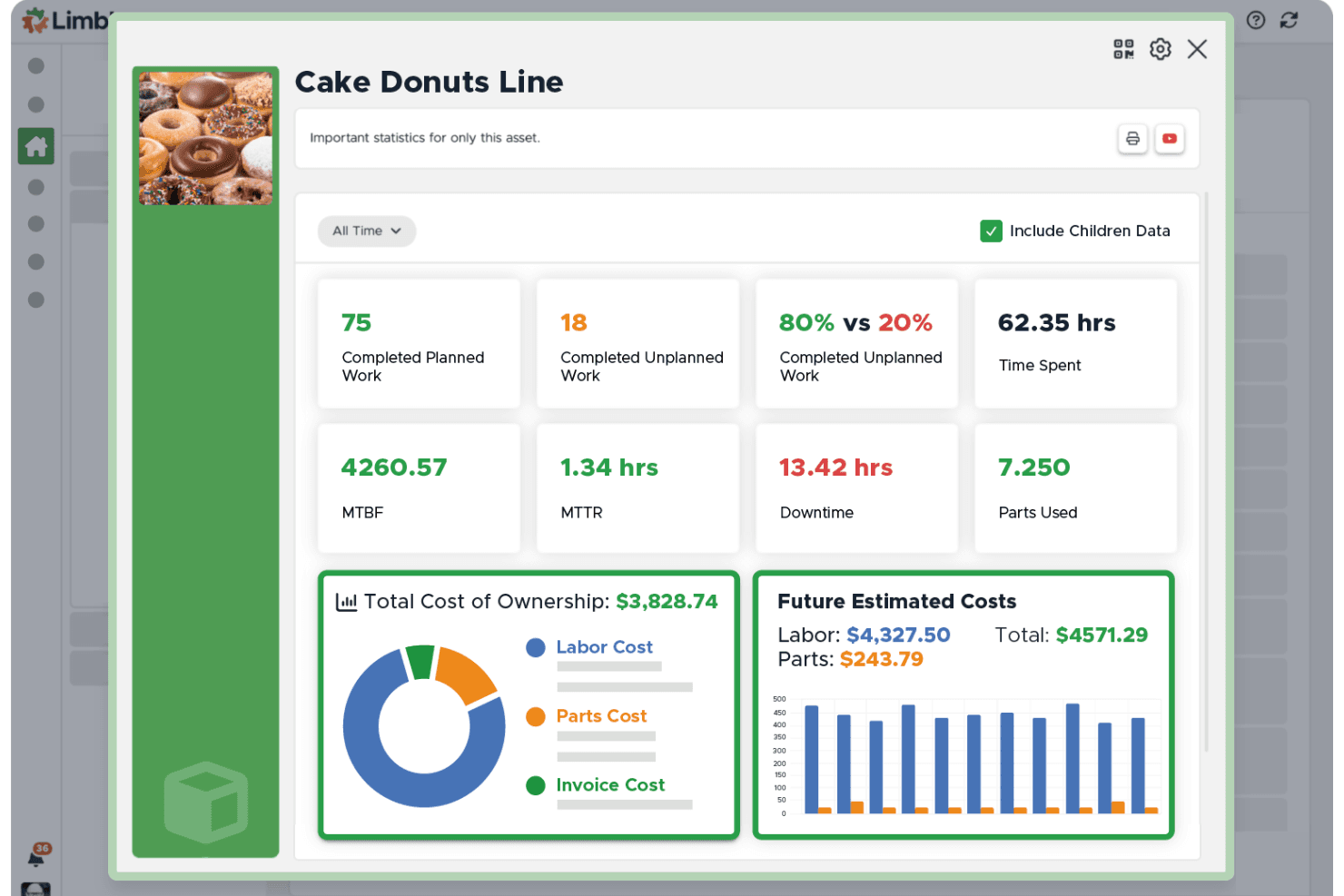
Limble provides visibility into assets, including planned maintenance, predicted costs, and overall asset health. Limble is a CMMS built for facilities and maintenance teams that centralizes asset tracking, work order management, preventive maintenance scheduling, and spare parts inventory in one mobile-friendly platform.
Who Is Limble Best For?
Limble is a strong fit for single-property hotels and resorts with in-house maintenance teams responsible for managing physical equipment and facilities.
Why I Picked Limble
Limble earns its spot on my shortlist because of how it handles PM scheduling at the asset level. I like that you can trigger PMs by calendar, meter readings, or threshold conditions, so an HVAC unit automatically generates a service order after a set number of run hours rather than waiting for something to fail. The AI-powered PM builder and conditional logic in procedures (where a failed inspection check auto-creates a corrective work order) are the features I keep coming back to.
Limble Key Features
- Asset QR code generation: Generate QR codes for assets to enable quick work order submissions directly from the field.
- Parts inventory management: Track spare parts, set min/max thresholds, and manage inventory levels across locations.
- Vendor and purchase order tracking: Manage vendor details and purchase orders with built-in tools and custom budget settings.
- Mobile app offline mode: Access work orders and essential asset data even when internet connectivity is unavailable.
Limble Integrations
Limble offers native integrations with Google Calendar, Microsoft 365 Calendar, Slack, ArcGIS Online, AssetWatch, Augury, Monnit, OKta, Oracle, and more. An API is available for custom integrations.
Pros and Cons
Pros:
- Offline mobile functionality for maintenance teams
- QR code scanning for quick work order entry
- Preventive maintenance automation with asset tracking
Cons:
- No built-in guest communication tools
- Limited visual asset mapping capabilities
Learn more about Limble: Best for preventive maintenance scheduling
- 7-day free trial + free demo available
- From $24/user/month
Visit WebsiteCustomer Rating:4.6/5
UpKeep helps hotels manage maintenance and work orders on the go. UpKeep is a mobile-first CMMS and asset operations platform built for hotels and hospitality teams to manage work orders, preventive maintenance schedules, physical asset tracking, and inventory.
Who Is UpKeep Best For?
UpKeep is a strong fit for maintenance and engineering teams at hotels and resorts managing physical assets, recurring inspections, and multi-technician work order workflows.
Why I Picked UpKeep
I picked UpKeep as one of the best because its preventive maintenance scheduling is genuinely purpose-built for hotel operations. I like that you can build recurring maintenance schedules tied directly to specific assets, like HVAC units or elevators, with trigger-based automation that fires work orders on a set cadence. Technicians get those orders on mobile, with full asset history and checklists attached, so nothing gets missed between shifts.
UpKeep Key Features
- Work order request portal: Any team member can submit maintenance requests through a dedicated portal, with real-time status updates as orders are prioritized and completed.
- Inventory management: Track parts and supplies across your property, with ordering triggered only when stock is needed.
- UpKeep Analytics: Monitor work order completion times, labor trends, and asset performance through data visualizations and shareable reports.
- Compliance and safety tracking: Log asset manuals, maintenance records, and labor history to keep teams executing tasks with full documentation on hand.
UpKeep Integrations
UpKeep connects to 1,000+ systems through native integrations, Zapier, and a public REST API. Native ERP connectors include SAP, Oracle, NetSuite, and Microsoft Dynamics, keeping work orders, inventory, and costs in sync in both directions. Additional native integrations include Slack, Microsoft Teams, QuickBooks Online, Xero, Okta, and OneLogin. An API and webhooks are also available for custom integrations.
Pros and Cons
Pros:
- Preventive schedules tied to individual assets
- Unlimited free requester accounts for staff
- Mobile app built for field technicians
Cons:
- Custom dashboards locked to the Enterprise tier
- No room-level tracking or guest request tools
Learn more about UpKeep: Best for workforce labor forecasting
- Free demo available
- Pricing upon request
Visit WebsiteCustomer Rating:4/5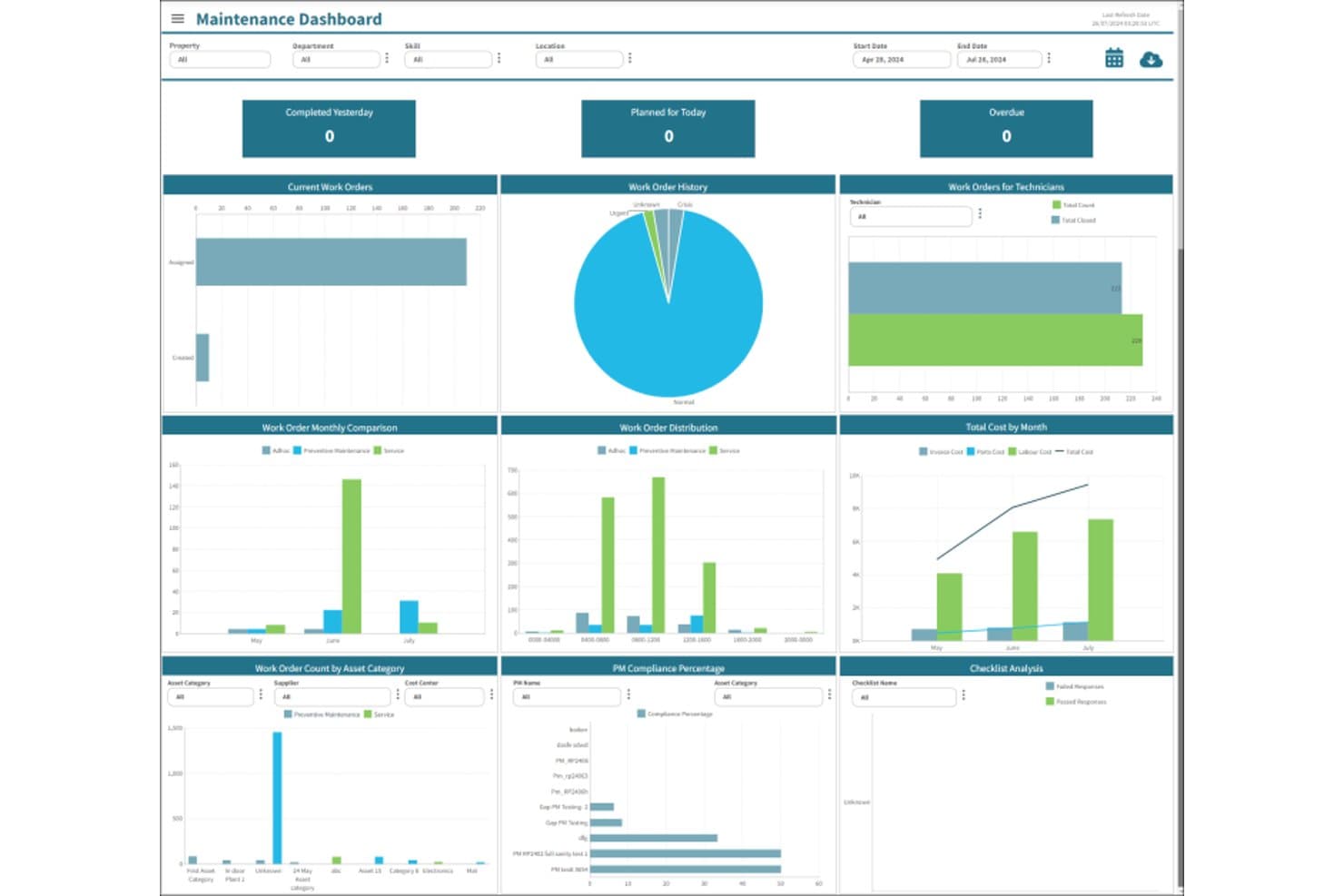
Unifocus offers a Maintenance Dashboard with work order tracking, PM compliance monitoring, cost analysis, and checklist tools for hotel asset management. Unifocus is a hospitality workforce and operations management platform that combines labor forecasting, scheduling, time and attendance, preventive maintenance, work order tracking, and property inspections in a single suite.
Who Is Unifocus Best For?
Unifocus is a strong fit for mid-size to large hotel operators and multi-property groups that need to align staffing levels with fluctuating demand across departments.
Why I Picked Unifocus
Unifocus earns its spot on my shortlist because its AI-driven labor forecasting pulls in occupancy data, POS inputs, and local event calendars to predict staffing needs by department before demand hits. I like that it connects those forecasts directly to labor budgeting, so you're not reconciling a schedule against a separate spreadsheet after the fact. The preventive maintenance module ties operational asset care into the same platform, which is a real advantage when managing property upkeep alongside staffing costs.
Unifocus Key Features
- Time and attendance tracking: Employees can clock in and out by mobile, kiosk, or biometric clock with real-time compliance checks.
- Housekeeping task management: Assigns, distributes, and tracks daily cleaning tasks with automatic routing based on room status.
- Work order automation: Maintenance teams get mobile work order tickets for preventive or reactive jobs, streamlining asset repairs and requests.
- Survey and feedback tool: Gathers guest and staff feedback right from the platform for service monitoring and improvement.
Unifocus Integrations
Unifocus offers native integrations with Oracle, MEWS, Infor, Protel, Agilysys, RMS, ADP, Workday, Paylocity, Paycor, Payday HCM, Valiant, Novatime, Ceridian, Kronos, and Bamboo HR. An API is available for custom integrations.
Pros and Cons
Pros:
- Customizable scheduling rules for hotel departments
- Centralized housekeeping and maintenance task management
- Accurate labor forecasts using occupancy data
Cons:
- Reporting tools require manual configuration
- Interface navigation can feel unintuitive
Learn more about Unifocus: Best for compliance tools for hospitality standards
- Free demo available
- Pricing upon request
Visit WebsiteCustomer Rating:4.8/5
Canary Technologies centralizes hotel guest messaging across web and mobile. Canary Technologies is a hotel guest management platform covering digital check-in and checkout, AI-powered guest messaging, secure payment processing, digital authorizations, upsells, and fraud prevention.
Who Is Canary Technologies Best For?
Canary Technologies is a strong fit for full-service and boutique hotels prioritizing digital guest journey management, from pre-arrival compliance through secure checkout.
Why I Picked Canary Technologies
Canary Technologies earns its spot on my shortlist because its compliance tools are genuinely built around the hospitality standards hotels are held to today. I like that its Digital Authorizations product is PCI Level-1 certified, meaning it handles the compliance burden of replacing paper and PDF credit card forms that no longer meet PCI standards. Its SOC certification and proprietary fraud detection layer add further protection during the authorization and checkout process, which is where most chargeback risk lives.
Canary Technologies Key Features
- AI guest messaging: Send automated, AI-generated responses to guest inquiries across SMS, WhatsApp, and web chat throughout the stay.
- Dynamic upsells: Present room upgrades, early check-in, and ancillary add-ons to guests digitally before and during their stay.
- Digital tipping: Let guests tip staff directly from their mobile device, with tips distributed automatically to individual team members or departments.
- Smart checkout: Give guests a mobile checkout option that settles balances and collects feedback without requiring a trip to the front desk.
Canary Technologies Integrations
Canary Technologies integrates with all major hotel property management systems, CRMs, payment providers, and most other hotel operations systems. Verified integrations include Oracle Hospitality, Protel, WebRezPro, Cloudbeds, Mews, Amadeus, Maestro, StayNTouch, Agilysys, and SiteMinder, among many others spanning PMS, payment, and access control categories. An API is also available for custom integrations.
Pros and Cons
Pros:
- Modular product suite across the guest journey
- Built-in fraud detection at checkout
- PCI Level-1 certified digital authorizations
Cons:
- Limited reporting customization options
- No physical asset or facility tracking
Learn more about Canary Technologies: Best for RFID-based equipment tracking
- Free demo available
- From $1,200/user (billed annually)
Visit WebsiteCustomer Rating:4.5/5
RedBeam tracks asset status, maintenance logs, and mobile equipment checkouts. RedBeam is an asset and inventory tracking platform built for hotels and the broader hospitality industry, combining barcode scanning, RFID tracking, and supply inventory management across single and multi-property operations.
Who Is RedBeam Best For?
RedBeam is a practical fit for hotel operations and facilities managers who need a hands-on system for tracking physical equipment, supplies, and assets across their property.
Why I Picked RedBeam
I picked RedBeam as one of the best because its RFID capabilities go beyond basic scanning. The fixed reader management feature lets you configure readers in storage rooms or event spaces to capture asset movement automatically, so you're not relying on staff to manually log every item. I also like the event-based workflow triggers, which send alerts if, say, a housekeeping cart enters a guest area after hours or AV equipment leaves an event space unaccounted for.
RedBeam Key Features
- Check-in/check-out: Assign and track shared equipment like catering gear and cleaning tools across shifts, departments, and events.
- Store & forward functionality: Captures asset updates in network dead zones and syncs them automatically once connectivity is restored.
- Custom data fields: Record purchase date, room location, maintenance schedule, and warranty info against individual assets.
- Cycle counting: Audit linens, cleaning supplies, and consumables on an ongoing basis without disrupting daily service operations.
RedBeam Integrations
RedBeam doesn't offer pre-built native integrations but provides REST APIs to connect with PMS, CRM, ITSM, and inventory platforms.
Pros and Cons
Pros:
- Mobile scanning works in offline areas
- Unlimited locations across multiple properties
- Supports both barcode and RFID scanning
Cons:
- No built-in maintenance or work orders
- Initial setup and tagging are labor-intensive
Learn more about RedBeam: Best for barcode tracking for on-site assets
- 15-day free trial
- From $20/user/month

GigaTrak offers an asset tracking system to access asset information and manage inventory. GigaTrak is a fixed asset and inventory management platform for hotels and resorts that uses barcode scanning hardware to register, audit, track, and maintain detailed records of on-site assets and equipment.
Who Is GigaTrak Best For?
GigaTrak is a practical option for property operations teams at hotels and resorts that need a no-frills system for barcode-based tracking of fixed assets like furniture, AV equipment, and computers across departments.
Why I Picked GigaTrak
I picked GigaTrak as one of the best because its barcode-based approach covers the full asset lifecycle, from initial registration and transfers to maintenance history and retirement. I particularly like the mobile audit workflow: you download the asset database to a handheld scanner, walk the property floor by floor, then upload everything when you're back on the network.
GigaTrak also keeps historical records that satisfy both accountants and auditors, which is genuinely useful during insurance reviews or capital planning cycles.
GigaTrak Key Features
- Check-in/check-out tracking: Log which staff member has taken a piece of equipment, when they took it, and when it was returned.
- Depreciation tracking: Automatically calculate asset depreciation over time using preset schedules for financial reporting.
- Custom label printing: Generate and print barcode labels directly from the system to tag new assets as they arrive on the property.
- Department and location assignment: Assign each asset to a specific room, floor, or department to keep location records current across the property.
GigaTrak Integrations
Native integrations are not publicly listed.
Pros and Cons
Pros:
- 40+ pre-built reports included
- Spreadsheet import for initial asset setup
- Bundled barcode scanner and label printer
Cons:
- Reports lack custom filtering options
- Interface design feels dated
Learn more about Gigatrak: Best for multi-property asset oversight
- Free demo available
- Pricing upon request

Transcendent by Actabl tracks hotel assets by location and status. Transcendent by Actabl is a hotel asset management platform that combines enterprise asset tracking, preventive maintenance, and capital expenditure (CapEx) planning across hotel portfolios.
Who Is Transcendent by Actabl Best For?
Transcendent by Actabl is a strong fit for asset managers and directors of engineering overseeing large hotel portfolios or multi-brand property groups.
Why I Picked Transcendent by Actabl
I've included Transcendent by Actabl in my top picks because its cross-property visibility is genuinely hard to replicate with general-purpose tools. What I like most is the centralized asset dashboard, which lets portfolio-level managers monitor asset status, maintenance history, and performance data across every property from one place. The CapEx planning module is also notable: it standardizes capital budgeting across your portfolio, aligning financial oversight with your long-term revenue management when making replacement and investment decisions.
Transcendent by Actabl Key Features
- Preventive maintenance scheduling: Auto-generate maintenance work orders for equipment, guest rooms, fire and life safety, water safety, and indoor air quality across your properties.
- Asset scanning with proof of presence: Track work order progress by scanning assets on-site, creating a verifiable record of completed inspections and maintenance tasks.
- Employee workload monitoring: View real-time workload distribution across your engineering team to balance task assignments and track individual progress on active work orders.
- Mobile app access: Complete work orders, inspections, and preventive maintenance rounds from a mobile device, giving your team full access to asset data on the floor.
Transcendent by Actabl Integrations
Native integrations are not publicly listed.
Pros and Cons
Pros:
- Enterprise-wide asset lifecycle visibility across properties
- Built-in fire and life safety tracking
- CapEx forecasting extends up to 10 years
Cons:
- Replacing retired assets requires full re-tagging
- Occasional slowness on login and page loads
Learn more about Transcendent by Actabl:

Timly tracks asset inventory, maintenance, and history across desktop and mobile. Timly is a cloud-based inventory management system for hotels that handles asset tracking, maintenance scheduling, consumables management, and digital stocktaking across multiple departments and locations.
Who Is Timly Best For?
Timly is a strong fit for mid-sized to large hotel operations teams that need their staff to manage and audit assets from a phone or tablet without being tied to a desk.
Why I Picked Timly
Timly earns its spot on my shortlist because its mobile app is genuinely built for hotel operations staff, not desk-based managers. I like that any team member can scan a QR code on a piece of equipment to pull up its full history, log a defect, or check it out, all from their phone. The RFID tracking option also lets housekeeping and maintenance teams capture asset movements contact-free during busy shifts.
Timly Key Features
- Maintenance scheduling: Set up recurring maintenance tasks for individual assets and receive automated reminders when service is due.
- Consumables tracking: Monitor stock levels for consumable items and log replenishments directly against each asset or department.
- Document storage: Attach warranties, manuals, and inspection certificates to individual asset records for on-demand access.
- GPS location tracking: View the last known location of any asset across departments or properties on a live map.
Timly Integrations
Timly offers native integrations with SAP, Microsoft Dynamics 365, Microsoft Entra ID, Google SSO, DATEV, Abacus, Lansweeper, and Fluke. A REST API is also available for custom integrations.
Pros and Cons
Pros:
- Multi-location asset tracking in real time
- Built-in maintenance and inspection reminders
- QR code scanning from any mobile device
Cons:
- Lacks built-in advanced forecasting tools
- No offline mode for low-connectivity areas
Learn more about Timly:
Other Hotel Asset Management Software
Here are some additional hotel asset management software options that didn’t make it onto my shortlist, but are still worth checking out:
- 11LLuminBest for real-time asset condition monitoring
- 12M1 SoftwareBest for lifecycle tracking
- 13Coba CMMSBest for hotel energy management
- 14CSATBest for personalized customer support experiences
- 15SirvoyBest for affordable, user-friendly PMS for small accommodations
- 16CheqroomBest for equipment tracking
- 17GuestyBest for vacation rental businesses seeking automation
- 18Little HotelierBest for maximizing online visibility for small properties
- 19CloudbedsBest for maximizing occupancy and revenue with a powerful booking engine
- 20WebRezProBest for automating guest communications and workflows
How I Evaluate Hotel Asset Management Software
I break every evaluation into two layers: the core functionality a tool needs—think asset histories, work orders, and preventive schedules—and the differentiators that actually move the needle.
Core Functionality (Table Stakes For This List)
When I'm selecting tools for my list, I rank each one on a scale from 0 (does not offer the functionality) to 5 (excels in this area) for each core functionality listed below. Then, I calculate the tool's total score as a percentage. Each tool needs to achieve a minimum total score of 60% to be considered for inclusion.
- Asset tracking: I look for a centralized registry where you can log every asset—from HVAC units to guest room furniture—with location, condition, and service history attached.
- Work order management: The ability to create, assign, and track maintenance requests matters, especially when a front desk agent flags a broken lock and needs it resolved before the next check-in.
- Preventive maintenance scheduling: I evaluate whether the tool lets you set recurring tasks based on time or usage, like quarterly deep cleans of kitchen exhaust hoods or seasonal pool equipment servicing.
- Mobile accessibility: Maintenance teams are on the move across floors and buildings, so I check that technicians can receive and update work orders from a phone or tablet on property.
- Reporting and analytics: I look for dashboards or exportable reports that surface patterns, such as which asset types generate the most repeat repairs or which properties have the highest open work order backlog.
Once I have a list of tools that meet this criteria, I consider what sets each platform apart.
Differentiating Factors (What Sets Vendors Apart)
Here's how I compare and contrast different vendors:
Standout Features
I pay close attention to how each platform handles multi-property oversight, since hotel groups need to compare asset health and maintenance performance across locations from a single dashboard. QR code or barcode scanning is another differentiator—technicians can pull up an asset's full history just by scanning a tag on a boiler or elevator panel. I also evaluate vendor management capabilities, like tracking outside contractor assignments and costs tied to specific assets.
Beyond Features
Integration depth matters a lot here. I check whether each platform connects to popular PMS and accounting systems, since your maintenance data is far more useful when it flows directly into your property's reservation and financial workflows. Onboarding support is another factor I weigh, because maintenance teams often have mixed comfort levels with new technology and need hands-on training. I also consider pricing transparency, specifically whether vendors charge per property, per user, or per asset tier.
How to Choose Hotel Asset Management Software
It’s easy to get bogged down in long feature lists and complex pricing structures. To help you stay focused as you work through your unique software selection process, here’s a checklist of factors to keep in mind:
| Factor | What to Consider |
|---|---|
| FactorScalability | What to ConsiderWill the software support expansion, such as adding new properties or more users, long-term? Review data limits, licensing tiers, and future fit. |
| FactorIntegrations | What to ConsiderDoes it connect easily with your PMS, accounting, and other core systems? Confirm compatibility and ask about API, middleware, or manual workflows. |
| FactorCustomizability | What to ConsiderCan you tailor workflows, user roles, and reporting to fit your property’s asset management approach? Assess flexibility without technical hurdles. |
| FactorEase of use | What to ConsiderIs the interface intuitive for staff at all tech-comfort levels? Try a demo to see if basic tasks feel straightforward and accessible. |
| FactorImplementation and onboarding | What to ConsiderWhat training and support options are offered for rollout? Consider your resources and bandwidth for going live and getting staff up to speed. |
| FactorCost | What to ConsiderReview whether pricing is per user, asset, or property—unexpected costs often appear as you scale or adjust system users. |
| FactorSecurity safeguards | What to ConsiderHow is sensitive data protected? Consider user permissions, data backups, and encryption standards, especially if using cloud-based solutions. |
| FactorSupport availability | What to ConsiderWill you have access to responsive support? Check for after-hours or multilingual support if you run 24/7 operations or manage international sites. |
What is Hotel Asset Management Software?
Hotel asset management software is a digital solution that centralizes tracking, maintenance, and reporting for every asset in your property, from building systems to guest room equipment. These tools help your team schedule preventive maintenance, organize work orders, store asset histories, and monitor costs, supporting better decision-making and operational efficiency.
Features
When selecting hotel asset management software, keep an eye out for the following key features:
- Asset registry: Maintain a centralized list detailing all hotel assets, including room equipment, utility systems, and amenities, with location, status, and warranty information.
- Work order management: Assign, track, and update maintenance tasks from creation through completion, supporting clear communication among engineering, housekeeping, and management.
- Preventive maintenance scheduling: Set automated schedules for routine inspections or servicing, so important tasks aren’t missed and equipment lifespans are maximized.
- Mobile accessibility: Allow staff to access asset data, submit work orders, and receive updates from their phones or tablets anywhere on the property.
- QR code or barcode scanning: Attach physical labels to assets for fast information retrieval and to simplify tracking asset histories and maintenance events.
- Inventory and parts tracking: Monitor in-stock spare parts and consumables, ensuring necessary supplies are available when repairs or replacements are needed.
- Vendor management: Log and evaluate third-party maintenance providers, track service performance, and store invoices or contract details in one place.
- Reporting and analytics: Generate reports on maintenance costs, asset downtime, and task completion rates to inform better budgeting and capital planning.
- Document storage: Keep user manuals, compliance certificates, and service records readily accessible within each asset’s profile for reference and audits.
- User permissions: Control access and set roles to ensure team members see only the information or actions relevant to their responsibilities.
Common Hotel Asset Management Software AI Features
Beyond the standard hotel asset management software features listed above, many of these solutions are incorporating AI with features like:
- Predictive maintenance alerts: AI reviews equipment usage and sensor data to forecast failures, helping you schedule repairs before issues disrupt operations.
- Automated work order prioritization: AI analyzes maintenance requests and asset histories to assign urgency, ensuring critical problems are addressed first.
- Anomaly detection: AI monitors real-time data to flag unusual patterns—like sudden energy spikes—so you can investigate and resolve issues early.
- Smart inventory optimization: AI tracks parts usage and supplier lead times, recommending reorder points to prevent shortages or excess stock.
- Natural language request processing: AI interprets plain-language maintenance requests from staff and routes them to the right team automatically.
Benefits
Implementing hotel asset management software provides several benefits for your team and your business. Here are a few you can look forward to:
- Proactive asset maintenance: Preventive scheduling and maintenance tracking help you address issues before they escalate or disrupt guest experiences.
- Full asset visibility: A central database gives you easy access to asset locations, conditions, maintenance status, and histories in one place.
- Faster task coordination: Work order management accelerates how teams assign, complete, and update maintenance tasks, minimizing delays and confusion.
- Smarter cost management: Analytics and inventory tracking reveal spending patterns and allow you to boost profitability by optimizing parts, repairs, and vendor relationships.
- Better staff onboarding: User-friendly interfaces and mobile accessibility make it easier for new hires to learn and use the system with minimal ramp-up.
- Improved compliance readiness: Storing manuals, logs, and certificates with each asset keeps you prepared for routine audits or inspection requests.
- Data-driven decision making: Reporting tools highlight long-term trends and inefficiencies, helping you plan budgets and preventive projects with greater confidence.
Costs and Pricing
Selecting hotel asset management software requires an understanding of the various pricing models and plans available. Costs vary based on features, team size, add-ons, and more. The table below summarizes common plans, their average prices, and typical features included in hotel asset management software solutions:
Plan Comparison Table for Hotel Asset Management Software
| Plan Type | Average Price | Common Features |
|---|---|---|
| Plan TypeFree Plan | Average Price$0 | Common FeaturesBasic asset tracking, limited user access, simple work orders, and entry-level reporting. |
| Plan TypePersonal Plan | Average Price$10-$30/user/month | Common FeaturesFull asset registry, preventive maintenance scheduling, mobile accessibility, and standard reports. |
| Plan TypeBusiness Plan | Average Price$35-$70/user/month | Common FeaturesAdvanced work order management, inventory tracking, multi-property support, custom integrations, and analytics. |
| Plan TypeEnterprise Plan | Average Price$75-$150/user/month | Common FeaturesCustom workflows, premium support, advanced permissions, vendor management, robust security features, and enhanced analytics. |
Hotel Asset Management Software FAQs
Here are some answers to common questions about hotel asset management software:
Can hotel asset management software help extend the lifespan of assets?
Yes, hotel asset management software supports preventive maintenance and regular inspections, so your team can catch problems early and reduce costly replacements.
Is mobile access important for hotel asset management software?
Yes, mobile access lets staff update asset records, request repairs, and check work orders directly from anywhere in the hotel, which improves response times and keeps records current.
How does this software support compliance and audits?
The software stores documentation like manuals, certificates, and maintenance logs, making it easy for your team to access proof of compliance during inspections or audits.
Will hotel asset management software work for multiple properties?
Yes, many solutions are designed for multi-property management, so you can oversee assets, maintenance, and budgets across several hotels from a single platform.
What should I look for when selecting a solution?
Focus on ease of use, integration options, scalability, mobile features, reporting capabilities, and dependable support to ensure the software meets your operation’s day-to-day needs.