
Software-ul de semnalizare digitală pentru hoteluri este o categorie de instrumente pe care hotelurile le folosesc pentru a gestiona ecranele digitale destinate comunicării cu oaspeții, orientării, evenimentelor și brandingului în cadrul proprietății sau al grupului. Indiferent dacă doriți să conectați PMS-ul la ecranele pentru oaspeți, să coordonați semnalizarea în mai multe locații sau să vă asigurați că toate echipele sunt la curent în timpul evenimentelor cu trafic intens, găsirea sistemului potrivit poate face diferența dintre haos și consecvență.
În acest ghid veți găsi alegerile mele principale de software pentru semnalizare digitală în hoteluri, care se potrivesc cu adevărat cerințelor unice ale activității din domeniul ospitalității, astfel încât să vă puteți ține oaspeții informați și să vă desfășurați operațiunile fără probleme.
Why Trust Our Software Recommendations
6,700+
Reviews
20
Industry experts
16+
Evaluation factors
14
Years
Our team has been testing and reviewing software since 2012. As hospitality leaders ourselves, we know how difficult—and important—it is to choose the right software.
For this guide, we evaluated tools using hands-on testing and independent research, scoring tools using our selection criteria.
Our reviews reflect our human editorial judgment, not a sales pitch.
Tabel comparativ al software-urilor de semnalizare digitală pentru hoteluri
Acest tabel comparativ rezumă detaliile privind prețurile pentru selecțiile mele principale de software de semnalizare digitală pentru hoteluri:
Score legend (out of 5)
- Excellent4.5–5
- Good4–4.4
- Average3–3.9
- Below average2–2.9
- Poor1–1.9
Sorted by: Default
| Tool | Starting Price | Website | |||||||
|---|---|---|---|---|---|---|---|---|---|
Best for Samsung display-native hotel signage | 4.3 out of 5 | 5 | 5 | 5 | 2 | 4 | 5 | $20/month per screen 60-day free trial | Website |
Best for cross-platform screen control without coding | 4.2 out of 5 | 5 | 5 | 4 | 2 | 4 | 5 | $20/screen/month 14-day free trial | Website |
Best for multi-property brand and screen control | 4.3 out of 5 | 5 | 5 | 4 | 2 | 5 | 5 | Pricing upon request Free demo available | Website |
Best for event-driven meeting room displays | 4.3 out of 5 | 5 | 4 | 5 | 3 | 5 | 4 | $450 one-time Free demo available | Website |
Best for MICE and PMS-connected signage | 4.5 out of 5 | 5 | 3 | 5 | 5 | 4 | 5 | $9/month 30-day free trial | Website |
Best for event-driven meeting room signage | 4.5 out of 5 | 5 | 5 | 4 | 3 | 5 | 5 | $14/screen/month Free demo + 30-day free trial available | Website |
Best for enterprise hotel chains with Oracle PMS | 4.8 out of 5 | 5 | 5 | 5 | 4 | 5 | 5 | Pricing upon request Not available | Website |
Best for OPERA PMS-connected hotel signage | 4.7 out of 5 | 5 | 5 | 5 | 4 | 4 | 5 | $14/player/month Free demo + 30-day free trial available | Website |
Best for MICE and wayfinding across properties | 4.7 out of 5 | 5 | 4 | 4 | 5 | 5 | 5 | Pricing upon request Free demo available | Website |
Best for hotel groups managing signage at scale | 5.0 out of 5 | 5 | 5 | 5 | 5 | 5 | 5 | Pricing upon request Free demo available | Website |


Recenzii ale software-urilor de semnalizare digitală pentru hoteluri
Mai jos sunt rezumatele mele detaliate ale celor mai bune software-uri de semnalizare digitală pentru hoteluri care au ajuns pe lista mea scurtă. Recenziile mele oferă o analiză detaliată a funcțiilor, integrărilor și celor mai potrivite cazuri de utilizare pentru fiecare software, pentru a vă ajuta să îl găsiți pe cel mai potrivit pentru dumneavoastră.
 Best for Samsung display-native hotel signage
- 60-day free trial
- From $20/month per screen
Visit WebsiteCustomer Rating:4.6/5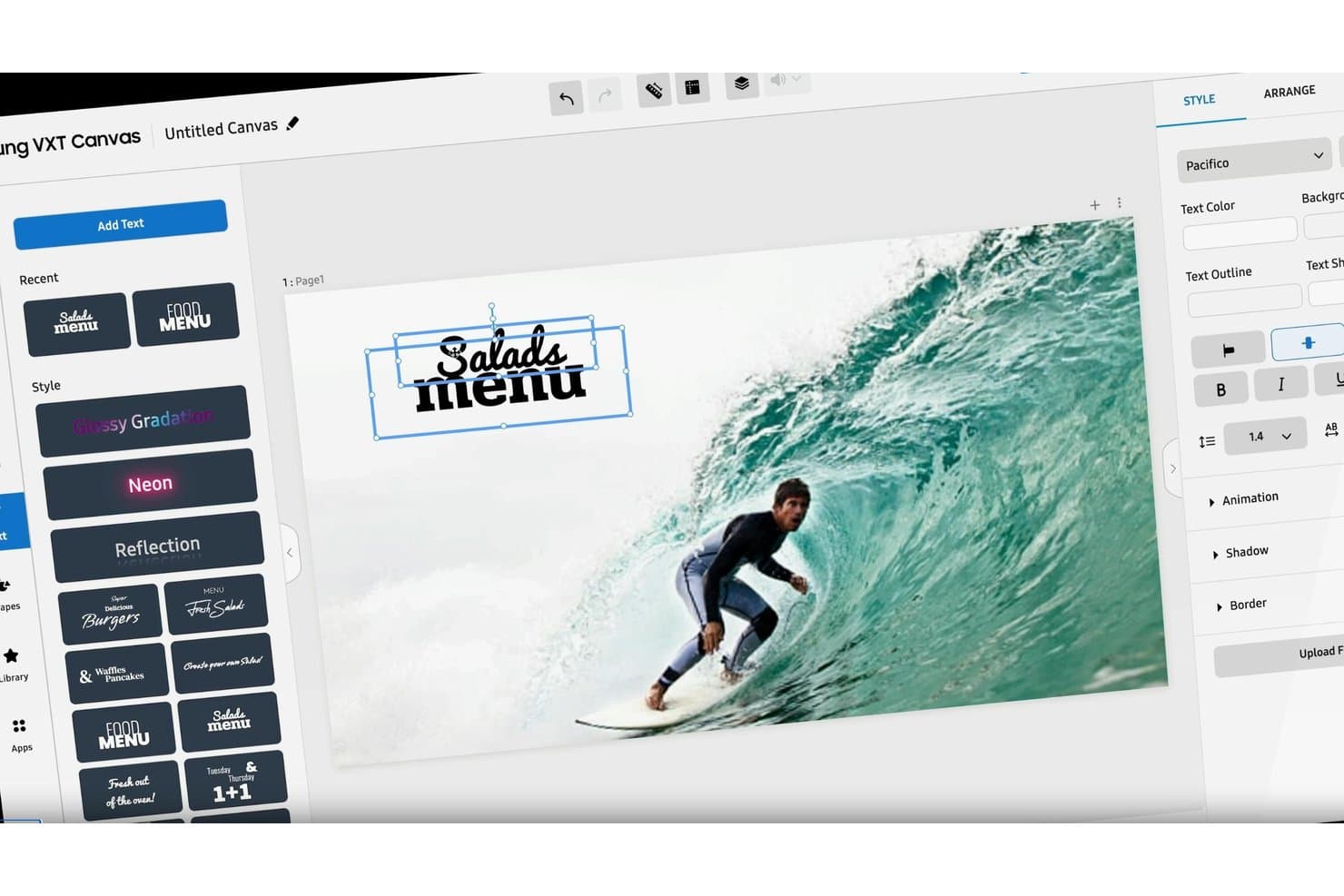
Samsung VXT lets users add styled text overlays to digital signage content. Samsung VXT is a cloud-based digital signage CMS that lets hotel teams design, schedule, and remotely deploy content across lobby displays, menu boards, corridor screens, and in-room Hospitality TVs from a single platform.
Who Is Samsung VXT Best For?
Samsung VXT is a strong fit for hotels that already run Samsung commercial displays and want a native CMS that manages those screens without compatibility workarounds.
Why I Picked Samsung VXT
Samsung VXT earns its spot on my shortlist because it's the only CMS built natively by the same company that makes the displays running in most hotel lobbies. I love how Tizen-native deployment eliminates the driver conflicts and firmware mismatches I've seen plague third-party CMS solutions on Samsung hardware. Zero-touch provisioning lets me register screens by serial number in bulk, so a 200-screen property rollout doesn't require my team on-site at every display. The SmartThings IoT integration is a genuine differentiator, automatically pushing emergency alerts to every screen the moment a fire sensor triggers.
Samsung VXT Key Features
- VXT Canvas drag-and-drop editor: Design lobby displays, menu boards, and event screens using 170–250+ templates with custom font support and widget-based layouts.
- Link My POS integration: Connects to Square, Toast, Oracle Simphony, and other POS systems to automatically update F&B menu boards when prices or items change.
- Infotainment by VXT feeds: Pulls from 200+ license-cleared content channels—weather, news, sports—to populate corridor and lobby screens with live data overlays.
- Proof of Play reporting: Verifies that scheduled content actually played on each screen, giving you an audit trail for compliance or campaign confirmation across properties.
Samsung VXT Integrations
Samsung VXT offers a smaller set of native integrations focused on its own ecosystem, including Samsung SmartThings IoT, Samsung Hospitality TV PMS controls, Link My POS (which connects to Square, Toast, Oracle Simphony, Clover, Revel, Appetize, Grubbrr, and VenueNext), Stingray Music, Infotainment by VXT (Seenspire), and the Data Sync App for Google Sheets, JSON, XML, and CSV feeds. A Server Open API is available on P and X Series plans for custom integrations, but there are no native connectors to hotel PMS platforms like Opera, Mews, or Cloudbeds.
Pros and Cons
Pros:
- QR codes allow mobile device casting
- Emergency alerts trigger full-screen overrides
- Native control of Samsung Hospitality TVs
Cons:
- Per-screen pricing escalates at large scale
- No native PMS signage content automation
Learn more about Samsung VXT: Best for cross-platform screen control without coding
- 14-day free trial
- From $20/screen/month (billed annually)
Visit WebsiteCustomer Rating:4.8/5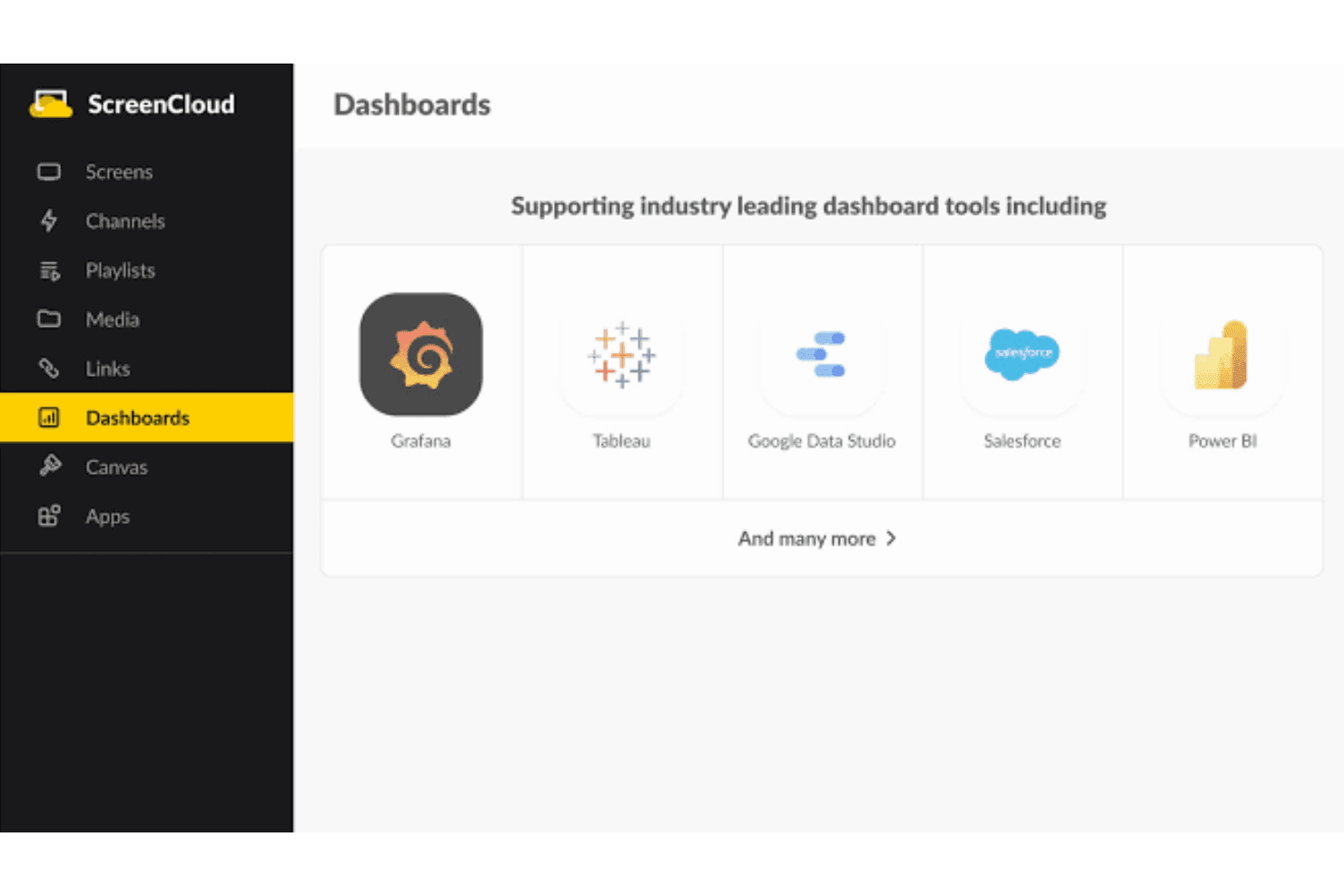
ScreenCloud supports industry-leading dashboard tools including Grafana, Tableau, Google Data Studio, Salesforce, and Power BI. ScreenCloud is a cloud-based digital signage platform that lets hotel teams create, schedule, and remotely manage content across lobby displays, meeting room panels, menu boards, and wayfinding screens from a single dashboard.
Who Is ScreenCloud Best For?
ScreenCloud is a strong fit for hotel groups and management companies that need to control signage across multiple properties and screen types without relying on IT staff for every update.
Why I Picked ScreenCloud
ScreenCloud earns its spot on my shortlist because it runs on virtually any screen hardware your hotel already owns, from Samsung Tizen displays in the lobby to LG webOS panels outside conference rooms, without a single line of code. I particularly like the Canvas editor's lockable brand templates, which let a central marketing team lock brand elements while individual properties swap out local event schedules or F&B promotions. The Broadcast feature also lets my team push an emergency message or a last-minute upsell offer to every screen across a property in one click.
ScreenCloud Key Features
- Quick Post: Publish a simple announcement with a title, image, or QR code directly from a phone or laptop, no design skills required.
- Meeting Room Software app: Syncs with Google Calendar and Microsoft Outlook to display real-time room availability and QR-code booking on door panels or tablets.
- Emergency Alerts app: Uses the Common Alert Protocol (CAP) to trigger an automatic content takeover across all screens with safety or urgent messaging.
- Offline playback: ScreenCloud OS devices cache content locally so screens keep playing during network outages.
ScreenCloud Integrations
ScreenCloud offers 80+ native app integrations, including Google Calendar, Microsoft Outlook, Microsoft Teams, Zoom Rooms, Google Meet, Slack, Canva, Google Reviews, TripAdvisor, and Instagram. It connects with Zapier and Microsoft Power Automate through its Webhooks app, and provides a GraphQL API for custom integrations with PMS or hospitality-specific systems.
Pros and Cons
Pros:
- Emergency alerts can override all displays
- Works with most hotel screen hardware
- Lockable brand templates for multi-property consistency
Cons:
- Template animations limited versus competitors
- No built-in hotel PMS integrations
Learn more about ScreenCloud: Best for multi-property brand and screen control
- Free demo available
- Pricing upon request
Visit WebsiteCustomer Rating:4.6/5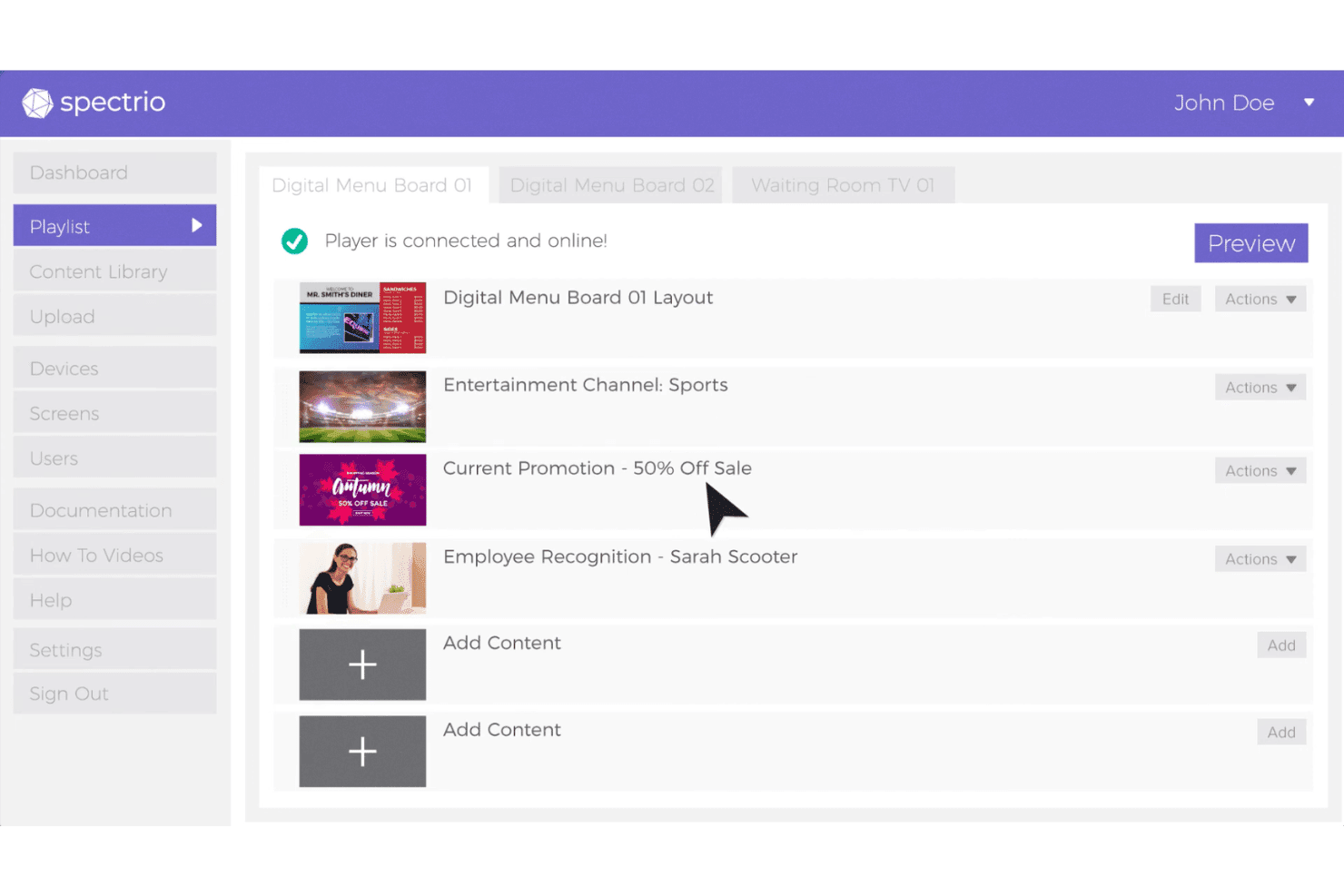
Spectrio includes a playlist management interface where users can organize digital signage content across multiple screen locations. Spectrio is a cloud-based digital signage platform built around a centralized CMS with multi-property content distribution, dayparted scheduling, interactive wayfinding kiosks, and an in-house creative studio.
Who Is Spectrio Best For?
Spectrio is a strong fit for hotel groups and multi-property brands that need centralized control over screen content across dozens or hundreds of locations.
Why I Picked Spectrio
I picked Spectrio as one of the best because no other platform on this list matches its multi-property brand governance at scale. I love that corporate teams can lock brand-level templates while property coordinators manage local content independently, all from one CMS. Spectrio's role-based permissions make this work cleanly across dozens or hundreds of locations, and the in-house Spectrio Studio team handles custom creative production when your property team doesn't have the bandwidth.
Spectrio Key Features
- Spectrio Studio creative services: An in-house team handles custom animation, video production, and branded content for hotels that don't have dedicated design resources.
- Interactive wayfinding kiosks: Touchscreen kiosks display floor maps, room directories, and event schedules, reducing directional inquiries to the front desk.
- Proof-of-Play analytics: The platform logs which content ran on which screens and when, giving you verifiable performance data across all displays.
- Tiered Spectrio Care support plans: Four support tiers range from 48-hour resolution to 15-minute first response, so you can match your SLA to your property's uptime requirements.
Spectrio Integrations
Spectrio offers native integrations with Google Calendar, Google Sheets, Instagram, Facebook, Slack, Microsoft Teams, Zoom, Power BI, TripAdvisor, and Yelp, plus RSS feeds and SSO support. An API and SDK are available for custom integrations, including PMS connections, though native connectors to hospitality platforms like Oracle OPERA, Mews, or Cloudbeds aren't documented.
Pros and Cons
Pros:
- Supports interactive wayfinding and guest kiosks
- In-house creative team builds custom assets
- Multi-property content control from one CMS
Cons:
- Hardware support limited for some player types
- No plug-and-play PMS integrations
Learn more about Spectrio: 4Best for event-driven meeting room displays
Mvix
- Free demo available
- From $450 one-time
Visit WebsiteCustomer Rating:4.6/5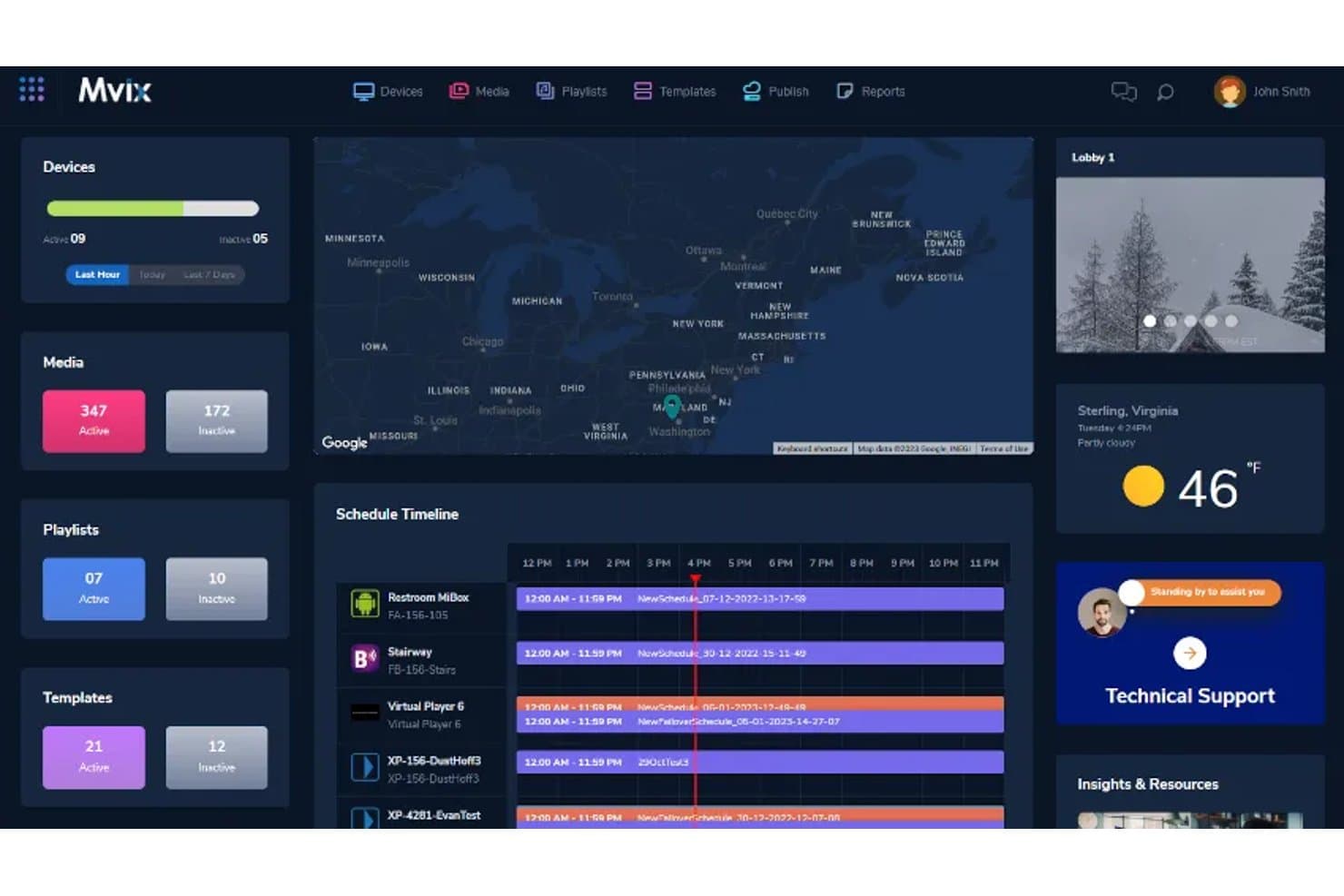
Mvix centralizes device, media, and schedule management in one dashboard. Mvix is a cloud-based digital signage platform for hotels that combines a centralized content management system, interactive wayfinding kiosks, meeting room displays, event schedule automation, and multi-screen management across single and multi-property deployments.
Who Is Mvix Best For?
Mvix is a strong fit for hotels and conference-heavy properties that need automated, real-time event and meeting room displays without relying on manual content updates.
Why I Picked Mvix
I picked Mvix as one of the best because of how well it handles automated event and meeting room displays, specifically through its native Delphi EMS integration. When a conference schedule changes, signage in lobbies, hallways, and outside room doors updates in real time without anyone touching the CMS. I also like the dedicated Meeting Rooms app, which supports on-the-fly booking directly from a touchscreen door display, synced live with calendar systems.
Mvix Key Features
- Interactive wayfinding kiosk: Touchscreen kiosks display interactive maps, floor routing, and directional signage so guests can self-serve without staff assistance.
- Email-to-Screen: Front desk staff can push announcements to any display by sending an email to a designated address, no CMS login required.
- Emergency alert override: CAP and IPAWS protocol support lets you instantly override all screens with emergency messaging, evacuation maps, or safety instructions.
- Multi-zone layout support: Arrange up to 10 simultaneous content zones on a single screen, mixing video, live data feeds, clocks, and tickers in one display.
Mvix Integrations
Mvix offers native integrations with Delphi EMS (Amadeus), Google Calendar, Square, Clover, Toast, Power BI, Tableau, Canva, and across the Microsoft ecosystem including Microsoft 365, Outlook, and Active Directory. It also supports SAML/SSO, CAP/IPAWS emergency alerting protocols, and provides REST APIs and webhooks for custom integrations, though no native PMS integrations (Opera, Mews, Cloudbeds) are documented.
Pros and Cons
Pros:
- Supports on-the-fly room booking
- Emergency alerts override screens instantly
- Automated event and meeting room displays
Cons:
- Hardware issues reported by some reviewers
- No native PMS integration available
Learn more about Mvix: Best for MICE and PMS-connected signage
- 30-day free trial
- From $9/month
Visit WebsiteCustomer Rating:5/5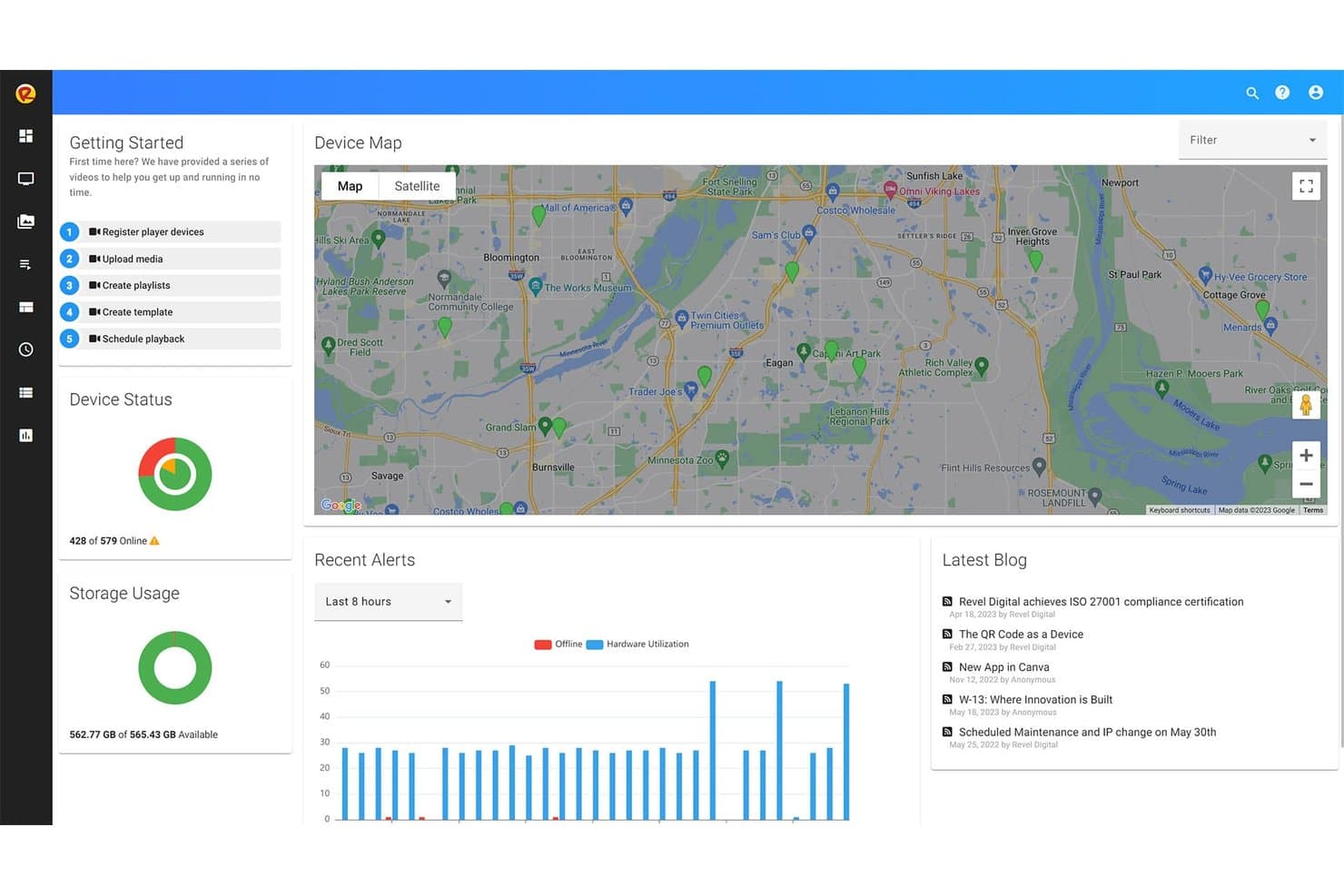
Revel Digital lets users monitor device locations via an interactive map dashboard. Revel Digital is a cloud-based digital signage platform built for hotels and event venues, with dedicated tools for PMS-connected displays, meeting room scheduling panels, and multi-property content management.
Who Is Revel Digital Best For?
Revel Digital is a strong fit for hotel groups and event venues that need PMS-connected displays and meeting room scheduling panels across multiple properties.
Why I Picked Revel Digital
I picked Revel Digital as one of the best because its Meeting Room Gadget and native PMS connections are purpose-built for hotels running heavy MICE calendars. When a booking changes in Cvent, Delphi, or Tripleseat, the conference room door panel updates within two minutes, no manual intervention needed. I also like that Opera, Maestro, and Cloudbeds connect directly, so lobby welcome screens can pull live group and event data straight from your PMS.
Revel Digital Key Features
- Multi-zone display designer: Build layouts with multiple independent content zones on a single screen, each running different media, feeds, or schedules simultaneously.
- Role-based access controls: Assign different content management permissions to IT, marketing, F&B, and front office teams so each group manages only their screens.
- AI image and template generation: Create on-brand visual content from plain-text prompts without any design software or external creative resources.
- AdHawk audience analytics: Use computer vision via compatible cameras to measure impressions, dwell time, and demographic data from guests engaging with your displays.
Revel Digital Integrations
Revel Digital offers 50+ native integrations, including Opera PMS, Maestro, Cloudbeds, Cvent, Delphi, Social Tables, Tripleseat, Google Calendar, Microsoft 365, and Slack, and it connects with Zapier and Microsoft Power Automate. A REST API and webhooks are available for custom integrations.
Pros and Cons
Pros:
- Unlimited screens and multi-property brand control
- Meeting room displays sync with events instantly
- AI-powered content generation and scheduling tools
Cons:
- Very few recent public user reviews
- Does not support Samsung or LG SoC displays
Learn more about Revel Digital : Best for event-driven meeting room signage
- Free demo + 30-day free trial available
- From $14/screen/month (billed annually)
Visit WebsiteCustomer Rating:4.9/5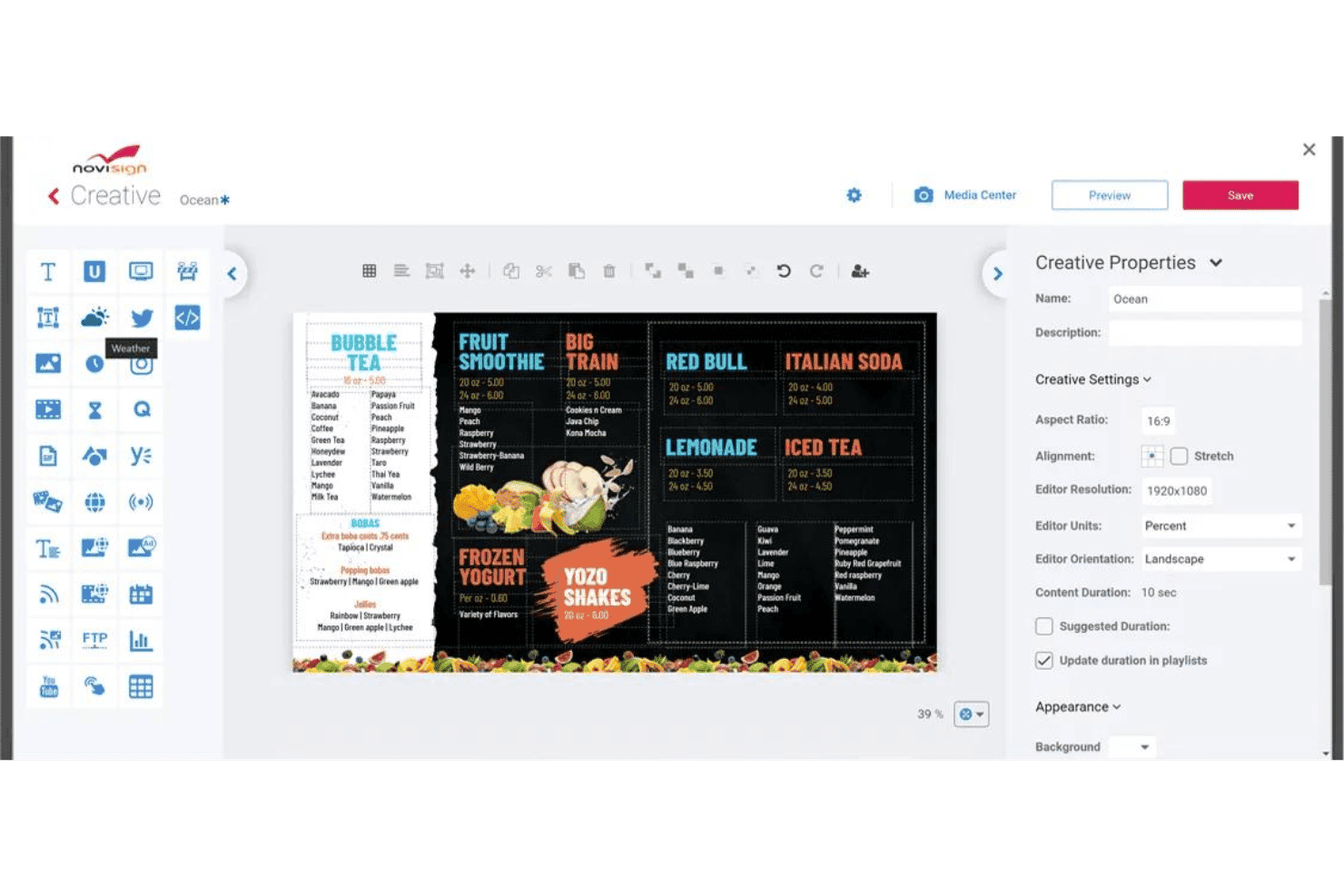
NoviSign offers a drag-and-drop digital signage creative editor with customizable menu board templates and content properties. NoviSign is a cloud-based digital signage platform for hotels that combines a drag-and-drop content editor, multi-screen remote management, event-driven meeting room boards, and native Amadeus Delphi integration for automated event directory displays.
Who Is NoviSign Best For?
NoviSign is a strong fit for conference and event hotels that need automated meeting room and event directory signage without manual content updates.
Why I Picked NoviSign
NoviSign earns its spot on my shortlist because of its native Amadeus Delphi integration, which automatically pulls banquet and meeting schedules directly onto lobby boards and conference room signage without anyone touching the CMS. I love that it pairs this with dedicated Mimo Monitors door panels (in 10"–22" form factors) that sync live room availability and session details. For a conference hotel running back-to-back events, that combination removes the manual update cycle entirely.
NoviSign Key Features
- Offline playback caching: Screens store content locally and continue playing automatically if the internet connection drops.
- Proof-of-play reporting: Track content delivery stats, screen availability, and media timing across all connected displays.
- Touchscreen kiosk support: Deploy interactive freestanding kiosks with touch zones, QR codes, polls, and wayfinding maps for guest-facing use.
- Role-based user permissions: Assign different access levels to front desk, marketing, and admin staff across one or multiple properties.
NoviSign Integrations
NoviSign offers native integrations with Amadeus Delphi, Microsoft Outlook/O365 Calendar, Google Calendar, Toast POS, Power BI, Tableau, Google Drive, Dropbox, and SharePoint, and it connects with Zapier. An API is available on the Premium plan for custom integrations, and the platform supports RSS/MRSS, JSON, XML, and CSV data feeds for live content.
Pros and Cons
Pros:
- Offline content playback minimizes network outage impact
- Meeting room signage with live schedule sync
- Native Amadeus Delphi integration for event boards
Cons:
- Editor can feel clunky for some users
- No native PMS integration for guest data
Learn more about NoviSign: Best for enterprise hotel chains with Oracle PMS
- Not available
- Pricing upon request
Visit WebsiteCustomer Rating:4.5/5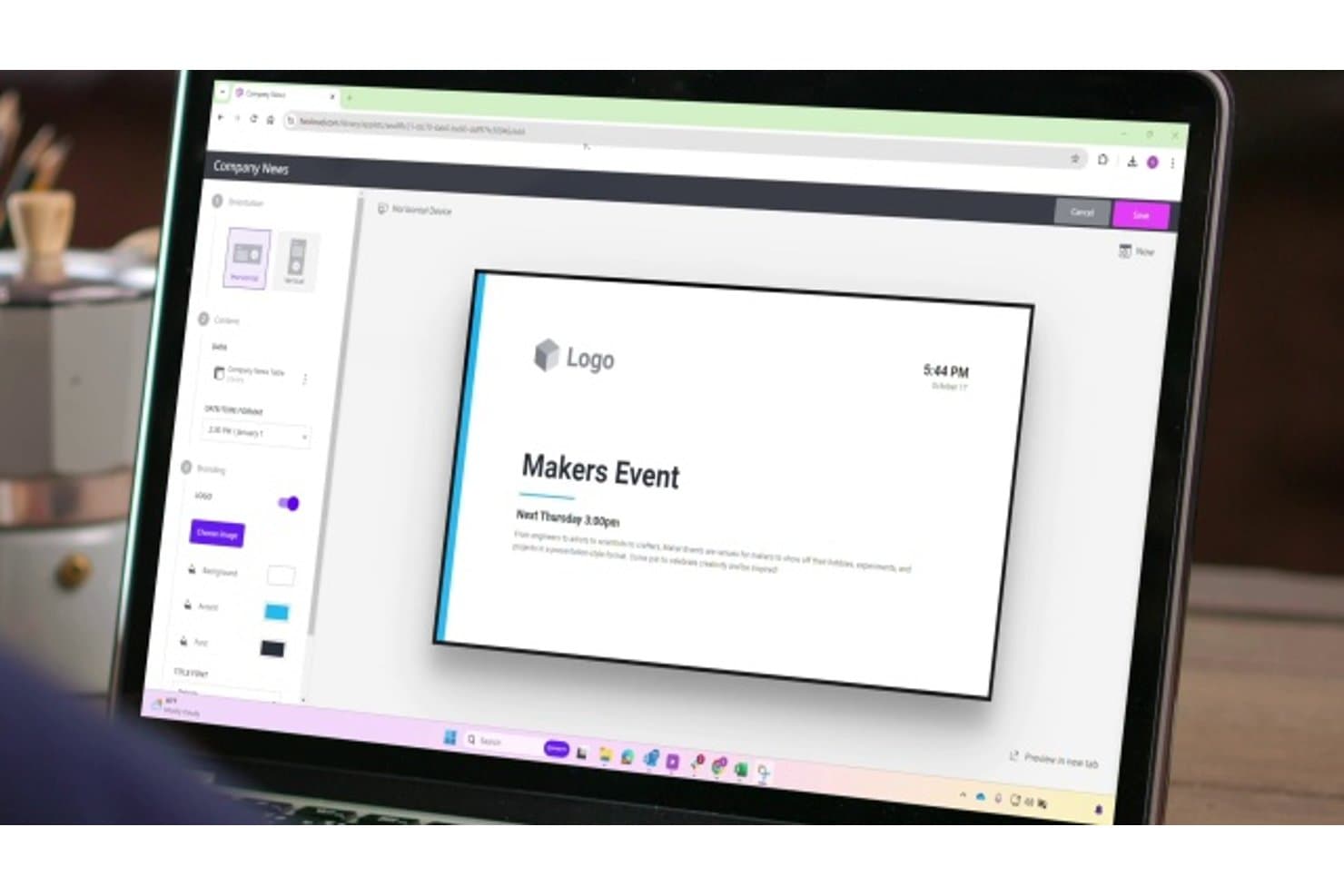
Poppulo lets users design branded digital signage screens for events. Poppulo is a cloud-based hotel digital signage platform that combines a centralized CMS, hospitality-specific templates, Oracle OPERA Cloud PMS integration, multi-property content management, and interactive guest-facing kiosk tools.
Who Is Poppulo Best For?
Poppulo is a strong fit for enterprise hotel chains and large resort groups running Oracle OPERA Cloud PMS that need centralized control across dozens or hundreds of properties.
Why I Picked Poppulo
Poppulo earns its spot on my shortlist because of how deeply it's built around Oracle OPERA Cloud PMS, which is the backbone of most large hotel chains. The native OHIP integration pulls live property data directly into signage, so welcome screens display a group's actual name and event times without anyone touching the CMS. I also love the Group Brand Takeover feature, which lets you restyle entire property displays for a corporate site visit or event group in minutes.
Poppulo Key Features
- Suite for Hotels templates: Ready-to-use, hotel-specific templates for event readerboards, menuboards, virtual concierge screens, and guest welcome displays that require no technical expertise to deploy.
- Content Experience Builder (CXB): A desktop-based advanced authoring tool for building multi-layered, dynamic layouts with API-driven data connections and custom interactive elements.
- Emergency alert override: Automated or one-click takeover of all screens with safety messaging, including multilingual alerts synced with external emergency alert systems.
- Back-of-house staff signage: Employee-facing displays for hotel staff that show guest arrival alerts, performance KPIs, and employee recognition content from the same central CMS.
Poppulo Integrations
Poppulo offers 80+ integrations, including Oracle OPERA Cloud (via OHIP), Microsoft 365, Google Workspace Calendar, Microsoft Exchange, Zoom Rooms, Microsoft Teams Rooms, Cisco, Neat, Power BI, and Salesforce. An open API is available through the Content Experience Builder for custom PMS, POS, and data workflows.
Pros and Cons
Pros:
- Dedicated hospitality templates and guest branding tools
- Enterprise-grade control for multi-property groups
- Native Oracle OPERA Cloud PMS integration
Cons:
- Advanced authoring tool is Windows desktop only
- Pricing only available after sales contact
Learn more about Poppulo: Best for OPERA PMS-connected hotel signage
- Free demo + 30-day free trial available
- From $14/player/month (USD, Cloud Essential)
Visit WebsiteCustomer Rating:4.3/5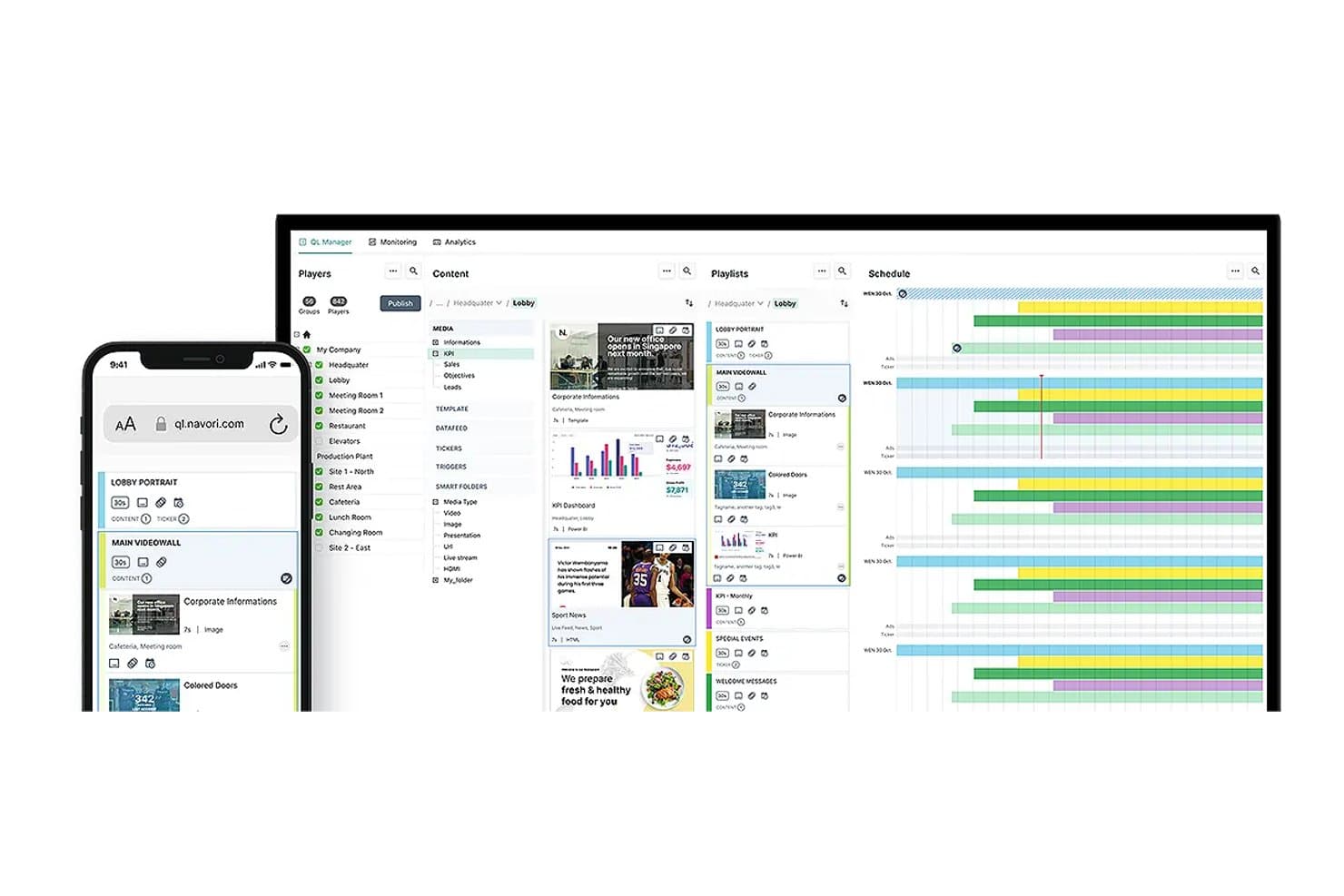
Navori lets users manage content, playlists, and schedules across hotel zones. Navori is a digital signage platform built for enterprise hotel networks, combining a centralized cloud CMS, hardware-agnostic player support, interactive wayfinding kiosks, live data feeds, and a certified OPERA PMS integration for real-time meeting room and event display management.
Who Is Navori Best For?
Navori is a strong fit for enterprise hotel groups and large convention properties running OPERA PMS that need to manage meeting room signage and event directories at scale.
Why I Picked Navori
Navori earns its spot on my shortlist because of its officially certified OPERA PMS integration, which is genuinely rare in this category. I like that it automatically pulls room booking data from OPERA via XML, keeping meeting room door panels and lobby event directories current without any manual updates. The Qompose Automate module adds AI-powered conditional playback on top of that, so content on F&B and spa screens can shift based on real-time signals like occupancy or time of day.
Navori Key Features
- Multi-tenant domain management: Organize screens, users, and content permissions by property, zone, or brand within a single hierarchical backend.
- AI-powered audience analytics: Aquaji uses computer vision to measure footfall, dwell time, and audience demographics on lobby and F&B displays.
- Emergency alert override: Trigger real-time safety and evacuation messaging across all screens simultaneously via the content automation engine.
- Hardware-agnostic player support: Deploy on Windows, Samsung Tizen, LG webOS, BrightSign, Android, ChromeOS, and Elo Touch from one CMS.
Navori Integrations
Navori offers native integrations with Micros Fidelio OPERA PMS (officially certified, Part n° 5009-268), Microsoft 365 Calendar, Google Calendar, Power BI, Salesforce, SAP, Screenfeed, Vistar, and Hivestack, plus live social feeds from LinkedIn, Facebook, Instagram, and X. It also supports RSS/JSON/XML live data feeds and provides an open REST API for custom integrations with CRM, ERP, and third-party backends.
Pros and Cons
Pros:
- Manages 99,000+ screens across many locations
- AI analytics measure guest engagement and demographics
- Certified OPERA PMS integration for meeting displays
Cons:
- Lacks pre-built templates for hotel signage
- Onboarding and setup often require technical expertise
Learn more about Navori: Best for MICE and wayfinding across properties
- Free demo available
- Pricing upon request
Visit WebsiteCustomer Rating:5/5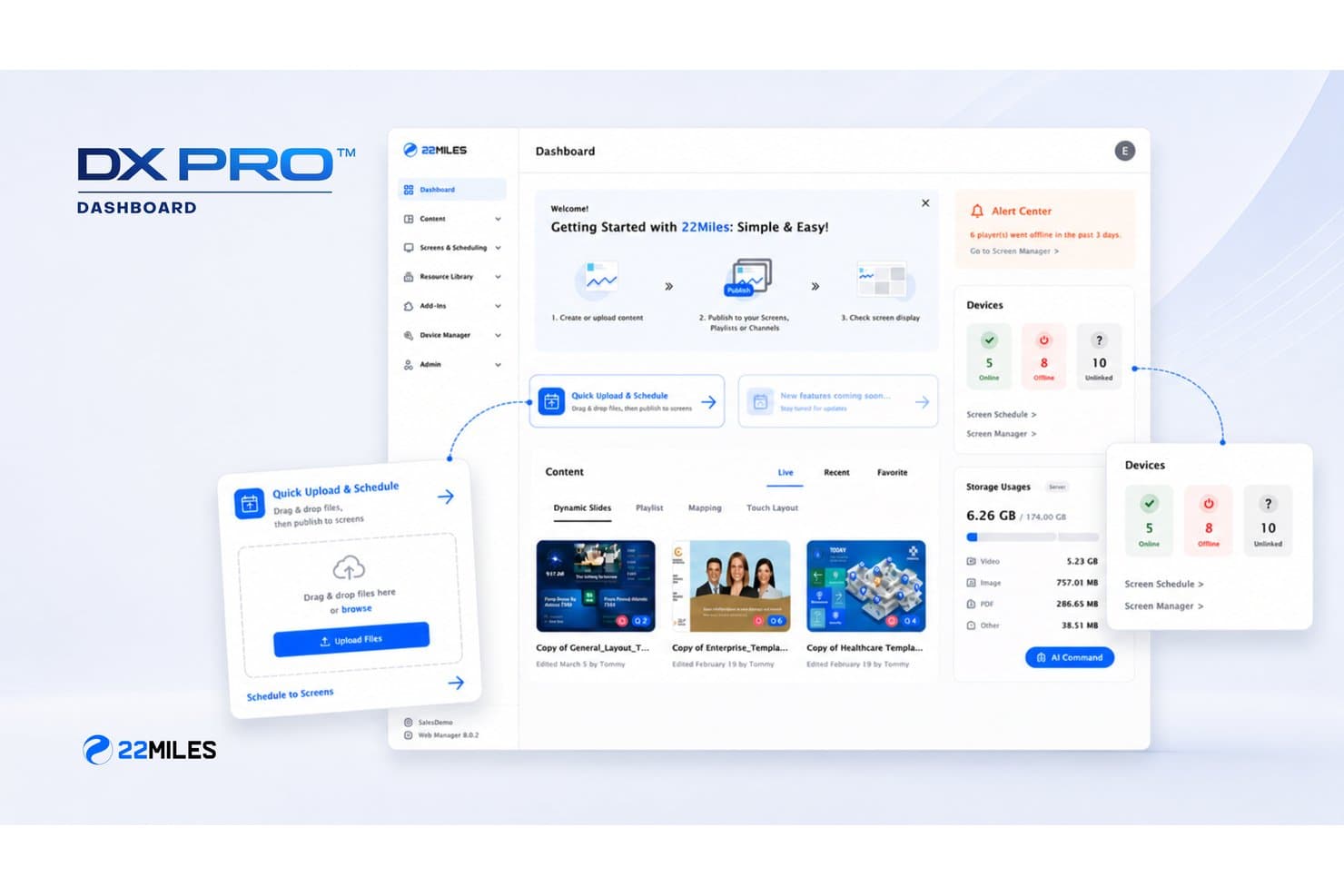
22Miles centralizes screen scheduling and content management from one dashboard. 22Miles is a hotel digital signage and wayfinding platform with a cloud-based CMS, interactive 3D maps, AI-powered guest kiosks, meeting room sign panels, and native integrations with event management and PMS systems.
Who Is 22Miles Best For?
22Miles is a strong fit for large hotels and resort groups that host events and conferences and need to manage wayfinding and digital signage across dozens—or hundreds—of screens.
Why I Picked 22Miles
I picked 22Miles as one of the best because no other platform on my shortlist handles MICE-scale wayfinding with this depth. When a hotel is running multiple conferences simultaneously, 22Miles syncs meeting room door panels directly with Delphi, Tripleseat, and EMS to display real-time session details and availability. Its 3D interactive maps with Carry2Mobile QR handoff let guests transfer turn-by-turn wayfinding to their own phones, which is genuinely useful in sprawling convention properties.
22Miles Key Features
- AI-powered multilingual chatbot: Deploy a GPT-backed AI assistant on kiosks and mobile that answers guest questions about directions, amenities, and services in multiple languages.
- Emergency alert override: Automatically push safety messaging, evacuation maps, and multilingual alerts to all screens instantly when an emergency feed is triggered.
- Hierarchical CMS permissions: Manage content at brand, property, and zone levels with role-based access controls so corporate teams and individual properties can each govern their own content.
- Back-of-house staff signage: Run internal-facing screens for operational updates, task assignments, and team communication alongside guest-facing displays.
22Miles Integrations
22Miles offers native integrations with hospitality and event management systems, including Opera PMS, Delphi, Tripleseat, Momentus, EMS, Envision, Ungerboeck, Micros POS, PowerBI, and across the Microsoft and Google Workspace ecosystems. An open API is available for custom integrations, and the platform is hardware-agnostic with certified support for BrightSign, Crestron, Cisco, AMX, and Samsung, LG, Sony, and Sharp/NEC displays.
Pros and Cons
Pros:
- AI-powered multilingual guest kiosks available
- Advanced 3D maps with AR wayfinding
- Excels at large-scale, multi-property deployments
Cons:
- Interface described as clunky by some users
- Desktop software unavailable for Mac users
Learn more about 22Miles: Best for hotel groups managing signage at scale
- Free demo available
- Pricing upon request
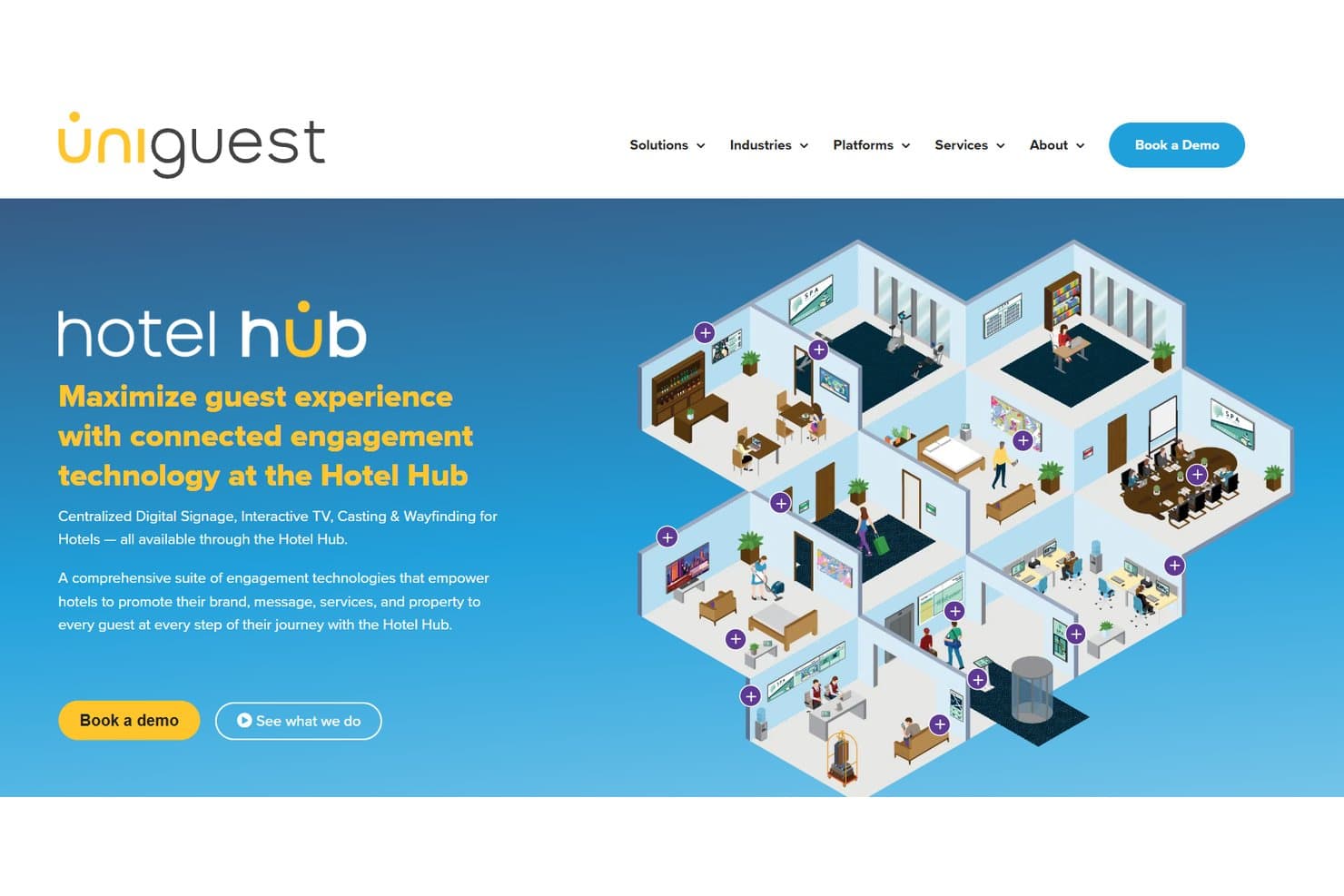
Uniguest Hotel Hub centralizes digital signage and guest engagement tools. Uniguest Hotel Hub is a cloud-based hotel digital signage platform that covers lobby displays, digital menu boards, interactive wayfinding, meeting room door panels, in-room TV, and casting from a single centralized CMS.
Who Is Uniguest Hotel Hub Best For?
Hotel groups and multi-property operators that need to manage signage across large portfolios will get the most value from Uniguest Hotel Hub.
Why I Picked Uniguest Hotel Hub
Uniguest Hotel Hub earns its spot on my shortlist because no other platform I've seen matches its ability to manage signage at scale across large hotel portfolios. The hierarchical CMS lets you organize content by brand, region, and property, with Content Tags pushing the right material to the right screens whether that's lobby displays, F&B menu boards, or meeting room door panels. I also like the Variables Module, which lets you define reusable values like property name and language once, then apply them across thousands of screens without rebuilding templates.
Uniguest Hotel Hub Key Features
- Interactive 3D wayfinding: Touchscreen lobby kiosks display interactive 3D property maps, with QR code handoffs so guests can send directions to their own phones.
- Reserva room booking panels: Meeting room door displays sync in real time with connected event management systems to show session details and room availability.
- PMS group code personalization: In-room TV content updates automatically based on guest group codes, so wedding parties, corporate groups, and sports teams each see tailored messaging.
- Hub Casting: Guests scan a QR code after check-in to cast content securely from their personal devices to in-room TVs.
Uniguest Hotel Hub Integrations
Uniguest Hotel Hub offers 22+ verified native integrations, including Oracle Opera, Mews, Amadeus, Stayntouch, HotelKey, Tripleseat, SevenRooms, NFS Rendezvous, Kipsu, and Volara, with an API also available for custom integrations.
Pros and Cons
Pros:
- Real-time meeting room door sign sync
- Interactive 3D wayfinding with guest QR handoff
- Manages thousands of screens across hotel groups
Cons:
- Digital directories reported as difficult to use
- Customer support responsiveness rated below average
Learn more about Uniguest Hotel Hub:
Alte software-uri de semnalizare digitală pentru hoteluri
Iată câteva opțiuni suplimentare de software pentru semnalizare digitală în hoteluri care nu au ajuns pe lista mea scurtă, dar care merită totuși luate în considerare:
- 11YodeckBest for multi-property screen management at scale
- 12OptiSignsBest for managing screens across multiple properties
- 13IntuifaceBest for touch-based guest self-service kiosks
- 14Look Digital SignageBest for multi-property screen management
- 15Rise VisionBest for non-technical staff managing hotel screens
- 16XiboBest for open-source screen control across properties
- 17VisixBest for MICE and conference-heavy properties
- 18EnplugBest for branded multi-property screen networks
- 19ScalaBest for enterprise-scale hotel and casino signage
Related Reviews
How I Evaluate Hotel Digital Signage Software
I split my evaluation into baseline functionality every tool must cover and the differentiators—like PMS integrations and MICE-ready features—that separate a capable platform from the right one.
Core Functionality (Table Stakes For This List)
When I'm selecting tools for my list, I rank each one on a scale from 0 (does not offer the functionality) to 5 (excels in this area) for each core functionality listed below. I then calculate the tool's total score into a percentage, using 65% as a benchmark to help assess its overall fit for the list.
- Remote content management: I look for cloud-based dashboards that let you push updates to lobby screens or event boards in real time, without walking to each display.
- Multi-screen and multi-property support: I evaluate how well a platform handles screen grouping, zone-based layouts, and role-based access across multiple hotel locations.
- Hospitality templates and media: Pre-built templates for welcome boards, meeting directories, and restaurant menus matter—I check for drag-and-drop design and live media support.
- Content scheduling and dayparting: The ability to rotate breakfast menus to lunch specials automatically, or trigger content around check-in surges, is something I assess in every tool.
- Hospitality system integrations: I check for connections to PMS platforms, event booking systems, and POS tools so signage content stays current without manual input.
- Hardware and OS compatibility: Broad support for commercial displays and media players—including Tizen, webOS, BrightSign, and Android SoC screens—keeps your AV options flexible.
Once I have a list of tools that meet the criteria, I consider what sets each platform apart.
Differentiating Factors (What Sets Vendors Apart)
Here's how I compare and contrast different vendors:
Standout Features
I look for emergency alert override capabilities—specifically, whether a platform can take over every screen instantly with evacuation maps and multilingual safety messaging triggered by fire panels or manual dispatch. For properties hosting conferences, I evaluate room-booking screen panels that sync with event management systems to show real-time availability and allow on-the-fly session extensions. Brand kit and multi-brand theming also matters: I check whether a hotel group can lock templates at the corporate level while letting each property localize content for its market.
Beyond Features
I evaluate each vendor's total cost of ownership, including whether pricing is per-screen or per-property and if media player hardware is bundled. A 200-room boutique hotel and a 40-property chain have very different budget math, so transparency around storage, bandwidth, and integration fees matters. I also check for offline playback caching and remote device monitoring—older properties with spotty Wi-Fi still need screens running during outages. Finally, I look at depth of PMS and event system connectors, since a native Opera or Mews integration that auto-updates guest welcome boards is far more useful than a generic API.
Cum să alegeți un software de semnalizare digitală pentru hoteluri
Platforma potrivită de semnalizare digitală pentru hoteluri depinde de problema operațională pe care trebuie să o rezolvați mai întâi — iată cum puteți corela cele mai presante nevoi ale proprietății dumneavoastră cu punctele forte ale furnizorilor:
| Dacă prioritatea dumneavoastră este… | Căutați… |
| Automatizarea actualizărilor ecranelor din PMS | Integrări native cu PMS-ul sau POS-ul dumneavoastră |
| Gestionarea a sute de afișaje în mai multe locații | Un tablou de bord centralizat pentru mai multe proprietăți |
| Personalizarea conținutului pentru MICE sau evenimente | Sincronizare cu software-ul de evenimente sau șabloane de agendă |
| Păstrarea consecvenței elementelor vizuale ale mărcii la scară largă | Instrumente de blocare a șabloanelor pentru mai multe mărci |
| Simplificarea gestionării ecranelor de către personal | Editoare de conținut cu funcție de glisare și plasare, fără cod |
Cum să vă evaluați lista scurtă
- Testați afirmațiile privind integrarea cu PMS-ul: Solicitați o demonstrație live de 30 de minute care să arate actualizarea în timp real a datelor despre oaspeți sau evenimente pe un ecran din hol.
- Evaluați controlul asupra unui număr mare de ecrane: Lansați un proiect-pilot pentru cel puțin cinci afișaje în proprietăți de test — confirmați că puteți trimite simultan tuturor o înlocuire sau un mesaj de urgență.
- Verificați compatibilitatea cu evenimentele: Solicitați o implementare demonstrativă folosind calendarul dumneavoastră de evenimente (sau instrumentul MICE), astfel încât afișajele din sălile de ședință să se actualizeze automat pe măsură ce rezervările se modifică într-un program simulat de o săptămână.
- Verificați blocarea șabloanelor: Obțineți un exemplu scris de guvernanță pentru mai multe mărci — confirmați că puteți restricționa elementele de brand corporativ, permițând în același timp localizarea la nivelul proprietății.
- Criteriu de decizie — profunzime versus flexibilitate: Decideți dacă integrările native cu sistemele din domeniul ospitalității (excelente pentru automatizare) sunt mai importante decât compatibilitatea extinsă cu hardware-ul și sistemele de operare (cea mai potrivită pentru medii cu mărci mixte sau sisteme vechi).
Ce este software-ul de semnalizare digitală pentru hoteluri?
Software-ul de semnalizare digitală pentru hoteluri este un tip de platformă care le permite hotelurilor să gestioneze ecrane digitale pentru informații destinate oaspeților, orientare, programarea evenimentelor, conținut promoțional și branding în cadrul proprietății sau al grupului. Puteți controla afișajele de la distanță, programa actualizări ale conținutului și conecta ecranele la sisteme precum instrumentele de gestionare a proprietății sau de rezervare a evenimentelor, pentru a menține informațiile corecte și actualizate pentru oaspeți și personal.
Funcțiile software-ului de semnalizare digitală pentru hoteluri
Atunci când selectați un software de semnalizare digitală pentru hoteluri, urmăriți următoarele funcții esențiale:
- Gestionarea de la distanță a conținutului: Actualizați și monitorizați ecranele dintr-un panou de control bazat pe cloud, permițându-vă să transmiteți modificări de ultim moment sau mesaje speciale către orice afișaj fără să vă ridicați de la birou.
- Suport pentru mai multe ecrane și proprietăți: Grupați, programați și controlați afișajele din diferite zone și locații, facilitând coordonarea unei comunicări consecvente în holuri, coridoare, lifturi și în mai multe proprietăți hoteliere.
- Șabloane specifice industriei ospitalității: Accesați modele predefinite pentru mesaje de întâmpinare, directoare de evenimente, agende de conferințe, meniuri de restaurant și orientare, permițând crearea rapidă a unui conținut care reflectă marca și standardele dumneavoastră privind experiența oaspeților.
- Programarea conținutului și împărțirea pe intervale ale zilei: Setați conținut diferit pentru a fi difuzat la anumite ore — cum ar fi în timpul micului dejun, în timpul cazării sau după plecare, ori în intervalele evenimentelor — astfel încât oaspeții să vadă întotdeauna informații relevante la momentul potrivit.
- Integrări cu sistemele hoteliere: Conectați afișajele digitale la sistemul de management al proprietății (PMS), sistemul de punct de vânzare (POS) și software-ul de rezervare a evenimentelor pentru a automatiza actualizările și a menține informațiile actualizate fără introducerea manuală a datelor.
- Compatibilitate cu hardware-ul și sistemele de operare: Utilizați soluția de afișaj digital pe o gamă largă de afișaje comerciale și playere media, cu suport pentru platforme precum Tizen, webOS, BrightSign și Android, astfel încât să nu fiți limitați la un singur furnizor sau dispozitiv.
- Alarme de urgență și preluarea controlului: Transmiteți instantaneu instrucțiuni de evacuare, mesaje de siguranță sau actualizări critice pe fiecare ecran din întreaga proprietate, declanșate automat de panourile de incendiu sau manual de personalul autorizat.
- Permisiuni pentru utilizatori și controlul accesului: Atribuiți niveluri diferite de acces personalului din diverse departamente sau locații, astfel încât numai membrii potriviți ai echipei să poată modifica, verifica sau aproba conținutul afișajelor.
- Redare offline și stocare în cache: Asigurați-vă că ecranele continuă să afișeze conținutul programat în timpul întreruperilor conexiunii Wi-Fi sau ale rețelei, astfel încât comunicarea cu oaspeții să nu dispară niciodată.
- Analize și monitorizare în timp real: Urmăriți disponibilitatea ecranelor, interacțiunea cu conținutul și starea dispozitivelor dintr-un panou de control centralizat, ajutându-vă să identificați problemele și să măsurați eficiența strategiei dumneavoastră de afișaj.
Beneficiile software-ului de afișaj digital pentru hoteluri
Implementarea unui software de afișaj digital pentru hoteluri oferă mai multe beneficii echipei și companiei dumneavoastră. Iată câteva dintre avantajele de care vă puteți bucura:
- Comunicare oportună cu oaspeții: Furnizați informații actualizate, mesaje de întâmpinare și noutăți despre evenimente exact acolo unde au nevoie oaspeții de ele, utilizând gestionarea de la distanță a conținutului și sincronizarea în timp real.
- Control centralizat al operațiunilor: Gestionați și programați conținutul pentru toate ecranele din proprietatea dumneavoastră sau din mai multe locații, dintr-un singur panou de control, simplificând coordonarea și reducând munca manuală.
- Integrări automatizate cu sistemele: Conectați-vă la sistemul de management al proprietății, sistemul de punct de vânzare și software-ul de rezervare a evenimentelor, astfel încât ecranele să reflecte întotdeauna rezervările, meniurile sau programele întâlnirilor actuale.
- Experiențe personalizate pentru oaspeți: Utilizați șabloane specifice industriei ospitalității și programarea conținutului pentru a adapta informațiile la evenimente, tipuri de camere sau segmente de oaspeți, fără activități complexe de design.
- Consecvența mărcii la scară largă: Blocați elementele mărcii și șabloanele la nivelul grupului, permițând în același timp fiecărei proprietăți să localizeze mesajele, pentru a susține un aspect unitar în proprietăți diverse.
- Mesaje de urgență și preluarea controlului: Transmiteți instantaneu alerte de urgență sau actualizări importante către toate afișajele, asigurând siguranța oaspeților și a personalului prin funcții de preluare a controlului și de alertare.
- Disponibilitate continuă a ecranelor: Bazați-vă pe redarea offline și monitorizarea dispozitivelor pentru a menține ecranele în funcțiune și conținutul vizibil chiar și în timpul întreruperilor rețelei sau al problemelor de conectivitate.
Costurile și prețurile software-ului de afișaj digital pentru hoteluri
Selectarea unui software de afișaj digital pentru hoteluri necesită înțelegerea diferitelor modele și planuri de tarifare disponibile. Costurile variază în funcție de funcții, dimensiunea echipei, suplimente și alți factori. Tabelul de mai jos prezintă pe scurt planurile comune, prețurile lor medii și funcțiile incluse de obicei în soluțiile software de afișaj digital pentru hoteluri:
Tabel comparativ al planurilor pentru software-ul de afișaj digital pentru hoteluri
| Tipul planului | Preț mediu | Funcții comune |
| Plan gratuit | $0 | Programarea de bază a conținutului, gestionare limitată de la distanță, acces la șabloane standard și suport limitat pentru ecrane. |
| Plan personal | $20-$40/lună | Suport pentru o singură proprietate, controale pentru marcă, mai multe șabloane de design, programare și integrări de bază. |
| Plan pentru afaceri | $50-$150/lună | Gestionarea mai multor proprietăți, permisiuni avansate, integrări PMS și POS, redare offline și rapoarte de analiză. |
| Plan pentru companii | $200-$800/lună | Ecrane nelimitate, integrări personalizate, blocarea șabloanelor corporative, alerte de urgență, asistență prioritară și SLA-uri. |
Întrebări frecvente despre software-ul de semnalizare digitală pentru hoteluri
Iată câteva răspunsuri la întrebările frecvente despre software-ul de semnalizare digitală pentru hoteluri:
Cum poate software-ul de semnalizare digitală pentru hoteluri să îmbunătățească comunicarea internă?
Software-ul de semnalizare digitală pentru hoteluri menține personalul la curent cu anunțurile privind turele, programele evenimentelor sau alertele de servicii, direct pe ecranele destinate angajaților. Puteți transmite actualizări în timp real către ecranele din spațiile administrative, sălile de pauză sau coridoarele de serviciu — deosebit de util pentru echipele cu fluctuație mare de personal sau cu mai multe ture.
Ce tipuri de integrări cu sistemele de ospitalitate ar trebui să caut?
Căutați integrări cu sistemul de administrare a proprietății (PMS), sistemul de punct de vânzare (POS) și software-ul de rezervare a evenimentelor. Integrările native cu PMS vă permit să automatizați panourile cu starea camerelor, să actualizați directoarele pentru oaspeți sau să afișați programele întâlnirilor în timp real, fără introducerea suplimentară a datelor.
Poate software-ul de semnalizare digitală pentru hoteluri să afișeze conținut în timpul întreruperilor conexiunii la internet?
Da, majoritatea platformelor moderne de semnalizare digitală pentru hoteluri acceptă redarea offline sau stocarea în cache. Astfel, conținutul programat continuă să fie afișat chiar dacă conexiunea Wi-Fi se întrerupe, astfel încât informațiile importante pentru oaspeți sau privind siguranța să nu dispară.
Cum gestionez identitatea vizuală a mărcii în mai multe proprietăți hoteliere?
Multe soluții vă permit să creați șabloane aprobate la nivel corporativ, cu anumite elemente ale mărcii blocate. Managerii locali pot apoi adapta mesajele pentru proprietatea lor, menținând în același timp un aspect unitar al mărcii în întregul grup.
Care este cea mai bună modalitate de a testa dacă integrarea PMS a unei platforme funcționează cu adevărat?
Solicitați o demonstrație în direct folosind propriul PMS sau o configurație de test. Cereți furnizorului să vă arate cum se actualizează în timp real datele despre oaspeți sau rezervări pe ecrane demonstrative, pentru a confirma existența unei integrări reale, nu doar a unei sincronizări statice a conținutului.
Există opțiuni pentru ca personalul fără cunoștințe tehnice să creeze și să actualizeze conținutul ecranelor?
Da, majoritatea instrumentelor de top pentru semnalizare digitală oferă editoare de conținut cu funcție de glisare și plasare, precum și șabloane specifice industriei ospitalității. Astfel, recepționerii sau echipele de evenimente pot actualiza rapid afișajele — fără competențe de proiectare sau asistență IT.