

Free hotel accounting software gives your property tools to track income, manage expenses, and stay compliant—without upfront costs. If you’re searching for ways to keep your books sorted and your budget in check, exploring free plans or trials is a savvy move. Whether you run a boutique inn or a busy hotel, the right software can cut down tedious admin and help your team focus on the guest experience. This list will show you which free hotel accounting solutions are worth your attention, what makes each one unique, and how to pick the best fit for your hospitality business.
Why Trust Our Software Recommendations
6,700+
Reviews
20
Industry experts
16+
Evaluation factors
14
Years
Our team has been testing and reviewing software since 2012. As hospitality leaders ourselves, we know how difficult—and important—it is to choose the right software.
For this guide, we evaluated tools using hands-on testing and independent research, scoring tools using our selection criteria.
Our reviews reflect our human editorial judgment, not a sales pitch.
Best Free Hotel Accounting Software
This comparison chart summarizes pricing details for my top hotel accounting software selections to help you find the best one for your budget and practice needs.
| Tool | Best For | Trial Info | Price | ||
|---|---|---|---|---|---|
| 1 | Best for freelancer-style invoicing and expense logs | Free plan available | From $11.67/month (billed annually) | Website | |
| 2 | Best for automated hotel accounting | 14-day free trial | From $15/month (billed annually) | Website | |
| 3 | Best for free desktop hotel accounting | Free plan available | Pricing upon request | Website | |
| 4 | Best for self-hosted GL with multi-entity ledger | Free plan available | Pricing upon request | Website | |
| 5 | Best for open-source bookkeeping on a shoestring | Free plan available | From $60/user/year (billed annually) | Website | |
| 6 | Best for zero-license ERP with layered tax setup | 30-day free trial + free demo available | Free | Website | |
| 7 | Best for free multi-entity ledger and tax layering | Free plan available | Pricing upon request | Website | |
| 8 | Best for self-hosted AP and layered tax controls | Free plan available | Pricing upon request | Website | |
| 9 | Best for free open-source SMB bookkeeping | Free plan available | Free | Website | |
| 10 | Best for free GL with dimension-based dept tracking | Free plan available | Pricing upon request | Website |


Free Hotel Accounting Software Reviews
Below are my detailed summaries of the free hotel accounting software that made it onto my shortlist. My reviews offer a detailed look at the features, best use cases, and pricing of each software to help you find the best one for you.
 Best for freelancer-style invoicing and expense logs
- Free plan available
- From $11.67/month (billed annually)
Visit WebsiteCustomer Rating:4.7/5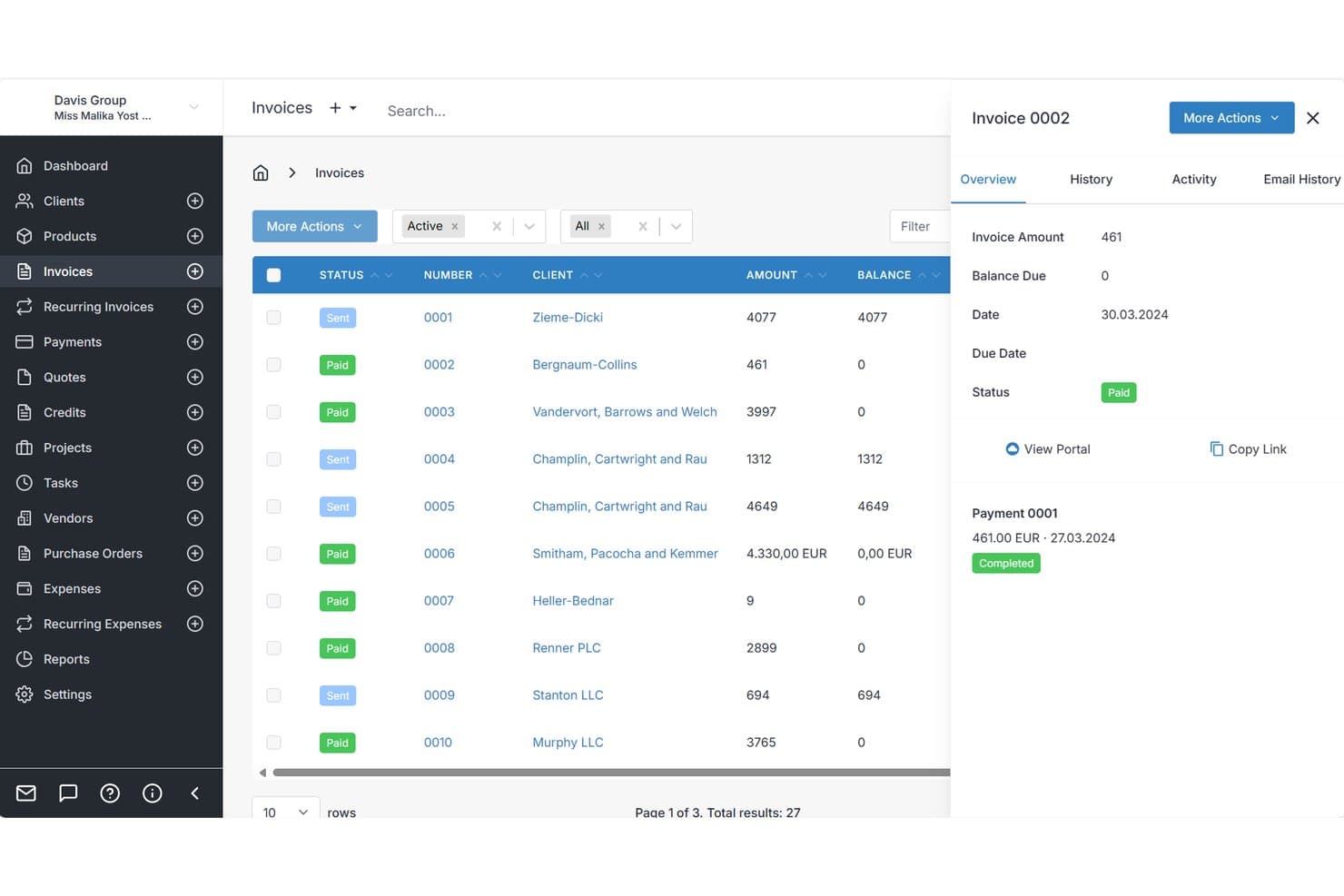
Invoice Ninja tracks invoice payment status and balance details in one panel. Invoice Ninja is a small-business invoicing and expense platform with a free plan, recurring billing, client payments, vendor records, purchase orders, tax handling, and basic reports, but no PMS or hotel-ledger features.
Who Is Invoice Ninja Best For?
Freelancers and very small service businesses needing recurring invoices, client payments, and basic expense logs rather than hotel accounting.
Why I Picked Invoice Ninja
I picked Invoice Ninja for freelancer-style invoicing and expense logs, not full hotel accounting. I use its Free plan to send recurring invoices, record categorized expenses, and share payment documents through the client portal. That can cover a tiny B&B’s direct billing and supplier records, but it lacks folios, PMS links, and hotel departmental reporting.
Invoice Ninja Key Features
- Quote conversion: Convert approved quotes into invoices.
- Vendor purchase orders: Create and email purchase orders to suppliers.
- Multi-rate taxes: Apply up to three taxes per invoice line.
- Partial payments: Record deposits and payments with separate due dates.
Invoice Ninja Integrations
Invoice Ninja documents integrations with QuickBooks Online, Stripe, PayPal, Square, GoCardless, and Authorize.net. It supports REST API connections plus Make, n8n, Pabbly, Integrately, and Zapier; no native PMS integrations are listed.
What's Free?
Invoice Ninja offers a free-forever plan with unlimited invoicing and no credit card required. It supports up to five clients and includes recurring invoices, online payments, expense tracking, inventory management, projects, and a client payment portal.
The Free plan includes Zapier, Make, and n8n integrations, but REST API access, custom SMTP email, unlimited clients, advanced reports, and additional account users require a paid plan.
Pros and Cons
Pros:
- Partial payments record guest deposits
- Vendor records support supplier purchasing
- Recurring billing supports direct reservations
Cons:
- No folios or room-revenue tracking
- No general ledger or departmental reporting
Learn more about Invoice Ninja: Best for automated hotel accounting
- 14-day free trial
- From $15/month (billed annually)
Visit WebsiteCustomer Rating:4.3/5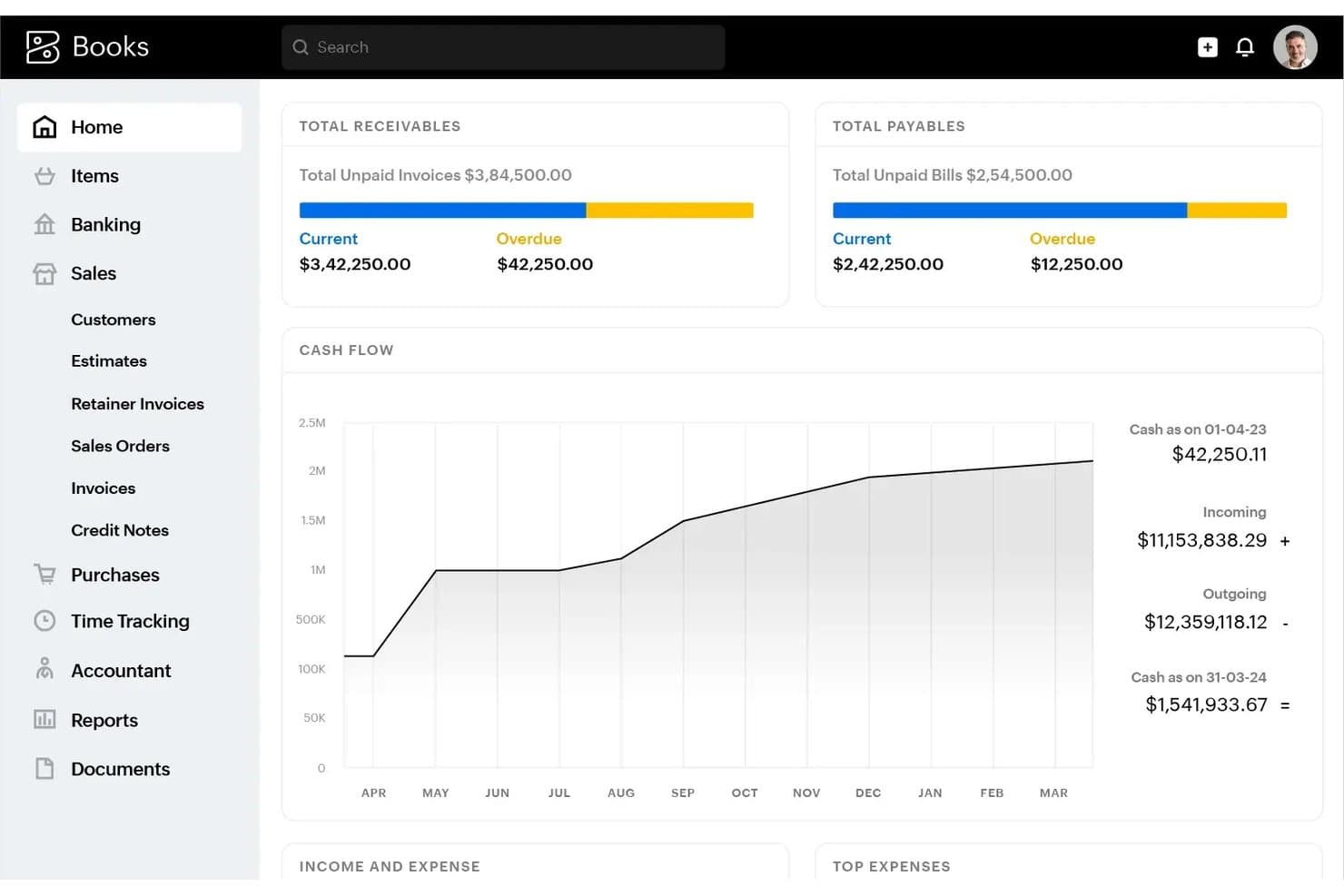
Zoho Books offers a financial dashboard displaying total receivables, total payables, cash flow trends, and a navigation menu for managing invoices, sales, and purchases. Zoho Books is a cloud-based accounting platform with a free plan that covers invoicing, expense tracking, bank reconciliation, financial reporting, and tax management for small hospitality businesses.
Who Is Zoho Books Best For?
Zoho Books suits independent hotel owners and B&B managers who need a free, self-managed accounting solution for a small property with annual revenue under $50K.
Why I Picked Zoho Books
I picked Zoho Books as one of the best because its workflow automation is genuinely useful for hotel back-office operations. I like that you can set recurring invoices for corporate accounts and long-stay guests, then let automated payment reminders handle follow-ups without manual intervention. The rule-based bank feed matching also auto-categorizes transactions, which cuts down on the daily reconciliation work that piles up fast in a busy property.
Zoho Books Key Features
- Customizable chart of accounts: Lets you create and edit account structures to match hotel department and revenue segmentation.
- Vendor management: Tracks supplier profiles, bills, purchase orders, and payment status in one place.
- Multi-currency support: Handles transactions and financial records in different currencies for international guests and vendors.
- Detailed financial reporting: Generates balance sheets, P&L statements, and cash flow reports for hotel accounting visibility.
Zoho Books Integrations
Zoho Books offers native integrations with Zoho CRM, Zoho Inventory, Zoho Projects, PayPal, Stripe, Square, G Suite, and Dropbox. It connects with Zapier and also provides an API for custom integrations.
What's Free?
Zoho Books offers a free-forever plan, but it's restricted to businesses with annual revenue under $50K and limited to one user. The free plan includes invoicing, expense tracking, bank reconciliation, and 50+ financial reports, though access to advanced features like multi-currency and vendor portals requires a paid upgrade.
Pros and Cons
Pros:
- Single-user free plan suits solo operators
- Audit trail tracks every transaction change
- Handles multi-rate tax configurations automatically
Cons:
- Revenue cap limits growing hotel properties
- No native hotel PMS integration available
Learn more about Zoho Books: Best for free desktop hotel accounting
- Free plan available
- Pricing upon request
Visit WebsiteCustomer Rating:4.4/5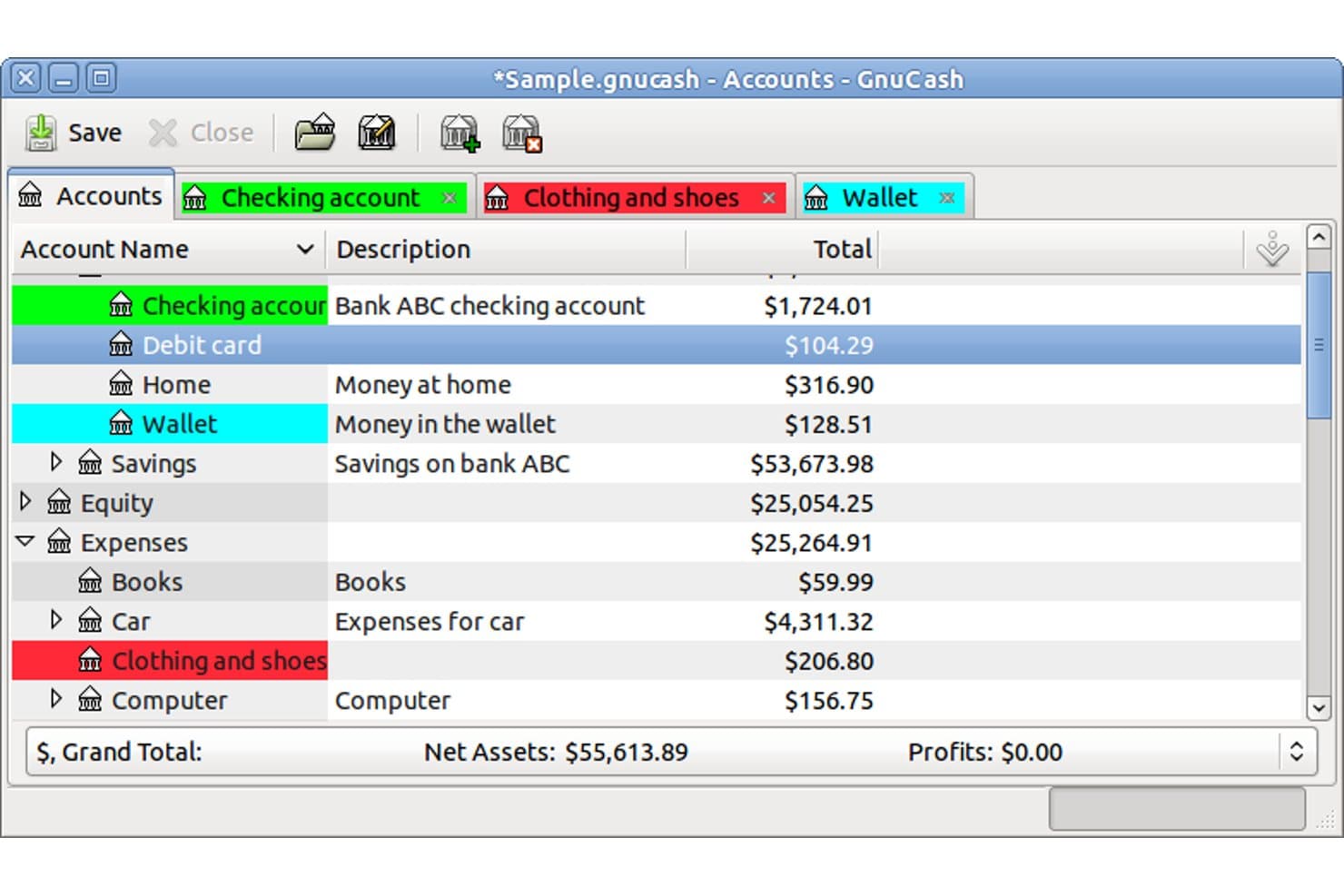
GnuCash offers a color-coded accounts overview displaying balances for assets, expenses, and equity categories in a tabbed interface. GnuCash is a free, open-source desktop accounting application built around double-entry bookkeeping, offering a customizable chart of accounts, invoicing, accounts payable/receivable, bank reconciliation, and standard financial reporting for small businesses.
Who Is GnuCash Best For?
GnuCash suits independent B&B owners and small independent hoteliers who manage their own books and need a free, offline desktop accounting tool with no ongoing subscription costs.
Why I Picked GnuCash
GnuCash earns its spot on my shortlist because the double-entry ledger enforces a level of financial accuracy that free tools rarely match. I like that you can build a hierarchical chart of accounts to separate room revenue from F&B or maintenance costs, which mirrors how a hotel's books actually need to work. Scheduled transactions also handle recurring vendor bills automatically, so regular costs like linen supplier invoices don't require manual entry every cycle.
GnuCash Key Features
- Customizable chart of accounts: Organize accounts into a hierarchy that reflects hotel departments or revenue centers.
- Multi-currency support: Assign different currencies to accounts, useful for international guest payments.
- Statement reconciliation: Match bank or card statement transactions to ledger entries for audit-ready records.
- Scheduled transactions: Automate recurring expenses or income to simplify month-end processes.
GnuCash Integrations
Native integrations are not clearly documented. GnuCash supports data import via QIF and OFX file types, and provides API access for custom integrations.
What's Free?
GnuCash is entirely free and open-source with no paid tiers, user limits, or feature restrictions. You get full access to every feature, including double-entry accounting, reporting, and multi-currency support, at no cost.
Pros and Cons
Pros:
- Unlimited accounts and transaction history included
- Handles multi-currency guest payments natively
- Full double-entry ledger with no restrictions
Cons:
- No hospitality-specific chart of accounts templates
- No cloud access or mobile app
Learn more about GnuCash: Best for self-hosted GL with multi-entity ledger
- Free plan available
- Pricing upon request
Visit WebsiteCustomer Rating:4.1/5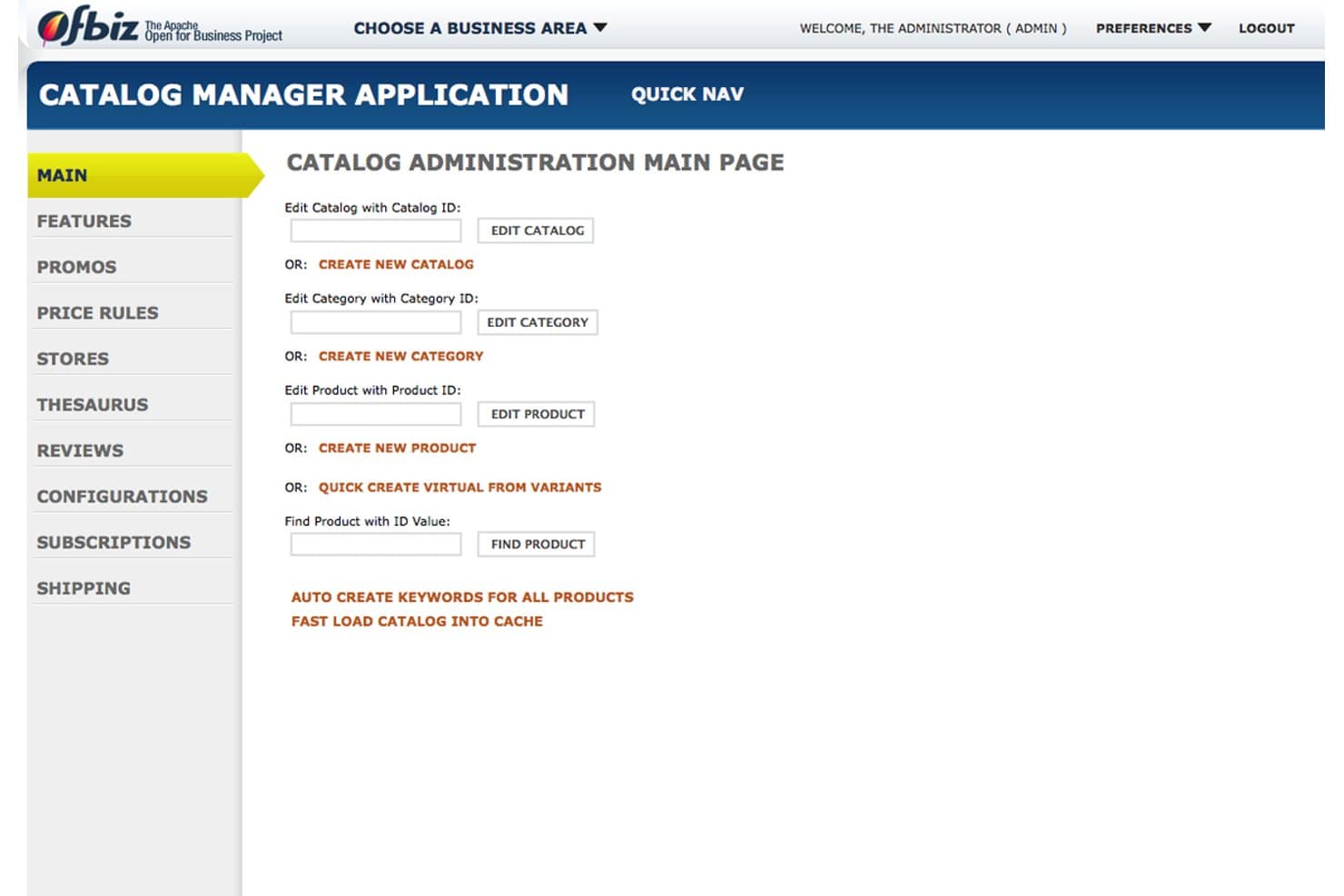
Apache OFBiz allows users to manage product catalogs and categories. Apache OFBiz is a free, open-source ERP and accounting platform with multi-entity general ledger, accounts payable and receivable, financial statements, tax configuration, and cost-center tracking.
Who Is Apache OFBiz Best For?
Hotel finance teams with developer support that need a self-hosted, multi-entity general ledger and can manage hospitality-specific accounting workarounds.
Why I Picked Apache OFBiz
I picked Apache OFBiz for the use case described as “Best for self-hosted GL with multi-entity ledger.” I can manage separate properties or subsidiaries with organization-level currencies, fiscal periods, and reporting. Cost centers split expenses by department, while comparative income statements and balance sheets support property-level reviews.
Apache OFBiz Key Features
- Accounts payable manager: Create invoices, payments, payment groups, vendor lookups, and reports.
- Tax authority setup: Configure VAT/GST, state, city, county, and product-specific tax rates.
- Budget workflow: Submit budgets for approval, review, rejection, and tracking.
- Fixed asset accounting: Record depreciation, maintenance, and asset meter details.
Apache OFBiz Integrations
Apache OFBiz doesn't have native integrations with hotel systems such as Cloudbeds or Mews. It provides Java APIs and service tools for custom integrations, but PMS connectivity requires development.
What’s Free?
Apache OFBiz is free forever as open-source software, with no per-user subscription fee. You’ll need to manage hosting, setup, maintenance, and custom integrations yourself, including connections to hotel systems such as Cloudbeds or Mews.
Pros and Cons
Pros:
- Comparative statements aid finance reviews
- Departmental cost centers support expense allocation
- Multi-entity ledgers support property-level accounting
Cons:
- Manual bank reconciliation lacks automatic matching
- Shipment-based invoices don’t fit room revenue
Learn more about Apache OFBiz: Best for open-source bookkeeping on a shoestring
- Free plan available
- From $60/user/year (billed annually)
Visit WebsiteCustomer Rating:4.8/5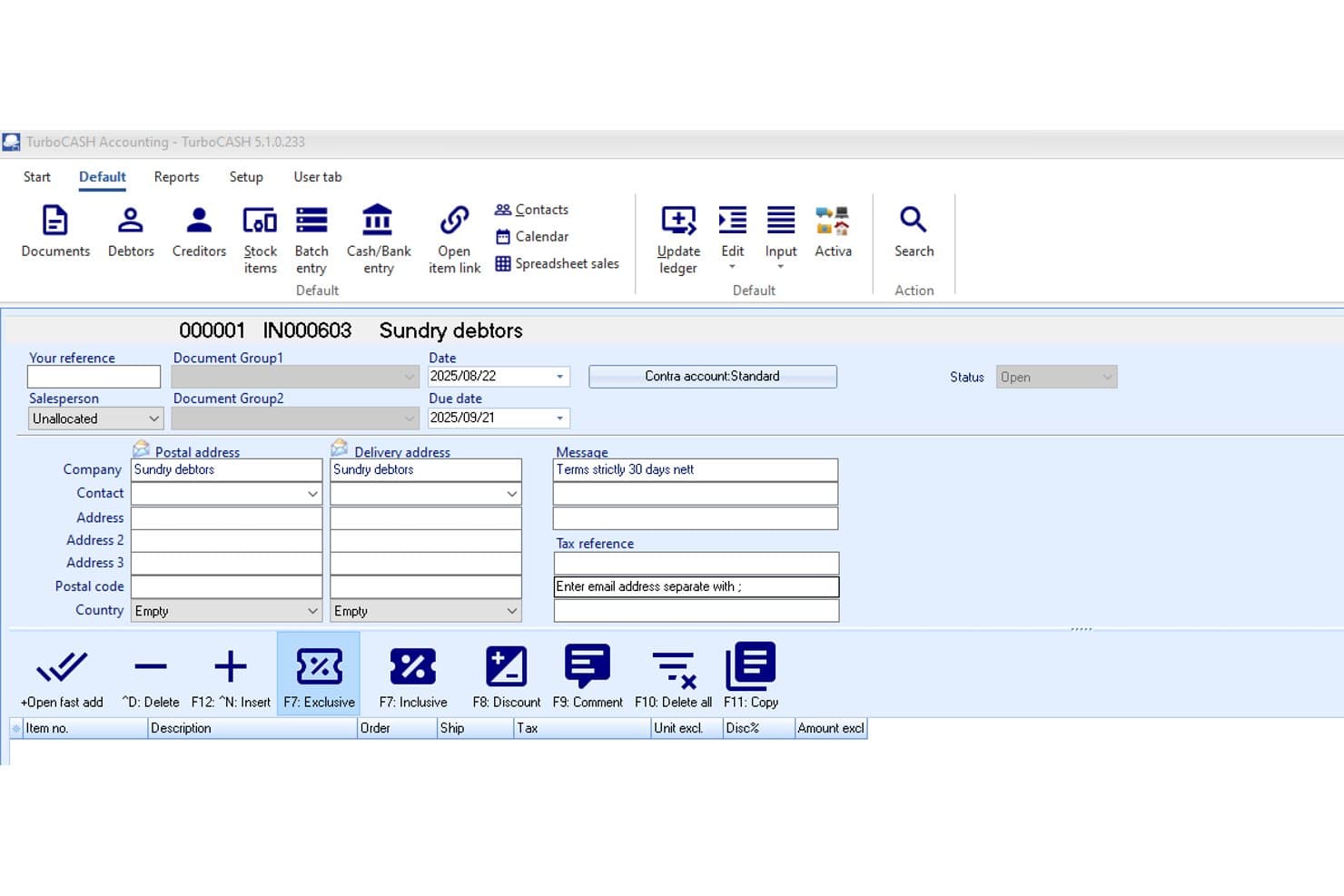
TurboCASH lets users create and manage invoices for sundry debtors. TurboCASH is a free Windows desktop accounting package for hotel bookkeeping, with double-entry ledgers, invoicing, accounts payable and receivable, cost centres, tax reporting, and manual bank reconciliation.
Who Is TurboCASH Best For?
TurboCASH suits highly budget-conscious independent B&B owners who can manage Windows-based, manual bookkeeping and configure their own departmental accounts.
Why I Picked TurboCASH
I picked TurboCASH for open-source bookkeeping on a shoestring, especially when a small property can manage desktop accounting manually. Its editable chart of accounts, cost centres, and reporting groups let me separate rooms, food and beverage, and events. I also value its supplier invoices, aged payable reports, and manual bank reconciliation for keeping core books organized.
TurboCASH Key Features
- Double-entry general ledger: Records transactions through batch-based journal entries.
- Tax code management: Supports configurable VAT, GST, and sales tax rates.
- Financial reports: Produces income statements, balance sheets, cash flow, and budget reports.
- CSV data exchange: Imports and exports accounting data through CSV and OpenOffice spreadsheets.
TurboCASH Integrations
TurboCASH connects with OpenOffice, CSV bank statements, PayPal, Thunderbird, Google Drive, OneDrive, Dropbox, ChatGPT, and Claude through BookStage. Native hotel PMS integrations and a public API aren't documented.
What's Free?
TurboCASH 4 is free forever and open source, with desktop accounting features for a single user. Multi-user access, remote databases, bank imports, and other Business Class features require the paid TurboCASH 5 subscription, which starts at $60 per user annually.
Pros and Cons
Pros:
- Aged supplier reports clarify unpaid bills
- Cost centres separate rooms and departments
- Double-entry ledgers support disciplined bookkeeping
Cons:
- Manual workflows burden daily hotel accounting
- No hotel-specific revenue performance metrics
Learn more about TurboCASH: Best for zero-license ERP with layered tax setup
- 30-day free trial + free demo available
- Free
Visit WebsiteCustomer Rating:4.5/5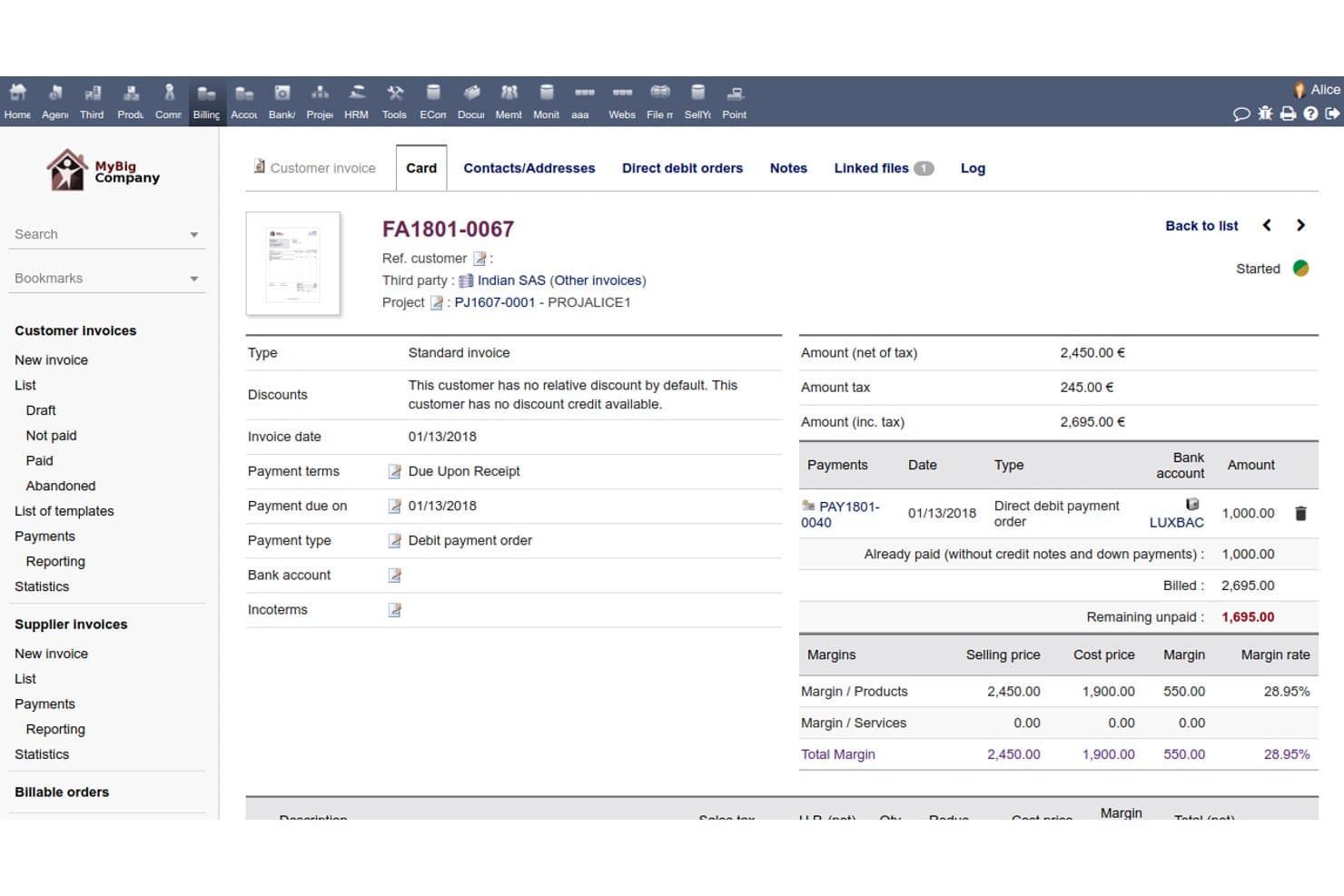
Dolibarr tracks invoice payments, margins, and unpaid balances in detail. Dolibarr is free, open-source ERP and accounting software with double-entry bookkeeping, AP/AR, POS, layered tax handling, and a third-party hotel reservation module for lodging operations.
Who Is Dolibarr Best For?
Dolibarr suits hotel finance controllers needing an open-source general ledger and layered tax setup, with add-ons or custom work for hospitality workflows.
Why I Picked Dolibarr
I picked Dolibarr for its zero-license ERP with layered tax setup, especially when a hotel needs open-source accounting control. Its double-entry ledger maps invoices to accounts, while up to three taxes per line handle combinations such as GST and PST. A third-party Hotel Reservation add-on adds room reservations and a daily accounting sheet, though core lodging workflows remain limited.
Dolibarr Key Features
- Supplier invoicing: Create purchase orders, supplier invoices, and partial payments.
- Point of Sale: Record front-desk, food, and beverage transactions.
- Bank and cash accounts: Manage multiple bank, credit card, savings, and cash accounts.
- Accounting exports: Export records to formats compatible with Sage, Cegid, and other packages.
Dolibarr Integrations
Dolibarr has documented native integrations with PayPal, Stripe, and Paybox, plus a REST API for custom PMS connections. Marketplace integrations include PrestaShop, Magento, WooCommerce, Airbyte, and Chift.
What's Free?
Dolibarr is free-forever, open-source software with no per-user license fee, and no free trial is advertised. UnboxERP’s cloud hosting, implementation, customization, and training services may cost extra, while self-hosting requires your own infrastructure and maintenance.
Pros and Cons
Pros:
- Open-source structure permits tailored workflows
- Layered taxes handle compound local charges
- Double-entry ledger supports hotel finance controls
Cons:
- Bank reconciliation remains manual and basic
- No native folios or hotel KPIs
Learn more about Dolibarr: Best for free multi-entity ledger and tax layering
- Free plan available
- Pricing upon request
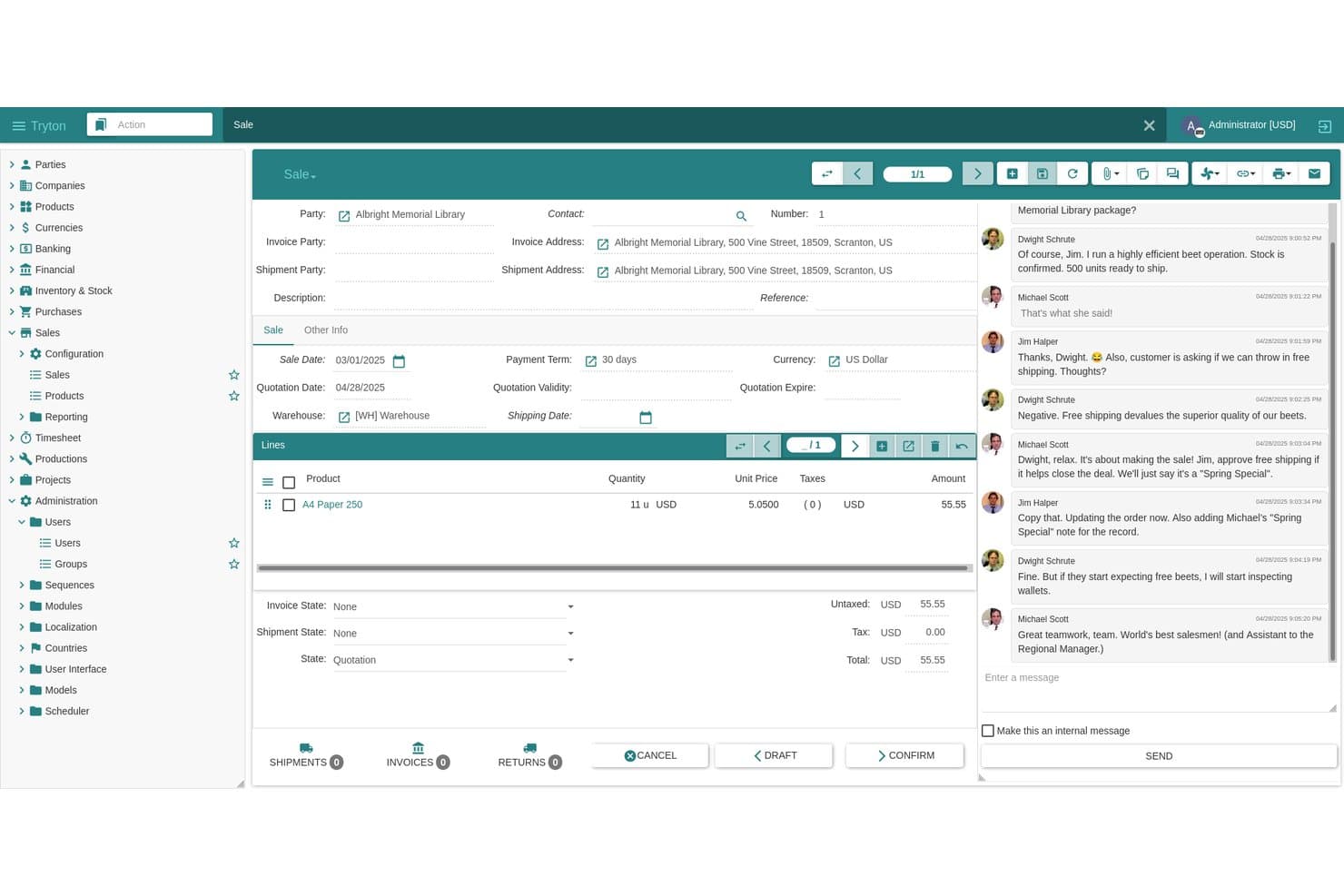
Tryton manages sales orders and customer billing for hospitality clients. Tryton is free, open-source accounting software for hotels, with double-entry ledgers, accounts payable and receivable, analytic accounts, tax rules, bank statement imports, and multi-company consolidation.
Who Is Tryton Best For?
Technically capable hotel finance controllers managing multiple entities who need free, customizable ledgers, analytic accounts, and layered tax rules.
Why I Picked Tryton
I rate Tryton highly for its “Best for free multi-entity ledger and tax layering” positioning. Account Consolidation combines balance sheets and income statements across properties, while analytic account axes tag Rooms, F&B, and Events for departmental reporting. Compound taxes, Tax Rules, and hierarchical tax codes support layered charges, although hotel folios and night audit require custom work.
Tryton Key Features
- Supplier invoicing: Create vendor bills, payment terms, corrections, and credit notes.
- Bank statement imports: Import OFX, CSV, MT940, CODA, AEB43, and SEPA files.
- Budget management: Set budgets against accounts for financial planning.
- User roles: Control access through configurable user roles and permissions.
Tryton Integrations
Tryton has documented integrations with Stripe and Braintree, plus SEPA payments and bank-file imports from OFX, MT940, CODA, AEB43, and CSV. Its REST client library and Proteus scripting client support custom PMS or other integrations.
What's Free?
Tryton is free forever as 100% open-source software you can download and self-host, with no stated user limit or time-limited trial. You’ll need to manage hosting, setup, maintenance, and support yourself, while the public demo is shared and resets daily.
Pros and Cons
Pros:
- Analytic axes support departmental profit tracking
- Layered tax rules fit complex charges
- Multi-property consolidation supports group reporting
Cons:
- Imported statements limit reconciliation workflows
- No hotel folios or night audit
Learn more about Tryton: Best for self-hosted AP and layered tax controls
- Free plan available
- Pricing upon request
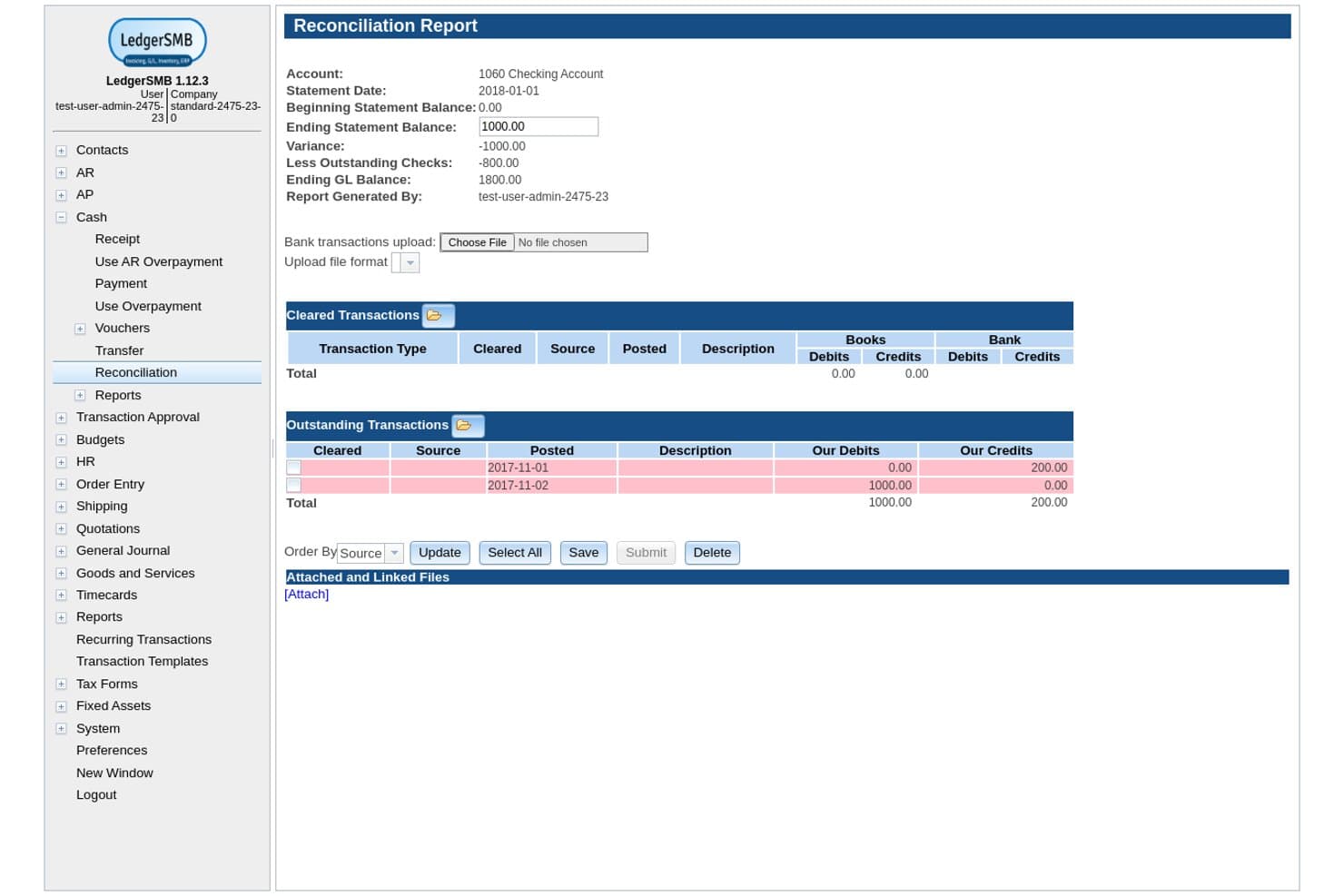
LedgerSMB helps hotels reconcile bank accounts and track outstanding transactions. LedgerSMB is free, open-source accounting software for hotel operations, offering self-hosted general ledger, AP/AR, departmental reporting, budgeting, inventory management, and configurable tax handling.
Who Is LedgerSMB Best For?
LedgerSMB suits technically capable hotel finance teams needing self-hosted accounts payable, audit controls, and layered tax handling.
Why I Picked LedgerSMB
I picked LedgerSMB for self-hosted AP and layered tax controls when hotel finance teams need control over vendor purchasing. I like that its vendor invoices, purchase orders, and AP audit trails support supplier oversight. Date-effective, compound tax ordering can model national, regional, and lodging-related taxes, while reporting units help separate Rooms, F&B, and Events.
LedgerSMB Key Features
- Double-entry general ledger: Manage journals with a customizable chart of accounts.
- Bank statement imports: Import OFX, CAMT.053, or CSV statements for reconciliation.
- Budget variance reports: Compare actual results with department or project budgets.
- Multi-currency accounting: Record transactions and payments in multiple currencies.
LedgerSMB Integrations
LedgerSMB doesn't have any native integrations with PMS, channel managers, or payment processors. It supports custom connections through experimental invoice, order, and quote APIs, plus OFX, CAMT.053, and CSV bank-statement imports.
What's Free?
LedgerSMB is free-forever, open-source software released under the GNU General Public License version 2, not a time-limited trial. You’ll need to manage hosting and maintenance yourself or pay separately for commercial support, and it lacks native PMS, channel manager, and payment processor integrations.
Pros and Cons
Pros:
- Department reporting separates hotel operations
- Vendor invoices strengthen supplier oversight
- Layered tax rules support lodging levies
Cons:
- No hotel-specific revenue workflows or metrics
- Self-hosting requires technical accounting support
Learn more about LedgerSMB:
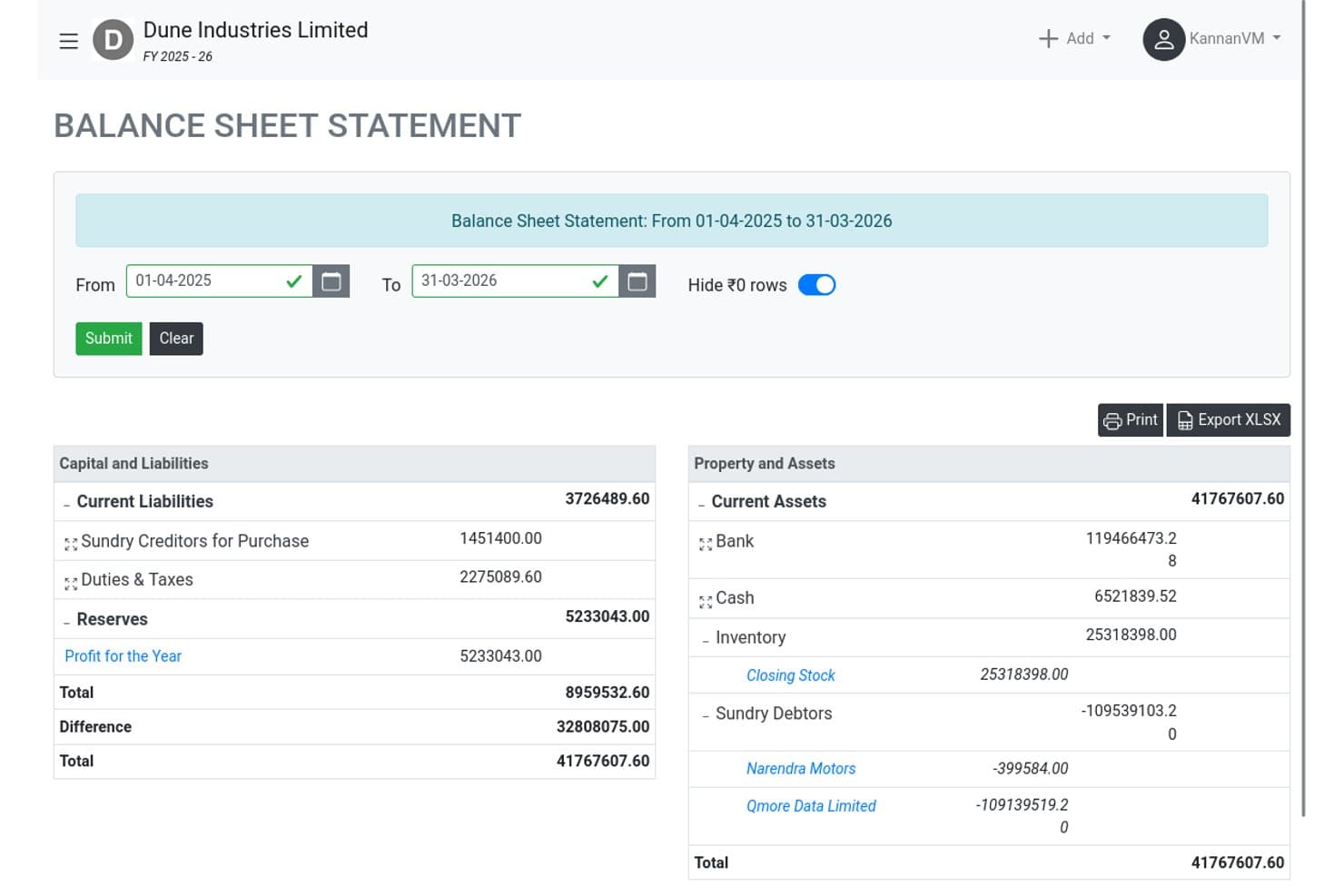
GNUKhata's balance sheet tracks assets, liabilities, and reserves for hotels. GNUKhata is free, self-hosted accounting software for general SMB bookkeeping, with double-entry ledgers, invoices, payables, receivables, manual bank reconciliation, financial reports, and Indian GST and VAT tools rather than hotel-specific workflows.
Who Is GNUKhata Best For?
Indian small and midsize businesses, traders, startups, and NGOs needing free, self-hosted double-entry bookkeeping with GST tools.
Why I Picked GNUKhata
I picked GNUKhata for its free open-source SMB bookkeeping, especially for small Indian properties handling back-office accounts. Its double-entry ledgers, purchase and sales invoices, bill adjustments, and GST reporting cover basic financial administration. It doesn’t manage hotel operations, PMS data, guest folios, or departmental reporting.
GNUKhata Key Features
- Point-of-sale screen: Records quick over-the-counter sales.
- Manual bank reconciliation: Matches vouchers with bank statement entries.
- Inventory locations: Tracks stock across multiple storage locations.
- Audit log: Records voucher edits, logins, and administrator actions.
GNUKhata Integrations
GNUKhata doesn't have any native integrations with PMS, POS, channel managers, or payment processors. It offers a REST API for custom integrations, but its documentation is incomplete.
What's Free?
GNUKhata is free-forever, open-source accounting software rather than a time-limited trial. It’s self-hosted and has no native PMS, POS, channel manager, or payment processor integrations, although a REST API supports custom connections.
Pros and Cons
Pros:
- Manual reconciliation spans multiple bank accounts
- GST reporting suits Indian properties
- Double-entry reports support back-office bookkeeping
Cons:
- Self-hosting requires Docker administration
- No departmental P&L or folio tracking
Learn more about GNUKhata: Best for free GL with dimension-based dept tracking
- Free plan available
- Pricing upon request
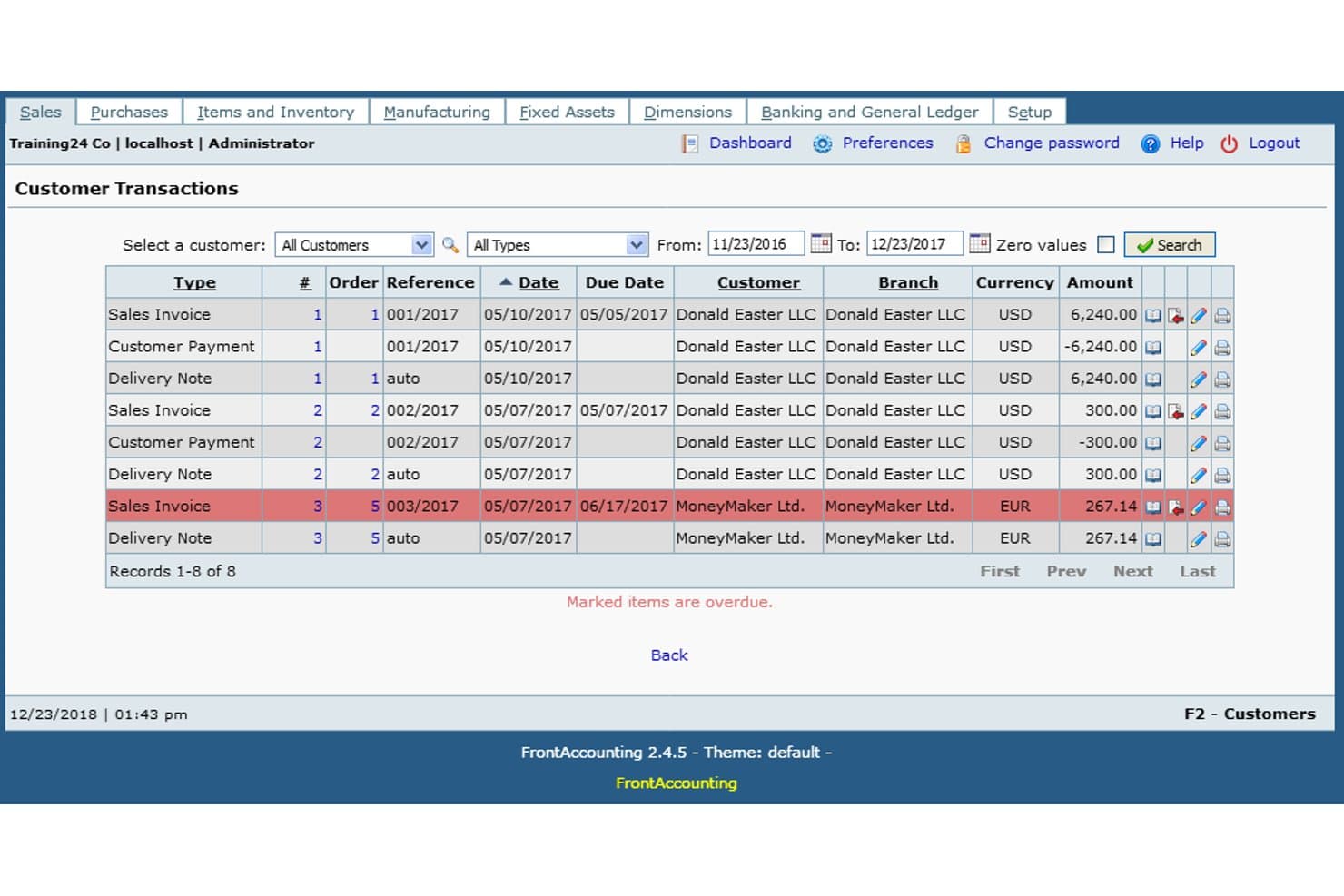
FrontAccounting tracks customer invoices, payments, and due dates in one view. FrontAccounting is a free, open-source accounting ERP for hotel books, with double-entry general ledger, accounts payable and receivable, multi-currency, inventory, tax configuration, and dimension-based reporting.
Who Is FrontAccounting Best For?
Finance controllers at small hotels who need free, self-hosted general ledger software with flexible department tracking and can manage manual setup.
Why I Picked FrontAccounting
I picked FrontAccounting because it’s the best for free GL with dimension-based dept tracking. I use its double-entry ledger and two-level dimensions to separate Rooms, F&B, Events, or Spa activity, then filter profit and loss reports by department. Its configurable tax groups and multi-currency accounts also support hotel books without paid licensing.
FrontAccounting Key Features
- Accounts payable workflow: Manage purchase orders, supplier invoices, payments, and allocations.
- Recurring invoices: Schedule customer invoices by day, month, or year.
- Inventory management: Track items, stock levels, and F&B supplies.
- Multi-company support: Run separate company databases from one installation.
FrontAccounting Integrations
FrontAccounting doesn't have any native integrations with PMS, POS, channel manager, or payment platforms. Its community SimpleAPI REST API supports custom integrations, and extensions can add connectivity such as cash flow reporting.
What's Free?
FrontAccounting is free forever as open-source accounting software, with no paid license required. You’ll need to handle setup and custom integrations yourself because it has no native PMS, POS, channel manager, or payment platform integrations.
Pros and Cons
Pros:
- Flexible multi-rate tax configuration
- Full double-entry general ledger
- Dimension-based departmental P&L tracking
Cons:
- No hotel-specific reporting or KPIs
- Bank reconciliation remains manual
Learn more about FrontAccounting:
Other Free Hotel Accounting Software
Here are some additional free hotel accounting software options that didn’t make it onto my shortlist, but are still worth checking out:
- 11SQL-LedgerBest for free self-hosted AP and audit controls
Related Reviews
How I Evaluate Free Hotel Accounting Software
I start by defining what qualifies as free. For this list, that means software with an ongoing free plan rather than a limited-time trial. Hotel accounting is continuous work, so a temporary free period isn't enough for tracking revenue, reconciling transactions, and maintaining accurate financial records over time.
From there, I assess each platform in two stages: the core functionality required to make the list and the differentiating factors that help certain tools stand out.
Core Functionality (Table Stakes For This List)
In addition to meeting my free-plan requirements, each tool goes through a standardized scoring process.
I score every platform from 0 (does not offer the functionality) to 5 (excels in this area) across the criteria below. I then convert the combined score into a percentage. To qualify for inclusion, a tool must receive a minimum overall score of 65%.
- General Ledger & Chart of Accounts: I look for double-entry accounting and a chart of accounts that can accommodate hotel revenue and expense categories such as rooms, food and beverage, events, and other departments.
- Revenue & Expense Tracking: The software should make it easy to categorize income and operating costs so you can distinguish revenue streams and understand where money is being spent.
- Accounts Payable/Receivable: I assess whether the platform can manage customer invoices, outstanding balances, and vendor bills for recurring hotel expenses such as utilities, food suppliers, maintenance, and linen services.
- Bank Reconciliation: I check how easily you can match bank and credit card activity against accounting records, particularly when processing a high volume of guest payments and daily transactions.
- Financial Reporting: Each tool should provide essential reports such as profit and loss statements, balance sheets, and cash flow statements so you can monitor financial performance over time.
- Tax & Multi-Rate Handling: I evaluate whether you can configure multiple tax rates and categories to accommodate requirements such as occupancy taxes, VAT, GST, or other applicable charges.
Once I've identified the tools that meet these baseline requirements, I look more closely at the capabilities and limitations that distinguish one platform from another.
Differentiating Factors (What Sets Vendors Apart)
Here's what I consider when comparing qualifying tools:
Standout Features
Hotel-specific integrations can make a significant difference. I give extra consideration to tools that connect with property management systems and can transfer reservation, payment, or folio information into the accounting workflow, reducing repetitive data entry.
Departmental reporting is another valuable feature. Being able to separate financial performance across rooms, food and beverage, events, spa services, or other revenue centers gives hotel managers a more detailed view of where profits and costs are coming from.
I also consider automation capabilities such as bank feeds, recurring transactions, and end-of-day reconciliation. These features can reduce the amount of manual accounting work required as transaction volume increases.
Beyond Features
I also evaluate how well each platform fits the size and complexity of a hotel operation. Free plans frequently place limits on users, transactions, invoices, storage, or business entities, so I consider whether those restrictions are realistic for a small hotel, B&B, hostel, or other independent property.
The broader integration ecosystem matters as well. I look at whether the software can work with property management systems, POS platforms, payment processors, or other hospitality tools through native integrations, third-party connectors, or APIs.
Finally, I consider the onboarding and support experience. Because free plans rarely include dedicated implementation assistance, tools with useful documentation, tutorials, setup guides, and active support communities score more favorably.
How to Choose Free Hotel Accounting Software
Choosing free hotel accounting software can be challenging when tools have different feature limits, upgrade requirements, and integration options. To narrow down your choices, focus on the factors that will have the biggest impact on your property's day-to-day financial operations:
| Factor | What to Consider |
| Scalability | Can the software continue supporting you as room count, transaction volume, staff, or property locations increase? Review any limits placed on users, transactions, or accounts. |
| Integrations | Does the platform work with your PMS, POS, payment processor, or reservation system? Prioritize connections that reduce duplicate data entry and manual reconciliation. |
| Customizability | Can you adapt the chart of accounts, categories, and reports to reflect hotel departments such as rooms, F&B, spa, or events? |
| Ease of use | Can managers and staff complete routine accounting tasks without extensive financial training? Look for straightforward navigation, reporting, and transaction workflows. |
| Implementation and onboarding | How easy is it to configure the platform and move your existing financial data into it? Check for setup guides, tutorials, templates, and community resources on the free plan. |
| Cost | What features or usage levels trigger a paid upgrade? Review transaction caps, user limits, storage restrictions, and additional charges before committing to a platform. |
| Security safeguards | How does the software protect financial and guest-related data? Look for encryption, access controls, backups, and permission settings appropriate for your team. |
| Compliance requirements | Can the platform accommodate the taxes and reporting obligations that apply to your property? Consider VAT, GST, occupancy taxes, and other location-specific requirements. |
What Are Free Hotel Accounting Software?
Free hotel accounting software are financial management tools that provide a permanent no-cost plan for handling core hotel bookkeeping tasks. They can help hospitality businesses record revenue, monitor expenses, reconcile transactions, manage invoices, and produce basic financial reports without paying a monthly software subscription.
These platforms are particularly useful for independent hotels, boutique properties, hostels, and smaller hospitality businesses that need reliable accounting functionality but may not yet require advanced automation or multi-property financial management.
Features of Free Hotel Accounting Software
The features available in free hotel accounting software vary considerably between providers. Most free plans cover everyday bookkeeping requirements, while more advanced hospitality-specific capabilities are typically reserved for paid subscriptions.
Typically Free Hotel Accounting Software Features
- General ledger: Records and categorizes financial transactions so you can maintain an organized history of property income, expenses, assets, and liabilities.
- Basic chart of accounts: Provides standard account categories that can be used to organize common hotel revenue and operating expenses.
- Simple invoicing: Lets you create, issue, and monitor invoices for customers, groups, corporate accounts, or other billable services.
- Expense tracking: Helps you record operational costs such as utilities, supplies, maintenance, payroll-related expenses, and vendor purchases.
- Manual bank reconciliation: Allows you to compare accounting records with bank transactions and identify discrepancies before closing your books.
- Standard financial reports: Produces essential statements such as profit and loss reports, balance sheets, and cash flow summaries.
- User management: Gives multiple team members access to the accounting system, often with basic roles or permission controls.
- Multi-currency support: Lets you record transactions in multiple currencies when working with international guests, suppliers, or partners.
Typically Paid Hotel Accounting Software Features
- Automated bank feeds: Imports transactions directly from connected bank accounts to reduce manual entry and speed up reconciliation.
- Property management system (PMS) integration: Transfers reservation, folio, payment, and revenue data from your PMS into the accounting platform automatically.
- Departmental P&L reporting: Separates income and expenses across departments such as rooms, food and beverage, spa, events, or other hotel operations.
- Night audit automation: Helps reconcile daily revenue, guest charges, payments, and adjustments as part of the property's end-of-day process.
- Multi-property consolidation: Combines financial information from several hotels or locations while allowing you to review performance at the individual-property level.
- Advanced tax management: Supports more complicated tax structures, including occupancy taxes, VAT, GST, and jurisdiction-specific reporting requirements.
- Recurring billing and automation: Automates repeat invoices, scheduled payments, recurring expenses, and other routine accounting activities.
- Customizable reporting and dashboards: Provides more control over financial reports, KPIs, filters, dashboards, and performance views.
- Audit trail and permissions: Records changes made within the system and provides more detailed access controls for stronger financial oversight.
- Priority support: Gives paying customers access to additional assistance such as live chat, phone support, dedicated onboarding, or implementation services.
Benefits of Free Hotel Accounting Software
Free hotel accounting software can help smaller properties organize their finances without adding another recurring software expense. Here are some of the main benefits you can expect:
- Lower operating costs: Free plans let you handle essential accounting tasks without monthly subscription fees, helping you preserve budget for staffing, maintenance, guest services, and other priorities.
- Better financial visibility: Centralized revenue, expense, and reporting tools make it easier to monitor cash flow, understand spending patterns, and keep track of overall property performance.
- Easier financial organization: Keeping transactions, invoices, expenses, and reports in one system reduces reliance on separate spreadsheets and disconnected financial records.
- Quicker implementation: Many free accounting platforms are designed for straightforward setup, allowing smaller hotel teams to begin tracking finances without lengthy implementation projects or dedicated IT resources.
- Improved collaboration: Cloud-based access can give owners, managers, bookkeepers, and finance staff a shared view of financial information, making reviews and approvals easier to coordinate.
- Room to grow: A free plan can provide enough functionality for a small hotel, hostel, or B&B while giving you the option to move to a paid tier as transaction volume, users, or reporting requirements increase.
- Fewer bookkeeping errors: Standardized invoicing, transaction categorization, reconciliation tools, and reporting can reduce mistakes that often occur with manual spreadsheets or duplicate data entry.
Costs and Pricing of Hotel Accounting Software
While the tools covered in this article offer free accounting options, free plans generally come with limitations around automation, integrations, reporting, users, or transaction volume. As your property grows, you may eventually need to upgrade to a paid plan to access more advanced financial management features.
Hotel accounting software pricing varies based on the number of users, properties, integrations, and accounting capabilities included. The table below provides a general overview of the pricing tiers you may encounter:
Plan Comparison Table for Hotel Accounting Software
| Plan Type | Average Price | Common Features |
| Free Plan | $0 | General ledger, basic expense tracking, invoicing, standard reports, manual reconciliation, and limited user access |
| Personal Plan | $5-$25/user/month | Free plan features plus automated bank feeds, additional users, customizable accounts, multi-currency support, and basic support |
| Business Plan | $25-$70/user/month | Personal plan features plus PMS or POS integrations, departmental reporting, tax management, automation, and recurring billing |
| Enterprise Plan | $70-$150/user/month | Business plan features plus multi-property consolidation, advanced permissions, detailed audit trails, custom reporting, and onboarding |
Free Hotel Accounting Software FAQs
Here are some answers to common questions about free hotel accounting software:
Can free hotel accounting software handle occupancy taxes and local levies?
Yes, many free hotel accounting tools let you create and track occupancy taxes or other local levies. Always check if the tax setup options cover your state or municipality’s requirements, since these can be complex in hospitality.
Is it possible to integrate free hotel accounting software with my property management system?
Some free versions offer limited PMS integrations, while others require you to upgrade. Look for tools with at least basic import options (like CSV upload) if you rely on syncing guest and folio data from your PMS.
How many users can access free hotel accounting software?
Most free plans allow a small number of users—often two to three staff accounts. If you need more, verify the user limits before onboarding your whole front desk, F&B, and finance team.
Are free hotel accounting platforms safe for storing guest and financial data?
Yes, leading free accounting platforms use standard data encryption and backup measures. Still, review their privacy policies and check for user permission settings to help protect sensitive guest and transaction information.
Do free accounting solutions provide support or training resources?
Support for free users typically includes help centers, community forums, and basic tutorials. Live chat, phone, or onboarding assistance is usually reserved for paid tiers, so consider your team’s ability to self-serve.