

Programele gratuite de gestionare hotelieră offline vă permit să administrați rezervările, facturarea și sarcinile zilnice de la recepție fără a avea nevoie de o conexiune permanentă la internet și fără taxe lunare ascunse. Dacă doriți control complet la sediu, acces fiabil chiar și în timpul întreruperilor sau o modalitate de a evita abonamentele costisitoare, ați ajuns în locul potrivit.
În acest ghid, veți găsi o comparație directă a celor mai bune opțiuni gratuite pentru gestionarea hotelieră offline, cu detalii despre funcții, limitări și tipurile de proprietăți pentru care fiecare instrument este cel mai potrivit. Aflați care dintre acestea acoperă cerințele dumneavoastră esențiale și cum puteți menține fiecare tură în desfășurare fără probleme, indiferent de conexiunea Wi-Fi.
Why Trust Our Software Recommendations
6,700+
Reviews
20
Industry experts
16+
Evaluation factors
14
Years
Our team has been testing and reviewing software since 2012. As hospitality leaders ourselves, we know how difficult—and important—it is to choose the right software.
For this guide, we evaluated tools using hands-on testing and independent research, scoring tools using our selection criteria.
Our reviews reflect our human editorial judgment, not a sales pitch.
Tabel comparativ al programelor gratuite de gestionare hotelieră offline
Acest tabel comparativ rezumă detaliile privind prețurile pentru selecțiile mele de top de programe gratuite de gestionare hotelieră offline:
Score legend (out of 5)
- Excellent4.5–5
- Good4–4.4
- Average3–3.9
- Below average2–2.9
- Poor1–1.9
Sorted by: Default
| Tool | Starting Price | Website | |||||||
|---|---|---|---|---|---|---|---|---|---|
Best for cloud-based multi-property hotel workflows | Not rated | 5 | 5 | 4 | Not rated | 5 | 5 | Pricing upon request Free demo available | Website |
Best free plan for small inns under 10 rooms | Not rated | 5 | 5 | 5 | Not rated | 5 | 5 | $69/month Free plan available; 14-day free trial | Website |
Best for one-time license, on-premise billing | 4.3 out of 5 | 4 | 4 | 4 | 5 | 5 | 4 | $179.99/license 30-day free trial | Website |
Best for cloud-based multi-channel hotel ops | Not rated | 5 | 5 | 4 | Not rated | 5 | 5 | €40/month 14-day free trial | Website |
Best for on-premise front desk with night audit | 4.2 out of 5 | 5 | 4 | 4 | 4 | 4 | 4 | Free Free plan available | Website |
Best for on-premise PMS with LAN multi-user access | 5.0 out of 5 | 5 | 5 | 5 | 5 | 5 | 5 | ₹1,150 one-time 30-day free trial | Website |
Best for AI-driven on-premise hotel ops | 4.5 out of 5 | 5 | 5 | 4 | 4 | 4 | 5 | Pricing upon request Free plan available | Website |
Best for offline-first PMS with fiscal invoicing | 4.8 out of 5 | 5 | 5 | 4 | 5 | 5 | 5 | Pricing upon request Free plan available | Website |
Best for open-source, fully local PMS | 4.5 out of 5 | 4 | 5 | 4 | 5 | 5 | 4 | Pricing upon request Free plan available | Website |
Best for self-hosted, open-source PMS billing | 4.5 out of 5 | 5 | 5 | 4 | 3 | 5 | 5 | Pricing upon request Free demo available | Website |


Recenzii ale programelor gratuite de gestionare hotelieră offline
Mai jos sunt prezentate rezumatele mele detaliate ale programelor gratuite de gestionare hotelieră offline care au ajuns pe lista mea scurtă. Recenziile mele oferă o analiză detaliată a funcțiilor, celor mai potrivite cazuri de utilizare și prețurilor fiecărui sistem, pentru a vă ajuta să îl găsiți pe cel mai potrivit pentru dumneavoastră.
 Best for cloud-based multi-property hotel workflows
- Free demo available
- Pricing upon request
Visit WebsiteCustomer Rating:4.5/5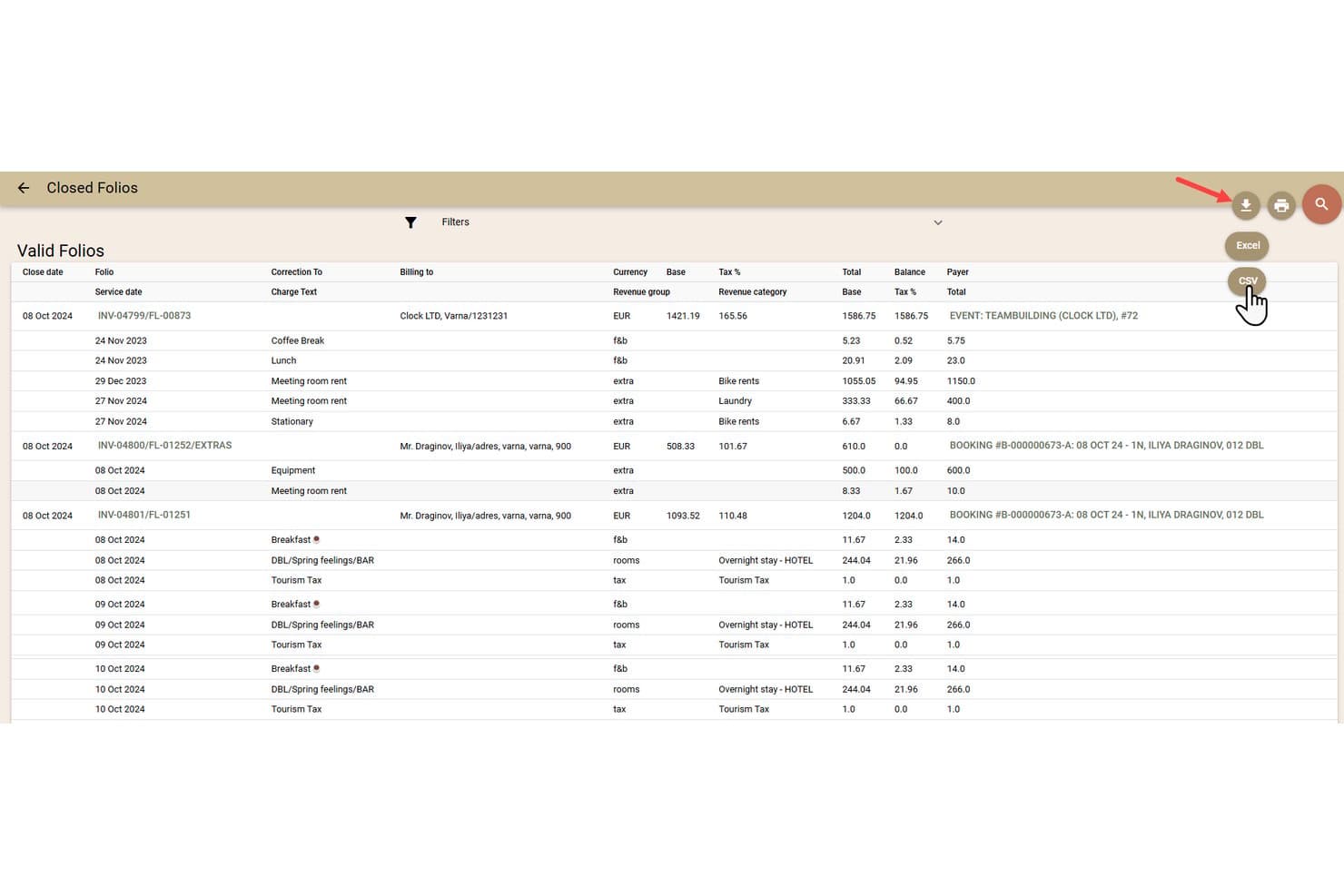
Clock PMS+ lets users export closed folios to Excel or CSV. Clock PMS+ is a cloud-based property management system for hotels that covers reservations, front desk operations, room inventory, guest billing, housekeeping, guest messaging, and integrations with booking channels and payment providers.
Who Is Clock PMS+ Best For?
Clock PMS+ suits multi-property hotel operators and boutique brands who need an all-in-one, cloud-based system and global support.
Why I Picked Clock PMS+
I picked Clock PMS+ because I value its cloud-based multi-property workflows, which let me manage reservations, front desk, and housekeeping across several hotels in one place. Features like live room inventory, automated group bookings, and real-time housekeeping sync help me keep operations tight, especially when handling complex properties with varied needs.
Clock PMS+ Key Features
- Automated night audit: Runs end-of-day procedures automatically for every property, including revenue postings and audit trails.
- Open API access: Lets you connect external apps or build custom integrations for your unique workflow needs.
- Multi-currency and tax configuration: Supports invoicing and guest billing in any currency with region-specific tax setups.
- Mobile housekeeping app: Allows cleaning staff to view task lists, post minibar charges, and report maintenance directly from their phones.
Clock PMS+ Integrations
Clock PMS+ offers 30+ native integrations, including SiteMinder, RoomCloud, QuickBooks, Stripe, Adyen, Revinate, Cendyn, Lightspeed, Assa Abloy, Whistle, and Mailchimp. An open API is available for custom integrations.
What's Free?
Clock PMS+ offers a 30-day free trial. After the trial, you’ll need to purchase a paid plan—there is no free-forever version, and all standard features are available during the trial.
Pros and Cons
Pros:
- Supports multi-property management in one system
- Highly detailed housekeeping and billing functions
- Advanced front desk and reservation features
Cons:
- No free-forever or downloadable version available
- No offline or local installation option
Learn more about Clock PMS+: Best free plan for small inns under 10 rooms
- Free plan available; 14-day free trial
- From $69/month
Visit WebsiteCustomer Rating:4.5/5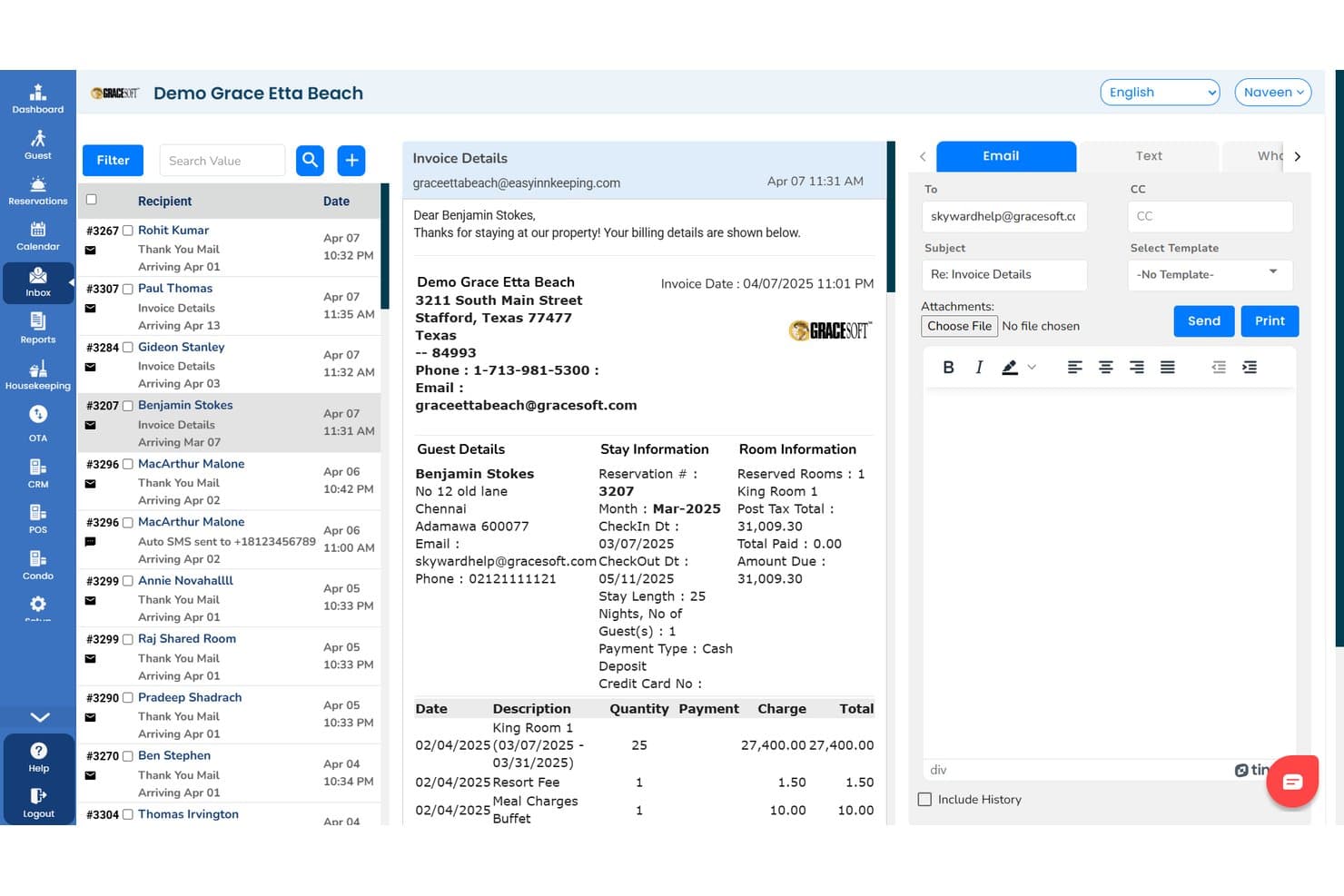
Easy InnKeeping displays guest invoices with billing and stay details. Easy InnKeeping is a cloud-based property management system with reservation management, front desk operations, room inventory tracking, guest billing, guest CRM, and housekeeping modules, designed for small inns, B&Bs, hotels, and vacation rentals.
Who Is Easy InnKeeping Best For?
Small inn or B&B owners who want a cloud-based, user-friendly PMS with a free plan for fewer than 10 rooms.
Why I Picked Easy InnKeeping
I picked Easy InnKeeping as one of the best because it genuinely offers a free-for-life Lite plan for small inns under 10 rooms, which is rare in hotel management. My team can manage reservations with a real-time calendar and use direct Vrbo integration at no extra cost for up to 250 bookings each year.
Easy InnKeeping Key Features
- Guest profile CRM: Store guest history, preferences, loyalty points, and communication records in one place.
- Point of sale (POS) module: Manage sales from restaurants, gift shops, and bar outlets within the property.
- Housekeeping assignment tools: Assign tasks to staff, update room statuses, and add notes directly from the calendar.
- Group reservation invoicing: Generate single consolidated invoices for group bookings and events like weddings or conferences.
Easy InnKeeping Integrations
Easy InnKeeping provides native integrations with Booking.com, Expedia, Airbnb, Vrbo, Google Hotels, TripAdvisor, Stripe, Square, Authorize.Net, PayPal, QuickBooks, and PriceLabs. The platform also offers WhatsApp messaging integration and an API for custom integrations.
What's Free?
Easy InnKeeping offers a free-for-life Lite plan for small inns with fewer than 10 rooms. The free plan includes core PMS features and supports up to 250 bookings per year, with some advanced features and integrations reserved for paid plans.
Pros and Cons
Pros:
- Reservation calendar supports drag-and-drop bookings
- Includes direct Vrbo integration in free tier
- Offers free Lite plan for small inns
Cons:
- No downloadable or offline operational mode
- Cannot function without internet connection
Learn more about Easy InnKeeping: Best for one-time license, on-premise billing
- 30-day free trial
- From $179.99/license
Visit WebsiteCustomer Rating:4.5/5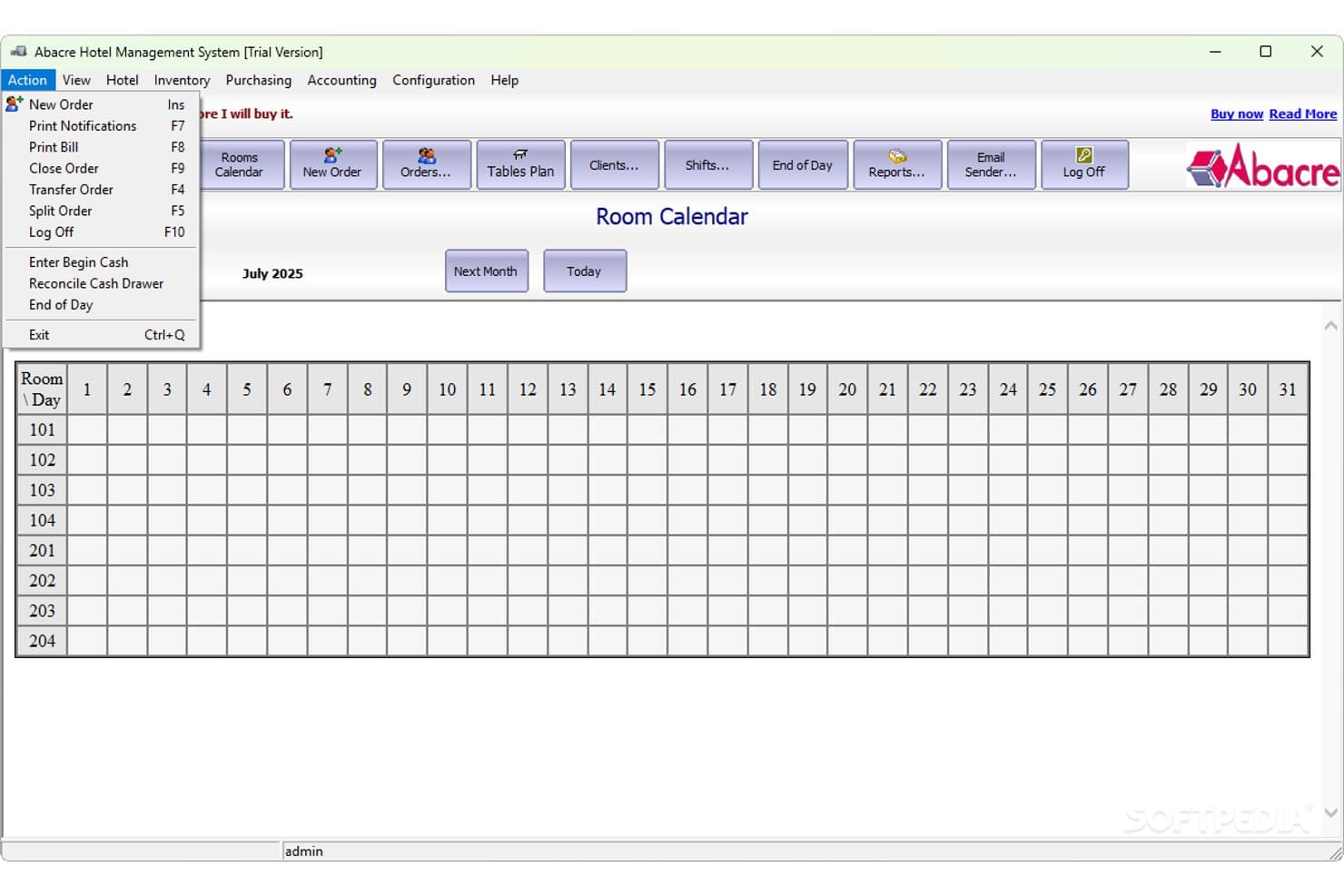
Abacre Hotel Management System tracks room availability across all days in a monthly calendar view. Abacre Hotel Management System is a Windows-based offline hotel management platform offering local reservations, guest profiles, billing, POS integration, housekeeping coordination, inventory, staff roles, and reporting features with LAN multi-terminal support and broad hardware compatibility.
Who Is Abacre Hotel Management System Best For?
Independent hotels and B&Bs that want a one-time license for a fully offline, Windows-based property management system with local network support.
Why I Picked Abacre Hotel Management System
I picked Abacre Hotel Management System because I like how it’s a Windows-based, on-premise PMS with real LAN multi-terminal capability and peripheral support. I think its encrypted local database and integrated POS for posting restaurant or bar charges right to guest folios stand out when you need everything to run offline and with a one-time license.
Abacre Hotel Management System Key Features
- Role-based staff management: Assign specific permissions and access levels for admin, front desk, housekeeping, and POS staff within the system.
- Integrated POS module: Post restaurant, bar, or shop charges directly to guest folios using the built-in order entry feature.
- Automatic local backup and recovery: Schedule encrypted database backups and restore them easily with integrated recovery tools.
- Multi-currency and tax configuration: Set up multiple currencies, tax rates, and exemptions to match your property's regional requirements.
Abacre Hotel Management System Integrations
Abacre Hotel Management System doesn't have any native software integrations. It supports connectivity with hospitality hardware like receipt printers, cash drawers, barcode scanners, MSR card readers, touch screens, and door-lock systems via OPOS, Windows, and COM-port drivers. No API is advertised.
What's Free?
Abacre Hotel Management System offers a 30-day free trial. You get full access during the trial, but you’ll need to buy a license to keep using it after the trial ends. There isn’t a free-forever plan.
Pros and Cons
Pros:
- Built-in POS for restaurant and bar
- Local network sync across multiple terminals
- Runs entirely offline on Windows PCs
Cons:
- No cloud or mobile app available
- Only a 30-day free trial offered
Learn more about Abacre Hotel Management System: Best for cloud-based multi-channel hotel ops
- 14-day free trial
- From €40/month
Visit WebsiteCustomer Rating:5/5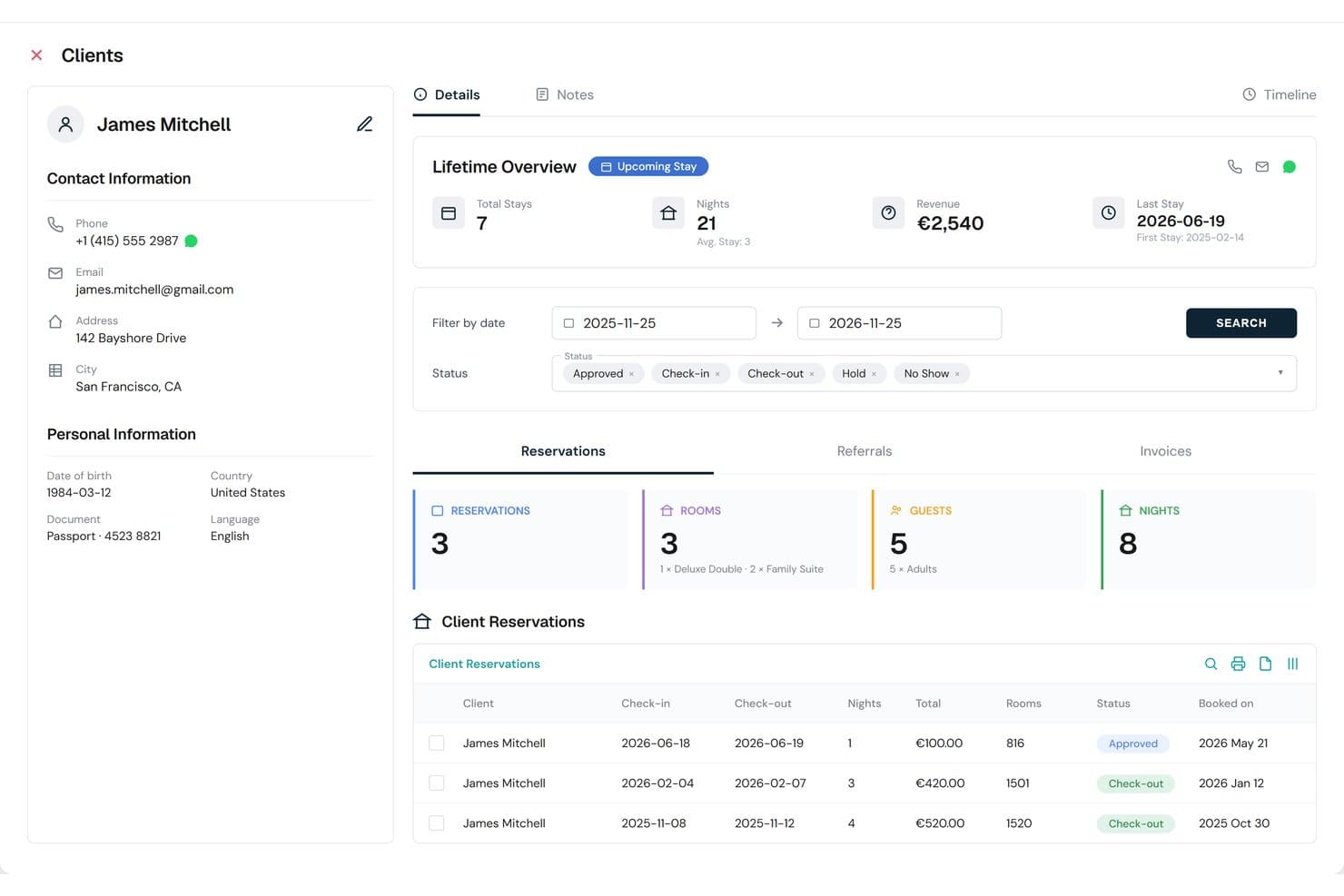
HotelBee tracks full client reservation history and lifetime stay metrics. HotelBee is a cloud-based hotel management system that brings together reservation management, front desk operations, POS, channel manager, and guest experience modules in a single browser-accessible platform.
Who Is HotelBee Best For?
HotelBee suits boutique hotels, hostels, and B&Bs looking for an all-in-one, cloud-based property management solution with native OTA integrations.
Why I Picked HotelBee
I picked HotelBee because it brings together a strong cloud-based multi-channel platform, with a PMS, POS, and channel manager that work in real time for busy boutique hotels and hostels. I’ve used its bed-level inventory and nearly instant OTA sync to manage reservations and rates across dozens of sites without missing a booking.
HotelBee Key Features
- HotelBee Payments: Accept card payments, automate deposits and no-show fees, and handle refunds directly from your dashboard.
- Bed-level inventory: Track and allocate individual beds in mixed dorms or hostels, supporting auto-allocation and restocking mid-stay.
- Guest portal and upselling: Offer online check-in, digital ordering, and upsell services with guest self-service tools and digital key delivery.
- Native fiscal and e-invoicing: Generate invoices compliant with fiscal regulations for Albania, Italy, Spain, Germany, Greece, and Croatia.
HotelBee Integrations
HotelBee offers native integrations with channel managers like Channex and Beds24, major OTAs including Booking.com, Expedia, Airbnb, Hostelworld, Agoda, and payment processors like Stripe and Adyen. It supports accounting tools like QuickBooks and Xero (on request), and provides a public REST API for custom integrations.
What's Free?
HotelBee offers a 14-day free trial with access to all core features. After the trial, continued use requires a paid plan, and there’s no free-forever option.
Pros and Cons
Pros:
- Native guest portal with digital check-in
- Bed-level inventory for hostel operators
- Full-featured PMS and channel manager suite
Cons:
- Guest data always stored in the cloud
- No offline or local install option
Learn more about HotelBee:
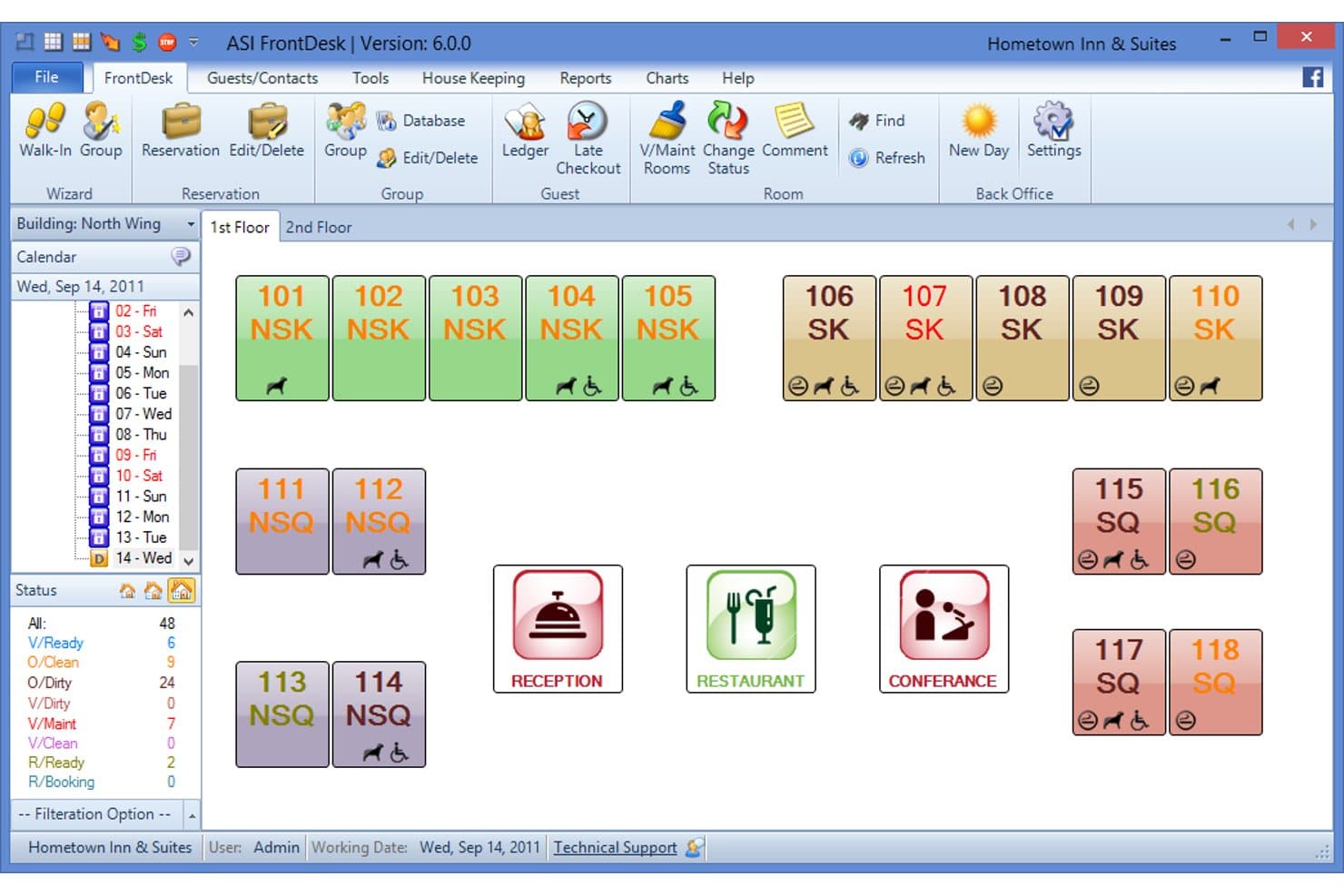
ASI FrontDesk displays a color-coded room grid for real-time occupancy tracking. ASI FrontDesk is a free offline hotel property management system for Windows that handles reservations, walk-in check-ins, folio billing, night audit, housekeeping, guest database, and reporting from a locally installed application.
Who Is ASI FrontDesk Best For?
Independent hotel and guesthouse operators who want a free, offline Windows system to manage reservations, check-ins, folios, and night audit without recurring costs.
Why I Picked ASI FrontDesk
I picked ASI FrontDesk because it gives me a truly offline, on-premise system with free reservation, check-in, folio, and night audit functions built for Windows. I like that my team can handle walk-ins, issue invoices, and complete nightly audits entirely from a local PC, which feels ideal for properties with spotty internet or strict data control needs.
ASI FrontDesk Key Features
- Multi-currency and tax management: Configure multiple currencies and set up detailed tax rules for guest folios and invoices.
- Housekeeping status module: Track room cleaning status and update out-of-order rooms directly within the application.
- Advance guest search: Find and manage guest profiles, including stay history and special remarks, using built-in search filters.
- 80+ built-in reports: Access a wide range of operations, occupancy, and financial reports generated locally on your Windows PC.
ASI FrontDesk Integrations
ASI FrontDesk’s freeware version supports integrations mainly through paid add-on modules, including QuickBooks, Shift4 and Fortis payment gateways, POS systems, electronic key locks, magnetic card readers, ID scanners, signature pads, and call accounting interfaces. Native integrations are not clearly documented.
What's Free?
ASI FrontDesk offers a free-forever offline hotel management system for Windows. The freeware version has no ongoing costs, but integrations and some advanced modules require paid add-ons.
Pros and Cons
Pros:
- Tracks housekeeping and out-of-order rooms
- Handles night audit and folio billing
- Runs fully offline on Windows computers
Cons:
- Advanced features require paid add-ons
- No direct online booking capability
Learn more about ASI FrontDesk: Best for on-premise PMS with LAN multi-user access
- 30-day free trial
- From ₹1,150 one-time
Visit WebsiteCustomer Rating:4.5/5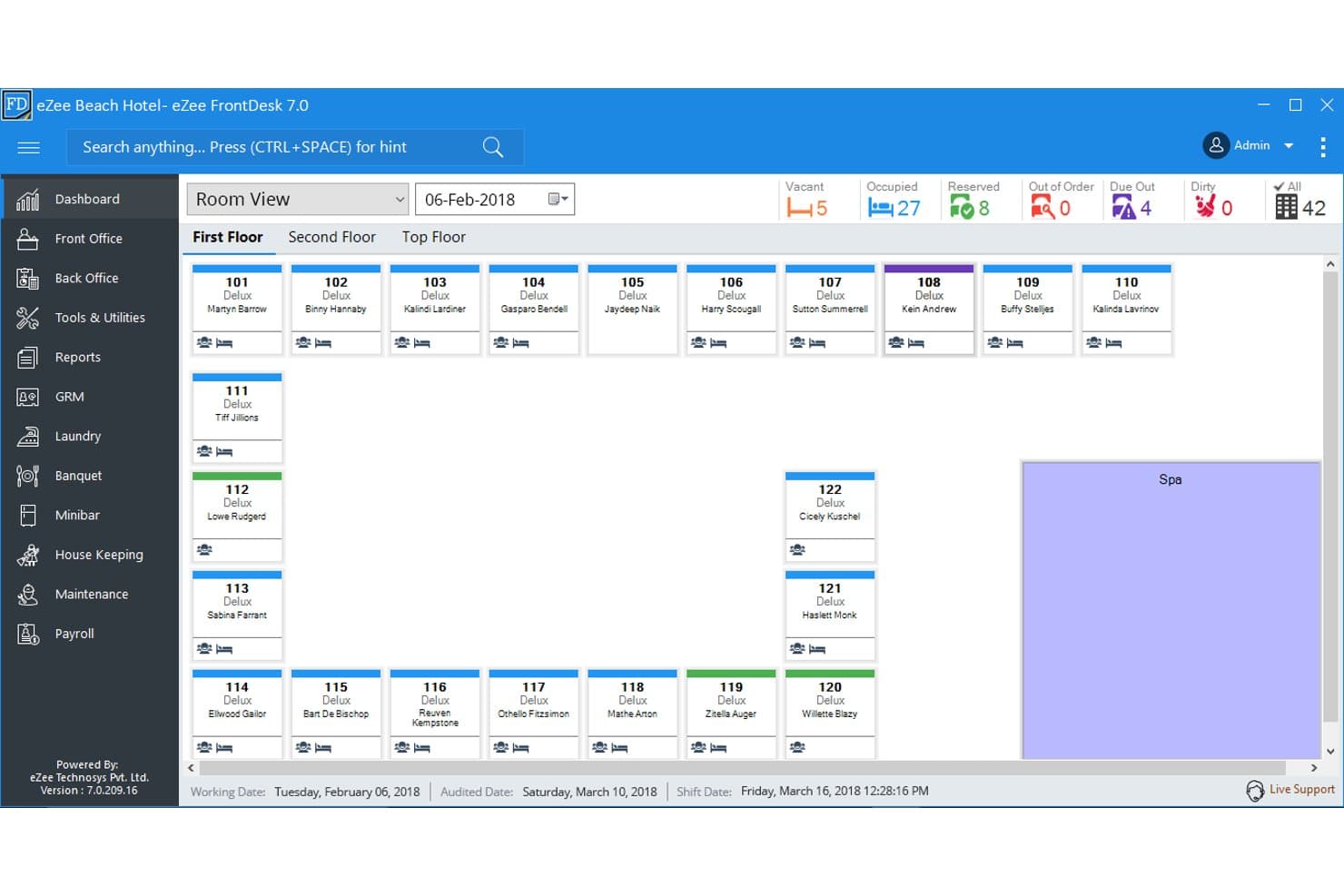
eZee FrontDesk displays real-time room status across all hotel floors. eZee FrontDesk is an on-premise hotel property management system for Windows that handles reservations, front desk operations, room inventory, guest billing, and guest profiles entirely offline with multi-user LAN access.
Who Is eZee FrontDesk Best For?
Independent hotels, motels, and boutique properties needing a locally managed PMS with multi-user LAN access and detailed guest and billing controls.
Why I Picked eZee FrontDesk
I picked eZee FrontDesk because the on-premise Windows deployment gives you full control and reliable offline access, especially with LAN multi-user support. I like how the system covers everything from guest profiles and folios to live tape chart management and statutory reporting without depending on the cloud. The built-in role-based access and housekeeping tools keep daily operations running smoothly.
eZee FrontDesk Key Features
- Reservation center calendar: View, create, modify, and cancel bookings from a centralized tape chart.
- Guest profile database: Store guest contact information, ID/passport details, preferences, and stay history locally.
- Multi-currency folio management: Create guest folios with charges, discounts, and taxes in multiple currencies.
- Housekeeping module: Track live room status and assign cleaning or maintenance tasks with real-time updates.
eZee FrontDesk Integrations
eZee FrontDesk integrates natively with eZee Centrix (channel manager), eZee Reservation (booking engine), eZee BurrP! (restaurant POS), eZee Panorama (hotel website builder), and supports integration with Tally ERP for accounting. An API is available for custom integrations.
What's Free?
eZee FrontDesk offers a 30-day free trial of its on-premise PMS. After the trial, you’ll need to purchase a license to continue using the software. There are no long-term free-forever plans available.
Pros and Cons
Pros:
- Detailed housekeeping and audit features included
- Multi-user LAN supports teamwork offline
- Local database keeps guest data private
Cons:
- Only runs on Windows desktop systems
- No free-forever or open-source version
Learn more about eZee FrontDesk: Best for AI-driven on-premise hotel ops
- Free plan available
- Pricing upon request
Visit WebsiteCustomer Rating:4.3/5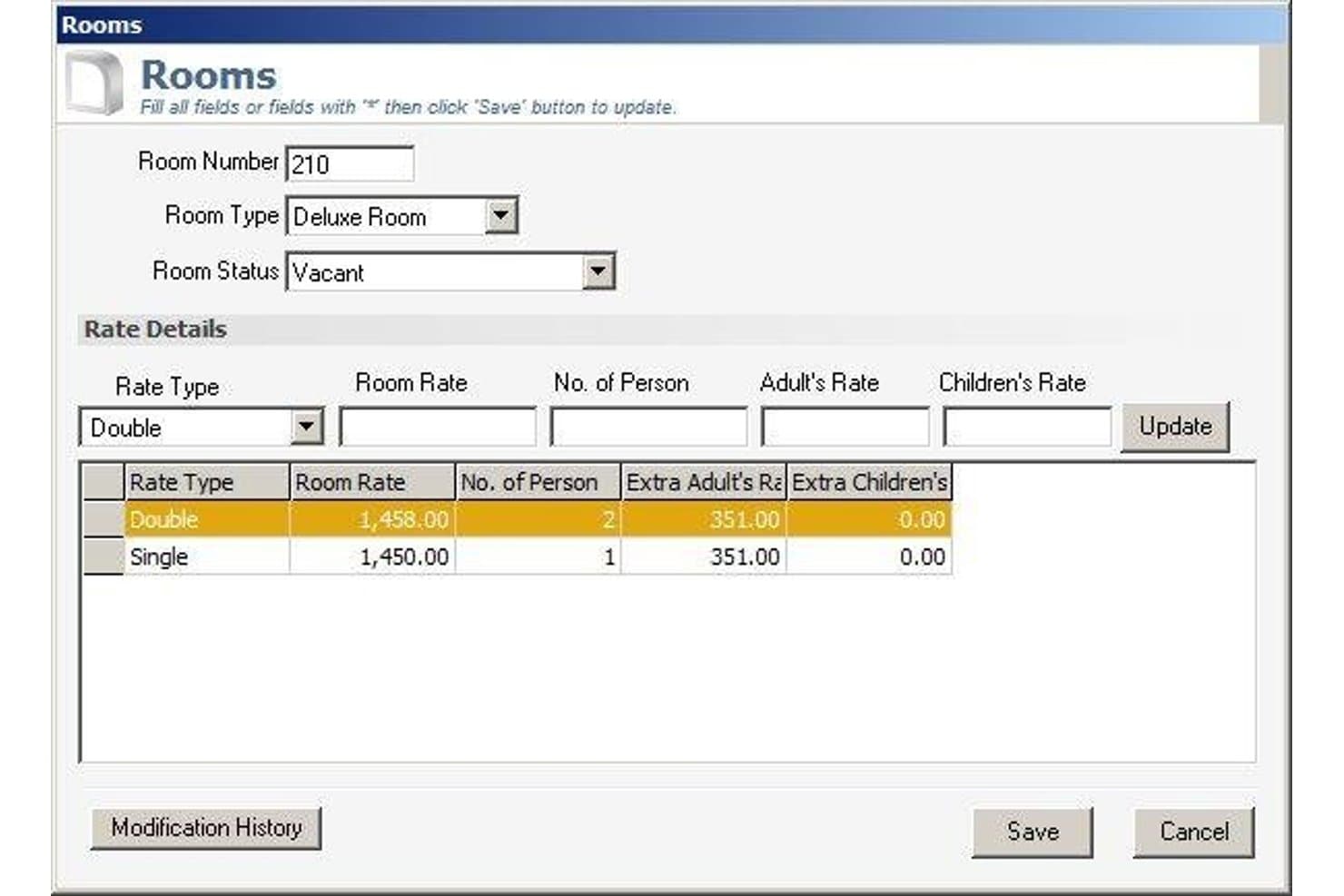
SourceForge lets users manage room rates and availability by room type. SourceForge’s HAIP is an open-source hotel management system you can self-host, featuring full reservations, front desk, inventory, billing, guest profiles, and built-in AI agents for advanced on-premise hotel operations.
Who Is SourceForge Best For?
Boutique hotel IT administrators or multi-property operators who want full control of an advanced, self-hosted property management system.
Why I Picked SourceForge
I picked SourceForge because I like how its HAIP platform lets me run a full-featured hotel management system directly on my own hardware, completely offline. The built-in AI agents automate night audits and housekeeping optimization, while real-time inventory dashboards and a multi-property setup keep operations flexible for boutique or multi-site hotels.
SourceForge Key Features
- Automated night audit anomaly detection: Identifies unposted charges, duplicate folios, and cash variances automatically during night audit workflows.
- Commission-free direct booking engine: Lets you embed a booking widget and manage public API access without relying on third-party OTA platforms.
- Role-based access control (RBAC): Allows flexible multi-level permissions and roles for property, department, or team member access management.
- Real-time housekeeping workload dashboard: Displays digital checklists and cleaning prioritization based on VIP and early check-in status.
SourceForge Integrations
SourceForge HAIP offers documented integrations with Booking.com, Expedia EQC, SiteMinder, DerbySoft (for OTA channels), Stripe (payments), Keycloak (authentication), Twilio (messaging), and S3/MinIO (media storage). It also provides a REST API and event-driven webhooks for custom integrations.
What's Free?
SourceForge HAIP is free to use as open-source software you can host on your own servers. There’s no user or property limit, but you’ll need to handle your own hosting, updates, and support. Paid support and managed hosting options aren’t included in the free version.
Pros and Cons
Pros:
- Direct booking widget with no commissions
- Built-in AI agents automate hotel operations
- Runs fully offline on local hardware
Cons:
- No desktop installer or printer integration
- Requires Docker and command-line setup
Learn more about SourceForge: Best for offline-first PMS with fiscal invoicing
- Free plan available
- Pricing upon request
Visit WebsiteCustomer Rating:4.3/5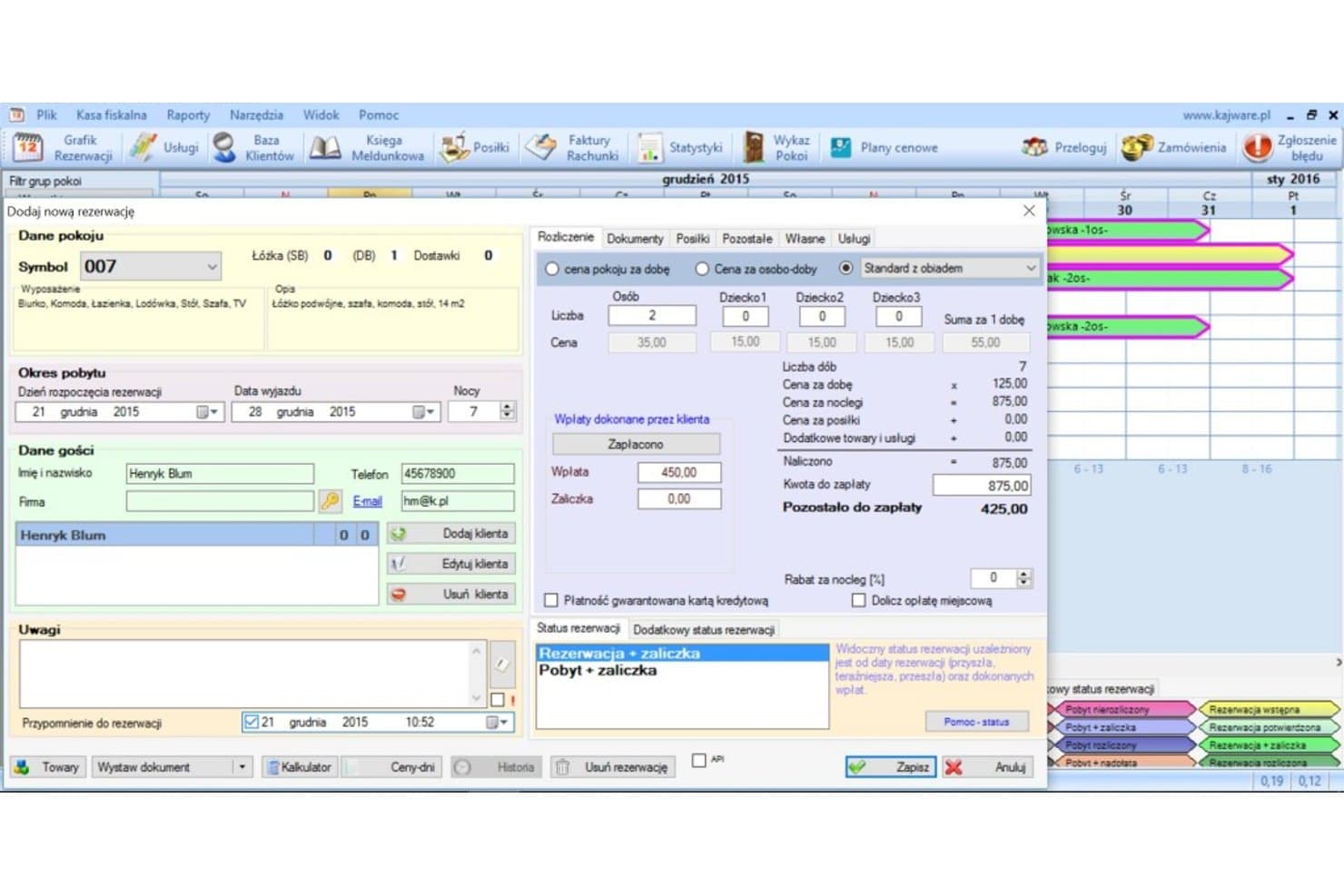
KWHotel lets users manage room bookings and billing in one form. KWHotel is a free offline hotel property management system for Windows that covers reservations, front desk operations, guest billing and invoicing, room inventory, housekeeping, and guest profiles.
Who Is KWHotel Best For?
KWHotel is ideal for independent hotels, guesthouses, and hostels that need a full-featured offline PMS with no ongoing fees.
Why I Picked KWHotel
I picked KWHotel because I’ve installed its free Windows app at properties where having a true offline PMS matters. The offline-first design makes check-in, invoicing, and front desk tasks reliable without internet. I also appreciate the built-in fiscal invoicing tools and housekeeping statuses for busy front desk teams.
KWHotel Key Features
- Integrated housekeeping management: Track room cleaning status directly from the reservation calendar to support daily coordination.
- Detailed guest profiles: Store IDs, tax information, VIP or blacklist status, and booking history for every guest.
- Flexible rate plan engine: Set daily, seasonal, group, and meal-inclusive rates with per-room and per-channel pricing rules.
- Role-based user permissions: Assign access rights and controls for administrators, receptionists, accounting, and other staff levels.
KWHotel Integrations
KWHotel offers native integrations with YieldPlanet, SiteMinder, WuBook, Booking.com, Expedia, Espago, POSbistro, SMSAPI, Sezam24, Google-format export, and the Hotel Clean App. An API is available for additional custom integrations.
What's Free?
KWHotel offers a free-forever Windows app for hotel management with no ongoing fees. The free plan includes reservation management, guest profiles, invoicing, and housekeeping, but may limit some advanced features and integrations to paid plans.
Pros and Cons
Pros:
- Housekeeping status visible on reservation calendar
- No room or booking limits in free version
- Fully offline reservations and invoicing on Windows
Cons:
- Windows-only with no macOS native app
- Free tier limited to one workstation
Learn more about KWHotel: Best for open-source, fully local PMS
- Free plan available
- Pricing upon request
Visit WebsiteCustomer Rating:4.5/5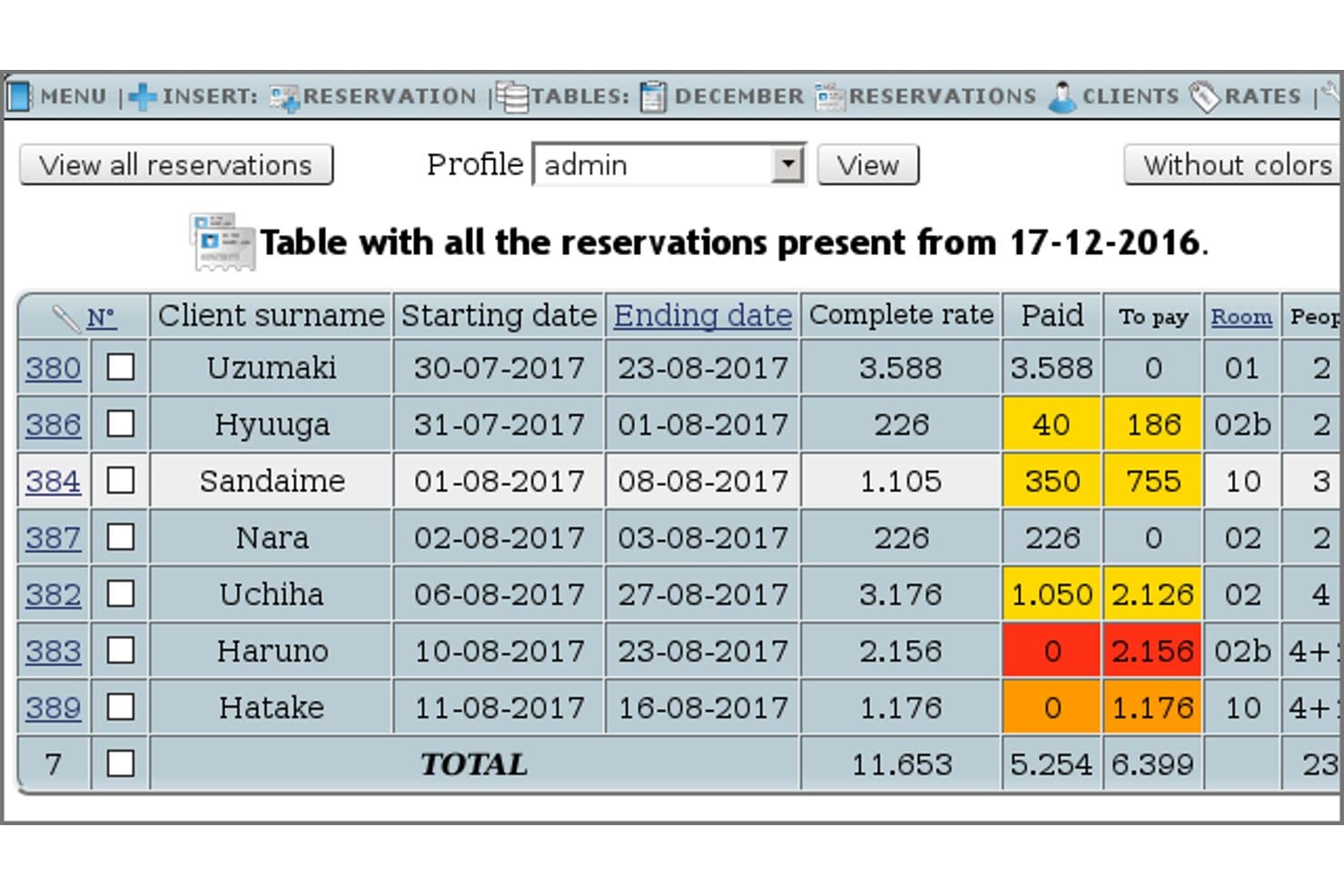
HotelDruid tracks all reservations with payment status and room details. HotelDruid is a free open-source property management system that handles offline reservations, guest billing, point of sale, inventory, and multi-user permissions on Windows or Linux with full local data storage.
Who Is HotelDruid Best For?
HotelDruid is a strong choice for independent hotels, B&Bs, and hostels needing a free, fully offline PMS with local data control and multi-user access.
Why I Picked HotelDruid
I picked HotelDruid for its open-source, fully local PMS setup that works even without internet. My team can run it entirely offline with a local Windows or Linux server and manage reservations, invoicing, and guest folios on-site. I also like the automatic room assignment feature and the granular multi-user privileges, which support clear operation across roles.
HotelDruid Key Features
- Touchscreen-friendly POS: Manage bar and restaurant sales with categorized items and automatic inventory deduction.
- Custom document templates: Create invoices, receipts, rental contracts, and regulatory forms in HTML, RTF, or email formats.
- Multilingual user interface: Access modules in over 14 languages, including English, Spanish, French, and German.
- Batch invoicing: Generate invoices for multiple reservations at once using auto-numbered and country-specific templates.
HotelDruid Integrations
HotelDruid integrates natively with MySQL, PostgreSQL, and SQLite databases. Add-on modules connect to PayPal, Stripe, Mercadopago, Booking.com, Expedia, Airbnb, Google Calendar, and other OTAs via channel manager. An API is not documented for custom integrations.
What's Free?
HotelDruid is free and open-source, so you can use its core property management system with unlimited rooms, users, and properties without time limits. Some add-on modules—like channel manager connectors—require paid upgrades, but all core reservation, billing, and POS features are included at no cost.
Pros and Cons
Pros:
- Drag-and-drop calendar with automatic room assignment
- No recurring subscription for unlimited users
- Fully local, offline operation on any hardware
Cons:
- No dedicated housekeeping status dashboard
- Outdated user interface and visual design
Learn more about HotelDruid:
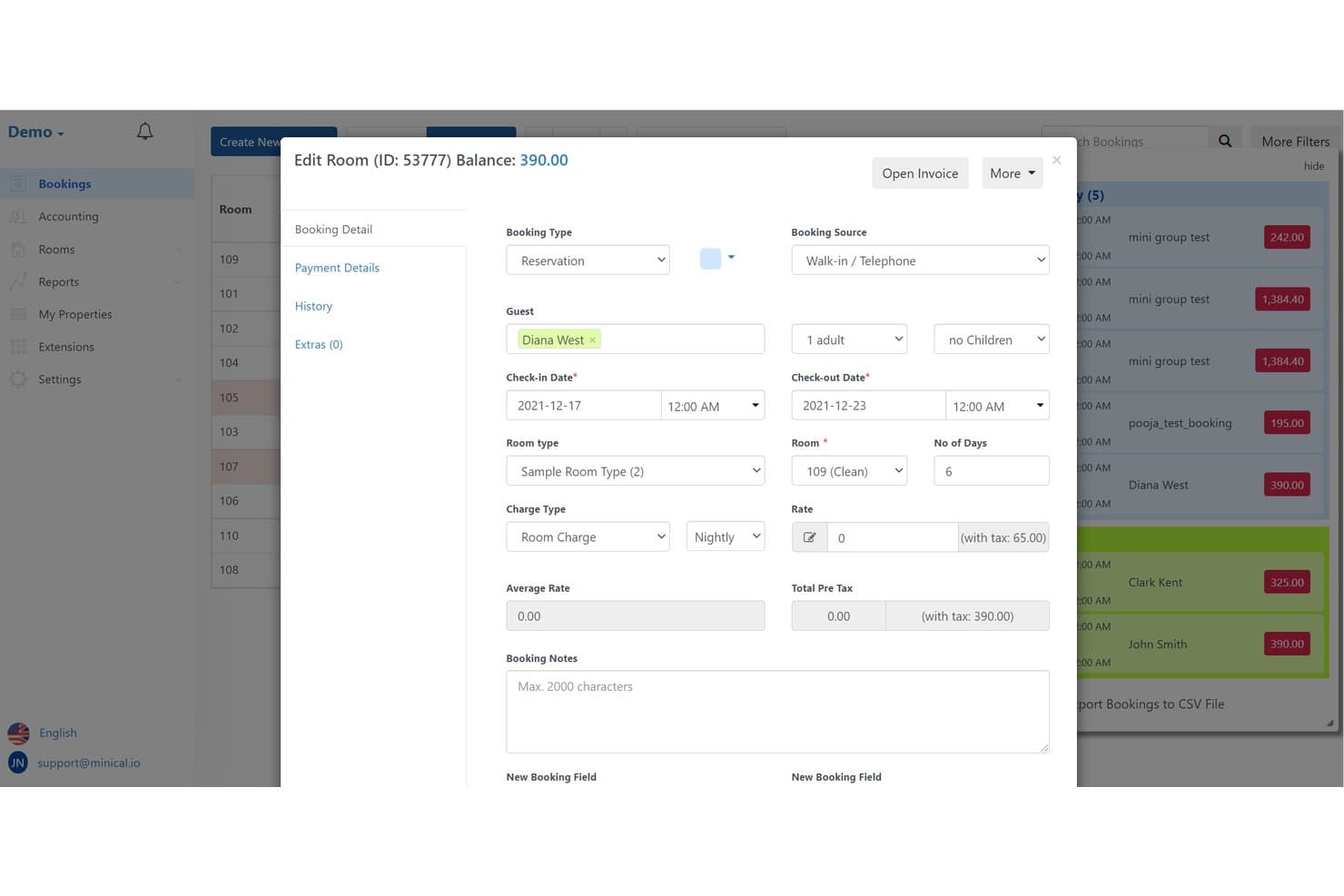
MiniCal lets users edit room bookings with guest and rate details. MiniCal is an open-source hotel property management system you can self-host to handle reservations, front desk workflows, room inventory, billing, guest profiles, and housekeeping, with dozens of modular extensions for payments, channel management, and regulatory reporting.
Who Is MiniCal Best For?
Independent hotel operators or IT admins seeking a self-hosted PMS with advanced billing, reporting, and open-source flexibility.
Why I Picked MiniCal
I picked MiniCal because I like its open-source codebase, which lets my team self-host property management on local hardware. The drag-and-drop reservation calendar and customizable billing modules let us handle reservations, front desk, and housekeeping even without internet access. Full fiscal report support helps us tackle regulatory compliance in offline deployments.
MiniCal Key Features
- Advanced inventory calendar: Visualize and manage room availability, rates, and restrictions in a single dashboard.
- Finance module: Handle detailed ledgers, custom invoice templates, and tax/currency rules for guest billing.
- Housekeeping task assignments: Assign, track, and update housekeeping tasks and room status in real time.
- Modular extension support: Enable specific features like payment gateways, channel management, or compliance tools as needed via add-ons.
MiniCal Integrations
MiniCal offers 70+ marketplace integrations, including Stripe, Square, Authorize.Net, Channex (with Booking.com, Airbnb, Expedia sync), SiteMinder, WordPress, Intercom, Cardknox, and compliance integrations for SERPRO (Brazil FNRH) and fiscal printer hardware. An API is available for custom integrations.
What's Free?
MiniCal offers a free demo so you can try out the platform with no upfront cost. There isn’t a permanent free-forever plan—ongoing use requires a paid license. The demo covers all core features but may limit the number of users or integrations available.
Pros and Cons
Pros:
- Advanced billing and fiscal compliance features
- Full offline deployment possible with core install
- Self-hosted open-source codebase available
Cons:
- Essential extensions cost extra beyond core package
- Free path requires technical server setup
Learn more about MiniCal:
Alte programe gratuite de gestionare hotelieră offline
Iată câteva opțiuni suplimentare de programe gratuite de gestionare hotelieră offline care nu au ajuns pe lista mea scurtă, dar care merită totuși verificate:
- 11Bistone Hotel Reservation SystemBest for one-time licensed, LAN-ready hotel ops
- 12MotelMateBest for NZ motel desk ops without cloud
- 13QloAppsBest for open-source, self-hosted property data control
- 14NobedsBest for cloud-free OTA sync on a free plan
- 15Odoo Pharmacy ManagementBest for ERP-based self-hosted property ops
- 16SolidresBest for Joomla-based self-hosted bookings
- 17HotelioBest for ID-capture guest registration offline
- 18JomresBest for self-hosted, open-source bookings
Related Reviews
How I Evaluate Free Offline Hotel Management Software
First, I define what counts as free. For offline hotel management software, that means a free-forever downloadable version or open-source release—not a trial—since a property's PMS is always-on infrastructure. From there, I split my evaluation into core functionality every tool must cover, like local reservation management and on-premise billing, and the differentiators that separate genuinely useful systems from bare-minimum installs.
Core Functionality (Table Stakes For This List)
In addition to my free offer requirements, I also use a scoring system to select tools for my list. Here's how it works:
When I'm selecting tools for my list, I rank each one on a scale from 0 (does not offer the functionality) to 5 (excels in this area) for each core functionality listed below. I then calculate the tool's total score into a percentage, using 65% as a benchmark to help assess its overall fit for the list.
- Offline/local deployment: I check whether the software installs and runs on local hardware without a live internet connection—for example, completing a guest check-in during an outage.
- Reservation management: I look for a booking calendar that lets you create, modify, and cancel reservations across room types, not just a static log of upcoming stays.
- Front desk operations: Each tool needs to support real check-in/check-out workflows, room assignments, and folio handling so your desk staff can manage walk-ins and scheduled arrivals in one place.
- Room inventory and availability: I evaluate how the system tracks room status and occupancy, including whether housekeeping states or out-of-order flags update the availability view in real time.
- Guest billing and invoicing: I look for folio generation with tax handling and payment recording—things like splitting a folio between a guest and a corporate account or printing a receipt at checkout.
- Guest profile management: The tool should store guest contact details, stay history, and notes in a local database so front desk staff can recognize returning guests and reference past visits.
Once I have a list of tools that meet the criteria, I consider what sets each platform apart.
Differentiating Factors (What Sets Vendors Apart)
Here's how I compare and contrast different vendors:
Standout Features
I look for a housekeeping module that tracks room status locally—clean, dirty, inspected, out-of-order—so front desk and housekeeping coordinate turnovers without a separate app. I also evaluate local reporting dashboards, checking whether occupancy, ADR, and RevPAR reports generate directly from the on-device database. Data backup and restore matters too: I check for one-click backup to an external drive, giving operators full disaster recovery control without depending on a vendor's cloud.
Beyond Features
I check OS compatibility and installation complexity first, since many offline PMS options are Windows-only and independent operators rarely have dedicated IT staff. Data ownership matters just as much—I look for local database encryption and role-based access controls so guest PII stays protected on shared front desk machines. I also evaluate export options like CSV or SQL dumps, because a property that outgrows its free PMS needs a clean migration path.
Cum să alegeți un program gratuit de gestionare hotelieră offline
Cel mai important aspect atunci când evaluați programele gratuite de gestionare hotelieră offline este să corelați prioritățile operaționale principale ale proprietății dumneavoastră cu funcții specifice, indispensabile, nu doar să bifați o listă lungă de funcții.
| Dacă prioritatea dumneavoastră este... | Căutați... |
| Funcționarea fără întreruperi ale internetului | O instalare locală/offline solidă și o metodă documentată de sincronizare prin LAN sau de realizare a copiilor de siguranță |
| Evitarea costurilor recurente | Un plan gratuit permanent sau o licență clară cu plată unică, fără taxe de reînnoire ascunse |
| Gestionarea fluxurilor de lucru pentru mai mulți utilizatori/la recepție | Suport pentru autentificarea prin LAN sau pentru mai mulți utilizatori, cu controale de permisiuni |
| Menținerea pregătirii pentru audit/conformitate | Module locale integrate pentru facturare fiscală și raportare offline |
| Confidențialitatea datelor din evidențele oaspeților | Stocare la sediu și controale de acces bazate pe PIN, parolă sau rol |
Cum să evaluați lista scurtă
- Testați complet modul offline: Instalați versiunea pentru desktop sau server local și finalizați 3 cicluri de rezervare și facturare cu Wi-Fi dezactivat.
- Încercați o configurare pentru mai mulți utilizatori: Adăugați cel puțin 2 conturi de autentificare pentru recepție și confirmați sincronizarea în timp real a stării camerelor printr-o rețea LAN partajată, într-un mediu de testare.
- Solicitați o demonstrație de realizare/restaurare a copiilor de siguranță: Cereți o prezentare a procesului de realizare a unei copii de siguranță cu un singur clic și de restaurare a datelor proprietății pe un computer de test.
- Verificați documentația privind conformitatea: Solicitați exemple de facturi și rapoarte care să demonstreze piste de audit offline sau funcții locale de păstrare a datelor.
- Găsiți echilibrul între controlul oferit de sursa deschisă și suportul proprietar: Decideți: doriți deținerea totală a datelor, cu o configurare realizată pe cont propriu, sau o integrare mai ușoară, cu suport și actualizări oferite de furnizor?
Ce este un program gratuit de gestionare hotelieră offline?
Un program gratuit de gestionare hotelieră offline este un sistem descărcabil care vă permite să administrați rezervările, profilurile oaspeților, facturarea și operațiunile hoteliere zilnice fără a necesita o conexiune permanentă la internet. Aceste instrumente rulează pe hardware-ul local, oferindu-vă control asupra stocării și accesului la date chiar și în timpul întreruperilor rețelei. Această abordare este ideală pentru proprietățile care doresc să evite costurile recurente ale abonamentelor și au nevoie de funcții de gestionare neîntrerupte la sediu.
Funcțiile programelor gratuite de gestionare hotelieră offline
Să trecem în revistă funcțiile întâlnite de obicei în programele de gestionare hotelieră offline și să vedem care dintre acestea sunt incluse, de regulă, în planurile gratuite și care în cele plătite.
Funcții întâlnite de obicei în programele gratuite de gestionare hotelieră offline
- Gestionarea rezervărilor: Vă permite să creați, să editați și să anulați rezervări direct într-un calendar local, astfel încât să puteți vedea dintr-o privire gradul actual și viitor de ocupare — chiar și atunci când conexiunea la internet se întrerupe.
- Înregistrarea și plecarea oaspeților la recepție: Acceptă fluxurile reale de sosire și plecare, astfel încât personalul să poată procesa oaspeții, să aloce camere și să gestioneze sosirile fără rezervare direct la recepție.
- Inventarul camerelor și urmărirea stării acestora: Păstrează o evidență actualizată a camerelor curate, ocupate, libere sau indisponibile, permițând alocarea imediată sau programarea activităților de curățenie.
- Facturarea și emiterea locală a facturilor: Generează fișe de cont pentru oaspeți, chitanțe și facturi cu tarifele camerelor, taxele și serviciile suplimentare — facilitând închiderea conturilor și urmărirea plăților fără instrumente cloud.
- Stocarea profilurilor oaspeților: Stochează pe propriul hardware date esențiale despre oaspeți, precum informațiile de contact, istoricul sejururilor și preferințele, asigurând continuitatea pentru vizitatorii care revin și accesul facil la date.
- Starea de bază a activităților de curățenie: Vă permite să marcați camerele ca fiind curate, murdare sau verificate, asigurându-vă că echipele operaționale știu care camere sunt pregătite pentru următorul oaspete.
- Gestionarea simplă a utilizatorilor: Permite acces limitat pentru mai mulți membri ai personalului, cu autentificări individuale, astfel încât echipele să își poată gestiona turele în siguranță.
- Raportare de bază: Generează rapoarte locale simple, direct pe dispozitiv, precum sosirile zilnice, plecările și gradul de ocupare, pentru o vizibilitate operațională mai bună.
Funcții ale software-ului de gestionare hotelieră offline, disponibile de obicei contra cost
- Permisiuni avansate pentru mai mulți utilizatori: Oferă acces bazat pe roluri, în care managerii, recepționerii și personalul de curățenie beneficiază de controale și restricții adaptate, îmbunătățind securitatea și responsabilitatea.
- Gestionarea integrată a canalelor: Sincronizează rezervările cu agențiile de turism online (OTA) sau cu motoarele de rezervare directă, reducând suprarezervările și necesitatea actualizărilor manuale.
- Instrumente pentru facturi fiscale și conformitatea fiscală: Include asistență integrată pentru cerințele fiscale locale complexe și generează facturi conforme cu cerințele autorităților, sprijinind standardele de audit și cerințele legale.
- Panouri de raportare personalizabile: Oferă analize avansate precum venitul pe cameră disponibilă (RevPAR), tariful mediu zilnic (ADR) și rapoarte de prognoză, toate direct din bazele de date locale.
- Copii de rezervă și restaurare automate: Permite realizarea de copii de rezervă locale sau externe criptate, programate, cu restaurare printr-un singur clic, astfel încât operatorii să poată recupera rapid datele în cazul unei defecțiuni hardware sau al pierderii datelor.
- Integrarea cu terminalele de plată: Conectează facturarea oaspeților direct la terminalele de plată instalate local, reducând introducerea manuală a datelor și erorile la plecare.
- Programarea activităților de curățenie și alocarea sarcinilor: Oferă instrumente pentru atribuirea sarcinilor de curățenie sau întreținere personalului, cu urmărirea stării acestora, permițând o coordonare strânsă între departamente.
- Gestionarea rezervărilor de grup și a blocurilor de camere: Oferă instrumente pentru rezervarea și gestionarea rapidă a unor blocuri de camere pentru evenimente, conferințe sau sosiri de grup, fără gestionarea manuală complicată a calendarului.
- Jurnale de audit detaliate: Înregistrează fiecare acțiune a utilizatorilor, modificare a rezervărilor și schimbare financiară, împreună cu marcaje temporale, creând o evidență fiabilă pentru audit și depanare.
- Instrumente de migrare și export: Permite exportul tuturor datelor esențiale în formate precum CSV sau SQL, asigurând posibilitatea de a actualiza sau migra sistemele fără pierderea informațiilor istorice.
Beneficiile software-ului gratuit de gestionare hotelieră offline
Înțeleg că ați ajuns la acest articol căutând cele mai bune opțiuni gratuite de software pentru gestionarea hotelieră offline. Cu toate acestea, deoarece planurile gratuite oferă doar funcții limitate, există șanse mari să fie nevoie să treceți la un plan superior în viitor.
- Acces local fiabil: Păstrați în funcțiune toate funcțiile esențiale — precum înregistrarea, facturarea și rezervările — chiar și în timpul întreruperilor conexiunii la internet, deoarece platforma funcționează direct pe hardware-ul proprietății dumneavoastră.
- Fără costuri recurente de abonament: Utilizați sistemul de gestionare hotelieră fără să plătiți taxe lunare sau anuale de licențiere, astfel încât să puteți reinvesti economiile în operațiunile proprietății.
- Control deplin asupra datelor oaspeților: Stocați profilurile oaspeților, istoricul rezervărilor și plățile pe propriile servere sau computere, reducând riscurile asociate stocării externe a datelor și încălcării confidențialității.
- Fluxuri de lucru adaptate pentru mai mulți utilizatori: Permiteți autentificări pentru mai mulți membri ai personalului și controale locale ale permisiunilor, coordonând sarcinile recepției, ale personalului de curățenie și ale conducerii fără dependențe de servicii cloud.
- Raportare rapidă direct pe dispozitiv: Generați instantaneu rapoarte privind gradul de ocupare, facturarea și sejururile oaspeților din baza de date locală, având mereu la îndemână datele operaționale fără a aștepta sincronizările cu serviciile cloud.
- Copii de rezervă și migrare flexibile: Utilizați copii de rezervă locale sau externe și opțiuni de export precum fișierele CSV sau extragerile SQL pentru a menține securitatea datelor proprietății sau pentru a vă pregăti pentru viitoarele actualizări ale sistemului.
- Instalare și întreținere simplificate: Evitați cerințele IT complexe, deoarece multe instrumente offline oferă instalare simplă pe Windows sau Linux și pot fi administrate fără personal tehnic dedicat.
Costurile și prețurile software-ului de gestionare hotelieră offline
Înțeleg că ați ajuns la acest articol căutând cele mai bune opțiuni gratuite de software pentru gestionarea hotelieră offline. Cu toate acestea, deoarece planurile gratuite oferă doar funcții limitate, există șanse mari să fie nevoie să treceți la un plan superior în viitor.
Tabelul de mai jos prezintă pe scurt planurile obișnuite, prețurile medii ale acestora și funcțiile incluse de obicei în software-ul de gestionare hotelieră offline:
Tabel comparativ al planurilor pentru software-ul de gestionare hotelieră offline
| Tip de plan | Preț mediu | Funcții comune |
| Plan gratuit | $0 | Gestionarea locală a rezervărilor, efectuarea de bază a formalităților de check-in și check-out, inventar simplu al camerelor, profiluri ale oaspeților și rapoarte simple. |
| Plan personal | $10-$30/lună | Toate funcțiile gratuite, facturare îmbunătățită, suport limitat pentru mai mulți utilizatori, stare îmbunătățită a inventarului și opțiuni de export al datelor. |
| Plan de afaceri | $40-$80/lună | Acces LAN pentru mai mulți utilizatori, controale ale permisiunilor bazate pe roluri, starea serviciului de curățenie, facturare avansată și tablouri de bord pentru rapoarte offline. |
| Plan pentru întreprinderi | $100-$200/lună | Toate funcțiile planului de afaceri, integrare completă cu terminalele de plată, rapoarte de conformitate, copii de siguranță automate, rezervări de grup și jurnale de audit. |
Întrebări frecvente despre software-ul gratuit de gestionare hotelieră offline
Iată câteva răspunsuri la întrebările frecvente despre software-ul gratuit de gestionare hotelieră offline:
Pot utiliza software-ul gratuit de gestionare hotelieră offline pe mai multe computere?
Da, unele sisteme gratuite de gestionare hotelieră offline vă permit să utilizați software-ul pe mai multe computere din aceeași rețea locală. Astfel, recepția, biroul administrativ și chiar personalul de curățenie pot rămâne sincronizate fără o conexiune la internet. Verificați întotdeauna dacă există suport pentru LAN sau pentru mai mulți utilizatori în timpul configurării, deoarece nu toate opțiunile gratuite permit acest lucru imediat.
Sunt datele mele în siguranță dacă utilizez software gratuit de gestionare hotelieră offline?
Da, datele sunt stocate local, astfel încât dumneavoastră controlați accesul și copiile de siguranță. Totuși, trebuie să gestionați protecția prin parolă, să efectuați periodic copii de siguranță și să restricționați accesul folosind conturi de utilizator sau roluri. Unele sisteme cu sursă deschisă oferă criptarea bazei de date sau funcții de export, oferindu-vă un control mai bun dacă protejarea confidențialității oaspeților este o prioritate.
Cât de dificil este să creez copii de siguranță și să restaurez datele proprietății cu software gratuit de gestionare hotelieră offline?
Crearea unei copii de siguranță este de obicei un proces manual—multe sisteme gratuite oferă un export printr-un singur clic pentru a salva datele pe o unitate USB sau pe un disc extern. Restaurarea este la fel de simplă ca importarea fișierului respectiv într-un alt sistem. Asigurați-vă că testați procesul de creare și restaurare a copiilor de siguranță, pentru a nu fi luați prin surprindere în cazul unei defecțiuni hardware sau al schimbării personalului.
Există limite privind numărul de camere sau rezervări în instrumentele gratuite de gestionare hotelieră offline?
Adesea, da. Unele sisteme gratuite limitează numărul de camere sau rezervări pe care le puteți gestiona ori blochează funcțiile avansate în spatele unui plan plătit. Citiți întotdeauna cu atenție limitele furnizorului înainte de implementare, mai ales dacă administrați mai mult decât câteva camere sau vă așteptați ca proprietatea să se dezvolte în timp.
Pot trece ulterior la funcții plătite dacă nevoile mele se schimbă?
Da, majoritatea furnizorilor de soluții gratuite de gestionare hotelieră offline oferă upgrade-uri plătite. Dacă descoperiți că aveți nevoie de rapoarte avansate, de mai mulți utilizatori sau de integrare cu canalele de rezervare online, de obicei puteți debloca aceste funcții printr-un plan plătit. Verificați procesul de upgrade și prețurile platformei, pentru a fi pregătit dacă hotelul se extinde.
Ce funcții ar trebui să caut în software-ul gratuit de gestionare hotelieră offline?
Căutați un software gratuit de gestionare hotelieră care să acopere nevoile esențiale ale software-ului de gestionare a proprietății fără a necesita o conexiune constantă la internet. Funcțiile utile includ gestionarea rezervărilor, un calendar al disponibilității, evidența oaspeților, repartizarea camerelor, efectuarea formalităților de check-in și check-out și rapoarte de bază. Dacă acceptați și rezervări directe, verificați dacă platforma se poate conecta la un motor de rezervări online sau la un motor de rezervări atunci când este disponibil accesul la internet. Funcții precum stabilirea dinamică a prețurilor și gestionarea veniturilor pot contribui, de asemenea, la optimizarea tarifelor camerelor, în timp ce instrumente precum Hotelogix ilustrează gama mai largă de funcții disponibilă în sistemele hoteliere mai avansate. Aceste capacități pot fi deosebit de utile pentru hotelurile mici și pensiunile cu mic dejun care doresc o gestionare simplă de zi cu zi, fără o configurare complexă.