
Software-ul de gestionare a activelor hoteliere este o tehnologie care vă ajută să urmăriți, monitorizați și organizați activele fizice din proprietatea sau întregul dumneavoastră portofoliu. Dacă sunteți în căutarea celui mai bun software de gestionare a activelor hoteliere, probabil doriți să obțineți un control mai strict asupra echipamentelor, să reduceți pierderile costisitoare sau perioadele de nefuncționare și să vă mențineți echipele la zi cu lucrările de întreținere și cerințele de conformitate.
Având în vedere numeroasele elemente interdependente din industria ospitalității, găsirea soluției potrivite poate aduce ordine în gestionarea activelor și vă poate elibera timp pentru îmbunătățirea satisfacției oaspeților. În acest ghid veți găsi comparații clare și detalii care vă vor ajuta să alegeți soluția potrivită pentru nevoile dumneavoastră specifice.
Why Trust Our Software Recommendations
6,700+
Reviews
20
Industry experts
16+
Evaluation factors
14
Years
Our team has been testing and reviewing software since 2012. As hospitality leaders ourselves, we know how difficult—and important—it is to choose the right software.
For this guide, we evaluated tools using hands-on testing and independent research, scoring tools using our selection criteria.
Our reviews reflect our human editorial judgment, not a sales pitch.
Tabel comparativ: software de gestionare a activelor hoteliere
Acest tabel comparativ rezumă detaliile privind prețurile pentru selecțiile mele de software de gestionare a activelor hoteliere.
Sorted by: Default
| Tool | Starting Price | Website | |
|---|---|---|---|
Best for work order automation for hospitality | 4.7 out of 5 | $35 per user/month 30-day free trial + free demo available | Book Demo |
Best for reservation management | 4.3 out of 5 | Pricing upon request Free demo available | Website |
Best for digital maintenance logs for teams | 4.8 out of 5 | $20/user/month Free plan + free trial + free demo available | Website |
Best for preventive asset maintenance scheduling | 4.8 out of 5 | Pricing upon request Free demo available | Website |
Best for preventive maintenance scheduling | 4.6 out of 5 | $24/user/month 7-day free trial + free demo available | Website |
Best for mobile inventory management | 4.7 out of 5 | $229/month Free trial + free demo available | Website |
Best for compliance tools for hospitality standards | 4.8 out of 5 | Pricing upon request Free demo available | Website |
Best for RFID-based equipment tracking | 4.5 out of 5 | $1,200/user Free demo available | Website |
Best for barcode tracking for on-site assets | Not rated | $20/user/month 15-day free trial | Website |
Best for multi-property asset oversight | Not rated | Pricing upon request Free demo available | Website |


Recenzii ale celor mai bune software-uri de gestionare a activelor hoteliere
Mai jos sunt prezentate rezumatele mele detaliate ale celor mai bune software-uri de gestionare a activelor hoteliere care au ajuns pe lista mea scurtă. Recenziile mele oferă o analiză detaliată a funcțiilor, integrărilor și celor mai potrivite cazuri de utilizare pentru fiecare software, pentru a vă ajuta să îl găsiți pe cel mai potrivit pentru dumneavoastră.
 Best for work order automation for hospitality
- 30-day free trial + free demo available
- Single plan at $35 per user/month (billed annually)
Visit WebsiteCustomer Rating:4.7/5
Click Maint organizes maintenance work orders by asset, location, and priority. Click Maint CMMS is a CMMS (computerized maintenance management system) built for hotels, resorts, and casinos that covers work order management, preventive maintenance scheduling, asset tracking, and spare parts inventory.
Who Is Click Maint CMMS Best For?
Click Maint CMMS is a strong fit for hotel maintenance managers at independent properties and small-to-mid-sized hotel groups that need a dedicated work order system without enterprise-level complexity.
Why I Picked Click Maint CMMS
I picked Click Maint CMMS as one of the best because its work order automation is genuinely built around how hotel maintenance teams actually operate. I like that guests and staff can submit requests directly through the system, and those requests automatically convert into prioritized, assigned work orders with real-time status tracking. The automated preventive maintenance scheduling, which pulls from manufacturer recommendations and usage patterns, delivers significant cost savings by ensuring tasks for HVAC, plumbing, and pool equipment don't rely on anyone remembering them.
Click Maint CMMS Key Features
- Asset registry with QR codes: Build a central asset database with details like location, warranty, and purchase date, and assign QR codes to each asset for instant mobile access.
- Spare parts inventory management: Track stock levels for spare parts and supplies, set reorder triggers, and manage preferred supplier details directly in the system.
- Compliance documentation storage: Store safety checks, compliance certificates, and maintenance records in one place for quick retrieval during audits and inspections.
- Work order reporting and analytics: Generate reports on work order volume, status, costs, and recurring issues to identify patterns and make informed decisions regarding maintenance.
Click Maint CMMS Integrations
Native integrations are not publicly listed.
Pros and Cons
Pros:
- Preventive maintenance auto-scheduling by asset
- Guest-initiated work order submission built in
- Quick setup with same-day onboarding
Cons:
- Mobile app lacks full desktop feature parity
- No predictive maintenance or IoT support
Learn more about Click Maint CMMS: Best for reservation management
- Free demo available
- Pricing upon request
Visit WebsiteCustomer Rating:4.3/5
The revenue management tools within roommaster offer dynamic pricing and revenue optimization for maximizing profits. roommaster is an all-in-one property management system designed to meet the operational needs of hotels. Whether you're running a small boutique hotel or a large multi-property chain, roommaster helps with everything from managing reservations and guest check-ins to automating key daily tasks.
Why I Picked roommaster: I like its robust property management system that keeps all asset-related data organized. You can track room availability and condition, helping your team stay on top of what’s in use or in need of attention. Its housekeeping management feature ensures that you’re able to log and track room statuses, which helps extend the life of your physical assets, like furniture and equipment, while keeping everything running smoothly for guests.
Standout features & integrations:
Features include the ability to generate detailed reports on everything from daily income to room usage trends, helping you make informed decisions. The revenue optimization tool is particularly helpful for pricing rooms more strategically based on demand, occupancy, and historical data. And with its mobile app, you and your team can access key hotel management functions on the go.
Integrations include AdriaScan, Amadeus, H&L, Sage, Triptease, Windcave, Airbnb, Booking.com, Expedia, QuickBooks, Alpharooms, Bookeasy, and Hotwire.
Pros and Cons
Pros:
- Easy integration with OTAs and direct website booking
- Includes tools for revenue optimization and dynamic pricing
- Prevents overbooking through channel management
Cons:
- Initial setup can be time-consuming
- Limited customization options for some features
Learn more about roommaster: Best for digital maintenance logs for teams
- Free plan + free trial + free demo available
- From $20/user/month (billed annually)
Visit WebsiteCustomer Rating:4.8/5
MaintainX work orders dashboard tracks team maintenance tasks and progress. MaintainX is a mobile-first CMMS built for hospitality teams that covers work order management, preventive maintenance scheduling, digital checklists, parts inventory tracking, and cross-property reporting.
Who Is MaintainX Best For?
MaintainX is a strong fit for hotel operations managers and frontline maintenance teams who need a shared, real-time system for logging and tracking daily work across departments.
Why I Picked MaintainX
I picked MaintainX as one of the best because the way it handles digital logging genuinely sets it apart for hotel teams. Every work order carries a full audit trail, capturing status changes, comments, photos, and staff assignments in one place. I also like its automatic escalation feature, which flags unresolved requests after a set time so nothing slips through on a busy shift. That combination of real-time logging and built-in accountability is exactly what multi-department hotel teams need.
MaintainX Key Features
- In-app messaging: Send real-time messages within work orders so maintenance staff and managers can communicate without switching to a separate tool.
- Preventive maintenance scheduling: Set recurring work orders on daily, weekly, monthly, or annual intervals for specific assets like elevators or HVAC systems.
- Parts and inventory tracking: Attach spare parts and supply records to assets and work orders, with low-stock alerts to flag when replenishment is needed.
- Custom reporting dashboards: Build and export reports tracking work by staff member, property, or asset, with pre-built options like time vs. cost analysis on all paid plans.
MaintainX Integrations
MaintainX offers native integrations through its integrations marketplace, including SAP, Oracle NetSuite, Microsoft Dynamics 365, Microsoft Power BI, QuickBooks Online, Xero, FreshBooks, Slack, Google Forms, Google Sheets, Jira, Microsoft Outlook, Samsara, MachineMetrics, and Motive. It connects with Zapier and provides an API for custom integrations.
Pros and Cons
Pros:
- The mobile app works offline on the property
- Built-in chat threaded to work orders
- Photo-attached work orders for room issues
Cons:
- No external vendor request intake channel
- Desktop experience feels secondary to mobile
Learn more about MaintainX: Best for preventive asset maintenance scheduling
- Free demo available
- Pricing upon request
Visit WebsiteCustomer Rating:4.8/5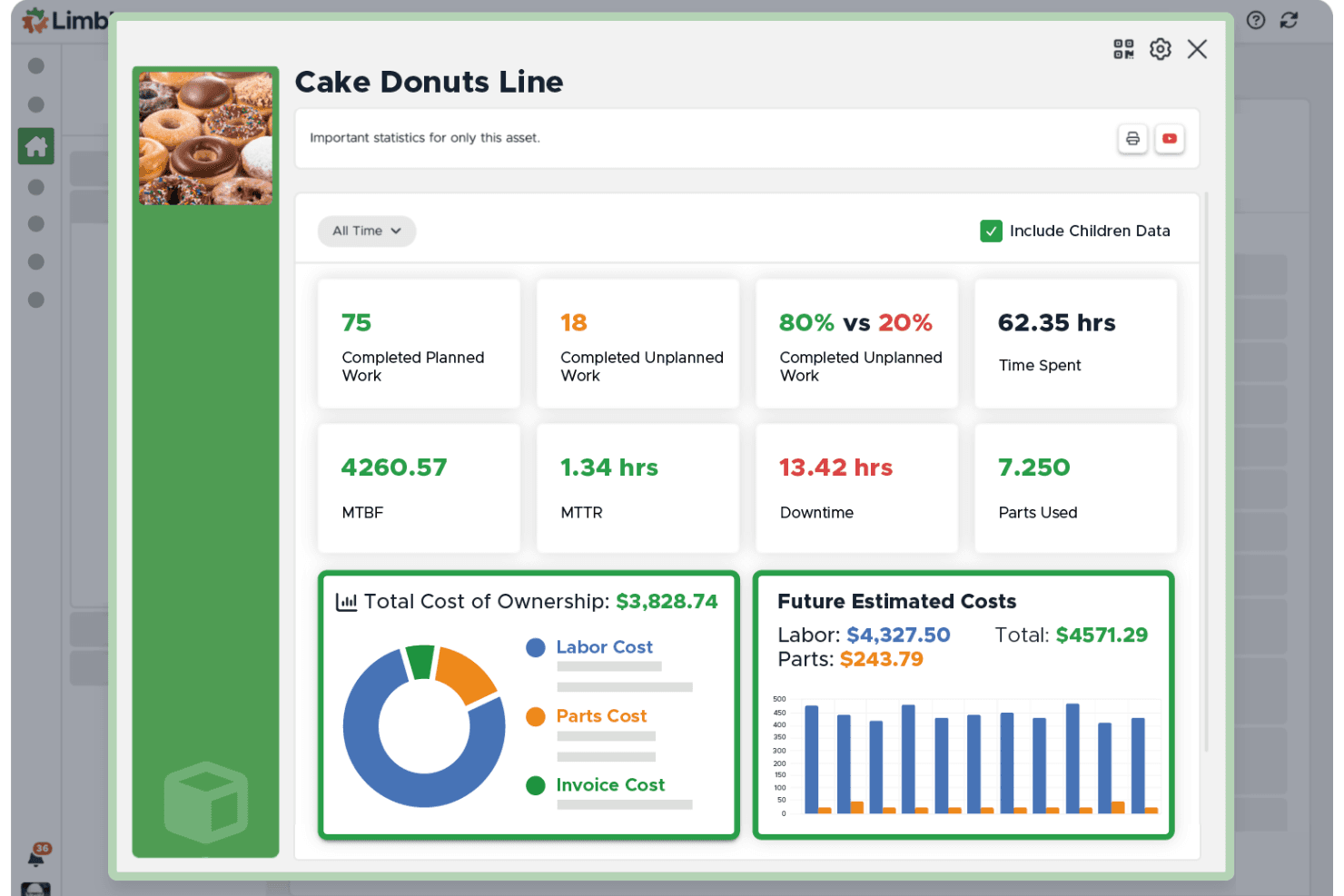
Limble provides visibility into assets, including planned maintenance, predicted costs, and overall asset health. Limble is a CMMS built for facilities and maintenance teams that centralizes asset tracking, work order management, preventive maintenance scheduling, and spare parts inventory in one mobile-friendly platform.
Who Is Limble Best For?
Limble is a strong fit for single-property hotels and resorts with in-house maintenance teams responsible for managing physical equipment and facilities.
Why I Picked Limble
Limble earns its spot on my shortlist because of how it handles PM scheduling at the asset level. I like that you can trigger PMs by calendar, meter readings, or threshold conditions, so an HVAC unit automatically generates a service order after a set number of run hours rather than waiting for something to fail. The AI-powered PM builder and conditional logic in procedures (where a failed inspection check auto-creates a corrective work order) are the features I keep coming back to.
Limble Key Features
- Asset QR code generation: Generate QR codes for assets to enable quick work order submissions directly from the field.
- Parts inventory management: Track spare parts, set min/max thresholds, and manage inventory levels across locations.
- Vendor and purchase order tracking: Manage vendor details and purchase orders with built-in tools and custom budget settings.
- Mobile app offline mode: Access work orders and essential asset data even when internet connectivity is unavailable.
Limble Integrations
Limble offers native integrations with Google Calendar, Microsoft 365 Calendar, Slack, ArcGIS Online, AssetWatch, Augury, Monnit, OKta, Oracle, and more. An API is available for custom integrations.
Pros and Cons
Pros:
- Offline mobile functionality for maintenance teams
- QR code scanning for quick work order entry
- Preventive maintenance automation with asset tracking
Cons:
- No built-in guest communication tools
- Limited visual asset mapping capabilities
Learn more about Limble: Best for preventive maintenance scheduling
- 7-day free trial + free demo available
- From $24/user/month
Visit WebsiteCustomer Rating:4.6/5
UpKeep helps hotels manage maintenance and work orders on the go. UpKeep is a mobile-first CMMS and asset operations platform built for hotels and hospitality teams to manage work orders, preventive maintenance schedules, physical asset tracking, and inventory.
Who Is UpKeep Best For?
UpKeep is a strong fit for maintenance and engineering teams at hotels and resorts managing physical assets, recurring inspections, and multi-technician work order workflows.
Why I Picked UpKeep
I picked UpKeep as one of the best because its preventive maintenance scheduling is genuinely purpose-built for hotel operations. I like that you can build recurring maintenance schedules tied directly to specific assets, like HVAC units or elevators, with trigger-based automation that fires work orders on a set cadence. Technicians get those orders on mobile, with full asset history and checklists attached, so nothing gets missed between shifts.
UpKeep Key Features
- Work order request portal: Any team member can submit maintenance requests through a dedicated portal, with real-time status updates as orders are prioritized and completed.
- Inventory management: Track parts and supplies across your property, with ordering triggered only when stock is needed.
- UpKeep Analytics: Monitor work order completion times, labor trends, and asset performance through data visualizations and shareable reports.
- Compliance and safety tracking: Log asset manuals, maintenance records, and labor history to keep teams executing tasks with full documentation on hand.
UpKeep Integrations
UpKeep connects to 1,000+ systems through native integrations, Zapier, and a public REST API. Native ERP connectors include SAP, Oracle, NetSuite, and Microsoft Dynamics, keeping work orders, inventory, and costs in sync in both directions. Additional native integrations include Slack, Microsoft Teams, QuickBooks Online, Xero, Okta, and OneLogin. An API and webhooks are also available for custom integrations.
Pros and Cons
Pros:
- Preventive schedules tied to individual assets
- Unlimited free requester accounts for staff
- Mobile app built for field technicians
Cons:
- Custom dashboards locked to the Enterprise tier
- No room-level tracking or guest request tools
Learn more about UpKeep: Best for mobile inventory management
- Free trial + free demo available
- From $229/month
Visit WebsiteCustomer Rating:4.7/5
Timly tracks asset inventory, maintenance, and history across desktop and mobile. Timly is a cloud-based inventory management system for hotels that handles asset tracking, maintenance scheduling, consumables management, and digital stocktaking across multiple departments and locations.
Who Is Timly Best For?
Timly is a strong fit for mid-sized to large hotel operations teams that need their staff to manage and audit assets from a phone or tablet without being tied to a desk.
Why I Picked Timly
Timly earns its spot on my shortlist because its mobile app is genuinely built for hotel operations staff, not desk-based managers. I like that any team member can scan a QR code on a piece of equipment to pull up its full history, log a defect, or check it out, all from their phone. The RFID tracking option also lets housekeeping and maintenance teams capture asset movements contact-free during busy shifts.
Timly Key Features
- Maintenance scheduling: Set up recurring maintenance tasks for individual assets and receive automated reminders when service is due.
- Consumables tracking: Monitor stock levels for consumable items and log replenishments directly against each asset or department.
- Document storage: Attach warranties, manuals, and inspection certificates to individual asset records for on-demand access.
- GPS location tracking: View the last known location of any asset across departments or properties on a live map.
Timly Integrations
Timly offers native integrations with SAP, Microsoft Dynamics 365, Microsoft Entra ID, Google SSO, DATEV, Abacus, Lansweeper, and Fluke. A REST API is also available for custom integrations.
Pros and Cons
Pros:
- Multi-location asset tracking in real time
- Built-in maintenance and inspection reminders
- QR code scanning from any mobile device
Cons:
- Lacks built-in advanced forecasting tools
- No offline mode for low-connectivity areas
Learn more about Timly: Best for compliance tools for hospitality standards
- Free demo available
- Pricing upon request
Visit WebsiteCustomer Rating:4.8/5
Canary Technologies centralizes hotel guest messaging across web and mobile. Canary Technologies is a hotel guest management platform covering digital check-in and checkout, AI-powered guest messaging, secure payment processing, digital authorizations, upsells, and fraud prevention.
Who Is Canary Technologies Best For?
Canary Technologies is a strong fit for full-service and boutique hotels prioritizing digital guest journey management, from pre-arrival compliance through secure checkout.
Why I Picked Canary Technologies
Canary Technologies earns its spot on my shortlist because its compliance tools are genuinely built around the hospitality standards hotels are held to today. I like that its Digital Authorizations product is PCI Level-1 certified, meaning it handles the compliance burden of replacing paper and PDF credit card forms that no longer meet PCI standards. Its SOC certification and proprietary fraud detection layer add further protection during the authorization and checkout process, which is where most chargeback risk lives.
Canary Technologies Key Features
- AI guest messaging: Send automated, AI-generated responses to guest inquiries across SMS, WhatsApp, and web chat throughout the stay.
- Dynamic upsells: Present room upgrades, early check-in, and ancillary add-ons to guests digitally before and during their stay.
- Digital tipping: Let guests tip staff directly from their mobile device, with tips distributed automatically to individual team members or departments.
- Smart checkout: Give guests a mobile checkout option that settles balances and collects feedback without requiring a trip to the front desk.
Canary Technologies Integrations
Canary Technologies integrates with all major hotel property management systems, CRMs, payment providers, and most other hotel operations systems. Verified integrations include Oracle Hospitality, Protel, WebRezPro, Cloudbeds, Mews, Amadeus, Maestro, StayNTouch, Agilysys, and SiteMinder, among many others spanning PMS, payment, and access control categories. An API is also available for custom integrations.
Pros and Cons
Pros:
- Modular product suite across the guest journey
- Built-in fraud detection at checkout
- PCI Level-1 certified digital authorizations
Cons:
- Limited reporting customization options
- No physical asset or facility tracking
Learn more about Canary Technologies: Best for RFID-based equipment tracking
- Free demo available
- From $1,200/user (billed annually)
Visit WebsiteCustomer Rating:4.5/5
RedBeam tracks asset status, maintenance logs, and mobile equipment checkouts. RedBeam is an asset and inventory tracking platform built for hotels and the broader hospitality industry, combining barcode scanning, RFID tracking, and supply inventory management across single and multi-property operations.
Who Is RedBeam Best For?
RedBeam is a practical fit for hotel operations and facilities managers who need a hands-on system for tracking physical equipment, supplies, and assets across their property.
Why I Picked RedBeam
I picked RedBeam as one of the best because its RFID capabilities go beyond basic scanning. The fixed reader management feature lets you configure readers in storage rooms or event spaces to capture asset movement automatically, so you're not relying on staff to manually log every item. I also like the event-based workflow triggers, which send alerts if, say, a housekeeping cart enters a guest area after hours or AV equipment leaves an event space unaccounted for.
RedBeam Key Features
- Check-in/check-out: Assign and track shared equipment like catering gear and cleaning tools across shifts, departments, and events.
- Store & forward functionality: Captures asset updates in network dead zones and syncs them automatically once connectivity is restored.
- Custom data fields: Record purchase date, room location, maintenance schedule, and warranty info against individual assets.
- Cycle counting: Audit linens, cleaning supplies, and consumables on an ongoing basis without disrupting daily service operations.
RedBeam Integrations
RedBeam doesn't offer pre-built native integrations but provides REST APIs to connect with PMS, CRM, ITSM, and inventory platforms.
Pros and Cons
Pros:
- Mobile scanning works in offline areas
- Unlimited locations across multiple properties
- Supports both barcode and RFID scanning
Cons:
- No built-in maintenance or work orders
- Initial setup and tagging are labor-intensive
Learn more about RedBeam: Best for barcode tracking for on-site assets
- 15-day free trial
- From $20/user/month

GigaTrak offers an asset tracking system to access asset information and manage inventory. GigaTrak is a fixed asset and inventory management platform for hotels and resorts that uses barcode scanning hardware to register, audit, track, and maintain detailed records of on-site assets and equipment.
Who Is GigaTrak Best For?
GigaTrak is a practical option for property operations teams at hotels and resorts that need a no-frills system for barcode-based tracking of fixed assets like furniture, AV equipment, and computers across departments.
Why I Picked GigaTrak
I picked GigaTrak as one of the best because its barcode-based approach covers the full asset lifecycle, from initial registration and transfers to maintenance history and retirement. I particularly like the mobile audit workflow: you download the asset database to a handheld scanner, walk the property floor by floor, then upload everything when you're back on the network.
GigaTrak also keeps historical records that satisfy both accountants and auditors, which is genuinely useful during insurance reviews or capital planning cycles.
GigaTrak Key Features
- Check-in/check-out tracking: Log which staff member has taken a piece of equipment, when they took it, and when it was returned.
- Depreciation tracking: Automatically calculate asset depreciation over time using preset schedules for financial reporting.
- Custom label printing: Generate and print barcode labels directly from the system to tag new assets as they arrive on the property.
- Department and location assignment: Assign each asset to a specific room, floor, or department to keep location records current across the property.
GigaTrak Integrations
Native integrations are not publicly listed.
Pros and Cons
Pros:
- 40+ pre-built reports included
- Spreadsheet import for initial asset setup
- Bundled barcode scanner and label printer
Cons:
- Reports lack custom filtering options
- Interface design feels dated
Learn more about Gigatrak: Best for multi-property asset oversight
- Free demo available
- Pricing upon request

Transcendent by Actabl tracks hotel assets by location and status. Transcendent by Actabl is a hotel asset management platform that combines enterprise asset tracking, preventive maintenance, and capital expenditure (CapEx) planning across hotel portfolios.
Who Is Transcendent by Actabl Best For?
Transcendent by Actabl is a strong fit for asset managers and directors of engineering overseeing large hotel portfolios or multi-brand property groups.
Why I Picked Transcendent by Actabl
I've included Transcendent by Actabl in my top picks because its cross-property visibility is genuinely hard to replicate with general-purpose tools. What I like most is the centralized asset dashboard, which lets portfolio-level managers monitor asset status, maintenance history, and performance data across every property from one place. The CapEx planning module is also notable: it standardizes capital budgeting across your portfolio, aligning financial oversight with your long-term revenue management when making replacement and investment decisions.
Transcendent by Actabl Key Features
- Preventive maintenance scheduling: Auto-generate maintenance work orders for equipment, guest rooms, fire and life safety, water safety, and indoor air quality across your properties.
- Asset scanning with proof of presence: Track work order progress by scanning assets on-site, creating a verifiable record of completed inspections and maintenance tasks.
- Employee workload monitoring: View real-time workload distribution across your engineering team to balance task assignments and track individual progress on active work orders.
- Mobile app access: Complete work orders, inspections, and preventive maintenance rounds from a mobile device, giving your team full access to asset data on the floor.
Transcendent by Actabl Integrations
Native integrations are not publicly listed.
Pros and Cons
Pros:
- Enterprise-wide asset lifecycle visibility across properties
- Built-in fire and life safety tracking
- CapEx forecasting extends up to 10 years
Cons:
- Replacing retired assets requires full re-tagging
- Occasional slowness on login and page loads
Learn more about Transcendent by Actabl:
Alte software-uri de gestionare a activelor hoteliere
Iată câteva opțiuni suplimentare de software pentru gestionarea activelor hoteliere care nu au ajuns pe lista mea scurtă, dar care merită totuși analizate:
- 11UnifocusBest for workforce labor forecasting
- 12LLuminBest for real-time asset condition monitoring
- 13M1 SoftwareBest for lifecycle tracking
- 14Coba CMMSBest for hotel energy management
- 15CSATBest for personalized customer support experiences
- 16SirvoyBest for affordable, user-friendly PMS for small accommodations
- 17CheqroomBest for equipment tracking
- 18GuestyBest for vacation rental businesses seeking automation
- 19Little HotelierBest for maximizing online visibility for small properties
- 20CloudbedsBest for maximizing occupancy and revenue with a powerful booking engine
How I Evaluate Hotel Asset Management Software
I break every evaluation into two layers: the core functionality a tool needs—think asset histories, work orders, and preventive schedules—and the differentiators that actually move the needle.
Core Functionality (Table Stakes For This List)
When I'm selecting tools for my list, I rank each one on a scale from 0 (does not offer the functionality) to 5 (excels in this area) for each core functionality listed below. Then, I calculate the tool's total score as a percentage. Each tool needs to achieve a minimum total score of 60% to be considered for inclusion.
- Asset tracking: I look for a centralized registry where you can log every asset—from HVAC units to guest room furniture—with location, condition, and service history attached.
- Work order management: The ability to create, assign, and track maintenance requests matters, especially when a front desk agent flags a broken lock and needs it resolved before the next check-in.
- Preventive maintenance scheduling: I evaluate whether the tool lets you set recurring tasks based on time or usage, like quarterly deep cleans of kitchen exhaust hoods or seasonal pool equipment servicing.
- Mobile accessibility: Maintenance teams are on the move across floors and buildings, so I check that technicians can receive and update work orders from a phone or tablet on property.
- Reporting and analytics: I look for dashboards or exportable reports that surface patterns, such as which asset types generate the most repeat repairs or which properties have the highest open work order backlog.
Once I have a list of tools that meet this criteria, I consider what sets each platform apart.
Differentiating Factors (What Sets Vendors Apart)
Here's how I compare and contrast different vendors:
Standout Features
I pay close attention to how each platform handles multi-property oversight, since hotel groups need to compare asset health and maintenance performance across locations from a single dashboard. QR code or barcode scanning is another differentiator—technicians can pull up an asset's full history just by scanning a tag on a boiler or elevator panel. I also evaluate vendor management capabilities, like tracking outside contractor assignments and costs tied to specific assets.
Beyond Features
Integration depth matters a lot here. I check whether each platform connects to popular PMS and accounting systems, since your maintenance data is far more useful when it flows directly into your property's reservation and financial workflows. Onboarding support is another factor I weigh, because maintenance teams often have mixed comfort levels with new technology and need hands-on training. I also consider pricing transparency, specifically whether vendors charge per property, per user, or per asset tier.
Cum să alegeți software-ul de gestionare a activelor hoteliere
Este ușor să vă pierdeți în liste lungi de funcții și structuri complexe de prețuri. Pentru a vă menține concentrarea pe parcursul procesului dumneavoastră specific de selectare a software-ului, iată o listă de factori de care să țineți cont:
| Factor | Aspecte de luat în considerare |
|---|---|
| FactorScalabilitate | Aspecte de luat în considerareVa sprijini software-ul extinderea pe termen lung, cum ar fi adăugarea unor proprietăți noi sau a mai multor utilizatori? Verificați limitele datelor, nivelurile de licențiere și compatibilitatea cu nevoile viitoare. |
| FactorIntegrări | Aspecte de luat în considerareSe conectează ușor la PMS-ul, sistemul de contabilitate și celelalte sisteme de bază? Confirmați compatibilitatea și întrebați despre API, software intermediar sau fluxuri de lucru manuale. |
| FactorPosibilitate de personalizare | Aspecte de luat în considerarePuteți adapta fluxurile de lucru, rolurile utilizatorilor și rapoartele pentru a se potrivi abordării dumneavoastră privind gestionarea activelor proprietății? Evaluați flexibilitatea fără obstacole tehnice. |
| FactorUșurință în utilizare | Aspecte de luat în considerareEste interfața intuitivă pentru personalul cu toate nivelurile de familiaritate tehnologică? Încercați o demonstrație pentru a vedea dacă sarcinile de bază sunt simple și accesibile. |
| FactorImplementare și integrare inițială | Aspecte de luat în considerareCe opțiuni de instruire și asistență sunt oferite pentru lansare? Luați în considerare resursele și capacitatea dumneavoastră de a intra în funcțiune și de a aduce personalul la nivelul necesar. |
| FactorCost | Aspecte de luat în considerareVerificați dacă prețul este calculat per utilizator, activ sau proprietate—costurile neașteptate apar adesea pe măsură ce vă extindeți sau modificați utilizatorii sistemului. |
| FactorMăsuri de securitate | Aspecte de luat în considerareCum sunt protejate datele sensibile? Luați în considerare permisiunile utilizatorilor, copiile de rezervă ale datelor și standardele de criptare, mai ales dacă utilizați soluții bazate pe cloud. |
| FactorDisponibilitatea asistenței | Aspecte de luat în considerareVeți avea acces la asistență promptă? Verificați dacă este disponibilă asistență în afara programului obișnuit sau în mai multe limbi dacă desfășurați operațiuni 24/7 sau administrați locații internaționale. |
Ce este software-ul de gestionare a activelor hoteliere?
Software-ul de gestionare a activelor hoteliere este o soluție digitală care centralizează urmărirea, întreținerea și raportarea pentru fiecare activ din proprietatea dumneavoastră, de la sistemele clădirii până la echipamentele din camerele oaspeților. Aceste instrumente vă ajută echipa să programeze lucrările de întreținere preventivă, să organizeze ordinele de lucru, să păstreze istoricul activelor și să monitorizeze costurile, sprijinind luarea unor decizii mai bune și eficiența operațională.
Funcții
Atunci când selectați un software de gestionare a activelor hoteliere, urmăriți următoarele funcții esențiale:
- Registrul activelor: Mențineți o listă centralizată care detaliază toate activele hotelului, inclusiv echipamentele din camere, sistemele de utilități și facilitățile, împreună cu informații despre locație, stare și garanție.
- Gestionarea ordinelor de lucru: Atribuiți, urmăriți și actualizați sarcinile de întreținere de la creare până la finalizare, sprijinind comunicarea clară între departamentele de inginerie, menaj și management.
- Programarea întreținerii preventive: Stabiliți programe automatizate pentru inspecții sau lucrări de întreținere de rutină, astfel încât sarcinile importante să nu fie omise, iar durata de viață a echipamentelor să fie maximizată.
- Accesibilitate mobilă: Permiteți personalului să acceseze datele activelor, să trimită ordine de lucru și să primească actualizări de pe telefoane sau tablete, de oriunde din proprietate.
- Scanarea codurilor QR sau a codurilor de bare: Atașați etichete fizice activelor pentru regăsirea rapidă a informațiilor și pentru a simplifica urmărirea istoricului activelor și a evenimentelor de întreținere.
- Urmărirea inventarului și a pieselor: Monitorizați piesele de schimb și consumabilele aflate în stoc, asigurându-vă că materialele necesare sunt disponibile atunci când sunt necesare reparații sau înlocuiri.
- Gestionarea furnizorilor: Înregistrați și evaluați furnizorii terți de servicii de întreținere, urmăriți performanța serviciilor și stocați facturile sau detaliile contractelor într-un singur loc.
- Raportare și analiză: Generați rapoarte privind costurile de întreținere, perioadele de nefuncționare ale activelor și ratele de finalizare a sarcinilor, pentru a fundamenta mai bine bugetarea și planificarea investițiilor.
- Stocarea documentelor: Păstrați manualele de utilizare, certificatele de conformitate și evidențele lucrărilor de întreținere ușor accesibile în profilul fiecărui activ, pentru consultare și audituri.
- Permisiuni pentru utilizatori: Controlați accesul și definiți roluri pentru a vă asigura că membrii echipei văd doar informațiile sau acțiunile relevante pentru responsabilitățile lor.
Funcții AI comune ale software-ului de gestionare a activelor hoteliere
Pe lângă funcțiile standard ale software-ului de gestionare a activelor hoteliere enumerate mai sus, multe dintre aceste soluții integrează AI prin funcții precum:
- Alerte pentru întreținere predictivă: AI analizează utilizarea echipamentelor și datele senzorilor pentru a anticipa defecțiunile, ajutându-vă să programați reparațiile înainte ca problemele să perturbe operațiunile.
- Prioritizarea automatizată a ordinelor de lucru: AI analizează solicitările de întreținere și istoricul activelor pentru a stabili nivelul de urgență, asigurându-se că problemele critice sunt rezolvate primele.
- Detectarea anomaliilor: AI monitorizează datele în timp real pentru a semnala tipare neobișnuite — precum creșteri bruște ale consumului de energie — astfel încât să puteți investiga și rezolva problemele din timp.
- Optimizarea inteligentă a inventarului: AI urmărește utilizarea pieselor și termenele de livrare ale furnizorilor, recomandând puncte de reaprovizionare pentru a preveni lipsurile sau stocurile excesive.
- Procesarea solicitărilor în limbaj natural: AI interpretează solicitările de întreținere formulate în limbaj obișnuit de către personal și le direcționează automat către echipa potrivită.
Beneficii
Implementarea software-ului de gestionare a activelor hoteliere oferă mai multe beneficii pentru echipa și compania dumneavoastră. Iată câteva dintre acestea:
- Întreținerea proactivă a activelor: Programarea preventivă și urmărirea lucrărilor de întreținere vă ajută să abordați problemele înainte ca acestea să se agraveze sau să perturbe experiența oaspeților.
- Vizibilitate completă asupra activelor: O bază de date centrală vă oferă acces facil la locațiile, starea, statutul întreținerii și istoricul activelor, într-un singur loc.
- Coordonarea mai rapidă a sarcinilor: Gestionarea ordinelor de lucru accelerează modul în care echipele atribuie, finalizează și actualizează sarcinile de întreținere, reducând la minimum întârzierile și confuzia.
- Gestionarea mai eficientă a costurilor: Analizele și urmărirea inventarului evidențiază tiparele de cheltuieli și vă permit să creșteți profitabilitatea prin optimizarea pieselor, reparațiilor și relațiilor cu furnizorii.
- Integrare mai bună a personalului: Interfețele ușor de utilizat și accesibilitatea mobilă facilitează învățarea și utilizarea sistemului de către noii angajați, cu o perioadă minimă de acomodare.
- Pregătire îmbunătățită pentru conformitate: Stocarea manualelor, jurnalelor și certificatelor împreună cu fiecare activ vă menține pregătiți pentru auditurile de rutină sau solicitările de inspecție.
- Luarea deciziilor pe baza datelor: Instrumentele de raportare evidențiază tendințele pe termen lung și ineficiențele, ajutându-vă să planificați bugetele și proiectele preventive cu mai multă încredere.
Costuri și prețuri
Alegerea software-ului de gestionare a activelor hoteliere necesită înțelegerea diferitelor modele și planuri de tarifare disponibile. Costurile variază în funcție de funcții, dimensiunea echipei, suplimente și alți factori. Tabelul de mai jos rezumă planurile comune, prețurile lor medii și funcțiile incluse de obicei în soluțiile software de gestionare a activelor hoteliere:
Tabel comparativ al planurilor pentru software-ul de gestionare a activelor hoteliere
| Tipul planului | Preț mediu | Funcții comune |
|---|---|---|
| Tipul planuluiPlan gratuit | Preț mediu$0 | Funcții comuneUrmărirea de bază a activelor, acces limitat pentru utilizatori, ordine de lucru simple și raportare de nivel introductiv. |
| Tipul planuluiPlan personal | Preț mediu$10-$30/utilizator/lună | Funcții comuneRegistru complet al activelor, programarea întreținerii preventive, accesibilitate mobilă și rapoarte standard. |
| Tipul planuluiPlan pentru companii | Preț mediu$35-$70/utilizator/lună | Funcții comuneGestionarea avansată a ordinelor de lucru, urmărirea inventarului, compatibilitate cu mai multe proprietăți, integrări personalizate și analiză. |
| Tipul planuluiPlan pentru întreprinderi | Preț mediu$75-$150/utilizator/lună | Funcții comuneFluxuri de lucru personalizate, asistență premium, permisiuni avansate, gestionarea furnizorilor, funcții solide de securitate și analiză îmbunătățită. |
Întrebări frecvente despre software-ul de gestionare a activelor hoteliere
Iată câteva răspunsuri la întrebările frecvente despre software-ul de gestionare a activelor hoteliere:
Poate software-ul de gestionare a activelor hoteliere să contribuie la prelungirea duratei de viață a activelor?
Da, software-ul de gestionare a activelor hoteliere sprijină întreținerea preventivă și inspecțiile regulate, astfel încât echipa dumneavoastră să poată depista problemele din timp și să reducă înlocuirile costisitoare.
Este important accesul mobil pentru software-ul de gestionare a activelor hoteliere?
Da, accesul mobil le permite angajaților să actualizeze evidențele activelor, să solicite reparații și să verifice ordinele de lucru direct, de oriunde din hotel, ceea ce îmbunătățește timpii de răspuns și menține evidențele actualizate.
Cum sprijină acest software conformitatea și auditurile?
Software-ul stochează documentații precum manuale, certificate și jurnale de întreținere, facilitând accesul echipei dumneavoastră la dovezile conformității în timpul inspecțiilor sau auditurilor.
Va funcționa software-ul de gestionare a activelor hoteliere pentru mai multe proprietăți?
Da, multe soluții sunt concepute pentru gestionarea mai multor proprietăți, astfel încât să puteți supraveghea activele, întreținerea și bugetele mai multor hoteluri de pe o singură platformă.
La ce ar trebui să fiu atent atunci când aleg o soluție?
Puneți accent pe ușurința în utilizare, opțiunile de integrare, scalabilitate, funcțiile mobile, capacitățile de raportare și asistența de încredere, pentru a vă asigura că software-ul răspunde nevoilor operaționale de zi cu zi.